OCTOBER, 2000
NEC America, Inc.
NDA-24310ISSUE 1 STOCK # 200799
Hotel Features and Specifications
The information contained in this document is specific to DtermSeries E only. Throughout this document, references to “Console” or “Attendant Console” imply a Hotel Console. Most features described in this manual require a Hotel Console. However, some features (including A-57, A-73, I-23, P-34, and V-16) can also be performed using a Business Console.
Minimum firmware may be required. Contact NEC Engineering for additional information.
NEC America, Inc. reserves the right to change the specifications, functions, or features, at any time, without notice.
NEC America, Inc. has prepared this document for use by its employees and customers. The information contained herein is the property of NEC America, Inc. and shall not be reproduced without prior written approval from NEC America, Inc.
NEAX®and Dterm®are registered trademarks of NEC Corporation. Copyright 2000
ISSUE 1 ISSUE 2 ISSUE 3 ISSUE 4
DATE OCTOBER, 2000 DATE DATE DATE
ISSUE 5 ISSUE 6 ISSUE 7 ISSUE 8
DATE DATE DATE DATE
NEAX2400 IPX
Hotel Features and Specifications
Revision Sheet 1/2NDA-24310
PAGE No. ISSUE No.
1 2 3 4 5 6 7 8
i 1 ii 1 iii 1 iv 1 v 1 vi 1 vii 1 viii 1 1 1 2 1 3 1 4 1 5 1 6 1 7 1 8 1 9 1 10 1 11 1 12 1 13 1 14 1 15 1 16 1 17 1 18 1 19 1 20 1 21 1 22 1 23 1 24 1 25 1 26 1 27 1 28 1 29 1 30 1 31 1 32 1 33 1 34 1 35 1 36 1 37 1 38 1 39 1 40 1 41 1 42 1 43 1 44 1 45 1 46 1 47 1 48 1 49 1 50 1 51 1 52 1 53 1 54 1 55 1 56 1 57 1 58 1 59 1 60 1 61 1 62 1 63 1 64 1 65 1 66 1 67 1 68 1
PAGE No. ISSUE No.
ISSUE 1 ISSUE 2 ISSUE 3 ISSUE 4
DATE OCTOBER, 2000 DATE DATE DATE
ISSUE 5 ISSUE 6 ISSUE 7 ISSUE 8
DATE DATE DATE DATE
NEAX2400 IPX
Hotel Features and Specifications
Revision Sheet 2/269 1 70 1 71 1 72 1 73 1 74 1 75 1 76 1 77 1 78 1 79 1 80 1 81 1 82 1 83 1 84 1 85 1 86 1 87 1 88 1 89 1 90 1 91 1 92 1 93 1 94 1 95 1 96 1 97 1 98 1 99 1 100 1 101 1 102 1 103 1 104 1 105 1 106 1
PAGE No. ISSUE No.
1 2 3 4 5 6 7 8
107 1 108 1 109 1 110 1 111 1 112 1 113 1 114 1 115 1 116 1 117 1 118 1 119 1 120 1 121 1 122 1 123 1 124 1 125 1 126 1 127 1 128 1
PAGE No. ISSUE No.
NDA-24310 ISSUE 1 OCTOBER, 2000
NEAX2400 IPX
Hotel Features and Specifications
Feature List
Page
Introduction . . . .
1
Numbering Plan . . . .
3
Description of Service Features . . . .
9
A-10
Automatic Wake-Up . . . .
11
A-10D
Automatic Wake-Up D
term. . . .
15
A-15
Announcement Service . . . .
21
A-25
Attendant Console With Hotel Functions . . . .
22
A-26
Audit Reports . . . .
24
A-48
Automatic Message Waiting Lamp Off . . . .
26
A-57
Alert Service . . . .
27
A-58
Automatic Wake-up - Hotel Attendant . . . .
29
A-73
Automatic Multiple Attendant Recall . . . .
31
A-74
Answering Camp-On/Call Hold Calls By Switchhook Flash . . . .
33
A-75
Automated Guest Station Voice Mail Retrieval . . . .
35
B-26
Busy Status - Hotel Attendant . . . .
36
C-19
Calendar Display . . . .
38
C-23
Check-In/Checkout . . . .
39
C-32
Calling Station Number Display . . . .
40
C-71
Called Number Display - Hotel Attendant Console . . . .
42
C-72
Connecting Room Service . . . .
44
C-147
Call Information Display . . . .
46
D-11
Do Not Disturb . . . .
48
D-11D
Do Not Disturb - D
term. . . .
50
D-15
Day/Night Class of Service . . . .
52
D-23
Direct Page Connection . . . .
53
D-24
Direct Paging . . . .
54
D-25
Direct Service Set/Reset . . . .
55
D-26
Direct Station Selection . . . .
56
D-88
Directory Assistance Interface . . . .
57
D-89
Direct Selection - Outside . . . .
58
D-105D
D
termWith Hotel Function . . . .
59
D-107
Direct Data Entry - Station . . . .
62
D-150
Double Suite Room . . . .
63
D-151
DD/MW Lamp Control . . . .
65
E-21
Emergency Call Monitor - Attendant . . . .
66
Feature List (Continued)
Page
G-4
Group Service Through PMS . . . .
68
G-5
Guest Name Display Through PMS . . . .
70
G-6D
Guest Name Display - D
term. . . .
71
G-7D
Guest Information Display - D
term. . . .
74
G-8
Guest Information Display - Hotel Attendant Console . . . .
76
G-9
Guest Information Display - PMS Terminal . . . .
77
G-11
Guest Room Calling - Hotel Attendant . . . .
78
G-21
Group Restriction . . . .
79
G-24
Guest Station - D
term. . . .
83
H-8
House Phone/Hot Line . . . .
84
H-22
Hotel Feature Transparency Over CCIS . . . .
85
I-23
Inter-Position Transfer 2 . . . .
90
L-27
Language Service . . . .
91
M-6
Message Waiting . . . .
92
M-22
Maid Status . . . .
94
M-51
Manual Switching Of C.O. Incoming Call Destination . . . .
97
M-68
Maid Status - Answerback . . . .
98
O-6
Off-hook Alarm . . . .
99
O-9
Overtime Call . . . 100
P-8
Printer Control - Hotel Attendant Console . . . 101
P-27
PMS Interface - BISYNC . . . 102
P-29
PMS Interface . . . 103
P-34
Paging Console . . . 105
R-9
Room Cutoff . . . 106
R-10
Room Status . . . 108
R-17
Room Numbering . . . 109
S-17
Split Access to Outgoing . . . 110
S-32
Screening . . . 111
S-49
Service Call Routing . . . 112
S-74
Secretarial Service - Guest Station . . . 113
S-75
Suite Room Service . . . 116
S-128
2nd Wake-up Call - Same Guest Station . . . 119
T-13
Toll Terminal Access . . . 122
T-21
Timing Start . . . 123
V-16
Voice Mail Service Via Message Center Interface (MCI) . . . 124
List of Figures
Page
Figure 1
Key Allocations of Desk Console. . . .
23
Figure 2
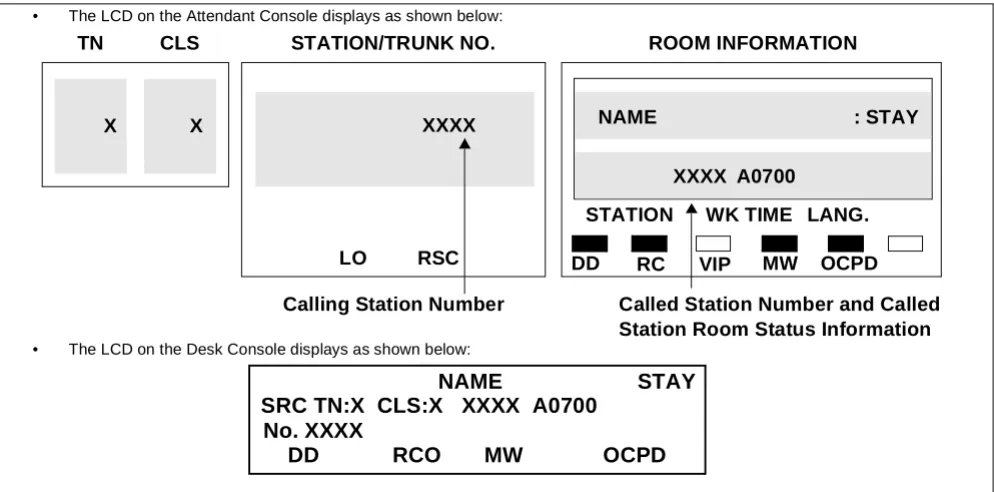
Display Area of Attendant Console and Desk Console . . . .
42
Figure 3
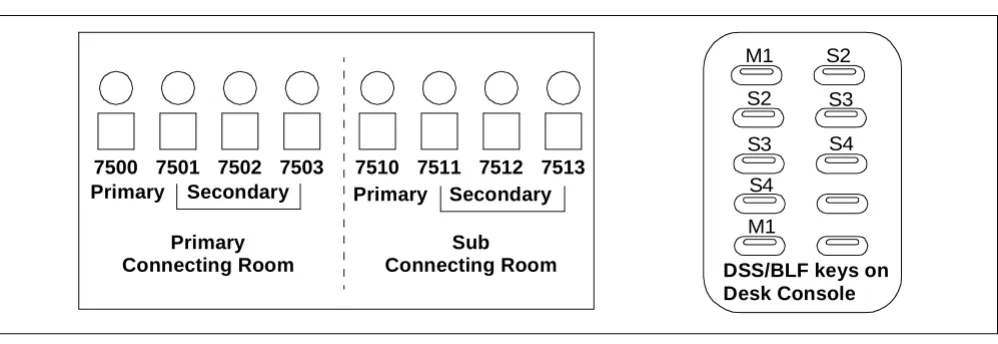
Console Lamps Used for Connecting Suites . . . .
45
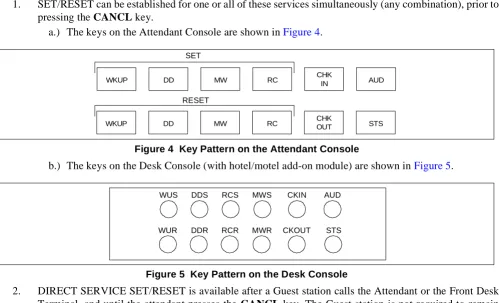
Figure 4
Key Pattern on the Attendant Console . . . .
55
Figure 5
Key Pattern on the Desk Console . . . .
55
Figure 6
Example of 16-Button D
termon a Front Desk Console . . . .
60
Figure 7
Example of Single/Double Suite Room . . . .
63
Figure 8
LCD Display on Special Administration Station D
term. . . .
71
Figure 9
DSS Key/Station Correspondence and Lamp Indications . . . .
78
Figure 10
Example of Display for Call Origination - from Attendant Console
and Desk Console . . . .
85
Figure 11
Example of Display for Call Origination from D
term. . . .
85
Figure 12
Call Termination on Attendant Console, Desk Console,
and Special Administration D
term. . . .
86
Figure 13
Example of Service Feature Setting - Attendant Console
and Desk Console . . . .
86
Figure 14
Check-In/Checkout Keys Replaced by Secretary Service
Set/Reset (SCS, SCR). . . 115
List of Tables
Page
Table 1
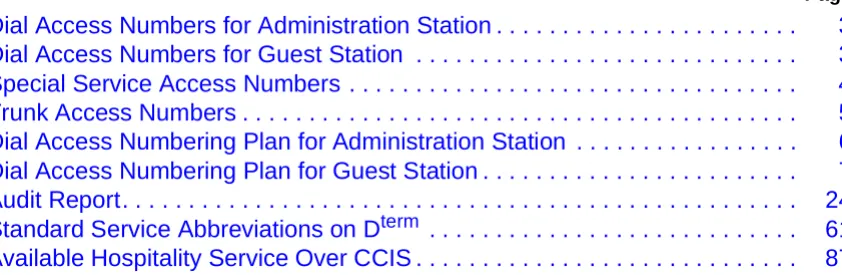
Dial Access Numbers for Administration Station . . . .
3
Table 2
Dial Access Numbers for Guest Station . . . .
3
Table 3
Special Service Access Numbers . . . .
4
Table 4
Trunk Access Numbers . . . .
5
Table 5
Dial Access Numbering Plan for Administration Station . . . .
6
Table 6
Dial Access Numbering Plan for Guest Station . . . .
7
Table 7
Audit Report. . . .
24
Table 8
Standard Service Abbreviations on D
term. . . .
61
NEAX2400 IPX Hotel Features
LEGEND
X – Available — – Not Applicable N – Not Available
→ – Feature carried over to next software series
Index Feature Description
Non-Network FCCS
A-10 Automatic Wake-Up X X
A-10D Automatic Wake-Up Dterm X X
A-15 Announcement Service X —
A-25 Attendant Console With Hotel Functions X N
A-26 Audit Reports X X
A-48 Automatic Message Waiting Lamp Off X X
A-57 Alert Service X N
A-58 Automatic Wake-up - Hotel Attendant X X
A-73 Automatic Multiple Attendant Recall X N
A-74 Answering Camp-On/Call Hold Calls By Switchhook Flash X —
A-75 Automated Guest Station Voice Mail Retrieval X —
B-26 Busy Status - Hotel Attendant X X
C-19 Calendar Display X —
C-23 Check-In/Checkout X X
C-32 Calling Station Number Display X X
C-71 Called Number Display - Hotel Attendant Console X X
C-72 Connecting Room Service X N
C-147 Call Information Display X N
D-11 Do Not Disturb X X
D-11D Do Not Disturb - D term
Note: Different from Business Feature. X X
D-15 Day/Night Class of Service X N
D-23 Direct Page Connection X —
D-24 Direct Paging X —
D-25 Direct Service Set/Reset X X
D-26 Direct Station Selection X —
D-88 Directory Assistance Interface X N
D-89 Direct Selection - Outside X —
D-105D DtermWith Hotel Function X X
D-150 Double Suite Room X N
D-151 DD/MW Lamp Control X X
E-21 Emergency Call Monitor - Attendant X N
G-1 Guest/Administrative Service X X
G-4 Group Service Through PMS X X
G-5 Guest Name Display Through PMS X X
G-6D Guest Name Display - Dterm X X
G-7D Guest Information Display - Dterm X N
G-8 Guest Information Display - Hotel Attendant Console X N
G-9 Guest Information Display - PMS Terminal X N
G-11 Guest Room Calling - Hotel Attendant X X
G-21 Group Restriction X N
G-24 Guest Station - Dterm X X
H-8 House Phone/Hot Line X —
H-22 Hotel Feature Transparency Over CCIS X —
I-23 Inter-Position Transfer 2 X N
L-27 Language Service X X
M-6 Message Waiting X X
M-22 Maid Status X X
M-51 Manual Switching Of C.O. Incoming Call Destination X N
M-68 Maid Status - Answerback X N
O-6 Off-hook Alarm X X
O-9 Overtime Call X X
P-8 Printer Control - Hotel Attendant Console X X
P-27 PMS Interface - BISYNC X X
P-29 PMS Interface X X
P-34 Paging Console X —
R-9 Room Cutoff X X
R-10 Room Status X X
R-17 Room Numbering X —
S-17 Split Access to Outgoing X X
NEAX2400 IPX Hotel Features (Continued)
LEGEND
X – Available — – Not Applicable N – Not Available
→ – Feature carried over to next software series
Index Feature Description
S-32 Screening X N
S-49 Service Call Routing X X
S-74 Secretarial Service - Guest Station X N
S-75 Suite Room Service X N
S-128 2nd Wake-up Call - Same Guest Station X X
T-13 Toll Terminal Access X X
T-21 Timing Start X X
V-16 Voice Mail Service Via Message Center Interface (MCI) X X
W-2 Wake-up Announcement - Headstart X N
NEAX2400 IPX Hotel Features (Continued)
LEGEND
X – Available — – Not Applicable N – Not Available
→ – Feature carried over to next software series
Index Feature Description
Introduction
Introduction
General Description
This manual explains the Office Data Design of the Hotel System, the Numbering Plan and a description of Service features.
How to Follow the Manual
This manual is organized as follows:
• Numbering Plan
This section explains the numbering plan in the hotel system.
• Description of Service Features
Numbering Plan
Numbering Plan
Access Codes for various service features are determined according to the Dial Access Numbering Plan. This chapter explains the Numbering Plan, and commands related to the Numbering Plan in the Hotel System.
Three types of Dial Access Numbers
• Station Access Numbers
• Special Service Access Numbers • Trunk Access Numbers
Basic Knowledge of Dial Access Numbers
This section explains the procedure for determining these Dial Access numbers and precautions. 1. A Dial Access Number consists of an Access Level and a Number of Digits as shown below:
2. For Hotel Systems, the service to be performed is determined according to the specific Dial Access Number.
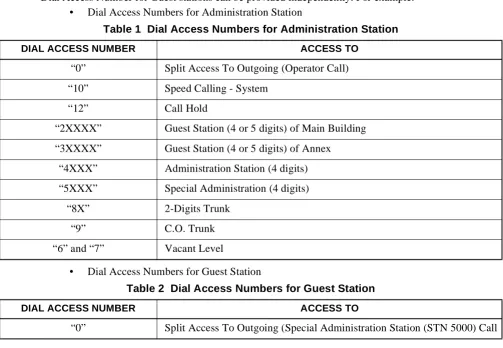
3. The Hotel System can have two Numbering Plan Development tables; one is for Administration stations and the other for Guest stations. Therefore, the Dial Access Number for Administration stations and the Dial Access Number for Guest stations can be provided independently. For example:
• Dial Access Numbers for Administration Station
• Dial Access Numbers for Guest Station
Table 1 Dial Access Numbers for Administration Station
DIAL ACCESS NUMBER ACCESS TO
“0” Split Access To Outgoing (Operator Call)
“10” Speed Calling - System
“12” Call Hold
“2XXXX” Guest Station (4 or 5 digits) of Main Building
“3XXXX” Guest Station (4 or 5 digits) of Annex
“4XXX” Administration Station (4 digits)
“5XXX” Special Administration (4 digits)
“8X” 2-Digits Trunk
“9” C.O. Trunk
“6” and “7” Vacant Level
Table 2 Dial Access Numbers for Guest Station
DIAL ACCESS NUMBER ACCESS TO
“0” Split Access To Outgoing (Special Administration Station (STN 5000) Call
A B C D E F Dial Access Number:
Numbering Plan
Note: For the Access Level (1st digit of the Dial Access numbers) different numbers are assigned for Station Access numbers, Special Service Access numbers, and Trunk Access numbers.
Station Access Numbers
1. One through six-digit station numbers are supported.
2. The NEAX2400 IPX can provide Timing Start Service. The Timing Start Service allows single-digit and multi-digit stations to use the same Access levels. For example:
2101: Guest Station Number of No. 1 Room on the 1st floor of the main building. 21001: Guest Station Number of No. 1 Room on the 10th floor of the main building. 3101: Guest Station Number of No. 1 Room on the 1st floor of the annex.
31001: Guest Station Number of No. 1 Room on the 10th floor of the annex.
3. The same station number cannot be assigned twice within the same NEAX2400 IPX, even if it is assigned to different tenants or to an Administration Station and a Guest Station.
Special Service Access Numbers
1. Special Service Access numbers of one through six digits can be assigned for each Access Level. Usually, one through three digits are used.
2. The Hotel System can provide the Same Number Access (Split Access To Outgoing) service. The Same Number Access service can provide both Administration and Guest stations with the different service feature by the same number. It can also provide the same or a different service feature by the same number according to Tenant Class, Route Restriction Class (RSC) and Service Feature Class (SFC) concerned.
3. The Hotel System can provide the Floor Service. The Floor Service is a service to call the Room Service station on each floor by the same Access code. For example:
• Guest Station on the 1st Floor of the main building:
dial “7” Calling→ Room Service Station (STN 4801) on the 1F • Guest Station on the 2nd Floor of the main building
dial “7”→Calling Room Service Station (STN 4802) on the 2F • Guest Station on the 3rd Floor of the main building
dial “7”→Calling Room Service Station (STN 4803) on the 3F
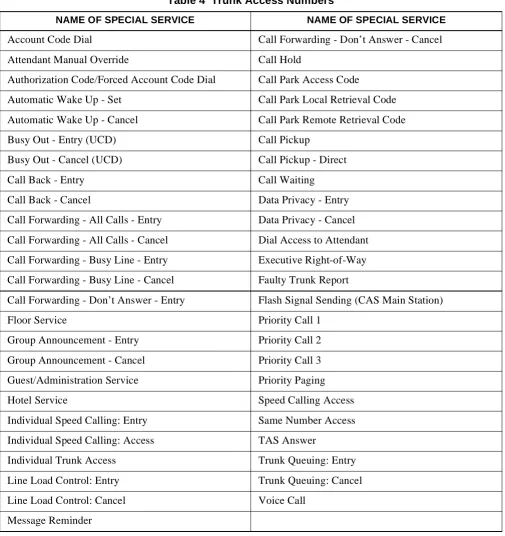
Table 4shows a listing of special services which require Access numbers.
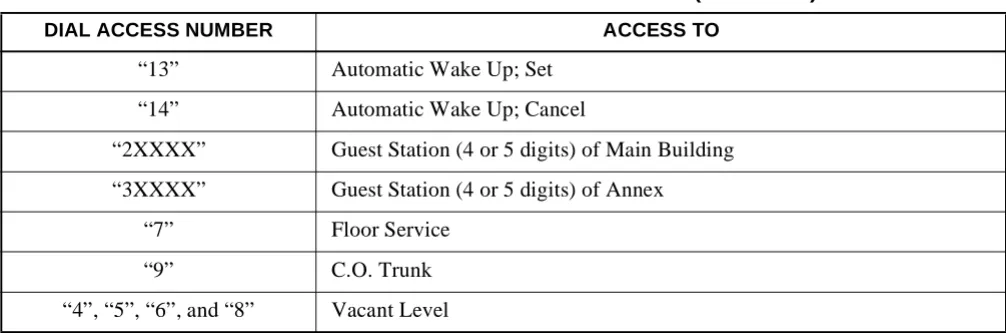
“13” Automatic Wake Up; Set
“14” Automatic Wake Up; Cancel
“2XXXX” Guest Station (4 or 5 digits) of Main Building
“3XXXX” Guest Station (4 or 5 digits) of Annex
“7” Floor Service
“9” C.O. Trunk
“4”, “5”, “6”, and “8” Vacant Level
Table 3 Special Service Access Numbers DIAL
CODE
SERVICE FEATURE FOR ADMINISTRATION STATION
SERVICE FEATURE FOR GUEST STATION
“0” Operator Call Special Administration Station Call
Table 2 Dial Access Numbers for Guest Station (Continued)
Numbering Plan
Note: In a case where both Entry and Cancel are specified for the same special service, different Access numbers must be assigned for Entry and for Cancel.
Trunk Access Numbers
1. Trunk Access numbers ranging from one through six (1-6) digits may be assigned on an individual basis. Usually, 1-3 digits are used.
2. Trunk Access numbers are required on an individual route basis.
Table 4 Trunk Access Numbers
NAME OF SPECIAL SERVICE NAME OF SPECIAL SERVICE
Account Code Dial Call Forwarding - Don’t Answer - Cancel
Attendant Manual Override Call Hold
Authorization Code/Forced Account Code Dial Call Park Access Code
Automatic Wake Up - Set Call Park Local Retrieval Code
Automatic Wake Up - Cancel Call Park Remote Retrieval Code
Busy Out - Entry (UCD) Call Pickup
Busy Out - Cancel (UCD) Call Pickup - Direct
Call Back - Entry Call Waiting
Call Back - Cancel Data Privacy - Entry
Call Forwarding - All Calls - Entry Data Privacy - Cancel
Call Forwarding - All Calls - Cancel Dial Access to Attendant
Call Forwarding - Busy Line - Entry Executive Right-of-Way
Call Forwarding - Busy Line - Cancel Faulty Trunk Report
Call Forwarding - Don’t Answer - Entry Flash Signal Sending (CAS Main Station)
Floor Service Priority Call 1
Group Announcement - Entry Priority Call 2
Group Announcement - Cancel Priority Call 3
Guest/Administration Service Priority Paging
Hotel Service Speed Calling Access
Individual Speed Calling: Entry Same Number Access
Individual Speed Calling: Access TAS Answer
Individual Trunk Access Trunk Queuing: Entry
Line Load Control: Entry Trunk Queuing: Cancel
Line Load Control: Cancel Voice Call
Numbering Plan
3. When Least Cost Routing (LCR) is utilized, LCR Access is regarded as access to an individual route; therefore an Access Number must be assigned.
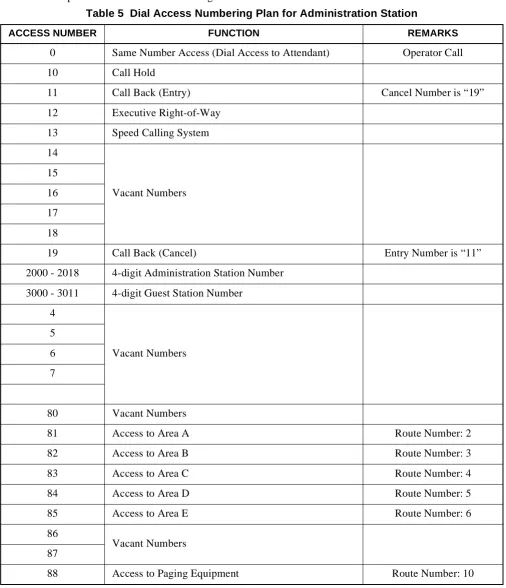
4. If Answer Service is provided for Speaker and/or Radio Paging, a Paging Answer code must be assigned. Examples of a Dial Access Numbering Plans are shown inTable 5andTable 6.
Table 5 Dial Access Numbering Plan for Administration Station
ACCESS NUMBER FUNCTION REMARKS
0 Same Number Access (Dial Access to Attendant) Operator Call
10 Call Hold
11 Call Back (Entry) Cancel Number is “19”
12 Executive Right-of-Way
13 Speed Calling System
14
Vacant Numbers 15
16
17
18
19 Call Back (Cancel) Entry Number is “11”
2000 - 2018 4-digit Administration Station Number
3000 - 3011 4-digit Guest Station Number
4
Vacant Numbers 5
6
7
80 Vacant Numbers
81 Access to Area A Route Number: 2
82 Access to Area B Route Number: 3
83 Access to Area C Route Number: 4
84 Access to Area D Route Number: 5
85 Access to Area E Route Number: 6
86
Vacant Numbers 87
Numbering Plan
89 Vacant Number
9 Access to Central Office Route Number: 1
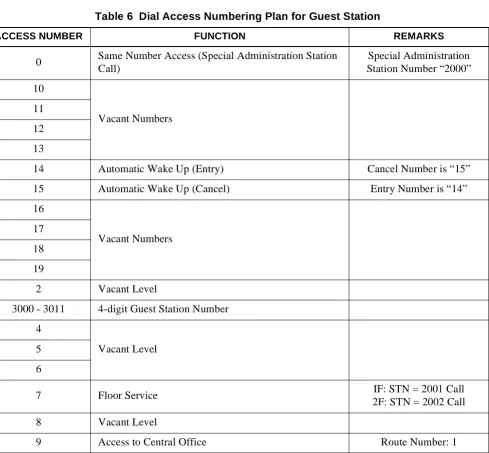
Table 6 Dial Access Numbering Plan for Guest Station
ACCESS NUMBER FUNCTION REMARKS
0 Same Number Access (Special Administration Station Call)
Special Administration Station Number “2000”
10
Vacant Numbers 11
12
13
14 Automatic Wake Up (Entry) Cancel Number is “15”
15 Automatic Wake Up (Cancel) Entry Number is “14”
16
Vacant Numbers 17
18
19
2 Vacant Level
3000 - 3011 4-digit Guest Station Number
4
Vacant Level 5
6
7 Floor Service IF: STN = 2001 Call
2F: STN = 2002 Call
8 Vacant Level
9 Access to Central Office Route Number: 1
Table 5 Dial Access Numbering Plan for Administration Station (Continued)
Numbering Plan
Description of Service Features
Description of Service Features
Hotel Service Features
This section explains each Hotel service feature by the following items:
General Description Operating Procedure Service Conditions
General Description
This item explains a general description of the service feature.
Operating Procedure
This item explains the procedure to be followed for receiving a specific service feature concerned. When testing a service feature, perform installation test work steps by referring to this item.
Service Conditions
Automatic Wake-Up A-10
A-10
Automatic Wake-Up
General Description
This service feature allows the NEAX2400 IPX to be programmed to automatically call Guest rooms at specified times. Upon answering, the Guest is connected to a recorded announcement or music source. A printout of unanswered or blocked wake-up attempts for Guest rooms is provided at the Hotel printer. This feature can be activated from the Guest room stations, administration stations, Console, PMS Terminal, or predetermined Special Administration Station.
Operating Procedure
To set AUTOMATIC WAKE-UP from a Guest Room
1. With separate set and cancel codes (24-hour time only): a.) Lift the handset. Receive dial tone.
b.) Dial WAKE-UP code. Hear special dial tone.
c.) Dial desired time of AUTOMATIC WAKE-UP. Hear service set tone. d.) Hang up.
2. When set and cancel codes are the same: a.) Lift the handset. Receive dial tone.
b.) Dial WAKE-UP code. Hear special dial tone.
c.) Dial desired time of AUTOMATIC WAKE-UP. Hear service set tone. d.) Hang up.
To cancel AUTOMATIC WAKE-UP from Guest Room
1. With separate set and cancel codes (24-hour time only): a.) Lift the handset. Receive dial tone.
b.) Dial CANCEL AUTOMATIC WAKE-UP code. Hear service dial tone. c.) Hang up.
2. When set and cancel codes are the same: a.) Lift the handset. Receive dial tone.
b.) Dial WAKE-UP code. Hear special dial tone. c.) Dial the digit “3”. Hear service set tone. d.) Hang up.
To set AUTOMATIC WAKE-UP from a Regular Administration Station
1. Only separate set and cancel codes will operate from a regular administration station. a.) Lift the handset. Receive dial tone.
b.) Dial SET WAKE-UP code. Hear special dial tone.
c.) Dial desired time of AUTOMATIC WAKE-UP. Hear service set tone. d.) Hang up.
To cancel AUTOMATIC WAKE-UP from a Regular Administration Station
1. Only separate set and cancel codes will operate from a regular administration station. a.) Lift the handset. Receive dial tone.
b.) Dial CANCEL WAKE-UP code. Hear service set tone. c.) Hang up.
To set AUTOMATIC WAKE-UP from a Special Administration Station
A-10 Automatic Wake-Up
Operating Procedure (cont’d)
b.) Dial SET WAKE-UP code. Hear special dial tone.
c.) Dial desired time of AUTOMATIC WAKE-UP, then dial the Guest room number. Hear service set tone.
d.) Hang up.
To cancel AUTOMATIC WAKE-UP from a Special Administration Station
1. Lift the handset. Receive dial tone.
2. Dial CANCEL WAKE-UP code and Guest room number. Hear service set tone. 3. Hang up.
To set AUTOMATIC WAKE-UP from the Front Desk Terminal or Console using the WUS/WUR (Wake-Up Set/ Wake-Up Reset) key
1. When Guest calls to request a wake-up call (see DIRECT SERVICE SET/RESET [D-25]): a.) Press the WUS key while still connected with the Guest room.
b.) Dial the wake-up time requested. (Use of 12-hour or 24-hour time is set in system data.). 2. If the wake-up time is entered after the Guest line is released:
a.) Press WUS key. The associated lamp lights.
b.) Dial wake-up time. The console displays the entered time.
c.) Dial the Guest station number. The console displays the station number.
d.) Press the ENTER key. The lamp flashes to confirm that AUTOMATIC WAKE-UP has been set. e.) Press the EXIT key. The lamp and station display are extinguished.
To cancel AUTOMATIC WAKE-UP from the Front Desk Terminal or Console using the WUS/WUR (Wake-Up Set/Wake-Up Reset) key
1. When Guest calls to cancel a wake-up call (see DIRECT SERVICE SET/RESET [D-25]): a.) Press the WUR key while still connected with the Guest room.
2. If the wake-up cancel is input after the Guest line is released: a.) Press WUR key. The associated lamp lights.
b.) Dial Guest station number. The console displays the station number and the AUTOMATIC WAKE-UP time set.
c.) Press the ENTER key. The lamp flashes to confirm the cancellation of the wake-up call. d.) Press the EXIT key. The lamp and station display are extinguished.
To call the Guest Station that does not answer the wake-up call, from the Console
1. The Guest does not answer the wake-up call. The call is routed to Attendant and terminates on the WU key.
2. Press the WU key or ANSWER key. The following is displayed:
3. Press the START key. The Guest station is rung.
4. If the Guest does not answer, release the call by pressing CANCL key. The Guest number is given to the front desk clerk and he/she is asked to visit the Guest room.
HH:MM NAME :NANS
DEST TN:X CLS:X XXXX No. XXXX
Automatic Wake-Up A-10
Service Conditions
1. From the Front Desk Terminal or Console, set AUTOMATIC WAKE-UP using either 24-hour time, or 12-hour time. When using 12-hour time, time is entered by dialing a special code, which includes either a # or * before entering the time to indicate PM. For example, when dialing the desired time, dial #1030 for 10:30 PM. The choice of # or * is assigned in system data.
2. The maximum number of stations that can set the same wake-up time can be assigned as one of the following: 64, 128, 256, 512 stations per Local Processor (LP). If the number of stations reaches the assigned maximum stations, the next attempt to set an AUTOMATIC WAKE-UP call at the same wake-up time is automatically set 5 minutes earlier than the appointed time.
Note 1:The ability to process this expanded number of calls is based on traffic and station distribution in the NEAX2400 IPX.
Note 2:Variable timing can be assigned in system data. The timing must be a multiple of five minutes (such as 5, 10, or 15) earlier.
3. All AUTOMATIC WAKE-UP times are to be set at five-minute intervals in either 12- or 24-hour time. For example:
7:50 AM = 0750 7:55 AM = 0755 8:00 AM = 0800
Note: Wake-Up Time to be set from a station/Console will be rounded to the nearest multiple of five.
4. If a Wake-Up announcement is used, this feature requires one of the following hardware alternatives: a.) Central Office Trunk (COT) or 2W E&M trunk and an announcement machine.
b.) Digital Announcement Trunk (DAT).
5. This feature provides three additional AUTOMATIC WAKE-UP attempts at fixed three-minute intervals. If the called party is not reached (no answer, busy, blocked, or locked-out) after a total of four attempts, the results will be automatically printed out at the hotel printer. The number of retries for a no-answer condition is determined by system data, up to a maximum of three retries. The number of retries for a busy condition is flexible, up to a maximum of three retries.
6. Ringing duration for AUTOMATIC WAKE-UP is controlled by the CF/NA timer, SYS1, ASYD, INDEX 139. The choice of ring duration is made through programming in system data.
7. AUTOMATIC WAKE-UP overrides DO NOT DISTURB [D-11].
Note: For the DtermSeries E, this feature is restricted by using the DD key of the terminal.
8. AUTOMATIC WAKE-UP messages can be arranged for headstart operation. Refer to the WAKE-UP ANNOUNCEMENT - HEADSTART [W-2] feature description for details.
9. If WAKE-UP ANNOUNCEMENT - HEADSTART [W-2] is not required, announcements can be arranged either as continuous recordings (last party disconnects) or to automatically disconnect after 30 seconds. An engineering traffic study is required to determine the number of interface trunks needed to accommodate each recording channel.
10. AUTOMATIC WAKE-UP for a Guest station can be set from the Console, predetermined Special Administration stations, Front Desk Terminal, or the actual Guest phone. AUTOMATIC WAKE-UP for an Administration Station can only be set from the actual administration phone.
TIME TO BE SET BY KEYPAD OPERATION TIME TO BE SET BY THE NEAX2400 IPX
xx: x1 ~ xx: x4 xx: x0
A-10 Automatic Wake-Up
Service Conditions (cont’d)
Note: Any Administration Station that is assigned as a Special Administration Terminal may NOT set WAKE-UP for itself or for any station other than a Guest station.
11. If PMS Language Selection is used, AUTOMATIC WAKE-UP announcements can be provided according to a Guest's language.
12. If all announcement trunks are busy, music will be provided for AUTOMATIC WAKE-UP. Music is provided by the NEAX2400 IPX MUSIC ON HOLD [M-1] source.
13. For Guest stations, a confirmation announcement can be provided instead of service set tone for AUTOMATIC WAKE-UP setting and cancelling operations.
14. AUTOMATIC WAKE-UP entry and result information is reported, as required, to the PMS and NEAX2400 IPX hotel printer for continuous update.
15. A maximum of six digits can be used for the identification code. Use of an ID code is not mandatory, and is left to the customer's discretion.
16. It is possible to use the same access code for both AUTOMATIC WAKE-UP set and cancel. For example: *1 may be assigned the AUTOMATIC WAKE-UP set and cancel access code. The NEAX2400 IPX will recognize *1 and wait for the next digit. If *, #, 0, 1, or 2 is dialed, then a time is being set. If 3 is dialed, this is an AUTOMATIC WAKE-UP cancel. For example:
*1 *0300 3:00 PM wake-up set (12-hour clock)
*1 #0300 3:00 PM wake-up set (12-hour clock)
*1 0800 8:00 AM wake-up set (12/24-hour clock)
*1 1000 10:00 AM wake-up set (12/24-hour clock)
*1 2100 9:00 PM wake-up set (24-hour clock)
*1 3 Wake-up cancel
17. As a system option, once AUTOMATIC WAKE-UP has been set from a Guest station, only that Guest station is allowed to cancel or change the WAKE-UP service. This option is determined by system data (Wake-Up Guest Station Priority Service).
18. These same conditions are applicable to WAKE-UP ANNOUNCEMENT - HEAD START [W-2]. 19. Setting and cancelling wake-up services may be restricted, depending on service class, from
Administration Stations, the PMS Terminal, a Front Desk Terminal, or predetermined Special Administration Stations.
20. When AUTOMATIC WAKE-UP for a Guest station is set from the Console, the PMS Terminal, a Front Desk Terminal, or predetermined Special Administration Stations, that Guest station is allowed to set/ cancel the WAKE-UP service.
21. When AUTOMATIC WAKE-UP has been executed, setting/cancelling of another AUTOMATIC WAKE-UP service is allowed from the Console, the PMS Terminal, a Front Desk Terminal, or predetermined Special Administration Stations.
22. AUTOMATIC WAKE-UP [A-10] and WAKE-UP ANNOUNCEMENT-HEADSTART [W-2]
procedures remain the same.
23. Maximum number of stations per LP that can be set for a single AUTOMATIC WAKE-UP time is determined by the system data.
24. The NEAX2400 IPX can be programmed so that, once a day, the NEAX2400 IPX will generate and print a Wake-Up report listing all Wake-Ups that are currently set. The time of the output is decided by the customer and assigned in the AHSY Command.
Automatic Wake-Up Dterm A-10D
A-10D
Automatic Wake-Up D
term
General Description
This service feature allows the NEAX2400 IPX to be programmed to automatically call Guest rooms at specified times. Upon answering, the Guest is connected to a recorded announcement or music source. A printout of unanswered, blocked, or busy wake-up attempts for Guest rooms is provided at the Hotel printer. This feature can be activated from the Guest room Dterms.
Operating Procedure
To set AUTOMATIC WAKE-UP from a Guest room Dterm(24-hour time only)
1. With separate set and cancel codes:
a.) Lift the handset or press the SPEAKER key. Receive dial tone. b.) Dial WAKE-UP code. Hear special dial tone. The LCD displays:
c.) Dial desired time of AUTOMATIC WAKE-UP. Hear service set tone. The LCD displays:
d.) Hang up. If the AUTOMATIC WAKE-UP time steady display is available by system data, the following will display:
2. When set and cancel codes are the same:
a.) Lift the handset or press the SPEAKER key. Receive dial tone. b.) Dial WAKE-UP code. Hear special dial tone.
c.) Dial desired time of AUTOMATIC WAKE-UP. Hear service set tone. The LCD displays:
d.) Hang up. If the AUTOMATIC WAKE-UP time steady display is available by system data, the following will display:
WAKE UP SET
(Time and Date)
>>>
XX:XX SET (Time and Date)
>>>
XX:XX
(Time and Date)
>>>
WAKE UP SET
(Time and Date)
>>>
XX:XX SET (Time and Date)
>>>
XX:XX
(Time and Date)
A-10D Automatic Wake-Up Dterm
Operating Procedure (cont’d)
To cancel AUTOMATIC WAKE-UP from a Guest Room Dterm(24-hour time only)
1. With separate set and cancel codes:
a.) Lift the handset or press the SPEAKER key. Receive dial tone.
b.) Dial CANCEL AUTOMATIC WAKE-UP code. Hear service set tone. The LCD displays:
c.) Hang up.
2. When set and cancel codes are the same:
a.) Lift the handset or press the SPEAKER key. Receive dial tone. b.) Dial WAKE-UP code. Hear special dial tone.
c.) Dial the digit “3”. Hear service set tone. The LCD displays:
d.) Hang up.
Service Conditions
1. From the Guest room Dterm, set AUTOMATIC WAKE-UP using 24-hour time only. 2. When AUTOMATIC WAKE-UP is executed, the LCD will display:
3. When the Dtermanswers the wake-up call, “WAKE UP” display will remain.
4. The maximum number of stations that can set the same wake-up time can be assigned as one of the following: 64, 128, 256, 512 stations per LP (Local Partition) depending on system data programming. If the number of stations reaches the assigned maximum stations, the next attempt to set an AUTOMATIC WAKE-UP call at the same wake-up time is automatically set 5 minutes earlier than the appointed time.
Note 1:The ability to process this expanded number of calls is based on traffic and station distribution in the NEAX2400 IPX.
Note 2:Variable timing can be assigned in system data. The timing must be a multiple of five minutes (such as 5, 10, or 15 minutes) earlier.
5. All AUTOMATIC WAKE-UP times are to be set at five-minute intervals. For example: 7:50 AM = 0750
7:55 AM = 0755 8:00 AM = 0800 3:00 PM = 1500 3:55 PM = 1555
WAKE UP CANCEL
(Time and Date)
>>>
WAKE UP CANCEL
(Time and Date)
>>>
WAKE UP (Time and Date)
Automatic Wake-Up Dterm A-10D
Service Conditions (cont’d)
Note: Wake-Up Time set from a station will be rounded to the nearest multiple of five.
6. If Wake-Up announcement is used, this feature requires one of the following hardware alternatives: a.) Central Office Trunk (COT) or 2W E&M trunk and an announcement machine.
b.) Digital Announcement Trunk (DAT).
7. This feature provides three additional AUTOMATIC WAKE-UP attempts at fixed three-minute intervals. If the called party is not reached (i.e., no answer, busy, blocked, or locked-out) after a total of four attempts, the results will automatically print out at the hotel printer. The number of retries for a no-answer or busy condition is determined by system data, up to a maximum of three retries.
8. Ringing duration for AUTOMATIC WAKE-UP is controlled by SYS1, ASYD, INDEX 139, the Call Forward, No Answer timer.
9. AUTOMATIC WAKE-UP overrides DO NOT DISTURB [D-11].
Note: For the DtermSeries E, this feature is restricted using the DD key of the terminal.
10. AUTOMATIC WAKE-UP messages can be arranged for headstart operation. Refer to the WAKE-UP ANNOUNCEMENT - HEADSTART [W-2] feature description for details.
11. If WAKE-UP ANNOUNCEMENT - HEADSTART [W-2] is not required, announcements can be arranged either as continuous recordings (last party disconnects) or to automatically disconnect after 30 seconds. An engineering traffic study is required to determine the number of interface trunks needed to accommodate each recording channel.
12. When AUTOMATIC WAKE-UP is set from the Administration Station, Front Desk Terminal, or Console, the LED for AUTOMATIC WAKE-UP on the Guest room Dterm illuminates. If the AUTOMATIC WAKE-UP time steady display is available, the following will display:
13. If PMS Language Selection is used, AUTOMATIC WAKE-UP announcements can be provided according to a Guest’s language.
14. If all announcement trunks are busy, music will be provided for AUTOMATIC WAKE-UP. Music is provided by the NEAX2400 IPX MUSIC ON HOLD [M-1] source.
15. For Guest stations, a confirmation announcement can be provided instead of service set tone for AUTOMATIC WAKE-UP setting and cancelling operations.
16. AUTOMATIC WAKE-UP entry and result information is reported, as required, to the PMS and NEAX2400 IPX hotel printer for continuous update.
17. A maximum of six digits can be used for the identification code. Use of an ID code is not mandatory, and is left to the customer’s discretion.
TIME TO BE SET BY KEYPAD OPERATION TIME TO BE SET BY THE NEAX2400 IPX
xx:x1 ~ xx:x4 xx:x0
xx:x6 ~ xx:x9 xx:x5
XX:XX
(Time and Date)
A-10D Automatic Wake-Up Dterm
Service Conditions (cont’d)
18. It is possible to use the same access code for both AUTOMATIC WAKE-UP set and cancel. For example, *1 may be assigned the AUTOMATIC WAKE-UP set and cancel access code. The NEAX2400 IPX will recognize *1 and wait for the next digit. If 0, 1, or 2 is dialed, then a time is being set. If the 3 is dialed, this is an AUTOMATIC WAKE-UP cancel. For example:
*1 0800 8:00 AM wake-up set
*1 1000 10:00 AM wake-up set
*1 2100 9:00 PM wake-up set
*1 3 wake-up cancel
19. As a system option, once AUTOMATIC WAKE-UP has been set from a Guest station, only that Guest station is allowed to cancel or change the WAKE-UP service. This option is determined by system data (Wake-Up Guest Station Priority Service).
20. These same conditions are applicable to WAKE-UP ANNOUNCEMENT - HEADSTART [W-2].
21. AUTOMATIC WAKE-UP [A-10] and WAKE-UP ANNOUNCEMENT - HEADSTART [W-2]
procedures remain the same.
22. For Distinctive Ringing of AUTOMATIC WAKE-UP, C.O. Line Incoming Connection is used.
23. When several services are set at the same time, services are displayed according to the following order of priority:
1. AUTOMATIC WAKE-UP - Dterm [A-10D]
2. 2ND WAKEUP CALL - SAME GUEST STATION [S-128]
3. MESSAGE WAITING [M-6]
4. DO NOT DISTURB - Dterm [D-11D]
5. ROOM CUTOFF [R-9]
24. AUTOMATIC WAKE-UP is not activated for the Guest station which has been set DO NOT DISTURB - Dtermby using the DD key of a DtermSeries E. For example:
a.) When setting DO NOT DISTURB - Dtermonly:
b.) When setting DO NOT DISTURB - Dtermand AUTOMATIC WAKE-UP - Dterm:
DD
(Time and Date)
>>>
Lamp A Lamp B Lamp C Lamp D
Lit
XX:XX DD (Time and Date)
>>> Wake-Up Time
Lamp A Lamp B Lamp C Lamp D
Automatic Wake-Up Dterm A-10D
Service Conditions (cont’d)
c.) When setting DO NOT DISTURB - Dterm, AUTOMATIC WAKE-UP - Dterm and MESSAGE WAITING:
d.) When setting DO NOT DISTURB - Dterm, AUTOMATIC WAKE-UP - Dterm, MESSAGE WAITING and 2ND WAKEUP CALL - SAME GUEST STATION (MW lamp illuminates):
In case of the MESSAGE WAITING lower display (MW lamp illuminates):
Note: On the upper LCD, AUTOMATIC WAKE-UP - Dterm, 2ND WAKE-UP CALL - SAME GUEST STATION, DO NOT DISTURB - Dterm, and ROOM CUTOFF are displayed in order of priority.
e.) When setting DO NOT DISTURB - Dterm, AUTOMATIC WAKE-UP - Dterm, MESSAGE WAITING, 2ND WAKEUP CALL - SAME GUEST STATION and ROOM CUTOFF (the MW lamp illuminates):
f.) When going on-hook at the status of “e” after AUTOMATIC WAKE-UP - Dtermis activated (the MW lamp illuminates):
XX:XX DD MW
(Time and Date)
>>>
Lamp A Lamp B Lamp C Lamp D
Wake-Up Time
Lit Lit Lit
XX:XX YY:YY MW
(Time and Date)
>>>
Lamp A Lamp B Lamp C Lamp D
Wake-Up Time Second Wake-Up Time
Lit Lit Flashing
XX:XX YY:YY DD
(Time and Date)
>>>
Lamp A Lamp B Lamp C Lamp D
Lit Lit Flashing
Lamp A Lamp B Lamp C Lamp D
XX:XX YY:YY MW
(Time and Date)
>>> Wake-Up Time Second Wake-Up Time
Lit Lit Lit Flashing
YY:YY DD RC MW
(Time and Date)
>>>
Lamp A Lamp B Lamp C Lamp D
Second Wake-Up Time
A-10D Automatic Wake-Up Dterm
Service Conditions (cont’d)
g.) When cancelling 2ND WAKEUP CALL - SAME GUEST STATION at the status “e” (the MW lamp illuminates):
25. Maximum number of stations per LP that can be set for a single AUTOMATIC WAKE-UP time is determined by the system data.
XX:XX DD RC MW
(Time and Date)
>>>
Lamp A Lamp B Lamp C Lamp D
Wake-Up Time
Announcement Service A-15
A-15
Announcement Service
General Description
This service feature allows a station user to hear a prerecorded announcement for various services such as:
ALERT SERVICE [A-57]
AUTOMATIC WAKE-UP [A-10]
Confirmation announcement (See AUTOMATIC WAKE-UP) [A-10]
DO NOT DISTURB [D-11] mode setting
GROUP SERVICE THROUGH PMS [G-4]
Hotel information
Intercept announcement when a vacant level is dialed
Language selection (Property Management System (PMS) option)
Restricted call attempts (ROOM CUTOFF) [R-9]
Tourist group information (tour group schedule & agenda)
Operating Procedure
To access
1. Lift the handset or press the SPEAKER key. Receive dial tone.
2. Dial the associated announcement service access code. The NEAX2400 IPX responds with an announcement.
3. Listen to the announcement and hang up.
Service Conditions
1. This feature requires one of the following hardware alternatives:
a.) Central Office Trunk (COT) or 2W E&M trunk and an announcement machine. b.) Digital Announcement Trunk (DAT).
2. Announcements can be arranged as continuous recordings (last-party disconnect) or to automatically disconnect after 30 seconds. An engineering traffic study is required to determine the number of interface trunks needed to accommodate each recording channel.
3. If PMS Language Selection is utilized, ANNOUNCEMENT SERVICE can be provided according to Guest’s language.
4. The following connections are available:
a.) Multi-connection - many station users can connect to one announcement trunk at the same time. b.) Single connection - one station user can connect to one announcement trunk at the same time 5. This feature is also available for the Tie Line trunk access to announcement trunk.
6. The NEAX2400 IPX can be programmed to return Ring Back Tone before connection to the announcement machine is made.
7. When this feature is activated from a Tie Line, the NEAX2400 IPX can be programmed to return answer supervision to far-end PBX.
8. If PMS Language Selection is used, Announcement Service can be provided according to the Guest’s language.
A-25 Attendant Console With Hotel Functions
A-25
Attendant Console With Hotel Functions
General Description
The NEAX2400 IPX Console provides regular business call handling and processing capabilities, as well as hospitality features. The console provides for the following special hospitality services:
1. Individual keys to set and reset:
AUTOMATIC WAKE-UP [A-10]
MESSAGE WAITING [M-6]
CHECK-IN/CHECKOUT [C-23]
DO NOT DISTURB [D-11]
SECRETARIAL SERVICE - GUEST STATION [S-74]
ROOM STATUS [R-10]
MANUAL SWITCHING OF C.O. INCOMING CALL DESTINATION[M-51]
ROOM CUTOFF [R-9]
AUDIT REPORT [A-26] (requires hotel printer)
2. Special keys for incoming call identification: ADM - Incoming administrative calls
DD - Incoming calls to stations in DO NOT DISTURB [D-11] mode EMG - OFF HOOK ALARM [O-6] - Emergency calls (option) GST - Incoming Guest station calls
GST2 - Incoming foreign Guest station calls (option) HP - HOUSE PHONE/HOT LINE [H-8]
OT - Overtime calls (option)
WU - Wake-Up calls (option) (Morning Call [MC])
3. Direct key access to frequently called Administration or service stations (i.e., room service, restaurant, maid, or C.O. number). These numbers are preassigned via the MAT. Ten keys are provided for this feature.
4. The console provides the following displays: Calendar (date and time)
Call Waiting (number of calls) Class of Service
Name Display - System (for Administration stations) Room Status:
- AUTOMATIC WAKE-UP [A-10]
- DO NOT DISTURB [D-11]
- GUEST NAME DISPLAY THROUGH PMS [G-5]
- Language (PMS Option)
- MESSAGE WAITING [M-6]
- Optional data display (Refer to Service Condition 3.) - Room class
- ROOM CUTOFF [R-9]
- Room occupied - Station number - VIP (PMS option) Station/Trunk
Attendant Console With Hotel Functions A-25
General Description (cont’d)
Note: If the Desk Console is used instead of the NEAX2400 IPX Hotel Attendant Console, the basic key allocations are different from the previous ones. The following illustration shows the Desk Console key positions and indications used in Hotel Systems. The operating procedures for each service are the same as the NEAX2400 IPX Hotel Attendant Console.
Figure 1 Key Allocations of Desk Console
Operating Procedure
Refer to the NEAX2400 IPX How to Operate Attendant Console.
Service Conditions
1. Distance limitation between the NEAX2400 IPX and the console: up to 1000 feet (304 meters) using 25-pair, 24 AWG cable.
2. Maximum of four consoles per PIM.
3. A three-character and a five-character display can be used in conjunction with PMS to display additional Guest information instead of language and room class. For example, company name, complementary code, etc. may be displayed.
4. The OAI name of the Administration station is displayed on the character display (Guest name display area) when Name Display service via OAI is available in the NEAX2400 IPX. When there is no name assigned for the Administration station, “ADM STATION” is displayed.
TRKSL SVC SC
DDO
WUS
WUR DDR RCR MWR STS
DDS RCS MWS
HWS BV MR CLR TG1 TG6 TG7 TG8 TG9 TG10 TG5 TG4 TG3 TG2 Enter Clear Exit
L 6
L 5
L 4
L 3
L 2
L 1
1 2
ABC DEF3
6 MNO 5 JKL 4 GHI 9 WXYZ 8 TUV 7 PQRS # ∗ 0 Cancel Talk SRC Answer DEST Release Hold Position Busy Position Busy Night Night PAGE REC Start Mute TF Recall NANS ADM Busy TIE LDN Alarm Position Available
HWC HP DD GST OT ICPT
LCD
DSS key
Hotel Function key
The different key indications of the NEAX2400 IPX Attendant Console and the Desk Console are shown below:
HOTEL ATTENDANT
CONSOLE DESK CONSOLE
WKUP (Set) WKUP (Reset) DD (Set) DD (Reset) RC (Set) RC (Reset) MW (Set) MW (Reset) WUS WUR DDS DDR RCS RCR MWS MWR HOTEL ATTENDANT
CONSOLE DESK CONSOLE
A-26 Audit Reports
A-26
Audit Reports
General Description
The NEAX2400 IPX provides AUDIT REPORT printout of all rooms assigned specific Room Status conditions. For example, an AUDIT of all stations in DO NOT DISTURB [D-11] mode may be ordered. These REPORTS are generated by key operation and function codes entered from the Hotel Console. AUDIT REPORTS available from the printer are as follows:
Table 7 Audit Report FUNCTION
PRINTOUT INFORMATION
CODE DEFINITION
0 All Status All Status
1
Maid Status
To be Cleaned
2 Cleaned
3 Ready to sell
4 Out of Service
5 Repair Needed
6 Vacant
7
Room Condition
Occupied
8 MESSAGE WAITING set [M-6]
9 AUTOMATIC WAKE-UP [A-10] (Room & Time)
10 Vip Room (see service condition, PMS option)
11 DO NOT DISTURB [D-11]
12 ROOM CUTOFF [R-9]
*
Room Class
All Class Audit
21 Room Class 1
22 Room Class 2
23 Room Class 3
24 Room Class 4
25 Room Class 5
26 Room Class 6
27 Room Class 7
28 Room Class 8
29 Room Class 9
20 Room Class 10
2* Room Class 11
Audit Reports A-26
Operating Procedure
To order AUDIT REPORTS printouts from the Console or Front Desk Terminal
1. Press the AUD key. The associated lamp illuminates 2. Press the STS key. Dial the desired function code. 3. The function code is displayed. Press the ENTER key.
4. All displayed information is cleared and lamps are extinguished. Printout begins.
Service Conditions
1. VIP classification must be entered via PMS. 2. Room classifications are assigned via the MAT.
3. Guest name and optional data (Language, etc.) are displayed on the Console, but are not included in the printout.
4. Hotel printer is necessary for this service feature. 5. Only one audit may be run at a time.
6. Status information is automatically printed out when the following services are performed: • MAID STATUS [M22] (from Guest room only).
A-48 Automatic Message Waiting Lamp Off
A-48
Automatic Message Waiting Lamp Off
General Description
This feature provides for Guest station MESSAGE WAITING [M-6] lamps to automatically turn off after Guests have called predetermined Administration Stations (i.e. Message Center) to retrieve messages.
Operating Procedure
When a Guest calls the Administration Station to retrieve a message, the MESSAGE WAITING [M-6] lamp on the associated Guest telephone is automatically extinguished and the MESSAGE WAITING [M-6] data is cleared.
Service Conditions
1. This service is only available when the MESSAGE WAITING [M-6] has been set from: a.) Front Desk Terminal (Model 90 or 120 PMS).
b.) Front Desk Terminal or Console (Model 60 PMS). 2. This feature is not available when calling the Console.
3. Message Waiting lamps set by Message Center Interface will not be cancelled by AUTOMATIC MESSAGE WAITING LAMP OFF [A-48].
Alert Service A-57
A-57
Alert Service
General Description
In an emergency situation, the Console or Special Administration Station may initiate the ALERT SERVICE. All Guest stations and Special Administration Stations are called, using a distinctive ringing pattern, and connected to an emergency announcement.
At this time, if Dterms are used for Guest stations, the DtermLCDs will indicate emergency.
Operating Procedure
To set ALERT SERVICE from Console
1. Press the LOOP key.
2. Dial the access code for Alert Service Setting. a.) Receive service set tone.
b.) All the Guest Stations and all the Special Administration are rung. 3. Press the RELEASE key.
To cancel ALERT SERVICE from Console
1. Press the LOOP key.
2. Dial the access code for Alert Service Cancel. Receive service set tone. 3. Press the RELEASE key.
To set ALERT SERVICE from Special Administration Station
1. Lift the handset. Receive dial tone.
2. Dial the access code for Alert Service Setting. a.) Receive service set tone.
b.) All the Guest Station and all the Special Administration Station are rung. 3. Replace the handset.
To cancel ALERT SERVICE from Special Administration Station
1. Lift the handset. Receive dial tone.
2. Dial the access code for Alert Service Cancel. Receive service set tone. 3. Replace the handset.
To answer
1. The Stations rung by the Alert Service lifts the handset. Announcement is heard from the Announcement Machine.Note
2. Replace the handset.
Note: On answering, the station is automatically connected to an announcement machine. If Language service has been specified by PMS, the Guest will receive the announcement in their own language.
Service Conditions
A-57 Alert Service
Service Conditions (cont’d)
2. Stations will be retried if the Guest does not answer, the line is busy, or the line is in LINE LOCKOUT [L-3]. Stations in the Make Busy condition are not called. The unanswered Guest information is printed out from the hotel printer. Note that the information is also printed out when the called station is a Guest Room - Dterm.
3. ALERT SERVICE overrides DO NOT DISTURB [D-11]. 4. Special Administration Stations are also called.
5. The ringing pattern used with ALERT SERVICE is shown below. This pattern may not be changed.
6. If a printout of responses (i.e., answered, blocked, busy) is required, the hotel printer must support a minimum of 220 characters per second (CPS).
7. When announcement trunks for ALERT SERVICE in different languages are provided, the Guest receives the announcement in his/her own language. In this case, the Guests are connected to the announcement trunk in multiple connection, and if the Guest does not go on hook after hearing the announcement, the call is disconnected automatically after 30 seconds.
8. While Guest stations are ringing, the LCDs on the Guest room Dterms (if used) will display:
ON
OFF
0.2 sec
0.4 sec
1 sec 0.2 sec 0.4 sec 0.4 sec
0.4 sec
EMERGENCY CALL (Time and Date)
Automatic Wake-up - Hotel Attendant A-58
A-58
Automatic Wake-up - Hotel Attendant
General Description
When AUTOMATIC WAKE-UP [A-10] is set to the Guest station with VIP status and it is time for the Guest to be awakened, the call will ring the Console. When answered, the call is extended to the Guest. The Guest will be greeted by the attendant rather than a recorded announcement.
Operating Procedure
To operate from the Console
1. On the Hotel Console, the WU (Wake-Up) lamp flashes and the bell rings at preset time.
2. Press the WU key or ANSWER key.Note 1The status of Guest station to be called appears on the display of Console.Note 2
3. Press the START key. Receive Ring Back Tone. The Station is rung. If a Dtermis used for a Guest station, the LCD will display as follows:
4. Guest Station lifts the handset. Hotel Attendant informs Wake-Up time. If a Dterm is used for a Guest station, “WAKE UP” display goes out.
5. Press the RELEASE key.
Note 1:If the Guest station concerned goes off hook while a call termination is being indicated at the WU key, this is processed as an answer to AUTOMATIC WAKE-UP [A-27], and AUTOMATIC WAKE-UP—HOTEL ATTENDANT ASSISTANCE is cancelled.
Note 2:If the Guest station concerned goes off-hook after the Hotel Attendant presses the WU or ANSWER key, but before pressing of the START key, the Hotel Attendant and the Guest station can communicate.
Note 3:VIP status is set via PMS at the time of CHECK-IN/CHECKOUT [C-23] or when room data is changed.
Service Conditions
1. The Service Conditions for setting and resetting AUTOMATIC WAKE-UP [A-10] also apply to AUTOMATIC WAKE-UP - HOTEL ATTENDANT.
2. ATTENDANT CONSOLE WITH HOSPITALITY FUNCTIONS [A-47] and AUTOMATIC WAKE-UP
[A-10] must be provided.
3. If Wake-Up is set to a primary station of a SUITE ROOM SERVICE [S-75], the status is displayed on the Direct Station Selection (DSS) keys. The Attendant may initiate ringing to all the phones in a suite by pressing the START key, or to a specific phone by pressing the corresponding DSS key.
4. If the Guest station goes off-hook after the Attendant presses the WKUP key, but before the Attendant presses the START key, the Guest and Attendant will be connected.
5. The NEAX2400 IPX reports the Wake-Up call as “called” at the time it rings in at the WKUP key. 6. An incoming Wake-Up call to the Console that is not answered will not time out. The NEAX2400 IPX
will not divert unanswered Wake-Up calls to AUTOMATIC UP [A-10]. AUTOMATIC WAKE-UP [A-10], AUTOMATIC WAKE-WAKE-UP - HOTEL ATTENDANT [A-58], and VIP Wake-Up are mutually exclusive.
7. System audit shows “Attendant-called” when the Console rings for a Wake-Up call, and shows “Attendant-answered” when the Attendant answers the call. Wake-up result is sent to PMS.
WAKE UP (Time and Date)
A-58 Automatic Wake-up - Hotel Attendant
Service Conditions (cont’d)
8. The console displays “ATC”, and no other result is sent to PMS when the Attendant answers the call. 9. Setting and cancelling WAKE-UP services are restricted from administration stations, the Console, the
PMS Terminal, a Front Desk Terminal, or predetermined Special Administration Station if the feature was set by the Guest room station. These restrictions are programmable with the system data.
10. AUTOMATIC WAKE-UP [A-10] and WAKE-UP ANNOUNCEMENT - HEADSTART [W-2]
execution remain the same.
11. VIP Wake-Up Variation: Guest stations are given the VIP status via the PMS computer. When AUTOMATIC WAKE-UP [A-10] is set to the VIP Guest station and it is time for the Guest to be awakened, the call will ring the Console. When answered, the call is extended by the Attendant to the Guest. The Guest will be greeted by the attendant rather than a recorded announcement.
a.) An incoming VIP Wake-Up call to the Console will ring up to three minutes. If the Attendant does not answer after three minutes, the NEAX2400 IPX will divert the VIP Wake-Up to AUTOMATIC WAKE-UP [A-10]. The service conditions of AUTOMATIC WAKE-UP [A-10] will apply.
b.) VIP Wake-up processing can be cancelled by the Console.
c.) When the VIP Wake-Up is attempted for a Guest station, a station check at the Console for that station will display CLD while the console rings. The Console displays ANSWER when the Attendant is called.
d.) If the attendant detects an overload of incoming Hotel Attendant Assistance Wake-Up calls, processing of the calls can be altered. The attendant seizes a loop and dials the Hotel Attendant Assistance Wake-up cancel code. The calls will be handled as AUTOMATIC WAKE-UP [A-10] calls. This ensures that the Guests are awakened in a timely manner. When the overload is determined to be over, the Attendant seizes an idle loop and dials the Hotel Attendant Assistance Wake-up reactivate code.
Automatic Multiple Attendant Recall A-73
A-73
Automatic Multiple Attendant Recall
General Description
This feature is a variation of the Automatic Recall feature of the NEAX2400 IPX. When the Attendant answers an incoming trunk call, dials the station, and presses the RELEASE key, the automatic-recall timer is activated. The dialed station rings, but if it is unanswered within the customer-defined recall time, the call is directed to all active Attendants as an incoming call on the NANS (no answer) ICI key - the dialed station stops ringing at this point. If there is no available Attendant, the call is directed to the Attendant who originally handled the call, and the dialed station begins ringing again. It continues ringing until the incoming trunk is released.
Operating Procedure
1. The Attendant presses the incoming trunk call identification key or the ANSWER key when the call waiting lamp is lit.
2. The Attendant dials the station number, then presses the RELEASE key. a.) The Automatic Recall timer is activated.
b.) The caller hears ringback tone while the called station rings, and the call remains in the Attendant loop (i.e., the Attendant that answered the call can retrieve the call before the station answers or before the recall time elapses).
3. If the station does not answer within the recall time, the NEAX2400 IPX releases the station. Any Attendant can press the NANS key and talk to the caller. The call rings on all active Attendants as a NANS (no answer) call, and can be answered by any of the Attendants.Note
4. If CALLED NUMBER DISPLAY - ATTENDANT [C-59] is activated:
a.) The unanswered station number is displayed as the destination, and the DEST lamp lights. 5. If the Attendant presses the SRC key:
b.) The calling trunk number is displayed and the SRC lamp lights; the DEST lamp goes off.
Note: If the ATTENDANT LOOP RELEASE [A-6] is activated, the recall timer is fixed at 30 seconds.
Service Conditions
1. This feature is not available on a tenant basis, only on a system basis.
2. This feature only works on incoming trunk calls. Internal calls recall to the original Attendant.
3. This feature only applies when the automatic-recall timer elapses while timing a call to a ringing, unanswered station. It does not apply to stations with ATTENDANT CAMP-ON [A-1] or CALL HOLD [C-6].
4. AUTOMATIC MULTIPLE ATTENDANT RECALL can be used in conjunction with ATTENDANT
LOOP RELEASE [A-6]. When the programmable timer runs out, the call is directed to all attendants without recalling on a specific Attendant loop.
5. This feature is not available for INCOMING C.O. CALLS TO TIE LINE CONNECTIONS [I-3]. 6. This feature applies to both Guest and administration stations.
7. ATT peg count is increased by one when the call is redirected to the attendants. 8. A call record is not sent to SMDR until the call is answered by one of the attendants. 9. CALL FORWARDING - DON'T ANSWER [C-3] supersedes this feature.
A-73 Automatic Multiple Attendant Recall
Service Conditions (cont’d)
11. The “Called Number” displayed is the number of the station that is ringing when the attendant presses the
RELEASE key. If the call has been forwarded, this number is not the same as the dialed number.
Answering Camp-On/Call Hold Calls By Switchhook Flash A-74
A-74
Answering Camp-On/Call Hold Calls By
Switchhook Flash
General Description
This feature allows a busy Guest station to answer a CAMP-ON or CALL HOLD call automatically by using switch hook flash.
Operating Procedure
To answer a CAMP-ON call
1. The Attendant executes ATTENDANT CAMP-ON WITH TONE INDICATION [A-1]. A busy Guest station user hears a camp-on tone indication.
2. If the camped-on station becomes idle:
a.) It is automatically rung and connected to the waiting trunk when the user answers. An alternative is for camped on station to perform a switch hook flash.
3. When ANSWERING CAMP-ON/CALL HOLD CALLS BY SWITCH HOOK FLASH has been enabled
and the camped-on station performs a switch hook flash:
a.) The call in progress is placed in a CALL HOLD [C-6] state and the camped-on station is connected to the CAMP-ON call. The station can then alternate between the two parties by repeating the switch hook flash.
4. When ANSWERING CAMP-ON/CALL HOLD CALLS BY SWITCH HOOK FLASH has been
restricted:
a.) CALL HOLD [C-6] can be used to answer the CAMP-ON call.
To answer a CALL HOLD call
1. A station uses CALL HOLD [C-6]. The call is placed on hold. 2. The station initiates another call.
3. When the station becomes idle:
a.) It is automatically rung and the user is connected to the call on hold upon answer. The station may also perform a switch hook flash to reconnect with the held call.
4. When this feature is enabled and the station performs a switch hook flash:
a.) The call in progress is automatically placed in a CALL HOLD [C-6] state and the original call is reconnected. The station can then alternate between the two parties by repeating the switch hook flash.
5. When this feature is restricted:
a.) CALL HOLD [C-6] can be used to place the second call on hold and return to the original call.
Service Conditions
1. This feature may be used to answer CAMP-ON calls by Administration Stations when FLASH BUTTON - Dterm[F-3D] has been allowed. However, CALL WAITING - ANSWER - Dterm[C-27D] is the preferred way for Administration Stations to answer CAMP-ON calls.
2. This feature may be used to answer CALL HOLD calls by Administration Stations when FLASH BUTTON - Dterm[F-3D] has been allowed. However, CALL HOLD - Dterm[C-6D] may be used as an alternative.
A-74 Answering Camp-On/Call Hold Calls By Switchhook Flash
Service Conditions (cont’d)
4. The operating procedure for CALL HOLD - Dterm[C-6D] using FLASH BUTTON - Dterm [F-3D] is replaced by this feature when enabled in system data.
5. The function of the TRANSFER key on the Dtermdoes not change when this feature is enabled.