CSEIT1722157 | Received :18 March 2017 | Accepted: 30 March 2017 | March-April-2017 [(2)2: 445-449]
International Journal of Scientific Research in Computer Science, Engineering and Information Technology © 2017 IJSRCSEIT | Volume 2 | Issue 2 | ISSN : 2456-3307
445
Virtual Keyboard Interaction with System Based on Webcam
Dr. S. Bhuvana, E. Ashwin, R. Boopathi, A. Danish Victor
Computer Science and Engineering, Sri Krishna College of Technology, Coimbatore, Tamil Nadu, India
ABSTRACT
As the technology advances, more and more systems are introduced in market which will look after the users comfort. Few years before hard switches were used as keys. Traditional QWERTY keyboards are bulky and offer very little in terms of advancements. Now-a-days soft touch keypads are much popular in the market. These keypads give an elegant look and feel better. Currently keyboards are static and their interactivity and usage would increase if they were made dynamic and adaptable. Various on-screen virtual keyboards are available but it is difficult to accommodate full sized keyboard on the screen to see the documents being typed. Virtual Keyboard has no physical appearance. The Virtual Keyboard that uses only a standard web camera, with no other additional hardware. Thus the new technology always has more Benefits and is more user-friendly.
Keywords : Image Display, Image Processing software, Image Extraction, Edge and Feature detection, Block segmentation, Pr-stored key, Pixel classification.
I.
INTRODUCTION
1.1 Background
In Image processing the concept of feature detection refers to methods that aim at computing abstractions of image information and making some decisions at every image points. Then the resulting features will be subsets of an image domain, often in the form of isolated points, continuous curves or connected regions. Group of words based image classification approaches mostly rely on low level features. However, it has been shown that combining multiple cues such as color, texture, or shape is a challenging task which can improve the classification accuracy.
1.2 Digital Image Processing
Digital image processing is the use of computer algorithms to perform image processing on digital images. It is a subcategory or field of digital signal processing, digital image processing has many advantages over analog image processing. It allows a much wider range of algorithms is to be applied to the input data and can avoid problems such as the build-up
of noise and signal distortion during processing. Since images are defined over two dimensions digital image processing is to be modeled in the form of multidimensional systems
II.
METHODS AND MATERIAL
2. Related Works
In this section, we discuss existing solutions for the Bare-fingers Touch Detection by the Button’s Distortion in Projector–Camera System methods is reviewed.
2.1 Projector-Camera based method
Touch detection on a projection screen is a crucial issue in the area of human–computer interaction. Over the last several years, many approaches have been proposed to solve the problem. Harrison et al. Use a wearable, bio-acoustic sensing array built into an armband to detect touch action on the skin, and Kane et al.’s Bonfire applies an accelerometer to detect the
to environmental influences. Range information provided by two or more cameras greatly improves the accuracy of touch detection. In Mo et al.’s Smart
Canvas, one camera is used to track the finger’s trajectory and other one is placed parallel to the surface, to detect whether the finger touches the surface. Korkalo et al. Use multiple cameras, which are placed on the side of the LCD display with their optical axis parallel to the screen, to detect touch events and determine the position of touch on the screen.
2.2 Gaussian Mixture Model
The shadows of the fingers can be used to recognize touch action. Li et al. put forward a Gaussian mixture model to detect shadows. Wilson et al. and Chan et al. apply infrared illumination and a camera to capture the hand and estimate the touch by exploiting the shadow cast by the fingers. The extraction of the fingertip is simple, accurate, and robust, but auxiliary equipment is needed in the system.
2.3 Edge Detection Method
Recently, depth sensing cameras have become very popular in detecting touch. Benko et al. and Wilson et al. discuss the use of the depth-sensing camera to enable freehand interaction on surface. Similarly, Harrison et al. and Murugappan et al. propose using Microsoft Kinect to obtain the distance between the fingertip and the surface. The detection of a button’s distortion can be carried out using edge detection. In computer vision and image processing, edge detection is a mature technology. Approaches for implementing first- and second-order digital derivatives for the detection of edges in an image are very effective
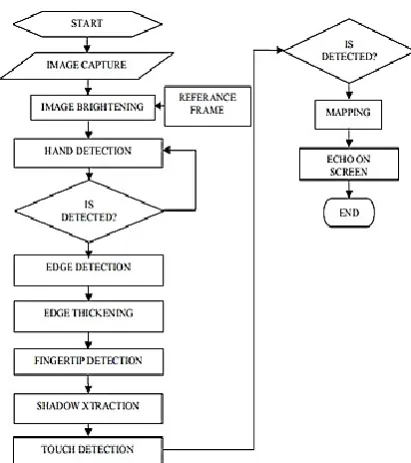
Figure 1. Flow Chart of Virtual Keyboard
3. Proposed Scheme
3.1. Training Phase
3.1.1 Image Capturing
Connect your webcam to the computer through the USB.
vid = videoinput(‘winvideo’)
Specify the adaptor name and resolution.
Open the Preview window to view the video at runtime preview(vid);
This will open a window similar to yahoo messenger Webcam interface. And you will be able to view the video demo of the webcam at runtime
The capturing of virtual keyboard designed by us is done. This command will store the image of that instant into the variable data in a matrix .
3.1.2 Pre-processing
After capturing image, the pre-processing of captured image is done by binarization. Image Binarization converts the captured rgb image to binary image. This binarization is computed by thresholding process. The pre-processing is done to get the fine tuning of the input image.
Figure 3. Pre-Processing Of Image
3.1.3 Invert Image
The binarized image is inverted to get the characters in foreground and other features to appear as background. Only the inverted image can be used for connected components detection.
3.1.4 Connected Component detection
The connected component labeling works by scanning an image, pixel-by-pixel in order to identify connected pixel regions, i.e. regions of adjacent pixels which will share the same set of intensity values V.
3.2. Testing Phase 3.2.1 Image Capturing
Connect your webcam to the computer through the USB.
vid = videoinput(‘winvideo’)
Specify the adaptor name and resolutionOpen the Preview window to view video at runtime preview (vid);It will be open a window similar to yahoo messenger Webcam interface. And you will be
able to view the video demo of the webcam at runtime. data = getsnapshot(vid);
The image of pressing any key is captured and the snapshot is automatically taken. This command will store the image of that instant into the variable data in a matrix.
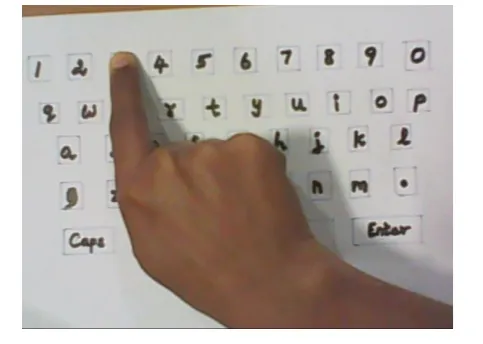
Figure 4. Identification of Key
3.2.2 Pre-processing
After capturing image, the pre-processing of captured image is done by binarization. Image Binarization converts the captured rgb image to binary image. This binarization is computed by thresholding process. The pre-processing is done to get the fine tuning of the input image.
3.2.3 Invert Image
The binarized image is inverted to get the characters in foreground and other features to appear as background. Only the inverted image can be used for connected components detection.
3.2.4 Connected Component detection
Connected component labeling works by scanning an image, pixel-by-pixel (from the top to bottom and left to right) in order to identify a connected pixel regions, i.e. regions of adjacent pixels which will share the same set of intensity values V. (For a binary image V={1} however, in a gray level image V will take on a range of the values, for example: V={51, 52,
53, ..., 77, 78, 79, 80}.) will be the connected
component labeling works on binary or gray level images and different measures of connectivity are possible.
In the testing module the data in the test is validated with the training data to get the pressed key. The detected character is written in the new text document.
Figure 5. Output Result
III.
RESULTS AND DISCUSSION
EXPERIMENTAL RESULTS
4.1 Image capturing module
This module consists of sequentially capturing images of the touching movements and storing those images in buffer acting as a queue. In a module comes into play once the user has selected the particular device that he/she desires to input information. Using the virtual keyboard at the user interface. The images are popped one by one for the character identification module. Before giving the initial captured frame of the buffer on to the character identification module for the aim of analyzing the keyboard, this keeps backup copy of it. This backup copy along with the secondary returning images is going to the character identification module for the aim of identifying the pen location and for identifying the character.
Figure 6. Input Image
4.2 Character Identification Module
Image-capturing module sends images to the module. Then one image goes through many image processing technique to extract relevant data in some level. Some
of the most vital data, which are identified by applying image processing techniques to every images are: Analyzing the keyboard is to spot the key
locations.
Segmenting the pen from the background. Generating the letters.
After detection of the edges of the keyboard from the primary start-up image. It calculates the dimensions of the keyboard. And it will calculates the height of one column and width of one raw keyboard and calculates the key Coordinates of every key and it is stored in array with in the virtual key codes. After finding the blue pixel coordinates of an image there coordinates are compared with every raw of the array to find the key block area to spot the virtual key code. The codes are used to generate the letters.
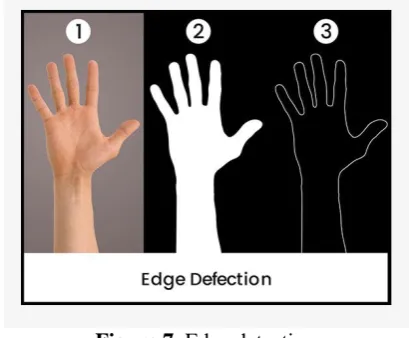
4.3 Determining the Edges
The determination of the edges of the camera vision is the main difficulty. After several experiments OV6630 that has a broad vision is selected as it could capture about 248 x 160 pixels; however the accuracy near the edges is a little low. Since we need to capture the image of entire A 3 sized keyboard we have to set the camera at 176 x 144. By setting the above resolution we can set the output format for capturing 16bit UV/Y data [2] where Y had GGGG data and UV had BRBR data. Y data was completely neglected.
Figure 7. Edge detection
IV.
CONCLUSION
reduces the hand movement time during typing, A video object processing engine that is specifically designed to detect key presses or clicks by tracking the movement of fingertips, and A fully operational Air Typing prototype that demonstrates its effectiveness and serves as the basis of the Air Typing prototype is ported to Google Glass/iPhone, and convert it into an App on Google Glass/iPhone. Through this App, we will collect more detailed usage data of Air Typing, and enhance Air Typing based on these usage data.
V.
REFERENCES
[1]. M. Khalilbeigi, R. Lissermann, M. Muhlhauser, and J. Steimle, "Xpaaand: Interaction techniques for rollable displays," in Proc. ACM CHI, 2011, pp. 2729–2732.
[2]. L. G. Cowan and K. A. Li, "ShadowPuppets: Supporting interaction with mobile projector phones using hand shadows," in Proc. ACM CHI, 2011, pp. 2707–2716.
[3]. Z. Mo, J. P. Lewis, and U. Neumann, "SmartCanvas: A gesture driven intelligent drawing desk system," in Proc. ACM IUI, 2005, pp. 239–243.
[4]. H. Benko and A. Wilson, "DepthTouch: Using the depth-sensing camera to enable freehand interactions on and above the interactive surface," in Proc. IEEE Workshop ITS, vol. 8, 2009.
[5]. C. Harrison, H. Benko, and A. D. Wilson, "OmniTouch: Wearable multitouch interaction everywhere," in Proc. ACM UIST, 2011, pp. 441–450.
[6]. D. Scharstein and R. Szeliski, "High-accuracy stereo depth maps the using structured light," in Proc. IEEE CVPR, 2003, vol. 1, pp. 195–201. [7]. C. R. Wren, Y. Ivanov, P. Beardsley, B. Kaneva,
and S. Tanaka, "Pokey: Interaction through covert structured light," in Proc. IEEE Workshop TABLETOP, 2008, pp. 185–188.
[8]. C. Harrison, D. Tan, and D. Morris, "Skinput: Appropriating the body as an input surface," in Proc. ACM CHI, 2010, pp. 453–462.
[9]. S. K. Kane, D. Avrahami, J. O. Wobbrock, B. Harrison, A. D. Rea, M. Philipose, and A. LaMarca, "Bonfire: A nomadic system for hybrid laptop-tabletop interaction," in Proc. ACM UIST, 2009, pp. 129–138.
[10]. A. D. Wilson, "PlayAnywhere: A compact interactive tabletop projection-vision system," in Proc. ACM UIST, 2005, pp. 83–92.
[11]. L.-W. Chan, T. Wu, S. Kao, J.-C. Ko, H.-R. Lin, M. Y. Chen, J. Hsu, and Y.-P. Hung, "Enabling beyond-surface interactions for interactive surface with an invisible projection," in Proc. ACM UIST, 2010, pp. 263–272.
[12]. A. D. Wilson, "Using a depth camera as a touch sensor," in Proc. ACM ITS, 2010, pp. 69–72. [13]. R. C. Gonzalez and R. E. Woods, Digital Image
Processing. Reading, MA, USA: Addison-Wesley, 1992.
[14]. Optoma Ltd., Online]. Available: http://www.optomausa.com/products/