Printing Enhancements to Citrix Presentation Server 4.0
Overview of Feature
Citrix Presentation Server 4.0 includes three new major printing enhancements: • Revamped printing engine
• Universal printer driver based on enhanced metafile technology • Printing-related policies
Printing Engine. The new Citrix Print Manager Service includes the use of the Windows enhanced metafile format for transferring print jobs from server to print device. This improves printing performance and time to print. Performance
improvements are made possible by the introduction of a new Windows service called the Citrix Print Manager Service, which is detailed below:
Please note that the VDSPL Protocol as illustrated in the above table is also known as the ICA SPL virtual channel protocol. This is the virtual channel protocol used for client printer mapping.
Citrix Print Manager Service Service Process Flow
Description This service supports the Citrix Advanced Universal Printing Architecture Path Location / Executable C:\Program Files\Citrix\System32\CpScv.exe
Managing Account Ctx_SmaUser
Feature Assessment Page 2 Date Created: May 18, 2005 Printing Enhancements to Citrix Presentation Server 4.0 Date Updated: June 7, 2005 This service compresses the print data stream and outputs it to a file in enhanced metafile format. This can produce print files that are 80-90% smaller.
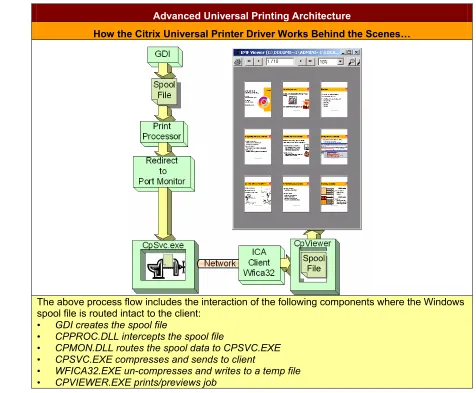
The table below details the advanced universal printing architecture. In this third reiteration of the universal printing driver, the new architecture is essentially “rebuilt from the ground up.”
Advanced Universal Printing Architecture
How the Citrix Universal Printer Driver Works Behind the Scenes…
The above process flow includes the interaction of the following components where the Windows spool file is routed intact to the client:
• GDI creates the spool file
• CPPROC.DLL intercepts the spool file
• CPMON.DLL routes the spool data to CPSVC.EXE
• CPSVC.EXE compresses and sends to client
• WFICA32.EXE un-compresses and writes to a temp file
• CPVIEWER.EXE prints/previews job
In addition, the print device identifier is now the session number and not the client device name. This eliminates potential issues that are associated with printing from environments where multiple client devices have the same name. As such, even if every client device has the name “Computer,” because the session number, not the device name, identifies the session, it is not possible for print jobs to get misdirected from one client printer to another with the same name.
Universal Printer Drivers
Driver Description Presentation Server
Release PCL4/LaserJet II driver Monochrome 300 dpi MetaFrame XP FR2 PCL5c/LaserJet 4500 driver Color, 600 dpi and duplexing MetaFrame XP FR3
Color LaserJet PS Color and 300 dpi MetaFrame XP FR3
Citrix Universal Driver
(Enhanced MetaFile) Unique new driver developed by Citrix based on enhanced metafile technology
Presentation Server 4.0
Where previous versions of Citrix Presentation Server supported the PCL4 and PCL5c universal printer drivers that were based on Hewlett-Packard LaserJet II (300 dpi monochrome) and 4500 (600 dpi color and duplex) drivers, the new enhanced metafile-based driver can support all common printer capabilities and forms, as well as discover underlying client printer capabilities.
To take advantage of any version of the universal printer driver, the corresponding Presentation Server Client must be installed on the client device. For example, the Version 9.x Presentation Server Client corresponds with Presentation Server 4.0. Please see the ICA Client Feature Matrix at http://www.citrix.com/English/SS/downloads/downloads.asp?dID=2755 to determine which Client versions support the various versions of the universal printer drivers.
If an administrator wishes to disallow any specific version(s) of the universal printer driver, these should be deleted by
following the instructions within Knowledge Base Article CTX089874. For example, in some environments, only monochrome 300 dpi printing is required, so the other universal printer drivers that are automatically installed during Presentation Server deployment can be removed.
Feature Assessment Page 4 Date Created: May 18, 2005 Printing Enhancements to Citrix Presentation Server 4.0 Date Updated: June 7, 2005 Printer Policies. Printing management has been enhanced and is now centralized in the policies node of the Presentation Server Console instead of the Printer Management node. The table below details the list of centralized policies and a listing of the available options:
Presentation Server 4.0 Printing Policies
Policy Description Options
Session Printers Choose a printer based on a
roaming user’s session information • Add oprinters: Shared name, server, printer model, and location
• Set default printer to the client’s main printer • Do not adjust the user’s default printer Client Printers\
Auto-Creation Control creation of client printers on the client device •• Auto-create all client printers Auto-create local (non-network) client printers only • Auto-create the client’s default printer only
• Do not auto-create client printers Client Printers\Legacy
Client Printers Allow use of legacy printer names and preserve backwards compatibility with prior versions of the server
• Create dynamic session-private client printers • Create old-style client printers
Client Printers\Printer Properties Retention
Control the location where printer
properties are stored •• Saved on the client device only Retained in user profile only
• Held in profile only if not saved on client Client Printers\Print
Job Routing Control whether print requests are processed by the client or the server
• Connect directly to network print server if possible • Always connect indirectly as a client printer
Client Printers\Turn Off Client Printer Mapping
Prevent users from using printers
connected to their client devices • Turn off client printer mapping
Drivers\Native Printer
Driver Auto-Install Control installation of native Windows drivers when automatically creating client and network printers
• Install Windows native drivers as needed • Do not automatically install drivers
Drivers\Universal Driver
Control when to use the universal
printer driver • Use universal driver only if requested driver is unavailable • Use only printer model specific drivers • Use universal driver only
Impact to Architectural Designs
Printing Engine. The Ctx_SmaUser account is used for both Access Suite Console session monitoring and alerting and the CpSvc.exe Windows service that supports printing. This user account is provided with power user permissions on installation of Presentation Server 4.0. Modifying this account and related permissions will likely result in printing malfunctions. The service that utilizes this account only requires limited access to the system to function properly. If this account were to be compromised, it has limited access to the system based on power user permissions as opposed to system or administrative rights. Thus, the security threat is minimized.
Because enumeration of all existing printers is no longer necessary during logon and logoff, users can expect to see improvements to logon and logoff times.
Universal Printer Driver. Because organizations can now opt for a truly universal printer driver, minimizing or eliminating native drivers becomes a reasonable alternative. Of course, the universal printer driver should be tested to ensure
Printing Policies. When designing a customer printing solution, consider WAN connections, location of print servers, and profile type. For example, if print servers are located across a WAN connection, the print job routing policy can be used to control whether the ICA data stream is passed back through the client device to take advantage of ICA compression. In addition, if folder redirection is used to retain application settings and documents, the printer properties retention policy can be used to retain printer settings, and thus mandatory profiles may be a viable option.
Considerations
Universal Printer Driver. Please note that this is the third iteration of the Citrix universal printer driver. Customers may not be fully aware of the differences and enhancements between each release. It would be important to clarify the key
differences with customers.
Additionally, only the latest Win32 Presentation Server Client supports the enhanced metafile version of universal printing functionality; no other Clients currently include the required client-side binaries.
Feature Assessment Page 6 Date Created: May 18, 2005 Printing Enhancements to Citrix Presentation Server 4.0 Date Updated: June 7, 2005
Notice
The information in this publication is subject to change without notice.
THIS PUBLICATION IS PROVIDED “AS IS” WITHOUT WARRANTIES OF ANY KIND, EXPRESS OR IMPLIED, INCLUDING ANY WARRANTIES OF MERCHANTABILITY, FITNESS FOR A PARTICULAR PURPOSE OR NON-INFRINGEMENT. CITRIX SYSTEMS, INC. (“CITRIX”), SHALL NOT BE LIABLE FOR TECHNICAL OR EDITORIAL ERRORS OR OMISSIONS CONTAINED HEREIN, NOR FOR DIRECT, INCIDENTAL, CONSEQUENTIAL OR ANY OTHER DAMAGES RESULTING FROM THE FURNISHING, PERFORMANCE, OR USE OF THIS PUBLICATION, EVEN IF CITRIX HAS BEEN ADVISED OF THE POSSIBILITY OF SUCH DAMAGES IN ADVANCE.
This publication contains information protected by copyright. Except for internal distribution, no part of this publication may be photocopied or reproduced in any form without prior written consent from Citrix.
The exclusive warranty for Citrix products, if any, is stated in the product documentation accompanying such products. Citrix does not warrant products other than its own.
Product names mentioned herein may be trademarks and/or registered trademarks of their respective companies. Copyright © 2005 Citrix Systems, Inc., 851 West Cypress Creek Road, Ft. Lauderdale, Florida 33309-2009 U.S.A. All rights reserved.
851 West Cypress Creek Road Fort Lauderdale, FL 33309 954-267-3000 http://www.citrix.com