M
M
ig
i
gr
ra
at
t
in
i
ng
g
f
f
r
r
om
o
m
Me
M
et
t
aF
a
F
ra
r
am
me
e
1.
1
.
8
8
to
t
o
M
Me
et
ta
aF
Fr
ra
am
me
e
X
XP
P
By
Notice
The information in this publication is subject to change without notice.
THIS PUBLICATION IS PROVIDED “AS IS” WITHOUT WARRANTIES OF ANY KIND, EXPRESS OR IMPLIED, INCLUDING ANY WARRANTIES OF MERCHANTABILITY, FITNESS FOR A PARTICULAR PURPOSE OR NON-INFRINGEMENT. CITRIX SYSTEMS, INC. (“CITRIX”), SHALL NOT BE LIABLE FOR TECHNICAL OR EDITORIAL ERRORS OR OMISSIONS CONTAINED HEREIN, NOR FOR DIRECT, INCIDENTAL, CONSEQUENTIAL OR ANY OTHER DAMAGES RESULTING FROM THE FURNISHING, PERFORMANCE, OR USE OF THIS PUBLICATION, EVEN IF CITRIX HAS BEEN ADVISED OF THE POSSIBILITY OF SUCH DAMAGES IN ADVANCE.
This publication contains information protected by copyright. Except for internal distribution, no part of this publication may be photocopied or reproduced in any form without prior written consent from Citrix.
The exclusive warranty for Citrix products, if any, is stated in the product documentation accompanying such products. Citrix does not warrant products other than its own.
Product names mentioned herein may be trademarks and/or registered trademarks of their respective companies.
Copyright © 2001 Citrix Systems, Inc., 6400 NW 6th Way, Ft. Lauderdale, Florida 33309 U.S.A. All rights reserved.
Version History
March 27, 2001 Scott C. Thompson, Citrix Consulting Services Larry Sweeney, Citrix Consulting Services Melissa S. Hopkins, Citrix Consulting Services Ed Rodriguez, Citrix Consulting Services
Krista Brandt, Citrix Consulting Services Katherine Schaefer, Citrix Consulting Services
Version 1.0
Table of Contents
INTRODUCTION ...1
MIGRATION METHODOLOGY...2
ANALYSIS...2
DESIGN...5
IMPLEMENTATION...6
READINESS...6
PRODUCTION ROLLOUT...7
MIGRATION STRATEGIES ...8
STRATEGY #1: MIGRATE EXISTING METAFRAME 1.8 SERVER FARM...8
STRATEGY #2: CREATE A NEW METAFRAME XP SERVER FARM...8
STRATEGY #3: CREATE A NEW METAFRAME XP SERVER FARM WITH NEW SERVER INSTALLATIONS...9
METAFRAME XP MIXED MODE ...10
MIXED MODE ARCHITECTURE...10
MIXED MODE CONSIDERATIONS AND RECOMMENDATIONS...13
MIGRATION SCENARIOS, PROCESSES, AND BEST PRACTICES...21
SCENARIO #1 ...21
SCENARIO #2 ...27
SCENARIO #3 ...34
APPENDIX A – NFUSE MULTI-FARM CONSOLIDATION...42
OVERVIEW...42
CREATING A SINGLE POINT OF ACCESS...42
CUSTOMIZING THE MULTIPLE SERVER FARM SITE...42
Table of Figures
FIGURE 1METAFRAME XP MIXED MODE ARCHITECTURE...11
FIGURE 2METAFRAME XP NATIVE MODE ARCHITECTURE...12
FIGURE 3INTEROPERABILITY TAB...17
FIGURE 4QSERVER COMMAND...18
FIGURE 5ICA GATEWAYS TAB...18
FIGURE 6SCENARIO 1 EXISTING INFRASTRUCTURE...22
FIGURE 7ICA CLIENT TCP/IP SETTING...23
FIGURE 8SCENARIO 1 PLANNED NATIVE METAFRAME XP ARCHITECTURE...24
FIGURE 9SCENARIO 2 EXISTING INFRASTRUCTURE...27
FIGURE 10SCENARIO 2 PLANNED NATIVE METAFRAME XP ARCHITECTURE...29
FIGURE 11SCENARIO 2 MIGRATION ARCHITECTURE...31
FIGURE 12SCENARIO 3 EXISTING INFRASTRUCTURE...34
FIGURE 13ICA CLIENT TCP/IP + HTTP SETTING...36
FIGURE 14SCENARIO 3 PLANNED NATIVE METAFRAME XP ARCHITECTURE...37
FIGURE 15SCENARIO 3 MIGRATION ARCHITECTURE...38
Introduction
This white paper presents a structured methodology from Citrix Consulting Services (CCS) that can be used as a model for planning your migration from MetaFrame 1.8 to MetaFrame XP. This white paper presents the CCS methodology model and then applies the model to the migration process.
This white paper presents sample migration strategies, scenarios, and best practices for transitioning to a native MetaFrame XP architecture comprised of only MetaFrame XP servers. A native MetaFrame XP architecture, based on the Independent Management Architecture (IMA), includes many benefits that are described in detail in the Citrix MetaFrame XP Application Server for Windows Administrator’s Guide (hereafter referred to as the MetaFrame XP Administrator’s Guide). While MetaFrame XP does provide interoperability with previous versions of MetaFrame, the full benefits of MetaFrame XP are realized only when operating in a native MetaFrame XP environment. The CCS methodology features tested and proven design and implementation techniques for large-scale deployments of server-based computing utilizing Citrix MetaFrame. The methodology ensures project success through early detection and mitigation of risks, rigorous project planning, and effective execution of the
methodology and project plans. This methodology is the result of years of experience performing successful large-scale MetaFrame implementations.
Note: This white paper requires familiarity with the concepts and configurations found in the MetaFrame XP Administrator’s Guide and Advanced Concepts for MetaFrame XP. References to these documents are made throughout this white paper to avoid repetition of information.
Migration Methodology
The CCS migration methodology is made up of the following five main phases: Analysis
Design
Implementation Readiness
Production Rollout
In addition to the five main phases, a management checkpoint is included at the end of each phase to review deliverables and assess overall project status. Project management is also required throughout each phase. The CCS migration methodology is depicted in the following diagram.
Analysis
Design
Imple-
Readiness
Rollout
mentation
Project Management
C h eck p o in t C h eck p o in t C h eck p o in t C h eck p o in tThe five phases of the CCS methodology are explained below.
Analysis
The analysis phase is broken down into the following four segments: Project Scope
Project Plan
Infrastructure Assessment Proof of Concept
The following deliverables are created during the analysis phase: Project Plan
Infrastructure Assessment
Project Scope
The scope of the MetaFrame XP migration is identified in the project scope segment of the analysis phase. What is included and not included in the migration is detailed as part of the scope definition. When the project scope is defined, project/phase success criteria are also developed to help gauge the progress of the migration.
Project Plan
When the project scope is completely defined, it is necessary to detail the tasks to be completed during the MetaFrame XP migration along with estimated times to completion and project milestones (project milestones generally coincide with the management checkpoints). The tasks that are necessary for a successful MetaFrame XP migration are outlined in the Project Plan (the form of this deliverable is typically a Microsoft Project file or a Gantt chart).
Infrastructure Assessment
The existing MetaFrame 1.8 environment is reviewed during the infrastructure assessment segment. The
infrastructure assessment reviews several areas that are critical to successfully migrating from MetaFrame 1.8 to MetaFrame XP. The infrastructure assessment:
Determines if anything in the existing environment presents risks to the migration Identifies considerations that should be taken
Identifies existing infrastructure components that can be leveraged as part of the migration Gathers requirements that will feed the migration design process
The infrastructure assessment reviews the following areas of the MetaFrame 1.8 environment:
Farm Architecture: This area includes a review of the existing farm architecture, including the number of farms, the sizes of the farms, and how the farms are grouped. Migration to MetaFrame XP may require a re-evaluation of farm design and implementation.
ICA Browser: This area includes a review of the existing ICA Browser configuration. The number of master ICA Browsers, backup ICA Browsers, and member servers are noted.
Servers: This area identifies the number of servers in the environment and their specifications. The capability of the hardware is evaluated based on anticipated user load and growth. The servers’ CPU, memory, physical disk, and network interface are validated during the infrastructure assessment.
Load Balancing: The current load balancing structure is analyzed to validate that the structure of the load-balanced groups is optimized to take advantage of MetaFrame’s load balancing capabilities. The load-load-balanced groups should be built with consideration to application usage, application dependencies, application
compatibilities, or application upgrade frequency.
Applications: This area reviews information about published applications. The published applications are analyzed based on their type (32-bit or 16-bit), version number, and memory requirements.
Application Delivery: This area reviews how applications are currently delivered. It also includes a review of ICA Client configuration.
Licensing: This area reviews the existing licensing strategy and how any existing gateways are configured for license pooling.
Following the completion of the infrastructure assessment, a management checkpoint is conducted to review the results and findings of the infrastructure assessment. The results of the infrastructure assessment are used to develop requirements for the design phase. The infrastructure assessment determines whether to perform a Proof of Concept, to continue on to the design phase, or to address additional issues.
Proof of Concept
A Proof of Concept (POC) proves to the organization’s business managers, users, and information technology teams that an application can be successfully delivered using the MetaFrame XP architecture. It also allows an organization to identify hardware, software, and business process issues prior to system implementation. The POC demonstrates the key technologies involved and provides an environment for experimentation and evaluation. The design and implementation of a POC, while very detailed and organized, does not serve as a replacement for a complete system analysis and design. The POC uses a controlled environment to simulate the organization’s target technical environment and, utilizing representative business functions, demonstrates MetaFrame XP’s benefits to the organization.
Objectives must be clearly defined prior to undertaking a POC. These objectives most often fall into the following categories:
Corporate Objectives – High-level goals that focus on reducing overall system cost, seeking a method to improve system redundancy, and reducing information technology related incidents that reduce employee effectiveness. These requirements are linked to a search for an enterprise solution that can be leveraged throughout the company.
Management Objectives – Mid-level goals that focus on addressing specific deployment/integration issues, including:
o Reducing desktop support activities.
o Correcting specific application issues, such as slow WAN performance
o Deploying applications to users faster, with fewer resources
o Enhancing network security and streamlining user deployment/configuration
User Objectives – Low-level goals that focus on the quality of service provided by the desktop or Windows-based terminal configuration, including:
o Faster application performance
o Enhanced application stability
o Faster issue resolution
o Better access to new applications
Design
The design phase includes the following segments: Native MetaFrame XP architecture
Identify migration strategy Migration architecture
The following deliverables are created during the design phase: Native MetaFrame XP Architecture Design
Migration Architecture Design
Native MetaFrame XP Architecture
To determine the migration strategy, the native MetaFrame XP architecture must be planned. The Native MetaFrame XP Architecture Design covers the following areas:
Farm Architecture: This area defines the architecture of the new MetaFrame XP farm.
Load Management: This area defines the configuration of Load Management evaluators. MetaFrame XP manages load across farms and at the application level. The Load Management design takes into consideration the optimal settings for the load-managed farm.
Data Store: This area defines the configuration of the MetaFrame XP data store. Based on the infrastructure size, the data store hardware configuration may need to be designed. This includes operating system choice and relational database selection (Oracle, SQL).
Data Collector: This area defines the configuration of the MetaFrame XP data collectors.
Zones: This area defines the MetaFrame XP zone configuration.
Applications: This area defines whether existing application installations should be used in the native MetaFrame XP architecture.
Application Delivery: This area defines how applications will be delivered to clients. It includes ICA Client configuration.
Licensing: This area defines the licensing model to be used.
Identify Migration Strategy
Migration Architecture
The migration architecture must be defined once a migration strategy has been identified. This migration architecture will include the infrastructure design that supports the chosen migration strategy. The Migration Architecture Design includes the following areas:
Farm Architecture: This area defines the MetaFrame XP farm architecture during the migration period.
Load Balancing/Management: This area defines how load balancing and Load Management evaluators will be configured.
Data Store: This area defines the configuration of the MetaFrame XP data store.
Master ICA Browser: This area defines the master ICA Browser configuration.
Data Collector: This area defines the configuration of the MetaFrame XP data collectors.
Zones: This area defines the MetaFrame XP zone configuration.
Applications: This area defines the configuration of published applications during the migration.
Application Delivery: This area defines how applications will be delivered to users during the migration period. It includes ICA Client configuration.
Licensing: This area defines how licensing will be addressed during the migration.
Implementation
The implementation phase includes the development and testing of any components or scripts that were identified and designed during the design phase.
Examples of implementation phase deliverables include:
Unattended Installation scripts used to build a new server, including the operating system, MetaFrame, and user applications and configurations
Logon/logoff scripts that are used to customize the user’s environment
Components needed to integrate published applications into a Web portal using NFuse Customized NFuse Web pages
Readiness
The readiness phase consists of the following two main segments: Testing
Pilot
Change Management
When migrating from MetaFrame 1.8 to MetaFrame XP, it is important to have a stringent change control process in place. An unmanaged MetaFrame environment creates instability and is difficult to maintain and support. Organizations have many changes driven by the business and information technology teams that impact the MetaFrame environment both directly and indirectly. All changes must be tracked to allow for proper risk management of the MetaFrame environment.
A formal change control process requires administrators to document every change and prove that it has been through an aggressive testing environment. By following a change control process the MetaFrame environment becomes more stable and efficient.
It is highly recommended that for each change the following process be followed:
Testing --> Pilot --> Production Rollout
This process requires that the change be implemented first in a test environment. The change is then migrated to a pilot environment, and finally to the full production environment. Before each migration, the change is fully tested in the environment to ensure that it functions correctly.
Testing
Testing is used to identify and fix potential issues with the planned native MetaFrame XP architecture or the migration architecture prior to production rollout. Testing includes a full system test and scalability testing.
System Test
The system test tests both the native MetaFrame XP architecture and the migration architecture to ensure that all functionality and quality requirements have been met. System testing occurs on multiple levels as each component of the overall environment is tested alone and in conjunction with the other components (as they would be used in a production environment). The test environment should resemble the production environment as closely as possible, including server hardware, server configuration, and network configuration.
Scalability Testing
Scalability testing includes testing for both server and network scalability.
Pilot
A pilot implementation allows you to “test drive” a Citrix solution in a live production environment. The pilot implementation is the proving ground for network designs, application compatibility, and other requirements identified during the analysis and design phases. The pilot consists of an actual production environment with live users. The pilot provides the baseline environment on which additional enhancements can be tested.
Production Rollout
Migration Strategies
This paper presents the following three strategies for migrating from MetaFrame 1.8 to MetaFrame XP. Each of these migration strategies is explained in detail in this section.
Strategy #1: Migrate an existing MetaFrame 1.8 server farm. The existing MetaFrame 1.8 servers are migrated to MetaFrame XP in a phased approach, using MetaFrame XP “mixed” mode of operation.
Strategy #2: Create a new MetaFrame XP server farm. Two farms, a MetaFrame 1.8 farm and a MetaFrame XP farm, coexist but do not interoperate in mixed mode.
Strategy #3: Create a new MetaFrame XP server farm with new server installations.
Strategy #1: Migrate Existing MetaFrame 1.8 Server Farm
This first migration strategy migrates an existing MetaFrame 1.8 server farm to MetaFrame XP. The existing MetaFrame 1.8 servers are upgraded and migrated to MetaFrame XP in a phased approach. MetaFrame XP mixed mode operation is used to allow both the new MetaFrame XP farm and the existing MetaFrame 1.8 farm to
interoperate together until the migration is complete.
Reasons to choose this migration strategy include the following:
The company has a large MetaFrame 1.8 farm, making it difficult to quickly migrate to a new MetaFrame XP farm.
The size of the server farm requires that existing MetaFrame 1.8 servers interoperate with the new MetaFrame XP servers to handle the production load without requiring users to connect to two separate farms.
The company wants to maintain existing application deployments by migrating published applications to MetaFrame XP.
The company wants to use existing server installations during the migration.
MetaFrame XP mixed mode operation is designed to facilitate migration to MetaFrame XP; it is not designed to be a permanent solution. For specific considerations, issues, and recommendations regarding MetaFrame XP mixed mode operation refer to the “MetaFrame XP Mixed Mode” section of this document. For instructions on how to enable MetaFrame XP mixed mode during MetaFrame XP installation, see the MetaFrame XP Administrator’s Guide.
Strategy #2: Create a new MetaFrame XP Server Farm
This migration strategy consists of migrating MetaFrame 1.8 servers from an existing MetaFrame 1.8 farm to a new MetaFrame XP server farm operating in native mode. The MetaFrame XP farm does not interoperate with the existing MetaFrame 1.8 farm. Two separate farms, a MetaFrame 1.8 farm and a MetaFrame XP farm, co-exist until all MetaFrame 1.8 servers are migrated.
Reasons to choose this migration strategy include the following:
The company wants to maintain existing application deployments by migrating published applications to MetaFrame XP.
The company wants to segregate and migrate users to the new MetaFrame XP farm.
The company wants to use MetaFrame XP IMA communication and the full MetaFrame XP feature set.
Strategy #3: Create a New MetaFrame XP Server Farm with
New Server Installations
The third migration strategy is to create a new MetaFrame XP server farm with new server installations. This strategy mirrors the second migration strategy with the exception that servers receive clean system installations. In this scenario, existing or new servers can be utilized for the migration.
Reasons to choose this migration strategy include the following:
The company wants to deploy new applications or re-configure existing applications.
The company wants to implement new hardware when creating the new MetaFrame XP environment. The company wants to implement a new architecture for the following reasons:
o The physical architecture of the existing implementation needs to be changed. For example, MetaFrame servers are currently deployed to multiple sites, and the company wants to physically consolidate the servers.
o The company is planning other infrastructure implementations. For example, the company is moving from Windows NT 4.0 to Windows 2000.
The company wants to use MetaFrame XP IMA communication and the full MetaFrame XP feature set. The company prefers a “clean” system migration.
MetaFrame XP Mixed Mode
MetaFrame XP supports two modes of operation: native mode and mixed mode. MetaFrame XP native mode does not allow for interoperability with previous versions of MetaFrame. Organizations that have existing MetaFrame 1.8 farms may need to integrate new MetaFrame XP servers with the MetaFrame 1.8 farm for migration purposes. MetaFrame XP mixed mode allows MetaFrame XP server farms to interoperate with MetaFrame 1.8 server farms. Mixed mode allows a MetaFrame 1.8 farm and a MetaFrame XP farm to interact together so they appear to ICA Clients as one server farm.
This section discusses MetaFrame XP mixed mode operation, how it differs from MetaFrame XP native mode operation, and how it pertains to migration. This section also presents recommendations for operating in mixed mode.
Mixed Mode Architecture
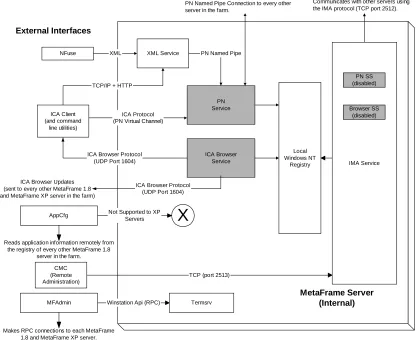
Mixed mode must support the existing features of the MetaFrame 1.8 farm across both the existing MetaFrame 1.8 farm and the new MetaFrame XP farm. This is accomplished by running the Program Neighborhood and ICA Browser services on each MetaFrame XP server in the farm. These services are installed during MetaFrame XP installation. The functionality of these services also exists in a native MetaFrame XP environment as subsystems of the IMA service.
The MetaFrame XP mixed mode architecture is depicted in the following diagram: PN Service ICA Browser Service AppCfg ICA Client (and command line utilities) XML Service NFuse
PN Named Pipe Connection to every other server in the farm.
ICA Browser Updates (sent to every other MetaFrame 1.8 and MetaFrame XP server in the farm)
Reads application information remotely from the registry of every other MetaFrame 1.8
server in the farm.
MFAdmin Winstation Api (RPC) Termsrv
Makes RPC connections to each MetaFrame 1.8 and MetaFrame XP server.
IMA Service Communicates with other servers using the IMA protocol (TCP port 2512).
Not Supported to XP Servers
X
Local Windows NT Registry PN SS (disabled) Browser SS (disabled) MetaFrame Server (Internal) External Interfaces XML ICA Protocol (PN Virtual Channel) TCP/IP + HTTPICA Browser Protocol (UDP Port 1604)
PN Named Pipe
ICA Browser Protocol (UDP Port 1604)
TCP (port 2513) CMC
(Remote Administration)
Figure 1 MetaFrame XP Mixed Mode Architecture
The MetaFrame XP native mode architecture is shown below:
External Interfaces
ICA Client
XML Service NFuse
(Web Server with NFuse Extensions)
ICA Browser Protocol (UDP Port 1604)
IMA Service
LHC
Access Data Store (only on one server in the farm when a local data store is
used) CMC
(Remote Administration)
TCP (port 2513)
Command Line Utilites
Communicates with other servers using the IMA protocol (TCP port 2512)
MS Access ODBC
ODBC
Winstation Api (RPC) Termsrv PN SS Browser SS MetaFrame Server (Internal) IMA RPC IMA RPC TCP/IP + HTTP
ICA Protocol (PN Virtual Channel)
Remote Data Store (MS SQL Server
or Oracle) ODBC (when the server is
configured for a direct connection to a remote database) XML
Figure 2 MetaFrame XP Native Mode Architecture
The operating mode is determined by the global “interoperability flag” set when MetaFrame XP is installed on the first server in a new farm. The operating mode is a farm-wide setting and can be changed at any time by modifying the farm properties using the Citrix Management Console. Once a farm is configured for a mode of operation, all existing servers in the farm are changed to that mode.
Each MetaFrame XP server queries the interoperability flag during boot up, and enables or disables the correct IMA sub-systems accordingly. This operation places the server in the configured mode. All new servers that are added to the farm are automatically put into this mode.
The MetaFrame XP servers continue to monitor the interoperability flag after boot up. The appropriate services are enabled or disabled if the operating mode changes. A reboot is not required to switch between operating modes. Because it takes time for a change in the operating mode to propagate to all servers in the farm, ICA Clients may be unable to refresh applications in Program Neighborhood or browse for published applications until the change has been propagated (current ICA connections are not affected). It is recommended that the operating mode be changed when the fewest users are connected to published applications.
Native mode and mixed mode can be compared as follows:
The ICA Client uses the Program Neighborhood virtual channel to connect to the Program Neighborhood Service in mixed mode; and to the Program Neighborhood subsystem in native mode.
The ICA Client uses the ICA Browser protocol (UDP Port 1604) to connect to the ICA Browser service in mixed mode; and to the Browser subsystem in native mode.
In mixed mode, the Program Neighborhood and ICA Browser services exist and are enabled, while the Program Neighborhood and Browser subsystems are disabled. The Program Neighborhood and ICA Browser services interact with the local Windows registry.
In mixed mode, Citrix Server Administration (mfadmin.exe) makes RPC connections to all MetaFrame 1.8 and MetaFrame XP servers. It also connects to Termsrv via Winstation API (RPC). In native mode, Citrix Server Administration makes RPC connections only to MetaFrame 1.8 servers.
In mixed mode and in native mode, Published Application Manager (appcfg.exe) reads application information only from MetaFrame 1.8 servers. Published applications for MetaFrame XP are managed only through the Citrix Management Console.
The IMA service exists in both modes of operation. It communicates with other servers via the IMA protocol over TCP Port 2512. It also connects to Termsrv via Winstation API (RPC), the local host cache via ODBC, and the data store via ODBC. The IMA service interacts with the local Windows registry only in mixed mode.
Note: There are more differences between native mode and mixed mode, including differences in load balancing, license pooling, and gateways, that should be considered before implementing mixed mode in a production environment. See Advanced Concepts for MetaFrame XP for a detailed description of these differences.
Mixed Mode Considerations and Recommendations
The following sections describe considerations to take and recommendations to follow when implementing a MetaFrame XP mixed mode farm.
Farm Name
The MetaFrame XP server farm must have the same name as the MetaFrame 1.8 server farm. When you install MetaFrame XP on the first server in the farm, you name the server farm at the same time you create the data store.
Note: ICA Clients see the MetaFrame XP and MetaFrame 1.8 farms operating in mixed mode as a single farm. However, they are two separate farms.
Management Utilities
MetaFrame XP farms and MetaFrame 1.8 farms are managed by separate utilities. You can manage a MetaFrame 1.8 farm using MetaFrame 1.8 utilities including Citrix Server Administration (mfadmin.exe) and Published
Use the Citrix Management Console to manage a MetaFrame XP farm. Published Application Manager cannot be used to manage applications migrated to MetaFrame XP servers.
Shadowing
In MetaFrame XP native mode operation, the Shadow Taskbar displays MetaFrame XP servers in a server farm. In MetaFrame XP mixed mode operation, the taskbar displays servers in both the MetaFrame 1.8 farm and the MetaFrame XP farm.
License Pooling in Mixed Mode
For information and examples about license pooling and how license gateways are affected by mixed mode, refer to the “Native and Mixed Mode Details” section of Advanced Concepts for MetaFrame XP.
Load Balancing in Mixed Mode
Although MetaFrame XP servers interoperate with MetaFrame 1.8 servers when operating in mixed mode, the new MetaFrame XP Load Management functionality is available only on MetaFrame XP servers running in native mode. Successfully load balancing applications between MetaFrame 1.8 servers and MetaFrame XP servers requires the following:
One of the MetaFrame XP servers must be the master ICA Browser. If a MetaFrame XP server is not the master ICA Browser, the two farms cannot be load balanced.
Only the Default Load Evaluator should be attached to all the MetaFrame XP servers.
It is possible to add different server load evaluators to the MetaFrame XP servers in mixed mode, although it is very difficult to load balance the MetaFrame XP servers with MetaFrame 1.8 servers in a logical way.
Therefore, load balancing in mixed mode is supported only when the Default Load Evaluator is used.
Applications to be load balanced must first be created in Published Application Manager in the MetaFrame 1.8 farm, and then created with the exact same name in the MetaFrame XP farm using the Citrix Management Console.
If applications are not published with an identical name, the applications are considered to be different applications to the master ICA Browser and will not load balance across MetaFrame 1.8 and MetaFrame XP servers.
Applications must be published on the MetaFrame 1.8 servers before being published on the MetaFrame XP servers. If applications are published on the MetaFrame XP servers first, attempting to publish the applications on the MetaFrame 1.8 servers returns an error stating that the application could not be created because the application name already exists.
A MetaFrame XP farm operating in mixed mode follows a unique load balancing algorithm. When a connection is launched to a load-balanced application, the following process occurs:
The ICA Client makes a request to the master ICA Browser to access the least loaded server on which the application is published.
The master ICA Browser evaluates the loads on all MetaFrame XP servers on which the application is
published, and chooses the least loaded server. This load is based solely on the number of user connections to the server.
The master ICA Browser evaluates the loads on all MetaFrame 1.8 servers on which the application is published, and chooses the least loaded server.
The master ICA Browser ignores both load values from the least loaded MetaFrame XP server and the least loaded MetaFrame 1.8 server. The master ICA Browser instead determines the number of active connections running on the two servers, and routes the client to the server with the least number of active connections. If both servers have the same number of active connections, the master ICA Browser will always route the ICA Client to the MetaFrame XP server.
The load balancing algorithm used in MetaFrame XP mixed mode is depicted in the diagram below.
MetaFrame 1.8 Farm MetaFrame XP Farm
Step 1
Step 2
Step 3
MF 1.8 Server 1 Server Load: 300 # Connections: 5
MF 1.8 Server 2 Server Load: 180 # Connections: 3
MF XP Server1 Server Load: 600 # Connections: 6
MF XP Server2 Server Load: 200 # Connections: 2
MF 1.8 Server 2 Server Load: 180 # Connections: 3
MF XP Server 2 Server Load: 200 # Connections: 2
MF XP Server2 Server Load: 200 # Connections: 2
In Step 2, the master ICA Browser ignores the server loads of the final two servers and looks at the number of active connections to each server. In this scenario, MF XP Server 2 has two connections and MF 1.8 Server 2 has three connections. Thus, MF XP Server 2 will field the ICA Client request for the application session.
ICA Browser Elections
When MetaFrame XP is configured for mixed mode operation, MetaFrame 1.8 farms and MetaFrame XP farms appear unified because ICA Browsers in both farms pool information. A MetaFrame XP server becomes the master ICA Browser of both farms. The new master ICA Browser holds information about the published applications available on each server.
When the first MetaFrame XP server is brought online with an existing MetaFrame 1.8 farm, either by upgrade or new installation, the new MetaFrame XP server becomes the master ICA Browser on the subnet if mixed mode is chosen when MetaFrame XP is installed. This is an important migration consideration because of how it could affect the environment. It is recommended that the existing master ICA Browser be upgraded first, and then the backup ICA Browsers. The newly migrated server becomes the master ICA Browser for both the MetaFrame 1.8 farm and the MetaFrame XP farm. This same server also becomes the zone data collector for the MetaFrame XP farm.
If mixed mode operation is enabled when there is a MetaFrame 1.8 farm and a native mode MetaFrame XP farm on the same subnet, one of the MetaFrame XP servers will become the master ICA Browser. This is because the MetaFrame XP ICA Browser has a higher version level than the existing MetaFrame 1.8 ICA Browser.
The first MetaFrame XP server in the farm will host the data store if the option Use a local database for the data store is selected. The data store will be created as an Access database. If running in mixed mode operation, this server will also become the master ICA Browser.
If there is a need to host the data store on a server other than the master ICA Browser, perform the following steps to separate the data store from the master ICA Browser. These steps ensure that the previous master ICA Browser will become the new master ICA Browser while in mixed mode operation.
1. Install or upgrade the server that will host the data store. During this installation, do not choose Operate in mixed mode with MetaFrame 1.8 servers.
2. Upgrade the master ICA Browser and backup ICA Browser servers.
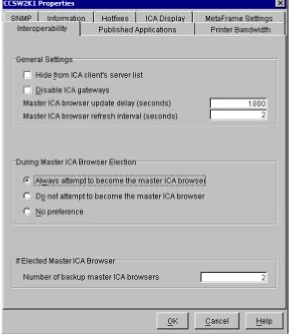
Select the server that was the master ICA Browser prior to upgrading. Right-click the server and select
Properties. The figure below displays the Interoperability tab.
Figure 3 Interoperability Tab
Choose the following options on the Interoperability tab:
a. Under the section During Master ICA Browser Election select Always attempt to become the master ICA browser.
b. If backup ICA Browsers were upgraded, the number of backup ICA Browsers should be indicated in the If Elected Master ICA Browser section next to Number of backup master ICA browsers.
c. The properties of the data store server should be set to Do not attempt to become the master ICA browser.
4. Click OK to close the Properties dialog box for the master ICA Browser.
ICA Gateways
In a MetaFrame 1.8 implementation, ICA Gateways may be in place to enable farms to span network subnets. ICA Gateways are also used in MetaFrame XP mixed mode to enable communication between master ICA Browsers on each subnet. This is indicated by a G listed next to each master ICA Browser in the results of a qserver command. The figure below displays a sample output:
Figure 4 Qserver Command
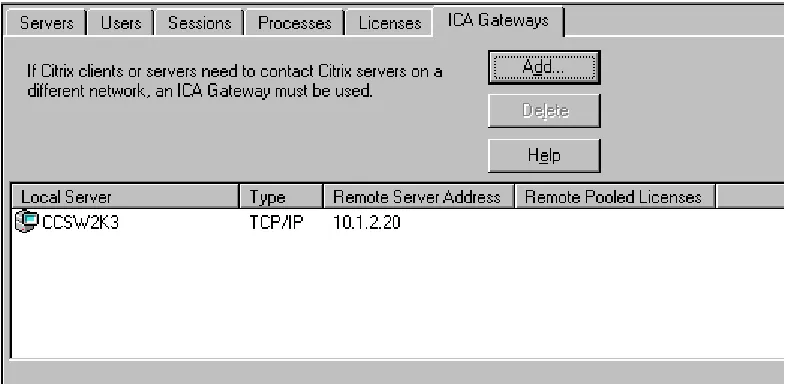
When ICA Gateways are created there is an initiating server (the server where the gateway was configured) and a receiving server (the remote server for the gateway as configured on the initiating server). These servers are listed in Citrix Server Administration (mfadmin.exe) on the ICA Gateways tab when All Listed Servers is selected, and also by running the qserver /gateway command. The figure below shows the ICA Gateways tab in the Citrix Server Administration utility.
Figure 5 ICA Gateways Tab
On the ICA Gateways tab in the figure above, the Local Server column displays the name of the initiating server and the Remote Server Address column displays the IP address of the receiving server.
Client Connectivity
In MetaFrame XP mixed mode operation, ICA Clients communicate with a single master ICA Browser for both the MetaFrame 1.8 farm and the MetaFrame XP farm by connecting to servers in either farm. When launching published applications, ICA Clients contact the master ICA Browser for the address of a server that can run the application. ICA Clients also contact the master ICA Browser to find new application sets and servers that host published applications for custom connections. The single master ICA Browser allows ICA Clients to connect to servers in either the MetaFrame 1.8 or MetaFrame XP farm.
The operating mode of the MetaFrame XP farm determines how it responds to ICA Client connections requests, whether through “auto-locate” broadcasts or specified server locations. ICA Client communication also functions differently when MetaFrame 1.8 servers reside on the same network as MetaFrame XP servers, regardless of the MetaFrame XP operating mode. For a more detailed explanation of ICA Browsing and ICA Client configuration refer to Chapter 3 of the MetaFrame XP Administrator’s Guide, and Chapter 7 (“ICA Client Configuration”) of Advanced Concepts for MetaFrame XP.
Network Traffic
MetaFrame XP mixed mode operation requires two types of network traffic. Both MetaFrame 1.8 servers and MetaFrame XP servers communicate via UDP Port 1604 for MetaFrame 1.8 server communication. In addition, IMA TCP Port 2512 traffic exists between all MetaFrame XP servers for MetaFrame XP server communication. Because operating in MetaFrame XP mixed mode results in increased network traffic and can affect network scalability, you should carefully consider whether to operate in this mode of operation.
Zones, Data Collectors, and Data Store
All standard MetaFrame XP components exist in mixed mode operation. MetaFrame XP zones continue to be established during server installation or through the Citrix Management Console. A data collector exists for each zone and a data store exists for each MetaFrame XP farm.
Published Application Migration
Applications published under MetaFrame 1.8 prior to migrating will upgrade successfully to MetaFrame XP. This is the case for both mixed mode and native mode operation. When MetaFrame 1.8 servers that host these
applications are migrated to MetaFrame XP, the server is automatically added to the list of servers that host the application. This holds true only if the application is not modified after the first server is migrated to MetaFrame XP. The following complications can arise if you add new applications or modify existing applications after the first server is migrated to MetaFrame XP (while the farm is still in mixed mode operation).
If applications that are to be load balanced across both MetaFrame 1.8 and MetaFrame XP servers are published first using the Citrix Management Console, they cannot then be published using Published Application Manager (appcfg.exe). When trying to publish an application to MetaFrame 1.8 servers using Published Application Manager after publishing the same application to MetaFrame XP servers, the following error message is displayed (where appname is the name of the application being published):
HKLM\System\CurrentControlSet\Control\ Citrix\Managed Applications. Published Application Manager
(appcfg.exe) reads application information remotely from the registry of every other server in the farm. Because Published Application Manager is aware of the application that was published on the MetaFrame XP servers (using the Citrix Management Console), it does not allow a new published application to be created with the same name.
To eliminate this issue, publish applications on MetaFrame 1.8 servers using Published Application Manager from a MetaFrame XP server, and then publish the applications on the MetaFrame XP servers using the Citrix Management Console.
When a migrated published application is load balanced across both MetaFrame 1.8 and MetaFrame XP servers, the application icon appears when the MetaFrame 1.8 version of Published Application Manager is opened. However if the Published Application Manager window is refreshed, the application icons disappear. The applications reappear when Published Application Manager is closed and re-opened. This occurs because refreshing Published Application Manager causes it to only read the registry of MetaFrame XP servers only. Because the registry of the MetaFrame XP server does not list all the servers for each published application, the icons disappear. The MetaFrame XP server lists only applications that are published locally. This issue does not occur when using the MetaFrame XP version of Published Application Manager (appcfg.exe).
Published applications that have been migrated continue to display the newly migrated MetaFrame XP servers in each application’s list of configured servers within Published Application Manager. If removed from the list, the migrated servers cannot be re-added because MetaFrame XP servers can only be managed from the Citrix Management Console.
Published applications modified using the version of Published Application Manager that is installed with MetaFrame XP cannot later be modified from the version of Published Application Manager installed on all MetaFrame 1.8 servers.
It is not recommended to add or modify published applications while in mixed mode operation. If it is necessary to add published applications to be load balanced across MetaFrame 1.8 and MetaFrame XP farms or to modify existing published applications, the following actions are recommended:
When a published application has been added or modified, do not migrate published applications during subsequent MetaFrame 1.8 to MetaFrame XP migrations.
After the MetaFrame 1.8 server has been migrated to the MetaFrame XP farm without migrating the published applications, use the Citrix Management Console to add this server to the list of configured servers for each application to be published on this server.
For additional details about published application migration and potential issues that may be encountered, refer to Chapter 5 of Advanced Concepts for MetaFrame XP.
Application Migration Log
When migrating MetaFrame 1.8 servers and their applications to MetaFrame XP, the migration log file should be referenced after the migration. The log file contains application migration results detailing whether each application migrated successfully. The log file is located in the %SystemRoot%\system32 directory.
License Migration
Migration Scenarios, Processes,
and Best Practices
This section provides three migration scenario examples using the methodology defined in the Migration
Methodology section of this document to demonstrate the process and best practices for each type of migration. These scenarios use the second and third migration strategies. The first migration strategy is not recommended because of considerations discussed in the Mixed Mode Considerations and Recommendations section of this document.
The scenarios do not include a project plan as part of the analysis phase. Specific tasks and estimated timelines for those tasks can vary greatly from company to company. The following factors can affect the project plan:
Timelines Resources Budget Scope
Hardware and software availability
A migration project plan should provide estimates for all the required tasks. To determine the tasks required, customize the methodology to the requirements for the specific migration project. The migration scenarios describe hypothetical examples. Therefore, specific detailed project plans are not included as the scenarios cover multiple possible requirements and environments.
The scenarios do not include a Proof of Concept. It is assumed that the MetaFrame XP technical concept has already been proven to business owners.
Scenario #1
The first scenario describes an example of migrating from one MetaFrame 1.8 farm on a single subnet to a MetaFrame XP farm. The existing farm currently uses MetaFrame 1.8 with Feature Release 1 and Load Balancing Services. In this scenario new server hardware will be used for all MetaFrame XP servers.
Analysis
The analysis phase of the migration methodology includes a project scope definition and an infrastructure assessment.
Project Scope
Project management has defined the success criteria to include the following: Successful implementation of the MetaFrame XP environment
Infrastructure Assessment
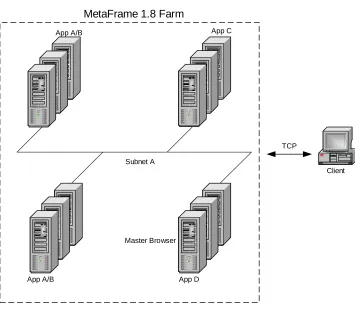
The following diagram depicts the existing infrastructure environment:
MetaFrame 1.8 Farm
Client
App A/B App C
App A/B
TCP
Subnet A
App D Master Browser
Figure 6 Scenario 1 Existing Infrastructure
The infrastructure environment is described as follows:
Farm Architecture –All servers reside in one MetaFrame farm. All servers in the farm are running MetaFrame 1.8 with Feature Release 1.
Master ICA Browser – A master ICA Browser exists within the farm. The master ICA Browser also hosts applications.
Servers – There are 12 servers in the farm, all located in a central data center.
Load Balancing – The Load Balancing parameters selected are the default settings.
Network Structure – Only one network subnet exists. All servers reside on this subnet.
Users – There are 500 users that connect to published applications within the farm. Users access the farm from multiple company sites.
Application Delivery – Users currently connect using the ICA Client. Each ICA Client’s networking properties for an application set is configured to use TCP/IP. Given these client settings, UDP broadcasts are sent between the ICA Client and the MetaFrame servers. This setting is shown below:
Figure 7 ICA Client TCP/IP Setting
Licensing – Each server has a base MetaFrame 1.8 server license valid for 15 users (180 total user licenses). Additional user bump backs are included to support all 500 users (1 20-user bump pack, 6 50-user bump packs). A MetaFrame 1.8 Feature Release 1 license is also installed on each server.
Design
Planned Native MetaFrame XP Architecture
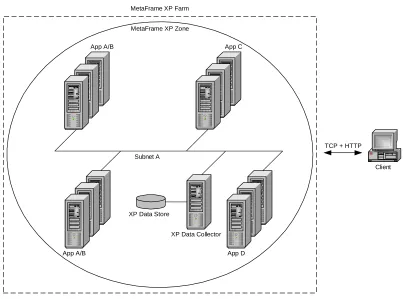
Below is a diagram of the planned native MetaFrame XP architecture:
Client
App A/B App C
App A/B
TCP + HTTP Subnet A
MetaFrame XP Zone MetaFrame XP Farm
XP Data Store
XP Data Collector
App D
Figure 8 Scenario 1 Planned Native MetaFrame XP Architecture
The planned native MetaFrame XP architecture is broken down as follows:
Farm Architecture – The native MetaFrame architecture will have only one farm.
Load Management – Default Load Management settings will be used.
Data Store – The data store will be an Access database located locally on a MetaFrame server.
Data Collector – A dedicated data collector will be used. No applications will reside on this server. This server will also serve as the data store.
Zones – Because the servers within the farm are not spread across low bandwidth connections, all servers will be contained within one zone.
Servers – Servers will remain in their existing locations.
Applications – Application installations will be re-configured and re-deployed. Therefore, no applications will be migrated. New applications will also be deployed.
TCP/IP + HTTP to the XML Service running on the MetaFrame server. The latest version of the ICA Client will be deployed using the auto-client update feature.
Licensing – A Universal Server license for MetaFrame XPa is needed for all servers. This license covers MetaFrame XP and Load Management. In addition, connection licenses must be purchased for each user that connects to the farm. Ten 50 user bump packs will be required for 500 users.
Migration Strategy
A new MetaFrame XP server farm with new server installations (Strategy #3) will be created. This option is chosen for the following reasons:
The company wants to re-configure existing applications as well as deploy new applications. The company desires to have clean system installations.
The company plans to migrate all servers at the same time.
Migration Architecture
This company has chosen to migrate all 12 servers at once during one migration period. Therefore, a migration architecture is not needed. The migration will transition straight from the existing environment to the planned native MetaFrame XP environment.
Implementation
During the implementation phase, scripts are developed to support the migration and rollout of MetaFrame XP. These scripts include the following:
An automated scripted server installation. This is created with the use of VBScript and Windows Scripting Host and includes partitioning the disks on the new system, installing the operating system, installing MetaFrame XP, applying service packs, hot fixes, and registry tweaks, and installing applications. The installation of applications includes both the re-configured applications and the new applications.
A script to migrate users to different groups. This script is used to move users from groups that have permissions for MetaFrame 1.8 published applications to groups that have permissions for MetaFrame XP published applications.
Readiness
The readiness phase includes testing and a production pilot.
Testing
A testing environment is established for the migration. Testing includes two segments:
Pilot
A pilot is performed before rollout of the migration architecture. The pilot is conducted using a small subset of users from the production environment. The pilot is run for user acceptance testing as well as to obtain business signoff for the architecture change.
Rollout
The following high-level steps are performed for the production rollout:
Migration Preparation Steps
1. Determine a migration window of time to re-install the existing servers and migrate the servers and users to MetaFrame XP. This window should have the least effect on production users.
2. Create new user groups to be applied to the published applications on the MetaFrame XP servers.
3. Open internal TCP ports 2512 and 2513 for IMA and Citrix Management Console communication respectively. 4. Install and configure the remote data store. Refer to the MetaFrame XP Administrator’s Guide for additional
instructions.
5. Install the first new MetaFrame XP server for the production environment. The automated scripted server installation is used for this process. The first server houses the data store, becomes the new dedicated data collector, and establishes the new zone.
6. Add the MetaFrame XP Universal Server License through the Citrix Management Console (add MetaFrame XP user connection migration licenses as each server is upgraded).
Migration Rollout Steps
1. During the migration window, re-install all of the existing MetaFrame 1.8 servers using the automated scripted server installation. Each new server joins the MetaFrame XP farm and is added to the zone that was created. 2. Create all published applications on the new server installations and apply the new user groups to the
published applications.
3. Configure the farm to initially support ICA Client broadcast messages.
4. Configure the client auto-update feature to update all ICA Client files with the latest version.
5. Run the scripts created for migrating designated users. This moves users from the groups that are applied to the MetaFrame 1.8 published applications to the new groups that are applied to the MetaFrame XP published applications. This process should not affect the existing MetaFrame 1.8 farms.
6. Once all users have received the updated ICA Client, configure the farm to not accept client UDP broadcasts. Configure all ICA Clients to use TCP/IP + HTTP for connections.
Scenario #2
Analysis
The analysis phase of the migration methodology includes project scope definition and an infrastructure assessment.
Project Scope
Project management has defined the success criteria to include the following: Successful implementation of the MetaFrame XP environment
Minimal impact to the user community.
The main requirement of the project is for all MetaFrame 1.8 servers and applications to be migrated to MetaFrame XP.
Infrastructure Assessment
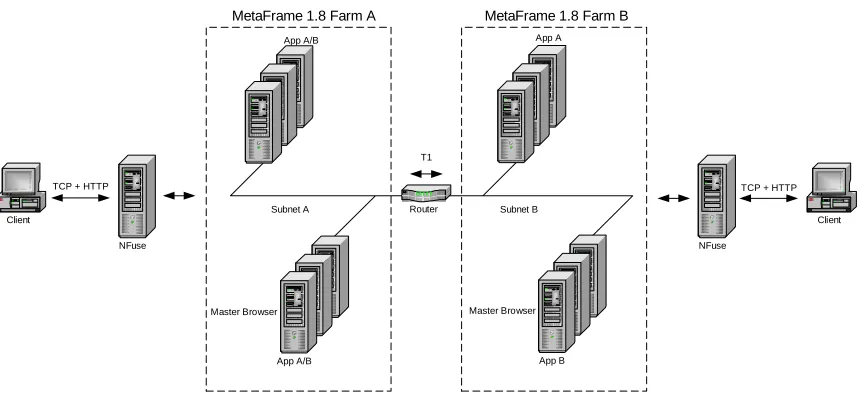
The following diagram depicts the existing infrastructure environment:
Router
MetaFrame 1.8 Farm A
Client
App A/B App A
App A/B
TCP + HTTP
Subnet A Subnet B
MetaFrame 1.8 Farm B
Client
TCP + HTTP
App B
NFuse NFuse
T1
Master Browser Master Browser
Figure 9 Scenario 2 Existing Infrastructure
The infrastructure environment is described as follows:
Farm Architecture – The servers reside in two MetaFrame farms. All servers in both farms are running MetaFrame 1.8 with Feature Release 1.
Master ICA Browser – Master ICA Browsers exist in both farms. The master ICA Browser in both farms also hosts applications.
Subnet 1: 6 servers Subnet 2: 6 servers
The two subnets are connected by a T1 link.
Users – There are 500 users that access the farms from multiple company sites.
Applications – There are 25 published applications.
Application Delivery – Users from both farms currently connect with NFuse to access published applications. There is a separate NFuse server for each farm in this scenario.
Licensing – Each server has a base MetaFrame 1.8 server license valid for 15 users (180 total user licenses). Additional user bump backs are included to support all 500 users (1 20-user bump pack, 6 50-user bump packs). A MetaFrame 1.8 Feature Release 1 license is also installed on each server.
Design
Planned Native MetaFrame XP Architecture
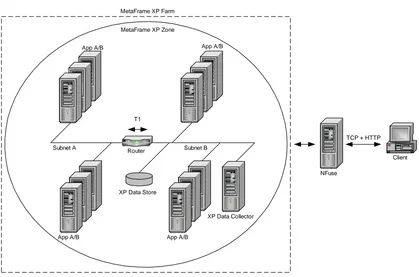
Below is a diagram of the planned native MetaFrame XP architecture:
Router
Client App A/B App A/B
App A/B
TCP + HTTP Subnet A Subnet B
NFuse T1
App A/B MetaFrame XP Zone MetaFrame XP Farm
XP Data Store
XP Data Collector
Figure 10 Scenario 2 Planned Native MetaFrame XP Architecture
The planned native MetaFrame XP architecture is broken down as follows:
Farm Architecture – The native MetaFrame XP architecture will have only one farm.
Load Management – Default Load Management settings will be used.
Data Store – The data store will be located on a remote database for redundancy and scalability.
Data Collector – A dedicated data collector will be used; no applications will reside on this server.
Zones – Because the servers within the farm are not spread across low bandwidth connections, all servers will be contained within one zone.
Servers – Servers will remain in their existing locations.
Applications – Application installations will be re-configured and re-deployed. Therefore, no applications will be migrated. New applications will also be deployed.
Application Delivery – Users will continue to connect to the farm and published applications via NFuse.
Migration Strategy
A new MetaFrame XP server farm with new server installations (Strategy #3) will be created. This option is chosen for the following reasons:
The company wants to re-configure existing applications as well as deploy new applications.
The company is deploying new server hardware. The company’s existing hardware is coming off lease and needs to be replaced. The new hardware will be phased in during the migration as the old hardware is phased out.
The company prefers a “clean” system migration as well.
Migration Architecture
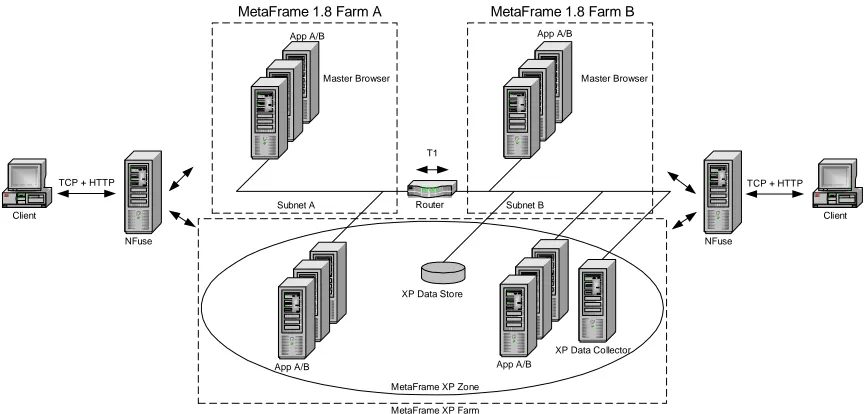
A diagram of the migration architecture is shown below:
Router
MetaFrame 1.8 Farm A
Client
App A/B App A/B
App A/B
TCP + HTTP
Subnet A Subnet B
MetaFrame 1.8 Farm B
Client
TCP + HTTP
NFuse NFuse
T1
Master Browser Master Browser
App A/B
MetaFrame XP Zone
MetaFrame XP Farm XP Data Store
XP Data Collector
Figure 11 Scenario 2 Migration Architecture
This migration architecture is defined as follows:
Farm Architecture – Three farms will co-exist. The two MetaFrame 1.8 farms will run parallel with a new MetaFrame XP farm (operating in native mode).
Load Balancing/Management – Default Load Balancing/Management settings will be used in both the MetaFrame 1.8 farms and the MetaFrame XP farm.
Data Store – The data store will be located on a remote database for redundancy and scalability. MetaFrame XP currently supports the use of Microsoft SQL Server or Oracle for a remote database.
Master ICA Browser – The existing master ICA Browsers will remain during migration. These servers will be the last to be migrated.
Data Collector – A dedicated data collector will be used for the native MetaFrame XP farm as well as during the migration. No applications will be hosted from this server. This server will be a new installation.
Zones – All MetaFrame XP servers will be contained within one zone.
Servers – Servers will remain in their existing locations.
Applications – Application mixes will remain on their existing servers. New applications will be deployed to the appropriate servers.
Although multi-farm consolidation is being used, migrated users will not be accessing both farms during the migration. This method is used to ease the migration by providing a single point of access during the migration period.
Licensing – The MetaFrame XP Universal Server License will be entered through the Citrix Management Console on the first server to be migrated. User connection migration licenses will be added as each server is migrated.
Implementation
During the implementation phase, scripts are developed to support the migration and rollout of MetaFrame XP. These scripts include the following:
An automated scripted server installation is created. This is created with the use of VBScript and Windows Scripting Host and includes partitioning the disks on the new system, installing the operating system, installing MetaFrame XP, applying service packs, hot fixes, and registry tweaks, and installing applications. The
installation of applications includes both the re-configured applications as well as the new applications.
A script is created to migrate users to different groups. This script is used to move users from groups that have permissions for MetaFrame 1.8 published applications to groups that have permissions for MetaFrame XP published applications.
Additionally, a custom NFuse Web site that performs multi-farm consolidation is built.
Readiness
The readiness phase includes testing and a production pilot.
Testing
A testing environment is established for the migration. Testing will include two segments:
System Tests: All components of both the native MetaFrame XP architecture and the migration architecture are tested.
Scalability Tests: Scalability tests are conducted mainly for both the native MetaFrame XP architecture and the migration architecture. Different performance counters are monitored to test server performance and network performance.
Pilot
Rollout
The following high-level steps are performed for the production rollout:
Migration Preparation Steps
1. Determine a migration window time frame to migrate users to MetaFrame XP. This window should have the least effect on production users.
2. Determine sets of users to be moved to MetaFrame XP during each migration window.
3. Create new user groups to be applied to the published applications on the MetaFrame XP servers.
4. Configure the NFuse Web site to support multiple farms. This is based on the Migration Architecture Design. Refer to Appendix A – NFuse Multi-Farm Consolidation at the end of this white paper for information regarding this type of configuration.
5. Configure the NFuse site for automatic download of the latest ICA Client.
6. Open internal TCP ports 2512 and 2513 for IMA and Citrix Management Console communication respectively. 7. Install and configure the remote data store (refer to the MetaFrame XP Administrator’s Guide for additional
instructions).
8. Install the first new MetaFrame XP server for the production environment. The automated scripted server installation is leveraged for this process. The first server will act as the new dedicated data collector and will establish the new zone. This server will be located at one of the site locations.
9. Install the remaining new servers for both locations using the automated scripted server installation. Each new server will join the MetaFrame XP farm as well as be added to the zone that was created.
10. Create all published applications on the new server installations and apply the new user groups to the published applications.
11. Add the MetaFrame XP Universal Server License through the Citrix Management Console (add MetaFrame XP user connection migration licenses as each server is upgraded).
Migration Rollout Steps
1. During the first scheduled migration window migrate the first set of designated users.
2. Run the scripts created for migrating designated users to move users from the groups that are applied to the MetaFrame 1.8 published applications to the new groups that are applied to the MetaFrame XP published applications. This process should not affect the existing MetaFrame 1.8 farms.
3. After this migration, direct the users to all of their applications in the MetaFrame XP farm via the NFuse Web site.
Scenario #3
The third scenario describes an example of a migration from one MetaFrame 1.8 farm that spans multiple subnets to a single MetaFrame XP farm. The existing farm currently uses MetaFrame 1.8 with Feature Release 1 and Load Balancing Services. In this scenario existing server hardware will be used with the exception of the MetaFrame XP data collector, which will be implemented using new hardware.
Analysis
The analysis phase of the migration methodology includes project scope definition and an infrastructure assessment.
Project Scope
Project management has defined the success criteria to include the following: Successful implementation of the MetaFrame XP environment
Minimal impact to the user community.
The main requirement of the project is for all MetaFrame 1.8 servers and applications to be migrated to MetaFrame XP.
Infrastructure Assessment
The following diagram depicts the existing infrastructure environment:
Router
App C
MetaFrame 1.8 Farm
Client
App A/B App C
App A/B App D/E App D/E
ICA Gateway
Master Browser Master Browser
TCP + HTTP
Subnet A Subnet B
The infrastructure environment is described as follows:
Farm Architecture – All servers reside in one MetaFrame farm. All servers in the farm are running MetaFrame 1.8 with Feature Release 1 and Load Balancing Services.
Master ICA Browser – This farm has a dedicated master ICA Browser. Using Citrix Server Administration, the server is set to always attempt to become master ICA Browser.
Servers – There are 50 servers in the farm, all located in a central data center.
Load Balancing – Default load balancing parameters are applied.
Network Structure – Two network subnets exist with the following distribution of servers: Subnet 1: 25 servers
Subnet 2: 25 servers
The two subnets reside on the same physical Local Area Network (LAN). The connectivity speed between subnets is 100 Mbps. An ICA Gateway exists between the two subnets allowing the farm to span the two subnets. ICA Gateways are bi-directional, meaning that they are initiated on servers on both network subnets.
Users – There are 1000 users that connect to published applications within the farm. Users access the farm from multiple company sites.
Applications – There are 25 published applications. Each server contains different application sets. There is a group of servers used only for office productivity applications and another group of servers used only for line-of-business applications.
This setting is shown below:
Figure 13 ICA Client TCP/IP + HTTP Setting
Design
The design phase of the migration methodology determines the planned native MetaFrame XP architecture, the migration strategy, and the migration architecture.
Planned Native MetaFrame XP Architecture
Below is a diagram of the planned native MetaFrame XP architecture:
Router
App C
MetaFrame XP Farm
Client App A/B App C
App D/E
App D/E
XP Data Collector App A/B
XP Data Store
NFuse
MetaFrame XP Zone
TCP + HTTP
TCP TCP
Figure 14 Scenario 3 Planned Native MetaFrame XP Architecture
The planned native MetaFrame XP architecture is broken down as follows:
Farm Architecture – The native MetaFrame XP architecture will have only one farm.
Load Management – Default Load Management settings will be used.
Data Store – The data store will be located on a remote database for redundancy and scalability. MetaFrame XP supports the use of Microsoft SQL Server or Oracle for a remote database.
Data Collector – A dedicated data collector will be used. No applications will reside on this server.
Zones – Because servers within the farm are not spread across low bandwidth connections, all servers will be contained within one zone.
Servers – Servers will remain in their existing locations.
Applications – Application installations will remain on their existing servers.
Migration Strategy
Existing MetaFrame 1.8 servers will be migrated to a new MetaFrame XP server farm (Strategy #2). This option is chosen for the following reasons:
The company wants to keep their existing application deployments and migrate published applications. The company wants to use existing server installations during the migration.
The company wants to use MetaFrame XP IMA communication and the full MetaFrame XP feature set.
Migration Architecture
A diagram of this migration architecture is shown below:
Router
App C MetaFrame 1.8 Farm
Client
App A/B App C
App D/E App D/E
ICA Gateway
Master Browser
MetaFrame XP Farm XP Data Collector
App A/B
XP Data Store
NFuse
MetaFrame XP Zone Master Browser
TCP + HTTP TCP
TCP
Figure 15 Scenario 3 Migration Architecture
This migration architecture is defined as follows:
Farm Architecture – Two farms will co-exist during migration. The MetaFrame 1.8 farm will run parallel with a new MetaFrame XP farm (operating in native mode).
Load Balancing/Management – Default Load Balancing/Management settings will be used in both the MetaFrame 1.8 farm and the MetaFrame XP farm.
Data Store – The data store will be located on a remote database for redundancy and scalability.
Master ICA Browser – A dedicated master ICA Browser will exist for the MetaFrame 1.8 farm during the migration. This will be the last server that is migrated.
Zones – All MetaFrame XP servers will be contained within one zone.
Servers – Servers will remain in their existing locations.
Applications – Applications will remain on their existing servers.
Application Delivery – NFuse will be used to provide multi-farm consolidation. Users will be able to access
applications within either the MetaFrame 1.8 farm or the MetaFrame XP farm. Users will connect to the NFuse Web server via HTTP. Users will be assigned permissions to published applications in either farm.
Although multi-farm consolidation is being used, migrated users will not be accessing both farms during the migration. This method is used to ease the migration by providing a single point of access during the migration period.
Licensing – The MetaFrame XP Universal Server License will be entered through the Citrix Management Console on the first server to be migrated. User connection migration licenses will be added as each server is migrated.
Implementation
During the implementation phase, scripts are developed to support the migration and rollout of MetaFrame XP. These scripts include the following:
An automated scripted upgrade installation of MetaFrame XP. This is created with the use of VBScript and Windows Scripting Host and includes the installation of MetaFrame XP and the migration of existing published applications.
A script to migrate users to different groups. This script is used to move users from groups that have permissions for MetaFrame 1.8 published applications to groups that have perm