Interested in learning
more about security?
SANS Institute
InfoSec Reading Room
This paper is from the SANS Institute Reading Room site. Reposting is not permitted without express written permission.
Reverse Engineering Of Malware On Android
Smartphones have been a vulnerable target for malware since June 2004. The number of infected applications steadily increased until certain security measures like application signing and validation of developers was introduced. Android phones are one such smartphones that were and continue to be a prime target for hackers. The main objective of this project is divided into two parts. First, the actual working of a malware is scrutinized in order to understand its effects and functioning. Second, reverse engineering te...
© 2
011
SA
NS
Ins
titu
te,
Au
tho
r re
tain
s fu
ll ri
gh
ts.
Reverse Engineering of Malware on Android
R
ev
e
r
s
e Enginee
ring Of Malwar
e On Android
Name
: V ibha Manjunath
Stude
nt Numbe
r: 1000689
Module
: MSc Project and Di
ss
e
rtation
Module Numbe
r: C E902 ± 7 - SU
Cour
s
e
: MSc Compute
r Security
© 2
011
SA
NS
Ins
titu
te,
Au
tho
r re
tain
s fu
ll ri
gh
ts.
Reverse Engineering of Malware on Android
Ab
s
tract
Smartphones have been a vulnerable target for malware since June 2004. The number of infected applications steadily increased until certain security measures like application signing and validation of developers was introduced. Android phones are one such smartphones that were and continue to be a prime target for hackers.
The main objective of this project is divided into two parts. First, the actual working of a malware is scrutinized in order to understand its effects and functioning. Second, reverse engineering technique is used in order to tweak the files and renovate a legitimate application into a malware.
The reverse engineering tools used are ApkTool, Dex2Jar, Notepad+ +, JD-GUI, etc. First a malware is disassembled and its source code is scrutinized to find the malicious code. Secondly, a legitimate application is disassembled and the AndroidManifest.xml file is altered to add more permissions and it is then repackaged. The new or altered application is then signed using a self-signed certificate and installed on the Android Emulator in order to test if the changes are reflected.
In this project we also revisit the various malwares existing, the architecture and security model of Android, the reverse engineering tools and the ways of mitigating malware on Android devices.
© 2
011
SA
NS
Ins
titu
te,
Au
tho
r re
tain
s fu
ll ri
gh
ts.
Reverse Engineering of Malware on Android
A
c
knowl
edgement
I would like to take this opportunity to thank various people for their help during the period leading to the completion of my dissertation. Firstly I would like to acknowledge my mentor Dr. Martin Colley for his able guidance and valuable inputs without which this dissertation would not have seen a successful end; my personal supporters, Venkatesh P.S and Joel Varghese who gave up their time to make wonderfully helpful comments; my parents B. S Manjunath and M. K Manjula for so much love over the years and to my wonderful sister Varsha Manjunath for being close even when they were far away.
© 2
011
SA
NS
Ins
titu
te,
Au
tho
r re
tain
s fu
ll ri
gh
ts.
Reverse Engineering of Malware on Android
Cont
ent
s
Introduction ... 5
Literature review ... 10
Android Architecture... 10
Android Security model ... 13
Android Malware and Security Issues ... 15
Reverse Engineering ... 20
Mitigation of Threats/Attacks ... 20
Methodology ... 25
Tools ... 25
Procedure ... 28
Static Analysis ... 28
Dynamic Analysis... 33
Result and Conclusion ... 45
Result ... 45
Conclusion ... 50
Future Work ... 51
Appendix ... 53
References ... 66
© 2
011
SA
NS
Ins
titu
te,
Au
tho
r re
tain
s fu
ll ri
gh
ts.
Reverse Engineering of Malware on Android
Introduction
Smartphones have gained tremendous popularity over the last few years. In this growing market of smartphones, Android, an open source platform of Google has become one of the most popular Operating Systems. Android is mainly used in smartphones and tablets (1). Smartphones are accepted and admired by many mainly because they are capable of providing services such as banking, social networking, etc all on the go. They are equipped with several features such as Wi-Fi, voice, data, GPS, etc (2).
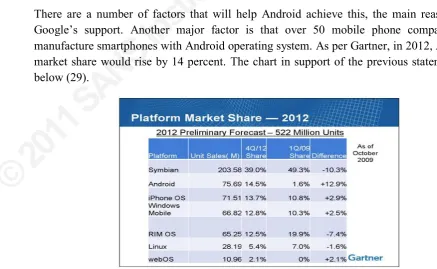
It is believed by experts that Android is going to be more popular by 2012 than its rivals such as iPhone and Blackberry (29).
Fig 1 ± Market Share of Smartphones in 2012 (29)
There are a number of factors that will help Android achieve this, the main reason being
*RRJOH¶V VXSSRUW Another major factor is that over 50 mobile phone companies will manufacture smartphones with Android operating system. $VSHU*DUWQHULQ$QGURLG¶V
market share would rise by 14 percent. The chart in support of the previous statement is as below (29).
© 2
011
SA
NS
Ins
titu
te,
Au
tho
r re
tain
s fu
ll ri
gh
ts.
Reverse Engineering of Malware on Android
The sudden increase in smartphone applications causes concern in terms of user security. Smartphones have become a very soft and vulnerable target for malicious application developers. Android has gained popularity mainly because it is an open source operating system and it has some basic features such as middleware in the form of virtual machines, system utilities and a few core applications such as calculator, browser, etc (3).
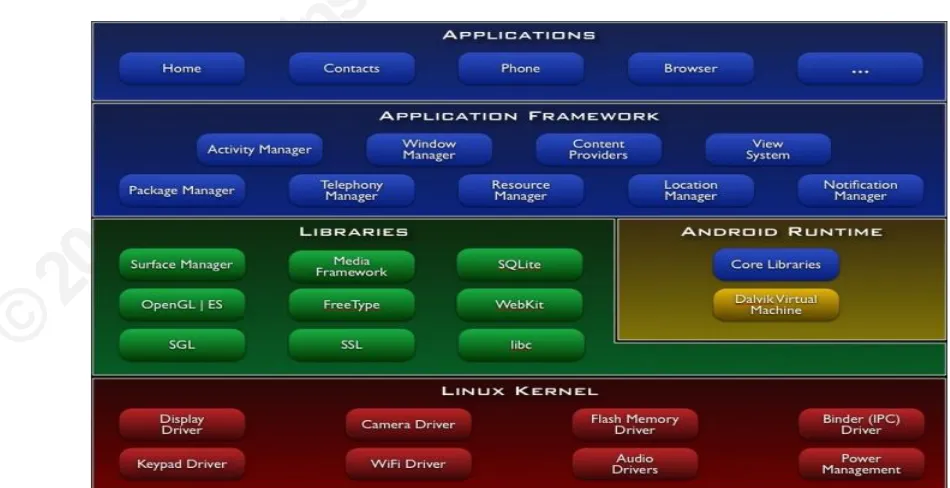
The android architecture is made up of the following four layers (3):-
x A Linux Kernel that supports multiprocesses and multithreads. Every application has its own Linux ID and runs in a separate process. Two applications with the same ID can exchange data between them.
x Some Open source libraries.
x Android run-time environment, wherein a Dalvik Virtual Machine runs an applications in the dex binary format.
x An application framework that possesses a Java interface. This layer consists of the Android NDK and SDK.
x Some pre-installed core applications.
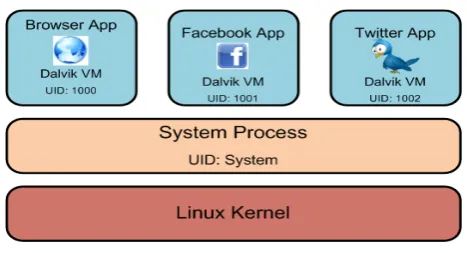
The android security model is based on a permission and sandbox mechanism. Each application runs in its own Dalvik Virtual Machine with a unique ID assigned to them. This prevents an application from hampering information/data of another application. The architecture and security model are discussed in greater detail in the next section.
Although Android is most widely used, there exists a dearth of applications in order to completely benefit from this operating system. Hence, third party application developers create new applications and launch them in the Android Market. This gives users access to thousands of applications; it is however important that the user needs to entirely trust the applications before installing them. It is for this reason that every application publishes the permissions that it requires during installation. The user can either grant all permissions or deny all, in which case, the installation of the application is aborted (4).
In order to distribute these applications Google came up with Android Market. Here users can access both paid and free applications. Every Android phone has this application and hence users can browse and download any application they require from Android Market.
However, there have been many malicious applications published in Android Market. Hence it becomes a necessity for Google to test each and every application and clean the Android Market by eradicating malwares. It is also important to see to it that the loopholes and bugs of current applications are not exploited by hackers. Among various attacks, phishing, insecure http connections, usage of local data, etc are most common (2).
© 2
011
SA
NS
Ins
titu
te,
Au
tho
r re
tain
s fu
ll ri
gh
ts.
Reverse Engineering of Malware on Android
Fig 3 ± Distribution of Spyware vs Malware (14)
Based on malwares that were published, the below diagram was designed indicating the number of malwares and their effects (6).
Fig 4 ± Smartphone Malware Effects (5)
It is evident from the graph above that most malwares were successful at manipulating files and disabling other applications. In case of Android, the applications are published on Android Market which is one place where a user can surf and download applications. Attackers usually tamper with applications and republish them. Users download these applications without knowing that they are not original and the malware thus gets installed on the device.
© 2
011
SA
NS
Ins
titu
te,
Au
tho
r re
tain
s fu
ll ri
gh
ts.
Reverse Engineering of Malware on Android
legitimate application and thereby end up installing the malware. The diagram below depicts this (14).
Fig 5 ± Repackaging Applications Process (14)
In this project we use reverse engineering technique in order to study the exact working of a malware named iCalendar. We use another application called Seesmic and apply the reverse engineering technique to alter files and repackage it and thereby converting a perfectly harmless application into a malware.
Reverse Engineering is a process with the aid of which we can discover and understand the complete working of an application by learning its operation, structure and functions. In this project the tools we use for reverse engineering are, ApkTool, Dex2Jar, JD-GUI, Notepad++
and Android SDK. The details of each of these tools and the entire procedure of reverse engineering are discussed in Methodology.
© 2
011
SA
NS
Ins
titu
te,
Au
tho
r re
tain
s fu
ll ri
gh
ts.
Reverse Engineering of Malware on Android
permissions requested by an application before installing it blindly. It is also the application
GHYHORSHU¶VUHVSRQVLELOLW\QRWWROHDYHDQ\ORRSKROHVWKDWFDQEHHDVLO\H[SORLWHGE\DKDFNHU
© 2
011
SA
NS
Ins
titu
te,
Au
tho
r re
tain
s fu
ll ri
gh
ts.
Reverse Engineering of Malware on Android
Lite
ratur
e r
e
view
William Enck, Machigar Ongtang and Patrick McDaniel have stated that,
³7KHQH[WJHQHUDWLRQRIRSHQRSHUDWLQJV\VWHPVZRQ¶WEHRQGHVNWRSVRUPDLQIUDPHVEXWRQ
the small mobile devices we carry every day´. (30)
Such operating systems will be responsible for the introduction of new markets and applications due to their openness. This will enable superior amalgamation with the existing services (30).
One such open source operating system that has attained a great deal of importance and popularity in the mobile phone world is Android. This operating system is powered by
*RRJOH DQG VWXG\ KDV VKRZQ WKDW LW KDV QRZ EHFRPH WKH ZRUOG¶V VHFRQG PRVW SRSXODU
operating system (30).
The most attractive feature of Android is that it provides an open platform for developers to create their own applications. Android provides an SDK and NDK for the developers to create various applications unlike the Apple iphone applications that need to be downloaded from the Apple Appstore (30).
The openness of this operating system is both an advantage as well as a disadvantage. Android allows developers to easily publish their application but it also allows for the publication of malicious applications (30).
A ndroid A rc
hitecture
© 2
011
SA
NS
Ins
titu
te,
Au
tho
r re
tain
s fu
ll ri
gh
ts.
Reverse Engineering of Malware on Android
Let us now discuss the architecture of Android. It is basically a software stack that contains three components, namely, Middleware, Operating System and Key Applications. Its features include (29):-
x Bluetooth, EDGE, WiFi and 3G.
x SQLite for structured data storage.
x Application Framework
x Dalvik Virtual Machine, etc.
Android architecture consists of the following:-
x A pplication (29):- Android phones usually come with some default applications such as email client, browser, calendar, SMS, maps, etc. The applications are programmed using Java.
x A pplication F ramewor k (29):- Android developers are offered the utilization of information of access location, set alarms, device hardware, run background services, etc. Android developers also have access to the framework APIs that is also used by the core applications. Reuse of components is exercised by the application architecture design.
All applications have a set of systems and services underlying them:-
¾ Views:- These are used to build applications, such as, text boxes, grids, buttons, and also a web browser that is embedded.
¾ Content Providers:- These allow applications to share their own data and to access information from other applications.
¾ Resource Manager:- This provides access to resources (non-code) such as graphics, layout files and localized strings.
¾ Notification Manager:- Custom alerts are displayed on the status bar using a notification manager.
¾ Activity Manager:- It provides a common navigation backstack and it also deals with the lifecycle of an application.
x Libraries (29):- Android is equipped with a set of C/C++ libraries that is used by several components of the system. These libraries are provided to the developers through the Android Application Framework.
Some of the core libraries along with their functionality is shown below:-
¾ System C Library:- It is used for embedded Linux-based devices. It is a BSD-derived implementation of the C system Library libc.
© 2
011
SA
NS
Ins
titu
te,
Au
tho
r re
tain
s fu
ll ri
gh
ts.
Reverse Engineering of Malware on Android
¾ SGL:- This comprises the 2D graphics engine.
¾ SQLite:- This is a relational database engine that is accessible to all applications.
¾ Surface Manager:- it controls the access to the 2D and 3D graphics layers from various applications and to the display subsystem.
x Android Runtime (29):- Android has some core libraries that offer most functionalities that are also available in the core libraries of the Java programming language. All android applications run in their own processes with their own instances of the DVM (Dalvik Virtual Machine). Dalvik allows a device to run several virtual machines efficiently. DVM executes files in the .dex format. The DVM is dependent on the Linux kernel for underlying functionalities such as low-level memory management and threading.
x Linux Kernel (29):- Android services, like process management, driver model, memory management, security and network security, of the core system depends on Linux version 2.6. The kernel also behaves as a layer of abstraction between the software stack and the hardware.
Android applications are mainly developed using JAVA programming language; however, there are some applications that can be developed in C/C++ (using Android NDK). An android package consists of the compiled java code and any resource and data files required by the application (31).
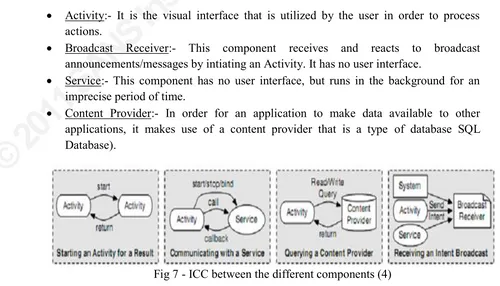
An android application comprises of several components that use Intent messages to communicate with one another. These components are summarized below (4):-
x Activity:- It is the visual interface that is utilized by the user in order to process actions.
x Broadcast Receiver:- This component receives and reacts to broadcast announcements/messages by intiating an Activity. It has no user interface.
x Service:- This component has no user interface, but runs in the background for an imprecise period of time.
x Content Provider:- In order for an application to make data available to other applications, it makes use of a content provider that is a type of database SQL Database).
© 2
011
SA
NS
Ins
titu
te,
Au
tho
r re
tain
s fu
ll ri
gh
ts.
Reverse Engineering of Malware on Android
According to Security Engineering Research Group, a Reference Monitor is one of the most important components in Android (access control) that helps in Inter Component Communication (ICC). Every component in an application is allocated various permission labels which are utilized for interacting with components of other applications. In order to initiate ICC, the application first checks the label of permissions; if the target comSRQHQW¶VODEHOLVSUHVHQWLQWKDWFROOHFWLRQRISHUPLVVLRQV,&&LQLWLDWLRQ
is permitted to carry on else it is denied (4).
The research group is of the opinion that this ICC mechanism is based on Intents; which is a mechanism for passing messages which also includes the kind/type of action to be carried out. The Intent messages can be either sent to a particular component or broadcast to the Android framework which will then forward the message to the appropriate component. Action strings, that specify the type of task to be preformed, help in specifying the intents. Based on the action strings, the Android system then takes a decision as to which component is best to carry out the essential task (4).
The AndroidManifest.xml file contains all the permissions and metadata related to the security enforcement policy. The tag <Permission> indicates the components that can access it and <Intent-Filters> tag is used to indicate the intents that can be resolved (4).
A ndroid Security mode
l
The android security model is designed such that no application is given the permission to carry out any operation that can badly affect other applications, the user or the operating system. Each application runs in its own process and hence Android is considered to be a multi-process system. Linux facilities such as group and user IDs are assigned to applications which impose security between the system and the applications at the process level.
$GGLWLRQDOVHFXULW\LVSURYLGHGXVLQJWKH³SHUPLVVLRQV´PHFKDQLVPWKDWJUDQWHDFKSURFess to
SHUIRUPFHUWDLQRSHUDWLRQVRQO\DQGDOVRSURYLGHV³SHU-85,SHUPLVVLRQ´WKDWJLYHLPSURYLVHG
access rights to certain information only (31).
Sandbox and Permission mechanism is said to be the base of the Android Security Model. It is known that each DSSOLFDWLRQ¶VFRGHUXQVLQDSDUWLFXODU'DOYLN9LUWXDO0DFKLQHZKLFKKDVD
specific user ID assigned to it. Each application runs in isolation from the other applications
DQGKHQFHDQ\DSSOLFDWLRQKDVQRDFFHVVWRDQRWKHUDSSOLFDWLRQ¶VILOHV (31).
© 2
011
SA
NS
Ins
titu
te,
Au
tho
r re
tain
s fu
ll ri
gh
ts.
Reverse Engineering of Malware on Android
Author Jesse Burns states that,
³Android supports building applications that use phone features while protecting users by
PLQLPL]LQJ WKH FRQVHTXHQFHV RI EXJV DQG PDOLFLRXV VRIWZDUH $QGURLG¶V SURFHVV LVRODWLRQ
obviates the need for complicated policy configuration files for sandboxes. This gives
DSSOLFDWLRQV WKH IOH[LELOLW\ WR XVH QDWLYH FRGH ZLWKRXW FRPSURPLVLQJ $QGURLG¶V VHFXULW\ RU
granting the application additional rights´. (6)
As per Lukas Jeter, Meenakshi Mani and Tia Reinschmidt, every android application has to be signed with a certificate whose private key is known to the owner of the application only. This allows the author of the application to be identified if necessary. When an application is installed in the phone it is assigned a unique Linux user ID, thereby avoiding it from affecting other applications by creating a sandbox for it. This user ID is permanent on that device and applications having the same user ID are allowed to run in a single process. This is one way of ensuring that a malicious application cannot access/compromise the data of genuine application (9).
It is obligatory for an application to list all the resources it will access during installation. The permissions that is requested by an application, during install time, are approved by user interaction or/and based on checks alongside the signatures of the application (9).
The three authors say that Android permissions are needed at various stages in the life span of an application, namely, (9)
x At the time of a system call in order to prevent the application from performing specific functions that is undesirable.
x The beginning of an activity in order to avoid applications from initiating activities of other applications.
x Permissions to manage who can send and receive a broadcast message from you.
x Binding or beginning of a service.
x In order to access and operate on a content provider.
Kamran Habib Khan & Mir Nauman Tahir indicate that there are four levels of security provided by Android, namely, (4)
x Normal:- In this case no permission is required by the user, hence normal permissions are granted to the application.
x Dangerous:- These permissions are requested by an application for approval by user during installation. The user can either accept all permissions or deny all. The denial of permissions will terminate the installation.
x Signature:- These permissions are acknowledged by the system provided the granting and the requesting application have the same certificate.
© 2
011
SA
NS
Ins
titu
te,
Au
tho
r re
tain
s fu
ll ri
gh
ts.
Reverse Engineering of Malware on Android
The numerous built-in security methods of Android make it secure only as long as it is handled by responsible users who understands the repercussions of the several permissions requested by various applications. However, the challenge has been to enforce more security without limiting the freedom to the user.
A ndroid Malwar
e and Security I
ss
ue
s
Mobile phones have become a soft target for cyber-criminals. Mobile phones contain an enormous amount of data from personal contacts to emails and it is also possible to carry out all types of transactions online (10).
A malware is any malicious code or piece of software that is designed to perform functions without the consent of the user. Joanna Rutkowska also agrees with the above definition and has defined malware as,
³Malware is a piece of code which changes the behavior of either the operating system kernel or some security sensitive applications, without a user consent and in such a way that it is then impossible to detect those changes using a documented features of the operating system or the application´(12)
Troy Vennon a GTC Engineer at Smobile Systems has stated that malware is categorized based on what the malware actually does once it has infected a system. There are hence four types of malware categorized by Troy Vennon, namely, (8)
x Virus:- A virus is defined as a destructive or malicious program that lacks the capacity to self-reproduce.
x Worm:- This is a malicious code that can control a system vulnerability or a network in order to automatically duplicate to another system.
x Trojan:- A Trojan allows an attacker to obtain unauthorized access or remote access to a system while it appears to be executing a required operation.
x Spyware:- This destructive application conceals itself from the user while it collects
LQIRUPDWLRQDERXWWKHXVHUZLWKRXWWKHXVHU¶VSHUPLVVLRQ
Authors Kamran Habib Khan & Mir Nauman Tahir have categorized the attacks on mobile phones as below (4):-
x Ad-ware:- This category includes the advertisements on cell phones that are in reality malwares.
x Direct Payoff:- This category consists of malwares that send SMS without the consent of the user.
x Destructive:- An example of these kinds of attacks is erasure of phonebook entries witKRXWWKHXVHU¶VNQRZOHGJH
x Information Scavengers:- This category includes the checking of cookies, address
ERRNVDQGSDVVZRUGVZLWKRXWWKHXVHU¶VFRQVHQW
© 2
011
SA
NS
Ins
titu
te,
Au
tho
r re
tain
s fu
ll ri
gh
ts.
Reverse Engineering of Malware on Android
x Proof of Concept:- This category consists of malwares/spywares that for example
OHDYH WKH %OXHWRRWK GHYLFH RQ ZLWKRXW WKH XVHU¶V FRQVHQW ZKLFK GUDLQV WKH GHYLFH
batteries.
Authors Lukas Jeter, Meenakshi Mani and Tia Reinschmidt have also commented on the type of attacks that can be performed on Android phones. They sate that,
³The types of attacks delivered by smart phone malware are as varied as the devices themselves´. (9)
Some of the malwares have not caused any harm and they appear to be just proof of concept tests; however, there have been some malwares that have caused undesirable and unexpected problems like abnormal battery drain or localized denial of service, etc. There exists more software that tries to steal data or services on the phone. Another type of malware is a Spyware which can access microphones, cameras and built-in GPS receivers to send data back to the attackers. Adware is another type of malware that utilizes the existing communication channels like Email, IM, MMS, Bluetooth or SMS, to transmit unwanted adYHUWLVHPHQWV WR UDQGRP QXPEHUV RU WR SHRSOH LQ WKH VXUURXQGLQJ DUHD RU LQ RQH¶V SKRQH
book (9).
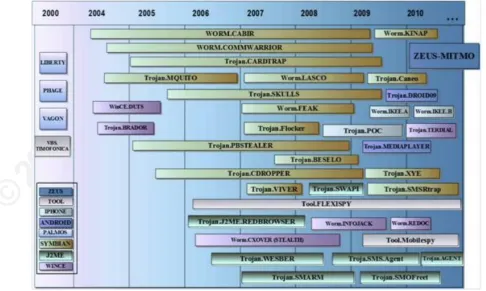
There have been a number of attempts to infiltrate malware into applications for Android; the only reason being Android is open source. There have been numerous malwares developed on Android platform. CNCCS have graphically represented the time and evolution of spyware in Smartphones (10).
© 2
011
SA
NS
Ins
titu
te,
Au
tho
r re
tain
s fu
ll ri
gh
ts.
Reverse Engineering of Malware on Android
CNCCS talk about the malware Droid09 that penetrated the Android market in November 2009. This application appeared to be a useful one for managing online bank transaction of
XVHUVKRZHYHULWDOORZHGWKHDWWDFNHUWRJDLQDFFHVVWRWKHXVHU¶VDFFRXQWGHWDLOVZLWKZKLFK
he could make online transactions. Another application that was in reality a spyware was the
Android.Fakeplayer which was discovered at the end of 2010. It posed to be a legitimate video player but started sending SMS to premium numbers (10).
SMobile Systems also talk about malwares that they have detected and attempted to remove.
MobileSpy is a malware that was detected in November 2009. It offered the following services to Android users, (8)
x GPS Location
x Websites accessed by the device
x Scrutinize SMS messages
x Manage/View the call details, outbound and inbound, etc.
This application is installed DV³Retinax.Android´ZKLFKruns in the background and there is no icon available to the user that indicates either MobileSpy or Retinax.Android.
In November 2010 Jon Oberheide and Zach Lanier, two security researchers, discovered a way to exploit the vulnerabilities or loop-holes of Android. The credentials service that is used for applications to request for tokens of authorization was one such vulnerability that they played with. They provided a fake application of Angry Birds game that enabled it to download three more malicious applications from the Android Market. The three new
DSSOLFDWLRQVFRXOGKHQFHEHLQVWDOOHGZLWKRXWDVNLQJIRUWKHXVHU¶VSHUPLVVLRQDQGWKH\ZHUH
able to access sensitive data that was present in the phone (31).
There have been many other researchers who have developed malwares for Android to point out the lack of security or the vulnerabilities that are present in Android. In November 2010, the MWR InfoSecurity research head, NILS, showed a bug in Android browser that allows the attacker to install malware on HTC Legend running the Android 2.1 OS. He realized that the Android browser has the permission android.permission.INSTALL_PACKAGES that updates the embedded Flash Lite Plugin. Hence, by providing a browser exploit it is likely to install a malware on the device (31).
William Enck, Damien Octeau, Patrick McDaniel, and Swarat Chaudhuri have discussed, in their paper, the Android specific vulnerabilities and have categorized them as below (13):-
x Information leaked to logs (13):- Centralized logging is provided by Android via the
/RJ $3, WKDW FDQ EH GLVSOD\HG XVLQJ WKH ³ORJFDW´ command. Applications with permission READ_LOGS can read the log messages. These logs, as per the documentation provided E\$QGURLGPXVWQRWFRQWDLQWKHXVHU¶VSHUVRQDOLQIRUPDWLRQ
© 2
011
SA
NS
Ins
titu
te,
Au
tho
r re
tain
s fu
ll ri
gh
ts.
Reverse Engineering of Malware on Android
x Information leaked via IPC (13): - It is possible that intent broadcasts that do not shield the broadcasts with permissions or does not indicate the target component can be received by any application. It is therefore risky if the intent has any important information.
x Insecure Broadcast Receivers (13):- Broadcast receivers are used to obtain intent messages. In order to subscribe to certain event types that are public, Broadcast
UHFHLYHUV GHILQH ³Intent Filters. Therefore, if the receiver is not defended by permissions, a harmful application can forge messages.
x Intent Injection (13):- Intent messages are also used to begin service components and activities. Intent injection attack takes place when the intent address is obtained from an unknown input that cannot be trusted.
x Delegation of Control (13):- It is possible for an application to allot control to another application by using ³3HQGLQJ,QWHQWV´ These pending intents when received cannot change values but can fill the missing fields, hence, if the intent address is missing,
WKHQ FDQ UHWUDQVPLW D WDVN WKDW LV H[HFXWHG XVLQJ WKH RULJLQDO DSSOLFDWLRQ¶V
permissions.
x Null checks on IPC input (13):- Applications recurrently process information from intent messages that are obtained from other applications. Null dereferences can be used for denial of service attack as they can cause an application to crash.
x Usage of SDcard:- If an application has permission to READ and WRITE into an SDcard, then they can access information of other applications that is stored on it.
Lookout Mobile Security has also classified mobile threats into three broad categories (14):-
Application Based Threats
(14):-x Spyware:- 7KHVHDUHLQWHQGHGWRDFFXPXODWHRUPDNHXVHRIXVHU¶VGDWD, such as, text messages, phone contacts, etc, without approval from the user. These can be either
targeted, meaning, they can just observe the user or they can be untargeted wherein they attempt to collect information from a large group of users.
x Malware:- Malwares are designed to behave maliciously on a device by either by stealing personal data of users and exploiting it in order to cause financial damage to the user or grants an attacker remote access to the device or sends unwelcome messages to all numbers on the contacts list, etc.
x Privacy Threats:- This happens when applications are not malicious but apparently access more sensitive data than required by it to perform its taks.
x Vulnerable Applications:- Applications that possess a few vulnerabilities that can be subjugated by an attacker can cause various damages such as automatically download
DPDOZDUHZLWKRXWXVHU¶VNQRZOHGJH
Web Based Threats(14):-
© 2
011
SA
NS
Ins
titu
te,
Au
tho
r re
tain
s fu
ll ri
gh
ts.
Reverse Engineering of Malware on Android
x Browser Exploits:- These exploit the vulnerabilities in a web browser or an application, such as, image viewer, PDF reader, etc, that needs to be launched via a web browser. Just by visiting a web page, a user can activate a browser exploit that can install malwares.
x Drive-By-Downloads:- Applications are automatically downloaded when the user visits a web page. The applications thus downloaded either need to be opened or they
FDQVWDUWZLWKRXWWKHXVHU¶VLQWHUYHQWLRQ
Network Based Threats
(14):-x Wi-Fi Sniffing:- This can tamper the data that is being transmitted from a device as many web pages and applications do not have strict security measures. They do not encrypt the data and hence it can be intercepted by a listener on an unsecure wireless network.
x Network Exploits:- These exploit the software vulnerabilities present in the operating system or software that deal with cellular or local networks. These exploits usually do not require any intervention from the user hence they are considered to be most dangerous.
Some of the security issues are highlighted by Lukas Jeter, Meenakshi Mani and Tia Reinschmidt. The major security issue with respect to smartphones that are running on Android OS is an immature or careless user installing malicious software or surrendering to other attacks such as phishing. The second most important security issue is a legitimate application that has vulnerabilities that can be exploited due to careless writing of the program (9).
The authors also talk about how these malicious applications can be detected and notified to the user. The Kirin technique is one method of recognizing probable dangerous amalgamation of permissions without which a user is covered with caution for each permission that is requested by an application at the time of installation. Another well known method is the use of anti-virus software that exists for Android OS. The issue with anti-virus software is that they depend on the user for correct usage and configuration. It takes about 48 hours for an anti-virus engine to discover a new malware (9).
© 2
011
SA
NS
Ins
titu
te,
Au
tho
r re
tain
s fu
ll ri
gh
ts.
Reverse Engineering of Malware on Android
R
ev
e
r
s
e Engin
eering
Reverse Engineering is a process of analysing an existing code or piece of software in order to scrutinize the software for any vulnerability or any errors. Reverse engineering is the ability to generate the source code from an executable. This technique is used to examine the functioning of a program or to evade security mechanisms, etc. Reverse engineering can therefore be stated as a method or process of modifying a program in order to make it behave in a manner that the reverse engineer desires.
Joany Boutet has quoted Shwartz, saying,
³Whether it's rebuilding a car engine or diagramming a sentence, people can learn about many things simply by taking them apart and putting them back together again. That, in a nutshell, is the concept behind reverse-engineering - breaking something down in order to understand it, build a copy or improve it´ (31)
From the beginning of 2009 research scientists began devising ways to reverse the Dalvik
%\WHFRGH 0DUF 6FKRQHIHOG UHOHDVHG KLV WRRO ³undx´ LQ &DQ6HF:HVW +LV WRRO FRXld generate a JAR file from an Android APK file, which could then be further converted to JAVA using tools such as JAD and JD-*8, 7K ³undx´ WRRO ZRUNHG ZHOO ZLWK EDVLF
applications; however it posed many problems when dealing with complex Dalvik Bytecode. The Dex2Jar tool originated then. Dex2Jar does similar job to undx; however this tool also has some issues while dealing with complex Dalvik Bytecode (31).
Authors Bastiaan Wissingh and Thorben Kriiger are of the opinion that,
³The ideal approach for learning more about the possible functionality of an application would besource code introspection´. (18)
The application, in its pre-compiled binary format, is distributed and hence it is not possible to directly debug the source code. However, there are disassemblers that convert or reverse the Dalvik Bytecode into readable format. The binaries for Dalvik Virtual Machines are in the .dex format. Backsmali is a disassembler that is used for .dex files in Dalvik VM. If programmers wish to alter the source code and repackage it, APKtool is used (18).
There are many programmers who have reversed various applications of Android in order to study the vulnerabilities, if any, and to scrutinize the code.
Mitigation of Thre
at
s/
A ttac
k
s
© 2
011
SA
NS
Ins
titu
te,
Au
tho
r re
tain
s fu
ll ri
gh
ts.
Reverse Engineering of Malware on Android
Fig 10 ± Evolution of Mobile Malware along with their Behaviour (5)
There exist many measures that can be incorporated in order to mitigate malware attacks on Android.
x Security Responsibilities of Developers (6):- Every developer needs to bear in mind
WKHVHFXULW\RIWKHXVHU¶s data. As mentioned before, every application is assigned its own UID; however it is possible for any program to request the Activity Manager to start an application that runs with the UID of the application. Jesse Burns states that it is for this reason that every application needs to be signed by the developer.
In Android, signing of applications is usually achieved by self-signed certificates. The major reason for insisting on code signing is to allow developers to perform updates to their existing applications. Different applications that are signed using the same key can request to run with the same ID as they are developed by the same developer. However it is important to note that this application signing does not validate the
GHYHORSHU¶VDFWXDOLGHQWLW\Hence developers cannot be trusted easily hence Android should warnings and trusted signer rules in order to protect security.
x 8VHU¶V 6HFXULW\ 5HVSRQVLELOLWLHV (15):- A user when installing applications needs to grant access to the permissions requested by them. It is therefore very important for a user to understand the permissions required by an application. There exist several applications like Skype that needs many access to various data on the phone; but there are a few applications like Wallpapers, Calendar, etc that require very few permissions.
Robi Sen, an Analysis Director in Entity-X, summarizes a few permissions that every user must be familiar with in order to recognise if it is safe for an application to access them and if they are really necessary for the proper functioning of the application (15).
Permission Risk Level Summary
1. Directly call numbers.
© 2
011
SA
NS
Ins
titu
te,
Au
tho
r re
tain
s fu
ll ri
gh
ts.
Reverse Engineering of Malware on Android
numbers that will cost the user. 2. Send SMS. High ± Moderate Enables an application to send
messages to premium services on behalf of the user. However, some applications have a genuine need of this permission.
3. Delete/Modify SD
card contents. High ± Moderate This will enable an application to read, write or delete data that is stored on SD card. The data can be pictures, videos, or data written by other applications. 4. Read Phone State
and ID.
Moderate This is required by applications such as games in order to pause or execute some tasks when the user receives a call. However, there could be malicious software
WKDWFDQREWDLQWKHSKRQH¶V8,'
IMEI and IMSI numbers. It can also be utilized to keep watch on the users or their calls.
5. Read Contact Data. Moderate The application can read the
XVHU¶V FRQWDFW OLVW DQG FDQ EH
used to send spam messages or
MXVW NHHS WUDFN RI WKH XVHU¶V
personal data. Legitimate applications that require this permission are messaging, social networking, etc.
6. Find GPS Location. Moderate ± Low This permission can enable an application to track the location of the user and to collect information regarding the user which he/she was not comfortable providing.
7. Read, Write Calendar Data.
Moderate ± Low This permission does not pose any major threats, although, it may allow an application to perform a targeted attack against the user.
8. Full Internet Access. High ± Moderate This is one of the most common and dangerous permissions. This permission is requested by all application that support advertisements, video games, etc. 9. Create Bluetooth
Connection
Low Bluetooth is used to communicate with peripherals. 10.Coarse Location. Low This permission obtains the
© 2
011
SA
NS
Ins
titu
te,
Au
tho
r re
tain
s fu
ll ri
gh
ts.
Reverse Engineering of Malware on Android
less precise than GPS location. Hence it does not pose any harmful effects.
11.Prevent Phone from Sleeping.
Low Applications requesting for this permission are usually games and media players that prevent the phone from entering the standby mode.
Some of the other permissions include View Network, Wi-Fi State, Read Sync Settings, Modify Global System Settings, Automatically Start at Boot, Restart Other Applications, Set Preferred Applications, Retrieve Running Applications, Discover Known Accounts, Take Pictures and Control Vibrator (15).
x Install Antivirus (16):- As per an article written by Julie Knudson, installing antivirus on the mobile phone, just as on a desktop, will help identify malwares and prevent a user from installing them. There are several antivirus soft-wares available for Android phones that help clean up malwares and protect the phone from the same.
x Controlling Network Access (16):- Julie Knudson quotes Andrew Hoog who states that it is important for companies to control the connection to network as attackers can simply plug in an Android device to a system, thereby utilizing it as an alternate network connection. This provides an easier route for an attacker to evade the
FRPSDQ\¶VILUHZDOOV'/36\VWHPVDQGWKHUXOHVRI:HE5RXWLQJ
John Engels suggests that IT organizations should provide separate networks and access controls to mobile devices that accesses their infrastructure and they also need to ensure that all traffic passes through both DLP and Web Security.
Lookout Mobile Security has also suggested a few mitigation steps that can be adopted by the users in order to keep their devices free of malwares (14).
x The user should download applications from trusted and reputable sources or app stores, such as Android Market for Android phones. The user should bear in mind to
FKHFN WKH UHYLHZV VWDU UDWLQJV DQG PRVW LPSRUWDQWO\ WKH GHYHORSHU¶V QDPH RI DQ
application.
x ,IDVNHGWRVXEPLWXVHU¶VORJLQFUHGentials, it is important to cross verify that the web link address matches the website it is supposed to be.
x A password should be set on the device in cases of theft so that it is complicated to access data on the device.
x Firmware updates for the device must be downloaded as and when they are available.
© 2
011
SA
NS
Ins
titu
te,
Au
tho
r re
tain
s fu
ll ri
gh
ts.
Reverse Engineering of Malware on Android
x User must download and install a security tool that will scan all applications downloaded for spyware and malware and can additionally protect the device from perilous websites.
© 2
011
SA
NS
Ins
titu
te,
Au
tho
r re
tain
s fu
ll ri
gh
ts.
Reverse Engineering of Malware on Android
M
ethodology
Reverse engineering is a process of analysing the possible functionalities of an application. In order to analyse a malware there are two methods, namely, static analysis and dynamic
analysis. The tools used for the same are discussed below.
Tool
s
Reverse engineering of android applications can be performed using various tools. In this project we use two methods to analyse the malware code. The first method involves the utilization of APKTOOL and an editor such as Notepad++. The second method is performed using tools Dex2Jar and JD-G UI.
Let us consider each of these tools individually as below,
A pk Tool
The APKTOOL is a 3rd party tool that is used to analyse closed Android application binaries. Its features include (17):-
x This tool is capable of disassembling applications to practically original form and repackaging them after certain modifications.
x It also enables the user to debug the smali code.
x This tool can be utilized for adding some support or features for customer platforms and localizing.
x It allows the user to work with the applications in an easier way as it provides automation of some recurring tasks and project-like file structures.
Dex2Jar
It is known that each Android application executes with its own instance of the Dalvik Virtual Machine. The DVM executes files in the .dex format or also known as the Dalvik Executable format. The .dex format is considered to be a very proficient binary format of machine instructions for the Dalvik Machine (18).
The main component and program logic of an Android application lies within the classes.dex file which the user is unable to view. Hence Dex2Jar tool was developed in order to convert .dex files into .class format. With the help of this tool it is now possible to view the source code of an application as a java code (19).
Android SD K
The Android Software Development Kit (SDK) is a collection of development tools that are used to create applications. The following components/tools are included in the SDK (20):-
© 2
011
SA
NS
Ins
titu
te,
Au
tho
r re
tain
s fu
ll ri
gh
ts.
Reverse Engineering of Malware on Android
x Tutorials of the Android operating system
x An emulator
x Necessary libraries
x Sample source codes
x Appropriate documents for Android APIs (Application Program Interfaces)
Windows XP, Vista, 7, Linux and Mac OS X are platforms that are compatible with Android SDK. The components of the SDK can be downloaded independently or 3rd party additions are also obtainable for downloads. As Google releases a new version of Android Operating System, a new version of SDK is also released which contains the latest features (20).
Android SDK can be used to develop applications by writing programs in the command prompt, however, it is more feasible and easy to use an Integrated Development Environment (IDE). The IDEs that are compatible with Android SDK are Netbeans, IntelliJ, etc; nevertheless, the most preferred IDE is Eclipse with ADT (Android Development Tools) plug-in. As the programs are written in JAVA, the user should have also installed the Java Development Kit (JDK) (20).
Notepad++
© 2
011
SA
NS
Ins
titu
te,
Au
tho
r re
tain
s fu
ll ri
gh
ts.
Reverse Engineering of Malware on Android
WinZip
This tool is used to view archived files in an easier way. Archives are nothing but files contained within other files and Zip file are the most familiar format of the archives. Hence the archived files will have a .zip extension (22).
WinZip provides various options for a user, (22)
© 2
011
SA
NS
Ins
titu
te,
Au
tho
r re
tain
s fu
ll ri
gh
ts.
Reverse Engineering of Malware on Android
x In order to decompress files, WinZip provides the option Extract. This command creates individual files on a disk for each of the decompressed files from the archive.
JD-G U I
This tool is a Java Decompiler that is freely available to download at http://java.decompiler.free.fr/?q=jdgui. It is a separate graphical utility that allows a user to view Java Source Codes of .class files. Some of its features include (23),
x It supports Drag and Drop
x Supports JAR files
x It utilizes cross-platform wxWidgets toolkit
x Enables user to browse the hierarchy of the class files
x It exhibits Java code in colour codes.
x It shows log files and enables the user to decompile files in the Java Stack traces.
Procedure
Static Analysis
³6WDWLFDQDO\VLVGHDOVZLWKWKHSURJUDPXQGHUVWDQGLQJDWV\QWDFWLFOHYHO´. (24)
There are two ways in which static analysis can be carried out, namely,
x Using the ApkTool to disassemble the Android application and analyse the smali code using Notepad++.
x Using Dex2Jar in order to convert the .dex file to a java file and use Notepad++ in order to analyse the java code.
Method
1:-x The first step is to download the pre-packaged ApkTool and extract it using WinZip to a directory that will be remembered.
The ApkTool is available for download at http://code.google.com/p/android-apktool/. It is important to note that the ApkTool for Windows platform needs to be installed, i.e., apktool-install-windows-r04-brut1.tar.bz2 and apktool1.4.1.tar.bz2.
© 2
011
SA
NS
Ins
titu
te,
Au
tho
r re
tain
s fu
ll ri
gh
ts.
Reverse Engineering of Malware on Android
http://www.mediafire.com/?v4c3t2u7zt87eb8. It is important to note that just before downloading the malware; Anti-Virus on the system needs to be turned off.
x Open the command prompt window and navigate to the root directory of ApkTool and the following command is typed
apktool if iCalendar acbcad45094de7e877b656db1c28ada2.apk
The output of this command should be
I: Framework installed to: C:\Users\Vibha\apktool\framework\127.apk
x In order to decompile the apk file we need to use the following command
apktool d iCalendar acbcad45094de7e877b656db1c28ada2.apk
The ouput of this command will be,
,%DNVPDOLQJ«
,/RDGLQJUHVRXUFHWDEOH«
I: Loaded.
I: Decoding file-UHVRXUFHV« ,'HFRGLQJYDOXHV;0/V«
I: Done.
© 2
011
SA
NS
Ins
titu
te,
Au
tho
r re
tain
s fu
ll ri
gh
ts.
Reverse Engineering of Malware on Android
This is the actual step that decompiles the apk file. Once this command is executed, without any errors, a folder with the application name or in our case the malware name will be created in the same directory. This folder will contain the following files,
i Res folder ± This folder contains XMLs defining the layout, drawables, attributes, languages, etc (25).
i Android Manifest File ± This file is one of the most important XML file which contains information about the permissions that the application needs or accesses. In other words this file contains the Meta information concerning the application.
© 2
011
SA
NS
Ins
titu
te,
Au
tho
r re
tain
s fu
ll ri
gh
ts.
Reverse Engineering of Malware on Android
x The code is then analysed with the help of the IDE Notepad++. Once the code is analysed and the malicious code is detected and scrutinized we can make the necessary amendments and repackage the application.
x In order to repackage the application the command is,
apktool b iCalendar acbcad45094de7e877b656db1c28ada2 The output of this command will be,
,&KHFNLQJZKHWKHUVRXUFHVKDVFKDQJHG« ,6PDOLQJ«
,&KHFNLQJZKHWKHUUHVRXUFHVKDVFKDQJHG« ,%XLOGLQJUHVRXUFHV«
,%XLOGLQJDSNILOH«
Method 2:-
x Dex2Jar tool is first downloaded and extracted, using WinZip, to a directory that can
be remembered. It is available for download at
http://code.google.com/p/dex2jar/downloads/detail?name=dex2jar-0.0.7.11-SNAPSHOT.zip&can=2&q=. As mentioned previously this tool helps to convert .dex format to .class format.
x The malware is also downloaded to the same directory. It is known that an Android
application is a compressed or zipped bundle of files, hence it can be unzipped or extracted using WinZip. The malware in the .apk format is extracted to the directory
same as Dex2Jar. The apk file is extracted to a different folder, in this case, iCalendar
© 2
011
SA
NS
Ins
titu
te,
Au
tho
r re
tain
s fu
ll ri
gh
ts.
Reverse Engineering of Malware on Android
The contents of this folder are (26),
i Meta INF Folder ± This folder consists of information that allows users to make sure of the security of the system and integrity of the APK application.
i Res folder ± This folder consists of the resource files such as layouts, sounds, settings, graphics, etc.
i Android Manifest File ± This is an XML file that holds information such as the permissions that is accessed by the application, the package name, version, etc.
i Classes.dex ± This file contains all the Java source code that is compiled. This file is run on the Dalvik Machine. This file consists of the complete bytecode that the Dalvik Machine will interpret.
i Resources.arsc ± This file is binary resource file that is obtained after compilation.
x The next step is to open the command prompt window and navigate to the root directory of Dex2Jar. The classes.dex file of the malware must also be present in the same directory as dex2jar.bat file. Hence copy the classes.dex file into the file that contains dex2jar.bat. The following command is then typed in the command prompt window,
© 2
011
SA
NS
Ins
titu
te,
Au
tho
r re
tain
s fu
ll ri
gh
ts.
Reverse Engineering of Malware on Android
x Once the dex2jar executes without any errors, a file named classes.dex.dex2jar.jar is created. This file is then opened using JD-GUI.
x The Java code is then scrutinized to detect the malicious code.
Dynamic Analysis
³A set of techniques, which involve running an application in a controlled environment and monitoring its behaviour, are known as dynamic analysis´ (25).
x The first step involved in dynamic analysis of the malware is installing the android SDK in order to create a virtual device. This virtual device acts as the controlled environment as per the definition above.
© 2
011
SA
NS
Ins
titu
te,
Au
tho
r re
tain
s fu
ll ri
gh
ts.
Reverse Engineering of Malware on Android
The SDK has many features to offer (7),
i Tools ± Contains tools for testing and debugging applications along with other utility tools.
i Platform Tools ± Consists of platform specific tools used to develop and debug applications.
i Platforms ± This contains all the Android platforms that are deployable on the Android Devices. Each of these platforms contains fully acquiescent Android Library, emulator skins, sample code and system image.
x The SDK Manager.exe is started. It first fetches updates on already installed packages. It is upto the user to install them. On the left hand side we select Virtual
Devices and create a new virtual device.
© 2
011
SA
NS
Ins
titu
te,
Au
tho
r re
tain
s fu
ll ri
gh
ts.
Reverse Engineering of Malware on Android
x Once the new AVD is created we then select that AVD and click on Start to run the virtual device/emulator. Once the emulator is completely loaded it looks as shown below.
x Copy the malware into the folder platform-tools in Android SDK. As the emulator is loading, open a command prompt window and navigate to the platform-tools folder in Android SDK. Type the below command in order to install the malware onto the device.
adb install iCalendar acbcad45094de7e877b656db1c28ada2.apk
Once the output of this command is Success, the application is successfully installed on the emulator.
© 2
011
SA
NS
Ins
titu
te,
Au
tho
r re
tain
s fu
ll ri
gh
ts.
Reverse Engineering of Malware on Android
© 2
011
SA
NS
Ins
titu
te,
Au
tho
r re
tain
s fu
ll ri
gh
ts.
Reverse Engineering of Malware on Android
x On the emulator we navigate to Dev Tools Running Processes and we observe that the iCalendar malware is running.
The name of the process is the same as the package name that can be viewed in the Android Manifest File. The entire Malicious Java code of the above malware can be viewed in the Appendix Section (Appendix 1.1, 1.2).
A different way of utilizing reverse engineering techniques is discussed below. This method uses an application called Seesmic 1.5.1. This application is a single yet powerful application that enables a user to deal with their social networks. Its features include (27),
x Update Salesforce, Facebook, Google Buzz and Twitter accounts simultaneously
x Obtain and search notifications for latest messages
x Share videos, location and pictures using any of the services like TwitPic, Youtube, vFrog, etc.
x Full integration of Facebook, Twitter, Google Buzz and Salesforce.
This application is available for download at http://www.freeware4android.net/google-android-2-2-device-1745/multimedia-graphics-tag/seesmic-get-23529.html (Appendix 2).
The procedure for reverse engineering this application is as follows:-
x As previously stated the Android SDK is downloaded and installed following the steps indicated in the installation guide.
© 2
011
SA
NS
Ins
titu
te,
Au
tho
r re
tain
s fu
ll ri
gh
ts.
Reverse Engineering of Malware on Android
apktool d seismic_1.5.1.apk
The output of which will be as shown below in the diagram.
x A folder by the name seismic_1.5.1 will have been created in the same directory. This folder has the following files,
i Res folder
i Smali folder
i Android Manifest File (XML)
i Android.yml file
x The Android Manifest file is opened with Notepad++ and edited in the following manner,
i The version number is altered to 1.6 from 1.5.1
i Four permissions are added, namely, READ_SMS, WRITE_SMS, SEND_SMS and READ_OWNER_DATA.
© 2
011
SA
NS
Ins
titu
te,
Au
tho
r re
tain
s fu
ll ri
gh
ts.
Reverse Engineering of Malware on Android
x In the command prompt window we type the below command in order to repackage the application.
apktool b seismic_1.5.1
© 2
011
SA
NS
Ins
titu
te,
Au
tho
r re
tain
s fu
ll ri
gh
ts.
Reverse Engineering of Malware on Android
x Once this command executes without any error, it can be observed that in the folder seismic_1.5.1 there is a folder called dist in which the repackaged application with the changes exist.
x This file is renamed to seismic_1.6.apk. it is then copied into the directory where ApkTool is downloaded. We cannot install this application on the emulator as it needs to be certified. Hence we self sign the application.
x In the command prompt window we type the following command
keytool ±genkey ±v ±keystore my_seesmic.keystore ±aliasseesmic_1.6 ±keyalg RSA ±
keysize 2048 ±validity 10000
It then asks for a keystore password which in this case is android. The further steps are as shown in the snapshot below. In the end it asks to enter a password for
© 2
011
SA
NS
Ins
titu
te,
Au
tho
r re
tain
s fu
ll ri
gh
ts.
Reverse Engineering of Malware on Android
x The application is now signed using jarsigner by using the command below
jarsigner ±verbose ±keystore my_seesmic.keystore seismic_1.6.apk seesmic1.6
It then requests for the keystore password which is android. Once the enter button is hit each file in the application is signed.
© 2
011
SA
NS
Ins
titu
te,
Au
tho
r re
tain
s fu
ll ri
gh
ts.
Reverse Engineering of Malware on Android
x Next step is to run the SDK Manager.exe and create a new virtual device named TEST
that runs on the platform Android 2.2.
x Once the new AVD is created we select start. In the meantime we open a new command prompt window and navigate to the folder android-sdk-windows/platf
orm-tools and type the below command to install the seismic_1.5.1.apk package.
© 2
011
SA
NS
Ins
titu
te,
Au
tho
r re
tain
s fu
ll ri
gh
ts.
Reverse Engineering of Malware on Android
© 2
011
SA
NS
Ins
titu
te,
Au
tho
r re
tain
s fu
ll ri
gh
ts.
Reverse Engineering of Malware on Android
x We then uninstall this version of Seesmic and install the altered version seismic_1.6.apk in the same way as before.
© 2
011
SA
NS
Ins
titu
te,
Au
tho
r re
tain
s fu
ll ri
gh
ts.
Reverse Engineering of Malware on Android
R
e
s
ult and Conc
lu
s
ion
R
e
s
ult
The android malware that is scrutinized in this project is called iCalendar. As the name suggests this application is supposed to display the Chinese calendar. This application is a
PDOZDUHWKDWDSSDUHQWO\VHQGVDQ606WRD&KLQHVH1XPEHUZLWKRXWWKHXVHU¶VFRQVHQW
From the analysis made in above, we can confirm that this is a malicious application that aims to subscribe the user to monthly offers without his/her knowledge. This application is alleged to be developed by Zsone Android Developer. It is also known that other legitimate applications from the same developer have a different version number from the malicious applications.
Let us first take a look at the smali files. It is evident that two files, namely, iCalendar.smali
and SmsReceiver.smali, are the only files to contain the malicious code. In order to view different months in the calendar, the user has to just click on the current image after the application is started. When the application is started, a function called showImg() is invoked. The method showImg() first checks if the image being displayed/the number of clicks is equal to 5; if it is equal to 5 then another method called sendSms() is invoked.
The sendSms() DVVLJQVDYDOXH³<´WRDYDULDEOHDQGit also obtains the current value in the