Available online:
https://edupediapublications.org/journals/index.php/IJR/
P a g e | 1250Performance Analysis Of Http And Ftp Based On Opnet
KRISHNASAMY. V
M.TECH (PART-TIME) (COMPUTER SCIENCE AND ENGINEERING), PRIST
UNIVERSITY,THANJAVUR
Abstract – In this paper the performance of HTTP
protocol and FTP Protocol is analyzed by using
OPNET-based simulation. Firstly, related scenarios
are modeled with OPNET Simulator. Furthermore,
two case studies are conducted by choosing average
queuing delay and TCP delay as performance indices
respectively. In the case of HTTP protocol’s
performance, the changing trend with the increase of
the number of clients is reported. Additionally, in the
case of comparison analysis, TCP delays of HTTP
and FTP protocols are studied with the connection of
5 clients. On the basis of this work, performances of
related network system with multiple traffics can be
conducted.
Keywords—HTTP; FTP; OPNET
I. INTRODUCTION
The Hypertext Transfer Protocol (HTTP) is an
application-level protocol for distributed, collaborative,
hypermedia information systems. This is the foundation
for data communication for the World Wide Web (i.e.
internet) since 1990. HTTP is a generic and stateless
protocol which can be used for other purposes as well
using extensions of its request methods, error codes,
and headers. This tutorial is based on RFC-2616
specification, which defines the protocol referred to as
HTTP/1.1. HTTP/1.1 is a revision of the original HTTP
(HTTP/1.0). A major difference between HTTP/1.0 and
HTTP/1.1 is that HTTP/1.0 uses a new connection for
each request/response exchange, whereas HTTP/1.1
connection may be used for one or more
request/response exchanges.
II. BASIC FEATURE
There are three basic features that make HTTP a
simple but powerful protocol:
A. HTTP is connectionless
The HTTP client, i.e., a browser initiates an HTTP
request and after a request is made, the client
disconnects from the server and waits for a response.
The server processes the request and reestablishes the
connection with the client to send a response back.
B. HTTP is media independent
It means, any type of data can be sent by HTTP as
long as both the client and the server know how to
handle the data content. It is required for the client as
well as the server to specify the content type using
appropriate MIME-type.
C. HTTP is stateless
As mentioned above, HTTP is connectionless and it
is a direct result of HTTP being a stateless protocol.
The server and client are aware of each other only
during a current request. Afterwards, both of them
forget about each other. Due to this nature of the
protocol, neither the client nor the browser can retain
information between different requests across the
web pages.
HTTP/1.0 uses a new connection for each
connection may be used for one or more
request/response exchanges.
D. Client
The HTTP client sends a request to the server in the
form of a request method, URI, and protocol version,
followed by a MIME-like message containing request
modifiers, client information, and possible body
content over a TCP/IP connection.
E. Server
The HTTP server responds with a status line,
including the message's protocol version and a
success or error code, followed by a MIME-like
message containing server information, entity
meta-information, and possible entity-body content.
F:FUNCTIONS AND TERMS OF FTP
To use FTP, you will need FTP client software and
an FTP server. You also need to know the server
address, the username, and a password and port
number. The basic information you need in order to
log in successfully follows:
Table 1 Function and terms of FTP
G. CONNECTION MODES – ASCII AND BINARY
FTP transfers files between systems by using one of
these two modes – ASCII and binary. The mode is
determined at the initial stage of all FTP transactions
by the server. The FTP client will automatically
switch to the mode. ASCII mode is used exclusively
to transfer text and HTML. Binary mode transfers zip
files, images or executable files in binary form.
Binary files cannot be sent via ASCII mode and vice
versa as corruptions will occur. Syncback always
transfers files in binary mode. This ensures that the
files contents are not changed by the FTP server and
that the size of the file is always the same.
H. TRANSFER MODES – PASSIVE AND ACTIVE
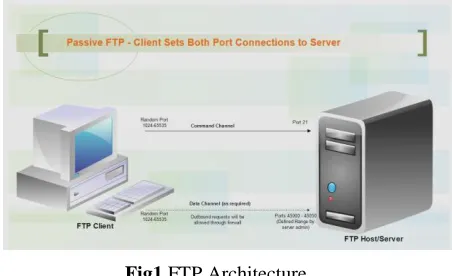
In passive mode connections, the FTP client initiates
the connections to the command port and data port to
the host server. This is the preferred mode in most
FTP clients as well as the default FTP setting in
SyncBackPro as the client’s firewall will allow
outgoing connections to the server.
The FTP client first establishes the connection by
opening a port (random port, X>1023) locally and
connecting to Port 21 of the server. The client then
opens another port X+1 and sends out the PASV
command to notify the server it is in passive mode.
The server will respond by opening a port
(predefined random port, Y>1023) and acknowledges
the client by sending out P to it. Then the client initiates the connection from port X+1 to the server’s
port Y for data transferring.
Fig1 FTP Architecture
In active mode, the FTP client (random port,
X>1023) initiates the connection by connecting to the server’s command port (Port 21). The client then
opens a listening data port and sends the command
PORT to the server. The server, using Port 20, will
initiate the connection to the specified data port on
the FTP client.
III. APPLICATION PERFORMANCE BASED ON
TCP AND UDP
TCP (Transport Control Protocol) and UDP
Available online:
https://edupediapublications.org/journals/index.php/IJR/
P a g e | 1252transport protocols in TCP/IP network architecture,
which guarantee the transmission of network layer
data TCP is a reliable connection-oriented transport
layer protocol. This means that prior to the
transmission of data, the two sides should establish a
connection to send and receive the data before the
completion of the transmission and then disconnect
the connection. UDP is an connectionless transport
layer protocol, regardless of the state of the other
side, you can send data directly. In different network
environments, different transport protocols have
different effects on application performance, and we
can choose different transport protocols according to
different requirements.
OPNET(Network Engineering Tools
Optimal) is a kind of network simulation software,
which provides three levels of model: process model,
node model and network model. Users can use
Modeler OPNET to realize the network simulation,
such as network performance analysis, network
planning and communication network analysis based
on the simulation model. OPNET becomes the most
popular network simulation software with its
facilitate of operation of the graphical interface and a
large number of model library and provides a great
convenience for us to study the network
a. TCP
TCP is a connection-oriented protocol provides
reliable data transmission. TCP packet format is
shown in Fig. The term connection-oriented means
the two applications using TCP must establish a TCP
connection with each other before they can exchange
data While it must follow the principle of Three-way
Handshaking to establish a connection and terminate
a connection by Four-way Handshaking.
Fig 2 CP Datagram Format
b.UDP
UCP packet format is shown in Fig.2 and we can see
that compared with TCP, UDP is a simple
communication protocol and it provides
connectionless unreliable transport services. Between
the sending and receiving ends, UDP doesn’t provide
a point-to-point connection and it can transmit data
immediately. UDP is a packet-oriented, and the
length of the datagram will remain unchanged. UDP
does not provide a guaranteed transmission, flow
control mechanism, congestion control mechanism
and error control mechanism and other functions but
forwards the data of IP layer without ensuring that
they reach the destination successfully .UDP is a
good choice for applications that can tolerate data
errors.
Fig 3UDP Datagram Format
IV. PERFORMANCE ANALYSIS OF FTP AND
HTTP
HTTP Protocol: OPNET tool can simulate HTTP
application as the browsing activities of Internet, i.e.
one of the client nodes periodically contact Web
server to retrieve web pages. In OPNET, each page is
modeled as a text (a basic HTML file) and a few
inline objects (such as images and data files
TCP as the transport protocol, the running process is
as follows: the client sends a HTTP request to a Web
page; the server receives the request, and the
corresponding page will be replied to the client. In
this analysis process, if the Web page contains
several inline objects, the client node will request for
the follow-up objects from the Server. In OPNET,
HTTP Configuration Table (HTTP configuration
table) mainly includes four key attributes of
describing HTTP application: HTTP Specification
defines the configuration of Web browser; Page
Inter-arrival Time (seconds) specifies the time
between page requests in a row; Page Properties
describes an OPNET said of a typical Web page;
Server Selection decides the retrieving path by
parsing an embedded Web link index page.
The number of client nodes and the network
bandwidth is different in each scene. We set the
packet loss rate of the Internet cloud in each scenario
be 1%. Also all through the traffic on the introduction
of an additional delay is set to be 200ms. Set the web
browser of every scene running on top of HTTP1.1,
and configure each client node requests a new page
every 10s. Set the size of each web page to 100 bytes,
which is consist of a single text object and 7 large
images. The Web application configuration is shown
as table. as follows, and the network topology details
table of these nine scenes is shown as table.
Fig 4Network Topology
FTP Protocol: OPNET standard application for FTP
models the basic operations. OPNET simplify the
multiple FTP applications and simulate the two main
data transmission of FTP operation: get and put. FTP
put operations are used to upload a file to FTP server
and FTP get operation are used to download a file
from the FTP server to the client nodes. In OPNET,
the FTP application models the process of
transferring files at a time. By default, FTP is running
on top of the TCP. When using the default transport
protocol, it opens a separate TCP connection for each
file. Unlike in real networks, during the procedure of
one file’s transferring operations, the FTP model uses
the same TCP connection to send control messages
and data modeling. OPNET FTP is described in three
key properties: Command Mix (Get/Total) specifies
the ratio between the get operands and the total
number of FTP operations; Inter-Request Time
(seconds) to specify the amount of time between
consecutive FTP operation; File Size (bytes) specifies
that you want to transfer the file size in bytes.
The simulation model contains two scenes in
this group, in the first scene the Web application is
the HTTP protocol, the second one is FTP protocol,
the network topology of the two scenes are observed
as Fig, These two scenes of network topology group
scene are much the same with group_1, the only
difference is that the link object is set to ppp_DS1.
The Web application configuration of HTTP scene is
shown as table. and the Web application
configuration of FTP scene is shown as table.
OPNET provides various kinds of
simulation and statistics, as well as the ability to
configure the collection mode, but a simulation in
OPNET does not automatically select which statistics
to collect. In order to validate different types of OPNET
Simulator
Multiple Client Systems
IP
WEB Server Profiles Platfor
ms
Applicati ons Multiple
Client Systems
Available online:
https://edupediapublications.org/journals/index.php/IJR/
P a g e | 1254network bandwidth and request the client node
number effects on the performance of HTTP
protocol, we need to manually configure the
simulation in each scene to collect the following
statistic: all Client HTTP node statistics, all
point-to-point link statistics. And then repeatedly perform the
simulation in the results browser view and collect the
results. We collect the queuing delay in the link from
client_1 to the Internet in every scene, and then
export the result to an excel file. From these useful
data, we calculate the average Queuing delay in every
scene.
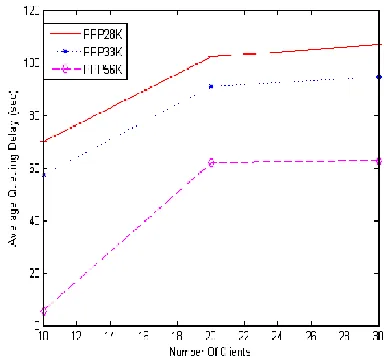
With the increasing of link bandwidth, the
end-to-end queuing delay of the client node to the
server decreases. When the number of the clients is
increased from ten to 20, the end-to-end queuing
delay increased by a big margin, as the number of the
clients is increased from 20 to 30, the end-to-end
queuing delay increased relatively less. Thus we get
the following results: client node number of HTTP
requests made more big effect on end-to-end queuing
delay in the link, HTTP protocol properties relatively
made smaller effect. The larger the link bandwidth
are, the smaller the end-to-end queuing delay will be,
and the performance of HTTP protocol will be better
accordingly.
V. EXPERIMENT RESULTS ANALYSIS
A. HTTP Protocol Performance Analysis
OPNET provides various kinds of simulation and
statistics, as well as the ability to configure the
collection mode, but a simulation in OPNET does not
automatically select which statistics to collect. In
order to validate different types of network
bandwidth and request the client node number effects
on the performance of HTTP protocol, we need to
manually configure the simulation in each scene to
collect the following statistic: all Client HTTP node
statistics, all point-to-point link statistics. And then
repeatedly perform the simulation in the results
browser view and collect the results. We collect the
queuing delay in the link from client_1 to the Internet
in every scene, and then export the result to an excel
file. From these useful data, we calculate the average
Queuing delay in every scene.
Fig 5 HTTP Performance comparison chart
B. Performance Results analysis of HTTP and FTP
In order to verify the performance of HTTP and FTP
protocol in the same network environment, we
configure the set of simulation to collect statistics for
two scenarios: all nodes from the class node of the
statistics for TCP. After you run the simulation,
Fig 6TCP Delay of HTTP and FTP
VI. CONCLUSION
This is based on OPNET, and completes a simulation
of HTTP protocol and FTP protocol, By comparing
the queuing delay in different scenarios based on
HTTP protocol, we find what do the link bandwidth
and client node number effect on the performance of
HTTP; through comparing the TCP Delay in HTTP
protocol and FTP protocol scene, we learned the
performance of FTP protocol and HTTP protocol on
Web application under the same network
environment. All the analysis are based on
simulation. On the basis of this study, performances
of related network system with multiple traffics can
be conducted.
REFERENCES
1. J. Evangelista. Netto, E. Hernane. Paulicena, R. Amorim. Silva, A. Anzaloni. “Analysis of
Energy Consumption Using HTTP and FTP
Protocols Over IEEE 802.11,” IEEE Journals &
Magazines, 2014, 12(4): 668-674
2. L.D.Circiumarescu,G.Predusca, N.Angelescu,
D.Puchianu. “Comparative Analysis of Protocol
RIP, OSPF, RIGRP and IGRP for Service Video
Conferencing, E-mail, FTP, HTTP,” IEEE
Conference Publications, 2015:584-589.
3. Andrew.S.Tanenbaum, David.J.Wetherall.
“COMPUTER NETWORKS,” Tsing University
Press, 2013.
4. Adarshpal.S.Sethi, Vasil.Y.Hnatyshin. “The
Practical OPNET User Guide for Computer
Network Simulation,” CHINA MACHINE
PRESS, 2014, 1.
5. R. Fielding, UC Irvine. “RFC 2616: Hypertext Transfer Protocol HTTP/1.1,” IETF, June 1999.
6. J. Postel, J. Reynolds. “RFC 959: FILE
TRANSFER PROTOCOL (FTP), ISI, October
1985.
7. M. Allman, V. Paxson. “RFC 5681: TCP
Congestion Control,” ICSI, September 2009.
8. Manju Sharma, Manoj Kumar, Ajay.K. Sharma.
“Http And Ftp Statistics For Wireless And
Wire-Line Network With And Without Load Balance Based On Opnet,” Institute for Scientific
Computing and Information, international
journal of information and systems sciences
Volume 5, Number 1, Pages 112-125©2009
9. Manju Sharma, Manoj Kumar. “Comparative
investigation on Media Access Delay and Client
Object response Time for a Switched and Routed Wireless LAN based on OPNET,” (2008)
10. IT Guru Academic Edition OPNET Technoligies,
http://www.opnet.com/University program/it guru
academic edition,(2007)
11. W.R Stevens. TCP/IP Illustrated Volume1 the
Protocols [M]. Post and Telecom Press, 2010, pp.
223-227.
12. M. Jeanna. Computer Networking Internet
Protocols in Action[M]. POST&TELECOM
PRESS, 2006, pp.75,83.
13. R. Adolfo, G. John. TCP/IP Tutorial and
Technical Overview 7th Edition[M]. Tsing
University Press, 2002, pp. 023-025.
14. Adarshpal S.Sethi, Vasil Y.Hnatyshin. The
Practical OPNET User Guide for Computer
Network Simulation[M]. CHINA MACHINE
PRESS, 2014, PP. 1.
15. J. Shi, L. J. Zhong. Study of OPNET Network
Simulation Mechanism and Modeling Method[J].