555-025-600
Comcode 108074378
Issue 6
While reasonable efforts were made to ensure that the information in this document was complete and accurate at the time of printing, Lucent Technologies can assume no
responsibility for any errors. Changes and corrections to the information contained in this document may be incorporated into future reissues.
Your Responsibility for Your System’s Security
Toll fraud is the unauthorized use of your telecommunications system by an unauthorized party, for example, persons other than your company’s employees, agents, subcontractors, or persons working on your company’s behalf. Note that there may be a risk of toll fraud associated with your telecommunications system, and if toll fraud occurs, it can result in substantial additional charges for your telecommunications services. You and your system manager are responsible for the security of your system, such as programming and configuring your equipment to prevent unauthorized use. The system manager is also responsible for reading all installation, instruction, and system administration documents provided with this product in order to fully understand the features that can introduce risk of toll fraud and the steps that can be taken to reduce that risk. Lucent Technologies does not warrant that this product is immune from or will prevent unauthorized use of common-carrier telecommunication services or facilities accessed through or connected to it. Lucent Technologies will not be responsible for any charges that result from such unauthorized use.
Lucent Technologies Fraud Intervention
If you suspect you are being victimized by toll fraud and you need technical support or assistance, call the appropriate BCS National Customer Care Center telephone number. Users of the Merlin®, PARTNER®, and System 25 productsshould call 1 800
628-2888. Users of the System 75, System 85, DEFINITY
Generic 1, 2 and 3, and DEFINITY® ECS products should call 1
800 643-2353.
Customers outside the continental United States should contact their local Lucent representative, or call one of the above numbers in the following manner:
1) Dial the International Access Code; for example, 011. 2) Dial the country code for the U.S., that is, 01.
3) Lastly, dial either of the telephone numbers provided above.
WWW Home Page
The www home page for Lucent Technologies is www.lucent.com.
Acknowledgment
This document was prepared by the BCS Product Documentation Development group, Lucent Technologies, Middletown, NJ 07748-9972.
CentreVu is a trademark of Lucent Technologies. CONVERSANT is a registered trademark of Lucent Technologies.
DEFINITY is a registered trademark of Lucent Technologies. In this document, DEFINITY Communications System Generic 1 is often abbreviated to Generic 1, or G1. DEFINITY
Communications System Generic 2 is often abbreviated to Generic 2, or G2. DEFINITY Communications System Generic 3 is often abbreviated to Generic 3, or G3.
DIMENSION is a registered trademark of Lucent Technologies. HackerTracker is a registered trademark of AT&T.
Intel is a registered trademark of Intel Corporation. INTUITY is a trademark of Lucent Technologies.
Macintosh is a registered trademark of Apple Computer, Inc. MERLIN is a registered trademark of Lucent Technologies. MERLIN LEGEND is a registered trademark of Lucent Technologies.
MERLIN MAIL is a registered trademark of Lucent Technologies. Microsoft and Windows are registered trademarks of Microsoft Corporation.
NetPROTECT is a service mark of Lucent Technologies. Netware is a registered trademark of Novell Inc.
Norton pcANYWHERE is a registered trademark of Symantic Corp.
OS/2 is a registered trademark of the International Business Machines Corporation.
PARTNER is a registered trademark of Lucent Technologies. PARTNER MAIL is a registered trademark of Lucent Technologies.
PARTNER MAIL VS is a registered trademark of Lucent Technologies.
PassageWay is a registered trademark of Lucent Technologies. Sun is a registered trademark and SPARCserver is a trademark of Sun Microsystems Inc .
TransTalk is a trademark of Lucent Technologies.
Windows is a registered trademark of Microsoft Corporation. Windows NT is a trademark of Microsoft Corporation. UNIX is a registered trademark in the United States and other
countries, licensed exclusively through X/Open Company Limited.
Voice Power is a registered trademark of Lucent Technologies.
Ordering Information
Call: Lucent Technologies BCS Publications Center Voice 1 800 457-1235 International Voice 317 322-6416
Fax 1 800 457-1764 International Fax 317 322-6699
Write: Lucent Technologies BCS Publications Center 2855 N. Franklin Road
Indianapolis, IN 46219
Order: Document No. 555-025-600
Issue 6, December 1997
Contents
About This Document xiii
■ Scope of this Handbook xiii
■ Reason for Reissue xv
■ Intended Audience xv
■ How this Guide is Organized xvi
■ Lucent Technologies’ Statement of Direction xvii ■ Lucent Technologies/Customer Security Roles and
Responsibilities xviii
Lucent Technologies’ Roles and Responsibilities xix
Customer Roles and Responsibilities xx
■ Lucent Technologies Security Offerings xx ■ Lucent Technologies Toll Fraud Crisis Intervention xxi
Helplines xxi
■ Related Documentation xxii
1
Introduction 1-1■ Background 1-1
■ Who is the Enemy? 1-2
Hackers and Phreakers 1-2
Call Sell Operations 1-2
Drug Dealers 1-3
■ What is in a Loss? 1-3
Cost of the Phone Bill 1-3
Lost Revenue 1-3
Expenses 1-3
■ Known Toll Fraud Activity 1-3
2
Security Risks 2-1■ Overview 2-1
■ Remote Access 2-2
■ Automated Attendant 2-3
■ Other Port Security Risks 2-3
■ Voice Messaging Systems 2-4
■ Administration / Maintenance Access 2-4
Passwords 2-4
Increasing Product Access (Port) Security 2-6
■ General Security Measures 2-7
Educating Users 2-7
Establishing a Policy 2-8
Physical Security 2-9
■ Security Goals Tables 2-9
3
Large Business Communications Systems 3-1■ Keeping Unauthorized Third Parties
from Entering the System 3-2
How Third Parties Enter the System 3-2
Protecting the Remote Access Feature 3-2
Security Tips 3-2
Disabling/Removing Remote Access 3-3
Tools to Protect Remote Access 3-3
Status Remote Access Command 3-10
Logoff Screen Notification 3-10
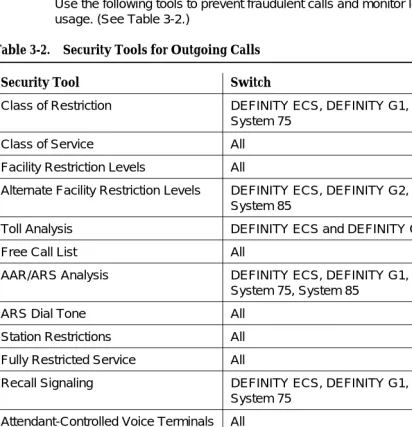
■ Tools that Restrict Unauthorized Outgoing Calls 3-11
Class of Restriction 3-12
Class of Service 3-14
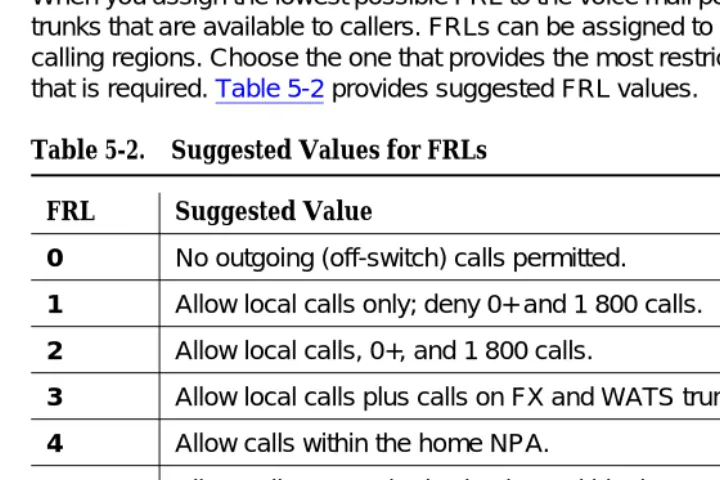
Facility Restriction Level (FRL) 3-15
Alternate Facility Restriction Levels 3-16
Toll Analysis (G3 only) 3-16
Free Call List 3-16
AAR/ARS Analysis 3-17
ARS Dial Tone 3-17
Station Restrictions 3-17
Recall Signaling (Switchhook Flash) 3-17
Attendant - Controlled Voice Terminals 3-18
Restrictions — Individual and Group-Controlled (DEFINITY ECS, DEFINITY G1, G3, and
System 75) 3-18
Central Office Restrictions 3-19
Restricting Incoming Tie Trunks 3-19
Authorization Codes 3-19
Trunk-to-Trunk Transfer 3-19
World Class Routing (DEFINITY ECS and
DEFINITY G2.2 and G3 only) 3-20
Digit Conversion 3-21
Station Security Codes (SSCs) 3-21
Personal Station Access (PSA) 3-22
Extended User Administration of Redirected Calls 3-23
Remote User Administration of Call Coverage 3-23
■ Security Measures 3-24
Require Passwords 3-24
Restrict Who Can Use Remote Access/Track
its Usage 3-25
Fully Restrict Service 3-27
Provide Individualized Calling Privileges
Using FRLs 3-28
Prevent After-Hours Calling Using Time of Day
Routing or Alternate FRLs 3-29
Block International Calling 3-30
Limit International Calling 3-32
Select Authorization Code Time-Out to Attendant 3-33
Restrict Calls to Specified Area Codes 3-33
Allow Calling to Specified Numbers 3-33
Use Attendant Control of Remote Access Calls
(DEFINITY G2 and System 85 only) 3-34
Use Attendant Control of Specific Extensions 3-34
Disable Direct Access to Trunks 3-35
Use Attendant Control of Trunk Group Access 3-36
Disable Facility Test Calls 3-36
Suppress Remote Access Dial Tone 3-38
Disallow Trunk-to-Trunk Transfer 3-39
Disable Transfer Outgoing Trunk to
Outgoing Trunk 3-40
Disallow Outgoing Calls from Tie Trunks 3-40
Limit Access to Tie Trunks 3-41
Monitor Trunks 3-41
Use Terminal Translation Initialization 3-42
Require Account Codes 3-42
Assign COR Restrictions to Adjuncts when Using
Disable Distinctive Audible Alert 3-43
Remove Data Origination Code 3-44
Use World Class Routing Restrictions
(DEFINITY G2.2 and G3 only) 3-44
Change Override Restrictions on 3-way
COR Check 3-45
■ Detecting Toll Fraud 3-45
Administration Security 3-47
Call Detail Recording (CDR) / Station Message Detail
Recording (SMDR) 3-48
Traffic Measurements and Performance 3-49
Automatic Circuit Assurance (ACA) 3-51
BCMS Measurements (DEFINITY ECS and
DEFINITY G1 and G3 only) 3-52
CMS Measurements 3-52
Security Violation Notification Feature
(DEFINITY ECS and DEFINITY G3 only) 3-53
Security Violations Measurement Report 3-56
Remote Access Barrier Code Aging/Access Limits
(DEFINITY G3V3 and Later) 3-61
Recent Change History Report (DEFINITY ECS and
DEFINITY G1 and G3 only) 3-61
Malicious Call Trace 3-62
Service Observing 3-63
Busy Verification 3-64
List Call Forwarding Command 3-64
4
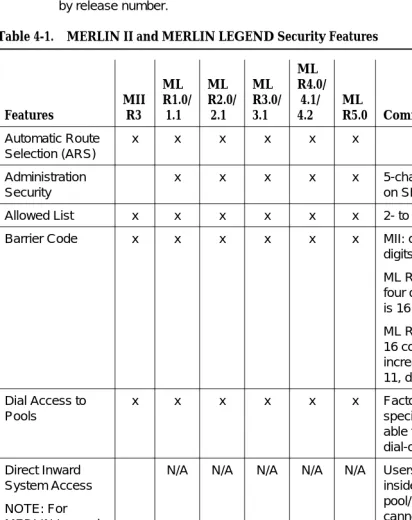
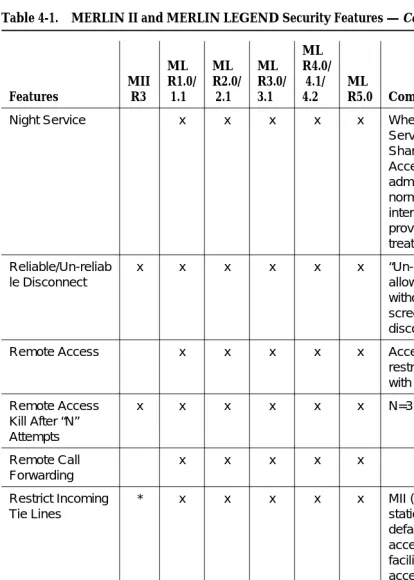
Small Business Communications Systems 4-1■ Features for the MERLIN Systems 4-3 ■ MERLIN II Communications System 4-6
Protecting Direct Inward System Access (DISA) 4-6
■ MERLIN LEGEND Communications System 4-8
Preventative Measures 4-9
Protection Via Star Codes and
Allowed/Disallowed Lists 4-10
Assigning a Second Dial Tone Timer 4-12
Setting Facility Restriction Levels 4-12
Protecting Remote Access 4-13
Protecting Remote Call Forwarding 4-16
■ MERLIN Plus Communications System 4-16
Protecting Remote Line Access (R2 only) 4-16
Protecting Remote Call Forwarding (R2 only) 4-17
■ PARTNER II Communications System 4-18 ■ PARTNER Plus Communications System 4-18
■ System 25 4-19
Protecting Remote Access 4-19
Protecting Remote System Administration 4-20
5
Voice Messaging Systems 5-1■ Protecting Voice Messaging Systems 5-2
Security Tips 5-3
■ DEFINITY ECS, DEFINITY Communications Systems,
System 75, and System 85 5-4
Tools that Prevent Unauthorized Calls 5-5
Security Measures in the PBX 5-7
Detecting Voice Mail Fraud 5-11
Protecting the AUDIX, DEFINITY AUDIX, and Lucent Technologies INTUITY Voice Mail Systems 5-15
Protecting the AUDIX Voice Power System 5-28
Protecting the CONVERSANT Voice Information
System 5-31
■ MERLIN II Communications System 5-33
Protecting the MERLIN MAIL Voice Messaging
System 5-33
■ MERLIN LEGEND Communications System 5-36
Protecting the AUDIX Voice Power System 5-37
Protecting the INTUITY Voice Messaging System 5-39
Protecting the MERLIN MAIL, MERLIN MAIL-ML, MERLIN MAIL R3, and MERLIN
LEGEND Mail Voice Messaging Systems 5-43
■ PARTNER II Communications System 5-48
Protecting the PARTNER MAIL and PARTNER
MAIL VS Systems 5-48
■ PARTNER Plus Communications System 5-50
Protecting the PARTNER MAIL and PARTNER
MAIL VS Systems 5-50
Protecting the AUDIX Voice Power System 5-53
6
Automated Attendant 6-1■ DEFINITY ECS, DEFINITY Communications Systems,
System 75, and System 85 6-1
Security Tips 6-1
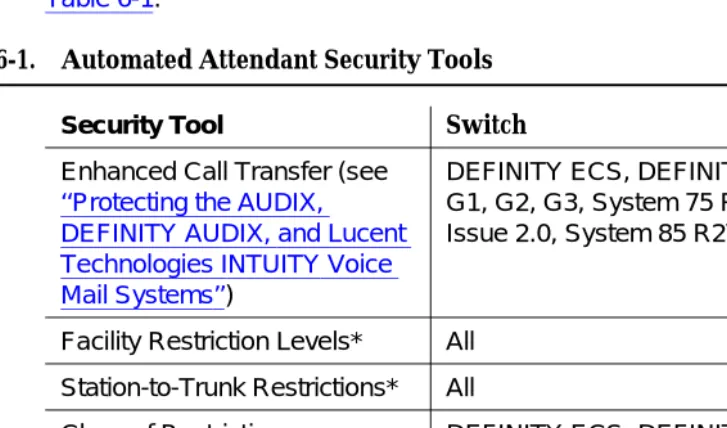
Tools that Prevent Unauthorized Calls 6-2
Security Measures 6-5
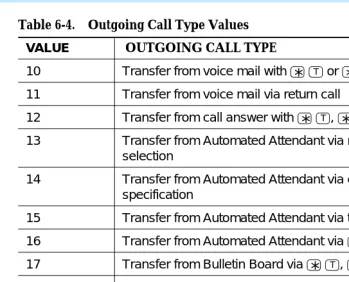
Detecting Automated Attendant Toll Fraud 6-8
Protecting Automated Attendant on the
AUDIX Voice Mail System 6-16
Protecting Automated Attendant on the AUDIX
Voice Power System 6-17
Protecting Automated Attendant on the
CONVERSANT Voice Information System 6-17
Protecting Automated Attendant on the
DEFINITY AUDIX System 6-18
Protecting Automated Attendant on the Lucent
Technologies INTUITY System 6-18
■ MERLIN II Communications
System R3 6-18
MERLIN MAIL Voice Messaging System 6-18
MERLIN Attendant 6-18
■ MERLIN LEGEND Communications System 6-19
AUDIX Voice Power System 6-19
MERLIN MAIL, MERLIN MAIL-ML, and
MERLIN MAIL R3 Voice Messaging Systems 6-19
MERLIN Attendant 6-19
■ PARTNER II Communications System 6-20
PARTNER MAIL and PARTNER MAIL VS Systems 6-20
PARTNER Attendant 6-20
■ PARTNER Plus Communications System 6-20
PARTNER MAIL and PARTNER MAIL VS Systems 6-20
PARTNER Attendant 6-20
■ System 25 6-21
AUDIX Voice Power System 6-21
7
Other Products and Services 7-1■ Call Management System (R3V4) 7-1
CMS Helplines 7-2
■ CallMaster PC 7-3
Security Tips 7-3
■ Multipoint Conferencing Unit
(MCU)/Conference Reservation and
Control System (CRCS) 7-4
■ PassageWay®Telephony Services for
NetWare® and Windows NT® 7-4
Security Tips 7-5
■ TransTalk 9000 Digital Wireless System 7-8
Security Tips 7-8
A
Call Routing A-1■ Call Routing A-1
B
Blocking Calls B-1■ Country Codes B-1
■ Blocking Toll Fraud Destinations B-8
Blocking ARS Calls on DEFINITY G1 and
System 75 B-9
Blocking ARS Calls on G2.1 and System 85 B-14
Blocking WCR Calls on DEFINITY G2.2 B-15
Blocking ARS Calls on G3 B-16
Blocking ARS Calls on System 25 R3V3 B-18
C
Remote Access Example(DEFINITY ECS, DEFINITY G1, G3,
and System 75) C-1
■ Setting Up Remote Access C-1
■ Permanently Disabling Remote Access C-3
D
Administering Features of the DEFINITY G3V3 and Later,Including DEFINITY ECS D-1
■ Administering the SVN Feature D-1
Administering the Login Component D-2
Administering the Remote Access Component D-4
Administering the Authorization Code Component D-8
Administering the Station Security Code ComponentD-9
■ Administering Customer Logins and
Forced Password Aging D-13
Adding Customer Logins and Assigning Initial
Password D-13
Changing a Login’s Attributes D-15
Administering Login Command Permissions D-16
■ Administering the Security Violations Reports D-17
E
Changing Your Password E-1■ AUDIX Voice Mail System E-1
■ AUDIX Voice Power System E-1
■ CONVERSANT Voice Information System E-2
■ DEFINITY AUDIX System E-3
■ DEFINITY ECS and DEFINITY G1
and G3 E-4
■ DEFINITY G2 E-5
■ Lucent Technologies INTUITY System E-5 ■ MERLIN MAIL or MERLIN MAIL-ML
Voice Messaging System E-6
■ MERLIN MAIL R3, MERLIN LEGEND
Mail, or PARTNER MAIL R3 Voice Messaging System E-7
■ PARTNER MAIL System E-8
■ PARTNER MAIL VS System E-8
■ System 25 E-9
■ System 75 E-9
■ System 85 E-10
F
Toll Fraud Job Aids F-1■ Toll Fraud Warning Signs F-1
■ System Security Action Plan F-3
■ Top 10 Tips to Help Prevent Phone “Phraud” F-4
G
Special Security Product and Service Offers G-1■ Remote Port Security Device (RPSD) G-1
Key and Lock Features G-2
Lucent Technologies Support G-3
■ Security Audit Service G-3
■ Lucent Technologies HackerTracker G-3
■ Toll Fraud Contact List G-5
H
Product Security Checklists H-1■ General Security Procedures H-3
■ AUDIX, DEFINITY AUDIX and INTUITY AUDIX Voice
Messaging Systems H-5
■ AUDIX Voice Power System H-7
■ BasicWorks H-9
■ CONVERSANT Voice Information System H-13 ■ DEFINITY ECS, DEFINITY G1 and G3, and System 75 H-15
■ DEFINITY G2 and System 85 H-21
■ DIMENSION PBX System H-25
■ Lucent Technologies/Bay Networks H-28 ■ MERLIN II Communications System H-29 ■ MERLIN LEGEND Communications System H-31 ■ MERLIN MAIL Voice Messaging System H-34 ■ MERLIN MAIL-ML Voice Messaging System H-36 ■ MERLIN MAIL R3 Voice Messaging System H-38 ■ MERLIN Plus Communications System H-41 ■ Multimedia Communications Exchange Server H-42 ■ Multipoint Conferencing Unit
(MCU)/Conference Reservation and
Control System (CRCS) H-43
ESM Security Checklist H-45
CRCS Security Checklist H-47
MSM Security Checklist H-48
■ PARTNER II and PARTNER Plus
Communications Systems H-53
■ PARTNER MAIL and PARTNER MAIL VS Systems H-56
■ System 25 H-58
■ PassageWay Telephony Services H-60
I
Large Business CommunicationsSystems Security Tools by Release I-1
GL
Glossary 1About This Document
Scope of this Handbook
This handbook discusses security risks and measures that can help prevent external telecommunications fraud involving the following Lucent Technologies products:
Communications Server:
■ DEFINITY® Enterprise Communications Server (ECS) Release 5 and later
PBX systems:
■ DEFINITY® Generic 1, 2, and 3 Communications Systems ■ MERLIN® II Communications System
■ MERLIN LEGEND® Communications System ■ MERLIN® Plus Communications System ■ PARTNER® II Communications System ■ PARTNER® Plus Communications System ■ System 25 Communications System
■ System 75 (R1V1, R1V2, R1V3)
■ System 85 (R1, R2V2, R2V3, R2V4)
Voice processing systems:
■ AUDIX® Voice Mail System ■ AUDIX® Voice Power® System
■ DEFINITY® AUDIX® System
■ INTUITY™ AUDIX® Voice Messaging System
■ INTUITY™ CONVERSANT® Voice Information System ■ MERLIN MAIL® Voice Messaging System
■ MERLIN MAIL®-ML Voice Messaging System ■ MERLIN MAIL® R3 Voice Messaging System ■ PARTNER MAIL® System
■ PARTNER MAIL VS® System
Other products and services:
■ Call Management System (R3V2)
■ CallMaster® PC
■ Multipoint Conferencing Unit (MCU)
■ PassageWay® Telecommunications Interface ■ TransTalk™ 9000 Digital Wireless System
■ Telephony Services for Netware®
NOTE:
Although the DIMENSION® Call Management System is not covered explicitly in this handbook, the information supplied for System 85 Release 2 applies to the DIMENSION PBX System as well.
NOTE:
This document describes switch features and how they are related to security. It is not designed to fully describe the capabilities of each feature. For further details about all the security features and their interactions with other system features, refer to the appropriate system manual for your telecommunications system. (See ‘‘Related Documentation’’ in this chapter for titles and document numbers.)
For the latest updates on the security of products, the following options are available:
■ Purchase the Toll Fraud Prevention training video
■ Enroll in Lucent Technologies BCS Advanced Security for DEFINITY
ECS
This advanced 2-day training course provides additional technical methods and procedures in recognizing and preventing toll fraud for the DEFINITY user. To enroll, call 1 800 255-8988, PEC 1460-095.
Reason for Reissue
This issue, Issue 6 of the GBCS Products Security Handbook, updates information to include the following:
■ Changes in the text to reflect the addition of the DEFINITY Enterprise
Communications Server Release 5 and Release 6
■ The Security Violations Measurement Reports used with the DEFINITY
switch
■ MERLIN LEGEND Release 3.1, 4.0, 4.1, 4.2, and 5.0
■ MERLIN LEGEND MAIL
■ PARTNER MAIL Release 3
■ INTUITY AUDIX® used with MERLIN LEGEND
Minor edits and other additions have also been included in this issue.
Intended Audience
Telecommunications managers, console operators, and security organizations within a company should be aware of the information in Chapters 1 and 2. Chapter 3 introduces more technical information and is directed at people responsible for implementing and administering the security aspects of systems.
How this Guide is Organized
The GBCS Products Security Handbook has the following chapters and appendices:
Chapter 1: Introduction Provides a background for toll fraud.
Chapter 2: Security Risks
Discusses the major areas in which customer premises equipment-based systems are vulnerable, and introduces available security measures.
Chapter 3: Large Business
Communications Systems
Provides information on protecting the DEFINITY ECS Release 5 and later, DEFINITY
Communications System Generic 1, Generic 2, and Generic 3, System 75, and System 85. Details how Remote Access is vulnerable to toll fraud, explains numerous system security features, and provides detailed procedures.
Chapter 4: Small Business
Communications Systems
Provides information on protecting the MERLIN II, MERLIN LEGEND, MERLIN Plus, PARTNER II, PARTNER Plus, and System 25 Communications Systems. Details product features that are vulnerable to toll fraud, such as Remote Access and Remote Call Forwarding, and recommends security measures.
Chapter 5: Voice Messaging Systems
Provides information on protecting voice messaging systems. Explains the tools available and
recommends security measures.
Chapter 6: Automated Attendant
Provides information on protecting Automated Attendant systems. Explains the features available and recommends security measures.
Chapter 7: Other Products and Services
Provides information to protect other Lucent Technologies products and services from toll fraud.
Appendix A: Call Routing
Details call flow through a customer premises equipment-based system.
Appendix B: Blocking Calls
Provides procedures for blocking calls to common toll fraud destinations.
Appendix C: Remote Access Example (G1, G3, and System 75)
Offers an example of how to set up Remote Access and an example of how to disable it.
Appendix D:
Administering Features of the DEFINITY G3V3 and Later
Lucent Technologies’ Statement of
Direction
The telecommunications industry is faced with a significant and growing problem of theft of customer services. To aid in combating these crimes, Lucent
Technologies intends to strengthen relationships with its customers and its support of law enforcement officials in apprehending and successfully prosecuting those responsible.
No telecommunications system can be entirely free from the risk of unauthorized use. However, diligent attention to system management and to security can reduce that risk considerably. Often, a trade-off is required between reduced risk and ease of use and flexibility. Customers who use and administer their systems make this trade-off decision. They know how to best tailor the system to meet their unique needs and, necessarily, are in the best position to protect the system from unauthorized use. Because the customer has ultimate control over the
configuration and use of Lucent Technologies services and products it purchases, the customer properly bears responsibility for fraudulent uses of those services and products.
To help customers use and manage their systems in light of the trade-off decisions they make and to ensure the greatest security possible, Lucent Technologies commits to the following:
■ Lucent Technologies products and services will offer the widest range of
options available in the industry to help customers secure their
communications systems in ways consistent with their telecommunications needs.
Appendix E: Changing Your Password
Tells how to change passwords for systems in the handbook.
Appendix F: Toll Fraud Job Aids
Provides job aids to help prevent toll fraud.
Appendix G: Special Security Product and Service Offers
Details special product and service offers and provides a toll fraud contact list.
Appendix H: Product Security Checklists
Lists the available security features and tips by product.
Appendix I: Large Business
Communications Systems Security Tools by Release
■ Lucent Technologies is committed to develop and offer services that, for a
fee, reduce or eliminate customer liability for PBX toll fraud, provided the customer implements prescribed security requirements in its
telecommunications systems.
■ Lucent Technologies’ product and service literature, marketing information
and contractual documents will address, wherever practical, the security features of our offerings and their limitations, and the responsibility our customers have for preventing fraudulent use of their Lucent Technologies products and services.
■ Lucent Technologies sales and service people will be the best informed in
the industry on how to help customers manage their systems securely. In their continuing contact with customers, they will provide the latest information on how to do that most effectively.
■ Lucent Technologies will train its sales, installation and maintenance, and
technical support people to focus customers on known toll fraud risks; to describe mechanisms that reduce those risks; to discuss the trade-offs between enhanced security and diminished ease of use and flexibility; and to ensure that customers understand their role in the decision-making process and their corresponding financial responsibility for fraudulent use of their telecommunications system.
■ Lucent Technologies will provide education programs for internal and
external customers to keep them apprised of emerging technologies, trends, and options in the area of telecommunications fraud.
■ As new fraudulent schemes develop, Lucent Technologies will promptly
initiate ways to impede those schemes, share our learning with our customers, and work with law enforcement officials to identify and prosecute fraudulent users whenever possible.
We are committed to meeting and exceeding our customers’ expectations, and to providing services and products that are easy to use and high in value. This fundamental principle drives Lucent Technologies’ renewed assault on the fraudulent use by third parties of our customers’ communications services and products.
Lucent Technologies/Customer
Security Roles and Responsibilities
The purchase of a telecommunications system is a complicated process involving many phases, including: system selection, design, ordering, implementation, and assurance testing. Throughout these phases, customers, vendors, and their agents each have specific roles and responsibilities. Insuring that systems are designed, ordered, installed, and maintained in a secure fashion is a responsibility each organization must understand.
(See the preceding section.) More specifically, Lucent Technologies BCS recognized four areas where we or our agents had specific responsibilities to our customers. These areas, and our responsibilities in each area, are detailed in the next section, “Lucent Technologies’ Roles and Responsibilities.”
In addition, customers have specific responsibilities to insure the system they are installing is as secure as their requirements dictate. The following quote is from
A Cooperative Solution to the Fraud that Targets Telecom Systems, a position paper developed by the Toll Fraud Prevention Committee (TFPC) of the Alliance for Telecommunications Industry Solutions:
“It is necessary to stress that the business owner, the owner or lessee of the CPE [Customer Premises Equipment], has the primary and paramount care, custody, and control of the CPE. The owner has the responsibility to protect this asset, the telecommunications system equally as well as other financial assets of the business.”
This document attempts to define industry standards for the roles and
responsibilities of the various organizations involved in a system implementation. Portions of this document are applicable to this document and are quoted throughout. Customers interested in the entire document can receive copies by contacting the Alliance for Telecommunications Industry Solutions, 1200 G Street, NW, Suite 500, Washington, DC 20005.
Lucent Technologies’ Roles and Responsibilities
1. Lucent Technologies BCS, as a manufacturer, has the responsibility to PROVIDE the customer with securable technology, the information resources (product documentation) to understand the capabilities of the technology, and the configuration of the equipment when it shipped from the factory.
2. Lucent Technologies BCS, as a sales organization, has the responsibility to INFORM the customer of potential toll fraud, how it can happen, and what roles and responsibilities Lucent Technologies and the customer need to accept to work together in reducing the customer’s potential for toll fraud.
3. Lucent Technologies BCS, as a provisioning organization, has the responsibility to ASSIST the customer in understanding the risks inherent in the use of certain equipment features, and the methods available to minimize those risks. Together with the customer Lucent Technologies must come to an agreement on the desired configuration, and insure that customers’ requests are carried out correctly.
4. Lucent Technologies BCS, as a maintenance provider, has the
Customer Roles and Responsibilities
The customer as the business owner has the responsibility to SELECT AND MANAGE the security of their system. Specifically, according to the TFPC of the Alliance for Telecommunications:
“The basic responsibility of the business owner is to devote adequate resources (time, talent, capital, etc.) to the selection of CPE and to its management, including fraud prevention, detection and deterrence. It is an essential part of managing the business. The owner must demand that the internal staff and supporting external professionals, such as consultants, include security concerns in the evaluation, design, and operation of the telecommunications environment for his/her business.”
Lucent Technologies Security
Offerings
Lucent Technologies has developed a variety of offerings to assist in maximizing the security of your system. These offerings include:
■ Security Audit Service of your installed systems (see Appendix G).
■ Security Tune-up Service (see Appendix G).
■ Toll Fraud Crisis Intervention Service (see “Lucent Technologies Toll Fraud
Crisis Intervention” in this section).
■ The BCS Product Security Kit, 555-025-601, includes this Security
Handbook, a self-paced tutorial that uses diagrams of system administration screens to help customers design security into their
systems, and a training video tape addressing customer needs for tools to share within their own companies. The video tape provides customers with valuable information on ways to recognize and defend against toll fraud.
■ The HackerTracker™ Call Accounting package that calls you when preset
types and thresholds of calls are established (see “Lucent Technologies HackerTracker” in Appendix G).
■ Remote Port Security Device (RPSD) that makes it difficult for computer
hackers to access the remote maintenance ports (see Appendix G).
■ Integrated Lock for Security Toolkit (or SoftLock) feature (see Appendix G).
This feature provides many of the same options as the RPSD listed above, but whereas the RPSD is a hardware device, the SoftLock feature is a software interface that can be installed directly in the DEFINITY ECS software base. This software can be used only with the DEFINITY ECS Release 6.2 and later.
■ Software that can identify the exact digits passed through the voice mail
Lucent Technologies Toll Fraud Crisis
Intervention
If you suspect you are being victimized by toll fraud or theft of services and need technical support or assistance, call the appropriate Lucent Technologies BCS service:
NOTE:
These services are available 24 hours a day, 365 days a year. Consultation charges may apply. Intervention services are performed at no charge for equipment covered by warranty or service agreement.
Helplines
■ If you require application support assistance or have questions regarding
feature functions for the DEFINITY ECS, DEFINITY G1, G2, and G3, System 75, or System 85 Communications Systems, associated voice mail systems, or other adjuncts, contact the DEFINITY Helpline:
800 225-7585
Toll Fraud Intervention Hotline 800 643-2353
All systems and products; DEFINITY ECS and DEFINITY Communications Systems, System 75, System 85, MERLIN II, MERLIN LEGEND, MERLIN Plus, PARTNER II, PARTNER Plus, and System 25 Communications Systems (including associated voice mail systems and other adjuncts)
Technical Service Center (TSC): 800 242-2121
DEFINITY ECS, DEFINITY
Communications System, System 75, and System 85
(including associated voice mail systems and other adjuncts)
National Service Assistance Center (NSAC):
800 628-2888
■ For assistance with the DEFINITY AUDIX System, call: 800 562-8349
■ For assistance with the MERLIN II, MERLIN LEGEND, MERLIN Plus,
PARTNER II, PARTNER Plus, or System 25 Communications Systems, or their associated voice mail systems or other adjuncts, call:
800 628-2888
NOTE:
The above services may result in an additional charge. Intervention services are performed at no charge for equipment covered by warranty or service agreement.
Related Documentation
The security risks and preventive measures presented in this document relate specifically to toll fraud. This handbook is designed to work with the
1
1
Introduction
Background
Telecommunications fraud is the unauthorized use of a company’s
telecommunications service. This type of fraud has been in existence since the 1950s when Lucent Technologies first introduced Direct Distance Dialing (DDD).
In the 1970s Remote Access became a target for individuals seeking
unauthorized network access. Now, with the added capabilities of voice mail and automated attendant services, customer premises equipment-based toll fraud has expanded as a new type of communications abuse.
Today, security problems are not just limited to toll fraud. There have been sharp increases in reported incidents of hackers: criminals skilled in reprogramming computer systems, accessing telecommunications systems through remote administration or maintenance ports. These ports cannot be used to place phone calls, but hackers can gain control over the setup of the system. Through these ports, hackers create security “holes” to allow unauthorized calling — a serious form of electronic vandalism.
Who is the Enemy?
Hackers and Phreakers
Hackers and “phreakers” (phone freaks) use personal computers, random number generators, and password cracking programs to break into even the most sophisticated customer premises equipment-based system if it has not been adequately secured. Once a hacker penetrates a network and provides
instructions to toll call sellers, large volumes of unauthorized calls can be made from the switch. Severe cases of communications abuse can also reduce revenue and productivity when employees are unable to dial out and customers are unable to call in.
These people are criminals, as defined by the United States Secret Service and Title 18 Section 1029 of the United States Criminal Code. They attempt to find your weakest link and break it. Once they have compromised your system, they will use your system resources to break into another system, and/or advertise that they have broken your system and how they did it. They will also sell this
information to a call sell operator. Some hackers command up to $10,000.00 a week for stolen codes.
Call Sell Operations
Most of the high dollar theft comes from call sell operations. These operations vary from a pay phone thief, who stands next to a pay phone and “sells” discount calls through your system, to a full-blown call sell operation.
A full-blown operation might involve a one-room apartment (rented under an assumed name) with 30 to 40 phones (lines from the phone company are under the same assumed name). The general pitch is that for a flat fee you can call anywhere in the world and talk as long as you like. The seller takes the money and places the call for the buyer, and then walks away so he will not get caught. Needless to say, a victimized company is paying for the actual call.
The call sell operation is open round-the-clock, and when the victimized company stops the abuse, the call sell operator moves on to the next number. In a month or two the call sell operator just disappears (and will usually resurface at another apartment with another 30 phones and a way into your system).
The toll fraud industry is growing fast. Originally, the majority of toll fraud was based in New York, NY. Now call sell operations are springing up in Miami, FL, Chicago, IL, Los Angeles and San Francisco, CA, and other locations around the country, even throughout the world.
after detecting the fraud. However, call sell operators know that the traffic on most customer premises equipment-based systems is not monitored.
That is why a calling card on the street sells for $30.00 and a customer premises equipment-based system code (called a Montevello) sells for up to $3,000.00.
Drug Dealers
Drug dealers want phone lines that are difficult to trace so they can conduct their illicit narcotic dealings. For this reason, drug dealers are more likely to route their calls through two or more communications systems (PBXs) or voice mail systems before a call is completed. This is called “looping.” Law enforcement officers believe that drug dealers and other criminals make up a sizeable chunk of toll fraud.
What is in a Loss?
Cost of the Phone Bill
There are no real numbers showing exactly how much money companies have lost due to toll fraud. Since some companies are not willing to disclose this information, it is difficult to know who has been hit and at what cost. Both small and large companies have been victims of what is one of the nation’s most expensive corporate crimes.
Lost Revenue
The cost of operational impact may be more severe than the toll charges. Employees cannot get outbound lines, and customers cannot call in. Both scenarios result in potential loss of business.
Expenses
Additional expenses may be incurred, such as changing well-known, advertised numbers, service interruptions, and loss of customer confidence.
Known Toll Fraud Activity
■ PBX-Based Activity
— Maintenance Port
Maintenance ports are the most recent target of abuse. In this scenario, hackers find a PBX maintenance port number with their “war dialer,” a device that randomly dials telephone numbers until a modem or dial tone is obtained. They then “hack” the user ID and password, sometimes just by using the PBX default passwords, to enter your system. Good password selection decreases the
possibility of being hacked via the maintenance port to virtually zero.
This is the most dangerous type of abuse because once in your system, the hackers have control over all the administrative commands. While in your system, they have been known to:
— Turn on Remote Access or Direct Inward System Access (DISA). (On some communications systems, this is a “yes” or “no” option.) These situations can be difficult to detect.
Hackers have been known to change the system at 8:00 p.m. to allow fraudulent calls. Then, at 3:00 a.m., they reprogram the system back to its original configuration. One company was hit three weekends in a row before they realized what was happening.
— Turn off Call Detail Recording (CDR) or Station Message Detail Recording (SMDR) and hack your system all weekend, and then turn it back on before Monday morning. This is especially disturbing to managers who are security conscious and check the CDR/SMDR reports every morning looking for suspicious activity. They will not see records of the calls because CDR/SMDR was turned off by the hackers. The administrator may notice the absence of CDR/SMDR records for evening, night, and weekend calls made by employees.
— Voice Mail
There are two types of voice mail fraud. The first type, which is responsible for the bulk of equipment-related toll fraud loss, relies on misuse of the call transfer capabilities of voice mail systems. Once thieves transfer to dial tone, they may dial a Trunk Access Code (TAC), Feature Access Code or Facility Access Code (FAC), or extension number.
If the system is not properly secured, thieves can make fraudulent long distance calls or request a company employee to transfer them to a long distance number.
In the first situation, a hacker dials either 9 or a TAC that allows the call to be transferred to the outgoing facilities. In the second situation, a hacker typically hacks the mail password and changes it along with the greeting. This gives the hacker access to proprietary corporate information.
— Automated Attendant
Auto Attendants are used by many companies to augment or replace a switchboard operator. When an Auto Attendant answers, the caller is generally given several options. A typical greeting is: “Hello, you’ve reached XYZ Bank. Please enter 1 for Auto Loans,
2 for Home Mortgages. If you know the number of the person you
are calling, please enter that now.”
In some Auto Attendants, option 9 is to access dial tone. In addition, when asked to enter an extension, the hacker enters 9180 or 9011. If the system is not properly configured, the Auto Attendant passes the call back to the PBX. The PBX reacts to 9 as a request for a dial tone. The 180 becomes the first numbers of a 1-809 call to the Dominican Republic. The 011 is treated as the first digits of an international call. The hacker then enters the remaining digits of the phone number and the call is completed. You, the PBX owner, pay for it. This hacker scenario works the same way with a voice mail system.
— Remote Access/Direct Inward System Access (DISA)
Remote Access or DISA is designed to allow remote users to access a PBX to place long distance calls as if they were at the same site as the PBX. Because of the potential cost savings, many PBX owners use DISA instead of calling cards; however, Remote Access opens the door for fraudulent calls by thieves.
Hackers are able to locate the DISA feature with the use of a war dialer, explained previously. After finding a number, the device searches for barrier codes.
If the system allows uninterrupted, continuous access, a war dialer can crack a 6-digit code within 6 hours. The codes are then
■ Network-Based Activities
— Shoulder Surfing
Network hackers use video cameras in airports supposedly to take pictures of their family, but they are actually taking pictures of people using their calling cards. Hackers may also use an audio tape recorder to capture calling card numbers as they are spoken to an operator. This technique is known as “Shoulder Surfing.”
— Social Engineering
“Social Engineering” is a con game hackers frequently use. It is sometimes referred to as “Operator Deceit.” The success of this con requires gullibility or laxity on the part of the operator or employee, of which the hacker takes full advantage.
For example, hackers call an employee, claim to have the wrong extension number, and ask to be transferred back to the operator. The call looks to the operator like an internal call. The hacker then asks for an outside line. Often, because operators do not know any better, they will connect the hacker to an outside line.
Another example of social engineering is a hacker calling the operator and pretending to be a telephone maintenance repair person. They make statements like: “I am a qualified telephone repairman testing your lines. Please transfer me to 900 or 9#;” or “I need to verify your DID number range.” An untrained operator may provide the requested transfer or information, giving the hacker more ammunition with which to crack your system.
— Dumpster Diving
Hackers obtain switch and security information by browsing through company trash cans. They are looking for discarded phone bills, corporate phone directories, and access codes. The “found” information can be used to make fraudulent calls.
— Alternate Carrier Access
If your system is not secure, hackers can dial out by using carrier codes that bypass routing restrictions you have placed on your primary carrier’s features.
— Looping
Examples include, but are not limited to the following 800 numbers: 1 800 COLLECT, 1 800 CALLATT, and 1 800 GETINFO. They could also dial 950 carrier access numbers.
Lastly, they can dial various 10xxx carrier access codes. In any case, they can still use the PBX to place a fraudulent call. If the PBX is not in New York, NY, they can use the calling card. Use of the 10xxx codes could allow for direct billing to the PBX. It is not uncommon for hackers to “loop” through as many as five communications systems before completing the fraudulent call.
— Call Diverters
A call diverter is a device used to forward calls to a different location, usually after business hours. These are normally used for smaller businesses who forward their calls to an answering service after hours.
When hackers find a number they suspect is using a call diverter, they call the number. When the call is answered, the hacker claims to have misdialed or remains silent. Then when the caller hangs up, the call diverter sometimes gives the hacker dial tone before the disconnect is completed. The hacker then seizes the dial tone and uses it to place fraudulent long distance calls.
— Beeper and/or Pager Scam
A scam directed at pagers and beepers is as follows. Many of the Local Exchange Carriers (LECs) have run out of numbers in the 976 prefix, so they are using other prefixes that work the same as 976. That is, the calling party gets charged for the call at a rate set by the owner of the number.
The 976-look-alike numbers are constantly expanding. They include, but are not limited to the following:
202-915-xxxx 315-970-xxxx 516-970-xxxx 716-550-xxxx
206-960-xxxx 401-940-xxxx 518-540-xxxx 716-970-xxxx
207-940-xxxx 402-960-xxxx 518-550-xxxx 718-540-xxxx
208-960-xxxx 410-915-xxxx 518-970-xxxx 718-550-xxxx
212-540-xxxx 412-556-xxxx 602-676-xxxx 718-970-xxxx
212-550-xxxx 413-550-xxxx 603-940-xxxx 719-898-xxxx
212-970-xxxx 413-940-xxxx 605-960-xxxx 801-960-xxxx
215-556-xxxx 504-636-xxxx 607-540-xxxx 804-268-xxxx
301-915-xxxx 505-960-xxxx 607-550-xxxx 804-844-xxxx
303-960-xxxx 507-960-xxxx 607-970-xxxx 817-892-xxxx
The fee charged for calling these numbers can range upwards of $250 per call. As already stated, the fee is set by the owner of the number. Unscrupulous people who own these numbers call around the country inserting these numbers into pagers to get the users to return the call so that they can collect the fee. Consult your LEC for a list of 976-look-alike numbers in your exchange.
This same scam could also easily apply to messages left on voice mail. The person could state, “I’m John Doe calling from XYZ. Please return my call at 212-540-xxxx.” When you return the call, you are charged $50.00.
Another slant to this scam is carried out by messengers who deliver parcels to your office. They will ask to use your company’s phone to call their office. Then they call one of these 976-look-alike numbers and stay on the line for a minute or two. Your company then gets the bill for a $250 call that lasted only a couple of minutes.
— Internal Abuse
Unfortunately, not all toll fraud is generated from “outsiders.” Many times it can be traced to internal employees who either sell the information or abuse the system for their own gain.
— Call Forwarding Off-Premises
Call forwarding can be programmed to forward calls internally (within the PBX) or off-premises. If off-premises call forwarding is allowed, unscrupulous employees can take advantage of it. They forward the phone to a number (usually their home number). They tell their friends and family to call the company’s 800 number and insert the employee’s extension number. The call is forwarded to the employee’s home phone, and the company foots the bill for the call. 308-960-xxxx 512-766-xxxx 617-940-xxxx 914-550-xxxx
315-540-xxxx 516-540-xxxx 703-844-xxxx 914-970-xxxx
2
2
Security Risks
Overview
In order for your system to be secure against toll fraud, you need to address access, egress, and system administration. This handbook addresses those concerns. In addition, the risk of PBX-based toll fraud increases when any of the following products and features are used:
■ Remote Access
■ Automated Attendant
■ Other port security risks
■ Voice Messaging
■ Administration and Maintenance Access
■ Vectors associated with the DEFINITY ECS and DEFINITY
Communications Systems
All these features offer benefits which allow companies to increase their
availability to their customers and the productivity of their workforce. However, this chapter takes a look at these features from a different point-of-view: how can these features, when combined with other outgoing features, such as dial access to trunks, make a PBX system more vulnerable to toll fraud?
Remote Access
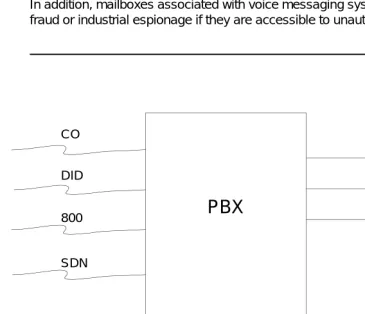
Remote Access, or Direct Inward System Access (DISA), permits callers from the public network to access a customer premises equipment-based system to use its features and services. Callers dial into the system using CO, FX, DID, or 800 service trunks.
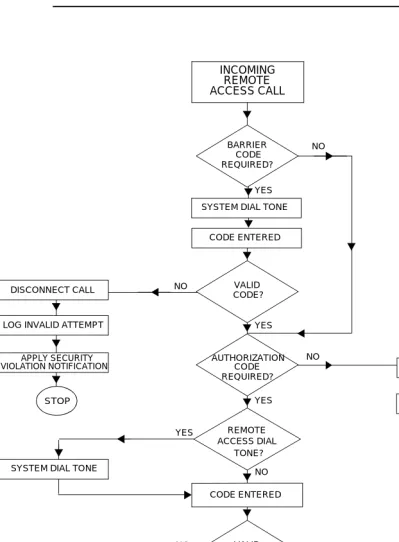
After accessing the feature, the user hears system dial tone, and, for system security, may be required to dial a barrier code, depending on the system. If a valid barrier code is dialed, the user again hears dial tone, and can place calls the same as an on-premises user.
For the DEFINITY ECS, DEFINITY G1 and G3, and for the System 75, incoming calls are routed to a Remote Access extension. For DEFINITY G2 and System 85, callers are connected to the Remote Access feature when they dial the number for an incoming Remote Access trunk group.
Different product releases have different restrictions, as follows. When a Remote Access call is answered, the caller can be requested to enter either a barrier code or an authorization code (the DEFINITY ECS, DEFINITY G1, G2.2 Issue 3.0 and later), G3, and System 75 R1V3 can require both) before calls are processed. When both maximum length barrier codes and authorization codes are required, hackers need to decipher up to 14 digits to gain access to the feature.
Hackers frequently call toll-free 800 numbers to enter customer premises
equipment-based PBX systems so that they do not pay for the inbound calls. After they are connected, hackers use random number generators and password cracking programs to find a combination of numbers that gives them access to an outside facility.
Unprotected Remote Access numbers (those that do not require barrier codes or authorization codes) are favorite targets of hackers. After being connected to the system through the Remote Access feature, a hacker may make an unauthorized call by simply dialing and the telephone number. Even when the Remote
Access feature is protected, hackers try to decipher the codes. When the right combination of digits is discovered (accidentally or otherwise), hackers can then make and sell calls to the public.
For these reasons, all switches in the network should be protected. Refer to Chapter 3 for more information on Remote Access for the DEFINITY ECS, DEFINITY Communications Systems, System 75, and System 85. Refer to Chapter 4 for more information on Remote Access for the MERLIN II, MERLIN LEGEND, MERLIN Plus, PARTNER II, PARTNER Plus, and System 25 Communications Systems.
Automated Attendant
Automated attendant systems direct calls to pre-designated stations by offering callers a menu of available options. Automated attendant devices are connected to a port on the main system and provide the necessary signaling to the switch when a call is being transferred. When hackers connect to an automated
attendant system, they try to find a menu choice (even one that is unannounced) that leads to an outside facility.
Hackers also may try entering a portion of the toll number they are trying to call to see if the automated attendant system passes the digits directly to the switch. To do this, the hacker matches the length of a valid extension number by dialing only a portion of the long distance telephone number. For example, if extension numbers are four digits long, the hacker enters the first four digits of the long distance number. After the automated attendant sends those numbers to the switch and disconnects from the call, the hacker provides the switch with the remaining digits of the number.
Many voice messaging systems incorporate automated attendant features. The security risks associated with automated attendant systems are common to voice messaging systems as well. Refer to Chapter 6 for more information on securing automated attendant systems.
Other Port Security Risks
Many of the security risks from voice mail, Remote Access, and automated attendant arise from allowing incoming callers to access outside facilities.
However, there are other endpoints within your system that should also be denied to incoming callers. Many of these endpoints can be dialed as internal calls within the system, and can be reached from either voice mail, auto attendant, or Remote Access.
For example, the NETCON (Network Control) data channels provide internal access to the system management capabilities of the system and can be reached on a call transfer from an AUDIX Voice Mail System if not protected by appropriate restrictions. [See ‘‘Increasing Product Access (Port) Security’’ on page 2-6.] Any features or endpoints that can be dialed, but are to be denied to incoming callers, should be placed in restriction groups that cannot be reached from the incoming facility or from endpoints that could transfer a call.
Voice Messaging Systems
Voice messaging systems provide a variety of voice messaging applications; operating similarly to an electronic answering machine. Callers can leave messages for employees (subscribers) who have voice mailboxes assigned to them. Subscribers can play, forward, save, repeat, and delete the messages in their mailboxes. Many voice messaging systems allow callers to transfer out of voice mailboxes and back into the PBX system. When hackers connect to the voice messaging system, they try to enter digits that connect them to an outside facility. For example, hackers enter a transfer command (the AUDIX Voice Mail System uses ), followed by an outgoing trunk access number for an outside trunk. Most hackers do not realize how they gained access to an outside facility; they only need to know the right combination of digits. See Chapter 5 for information on securing your voice messaging system.
Sometimes hackers are not even looking for an outside facility. They enter a voice messaging system to find unassigned voice mailboxes. When they are
successful, they assign the mailboxes to themselves, relatives, and friends, and use them to exchange toll-free messages. Hackers can even use cellular phones to break into voice mailboxes. (See ‘‘Protecting Voice Messaging Systems’’ on page 5-2.) In addition, unauthorized access to voice messaging systems can allow hackers to access the switch and change administration data. See
‘‘Increasing Product Access (Port) Security’’ on page 2-6.
Administration
/
Maintenance Access
Expert toll hackers target the administration and maintenance capabilities of customer premises equipment-based systems. Once criminals gain access to the administration port, they are able to change system features and parameters so that fraudulent calls can be made. The following measures can be taken to prevent high level access to system administration.
Passwords
Changing Default Passwords
To simplify initial setup and allow for immediate operation, either the switch and adjuncts are assigned default administration passwords, or passwords are disabled, depending on the date of installation. Hackers who have obtained copies of customer premises equipment-based and adjunct system
documentation circulate the known default passwords to try to gain entry into systems. To date, the vast majority of hacker access to maintenance ports has been through default customer passwords. Be sure to change or void all default passwords to end this opportunity for hackers.
The following is a list of customer logins for systems in this handbook that provide login capabilities. For information on password parameters, see the applicable system chapter. For information on how to change passwords, see Appendix E.
■ AUDIX Voice Mail System: cust
■ AUDIX Voice Power System: audix (or is on the Integrated
Solution-equipped system)
■ DEFINITY AUDIX System: cust
■ DEFINITY ECS, DEFINITY G1, G3V1, G3V2, and System 75: cust, rcust, bcms1, browse*, NMS*
■ Lucent Technologies INTUITY System: sa, vm
■ MERLIN LEGEND Communications System: admin on Integrated Voice
Response platform-supported systems
■ MERLIN MAIL and MERLIN MAIL-ML Voice Messaging Systems: 1234
■ PARTNER MAIL and PARTNER MAIL VS Systems: 1234
■ System 25: systemx5
Choosing Passwords
Follow the guidelines listed below when choosing passwords.
■ Passwords should be as long as allowed. See the section specific to your
system for maximum password length information.
■ Passwords should be hard to guess and should not contain:
— all the same characters (for example, 1111, xxxx)
— sequential characters (for example, 1234, abcd)
— character strings that can be associated with you or your business, such as your name, birthday, business name, phone number, or social security number
— words and commonly-used names. Many of the war dialers used by hackers are programmed to try all of the names from books listing potential baby names. In one documented case, the contents of an entire dictionary were used to try and crack passwords.
■ Passwords should use as great a variety of characters as possible. For
example, if both numbers and letters are permitted, the password should contain both.
■ Passwords should be changed regularly, at least on a quarterly basis.
Recycling old passwords is not recommended.
Increasing Adjunct Access Security
Since system adjuncts can be used to log in to otherwise “protected” systems, you also should secure access to the following products:
■ G3 Management Applications (G3-MA)
■ CSM (Centralized System Management)
■ CMS (Call Management System)
■ Manager III/IV
■ Trouble Tracker
■ VMAAP
Logins and passwords should be changed and managed in the same manner as the system being managed (for example, the switch or the AUDIX Voice Mail System). See ‘‘Administration Security’’ on page 3-47 for additional information.
Increasing Product Access (Port) Security
You need to protect your security measures from being changed by the hacker who gains access to the administration or maintenance ports of your customer premises equipment-based system or its adjuncts. See ‘‘Logins for INADS Port’’ on page 3-47.
If you use PC-based emulation programs to access administration capabilities, never store dial-up numbers, logins, or passwords as part of an automatically executed script.
For greater security, you may want to purchase and use the optional Remote Port Security Device (RPSD). The RPSD consists of two modem-sized devices, a lock, installed on the receiving modem (for example, at the PBX), and a Key, which is placed on the originating modem (for example, at the remote administration terminal). The lock and key must match before a communications pathway is opened. Refer to Appendix G for more information.
Another area that may be vulnerable to toll fraud is the System 75 and the DEFINITY ECS, DEFINITY G1 and G3 (except G3r) NETCON data channel — the internal extension number that can be used for administration and
maintenance access. If the NETCON data channel is not restricted, a hacker can do a valid transfer from the voice mail port (or other ports in the system) to the network extension, get dial tone, and connect to and log into the administrative port, bypassing any port protection device, such as an RPSD. In a modem pool or NETCON modem installation, this would permit a hacker to transfer to a NETCON extension, get data tone, and get a login prompt. In a modem pool installation, this would also permit the hacker to transfer out to make toll calls.
example, if voice mail extensions have a COR of 9, and extensions assigned to NETCON channels have a COR of 2, ensure that COR 9 does not have access to COR 2. Anyone not authorized to use the NETCON channel should not be able to access it.
NOTE:
To determine how the NETCON channels have been assigned, use the list
data module command. The output from this command identifies the
modules in your system. If NETCON extensions are administered, they will be listed as NETCON, along with the four 3- or 4-digit extension numbers associated with the data channel(s).
NOTE:
NETCON extensions may also be contained in a hunt group. If list data
module does not list the NETCON extensions, use list hunt group to see if
the NETCON data channels are in a hunt group.
NOTE:
For verification purposes, you may also enter list data module
<extension>, if you think you know the extension that is associated with the
NETCON data channel. This command will list the COR, COS, Tenant Number, and name of the data module (for example, NETCON, TDM) associated with the extension you entered.
In addition, the modem port used for voice mail maintenance or administrative access is often a switch extension. It should be restricted in the same manner as the NETCON channel.
General Security Measures
General security measures can be taken systemwide to discourage unauthorized use.
Educating Users
Everyone in your company who uses the telephone system is responsible for system security. Users and attendants need to be aware of how to recognize and react to potential hacker activity. Informed people are more likely to cooperate with security measures that often make the system less flexible and more difficult to use.
■ Never program passwords or authorization codes onto auto dial buttons.
Display phones reveal the programmed numbers and internal abusers can use the auto dial buttons to originate unauthorized calls.
■ Discourage the practice of writing down passwords. If a password needs to
■ Attendants should tell their system manager if they answer a series of calls
where there is silence on the other end or the caller hangs up.
■ Users who are assigned voice mailboxes should frequently change
personal passwords and should not choose obvious passwords (see
‘‘Choosing Passwords’’ on page 2-5).
■ Advise users with special telephone privileges (such as Remote Access,
voice mail outcalling, and call forwarding off-switch) of the potential risks and responsibilities.
■ Be suspicious of any caller who claims to be with the telephone company
and wants to check an outside line. Ask for a callback number, hang up, and confirm the caller’s identity.
■ Never distribute the office telephone directory to anyone outside the
company; be careful when discarding it.
■ Never accept collect phone calls.
■ Never discuss your telephone system’s numbering plan with anyone
outside the company.
Establishing a Policy
As a safeguard against toll fraud, follow these guidelines:
■ Change passwords frequently (at least quarterly). Set password expiration
times and tell users when the changes go into effect. Changing passwords routinely on a specific date (such as the first of the month) helps users to remember to do so.
■ Establish well-controlled procedures for resetting passwords.
■ Limit the number of invalid attempts to access a voice mail to five or less.
■ Monitor access to the dial-up maintenance port. Change the access
password regularly and issue it only to authorized personnel. Consider using the Remote Port Security Device. (Refer to Appendix G for additional information.)
■ Create a PBX system management policy concerning employee turnover
and include these actions:
— Delete all unused voice mailboxes in the voice mail system.
— If an employee is terminated, immediately delete any voice mailboxes belonging to that employee.
— If a terminated employee had Remote Access calling privileges and a personal authorization code, remove the authorization code immediately.
— If the terminated employee had access to the system administration interface, their login ID should be removed (G3V3 or later). Any associated passwords should be changed immediately.
■ Back up system files regularly to ensure a timely recovery should it be
required. Schedule regular, off-site backups.
Physical Security
You should always limit access to the system console and supporting documentation. The following are some recommendations:
■ Keep the attendant console and supporting documentation in an office that
is secured with a changeable combination lock. Provide the combination only to those individuals having a real need to enter the office.
■ Keep telephone wiring closets and equipment rooms locked.
■ Keep telephone logs and printed reports in locations that only authorized
personnel can enter.
■ Design distributed reports so they do not reveal password or trunk access
code information.
Security Goals Tables
The following tables list the security goals for each communications system, and provide an overview of the methods and steps that are offered through the switches to minimize the risk of unauthorized use of the system.
■ Table 2-1 on page 2-10 provides information for the DEFINITY ECS,
DEFINITY Communications Systems, System 75, and System 85.
■ Table 2-2 on page 2-13 provides information for the MERLIN II, MERLIN
LEGEND, MERLIN Plus, and System 25 Communications Systems.
■ Table 2-3 on page 2-16 provides information for the PARTNER II and
Table 2-1. Security Goals: DEFINITY ECS, DEFINITY Communications Systems, System 75 and System 85
Security Goal Method Security Tool Steps
Protect Remote Access feature
Limit access to authorized users
Barrier codes Set to maximum length
Set COR/COS
Authorization codes
Set to maximum length
Set FRL on COR
Use VDNs to route calls
Call Vectoring (G2 and G3 only)
Administer Call Vectoring (G3 only)
Use CORs to restrict calling privileges of VDNs
Limit times when Remote Access is available
Night Service (G1, G2, G3, and System 75 only)
Administer Night Service
Shared Trunk Group (System 85 only)
Assign shared trunk group
Suppress dial tone after barrier code entered
Suppress Remote Access Dial Tone — (G1, G3 and System 75 R1V3 require the concurrent use of Authorization codes)
Turn off dial tone (See Remote Access form)
Prevent unauthorized outgoing calls
Limit calling area AAR/ARS Analysis Set FRL
Set COR
Digit Conversion (G1, G2, G3, and System 85 only)
Administer digit conversion
Toll Analysis (G1, G3, and System 75 only)
Identify toll areas to be restricted
Prevent unauthorized outgoing calls (continued) Restrict phones from making outbound calls Attendant-Controlled voice terminals (G2 and System 85 only)
Place phones in attendant- controlled group
Limit outgoing calls FRLs Restrict tie trunk usage
Deny access to AAR/ARS/WCR
Authorization codes
Set to maximum length
Set FRL on COR
Limit calling permissions
COS (G2 and System 85 only)
Set COS restrictions
COR (G1, G3, and System 75 only)
Set FRL
Set calling party restrictions or outward restrictions
Set COR to COR restrictions
Require account code before calls
Forced entry of account code
Set account code length
Administer as required
Create
time-dependent limits on access to route patterns
Alternate FRL (G2 and G3r only)
Set lowest value possible
Suppress dial tone after ARS/WCR feature access code
Suppress dial tone Turn off ARS/WCR dial tone
Screen all AAR/ARS calls
World Class Routing (G2.2 and G3 only)
Administer all capabilities Table 2-1. Security Goals: DEFINITY ECS, DEFINITY Communications
Systems, System 75 and System 85 — Continued
1. Methods are listed in decreasing order of importance, relative to security. 2. Basic transfer with Transfer Restriction = Digits allows access to dial tone.
Prevent exit from Voice Messaging System
Limit calling permissions
COR (G1, G3, and System 75 only)
Set low FRL
Set calling party restrictions or outward restrictions
Set COR to COR restrictions
COS (G2 and System 85 only)
Set calling party restrictions
Restrict outgoing toll calls
Toll Analysis (G1, G3, and System 75 only)
Identify toll areas to be restricted
Prevent Transfer to Dial Tone1 (for AUDIX, DEFINITY AUDIX, and Lucent Technologies INTUITY Voice Mail Systems only)
Station Restrictions
Turn off transfer feature
Enhanced
Transfer (G1 Issue 5.0, G2, G3