273 Branchport Ave. Long Branch, N.J. 07740
(800) 631-2148 Thank you for using our products.
www.wheelockinc.com
INSTALLATION INSTRUCTIONS MODEL MZC-144
MODULAR ZONE CONTROL (3 ZONES EXPANDABLE TO 12 ZONES) - AND -
MODEL MZEM-3 ZONE EXPANSION MODULE (3 ZONES) -AND-
MODEL TBM TALK-BACK MODULE -AND-
MODEL MZC-RM MODULAR ZONE CONTROL RELAY MODULE
Use this product according to this instruction manual. Please keep this instruction manual for future reference.
NOTE: All CAUTIONS and WARNINGS are identified by the symbol. All warnings are printed in bold capital letters.
1. APPLICATION INFORMATION:
The Modular Zone Control (MZC-144) is an expandable Zone Control that performs the central control, switching and signaling required to provide selective Zone Paging, Fixed Group Paging, Logical Zone Group, All Call, Background Music Mute, and Page Alert Tone Signaling. The MZC-144 provides 3 separate zones of paging, and can be expanded to 12 zones by installing up to 3 Modular Zone Expansion Modules (MZEM-3). Each MZEM-3 provides a zone group consisting of 3 zones. Each MZEM-3 provides a background music input for its 3 zone group. The Modular Zone Control Relay Module (MZC-RM) provides relay operation of the 3 zones in a fixed group.
The MZC-144 can be combined in a master/remote arrangement to create up to 144 zones of paging and relay control. This is accomplished by using the MZC-CAB cable to daisy chain units together. When the system reaches more than 5 remote units (72 Zones) a MZC-BOOSTER is required to connect the 5th remote unit to the 6th remote unit.
With the optional (centralized) Talk-Back control circuit installed, the MZC-144 can be programmed to accommodate both One Way and Talk-Back paging zones. It can also be programmed to be used with a wide variety of system amplifier configurations, which can include various combinations of 25V/70V/100V central and zone amplifiers and amplified One Way paging speakers. The MZC-RM provides relay operation of the three (3) zones in a fixed group. The module is capable of either latching or non-latching operation. Two (2) with Form C contacts and one (1) of either a Normally Open (NO) or Normally Closed (NC) contact. The MZC-RM can be inserted into the MZC-144 in three (3) different locations. This optional module has been designed to work with the MZC-144. The MZC-RM will only allow single zone (relay) activation. Through the use of logical zone groups, the MZC-144 can activate multiple relays during activation of the MZC-RM. Logical zone groups, which can be up to five (5) entries, are defined by the user. When logical zone groups are programmed for use by the MZC-RM, only single zone access codes may be used. Fixed zone group and all call activation will cause no change to the status of the relay outputs. The MZC-144 is compatible with most EKSU, KSU (1A2), and PBX telephone systems. It connects to either an unused loop start CO port or a 600 ohm low power audio page port. When connected to an unused CO port, DTMF telephones may be used to operate the MZC-144. When connected to a page port, the page port must provide a dry contact closure and transmit DTMF tones.
NOTE: The MZC-144 is not designed for connection to an analog port.
Paging is accessed from any telephone by pressing the CO line button (EKSU & KSU), or dialing the number assigned to paging. Twelve (12) individual zones are selected by dialing 001 thru 012. All Call is selected by dialing 000. The four (4) zone groups are selected for group paging, by dialing 201 thru 204.
Table 1: Zone Groups
Group Zones Qty. of MZEM-3
1 1, 2, 3 0
2 4, 5, 6 1
3 7, 8, 9 2
4 10, 11, 12 3
Group one (1) of every MZC-144 will always be audio. Groups 2, 3, 4 of each MZC-144 can be audio or a relay (contact closure). For audio operation use MZEM-3, for relay operation use MZC-RM for each additional zone group.
2. INTERFACE INFORMATION:
The MZC-144 can be connected directly to: 1. A telephone for stand alone paging.
2. A telephone system's unused CO line/trunk port.
3. A telephone system's 600 ohm audio page port (See Figure 12, page 19).
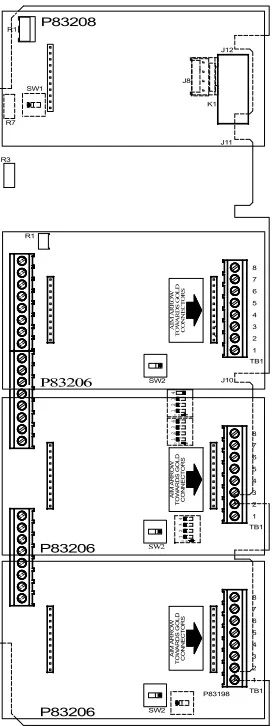
Figure 1 shows the MZC-144 PC Board which includes a built-in zone group 1 (Zones 1, 2, & 3), and illustrates the positions for the optional MZEM-3, MZC-RM and Talk-Back Module (TBM).
CAUTION: Plugging any Expansion Module in backwards will result in improper operation and failure of the unit.
Figure: 1
PC Board Position of Optional Talk-Back board, Optional MZEM-3 Modules and MZC-RM Modules
3. AUDIO CONFIGURATION DESCRIPTIONS:
The amplifier type (central or zone) is configured for each zone group as described in Table 3. Table 3: Amplifier Type Group Configuration Function Group Function Choices - Per Group
Amplifier Type
1. Central Amplifier:
25V/70V/100V audio output switched to One Way and/or Talk-Back speakers with line matching transformers.
2. Zone Amplifier:
600 ohm audio input switched to separate zone amplifiers connected to One Way paging speakers with 25V/70V/100V line matching transformers; or switched to PRM-150 line preamplifiers or connected to One Way paging speaker amplifiers.
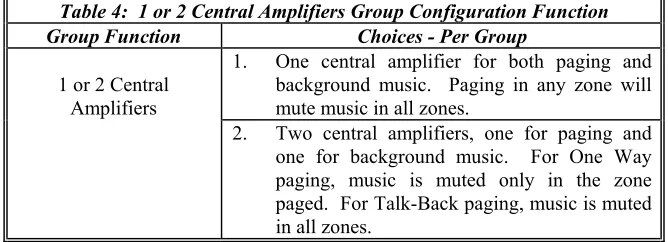
If any of the zone groups require central amplification, then the choice of one or two central amplifiers is configured for each of those groups, as described in Table 4.
Table 4: 1 or 2 Central Amplifiers Group Configuration Function Group Function Choices - Per Group
1 or 2 Central Amplifiers
1. One central amplifier for both paging and background music. Paging in any zone will mute music in all zones.
2. Two central amplifiers, one for paging and one for background music. For One Way paging, music is muted only in the zone Table 2: Dial Access Codes
To Access Dial
All Zones (All Call) 000
Zone 1 001
Zone 2 002
Zone 3 003
Zone 4 004
Zone 5 005
Zone 6 006
Zone 7 007
Zone 8 008
Zone 9 009
Zone 10 010
Zone 11 011
Zone 12 012
Zone Group 1 (Zones 1, 2 & 3) 201 Zone Group 2 (Zones 4, 5 & 6) 202 Zone Group 3 (Zones 7, 8 & 9) 203 Zone Group 4 (Zones 10, 11 & 12) 204
• Each zone may be accessed individually by dialing 001 thru 012.
• All zones can be accessed simultaneously for an all call by dialing 000. Each 3 zone group (Fixed Zone Group) can be accessed by dialing 201 thru 204.
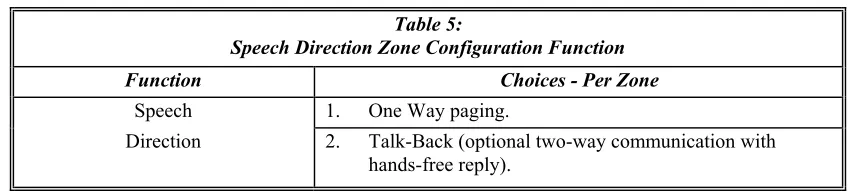
The speech direction function is configured on a per zone basis, as described in Table 5. Table 5:
Speech Direction Zone Configuration Function
Function Choices - Per Zone
Speech 1. One Way paging.
Direction 2. Talk-Back (optional two-way communication with hands-free reply).
NOTE: Talk-Back may be chosen only for zones within central amplifier groups and requires the optional Talk-Back module (TBM).
The MZC-144 has Talk Battery output function for stand alone telephone, unused CO line/trunk port, and 600 ohm audio page port.
Depending upon system amplifier configuration, the amplifier functions and background music mute operation will vary, as shown in Table 6.
Table 6:
Amplifier Configurations, Functions, and Music Mute Operation
Amplifier Configuration Function Music Mute Operation (A) One (1) Central Amplifier Paging & Music Paging any zone will mute
music in all zones. (B) Two (2) Central Amplifiers One for Paging
and One for Music
Music is muted only in the paged zone(s).
(C) Zone Amplifiers, Line Preamplifiers Speaker Amplifiers
Paging & Music Music is muted only in the paged zone(s).
(D) Mixed
(A) & (C) Above Paging & Music
1. Central Amplifier Zones: Paging mutes music in all zones.
2. Zone Amplifier Zones: Music is muted only in the paged zone(s).
(E) Mixed
(B) & (C) Above Paging & Music Music is muted only in the paged zone(s).
NOTES
1. The optional Talk-Back function is centrally controlled in the MZC-144, and can be selected per zone for configurations (A) and (B), as well as the (A) and (B) segments of mixed systems (D) and (E).
2. Mixed amplifier configurations (D) and (E) cannot be applied within the same zone group. 3. When 2 central amplifiers are used, music will be muted in all zones only when a Talk-Back
4. APPLICATION DIAGRAMS:
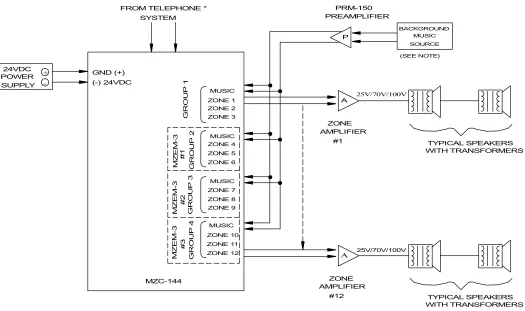
The following application diagrams show the seven basic system configurations of the MZC-144 and its companion MZEM-3. All of these configurations are possible with the appropriate configured switch selections. Figures 2, 3, 4, and 5 are typical configurations using central amplifiers. Figure 6 is a typical configuration using amplified speakers. Figures 7 and 8 are typical configurations using zone amplifiers.
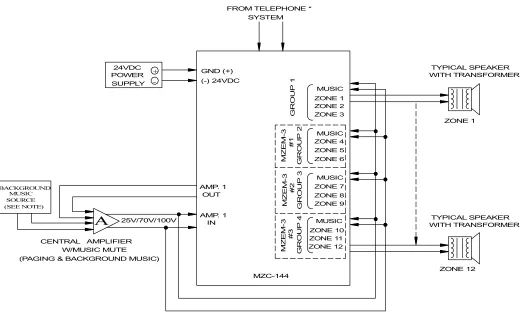
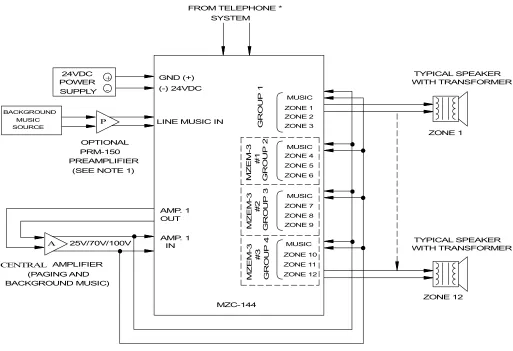
Figure 2:
One Central Amplifier which has music mute, page input and music input. (One Way Paging and/or Optional Talk-Back)
In this application, the one central amplifier for both paging and background music has music muting and separate inputs (volume controls) for paging and music. The system uses speakers with built-in line matching transformers for both One Way paging, and paging with optional Talk-Back.
MUSIC SOURCE
POWER SUPPLY 24VDC
25V/70V/100V
A
GND (+)
ZONE 1 FROM TELEPHONE *
CENTRAL AMPLIFIER
WITH TRANSFORMER
+
-TYPICAL SPEAKER
BACKGROUND
TYPICAL SPEAKER WITH TRANSFORMER
AMP. 1
MZC-144 AMP. 1
SYSTEM
W/MUSIC MUTE
ZONE 12 (-) 24VDC
OUT
IN
(PAGING & BACKGROUND MUSIC)
(SEE NOTE)
MUSIC ZONE 1 ZONE 2 ZONE 3 MUSIC ZONE 4 ZONE 5 ZONE 6 MUSIC ZONE 7 ZONE 8 ZONE 9
ZONE 10 ZONE 11 ZONE 12
GROUP 1
MZ
E
M
-3
#1
GROUP 2
MZ
E
M
-3
#2
GROUP 3
MZ
E
M
-3
#3
GROUP 4
MUSIC
* NOTE: Use Tip CO and Ring CO for stand alone telephone, unused CO line/trunk port, or 600 ohm audio page port connections.
NOTES:
1. If the central amplifier does not provide music mute, then the background music source is connected as shown in Figure 3. 2. In systems with optional Talk-Back paging, install one background music source only as shown. DO NOT connect
Figure 3:
One Central Amplifier which does not have music mute, and which has only one input. (One Way Paging and/or Optional Talk-Back)
In this application, the one central amplifier for both paging and background music does not provide music muting, and has only one input (one, or no volume control). The system uses speakers with built-in line matching transformers for both One Way paging, and paging with optional Talk-Back.
MUSIC SOURCE
POWER SUPPLY 24VDC
25V/70V/100V
GND (+)
ZONE 1 FROM TELEPHONE *
CENTRAL AMPLIFIER
WITH TRANSFORMER
+
-TYPICAL SPEAKER BACKGROUND
TYPICAL SPEAKER WITH TRANSFORMER
AMP. 1
MZC-144 AMP. 1
SYSTEM
ZONE 12 (-) 24VDC
OUT
IN
(PAGING AND
MUSIC ZONE 1 ZONE 2 ZONE 3
MUSIC ZONE 4 ZONE 5 ZONE 6
MUSIC ZONE 7 ZONE 8 ZONE 9
ZONE 10 ZONE 11 ZONE 12
GROUP 1
MZ
E
M
-3
#
1
GROUP 2
MZ
E
M
-3
#
2
GROUP 3
MZ
E
M
-3
#
3
GROUP 4
MUSIC
P
A
LINE MUSIC IN
BACKGROUND MUSIC) (SEE NOTE 1)
PRM-150 OPTIONAL
PREAMPLIFIER
*NOTE: Use Tip CO and Ring CO for stand alone telephone, unused CO line/trunk port, or 600 ohm audio page port connections.
NOTES:
1. If the background music source has no volume control, then the optional PRM-150 must be connected between the background music source and the MZC-144 music input, as shown.
Figure 4:
Two Central Amplifiers, one for paging and one for background music. (One Way Paging Only)
In this application, two central amplifiers are used, one for paging and one for background music. The system uses speakers with built-in line matching transformers for One Way paging.
MUSIC SOURCE
POWER SUPPLY 24VDC
25V/70V/100V
GND (+)
ZONE 1 FROM TELEPHONE *
CENTRAL AMPLIFIER
WITH TRANSFORMER +
-TYPICAL SPEAKER
BACKGROUND
TYPICAL SPEAKER WITH TRANSFORMER
AMP. 1
MZC-144 AMP. 1
SYSTEM
ZONE 12 (-) 24VDC
OUT
IN
(PAGING)
MUSIC ZONE 1 ZONE 2 ZONE 3 MUSIC ZONE 4 ZONE 5 ZONE 6 MUSIC ZONE 7 ZONE 8 ZONE 9
ZONE 10 ZONE 11 ZONE 12
GROUP
1
MZ
E
M
-3
#1
GROUP
2
MZ
E
M
-3
#2
GROUP
3
MZ
E
M
-3
#3
GROUP
4 MUSIC
P
A
(SEE NOTE 1) PRM-150 OPTIONAL
PREAMPLIFIER AMPLIFIER
CENTRAL
(MUSIC)
(SEE NOTE 2) A
25V/70V/100V
*NOTE: Use Tip CO and Ring CO for stand alone telephone, unused CO line/trunk port, or 600 ohm audio page port connections.
NOTES:
1. If both the music central amplifier and the background music source have no volume controls, then a PRM-150 must be connected between the background music source output and the music central amplifiers input.
Figure 5:
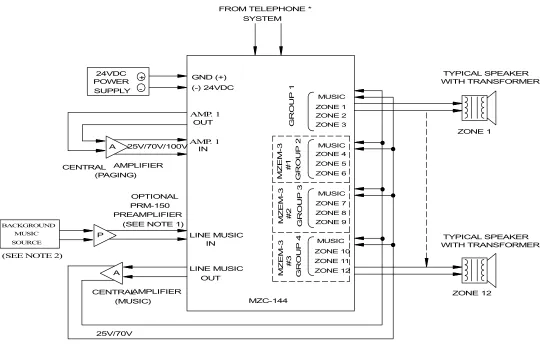
Two Central Amplifiers, one for paging and one for background music. (One Way and/or Optional Talk-Back Paging)
In this application, two central amplifiers are used, one for paging and one for background music. The system uses speakers with built-in line matching transformers for both One Way paging, and paging with optional Talk-Back.
MUSIC SOURCE
POWER SUPPLY 24VDC
25V/70V/100V
GND (+)
ZONE 1 FROM TELEPHONE *
CENTRAL AMPLIFIER
WITH TRANSFORMER +
-TYPICAL SPEAKER BACKGROUND
TYPICAL SPEAKER WITH TRANSFORMER
AMP. 1
MZC-144
AMP. 1
SYSTEM
ZONE 12 (-) 24VDC
OUT
IN
(PAGING)
MUSIC ZONE 1 ZONE 2 ZONE 3
MUSIC ZONE 4 ZONE 5 ZONE 6
MUSIC ZONE 7 ZONE 8 ZONE 9
ZONE 10 ZONE 11 ZONE 12
GROUP
1
MZ
E
M
-3
#1
GROUP
2
MZ
E
M
-3
#2 GROUP
3
MZ
E
M
-3
#3
GROUP
4 MUSIC
P A
LINE MUSIC (SEE NOTE 1)
PRM-150 OPTIONAL
PREAMPLIFIER
(MUSIC) AMPLIFIER CENTRAL
(SEE NOTE 2)
LINE MUSIC OUT
IN
A
25V/70V
*NOTE: Use Tip CO and Ring CO for stand alone telephone, unused CO line/trunk port, or 600 ohm audio page port connections.
NOTES:
1. If both the music central amplifier and the background music source have no volume controls, then a PRM-150 must be connected between the background music source output and the line music input.
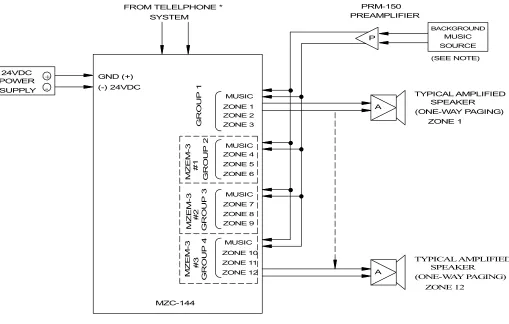
Figure 6: Amplified Speakers
(One Way Paging)
In this application, amplified speakers are used for One Way paging and for background music. A PRM-150 preamplifier is used with the background music source.
MUSIC SOURCE
POWER SUPPLY
24VDC GND (+)
ZONE 1 FROM TELELPHONE *
+
-BACKGROUND
TYPICAL AMPLIFIED SPEAKER
MZC-144 SYSTEM
(-) 24VDC
MUSIC ZONE 1 ZONE 2 ZONE 3
MUSIC ZONE 4 ZONE 5 ZONE 6
MUSIC ZONE 7 ZONE 8 ZONE 9
ZONE 10 ZONE 11 ZONE 12
GR
OUP
1
MZ
E
M
-3
#
1
GR
OUP
2
MZ
E
M
-3
#
2
GR
OUP
3
MZ
E
M
-3
#
3
GR
OUP
4 MUSIC
P PRM-150 PREAMPLIFIER
(SEE NOTE)
(ONE-WAY PAGING)
(ONE-WAY PAGING) SPEAKER
TYPICAL AMPLIFIED
ZONE 12
A
A
*NOTE: Use Tip CO and Ring CO for stand alone telephone, unused CO line/trunk port, or 600 ohm audio page port connections.
Figure 7:
Zone Amplifiers which have music mute, page inputs and music inputs. (One Way Paging)
In this application, the zone amplifiers for both One Way paging and background music have music muting, and separate inputs (volume controls) for paging and music. The system uses speakers with line matching transformers.
MUSIC SOURCE
POWER SUPPLY 24VDC
25V/70V/100V A
GND (+)
ZONE FROM TELEPHONE *
AMPLIFIER
+
-BACKGROUND
TYPICAL SPEAKERS WITH TRANSFORMERS
MZC-144 SYSTEM
#12 (-) 24VDC
(SEE NOTE)
MUSIC ZONE 1 ZONE 2 ZONE 3 MUSIC ZONE 4 ZONE 5 ZONE 6 MUSIC ZONE 7 ZONE 8 ZONE 9
ZONE 10 ZONE 11 ZONE 12
GROU
P
1
MZ
E
M
-3
#
1
GROU
P
2
MZ
E
M
-3
#
2
GROU
P
3
MZ
E
M
-3
#
3
GROU
P
4 MUSIC
#1 AMPLIFIER
ZONE
A
WITH TRANSFORMERS TYPICAL SPEAKERS 25V/70V/100V
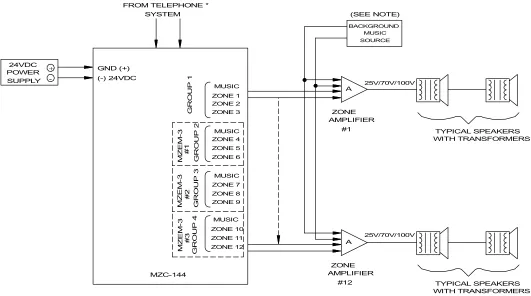
Figure 8:
Zone Amplifiers which do not have music mute, and which have one input. (One Way Paging)
In this application, the zone amplifiers for both One Way paging and background music do not provide music muting, and have only one input (with or without volume control). The system uses speakers with line matching transformers.
MUSIC SOURCE
POWER SUPPLY 24VDC
GND (+)
FROM TELEPHONE *
+
-BACKGROUND
MZC-144 SYSTEM
(-) 24VDC
MUSIC ZONE 1 ZONE 2 ZONE 3
MUSIC ZONE 4 ZONE 5 ZONE 6
MUSIC ZONE 7 ZONE 8 ZONE 9
ZONE 10 ZONE 11 ZONE 12
GROUP
1
MZ
E
M
-3
#1
GROUP
2
MZ
E
M
-3
#2
GROUP
3
MZ
E
M
-3
#3
GROUP
4 MUSIC
P PRM-150 PREAMPLIFIER
(SEE NOTE)
25V/70V/100V
ZONE AMPLIFIER
TYPICAL SPEAKERS WITH TRANSFORMERS
#12 #1 AMPLIFIER
ZONE
WITH TRANSFORMERS TYPICAL SPEAKERS A
A 25V/70V/100V
*NOTE: Use Tip CO and Ring CO for stand alone telephone, unused CO line/trunk port, or 600 ohm audio page port connections.
NOTES:
1. One music source can be used for all zone groups, or different music sources can be used for different zone groups. 2. Existing system renovations and expansions often require different amplifier configurations in different zone groups. For
CAUTION: In mixed systems, the different amplifier configurations must be installed in different zone groups. It is not possible to mix different amplifier configurations within the same zone group.
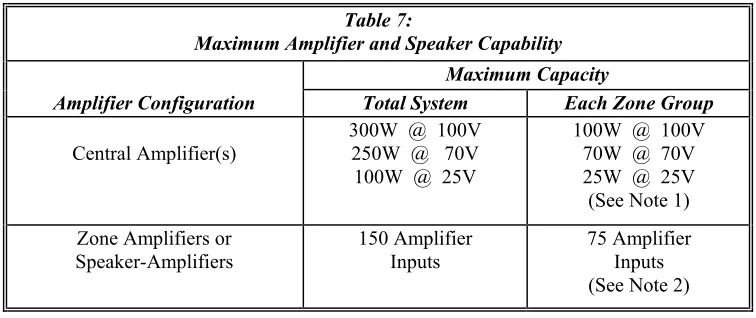
Maximum amplifier and speaker capacity for each zone group and the total system is shown in Table 7.
Table 7:
Maximum Amplifier and Speaker Capability
Maximum Capacity
Amplifier Configuration Total System Each Zone Group
Central Amplifier(s)
300W @ 100V 250W @ 70V 100W @ 25V
100W @ 100V 70W @ 70V 25W @ 25V (See Note 1) Zone Amplifiers or
Speaker-Amplifiers 150 Amplifier Inputs 75 Amplifier Inputs (See Note 2)
NOTES:
1. The Zone Control can switch an audio input from a central amplifier of up to 300W @ 100V, 250W @ 70V, or 100W @ 25V. This TOTAL SYSTEM audio input can be distributed among the zone groups provided no single zone group exceeds:
(A) 100W @ 100V, leaving 200W for the remaining system groups. - or -
(B) 70W @ 70V, leaving 180W for the remaining system groups. - or -
(C) 25W @ 25V, leaving 75W for the remaining groups.
5. MOUNTING INSTRUCTIONS:
The MZC-144 is designed for indoor surface wall mounting. Remove the MZC-144 cover from the base (containing the PC Board assembly) by removing the (1) screw on the front of the unit. Two keyholes and two circular holes are provided in the base for easy installation. A diagram for mounting screw hole locations is given in Figure 9. Remote units are to be mounted approximately 1/4 inch from the right side of the last unit installed. Recommended screw sizes are #6, #8, or #10 screws. Be sure to use mounting hardware suitable for mounting surface.
Figure 9: Mounting Diagram
11.000" 6.000"
UP
MOUNT UNIT WITH KEYHOLES AT TOP
6. SPECIFICATIONS:
Table 8:
Supply Voltage (Nominal) -24VDC
Supply Voltage Range -21.6VDC to -26.4VDC
Alert Tone Frequency 1100Hz +/-10%
Alert Tone Duration 500m Sec. +/-10%
Alert Tone Level -4dBM +/-3dBM
Tip and Ring Input Level -15dBM (0.1Vrms) to +10dBM (2.4Vrms)
Music Input Level -15dBM (0.1Vrms) to +10dBM (2.4Vrms)
Tip and Ring Input Impedance 600 Ohms
Music Input Impedance 600 Ohms
Max. Output Level to Amplifier 1 0dBM (0.78Vrms) Output Impedance to Amplifier 1 4 Ohms
Max. Input Level from Amplifier 1 100W @ 25V, 250W @ 70V or 300W @ 100V (Central Amplifier Output) See Note 4
Audio Output Level (Max. - Per Zone)
- Speaker - Amplifier Selected 0dBM (0.78Vrms), 600 Ohms Audio Output Level (Max. - Per Zone Group)
- Central-Amplifier Selected
25W @ 25V, 70W @ 70V or 100W @ 100V (Central Amp. Output) See Note 4
Operating Temperature Range 0 to 49 Degrees C
Operating Humidity Range 0 to 85% RH
Off-Hook Detection Sensitivity 1850 Ohms DC Resistance (Max.)
* Quantity of MZEM-3 Modules in System
0 1 2 3
Supply Current (Idle-BGM) 75mA 95mA 115mA 135mA
7. ZONE ACCESS AND DIALING CODES FOR MASTER:
Table 9: Zone Control Access
(See Note 1) Press CO Line Button, Or Dial Number Assigned To Page
Page Zone 1 Dial 001
Page Zone 2 Dial 002
Page Zone 3 Dial 003
Page Zone 4 Dial 004
Page Zone 5 Dial 005
Page Zone 6 Dial 006
Page Zone 7 Dial 007
Page Zone 8 Dial 008
Page Zone 9 Dial 009
Page Zone 10 Dial 010
Page Zone 11 Dial 011
Page Zone 12 Dial 012
Page Zone Group 1 (Zones 1, 2 & 3) Dial 201 Page Zone Group 2 (Zones 4, 5 & 6) Dial 202 Page Zone Group 3 (Zones 7, 8 & 9) Dial 203 Page Zone Group 4 (Zones 10, 11 & 12) Dial 204 Page All Zones (All Call) Dial 000
8. ZONE ACCESS AND DIALING CODES FOR REMOTE:
Table 10: Zone Control Access
(See Note 1) Press CO Line Button, Or Dial Number Assigned To Page
Remote 1
Page Zone 13-24 Dial 013-024
Page Zone Group 5 (Zones 13, 14 & 15) Dial 205 Page Zone Group 6 (Zones 16, 17 & 18) Dial 206 Page Zone Group 7 (Zones 19, 20 & 21) Dial 207 Page Zone Group 8 (Zones 22, 23 & 24) Dial 208
Remote 2
Page Zone 25-36 Dial 025-036
Page Zone Group 9 (Zones 25, 26 & 27) Dial 209 Page Zone Group 10 (Zones 28, 29 & 30) Dial 210 Page Zone Group 11 (Zones 31, 32 & 33) Dial 211 Page Zone Group 12 (Zones 34, 35 & 36) Dial 212
Remote 11
Page Zone 133-144 Dial 133-144
Page Zone Group 45 (Zones 133, 134 &135) Dial 245 Page Zone Group 46 (Zones 136, 137 & 138) Dial 246 Page Zone Group 47 (Zones 139, 140 & 141) Dial 247 Page Zone Group 48 (Zones 142, 143 & 144) Dial 248
NOTES:
1. All Call is always 000
2. Logical Zone Group programming is explained later under “Programming Instructions” on page 23. 3. Press CO line button: For EKSU & KSU (1A2) key telephone systems.
Dial number assigned: For PBX telephone systems.
9. MODEL MZC-RM 3 ZONE RELAY MODULE:
The MZC-RM is a plug-in relay module designed to allow relay control through the MZC-144. The MZC-RM provides a fixed zone group consisting of three relay outputs, two Form C and one selectable (normally open or normally closed) dry contact. Each of the relay outputs is capable of providing a dry contact, rated at 24VDC at 500mA (resistive load). This device is not intended for high power switching applications. This device is also not intended for security applications. The MZC-RM is capable of two different modes of operation, non-latching or latching.
The MZC-RM can be plugged into the MZC-144 at three positions. Figure 10 shows the MZC-144 PC Board, and the 3 positions where the MZC-RM expansion module may be inserted. Table 11A and 11B shows the single zone dial access codes for activation of the MZC-144 and the three positions available to the MZC-RM.
The MZC-144 activates one relay at a time on the MZC-RM. This is accomplished through the use of the single zone dialing access codes set forth in Table 11A and 11B. Through the use of logical zone groups, the MZC-144 can activate multiple relays during activation of the MZC-RM. Logical zone groups, which can be up to five entries, are defined by the user. When Logical Zone Groups are programmed for use by the MZC-RM, only single zone access codes may be used. Please note the use of fixed zone group paging and/or an All Call page on the MZC-144 will not be acknowledged by the MZC-RM.
Figure 10:
MZC-144 Board and MZC-RM Positions
Table 11A: Single Zone Dial Access Codes
Master Remote 1 Remote 2 Remote 3 Remote 4 Remote 5 Main* 1/001 13/013 25/025 37/037 49/049 61/061 Board 2/002 14/014 26/026 38/038 50/050 62/062 3/003 15/015 27/027 39/039 51/051 63/063 4/004 16/016 28/028 40/040 52/052 64/064
Position 1 5/005 17/017 29/029 41/041 53/053 65/065
6/006 18/018 30/030 42/042 54/054 66/066 7/007 19/019 31/031 43/043 55/055 67/067
Position 2 8/008 20/020 32/032 44/044 56/056 68/068
9/009 21/021 33/033 45/045 57/057 69/069 10/010 22/022 34/034 46/046 58/058 70/070
Position 3 11/011 23/023 35/035 47/047 59/059 71/071
12/012 24/024 36/036 48/048 60/060 72/072
Table 11B: Single Zone Dial Access Codes (Continued)
Remote 6 Remote 7 Remote 8 Remote 9 Remote 10 Remote 11 Main* 73/073 85/085 97/097 109/109 121/121 133/133 Board 74/074 86/086 98/098 110/110 122/122 134/134 75/075 87/087 99/099 111/111 123/123 135/135 76/076 88/088 100/100 112/112 124/124 136/136 Position 1 77/077 89/089 101/101 113/113 125/125 137/137 78/078 90/090 102/102 114/114 126/126 138/138 79/079 91/091 103/103 115/115 127/127 139/139 Position 2 80/080 92/092 104/104 116/116 128/128 140/140 81/081 93/093 105/105 117/117 129/129 141/141 82/082 94/094 106/106 118/118 130/130 142/142 Position 3 83/083 95/095 107/107 119/119 131/131 143/143 84/084 96/096 108/108 120/120 132/132 144/144
Legend: Zones/Access Code
Example: 7/007 = Zone 7, dial access code 007
*The MZC-RM does not use these single zone dial access codes.
10. INSTALLATION INSTRUCTIONS:
1. Remove MZC-144 cover. 2. Disconnect power.
3. Select the position which the MZC-RM is to be plugged into from Table 11A and 11B (e.g.: if you want the MZC-RM to be zones 7, 8 or 9 on the MZC-144, the MZC-RM would be installed in Position 2 on the MZC-144 board).
4. Plug MZC-RM into its selected position (See Figure 10).
CAUTION: Plugging the MZC-RM in backwards can result in improper operation and failure of the unit. 5. Set 2 configuration jumpers in accordance with Figure 15.
6. Connect relay outputs as required (See Figure 15). 7. Re-apply power to unit.
Figure 11:
Simplified Single Line Block Diagram
ZONE 1
K2
K3
LOOP
DETECTOR
TONE ALERT
DETECTORDTMF
K5 K4
K6
SELECT ZONE
CIRCUITRY
RELAY COILS
TIP & RING
MUSIC
AMP. 1 OUT
AMP. 1 IN
CENTRAL AMPLIFIER SELECT JUMPER
AUDIO
AUDIO ZONE 2
ZONE 3 AUDIO
K3
K4
K5 K6
ZONE AMP./ CENTRAL AMP. SELECT SWITCH
K2 LINE LEVEL
MUSIC
FOR A ZONE GROUP 3 ZONE SELECT CIRCUITRY
NIGHT RINGER
CONFIGURATION SWITCHES
TALK-BACK CIRCUIT (OPTIONAL)
ONE WAY/TALK-BACK ZONE
SELECT SWITCHES
COMMUNICATIONS/AUDIO
FROM REMOTE BOARDS MZEM-3 OR MZC-RM
#1
MZEM-3 OR MZC-RM #2
MZEM-3 OR MZC-RM #3
TO REMOTE BOARDS
11. MASTER WIRING INSTRUCTIONS (SEE FIGURE 12):
1. Make sure 24VDC power supply is disconnected from the 115VAC power source. 2. Connect tip and ring from:
A. Stand along telephone, or
B. Telephone system's unused CO line/trunk port, or
C. Telephone system's 600 ohm, audio page port (See Figure 13) 3. Connect night ringer if used (see Figure 14).
4. Connect the background music source to TB2, terminals 3 and 4, on the MZC-144.
5. Connect the 24VDC power supply to the (-)24V and GND(+) terminals on TB3, terminals 6 and 5 respectively.
6. Connect the zone amplifier, speaker amplifiers, or speakers with transformers to the audio pair for zones 1 thru 12 on TB1 of the MZC- 144 and TB1 of each MZEM-3 module as required.
7. If one central amplifier is used for paging and background music:
A. Connect the input of central amplifier to AMP1 OUT, terminals 5 and 6 of TB2 on the MZC-144. Connect the output of central amplifier to AMP1 IN, terminals 7 and 8 of TB2 on the MZC-144.
B. Connect the output of central amplifier to MUSIC, terminals 1 and 2 of TB1 on MZC-144 and TB1 on MZEM-3 modules, as required.
8. If separate central amplifiers are used, one for paging and one or more for background music: A. Connect paging amplifier as described in 7A, above.
B. Connect output of background music amplifier(s) as described in 7B, above. 9. Connect MZC-RM relay outputs as required, see Figure 15.
10. Connect the 24VDC power supply to the 115VAC source. When the MZC-144 is used in a Master/Remote configuration make sure that the remote units are powered up prior to or at the same time as the master.
NOTE:
When only one central amplifier is used, background music will be muted in all zones when a page is in progress. When separate central amplifiers are used, background music will be muted in only the paged zone.
12. REMOTE WIRING INSTRUCTIONS (SEE FIGURE 12):
NOTE:
Wire in star configuration. DO NOT daisy chain the power connections from one unit to the next as improper operation may result.
4. Connect the zone amplifier, speaker amplifiers, or speakers with transformers to the audio pair for zones 1 thru 12 on TB1 of the MZC-144 and TB1 of each MZEM-3 module as required.
5. If one central amplifier is used for paging and background music, connect the output of central amplifier to MUSIC, terminals 1 and 2 of TB1 on MZC-144 and TB1 on MZEM-3 modules, as required.
6. If separate central amplifiers are used, one for paging and one or more for background music, connect output of background music amplifier(s) as described in note 5, above.
7. Connect the 24VDC power supply to the 115VAC source. When the MZC-144 is used in a Master/Remote configuration make sure that the remote units are powered up prior to or at the same time as the master.
When using multiple power supplies, connect the positive terminals together at the power supplies. NOTE:
When only one central amplifier is used, background music will be muted in all zones when a page is in progress. When separate central amplifiers are used, background music will be muted in only the paged zone.
13. DISCONNECTING:
An MZC-144 page will disconnect upon loss of loop current.
14. CONFIGURATION SETTING INSTRUCTIONS (SEE FIGURE 12 OR INSIDE OF MZC-144 COVER):
1. Verify that the Switch is in the “Talk Battery” position when connected to a telephone systems, unused CO/trunk port, 600 ohm audio page port, or directly to a telephone.
2. Set the Talk-Back Master selector switch, SW2. A. Enabled
B. Defeated
3. Set the "Zone Amplifier/Central Amplifier" select switches for each group as required. See switch, SW3. A. Central Amplifier
B. Zone Amplifier
4. Set the Board Address on selector switch SW4 per the table below.
Table 12: SW4 (1 = ON, 0 = OFF) Board Address
Position 1234 Effect Zones
* 1111 Master 001-012 0111 Remote1 013-024 1011 Remote2 025-036 0011 Remote3 037-048 1101 Remote4 049-060 0101 Remote5 061-072 1001 Remote6 073-084 0001 Remote7 085-096 1110 Remote8 097-108 0110 Remote9 109-120 1010 Remote10 121-132 0010 Remote11 133-144
1100 Not Used N\A
0100 Not Used N\A
1000 Not Used N\A
0000 Not Used N\A
5. Set the Max Page Length, if necessary per the table below.
Table 13: SW6 (1 = ON, 0 = OFF)
Position Effect
NOTE: If the optional Talk-Back Module (TBM) is not enabled, positions 1, 2, and 3 are ignored.
Set the “Central Amplifier” select switch for each group, as required. See switch, SW6. If One Central Amplifier is used for both paging and background music, then the switch should be in the One Central Amplifier. If two or more central amplifiers are used, one for paging and one or more for background music, then the switch should be in the Two Central Amplifier position. If central amplifiers are not used, then the switch should be in the Two Central Amplifier position.
CAUTION: These devices are not intended for use in hazardous locations as defined by the National Electrical Code (NEC). Figure 12:
Installation, Programming and Volume Adjustment Diagram
MAIN BOARD SETTINGS
TALK BATTERY *
DEFEAT ENABLED TALK-BACK MASTER
* CENTRAL AMPLIFIER ZONE AMPLIFIER * 1 2 3 4 5 6 7 8 6 8 7 5 4 3 2 1 7 8 2 5 6 3 4 1 + -4 2 3 O 1 N 4 2 3 O 1 N 4 2 3 O 1 N ZONE2 ZONE3 ZONE1 MUSIC + -+ -+ LINE MUSIC
-+ OUT LINE MUSIC IN AMP1 OUT AMP1 IN GND NIGHT RING GND -24VDC C.O./PAGE PORT R1 R3 R7 SW1 J8 SW2 SW6 SW5 SW4 TB1 TB2 TB3 1234 0111 1011 0011 1101 0101 1001 0001 1110 0110 1010 0010 1100 0100 1000 0000 NOT USED NOT USED NOT USED REMOTE7 NOT USED REMOTE11 REMOTE10 REMOTE9 REMOTE8 REMOTE4 REMOTE6 REMOTE5 REMOTE3 REMOTE2 MASTER REMOTE1 N/A N/A N/A 025-036 037-048 061-072 073-084 049-060 097-108 109-120 121-132 133-144 N/A 085-096 013-024 001-012 ZONES EFFECT POS. BOARD ADDRESS SW6 (1=ON, 0=OFF) SW4
ZONE 1, TALK-BACK
TWO CENTRAL AMPS ONE CENTRAL AMP ZONE 3, TALK-BACK ZONE 3, ONE WAY ZONE 2, TALK-BACK ZONE 2, ONE WAY ZONE 1, ONE WAY
3 OFF 4 OFF 4 ON 2 ON 3 ON 2 OFF 1 OFF 1 ON EFFECT POS. 1111 R3 PAGE VOLUME R7 TONE VOLUME MAX. MIN. *
TURN OFF ALL POWER WHEN DOING SYSTEM MAINTENANCE.
* * * * MAX. MIN. RING TIP + -+ -+
-FAILURE TO DO SO CAN RESULT IN SYSTEM MALFUNCTION. REFER TO INSTRUCTION MANUAL.
CAUTION -
J12
15. AUDIO PAGE PORT INSTALLATION INSTRUCTIONS:
The MZC-144 can be connected to an audio page port only if the audio page port provides: (A) A 600 ohm, low power page output, capable of passing DC loop current.
(B) Transmission of DTMF touch tone.
(C) A dry contact that is normally open, closes when paging and reopens when the page is completed. If these conditions are met, then connect Tip and Ring as shown in Figure 13.
Figure 13:
Connecting to a 600 Ohm Audio Page Port
RING-CO TIP-CO
1 2
(600 OHM OUTPUT)
DRY CONTACT
TELEPHONE SYSTEM AUDIO PAGE PORT
CONTROL
RING TIP
ZONE
UNIT
TB1
16. NIGHT RINGER INSTALLATION INSTRUCTIONS:
The Night Ringer works from a dry contact closure through which no more than 10mA of current will be drawn. The dry contact closure will result in the Night Ringer function, an All Call will occur and the alert tone sent out. The alert tone will remain until the dry contact closure opens. This feature will follow the dry contact closure presented between the Night Ring and GND (TB3 Pos. 7 and 8). This feature has a lower priority than paging. Therefore if a page comes in while the Night Ringer is active, the page will take priority.
Figure 14:
Night Ringer Installation Instructions
RING GND
8 7
DRY CONTACT
TELEPHONE SYSTEM NIGHT RINGER OUTPUT
CONTROL ZONE
UNIT
TB3
Figure 15:
MZC-RM Latching and Non-Latching Installation and Configuration Instructions
TB1 8 7 6 5 4 3 2 1
NO OR NC C
C NC NO C NC NO
CO
NNECT
ORS
AI
M
ARR
O
W
T
O
W
A
RDS GOL
D RELAY A
RELAY B
RELAY C
P83475
E1
LATCHING NON-LATCHING
NC NO
E2
E1 Shorting Plug Between Pins
* 1-2: Latching 2-3: Non-Latching
E2 Shorting Plug Between Pins
* 1-2: No Contact 2-3: NC Contact
17. PROGRAMMING INSTRUCTIONS:
The MZC-144 supports the following commands. 1. Program a Logical Zone Group.
2. Delete a Logical Zone Group. 3. Delete all Logical Zone Groups.
Programming a Logical Zone Group:
1. Access the MCZ-144. 2. Dial a “#11*”.
3. Dial the Logical Zone Group to be programmed (301-325). 4. Dial a “*”.
5. Dial up to (5) Zones, Fixed Zones or any combination of them. With an “*” separating each of the Zones or Fixed Zones. 6. The final step in the programming process is to enter a “#” as an end signal to the MZC-144 and the programming will
proceed.
7. If the programming is successful, you will hear a long beep then you can program another Logical Zone by repeating steps two through seven.
8. If the programming is not successful, there will be three short beeps and the MZC-144 will disconnect. The following is an example of how to program a Logical Zone Group:
#11*301*001*203*005# - This programs Logical Zone Group 301 with zones 001, 005 and Fixed Zone Group 203.
Deleting a Logical Zone Group:
1. Access the MZC-144. 2. Dial a “12*”.
3. Dial the Logical Zone Group to be deleted (301-325). 4. Dial a “#”.
5. If the deletion is successful you will hear a long beep then you can delete another Logical Zone by repeating steps 2 through 5. If the deletion is not successful there will be three short beeps and the MZC-144 will disconnect.
The following is an example of how to delete a Logical Zone Group: #12*301# - This deletes Logical Zone Group 301.
Deleting All Logical Zone Groups:
18. OPERATING INSTRUCTIONS:
1. Pick up the telephone handset and press the CO line button (EKSU, KSU), or number assigned to paging (PBX) to access the port assigned to paging. (Port to which the MZC-144 has been connected).
2. Wait for access tone. 3. To initiate:
A. Zone Page, dial "001" thru "012" to select zones 1 thru 12, respectively.
B. Fixed Zone Group Page, dial "201" thru "204" to select zone groups 1 thru 4, respectively.
C. Logical Zone Group Page, dial “301” thru “325” to select logical zone groups 1 thru 25, respectively. D. All-Call Page, dial "000".
4. When paging, background music will be muted. At the conclusion of the page (i.e., phone "hangs-up"), the background music will automatically be restored.
5. When any page is initiated, an alert tone is heard both in the telephone receiver, and in all selected zones. Adjust the tone volume control in the MZC-144 to the desired level. Note the minimum setting turns the tone off.
6. If Talk-Back is used, adjust the Talk-Back volume control in the MZC-144 to the desired level.
7. At the conclusion of the page, simply hang-up the telephone handset; or press the hook switch before dialing the next number.
19. TROUBLE SHOOTING:
Condition Check
1. Zone page or all call page cannot be accessed
1. Telephone system must have touch tone (DTMF) dialing.
2. Check presence and polarity of voltage on (-) 24VDC and GND (+) terminals on TB4.
3. Check for the access tone at the beginning of a page by using a telephone connected between TB3 1 and TB3 2.
2. No background music. 1. Verify unit has released from last page.
2. Check background music source, and adjust its volume control, as desired. 3. Check presence of line level music input (if used) at terminals on TB1 of
MZC-144 group. Check for presence of music at terminals on TB2 of MZC-MZC-144 and TB2 of MZEM-3 modules. If necessary also at speaker amplifier, or central or zone amplifier inputs.
3. No sound or low page volume. 1. Check presence and level of audio input at Tip and Ring terminals on TB1 of the MZC-144 and if necessary also at the CO Port.
2. Check presence and level of audio at the zone AUDIO output terminals on TB2 of the MZC-144 and TB1 of the MZEM-3 modules. If necessary also at speaker amplifier inputs, and central or zone amplifier inputs.
4. The page alert tone is too high or
too low. 1. Set the page alert Tone Volume Control in the MZC-144 to the desired level. 5. Talk-Back does not function
properly. 1. Check for proper configuration of the zone's One Way/Talk-Back Select Switch. 2. Adjust the Talk-Back Volume Control in the MZC-144.
6. Relay module not providing contact
closure. 1. Telephone system must have touch tone (DTMF) dialing.
2. Check presence and polarity of voltage on (-) 24VDC and GND (+) terminals on TB4.
ANY MATERIAL EXTRAPOLATED FROM THIS DOCUMENT OR FROM WHEELOCK MANUALS OR OTHER DOCUMENTS DESCRIBING THE PRODUCT FOR USE IN PROMOTIONAL OR ADVERTISING CLAIMS, OR FOR ANY OTHER USE, INCLUDING DESCRIPTION OF THE PRODUCT'S APPLICATION, OPERATION, INSTALLATION AND TESTING IS USED AT THE SOLE RISK OF THE USER AND WHEELOCK WILL NOT HAVE ANY LIABILITY FOR SUCH USE.
Limited Warranty
Wheelock products must be used within their published specifications and must be PROPERLY specified, applied, installed, operated, maintained and operationally tested in accordance with these instructions at the time of installation and at least twice a year or more often and in accordance with local, state and federal codes, regulations and laws. Specification, application, installation, operation, maintenance and testing must be performed by qualified personnel for proper operation in accordance with all of the latest National Fire Protection Association (NFPA), Underwriters' Laboratories (UL), Underwriters’ Laboratories of Canada (ULC), National Electrical Code (NEC), Occupational Safety and Health Administration (OSHA), local, state, county, province, district, federal and other applicable building and fire standards, guidelines, regulations, laws and codes including, but not limited to, all appendices and amendments and the requirements of the local authority having jurisdiction (AHJ). Wheelock products when properly specified, applied, installed, operated, maintained and operationally tested as provided above are warranted against mechanical and electrical defects for a period of three years from date of manufacture (as determined by date code). Correction of defects by repair or replacement shall be at Wheelock's sole discretion and shall constitute fulfillment of all obligations under this warranty. THE FOREGOING LIMITED WARRANTY SHALL IMMEDIATELY TERMINATE IN THE EVENT ANY PART NOT FURNISHED BY WHEELOCK IS INSTALLED IN THE PRODUCT. THE FOREGOING LIMITED WARRANTY SPECIFICALLY EXCLUDES ANY SOFTWARE REQUIRED FOR THE OPERATION OF OR INCLUDED IN A PRODUCT. WHEELOCK MAKES NO REPRESENTATION OR WARRANTY OF ANY OTHER KIND, EXPRESS, IMPLIED OR STATUTORY WHETHER AS TO MERCHANTABILITY, FITNESS FOR A PARTICULAR PURPOSE OR ANY OTHER MATTER.
USERS ARE SOLELY RESPONSIBLE FOR DETERMINING WHETHER A PRODUCT IS SUITABLE FOR THE USER'S PURPOSES, OR WHETHER IT WILL ACHIEVE THE USER'S INTENDED RESULTS. THERE IS NO WARRANTY AGAINST DAMAGE RESULTING FROM MISAPPLICATION, IMPROPER SPECIFICATION, ABUSE, ACCIDENT OR OTHER OPERATING CONDITIONS BEYOND WHEELOCK'S CONTROL.
SOME WHEELOCK PRODUCTS CONTAIN SOFTWARE. WITH RESPECT TO THOSE PRODUCTS, WHEELOCK DOES NOT WARRANTY THAT THE OPERATION OF THE SOFTWARE WILL BE UNINTERRUPTED OR ERROR-FREE OR THAT THE SOFTWARE WILL MEET ANY OTHER STANDARD OF PERFORMANCE, OR THAT THE FUNCTIONS OR PERFORMANCE OF THE SOFTWARE WILL MEET THE USER'S REQUIREMENTS. WHEELOCK SHALL NOT BE LIABLE FOR ANY DELAYS, BREAKDOWNS, INTERRUPTIONS, LOSS, DESTRUCTION, ALTERATION, OR OTHER PROBLEMS IN THE USE OF A PRODUCT ARISING OUT OF OR CAUSED BY THE SOFTWARE.
THE LIABILITY OF WHEELOCK ARISING OUT OF THE SUPPLYING OF A PRODUCT, OR ITS USE, WHETHER ON WARRANTIES, NEGLIGENCE, OR OTHERWISE, SHALL NOT IN ANY CASE EXCEED THE COST OF CORRECTING DEFECTS AS STATED IN THE LIMITED WARRANTY AND UPON EXPIRATION OF THE WARRANTY PERIOD ALL SUCH LIABILITY SHALL TERMINATE. WHEELOCK IS NOT LIABLE FOR LABOR COSTS INCURRED IN REMOVAL, REINSTALLATION OR REPAIR OF THE PRODUCT BY ANYONE OTHER THAN WHEELOCK OR FOR DAMAGE OF ANY TYPE WHATSOEVER, INCLUDING BUT NOT LIMITED TO, LOSS OF PROFIT OR INCIDENTAL OR CONSEQUENTIAL DAMAGES. THE FOREGOING SHALL CONSTITUTE THE SOLE REMEDY OF THE PURCHASER AND THE EXCLUSIVE LIABILITY OF WHEELOCK.
IN NO CASE WILL WHEELOCK'S LIABILITY EXCEED THE PURCHASE PRICE PAID FOR A PRODUCT.