HX270S
VHF/FM Marine
Handheld Transceiver
TABLE OF CONTENTS
FCC LICENSE INFORMATION ... 3
FCC NOTICE ... 4
1. GENERAL INFORMATION ... 5
2. ACCESSORIES ... 6
2.1 PACKING LIST ... 6
2.2 OPTIONS ... 6
3. BATTERY ... 7
3.1 BATTERY CHARGING ... 7
3.2 BATTERY REMOVAL/INSTALLATION ... 7
3.3 USING THE NC-88 BATTERY CHARGER ... 8
3.4 FBA-25A ALKALINE BATTERY CASE ... 8
3.5 BATTERY SAFETY ... 9
4. CONTROLS AND INDICATORS ... 10
4.1 CONTROLS and CONNECTIONS ... 11
4.2 INDICATORS ... 13
5. OPERATION ... 15
5.1 INITIAL SETUP ... 15
5.2 RECEPTION ... 16
5.3 TRANSMISSION ... 17
5.4 TRANSMIT TIME-OUT TIMER (TOT) ... 17
5.5 USA, CANADIAN, AND INTERNATIONAL BANDS ... 18
5.6 NOAA WEATHER CHANNELS ... 18
5.7 SCAN ... 19
5.8 PROGRAMMABLE PRIORITY SCAN ... 20
5.9 DUAL WATCH ... 20
5.10 EMERGENCY (CHANNEL 16 USE) ... 21
5.11 CALLING ANOTHER VESSEL (CHANNEL 16 OR 9) ... 21
5.12 OPERATING ON CHANNEL 13 ... 22
5.13 OPERATING ON CHANNEL 67 ... 22
5.14 PRESET CHANNELS (1 ~ 8): INSTANT ACCESS ... 23
5.15 SIMPLEX/DUPLEX CHANNEL USE ... 23
5.16 SETUP MODE ... 24
6. MAINTENANCE ... 26
7. PRODUCT SUPPORT INQUIRIES ... 27
8. CHANNEL ASSIGNMENTS ... 27
9. WARRANTY ... 34
RF Exposure Safety Statement
This Radio has been tested and complies with the Federal Communications Commission (FCC) RF exposure limits for Occupational Use/Controlled expo-sure environment. In addition, it complies with the following Standards and Guide-lines:
HFCC@96-326, Guidelines for Evaluating the Environmental Effects of Radio-Frequency Radiation.
HFCC OET Bulletin 65 Edition 97-01 (1997) Supplement C, Evaluating Compli-ance with FCC Guidelines for Human Exposure to Radio Frequency Electro-magnetic Fields.
HANSI/IEEE C95.1-1992, IEEE Standard for Safety Levels with Respect to Human Exposure to Radio Frequency Electromagnetic Fields, 3kHz to 300 GHz.
HANSI/IEEE C95.3-1992, IEEE Recommended Practice for the Measurement of Potentially Hazardous Electromagnetic Fields-RF and Microwave.
WARNING
This radio generates RF electromagnetic energy during transmit mode. This radio is designed for and classified as Occupational Use Only, meaning it must be used only during the course of employment by individuals aware of the hazards, and the ways to minimize such hazards. This radio is not in-tended for use by the General Population in an uncontrolled environment.
CAUTION
To ensure that your expose to RF electromagnetic energy is within the FCC allowable limits for occupational use, always adhere to the following guidelines:
SAFETY INFORMATION
This radio is NOT approved for use by the general population in an uncon-trolled environment. This radio is restricted to occupational use, work re-lated operations only where the radio operator must have the knowledge to control its RF exposure conditions.
HWhen transmitting, hold the radio in a vertical position with its microphone 1 to 2 inches (2.5 to 5 cm) away from your mouth and keep the antenna at least 1 inch (2.5cm) away from your head and body.
HThe radio must be used with a maximum operating duty cycle not exceed-ing 50 %, in typical Push-to-Talk (Manual PTT) configurations.
Congratulations on your purchase of the HX270S! Whether this is your first portable marine VHF transceiver, or if you have other STANDARD HORIZON equipment, the STANDARD HORIZON organization is committed to ensur-ing your enjoyment of this high-performance transceiver, which should pro-vide you with many years of satisfying communications even in the harshest of environments. STANDARD HORIZON technical support personnel stand behind every product we sell, and we invite you to contact us, should you require technical advice or assistance, at (800)767-2450.
We appreciate your purchase of the HX270S, and encourage you to read this manual thoroughly, so as to learn and understand the capabilities of the HX270S fully.
ABOUT VHF MARINE RADIO
FCC RADIO LICENSE INFORMATION
Standard Horizon radios comply with the Federal Communication Commis-sion (FCC) requirements that regulate the Maritime Radio Service.
PROHIBITED COMMUNICATIONS
The FCC prohibits the following communications:
H False distress or emergency messages:
H Messages to “any boat” except in emergencies and radio tests;
H Messages to or from a vessel on land;
H Transmission while on land;
H Obscene, indecent, or profane language (potential fine of $10,000).
STATION LICENSE
An FCC ship station license is no longer required for any vessel traveling in U.S. waters which uses a VHF marine radio, RADAR or EPIRB, and which is not required to carry radio equipment. FCC license forms, including applica-tions for ship (506) and land station licenses can be downloaded via the Internet at www.fcc.gov/formpage.html. To obtain a form from the FCC, call (888) 225-5322.
RADIO CALL SIGN
Currently the FCC does not require recreational boaters to have a Ship Radio Station License. The USCG recommends the boat’s registration number and the state to be used.
CANADIAN SHIP STATION LICENSING
You may need a license when traveling in Canada. If you do need a license contact their nearest field office or regional office or write:
Industry Canada
Radio Regulatory Branch Attn: DOSP
FCC/INDUSTRY CANADA INFORMATON
The following data pertaining to the transceiver is necessary to fill out the license application.
FCC Type Accepted ... Part 80
Output Power with FNB-83 ...1 W (Low), 2.5 W (Mid), and 5 W (High) Emission ... 16K0G3E Frequency Range ... 156.025 to 157.425 MHz FCC Type Number ... K6630073X20 Industry Canada Type Approval ... 511B-30073X20
FCC NOTICE
Unauthorized changes or modifications to this equipment may void compliance with FCC Rules. Any change or modification must be approved in writing by STANDARD HORIZON, the Marine Division of VERTEX STANDARD.
NOTICE
This equipment has been tested and found to comply with the limits for a Class B digital device, pursuant to Part 15 of the FCC Rules. These limits are designed to provide reasonable protection against harmful interference in a residential installation. This equipment generates, uses and can radiate radio frequency energy and, if not installed and used in accordance with the instructions, may cause harmful interference to radio communications. However, there is no guarantee that interference will not occur in a particular installation. If this equipment does cause harmful interference to radio or television reception, which can be de-termined by turning the equipment off and on, the user is encouraged to try to correct the interference by one or more of the following measures:
• Increase the separation between the equipment and receiver. • Connect the equipment into an outlet on a circuit different from that to
which the receiver is connected.
1. GENERAL INFORMATION
1.1 INTRODUCTION
The HX270S is a submersible, miniature 5-Watt portable two-way VHF ma-rine transceiver. The transceiver has all allocated USA, international, or Canadian channels. It has an emergency channel 16 which can be immedi-ately selected from any channel by pressing the 16/9 key. NOAA weather channels can also be accessed immediately by pressing the WX key.
The transceiver includes the following features: Memory Scanning, Program-mable Priority Scanning, NOAA Weather Alert, Battery Saver, easy-to-read large LCD display, EEPROM memory back-up, Battery Life displayed on LCD, and a transmit Time-Out Timer (TOT).
2. ACCESSORIES
2.1 PACKING LIST
When the package containing the transceiver is first opened, please check it for the following contents:
• HX270S Transceiver
• FNB-83 7.2 V, 1400 mAh Ni-MH Battery Pack • NC-88B 120 VAC Overnight Charger
• CD-26 Charger Cradle • FBA-25A Alkaline Battery Case • CAT460 Antenna
• E-DC-19A DC Cable with 12 V Cigarette Lighter Plug • CLIP-14 Belt Clip with screw
• Owner’s Manual
2.2 OPTIONS
CD-26 Charger Cradle FBA-25A Alkaline Battery Case
FNB-83 7.2 V, 1400 mAh Ni-MH Battery Pack E-DC-19A DC Cable with 12 V Cigarette Lighter Plug NC-88B 120 VAC Overnight Charger
E-DC-6 DC Cable; plug and wire only VAC370 Rapid Charger
CE68 PPS Software
CT-111 Cable SET for CE68
CAW230 Radio-to-Ship’s-Antenna Adapter
3. BATTERY
The FNB-83 is a high performance rechargeable battery providing high ca-pacity in a compact package.
3.1 BATTERY CHARGING
If the radio has never been used, or its charge is depleted, it may be charged by connecting the NC-88 battery charger (see figure 2 on page 8). If 12V DC power is available, the optional E-DC-6 or the E-DC-19A DC adapter with cigarette plug may be used for charging the battery. The NC-88, E-DC-6 and E-DC-19A will charge a completely discharged FNB-83 battery pack in about 10 hours.
3.2 BATTERY REMOVAL/INSTALLATION
1. Turn the transceiver off.2. To remove, open the Battery Pack Latch on the bottom of the trans-ceiver, then slide the battery downward and out from the transceiver. 3. To install, insert the battery pack into the battery compartment on the
back of the transceiver, then close the Battery Pack Latch until it locks in place with a “click.”
Figure 1
Install the Battery Pack
Close the
Battery Pack Latch
«
«
3.3 USING THE NC-88 BATTERY CHARGER
1. Install the supplied FNB-83 battery pack on the rear of the HX270S. Ensure that the transceiver is switched off.
2. Plug the NC-88 Overnight Charger into the AC line outlet, then insert the cable plug into the jack located on the side panel of the CD-26 Charger Cradle.
3. Insert the transceiver and battery pack into the CD-26; the antenna jack should be at the left side when viewing the charger from the front.
4. If the transceiver and battery pack are in-serted correctly, the Red indicator on the CD-26 will glow. A fully-discharged pack will be charged completely in 10 hours.
Important Notes:
H The NC-88 is not designed to power the transceiver for operation (re-ception or transmission).
H Do not leave the charger connected to the transceiver for continuous periods in excess of 24 hours. Long term overcharging can degrade the Ni-MH battery pack and significantly shorten its useful life.
H If using a charger other than the NC-88/CD-26, or if using a battery pack other than the FNB-83, follow the appropriate instructions provided with the charger/battery. Contact your Dealer if you have any doubts about the appropriateness of the particular charger or battery pack you intend to use.
3.4 FBA-25A Waterproof Alakline Battery Tray
FBA-25A is a battery case that holds six alkaline batteries and is used with the HX270S transceiver.
When installing batteries, insert the (–) end first, then press in the (+) end so the battery snaps into place. Always replace all six batteries at the same time, paying attention to the polarity indicated inside the case.
The 25A must not be used with rechargeable cells. The FBA-25A does not contain the thermal and over-current protection circuits (provided in the "FNB" series of Ni-MH Battery Packs) required when utilizing Ni-Cd and Ni-MH cells.
3.5 BATTERY SAFETY
Battery packs for your transceiver contain Ni-MH batteries. This type of bat-tery stores a charge powerful enough to be dangerous if misused or abused, especially when removed from the transceiver. Please observe the follow-ing precautions:
DO NOT SHORT BATTERY PACK TERMINALS
Shorting the terminals that power to the transceiver can cause sparks, se-vere overheating, burns, and battery cell damage. If the short is of sufficient duration, it is possible to melt battery components. Do not place a loose battery pack on or near metal surfaces or objects such as paper clips, keys, tools, etc. When the battery pack is installed on the transceiver, the termi-nals that transfer current to the transceiver are not exposed.
DO NOT INCINERATE
Do not dispose of any battery in a fire or incinerator. The heat of fire may cause battery cells to explode and/or release dangerous gases.
Caution
Never short-circuit the connection terminals on the bat-tery or charger !
CONTAINS NICKEL-METAL-HYDRIDE BATTERY.
MUST BE RECYCLED OR DISPOSED OF PROP-ERLY.
HX270S
VOL
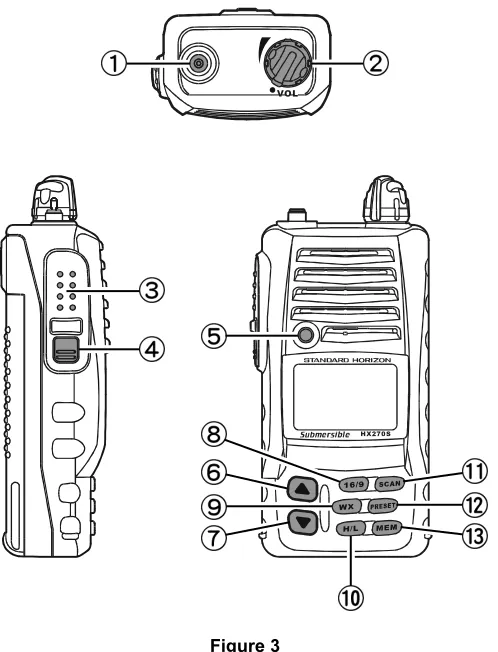
Figure 3
Controls and Connectors
4. CONTROLS AND INDICATORS
NOTE
4.1 CONTROLS AND CONNECTIONS
Antenna Connector
The supplied CAT460 flexible antenna is attached here.
POWER SWITCH/VOLUME CONTROL
Turns the transceiver on and off, and adjusts the volume.
PUSH-TO-TALK (
PTT
) SWITCH
Activates transmission.
SQUELCH (
SQL
) SWITCH
Sets the point at which random noise on the channel does not activate the audio circuits but a received signal does. This point is called the Squelch threshold. Further adjustment of the squelch control will de-grade the reception of wanted transmissions.
BUSY/TX INDICATOR
This indicator glows green when a signal is being received and red when transmitting.
UP () KEY
Used to select a desired channel. Each press increases the channel number. When held down, the channels increase continuously.
DOWN (
) KEY
Used to select a desired channel. Each press decreases the channel number. When held down, the channels decrease continuously.
16/9
KEY
Immediately recalls channel 16 from any channel location. Holding down this key recalls channel 9. The 16/9 key is also used to revert to the channel selected before pressing the 16/9 key.
WX
KEY
Immediately recalls the last-used NOAA Weather Channel from any chan-nel location. Recalls the previously- selected working chanchan-nel when the WX key is pressed again.
Secondary use: When the 16/9 key is held and the WX key is pressed, the radio will change modes between the USA, International, and Cana-dian channel bands.
H/L
KEY
Toggles the transmitter power level between High (5 Watts), Medium (2.5 Watts), and Low (1 Watt) of output. Does not operate on “low power only” and transmission-inhibit channels.
When operating on Canadian channel 13, or USA channels 13 or 67, pressing this key momentarily toggles the power level from Low power to Medium or High power.
Hold down this key to lock the displayed channel functions (except the H/L, PTT, and SQL keys) so that they are not accidentally changed.The key lock symbol “ ” will appear, to indicate that the functions are locked. Hold down until the key lock symbol “ ” disappears to unlock the ra-dio.
SCAN
KEY
Starts scanning and Priority scanning of programmed channels. When scanning, press and hold this key to turn on and off Priority scan (P is shown on the left side of the display during Priority scanning).
PRESET
KEY
Immediately recalls one of up to eight user preset memories for opera-tion (shown as 1-8 on the LCD). Pressing this key repeatedly scrolls through the preset memory channels.
MEM
KEY
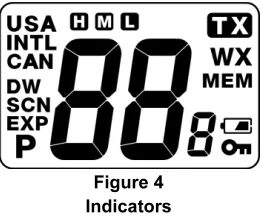
4.2 INDICATORS
Figure 4 Indicators
Channel Display
The operating channel is shown on the LCD in both the transmission and reception modes.
A Indicator
Signifies ship-to-ship channels in USA or Canadian mode (whose counter-part in the International mode is a public correspondence (marine operator) channel).
USA/INTL/CAN Indicator
Denotes the “band” of operation for the particular channel. “USA” indicates the USA band; “CAN” indicates the Canadian band; and “INTL” indicates the International band.
/
/
Indicators
“ ” indicates High power (5 Watts); “ ” indicates Medium power (2.5 Watts); and “ ” is for Low power (1 Watt). “Blank” in this location indicates a re-ceive-only channel.
P Indicator
Ch16 Priority Scan is activated.
DW Indicator
WX Indicator
A NOAA weather channel is selected.
MEM Indicator
The channel is in the transceiver’s “Scan Memory.”
Battery Indicator
When the battery charge is almost depleted, a “ ” icon will appear on the display. When this icon appears, it is recommended that you charge the battery soon.
No Icon Enough battery power Lower battery power Nearing depletion
(Blinking) Prepare to charge the battery
NOTE: The battery indicator should be used only as a guide in charging the FNB-83 battery.
KEY Lock Indicator
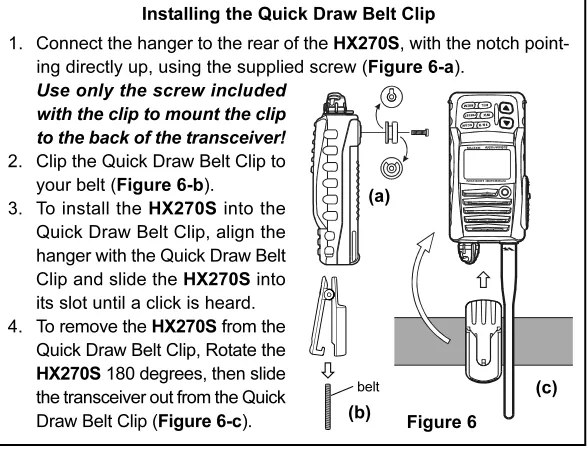
Installing the Quick Draw Belt Clip
1. Connect the hanger to the rear of the HX270S, with the notch point-ing directly up, uspoint-ing the supplied screw (Figure 6-a).
Use only the screw included with the clip to mount the clip to the back of the transceiver! 2. Clip the Quick Draw Belt Clip to
your belt (Figure 6-b).
3. To install the HX270S into the Quick Draw Belt Clip, align the hanger with the Quick Draw Belt Clip and slide the HX270S into its slot until a click is heard.
5. OPERATION
5.1 INITIAL SETUP
1. Install the belt clip on the transceiver, if desired. 2. Install the battery pack on the transceiver (see
figure 1 and section 3.2).
3. Install the antenna onto the transceiver.
NOTE
Water resistance of the transceiver is assured only when the battery pack and antenna are attached to the transceiver.
Figure 5 Antenna Installation
(a)
«
HX2
70
S
5.2 RECEPTION
1. Turn the POWER/VOLUME CONTROL knob clockwise to turn the trans-ceiver on.
2. Press the SQL key, then press the [] key until the SQL level is 00.
3. Turn up the POWER/VOLUME CONTROL knob until the noise or audio from the speaker is at a comfort-able level.
4. Select a channel that has no signal being received (no one is transmit-ting on the channel) and where only noise is heard.
5. Press the SQL key, then press the [] key and stop immediately after the noise disappears. This condition is known as the “Squelch Thresh-old.” If the squelch is set to a higher level, weak signals may not be received.
6. To change channels, press the [] or [] key.
7. The LCD and keypad are illuminated for 5 seconds when any key is pressed. The lamp automatically turns off in 5 seconds.
8. To “lock” the channel so that it is not accidentally changed, hold down the H/L key for about one second. This locks the [] and [] buttons and all the front panel controls except the H/L, PTT and SQL keys. The “ ” symbol will appear on the display to indicate
5.3 TRANSMISSION
NOTE
Never key the transceiver without an antenna connected, as this may cause damage to the transceiver.
1. Perform steps 1 through 7 of the RECEPTION discussion above. 2. Before transmitting, monitor the channel and make sure it is clear.
THIS IS AN FCC REQUIREMENT!
3. For communications over short distances, press the H/L key until “ ” is displayed on the LCD. This indicates Low power (approximately 1 Watt).
NOTE
Transmitting on 1 Watt prolongs battery life. Low power (1 Watt) should be selected whenever possible.
4. If using Low power is not effective, select Medium power (2.5 Watts) or High power (5 Watts) by pressing the H/L key until
“ ” (Medium power) or “ ” (High power) is dis-played.
5. When receiving a signal, wait until the incoming signal stops before trans-mitting. The transceiver cannot transmit and receive simultaneously. 6. Press the PTT (Push-To-Talk) switch to transmit. The “TX” indicator is
displayed during transmission.
7. Speak slowly and clearly into the microphone. Hold the microphone about ½ to 1 inch away from your mouth.
8. When the transmission is finished, release the PTT switch.
5.4 TRANSMIT TIME - OUT TIMER (TOT)
5.5 USA, CANADIAN, AND INTERNATIONAL BANDS
1. To change the operating band (channel set) of the transceiver, hold down the 16/9 key and press the WX key. The band will change from USA, to International, and to Canadian with each press.
2. “USA” appears on the LCD for the USA band, “INTL” appears for the International band, and “CAN” ap-pears for the Canadian band.
5.6 NOAA WEATHER CHANNELS
1. To receive a NOAA weather channel, press the WX key. The transceiver changes to the weather channel mode. This mode consists of a special pre-set memory bank containing the standard NOAA weather channels. 2. The transceiver will be set to the last-used NOAA weather channel. Press
the [] or [] key to change to other weather channels. 3. To exit from the weather channel mode, press the
WX key. The transceiver will revert to the channel you were using prior to switching to the weather chan-nel mode.
5.6.1 NOAA WEATHER ALERT
In the event of extreme weather disturbances such as storms and hurri-canes, NOAA (National Oceanic and Atmospheric Administration) sends a “weather alert” consisting of a 1050 Hz tone, followed by weather reports on the weather channels. The transceiver is capable of receiving this alert if the following is performed:
1. Program your area’s weather channels into the transceiver’s scan memory. Follow the same procedure as for regular channels under Sec-tion 5.7.
2. Press the SCAN key to start the scan.
3. The memorized weather channels are scanned along with the regular memorized channels. Scanning will not stop, however, on the (continu-ous) weather broadcast channels unless the weather alert tone is re-ceived.
5.6.2 NOAA WEATHER ALERT TESTING
In the event of a major storm or other appreciable weather condition requir-ing vessels at sea or other bodies of water to be notified, the NOAA (Na-tional Oceanographic and Atmospheric Administration) broadcasts a 1050 Hz tone that the HX270S can detect. (Refer to section 5.6.1 “NOAA WEATER ALERT” on how to use this feature.) This tone, when detected, will produce a loud beep from the radio speaker to signal that a weather alert is being broadcast.
In order to test this system, the NOAA broadcasts the 1050 Hz tone every Wednesday, sometime between 11 AM and 1 PM. Any marine VHF radio that can detect the weather alert tone, may use this test to verify that this feature is functioning properly.
5.7 SCAN
This transceiver provides a special “Scanning Memory Bank” which allows you to designate certain channels for inclusion in a “loop” which will be scanned at high speed. If an incoming signal is detected on one of the chan-nels in the scanning loop, the radio will pause on that channel, allowing you to listen to the incoming transmission.
1. Select the desired channel to be included in the scanning loop using the [] or [] key.
2. Press the MEM key to store the channel into the transceiver’s scanning memory. “MEM” will be dis-played on the LCD.
3. Repeat steps 1 and 2 for all the channels to be scanned.
4. To delete a channel from the transceiver’s scan memory, press the MEM key again while the memorized channel is displayed. “MEM” will disap-pear from the display.
5. All channels programmed remain in the transceiver’s scan memory even if the power is turned off.
5.8 PROGRAMMABLE PRIORITY SCAN
The priority scanning feature allows the radio to scan while also keeping watch on a particularly important “priority channel.” The following channels can be set as the priority channel: 16, 09, and Preset Channels 1 through 8 (Preset Channels are described in section 5.14).
1. To set the priority channel, hold down the 16/9 key and press the MEM key. The channel will change from 16 to 09 to Preset 1 to Preset 2 to Preset 3 to Preset 4 to Preset 5 to Preset 6 to Preset 7 to Preset 8 with each press of the MEM key. The displayed channel will be set as the priority channel when the 16/9 key is released.
2. For priority scanning, hold down the SCAN key during normal scanning. Scanning will proceed between the memorized channels and the priority channel. The priority channel will be scanned after each programmed channel. “P” is shown on the left side of the channel number during pri-ority scanning.
3. As an example of priority scanning, let us say that channels 06, 07, and 08 are memorized in the transceiver’s scan memory. Priority scanning will proceed in the following sequence:
[CH06]«[Priority Channel]«[CH07]«[Priority Channel]«
«[CH08]«[Priority Channel]«[CH06]«[Priority Channel] ……
4. Even when the transceiver stops and listens to the signal of a programmed channel, the transceiver will “dual watch” between this channel and the priority channel. Therefore, your priority watching of the designated chan-nel is not compromised when the scanner has paused on an active chanchan-nel.
5.9 DUAL WATCH
The Dual Watch feature allows the radio to watch for a transmission on the priority channel and another selected Marine channel until a signal is re-ceived. The priority channel is determined per the discussion in section 5.8 “PROGRAMMABLE PRIORITY SCAN” as described previously.
1. To start the Dual Watch feature, select a channel to be dual watched with the priority channel and press and hold in the
SCAN key. The radio checks the priority channel for voice traffic every one second. A small “DW” icon will be shown blinking on the left of the display during scanning.
5.10 EMERGENCY (CHANNEL 16 USE)
Channel 16 is known as the Hail and Distress Channel. An emergency may be defined as a threat to life or property. In such instances, be sure the transceiver is on and set to CHANNEL 16. Then use the following proce-dure:
1. Press the PTT (push-to-talk) switch and say “Mayday, Mayday, May-day. This is , , ” (your vessel’s name).
2. Then repeat once: “Mayday, ” (your vessel’s name).
3. Now report your position in latitude/longitude, or by giving a true or mag-netic bearing (state which) to a well-known landmark such as a naviga-tion aid or geographic feature such as an island or harbor entry. 4. Explain the nature of your distress (sinking, collision, aground, fire, heart
attack, life-threatening injury, etc.).
5. State the kind of assistance your desire (pumps, medical aid, etc.). 6. Report the number of persons aboard and condition of any injured. 7. Estimate the present seaworthiness and condition of your vessel. 8. Give your vessel’s description: length, design (power or sail), color and
other distinguishing marks. The total transmission should not exceed 1 minute.
9. End the message by saying “OVER”. Release the PTT (push-to-talk) switch and listen.
10. If there is no answer, repeat the above procedure. If there is still no response, try another channel.
11. To recall the previously-selected channel, press the 16/9 key again.
5.11 CALLING ANOTHER VESSEL (CHANNEL 16 OR 9)
Channel 16 may be used for initial contact (hailing) with another vessel.However, its most important use is for emergency messages. This channel must be monitored at all times except when actually using another channel.
Prior to making contact with another vessel, refer to the channel charts in this manual, and select an appropriate channel for communications after initial contact. For example, Channels 68 and 69 of the U.S. VHF Charts are some of the channels available to non-commercial (recreational) boaters. Monitor your desired channel in advance to make sure you will not be inter-rupting other traffic, and then go back to either channel 16 or 9 for your initial contact.
When the hailing channel (16 or 9) is clear, state the name of the other vessel you wish to call and then “this is” followed by the name of your vessel and your Station License (Call Sign). When the other vessel returns your call, immediately request another channel by saying “go to,” the num-ber of the other channel, and “over.” Then switch to the new channel. When the new channel is not busy, call the other vessel.
After a transmission, say “over,” and release the microphone’s push-to-talk (PTT) switch. When all communication with the other vessel is completed, end the last transmission by stating your Call Sign and the word “out.” Note that it is not necessary to state your Call Sign with each transmission, only at the beginning and end of the contact.
Remember to return to Channel 16 when not using another channel. Some radios automatically monitor Channel 16 even when set to other channels or when scanning; see your Owner's Manual.
5.12 OPERATING ON CHANNEL 13
Channel 13 is used at docks, bridges and for maneuvering in port. Mes-sages on this channel must concern navigation only, such as meeting and passing in restricted waters. In emergencies and when approaching blind river bends, High power is allowed. Pressing the H/L key will change the power output from 1 Watt ( ) to 5 Watts ( ); if pressed again, 2.5 Watts ( ) will be selected. When the PTT switch is released, the transceiver will revert to Low power. Press the H/L key again if you need High power on a subsequent transmission.
5.13 OPERATING ON CHANNEL 67
5.14 PRESET CHANNELS (1 ~ 8): INSTANT ACCESS
Eight user-assigned channels can be programmed for instant access.
5.14.1 Programming
1. Hold down the PRESET key, and press the [] or [] key (repeatedly, if necessary) until the desired channel number (from among the regular operating channels) is displayed.
2. With the desired channel number displayed, release the PRESET key. The “1” notation will appear on the LCD display for 1 second, indicating that the displayed channel is now saved in the Preset
Channel “1” position. Then the preset channel num-ber will disappear and the display comes back to the normal channel display.
Repeat steps 1 and 2 to program the desired channels into Preset Channels 1 ~ 8.
To delete a Preset Channel, hold down the PRESET key and press the [] or [] key until the Preset Channel number to be deleted is displayed, then release the PRESET key.
5.14.2 Operation
Pressing the PRESET key toggles between Preset Channel 1, 2, 3, 4, 5, 6, 7, 8 and the last selected “regular” channel. Preset Channel 1 is repre-sented by “1” to the right of the channel number on the LCD for 1 second, and channel 2 is represented by “2,” and so forth. Then the preset channel numberr will disappear and the display comes back to the normal channel display.
5.15 SIMPLEX/DUPLEX CHANNEL USE
5.16 SETUP MODE
The HX270S’s Setup Mode allows a number of the HX270S operating pa-rameters to be custom-configured for your operating requirements.
The Setup Mode is easy to activate and set, using the following procedure:
1. Turn the radio off.
2. Hold down the SQL key, then turn on the transceiver while still holding down the SQL key.
3. “SEt” will appear on the display, indicating that the Setup Mode has been activated.
4. Press the SQL key to select the Menu item to be adjusted (see below). 5. Press the [] or [] key select the status or value of the Menu item. 6. After completing your adjustment, press the SQL key to save the new
setting, and then press the PTT switch to exit to normal operation.
Key Beep
DW Display
Lamp Mode Scan Lamp
Scan Display
«
«
«
«
«
«
¬
Key Continue Off
5.16.1 bEP (K
EYB
EEP)
Function: Enable/Disable the Keypad beeper. Available Values: ON/OFF
Default: ON
5.16.2 dUL (DW D
ISPLAY)
Function: Selects the Dual Watch scanning display mode. Available Values: nor (Normal)/SPL (Special)
Default: SPL (Special)
When “Special” is selected, channel number which is the LCD shows re-ceived channel.
5.16.3 LP (L
AMPM
ODE)
Function: Select the LCD/Keypad Lamp mode. Available Values: kEy (KEY)/Cnt (Continue)/oFf Default: kEy (KEY)
kEy: Illuminates the LCD/Keypad for 5 seconds when any key is pressed. Cnt: Illuminates the LCD/Keypad continuously.
oFf: Disables the LCD/Keypad illumination.
5.16.4 SnL (S
CANL
AMP)
Function: Enable/Disable the Scan lamp while scanning is paused. Available Values: ON/OFF
Default: ON
5.16.5 SCn (S
CAND
ISPLAY)
Function: Select the display mode while scanning. Available Values: nor (Normal)/SPL (Special) Default: nor (Normal)
nor: The channel number changes when scanning.
trans-TROUBLESHOOTING CHART
6. MAINTENANCE
To receive warranty service, the purchaser must deliver the Product, trans-portation and insurance prepaid, to STANDARD HORIZON Marine Repair Department (a division of VERTEX STANDARD), 10900 Walker Street Cy-press, CA 90630. Include proof of purchase indicating model. serial num-ber, and date of purchase. STANDARD HORIZON will return the Product to the purchaser freight prepaid. For general troubleshooting, refer to this Troubleshooting Chart.
SYMPTOM
T h e S C A N k e y does not start the scan.
T h e U S A / I N T L / CAN modes do not function.
Press and holding the SQL key does not eliminate back-ground noise. C a n n o t c h a n g e any function. Key Lock does not function.
Indicator does not light when charg-ing a battery.
PROBABLE CAUSE
N o c h a n n e l s memorized.
Squelch is not ad-justed.
Proper operation not followed.
Low battery.
Key Lock is on.
Proper operation not followed. Defective battery FNB-83 or cor-roded contacts on battery or charger.
REMEDY
Use the MEM key to enter desired channels into the transceiver’s memory. Adjust the squelch to thresh-old or to the point where noise just disappears. Further ad-justment of the squelch con-trol may eliminate incoming signals.
HOLD down the 16/9 key and press the WX key.
Charge battery. Refer to sec-tion 3 of this manual.
Turn Key Lock off. Refer to section 4.1. .
Hold down the H/L key for 1 second.
7. PRODUCT SUPPORT INQUIRIES
If you have any questions or comments regarding the use of the HX270S,
you can visit the STANDARD HORIZON Web site (www.standardhorizon.com),
send an E-mail [email protected], or contact the Product Support team at (800)767-2450 M-F 7:00-5:00PST.
8. CHANNEL ASSIGNMENTS
Tables on the following columns list the VHF Marine Channel assignments for U.S.A. and International use. Below are listed some data about the charts.
1. VTS. Where indicated, these channels are part of the U.S. Coast Guard’s Vessel Traffic System.
2. Alpha channel numbers, that is, channel numbers followed by the letter A (such as Channel 07A) are simplex channels on the U.S.A. or Cana-dian channel assignments whose counterparts in the International as-signments are duplex channels. International channels do not use “Al-pha” numbers. If you call the Coast Guard on Channel 16, they will some-times ask you to “go to channel 22 Alpha.” This is a channel assigned to U.S.A, and Canadian Coast Guards for handling distress and other calls. If your radio is set for International operation you will go to Chan-nel 22 instead of 22A, and will not be able to communicate with the Coast Guard. To use Channel 22A, your radio must be set for USA or Canada operation, usually by a U/I/C (USA/International/Canada) con-trol or combination of concon-trols. Channel 22 (without an “A” is an Interna-tional duplex channel for port operations. Some radios indicate an “A” adjacent to the alpha channels on the display; on others “Alpha” is not indicated but the proper channel is selected based on the U/I/C setting. 3. Bridge-to-Bridge channels (for example, Channel 13) are for use by bridge operators on intercoastal waterways and rivers. It is also used by marine vessels in the vicinity of these bridges for navigation and for communi-cating with the bridge operators. Note that a limit of 1 Watt is specified for these channels. See page 22 for additional information.
VHF MARINE CHANNEL CHART
CH U C I S/D TX RX CHANNEL USE
01 X X D 156.050 160.650 Public Correspondence (Marine Operator)
01A X S 156.050 Port Operation and Commercial. VTS in selected areas 02 X X D 156.100 160.700 Public Correspondence (Marine Operator)
03 X X D 156.150 160.750 Public Correspondence (Marine Operator)
03A X S 156.150 US Government only, Coast Guard
04 X D 156.200 160.800 Public Correspondence (Marine Operator), Port operation, ship movement
04A X S 156.200 Pacific coast: Coast Guard, East Coast: Commercial fishing
05 X D 156.250 160.850 Public Correspondence (Marine Operator), Port operation, ship movement
05A X X S 156.250 Port operation. VTS in Seattle 06 X X X S 156.300 Inter-ship Sefety
07 X D 156.350 160.950 Public Correspondence (Marine Operator), Port operation, ship movement
07A X X S 156.350 Commercial
08 X X X S 156.400 Commercial (Inter-ship only)
09 X X X S 156.450 Boater Calling channel, Commercial & Non-commercial (Recreational)
10 X X X S 156.500 Commercial
11 X X X S 156.550 Commercial. VTS in selected areas. 12 X X X S 156.600 Port operation. VTS in selected areas. 13 X X X S 156.650 Inter-ship Navigation Safety (Bridge-to-bridge) 14 X X X S 156.700 Port operation. VTS in selected areas. 15 X S - - - 156.750 Environmental (Receive only)
15 X X S 156.750 Commercial, non-commercial, ship movement (1 W) 16 X X X S 156.800 International Distress, Safety and Calling
17 X X X S 156.850 State Controlled (1 W) 18 X D 156.900 161.500 Port operation, ship movement 18A X X S 156.900 Commercial
19 X D 156.950 161.550 Port operation, ship movement 19A X S 156.950 US: Commercial
19A X S 156.950 Coast Guard
as duplex on the charts, correct mode of operation is established auto-matically by your radio when you select a channel; you cannot change the mode. And you still must release the push-to-talk switch after each transmission in order to listen to the radio.
5. Channels normally used by recreational boaters are those that include the term “non-commercial” in the Channel Use column of the chart. Some of these are shared with other users and some are used only in certain geographic regions.
6. Marine vessels equipped with VHF radios are required to monitor Channel 16.
VHF MARINE CHANNEL CHART
CH U C I S/D TX RX CHANNEL USE
20 X X X D 157.000 161.600 Canadian Coast Guard Only,
International: port operations and shipment 20A X S 157.000 Port operation
21 X D 157.050 161.650 Port operation, ship movement
21A X X S 157.050 U.S. Government Only, Canadian Coast Guard
22 X D 157.100 161.700 Port operation, ship movement
22A X X S 157.100 US and Canadian Coast Guard Liaison and Maritime Safety Information Broadcasts announced on channel 16 23 X X D 157.150 161.750 Public Correspondence (Marine Operator)
23A X S 157.150 U.S. Government Only
24 X X X D 157.200 161.800 Public Correspondence (Marine Operator) 25 X X X D 157.250 161.850 Public Correspondence (Marine Operator) 26 X X X D 157.300 161.900 Public Correspondence (Marine Operator) 27 X X X D 157.350 161.950 Public Correspondence (Marine Operator) 28 X X X D 157.400 162.000 Public Correspondence (Marine Operator) 60 X X D 156.025 160.625 Public Correspondence (Marine Operator) 61 X D 156.075 160.675 Public Correspondence (Marine Operator),
Port operation, ship movement
61A X X S 156.075 U.S. Government Only, Canadian Coast
Guard-Pacific Coast, Commercial Fishing-East Coast
62 X D 156.125 160.725 Public Correspondence (Marine Operator), Port operation, ship movement
62A X S 156.125 Public Coast: Coast Guard; East Coast: commercial fishing only 63 X D 156.175 160.775 Public Correspondence (Marine Operator),
Port operation, ship movement
63A X S 156.175 Port Operation and Commercial. VTS in selected areas. 64 X X D 156.225 160.825 Public Correspondence (Marine Operator),
Port operation, ship movement
64A X X S 156.225 U.S. Government Only, Canadian Commercial Fishing
65 X D 156.275 160.875 Public Correspondence (Marine Operator), Port operation, ship movement
65A X X S 156.275 Port Opeations
66 X D 156.325 160.925 Public Correspondence (Marine Operator), Port operation, ship movement
66A X X S 156.325 Port Operations
67 X X X S 156.375 US: Commercial. Used for Bridge-to-bridge communi-cations in lower Mississippi River. Inter-ship only, Canada: Commercial fishing, S&R
68 X X X S 156.425 Non-commercial (Recreational) 69 X X X S 156.475 US: Non-commercial (Recreational),
Canada: Commercial fishing only,
The above BOLD channels are not for use of the general public in U.S. waters, unless proper authorization is given.
VHF MARINE CHANNEL CHART
CH U C I S/D TX RX CHANNEL USE
74 X X X S 156.725 US: Port Operations, Canada: Commercial fishing only, International: Inter-ship, Port opertions and Ship movement 75 X S 156.775 Port Operations (Inter-ship only) (1W)
76 X S 156.825 Port Operations (Inter-ship only) (1W) 77 X X S 156.875 Port Operations (Inter-ship only) (1W) 77 X S 156.875 Port Operations (Inter-ship only) 78 X D 156.925 161.525 Public Correspondence (Marine Operator),
Port operation, ship-movement 78A X X S 156.925 Non-commercial (Recreational)
79 X D 156.975 161.575 Port operation and Ship movement 79A X X S 156.975 Commercial
80 X D 157.025 161.625 Port operation, ship movement 80A X X S 157.025 Commercial
81 X D 157.075 161.675 Port operation, ship movement
81A X X S 157.075 U.S. Government Only
-Environmental protection operations.
82 X D 157.125 161.725 Public Correspondence (Marine Operator), Port operation, ship movement
82A X X S 157.125 U.S. Government Only, Canadian Coast Guard Only
83 X X D 157.175 161.775 Canadian Coast Guard Only
83A X X S 157.175 U.S. Government Only, Canadian Coast Guard Only
83 X X D 157.175 161.775 Public Correspondence (Marine Operator) 84 X X X D 157.225 161.825 Public Correspondence (Marine Operator) 85 X X X D 157.275 161.875 Public Correspondence (Marine Operator) 86 X X X D 157.325 161.925 Public Correspondence (Marine Operator) 87 X X X D 157.375 161.975 Public Correspondence (Marine Operator) 88 X X X D 157.425 162.025 Public Correspondence (ship-to-coast) 88A X S 157.425 Commercial, Inter-ship Only
WX01 X X X D - - - 162.550 Weather (receive only)
WX02 X X X D - - - 162.400 Weather (receive only)
WX03 X X X D - - - 162.475 Weather (receive only)
WX04 X X X D - - - 162.425 Weather (receive only)
WX05 X X X D - - - 162.450 Weather (receive only)
WX06 X X X D - - - 162.500 Weather (receive only)
WX07 X X X D - - - 162.525 Weather (receive only)
WX08 X X X D - - - 161.650 Weather (receive only)
WX09 X X X D - - - 161.775 Weather (receive only)
Points of
communica-tion (Intership and
be-tween coast and ship unless otherwise indi-cated)
Port Operations
01A1 156.050 156.050
63A1 156.175 156.175
05A2 156.250 156.250
65A 156.275 156.275 66A 156.325 156.325 123 156.600 156.600
73 156.675 156.675 143 156.700 156.700
74 156.725 156.725
774 156.875 Intership only.
20A12 157.000 Intership only.
Navigational (Bridge-to-Bridge)5
136 156.650 156.650
677 156.375 156.375
Commercial
01A1 156.050 156.050
63A1 156.175 156.175
07A 156.350 156.350
677 156.375 Intership only.
08 156.400 ... Do. 09 156.450 156.450 10 156.500 156.500 113 156.550 156.550
18A 156.900 156.900 19A 156.950 156.950 79A 156.975 156.975 80A 157.025 157.025
88A8 157.425 ... Intership only.
7214 156.625 ... Internship only.
Digital Selective Calling
7015 156.525 156.525
Noncommercial
6817 156.425 156.425
0916 156.450 156.450
69 156.475 156.475 71 156.575 156.575
72 156.625 ... Intership only. 78A 156.925 156.925
79A 156.975 156.975 Great Lakes only. 80A 157.025 157.025 Do.
Distress, Safety and Calling
16 156.800 156.800 EPRIB
Intership Safety
06 156.300 ... a. Intership, or b. For SAR: Ship and aircraft for the U.S. Coast Guard.
Environmental
1513 ... 156.750 Coast to ship only.
Maritime Control
179,10 156.850 156.850
Liaison, U.S. Coast Guard
22A11 157.100 157.100 Ship, aircraft, and
coast stations of t h e U . S . C o a s t Guard and at Lake Mead, Nev., ship and coast stations o f t h e N a t i o n a l Park Service, U.S. Department of the Interior.
Public Correspondence (Marine Operator) channels
24 157.200 161.800 84 157.225 161.825 25 157.250 161.850 85 157.275 161.875 26 157.300 161.900 86 157.325 161.925 27 157.350 161.950 87 157.375 161.975 28 157.400 162.000 888 157.425 162.025 Ship
transmit Channel designator
Carrier frequency
(MHz)
Points of
communica-tion (Intership and
be-tween coast and ship unless otherwise indi-cated) Coast transmit Ship transmit Channel designator Carrier frequency
(MHz)
1. 156.050 MHz and 156.175 MHz are available for port operations and commercial communications purposes when used only within the U.S. Coast Guard desig-nated Vessel Traffic Services (VTS) area of New Orleans, on the lower Missis-sippi River from the various pass entrances in the Gulf of Mexico to Devil’s Swamp Light at River Mile 242.4 above head of passes near Baton Rouge.
2. 156.250 MHz is available for port operations communications use only within the U.S. Coast Guard designated VTS radio protection areas of New Orleans and Houston described in Sec. 80.383. 156.250 MHz is available for intership port operations communications used only within the area of Los Angeles and Long Beach harbors, within a 25- nautical mile radius of Point Fermin, California. 3. 156.550 MHz, 156.600 MHz and 156.700 MHz are available in the U.S. Coast
Guard designated port areas only for VTS communications and in the Great Lakes available primarily for communications relating to the movement of ships in sec-tors designated by the St. Lawrence Seaway Development Corporation or the U.S. Coast Guard. The use of these frequencies outside VTS and ship move-ment sector protected areas is permitted provided they cause no interference to VTS and ship movement communications in thier respective designated sectors. 4. Use of 156.875 MHz is limited to communications with pilots regarding the
move-ment and docking of ships. Normal output power must not exceed 1 watt. 5. 156.375 MHz and 156.650 MHz are available primarily for intership navigational
communications. These frequencies are available between coast and ship on a secondary basis when used on or in the vicinity of locks or drawbridges. Normal output power must not exceed 1 watt. Maximum output power must not exceed 10 watts for coast stations or 25 watts for ship stations.
6. On the Great Lakes, in addition to bridge-to-bridge communications, 156.650 MHz is available for vessel control purposes in established vessel traffic sys-tems. 156.650 MHz is not available for use in the Mississippi River from South Pass Lighted Whistle Buoy “2” and Southwest Pass entrance Midchannel Lighted Whistle Buoy to mile 242.4 above Head of Passes near Baton Rouge. Addition-ally it is not available for use in the Mississippi River-Gulf Outlet, the Mississippi River-Gulf Outlet Canal, and the Inner Harbor Navigational Canal, except to aid the transition from these areas.
8. Within 120 km (75 miles) of the United States/Canada border, in the area of the Puget Sound and the Strait of Juan de Fuca and its approaches, 157.425 MHz is half of the duplex pair designated as Channel 88. In this area, Channel 88 is available to ship stations for communications with public coast stations only. More than 120 km (75 miles) from the United States/Canada border in the area of the Puget Sound and the Strait of Juan de Fuca, its approaches, the Great Lakes, and the St. Lawrence Seaway, 157.425 MHz is available for intership and com-mercial communications. Outside Puget Sound area and its approaches and the Great Lakes, 157.425 MHz is also available for communications between com-mercial fishing vessels and associated aircraft while engaged in comcom-mercial fish-ing activities.
9. When the frequency 156.850 MHz is authorized, it may be used additionally for search and rescue training exercises conducted by state or local governments. 10. The frequency 156.850 MHz is additionally available to coast stations on the
Great Lakes for transmission of scheduled Coded Marine Weather Forecasts (MAFOR), Great Lakes Weather Broadcast (LAWEB) and scheduled Notices to Mariners or Bulletins. F3C and J3C emissions are permitted. Coast Stations on the Great Lakes must cease weather broadcasts which cause interference to stations operating on 156.800 MHz until the interference problem is resolved. 11. The frequency 157.100 MHz is authorized for search and rescue training
exer-cises by state or local government in conjunction with U.S. Coast Guard stations. Prior U.S. Coast Guard approval is required. Use must cease immediately on U.S. Coast Guard request.
12. The duplex pair for channel 20 (157.000/161.600 MHz) may be used for ship to coast station communications.
13. Available for assignment to coast stations, the use of which is in accord with an agreed program, for the broadcast of information to ship stations concerning the environmental conditions in which vessels operate, i.e., weather; sea conditions; time signals; notices to mariners; and hazards to navigation.
14. Available only in the Puget Sound and the Strait of Juan de Fuca.
15. The frequency 156.525 MHz is to be used exclusively for distress, safety and calling using digital selective calling techniques. No other uses are permitted. 16. The frequency 156.450 MHz is available for intership, ship and coast general
pri-9. WARRANTY
Marine Products Limited Warranty
STANDARD HORIZON (a division of VERTEX STANDARD) warrants, to the original purchaser only, each new Marine Communications Product (“Prod-uct”) manufactured and/or supplied by STANDARD HORIZON against de-fects in materials and workmanship under normal use and service for a period of time from the date of purchase as follows:
3 years Waterproof - if purchased after 01/01/94
Associated Chargers
3 years - if purchased after 01/01/91
Associated Batteries - 1 year. Note: Batteries will be deemed deflec-tive only if storage capacity drops below 80% of rated capacity or if leakage develops.
Associated Accessories - 1 year. Includes: Microphones/Handsets, Ex-ternal Speakers, Antennas, Carrying Accesso-ries, Power Supplies, and Signaling Boards.
In the event of a defect, malfunction or failure of the Product during the warranty period, STANDARD HORIZON’s liability for any breach of contract or any breach of express or implied warranties in connection with the sale of Products shall be limited solely to repair or replacement, at its option, of the Product or part(s) therein which, upon examination by STANDARD HORIZON, appear to be defective or not up to factory specifications. STANDARD HORIZON may, at its option, repair or replace parts or subassemblies with new or reconditioned parts and subassemblies. Parts thus repaired or re-placed are warranted for the balance of the original applicable warranty.
STANDARD HORIZON will not warrant installation, maintenance or service of the Products. In all instances, STANDARD HORIZON’s liability for dam-ages shall not exceed the purchase price of the defective Product.
This warranty only extends to Products sold within the 50 States of the United States of America and the District of Columbia.
This limited warranty does not extend to any Product which has been sub-jected to misuse, neglect, accident, incorrect wiring by anyone other than STANDARD HORIZON, improper installation, or subjected to use in viola-tion of instrucviola-tions furnished by STANDARD HORIZON, nor does this war-ranty extend to Products on which the serial number has been removed, defaced, or changed. STANDARD HORIZON cannot be responsible in any way for ancillary equipment not furnished by STANDARD HORIZON which is attached to or used in connection with STANDARD HORIZON’s Products, or for the operation of the Product with any ancillary equipment and all such equipment is expressly excluded from this warranty. STANDARD HORIZON disclaims liability for range, coverage, or operation of the Product and ancil-lary equipment as a whole under this warranty. STANDARD HORIZON re-serves the right to make changes or improvements in Products, during sub-sequent production, without incurring the obligation to install such changes or improvements on previously manufactured Products.
The implied warranties which the law imposes on the sale of this Product are expressly LIMITED, in duration, to the time period specified above. STAN-DARD HORIZON shall not be liable under any circumstances for conse-quential damages resulting from the use and operation of this Product, or from the breach of this LIMITED WARRANTY, any implied warranties, or any contract with STANDARD HORIZON. IN CONNECTION WITH THE SALE OF ITS PRODUCTS, STANDARD HORIZON MAKES NO WARRAN-TIES, EXPRESS OR IMPLIED AS TO THE MERCHANTABILITY OR FIT-NESS FOR A PARTICULAR PURPOSE OR OTHERWISE, EXCEPT AS EXPRESSLY SET FORTH HEREIN.
Some states do not allow the exclusion or limitation of incidental or conse-quential damages, or limitation on how long an implied warranty lasts, so the above limitations or exclusions may not apply. This warranty gives spe-cific legal rights, and there may be other rights which may vary from state to state.
Note: The flat rate amount is payable by the Owner only if STANDARD HORIZON or the STANDARD HORIZON Dealer determines that a repair is needed. After the repair, a 90-day warranty will be in effect from the date of return of the unit to the Owner.
This service program is not available for equipment which has failed as a result of neglect, accident, breakage, misuse, improper installation or modi-fication.
ON-LINE WARRANTY REGISTRATION
10. SPECIFICATIONS
7.1 General
Frequency range: 156 MHz - 163.275 MHz (Marine Band + WX Band) Channel Steps: 25 kHz
Frequency stability: ± 5 ppm (–22 °F to +140 °F [–30 °C to +60 °C])
Emission type: 16K0G3E Antenna impedance: 50 Ohms Supply voltage: 7.2 VDC
Current consumption: 200 mA (Receive)
40 mA (Standby, Saver Off) TX: 1.4 A (H)/0.9 A (M)/0.5 A (L) Operating Temperature: –22 °F to +140 °F (–30 °C to +60 °C) Waterproof rating: 30 minutes @ 1 meter depth (JIS 7) Case Size (W x H x D): 2.3” x 4.7” x 1.2” (58 x 120 x 30.5 mm) Weight (Approx): 13.4 oz (380 g) with FNB-83
7.2 Transmitter
RF output power: 5 W/2.5 W/1 W @7.2 V Modulation Type: Variable Reactance Max deviation: ±5 kHz
Spurious emissions: At least 73 dB down
7.3 Receiver
Circuit type: Double-conversion superheterodyne Intermediate Frequencies: 1st: 21.7 MHz
2nd: 450 kHz
Sensitivity: 0.25 µV 12 dB SINAD
Adjacent channel selectivity: 70 dB
Intermodulation response: 70 dB
Selectivity: 12 kHz / 25 kHz (–6 dB/–60 dB)
Copyright 2004
VERTEX STANDARD CO., LTD. All rights reserved.
No portion of this manual may be reproduced without the permission of VERTEX STANDARD CO., LTD. Marine Division of VERTEX STANDARD
US Headquarters
10900 Walker Street, Cypress, CA 90630, U.S.A.