Home Intelligent Systems (HPS) For Disabled
and Elderlies
Akash Deshpande1, Sudharm Dhokane2, Viraj Pargaonkar3, Shubham Lokhande4, Prof.T.H.Gurav5, BE Students, Department of Computer Engineering, Smt.Kashibai Navale College of Engineering, Savitribai Phule
Pune University, Pune, India
Asst. Professor, Department of Computer Engineering, Smt.Kashibai Navale College of Engineering, Savitribai Phule
Pune University, Pune, India
ABSTRACT: Partially disabled people and elderlies need care givers in their daily routine, including performing simple activities such as reaching out for switches and electrical appliances. The ageing population has increased tremendously which will lead to more demand for care givers and domestic helpers. But they incur much cost. With the popularity of mobile devices and the emergence of smart home devices today, it is possible to control and communicate with home appliances remotely. In this project, we will describe how we implemented augmented reality, voice control and web server to control these home electrical appliances for elderlies and disabled. We will develop a Home Automation system that employs the integration of multitouch mobile devices, cloud networking, wireless communication, and power-line communication to provide the user with remote control of various lights and appliances within their home.
KEYWORDS: Augmented Reality, Raspberry Pi, Internet Of Things,Home Automation,Distributed Application, Marker, Web Server.
I. INTRODUCTION
With the continuous growth of mobile devices in its popularity and functionality the demand for advanced ubiquitous mobile applications in people’s daily lives is continuously increasing. Utilizing web services is the most open and interoperable way of providing remote service access or enabling applications to communicate with each other. An attractive market for home automation and networking is represented by busy families and individuals with physical limitations.
Partially disabled people and elderlies need care givers in their daily routine, including performing simple activities such as reaching out for switches and electrical appliances. The ageing population has increased tremendously which will lead to more demand for care givers and domestic helpers. But they incur much cost. With the popularity of mobile devices and the emergence of smart home devices today, it is possible to control and communicate with home appliances remotely. In this project, we will describe how we implemented augmented reality, voice control and web server to control these home electrical appliances for elderlies and disabled.
In this project, we are using Augmented Reality (AR) to allow a virtual object to pop out on the screen of the mobile device when the user points his mobile device's camera to a physical object or an image. This allows the user to interactively and conveniently control several applications remotely. Besides, AR uses the concept of image tracking, processing and communicating with backend server (ARCHServ) to control the applications.
Goals and Objectives of our Application:
One major challenge these people face is how to perform simple household tasks by themselves. Examples of these tasks include turning on and off of light switches and control household appliances.
turning on or off of lighting, air-con and fan. Thus, it will help reduce the burden on nurses and the hospitals operating expenses.
Furthermore, our automated ARCH control system will also enable techies to setup their DIY smart home with plug and play.
Metholodgies Of Problem Solving:
Thresholding
Sobel Algorithm (edge detection)
Line fitting
Pose Alogorithm
II. LITERATURE SURVEY
A. X10
This granddaddy of home automation protocols dates back to the 1970s and has gone from power line-based to wireless. X10 is not known for robust speed or great communication between units on the home automation network. It started out as a power line-based system, but eventually went wireless.
X10 advantages:
Inexpensive
No new wiring is required. Simple to install
100's of compatible products
Control up to 256 lights and appliances
Time proven -- it has been around for over 30 years
Because X10 products talk over your home's electrical wires they may have difficulties in two situations. The first is when there is an appliance running that generates noise onto the power line. Appliances that may cause
problems are motors and advanced electronics.
The second issue with X10 is when your X10 transmitter is on one phase of your home's electrical wiring and the receiver is on the other side. Many times the signal either bridges the two phases at the transformer at the street or via some 220V appliance in the home.
B. ZigBee
It is based on wireless 802 standards from the IEEE. The ZigBee Alliance is made up of vendors who made products to work with it. It uses one of the key elements in IEEE 802.15.4 which make a mesh network so that most of the devices communicate equally. It also consumes very low power and uses a mesh network structure to offer excellent range and speedy communication between devices. However, some users have noted that Zigbee devices frequently have difficulty communicating with those made by different manufacturers, so it might not be the best option if you’re looking for seamless interoperability.
Advantages:
Zigbee has always had a focus on ultra-low power consumption which made it ideal for battery operated devices or locations where wiring would be difficult. This multi-hop mesh networking approach can use redundant pathways to make sure the message gets through even if one of the devices is out of order [5].
Disadvantages:
Zigbee is integrated only at the radio level.
Device makers develop propriety software only.
Less quantity and availability of other competing devices in comparison with other systems.
Interoperability among brands is short of guaranteed.
C. Z-Wave
Z-Wave is a wireless home automation protocol that runs on the 908.42MHz frequency band. It’s relatively new in terms of home automation protocols, but has grown quite rapidly in the past few years. The group behind it, the Z-Wave Alliance, now boasts over 1,000 different compatible devices, giving you a wide range of options when it comes to automating your home. One of the key features of Z-Wave is that it utilizes a type of network called a “mesh network,” which essentially means that one Z-Wave product will pass the signal along to another until it reaches its intended destination. This relay system greatly extends its range. It’s also extremely low power, which is ideal for devices that rely on battery power. Z-Wave-enabled devices create a mesh network between them, and it gets more strong-like-bull the more devices you add. All Z-Wave modules are produced by a single manufacturer, Sigma Designs. In order for a manufacturer to sell a device, it should be able to “talk” to every other Z-Wave product on the market. This is an example of a deep integration, at both the radio and application levels.
D. INSTEON
Insteon may be the best of all protocols because it combines wired power line-based protocol with wireless. Both perhaps work as a mesh; all nodes on an Insteon home automation network are peers that can communicate when in proximity. If one fails, the other mesh can take over. You can buy Insteon devices at Smarthome.com, which is run by Smart Labs, the developers of Insteon. It's compatible with X10. Insteon is a home automation protocol designed to bridge the gap between power line based [2] and wireless protocols, so it uses both. It’s also compatible with x10 devices, so it’s not a half bad choice if you’ve got a house filled with X10 stuff already and are looking to transition to wireless. A wide range of Insteon devices are available right now.
Advantages:
The Insteon Starter Kit is cheaper than the Insteon Hub on its own.
It will set the foundation for a system that can include a variety of sensors and devices.
Unlike some other options, Insteon doesn't charge a monthly fee for the use of its system. Disadvantages:
The clunky Insteon app is a bit limited and more frustrating to use than it ought to be, making it one of the weaker home automation systems that we've teste
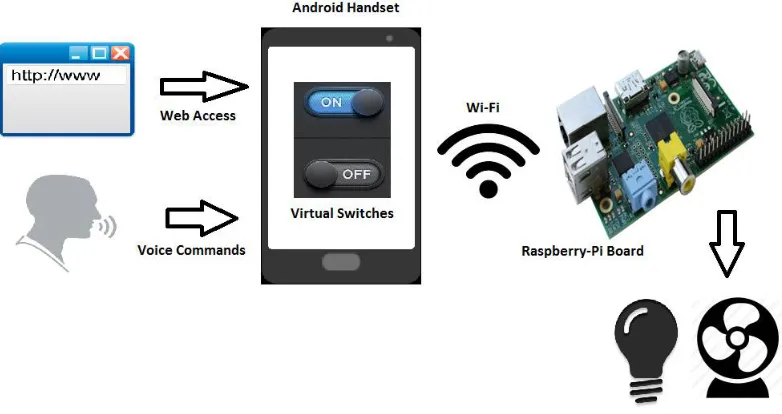
III. PROPOSED ARCHITECTURE Working:
The user accesses the android application compatible with the system.
The android application is connected to the Raspberry-pi hardware via a Wi- Fi connection.
The android application sends a signal to the system regarding user activity.
The Java Application Server is active and serving the clients that may access it.
The Relay Driver Circuit is responsible for switching activity.
Fig 1: System Architecture
IV. ALGORITHM
A. Thresholding:
a. Read the image
b. Convert the Image to Grayscale c. Threshold the image
d. Complement the image
B. Sobel Algorithm (edge detection)
a. uses a simple convolution kernel to create a series of gradient magnitudes
b. uses two convolution kernels, one to detect changes in vertical contrast (hx) and another to detect
horizontal contrast (hy).
c.
C. Line fitting:
Step 1: Calculate the mean of the x-values and the mean of the y-values. Step 2: Compute the sum of the squares of the x-values.
where n is the total number of data points.
a. Step 5: Compute the y-intercept of the line by using the formula:
where are the mean of the x- and y-coordinates of the data points respectively.
D. POSE ALGORITHM:
i. start with image coordinates of the points we are going to use for pose estimation.
ii.
Find model's coordinates of these points.V. MATHEMATICALMODEL
Let ‘S’ be the “ARCH System”
S= {……….}
Set S is divided into 6 modules
S= {S1, S2, S3, S4, S5, S6}
S1= Image Capturing & Preprocessing Module (ICP)
S2= Marker Detection Module (MD)
S3= Virtual Component Builder Module (VCB)
S4= Rendering Module (R)
S5= Event Handling Module (EH)
S6= Appliance Controller (AC)
Identify the inputs as X.
Inputs = {X1, X2, X3, ……..Xn}
X1= Video frame with marker
X2= Video frame without marker
X3= Device Switching Command
Identify the output as Y.
Outputs = {Y1, Y2, Y3, ……..Yn}
Y1= 3D Augmented View
Y2= Texture Augmented View
Y3= Device Switching
VI. ADVANTAGES
Remote Accessing electric appliances
Support of voice command as well
More interactive user interface
Cost-effective
VII. CONCLUSION
We have proposed a system to allow the elderly, disabled and their caregivers to easily control household appliances using AR, voice control and web servers.
REFERENCES
1. Evil Genius, "Raspberry Pi Projects for the Evil Genius", McGraw-Hill/TAB Electronics, 2014 2. Web Control of Raspberry Pi GPIO, 2014, Autodesk, Inc, [online] Available: online
3. Kimmo Karvinen and Tero Karvinen, "Make: Getting Started with Sensors, Measure the world with Electronics", Arduino and Raspberry Pi, 2014
4. ARCH Project Demo, YouTube Video Link, recorded on, 2015, [online] Available: online 5. Wikitude GmbH, Wikitude AR project, 2015, [online] Available: online
6. IEEE Smart home system using android application,2014 , Bluetooth based.