ABSTRACT
HARRISON, TAYLOR RAY. The Evaluation of iPad Applications for the Learning of Mathematics. (Under the direction of Dr. Hollylynne Lee.)
Algebraic equations have long been a source of confusion and frustration for many students. Many schools are turning towards computers, tablet PCs, and more recently, iPads to assist students' learning in the algebra classroom. The purpose of this research is to review literature on students' learning of algebraic equations, literature on the use of iPads and other tablet PCs in the classroom, literature on digital learning objects, and previously constructed evaluation instruments for digital learning objects. From this review, an evaluation
The Evaluation of iPad Applications for the Learning of Mathematics
by Taylor Harrison
A thesis submitted to the Graduate Faculty of North Carolina State University
in partial fulfillment of the requirements for the degree of
Master of Science
Mathematics Education
Raleigh, North Carolina 2013
APPROVED BY:
_______________________________ ______________________________
Dr. Allison McCulloch Dr. Molly Fenn
BIOGRAPHY
Taylor Harrison, raised in Mesic, North Carolina, graduated from the North Carolina School of Science & Math in 2003. A National Merit scholar, he entered the University of North Carolina as a mathematics major before eventually changing his major to computer science and graduating in 2006. After five years in the workforce, math once again called, and in 2011, he entered the masters program in mathematics education at North Carolina State University.
TABLE OF CONTENTS
LIST OF TABLES... vi
LIST OF FIGURES... vii
CHAPTER 1. INTRODUCTION... 1
The Rise of iPads and Tablet PCs in Schools... 1
Algebra and Equation Solving... 2
Digital Mathematical Learning Objects... 3
The Need for an Evaluation Metric... 5
CHAPTER 2. REVIEW OF LITERATURE... 9
Research on Children's Difficulties in Solving Algebraic Equations... 9
Research on Digital Learning Objects... 12
Research on Tablets and iPads in Schools... 18
Why Design Matters... 21
Previously Constructed Evaluation Models... 22
Multimedia Educational Resource for Learning and Online Teaching (MERLOT)... 23
Co-operative Learning Object Exchange (CLOE)... 24
Learning Object Review Instrument (LORI)... 25
Le@rning Federation Educational Soundness Specification... 27
Learning Object Evaluation Instrument (LOEI)... 28
Learning Object Evaluation Metric (LOEM)... 28
Designing Interactive Mathematics... 32
Digital Tools for Algebra Education... 32
Focus in High School Mathematics: Technology Support Reasoning and Sense Making... 33
Summary... 34
CHAPTER 3. THE EVALUATION INSTRUMENT... 36
The Interactions Category... 38
The Quality of Content Category... 43
The Feedback and Support Category... 45
The Usability Category... 47
Remarks... 50
Choosing Apps to Evaluate... 51
Applying the Instrument & Data Analysis... 52
CHAPTER 4. RESULTS OF APP EVALUATIONS... 55
Hands-On Equations for the iPad... 55
Algebra Touch... 64
DragonBox+ Algebra... 72
Numerosity: Play with Math!, Chapter 5... 80
touchyMath... 86
Cover Up... 93
Mathination - Equation Solver... 98
Correlation with the App Store Ratings...105
Reliability of the Instrument...107
CHAPTER 5. DISCUSSION AND CONCLUSIONS...108
The Criteria...108
The Apps...110
Instrument Reliability...110
Connections to Other Research Involving these Apps...111
Limitations of the Instrument and Other Areas of Consideration...113
REFERENCES...115
APPENDICES...126
Appendix A. MERLOT Criteria...127
Appendix B. Co-operative Learning Object Exchange (CLOE) Criteria...129
Appendix C. Learning Object Review Instrument (LORI) Criteria...131
Appendix D. Le@rning Federation Educational Soundness Specification Criteria...133
Appendix E. Learning Object Evaluation Instrument (LOEI) Criteria...136
Appendix F. Learning Object Evaluation Metric (LOEM) Criteria...138
Appendix G. Identifying Design Principles in Educational Applets (IDEA) Criteria...140
Appendix H. Designing Interactive Mathematics Criteria...142
Appendix J. Focus on High School Mathematics: Technology to
LIST OF TABLES
Table 1. The Criteria Used in the Evaluation Instrument... 38
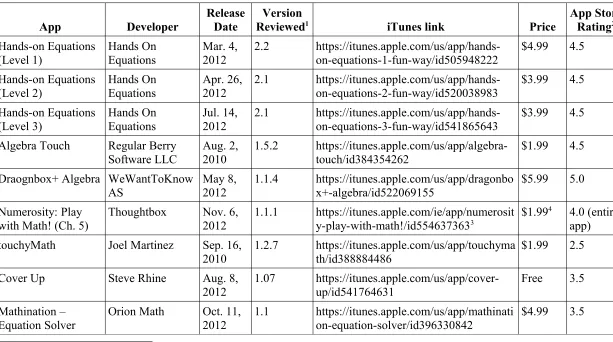
Table 2. The Apps Selected for Evaluation... 53
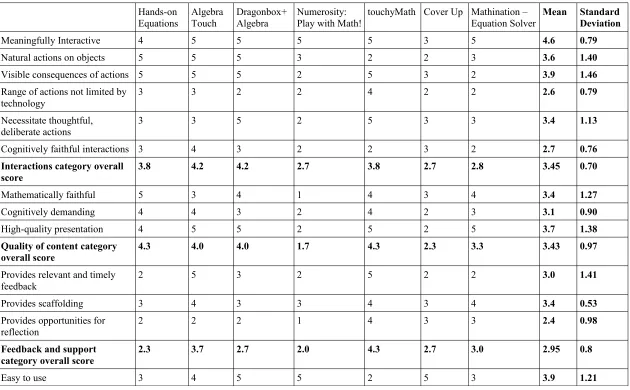
Table 3. The Evaluation Scores... 56
Table 4. Pearson Correlations with App Store Ratings...106
LIST OF FIGURES
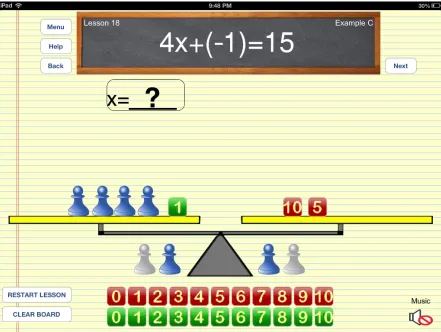
Figure 1. The equation has been set up on the scale... 58
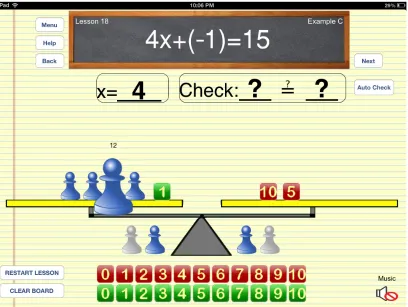
Figure 2. The pawn pulses as its value is added to the displayed sum... 60
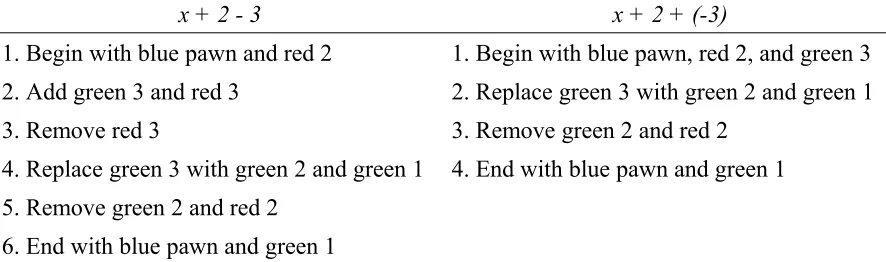
Figure 3. Steps required to set up and simplify two similar expressions... 62
Figure 4. A typical lesson... 65
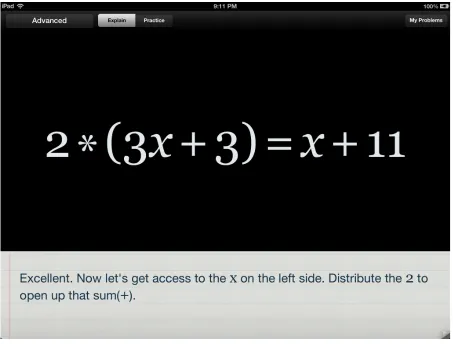
Figure 5. The distributive property in action... 67
Figure 6. A solution gets lost when dividing by (x + 2)... 69
Figure 7. An early level... 72
Figure 8. A few levels later. Several of the cards have changed... 73
Figure 9. A level from late in the game... 74
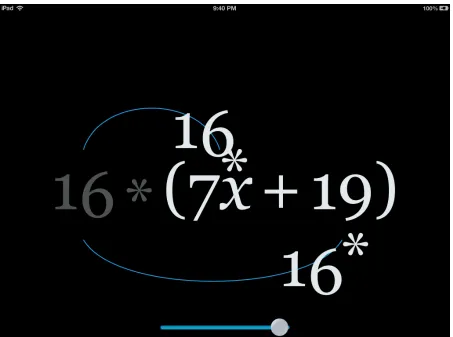
Figure 10. After multiplying one term by -f, the app indicates where else the -f card must go... 77
Figure 11. The user must drag the 5 onto the division operator or the 16 onto the unknown... 81
Figure 12. No valid solution is provided for the division... 84
Figure 13. An equation that no longer makes sense... 84
Figure 14. A randomly generated problem... 87
Figure 15. An interactive lesson on solving linear equations... 88
Figure 16. The user's history of actions after solving a linear equation... 92
Figure 17. An equation before and after it has been “covered up”... 94
CHAPTER 1
INTRODUCTION
With the increasing popularity of tablet PCs and iPads, scores of K-12 and higher education institutions are adopting these devices to use in the classroom. However, one of the obstacles of using technologies like these to reshape the mathematics classroom is teachers being ill-equipped to determine how best to use these devices (Wilson, 2008). With the hundreds of applications available that could potentially be used in the classroom, not all of them adequately enhance student learning and lead to concept development (Bos, 2009). Teachers are unlikely to use an application in their classroom without some assurance of value and quality (Vargo, Nesbit, Belfer, & Archambault, 2003). Therefore, teachers and administrators need a way to find and select those applications which would most likely be of greatest benefit to the learning of their students. The purpose of this research is to review existing research on the use of mathematical learning objects and tablet PCs in the classroom, review previous criteria for effective learning objects, produce a set of criteria designed to evaluate interactive iPad applications for the learning of mathematics, and apply these criteria to evaluate seven applications for learning algebraic expressions and equations. The Rise of iPads and Tablet PCs in Schools
Rose-Hulman Institute of Technology, Purdue University, and the University of Texas have all established programs distributing iDevices (iPods and/or iPads) to students and faculty members (Hieb & Ralson, 2010; Hlodan, 2010; i.P.O.C., 2006).
The trend is not limited to institutions of higher education. School districts in New York, Illinois, Virginia, California, and North Carolina have collectively spent tens of millions of dollars on iPads alone (Durham Academy, 2012; Hu, 2001; Satariano, 2012). Even kindergarteners are regularly using iPads in the classrooms (Hu, 2011; Subramanian, 2012). And it is not just students in the U.S. that are getting their hands on tablet PCs – in November 2012, the government of Scotland announced a 3-year plan to spend up to £30 million ($47 million) on tablet PCs and netbooks for use in schools, colleges, and universities (Best, 2012).
As of the first quarter of 2013, over 318 million iPhones and 121 million iPads have been sold (APPLinvestors, 2013). By the time a student finishes high school in the U.S., the majority of them will be using technology daily (Franklin & Peng, 2008). Educational theorists (Bereister, 2002; Dede, 2000; Mayberry et al., 2012) advocate that the classroom experience must mirror the complexities of society, integrating technology from students' personal lives into the classroom.
Algebra and Equation Solving
A skill that any successful Algebra I student must acquire is the ability to solve equations. Being able to solve equations requires thinking about numbers and symbols differently than one is likely to have thought about them in previous classes. Filloy and Rojano (1989) describe “cut-points”, the changes the student has to make from their previous ways of arithmetic thinking to new ways of algebraic thinking. The equals sign, for example, is no longer mainly used as an instruction to write down the answer, but is now used
regularly to define a relationship. 3+4 represents not just an instruction to add 3 and 4, but also the result obtained from performing the addition. A student must understand all parts of an algebraic equation – the numbers, the variables, the operators, the equals sign – in order to be able to solve equations in a way that will enhance their algebraic thinking skills.
Digital Mathematical Learning Objects
While the iPad itself is relatively new technology (the first edition was released in 2010), interactive digital tools and applications designed to explore mathematical concepts have been around for decades. In recent years, many of these have taken the form of “applets” that appear on the internet. While there are some significant differences between web-based applets and iPad applications (the primary one being the touch interface, rather than typically a mouse and keyboard), they are, for the most part, very similar. Therefore, previous research on learning objects and criteria devised for evaluating them should provide a foundation on which to build a set of criteria for evaluating iPad applications that can be used in the algebra classroom.
Center for Best Practices, 2010) both call for the use of technology tools in the classroom. Additionally, there has been a call for a more student-centered, task-based learning
environment (NCTM, 2000; National Research Council, 2001). Learning objects on the iPad can help educators achieve both of these goals. The iPad provides a safe student-centered environment, conducive to exploration and active learning, in which all students can participate (Cromack, 2008; Loch, Galligan, Hobohm & McDonald, 2011). In addition, teaching practices conducive to a student-centered, task-based learning environment have been found to be more prevalent in classrooms with tablet PCs, and teachers that use tablet PCs report that it is easier to create such environments (Cambre & Hawkes, 2004).
Clements, 2000; Heid, 2003; Lester, 2000; Moyer, Niezgoda, & Stanley 2005). According to Connell (2001), manipulating objects is the first and foundational step in object reification. In order to truly understand a mathematical concept, its mathematical object must be
manipulated and conjectures made, then the object manipulated to test these conjectures, leading to further conjectures and problem-solving.
The Need for an Evaluation Metric
There are thousands of mathematics based apps available for the iPad, either for free or for a small price, with new apps continually being added (Attard & Northcote, 2011). As of April 2013, over 600 iPad apps in the iTunes App Store match the keyword “algebra” (Apple, 2013). It is unlikely that a teacher would use these apps extensively in the classroom without some assurance of quality (Vargo et al., 2003). Thus, an effective evaluation metric could greatly reduce the search time for those teachers that only want to examine highly-rated apps (Koppi, Bogle, & Bogle, 2005). Especially for those apps with a cost to purchase, a lack of an evaluation metric could potentially discourage users, particularly those trying to limit costs, to try out an app that might otherwise be an effective teaching or learning tool (Downes, 2002). Teachers might then be compelled to use an unproven app, or create one of their own, rather than using one that has previously been an effective learning tool. Thus, one of the main benefits of learning objects, reusability, is compromised (Kay & Knaack, 2008a).
principles and have a means by which they are able to discriminate between those apps which employ pedagogically sound design principles (Bos, 2009; Dick, 2008). Providing these teachers with an evaluation metric based in pedagogical research allows them to do just this, and assures that their criteria for selecting apps is based on qualities that have been backed by research.
An evaluation metric can also be used prescriptively, by designers of apps, during the process of creating the app. There are many designers that aspire to make apps that are useful in the mathematics classroom, but not all of them will be aware of the research that has been done on effective design. Without this knowledge, design decisions that these designers make (sometimes even subconsciously) can hinder the learning of the students whom they wish to help. Giving these designers access to a research-backed set of criteria will allow them to incorporate elements into their apps that will enhance learning, and enable them to make more effective apps (Wiley 2000; Wiley 2002). This, in turn, can introduce multiple perspectives into the mathematics classroom, and give educators a wider range of effective apps to choose from (McCormick, Scrimshaw, Li, & Clifford, 2004).
might enhance or reduce learning. Most reviewers review only a small selection of apps, making comparing reviews across different apps problematic. Reviews can vary widely in their content, ranging in length from a few words (or simply a numeric rating) to several paragraphs, and likely addressing different aspects of the app, again making comparison of apps difficult. A typically small sample of qualitative reviews makes it difficult to extrapolate experiences to entire populations. Finally, any claims in the reviews that the objects benefited learning are generally not statistically relevant, reliable, or research-backed (Kay & Knaack, 2007; Kay & Knaack, 2009). A standardized evaluation metric, based in research, would alleviate much of these problems.
A handful of instruments have previously been developed to evaluate learning objects, several of which are discussed in Chapter 2. Many of these are not focused on any specific subject area, however, so they fail to address particular aspects that are unique to mathematics. Few, if any, are designed for learning objects on iPads or tablet PCs. By analyzing a number of these instruments as well as examining research in relevant areas, an instrument can be created that is designed specifically for evaluating mathematical apps on the iPad, consisting of criteria that are not only agreed upon by multiple experts, but are also backed by research.
Chapter 2 will consist of a review of literature in three key areas: children's
difficulties in solving algebraic equations, the effectiveness of digital learning objects, and the effects of iPads and tablet PCs in the classroom. Several previously constructed
mathematics, and is presented in Chapter 3. Using this newly constructed instrument, seven iPad applications designed for the learning of algebraic equations and expressions were evaluated and results reported in Chapter 4. Correlation with App Store ratings and inter-rater reliability of the instrument were also calculated and presented in Chapter 4. Based on the evaluations reported in Chapter 4, common weaknesses and strengths of these apps will be discussed in Chapter 5, including areas that may require special attention from developers of these types of apps. In addition, any difficulties in employing the instrument, possible
CHAPTER 2
REVIEW OF LITERATURE
Research on Children's Difficulties in Solving Algebraic Equations
Manipulating and solving algebraic equations has long been a source of difficulty and confusion for students (Filloy & Rojano, 1989; Knuth, Alibali, McNeil, Weinberg, &
Stephens, 2005; Knuth, Stephens, McNeil, & Alibali, 2006; Steinberg, Sleeman, & Ktorza, 1990). Many of these difficulties can be traced either to problems in arithmetic or poor or incomplete understandings of algebraic symbols and structures.
The principal part of any equation – the equals sign – is also perhaps the part most often misunderstood by students. Many students view the equals sign as an instruction to evaluate the expression before it (Falkner, Levi, & Carpenter, 1999), or as an announcement that the answer follows (Kieran, 1981). This “operational” or “arithmetical” view is likely not problematic in elementary mathematics, where problems are typically of the form 3 + 5 = ?. Even with early algebraic equations such as 2x + 10 = 18 or x/5 = 4, the student can invert or “undo” the indicated operations to arrive at the correct value of the unknown. But solving equations such as 2x + 12 = 5x + 3 requires procedures from outside the domain of arithmetic. Filloy and Rojano (1989) contend that a student must first assign meaning to such an equation, and this, in turn, requires a change in the concept of the equals sign and of the equality of expressions. This change from an operational view to a relational view of the equals sign does not occur spontaneously, however, upon first encounter with such an
Knuth et al. (2006) found that students who expressed a relational view of the equals sign performed better on solving equations of the form Ax + B = C than those students who expressed an operational view of the equals sign, even after controlling for grade level and mathematical ability. In a similar study, Knuth et al. (2005) found that students who expressed a relational view of the equals sign were better able to recognize that equations that had been transformed by performing identical operations to both sides (a common step when solving algebraic equations) maintained the same solution.
A common source of difficulty for children when solving algebraic equations is problems with notation and convention. For example, when asked to find the value of 4 + 3y when y = 2, many students will evaluate 4 + 32 to get an answer of 36 (Booth, 1988;
All of these notation and convention errors can be problematic when attempting to solve an algebraic equation.
Children's use of informal methods can cause problems when faced with algebraic equations. In a study involving top-achieving sixteen-year-olds, Ekenstam and Nilsson (1979) found that although 82% of them correctly solved the equation 30/x = 6, only 48% correctly solved the similar equation 4/x = 3. In the first example, students were able to use the informal method of inspection, a strategy that is not as easily applied to the second equation. In a more recent study, Linsell (2009) examined the correlation between strategy used and success rate of students solving various types of algebraic equations. He found that students who used strategies such as transformations and working backwards were more successful than students using strategies such as guess-and-check and counting strategies, particularly when faced with more difficult equations.
Although research has shown these difficulties and misconceptions are widespread, there is encouraging evidence that they can be quickly overcome or even avoided completely. Hewitt (2012) examined a group of nine- and ten-year-olds that had previously had no
of arithmetic expressions, instead treating them as mathematical entities that can themselves be operated on.
Knowing the source of many children's difficulties in solving equations – namely, poor understanding of the different parts of the equation, and adopting informal methods to solve them – is a key step in creating instructional materials to help overcome these
difficulties. What follows is a review on literature on a specific type of instructional material, the digital learning object, and the effects they have on students and their learning.
Research on Digital Learning Objects
Research has shown that learning objects can enhance active learning and promote collaboration (McCormick et al., 2004; Parish 2004), both of which have been shown to improve student learning outcomes in many cases (Prince, 2004). Clements (2000) found that when using learning objects, students were more likely to cooperate and participate in
positive discussion, increasing their social skills and promoting positive social interactions. Even when students disagreed, they tended to disagree about ideas, and were more likely to come to a successful resolution to their disagreements through discussion with their peers. In addition, students are more engaged when using learning objects (Kay & Knaack, 2007), and mathematical problems that would otherwise lack meaningful context can be transformed into tangible situations where students are eager to use their problem-solving skills to find solutions (McCormick et al., 2004; Reeuwijk, 2004).
Students have exhibited positive attitudes towards learning objects, both in
Reimer & Moyer, 2005), fun and motivating (CITEd, 2011; Kenny et al., 1999; Reeuwijk, 2004; Reimer & Moyer 2005; Vogel, Greenwood-Ericksen, Cannon-Bowers, & Bowers, 2006), more efficient than pen-and-paper methods (Reimer & Moyer, 2005), made them feel more confident about their math skills (Reeuwijk, 2004), and enhanced their learning
(Reimer & Moyer, 2005; Riconscente, 2011). In addition, students reported that they appreciated the immediate feedback provided by the learning objects (Reeuwijk, 2004).
As computers became affordable and ubiquitous, attention from schools shifted from “learning to use computers to do math” to “using computers as an aid in a math lesson.” Early computer applications considered the computer to be another display medium and a source of drill-and-practice exercises. However, educators, especially those holding constructivist views of learning, began to oppose this approach and moved to make the computer a tool to aid in student-centered explorations of concepts and open-ended tasks (Durmuş & Karakirik, 2006). Learning objects can provide these learner-centered
When a student is feeling confused, learning objects can often provide hints and feedback, something that could otherwise not be done without teacher assistance (CITEd, 2011).
Research has suggested that such student-centered learning environments result in deeper understanding of mathematical concepts (Loch et al., 2011). Studies on learning objects suggest that this is indeed the case when learning objects are used in the mathematics classroom. Using learning objects to investigate problems and design solutions has been shown to improve a student's understanding of both the process and the content (Klopfer, Yoon, & Rivas, 2004). In addition, students develop their algebraic thinking and problem solving skills when using learning objects (Reeuwijk, 2004). For example, while working with third graders using a “Pan Balance” applet, Polly (2011) found that students were able to analyze their solutions, evaluate both solutions and equations, and create new equations, simultaneously promoting deeper mathematical understanding as well as higher-order
thinking skills. The visual and interactive features of learning objects allow a student to make connections between the visual and the symbolic, making the mathematics easier to
understand and benefiting the student's learning (CITEd, 2011; Clements 2000; Reeuwijk, 2004; Suh & Moyer 2007). Because of this focus on the student, the large range of possible actions, and the helpful feedback that can be provided, Laborde (2007) reasons that learning objects are well-suited to help students develop the knowledge underlying optimal solving strategies.
misconceptions that might otherwise get hidden in traditional methods are more readily revealed when using learning objects (Clements, 2000). Students have to translate their intuition into language and actions that the learning object understands, which in turn, causes the students to use formal mathematics language much more often when describing their ideas to their teachers and peers (Clements, 2000; Hoyles, Healy, & Sutherland, 2008). In addition, learning objects can be helpful for students with language difficulties, including English-language learners, who often have trouble communicating their ideas in the mathematics classroom. A learning object may help them clarify their thinking and
demonstrate it to others. Also, several learning objects have support for multiple languages (CITEd, 2011).
The computing power of the technology behind the learning object also offers benefits for students' learning. Rather than the student being bogged down in arithmetic and procedures tangential to the intended learning goal, the computations can be passed off to the technology. This allows the student to focus on the mathematical concepts and models (Reeuwijk, 2004). In addition, the computing power allows for more immediate and accurate calculations, production of graphs, and other visible feedback in response to the user's
actions, which has been shown to be valuable for mathematics learning (Forster 2006; Reeuwijk, 2004). The combination of a student-centered environment and the affordances that computing power provides ultimately leads to more efficient learning and cognitive material intake (Pange, 2003; Patsiomitou, 2008; Vogel et al., 2006).
effort to produce and distribute learning objects is lower than the alternatives, as well (Duval, Hodgkins, Rehat, & Robson, 2003), resulting in more perspectives and a larger variety of learning objects (McCormick et al., 2004). The content is more readily available, in that any classroom or home with an internet connection and a tool to run the learning object (e.g., computer, iDevice) can have access to any one of countless learning objects in minutes (Duval et al., 2003). Content, whether it be student work, custom problems and assignments, or learning objects themselves, can often be saved and easily shared between students and teachers, or between one teacher and another, either in nearby classrooms or around the world (Duval et al., 2003). This can lead to increased collaboration among teachers and propagation of new ideas about instruction (Parish, 2004).
Learning objects can have a wide variety of applications in the mathematics
Learning objects can be effectively used with students of all grades, ranging from kindergarten (Moyer et al., 2005) to high school seniors (Bos, 2009; Kay, 2007).
Additionally, learning objects have been shown to have an equally positive effect on males and females, both in regards to student performance (Kay & Knaack, 2008b) and attitude towards the learning object (Kay, 2007; Kay & Knaack, 2008b). And although self-reported computer comfort was shown to be correlated with reception of the learning objects (Kay, 2007), actual performance gains after using the objects was not correlated with computer comfort (Kay, 2007; Kay & Knaack, 2008b). Finally, learning objects have been shown to benefit students in honors classes (Reeuwijk, 2004), as well as those students classified as “low-achieving” (Bos, 2009).
In a study examining eighth and ninth grade algebra I classes across four secondary schools in the Netherlands, van Reeuwijk (2004) found that after integrating web applets into the instruction for a chapter, students scored better on the end-of-chapter tests than students without the applets in previous years. No information on significance or size of the
improvement was provided from the study, however. In the United States, 95 low-achieving students in 19 classes across two districts participated in a study (Bos, 2009) examining the effects of computer-assisted instruction on a student's mathematical achievement when studying quadratic equations. The students were divided into a control group (47 groups in 9 classes) and an experimental group (48 students in 10 classes), each receiving 55 minutes of instructions per day for eight days. The experimental group's instruction took place in the computer lab, using the Texas Instrument InterActive environment, with lessons that focused on manipulating on-screen mathematical objects. The control group stayed in a traditional classroom, receiving instruction with more of an emphasis on lecture, taking scripted notes, and drill and practice. Post-test scores of the experimental group was significantly greater (p<.001) with a large effect size of .64.
Research on Tablets and iPads in Schools
Like desktop computers, early uses of tablet PCs and iPads in the mathematics classroom were primarily as convenience tools or instructional aids, rather than tools for exploring mathematical concepts (Hieb & Ralston, 2010; Loch et al., 2011; Oliver, 2005). In addition, much of the early research on tablets in the classroom focused on university
however, iPads and tablet PCs started appearing in K-12 schools, and some of the more recent research has taken place there.
Tablet PCs and iPads have been shown to increase student motivation across virtually all grades. In a study of 107 first- and second-graders with low socioeconomic status, all 57 students who solved mathematical tasks using iPad applications indicated positive motivation to use the applications (Segal, 2011). Crichton, Pegler, and White (2012) found that
elementary and junior high students demonstrated “great enthusiasm” and described “great satisfaction” for using iPads, after a school year in which iPads were used extensively in the classroom. In a study examining fifth graders using an interactive iPad app to explore fractions, all 122 students reported that the app was fun and that they wanted to use the app again, and 95% reported that they thought their friends would enjoy it (Riconscente, 2011). Studies at the university level have indicated improved motivation (Galligan et al., 2012), increased student attention (Wise, Toto, & Lim, 2006), increased attendance and retention (Romney, 2010), very high participation rates in voluntary tablet activities (Vu, 2007), and increased participation in class (Reba & Weaver, 2007; Romney, 2010).
The use of Tablet PCs can lead to more efficient and effective learning. The use of regular, real-time formative assessment means that students and teachers can become more easily aware of what the student has mastered or of the student's misconceptions. This in turn, allows the teacher to focus on these misconceptions, rather than concepts already mastered by the student, leading to more efficient teaching and learning (Kowalski,
partly due to to the increased emphasis on students' sense-making processes and on the social aspects of learning. Students feel that they are able to learn mathematical concepts well in classes that use tablet PCs (Fister & McCarthy, 2008; Loch et al., 2011). Additional studies and reports suggest that the use of tablet PCs and tablet PC applications can result in an increased mathematical fluency (Attard & Northcote, 2011), students taking ownership of their learning (Fister & McCarthy, 2008), and an overall positive effect on student learning (Wise et al., 2006). As further evidence, Fister and McCarthy (2008) compared exam scores in an Introductions to Proof course at Murray State University (MSU). The class in which all students used a tablet while in class scored 16% higher than the class without tablets, on an identical exam. In Fall 2006, assessments were given to several tablet classrooms at MSU and to a control of traditional classrooms. The tablet classrooms showed a 10-15%
improvement in their scores over their non-tablet counterparts. The use of tablet PCs in these classrooms also generated campus-wide discussion and coordination of effective teaching (Fister & McCarthy, 2008).
One of the primary differences between a desktop PC and a tablet PC, besides
< .001) less time solving the problem (24% less, on average), and used more advanced strategies. In the second task (a number line estimation task), students again spent
significantly (p < .001) less time solving the problem (32% less, on average). There was no significant different in accuracy between the students who used the tablet PCs and those who used the desktop PCs.
Tablet PCs have practical advantages in the classroom, as well. The touch (or pen) interface allows symbolic and graphical information to be easily written electronically, and enables the teacher to adjust lectures in real-time, to explore different solution paths or in response to students' reactions or feedback (Loch & Donovan, 2006). One of the
requirements for an effective Virtual Learning Environment according to the Shared Content Object Reference Model (SCORM) is a consistent standard for running and launching applications (Advanced Distributive Learning, 2009). The iPad in particular has an operating system which satisfies this – all applications are launched from the same place, and folders can be set up so that applications can be manually grouped according to course, topic, or any other desired grouping. Additional advantages include portability, a functional screen size, an abundance of apps, multiple routes for internet access, and multimedia, the combination of which can unleash numerous possibilities for learning and teaching (Gupta, 2010; Kinash, Brand, & Mathew, 2012; Loch et al., 2011).
Why Design Matters
that outcomes for learning are dependent on software design. The design of technology tools can drastically affect how students interact with the tools, and this, in turn, may influence students' understandings of content as well as their acquisition of problem-solving skills (e.g., Hoyles & Noss, 2003; Lee & Hollebrands, 2006). Learning objects, through their design, can also affect the available strategies a student can use, since they can afford or constrain certain actions (Underwood et al., 2005).
The design of a learning object can be greatly influenced by the designers'
epistemological and pedagogical beliefs about mathematics, problem solving, and teaching (Lee & Hollebrands, 2006). Effective design must be rooted in epistemological frameworks, and is possible only if the designer has a reflexive awareness of these frameworks (Bannan-Ritland, Dabbagh, & Murphy, 2000).
Previously Constructed Evaluation Models
Several authors, researchers, and organizations have devised models for evaluating learning objects, though not necessarily for the same reasons. Online learning object
repositories, for example, may have criteria that must be met for inclusion into the repository (e.g., see Le@rning Federation, 2007). Other evaluation models attempt to provide a
Reviewing these evaluation models will provide a good foundation on which to construct an instrument to evaluate mathematical iPad applications. First, some
non-mathematics-specific models will be reviewed, in order to glean good design principles for learning objects in general. Then, models specific to mathematics will be reviewed, in order to glean principles that are either specific to mathematics, or perhaps of more importance in mathematical learning objects. The principles gathered from this review will be combined with findings from other research in this chapter to construct the evaluation instrument for the evaluation of mathematical iPad applications.
Non-mathematics-specific Evaluation Models
Multimedia Educational Resource for Learning and Online Teaching (MERLOT)
MERLOT maintains a repository of approximately 40,000 learning materials across various disciplines. Each discipline (e.g., Math and Statistics) has an Editorial Board consisting of members with (a) expertise in the scholarship of their field, (b) excellence in teaching, (c) experience in using technology in teaching and learning, and (d) connections to professional organizations in their discipline. The MERLOT Management Team creates a framework of evaluation criteria and provides them to the Editorial Board of each discipline. The Editorial Board then applies the criteria to test cases in their discipline, and uses these to develop evaluation guidelines and criteria that are applied to all materials in the discipline. The Mathematics and Statistic set of criteria is identical to the non-discipline-specific framework. The complete set of criteria can be found in Appendix A.
Potential Effectiveness as a Teaching-Learning Tool, which addresses such things as
alignment with learning objectives and whether the use of technology enhances learning, and (3) Ease of Use, which includes interface and feedback. Each Editorial Board performs a cursory review of learning materials in their discipline to identify worthy candidates for in-depth reviews. At least two members of the Editorial Board then perform reviews using the evaluation criteria and submit them to an editor. From these, the editor creates a single composite review that is then published and attached to the entry for the learning object in the repository for users of the repository to see (MERLOT, 2013).
Co-operative Learning Object Exchange (CLOE)
The (now-defunct) Co-operative Learning Object Exchange (CLOE) was a grant-funded partnership from 2004-2008 between 29 universities across the world to
collaboratively develop, adapt, and evaluate learning objects. A set of criteria was created, both to guide university participants in creating learning objects and as a metric for other participants to review those learning objects. The criteria were modeled after the MERLOT model, but consisted of fewer questions, and required only that reviewers choose one of three answers (“not at all”, “somewhat”, or “definitely”) for each question, rather than providing detailed open responses. Criteria fell into three categories, similar to MERLOT's categories: Quality of Content, Effectiveness as a Teaching/Learning Tool, and Ease of Use/Usability. The complete set of criteria can be found in Appendix B.
Other reviewers were separated into two categories: instructional design experts and subject matter experts. Learning objects had to receive satisfactory reviews (using the
aforementioned criteria) from reviewers in both categories before the learning object was published in the CLOE database for other CLOE participants to use (CLOE, 2004). Learning Object Review Instrument (LORI)
The Learning Object Review Instrument (LORI) was developed by Vargo et al. (2003), and later improved by Nesbit, Belfer, and Leacock (2004; 2009). A primary goal of LORI was to balance assessment validity with efficiency of the evaluation process (Leacock & Nesbit, 2007). LORI is noteworthy in that quantitative studies have been performed examining the inter-rater reliability as well as correlation of ratings to learning outcomes of students. Also noteworthy is that LORI has been revised several times, at least in part in response to some of these studies.
Shortly after developing LORI, Vargo et al. (2003) conducted a study to examine inter-rater reliability, both with and without collaboration between the raters. Twelve
educational technology professionals and university faculty participated in the study, though only 10 participants' data were used, due to missing ratings for two participants. Participants received no special training or information about LORI other than the instrument itself, and in most cases, they did not have specific knowledge or expertise matching the learning objects' subject matter.
Using intraclass correlation (ICC) as an indicator for inter-rater reliability and an arbitrary threshold of 0.80 for sufficient reliability, three of the eight items achieved sufficient reliability before collaboration of the participants, and six of the eight items achieved sufficient reliability after collaboration. Two of the LORI items (standards
compliance and accessibility) were not considered due to insufficient variation and violation
of the assumption of normality. Both of these two items, however, saw majority agreement among raters, both before and after collaboration.
More recently, Akpinar (2008) conducted a study examining the correlation of LORI ratings with teacher usability ratings, student usability ratings, and learning outcomes of students using the learning objects. Usability ratings were based on questionnaires asking the teacher or student about ease of use, and whether they approved of the screen design, text and picture orientation, the interactive mechanisms, and the tools used in the learning object. Student learning outcomes were measured by pre- and post-test scores.
were significantly correlated with LORI ratings, suggesting that LORI ratings alone are not sufficient in predicting significant learning outcomes of users.
Le@rning Federation Educational Soundness Specification
The Le@arning Federation was a five-year development initiative for building a collection of online content for use in Australian universities. The Le@rning Federation Digital Content Repository is the result of this, and provides access to over 3,000 learning objects (over 900 in mathematics), the majority of which are commissioned by the
Le@arning Federation itself. The Le@rning Federation Soundness Specification (Le@rning Federation, 2007) was used both to guide content development for learning objects
commissioned by the Le@rning Federation, as well as to filter non-commissioned content that is proposed for inclusion in the repository.
The Le@rning Federation sought to produce and select learning objects that enhance student learning (Le@rning Federation, 2003). In order to do this, they based their
specifications on research into how students learn and how teachers facilitate this learning. Specific areas of focus for the research they examined included engagement, constructivist learning, inquiry, successful learning, critical pedagogy, and appropriate use of the medium. Through this process, they produced the Educational Soundness Specification, consisting of 39 measures in four principles: Learner Focus, Integrity, Useability, and Accessibility (the complete list of 39 items can be found in Appendix D). They also created other
Learning Object Evaluation Instrument (LOEI)
Haughey and Muirhead (2008) developed the Learning Object Evaluation Instrument (LOEI) to evaluate learning objects specifically for the K-12 sector. Unlike most other evaluation models, LOEI is not meant to provide a comparison between learning objects, but rather a way for a reviewer to determine the value of a learning object in and of itself. LOEI consists of 14 criteria in five categories: Integrity, Usability, Learning, Design, and Values (the complete list of 14 criteria can be found in Appendix E). The criteria were drawn from four sources: 1) CLOE, 2) the Le@rning Federation Soundness Specification, 3) LORI, and 4) criteria developed with respect to the special concerns of the K-12 environment.
To assess the quality of LOEI, the researchers used the instrument to evaluate 22 learning objects, made minor refinements to the instrument, and then at a later time, evaluated 14 more learning objects. Through these evaluations, the researchers agreed that the instrument was easy to use and found a “high degree of congruence” in their assessments (Haughey & Muirhead, 2008).
Learning Object Evaluation Metric (LOEM)
The Learning Object Evaluation Metric (LOEM) was developed by Kay and Knaack (2008a) after a review of literature on instructional design and of existing evaluation models, including CLOE, LOEI, LORI, MERLOT, and a model previously constructed by the
researchers. Through this review, Kay and Knaack identified five main constructs for
research on the models or estimates of their reliability and validity. They expressed a desire to systematically assess a multi-component evaluation model for evaluating learning objects.
The original version of LOEM consisted of 29 items in the five aforementioned constructs (the complete list can be found in Appendix F). In evaluating a learning object, each of the 29 items were given a score from 1 to 3. Twelve items were then excluded from the model due to either low correlation with student evaluations, teacher evaluations, and student performance, or due to insufficient fit into principal component analysis. In addition, the Content construct was not found to be a significant factor. Kay and Knaack hypothesize that content may have had a negligible influence because teachers may have filtered for content issues before selecting learning objects to use.
In order to assess the reliability and validity of LOEM, Kay and Knaack (2008b) performed a study consisting of 1113 students and 33 teachers in 21 middle and secondary schools using 44 learning unique learning objects, a much larger and diverse sample than previous studies using other evaluation models. The learning objects were assigned LOEM ratings by a team of four teachers after extensive training on the use of LOEM. Students were asked to evaluate the learning objects after using them, via questionnaires addressing three constructs: learning, quality, and engagement. The teachers were also asked to evaluate the learning objects, using a different set of questions as the students, but addressing the same three constructs. In addition, student performance was measured using pre- and post-tests.
Internal reliability for each of the four LOEM constructs was found to be between 0.70 and 0.80, which the researchers noted as moderate, but acceptable. A principal
into the four separate constructs that the model proposed. While there was slight overlap in some of the items – for example, “appropriate language level”, while in the Usability
construct, was somewhat correlated with the Engagement factor – the researchers determined that overall, the resulting structure fit the evaluation model well. Correlations between the four constructs were significant, but determined to be small enough to support the
assumption that each construct was distinct.
Of the four LOEM constructs, three (design, engagement, and usability) were found to be significantly correlated with all three constructs in the student evaluations (learning, quality, and engagement). For the teacher evaluations, both the interactivity and the usability LOEM constructs were significantly correlated with teachers' assessments of quality. The design construct was significantly correlated with teachers' assessments of quality and learning, but not engagement. The engagement construct was significantly correlated to all three constructs in the teachers' assessments. Finally, student performance was examined. Student performance was significantly and positively correlated with each of the four LOEM constructs. This is noteworthy because it is one of the few studies that successfully links an increase in student performance to the ratings of a learning object evaluation model.
Mathematics-specific Evaluation Models
Identifying Design Principles in Educational Applets (IDEA)
areas of expertise (e.g., teacher, software developer, educational technologist), some of which were involved with the development of the applets in the ESCOT project. They sought to identify design principles that successfully supported problem solving and learner-centered design issues.
Each member individually reviewed each of the 25 selected applets, noting strong and weak characteristics, and selected their five highest ranking and lowest ranking applets, based on overall quality. Then, through discussion with the whole group, an aggregate ranking was formed. The group then generated design principles based on characteristics of the highest ranked and lowest ranked applet. The remaining applets were assigned to smaller groups, where this process was continued to generate additional design principles. The design principles for the small groups were combined, and an aggregate list was created. Finally, the list was reduced to include only those principles which applied to multiple applets. The group decided not to focus on those principles that pertain to ease-of-use, due to the large body of existing literature on the subject of usability. The resulting 21 principles (see Appendix G) were grouped into three categories: motivation, presentation, and support for problem solving.
After producing their list of design principles, the IDEA group also analyzed
Designing Interactive Mathematics
Designing Interactive Mathematics was published by June Lester (2000), a long-time mathematics instructor and researcher in the field of design of onscreen mathematical
technology. While the paper itself is not based on any particular scientific study, the author draws from a variety of sources, including her own experience, to create a preliminary list of potential design principles for the interactivity of a mathematical learning object.
The majority of the article is focused on two principles. First, “if possible, model the behaviour of onscreen mathematical objects by observing and analyzing their “natural” mathematical properties; otherwise, invent and standardize behaviours” (p. 3). This principles encompasses such things as mathematical correctness and parametric
independence. Second, “make interactive behaviours visible, at all stages of the interaction” (p. 6). This includes highlighting possible interactions, providing feedback during the interaction, and showing the resulting state of the object after the interaction. Several additional design principles (see Appendix H) are also provided, along with comments on how they can be applied to mathematical learning objects.
Digital Tools for Algebra Education
tool criteria, and assessment criteria, along with a fourth category, general criteria, that were more practical in nature, such as the cost of the tool.
Bokhove and Drijvers then sent the list of criteria to 47 experts in the field of mathematics and algebra education, and asked them to rate each criterion on a scale of 1 (unimportant) to 5 (important), with an option to give no answer. The experts were also asked to comment on the thoroughness of the instrument or to suggest additional criteria. Bokhove and Drijvers received 27 responses with rated criteria, and used these to assign relative weights to each criterion. Every criteria scored an “above neutral” average (the lowest rated criteria received an average rating of 3.41, with 3 being “neutral”), and no additional criteria were suggested by the experts. All four categories received approximately equal weightings, with the general category slightly behind the other three. Few other evaluation instruments assign importance to different criterion, and even less do so
quantitatively, so Bokhove and Drijver’s efforts are notable in this regard. The five criteria receiving the highest weights (i.e., the ones judged to be the most important by the experts that responded) were stability and performance of the tool, the tool is easy to use for a student, the tool is able to display formulas correctly, the tool is mathematically sound and faithful to the underlying mathematical properties, and the tool stores the answers given by a
student.
Sense Making volume (Dick & Hollebrands, 2011) is focused on how to incorporate technology into the classroom to accomplish this goal. In the introduction, Dick and
Hollebrands provide “A Guide for Choosing and Using Interactive Technology Scenarios”, in which they present ten questions that teachers should ask when choosing an interactive technology scenario (see Appendix J for the full list). Most questions (e.g., “Is the action purposeful, thoughtful, and deliberate?”) are similar to criteria found in other instruments. While the guide is not explicitly stated to be research-based, the authors had both previously been involved in much research on the topic of technology and student learning (e.g., see Dick, 2008; Lee & Hollebrands, 2006; Underwood et al., 2005; Zbiek, Heid, Blume, & Dick, 2007), and it is reasonable to assume that this guide is substantiated by that research.
Summary
The evaluation instruments reviewed come from a variety of sources. Some
instruments were developed by a small team or an individual, while others were developed through collaboration with educators or experts around the world. Some were created through a systematic process of formation and refinement, while others did not have an established method for the creation of criteria. Some instruments were based on years of research, others were based on years of personal experience and anecdotal evidence. Despite all these differences, however, there are several design principles that appear across
CHAPTER 3
THE EVALUATION INSTRUMENT
Using these evaluation models and other research on digital learning objects and tablet PCs in the classroom as a guide, we can cull several commonalities and design principles to create an evaluation instrument for iPad apps used for the learning of
mathematics. The purpose of this chapter is to present, describe, and justify the evaluation instrument created and used as part of this research.
From across the ten instruments and sets of criteria presented in Chapter 2, criteria that appeared in multiple instruments were identified. Since criteria in different instruments were rarely worded identically, judgment was used to determine whether two criteria would be considered congruous. For example, LOEM's (Kay and Knaack, 2008) criterion of Meaningful Interactions and Lester's (2000) criterion of Don't use animation as a substitute for interaction, while not identical, were deemed similar enough to be considered the same
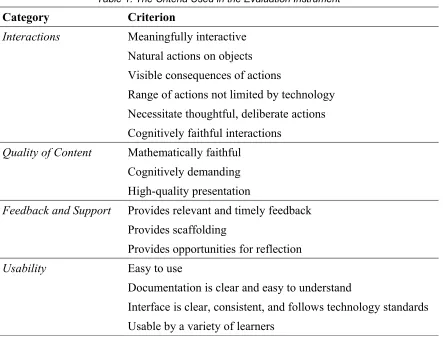
The criteria are grouped into four categories. An app is given a score from 1 to 5 for each of the criteria. A 5 would indicate the app meets the criteria very well, with any shortcomings being very minor and likely to not affect the student's learning. A 4 would indicate the app adequately meets the criteria most of the time, but with some flaws
occasionally present or flaws that would only affect some users. A 3 would indicate that there is significant room for improvement or that there are a handful of flaws that have the
potential to hinder students' learning. A 2 would indicate that the criterion is not well-met, and that there are significant flaws present that are likely to hinder students' learning. A 1 would indicate that the app does not meet the criterion at all, with major flaws, ones that could potentially prevent the app from being used as an effective learning tool.
Table 1. The Criteria Used in the Evaluation Instrument
Category Criterion
Interactions Meaningfully interactive Natural actions on objects Visible consequences of actions
Range of actions not limited by technology Necessitate thoughtful, deliberate actions Cognitively faithful interactions
Quality of Content Mathematically faithful Cognitively demanding High-quality presentation
Feedback and Support Provides relevant and timely feedback Provides scaffolding
Provides opportunities for reflection
Usability Easy to use
Documentation is clear and easy to understand
Interface is clear, consistent, and follows technology standards Usable by a variety of learners
The Interactions Category
An app that receives a 5 for this criterion would require that the user be an active participant at all times, controlling what is happening on-screen. The user should have a choice of actions, and the on-screen objects should be transformed because of these actions. An app that would receive a 3 may be one in which some mathematical decisions are made without input from the user, or one in which the user spends a moderate amount of time as a passive observer. An app that receives a 1 would require little interaction from the user, particularly when it comes to the mathematics being performed.
The mathematical actions that are performed should be on objects (Lester, 2000) and should be natural – that is, when an action is performed, the object should behave as
expected, either because of the properties of the mathematical entity represented, or because of standards adopted. Note that this not only depends on the action being performed, but also on how the action is performed. Tversky, Morrison, and Betrancourt (2002) define the congruence principle as “the structure and content of the external representation should correspond to the desired structure and content of the internal representation” (p. 249). In other words, the way in which an action is physically performed (external) should match how the user perceives the mathematical action that is happening (internal). For example, if one was to rotate an on-screen figure by performing a rotation motion with their fingers, this would be a congruent action, while tapping on the figure would not be. Segal (2011) showed that in a touch-interface, students perform better on tasks that require congruent actions than those that require incongruent actions.
by gestures with the object, and these gestures must be congruent to the mathematical action being performed. An app that receives a 3 may occasionally, in order to manipulate an object, require the user to press a button away from the object or select a menu option. Or some gestures may feel unnatural or be incongruent to the mathematical action being performed. An app that receives a 1 is likely to consist of mathematical objects that can not be touched or directly interacted with.
The consequences of the user's actions should be clearly visible. Perhaps this means momentarily highlighting an object before it changes, or emphasizing the link between the independent object that can be changed and the dependent object or objects that will change as a result. Meeting this criterion will help students better understand relationships
(Underwood et al., 2005), a fundamental part of learning algebra.
For an app to receive a 5 for this criterion, the consequences of all or nearly all of the user's actions must be visible, and changes that happen are expected and noticeable. An app that receives a 3 may have some actions that happen instantaneously, without any animation, or has changes happen far away from the user's actions. An app that receives a 1 would often have changes that happen unexpectedly, or have multiple actions happening simultaneously, and it would not be clear which objects have changed and how.
The visibility of the consequences of one's actions contributes to the app's
1187). It “is about allowing students to ‘do’ mathematics and not be distracted or limited by technical features” (Bos, 2009, p. 522).
Thus, as another requirement to achieve pedagogical fidelity, the user's range of actions which can be performed on objects should not be limited by the technology. It is students' reflections on these mathematical actions that lead to them making predictions and testing these predictions, ultimately leading to a greater understanding of the mathematical concepts and objects being represented on-screen (Dick, 2008). Therefore, when actions that the user can perform are limited, the potential for students' learning is diminished.
An app which receives a 5 for this criterion must use the technology to its full
potential, allowing the user to perform nearly any actions that they could with pen-and-paper, and possibly more. An app that receives a 3 may restrict some of the actions the user can perform or restricts when they can perform certain actions. The technology likely offers little advantage over pen-and-paper methods. In an app that receives a 1, the user may often be forced to perform certain mathematical actions. Little opportunity is afforded for making and testing predictions, and alternate solution paths that would otherwise be viable are not able to be traversed.
An effective mathematics app should necessitate thoughtful, deliberate actions, rather than random ones. If a student completes a task by randomly performing actions, he or she is unlikely to learn the intended mathematical concepts or improve their problem-solving skills.
efficient. Or perhaps the set of possible solutions is relatively small (e.g., integers between -10 and 10) without any penalty for incorrect answers, so users could conceivably arrive at the correct solution by simply guessing, even though the intended solution path may require thoughtful, deliberate actions. An app receiving a 1 may be one that the user is expected to randomly guess or use trial-and-error without first considering appropriate guesses. Even if random guessing is not explicitly encouraged, it may be that most users will immediately find that random guessing is more efficient, and have no reason to not resort to random guessing.
Taken as a whole, the interactions afforded by the app should exemplify the app's cognitive fidelity. Cognitive fidelity refers to “how well the virtual tools reflect the user’s
cognitive actions and possible choices while using the tool in the virtual environment” (Moyer-Packenham et al., 2008, p. 204), or more succinctly, “whether a concept is better understood when the object is acted on” (Bos, 2009, p. 522). In the “real world”, it is often acceptable for technological tools to arrive at “black box” solutions as efficiently as possible; however, in the classroom, learning apps should place a priority on illuminating
mathematical thinking processes (Dick, 2008). For an example of how an algebra app might be cognitively unfaithful, consider the graph of the equation x2+y2
=1 (i.e., a circle of radius
For an app to receive a 5 for the cognitively faithful interactions criterion, the interactions afforded by the app must clearly convey the properties of the mathematical objects within it. The app should elucidate why and how mathematical procedures and methods work. An app that receives a 3 may fail to explain several mathematical elements within it. The user may be expected to blindly apply procedures without understanding why the procedures work. An app that receives a 1 is likely to be confusing for users. Feedback (implicit or explicit) may be misleading, and while the content may be mathematically accurate, the user is not likely to gain much mathematical knowledge from using the app. The Quality of Content Category
which the implicit multiplication in sin2x is treated differently than the explicit multiplication in sin2 * x, where the application of the sine function would happen before the explicit multiplication (p. 335).
For an app to receive a 5 for mathematical fidelity, all mathematical content must be accurate. An app that receives a 3 contains mathematical errors, but ones that might not be encountered by all users, or are errors of insufficient or incomplete information, rather than untruths. An app that receives a 1 has major mathematical errors.
Apps for learning mathematics should be cognitively demanding (Bowers, Bezuk, & Aguilar, 2011; Dick & Hollebrands, 2011; Underwood et al., 2005). That is, they should require higher-level thinking rather than simple memorization or application of procedures. Note that perceived task difficulty is not necessarily correlated with cognitive demand. In algebra, for example, memorizing and using the quadratic formula may be difficult for some students, but an app that simply requires the application of the quadratic formula to several equations in the form Ax2 + Bx + C = 0 is not cognitively demanding (Bowers et al., 2011).
The quality of the presentation should be high (Kay & Knaack, 2008a; Nesbit et al., 2009; Underwood et al., 2005). This criterion is not the same as an attractiveness or an aesthetics criterion – the quality of the presentation should be judged based on how it
enhances learning, not as one would judge the beauty of a piece of art. Multimedia in the app, including text, audio, graphics, video, and animations, should be clear and concise. Multiple types of multimedia should be incorporated in ways that enhance learning; in particular, the app should not be overloaded with needless or wordy text. Text and other media should be free of distracting typographical or technical errors.
For an app to receive a 5 for this criterion, all components of the presentation should contribute to (or at the very least, not impede) student learning. Sounds, colors, and
animations could be used as various indicators to highlight properties or changes. An app that receives a 3 may have some distracting or misleading components, or some graphics, text or audio may be unclear. An app that receives a 1 has very little beneficial graphics or sound. Text or pictures may be unreadable, or there are unnecessarily wordy and lengthy blocks of text.
The Feedback and Support Category
feedback should provide formative assessment – that is, assessment for learning, rather than simply assessment of learning (Bokhove & Drijvers, 2010)
For an app to receive a 5 for this criterion, formative feedback must be provided at various stages throughout the task. The feedback provided must help the student progress, both in the task and in their understanding of the mathematics involved. An app that receives a 3 may provide frequent feedback, but only of the corrective type, or relevant feedback may be present during some parts of the app, but lacking in others. An app that receives a 1 provides little to no feedback to the user.
The mathematics app should provide scaffolding (Haughey & Muirhead, 2005; Le@rning Federation, 2003; MERLOT, 2013). The scaffolding should ensure that the user never feels like they are conceptually “stuck” or “lost” when it comes to advancing in the task. The scaffolding can be explicit, in the form of hints or guiding questions, or it can be implicit, by gradually increasing difficulty and building upon concepts.
An app that receives a 5 for this criterion provides both implicit and explicit scaffolding. Steps are taken to ensure that the user is always able to progress, while at the same time, building their knowledge of the mathematical topics being examined. An app that receives a 3 may provide implicit scaffolding, but lack on-demand or as-needed assistance. Or if real-time assistance is provided, the app may not be requiring the user to build upon concepts learned earlier in the app. In an app that receives a 1 for this criterion, no recourse is provided for a user that becomes stuck, and there is no sensible progression of tasks.
take the form of a history of actions, or sense-making questions near the end of the task, or simply deliberate pauses throughout the task. Discussion could also be included regarding how the mathematics relates to the real world or to other fields of study.
For an app to receive a 5 for this criterion, it must actively promote and stimulate reflection. An app that receives a 3 may provide opportunities for reflections, but ones that are likely to be skipped or ignored by the user, or ones that simply do a poor job of
promoting cogitation. An app that receives a 1 moves instantly from one topic or problem to the next, perhaps even encouraging the user to progress as quickly as possible, and asks the user no thought-provoking questions.
The Usability Category
The mathematics app should be easy to use (Dick & Hollebrands, 2011; Kay & Knaack, 2008a; MERLOT, 2013). Most students should be able to successfully use the app without a lot of documentation, technical skills, or instruction.
For an app to receive a 5 for this criterion, it must be “pick-up-and-play”. That is, the typical user should be successfully progressing through the tasks moments after starting the app. An app that receives a 3 has some features that are not clearly evident without
consulting documentation, or the goal of the task is not immediately clear. An app that receives a 1 requires the user to frequently refer to the documentation for commands or actions, and may require significant technical skills to progress in the task.
An app that receives a 5 for this criterion has clear help files with pictures,
animations, or examples. Help files are easy to navigate, and specific topics are easy to find. An app that receives a 3 may have help files that are somewhat wordy or unclear. Or the help files themselves are clear, but finding help on a specific topic is difficult, or accessing the help files requires the user to abandon the current task. An app that receives a 1 has little to no documentation or help files, despite the need for them. If the app does have
documentation, it is often incorrect, hard to understand, or otherwise not helpful. Note that the amount of help files does not necessarily correlate with this score – an app that does not have a need for many help files should be not dispraised for having few.
The user-interface of the app should be clear, consistent, and follow technology standards. A clear interface means that text should be large enough to be readable, buttons or other objects that can be clicked are clearly identified, and unnecessary information or
dialogues are kept to a minimum. A consistent interface means that all or most pages have a similar look and feel and that text and visual components are always in the same location. Following technology standards means, for instance, that the user is expected to tap an object to select it or that icons for commonly used functions (save, pan, zoom) are instantly
recognizable by the typical iPad or computer user.
For an app to receive a 5 for this criterion, the interface must be clear and consistent throughout the entirety of the app, and where applicable, technology standards should be followed. An app that receives a 3 may have some buttons or interactive objects that are not identified as such, or the placement of questions, buttons, or other objects may vary