ISSN(Online) : 2320-9801
ISSN (Print) : 2320-9798
I
nternational
J
ournal of
I
nnovative
R
esearch in
C
omputer
and
C
ommunication
E
ngineering
(An ISO 3297: 2007 Certified Organization)
Vol. 4, Issue 4, April 2016
Development of library system using
ADO.NET Technology and Microsoft SQL
Pulakesh Roy1, Dibyendu Roy1
Dept. of Electronics and Communication Engineering, UIT, Burdwan University, Burdwan, India1
ABSTRACT: At first the Home Page has been made where the database will be there to answer the security question (Like the User Name and Password). If the right answer is given then go to the Selection Section and if the wrong answers are type then it show the message Invalid User Name and Password. From the Selection then go to the Create, Update, Delete and View Section. It can also back to the Home Page or Exit the window. In Delete Section it can easily delete any particular account very easily by typing the unique Book No. In this section it can also delete all the account by clicking on the Delete All Account button. From this section the system can easily get back to the Create, Update and View Section also, by the help of Shortcut Key.
KEYWORDS: Common Language Runtime; Framework Class Library; Object-relational mapping; Entity Framework; .NET Framework; BLOB
I. INTRODUCTION
With the development of science and technology, the information system has become necessary in our daily life. According to the speed of user response, QOS and the performance of database system we determine the vitality of the information system. With the going of time, the performance of SQL server database system degrades, and its response time increases. Optimization of the database system plays a very important role, and it runs through the entire life cycle of the database system.SQL is mainly used to communicate with the database. SQL statements are mainly used to perform the tasks such as update the data on a database, or to retrieve the data from a database etc [1, 2].
Advantages of
SQL:- SQL is used to execute queries against the database.
SQL can be used to retrieve data from the database.
SQL is used to insert the records into the database.
SQL can be used to update the records in the database.
DOT NET Framework: - The .NET Framework which is pronounced as DOT NET is a partially open source freeware software for framework developed by Microsoft that is primarily runs on Microsoft Windows. .NET Framework includes a large class library which is known as the Framework Class Library (FCL) and across the several programming languages it provides language interoperability. Programs which written for the .NET Framework execute in a software environment, which is known as the Common Language Runtime (CLR) [3], which is basically an application virtual machine that provides the services such as the security system, management of memory, and handling the exception.
ADO DOT NET: - ADO.NET can be represented as a set of computer software components that are mainly used to access data and the data services which are based on the disconnected DataSets and the XML. It is also a part of the base class library which includes the Microsoft .NET Framework.
Object-relational mapping: - In case of computer science Object-relational mapping (ORM, O/RM, and O/R mapping) is basically a programming technique which is use to convert the data between the incompatible type systems in object-oriented programming languages [4]. In object-oriented programming, the data management tasks are act on the object-oriented (OO) objects which are always almost non-scalar values.
II.RDBMS
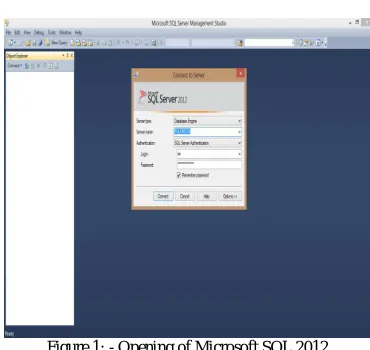
Figure 1: - Opening of Microsoft SQL 2012
Database Tables: - Mostly a database contains one or more than one tables and each table is uniquely identified by a name (such as the "Customers" or "Orders" etc.). Each table contains the records (rows) with the datas.
An example of the database system is given below:
CustomerID CustomerName ContactName Address City PostalCode Country
1 Abhishake
Chakrabarty Abhishake
A.J.c.bose road
street- 40 Kolkata 700020 India 2 Bibek Nandi Bibek Behala street- 34 Kolkata 700034 India 3 Antonio Moreno
Taquería Antonio Moreno Mataderos 2312
México
D.F. 05023 Mexico 4 Around the Horn Thomas Hardy 120 Hanover Sq. London WA1 1DP UK 5 Berglunds snabbköp Christina
Berglund Berguvsvagen- 8 Lulea S-958 22 Sweden
ISSN(Online) : 2320-9801
ISSN (Print) : 2320-9798
I
nternational
J
ournal of
I
nnovative
R
esearch in
C
omputer
and
C
ommunication
E
ngineering
(An ISO 3297: 2007 Certified Organization)
Vol. 4, Issue 4, April 2016
Figure 2:- Block diagram of creating a table for the library system
III.ADO.NET
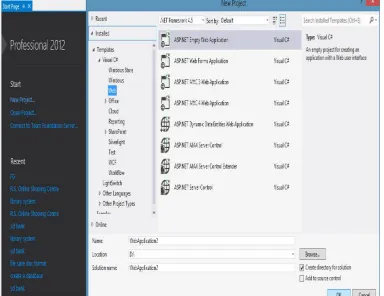
ADO.NET is a very important feature of .NET Framework [7], which is used to work with data that are, stored in the database, such as Microsoft SQL files, XML files etc. For creating an ADO.NET file we have to create a web form in the Visual Studio as shown in the figure 2.
Features:-
ADO.NET contains a number of classes that provides various methods and attributes to manage the communication between the applications and the data sources.
ADO.NET provides a set of features, such as connection and commands that can be used to develop the highly
efficient data services and many other important services in .NET applications. Difference between classic ADO and ADO.NET:-
In ADO we have a set of records and in ADO.NET we have a set of data.
In the case of record-set we have only one table. If we want to accommodate more than one table then we need
an inner join and fill the record-set. In the case of dataset it can have multiple tables.
Figure 3: - Creating an ASP.NET Web file in Visual Studio 2012
Different types of data providers available in .NET Framework:-
1. .NET Framework Data Provider for SQL Server – It provides the access of Microsoft SQL Server 7.0 or later version. It uses the command System.Data.SqlClient namespace.
2. .NET Framework Data Provider for OLE DB – It provides the access of databases which is exposed by
using OLE DB. It uses the command System.Data.OleDb namespace.
3. .NET Framework Data Provider for ODBC – It provides the access of databases which is exposed by using
ODBC. It uses the command System.Data.Odbc namespace.
4. .NET Framework Data Provider for Oracle – It provides the access of Oracle database 8.1.7 or later
versions. It uses the command System.Data.OracleClient namespace.
Entity Framework: - Entity Framework (EF) is an open source object-relational mapping (ORM) framework which is use for ADO.NET, and is a part of .NET Framework. The Entity Framework is a set of technologies in ADO.NET that deals with the development of different type of oriented software applications. Architects and developers of data-oriented applications have typically struggled to achieve two very important objectives. They must model some business problems like the entities, relationships, and logic, and they also must work with the data engines that are used to store and retrieve the data.
BLOB: - In the recent year’s the storing of digital data like image, video and document etc. in the database make a very important role for the advancement of the computer science and growing of the information technology. The indexing of the image is one of the important categories for retrieving the information from multimedia databases [8]. Images are stored in a large database, so the retrieving of image by the content attracted more attention [8]. In our project for storing the images in the database we use the BLOB technique.
According to Eric Raymond, the main idea about a BLOB is that the handler of the file has no way of understanding the file’s order to figure out how to deal with it. The database storage of large multimedia objects, such as films and television programs is the example of application that deals with BLOB.
IV.LITERATURE REVIEW
ISSN(Online) : 2320-9801
ISSN (Print) : 2320-9798
I
nternational
J
ournal of
I
nnovative
R
esearch in
C
omputer
and
C
ommunication
E
ngineering
(An ISO 3297: 2007 Certified Organization)
Vol. 4, Issue 4, April 2016
V.PROCEDURE AND OPERATION
1. At first in the Home Page where we have to answer the security question (Like the User Name and Password). If we type the right answer then we go to the Selection Section and if we type the wrong answers then it show the message Invalid User Name and Password.
Figure 4:- Home Page
2. From the Selection we can go to the Create, Update, Delete and View Section. We can also back to the Home Page or Exit the window.
Figure 5:- Selection Section
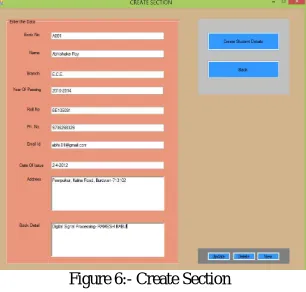
3. In the Create Section create new account are created. In this Section we type a unique Book No. and all the necessary information and if the Book No. is exist then it show a message that the Book No. is already exist. From this section we can easily go to the Update, Delete and ViewSection also by the help of Shortcut Key.
Figure 6:- Create Section
Figure 7:- Update Section
5. In Delete Section we can easily delete any particular account very easily by typing the unique Book No. In this section we can also delete all the account by clicking on the Delete All Account button. From this section we can easily get back to the Create, Update and ViewSection also, by the help of Shortcut Key.
Figure 8:- Delete Section
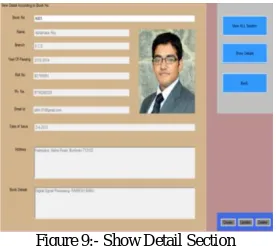
6. In View Account Section we can view a particular account by the help of the Book No. Here we first type the unique Book No. then we click on the Show Details button, after that automatically all the details related to that particular Book No. is come on the screen as shown in the following figure. From this section we can go to the View All Section to view all the account. We can also get back to the Create, Update and Delete Section from this section very easily, simply by clicking on the Create or Update or Delete button.
Figure 9:- Show Detail Section
ISSN(Online) : 2320-9801
ISSN (Print) : 2320-9798
I
nternational
J
ournal of
I
nnovative
R
esearch in
C
omputer
and
C
ommunication
E
ngineering
(An ISO 3297: 2007 Certified Organization)
Vol. 4, Issue 4, April 2016
Figure 10:- View All Section
In this Section we can also view the account with respect to the Date of Issue, Name, Branch, Year of Passing, Roll No. and the Phone No., by fill up the necessary information then clicking on the button as show in the above figure. From the View All Section we can get back to the Show Details Section simply by clicking on the Back button.
VI. Process Diagram
VII. CONCLUSION
In this article a robust library system have been developed to maintain the book and other content of a digitized library using ADO.NET Technology and Microsoft SQL. This system can also be modified and make it more and more user friendly by certain modification of the ADO.NET code in future.
REFERENCES
1. Dedi Iskandar Inan, Ratna Juita: Analysis and Design Complex and Large Data Base using MySQL Workbench. International Journal of Computer Science & Information Technology (IJCSIT) Vol 3, No 5, Oct 2011.
2. Lightstone, Sam., Teorey, Toby. And Nadeau, Tom. (2007) “Physical Database Design: The Database Professional's Guide to Exploiting Indexes, Views, Storage, and More”, Publisher: Morgan Kaufmann.
3. Dhamayanthi N, Thangavel P: Structural Design Patterns and .NET Framework 2.0. JOURNAL OF OBJECT TECHNOLOGY - Vol.5, No.8,
November - December 2006.
4. Kuldeep Hule, Zakir Shaikh: Object Relational Mapping Tool for C#.NET Framework. Vol. 3, Issue 8, August 2014.
5. Ion-Sorin STROE: MySQL databases as part of the Online Business, using a platform based on Linux. Database Systems Journal vol. II, no. 3/2011.
6. James W. Denton, A. Graham Peace: Selection and Use of MySQL in a Database Management Course. Journal of Information Systems Education, Vol. 14(4).
7. Alfred J. Lendvai, Hao Shi: ADO and ADO.NET Object Model Comparisons - A Relational Perspective. IJCSNS International Journal of Computer Science and Network Security, VOL.7 No.1, January 2007.
BIOGRAPHY
The author, Pulakesh Roy, was born on 27th october, 1992 at Burdwan district in the state of West bengal, India. He has done his Secondary and higher secondary schooling from Burdwan (West Bengal). He has completed his under-graduation with Bachelor of Technology in Electronics & Communication (in the year 2014) and post-graduation with Master of Technology in EIE under the ECE department (in the year
2014) from university of burdwan West Bengal. A part of his masters work has alreadybeen published in
International Journals and presented in International and National conferences.