Web-Powered
Databases
David Taniar
Monash University, Australia
Johanna Wenny Rahayu
La Trobe University, Australia
Hershey • London • Melbourne • Singapore • Beijing
Managing Editor: Jan Travers Development Editor: Michele Rossi
Copy Editor: Amy Bingham
Typesetter: LeAnn Whitcomb
Cover Design: Integrated Book Technology Printed at: Integrated Book Technology
Published in the United States of America by
Idea Group Publishing (an imprint of Idea Group Inc.) 701 E. Chocolate Avenue
Hershey PA 17033-1240 Tel: 717-533-8845 Fax: 717-533-8661
E-mail: [email protected] Web site: http://www.idea-group.com
and in the United Kingdom by
Idea Group Publishing (an imprint of Idea Group Inc.) 3 Henrietta Street
Covent Garden London WC2E 8LU Tel: 44 20 7240 0856 Fax: 44 20 7379 3313
Web site: http://www.eurospan.co.uk
Copyright © 2003 by Idea Group Publishing (an imprint of Idea Group Inc.) All rights reserved. No part of this book may be reproduced in any form or by any means, electronic or mechanical, including photocopying, without written permission from the publisher.
Library of Congress Cataloging-in-Publication Data
Taniar, David.
Web-powered databases / David Taniar, Johanna Wenny Rahayu. p. cm.
Includes bibliographical references and index. ISBN 1-59140-035-X
1. Web databases. I. Rahayu, Johanna Wenny. II. Title.
QA76.9.W43 T36 2003
005.75'8--dc21 2002068794
eISBN 1-59140-092-9
British Cataloguing in Publication Data
Chapter V
The Development of On-line
Tests Based on Multiple
Choice Questions
Geoffrey G. Roy and Jocelyn ArmaregoMurdoch University, Australia
Copyright © 2003, Idea Group Inc.
ABSTRACT
This chapter is concerned with the use of Web-based technologies to deliver and manage on-line multiple choice tests for university teaching. The data defining the tests and the results of each student’s attempt is maintained in a server-side database. The test is delivered in a Web page that can be displayed by a standard Web browser. Students are thus able to access the required tests from the same location that they can access their course content, in large part, on the Web. Multiple choices tests have been shown to be an effective way of both supporting the learning experience and providing an objective assessment process. The basic elements of the required technology are described including some implementation issues that are necessary to achieve a viable and robust system. Some of the key issues include the use of server-side tools for database access and client-side components to deliver and manage the user interface.
INTRODUCTION
curricula for a range of new professional Engineering degrees. We have been able to embrace a range of Web-based technologies right from the outset and to integrate these into our teaching processes.
As a part of these developments, we have chosen to implement a facility for providing a testing environment using multiple choice questions (MCQs) as a part of the Web-based delivery of curriculum content. This tool allows us to build, deliver and evaluate a number of MCQ tests. These can be inserted at appropriate places throughout an on-line teaching programme. Students are able to access the test from wherever they can access the Internet, while staff can monitor activity and test results, providing an integrated tool for assessment.
Naturally, there is a wide range of issues (and problems) associated with this approach, and these are discussed below. We also present an outline of how our system operates and describe some of the key architectural and design issues.
ON-LINE MULTIPLE CHOICE TESTING
Background
Assessment is a fundamental part of the educational process–it is seen to shape and drive student learning (Gibbs, 1995). Its underlying assumption is that it provides a representative sample of student behaviour in order to provide estimates of current status (Mogey & Watt, 1996). Assessment may perform one or more of the following roles:
• In its diagnostic role, it identifies strengths and weaknesses and may help in detecting misconceptions, as well as providing information on prior knowledge which helps identify the need to modify content to suit student requirements • Formative assessment helps students discover what they have learned through
appropriate and timely feedback in addition to supplying feedback to the teacher on teaching style as well as student progress. Formative assessment can motivate learning and encourage students to keep pace with the teaching • As a summative tool, it estimates performance for the purpose of formal
assessment.
Ideally, assessment is an integral part of a course with appropriate methods linked to learning objectives. Bloom’s taxonomy is commonly used when discussing various learning processes (Bloom, 1956). The learning objectives for each category are described below:
• Knowledge–learning objectives at this level include: knowing common terms, specific facts, methods and procedures, basic concepts, principles.
• Comprehension–learning objectives include: understanding facts and prin-ciples, interpreting verbal material, charts and graphs, translating material from one form to another (e.g., verbal to visual/mathematical), estimating future consequences implied in data, justifying methods and procedures.
• Analysis–learning objectives include: recognising unstated assumptions, logi-cal fallacies in reasoning, distinguishing between facts and inferences, evalu-ating relevance of data, analysing the organisational structure of a work • Synthesis–learning outcomes stress creative behaviours with major emphasis
on the formulation of new patterns or structures
• Evaluation–learning outcomes are the highest in the cognitive hierarchy because they contain elements of all other categories in addition to conscious value judgements based on clearly defined internal or external criteria. (Bloom, 1956; Carneson, Delpierre & Masters, 2000; McKenna & Bull, 1999)
Objective Testing
It is accepted that most lower level learning outcomes (knowledge, comprehen-sion, application, as well as interpretation, reasoning) can be assessed through objective testing. The distinction between objective and subjective testing is that the former offers higher reliability by featuring answers that can be marked without examiner bias/subjectivity - the answer is completely predetermined. In general, the assessment of higher-level processes is undertaken subjectively (by means of the essay, project etc.).
However, the noted imperfections of objective testing are based on its application to lower level learning outcomes:
• Items are usually constructed to measure factual rather than applied knowledge of objectives.
• Trivial recognition of facts rather than higher level thinking is adequate - often only superficial recognition of information is required to answer correctly . • Restrictions are placed on student answers–some choice is offered and
candidates are not asked to construct an original answer. • Questions may be answered simply through guessing.
• The rigid objectivity of the test is a flaw when divergent thinking skills are activated and when a student’s perceptions differ from those of the teacher (Popham, 1981).
Additional difficulties regard the decontextualisation of knowledge (Paxton, 1998) as well as the inadequacy of objective tests in testing students’ ability to communicate or to develop and organise ideas and present a coherent argument (McKenna & Bull, 1999).
DESIGNING MULTIPLE CHOICE
QUESTION TESTS
Of the various forms of objective assessment, including:
• selecting a solution from a set of choices (multiple choice/multiple response, true/false, matching, selection/association)
• identification of an object or position (graphical hotspot) • supply a brief response (text /gap fill)
the MCQ format is one of the most widely used testing strategies in educational programmes today. These tests are easy to score and, when constructed well, assume many of the psychometric properties that characterise valid assessment practices (Yunker, 1999). As part of a varied assessment package, MCQ tests can fulfil each of the roles of assessment: short tests as diagnostic feedback on class work/activities, revision, or as a “bridge” to other, often subjective forms of assessment.
The format of an MCQ test typically comprises the following components (design issues that attach to each are described):
• Stem – question component. Needs to be concise and unambiguous, avoiding negatives and grammatical clues to the key. The stem should contain most of the wording to reduce reading load
• Key – correct answer. The key should be the same length as the distractors, randomised in its positioning in the list
• Distractors – alternate, incorrect answers. These should be internally consis-tent and apparently realistic alternatives, that as far as practical, cover the range of options and easily identified misconceptions
• Feedback – a mark and/or comment reflecting student performance. Should be appropriate, helpful, encouraging, varied and unpatronising.
(Twomey & Miller, 1996; Twomey, Nicol, & Smart, 2000)
Obviously, the questions should reflect the aims and objectives of the course and be appropriate to the level of ability of the students for whom they are intended. While there are many guidelines for preparing MCQ tests, commonly identified issues that need to be addressed include:
• writing appropriate questions, which address different cognitive levels – recall questions are easier to design
• creating questions (and data banks) in a cost-effective manner – the time spent writing questions and feedback has been compared to the marking load required by non-automated approaches (Dalziel, 2000)
• classifying questions for skills level, level of difficulty, cognitive skills level and time required
• providing useful, detailed feedback to accompany automated marking, espe-cially in the area of formative assessment
One solution to some of these issues is to offer question banks as ancillary material either by the publishers of textbooks or to develop these through consortia within academia. However, these raise additional issues – the variability in quality and targeting of lower level outcomes by these questions (Dalziel, 2000) and the interoperability between questions and test engine, if the former is not in a standardised format (Smythe & Roberts, 2000).
The quality of a test based on MCQs may be established through statistical treatment of results obtained by a class. These assist in verifying that an MCQ test is satisfactory (Farthing & McPhee, 1999):
• Facility – measured in terms of number of correct answers/total answers. Other than for diagnostic purposes, tests should be made up of questions with a facility in the range 0.3-0.7
• Discrimination – able to discriminate between students of widely varying abilities. This is commonly measured in terms of upper and lower quartiles of the class performance in a test. (Cu –Cl)/Qn defines the number of correct answers in the upper quartile (Cu) minus the number of correct answers in the lower quartile (Cl) over the number of students in a quartile (Qn). For practical purposes, the minimum discrimination level is taken as 0.3.
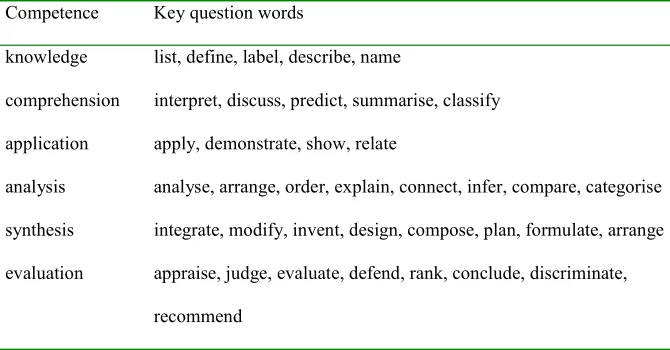
There is also the need to consider the type of intellectual process that a given question is assessing. Candidates of all abilities should answer a question that assesses knowledge, while higher-order questions discriminate well between candi-dates. However, the application of Bloom’s taxonomy to the design of MCQs requires effort. Table 1 categorises question types (McKenna & Bull, 1999), while Appendix C of Carneson, Delpierre and Masters provides examples of MCQs which address each of these cognitive levels (Carneson et al., 2000).
Issues regarding interoperability reflect the growing reliance on the assistance of technology in the area of assessment.
Competence Key question words
knowledge list, define, label, describe, name
comprehension interpret, discuss, predict, summarise, classify application apply, demonstrate, show, relate
analysis analyse, arrange, order, explain, connect, infer, compare, categorise synthesis integrate, modify, invent, design, compose, plan, formulate, arrange evaluation appraise, judge, evaluate, defend, rank, conclude, discriminate,
recommend
Online Testing
The use of IT for the assessment/self-assessment of students is not novel. As the most commonly used type of objective assessment, the MCQ in particular lends itself to automation, both off-line (through OMR1 marking of paper-based tests) and more recently accessed and assessed online.
The impetus for the automation of objective assessment is two-fold:
• Negative – pressure from increasing student numbers and increased workload, together with demands for quality control and accountability (at the minimum in terms of more frequent assessment), make computer-mediated assessment and feedback attractive. The additional work needed to produce and mark diagnostic and formative assessment means these are reduced, avoided or abandoned in the face of increased student numbers (White & Davis, 2000) • Positive – the systems for producing computer-delivered self-testing material allow the application of interesting techniques which can provide new and improved ways of helping students to achieve learning objectives.
The automation of assessment needs to benefit both student and teacher. Advantages for the teacher include:
• Reduced load of examining – built-in management (in the form of collation, tabulation, report generation) eases the administrative burden of assessment • Creation of a bank of questions allows for the randomised selection of questions – the possibility of individualised tests is technically feasible although attaining equivalence of question standard between tests is not a trivial task
• Can be set at different cognitive levels
• As a diagnostic tool, feedback on the effectiveness of teaching through a facility for reporting results and analysing group and individual responses • As a formative tool – provides a speedy alert to problem areas in terms of
question quality and student performance
• Highly reliable in the assignment of marks – statistical information on perfor-mance is also easily obtained
• Students may be invited to retake tests as frequently as is useful, providing regular information on performance to both teacher and student
• Cost benefits accrue if student numbers are large and/or questions may be reused
and for the student, the benefits include:
• Flexible access – own time, own pace, at own place and when ready • Timely feedback – MCQs as formative assessment provide motivation to
student and acts as a learning aid by indicating the degree of understanding of course material
• Practice tests are also formative –students who undertake practice score higher on assessed version across subject disciplines. Prior exposure to content plus feedback allows students to identify and rectify weak areas (Sly & Rennie, 1999)
• Increased student confidence – problem areas can be pinpointed through item analysis
• A common format for the tests makes life easier for the students. (Twomey et al., 2000)
Traditionally, the purpose of feedback has been to confirm or change a student’s knowledge; however, its value is now recognised within the broader context of self-regulation (Butler & Winnne, 1995): feedback stimulates cognitive functioning, leads to reflection, and enables students to review and monitor their work.
However, the challenge in automated assessment lies in achieving balance between pedagogy and technology (White & Davis, 2000).
WEB-BASED DELIVERY
The use of the Internet and Web-based technologies provides us with a range of opportunities that did not exist a few years ago. When we began this work, there were few tools available so most of our work was started from scratch. Today, there are a number of products that provide most of the functionality that we will describe here. These range from commercial products such as Questionmark’s Perception, WebMCQ, QuizPlease and Blackboard and WebCT’s quiz and survey tools (plus third-party testing and assessment tools for some of these platforms (as provided, for example, by Respondus) to institutional-based environments (such as CALnet, CASTLE and TAL, all based in UK universities) to Hot Potatoes and QuizMaster, free collections of programs to generate Web tests. (Bostock, 2001). The advantage we have is that we have been able to design a set of tools that meets our specific requirements (without compromise) and this has enabled us to offer a unique facility to our staff and students. We have had to learn about, and resolve, a range of technical problems in the process, and this experience we can now present here.
The following description of our MCQ testing environment is intended as a guide for those contemplating developing, or implementing, such a tool–either as purpose-built (as we have done), or using one of the commercially available packages. In the latter case, the reader is encouraged to use the tips we present as an aid in evaluating the likely performance and integrity of a product whose purchase they contemplate.
The tool we have developed has been named “MCQ” (not so original, but it is expressive of its purpose). It has three major parts:
• The database of information to support the tool. This database contains the test questions, the student access information (userIDs and passwords) and the recorded results from the students taking the tests
• The MCQ module that can deliver the test within a Web page to the student • The MCQR module that can deliver within a Web page the results of all tests
taken, for monitoring purposes.
• testing requirements • operational requirements
• security and integrity requirements
Testing Requirements
These requirements relate to the logistics of delivering a MCQ test to meet the broad goals as outlined earlier. The key requirements are:
• to provide a testing environment where a number of different tests can be presented as part of a teaching programme
• that each test follow the accepted format of a MCQ with a limit of five on the number of answers (keys plus distracters).
• that the student be required to indicate the “correct” answers by clicking on a checkbox. Answers can be of two types:
–true/false answers, where the answer is considered to be fully correct or fully incorrect. In this case the student would be given a score based on the number of chosen correct answers
–graded answers, where correctness is rated on a scale 0 to 5. A zero value is taken to be incorrect; other values represent degrees of “correctness”. In this case the student can obtain a score depending on the value given to the chosen answer
• that the test should be time-limited
• that once completed, marking should be done instantly–with immediate feed-back of results and an opportunity to review the answers and their explanations • that the student’s results over a number of tests should be accessible online to both student and teacher, to enable feedback on progress and performance as the teaching programme proceeds.
Operational Requirements
To make the delivery possible, and convenient, the following requirements should also be met:
• There must be a tool to assist in the creation, editing and maintenance of the sets of questions comprising each test – accessible to the teacher only.
• There must be a tool to support the maintenance of student information (userIDs and passwords) for the use of the teacher.
• The test must be able to be delivered to the student using one of the commonly available Web browsers (e.g., Microsoft Internet Explorer, Netscape Communicator) to anywhere, including home locations using a dialup (e.g., 56 kBaud) connection.
• Once loaded, and the test started, the student should be able to examine all questions, answer them in any order and change the selected answers at any stage before having the test marked.
• Once marked, the correct and incorrect answers must be indicated and the explanations made available to the student.
• The results from the test must be uploaded to the Web server and saved into a secure database.
• Each test may have a limited availability, i.e., a time/date before which the test is not accessible, and a time/date after which the test is not available. • The teacher may allow students to browse through a test without the need to
have the results recorded (to assist in familiarising students with the testing procedures, and to avoid making the process too daunting in the first few exposures to the testing process).
• The teacher may allow the student to retake a test (to improve grades), and may impose a penalty on the score if desired. Students may also be allowed to access a test after the last available time/date without having the score recorded (for study/revision purposes).
• A test is composed of a set of questions. Each question can be graded for difficulty and various subsets of questions (based on difficulty levels) can be selected for a test. This allows a common set of questions to be used across several courses where concepts are being developed in increasing complexity • A test can be composed of a subset of questions, chosen at random from the full set. This allows different sets of questions to be presented each time the test is retaken or taken by different students.
Security and Integrity Requirements
The security and integrity of the testing process raises a number of important concerns. Security relates to ensuring that the student does not corrupt the testing process by hacking into the tools. Integrity relates to ensuring that the test is in fact testing the desired student, and not some other person.
We cannot provide 100% guarantees against either of these possibilities, so we have assumed the following:
• Each student must provide a userID and a password to access the test and record/review results. These are allocated by the teacher, and students are encouraged to keep them confidential.
• The teacher can restrict the time slot when the test is available to a very narrow period (say corresponding to a formal class period if necessary) so that both authentication of students and supervision can be provided. This approach will naturally remove the flexibility of allowing students to take the tests in their own time and at their own pace.
Except where the tests are made available within a fully supervised environ-ment, we can never guarantee that the answers to the questions are provided by the intended student. Students naturally help each other, and there are arguments that group work can be a useful and a productive learning process. It is impossible, however, to ensure that this is always the case. This problem naturally limits the level of integrity that can be assumed for the on-line tests.
Our experience indicates that for most students the experience is valuable and that most take a serious and honest approach to the testing process. It is, however, necessary to balance up the consequences. Our solution is to limit the overall importance of the results of the online tests in the total marks for the course. On-line testing can therefore constitute only a small part of the complete assessment process.
Architectural Options
The essential architecture of our MCQ tool is shown in Figure 1. The Web server serves up the Web pages, with embedded tools, to the workstation client. The Web server host has access to a server-side database that contains the information for the tests. The Web pages delivered to the client contain the necessary scripts/code to present the user with the test, collect the user’s responses, mark the tests, etc.
The client workstation must be running one of the readily available Web browsers (Microsoft Internet Explorer, or Netscape Communicator). The Web server host must be running a Web server with the capabilities to access the database. Most Web servers (e.g. Microsoft IIS, Apache) have these, though sometimes, additional propriety tools must be added to provide the necessary capabilities.
Web Browser Web Server Client Workstation
Web Site MS Access Database Web Server Servlet Server
JDBC-ODBC Driver
ODBC Service
Table
Web Page
Java Applet Internet
This general architecture can be further developed in a number of ways: • One strategy is to use an “all” Microsoft solution using an NT/W2000-based
Web server running IIS, with Microsoft ASP (Active Server Pages) with a connection to a Microsoft Access database. In this case the “test” is generated by ASP (as a Web page using form components) that is delivered to the client upon request. The fields in the form will contain all the necessary information for a question to be presented. The user’s response will be collected (using checkboxes) and sent back to the Web server for processing. The operational logic will thus be built into the ASP through some form of scripting language (e.g., Visual Basic, or Java Script). The advantage of this approach is that all the tools are readily available and usually installed as a part of the Microsoft IIS Web server installation. The various components will also work reasonably well together. The major problems relate to the lack of portability and the difficulties of developing and maintaining the test logic in a scripting language • It is also possible to place more of the logic for the test within the Web page itself and have this downloaded to the client’s workstation. This can be done using Javascript or a Java applet. The first option is not really secure, as it opens up the hacking possibilities somewhat: a determined user may be able to modify the behaviour of the script. The second option is more secure (as the downloaded code is in the form of Java byte codes, and much more difficult to de-compile and reengineer). In this case, some care must be exercised to limit the size of the applet to be downloaded, otherwise unacceptable delays may occur in loading the Web page containing the test.
We have chosen this second option as it gives us some vendor independence as well as better capabilities for programming the logic of the test. We have continued to use MS Access for the database, but this is not essential. Other databases2 could be used providing suitable access tools are available. Most of the larger and commonly used database systems provide these tools as a part of their installation/licensing.
Figure 1 also shows the next level of detail for our architecture. We deliver a Web page containing a Java applet to the client. The Java applet has a number of functions:
• It downloads the required data to access the test questions and configure each test.
• It communicates with a server-side program (a Java servlet) passing SQL (Structured Query Language) commands through to the database and retrieves the result sets (tables) in response.
• It prepares the user interface for the test, collects the student responses, marks and scores the student’s selections, and finally transmits the results of the test back to the database via the servlet server.
servlet server (ServletExec) that is provided by the Unify Corporation. There are several others available, including demonstration versions which can be used freely for a limited time, or for limited user connections. The ServletExec4 server is installed as an “add-on” to IIS. We also use a JDBC-ODBC driver (JDataConnect5) from NetDirect.
The servlet server provides a server-side capability (just like CGI scripts). Servlets are written in Java and are executed as a lightweight process on the Web server host (within a running Java Virtual Machine). When the Web server receives a request to connect to a servlet, it passes control to the servlet server that loads and executes the requested servlet. The applet then communicates directly with the servlet, sending and receiving data as required. In our case, the applet sends an SQL command and then waits for the results (as a table) to be returned. This table is formed by the database engine (MS Access in our case) and is simply the result of the query described by the SQL statement.
Accessing databases across a network is supported by Microsoft via the ODBC (Open DataBase Connectivity) service that is provided as a part of all Windows operating systems. It is, however, possible to access databases directly – provided that you have the correct driver. The JDataConnect driver kit provides options for both direct and ODBC connections. To use an ODBC connection, the database to be used must be registered by the ODBC service. This is a once-only configuration task on the machine where the database is located. The database does not have to be located on the same machine as the Web server, though we find this convenient as it keeps all the MCQ components in one location.
Implementation Strategies
In this section we describe a number of the subsystems used in the MCQ and MCQR environments that are needed to meet the requirements outlined earlier. We will not provide all the details here, as these are probably too complex for this chapter and may not be relevant in all application domains.
We have chosen to use an MS Access database. This is available at minimum cost and provides all the necessary functionality we need. We do not expect to have to cope with very large tables (a few thousand records at most), and the level of transactions is not going to be very high (one or two per minute at the most).
It would be normal to create a separate database for each course. Each database may have a number of tests defined within it. We have implemented a very simple Access database template that can be used by each teacher.
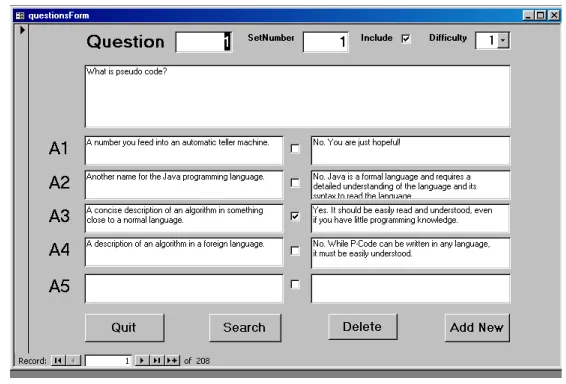
The questions are entered/edited using a form like that shown in Figure 2. In each database, the questions are classified into sets, corresponding to those questions to be used in a single test. Hence, a database can contain many tests, usually in a related area or for a single course.
The appropriate set number must be inserted and the difficulty level (0 to 9) set (default is 1). The “include” checkbox allows questions to be included/excluded from being presented in the test (without the need to delete it from the database). Entering the data for the questions is thus quite straightforward; creating the questions, with their answers, is another matter!
We have a variation of this form where the questions have ranked answers (0 to 5). In this case, the checkboxes in Figure 2 are replaced by combobox fields to nominate the required answer value.
The database also contains the data returned from the client after the student has had the test marked. The information contained includes:
• the user’s ID
• the test taken (set number)
• a status flag indicating the attempt number (-1 means a browse of the test, 0, 1, 2... are the attempt numbers)
• a time/date stamp when the test was taken • the number of correct answers and
• the computed percentage score.
The Java servlet implemented to be run by the servlet server provides the direct connectivity to the database. It is loaded and executed when a request comes to the servlet server. Since we use the same servlet to handle a wide range of requests for database access, the information it needs includes:
• A user name and the name of the database to be accessed (Data Source Name as used in the ODBC server configuration). This information is sufficient to identify which database is to be used. The user name is used for event logging by the servlet.
• Followed by an SQL statement. For example, to check the validity of a user’s ID and password we send a command like this:
select * from nametable where name = ‘fred’
This SQL command will return a table containing a single row (if the user name exists) with two columns; the first will be the ‘name’ value and the second the ‘password’. Here is another example SQL command to retrieve the table of questions for set number 2 and with a difficulty rating <= 5:
select * from questions where SetNumber = 2 AND Include = Yes AND difficulty <= 5
Establishing the communication connection between the two components is not difficult, but is not widely documented in the generally available reference books. We have found Moss (1999) a particularly useful reference.
The servlet thus provides us with the capability to receive SQL commands from the client, send these to the required database on the Web server, retrieve the results, and transmit them back to the client.
As noted earlier, in order to run the servlet on the Web server, a JVM (Java Virtual Machine) must be running and the request passed from the Web server. The required servlet is activated from a nominated URL, like this one:
http://eng-Web.murdoch.edu.au/servlet/DBservletJDC that will cause the Web server to pass the request to the servlet server, and attempt to run the Java servlet “DBservletJDC.class”. Once this servlet is executing, the applet at the client can communicate (bidirectionally) with the servlet using HTTP protocols.
The communication between the servlet and the ODBC service is established using JDBC (Java DataBase Connectivity), which is provided as a part of the standard JDK from Sun Microsystems. It requires a driver that can establish the communications with the database, pass forward the SQL command and retrieve the results set (as a table of data). The driver provided as a part of JDK has proven unreliable in use. This has forced us to use proprietary software to communicate to the ODBC service on the Web server (JDataConnect).
Test Presenter Subsystem
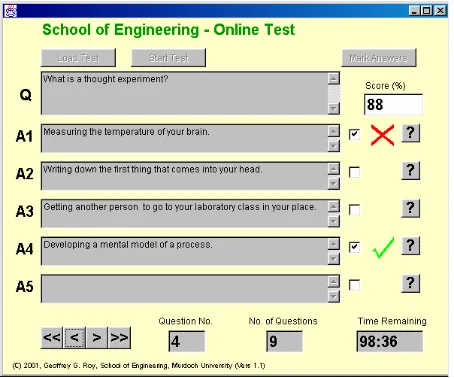
The user interface for the MCQ environment is shown in Figure 3. There are text fields for the question, and each of the (up to 5) answers. The amount of data is not large (typically about 10 kbytes for test of 10 to 15 questions) though there are sometimes noticeable delays (15-30 seconds), while communication is established across a remote (e.g. dialup) network connection.
We permit multiple correct answers to be defined for a question and allow students to make multiple selections. The problem this creates is that a student may select a correct and an incorrect answer (or try to select all answers!). We discourage this by recording only a correct answer if no incorrect answers are selected. This discourages guessing.
Once the student is satisfied that the best set of answers has been selected, the test can be marked with the Mark Answers button. The results are then made available as also shown in Figure 3. The total score is displayed (as a percentage), and a check, or cross, is placed against each selected answer.
The score is computed in two ways depending on the type of questions in the test: • For simple Yes/No questions, it is just the number of correct answers,
converted to a percentage of the number of questions in the test.
• For graded answers, where each answer has a value in the range 0 to 5, the score is computed as the average of the values for the selected answers for each question, added over the whole test, then taken as a percentage of the sum of the values of the best valued answers.
Once marked, the results are sent back to the Web server for storage in the database. The test is now complete. The “?” buttons then become active. Clicking any one of these will display a dialog box containing the explanations given for each answer as specified in the “questions” form as shown in Figure 2.
It would be normal practice to insert the MCQ applet at strategic locations throughout the coursework content to encourage students to take the test at an appropriate time relative to the content upon which the test is based. This provides timely feedback to the student and some direction for additional study or revision.
Test Report Subsystem
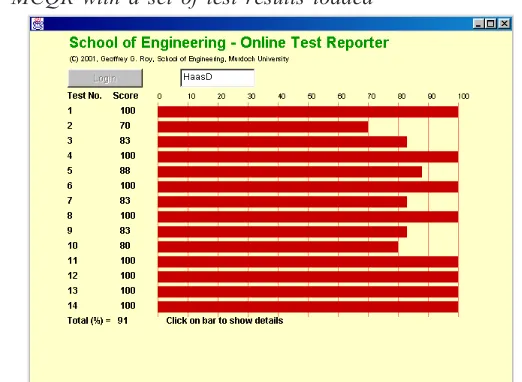
Once a student has undertaken a number of tests, there will be an interest in looking at the overall progress, or even just to confirm that the test results have been correctly recorded. The teacher will also be interested in monitoring the progress of all students. We have developed a simple reporting tool for this purpose: MCQR. The MCQR applet is included in a suitable Web page, as shown in Figure 4. Once the user has been validated, all the recorded test results for that student are downloaded and the overall scores computed and displayed. In this case, there are 14 tests in the course, and the student has taken all of these. The computed scores are shown numerically and as a bar graph. Hence, the student receives a clear picture of how s/he is progressing.
Since each test may allow for several attempts (if permitted), the score will be computed from all tests results. The student can see what scores were received for each attempt by clicking on the appropriate bar graph. Each attempt is then shown with the date/time when the test was taken, the number of correct answers, and the percentage mark in each case. The mark given to the student in this case is computed from the individual marks as follows:
{
− ⋅δ
}
= X i
score max i
where Xi is the percentage score for attempt i (counting from zero), and δ is the penalty factor which is applied (for example we use 20% per attempt). The max function ensures that a student cannot get a lower mark on further attempts. The use of this penalty scoring, as well as the option to allow multiple attempts, can be allowed/disallowed as required.
The total score, displayed towards the bottom of the dialog shown in Figure 4, is taken as the score to be allocated to the student for the set of tests. It is computed as a weighted sum of the individual test scores. The weighting factors are defined by the teacher; in this case, all the factors are weighted equally.
Operational and Security Issues
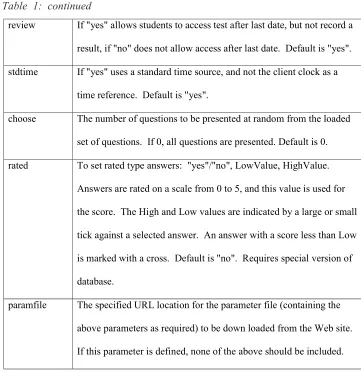
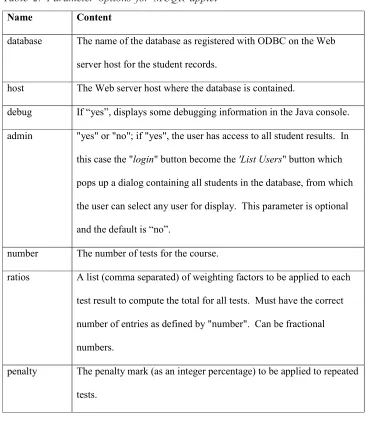
The most convenient way of developing the MCQ and MCQR applets is to parameterise them so that the same applets can be used across several courses, each tailored to meet teacher and assessment requirements. This data is provided as applet parameters. A full list of these for the MCQ and MCQR applets is given in the Appendix. These describe all the configuration settings that allow a test to be specialised to suit each teacher or course.
For the MCQ applet some of this data is sensitive, in the sense that if made visible to the student user, it may provide clues for hacking. While we cannot totally avoid these problems, we can make it more difficult. The behaviour of the Web page containing the MCQ applet can be controlled to some extent, for example:
• we can remove the right-mouse-button functionality (which exposes a menu that includes a Show Source option) with the use of a Javascript built into the Web page
• we can remove the <ctrl>S key pressed option that is the shortcut the Save As... (allowing the Web page to be saved locally), also using a Javascript in the Web page
• we can load the Web page containing the MCQ applet in a browser window that has no menu options (which normally includes Save As and View Source options)
• we can remove the applet parameters from the Web page (except for one), and locate them in a remote data file (on the Web server) and have them downloaded after the applet starts executing on the client like this example: <applet code=”MCQ.class” width=600 height=500>
<param name = “paramfile”
value = “http://eng-Web.murdoch.edu.au/g1087/Tests/test01.dat”> We need, however, to specify the location/name of the file containing the parameter information. The format of this file and the way that the data is interpreted by the applet requires some effort to decode.
Taken together, these options make it fairly difficult for a student to hack the test in an attempt to change its intended behaviour, but nothing is impossible!
Perhaps the easiest hack is for the student to change the clock on his/her (home) computer to allow the test to be run outside the set times. This can be prevented by obtaining a reference time from a clock located elsewhere. The time from the Web server is one option; the other is to use one of the standard clocks available on the Internet. These are readily accessible and use NTP (Network Time Protocol).
There are no real security issues with the MCQR applet as this supports a reporting function only. Students must be authenticated, as with MCQ, in order to see their own result.
Options for Further Development
As described earlier, statistical analysis of the facility and discrimination attributes of the set of questions contained in the tests may be used to establish the quality of a test. This is an area of functionality that we have not yet implemented. To achieve this we will need to extend the database capabilities to contain a relevant table to store this data and have it captured at the conclusion of each test. A reporting tool will also have to be developed. This capability will most probably be developed within the Access database, as it is not information that needs to be made available to students in an online mode.
The issue of interoperability is also worthy of consideration. There is now a wide and diverse range of assessment engines, both commercially available and customised to individual learning environments. Among other developments, that of specialised markup specifications (e.g., based on XML) and the related activities of the Instructional Management System on test interoperability standards (Smythe & Roberts, 2000) have increased the possibility of exchanging (or importing) question banks without the need for rekeying.
At this stage we have not provided any built-in auditing functions into MCQ. We currently rely on other communications channels (email and chat rooms) to: • identify and correct problems associated with the operation of the testing systems • gather responses from students on their experience with the tests and their
operational environments.
It is possible, however, to trace all student activity, as well as log all SQL commands to the Web server. This provides a backup reference if there are queries about “lost data”, “my internet connection failed”, and the like.
CONCLUSIONS
While automated assessment tools are not likely to reduce the burden of assessment significantly (White & Davis, 2000), they can be used to promote deeper and more effective learning by
• testing a range of skills, knowledge and understanding
• providing feedback to both teacher and student in a timely manner
• providing an environment for the analysis of teaching/testing approaches, also in a timely manner.
Name Content
database The name of the database as registered with ODBC on the Web
server host for the student records
host The Web server host where the database is contained.
debug If “yes”, displays some debugging information in the Java console.
set The question set number to be presented to the student
browse To allow browsing of questions without marking (yes/no)
repeat To allow repeated attempts at test (yes/no)
before To set a time/date before which the test must be attempted. The
format is “hour:min <space>day/month/year”, or “day/month/year”,
in which case the hour is set to 23 and the minute to 59. This
parameter is optional.
after To set a time/date before which the test cannot be attempted. The
format is “hour:min <space>day/month/year”, or “day/month/year”,
in which case the hour is set to 0 and the minute to 0. This parameter
is optional.
time The time in minutes for the test. Omit this parameter if test is to be
un-timed. When time runs out, all a student can do is have the
current answers marked.
difficulty Questions in the database can be given a level of difficulty (0 to 9).
This parameter allows a subset to be chosen on the basis of this level
of difficulty. Expressions like: <=2, =5, >2 etc are permissible
(default is <=9).
APPENDIX
review If "yes" allows students to access test after last date, but not record a
result, if "no" does not allow access after last date. Default is "yes".
stdtime If "yes" uses a standard time source, and not the client clock as a
time reference. Default is "yes".
choose The number of questions to be presented at random from the loaded
set of questions. If 0, all questions are presented. Default is 0.
rated To set rated type answers: "yes"/"no", LowValue, HighValue.
Answers are rated on a scale from 0 to 5, and this value is used for
the score. The High and Low values are indicated by a large or small
tick against a selected answer. An answer with a score less than Low
is marked with a cross. Default is "no". Requires special version of
database.
paramfile The specified URL location for the parameter file (containing the
above parameters as required) to be down loaded from the Web site.
If this parameter is defined, none of the above should be included. Table 1: continued
Name Content
database The name of the database as registered with ODBC on the Web
server host for the student records.
host The Web server host where the database is contained.
debug If “yes”, displays some debugging information in the Java console.
admin "yes" or "no"; if "yes", the user has access to all student results. In
this case the "login" button become the 'List Users" button which
pops up a dialog containing all students in the database, from which
the user can select any user for display. This parameter is optional
and the default is “no”.
number The number of tests for the course.
ratios A list (comma separated) of weighting factors to be applied to each
test result to compute the total for all tests. Must have the correct
number of entries as defined by "number". Can be fractional
numbers.
penalty The penalty mark (as an integer percentage) to be applied to repeated
tests.
ENDNOTES
1 Optical Mark Recognition
2 For example, MySQL is a public domain database that can provide all the essential capabilities and is available on both Windows and Linux/Unix platforms. 3 To be fair, Sun Microsystems have never claimed that their tools are suitable for production environments.
4 http://www.servletexec.com 5 http://www.j-netdirect.com
REFERENCES
Bloom, B. S. (1956). Taxonomy of educational objectives: The classification of educational goals Handbook 1: Cognitive Domain. New York: David Mackay.
Bostock, S. (2001). Category: Computer Assisted Assessment. Keele University. Available from: http://www.keele.ac.uk/depts/cs/Stephen_Bostock/keywords/ caa.html.
Butler, D. and Winnne, P. (1995). Feedback and self-regulated learning: A theoreti-cal synthesis. Review of Educational Research, 65(3), 245-281.
Carneson, J., Delpierre, G. and Masters, K. (2000). Designing and Managing Multiple Choice Questions. University of Cape Town. Available: from http:/ /www.uct.ac.za/projects/cbe/mcqman.
Dalziel, J. (2000). Integrating computer-assisted assessment with textbooks and question banks: options for enhancing learning. Paper presented at the Fourth Annual Computer Assisted Assessment Conference, Loughborough www.lboro.ac.uk/service/ltd/flicaa/conf2000/pdfs/dalzielj.pdf.
Farthing, D. W. and McPhee, D. (1999). Multiple choice for honours level students? A statistical evaluation. Paper presented at the Third Annual Computer Assisted Assessment Conference, Loughborough www.lboro.ac.uk/service/ ltd/flicaa/conf99/pdf/farthing.pdf.
Gibbs, G. (1995). Improving Student Learning Through Assessment and Evalu-ation. Oxford: Oxford Centre for Staff Development, Oxford Brookes University
McKenna, C. and Bull, J. (1999). Designing effective objective test questions: an introductory workshop. Paper presented at the Third Annual Computer Assisted Assessment Conference, Loughborough www.lboro.ac.uk/service/ ltd/flicaa/conf99/pdf/bullworkshop.pdf.
Mogey, N. and Watt, H. (1996). The use of computers in the assessment of student learning. In Stoner, G. (Ed.). Implementing Learning Technology. Edinburgh: Learning Technology Dissemination Initiative www.icbl.hw.ac.uk/ltdi/ implementing-it/cont.htm.
Paxton, M. (1998). A linguistic perspective on multiple choice test items. The Higher Education Research and Development Society of Australasia Newsletter, 20(1).
Popham, W. J. (1981). Modern Educational Measurement. Englewood Cliffs, NJ: Prentice Hall.
Simas, R. and McBeath, R. (1992). Constructing multiple choice test items. In McBeath, R. (Ed.), Instructing and Evaluating in Higher Education. Englewood Cliffs, NJ: Educational Technology Publications
Sly, L. and Rennie, L. J. (1999). Computer managed learning: Its use in formative as well as summative assessment. Paper presented at the Third Annual Computer Assisted Assessment Conference, Loughborough www.lboro.ac.uk/ service/ltd/flicaa/conf99/pdf/sly.pdf.
Smythe, C. and Roberts, P. (2000). An overview of the IMS question & test interoperability specification. Paper presented at the Fourth Annual Com-puter Assisted Assessment Conference, Loughborough www.lboro.ac.uk/ service/ltd/flicaa/conf2000/pdfs/smythec.pdf.
Twomey, E. and Miller, P. (1996). Computer-based assessment: An introduction. Life Sciences Educational Computing, 7(1), 5-10.
Twomey, E., Nicol, J. and Smart, C. (2000). Computer-assisted assessment: using computers to design and deliver objective tests. Economics LTSN Advice Sheet. Available: http://econltsn.ilrt.bris.ac.uk/advice/assess.htm.
White, S. and Davis, H. (2000). Creating large-scale test banks: A briefing for participative discussion of issues and agendas. Paper presented at the Fourth Annual Computer Assisted Assessment Conference, Loughborough www.lboro.ac.uk/service/ltd/flicaa/conf2000/pdfs/whites.pdf.