Creative Components Iowa State University Capstones, Theses and Dissertations
Spring 2019
Improvements to Cyclone Database Implementation Workbench
Improvements to Cyclone Database Implementation Workbench
Sri Charan Admala
Iowa State University, [email protected]
Follow this and additional works at: https://lib.dr.iastate.edu/creativecomponents
Part of the Programming Languages and Compilers Commons
Recommended Citation Recommended Citation
Admala, Sri Charan, "Improvements to Cyclone Database Implementation Workbench" (2019). Creative Components. 123.
https://lib.dr.iastate.edu/creativecomponents/123
i
Improvements to Cyclone Database Implementation Workbench (CyDIW)
-
Sri Charan AdmalaA technical report submitted to the graduate faculty in fulfillment of the requirements for the degree of
Master of Science in Computer Science
Program of Study Committee:
Dr. Shashi Gadia, Major Professor Dr. Gurpur Prabhu, Committee Member Dr. Carl Chang, Committee Member
The student author, whose presentation of the scholarship herein was approved by the program of study committee, is solely responsible for the content of this technical report. The Graduate College will ensure this technical report is globally accessible and will not permit alterations after a degree is conferred.
Iowa State University
Ames, Iowa
2019
ii
Contents
Page
ACKNOWLEDGEMENTS iii
ABSTRACT iv
Chapter 1 – Introduction 1
Chapter 2 – Issues in CYDIW 4
Chapter 3 – Simplification of Commands 7
Chapter 4 – Separation of Storage as a Client 11
Chapter 5 – Separation of Utilities as a Client 12
Conclusion and Future Work 13
iii
Acknowledgement
I would like to thank my committee chair, Dr. Shashi Gadia, for the many insights and
ideas he has given me. It would not have been possible without his supervision and help. The
quality time he spent helping me was invaluable and much appreciated.
I gratefully acknowledge and thank my committee members, Dr. Carl Chang and Dr.
Gurpur Prabhu for their concerns, suggestions and comments during the process.
In addition, I would also like to thank my friends, colleagues, the department faculty and
iv
Abstract
Cyclone Database Implementation workbench (CyDIW) is a platform that is used to implement
new database prototypes, use command-based external systems (clients) & perform benchmarking.
The workbench supports a scripting language designed to perform complex & self-contained
benchmarking experiments. CyDIW consists of database prototypes such as NC-94(a
spatiotemporal database), Enterprise Database (EDB) and different clients like Saxon, MySQL,
OOXquery, R, Simple Calculator. All these clients are interfaced with workbench using adapters.
These adapters receive the command from CyDIW, execute them and provide the output back to
CyDIW.
In this project, it was observed that the parsing of CyDIW command was leading to conflicts
with the use of variables. A new parser is built where the concept of a command is straightforward
and the use of CyDIW becomes easier. It was also identified that there are commands which can
be removed from CyDIW and built as a separate client for simplicity. To achieve this, new clients
have been developed to make CyDIW a lightweight application. This helps users to conduct
1
Chapter 1 - Introduction
Cyclone Database Implementation workbench (CyDIW) is an application that is used to implement new
database prototypes, use existing command-based systems and conduct repetitive experiments. In order
to do so, page-based storage (Storage where page is considered as a unit and the size of a page is decided
by the user) has been used. There are several database prototypes such as EDB, NC94, etc. that have been
developed over the years and many other clients such as OOXQuery, Saxon, MySQL, R which could also
be interfaced with CyDIW workbench. The experiments are batches of commands across multiple clients.
For example, the output of a XQuery can be used as input for R to construct plots in CyDIW. Overall,
CyDIW is a central system supporting multiple clients for their combined use. These clients have certain
behaviors defined by their APIs. Each client has certain commands which are defined in the adapter and
is executed when CyDIW invokes the command. A client is registered in CyDIW with a unique command
prefix. A command from a client system is executed in CyDIW by using this unique command prefix.
There are two ways of interfacing any new client within CyDIW. One way is that the user provides an
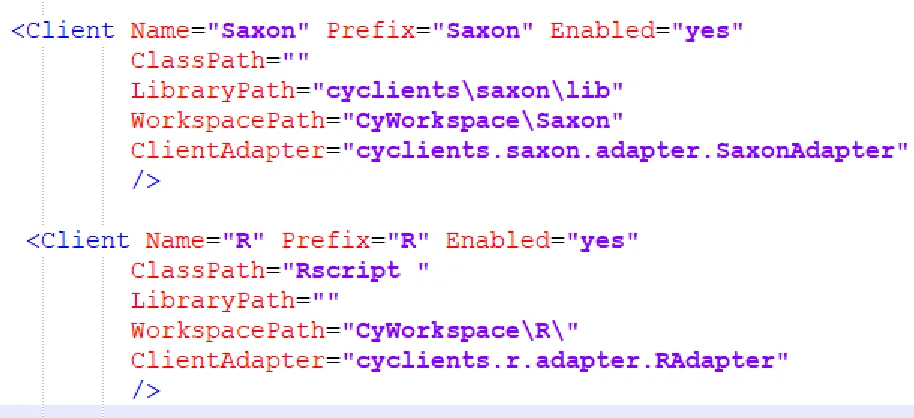
adapter for its client and register it in the CyDIW’s System Configuration file as shown in Figure2. Other
way is by installing the client on the Operating System and use it with prefix “OS”. In the latter case you
need not provide any adapter as the Operating System would take care of that. CyDIW has a set of
commands that are native to itself like viewing, declaring and setting the variables. In order to display and
execute the CyDIW commands, a scripting language & a simple Graphical user interface (GUI) was
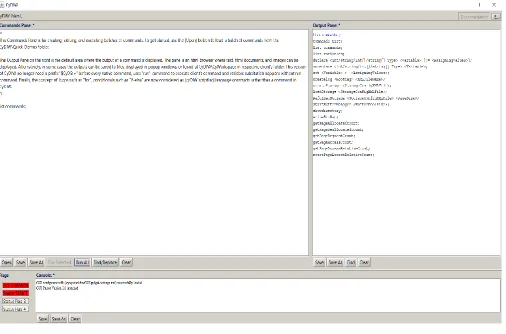
designed. The GUI is divided into three parts, Command pane, Output Pane and Console pane as shown
2
Figure 1 CyDIW GUI
The Command Pane has two Run buttons, one to execute all the commands in the pane and the
other to execute only the selected part. In both cases, the commands are sent to the parser where it
separates client and command and passes the command to the client. Upon execution of command, the
result is passed back to the GUI through the parser. The results can be saved to a file using the save
3
Figure 2 SystemConfiguration.xml Example.
CyDIW looks into this configuration file to get the location of external software packages. If a system
entry has enabled set to “yes”, at the time of initializing CyDIW, it loads all the configuration settings
related to it from above file. When a command is executed, it uses the instructions provided in the adapter
of the respective client executes the client specific command on the client system. After the command is
successfully executed, log is written to the log file and output is displayed on the output pane or written
4
Chapter 2 – Issues in CyDIW
The basic command in CyDIW has a client prefix, a client command and optional commands
like log and out which are used in logging and storing result in an output. The client prefix is not
used when it is a native command of CyDIW. Besides this, it deals with using variables,
conditionals and loops which are essential for any language.
CyDIW basic command: $CLIENT_PREFIX:> <CLIENT_COMMAND> <OUTPUT> <LOG>
The above command looks fine but there are some major issues when dealt in different
scenarios like using variables, using log or out keywords in client command, command not
ending with a semicolon inside the for loops and too many native commands which need to be
removed from parser and separated as a client.
2.1 Use of Variables
Variables are declared and used as $$var which led to confusion as the client prefix also had
$ in front of it. If the CLIENT_PREFIX is a variable, then a command would start with “$$$”
which results in a conflict for the parser on choosing the correct variable. Now, the variable
declaration is different from using the variable to avoid conflicts.
Variable Declaration:
Before
declare int $$var;
After
5
“$$” was used to distinguish it with the CLIENT_PREFIX but it is not required now as we
are using the variable in a different way. We use the variable similar to Saxon but surround the
variable with “@” symbol whenever we use it. The differences can be scene below.
Use of Variable:
Before
$$var
After
@$var@
2.2 Logging and Output
out and log commands are mixed up with the CLIENT_COMMAND and sometimes
becomes ambiguous to tell whether it is part of optional command or client command. The
symbol “#” is used to distinguish them from the CLIENT_COMMAND. A strict order is also
enforced which says that Out command should appear before the log command which removes
ambiguity for the parser.
Before:
$CLIENT_PREFIX:> $CLIENT_COMMAND out>> <FILENAME> log <TAG> <LOGFILE>
After:
$CLIENT_PREFIX:> $CLIENT_COMMAND #out>> <FILENAME> #log <TAG>
6
2.3 Commands does not end with semicolon in a loop
The parser considers” <;>” as end of a command inside a loop which is different from
commands outside the loop which end with a “;”. It needs to be end with semicolon for all the
commands to maintain consistency. The syntax of loops and conditionals is changed for this
purpose. The symbols “{” and “}” are replaced with “{|” and “|}” and the commands inside the
loop now end with “;”.
Before:
foreach () {
COMMAND<;>
}
After:
foreach () {|
COMMAND;
|}
2.4 Separation of commands into clients
There are some commands like CreateStorage, DisplayFile which are susceptible to change
with the type of experiment. The code of the parser needs to be changed every time there is
change in this kind of commands. As a result, they are moved out of CyDIW and kept as clients
so that the parser is not vulnerable to the changes inside these clients. Two new clients are
created namely, Storage and CyUtils.
2.5 Others
Some of the adapters like R are not working properly which needed attention and was
7
Chapter 3 – Simplification of commands
All the above issues led to the construction of a new parser and change in the syntax of
commands which can be used without ambiguity. The parser has all the features as before except
that some of the native commands are separated from CyDIW and put in as a client. The most
basic command in CyDIW is the commands which redirects the commands to clients and
executes them. Let us have a look at it.
3.1 Basic CyDIW Command
$<CLIENT_PREFIX> :> <CLIENT_COMMAND> [#out>> <FILENAME>] [#log <TAG> <FILENAME>];
The out and log commands are optional and should appear in the same order as shown above.
It can have variables at any place in the command whether it may be CLIENT_PREFIX or
CLIENT_COMMAND or FILENAME or TAG.
8 3.2 List Commands
This is a simple command which lists all commands which are native to CyDIW
Figure 4 List Commands output.
3.3 Variables
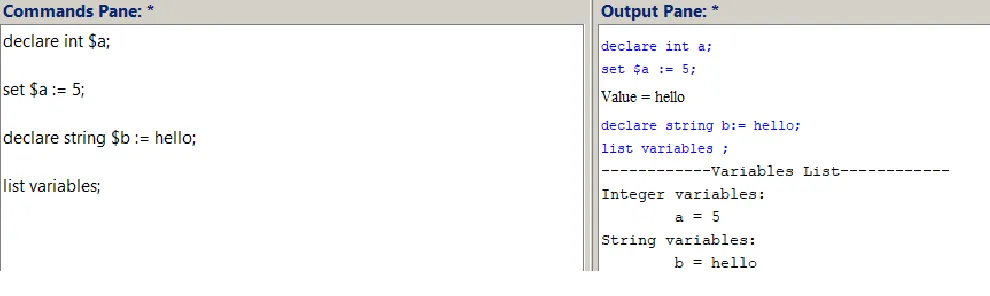
Like any other language, CyDIW also uses variables to store data. The declaration of variables is
different from the use of the variables. There are four types of variables in CyDIW, int, int array,
string and string array which are enough to conduct variety of experiments on CyDIW. The
syntax is as follows:
Declaring a variable:
declare < int/int []/string/string []> $<VARIABLE_NAME> [:= <VALUE>];
Undeclaring a variable:
undeclare <int/int []/string/string []> $<VARIABLE_NAME>;
Setting a variable:
set $<VARIABLE_NAME> := <VALUE>;
Listing all variables:
List variables;
9
Figure 5 Variable declaration Example.
3.4 Conditional Statements
The if else statements are similar to any other language except for the blocks. The block starts
and ends with “{|” and “|}” respectively. It also supports nested loops inside it.
Syntax:
if (<CONDITION>) {|
<IF_BLOCK>
|}
[else {|
<ELSE_BLOCK>
|}]
10 3.5 Foreach Loop
Syntax:
foreach $<VARIABLE> in <LIST> [#depositLogTag <TAG> <FILENAME>]
{|
<FOR_BLOCK>
|}
The variable in the loop should already be declared to execute the for loop. The list is written
as “(a,b)” where the variable is given value from a to b. The loop also has log option to log data
at the end of every loop so that you can get information about the loop invariants. Just like
conditionals, loops can also be nested and can have combination of statements and conditionals
too.
11 3.6 Logical Operators
The two keywords “AND” and “OR” are used as logical operators “&&” and “||” which can
be used inside if condition.
3.7 Log File Creation
Syntax:
createLog <ROOT_TAG> <XML_FILENAME>;
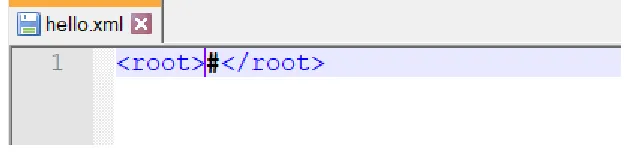
The named XML file is created with the user defined root tag. The initial contents of the file is
<ROOT_TAG> # <ROOT_TAG>. A cursor “#” is placed to indicate the next place to be written.
The log entries are deposited just preceding the cursor. Note that the contents of the log file can be
printed at any time using displayXML command.
For Example, if the command is
createLog <root> hello.xml;
the output would be as shown in Figure 8.
[image:16.612.170.482.494.571.2]
12 3.8 Showtext
Syntax: showtext [on/off];
This command is used to display tags on the output pane. The output pane is in the HTML
format and if an output has tags, the tags would not be displayed if showtext is set to off. One
needs to set it on to see the tags.
13
Chapter 4 – Separation of storage as a client
The Storage commands were previously part of native CyDIW commands which made not
only the application complex but also hard to maintain the stability of the code. At present,
Storage is a client and it has its own adapter where one can add any number of commands.
Adding commands was not possible in the previous version as one must change the parser to do
so. Note that the storage being referred here is page-based storage. Using Storage commands is
easy and like that of any other client enabled on CyDIW.
This client has functionalities such as create storage, load existing storage, allocate and
deallocate a page, read from a page and write into it. Additional functionalities can be added, and
the command can be inserted into the storage adapter to use it through CyDIW. Executing the
command through CyDIW would be like the one shown below.
Before:
CreateStorage test 1024 4;
After:
$Storage:> CreateStorage test 1024 4;
As we can see, it is almost like the command of the parser before and it is same as any other
client command syntax. The advantage in separating this as another client is that we can add
14
Chapter 5 – Separating Utilities as a Client
Just like the Storage client, CyUtils is another client whose commands are separated from the
native CyDIW commands. This client has all the utilities needed for experiments so that it makes
execution easier. Currently, file handling commands are added to this client. It has all the below
features
1. Open a file
2. Close a file
3. Append string to a file
4. Append two files
5. Display a file
The Syntax for executing these commands has changed slightly. It is now appended with the
client prefix appended at the front. The reason behind separating it is same as storage as one
must change the parser to modify any of these utilities. For Example, to add a feature like
displayHTML, one must edit the parser which is a cumbersome process.
Before:
displayXML test.xml
After:
15
Conclusion and Future Work
The current CyDIW is free of ambiguity while executing commands and can be used to
conduct experiments. With the separation of Storage and Utilities clients, CyDIW has become
very light and no more change is needed inside the parser as all the native commands are
permanent to CyDIW.
The output in the output pane is displayed only after all the commands are executed, which
means that the output is concatenated after each execution. If the number of commands is
limited, this would not be a problem. But if there is a loop with 100- 200 iterations, then it may
slow down the execution, which needs to be corrected.
Other work includes correcting some of the adapters where the parsing is done inside the
16
References
[1] Shashi K. Gadia and Xinyuan Zhao. A Ligthweight Workbench for Database Benchmarking, Experimentation and Implementation. IEEE Transactions on Knowledge and Data Engineering, Vol 24, 2012 , pp 1921-1936.
[2] JavaCC, https://en.wikipedia.org/wiki/JavaCC