University of New Orleans University of New Orleans
ScholarWorks@UNO
ScholarWorks@UNO
University of New Orleans Theses and
Dissertations Dissertations and Theses
Spring 5-19-2017
Development of Peer Instruction Material for a Cybersecurity
Development of Peer Instruction Material for a Cybersecurity
Curriculum
Curriculum
William Johnson
University of New Orleans, [email protected]
Follow this and additional works at: https://scholarworks.uno.edu/td
Part of the Information Security Commons
Recommended Citation Recommended Citation
Johnson, William, "Development of Peer Instruction Material for a Cybersecurity Curriculum" (2017). University of New Orleans Theses and Dissertations. 2367.
https://scholarworks.uno.edu/td/2367
This Thesis is protected by copyright and/or related rights. It has been brought to you by ScholarWorks@UNO with permission from the rights-holder(s). You are free to use this Thesis in any way that is permitted by the copyright and related rights legislation that applies to your use. For other uses you need to obtain permission from the rights-holder(s) directly, unless additional rights are indicated by a Creative Commons license in the record and/or on the work itself.
Development of Peer Instruction Material for a Cybersecurity Curriculum
A Thesis
Submitted to the Graduate Faculty of the University of New Orleans
in partial fulfillment of the requirements for the degree of
Master of Science in
Computer Science Information Assurance
by
William E. Johnson
B.A. Millsaps College, 2011
Dedication
Acknowledgment
I would like to thank Dr. Irfan Ahmed as my major professor and the rest of the Information
Assurance faculty at the University of New Orleans for providing me with this opportunity
as well as giving me a place within the concentration. I want to thank Dr. Golden G. Richard
III for inspiring me to enter into the University of New Orleans to obtain a Master’s degree
for information security as well as guiding me through my time here. I also want to thank
Dr. Vassil Roussev for support and guidance through my graduate coursework. They have
all been invaluable throughout my time spent here.
I want to extend my thanks to Joe Sylve for the LATEX template–it’s been
indispens-able for writing this thesis.
I would also like to thank Dr. Cynthia B. Lee of Stanford–her collaboration and
assistance with this project is immensely appreciated.
Finally, I would like to thank Allison Luzader for her collaboration.
This thesis is a continuation of work published by William Johnson, Allison Luzader,
Dr. Irfan Ahmed, and Dr. Vassil Roussev of the University of New Orleans Department of
Computer Science; Dr. Golden G. Richard III of Louisiana State University’s Center for
Computation and Technology; and Dr. Cynthia B. Lee of the Stanford computer science
department [5].
The research supporting this thesis was funded by the National Science Foundation
Table of Contents
List of Figures . . . vi
List of Tables . . . vii
Abstract . . . viii
1 Introduction . . . 1
2 Peer Instruction Background . . . 4
2.1 Peer Instruction Methodology . . . 4
2.2 Peer Instruction Outcomes in CS . . . 5
3 Question Development Methodology for Peer Instruction . . . 6
3.1 Challenges for Developing Questions . . . 6
3.2 Overview of the Methodology . . . 6
4 Examples of Peer Instruction Questions . . . 8
4.1 Introductory Cybersecurity Concepts . . . 9
4.2 Digital Forensics . . . 10
4.3 Reverse Engineering . . . 12
4.4 Network Penetration Testing . . . 14
5 Analysis of Peer Instruction Questions . . . 16
5.1 Concept Triggers . . . 16
5.2 Question Presentations . . . 18
5.2.1 Presentation types vs. cybersecurity topics . . . 20
5.2.2 Association between presentation types and concept triggers . . . 20
6 Computer Forensics Workshop . . . 24
6.1 Workshop Introduction . . . 24
6.2 Advertisement and Student registration . . . 25
6.3 Pre-class reading material . . . 25
6.4 In-class peer instruction activities . . . 27
6.4.1 Student participants . . . 27
6.4.2 Peer Instruction Questions by Workshop Section . . . 28
6.4.3 Data Collection Instruments . . . 34
6.4.4 Results and Evaluation of Student Performance . . . 36
7 Related Work . . . 42
8 Conclusion and Future Work . . . 44
8.1 Future Work . . . 44
References . . . 45
Appendices . . . 48
A Workshop Quizzes . . . 48
A.1 File Systems Quiz . . . 48
A.2 File Carving Quiz . . . 49
A.3 Windows Registry Quiz . . . 49
B Computer Forensics Workshop Interest/Experience Survey . . . 51
List of Figures
3.1 Overview of the methodology for developing peer instruction questions . . . 7
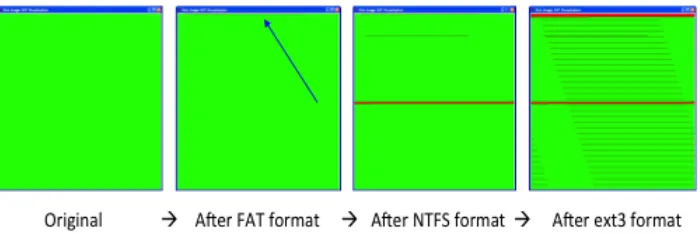
4.1 The results of formatting a flash drive with FAT, then NTFS, then the EXT3
filesystem. Deleted regions are shown in red. . . 12
5.1 Percentage of peer instruction questions over concept triggers . . . 17
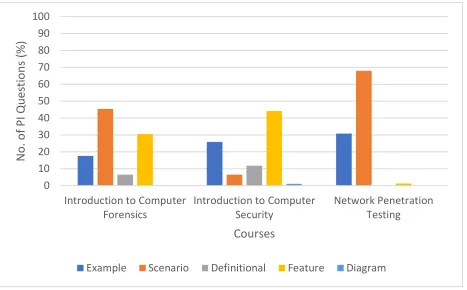
5.2 Percentage of peer instruction questions over presentation types . . . 18
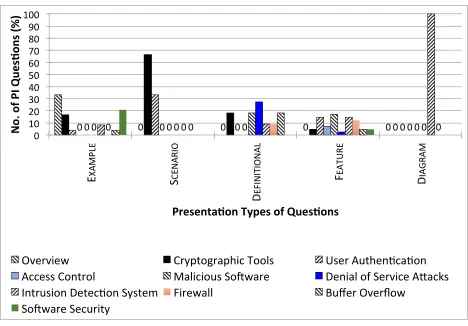
5.3 Percent distribution of questions as per presentation types and topics . . . . 19
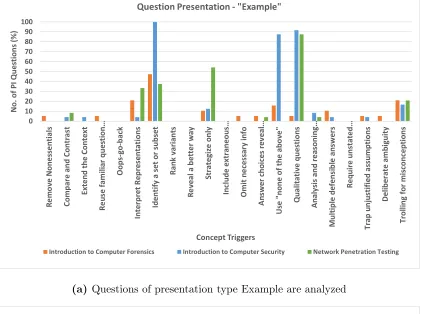
5.4 Association between concept triggers and question presentations.. . . 22
5.4 Association between concept triggers and question presentations.. . . 23
6.1 Percentage of correct answers to peer instruction questions during the
com-puter forensics workshop . . . 36
6.2 Percentage of correct answers to quiz questions per section during the
com-puter forensics workshop; note that shaded bars followed by solid bars refer
List of Tables
4.1 Sample concept-triggers borrowed from Beatty et al. [1]. We use them for
analyzing peer instruction questions . . . 9
6.1 Testing background information for computer forensics workshop attendees . 27
6.2 Coursework and experience related information for computer forensics
work-shop attendees . . . 28
6.3 Computer forensics and cybersecurity interest and experience opinion survey 39
6.4 Peer instruction lecture preparation, peer instruction, and clicker usage opinions 40
6.5 Workshop-specific opinions . . . 41
Abstract
Cybersecurity classes focus on building practical skills alongside the development of the open mindset that is essential to tackle the dynamic cybersecurity landscape. Unfortu-nately, traditional lecture-style teaching is insufficient for this task. Peer instruction is a non-traditional, active learning approach that has proven to be effective in computer sci-ence courses. The challenge in adopting peer instruction is the development of conceptual questions. This thesis presents a methodology for developing peer instruction questions for cybersecurity courses, consisting of four stages: concept identification, concept trigger, ques-tion presentaques-tion, and development. The thesis analyzes 279 quesques-tions developed over two years for three cybersecurity courses: introduction to computer security, network penetra-tion testing, and introducpenetra-tion to computer forensics. Addipenetra-tionally, it discusses examples of peer instruction questions in terms of the methodology. Finally, it summarizes the usage of a workshop for testing a selection of peer instruction questions as well as gathering data outside of normal courses.
Chapter 1
Introduction
Cybersecurity is one of most strategically important areas of computer science and
also one of the most difficult disciplines to teach effectively. The escalating reliance on IT
tools in all aspects of social life is leading to ever increasing costs in cybersecurity failures.
The vast majority of these failures are the result of poor understanding of the security
landscape, an overly abstract view of important computing concepts, and an inability to
adapt to new threats.
Engineering a secure IT system, in addition to technical skills, requires out-of-the-box
thinking that takes into account the incentives and capabilities of both the attacker and the
defender. To be effective, a cybersecurity professional must be flexible and creative, able to
quickly adapt within the fast-changing security landscape. In such a dynamic environment,
education is a continuous process and requires the mindset that learning on the job is part
of the daily routine. It is imperative that we find methodologies that can reliably improve
learning outcomes and develop workforce proficiency in these strategically important areas.
Unfortunately, the traditional lecture is a poor match for the need to develop
stu-dents into creative thinkers and lifelong learners, and this is especially true for cybersecurity
educationboth within and outside of academia. This is the direct result of an over-emphasis
on specific (lifespan limited) technical skills without attention to fundamental conceptual
underpinnings. Other challenges include a lack of technical depth, and impatience towards
developing broader analytical skills.
One of the main difficulties in delivering the necessary educational outcomes is that
students need to experience a significant number of realistic situations before they can
instructor, but it is well short of sufficient. One of the biggest instructional challenges is
to balance the requirements of discussing concepts and building hands-on skills within the
confines of a semester. In our view, the only way to accomplish this is to encourage the
students to do more preparation before coming to class (and to continue this preparation
well after class has ended), and to actively participate in class discussions with their peers.
Motivating students to study before class has been a challenge in other disciplines
and one of the more promising solutions that has emerged is the concept of peer instruction.
This teaching paradigm was introduced by Eric Mazur, a physicist at Harvard University,
who realized that his students could pass their traditional, formulaic problem-solving exam
but have little conceptual understanding of Newtonian physics [2], [16]. When confronted
with new types of questions on the same concepts, they were simply not able to adapt.
In a peer instruction classroom, lecture is interspersed with multiple-choice questions
known as ConcepTests, which are designed to provoke deep conceptual thinking in students
and engage them in meaningful discussion with their peers. Peer instruction has been shown
to improve outcomes in several scientific disciplines, such as physics, computer science, and
biology. In computer science (CS), it has shown promising results such as halving failure
rates in four different courses [9] and increasing retention in the major [12].
Although reports from the field show the successes of peer instruction in CS, the
cur-rent primary focus has been limited to theoretical and introductory programming courses [6].
In our experience, there are substantial differences between teaching a standard CS course
and an advanced cybersecurity one. For instance, cybersecurity teaching is expected to
trans-form students mindsets for increased adaptability and analytical skills for assessing dynamic
risks and defense strategies. Unfortunately, peer instruction is not widely used in
cyberse-curity education and a major challenge in adapting peer instruction is the development of
in-class, conceptual questions appropriate to the unique goals of cybersecurity education.
Over the past two years, we have made significant efforts and developed 279 peer
net-work penetration testing, and introduction to computer forensics. This thesis analyzes these
questions and identifies a systematic methodology for developing peer instruction questions.
Furthermore, it provides five examples of the peer instruction questions in cybersecurity.
In addition, we discuss our experience holding a condensed computer forensics
work-shop for experimentation of usage of peer instruction with material focusing on the FAT32
file system, file carving, and forensic artifacts of the Windows registry.
The rest of the discussion is organized as follows: Chapter2provides some background
for peer instruction. Chapter 3 presents a methodology for developing peer instruction
questions, and chapter 4 provides examples of peer instruction questions for four major
cybersecurity areas. Chapter 5 provides a comprehensive analysis of the peer instruction
questions recently developed for three cybersecurity courses. Chapter 6 details a small
workshop we held primarily to test a selection of peer instruction questions and gauge student
opinion. Chapter 7 discusses some prior work on peer instruction within computer science.
Chapter 2
Peer Instruction Background
2.1
Peer Instruction Methodology
The peer instruction method divides the lecture period into small presentations. Each
presentation focuses on a central point and is typically followed by a series of the following
activities:
• A conceptual question is asked to students, who are then given two to three minutes
to formulate individual answers and report them to the instructor. Typically, the
ques-tion is in multiple-choice format, enabling aggregaques-tion of student response data by the
instructor.
• If a mix of correct and incorrect answers is received, students are further encouraged to
discuss their answers with others sitting around them. The discussion may last three to
four minutes. The goal of the discussion is to present the fundamental reasons behind
the answers and for students to convince each other of the correctness of their own
answers.
• Students are then asked to stop discussion and polls for their answers are performed
again to observe how their opinions were influenced by the discussion in the previous
step.
• After reviewing the poll results, the instructor decides to either move on to the next
concept or present the correct solution with more explanation, as needed.
Peer instruction requires students to be better prepared for each class. The instructor
the material before the class, allowing them to better understand the presentations and
re-spond to conceptual questions. The students are also given a quiz to solve after reading the
material, and some incentives (such as bonus marks) are associated with each quiz. This
approach encourages students to go through the material carefully and to be prepared.
2.2
Peer Instruction Outcomes in CS
More recently, peer instruction has been introduced in computer science, and research
has shown that computer science students both value peer instruction and also recommend
that more instructors use it at both small colleges and large schools [17], [15]. Research also
shows that instructors who use a peer instruction approach in their classrooms find it quite
effective [10]. Essentially, the real learning occurs during discussions between students when
a conceptual question is asked to them [11].
Research also shows that students who have learned through peer instruction achieve
6% higher grades on their final exams than students in a lecture-centric standard teaching
environments [18]. Peer instruction has shown effective results in reducing failure rates by
61% on average in four computer science courses (CS1, CS1.5, Theory of Computation,
and Computer Architecture) [9]. It has also shown a 31% improvement in the retention of
Chapter 3
Question Development Methodology for Peer
Instruc-tion
3.1
Challenges for Developing Questions
In our experience, there are a number of challenges that arise when developing peer
in-struction questions. In particular, this section discusses two challenges that are encountered
frequently.
Quiz vs. Peer Instruction Questions The main challenge is the development of
multiple-choice questions to facilitate peer discussion without the questions seeming
non-conceptual. Questions reserved for quizzes rather than peer instruction need be less
concep-tual, as they are typically used to test knowledge rather than the application of knowledge.
It can be difficult to step away from that for conceptual questions without these questions
seeming too simple.
Plausible Incorrect Answers for a Peer Instruction Question Similarly, there is a
difficulty in creating incorrect answers for peer instruction questions that seem plausible.
The trolling for misconceptions” and similar question tactics by Beatty et al. [1] assist in
fulfilling this issue, though it is occasionally also difficult to realize potential misconceptions.
3.2
Overview of the Methodology
We have identified a basic methodology for creating peer instruction questions
sys-tematically. Figure 3.1 illustrates four stages of the methodology: concept identification,
in-Concept Identification
Concept Trigger
Question Presentation
Question Development
Figure 3.1: Overview of the methodology for developing peer instruction questions
struction question, the first stage is to identify a concept defining the main focus of a
ques-tion, and then further (in the second stage) identify a concept trigger that is introduced in
the question to provoke a students thinking process and set the desired direction of peer
discussion. Deliberately introducing ambiguity in answer choices is an example of concept
triggers (more examples are discussed in Table 6.1). Multiple concept triggers can be used
for a question.
The third stage determines how the concept and the concept-trigger(s) (identified in last two
stages) can be put together in a question for better presentation, and easier understanding.
For instance, a question can be presented in a scenario, example, or diagram. The last stage
of the methodology creates the question, including articulation and identification of multiple
Chapter 4
Examples of Peer Instruction Questions
This chapter presents five examples of peer instruction questions representing four
distinct cybersecurity areas: introductory cybersecurity concepts, computer forensics, reverse
engineering, and network penetration testing. The first is typically taught in the traditional
lecture format, whereas the latter three are intensive hands-on courses. Together, they form
the basis of a broad skill set and perspective on security.
The chapter further discusses concept triggers and question presentation for each
question. We borrow our concept triggers from Beatty et al. [1], and used them for the
de-tailed analysis of our peer instruction questions (discussed in §5). Concept triggers (mostly
used in our analysis) are briefly described in Table 6.1. Furthermore, we identify four
question-presentation types after carefully analyzing our peer instruction questions:
Ex-amples, Scenario, Definitional, Feature, and Diagram.
Scenarioquestions present students with a situation, and require students to answer
the question provided about the situation by examining the literal and implied details of
that situation. Example questions simply provide describe a sample system or code–these
are somewhat similar to scenario questions, but are more straightforward, as there is less
interpretation required for students to understand and respond to the question. Definitional
questions are even simpler–they deal strictly with the definition of a concept, and are used
best when attempting to differentiate between two or more particularly similar concepts.
Di-agramquestions present students with a diagram and ask them to make interpretations based
on the visual–these must not simply be code snippets; they must have a strong visual
com-ponent. Finally, feature questions deal with the components of a concept–they are questions
that may ask whether a provided example has all of the required features of that concept,
best support. They are, essentially, similar but more specific than definitional questions, as
they target
Concept triggers Description
Compare and contrast Compare multiple situations; draw conclusions from comparison Interpret representations Provide a situation that asks students to make inferences based upon
the presented features
Identify a set or subset Ask them to identify a set or subset fulfilling some criterion
Strategize only Provide a problem; ask students to identify the best means of reach-ing a solution
Omit necessary information Provide less information than is essential for answer; see if students realize this
Use “none of the above” Provide an option to learn alternative understandings; use it occa-sionally as a correct answer
Qualitative questions Questions are about the concepts and relationships rather than num-bers or equations
Analysis and reasoning questions Create questions that require significant decision-making, hence pro-mote significant discussion
Trap unjustified assumptions Answer choices are facilitated by potential unjustified assumptions made by the students
Deliberate ambiguity Use deliberate ambiguity in questions to facilitate discussion Trolling for misconceptions Attempt to trap students with answers that require common
mis-conceptions to choose
Table 4.1: Sample concept-triggers borrowed from Beatty et al. [1]. We use them for analyzing peer instruction questions
4.1
Introductory Cybersecurity Concepts
This example of a peer instruction question is used to introduce the key concepts
of confidentiality, integrity, and availability (CIA triad). In class, the instructor initially
presents some slides and explains the concepts. After giving a few examples, the instructor
shows the peer instruction question. Students are given an opportunity to answer
indi-vidually first. After all students have responded, students discuss their answers in small
groups and come to a consensus. This approach gives students the opportunity to engage in
One example of the peer instruction question could be: An attacker deletes files
on a system, denying access to system users. Which element of CIA triad is violated? a)
Confidentiality, b) Integrity, c) Availability, and d) None/Other/More than one of the above.
Concept Triggers: We can deconstruct this peer instruction question and identify some
of the question design tactics by Beatty et al. that might be used to construct a question
such as this one. First, by noting the question option D, this question introduces the usage
of “none of the above” as well as “identify a set or subset”, by allowing the students to select
none of the above or any option that they may choose from the set.
Additionally, this question is qualitative rather than quantitative as it approaches the
concept of the balance of the CIA (Confidentiality, Integrity, and Availability) triad and its
components, representing the tactic of qualitative questions.
Finally, this question promotes the usage of “multiple defensible answers”, as while
it lends itself primarily to exhibiting a violation of availability (due to the phrase “denying
access to system users”), this attack would secondarily be considered a violation of system
integrity, and as such, choice C would be the primary answer, but choice B is also acceptable.
Ultimately, the answer is D.
Question Presentation: This question is presented as an example. However, it can be
elaborated in a scenario.
4.2
Digital Forensics
Indigital forensics, the problem of comprehensive data recovery is a critical first step
for most inquiries. In most cases, the formatting of a hard disk has a very small impact
on the actual data content, because it simply overwrites file system metadata (making the
data inaccessible via the OS interface). There is a common misconception, even among users
destroy file content. In fact, with the exception of internal SSDs, most format operations
destroy very little file content. One example question to make students think about it, could
be: Estimate the fraction of disk blocks affected by formatting the disk: a) 100%, b) 65%, c)
20%, d) ¡5% (answer: d). Follow-up questions could lead them to the fact that the answer
may be different, depending on the target medium–HDD vs. SSD vs. virtual disk.
The corresponding peer instruction lesson involves describing basic filesystem layouts,
then asking students to take a position on what percentage of filesystem data would be
destroyed by first formatting a USB flash drive using the FAT filesystem. The scenario is
then expanded to include a sequence of other format operations using different filesystem
types, including NTFS, ext3 on Linux, etc., against the same flash drive. Students are asked
to agree how to visually depict how much data they predict is permanently destroyed. The
instructor then uses a visual aid to illustrate exactly how much data is destroyed. The results
are illustrated in Figure 4.1. Figure 4.1 illustrates data deletion (in red) as the flash drive
is subjected to a number of format operations. Green areas remain untouched by format
operations.
Concept Triggers: Deconstructing this question, it uses some interesting question tactics.
First, formatting a disk can have vastly different effects depending on the filesystem type–
this is a particularly important detail missing. Initially, this question can be noted as using
“omit necessary information” as well as “trap unjustified assumptions”, as any particular
answer would need to assume a particular formatting scheme–trolling for misconceptions
could work as well, if students assume that this operation is performed the same regardless of
filesystem type. Finally, this question involves “deliberate ambiguity”, and it is a “qualitative
question”. It is important to understand the power of this type of design tactic, as leading a
discussion or even curriculum with a generalizing misconception such as this can be powerful
Figure 4.1: The results of formatting a flash drive with FAT, thenNTFS, then theEXT3filesystem. Deleted regions are shown in red.
Question Presentation: This question could be identified primarily by feature, as it
requires an understanding of disk formatting, and students will need to understand the
features of that process to guess the correct percentage of blocks affected–even though this
question intentionally leaves out a significant amount of information.
4.3
Reverse Engineering
Inreverse engineering, it is important not only to understand assembly-level language,
but it is also critical to know the specifics of its implementation on particular hardware. With
assembly language, the programmer has fewer restrictions in terms of access to memory
than in higher-level languages such as C or C++. In effect, this allows the programmer to
easily create self-modifying code that overwrites other instructions or operands in memory.
However, instruction prefetch caching introduces additional complexity. If code is modified in
memory, the modification will persist, but if prefetch is enabled, this only applies to current
control flow to an extent. In the case of a small number of instructions (16 bytes for the Intel
80486 prefetch queue), if an instruction modifies code that has previously been fetched, it
will be executed as if it were not modified in memory. If prefetch caching is not enabled (as
is the case when single-stepping in a debugger), modified code that falls in control flow will
be executed as if it is modified, regardless of locality to the instruction pointer. An example
question to explore this concept is, given a code example (shown in Listing 1) that presents
1
2 S t a r t :
3 mov word p t r l o c 1 0 1 0 6 +1 , 152 h 4 l o c 1 0 1 0 6 : ;DATA XREF:
5 mov ax, 168 h
6 mov word p t r l o c 1 0 1 2 9 +5 , ax 7 l o c 1 0 1 2 9 : ;DATA
8 mov word p t r e s: 0 , 4D4Ch
Listing 4.1: Self-modifying code snippet
while single stepping inside a debugger on an 80486 processor, what is the value of the 16-bit
word at location loc 10129+5? a) 168h, b) 152h, c) 4D4Ch, d) Value is unknown, e) None
of the above.
The corresponding discussion first explores prefetch caches, as well as explaining more
modern uses of the cache (ex: clearing the cache when a branch occurs). It also explains
how a debugger handles self-modifying code while single stepping (in the context of clearing
the cache on each step), and then uses a portion of the Intel IA-32 manual to explain
how certain families handle self-modifying code. The peer instruction question can then
be asked, and after the related discussion, the lecture can then turn to other methods of
defeating debuggers.
Concept Triggers: Deconstructing this question, it allows for the usage of none of the
above. Additionally, this question requires quite a bit of analysis–students must read and
understand the code snippet as well as what the question is asking in order to better
under-stand how it will ultimately execute in the particular situation–so this question falls under
the category of analysis and reasoning questions.
Question Presentation: This question is clearly an example question, as it provides a
code sample and requires that students answer by making inferences from the code sample
4.4
Network Penetration Testing
The problem of obtaining user credentials is central to most aspects of network
pene-tration testing. Therefore, a non-trivial amount of time is spent on various password cracking
techniques. The real point is, of course, is to gain an understanding of what methods can be
used to thwart such attacks. A common point of misunderstanding is the purpose of salting
password hashes, and what types of problems it can address. Salting is the prepending of
random bits to the password prior to hashing.
Although the salt is not a secret, it can render efforts to reverse password hashes
that rely on precomputed mappings computationally infeasible. At the same time, salting
does little to prevent the cracking of weak passwords, as they can be effectively broken
with dictionary techniques. An appropriate conceptual question that can lead to the various
considerations is: You obtain a leaked database of unsalted SHA-1 password hashes. What
would be the most effective way to obtain as many passwords as possible in a short amount
of time? a) brute force, b) rainbow tables, c) dictionary attack with a large wordlist, d)
passing the hash, and e) birthday attack.
The corresponding lesson first begins by discussing simple password guessing, noting
that simple guessing is limited by speed as well as account lockouts. Then it moves to
means of automation, pointing out that automation works best against collections of hashes,
allowing for much greater speeds. Methods of password cracking such as rainbow tables and
dictionary attacks can be discussed, leading to the conceptual peer instruction question to
gauge understanding of the situational advantages. Following the question and discussion,
the lecture can then turn to means of optimization of these approaches through heuristics,
and then the instructor can then demonstrate common password cracking tools as well as
provide an example hash for a hands-on lab.
Concept Triggers: Deconstructing this question, it is “qualitative”, as it provides enough
salting, etc.) and understand the relationship between the presence or stated lack (hash
salting) of concepts to correctly answer the question, rather than a simple equation. Secondly,
this requires students to “interpret representations”–they must identify the key words and
concepts and make interpretations based on their usage. Finally, this question uses the
“strategize only” question trigger, as students must identify the best path or tool to a
solution rather than a solution itself.
Question Presentation: This question is clearly a scenario question, as the question
Chapter 5
Analysis of Peer Instruction Questions
This chapter provides an analysis of 279 peer instruction questions recently developed
for three cybersecurity courses: introduction to computer security (93 questions), network
penetration testing (78 questions), and introduction to computer forensics (108 questions).
The goal of the analysis is to identify the concept triggers (in Table 6.1) and presentation
types in the questions of each of the three courses, and then, compare them.
For introduction to computer security, all 93 questions have multiple triggers.
Ex-cluding the “none of the above” trigger (as this is present in nearly all the questions due to
the none/more than one of the above option), we have 84 questions with multiple triggers.
Excluding the “identify a set or subset” trigger (as this is also present in nearly all the
ques-tions due to the same option), we have 83. Excluding both of those concept triggers, we have
56 questions with multiple triggers. For network penetration testing, all 78 have multiple
triggers, due to questions with the qualitative question trigger. Finally, for Introduction to
Computer Forensics, 67 of the 108 questions use multiple concept triggers. Excluding the
”none of the above” trigger, there are 48 questions with multiple triggers, and excluding
“identify a set or subset”, there are 57 questions with multiple triggers.
5.1
Concept Triggers
Figure5.1presents the percentage of questions having concept triggers under
consid-eration. There are a number of concept triggers conspicuously missing from both courses.
This is because when building a question with particular concept triggers, there are many
(such as “remove nonessentials”) triggers that work well when developing a question, but
0 10 20 30 40 50 60 70 80 90 100 Re m ov e N on es se nt ial s Co m pa re an d co nt ra st Ex te nd th e c on te xt Re us e f am ilia r q ue sti on si tu at io ns Oo ps -g o-ba ck In te rp re t r ep re se nt at io ns Id en tif y a se t o r s ub se t Ra nk va ria nt s Re ve al a b et te r w ay St ra te giz e on ly In clu de e xt ra ne ou s i nf or m at io n Om it ne ce ss ar y i nf or m at io n An sw er ch oi ce s r ev ea l li ke ly… Us e "n on e o f t he ab ov e" Qu ali ta tiv e qu es tio ns An aly sis an d re as on in g q ue st io ns M ul tip le de fe ns ib le an sw er s Re qu ire u ns ta te d as su m pt io ns Tr ap u nj us tif ied as su m pt io ns De lib er at e a m bi gu ity Tr ol lin g f or m isc on ce pt io ns No . o f P I Q ue st io ns (% ) Concept Triggers
Network Penetration Testing Introduction to Computer Forensics Introduction to Computer Security
Figure 5.1: Percentage of peer instruction questions over concept triggers
triggers present in questions are in fact evident, and provide an interesting view into the
creation of a peer instruction question set as a whole. While it may be difficult to identify
items such as oops-go-back pairs, the ability to view trends of concept trigger usage shows
interesting insight into the intentions of the instructor.
The three courses have a majority of questions that are qualitative. It can be
ra-tionalized, as the peer instruction questions are generally qualitative because they refer to
concepts, relationships between concepts, etc. The third course, introduction to computer
forensics, does not include a large number of questions specifically marked as qualitative as
that trigger was not in itself specifically targeted as a concept trigger during development of
0 10 20 30 40 50 60 70 80 90 100
Introduction to Computer
Forensics Introduction to ComputerSecurity Network PenetrationTesting
No
. o
f P
I Q
ue
sti
on
s (
%)
Courses
Example Scenario Definitional Feature Diagram
Figure 5.2: Percentage of peer instruction questions over presentation types
5.2
Question Presentations
We categorize the peer instruction questions based on the wording or presentation
of the questions. The presentation types identified in our questions are scenario, example,
definitional, diagram, and feature.
Figure 5.2 presents the percentage of peer instruction questions over presentation
types. Both of the courses have a similar number of example questions. However, the
introduction to computer security course has a significant number of feature questions. The
network penetration testing course, on the other hand, has a majority of scenario-based
questions.
There is no strict rule as to when to use each question presentation type; this is up
0 0 0 0 0 0 0
0 0 0 0 0 0 0 0 0 0 0 0 0 0 0
10 20 30 40 50 60 70 80 90 100
E XA MP LE S CE N ARIO D EF IN IT IO N AL F EA TU RE D IA G RA M N o. o
f P
I Qu
es
,o
ns
(%)
Presenta,on Types of Ques,ons
Overview Cryptographic Tools User AuthenNcaNon Access Control Malicious SoOware Denial of Service AQacks Intrusion DetecNon System Firewall Buffer Overflow
SoOware Security
Figure 5.3: Percent distribution of questions as per presentation types and topics
our penetration-testing course, most of the material discussed lends itself well to hands-on
activities, and much of the class time is used for hands on activities in a lab. For concepts
that arise in practical material such as this, it would be helpful to trend toward using more
scenario-based questions. When discussing subjects such as relationships between concepts
or objects–for example, redirection of stdin and/or stdout through a Netcat instance–an
instructor may find it useful to provide a diagram and focus the question around that. It is
largely up to the instructor, but question presentation, much like question triggers, should
be used to enhance peer discussion as deemed necessary.
We further analyze Figure 5.2’s data to answer two questions: 1) what
presenta-tion types are used more frequently for different cybersecurity topics, and 2) what is the
5.2.1
Presentation types vs. cybersecurity topics
To answer the first question, we have only considered the peer instruction questions
for the course introduction to computer security. The course covers ten significantly different
areas of cybersecurity (listed in Figure 5.3), and its questions are spread out across all the
presentation types (refer to Figure5.2). For the analysis, we further find the distribution of
questions in accordance with cybersecurity topics and presentation types. Figure5.3presents
the results showing that scenario based questions are from the topics, cryptographic tools,
and user authentication. Apparently, these topics are traditionally discussed in scenario
settings such as exchange of shared keys by Alice and Bob, or an attack scenario to steal and
brute force a password file. Example, definitional, and feature based questions are spread
out across the topics. Interestingly, the whole dataset contains only one diagram question,
and that is for buffer overflow.
5.2.2
Association between presentation types and concept triggers
Figure5.4presents the results of the distribution of questions of a certain presentation
type with respect to concept triggers. The analysis of the results shows that each course
utilizes similar concept triggers for Example and Scenario-based questions. The exceptions
are “identify a set or subset” and “use ’none of the above”’ that are used particularly heavily
by the introduction to computer security, and “qualitative questions” that is used heavily
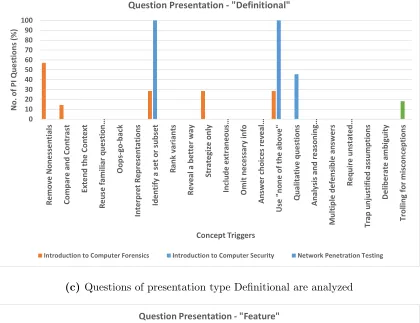
by introduction to computer security and network penetration testing. Definitional and
feature types of questions are mostly used for the introduction to computer security and
network penetration testing courses. Interestingly, Compare and contrast is used in all three
courses, but primarily for the ”feature” presentation type. Presentation type Diagram only
has one question in our dataset for the course, introduction to computer security, utilizing
above”. In general, Diagram questions are time-consuming and more difficult to create, and
0 10 20 30 40 50 60 70 80 90 100 Re m ov e No ne ss en tia ls Co m pa re an d Co nt ra st Ex te nd th e Co nt ex t Re us e f am ili ar q ue st io n… Oo ps -g o-ba ck In te rp re t R ep re se nt at io ns Id en tif y a se t o r s ub se t Ra nk va ria nt s Re ve al a be tte r w ay St ra te giz e on ly In clu de e xt ra ne ou s… Om it ne ce ss ar y i nf o An sw er ch oi ce s r ev ea l… Us e "n on e of th e ab ov e" Qu al ita tiv e qu es tio ns An al ys is an d re as on in g… M ul tip le d ef en sib le an sw er s Re qu ire u ns ta te d… Tr ap u nj us tif ie d as su m pt io ns De lib er at e am bi gu ity Tr ol lin g f or m isc on ce pt io ns No . o f P I Q ue st io ns (% ) Concept Triggers
Question Presentation - "Example"
Introduction to Computer Forensics Introduction to Computer Security Network Penetration Testing
(a) Questions of presentation type Example are analyzed
0 10 20 30 40 50 60 70 80 90 100 Re m ov e No ne ss en tia ls Co m pa re an d Co nt ra st Ex te nd th e Co nt ex t Re us e fa m ili ar q ue st io n… Oo ps -g o-ba ck In te rp re t R ep re se nt at io ns Id en tif y a se t o r s ub se t Ra nk va ria nt s Re ve al a be tte r w ay St ra te giz e on ly In clu de e xt ra ne ou s… Om it ne ce ss ar y i nf o An sw er ch oi ce s r ev ea l… Us e "n on e of th e ab ov e" Qu al ita tiv e qu es tio ns An al ys is an d re as on in g… M ul tip le d ef en sib le an sw er s Re qu ire u ns ta te d… Tr ap u nj us tif ie d as su m pt io ns De lib er at e a m bi gu ity Tr ol lin g f or m isc on ce pt io ns No . o f P I Q ue st io ns (% ) Concept Triggers
Question Presentation - "Scenario"
Introduction to Computer Forensics Introduction to Computer Security Network Penetration Testing
(b) Questions of presentation type Scenario are analyzed
0 10 20 30 40 50 60 70 80 90 100 Re m ov e No ne ss en tia ls Co m pa re an d Co nt ra st Ex te nd th e Co nt ex t Re us e fa m ili ar q ue st io n… Oo ps -g o-ba ck In te rp re t R ep re se nt at io ns Id en tif y a se t o r s ub se t Ra nk va ria nt s Re ve al a be tte r w ay St ra te giz e on ly In clu de e xt ra ne ou s… Om it ne ce ss ar y i nf o An sw er ch oi ce s r ev ea l… Us e "n on e of th e ab ov e" Qu al ita tiv e qu es tio ns An al ys is an d re as on in g… M ul tip le d ef en sib le a ns w er s Re qu ire u ns ta te d… Tr ap u nj us tif ie d as su m pt io ns De lib er at e am bi gu ity Tr ol lin g f or m isc on ce pt io ns No . o f P I Q ue st io ns (% ) Concept Triggers
Question Presentation - "Definitional"
Introduction to Computer Forensics Introduction to Computer Security Network Penetration Testing
(c) Questions of presentation type Definitional are analyzed
0 10 20 30 40 50 60 70 80 90 100 Re m ov e No ne ss en tia ls Co m pa re an d Co nt ra st Ex te nd th e Co nt ex t Re us e fa m ili ar q ue st io n… Oo ps -g o-ba ck In te rp re t R ep re se nt at io ns Id en tif y a se t o r s ub se t Ra nk va ria nt s Re ve al a be tte r w ay St ra te giz e on ly In clu de e xt ra ne ou s… Om it ne ce ss ar y i nf o An sw er ch oi ce s r ev ea l… Us e "n on e of th e ab ov e" Qu al ita tiv e qu es tio ns An al ys is an d re as on in g… M ul tip le d ef en sib le a ns w er s Re qu ire u ns ta te d… Tr ap u nj us tif ie d as su m pt io ns De lib er at e am bi gu ity Tr ol lin g f or m isc on ce pt io ns No . o f P I Q ue st io ns (% ) Concept Triggers
Question Presentation - "Feature"
Chapter 6
Computer Forensics Workshop
6.1
Workshop Introduction
We chose to hold a small condensed workshop focusing on a few topics within the
introduction to computer forensics course in order to gain experience implementing peer
instruction within the classroom as well as gathering some initial data through the use of
surveys on the material and peer instruction as well as quizzes preceding and following each
of the topics to gain insight into learning progression through the workshop. In addition, the
workshop allows us to gain insight into problems (misunderstanding the question or answers
due to issues with wording, pacing of the workshop and/or peer instruction questions and
discussion, etc.) that we may frequently see when developing questions.
We advertised the workshop approximately 10 days prior through an email advertising
it as a short overview on important topics for computer forensic investigation as well as an
introduction to usage of peer instruction, providing a signup form.
The workshop focused on a lecture with topics chosen from our Introduction to
Com-puter Forensics course. It began with our survey on the material, interest and experience
with cybersecurity and related fields, and some information on clicker questions. The
lec-ture was interspersed with related peer instruction questions and quizzes, continued with
a small hands-on component showing typical usage of Autopsy (computer forensics
inves-tigation software) and FTK Registry Viewer (software used to browse Windows registry
contents), and concluded with a peer instruction and clicker usage survey. The following
6.2
Advertisement and Student registration
The email that we sent to students as an advertisement contained a short form
re-questing contact information as well as some information on course level and willingness for
preparation for the workshop. The registration form contains the following fields:
• Name
• Email address
• Have you taken CSCI 2125 (Data Structures)?
• Have you taken CSCI 4623/5623 (Introduction to Computer Forensics)?
• Have you taken CSCI 4401/5401 (Principles of Operating Systems)?
• Have you taken any cybersecurity courses?
• Are you willing to read some introductory material before the workshop?
We received 20 responses. 75% of the respondents had taken our data structures
course. Only one respondent had previously taken introduction to computer forensics. 40%
had taken principles of operating systems. 30% of respondents had taken cybersecurity
courses previously. All respondents responded as willing to read introductory material.
6.3
Pre-class reading material
We provided two pieces of reading material. The first was a short paper detailing
the importance, history, structure of, and useful data found in the Windows registry [4].
The second consisted of the first five pages of an article introducing file carving, touching
on the FAT32 and NTFS file systems as well as their file allocation and deletion procedures,
detailing fragmentation and means of file recovery in both, as well as carvers utilizing header
and footer file magic [8].
1. Which of these is not a Windows registry root key?
(a) HKEY LOCAL MACHINE (b) HKEY USERS
(c) HKEY CURRENT CONFIG
(d) HKEY ROOT USER (e) HKEY CLASSES ROOT
Answer: HKEY ROOT USER
2. Which of the following utilizes a bitmap to denote cluster allocation?
(a) FAT16 (b) NTFS
(c) FAT32
Answer: NTFS
3. Which of these carvers was built as a direct improvement to Foremost?
(a) Photorec
(b) Scalpel
(c) Binwalk (d) FTK carver
(e) Magic Rescue Answer: Scalpel
4. Which of these features of the registry is most known for using ROT13 for encoding data?
(a) Autorun
(b) MRU (c) UserAssist
(d) USBSTOR
Answer: UserAssist
5. Which web browser utilizes the TypedURLs registry key?
(a) Mozilla Firefox
(b) Internet Explorer
(c) Google Chrome (d) Opera Browser
Answer: Internet Explorer
For the quiz, we received 11 responses. 7 of those answered all questions correctly,
6.4
In-class peer instruction activities
For the workshop peer instruction component, we had one group of four students,
two groups of three, and one pair–each of these were groupings of students based upon
where they chose to sit. Seating was restricted to the front of the room where clickers were
placed with workstations. The lecture was centered around seven peer instruction questions,
distributed among four separate lecture sections: “Introduction to Computer Forensics,”
“File Systems,” “File Carving,” and “Windows Registry.” As we began each question, we
provided the students 2-3 minutes to respond. 3-5 minutes was provided for them to discuss
their answers amongst themselves, and we provided another 2-3 minutes for the second set
of responses to the question.
6.4.1
Student participants
Of the 20 responses to the interest form, ultimately 12 attended. We provided a
survey focused on digital forensics, security experience, opinion on the potential for peer
instruction, and some prior testing information. 9 of the 12 attendees completed the survey,
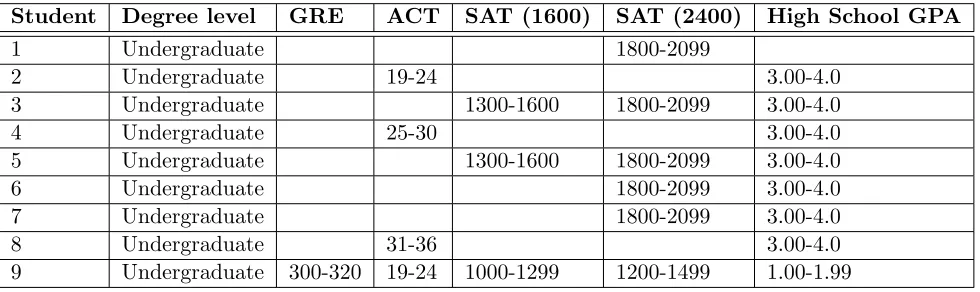
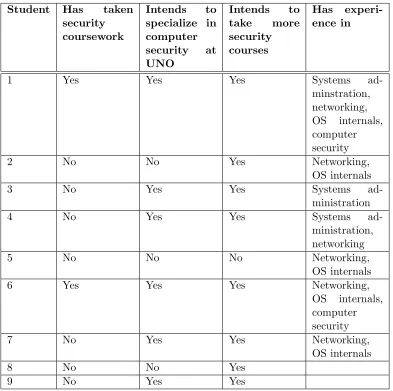
and Table 6.1 provides a short summary of some of their prior testing scores, while Table
6.2 discusses their coursework and experience in relevant fields. The full survey question set
will be provided in AppendicesA,B, and C.
Student Degree level GRE ACT SAT (1600) SAT (2400) High School GPA
1 Undergraduate 1800-2099
2 Undergraduate 19-24 3.00-4.0
3 Undergraduate 1300-1600 1800-2099 3.00-4.0
4 Undergraduate 25-30 3.00-4.0
5 Undergraduate 1300-1600 1800-2099 3.00-4.0
6 Undergraduate 1800-2099 3.00-4.0
7 Undergraduate 1800-2099 3.00-4.0
8 Undergraduate 31-36 3.00-4.0
Student Has taken security coursework
Intends to
specialize in computer
security at
UNO
Intends to
take more
security courses
Has
experi-ence in
1 Yes Yes Yes Systems
ad-minstration, networking, OS internals, computer security
2 No No Yes Networking,
OS internals
3 No Yes Yes Systems
ad-ministration
4 No Yes Yes Systems
ad-ministration, networking
5 No No No Networking,
OS internals
6 Yes Yes Yes Networking,
OS internals, computer security
7 No Yes Yes Networking,
OS internals
8 No No Yes
9 No Yes Yes
Table 6.2: Coursework and experience related information for computer forensics workshop attendees
6.4.2
Peer Instruction Questions by Workshop Section
Here we summarize the four sections utilized in the workshop. We also include a
listing of the seven peer instruction questions, their answers, and a short analysis of the
concept triggers and presentation types.
TOPIC 1: Introduction to Computer Forensics
This section of the workshop serves as an introduction to computer forensics. We
the typical forensic investigative process; and we also discuss the difficulty of destroying
digital evidence. These topics all lead into the following peer instruction question.
After the question is asked, we discuss the formatting process on Windows–particularly
the difference between the traditional (or “quick”) format, more thorough full formatting,
and the importance of understanding formatting procedures on different devices and
tech-nologies.
This section’s peer instruction question is as follows:
1. Estimate the fraction of disk blocks affected by formatting a hard disk.
(a) 100%
(b) 65%
(c) 20%
(d) Less than 5%
Answer: Less than 5%
This question was previously discussed in Chapter 4, so I will simply list its concept
triggers and presentation type.
Concept Triggers: This question uses “omit necessary information,” “trap
unjus-tified assumptions,” “trolling for misconceptions”, “deliberate ambiguity”, and is a
“quali-tative question.”
Question Presentation: This is a “feature” question.
TOPIC 2: File Systems
In this section, we introduce the FAT file system structure and its two primary data
structures–directory entry and file allocation table. Without detail, we ask the first peer
instruction in this section.
Following the first question, we detail the specifics of the two data structures, the
entry, root directory size, and long filename support. Then, the second peer instruction
question of this section is asked.
Following the second file system question, we discuss the regions of the FAT partition:
the reserved region, the FAT region, the root directory region, and the file and directory data
region. This discussion concludes the file systems section. The section’s peer instruction
questions are as follows:
1. In order to access a file from a FAT filesystem, what information is absolutely necessary?
(a) Name and ending address of file content
(b) Name, file size, and ending address of file content
(c) Name and starting address of file content
(d) File size and starting address of file content
(e) None of the above
Answer: Name and starting address of file content
Concept Triggers: Here we use “none of the above” as a trigger to provide the
possibility.
We also use “trap unjustified assumptions” to see if any student does not fully
under-stand that the FAT file system’s data structures allow file clusters to be accessed similarly
to a linked list, as a directory entry points to a file’s first cluster, and the file allocation table
helps identify the next cluster–we can follow this to the block marked as EOF; we then don’t
need the file size.
Question Presentation: This question is presented as a feature question as it draws
upon and asks about core features of the FAT file system and its data structures.
1. If sector 0 is lost/damaged in FAT12/16, what problem does it cause?
(a) The volume’s sector, cluster, etc. sizes cannot be determined
(b) The volume’s maximum file sizes become unavailable
(c) The number of file allocation tables becomes unknown
(d) More than one of the above
Answer: More than one of the above (“The volume’s sector, cluster, etc. sizes cannot be determined” and “The number of file allocation tables becomes unknown”)
Concept Triggers: This question uses “none of the above”.
We also use “analysis and reasoning questions” as the students must understand the
difference between FAT12/16 and 32–specifically that sector 0 is backed up in FAT32 but
not 12/16, as well as what specifically is stored there and its implications for file storage.
Question Presentation: This is a feature question, targeting the difference in core
features of FAT12/16 and 32.
TOPIC 3: File Carving
This section begins with its first peer instruction question. Following that, we describe
the goal and traditional means of file carving (header/footer searches). We then ask the
second peer instruction question.
Following the section’s second question, we provide examples of common file format
headers and footers. Then we provide visuals of typical carving situations with and without
file fragmentation and damage (showing headers, footers, and related and unrelated file
clusters).
With a concluding slide describing some of the main issues with file carving, we
proceed to the Windows registry section. The peer instructions for the file carving section
are as follows:
1. File carving is especially useful in which of the following one or more situations?
(a) An operating system drive is examined as an external drive
(b) Many potentially desired files have been deleted
(c) Files have recently been defragmented
(d) The file allocation table on a FAT file system has been corrupted
Concept Triggers: This question uses “identify a set or subset”, present in the
“more than one of the above” option.
It also uses “interpret representations,” as students must consider what in each
an-swer would make file carving inherently warranted–the reasoning for each situation being a
potential answer is something that must be inferred.
Question Presentation: This is an example question, particularly due to the choice
of “interpret representations”, as students must choose the correct example to answer the
question.
1. File carving is the most effective in which one or more of the following scenarios?
(a) Drive is highly fragmented
(b) Drive is recently defragmented
(c) System used to examine drive has low space
(d) System used to examine drive has high space
(e) More than one of the above
Answer: System used to examine drive has high space
Concept Triggers: We are attempting to test the students’ knowledge of the carving
process as well as some of the major issues that complicate the process. Deconstructing this
question, we note that two triggers are used. First, as we provide the potential for multiple
question choices, we use “identify a set or subset”.
Additionally, as students require an understanding of the downsides of both
frag-mentation as well as the defragfrag-mentation process (fragfrag-mentation is difficult to deal with in
carving, but defragmentation can destroy useful unallocated space from previous files), we
use “trolling for misconceptions”, as the option “Drive is recently defragmented” presents
a more ideal layout in terms of data contiguousness (and thus is an attractive option), but
there is a potential for loss of important data.
Question Presentation: This question does not specifically present a scenario, but
provides examples of potential carving situations on both a target drive and an investigator’s
TOPIC 4: Windows Registry
This section opens with its first peer instruction question. Following that, we discuss
the structure of the Windows registry–including keys, values, and data as well as the primary
registry hives and their backing files. Then, after discussing the registry’s LastWriteTime
timestamp, we ask the secton’s second peer instruction question. Following that, we then
show the attendees various useful locations in the registry, and conclude the section. The
registry section’s questions are as follows:
1. Which of the following actions is best described as an example of registry forensics?
(a) An investigator uses Volatility to examine a file
(b) An investigator uses LiME to access a memory dump
(c) An investigator reviews the SAM hive to obtain password hashes
(d) An investigator examines access timelines using FTK
Answer: An investigator reviews the SAM hive to obtain password hashes
Concept Triggers: This is an “analysis and reasoning” question, as students must
understand what each (at least the correct) tool is used for, and how the target data is
obtained.
Question Presentation: This is a feature question, as students must understand
the specific details behind each answer (tool usage scenarios as well as type of target data).
1. A USB drive with an unknown owner is found in a corporate setting. How might a forensic investigator typically determine whether that particular drive was plugged into any given Windows machine?
(a) Examine all ntuser.dat files to determine if a user plugged it into the machine
(b) Check the system registry file to see if it was plugged into that machine
(c) Check the software registry file to see if it has been used by any particular piece of software
(d) More than one of the above
Concept Triggers: This question first uses “none of the above” to point the
stu-dents toward each answer as being potentially valid, while not drawing attention toward the
specificity of the software or ntuser.dat options or generality of the system option. With
multiple potentially valid options, if there is difficulty, the instructor can discuss the merit of
each option in situations such as those described, or perhaps in a situation narrowing toward
a particular user’s and/or software’s usage of the USB drive in question.
“Identify a set or subset” is used for much of the same reason–each is a potentially
valid location for information on that USB drive, but for the purposes of tying the drive to
the system itself, system is the more general and correct option, as if the drive had been
utilized by software or a particular user, it would still be visible in USBSTOR or a similar
location.
Question Presentation: This is a scenario question. It provides a particular
situ-ation that a forensic investigator may face, and it asks for the best means to proceed.
6.4.3
Data Collection Instruments
In addition to the previously detailed peer instruction questions, our data collection
also consisted of reading quizzes that preceded and followed the latter three workshop sections
to measure improvement through each lecture section–the preceding and following quizzes
asked equivalent questions.
Available in Appendix A, the quizzes asked short and easy to answer questions such
as:
1. Which of the following is a known issue with carving?
(a) Fragmentation
(b) Milestones
(c) Unprintable bytes in headers
The ease of the questions is intended, as these questions are not conceptual, but
they are used rather to determine how students retained knowledge from each of the lecture
sections. The workshop quizzes are intended to serve the purpose that testing would serve
in terms of providing data in a full-length course–of course the workshop attendees are
not graded, and the quizzes immediately precede and follow the material (rather than being
presented potentially months after the material is presented), but we believe the metrics from
workshop quizzes should prove useful. In addition, the more immediate feedback through
quizzes can help identify potential problems with peer instruction questions, lecture content,
and lecture pacing.
We also provided two surveys to the workshop: a computer forensics
interest/experi-ence survey given at the start of the workshop, as well as a final survey focusing on student
experience of peer instruction, created and used by Beth Simon and Leo Porter of the UC
San Diego Computer Science and Engineering department, and provided by Simon, Porter,
and Cynthia Lee of the Stanford Computer Science department.
The computer forensics interest/experience survey was used to collect information
such as gender, enrollment level (undergraduate or graduate), gender, interest in computer
security coursework and specialization, experience in related fields, some prior testing scores
(ACT/SAT/GRE and high school GPA), and a number of opinion-based questions using
a Likert scale discussing topics such as importance of computer science and security topic
knowledge and learning styles. The Likert scale opinion answers are shown in Table 6.3.
The peer instruction survey gathered information on prior usage of clickers, workshop
preparation (reading material and quiz), peer discussion, clicker usage, and lecture pacing.
It uses a number of questions with a Likert scale to determine lecture preparation as well as
opinions on peer instruction, clicker usage, and attentiveness; there are also a few additional
opinion questions discussing details specific to this iteration of the workshop. We have
It is important to note that though 12 students attended the workshop, we only
received 9 responses to the surveys. While there may not be enough data to draw particularly
strong conclusions from these surveys, the content of these surveys is available in Appendices
B and C.
6.4.4
Results and Evaluation of Student Performance
82%
42%
64%
91%
0%
58%
8% 100%
45%
100% 100%
0%
75%
17%
0%
20%
40%
60%
80%
100%
1
2
3
4
5
6
7
Co
rre
ct
A
ns
w
er
ss
(%
)
Peer Instruction Questions
Workshop Peer Instruction Question Correctness
Before
After
Figure 6.1: Percentage of correct answers to peer instruction questions during the computer forensics workshop
Answers to nearly every peer instruction question asked show a visible improvement,
and keeping in mind that this gauges correct vs. incorrect answers in general and not the
specific set of answers for each question, there was no deterioration in terms of performance
across any of the question pairs. Figure 6.1 shows the improvements in correct answers
In regards to the fifth peer instruction question used in the lecture (seen in Figure
6.1), we believe the failure to correctly answer it for either iteration may be due to the
wording of the question or its answers.
There was feedback during the workshop that suggested some attendees may have
felt that the question was a comparison of file carving vs. other unnamed evidence collection
techniques rather than a comparison of potentially ideal usage situations for file carving.
Additionally, we feel there was also confusion as to whether the particular answers used
referred to the situation on an investigator’s or a suspect’s drive as well as “space” meaning
“free space” in the case of answers c and d. We feel this is still a valuable question, and we
have made corrections to the question wording.
We have modified this question and its answers to read:
1. In which of the following situations is file carving most effective?
(a) The targeted drive is highly fragmented
(b) The targeted drive has been recently defragmented
(c) The system being used to examine the drive has low free space
(d) The system being used to examine the drive has high free space
(e) More than one of the above
50% 45%
73%
91%100% 82% 100%
9%
82% 100%
91% 100%
90%
73%
18% 82%
100%
70%
64%
9%
91%
80%
0% 20% 40% 60% 80% 100%
Carving (3 questions) FAT (4 questions) Registry (4 questions)
Co
rre
ct
A
ns
w
er
s (
%)
Workshop Quiz Question Pairs
Workshop Quiz Response Correctness
Question 1 Before Question 1 After Question 2 Before Question 2 After Question 3 Before Question 3 After Question 4 Before Question 4 After
Figure 6.2: Percentage of correct answers to quiz questions per section during the computer forensics workshop; note that shaded bars followed by solid bars refer to the question’s first and second iterations, respectively, for that section
Across the second iteration of every quiz, student performance showed a general
improvement as seen in Figure 6.2. For these results, we note there were no major issues,
and the improvements seen in the carving quiz question 1, FAT quiz question 2, and registry
quiz questions 3 and 4 are particularly interesting to note.
Also, as in Tables 6.3, 6.4, and 6.5, the students had particularly positive opinions
of peer instruction and clicker usage in general as well as computer security and forensics,
and their workshop experience seems to have been relatively positive. Therefore, given both
their in-workshop results and survey responses, we view peer instruction as an instructional

![Table 4.1:Sample concept-triggers borrowed from Beatty et al. [1].We use them for analyzing peerinstruction questions](https://thumb-us.123doks.com/thumbv2/123dok_us/8921966.1842400/18.612.73.570.121.401/sample-concept-triggers-borrowed-beatty-analyzing-peerinstruction-questions.webp)