2017 International Conference on Computer Science and Application Engineering (CSAE 2017) ISBN: 978-1-60595-505-6
Design and Implementation of Mobile Museum
based on iOS Platform
Yuexia Zhang*, Ruiqi Yang and Zijian Liu
School of Information and Communication Engineering, Beijing Information Science & Technology University, 100000 Beijing, China
ABSTRACT
With the improvement of people's living standards and the growing cultural needs, people are inclined to go to museums or other places to learn culture and history. Currently, the content display mode of the museum applications is old and the function of the museum applications is very humble. In this paper, we show a mobile museum software based on iOS platform, which implements the information aggregation of exhibition and museum, and achieves the goal of browsing for users. It also has features of navigation and collection. All the software's features can be implemented on smartphones. The test results show that the software has the function of browsing information of exhibition and museum, and the user can easily access information at any time.
INTRODUCTION
With the development of society, people's needs and enthusiasm of culture are growing. The museum is one of the major cultural venues that can meet people's needs. People can appreciate the rich human history and other culture in museums. But currently, the traditional museums' communication strategies do not meet the people’s demand for museum-related information acquisition. Some museums still use just printed material. There is international interest in exploring technical and social methodologies to involve large audience in cultural projects [1].
With the development of smartphones and telecommunications technology, people are increasingly using mobile devices to deal with daily affairs. To meet people's growing cultural needs, it is an inevitable trend to combine traditional and old ways of museum display with mobile devices.
IOS platform is an Apple operating system for mobile device released by Apple Corp on 2007.It was originally designed for iPhone use, and later applied to iPod touch, iPad and Apple TV and other products. Like Mac OS X operating system, iOS platform belongs to Unix-like business operating system. In 2017 smartphone platform market research report, iOS platform ranked second with a market share of 14.7%. There is a wide range of applications for the iOS platform[2-3], as well as studies of the interface experience[4-7]. Though, there are very few applications for mobile museums.
This paper shows a mobile museum software based on iOS platform, which implements the information aggregation of exhibition and museum, and provides users with a valuable tool to browse museums’ information. All the software's features can be implemented on smartphones.
METHODOLOGY Design
The design of the mobile museum software has two parts: the frontend interface and the backend. The frontend interface includes exhibition, museum, exhibit and favorite interface. The backend includes data parsing, network and database access module, as shown in Figure 1.
Interface Backend
Data Parsing
Network
Database Access Exhibition
Museum
Exhibit
Favorite
[image:2.612.156.440.341.465.2]Figure 1. Design of the mobile museum.
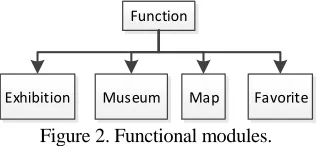
The mobile museum software has four functional modules. It includes exhibition, museum, map and favorite module, as shown in Figure 2.
Function
Exhibition Museum Map Favorite
Figure 2. Functional modules.
[image:2.612.219.377.509.582.2]Museum
Phone
Number Exhibit Map
Exhibit
Share Favorite
Figure 3. Museum module. Figure 4. Exhibit module.
Interface
The interface of the mobile museum is responsible for the interaction of the software and the user. User experience is affected by the software’s interface and interaction, such as after the click operation on icon try to enter into the software, the interface will interact with the system to determine whether to allow users to enter, or into a module, it automatically identifies whether the current user is eligible. The interface can call the function of each module directly through the API, so that users do not need to reach the goal module step by step.
According to the design of the mobile museum, the interface contains exhibition, museum, museum display, map and favorite interface.
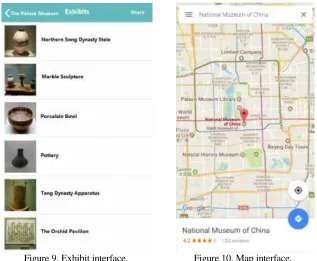
The exhibition interface shows the exhibition information which includes the exhibition name, venue and other information. The museum interface shows information of museum, such as name, and address. The exhibit interface shows the exhibits information of the on display, such as names, pictures and so on. The map interface shows the location and route of the museum. The favorite interface shows the exhibits collected by user.
Backend
The backend of the mobile museum has three parts. It includes data parsing, network and database access module.
The data parsing module is used to convert the JSON to an available data object in iOS. JSON (JavaScript Object Notation) is a lightweight data exchange format. It’s easy to write and read and has some advantages such as fast aging, low memory footprint and facilitate machine generation and analysis. It can improve the transmission efficiency between the backend and the interface.
The database access module is used to import the required JSON files from the database for parsing and rendering operations, implemented by application interface of the database.
Operation Flow
RESULT AND DISCUSSION
We successfully developed the mobile museum for iOS platform. All the results are shown by using iOS simulator. It shows the user interface in the actual device application. The first user interface is the exhibition.
Exhibition
The exhibition interface shows list of exhibitions, as shown in Figure 5. User can click the table cell to check the information on each exhibition. The related information will be displayed in the exhibition detail interface, as shown in Figure 6.
Museum
Figure 7. Museum interface. Figure 8. Museum Detail interface.
The museum interface displays the museums’ information, such as name, address and phone number, as shown in Figure 7. It will show the detailed information of each museum when the user clicks on one of them, as shown in Figure 8. The map item shows the location of the museum and the exhibits item shows a list of exhibits, as shown in Figure 9.
[image:5.612.139.456.347.608.2]
Figure 9. Exhibit interface. Figure 10. Map interface.
Favorite
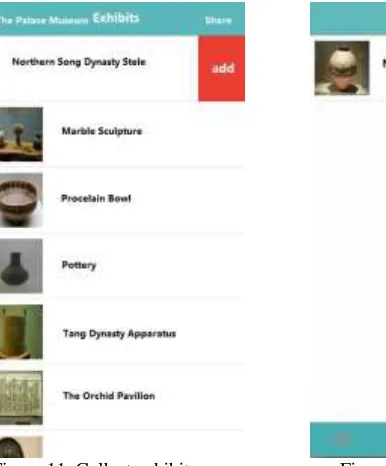
When the user swipes the item to the left in favorite interface, the item will expose the collect button. By clicking the collect button, user can add this exhibit to favorite list, as shown in Figure 11. User can find favorite item in the bottom navigation bar, the favorite exhibits that user collected are displayed in a list, as shown in Figure 12.
CONCLUSIONS
In this paper, the design and simulation of the mobile museum have been successfully presented. The mobile museum has some additional features compared with ordinary museum software. It offers navigation function, let user get the location of the museum and the route. And it also allows user to collect and manage the exhibits of interest for visiting reference. It makes user feel more convenient to get the information of exhibition and museum. At the meantime, it meets people's spiritual and cultural needs, enrich people’s cultural life. At the same time, it contributed to the promotion of the museum, make the passenger traffic and attention increased.
[image:6.612.158.351.315.548.2] [image:6.612.217.439.315.549.2]
Figure 11. Collect exhibit. Figure 12. Favorite interface.
ACKNOWLEDGMENT
REFERENCES
1. Cosentino, A. 2016. “Scientific examination of Cultural Heritage raises awareness in local communities,” Science Education and Civil Engagement, 8:1: 15-20.
2. Hussin, M. F. B., M. H. Jusoh, A. A. Sulaiman, M. Z. A. Aziz, F. Othman and M. H. B. Ismail. 2015. “Accident reporting system using an iOS application,” presented at Systems Process and Control, Dec. 12-14. 2014.
3. Dias, K. N., D. Welfer, J. F. Kazienko and R. C. F. da Sliva. 2016. “A Novel iOS m-Health Application to Assist the Hospital-Acquired Pneumonia Diagnosis and Treatment,” IEEE Latin America Transactions, 14(3):1335-1342.
4. Tsai, T. M., S. C. Chou, B. F. Liu, Y. Lin, R. S. Wang, R. D. Yang and S. C. T. Chou. 2012. “Status and Trend of E-book Applications for iOS Devices: A Developer's Perspective,” presented at
ACIS International Conference on Software Engineering, Artificial Intelligence, NETWORKING and Parallel & Distributed Computing, Aug. 8-10, 2012.
5. Wetchakorn, T. and N. Prompoon. 2015. “Method for mobile user interface design patterns creation for iOS platform,” presented at International Joint Conference on Computer Science and Software Engineering, July 22-24, 2015.
6. Tian, Y., T. Matsuno and S. Ma. 2017. “Development of remote robot control system for snake-like robot based on SSH protocol and iOS system,” presented at IEEE International Conference on Robotics and Biomimetics, Dec. 3-7, 2017.
7. Gu, E., M. H. Tzou and R. Hoda. 2014. “Fill That Blank! An iOS-based Literacy Application,”