Encode Decode Linux based Partitions to Hide and
Explore File System
Ajahar Ismailkha Pathan
Department of information technology Technocrats Institute of Technology, Anand Nagar,
Bhopal (M.P.) India
Amit Sinhal
Department of information technology Technocrats Institute of Technology, Anand Nagar,
Bhopal (M.P.) India
ABSTRACT
One of the big advantages of using Linux is that its security tends to be so much better than that of the competing alternatives. Linux has gained its popularity as an open source operating system and has been used for workstations and servers. Due to the growth of its usage in application and production line, its vulnerabilities have increased from time to time. Exploits are written based on these vulnerabilities that enable systems to be controlled over or simply knock out of its purpose. Linux might be impervious to viruses and worms written for Windows, but that's just a small subset of the larger issue. We are not sure about security. With the limitations of above there is a need of a analysing different methods to secure Linux. Here we perform analysis on some tool that are Explore 2fs, DiskInternal Linux Reader, Ext2fsd to access Linux partition and security of Linux define based on efficiency of that tools.
Keywords
File System, Virtual File System, Journaling, File Explore, Permission, Modification.
1.
INTRODUCTION
Linux has gained its popularity as an open source operating system and has been used for workstations and servers. Due to the growth of its usage in application and production line, its vulnerabilities have increased from time to time. Exploits are written based on these vulnerabilities that enable systems to be controlled over or simply knock out of its purpose. Having Linux as a server or workstation using default configurations are potentially dangerous and should be taken into consideration. Out of the box configurations are usually configured to its generic use. Initial planning on deciding for the system intended purpose is thus crucial. These purposes are service providing system such as a web server, file server, DNS server, mail server and more. This document guides users to enforce basic security measures to be implemented on their system. This ensures the systems are not vulnerable to attacks and to improve its ability responding to such kinds of attacks.
Linux might be impervious to viruses and worms written for Windows, but that's just a small subset of the larger issue. Attackers have various tricks up their sleeves to get to those precious bits and bytes that make up everything from your mugshot to your credit card details. Computers that connect to the internet are the ones most exposed to attackers, although computers that never get to see online action are just as vulnerable. Think of that ageing laptop or that old hard disk with the kind of data recovery tools available today it doesn't matter what OS was installed on the disk. If it holds data – corrupted or otherwise – it can be retrieved, bank accounts recreated, chat transcripts reconstructed, images restitched.
But don't be scared. Don't stop using the computer. While it's virtually impossible to make a machine connected to the internet impenetrable to attacks, you can make an attacker's task difficult and also ensure they have nothing to learn from a compromised system. Best of all, with Linux, and some pieces of open source software, it doesn't take much effort to secure your Linux installation [5].
2.
WHAT IS FILE SYSTEM?
A file-system basically provides idea and method for storing and retrieving data i.e. files from or to disk. A file-system is the most important part of the operating system required for computing on data. It is the means of classifying and organizing data in hierarchical manner and naming similar data and storing data. With the help of a file-system, the space available in a device is managed efficiently for storing data, so that the required information can be received whenever necessary. The data and the metadata (data about the data) is accessed from the files and directories, using the mechanism provided by the file system. File systems are used in storage devices such as optical discs and magnetic storage discs [3]. The file system, that is, how the storage of data (i.e., files, folders, etc.) is organized on a computer disk (hard disk, floppy disk, CDROM, etc.) or on a partition on a hard disk. Each type of file-system has its own set of rules for controlling the allocation of disk space to files and for associating data about each file with the file, such as its filename, the directory in which it is located, its permissions and its creation date [3].
On the other sense the files in a file system are collections of data. A file system not only holds the data that is contained within the files of the file system but also the structure of the file system. It holds all of the information that Linux users and processes see as files, directories soft links, file protection information and so on. Moreover it must hold that information safely and securely, the basic integrity of the operating system depends on its file system. Linux kernel maintains the files in the file system that it supports. When disks are initialized they have a partition structure imposed on them that divides the physical disk into a number of logical partitions. Each partition may hold a single file system. File system organize files into logical hierarchical structures with directories, soft links and so on held in blocks on physical devices.
software interface to the VFS. Linux's Virtual layer allows you to transparently mount the many different file system at the same time. The Linux Virtual file system is implemented so that access to its files is as fast and efficient as possible. It must also make sure that the files and their data are kept correctly [1].
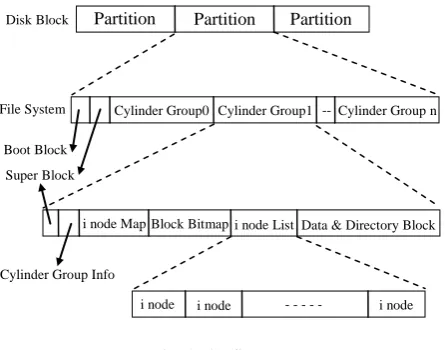
Fig. 1 File System
As shown in figure disk drive divided into one or more partition. Each partition contains file system. Partition is divided into primary & secondary partition. In primary super block & boot block separated from actual partition and these remaining part is called cylinder group (logical partition). Each file-system contains a control block, which holds information about that file-system. Super block contains a description of the basic size and shape of the file system. The information within it allows the file system manager to use and maintain the file system. Boot block contain information used to start system. i-node in the file-system is fixed length entry, which contain information about individual files. The i-node contain all information about file that is file type, file access permission bits, size of file , pointer to file’s data block. Data block which contain the information stored in the individual files[1].
3.
TYPES OF LINUX FILE SYSTEM
3.1
The Second Extended File System
(Ext2)
The Second Extended file system was devised (by Rémy Card) as an extensible and powerful for Linux. It is also the most successful file system so far in the Linux community and is the basis for all of the currently shipping Linux distributions. Ext2 is not a journaling file system, and when introduced was the first to allow for extended file attributes and 2 terabyte drives. Because Ext2 does not use a journal it has significantly less writes applied to Ext2 the disk.
• Ext2 stands for second extended file system. • It was introduced in 1993. Developed by Rémy Card.
• Ext2 does not have journaling feature.
• On flash drives, USB drives, ext2 is recommended, as it doesn’t need to do over head of journaling.
• Maximum individual file size can be from 16GB to 2TB
• Overall ext2 file system size can be from 2TB to 32TB
The EXT2 file system, like a lot of the file system, is built on the premise that the data held in files is kept in data blocks. These data blocks are all of the same length and, although that length can vary between different EXT2 file system. The block size of a particular EXT2 file system is set when it is created. Every file's size is rounded up to an integral number of blocks. If the block size is 1024 bytes, then a file of 1025 bytes will occupy two 1024 byte blocks. Unfortunately this means that on average you waste half a block per file. Usually in computing you trade off CPU usage for memory and disk space utilization[9]. In this case Linux, along with most operating systems, trades off a relatively inefficient disk usage in order to reduce the workload on the CPU. Not all of the blocks in the file system hold data, some must be used to contain the information that describes the structure of the file system. EXT2 defines the file system topology by describing each file in the system with an i-node data structure[9].
An i-node describes which blocks the data within a file occupies as well as the access rights of the file, the file's modification times and the type of the file. Every file in the EXT2 file system is described by a single node and each i-node has a single unique number identifying it. The i-i-nodes for the file system are all kept together in i-node tables[1]. EXT2 file system as occupying a series of blocks in a block structured device. So far as each file system is concerned, block devices are just a series of blocks that can be read and written. A does not need to concern itself with where on the physical media a block should be put, that is the job of the device's driver. Whenever a file system needs to read information or data from the block device containing it, it requests that its supporting device driver reads an integral number of blocks. The EXT2 file system divides the logical partition that it occupies into Block Groups. Each group duplicates information critical to the integrity of the file system as well as holding real files and directories as blocks of information and data. This duplication is necessary should a disaster occur and the file system need recovering. One benefit of the ext2fs over the extfs is the size of the file system that can be managed. Currently (after some enhancements in the VFS layer), the ext2fs can access file system as large as 4TB. In contrast to other UNIXs, the ext2fs uses a variable length directory and can have files names that are as long as 255 characters[1].
Advantages
• Because the block group contains copies of the primary control structures, it can be repaired by these copies should the superblock at the start of the disk get corrupted
• The directories entries in the ext2fs are in a singly linked list, as compared to an array with fixed entry lengths on some systems
• Due to lower write requirements, and hence lower erases, it is ideal for flash memory especially on USB flash drives. • Modern SSDs have a increased life span and additional features that can negate the need for using a non-journaling file system.
3.2
The Third Extended File System (Ext3)
EXT3 is basically just Ext2 with journaling. The aim of Ext3 was to be backwards compatible with Ext2 and therefore disks can be converted between the two without needing to format the drive. The problem with keeping compatibility is many of the limitations of Ext2 still exist in Ext3. Benefit of keeping backwards compatibility is the fact that most of the testing, Partition Partition Partition
Disk Block
File System
Boot Block Super Block
Cylinder Group0 Cylinder Group1 Cylinder Group n
Cylinder Group Info
Data & Directory Block i node Map Block Bitmap i node List
i node i node i node
--
bug fixes, and use cases for Ext2 also apply to Ext3 making it stable and fast. EXT3 enhanced file-system that has evolved from Ext2, named Ext3.The new file-system has been designed with two simple concepts in mind to be a journaling file system and to be, as much as possible, compatible with the old Ext2 file-system[17]
Ext3 achieves both the goals very well. In particular, it is largely based on Ext2, so its data structures on disk are essentially identical to those of an Ext2. As a matter of fact, if an Ext3 file-system has been cleanly unmounted, it can be remounted as an Ext2 file-system; conversely, creating a journal of an Ext2 and remounting it as an Ext3 file-system is a simple, fast operation[17].
Advantages
• Ext3 stands for third extended file system.
• It was introduced in 2001. Developed by Stephen Tweedie.
• The main benefit of ext3 is that it allows journaling.
• Journaling has a dedicated area in the file system, where all the changes are tracked. When the system crashes, the possibility of file system corruption is less because of journaling.
• Maximum individual file size can be from 16GB to 2TB • Overall ext3 file system size can be from 2TB to 32TB
3.3
C. Journaling Filesystem
Journaling file systems avoid file system corruption by maintaining a journal. The journal is a special file that logs the changes destined for the file system in a circular buffer. At periodic intervals, the journal is committed to the file system. If a crash occurs, the journal can be used as a checkpoint to recover unsaved information and avoid corrupting of file system meta-data. In order to minimize the file system inconsistencies and minimize system restart time after an unclean system shutdown, before the changes are actually made to the file system, journaling file system will keep track of the changes that will be made to the file system. The records of journaling file system changes are stored in a separate part of the file system, and the records are usually known as the “journal” or “log”. Once these journal records are safely written, the journaling file system applies these changes to the file system and then purges those records from the journaling record.
Because journaling records are written before the file system changes are made, and because the file system keeps these file system change records until they have been safely and completely applied to the file system, journaling file systems maximize file system consistency and minimize system restart time after an unclean system shutdown. When a computer using journaling file system is rebooted, the mount program will check the journal record. If the journal records have some changes that are not marked as being done, then the changes will be applied to the file systems. The mount program then can guarantee the consistency of the file systems
Advantages • Availability • Data Integrity
• Speed
• Easy Transitions
4.
TOOLS FOR LINUX PARTITION
ACCESS
Many of us use a dual-boot Windows/Linux system. However, the problem we often face is that while we can access our Windows our Windows files from the Linux partition, it is not possible to access Linux partition files from the Windows [19] [20]. Following is a way around suggested. It shows that there are three ways to do it. All by using the ext2 and ext3 file system from the window, that is with “Explore2fs” (Read-Only access), “DiskInternals Linux Reader”(Read-only access) , and the “Ext2 Installable Driver” (Read and Write Operations)[22].
4.1
Explore2fs
Explore2fs is a GUI explorer tool for accessing ext2 and ext3 file systems. It runs under all versions of Windows and can read almost any ext2 and ext3 file-system [6]. Download it from http://www.chrysocome.net/explore2fs unpack/unzip it to start the Explore2fs file browser, This now allows you to browse your Linux partition and also copy-paste those files to your Windows partition [3][22].
4.2
Diskinternals Linux Reader
DiskInternal Linux Reader is a tool that solves the problem! It allows you to browse Linux ext2 and ext3 format partitions using a familiar Windows Explorer interface, and to open and copy files from them. DiskInternals Linux Reader permits only read-only access. It does not allow you to write to the ext2 and ext3 partitions. This ensures that you cannot make changes that could prevent Linux from running later. While accessing the Linux files, DiskInternals Linux Reader completely ignores Linux file security policies. This means that it is possible to access absolutely any file on a Linux partition from Windows. DiskInternals Linux Reader can also create and open images of Linux ext2/ext3 disks. DiskInternals Linux Reader is another program that enable you to access your Linux partition from Windows. You can download the software at http://www.diskinternals.com/linux-reder/. Once install, you can run the program from your start menu. The interface is like Windows Explorer and it’s easy to use. You can view your ext2/ext3 Linux partition but no write mode is allowed. Like Explorer2fs, you can only preview your files on your Linux partition after you copy it to your Windows partition[22].
4.3
Ext2 File System Drive
To access Linux partition from windows one tool available is EXT2Fsd. EXT2Fsd will give you both read as well as write access. EXT2Fsd is open source ext2/ext3 driver for windows. This driver can be installed on windows 2000/XP/Vista/7 both 32bit and 64bit. Using Ext2FSD, all of your EXT partitions will be displayed just like the native NTFS or FAT partitions making it accessible from Windows explorer[22].
5.
SECURITY ANALYSIS
There are various ways are available to access the data from the file system. In this research we already discuss the three different ways to access Ext2 And Ext3 file-system with the help of different tools[18].
• “Explore2fs” (Read-Only access),
• “Ext2 Installable File System Driver” (Read and Write Operations).
As we know every tool has its own advantages and disadvantages. To identify the secure depth of file system here we perform the following test with static values.
• File Explore Test. • File Permission Test.
• File Modification Test.
Security analysis the nothing but the checking of file-systems capability to secure the data from the access of data by different tools that want to read or write data to or from file system.
5.1
File Explore Test
The test performs on the basis of different type of file explored by the tool. Here we consider three different type of file for the test. Regular Files, Hidden Files and System Files. The efficiency static values given based on this file types are,
• Success full explore Regular files(all) then the Static ratings = 50% efficient
• Success full explore Hidden files(all) then the Static ratings = 25% efficient
• Success full explore System files(all) then the Static ratings = 25% efficient
5.2
File Permission Test
The test performs on the basis of different permissions of the regular file explored by the tool. Here we consider three different permissions of regular file for the test. Read Only Access, Read, Write Only Access, and Read-write with Execute Access. The efficiency static values given based on this file access permissions are, note the test for Regular files only not applied to other file types.
• Success full Access of Read Only files(Regular) then the Static ratings = 30% efficient
• Success full Access of Read & Write Only files(Regular) then the Static ratings = 30% efficient
• Success full Access of Read-write with execute files (Regular) then the Static ratings = 40% efficient.
Fig. 3 File Permission Test
5.3
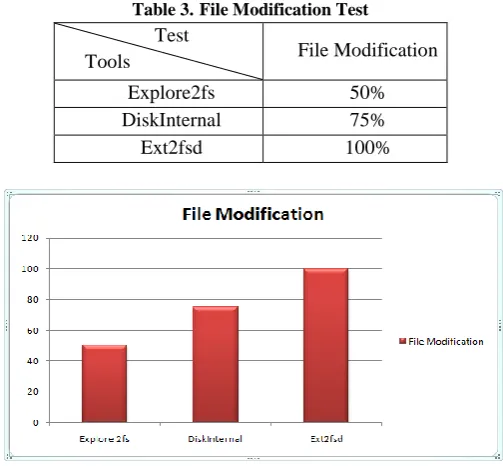
File Modification Test
[image:4.595.306.557.120.351.2]The test performs on the basis of modification perform on different type of files with or without application available. Here we consider three different types file for the test. Regular Files, Hidden Files and System Files. The efficiency static values given based on modification perform on this file, note the test for all three types of file is only to check whether the modification perform with or without application tool.
Table 3. File Modification Test Test
Tools File Modification
Explore2fs 50%
DiskInternal 75%
Ext2fsd 100%
Fig. 4 File Modification Test Table 2.File Permission Test
Test
Tools File Permission
Explore2fs 72%
DiskInternal 76%
Ext2fsd 90%
[image:4.595.38.292.371.628.2]Fig. 2 File Explore Test
Table 1.File Explore Test Test
Tools File Explore
Explore2fs 70%
DiskInternal 84%
Ext2fsd 100%
[image:4.595.310.562.477.710.2]6.
COMPARISION
7.
EFFICIENCY OF TOOLS
After completion of security analysis on all three tools with different tests now we can calculate one best tools from all three based on the efficiency result of test that we perform previously. The average analysis result of all three tools are shown below.
Now the efficiency chart shows that Ext2fsd is best tool for access Linux partition till various tools available.
8.
ACTUAL SYSTEM
8.1
What the actual system is?
We hereby introduce a new file-system in which we assure the safety of data and as well the security of data from the unrestricted person to retrieve the data illegally. Here we divide the hard-disk into basically two partitions one consisting of OS (basically LINUX) and other is the partition that contains all the data of the PC as shown in the fig3.1. The other partition that contains the data is basically secured with the algorithms that already exists to encrypt the data as well as to secure the partition with the password.
8.2
How can we achieve the Secure DATA?
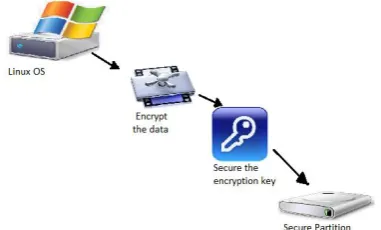
The file-system works since the start-up of the PC. Any work done by the user on the PC basically in the directories USR, ETC, HOME in the LINUX OS is copied to partition after each and every time interval. The Data is basically encoded using any encryption algorithm, with the use of secure encryption key (either by asymmetrically (recommended) or symmetrically algorithms) and transferred to the partition and the partition can be accessed only by the authorized person who has the decryption key and the password key of the partition key of the partition [2]. So it is necessary to use the better key to safeguard the partition and keep it safe.
[image:5.595.317.546.68.251.2]The figure Encryption of data and transfer of data to the partition and figure Decryption of data and retrieving data from the partition shows the encryption and decryption of data, that how the data is transfer to the partition and also how it is retrieved from the partition.
[image:5.595.47.293.98.348.2]Fig. 8 Encryption of data and transfer of data to the partition Fig. 7 General concept.
Table 5.Efficiency Of Tools
Efficiency
Tools
Efficiency
Explore2fs
64%
DiskInternal
78.34%
Ext2fsd
96.66
Fig. 6 Efficiency of Tools Table 4.Comparison Of Tools Test
Tools
File Explore
File Permission
File Modification
Explore2fs 70% 72% 50%
DiskInternal 84% 76% 75%
Ext2fsd 100% 90% 100%
[image:5.595.43.295.460.715.2] [image:5.595.347.538.503.618.2]8.3
How the transferring takes place?
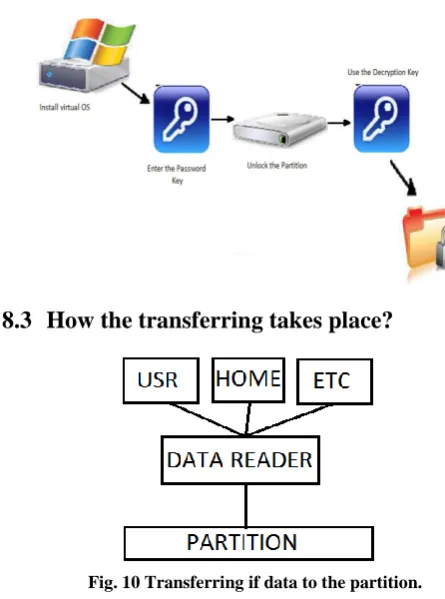
The data transferred from the OS to the partition as show in the Figure transferring if data to the partition. The data from the USR, HOME, ETC directory are transferred to the partition by the DATA-READER. The DATA-READER basically starts with the start-up of the PC and transfers all the data/work done by the user in these three directories to the partition in safer way.
9.
CONCLUSSION
This paper compares secure access provided by the different Linux partitions specially Ext2 and Ext3. For comparission different security tests are conducted. After the performing security test and comparison of all tests and analyzing all results of these compression it is observed that no current tool provides 100% access to Linux file system.
After observing efficiency off all tools available it is noticed that Ext2fsd provides efficiency up to 96.66% for Linux based partitions while it can be reached up to 100% for other operating system based partitions. So it is concluded that Ext2 & Ext3 Linux based file systems are more secure than other operating system based partitions.
In future a tool is developed to access Linux based partitions which will provide efficiency up to 100% this tool also gives a partition type which is more secure than Ext2 and Ext3. we encourage you to take a look at Linux. It is a best to make solution for storing and securing the data of Linux in to another system. That my research will do.
10.
REFERENCES
[1] W. Richard Stevens And Stephen A. Rago, “Advanced Programming in the UNIX Environment” Second Edition June 17 2005, Addison Wesley Professional, ch 1 and 2, pp 09-210
[2] HAN Hua, GUO Chaoyang, DAI Yafei, YUE Bin, LI Xiaoming,” A Scheme to Construct Global File System” Peking University Beijing, China 100871, 2002 IEEE,
China National Key Fundamental Research Grant G1999032708
[3] Red Hat
http://www.redhat.com/mirrors/LDP/LDP/tlk/fs/file-system.html
[4] Priscilla Oppenheimer. 2008. New Technologies File System (NTFS).
[5] A. Aho, J. Hopcroft, and J. Ullman. 1974. The Design and Analysis of Computer Algorithms. Addison-Wesley,. [6] Daniel P. Bovet And Marco Cesati. 2007. 2nd Edition “Understanding the linux Kernel”. O’Reilly Publication. Ch 17, Pn 574-607.
[7] Stephen C. Tweedie, ’98.” Journaling the Linux ext2fs Filesystem”, a paper from LinuxExpo.
[8] A fast file system for UNIX. McKusick, Joy, Leffler and Fabry. Aug. 1984. ACM Transactions on Computer Systems, vol. 2.
[9] Ext2 File System
http://www.linux-tutorial.info/modules.php?name=MContent&pageid=272 [10] R. E. Tarjan March. 22 (1975), Efficiency of a good but not linear set union algorithm, J. Assoc. Comput., 215– 225.
[11] M. A. Weiss, 1994, Data Structures and Algorithm Analysis, Benjamin Cummings, Redwood City, California, Second Edition.
[12] Dominic Giampaolo, “Practical File System Design:The Be File System”, BLANK, Pn 08-247.
[13] Xiang Cai and Yuwei Gui, “Exploiting Unix File-System Races via Algorithmic Complexity Attacks”, Stony Brook University.
[14] Ashish Aggarwal and Pankaj Jalote. Nov. 2006. Monitoring the security health of software systems. Software Reliability Engineering, 2006. ISSRE ’06. 17th International Symposium on, pages 146–158.
[15] Claybrook, Billy G. File Management Techniques. John Wiley & Sons.
[16] Ext3 File System
http://frankdrews.com/public_filetree/cs458_558_SQ03/stude ntpapers/shangyouzeng.pdf
[17] Song-Hwa Park, Tae-Hoon Kim, Ki-Dong Chung, "Fast Mounting and Recovery for NAND Flash Memory Based Embedded Systems," EVC Workshops 2006, LNCS 4097, pp.710-720, 2006.
[18] Kazuhide Fukushima and Shinsaku Kiyomoto, , May 2010 “Security Analysis of Access Linux Platform”, KDDI R&D Laboratories Inc., Fujimino, Japan, IJCSNS VOL.10 No.5.
[19] ACCESS Co., LTD. The access linux platform.
[20] H.C.Rao and L.L.Peterson, “Accessing files in an INTERNET: The JADE File System”, IEEE Trans. Sofiw. Eng. 19, 6, June 1993, pp. 61 3-624
[21] B. C. Neuman. “The Prosper0 Fill: System: A Global File System Based on the Virtual System”. Computing Systems, 5(4), 1992, pp. 407-432.
[image:6.595.53.276.72.372.2][22] Linux platform Access http://www.howtogeek.com/112888/3-ways-to-access- your-linux-partitions-from-windows/