Implementation strategies for integrated office information
systems.
NOBLE, Faith.
Available from Sheffield Hallam University Research Archive (SHURA) at:
http://shura.shu.ac.uk/19360/
This document is the author deposited version. You are advised to consult the
publisher's version if you wish to cite from it.
Published version
NOBLE, Faith. (1993). Implementation strategies for integrated office information
systems. Doctoral, Sheffield Hallam University (United Kingdom)..
Copyright and re-use policy
See
http://shura.shu.ac.uk/information.html
Sheffield Hallam University Research Archive
1 0 0 3 4 4 7 9 3 7 TELEPEN
III
Sheffield City Polytechnic Library
ProQuest Number: 10694241
All rights reserved
INFORMATION TO ALL USERS
The quality of this reproduction is dependent upon the quality of the copy submitted.
In the unlikely event that the author did not send a com plete manuscript and there are missing pages, these will be noted. Also, if material had to be removed,
a note will indicate the deletion.
uest
ProQuest 10694241
Published by ProQuest LLC(2017). Copyright of the Dissertation is held by the Author.
All rights reserved.
This work is protected against unauthorized copying under Title 17, United States C ode Microform Edition © ProQuest LLC.
ProQuest LLC.
789 East Eisenhower Parkway P.O. Box 1346
Implementation Strategies for Integrated Office Information Systems
Faith Noble
A thesis submitted in partial fulfilment of the requirements of
Sheffield Hallam University
for the degree of Doctor of Philosophy
Implementation Strategies for Integrated Office Information Systems Faith Noble
ABSTRACT
This thesis is an investigation into the implementation of computer-based office information systems in organizations. The research methods employed are both qualitative and quantitative, and include fifteen case studies and a postal survey. A review of the literature and the case study research indicated that organizations are taking advantage of the integrative capacity of new technology in order to implement integrated office systems, but generally with little strategic focus or organizational change. A framework for the identification of strategic uses, based on information-processing theory, is presented, together with a discussion of their implications for organizational change.
CONTENTS
Page 1. Research Problem and Methods
1.1 The practical problem 1
1.2 Office information systems 2
1.3 Overview of thesis 3
1.4 Research methodology 4
2. Developments in Office Systems
2.1 Nature and functions of offices 7 2.2 Developments in office systems 12 3. The Organizational Uses of Office Systems
3.1 The benefits of IT 23
3.2 The objectives of office automation 24
3.3 The strategic use of IT 26
3.4 Strategic uses of office systems 29 The Case Studies
4.1 Snapshots 38
4.2 Extended studies 45
4.3 Conclusions from the case studies 72 5. The Interaction of Technology and Organization:
A Process Model of Implementation
5.1 Perspectives on technology and organizations 75
5.2 Technological impacts 76
5.3 The managerial perspective 78 5.4 The ’impact’ of office systems on organization structure 79
5.5 The processual perspective 82
5.6 Structuration 87
5.7 Giddens’ theory of modem organizations 88 5.8 Structuration theory applied to management processes 90 5.9 Structuration theory applied to IT 91 6. Implementation Strategies for Integrated Office Systems
6.1 Review of existing implementation strategies for office systems 95 6.2 Discussion of implementation approaches 101 6.3 Organizational transformation 104 6.4 OS, first-order and second-order change 107 6.5 Implementing organizational transformation 110 6.6 Discussion of OT implementation 112 6.7 Implementing integrated office systems 114
Conclusions 118
Appendix 123
Chapter One Research Problem and Methods
1.1 The practical problem.
Peter Keen (1991) has estimated that information technology now represents more than 50% of all capital investment in the U.S. At the same time, there is increasing doubt about the effectiveness of IT investment. The MIT Sloan School of Management Corporation in the 1990’s progamme, for example, notes that investment in IT in the U.S. has not been accompanied by improvements in white collar productivity (Scott Morton, 1991). A study by Franke (1989), both of the U.S. financial industry at aggregate level and of an individual bank, showed that increasing IT investment has coincided with declining capital productivity and profitability.
At the level of individual organizations, the problem is expressed in terms of major difficulties in implementation and failure to achieve the benefits anticipated from the investment. It is difficult to obtain accurate figures on the extent of the problem because most organizations don’t like to publicise their failures, but estimates have been made. Willcocks and Mason (1987) cite a study carried out in 1984 for the DTI and Institute of Administrative Management, which estimated that 20% of expenditure on IT was wasted, and reports by the Comptroller and Auditor General which noted major losses in public sector IT projects. A survey of computer integrated manufacturing by A. T. Kearney (1989) found widespread failure to achieve anticipated benefits. Although data processing is a well-understood area of IT, large-scale development disasters are still not unknown, such as the £1.3 billion DSS computerised benefits system cost overrun (The Guardian, 6 July 1989; The Independent, 7 June, 1993) and the £7 million computer system at the Passport Office which increased delays in handling applications and provoked a strike by staff in the summer of 1989 (The Guardian, 5 August 1989). More recently, there have been the London Ambulance Service information system disaster, which resulted in several deaths (The
Independent, 27 September 1992), and the cancellation by the London Stock Exchange of the Taurus share settlement system project at an estimated cost of £400 million, and a threat to the future of the Stock Exchange as an institution and the City of London as Europe’s major financial centre (The Independent, 19 June, 1993).
More common than spectacular failures are disappointing, under-utilised systems and low levels of take-up, especially of office information systems. A study by the Butler Cox
Foundation (Farmer, 1987) of office systems in more than 400 organizations in Europe and the U.S. found that ’About one in ten installations is a clear success; one in ten is a clear failure; and the remaining eight out of ten installations are non-events’. In a recent survey by the Institute of Administrative Management and Touche Ross (1991), a third of users did not think that office automation had yielded significant benefits to their organisations. Although most organizations had pursued mainly efficiency benefits, there were direct savings in less than 15% of projects.
The main sources of these problems are now widely recognised as not technological but
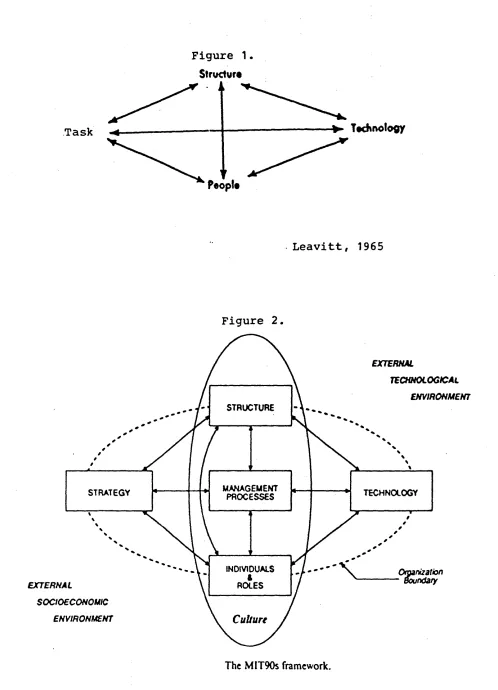
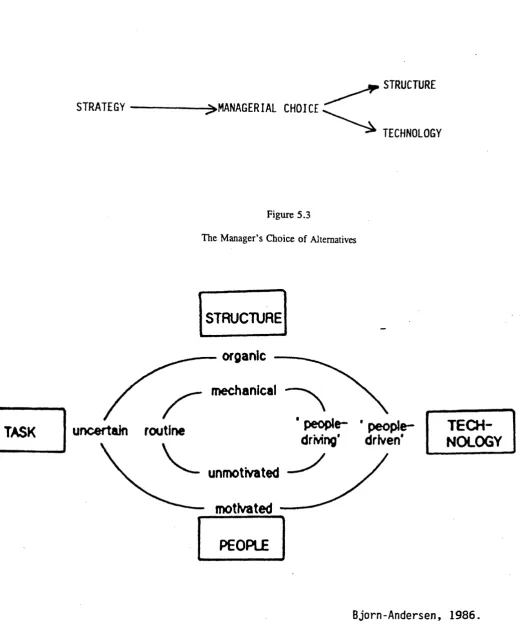
failure to address user and business needs. In large part, this is a failure of implementation approach. Implementation, defined broadly as the entire process of introducing new technology into an organization (Walton, 1989) is known to have a major effect on outcomes, in terms both of system success/failure and impacts on users and organizations (Klein, 1986; Kling and Iacono, 1989). In the ’traditional’ system development life cycle implementation is seen as the stage after design and testing, when the completed system is handed over to users. A wider perspective on implementation sees it as including strategic and organizational change, as well as technological. An example is the Leavitt diamond (1965) (Fig. 1.1), a well-known heuristic device used to illustrate the interdependence of technology, task, organization, and people. This was adapted by the MIT Corporation of the 1990s programme as the framework for the entire project (Figure 1.2) (Scott Morton, 1991). In their version, ’task’ becomes strategy, seen as the summation of all the organization’s tasks, culture is added, and the role of management processes is to integrate them all. Implementation is the management process in introducing new technology.
A basic argument of this thesis is that implementation has two equally important aspects, which can be called for now the rational-technical and the political-interpretative. So far, they have not been very well brought together. The IT-corporate strategy literature of the 80s concerned itself with finding strategic applications for IT, without paying much attention to the issue of how to implement them. The MIT programme also, to judge from the publicly available work, was more concerned with developing frameworks, raising awareness and vision among senior executives about the potential of IT, than with implementation. There are signs that this is changing; that the perceived problem now is less what to do with the technology than with how to manage the organizational change necessary to exploit it (McFarlan, 1992; Benjamin, 1993).
At the same time, there is an extant long tradition of research and practice on introducing technology, of which socio-technical systems, job redesign, and soft systems methodology are notable examples, and a body of work on managing organizational change, particularly from an Organization Development perspective, both of which deal with the ’political’, people, ’soft’ or ’messy’ aspects of implementing change. Operational Research, Management Information Systems, and information systems researchers a) have discovered for themselves in their own research the significance of the social and organizational aspects of IT use and introduction; b) have increasingly turned to the body of theory and practice just discussed, as well as other areas of behavioural science, in order to explain their findings and obtain prescriptions for good practice. This has been a difficult exercise for many coming from the IT end because of their inadequate grounding in social science, and because of the major disagreements among social scientists over their own paradigm.
1.2 Office information systems.
Figure 1.
Structure
>> Technology
Leavitt, 1965
Figure 2.
EXTERNAL
TECHNOLOGICAL ENVIRONMENT
EXTERNAL
SOCIOECONOMIC
Culture
ENVIRONMENTINDIVIDUALS ROLES
TECHNOLOGY MANAGEMENT
PROCESSES STRUCTURE
STRATEGY
The MIT90s framework.
[image:9.625.62.560.35.725.2]of the more notable being the DTI OA pilot projects (KMG Thomson McLintock, 1986), Wainwright and Francis’ 1984 study of five organizations, Long’s 1987 survey of new office technology, HUSAT’s work for the European Foundation (Eason, 1985), and the National Computing Centre survey of OS in the U.S. and U.K. (1986). A prescriptive literature on implementation also developed, much of it sponsored by the NCC. There were also studies of the effects of computers on white collar work (Webster, 1990; Liff, n.d.; Thompson, 1989). On the whole, the systems studied were not strategic and did not involve major organizational change. Although radical organizational implications for OS had been anticipated for some time (Price, 1979), the systems were largely departmental and addressed to lower level workers, so that the effects on organizations which were observed were mainly at job-level and involved secretaries, typists and clerks. Because these systems were still in the early stages of development, they had little impact outside those departments, and the effect on organization structure was minimal (NCC, 1986). OS as such had rarely reached management level, even when that was part of the plan. However, the technology and its uses have both moved on greatly since most of this work was done. One phase of the present research therefore involved finding out about recent
developments in OS and updating knowledge about the implementation and ’impacts’ of OS by studying current examples.
The main purpose, however, was to delineate an implementation strategy for office systems, which would take into account both the rational and political aspects. In an earlier review of office systems development methodologies (Noble, 1991), I had compared seven methodologies or approaches, and had found that on the whole those which were strong on meeting business needs were weak on user needs and organizational/social issues, and vice versa. I concluded that there was a need for a methodology or approach for contemporary office systems which could address both sides. This was the broad aim of the current project (although I would eschew use of the word ’methodology’ both because it is technically incorrect and because it suggests a rigour and certainty which is not justified by our current state of knowledge).
1.3 Overview o f thesis.
case studies are presented at this point in Chapter Four for reasons which are discussed below. The second half of the dissertation adopts the more political or interpretative perspective, and, following the MIT schema, is on the theme of the relationship between IT/OS and
organizations and people. Chapter Five looks at these issues from a descriptive/theoretical point of view, discussing the ’emergent’ perspective on implementing technology in organizations and exploring the contribution to it of structuration theory. Chapter Six reviews the prescriptive implementation literature with a focus on managing change, and outlines an implementation approach for strategic office systems. In the Conclusions I summarise my findings and their implications for further research.
1.4 Research methodology.
Because the research problem included such diverse aspects, different methods were required to investigate them. Case studies, discussions with practitioners, consultants, suppliers, and other researchers, and meetings of the British Computer Society Office Automation Specialist Group provided valuable information on technological developments, uses, and problems with office systems. Data from recent surveys conducted by the National Computing Centre, Price- Waterhouse, and the Institute of Administrative Management were used to gain a fuller picture of the extent of dissemination or take-up of OS nationally and internationally. I supplemented this by a postal survey of the MDs and CEOs of 250 leading UK companies, in order to find out senior managers’ perceptions of the potential benefits of OS and their relation to business strategy.
Case studies were conducted in fifteen organizations which were currently implementing, or had recently implemented office systems. Half were brief ’snapshots’, based on a presentation given to a public meeting, one visit to the organization, or both. These contributed insight into how OS are currently being used, the technology and strategy side, but generally did not cover implementation in any depth. The other case studies were considerably more extensive, involving interviews with a number of different people in the organization, usually over a period of
months, and provided material on a wider range of implementation issues. As implementation is a change process, the most effective way to study it is through longitudinal studies in
organizations, a contextualist research method which ’has its roots in pragmatism ..., has its focus on the event in its setting’ (Pettigrew, 1985). I discuss the role of process models and the implied methodology for using them at greater length in Chapter Five. The case study questions covered
1) the inception of the OS, where the initial idea came from; 2) the reasons for introducing OS, benefits sought, and strategic aim, if any; 3) the design of the system, especially type and degree of integration, applications, and the work and the employees affected; 4) the implementation strategy or approach employed (both in intention and in fact); 5) the problems experienced and how they were dealt with; 6) results or outcomes to date in terms of benefits realised and disadvantages; 7) the relation between the introduction of the OS and organizational change with
respect to work roles and organization structure.
The case studies represent a variety of organization types, public and private, large and small, service and manufacturing. The sample was not selected with the intention of testing hypotheses, but to provide a variety of settings, because of the aim of observing how OS are currently being used. The number was limited by what was reasonable for one researcher to handle. However, in the later stages of the research, an attempt was made to find organizations which were using OS technology in ’more advanced’ ways. The resulting sample includes a local authority department, two national government departments (one of which was later privatised), three manufacturing companies - one local, one part of an international group, and one part of a major multinational - and two major multinational IT suppliers.
The case studies provided qualitative information from semi-structured interviews with senior managers, wherever possible, with IT and project managers, user department heads, and direct users. Documentation such as project proposals, evaluation reports, and user handbooks were also obtained. In most cases, the organizations were visited several times over a two-year period, which provided an overview of the implementation process while events were reasonably fresh in the minds of participants.
The use of the case study material is descriptive and exploratory rather than explanatory (Yin, 1984); that is, it illustrates and generates hypotheses (Eisenhardt, 1989), but does not test hypotheses or choose between alternative theoretical explanations (Lee, 1989). Because some of the cases were very brief and illuminated only the technology and strategy issues, while others provided material on implementation and organizational change as well, the discussion of the case studies is placed after the technology and strategy chapters and before the implementation
chapters.
The second half of the dissertation raises issues which could perhaps have been better explored empirically by using considerably more in-depth methods, such as participant
observation in one or more organizations over a longer period of time. This could have produced far greater richness of detail, but due to limited time for the research, this would have been at the expense of the breadth which was gained by studying organizations in several different sectors and at different phases in their use of office systems. There was a choice to be made here. Since integrated office systems are still in their early stages, it seemed preferable to learn from the experiences of a wider variety of organizations, accepting the limitations of this approach, while indicating how theory and practice could be advanced in future by other approaches.
academic traditions to bear on the practical problem of implementing office systems. In
organizing and analysing the material, I have attempted to make an original contribution in each of the broad areas covered, and in integrating these at the end.
Chapter Two Developments in Office Systems Introduction
This chapter examines the nature of the office and the role of information in it, and develops an information-processing view as the basis of a classification of offices. Office information systems are distinguished from other applications of IT, and changes in the use of computers in the office over the past three decades are examined, showing the increasingly integrated character of contemporary OS.
2.1 Nature and functions o f offices.
2.1.1 Definitions and typologies.
The study of office systems must begin with some conceptualisation of the office. Offices vary in many respects: the occupations of those who work in them, the kinds of work done, size, physical environment, the sorts of organizations they are part of and their functions in those organizations (Pava, 1983; Doswell, 1983; Hirschheim, 1986). However, what offices share is that they process information rather than producing or handling tangible physical objects
(Hirschheim, 1985b; Doswell, 1983; Wainwright and Francis, 1984; Newman, 1987; Tsichritzis, 1986), and this makes them obvious targets for information technology.
Because of the great variety of offices and office work, there are a number of typologies which have selected different aspects of the office as bases of differentiation. Doswell (1990) for example shows that the office has been modelled as: 1) a place and its equipment, 2) activities that occur and who performs them, 3) activity types or functions, 4) communication flows, 5) conversation, 6) procedure flows, 7) decision making, 8) databases, and 9) agents. He concludes that no one model is sufficient, as an office consists of all of these aspects. Hirschheim (1986) distinguishes typologies according to their underlying theoretical perspective, which can be seen as a continuum, ranging from the ’analytic’ perspective at one end to the ’interpretative’ at the other.
The former sees the office as an environment where people perform a variety of functions to support the successful running of the organization. The functions are conceived of in terms of largely formal and structured actions or activities. The latter conceives of the office in terms of mostly unstructured and informal human action (p. 30).
will be discussed here.
Software development has tended to focus on office activities because activities are observable, relatively unambiguous and measurable, and easier to apply technology to
(Hirschheim, 1985b). In the activities view, the information processing task is conventionally broken down into information capture, storage, manipulation, retrieval, and distribution (Hirschheim, 1986; Wainwright and Francis, 1984). Office work is seen as comprising sets of tasks, such as ’production of correspondence and other text, taking messages and passing them on, filing and record keeping, time scheduling and diaries, dealing with incoming and outgoing mail’, etc. (Antill and Clare, 1991, p. 13).
Office activities are also commonly classified in the IS literature according to the routineness of the work (and the closely related issue of the type of worker), probably because routine, structured work lends itself to computerisation. Newman (1987) thus classifies office tasks as either procedural (routine; ways of dealing with recurring tasks) or problem-solving (dealing with the unexpected). He points out however that there are many procedural elements even in problem-solving work, to which computer technology can be applied. Panko and Sprague’s typology of offices (1982) is based on the routine/non-routine distinction: Type I offices are 1) volumeroutine high volume of transactions, routine information processing -mainly clerical workers; Type II offices are concerned with policy-making, planning, R&D, finance - mainly managerial, professional and non-clerical staff. Wainwright and Francis located types of worker on a continuum, with those who organize and disseminate information
(professional, managerial, technical) at the creative end, and those involved in storage and retrieval (mainly typists, clerks, and secretaries) at the routine end. Pava (1983) developed different methodologies for computerising routine and non-routine office work.
An exclusive focus on office activities can result in the computerisation of procedures as they currently exist under the manual system, losing many of the potential benefits of applying technology (Simons, 1984; Tsichritzis, 1986). It may also underestimate the amount of routine information-processing carried out by managers and the amount of non-routine work handled regularly by ’lower-level’ workers, thus rigidifying existing organizational roles. In any case, the routine/non-routine distinction is more appropriate to the data processing era than to today’s technology which can be used to support, not automate, many non-routine tasks.
Types of activities performed and by whom are less significant from a business perspective than the purpose or function of the office in the organization. Gunton (1983) lists seven types of office, based on a functional classification:
Managerial office - direction and co-ordination
Transaction office - group of clerks receives and processes documents - high-volume processing
Working professional office - individual tasks together constitute the function of the office
Casework office - clerks responsible for progress of one or more cases
Engineering office
Machine room - like typing pool
Physical handlers - e.g. post rooms, stationery stores.
Gerstein (1987) has a similar functional typology; four of his types correspond to Gunton’s: Administrative office - ’general office’, including executive and
managerial
Back office - processes transactions Professional - medical, dental, legal. Technical office - design, scientific But he adds:
Service office - provides information to customers, suppliers, or members of the organization.
Newman (1987) proposed a functional classification which is less descriptive and based more on the way the office supports the business:
1) Contract negotiation: selling and promoting products, purchasing materials, recruiting staff, negotiating with labor unions.
2) Contract implementation: paying bills, invoicing, paying staff.
3) Organization of work: planning, assigning tasks, scheduling activities, monitoring results — all of the functions directly associated with management.
4) Support: typing, mail collection and delivery, reception, secretarial support.
5) Supplying information to clients and customers. Researching, collecting and processing data, writing, consulting. Generally through either project or case work (newspaper, solicitor).
Newman notes that while ’the first four functions exist within every organization ... information supply is prevalent in organizations within the information industry’.
2.1.2 An information-processing view.
Both the activity and functional typologies are more descriptive than analytical, and derive more from an IT perspective than a management or organizational one. If we apply a systems perspective, an organization is seen as an open system seeking to maintain its integrity and stability while interacting with its environment. Information is required to deal with or reduce variety and uncertainty (Ashby, 1956), which can arise from three sources:
task/technology (Perrow, 1971; Galbraith, 1973), the environment, and the interdependencies between tasks which require co-ordination (Thompson, 1967; Tushman and Nadler, 1978). Uncertainty, and therefore information-processing needs, are greater: the greater the complexity of the task, the more dynamic the environment, and the greater the interdependence among subunits. The main function of the office is to handle the organization’s information-processing needs.2
A parallel view of the organization sees it as consisting of three main aspects: an operating or technical core concerned with performing primary tasks (’production’), an outer ring or
strategic level which deals with the environment, and a co-ordinative level which mediates between the two and integrates specialised activities (Kast and Rosenzweig, 1974; Parsons, 1964). Organizations may or may not be formally structured so that units focus around these three basic aspects; usually they are not. Lawrence and Lorsch (1967) have discussed the organization design implications of the core/boundary distinction for structural differentiation and integration.
Some typologies of offices reflect these different kinds of information processing needs and aspects of organizations. Thus, Butera and Bartezzaghi (1983) identify two main functional types of offices: 1) main process offices which perform a primary task; 2) control and co ordination offices, which are mainly concerned with managing organizational units. The DTI reports made a similar distinction between line and support activities and added a forward planning function: 1) line - client services, such as sales, orders, deliveries, after-sales support); 2) support services - resource management: staff, buildings; 3) future options - R&D, corporate planning.
In examining the strategic use of IT, Porter (1985) and Porter and Millar (1985) also made a basic distinction between primary and support functions:
primary activities are those involved in the physical creation of the product, its marketing and delivery to buyers, and its support and servicing after sale. Support activities provide the inputs and infrastructure that allow the primary activities to take place.
Porter and Millar took into account the information intensity of both the product and the process. The greater the information content of the product and of the processes in the primary activity, the greater the relevance of IT to competitive advantage.
Besides primary and support offices, the information-processing view points to the importance of boundary-spanning offices (such as Newman’s ’contract negotiation’ office), which deal with the environment, either at the immediate interface with the customer or supplier, or in terms of surveillance and long-range planning. Marketing, sales, service, links with suppliers and distributors, and corporate planning and much top management activity is concerned with the environment, although at different levels and with different time horizons.
From the information-processing perspective therefore there are three main categories of offices:
primary (perform the core value-adding task of the organization), boundary-spanning,
co-ordinative (manage the relations between the other two, and among organizational information systems. This indicates one of the limitations of information systems. Nevertheless equivocality is an an important issue in organization design from an information-processing perspective (Daft and Lengel, 1986).
units).
This simplified scheme focuses on the functional importance of the office’s work to the organization, allows one to consider the industry dimension via the information intensity of the product and primary processes, and directs attention to the possibilities for strategic office systems.
The scheme can be elaborated as follows:
I. Primary. In industries where the information component of the primary activity is high, the main activity of the organization is carried on in offices - e.g. financial services, information services, government, professionals (solicitors, architects, general practitioners). These core offices may be front-office - deal directly with the customer or client, back-office - process orders, claims, accounts, records, or both at the same time (especially in small organizations). Tasks will be both routine and nonroutine. Even in industries with tangible products, a large amount of information processing goes on, both indirectly and directly supporting manufacturing operations.
II. Co-ordinative. All industries have administrative offices, which support the organization as a whole. They include functional departments such as personnel, payroll, accounts, as well as the executive functions of planning, control and co-ordination. In a small organization these
functions are combined in one general managerial office; larger organizations typically have large departments, often with several subdivisions, devoted to each function. These are generally back- office in that clients, customers and suppliers normally do not have access to them; they are concerned with the internal functioning of the organization.
III. Boundary-spanning. In all industries the main activity of the organization is necessarily supported by boundary-spanning offices which handle inputs and outputs, such as sales, service, purchasing. Their importance to the business varies, depending on the industry - in some they are critical for survival because they are closely linked to the success of the primary activity (examples are booking services for airlines, hotels, and theatres; raw material procurement in some industries [Porter 1985]). They too usually have front-office and back-office aspects but they are often combined in the same physical space.
2.1.3 Interpretivist and social action perspectives
The information-processing view of the organization is analytical and rationalistic; it reflects the organizational imperative view of the relationship between organizations and information systems (Markus and Robey, 1988) and a technical as opposed to a political or critical view of the nature of management and organization (Reed, 1989). It is particularly useful in thinking about information systems in strategic terms, as I will attempt to show in the next chapter, but it is only partial.
does not become information until a meaning is attached to it by a human observer. Information can be defined as a symbol to which a meaning is attached (Checkland and Scholes, 1990); it therefore depends on interpretation, which is itself dependent on social norms including language. Further, information is itself highly symbolic (Feldman and March, 1981) and a source of power. The social character of information indicates the possiblity of differences of interpretation and interests, the complexity of office work and the potential difficulties in implementing
technologies which handle it.
Writers including Suchman and Wynn (1984) have demonstrated the highly social and context-dependent character of office work, where informal interaction is often an essential aspect of getting the work done. Office work is often co-operative, unstructured, discontinuous, and rich in variety. Office information systems then need to be seen as social action systems with a language and organizational context, not just as technical systems (Lyytinen et al., 1991).
Hirschheim (1985b) observes the following differences between the analytic and interpretative perspectives:
There is a danger of going so far down the interpretivist track, however, that one overlooks the existence of structural constraints on human action. An adequate account encompasses both the rational-analytic aspects of office systems, ie. the intentions behind the introduction of
technology, which may act as constraints, and the way that technology is interpreted and shaped by social actors at different organizational levels. This point is developed further in Chapter 5. 2.2 Developments in office systems.
2.2.1 Definition of office information systems.
Office systems can be defined as the convergence of computers, telecommunications, and office machines, used to support office functions and activities (Olson and Lucas, 1982; Jarrett, 1984; Hirschheim, 1985b; Long, 1987). Beyond this, there is not much agreement as to what office systems are or how exactly they differ from other kinds of information systems, although a difference is generally perceived. Confusingly, the terms ’office automation’, ’office systems’, and ’office technology’ are used by different writers to refer to what appears to be the same thing (Hirschheim, 1985b). Some writers simply provide a list of facilities, including word processing, electronic mail, and electronic filing (Boddy and Buchanan, 1986; Lucas, 1981). This is a
Analytic
Office operations Deterministic, rational, overt Non-deterministic, political, Interpretative covert
Agent, culture
Shared social meaning of actors
Symbolic, non-empirical Phenomenological Qualitative
Understanding Organization as:
Office action Manifest behaviourStructure
Research paradigm Research methods Focus
Observable, empirical Formal models, empirical Quantitative
Analysis
technology-based, not a business definition and reflects an activities view of the office. We clearly need a good classification of the applications of information technology (Mason, 1984). 2.2.2 Analytical approaches.
Some analytical approaches to computer applications have been based on Anthony’s (1965) structural model, which divides management activity into operational control, management
control, and strategic planning. The degree of structuring of the activity is often also taken into account. Thus, Lucas (1982) classified information systems according to Gorry and Scott Morton’s framework for decision support systems. The dimensions are the nature of decisions and type of managerial function (Fig. 2.1). Transaction processing falls outside the framework altogether because it is routine clerical work and not managerial. MIS are seen as supporting management control and strategic planning decisions. Lucas noted that most IS so far were in the structured operational control cell because ’these problems are similar in many organizations and are among the most easily understood’.
Figure 2.1
Types of Information Systems
Adaptation of the Gorry and Scott Morton Framework
Transaction processing Routine clerical
Type of Function
Decisions Operational Control Management Control Strategic Planning
Structured Order processing Budgets Warehouse location Accounts payable Personnel reports Transportation
mode mix
Semistructured Inventory control Analysis of variance Introduction of
Production planning new product
Unstructured Cash management Management of Planning for R&D personnel
After Lucas 1982
Churchill, Kempster and Uretsky (1969), using the dichotomies structured/unstructured and planning/control, developed ’a hierarchy of computer applications based not only on increasing levels of sophistication but also on the outputs of lower types being necessary inputs for higher types’ (Figure 2.2). Types 1 and 2 are clerical systems, while type 3 and type 4 systems ’are oriented towards ... managerial rather than clerical activities. The essence of management-oriented systems is that they involve either unstructured environments or planning functions’ (Friedman, 1989). Churchill et al. regarded their types as four stages in the
Figure 2.2
Computer Applications and Management Activities
Type of computer
application Categories of mangementactivities
Type 4 Planning unstructured
activities Type 3 Planning highly
structured activities unstructured activitiesControlling relatively
Type 2 Controlling highly
structured activities Type 1
Churchill et al. 1969, in Friedman, op. cit.
These analytical schemes help to show how computerisation has progressed from structured, operational systems towards less structured activities and managerial functions. They do not help us distinguish office systems from other kinds of information systems, because office work includes all three levels and both structured and unstructured tasks.
2.2.3 Historical approach.
The conceptual confusion about office systems is due in part to the fact that their nature has actually been changing very rapidly. An historical approach is therefore useful for
understanding the nature of office systems. The aim of this section is to show how the use and meaning of ’office automation’ and ’office systems’ have changed, and how technological and organizational developments have led towards integration.
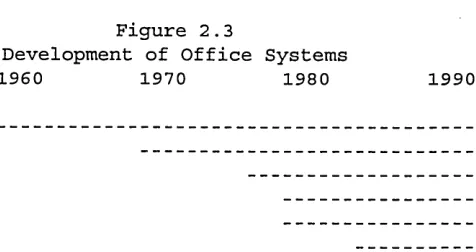
Electronic technology has been applied to the office in four overlapping stages, which are data processing, isolated applications, departmental office automation, and integrated systems (Figure 2.3). Putting dates to these stages is to some extent arbitrary, because at any given time a few ’leading edge’ users are well ahead of the rest, the earlier stages continue into the present (Ward, 1990), and there is a great tendency within IT to anticipate the next stage, what Friedman (1989) calls ’advancing the clock’. One has to distinguish between what is technically possible and what is in widespread use. The phases used here concern technology which is generally available and widely utilised in the appropriate contexts.
Data Processing MIS
Word Processing PCs
Generic OA Integrated OS
Figure 2.3
Development of Office Systems
1960 1970 1980 1990
[image:21.612.240.478.556.682.2]2.2.3.1 Data processing and management information systems.
When the term ’office automation’ was first used, it referred to the computerisation of standardised office tasks previously carried out manually by clerical workers. Routine clerical work which involved number-crunching was the first candidate for office ’automation’.
...in the early 1960s, the term ’office automation’ was widely used to connote the use of computers in such applications as billing and invoicing, accounts receivable and payable, payroll processing and the like. Today we regard these as accounting applications that have long been moved into the domain of the data processing organization, but at the time in question, these functions were performed by office personnel; consequently,
implementing them by computer was ’office automation’. (Hammer and Zisman, 1979.) This use of computers in the office is now almost entirely subsumed under the term ’data processing’ or ’transaction processing’. The practice spread from the information-based industries where it was first extensively used to control the costs of an expanding clerical work force:
By the mid-1960’s most large businesses had turned to computers to facilitate such routine ’back office’ tasks as storing payroll data and issuing checks, controlling inventory and monitoring the payment of bills (Giuliano, 1982).
Management information systems, which developed in the 1970’s, fed off the data processed by the mainframes and were intended to improve management control. Rockart and Scott Morton, writing in 1984, documented the development of MIS through what they called the accounting, operations, and ’information’ eras:
In the first era accounting functions were automated. In the second, during the mid to late 60s, the emphasis changed from systems aiding the accountant to systems aiding first- line operational personnel. In this era, manufacturing control systems and on-line order entry systems were instituted. As in the first era, most of the second wave of systems merely enabled companies to process paperwork faster and more accurately The first two eras, in which accounting and operational applications were developed, produced many internal data bases useful to management.... (the) third era of applications focuses on providing information to middle and top mgmt.... and on facilitating both data analysis and communication of analytic results and other facts.
Problems
Friedman (1989) has pointed out that the main constraints on computer system development from the mid-60s to early 80s were technical ones. Mainframe computers were large and expensive, programming was difficult, and so most installations were overseen by technical specialists, with little involvement of users or functional managers. Because installations were technology-led and neglected users’ needs, there were many problems in implementing both data processing systems and MIS. The result was many unusable DP systems (Wainwright and Francis, 1984), and managers wading through reams of computer print-out which seemed to provide every kind of information except what they could actually use. There was also considerable fear that the automation of office work would lead to white collar unemployment and to mind-deadening jobs (Hoos, 1960).
2 .2 3 .2 Isolated applications.
In the late 70s and early 80s, processing capacity increased and appropriate software was developed which made the high-volume routine handling of text technically feasible and thus made computing much more widely applicable in the office. Doswell noted in 1983: ’the automation of office procedures is not now mainly concerned with data processing’, and cited Strassman’s 1976 estimate that less than 1% of all organizational information processing costs could be attributed to number-processing activities.
Although hardware suppliers began to offer OA products at about the same time, what turned out to have more lasting significance in the 70s and 80s was the use of microelectronics in isolated pieces of office equipment, notably in word processing and personal computers. By 1983, the Policy Studies Institute found that two-thirds of British offices which were already computer users had word processing. An Infratest survey for the European Foundation in the UK in 1984 found that 100% of financial organizations used some computers, some WP and telex. 86% of manufacturing organizations and 68% of commercial and professional organizations used some computers. The figures for WP were 58%, 64% and 70% respectively (see Figure 2.4) A survey of the use of OA facilities in 1987 among Price Waterhouse’s panel of companies with five or more DP staff showed that 71% reported considerable use of word processing by secretaries - by far the most widespread ’office automation’ facility (see Figure 2.5).
Figure 2.4
Percentage of U.K. Organizations with Each Form of Equipment
Manufacturing Public Commercial Financial Professional
Some Computers 86 37 68 100 68
Some WP 58 74 64 100 70
Telex 86 20 100 44
Fax 31 16 32 16 53
Infratest 1984 in EF Working Paper Series
Pri
ce
W
ate
rh
ou
se
UK
C
om
pu
ter
O
pin
io
n
Su
rve
y
-
O
ffic
e
A
uto
m
atio
n
-
No
v.
87
n
i<
2
. ®
<D O
2
.°
O CD
®
mCD
3
O r O = •
CD s 3
CD I <Q
30
CD
3
3 a^ co®
O CD <
© a cd
r h >
3 =®
© 3 3 =T(D ©
m
1 o
. 5
©<®
X M
h > i ;
© H
-1 IT
S O
EL ©
a
om o
© -o #■* f o 3$
"U
O’
m =
2 ( 0
o
©
«-»
©
O’
©
3 ^ 3
^
® „ e . 3
Z - 'K , 3 3 ® 1 r ® O
, j y ■> ® © -i
3 c 3 ? a «
” E . »* © m «■» : ? - r ® 3 § ■ © ® s " 1 2 ? ^
"*»0 3 © © r
©
i CO H.
© 3 © ®CO
m
c
3O
#-»
o
3©
I
CO
©
©
©*
o-e*
m
■
t
*
It is significant that the only other facility with considerable use at that time was spreadsheets. After stand-alone word processing, the major office technology success of the 1980s was the personal computer. The dramatically reduced costs of microprocessors, the introduction of the IBM-PC in 1981, and the frustration of managers and professionals with the delays of the DP department in dealing with their requests for system development led to a proliferation of PCs in the office, to the point where organizations became anxious to re-exert control (Jarke, 1986).
A large-scale survey of the use of office technology by U.K. and U.S. organizations published in 1986 by the National Computing Centre found that the most widely used applications were storage and retrieval, text preparation, data preparation, and information collection (see Figure 2.6). The electronic office equipment in most general use was still photocopiers, electric typewriters and dictation machines, but the use of stand-alone WPs and micros exceeded 60% of organizations. In continental Europe, a cross-national survey carried out for the European Foundation found that less than 2% of the small and medium sized firms studied had a DP system, microcomputer, or WP system.
Lists of equipment are not very informative as to how it is being used. Surveys of applications show that for the most part office technology was being used in isolation. Thus the Price-Waterhouse survey showed that in contrast to the widespread use of WP and PCs, less than a third of the organizations in their sample used an integrated OA package. In the earlier NCC study about 30% of organizations used electronic messaging and less than 10% used LANs. The European Foundation (1986) noted ’when it comes to the actual introduction of new systems there is a degree of caution and reservation. Preference is given to those systems which do not involve organizational changes in the company, e.g. the introduction of word processing or graphic systems alone’.
While PCs had from the start been conceived as personal support tools, and the concern was more with increasing effectiveness than with efficiency, the objectives for introducing WP were to extend the efficiency gains for data-handlers to handlers of text, ie. from clerks to typists and secretaries. Cost savings were often sought by organizing word processors into pools, which was generally unpopular both with the word processor operators themselves and with their internal customers. While staff were on the whole enthusiastic about word processing, there was failure to reach the full potential and it was often used like a typewriter because of lack of training and poor implementation (Liff, n.d.; Johnson and Rice, 1987). PCs have been generally extremely popular with individuals, although they have presented many problems to
organizations, especially lack of standardisation and control (Immel, 1985; Jarke, 1986). This phase of office automation represented the mechanisation of isolated activities and not integrated systems (Tsichritzis, 1986). The technology was usually introduced piecemeal (Butera and Bartezzaghi, 1983; Pava, 1983) and facilitated the work as it was currently being
%
of
Re
sp
on
de
nt
s
%
of
R
es
po
nd
en
ts
UK
100
20
8 3 =• ^ ? m ^Q-m 1 a
I s 3? 3 C5 g o ® 0> b a* ®
w 3 s. ? <
® g = » o i I s c; — • ! .3 to
o <o S 52
~ o
® 3 3 3 3 S
<® § 5 ® i. §3 O <2. 2 - 0 o
CO o 3
3 <Q
O® CO
(O
US
60
—1 3 m ? Q-m o h o
:< o o § 2. 5 <3 s a i i a i ® ®
Q. 33 352 S ° o £
2 2 ® § 2 3
■° P -o H 3 52 2 o
a 3
o ® -O W 5 SL wC. g 2 O c03 CD ® 1~ 5'
2? “ 3 CQ
O CO
CQ 55*2 2.
<2.2 .0
CQ
to
carried out (Long, 1987). It was directed mainly at typists, secretaries, and clerical workers (Wainwright and Francis, 1984; Long, 1987), although many professionals and some managers enthusiastically took up PC use. However, the very widespread use of WP and PCs has served to familiarise many office workers with computers and thus to prepare the ground for the next phase.
2.2.3.3 Generic office automation.
There appeared to be a need for a type of computing which would support various kinds of office work and which would be more integrated. In the early 80s, hardware manufacturers brought out minicomputers linked to terminals and peripherals such as printers, usually together with a software package including several facilities such as word processing, electronic mail, databases, diary and calendar. This phase or type of system I refer to as ’office automation’ because of the conception which lay behind it of automating the individual office. Some
examples of packages from the 80s (many of which are still around in some form) are: IBM Profs, Disoss (now replaced by Office Vision); Data General CEO; Olivetti-Quadratron Q-Office, DEC All-in-One; ICL Officepower. In retrospect, generic OA can be seen as a first step towards integrated office systems, because it integrated different facilities into one software package, and linked previously independent devices to each other.
The role of OA in relation to other forms of computing was perceived differently by various writers. Meyer and Boone (1987) saw OA as supporting unstructured office work on behalf of individual users:
OA is distinguished from MIS in three important ways. First, OA provides tools to individuals and groups of users, who then operate the tools themselves. MIS operates a centralised resource on behalf of the entire organization. Second, OA applies to
unstructured knowledge work, while MIS processes routine, well-structured transactions. Third, OA tools work with data that belong to the users, while MIS processes
organizational data.... If an information service is interactive, operated by and at the discretion of a user, it is considered part of the domain of OA.... We define OA as ’computer- and communications-based tools for thinking’ (pp. 4-5).
Jarke, in a study of micro-mainframe links (1986), located the function of OA as the support of the working group.
microcomputers were originally perceived as personal support tools, whereas most mainframe applications concern the organization level.... Micro-mainframe technology [which includes OA] allows another organizational level to be supported: the working group which synthesizes individual contributions into a completed project or work task... Here, the computer-commmunications systems serve as a medium of cooperation and negotiation among group members. (Emphasis added.)
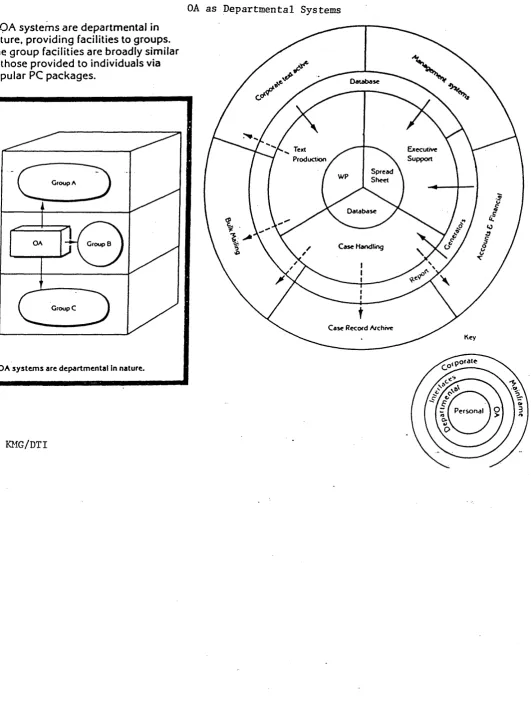
The DTI report saw OA as supporting the departmental organizational level; OA ’fills the middle ground of computing, providing an important bridge between individual resources
provided by PCs and more conventional mainframe (or super-mini) computing’ (see Figure 2.7). The DTI office automation pilots constituted an important part of a flurry of interest in
Figure 2.7
.OA system s are departmental in nature, providing facilities to groups. The group facilities are broadly similar to those provided to individuals via popular PC packages.
OA as Departmental Systems
Group A
OA Group B
Group C
OA sy ste m s are d epartm ental In nature.
Executive Support Text
Production
Case Handling
Case Record Archive
Key
£o,pocaie
Personal
OA in Britain in the early 80s. The NCC began a major programme of work on OA in 1980 (published in 1982-3), and 1982 was Information Technology Year. The DTI-sponsored office automation pilot projects (1981-85, publ. 1986) were conducted in twenty organizations, with the objective of helping both user organizations and suppliers learn how best to exploit the
technology.
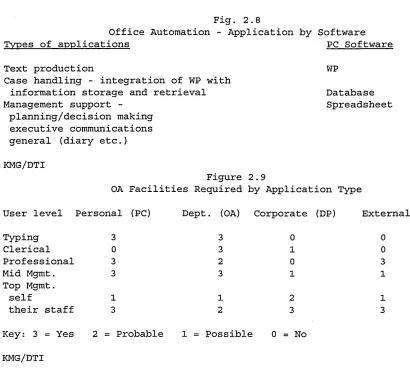
The DTI reports (KMG, 1986) suggested four generic application areas for OA: text production, case handling, management support, and the management of large, especially geographically dispersed projects. The pilots included examples of the first three. The relation of the different applications to existing software is shown in Figure 2.8, and the facilities required by each application type are shown in Figure 2.9.
Fig. 2.8
Office Automation - Application by Software
Types of applications PC Software
Text production WP
Case handling - integration of WP with
information storage and retrieval Database
Management support - Spreadsheet
planning/decision making executive communications general (diary etc.)
KMG/DTI
Figure 2.9
OA Facilities Required by Application Type
User level Personal (PC) Dept. (OA) Corporate (DP) External
Typing 3 3 0 0
Clerical 0 3 1 0
Professional 3 2 0 3
Mid Mgmt. 3 3 1 1
Top Mgmt.
self 1 1 2 1
their staff 3 2 3 3
Key: 3 = Yes 2 = Probable 1 = Possible 0 = No
KMG/DTI
Problems
The problems with the DTI pilots varied according to type of application. The case handling system, which was the integration of WP with information storage and retrieval, was used as WP. In management support, the users’ needs were not understood and the benefits ill defined. In text production, which was seen as joint drafting of reports using but beyond WP, the need for the facility had been over-estimated, and it was considered benefits would be major
[image:29.612.89.499.213.592.2]only when several people needed to work together to meet a deadline. Part of the problem was resistance to change within the organizations, but suppliers were implicitly criticised for giving insufficient support and not focusing on business needs. The report stressed that OA should be application-driven, whereas the hardware manufacturers were concentrating on providing more and better quality facilities. The report also noted that links to mainframe and to PCs were essential. The results were therefore on the whole disappointing, although a great deal of learning had taken place (NEDC, 1987).
The main problems with generic OA were lack of take-up, and that it was technology-not business-led. A generic facilities-based approach had been developed for the administrative office, and was not directed at specific business needs. One seldom hears of large-scale failure, as with DP, because the systems had been pitched at the administrative level, use was
discretionary, and failure was represented by unused boxes sitting in cupboards or storerooms, low levels of financial benefits realised, and low levels of exploitation of the facilities available.
The ’paperless office’ also turned out to be an illusion (Immel, 1985). Where OA had been introduced paper was not only still in evidence but had actually increased, and the total numbers of staff had not noticeably dwindled at that time, partly due to the need to employ numbers of computer specialists (Long, 1987). Lack of take-up or failure to invest resulted from lack of understanding of what OA was supposed to do, and of how it could be cost-justified. 2.2.2.4 Integrated systems.
The need for integrated office systems (integrated - between systems, across functions, between sites, inter-organizational) had been recognised throughout the 80s (Simons, 1984). Gunton (1988) had observed that where office systems were introduced departmentally they were ’islands of automation’ within the organization; possible links with existing DP systems were overlooked. Long (1987) foresaw a new phase of office technology which
involves the outright elimination of many intermediary (routine information handling) functions, and has been brought about by the proliferation of p-c-s and the increasing ability to interlink them with one another and with databases... (a) movement towards ultimate integration and interlinking of three underlying technologies (data processing, telecommunications, office machines) is now underway with the development of the ’multifunctional work station’, which will integrate information retrieval, processing, storage and communication into one functional unit.... This second phase will also see the routinisation and even automation of some aspects of professional and technical jobs
....(and) will allow organizations to make dramatic changes in their structure and functioning, and to provide new products and services.
Farmer (1988) observed:
...in the mid- to late 1980’s, a significant minority of large organizations began
automation and personal computing, to meet specific, not general, business requirements.
The reasons integration had not been achieved earlier were both technical and organizational. They included lack of integration of software and hardware, incompatible standards, cost, managerial and professional resistance to keyboards, and unusable systems (Wainwright and Francis, 1984). The existing base of incompatible computer systems which survive from the previous eras acts as a major obstacle to investment in integrated systems. There are still technical obstacles, but while it was once nearly impossible to create links, there are now products which enable systems to work together. Suppliers are far more concerned with the issue, some have joined together to promote Open System Interconnection standards, and some unlikely partners have begun to work with each other (e.g. IBM and Apple). At the same time user organizations are more aware of the problem and establishing IT policies to ensure greater standardisation of hardware and software among their units.
’Integration’ currently has several different meanings:
1) the integration of data and text with image and voice (multi-media);
2) the convergence of equipment based on different technologies, especially communications with computers (NEDC, 1987);
3) the integration of existing software facilities (WP, email, databases) into one coherent package with a consistent interface to the user, and consistent procedures across facilities;
4) integration of existing systems: networking of PCs and links with mainframe computing, or of OA with PCs, DP and MIS;
5) integration of departmental systems with each other across functional boundaries, into corporate, organization-wide networks;
6) integration of communications across organizational boundaries (inter-organizational systems). All of these different forms of integration are going on concurrently. The more technical forms of integration facilitate and support organizational integration. The focus here is on the
integration of systems (Integration 4, 5 and 6) and through them, of organizations.
Several writers have commented on how OA is being integrated with end-user computing and other systems:
End user computing involves two main strands of activity which are increasingly difficult to distinguish. The first was the development of mainframe tools which could be used by staff outside data processing to analyse corporate data...The second strand... has been the use of personal computers.... A third related activity has been the spread of ’office automation’, in particular word processing, which can no longer be seen as separate from either corporate information processing or end user computing....’office automation’ is merging into end user computing on the one hand and corporate information processing on the other. Today end user computing involves the convergence of Information Centres, personal computing, and part of ’office automation’ (Lockett, 1988). (Emphasis added.) As I define it, an integrated office system will usually include standard OA facilities such as word processing, electronic mail, and access to databases from one terminal. Ideally, these different facilities will have a common interface to the user and a consistent set of procedures (Integration 3). Further applications will depend on the needs of the particular type of user and
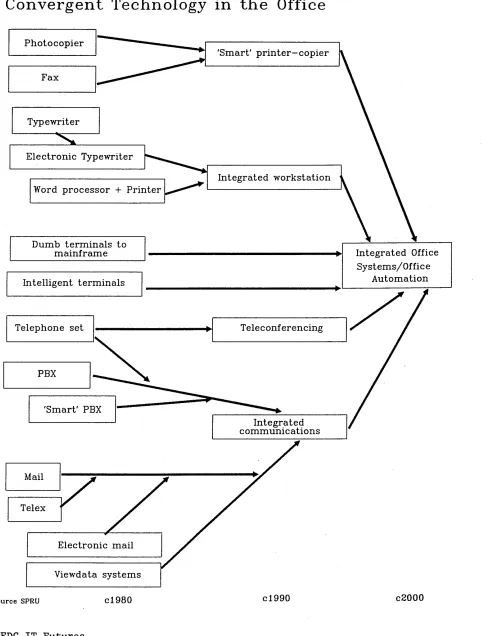
the nature of the business - desk-top publishing, spreadsheets, etc. Various architectures are possible; integrated systems may be distributed, ie. consist of PCs and peripheral equipment such as printers, interlinked by local area networks (LANs), or linked by means of a mainframe, a minicomputer or a PC which acts as a fileserver. Terminals may have their own processing power and storage facility or not, again depending on user needs. An essential feature is electronic communication: people on the system are linked by way of electronic mail and access to shared files and databases. External communication from the computer via email, telex and fax, and access to databases outside the organization are also possible (see Figure 2.10).
Whereas the staff affected by the earlier phases of OS were mainly clerical and secretarial, integrated systems are intended to include professionals, technical workers and managers - ie. all information workers. Thus integrated systems have to be able to deal with far less structured problems, must be flexible, easy to learn and adaptable to user needs. The aim is not to automate the work, but to support workers in their tasks (Newman, 1987). Since much office work is co operative rather than individual, systems must be able to support group working (computer- supported co-operative working). They may support business processes and will be at least departmental, probably cross-functional, interdepartmental or organizational in scope. The rationale for investment is far more likely to be improved quality of work, organizational performance, and service to customers and clients rather than conventional forms of cost-benefit analysis.
While at present it is still possible to distinguish between office systems, DP and MIS, and personal computing, in the very near future these differences will be eroded as they all become linked together in integrated systems, which can have profound effects on organizations. From being merely administrative support systems, office systems can become the basis of
organizational computing. Because they will affect more levels, different types of work and worker and cross functions, sites, organizations, etc., they are likely to have far greater organizational impact than departmental systems. We know from the IS literature (Keen et al.,
F igu re 2 .1 0
Convergent Technology in th e Office
Integrated Office Systems/Office
Automation
PBX Telephone set
Fax Photocopier
Typewriter
'Smart' PBX
Teleconferencing 'Smart' printer-copier
Integrated communications Word processor + Printer
Dumb terminals to mainframe Electronic Typewriter
Intelligent terminals
Integrated workstation
Telex
Viewdata systems
S o u rce s p r u cl980 cl990 c2000