S
IJ
rrI[] E rrI E
rrI~S
~lJlJrrlEr1TI[]E
PAGE 137
VOLUME 4
NUMBER 7 ~--: 8
Dec. 1, 1982 INTERNATIONAL SORCERER
&
smart-ALEC COMPUTER USERS NEWSLETTERCopyright (C) 1982 by Sorcerer7 s Apprentice - All rights reserved $3.00
IN THIS ISSUE
-Op i n i on • • • • • • • • • • • • • • • • • • • • 137 A Visit to Rotterdam ••••••• 138 Dvorak Keyboard •••••••••••• 140 Parallel to Serial Conv •••• 146 PAPS a Review •••••••••••••• 150 EXMON2.a new Monitor ROM ••• 155 More EXMON2 •••••••••••••••• 157
EXMON2/Spellbinder/Exbasic.160 Cassette Hints •••••••••.••. 161 SETMX Printer Utility ••.••• 163 Entering Assembly Programs. 166 Softpac eats Powerspot ••••• 168 1983 Renewal Form •..••••••• 170 Ordering Information ••••••• 172
•
O P I N I O N
Don Gottwald, who has been serving the Sorcerer7s Apprentice Users Group as president, treasurer, fill-in editor, major domo, and chief cook and bottle washer for longer than he cares to remember, called me a while back and asked if I would volunteer to serve as president. He needed some help, he said. My first reaction was to decline. My second reaction was to decline. But Don is nothing if not persuasive, and so I was dragooned into accepting the post, subject to confirmation by the board of directors.
Now what do I do?
"We need some direction," Don said. He's right, of course; since the demise of Exidy Systems, Inc. the Sorcerer's Apprentic~ remains as the focus of support available to Sorcerer users (certainly th~ Ap-prentice was the major support even while ESI was viable, since c~stomer
support and service was npt the company's strong suit). Direction is definitely needed to insure the survival, if not the growth, of the Apprentice.
~
Can I supply the needed di-rection? I don't think so. At best I can help focus the direction of the Apprentice; the real direction must come from all of us in the users group. The Sorcerer's Ap-prentice Users Group IS the news-letter, period. All other acti-vities of the group are ancillary; the RBBS, tape library, and disk library all center on the news-letter. How did that come to be?
Early-on in the life of the group we held meetings of users from the Southeastern Michigan area. The meetings were fun, in-teresting, informative; even exci-ting, to those of us who were novices. We listened to the hard-ware and softWare gurus, swapped homebrew software, and shot the breeze. And after a while, no more meetings. Why? Certainly not be-cause of lack of interest; witness the concern of members when an issue of the newsletter is late. The real reason for the demise of meetings in the Detroit area was, and is, manpower.
By A. S. Marland
Imagine that the BBC had given up any hope of getting a computer out of ACORN in time, and that
Liveport had stepped in at a
sticky moment with a few thousand Sorcerers at a .bulk discount. Something rather like that actual-ly happened in Holland. That's why Compudata are manufacturing Sorcerers, and why half the floor space in the Dutch computer club~s
September 4th show at Rotterdam was given over to Sorcerer exhi-bits. Most of theres~ was Appi~, but lurking in amongst the Apples there was yet another aorcerer more about that l~ter.
The Dutch seem to have organised • a club on a national scale for all types of computer joined together. Thus the overall organisation is .call ed BCC (Hobby Computer. CI ub) , while its Sorcerer branch is cal-led ESSS (Exidy Sorcerer Sebrui-kers Sroep).
ESSS does a series of tapes (C-60s) more or less full of programs at 1200 baud. I bought twp of them for some ridiculous sum (I· think i t was 15 guilders, about $6.50, but I can~t remember if that was each or for .. the pair) and a FIles command worked first time on both without CRC errors. I simply have not had the time to .try much of .. i t yet, but evem if only lOX is any good, that~s still three good cheap programs (and 1"'11 bet more than lOX is good!). ESSS' also does a bi-monthly Eng-lish language periodical called ESSS-periodical with ·an annual subscription rate of fl. 22.50 for. Europe, or fl 27.00 for,. further off. (Ed. Note::fl
=
dutch guil-ders, ask your loc.al bank. for current exchange rates)While still on program libra-ries, the Dutch CP/M users group has the usual public domain soft-ware available in four different
singl~-sided ,double-density Sorce-rer formats:
77 track 16 sect. hard-25fl/vol. 1 disk
77 track soft sector -25fl " 1 disk
40 track soft sector -30fl "
2 disks
30 track soft sector -40fl " 3 disks
Some addresses:
ESS~ Chairman: F. nemelksloot 197, Netherlands.
Vogelaar, Kar-2806 BE Gouda,
Tape librarian: W. Warning,
Dot-terbloem 32, 8265 HS Kampen,
Netherlands.
Periodical: Redaktie Postbus 510, 1000 AM Netherlands.
ESGG, p.a. Amsterdam,
*******.****************
N O T I C E
Sorcerery Brews by Howard Ar-rington is no longer available. No reprints will be offered.
************************
*~**********************
*
F O R S A L E*
************************
48k Sorcerer. I I 15", 110ni tor
5 Vol. Book Prog,rams 3 Games
***$695.00 *** or make ,offer . also 1 D~v PAC - $65.00
Steve Clough 6444 W. Pinecone Dr. Michigan City, IN 46360
(219)874-5019
************************
. _ - - - - F O R
THE EXIDY
SORCERER™ _ _ _ _
_
• •
....
I···
:.
..
:;:..
-
.
~
...
•
• •
A Dogfight in Space
• a real-time graphics game for two players
• written in machine language for the Exidy Sorcerer™
•
• graphics characters continually redrawn for smooth, high-resolution movement
• each ship realistically accelerates, rotates, and fires
• 16K required
• $20.00 for cassette (includes shipping) •
CIC
We think you'll like it!
DVORAK KEVBOARD FOR THE SORCERER
By Don Ellis BACKGROUND:
Having a long-standing dislike for the "QWERTY" keyboard, I was not too surprised to learn that the standard "QWERTY" keyboard was intentionally designed to be awk-ward and inefficient! This key-board was created by Christopher Latham Sholes for his type writing machine which was patented in 1878. Since this machine relied on gravity to return the. type slugs to their home positions, too fast an operating speed could cause the machine to jam. To overcome this problem, Sholes, with the help of a Pennsylvania school superinten-, dentsuperinten-, designed a keyboard in which
the most common letter combina-tions in English are located as • far apart as possible and assigned
to the weakest fingers.
Despite numerous attempts by de-signers in the intervening century to introduce more humane keyboard designs, the Sholes keyboard has remained the standard no doubt because the Sholes keyboard has been commonly available, and peo-ple have made a tremendous invest-ment of time and effort in lear-ning to use it.
Feeling that my main investment in the Sholes keyboard is frus-tration, and since the keyboard on my Sorcerer is the only one I use often, I have been eager to depart from the standard.
Of the alternative keyboard de-signs which have been developed, the most attractive candidate is the Dvorak Simplified Keyboard. This keyboard which was patented in 1932 was the result of exten-sive ergonomic, language and de-sign studies by August Dvorak at the University of Washington. Com-pared to the standard Sholes key-board, entry of typical English
text via the Dvorak keyboard re-quires only about 1/20th the l i -near finger motion!
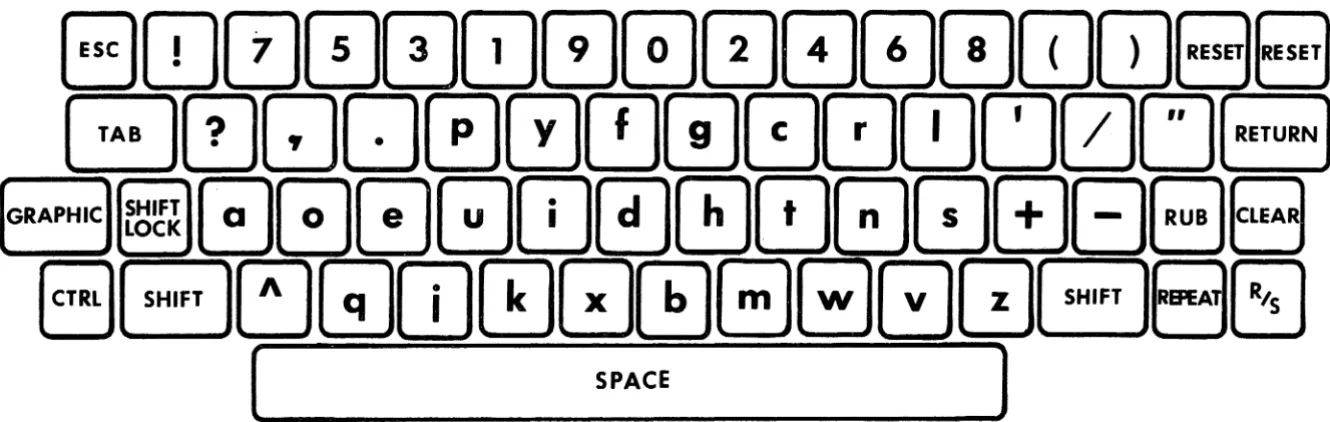
The basic Dvorak keyboard is illustrated in Figure 1. Obviously adaptation of this design to the Sorcerer requires some additional . definitions to accommodate the full character set. In addition, the Dvorak keyboard was designed for a typewriter, not a computer, and i t has retained one feature of the standard keyboard which I regard to be acutely vexing for programming applications: place-ment of some mathematical ope-rators in the shifted character set and some in the unshifted character set.
In defining my adaptation of the Dvorak keyboard for the Sorcerer,
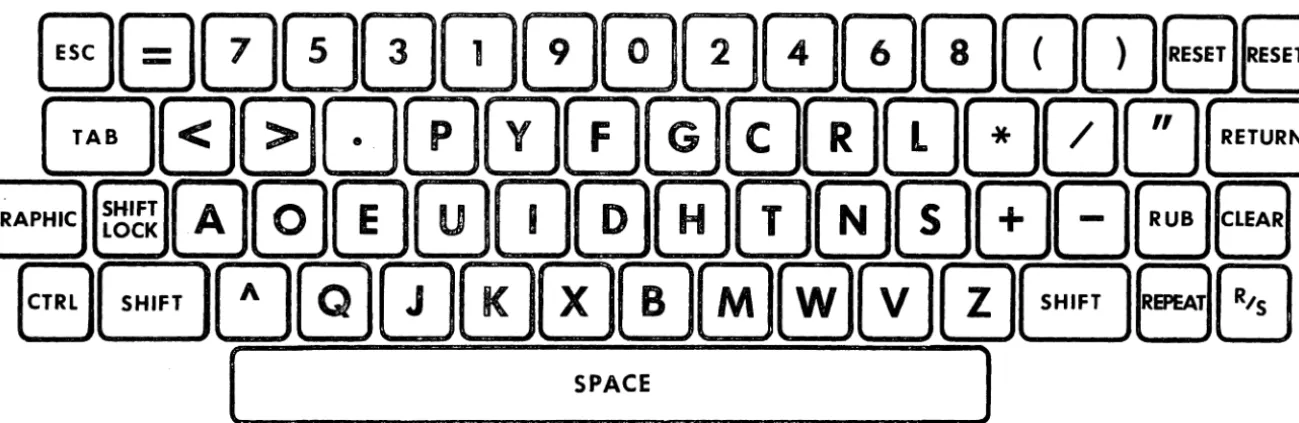
I have made use of the fact that the Sorcerer has, in effect, three alpha-numeric keyboards, the un-shifted keyboard, the shift lock keyboard, and the shift keyboard. I treat the unshifted keyboard as the primary keyboard for for word processor text entry and therefore incorporate in this keyboard the most common text punctuations. Si-milarly, the shift lock keyboard is the primary keyboard for pro-gramming and incorporates mathe-matical and logical operator sym-bols for BASIC and FORTH. The shift keyboard is the second key-board for both text entry and programming. As such, i t incorpo-rates special symbols that aren't in the other two keyboards and the remaining punctuation used in FORTH and BASIC programming. Fi-gures 2, 3 and 4 show the resul-ting keyboard definitions. Besides the Dvorak character arrangement, two changes relative to the origi-nal Sorcerer keyboard are es-pecially worth notinq: (1) The
period/decimal point occurs in all three keyboards and (2) RUB occurs in both the shift lock and shift keyboards.
IMPLEMENTATION
While i t would be possible to redefine the keyboard by changing its circuitry, the desired redefi-nition could not be achieved this way because all functions that are assigned to a key in the original design would still be assigned to the same key in the new keyboard. For example, the period and the greater than sign would always be on the same key no matter where that key was located. Fortunately, there is a better and simpler way. The keyboard is defined by a set of tables in the MONITOR ROM and can be redefined by changing these tables.
With the help of the 2716 EPROM
Burner from Ensign Software, crea-ting a new MONITOR with the de-sired changes was reasonably easy: All that was required was to copy each half of the MONITOR into locations 1000 to 17FF with a MOve command, insert the changes, and program new EPROMS. (Before the new EPROMS were installed in the Sorcerer, i t was necessary to change the connection of pin 21 of the ROM sockets from ground to +5 volts. This change is different from the modification shown in the Sorcerer Technical Manual!!!)
Four tables in the MONITOR ROM need to be changed: The Control Table (CONTBL), the Shift Table
(SHITBL), the Shift Lock Table (SLOTBL), and the Unshifted Table (UNSTBL). The new entries for these four tables are listed below (Addresses are monitor 1.0 ses, rather than work area addres-ses.):
=================================================
CONTBL SHITBL
Address Entry Character Address Entry Character
ECC8 11 CTRL-Q E018 51 Q
9 lE CTRL-CARAT 9 7C
A 01 CTRL-A A 41 A
B 3C
<
B 3F ?C 3D
=
C 210 OA CTRL-J 0 4A J
E 05 CTRL-E E 45 E
F OF CTRL-O F 4F 0
ECOO 3E
>
E020 2C,
1 37 7 1 5C \
2 15 CTRL-U 2 55 U
3 10 CTRL-P 3 50 P
4 2E 4 2E
5 33 3 5 26 &
6 35 5 6 27
7 18 CTRL-X 7 58 X
8 OB CTRL-K 8 4B K
9 09 CTRL-I 9 49 I
A 19 CTRL-Y A 59 Y
B 31 1 B 25
'-C 00 CTRL-M C 40 M
0 02 CTRL-B 0 42 B
E 04 CTRL-O E 44 0
F 06 CTRL-F F 46 F
ECEO 39 9 ED30 24 $
1 14 CTRL-T 1 54 T
2 03 CTRL-C 2 43 C
3 08 CTRL-H 3 48 H
4 07 CTRL-G 4 47 G
5 30 0 5 23 #
6 17 CTRL-W 6 57 W
7 OE CTRL-N 7 4E N
8 12 CTRL-R 8 52 R
9 34 4 9 7E TILDE
A 32 2 A 40 Q)
B 1A CTRL-Z B 5A Z
C 16 CTRL-V C 56 V
D 13 CTRL-S D 53 S
E OC CTRL-L E 4C L
F 36 6 F 7B
ECFO 2D ED40 3B ;
1 2B + 1 3A
.
.
2 1C CTRL-\ 2 2F /
3 00 CTRL-Q) 3 2A
*
4 38 8 4 7D
5 iF CTRL- 5 7F RUB
6 OD RETURN 6 OD RETURN
7 OA LINE FEED 7 OA LINE FEED
8 1D CTRL-] 8 5D ]
9 lB CTRL-[ 9 5B [
---
---SLOTBL UNSTBL
Address Entry Character Address Entry Character
ED6B 51 Q EDBB 71 q
9 5E CARAT 9 5E CARAT
A 41 A A 61 a
B 3C
<
B 3F ?C 3D = C 21
D 4A .J D 6A j
E 45 E E 65 e
F 4F 0 F 6F 0
ED70 3E
>
EDCO 2C,
1 37 7 1 37 7
2 55 U 2 75 u
3 50 P 3 70 P
4 2E 4 2E
5 33 3 5 33 3
6 35 5 6 35 5
7 58 X 7 78 x
8 48 K 8 6B k
9 49 I 9 69 i
A 59 Y A 79 Y
B 31 1 8 31 1
C 4D M C 6D m
D 42 8 D 62 b
E 44 D E 64 d
Sorcerer's Apprentice Page 142
F 46 F F 66 f
ED80 39 9 EDDO 39 9
1 54 T 1 74 t
2 43 C 2 63 c
3 48 H 3 68 h
4 47 G 4 67 g
5 30 0 5 30 0
6 57 W 6 77 w
7 4E N 7 6E n
8 52 R 8 72 r
9 34 4 9 34 4
A 32 2 A 32 2
B 5A Z B 7A z
C 56 V C 76 v
D 53 S D 73 s
E 4C L E 6C 1
F 36 6 F 36 6
ED90 2D EDEO 2D
1 2B + 1 2B +
2 2F / 2 2F /
3 2A
*
3 604 38 8 4 38 8
5 7F RUB 5 5F
6 OD RETURN 6 00 RETURN
7 22 II 7 22 II
8 29 ) 8 29 )
9 28 9 28 (
=================================================
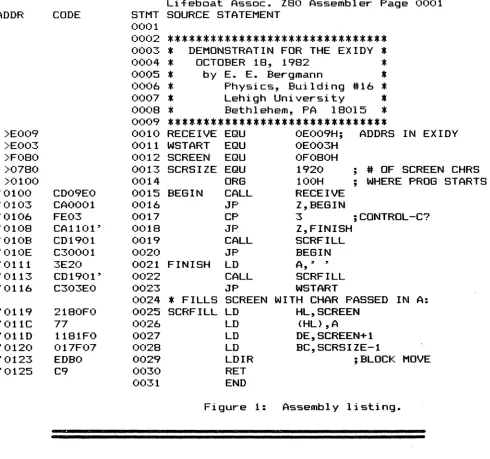
The next step: modifying Roy Mercer~s "Touch-Type-Tutor" program into a Dvorak version.
TERCENTENNIAL TECHNICAL
Video and Data Communications
Technical Services
*
*
*
*
* * * * * * * * * * *
* *
*
For quality Service on the following equipment:
Exidy Sorcerer Computers - Expansion Interface
&Box
Radio Shack ••• a11 models - Zenith/Heath - Atari
Leedex, Sanyo, Electrohome. ••••••• and other brand monitors
Micropolis, Vista, Shugart, Percom, MPI ••• and other drives
Modems, Dot Matrix Printers ••••••••••••••••••• most brands
Memory upgradES and new Monitor
1.1PROM's available.
Services available on most home entertainment electroniCs:
Solid State Television, foreign and domEStic brands.
Video Recorders---Video Cameras---Video Monitors
Stereo Receivers---Audio Recorders---Record Changers
Video Switchers---Time/Date Generators---Video Disc Systems
Video GamES: Atari and others.
For above ServicES (Tech. lie. #8228), or consultation, call or write:
Jack MacGrath
TERCENTENNIAL TECHNICAL
P.O. Box 5
70 Tercentennial Drive
Billerica MA 01821
(J)
o
,
nIt!
,
It!,
...
1/1 l>
'C 'C
"'
It!
0000000000@
G)c)000®®©®CD@
0@®@CD®®CD®00
e
O@0®0®®®00
e
C .
space
)
Figure 1: Dvorak Simplified Keyboard (adapted from: "An Incredible Legacy", Electronic Design, May 24, 1979)
8000000000000088
i
G0GJ000C!J0000CJ0CJB
t
B
~~~
000GJQJ00000ElGEJ8
::J
rt'
to"
n
It!
8B~@OJ[DGJGGEl0G88~
,
,
[ -
SPACE
]
[image:8.793.123.650.22.239.2] [image:8.793.67.732.295.506.2]I
88000800000000B8
G0GD000@][D0CD80c:J8
B=0~000000G00B88
~ 8EJ~@]0~0~BB00EJ8EJ
n J "
[
SPACE
]
ro
" i
ro
i
'.
i.O D
"CI "CI i
ro
Figure 3: Shift-Lock Keyboard for the Sorcerer adaptation of the Dvorak Keyboard.
~ 8mOD0000~~mrnrnrn8B
i
B0DD000~00~G0~a
~
B
t~I~~ 0~000@]0CDG000EJEl
88[o@]000C!JBB00EJ8G
;,
[image:9.802.83.733.76.287.2] [image:9.802.86.726.342.547.2][
SPACE
)
PARALLEL TO S E R I A L
By Walt Hendrickson 2313 W 181st Street Torrance, CA 90504 Enclosed is a sort
machine-language program for using one bit of the parallel 1/0 port to send and receive serial data. This me-thod of serial transmission offers the advantages of:
a. operation at any desired baud-rate from 50 to 9600;
b. baudrate can be fixed or se-lectable by software;
c. choice of even, odd or no parity;
d. independent choice of the num-ber of data bits transmitted and received.
This interface will NOT: a. provide FULL DUPLEX operation b. provide RS-232C levels (+/- 3 to + / - 25 volts).
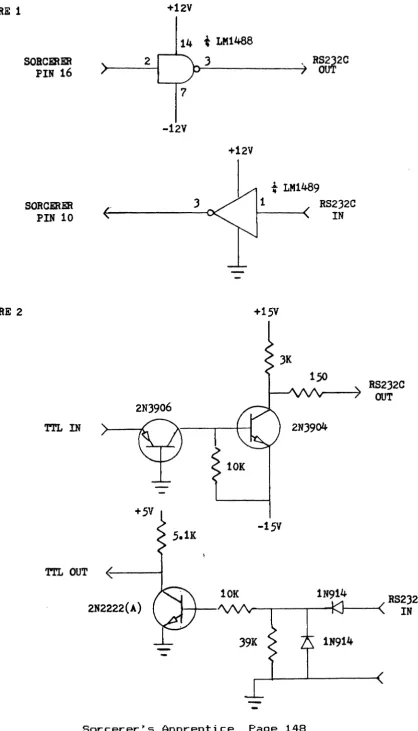
The outputs from the parallel port are TTL levels, which in most cases can interface to standard RS-232C devices, such as a CRT or line printer. If your device must have bi-polar voltages of RS-232C, a simple buffer can be connected between the Sorcerer and your device. Two such buffers ar shown in figures 1 and 2. The baudrate constants shown at the top of the program listing can be adjusted to suit the user"s needs. The pro-gram listing is assembled for an aOaOA based system where this method of serial 110 has been used for over 6 years.
The constants were adjusted for the Sorcerer"s clock time and checked using a oscilloscope and period counter. For baud rates above 1000, the alternate time delay routine shown below should be used to achieve the higher
accuracy needed. The routine shown here in its basic form can easily be modified to provide selectable parity, selectable baud rates, and selectable word size. I have used this routine to inter-face with an ADM-3 CRT, a ASR-33 TTY, TI-810 printers, etc. Note that i t can also be used to transfer data FROM ONE COMPUTER TO ANOTHER with only 3 intercon-necting wires! If the distance you are transmitting over is grea-ter than 50 feet, use baud rates below 600 baud or add one of the buffers shown in figures 1 or 2.
Alternate time delay: WHOLE:
HALF: DELAY:
CALL HALF
MVI B,BAUDRATE OCR
B
JNZ DELAY RET
continued on page 147
ATTENTION
Cary Stewarts home was broken into while he was away on vacation and his computer system was taken. Please be on the lookout for anyone attempting to sell a Sor-cerer Model II, 48k, revision B board internally, jumpered to C4 configuration, with a set of 2716 EPROM's for the monitor ROM's; an Exidy S-100 Expansion Box, contai-ning a revision B board and an ECN sticker dated December 1980; a Micropolis 1053 Mod. II disk sys-tem. The persons responsible for the theft left all the software behind, so when they try to sell the system, they undoubtedly will not have any software to offer. Anyone having any information re-garding the above - please contact the Burbank, CA police andlor Cary Stewart at (213) 843-1101.
ASSM 100 0100 0100 0100 0100 0100 0100 0100 0100 0100 0100 0100 0100 0100 0100 0100 0100 0100 0100 0100 0100 0101 0102 0104 0105 0108 010B 010D 010F 0111 0114 0116 0118 011A 011B 011C 011D 011E 0121 0124 012 0128 012B 012C 012D 012E 012F 012F 012F 012F 0130 0131 0132 0133 C5 D5 DB FF OF
DA 02 01 CD 5D 01 3E 00 D3 FF 16 80 CD 5A 01 DB FF E6 01 D3 FF
IF 7A
IF 57
D2 11 01 CD 5A 01 3E 01 D3 FF CD 5A 01 7A Dl Cl C9 C5 D5 F5 57 3E 00
0010 0020 0030 0040 0050 0060 0070 0080 0090 0100 0110 0120 0130 0140 0150 0160 0170 0180 0190 0200 0210 0220 0230 0240 0250 0260 0270 0280 0290 0300 0310 0320 0330 0340 0350 0360 0370 0380 0390 0400 0410 0420 0430 0440 0450 0460 0470 0480 0490 0500 0510 0520 0530
Figures 1
&
2 are on page 148*---*
*
SORCERER READ AND PRINT ROUTINE*
*
USING 1 BIT OF THE PARALLEL 1/0*
*
PORTS. 1/30/81 W. HENDRICKSON*
*
BAUD RATE CONSTANTS ARE:*
*
*
*
BAUD RATE CONSTANT*
*
110 ---OB6H*
*
300 --- 42H*
*
500 --- 28H*
*
600 --- 20H*
*
1200 --- 38H $*
*
2400 --- 19H $*
*
4800 --- 09H $*
*
$=
ALTERNATE DELAY CIRCUIT*
*---*
*
*----
READ AND ECHO ROUTINE----*
*
RDPK: RDPKl : RDPK2: THEEND:*
PUSH PUSH IN RRD JC CALL MVI OUT MVI CALL IN ANI OUT RAR MOV RAR MOV JNC CALL MVI OUT CALL MOV POP POP RET B D OFFH*
RDPKl HALF A,O OFFH D,80H WHOLE OFFH 01H OFFH A,D*
D,A RDPK2 WHOLE A,OlH OFFH WHOLE A,D D B*
WE USE THESE
GET INPUT BIT (BIT 0) PUT INTI CARRY
NO START BIT YET DELAY 1/2 BIT TIME ECHO START
SET FLAG BIT DELAY 1 BIT TIME SAMPLE INPUT MASK FOR BIT 1 ECHO
GET DATA
ROTATE FOR NEXT BIT SAVE NEW PATTERN LOOP FOR 8 BITS LAST BIT
SET STOP BIT
SEND 1 STOP DATA TO REG A
ASCII DATA IN REG A
*----
SEND ASCII DATA IN REG A----*
*
PRINT: PUSH
PUSH PUSH MOV MVI B D PSW D,A A,O
continued on page 149
WE USE THESE
SAVE DATA IN D
FIGURE 1
FIGURE
2+12V
14
SOBC~ER
2
PIN 16
7
-12V
SORCERER
)PIN 10
Tl'L IN
Tl'L OUT ~---t
2N2222(A)
t
LM1488
)+12V
, RS2
1
2C
OU
t
LM1489
1
RS2)2C
IN
+15V
150
2N)904
-15V
lN914
RS2)2C
OUT
RS2)2C
v---r----,r--<. 1----<
IN
1N914
0135 D3 FF 0540 OUT OFFH SEND START BIT
0137 DE 08 0550 MVI C,8 BIT COUNTER
0139 CD 5A 01 0560 PRINT1 : CALL WHOLE WAIT 1 BIT TIME
013C 3E 01 0570 MVI A,OlH
013E A2 0580 ANA D MASK DATA
013F D3 FF 0590 OUT OFFH SEND DATA BIT (BIT
0141 lF 0600 RAR
0142 7A 0610 MOV A,D GET NEXT BIT READY
0143 lF 0620 RAR
0144 57 0630 MOV D,A SAVE NEW DATA
0145 OD 0640 DCR C DEC COUNTER
0146 C2 39 01 0650 JNZ PRINTl LOOP FOR 8 BITS
0149 CD 5A 01 0660 CALL WHOLE
014C 3E 01 0670 MVI A,Ol
014E D3 FF 0680 OUT OFFH STOP BIT
0150 CD 57 01 0690 CALL TWOBIT SEND 2 STOPS
0153 Fl 0700 POP PSW
0154 Dl 0710 POP D
0155 C1 0720 POP B
0156 C9 0730 RET
*
DONE~0157 0740
*
0157 0750
*----
DELAY ROUTINE----*
0157 0760
*
0157 CD SA 01 0770 TWOBIT: 015A CD 5D 01 0780 WHOLE: 015D 06 42 0790 HALF:
015F E3 0800 DELAY:
0160 E3 0810
0161 05 0820
0162 C2 5F 01 0830
0165 C9 0840
0166 0850
*
0166 0860 BAUDRATE
SYMB 2
RDPK 0100 : RDPKl THEEND 0121 : PRINT TWOBIT 0157 : WHOLE DELAY 015F : BAUDRATE
* * * *
************************
*
F O R S A L E*
************************
32K SORCERER I 48K SORCERER II
*
E~ddy S-100 Adaptor Box Exidy S-100 Adaptor Board
(2)Thinker Toys 2-D Floppy Disk Controller Boards for
Sorcerer Assorted Software
Tom Cumberland (303)744-1285
*
CALL CALL MVI XTHL XTHL DCR JNZ RET EQU
0102
·
·
012F :015A
·
·
0042* * *
WHOLE HALF
B,BAUDRATE BAUD RATE CONSTANT
B DELAY
42H
RDPK2 0111
PRINTl 0139
HALF 015D
* * * * * * * * *
*
* * *
************************
*
WANTED*
************************
USED 8-100 expansion unit or Exidy 8-100 interface card. Call eve-nings (613)384-3081 or write:
Yvon Mayo 930 Pembridge Cr.
Kingston, ON K7M 6C5 Canada.
************************
Sorcerer's Apprentice Page 149
THE PERSONAL ACCOUNTS PAVABLE SYSTEM
By Tom Bassett
I hate to pay bills.
It's not so much that I mind spending money. And I don't be-grudge the money (LOTS of money)
that th~ rest of the family
spends. It's just that I hate to pay bills, keep a checkbook, make arithmetic mistakes, address enve-lopes, write checks, and balance with the 7.*&$! bank each month.
So I wrote a program· to do i t all for me. After all, what's a computer for?
The program is the Personal
Accounts Payable System -- PAPS. I t ' s really several separate pro-grams, so I call i t a "system". The Sorcerer's Apprentice Users Group is selling the system to Sorcerer users. This article is a description of PAPS and what you can expect for $50.00.
Accounts Payable
In the business world, most
companies have computerized their accounting functions, among which the accounts payable module is a major part. Accounts payable is just a list o~ the bills the company owes. These business sys-tems interface payables with pur-chasing, cost accounting, and
ge-neral ledger functions, among
others.
The average working stiff does not need all this sophistication. But he does need something that most business systems don't have -- a means of interfacing his bank accounts with his bill-paying, and a means of balancing and reconci-ling those accounts. This is what PAPS is designed to do. As a business system i t ' s not much use. But for maintaining a personal checking account -- well, I don't know what i'd do without it. Of
course, I'm prejudiced.
Requirements
The system requires a 48K Sor-cerer I or II with two disk drives of at least 296K capacity each <such as Micropolis Mod II or Exidy drives), and a printer of at least 80-column width. A "walk-through" documentation is provided as a disk file, and leads the user through the installation, configu-ration and initialization proce-dures, as well as day-by-day use of the system.
I ' l l attempt functi ons of difficult to
to describe the the system. It's do so in a logical order, since many of the functions are interrelated.
A File of Bills
With PAPS, bills from various
charge accounts, charge cards,
etc., are "posted", or input, to the system as they are received. The bills accumulate in an
ac-counts payable file. At
bill-paying time, a payment-processing program allows you to select, from among the posted bills, the ones you want to pay -- or all of them, if you wish (and have the money). You can also pay a bill directly, without going through the bill-posting procedure. This is handy for the one-time payment to a payee you'll probably never write a check to again.
Once you have selected the bills to pay, a "cash requirements" report is printed. This lists the selected payments, and the cash required to be on deposit in the bank to cover the total of the payments.
continued on page 151
Sorcerer's Apprentice Page 150
o
Print the Checks
If you have enough cash on deposit, you are allowed to pro-ceed with printing checks on con-tinuous-form blank checks. If
there~s not enough cash in the bank to cover your selections, the check printing is inhibited until you either delete payment selec-tions (to reduce cash require-ments) or deposit cash to cover the requirements. Once the checks
are printed satisfactorily
(there~s a reprint option), you are required to print a check register.
Registers
Notice that "required" in the last paragraph. This is a feature of PAPS that will be appreciated by those who tend -- as I do -- to be a bit sloppy about record-keeping. You MUST print the regis-ter; the program won~t allow you not to. And, the register is numbered; each register has a sequential number, incremented automatically upon update of the "outstanding check" file. This is also true of a couple of other registers. What's the purpose? Simply to provide you with a valid "audit trail". An audit trail is a history of every transaction wit-hin a system. If there's a foul-up somewhere along the line, you can refer to your registers to trace the transactions that caused i t . The numbered registers provide the means to do this.
Once checks and register are printed, i t remains for you to sign the checks and stuff them into window envelopes. Since the name and address of the payee are on the face of the check, no more envelope addressing.
Standing Data Files
Back to the bills. To make input easier, the system carries a file of "vendors", or businesses
write checks. Up to 200 of these vendors can be carried on file, complete with names, addresses, customer numbers, etc. So to spe-cify the payee of a bill, you simply type his vendor number and his data is· pulled from a disk file. Saves a lot of typing. Year-to-date payments are accumulated for each vendor, and a listing of all vendors and amounts can be printed.
This vendor file is one of several "standing" data files in the system. Another is the "ex-pense account" file. You may carry up to 200 expense accounts such as gas and electricity, newspapers, state sales tax, etc. When posting your bills, you must "distribute" -- or assign -- the amount of the bill to one or more expense ac-counts. These accounts accumulate, . and you thereby have a record of where the money went.
Budgets
If you want to budget your money, you can assign a yearly budget amount to each expense account. At any time you can print a listing of expense accounts and the year-to-date expenses for each. This listing will also in-clude a year-to-date projected budget amount. For example if your yearly budget for "galoshes" is $100, and you print the report at the end of March, your projected YTD budget amount would be $25, since March marks the end of the first quarter of the year. You can compare this to the actual expen-diture-to-date for galoshes and see how you're doing. Very revea-ling, I~ve found.
Another data file is the "in-come account" file. This carries one or more income sources, so that as you post deposits to your bank account you can indicate where the income came from.
and individuals to whom you often continued on page 152
Up To Three Banks
The last standing data file is the "bank account" file. Here you are allowed to keep up to three bank accounts. As you operate the system, one bank account is the "active" account and all transac-tions are made for that account. Active accounts may be switched at will. And, bills from the accounts payable file may be paid from any bank account.
These standing data files are established and maintained by se-parate maintenance programs, al-lowing full access to the data. If a vendor's address changes, just update that record in the vendor file. ather working data files are created and erased as needed wit-hin the system.
Handwritten Checks
What about the checks your spouse writes to the grocery store? No problem. The system incorporates a "manual check" pro-cessing program that allows you to post these checks (in batches if you wish) and update that bank account balance. As with bill posting, these checks are posted to either a vendor carried in your file, or to an unlisted payee. Also, as with bill posting, the check amount is distributed to expense accounts. And, as with the computer-generated check routine, a check register MUST be printed, giving you your audit trail.
One feature must be noted here. As all these check transactions are being carried on, and regis-ters are being printed, everything is posted to temporary work files. The permanent "outstanding check" file is not updated until the registers are printed and you have indicated that they are satisfac-tory. Then the file is updated and the temporary work file erased. This also allows corrections to be made if a register contains an error.
But once the outstanding check file is updated, i t may NOT be corrected. The only means of cor-recting an error is to post a correcting transaction, which will appear in a register and preserve the integrity of the audit trail.
Deposits
A deposit-posting program allows you to input deposits to each bank account, and updates the bank account file. Here you specify the income source of the deposit, the amount of the income item, and the deposit amount. If the income amount is greater than the deposit amount, then you must distribute the difference to one or more expense accounts. Thus, if you choose, you may maintain an accu-rate record of income, the sources of the income, and the expenditure of the income.
Convenience
To save typing when distributing amounts to expense accounts the programs incorporate a default en-try. It works like this. Say you are posting a bill or a manual check for $100, and you want to distribute $35.78 to one expense account and $64.22 to another. When prompted to do so by the program, you enter the account number of the first expense ac-count, and then the amount, $35.78. Then enter the number of the second expense account, and, rather than using your calculator to find the remainder of $64.22, just hit return. The remainder of $64.22 is posted to the chosen account, and you've saved some calculating and typing. If you're posting to only one expense ac-count, just hit return at the amount prompt and you're finished.
Are You Sure? I've mentioned
ponses. As you
prompts and res-respond to the continued on page 153
Sorcerer's Apprentice Page 152
()
various prompts for entry of ac-count numbers and the like, the program will read the account file and display the account name cor-responding to that number, just to make you more sure in your mind that this is indeed the account you want.
And, when you've finished ente-ring data for a transaction, you are asked "Is this data correct? (YIN)". Hitting an "N" allows you to clear the data you've just entered and start over.
Balancing
Ev~ry month we all get those
thic~ envelopes from the bank, containing returned checks and a statement of our account. I have always hated to sit down with a calculator and a ream of scratch paper and attempt to reconcile the bank's arithmetic with mine. There's usually a conflict in the figures, and usually the bank wins. With PAPS the returned checks are input by number to a returned check program, a register is printed, and the outstanding check file is updated.
Then comes the moment of truth. A balancing and reconciliation program lets you input the balance from the bank statement, any un-credited deposits, any interest earned on a NOW (interest-bearing) account, and any services charyes. Then, in a flash, you are told if you're in-balance or out-of-balance; and, if out-of-balance, by what amount and in which direc-tion.
In the year or so that I"ve been using PAPS I've been out-of-balance just once. An examination of my registers quickly located the error (I"d posted a manual check of $25.13 as $25.00). I made corrections (posted a $.13 check with a dummy number and immedia-tely returned i t ) , and rebalanced and all was well. And, although i t might look silly on the registers,
that posting for a $.13 check preserved my audit trail.
If a check must be voided, the returned check program is used with a "void" option. The amount of the voided check is then imme-diately added back to the bank balance, and the voided notation is carried in the register.
Who Pulled the Plug?
So what happens if, while all this is going on, your number three son pulls the plug and blows a file update? What happens to the kid is up to you, but here's what happens with PAPS.
The system uses a "grandfather-father-son" data disk backup rou-tine. You will always use the most current disk for data transac-tions; then, when finished with your session, you may call up a backup routine that copies the current data disk to the oldest data disk. In other words, the grandfather disk becomes the son, the son becomes the father, and the father becomes the grand-father. The disks are used in this rotation so that when the plug is pulled you have lost only the current data you were entering when that disk was bombed.
Now, with three data disks floa-ting around i t would be easy to become confused and use an obso-lete data disk as a current data disk, really botching up your files. It would be easy except that PAPS won't let you do i t . When you call in the system, i t insists on the proper data disk
(the current one). And~ when bac-king up data disks, i t insists on the disks being used in the cor-rect rotation.
Howeve<, if you're forced to use the father disk because the son disk was sat on by the dog, the program will inform you of your
continued on page 154
"error" but allow you to overide the trap, thus setting the father disk to current status.
All this backup protocol sounds like a lot of hassle, but i t will save the day when it~s n2eded.
Where~s That Check?
We have all experienced the frustration of searching for a check we wrote six months ago or was i t seven? by paging through a check register. PAPS maintains a year-to-date check file for each bank account. If you have to find an old check, you can search the file by vendor number, or by a range of dates, and extract and print a listing of only those checks. Or you can print the whole year-to-date file for a permanent record of the
year~s activity.
Archives
Do you know where your checking account records from last year are? PAPS incorporates an Archive Subsystem that keeps a permanent disk record of each year~s account activity, including a file of the
year~s checks. These checks can be sorted and listed by vendor number or date as with the current year-to-date file, if desired. The Archive subsystem is on a separate disk; when that disk fills, a new one can be started for subsequent years.
Once the year~s data is archi-ved, PAPS allows you to zero all account activity in preparation for beginning another year. But current activity (the outstanding check file and deposit file) are not zeroed.
Is It Deductible?
If you establish some expense accounts to keep track of tax-deductible expenses PAPS provides one feature that differs greatly from business systems. A business
usually operates on the "accrual" basis, which in the case of a payable means that the expense is "recognized" -- is tax-deductible, in other words -- in the year in which the expense is posted to accounts payable, even though the bill is not paid until a later year. But an individual usually is taxed on the "cash" basis, in which the expense is deductible in the year in which i t is actually paid, regardless of when the bill is received.
With PAPS the amount of the bill is posted to the expense account only after the check has been written. So if a bill is received this year, posted this year, but not paid ' t i l l next year, then i t will be in next year's expenses and not this year's. Thus your expense account accumulations can be, if you choose to go into that detail, an accurate record of tax deductions for your tax year.
Ahem!
PAPS has other features, but I~m
running out of space to describe the details. As I said earlier, I don't know what I'd do without the system; I've come to depend on it. And, perhaps of major importance is this feature: when asked by a friend "What do you do with your computer?" I can answer casually "Well, for one thing I keep my entire accounts payable on the machine. I seldom write checks by hand anymore."
Editors Note:
We would like to find someone who can transfer this program to the Exidy Soft Sector format and the Vista 10 sector hard format. -OR- if someone can transfer this program to 8" disks for subsequent sale by Sorcerer~s Apprentice. This program is NOT in the public domain. It is available for Sorce-rer owners from Sorcerer~s Appren-tice.
---======
***
E X M D N : 2***
Exidy Enhanced Monitor Version 2.8.7
All new routines copyright (c) 1982 Walter S.Blady
This monitor includes the fol-lowing features that are required by many popular application pro-grams.
1) Direct cursor positioning 2) Clear to end of line
3) Clear to end of screen 4) Clear entire line
5) Generate reverse ASCII set 6) Set highlight on
7) Set highlight off
These additional features give you even more flexibility.
*
Serial port that works properly for modems etc.*
Reserve any number of lines at the top of screen.*
Search memory for HEX or ASCII string up to 48 characters.*
Fill memory with hex byte.*
TWO Parallel printer drivers with or without linefeeds*
TWO Serial printer drivers with or without linefeeds.*
F-A-S-T keyboard status checking routine - CP/M compatible.*
Greatly expanded jump table to the most often used monitor rou-tines.*
Plus numerous fixes and enhance-ments to the monitor.Two printer drivers are in-cluded: Parallel and Serial. Both are used with the Exidy parallel and serial connectors. Each driver has two jump vectors - allow or disallow linefeeds. The serial
driver has a reserved byte in the MWA ~waitn', for a delay value used after a Carriage Return. This is used for printers with slow carriages. The value must be poked in.
Two useful commands have been added to help those interested in fiddling with hex code.
1) Fill memory with a byte 2) Search memory for a byte or word location address is printed to the output device.
A fast keyboard status check routine has been added. When cal-led, OFFh is returned in ~A' and the ZERO flag reset when a key has been pressed. OOh is returned in
'A~ and the ZERO flag set if no key has been pressed.
A more comprehensive jump table has been set up to include the most often used Exidy routines.
The top of screen may be de-fined. Any number of lines may be reserved at the top of screen, and scrolling or cursor movements will not interfere with this area. The only way to access this area is through direct cursor positioning. Other additions are outlined be-low.
NEW SET OUTPUT COMMANDS: SEt 0
=
V ••• VIDEO P ••• PARALLEL S ••• OUTAPE
N ••• CENTR. DRIVER, NO LINFEEDS continued on page 156
M •.. CENTR. DRIVER, LINE FEEDS
X ••. SERIAL DRIVER, NO LINFEEDS
V ••• SERIAL DRIVER, LINE FEEDS E063h .. Special serial output
SEt 1=
E060h •• Special serial input E057h •• External keyboard input
NEW SET COMMANDS: SEt H=n ••••• SET TOP OF SCREEN
(n must be in hex)
The top of screen can also be set by calling 'highsc' with the number of reserved lines desired, i n reg i s t er ' E' •
The cursor character may be changed by putting the value in register 'A' and calling 'cursor'. Or the value can be poked directly into the proper MWA location.
NEW SCREEN EDITING COMMANDS: 'ESC'
=
Ln Cn.DIRECT CURSOR POS. 'ESC' 1 ••• CLEAR TO END LINE 'ESC' 2 ••• CLEAR TO END SCREEN 'ESC' 3 ••• CLEAR LINE'ESC' 4 ••• HIGHLIGHT ASCII ON 'ESC' S . . . HIGHLIGHT ASCII OFF 'ESC' 6 ••• LOAD REVERSE ASCII SET (destroys all user graphics>
'ESC' 7 ••• RESTORE USER GRAPHICS NEW COMMANDS:
FL (fill} .•• (from address> (to address> (byte>
SR (search). (from address> (to address) (byte ' I ' word)
NEW (MWA) STORAGE:
CRSFLG •• ESCAPE SEQUENCE FLAGS (5 low order bits used)
SCRTOP •• OFFSET TO TOP OF SCREEN (n
*
64)WAITN ••• NULL VALUE FOR SERIAL PRINTERS WITH SLOW 'CR'
Three original routines have been sacrificed to make room for these new features. They were considered by most to be of limi-ted value.
1) Memory test <GONE> 2) Batch mode <GONE> 3) Files command <GONE>
N O T I C E
B. J. Freeman's 'Hackers Manual' is not yet avail-able. Please contact B.J. as to availability before sen-ding any money.
************************
*
F O R S A L . E*
*
*
************************
48k Sorcerer Model II with Exidy Dual Disks, GE Tape Deck and VT100 Monitor. Word Processor and BASIC ROMPACs. Exidy CP/M, EXBASIC, Z80 Software Dev
&
BASCONVRT Disk Utility. Spellbinder, Plot, Exidy Manuals&
all Sorcerer Apprentice Volumes as well. A complete system ready to go. A DTC 381 Printer can also be included. Make an offer. Call Max at (408)262-0727 anytime.************************
*
F O R S A L . E*
*
*
************************
In original boxes, never used: 48k Model II Sorcerer, Amdex 12" moni-tor, Exidy Floppy Disk Subsystem, 2 Exidy Floppy Disk Add-on units, C.Itoh Dot Matrix Printer, C.Itoh Daisy Whel Printer, CP/M 2.2, Spellbinder and Spellcheck. All for $3000.00 or best offer.
R. L. Mouser, 945 Palm Brownsville, TX 78520.
(512)546-7111.
Bl vd. , Phone
CRSCHR •• CURSOR CHARACTER
************************
Sorcerer's Apprentice Page 156
o
E X M D N 2
By: H.A. Lautenbach
Many are wondering about what's so special about the new Monitor revision by Walter Blady. For many i t will be like breathing new life into your Sorcerer and also your own programming style.
It has not been mentioned before, but another feature this Monitor has, that is a real treat, is that the serial port now becomes a true serial port for 300 or 1200 baud modems and also the SMODEMX program. The toggling of that Bit associated with the keyboard scan routine no longer poses any problem. We are getting many phone calls (long distance no less) asking some more complex questions. I would like to take some time to answer some of these in this newsletter.
Questions ========= Availability?
From whom if not PORT FE? How much does i t cost? Is i t compatible with the WPP ROM PAC?
What happens to the old Monitor chips?
Is i t compatible with the ROM PAC BASIC?
What terminal does i t emulate?
Answers
-: No, not though PORT FE.
: H.A. Lautenbach same P.O. Box as PORT FE $65.00 + 5.00 Postage U.S. Funds
: No, direct monitor calls made by WPP ROM PAC
You can pass them on to never
neverland OR you can stack the NEW Monitor EPROMS on top of the old ones and have both monitors.
: Yes fully, no bugs detected.
: None specific
With the reverse character: Yes some of them (not all) set do ! s t i l l have my
graphics?
Is the Monitor Jump table compatible with the old Monitor jump table? What have I lost in the Monitor?
Is i t CP/M compatible?
Will my speed increase?
: Yes fully (1st 16 are identical) plus 18 more added.
: Batch,Test
&
Files commands: YES (completely, with keyboard status check routine for CP/M) Depends on how efficient your present CP/M status check is.
continued on page 158
Lifeboat CPIM 1.4and 2.2 are
definitely improved (if original) Also Micropolis CPIM can be improved. Will all software that : Yes, as far as we can determine.
requires cursor As long as i t has an install
positioning work? program or system parameter fi Ie. Was anything else changed?
.
.
YES many BUGS have been corrected,some not even mentioned ever before. Has a CPIM boot been
provided?
How did you get i t all into the monitor?
: No, There are too many boot addresses that could and are being used on different disk systems. We thought i t wiser not to include this function.
: With a lot of squeezing and making certain that the routines more efficient.
Can I control the Sorcerer : from a remote ASCII
terminal?
Yes, from both the Sorcerer and the keyboard or from a remote ASCII terminal that is hooked up via the serial port on the
Sorcerer. (300 or 1200baud) Can I control i t via a
modem at 300 baud? Are all the new jump vectors new routines?
: Yes, even at 1200 if you have the modems.
: It~s about 50/50, some of the jump vectors were brought out to be more accessible to the user. Is i t compatible with MP/M?: We don~t know, should be.
Can I use all my graphics if I want to?
Is the reverse ASCII under keyboard control?
What about updates. What if there are still bugs?
Are there discounts for user groups?
: Yes if you want. Reverse ASCII would be overwritten though and would have to be recalled.
: Yes, you use the ESC key and a number.
.
.
~If~ there are any, only a small handling charge will get you revised EPROMS.: Yes group purchases will be given discounts. 5 to q sets 15%, 10 or more 20%
There are probably some that I~ve missed, but if any of you questions, please direct all inquiries to me personnaly. Most questions are answered with the documentation that comes EPROMS.
continued on page 159
Sorcerer~s Apprentice Page 158
have more of your with the
o
~Q)]]~
A NEW MONITOR
FOR THE SORCERER
At last, here's a revised version of Exidy's operating system that has full terminal functions. EXMON2 will increase the flexibility of your Sorcerer computer and open the door to many excellent software applications that require special terminal features.These New EXMON2 routines can be used directly from your Sorcerer keyboard and are easy to use in BASIC programs:
• Direct cursor positioning
• Clear to end of line
• Clear to end of screen
• Delete line
• Text highlight onloff
• Reverse ASCII characters
EXMON2 has many additional features that give your Exidy Sorcerer even greater flexibility:
• Define and reserve top of screen
• Search memory for hex or ASCII string
• Parallel and serial prlnt.r drivers
with or without line feeds
• A properly working serial port
(for modems, etc.)
• A '-a·s·' keyboard status routine that's CP/M compatible
• And there's more •••
Each EXMON2 set comes complete with two burnt-in, fully-tested Eproms and an accompanying user's manual with easy-to-understand installation instructions.
1 set (2 Eproms & manual) ... $85.00 U.S. + postage-Group
f
(5t09sets) ... $55.25 U.S. + postage-discounts (10 or more) ... $52.00 U.S. + postage-- Add $5.00 U.S. with the first set, $3.50 U.S. with eachadditional set for postage and handling.
Please make cheques payable to:
H.A. LAUTENBACH, and mail to: P.O. BOX 1173, STN. B, DOWNSVIEW, ONTARIO, CANADA M3H 5V8
•••••••••••••••
• TO ORDER EXMON2: . •• _ _ Please send more information on EXMON2. • I have enclosed my certified cheque/money order • for $ ; please send me _ EXMON2 set(s). •
• Company/Club •
• N~e •
• Address •
•
•
•••••••••••••••
For most of you there is a hardware change requiring you to change the ROMIEPROM jumpers to that of the standard 2716 EPROMS and that's all there is to it. In my personal opinion (BIASED OF COURSE) I really think i t ' s the best thing that has happened to the Sorcerer since i t was first sold.
I do recommend that everyone needs this capability. I'm sure that most of you have done without long enough. The added frills are nice.
************************
*
F O R S A L E*
*
*
************************
Best Offer
48k Dynasty smart-ALEC (Mfg-Exi-dy), 12" Zenith ZVM-121 Video Monitor, Epson MX-80 III FIT, GRAFTRAX, Lexicn LEX-11 Modem, BA-SIC ROMPAC, Word Process'or PAC, 12 Cassette based programs.
Call J. W. Bond
(313)493-7546 after 7pm EST SOURCE ST1445
************************
*
F O R S A L E*
*
*
************************
48K Sorcerer $450.00 or best offer. Four (4) 32k Sorcerers, $300.00 or best. Two (2) Leedex Monitors, $4.00 each or best. One (1) Teco Monitor, $65.00. Comprint electrostatic printer (200 CPS) brand new, $250.00. Five (5) Exidy Word Processor PACs, $30.00 each. Two (2) IBM Selectrics with Escon interfaces to Exidy parallel ports, $600.00 each.
CBMS
P. O. Box 1172 - 520 East Main Ada, OK 74820
(405)436-4141
SPELLBINDER /
WDRDPRDCESSDR
PAC _ _ _ _ _
&__EXMDN2
We have found the necessary addresses in the WORDPROCESSOR PAC that need to be changed. For some of you that are running the PAC either relocated for disk operation or the actual PAC itself. In the PAC the last PROM/EPROM is the only one affected. The following are the addresses that have to be changed:
add: was/is Change to:
WORD PROCESSOR DF21 LD HL, EC6E ---)GRATBL: ED4C
---
DF3F LD HL, ECBE ---)CONTBL: ED9C---DF48 LD HL, EDOE ---)SHITBL: EDEC
PAC CHANGES DF51 LD HL, ED5E ---)SLOTBL: EE3C
============ DF56 LD HL, EDAE ---)UNSTBL: EE8C
As for the SPELLBINDER file, there may be several versions in use, however many versions there are, will not affect ~what you must change~ only the addresses where you find them may differ from version to version. After having changed the file it works just the same with EXMON2 as i t did with the old monitor. memory bound '--- unfortunately.
SPELLBINDER
===========
Vera xx CHANGES
===============
add
45EC 460A 4613 461C 4621
LD HL, LD HL, LD HL, LD HL, LD HL,
was/is Change to:
EC6E ---)GRATBL: ED4C ECBE ---)CONTBL: ED9C EDOE ---)SHITBL: EDEC ED5E ---)SLOTBL: EE3C EDAE ---)UNSTBL: EE8C
FOR SPELLBINDER <Installed version)
SAVE 89 SPELLM2.COM or SAVE 78SPELLM2.COM
Those are the only things that need to be changed to make it compatible with EXMON2.
---
---EXBASIC
&
EXMDN2
The following changes make EXBASIC compatible with EXMON2.
The first part contains the changes to standard EXBASIC. The second part are the additional code changes for EXBASVC- (EXBASIC installed with the full Screen Editor).
Address:
3934H 39AOH 39A4H 39B8H
Old code:
CALL E1A2H CALL E1A2H CALL E9E8H CALL E9CCH
Part one:
New code:
CALL E045H CALL E045H CALL E04EH CALL E04BH
continued on page 161
Sorcerer~s Apprentice Page 160
Part two:
(EXBASIC installed with Full Screen Editor) 5917H
591BH 597DH 59ACH 5A07H 5A6CH 5A73H 5Dl1H
CALL E018H CALL E9D6H LD HL,E018H JP E9FOH CALL E9B1H CALL E045H CALL E205H LD DE,E01BH
(SAME) CALL E051H
(SAME) JP E01BH CALL E048H CALL EOOCH CALL E1F8H
(SAME)
As you may gather from the information regarding changes above, most programs require very little change. EXMON2 is proving to be quite the handy tool.
We shall try to keep you updated on all programs and their changes as they become available. If you have anything to add to the expanding list of modified programs, please write in and let us know what they are so that others may benefit.
******************************************
CASSETTE RECORDING H I N T S
By Frank Voss For those Sorcerer owners who
are still using cassette program and file storage, the following hints may be helpful.
Much has been written about achieving the proper output level and waveforms for reading by the Sorcerer's cassette interface. Me-ters, oscilloscopes and various
"black boxes" have been utilized to increase tape loading reliabil-ity. O~e aspect of the tape cas-sette system seems to have been neglected. This is the alignment of the tape recorder's record/-playback head with respect to the magnetic tape and is referred to as the "azimuth".
I became aware of the effect of the head azimuth on loading relia-bility several months ago when my recorder (a General Electric model 3-5155A), which I had been using for almost three years, began fai-ling to feed programs to the com-puter successfully. Prior to the
onset of this problem, I estimate a loading success rate in excess of 997..
Examination and testing of my recorder revealed no electrical or mechanical breakdown. Several test programs were made and found to vary from one to another. The pro-blem was then determined to be the head azimuth.
Tape heads are usually mounted in a manner that permits an ad-justment screw opposed by a spring to alter the tape gap's angle to the recording tape's direction of travel. (See Figure 1.) If this angle should change, either by
ad-justment of the screw or because of other factors, the characteris-tics of the output from the recor-der can change significantly also. Thus a previously good tape may. not load anymore.
continued on page 162
In my situation, repeated move-ment of the platform on which the record/playback head, erase head, capstan, etc., are mounted, caused the head to shift and altered the azimuth angle.
Readjustment can be best done with instruments but I have done so easily by listening to the pro-blem tape. The azimuth is adjusted so that the sound is at its loud-est level and has a clear, crisp character as opposed to a dull or muffled quality. The volume con-trol is set to the proper level and the tape should load success-full y.
Fortunately the design of my mo-del recorder permits access to the azimuth adjustment screw while a tape is being played. Other re-corders may require the case to be opened or a top cover removed. If you wish to have easy access to the adjustment screw at a future time, locate the position of the screw while the recorder is in a play function and then carefully drill a 1/8th hole in the case above the screw so that a small screwdriver may be inserted for adjustment purposes.
To minimize adjustments, after a problem tape has been loaded into the computer, the tape head is adjusted to a reference tape and the program in the computer is
~ECoRD
/PLAY SACk.
HE-AD
COUNTER
TEtJS ION
MOVABLe'
PLATFoRM
P\VOT
BRACKET
resaved. The reference tape is created by the user. The tape re-corder head is adjusted so that as many of the u~er's tapes as possi-ble load successfully. A short, clean, good quality tape is now used to record the carrier tone that is normally available from the MIC jack on the back of the computer. Whenever i t becomes ne-cessary to check or readjust the head alignment, i t is done with respect to this tape. Adjustment should be so that the volume is at a maximum for a given volume set-ting. This reference tape can also serve to give a rough indication of the tape movement. If the tape speed is erratic or fluctuating, the tone will reveal this. If the tone is steady and constant, then tape movement is OK.
When loading programs from one recorder to different computers, difficulties can be overcome by adjustments of the volume control. When loading tapes created on dif-ferent machines to the same cass-ette recorder/computer system, the problem is more likely to be over-come by adjustment of the head azimuth. In either case, if you live in a cold climate and your computer is in a cool room, allow your system to warm up by letting i t set powered up for a time to increase the reliability of opera-tion. Cold seems to be a real curse to the Sorcerer!
Figure 1
tl\AGNET'C
"T~Pl
~AOJUSTM~Nl
SCREW
GAP
TYPICAL
HEAD
MOUNTltJ~
[image:26.612.308.554.42.302.2]S E T M X
By Irv Hoff
PRESETTING EPSON MX-80 PRINTER OPTIONS This simple program allows EPSON
MX-80 users to preset a number of options. The printer can then be satisfactorily used with the TYPE command (via CTL-P) or other nor-mal listing programs. These op-tions include: 10 or 16.5 chars. per inch, 6 or 8 vertical lines per inch, single strike or double strike emphasized print, and reset to normal default values.
To use, turn on the Epson prin-ter and then call up SETMX.COM. It will display various options on its menu. Several selections can be made at the same time or a number reentered if mis-typed. If RET is immediately typed i t de-faults to a standard configura-tion.
; SETMX v1.0 EPSON MX-80 PRINTER by
IRVIN M. HOFF
Default is: 10 characters per inch 6 vertical lines per inch, single strike print. After the appropriate answers have been typed, hit RET to leave the pro-gram (or CTL-C). The printer now has the options you selected. The TYPE command (via CTL-P) may then be used or any other LIST routine desired.
Obviously some options were not included. The SETMX.ASM file can be edited and then reassembled.
(ASM.COM works fine for this pur-pose.) Even if the operator is not too familiar with using source code, there are enough examples already included to make the job of adding some additional feature fairly simple.
UTILITY 10/10/82
; ; ;
LOS ALTOS HILLS, CA 94022
; This program sets the EPSON MX-80 printer to various ; configurations such as:
; ; ;
.
,
;
10 CPI or 16.5 CPI
Normal or Double Strike
6 or 8 vertical lines per inch Emphasized print
; There are numerous other selections that could be added. ; This program should give you the background to include ; other options, if desired, yourself. These seemed the
most important.
COMMAND CHARACTERS FOR THE EPSON PRINTER:
17 CTL-Q Enable printer to receive data 27, ~ 0' ESC 0 8 vertical lines per inch
27, ' ...., ~
""- ESC 2 6 vertical lines per inch (Normal)
,
27, , E' ESC E Emphasized print; 27, ' F~ ESC F Non-emphasized print (Normal)
; 27,'6' ESC 6 Double-strike print
; 27,'H' ESC H Single-strike print (Normal)