© 2016, IRJET | Impact Factor value: 4.45 | ISO 9001:2008 Certified Journal | Page 1793
Communication system to help deaf and dumb communicate with
normal people
Shoaib Ibrahim Shaikh
1, Ismail Mehmood Memon
2, Sanmay Jayaram Shetty
3,
Aziz Saifuddin Vakanerwala
4, S.E Pawar
51234
Student, Department of Information technology, Trinity college of Engg. And Research, Maharashtra, India
5Professor, Department of Information technology, Trinity college of Engg. And Research, Maharashtra, India.
---***---Abstract -
The basic means to communicate is the power ofhearing and speech. A lot of people are unfortunate and lack these gifts i.e. the dumb and deaf people. With the help of today’s technology, it has become possible to create systems that can understand their sign languages. The American Sign Language (ASL) uses the English Language for each gesture. In order to understand the deaf and dumb people, we have proposed a dynamic gesture recognition system that has the capability to identify the letters of the English Language. Our system works on dynamic motion recognition, which is different from traditional gesture recognition systems that are static in nature. This paper will give a proper demonstration of our system and will address the problems that the less fortunate people and the normal people face while communicating. The modules in our system include Train Patterns, Pattern Recognition, Text-to-Speech and Data Dictionary. These modules will help us in achieving our objective.
Key Words: (Communication, dynamic, gesture, motion, recognition.
1.INTRODUCTION
Over the past several years, huge amount of progress has been done in the field of sign language recognition technology [1][2]. This has hugely helped in the advancement of Human Computer Interaction and Intelligent Computing. The primary focus of HCI is to study and improve the ways in which humans interact with computer systems around them. The programmers use their abilities of observation and develop systems to make this interaction simple and convenient for the users. HCI requires the involvement of users at all times hence, to make systems interactive, they require certain gestures or voice commands as input and a specific output is generated based on the input. Sign language communication [2], virtual reality and robotics greatly rely on gestures as input [1], whereas Voice Command Applications require voice as input. We will concentrate only on gestures as our system will use gestures as input. Gestures are of two types, namely static gesture [3] and dynamic gesture [4]. Static gestures are stationary gestures that recognize the shape of the hand. Dynamic
gestures are motion gestures where the system detects the path that the hand travels. Our system will exclusively involve dynamic gestures to recognize the letters of the English Alphabet. For implementation of gesture recognition system, we require a camera, Color markers for tracking the pattern.
The main objective of this paper is developing a gesture recognition system that will help make communication possible between the deaf and dumb people and the normal people. The American Sign Language (ASL) contains a gesture for every letter of the English Language. With this, we can conclude that the deaf and dumb are aware of the English language and it is easy for them to understand it. When the user will make a pattern of any letter of the English language, in front of the webcam, our system will be capable to identify the word and show its output. This system will work on dynamic gestures only. For this, we will need a camera like the webcam of a laptop to record the live video feed to capture the pattern that is generated in front of the webcam [1][2]. A Color marker will be used to make this pattern so that our system can distinguish the particular color and identify the pattern generation accordingly.
2. RELATED WORK
Joyeeta Singha and Karen Das developed sign language recognition system which is based on static gesture. Joyeeta Singha and Karen Das studied various models and developed a model of their own which consisted of Eigen values and Eigen vector .Their system comprised of four modules namely skin color filtering, hand cropping ,extracting feature and classification. They used 24 signs in their system each included 10 samples. They used Eigen values weighted Euclidean distance and developed it based on Indian sign language .Their work is based on single frame and used stored image to recognize the gesture.[4]
© 2016, IRJET | Impact Factor value: 4.45 | ISO 9001:2008 Certified Journal | Page 1794
found that grayscale was less instructive for edge
detection so they replaced it by canny edge algorithm.
This algorithm is required to detect edges of objects in
an image. After detecting the edges, we need to detect
the tips of fingers. Wavelet family method was used for
this purpose. As soon as fingers are detected next thing
is to match the gesture with the gestures in the
database. For this purpose fuzzy set was used. Six
alphabets are considered i.e. alphabet A, D, J, O, P, and
Q. Time recognition for alphabet A= 1.52, D=1.50,
J=1.61, 0=1.50, p=1.57. Drawback of this system is only
right hand can be used and external object should not
be present in background [5].
Other approach, smart glove is used for communication of dumb and deaf people. The system consists of LCD, Audio amplifier and speaker memory for storage of audio files. C language is used for developing this system. Flux sensor calculates the degree of the fingers on which it is attached. For communication between hardware and software encoding and decoding is required. For this PIC microcontroller is used. In gesture recognition the system matches the data with the posture that is there in the system [6][7].
3. SYSTEM ARCITECTURE
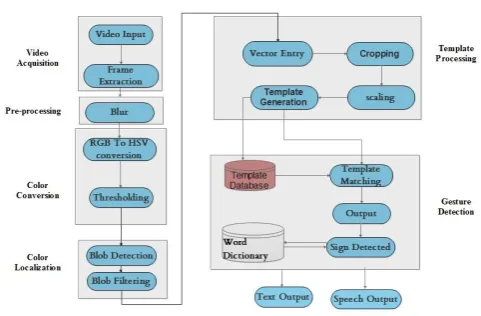
Our system uses following Processing steps in our various modules
Video Acquisition Blur
RGB- HSV
HSV Thresholding Blob Detection Template Processing
Video Acquisition
Webcam is used to capture live video feed. We have configured video feed in our system using JMyron library.
Blur
Blurring is used to reduce the noise in the background. Blurring helps in getting good quality video feed.
Formula: sumR = (R1+…+R25)/25 sumG = (G1+…+G25)/25 sumB =(B1+…+B25)/25
RGB to HSV conversion
HSV model is preferred over RBG model because it can identify distinct colors [1][8].
Formula: rgbmax = Max (R, G, B), rgbmin = Min(R, G, B)
When rgbmax = R, then
H=0+43*((G-B)/ (rgbmax-rgbmin)) When rgbmax = G, then
H=85+43*((B-R)/ (rgbmax-rgbmin)) When rgbmax = B, then
H=171+43*((R-G)/ (rgbmax-rgbmin))
HSV Thresholding
HSV Thresholding is done in order to identify the region where the gesture is present. HSV Thresholding helps in making proper gestures. We threshold the values (Hue, saturation, values) in the range of the selected color. Output of HSV thresholding is a Black and white image, where black region is gesture and white is the unwanted part [1[9].
Blob Detection
Blob is a cluster of connected pixels that share common attribute. Blob in our system is the color pointer region. System starts scanning for Dark region in the image and saves its ‘x’ and ‘y’ co-ordinates. The maximum and minimum values of x and y co-ordinates are saved into the table called as vector entry table. This process will be repeated till the entire image is scanned and all the related blobs are found. These points will be joined in order to form a blob. [1]
Template Processing
[image:2.595.318.559.99.257.2]© 2016, IRJET | Impact Factor value: 4.45 | ISO 9001:2008 Certified Journal | Page 1795 converted into text. This step is called template matching
[1].
The system consists of following modules, namely
1. Select Pointer
2. Gesture Based Pattern Generation 3. Train Patterns
4. Manage Trained Patterns 5. Pattern Recognition 6. Word dictionary
1) Select Pointer:
[image:3.595.324.549.402.577.2]This is function that will enable the user to select a color pointer that our system is supposed to detect. The color pointer is anything of a specific color that will be used to create the pattern. It can be held in hand or worn on finger. The video feed will be displayed on three different windows.
Fig -2: Select pointer /Track Color
The three windows will display the video feed in three different forms i.e.
a) Normal form: Video is displayed in normal form which we can see in any other camera (320*240 Scaled feed). The user will select the pointer color with the help of mouse pointer. b) Saturation: Video is displayed in saturated format. The color pointer we selected in the normal form can be shown in an intense format in saturation feed.
c) Threshold Form: Specified color will be shown in black and the rest is shown in white. This can be used to trace the pattern made by the user on white background.
There are four buttons on the main window of "Select Pointer" that perform different functions. They are:
'Start Feed' Button: This button starts the video feed of webcam. The video feed will be displayed only when we click on this button.
'Stop Feed' Button: This will stop the video feed, but it will display the last captured frame as an image.
'Camera Setting' Button : This is a functionality in JMyron library in Java that allows to adjust the camera settings like 'hue’, ‘saturation', 'brightness', 'sharpness', etc.
'Update' Button: The distinct color that is selected by the mouse pointer on the normal video is saved by clicking on this button. Henceforth, this value is used throughout the system.
'Blur' checkbox : When this box is checked, it shows the blurred image on the saturation and threshold windows
2) Gesture Based Pattern Generation
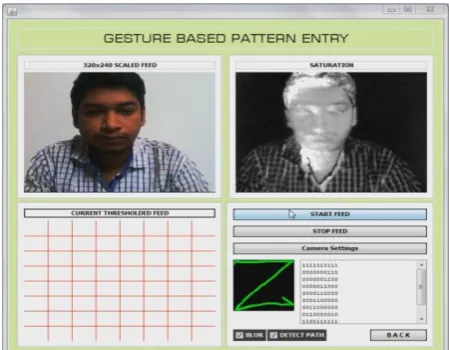
The main functionality of GBPG is to trace the path of the color pointer and display it. The path will only be traced when the 'detect path' checkbox is checked. The path of the pattern is trace on the threshold window and the pattern that is captured will be displayed on the small window next to it. The Threshold window is divided into sections of 10 rows and 10 columns. This will help in generating a binary matrix form of the pattern. This window shows the actual pattern that is traced by the pointer. The pattern will be displayed in green and the background will be black.
Fig -3: Gesture Based Pattern Entry
The path will be traced when the size of the blob is greater than minimum value that is set.. A 10*10 matrix will be displayed on the matrix window. It is a binary matrix that is a representation of the pattern. The cell/block where a part of the pattern is present will be denoted as '1' in the matrix window, and all other blocks will be denoted as '0'.'Blur' checkbox will blur the image in the threshold window, thereby reducing the noise that may be present in background
© 2016, IRJET | Impact Factor value: 4.45 | ISO 9001:2008 Certified Journal | Page 1796 Train patterns' module also consists of 3 windows that
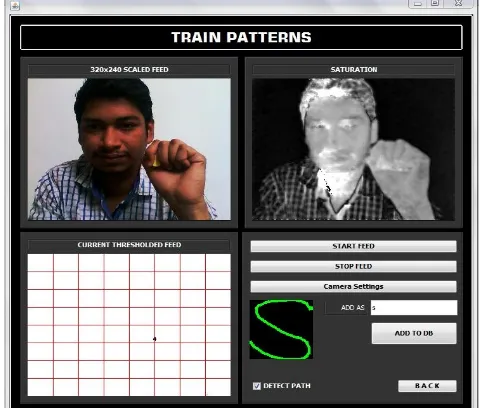
display Normal, Saturation, and Threshold feeds of the original video feed. 'Start Feed' Button starts the video feed from web cam and the 3 windows display their respective video feeds. The pointer color has already been updated in the 'Update' button of 'Select Pointer' module. Using this color pointer, we will start training our system by making the gestures of the English alphabets in front of the web-cam and saving their patterns according to the letters in our database. To trace a pattern, we need to make sure that the size of the pointer blob should be greater than or equal to the size of the cell. To add the letters, we will select the checkbox 'Detect Path', so that our pattern is detected by the system. When the pattern is understandable, we will click 'Add to DB' button. This button will store the serialized/binary form of the pattern with the character or letter that we have stored it with. All the patterns will be stored in a .DAT file format.
Fig -4: Train Patterns
4) Manage Trained Patterns
This button displays the list of patterns that have been saved in our database. Managing patterns only includes the removal of unnecessary patterns from our system. The managing pattern window displays a list of symbols, along with its recorded pattern and the binary form of the pattern. While training patterns, there comes a need to manage certain patterns. In our system, we have provided a way by which, we can remove patterns
a. which are less accurate
b. which are repeated for the same letter
[image:4.595.309.559.74.255.2]c. which need to be removed when compared with a similar patterns.
Fig -5: Manage Patterns
The user can browse through the patterns and can enter new patterns according to his need. The user can also remove the patterns if they do not satisfy his need, and can re-enter a new pattern.
5) Pattern Recognition
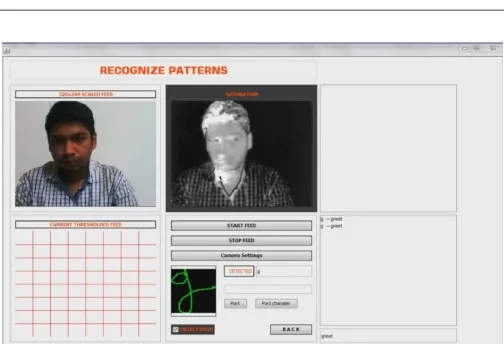
[image:4.595.46.286.356.560.2]© 2016, IRJET | Impact Factor value: 4.45 | ISO 9001:2008 Certified Journal | Page 1797 Fig -6: Recognize Patterns
6) Word dictionary
The user is required to make a gesture for each and every letter. This will become hectic for the user to make gesture for the entire sentence. To avoid this, we have maintained a word dictionary which helps the user in completing a word. When a pattern is made, the letter is converted to text. Then that text is searched in the dictionary by each letter, the words in dictionary are stored alphabetically. The words matching the text will be suggested. If the suggested word is what the user is looking for then the user will click on it and that word will be shown in the textbox. In this way, we can reduce the time and effort of the user to make gestures of the remaining letters of the word [1].
Fig -6: Word dictionary
4. RESULT
For testing the performance of our system, we used 36 sign. This 36 sign included each of 30 samples in different background. The dataset contains different alphabet and numbers. The results for each and every alphabet and numbers are as shown below.
Table -1: Relevant and Irrelevant Gestures (Alphabets and numbers) table,
Gestures Total
Gestures
Gestures Recognized
Relevant Gestures Recognized
Irrelevant Gestures Recognized
Relevant Gestures Not Recognized
A 30 29 28 1 2
B 30 29 27 2 3
C 30 29 26 3 4
D 30 29 25 4 5
E 30 28 25 3 5
F 30 28 26 2 4
G 30 28 28 0 2
H 30 29 28 1 2
I 30 29 27 2 3
J 30 28 26 2 4
K 30 28 25 3 5
L 30 28 26 2 4
M 30 28 27 1 3
N 30 29 28 1 2
O 30 29 25 4 5
P 30 28 27 1 3
Q 30 29 25 4 5
R 30 29 25 4 5
S 30 29 26 3 4
T 30 29 28 1 2
U 30 29 27 2 3
V 30 29 25 4 5
W 30 29 25 4 5
X 30 29 27 2 3
Y 30 28 27 1 3
Z 30 30 28 2 2
0 30 29 25 4 5
1 30 30 25 5 5
2 30 29 26 3 4
© 2016, IRJET | Impact Factor value: 4.45 | ISO 9001:2008 Certified Journal | Page 1798
4 30 29 28 1 2
5 30 28 25 3 5
6 30 28 26 2 4
7 30 29 26 3 4
8 30 30 27 3 3
9 30 30 28 2 2
Table -2: Precision, Recall Table
Gesture Precision Recall
A 96.42 93.33
B 93.33 90
C 96.55 86.66
D 86.20 83.33
E 89.28 83.33
F 92.85 86.66
G 100 93.33
H 96.55 93.33
I 93.10 90
J 92.85 86.66
K 89.28 83.33
L 92.85 86.66
M 96.14 90
N 96.55 93.33
O 86.2 83.33
P 96.42 90
Q 86.20 83.33
R 86.20 83.33
S 89.65 86.66
T 96.55 93.33
U 93.10 90
V 89.65 86.66
W 86.20 83.33
X 93.10 90
Y 96.42 90
Z 93.33 93.33
0 86.20 83.33
1 83.33 83.33
2 89.65 86.66
3 96.42 90
4 96.55 93.33
5 89.28 83.33
6 92.85 86.66
7 96.29 86.66
8 90 90
9 93.33 93.33
Chart -1: Recall
Our system has average recall of 87.95 per cent.
Chart -2: Precision
Our system has achieved precision of 92.30 per cent.
5. CONCLUSIONS
This system will ease communication between the normal people and the dumb and deaf which will bridge the gap between them, so that they live their lives normally and express themselves in a much better way. Our system converts RGB to HSV color format. HSV color format is used in “select pointer” to make a gesture. Blur is used to reduce noise in the video feed. HSV is used to distinctly convert entire color into binary color format. Blob detection is used to detect gesture region. Template is generated and are store in binary form .While matching the gesture same algorithm are used to identify the gesture.
© 2016, IRJET | Impact Factor value: 4.45 | ISO 9001:2008 Certified Journal | Page 1799
ACKNOWLEDGEMENT
Sincere gratitude to our project guide Prof. S.E Pawar (HOD, I.T Department) Trinity College of Engineering and Research, Pune, for their valuable time, support and guidance during the course of the paper and for providing much needed moral support and encouragement on numerous occasions. We wish to thank entire team, who has taken out time to get this paper complete. Last but not the least, the support and help of all the teachers and staff members of Dept. of I.T, is gratefully acknowledged.
REFERENCES
[1] Shoaib Ibrahim Shaikh, Ismail Mehmood Memon, Sanmay
Jayaram Shetty, Aziz Saifuddin Vakanerwala,
“Performance and Detection of Gesture and Motion for Deaf and Dumb Communication”, ,International Journal of Innovative Research in Science, Engineering and Technology(IJIRSET),Volume 5, Issue 2, 15th February 2016.
[2] Beifang Yi, Xusheng Wang, Frederick C. Harris, Jr, and Sergiu M. Dascalu “sEditor: A Prototype for a Sign Language Interfacing System” Human-Machine Systems, IEEE Transactions on (Volume:44 , Issue: 4 ), pp 499 – 510, 2014.
[3] Chen YongQiang, HUANG YingShu, Xia Chenjie "Static
hand gesture recognition algorithm based on finger angle characteristics", Proceedings of the 33rd Chinese Control Conference, pp 8239 - 8242, 2014..
[4] Joyeeta Singha, and Karen Das, "Recognition of Indian Sign Language in Live video”, International Journal of Computer Applications”, Vol.70, No.19, pp 17-22, May 2013
[5] Aditi Kalsh and N.S. Garewa, “Sign Language Rcognition
System,”,International Journal of Computational
Engineering Research,Vol, 03 ,Issue, 6,June,2013.
[6] Pallavi Verma, Shimi S. L., Richa Priyadarshani “Design of Communication Interpreter for Deaf and Dumb Person”, International Journal of Science and Research, Volume 4 Issue 1, January 2015
[7] Piyush Kumar, Jyoti Verma “Hand Data Glove: A Wearable
Real-Time Device for Human-Computer Interaction” International Journal of Advanced Science and Technology Vol. 43, pp-15-26, June, 2012
[8] Anupam Agrawal, Rohit Raj Shubham Porwal, "Vision-based Multimodal Human-Computer Interaction using Hand and Head Gestures", Information Communication Technologies (ICT), IEEE Conference, 2003, pp.1212-1217, 2013.
[9] Yogesh Tayal, Ruchika Lamba, Subhransu Padhee,
"Automatic Face Detection Using Color Based