ISSN: 1992-8645 www.jatit.org E-ISSN: 1817-3195
AUTOMATIC DOCUMENT GENERATION STRATEGY FOR
GRAPHIC-ORIENTED MODELING AND AUTOMATIC CODE
GENERATION PLATFORM
1 CHUNMAO JIANG, 2 XIANGHU WU, 2 MINGCHENG QU,3JUN YAO
1School of Computer Science Technology and Information Engineering, Harbin Normal University, Harbin,
Heilongjiang 150025, China
2
School of Computer Science and Technology, Harbin Institute of Technology, Harbin 150001
3Baoqing meteorological bureau, Heilongjiang 161025, China
ABSTRACT
With the growing of maturity for the graphical model-driven development environment, software development has been made out of the shackles of a lot of manual coding and not easily code reusing, meanwhile a higher document management standard is required in software development process. To meet this requirement this paper presents a structured Word document automatic generation technology which makes full use of XML Dom and VBA technologies, and takes XML data storage files as input. The paper elaborates tag defining rules of structured Word document template, and the algorithms of XML data nodes query, information extraction and replacement of Word document tags. The model has been applied in a practical engineering project, and effectively solves the problems of strenuousness, repetition, inefficiency and easily mistakes occurring as compiling structured Word documents only by hand.
Keywords: Word, Automatic Generation, XML, VBA, Tag
1 INTRODUCTION
Currently computers have been widely used in the office affairs. Word documents have become increasingly important in the daily office affairs, which provide a good foundation for the standardization of business processes. However, as a variety of structured Word documents appear in all kinds of industries,
especially in the software development industry, in various stages of software development, staff need to spend a lot of energy to compile a variety of structured documents, such as requirements specifications, outline design specification, detailed design specifications, test analysis report, data summary analysis documents, technical reports, etc.
A common problem is that compiling various documents by hand will not only lead to heavy workload, duplication, inefficiency, but also prone to mistakes. So in this paper a feasible technology of Word document automatic generation is proposed. It can be used to effectively meet the requirements of design and automatic generation for all kinds of standardized document, meanwhile it can also adapt to the requirements of procedures and standardization for modern office [1].
For this problem, many researchers have put forward some solutions. Literature [2] presents a solution for data analysis document, it emphasizes on data extraction, multiple math formulas computing and data analysis, but it can only process rtf document and does not relate to rich formatting operation of Word document. Literature [3] based on Microsoft SQL Server 2000 database and Browser/Server mode presents platform architecture for automatically generating a Word document template. But this paper mainly focuses on automatic document template generation, and presents little detail about how to generate actual application documents. Literature [4] proposed a solution based on Word 2000 for automatic document generation, but its data source is based on database, so this limits its application scope.
ISSN: 1992-8645 www.jatit.org E-ISSN: 1817-3195
powerful tool of the structured document information processing.
Take Telelogic Rhapsody, a model-driven development environment, based on UML2.0 standard graphical language, for example. It is mainly used in embedded software development, and it is able to track the full life cycle of the software development, and to provide intuitive views for requirement capturing and a variety of requirements definition and description methods. It has a executables real-time framework which can be used to verify the graphic model and to generate executable codes. Meanwhile all the modeling information is saved in XML file. So based on XML and Word, this paper proposes a flexible, simple, and widely suitable automatic Word document generation technology[6-7].
The technology proposed in this paper can be used to extract data information from XML file, it has a strong versatility, by it pictures, tables, and nest-loop contents can be inserted easily. Moreover, it can guarantee the rich format requirements of Word document. The technology has been used in an actual project, the examples we used below are a part of it.
2 PROBLEMS AND SOLUTIONS
The overall objectives of the project-“integrated development platform for embedded software based on graphical modeling and automatic code generation” are: allowing the user to package mature part in previous system into a reusable component with a good description, graphically modeling based on high-level abstractions (components, tasks, states, etc.), automatically converting abstract model into executable code, and verifying the application code in a virtual machine (software simulation of embedded board). In order to achieve these objectives, in addition to these basic functions of modeling, automatic code generation, virtual machine, the platform should also contain some other general-purpose software development management functions, such as project management, version management, document management and so on. So a complete integrated development environment can be formed, which can be used to support all the activities in software life cycle, such as analysis, design, coding, debugging, testing and document compiling. During modeling process, all the information of system model is saved into a XML file, including model, view, various data and so on. So if we want to compile design document (outline design, detailed design), then we can get most data from XML file by computer
programming, furthermore we can generate structured design document of application system automatically.
Structured Word document indicates that a document is composed of three parts, i.e. variable data (including text, pictures, tables, etc.), infrequently changeable data (such as document title at all levels, etc.), and format data (such as font, size, etc.). A key problem is how to minimize repetitive operation, and focus on how to extract variable data, how to combine with infrequently changeable data, and to maintain the document format effectively[5].
The overall framework of structured Word document automatic generating solution is shown in Figure [1] below.
For infrequently variable content and format data, we can use program to insert them into document, but this will cause the program have to execute some non-essential operations. So we put forward another strategy-editing structured Word document template in accordance with certain standards, so infrequently variable content and format data can be saved in it, and also this will make user easily to modify the template at any time without worrying about the program.
Based on XML DOM technology and XML tag-mapping file, the program can traverse XML data file and extract useful data effectively, here XML tag-mapping file can be used to position data node rapidly and accelerate traverse[6]. After certain data is extracted, we use VBA, Word Macro Operation and COM technologies to position and insert data (extracted previously) into document template.
XMLData file
XML tag-mapping file
Compiling document template Tag defination
Document with word only
Data information
extracted XML DOM technology
VBA
Completed application document
Insert pictures System
modeling
generati
on
Fig1. The Overall Solutions Structure Of Auto-Generated Documents
3 STRATEGY AND ALGORITHM
3.1 Strategy Description
Structured Word document automatic generation strategy can be divided into:
Defining Labels
Editing XML tag-mapping file
ISSN: 1992-8645 www.jatit.org E-ISSN: 1817-3195
Implementing Word document automatic generation algorithm
Figure[2] shows the WORD document automatically generated sequence diagram. User is responsible for selecting the document type to determine the document format and according to the XML data file to define node labels, then edit the XML tags mapping file to complete the mapping definition between Word label and XML data node ; as shown in Figure [2], the document types may include requirements specifications, outline design specification, detailed design specifications and test analysis reports; Word document template which meets the application document format requirements contains node labels used to replace constantly changing data in document; XML data file is the data input of the generated WORD application document; program is the master program which is responsible for the automatic generation of documents, in the first it reads the document template label, then look for the corresponding node path in the XML tags mapping file in order to quickly extract the XML data to complete the template tag replacement, at last it will generate Word document requested by the user[9].
The sequence diagram of the proposed strategy is shown in figure 2.Figure[2] shows the WORD document automatically generated sequence diagram. User is the operator of Document template for the development ; document types may include requirements specifications, outline design specification, detailed design specifications and test analysis reports; prototype Word document is a example of the document for the user ; XML data format is a collection of format acquired after the summary of the contents of XML data source file , including XML tags and attributes of each document; XML label mapping documentation XML data file nodes paths and defined labels within the template structured Word document the correspond; Word document template is the document template that formed after the prototype WORD document is replaced by the label ; XML data file is the data input of the generated WORD application document ; program is the master program which is responsible for the automatic generation of documents[10].
User Document Type
XML Mapping File XML Data File
Word Document Template
Program
1: Select Type
3: Get Node information 2: Return Type Format
4: Return Node information
5: Edit Template Based on 2 and 3
6: Return Template
7: Edit Mapping File Based on 4 and 6
8: Call Program to Generate Document
9: Read Rags
10: Get node Path
11: Return Path
12: Extract Data
13: Replace Tags with Data
14: Return Final Application Document
Fig.2. Word Document Automatically Generated Sequence Diagram
3.1.1 WORD document Label define
The purpose of defining the document tag is to replace, repeat the plain text(with format), pictures, tables of Word template and so on. Accord to the
According to the function of tags, they can be divided into two categories: loop labels and element labels.
(1) Loop tags: they indicate that the data element (inside the loop tags) will have multiple result-sets, and they all have the same structures and style. Loop tag is defined as:
<loop N>nodeName content </loop N>
Where ‘N’ represents nest level and starts from 0, 0 represents the outmost loop, N is incremented by 1, as nest level increases by 1. nodeName represents the unique node name which lies in XML tay-mapping file. Content Represents the fixed words inside loop body.
(2)Element tags: It represents an attribute of a specific data node in XML data file. Element tag is defined as:
<nodeName @ attribute>
nodeName represents specific node in XML data file, attribute represents certain attributes of the specific node. In addition to image data, the rest of text and tabular data both can use this form.
ISSN: 1992-8645 www.jatit.org E-ISSN: 1817-3195
delete picture tag information. So picture tag is defined as:
<Pic><nodeName @ path></Pic>
During document generation, first the tag < nodeName @ path> will be replaced by picture path, after all the text data have been processed, then search tag: <Pic></Pic>, extract picture path information and insert picture.
3.1.2 Edit the XML tags Map files and WORD document template
The main function of XML tag-mapping file is to build a effective mapping between Word document tag and node of XML data file. So the program can quickly achieve path information which is related to the node in XML data file, so the traverse performance can be promoted greatly.
An example of XML tag-mapping file is shown below: <Event-parameter-list> eventlist/event /parameterlist </Event-parameter-list>
The editing of Word document template is mainly based on collection of nodes, node name, attributes which are stored in XML data file, and the information content, tag collection which are required to be displayed in Word document, to complete fixed content and format, variable content, format and corresponding editing of tags. The specific rules for edit Word document templates are[7]:
(1) All the tags (except loop tag) must lie in the body of loop tag. All the loop tags have the markes of loop level, and the mark value of the outermost loop is 0, its value is increased by one as nest level increases.
(2) The table can be nested by tables, but all labels in the same table level must belong to the same loop level, i.e., these data nodes’ path determined by labels should be same.
(3) The picture tags must contain element tags, and the content of element tag is the path of picture.
(4) Each element tag can only belong to one unique loop level, so the program can only read element tag content that belong to the current loop level until the level is processed.
(5) All the loop tags must be finished with ‘enter’ and ‘tab’ keys, but the element tags do not need so.
(6) Any loop and element tags must have unique corresponding nodes in XML mapping file, so the strings behind loop tag, or the string behind label '@' of element must be unique.
3.1.3 WORD document generation process
Here we use Microsoft VBA technology to implement our system. The basic idea of VBA is to capsulate the macro command of Word, and use the capsulated VBA command to extract and substitute the tags defined in Word template.
The automatic generation process of WORD document is shown in figure [3], the specific implementation steps are explained as follows:
(1) Initialization
Open structured Word document template;
Create blank temporary Word document ;
Create information storage queue.
(2) Search tags
Using document search function of VBA to find element tags in the body of loop tag for Word template. If find element tags, then according to the corresponding tags of XML tag-mapping file, find the node path of corresponding data source. If not find element tags, then go to step (4).
Taking the node path which is got from XML tag-mapping file as input, to search XML data file based on breadth-first search strategy, and using DOM technology to extract the information of all the data nodes with the same level and type into information queue, meanwhile record the sum of data nodes.
(3) Replace the tags
Locate information insertion point in the document template, copy the corresponding contents of the document template to a temporary Word document, here the copy number is the same with data nodes;
Locate information insertion point int the temporary Word document, output the contents of the information queue, complete the filling process for the document, meanwhile delete loop and element tags.
Copy the contents of the temporary Word document back to Word document templates, and clear the temporary Word document for later use;
Go back to step (2) to process other tags.
(4) Insertion
ISSN: 1992-8645 www.jatit.org E-ISSN: 1817-3195
(5) Save document as
After the document filling is completed, then execute ‘Save document as’ operation, close Word document template and temporary document.
Begin
Initialization
Search tags in Word document template
Exist?
Search node path in XML mapping file
Breadth-first search, read the information
Locate insertion point in Word template, fill content
Insert picture
Save document as
End
N Y
Fig.3 Structured Word Document Generation Process
3.2 Algorithm
From the process of automatic document generation, the main algorithm can be divided into four parts: (1) program initialization, (2) search and replace tag, (3) content insert, (4) save document as. The second part is the most important process
In the first part: first we build two DOM objects mp_xml and data_xml to traverse and search XML files; second we build a Word application object, so the program can operate and control the access and content of Word document in background mode; third we build a queue to store XML data information, and use characteristics of FIFO to fill Word template.
The second part is the core of the program, we use breadth-first and recursive algorithms to search and replace tags. Breadth-first algorithm is used to traverse the nodes of XML data file in the same level with the same attributes. Recursive algorithm is used to perform traversal for the nodes with same properties, but different levels, in this case content related to recursive node in document template only need to be edited one time, then the template can be shared between nodes in different levels by definition of recursive tag while ensuring the correctness of hierarchy[8].
For automatic document generation, because in the process of search and replacement the program must take the tag of '<loop N> nodeName content </loop N>' as the basic, so the program must search the tag ‘<loop N>’ in Word template first, then get the name of data node, next by search the XML mapping file to find the path in XML data file for data node. Then traverse this node based on breadth-first to obtain the sum of nodes with the same level and attribute. If the sum is zero, then clear the corresponding content of word template and queue and continue to process the next level loop. If the sum is not zero, then in turn read the sum of the node attributes and lower loop, and push the information into queue. Next according to the sum of nodes, attributes and lower loop, the corresponding Word template content is copied the same times, then fill the data in queue into Word template and clear queue, at last continue next level loop[9].
The algorithm is described as follows:
Algorith 3-1: FindTag and ReplaceTag
Input : Data in XML File
Output : Word Document
01
02
03
04
05
06
07
08
09
10
11
12
13
14
15
16
17
18
19
20
21
22
23
Part2: Dim N = 0 As Integer;
While (findTag (“<loop N>”) = true)
Select the nodeName after <loop N>;
Get the nodeName path from XML tag-mapping file;
Find comparatively-path of nodeName based on parentnode
Set nodes = SelectNodes (nodeName comparatively-path); //XML Dom method
If nodes.Length == 0 then //there isn’t node named of nodeName
Clear the content between <loop N> and </loop N>;
Clear Queue_nodePath and Queue_nodeValue;
Else
attributeCounts = 0; next_loopNum = 0;
While (findnodeTag (“<nodeName@”))
attributeCounts += 1;
If Counts != 0 then
While findTag (”<loop N+1>”) in range from <loop N> to </loop N>
next_loopNum +=1;
For i = 1 to counts
Loop_findAttribute (”<nodeName@attribute>”);
Select the range from <loop N> to </loop N> then Cut;
ISSN: 1992-8645 www.jatit.org E-ISSN: 1817-3195
24
25
26
27
28
29
30
31
32
33
34
35
36
37
38
TempWordDocument;
For each node in nodes
For each attribute in node.Attributes
For i = 1 to attributeCounts
If attriName(i) = attribute.Name then
attriValue(i) = attribute.Text;
For i = 1 to next_loopNum
Call Queue_nodePath.insert(node);
Call Queue_nodeValue.insert(nodeName path);
For i = 1 to attributeCounts
replaceTag;
Clear Queue_nodePath and Queue_nodeValue;
Select the content of TempWordDocument then Paste to WordTemplate;
N += 1;
//End while
In the second part it is needed to process loop tag, furthermore it is mainly to process loop level ‘N’. For document template, every tag (corresponding to the specific data nodes in XML data file) will have a corresponding specific loop level. But the loop level of recursive node can’t be certain when user edit the template because the XML data files are not same, so we must extract the recursive content from document template to form an independent template file, and mark the different loop level of the nodes with different number label. So when the program read a recursive tag, the current level must be recorded, then update the current loop level number of the template to guarantee document hierarchy be right[10].
[image:6.612.314.520.77.342.2]In the third and fourth parts, the main function is to insert pictures and save document by VBA technologies.
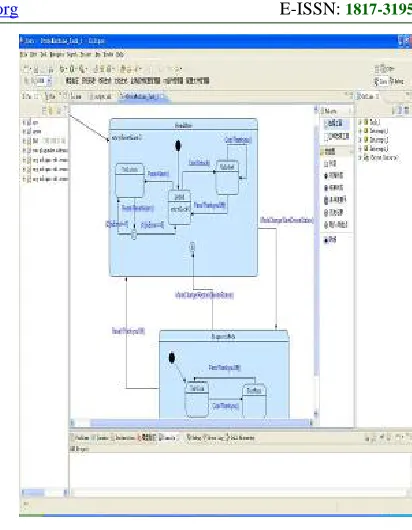
Fig.4 Task State Model
4 MODEL APPLICATION VERIFICATION
To effectively illustrate the proposed model and the feasibility of the algorithms, we apply this model to the actual project.
ISSN: 1992-8645 www.jatit.org E-ISSN: 1817-3195
Fig.5 Xml Data File
According to the node information in the XML file, we first establish a document template for state chart, including picture tags, recursive state tags.
<loop 0>Task
The detail information of Task<Task@name>:
<loop 1>StateImage
<Pic><StateImage@path></Pic>
</loop 1>
<loop 1>HeadFileList
File Include List:
Head File Location
Head File Name
Type
<loop 2>HeadFile
<HeadFile@de fine>
<HeadFile@dec lare>
<HeadFile@t ype>
</loop 2>
</loop 1>
<loop 1>State
State Information:
State Name:<State@name> State ID:<State@id> <loop 2>RecursiveState
</loop 2>
</loop 1>
</loop 0>
After the establishment of a structured Word document template, the next step you need to edit XML tag-mapping file as follows:
<?xml version="1.0" encoding="GBK"?>
<path>
<Root>/root</Root>
<TaskList>tasklist</ TaskList >
<Task>tasklist/task</ Task >
<StateImage>tasklist/task/stateimage</ StateImage >
<HeadFileList>tasklist/task/includelist</ HeadFileList >
<HeadFile>tasklist/task/includelist/include</ HeadFile >
<State>tasklist/task/state</State>
<RecursiveState>tasklist/task/state/state</ RecursiveState >
</path>
When all tags are edited, we can press ‘document generation’ button to automatically generate Word document, as shown in [6] below.
Fig.6 Task State Diagram Information Generated By The Document
Recursive State Node
State Node Diagram of State
ISSN: 1992-8645 www.jatit.org E-ISSN: 1817-3195
5 CONCLUSION
The proposed structured Word document generation technology has been applied in actual projects which not only effectively solve some problems of heavy workload, duplication, inefficiency raised by manually compiling document. Furthermore the proposed technology is based on XML, so it effectively solves the problem of depending traditional databases. Meanwhile XML has already been used widely in information storage and exchange. The application in actual project shows that the technology proposed can satisfy the requirements of the flexible style design and automatic generation for structured Word document.
ACKNOWLEDGMENT
This work is supported by the study fund of Heilongjiang natural science funds F201139. Harbin Technological Innovation Talent Research Special Foundation Project. 2012RFQXG097. Chunmao
Jiang , associate professor ,main research include
mobile peer to peer, cloud computing, embedded operating system, etc.
REFRENCES:
[1] Robert H. Gregory. Document Processing. Proceedings of the Eastern Computer Conference.
[2] Qu Mingcheng, Liao Minghong, Wu Xianghu, Liu Zhiqiang, “Construction of an automatic generation model and its application”, Computer Integrated Manufacturing Systems, Vol.14, No.7, 2008, pp.1297-1305.
[3] Ge Fen, Wu Ning, “A Platform for Automatically Producing Word Document Based on Mutiple Techniques”, Journal of University of Electronic Science and Technology of China, Vol. 36, No. 4, 2007, pp.263-266 .
[4] Zhang Weixiang, Wu Xin, Liu Wenhong, „A Research on and Realization of Output of Structured Documents”, Journal of Spacecraft TT&C Technology, Vol.26, No.12, 2007, pp.91-94.
[5] Helen Balinsky, Anthony Wiley, Michael Rhodes, Alfie Abdul-Rahman. Automated Repurposing of Implicitly Structured Documents. DocEng’08, September 16-19, 2008, Sao Paulo, Brazil.
[6] Wang Hongzhi, Li Jianzhong, Luo Jizhou, “Efficient Aggregation Algorithms on XML
Stream”, Journal of Software, Vol.19, No.8,
2008, pp. 2032−2042.
[7] J. Lumley, R. Gimson, and O. Rees, “A framework for structure, layout & function in documents”, In DocEng’05: Proceedings of the 2005 ACM symposium on Document engineering, pp.32–41, New York, NY, USA, 2005. ACM.
[8] D. M. Levy, “Document reuse and document systems”, Electronic Publishing, Vol.6, No. 4, 1993, pp.339–348.
[9] J. F. Terris, “Re-use, re-purpose, re-package”, In Proceedings of XML Europe 2001, IDEAlliance, Dec 2001.