An Application Sandbox Model based on Partial
Virtualization of Hard-Disk and a Possible
Windows Implementation
Jasmeet Singh
Amity School of Engineering &Technology Amity University Haryana
Gurgaon, India
Khalid Hussain
Amity School of Engineering &Technology Amity University Haryana
Gurgaon, India
Akshat Aggrawal
Amity School of Engineering &Technology Amity University Haryana
Gurgaon, India
ABSTRACT
The proposed concept is of an Application Sandbox Model that restricts any malicious code from making changes to the actual system hard-disk by using a counterfeit Virtual Hard-Disk. The applications initiated using this Sandbox are allowed to read any file from the real hard disk but when they need to make changes(write) to any file then the Sandbox copies that file from the real hard disk to a Virtual Hard-Disk Space and then makes changes to this counterfeit copy of the file. For every future access request (read or write) of the same file only this counterfeit copy shall be referred. In this way it both ensures the normal & complete execution of the application initiated using the Sandbox and simultaneously protects the real hard disk file system from any potentially harmful changes. This paper discusses about the concept, design and a possible Windows Implementation of such an Application Sandbox Model.
General Terms
Application Sandbox Model,PartialVirtualization, Virtual Hard Disk, Windows Application Sandbox.
Keywords
Virtualization, sandboxing, security, system calls interception,Input/output Request Packet, virtual hard-disk.
1.
INTRODUCTION
A Sand box is a secure execution environment that applies restrictions on an application to run untested code without harming anything outside the scope of the sandbox environment. Sandboxes replicate the bare minimums required to successfully run the whole application. Typical examples of sandboxes include process virtual machines like JVM, rule based execution systems, resource limiting jails, and system virtual machines.
The problems with today’s sandbox models is that firstly, they are more restrictions oriented and hence don’t allow the applications to always run successfully & completely and hence all the effects of the application cannot be always studied. Secondly they do not provide any provision to log all the changes that are made to the system by that application. Thirdly there is no possible way to refer to both the initial and the final state of the system files and determine which files and their which parts have been changed by the application. The proposed sandbox model presented in this paper overcomes these drawbacks of traditional sandboxes. The major purpose of such a sandbox model is to study the
changes made by an application to the system environment. The idea is as simple. The idea is to protect that component of a system which any virus program actually targets, the hard-disk.
The proposed sandbox model is based on the concept of a virtual hard disk integrated with the sandbox software in a very elegant manner. The sandbox shall instead of emulating an Operating System environment would rather borrow the Operating System environment for the executions of applications under itself. This is because the purpose is to restrict (or sandbox) the applications from harming operating system environment and not to create a whole new operating system environment itself.
2.
RELATED WORK
The concept of sandboxing is first introduced by Wahb e et al. in the context of software fault isolation [1]. What they achieve is safety for trusted modules running in the same address space as untrusted modules. Janus [2], to my knowledge, is the first to propose using these techniques. Systrace [3] expands on Janus by proposing novel techniques that efficiently confine multiple applications and support multiple policies. Recursive Systrace [4] expands on Systrace by allowing sandboxed processes to further limit their children processes.
Sandboxing can be used to analyze malicious codes [5], make sure the data written with no sensitive information [6], etc. Many studies have improved the traditional sandbox toward dissimilar emphases: sandbox based on delegating architecture [7], sandbox executing speculative security checks [8], sandbox with a dynamic policy [9], etc.
Many sandbox systems [1,2,3,4,5,6,7,8,9] are based on system call interception. When an application attempts to invoke a system call, the sandbox system first suspends the application and checks the security of the invocation. It finally resumes the application if it judges the invocation as benign [10].
3.
THE PROPOSED SANDBOX MODEL
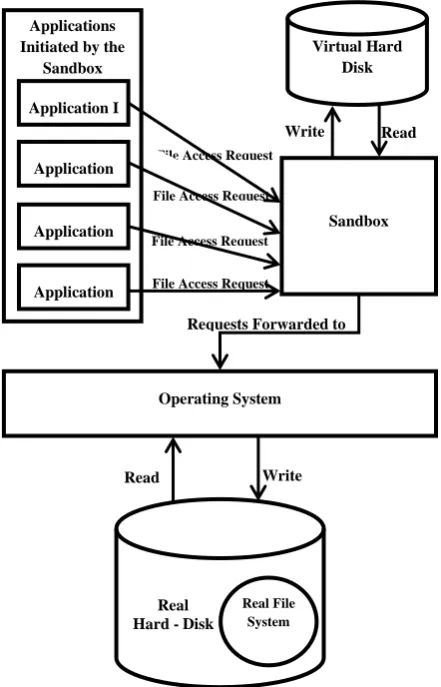
real hard disk only when a write request is made by the application for some particular file. Two other external actors in the Model are the Operating System and the Applications that are to be run using the sandbox.
Fig 1: The Virtual Hard Disk based Sandbox Model
All file access requests made by the application run in the Sandbox are intercepted by the sandbox. The sandbox then checks if it is a read request or a write (or modification) request. The applications run normally until there are only file read requests made by the application. But when a write request is encountered by the sandbox something different happens. The file that is to be modified by the sandbox is copied by the sandbox from the actual Hard Disk’s File System to the same tree of directories in a Similar File System of the Virtual Hard Disk unless or until it does not already exist in the Virtual Hard Disk. And after copying the changes are made only to this copied or counterfeit file rather than the actual one. For every future access of the same file whether read or write, only the file in the Virtual Hard Disk is used.
The idea is based on the obvious fact that any malicious program ultimately only harms the system’s secondary storage of a system. And that too only when it is writing to this storage and not when it reads from it. Hence if the writing of the files in the secondary storage can be handled with by using decoy files then the problem is solved and the malicious program cannot possibly harm the system at all.
3.1
Copying From Real Hard Disk to VHD
There can be total 4 main cases for every intercepted file access request:3.1.1
Read request of a file not residing on the
VHD:
In this case the sandbox just forwards the request to the Operating Systems which responds to it.
3.1.2
Read request of a file already residing on
the VHD:
In this case this counterfeit copy of the file in the Virtual Hard Disk is read by the application instead of the actual file residing in the real File System.
3.1.3
Write request of a file not residing on the
VHD:
In this case the file is copied from the file system to the virtual hard disk. And then the modification is done to this counterfeit copy of the file. This copy shall be created in the same directory tree that has been made in the sandbox according to the location of the file in the real Hard Disk File System.
3.1.4
Write request of a file already residing on
the VHD:
In this case there is no need to copy the file from the hard disk to the Virtual Hard Disk again. And only the counterfeit copy in the Virtual Hard Disk is written to or modified by the sandbox. The VHD shall contain the file in exactly the same directory branch as referred to by the applications request.
3.2
File Deletion Dilemma
There can obviously also be a case that some file had been previously copied to the VHD for some application and then the same application or another one may have made a deleted request for the same file and the sandbox may have deleted it. In this case the file might still be present in the real file system but may have been deleted from the VHD. This will seem to the sandbox as if the file has not yet been copied from the Real File System to the VHD and the sandbox will wrongly forward the request to the Operating System to read it from the File System. This is the File Deletion Dilemma since neither can the sandbox delete a file from the real hard-disk nor is there a permanent way to delete it from the virtual hard disk. The sandbox cannot be allowed to delete from the real hard disk for security purpose. But there can be a way to delete a file from the virtual hard disk and simultaneously record this process of deletion as well.
3.3
Solution to the Dilemma
For such a case the Sandbox will have to maintain historical records of all the files that had been copied with the information that do they still exist in the virtual hard disk or had been deleted by some application from the directory. These records will be stored in a table which will be referred as the VHD-Table (Virtual Hard Disk-Table) in this paper.
File Access Request
File Access Request
File Access Request
File Access Request
Requests Forwarded to the OS
Read
Write Read
Applications Initiated by the
Sandbox
Application II
Application III
Application IV Application I
Virtual Hard Disk
Sandbox
Operating System
Real Hard - Disk
Write
The table shall not only store the files parameters but also the directory location in which the files exist. And the sandbox shall now look for the file information in the VHD table instead of the virtual file system directories.
3.4
Algorithm for Processing File Access
Requests
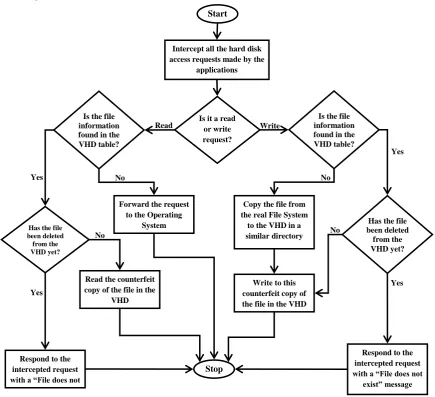
As shown in the flowchart below (see Figure 2), 2 new cases for file access requests are included:-
i. Read request of a file deleted from the VHD.
ii. Write request of a file deleted from the VHD.
[image:3.595.80.516.179.576.2]In either of the 2 cases the sandbox responds to the request with a “File does not exist” message.
Fig 2: Flow-chart Depicting the Algorithm for Processing File Access Requests
3.5
Copying the Critical Components of
Operating Systems tothe Virtual Hard Disk
Critical components of the Operating System can be copied to the Virtual Hard Disk in advance even before running the application. These are the components that need changes very frequently or are too critical to the Operating System that they are more likely to be attacked by any malicious software. The sandbox will not check for these files or directories in the VHD table it will directly allow the application to access them from the VHD which will also save valuable execution time.Examples of such components would be:-
Windows Registry.
Internet Browser Cache folders & files.
Temporary files.
Frequently needed DLL libraries.
Data from removable drives or pen drives right when they are inserted to the system to avoid viruses.
There are 2 advantage of copying such components to the VHD:-
No
Yes Yes
No
No
Yes
No Yes
Write Read
Start
Stop
Intercept all the hard disk access requests made by the
applications
Is it a read or write request? Is the file
information found in the VHD table?
Has the file been deleted from the VHD yet?
Is the file information found in the VHD table?
Forward the request to the Operating
System
Read the counterfeit copy of the file in the
VHD
Respond to the intercepted request with a “File does not
exist” message
Has the file been deleted
from the VHD yet?
Write to this counterfeit copy of the file in the VHD Copy the file from the real File System
to the VHD in a similar directory
Respond to the intercepted request with a “File does not
1. Time will not be wastes in copying the files of such components which are the most probable target for frequent modification.
2.
Security will increase since the some critical components are most likely to be attacked by the malicious applications.3.6
Manually Copying Files to the VHD
A provision can be made for manually copying all those files to the VHD that might be modified by the application. The sandbox cannot possibly guess that what all files might need modification or access by the application. The user can copy files that are most probable to be needed by the application. Copying the files in between the execution of the application can be done by blocking the application execution which should be avoided.There will be 3 main advantages of copying the most probable files that may need to be modified by the application:-
1. It will save a lot of valuable time that would have been wasted in the transfer of files from the Hard Disk File System to the VHD in the middle of the execution of the application.
2. The performance of the application will increase since the Sandbox will not need to check again and again if the files are on the VHD or not.
3. Copying a large directory or a large number of files to the VHD at once would take lesser time than copying each file separately after many intervals.
4.
Modules
The model has 7 main modules which are as follows:-
4.1.1
Application
Initiator:-It first creates a new application controller instance and initializes that instance and waits for a “START” message from the application controller. And then starts the execution of the application.
4.1.2
Application
Controller:-It first creates and initializes new file access filter, restrictions module & logging module and sends the “START” message to the application initiator. And then intercepts all the file access requests.
4.1.3
File Access Request
Filter:-It uses the algorithm represented in Figure 2 to filter the requests made by the applications. For this purpose it sends a “Check_VHD_Table” request to the VHD controller along with the file name and location. Then it either sends READ/WRITE message to the VHD controller (with the file parameters), sends a Copy_HDD_to_VHD request to the VHD controller (with the file parameters) or directly forwards the request to the Operating System accordingly.
4.1.4
VHD (Virtual Hard Disk)
Controller:-It is responsible for controlling the virtual hard disk & its file system and maintaining and controlling the VHD-Table.
4.1.5
Logging
Module:-It logs all and changes made by the application in an organized log file.
4.1.6
Restrictions
Module:-It creates, removes and maintains the restrictions that are put upon the application.
4.1.7
Automated Tool
Creator:-It is an optional module which can create an automated reversal tool for all the changes made to the system by an application. For this purpose it uses only the logging module. The reversal tool shall only be used on an already effected system to revert all the similar harmful changes that may have been made by the same application.
5.
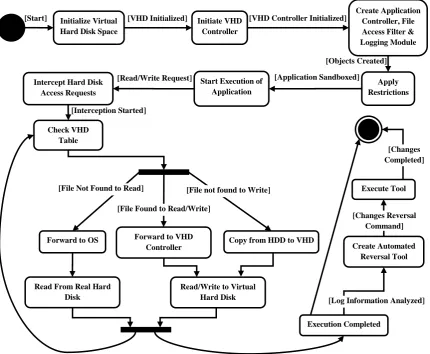
Execution Sequence
Fig 3: Statechart for Execution Sequence of the Sandbox
6.
A POSSIBLE WINDOWS
IMPLEMENTATION
6.1
Placing Restrictions
Since there is no strict parent-child relationship in between the processes in Windows hence Sandboxing in windows is difficult than it is in Linux. But there is a way around to implement a sandbox in windows. Microsoft Windows offers a “job” kernel object that lets you group processes together and create a "sandbox" that restricts what the processes can do. It is best to think of a job object as a container of processes. However, it is also useful to create jobs that contain a single process because you can place restrictions on that process that you normally cannot. A job object allows groups of processes to be managed as a unit. Job objects are namable, securable, sharable objects that control attributes of the processes associated with them. Operations performed on the job object affect all processes associated with the job object [11].
6.2
Intercepting File Access Requests
In Windows “File System Filter Drivers” are used to intercept file access requests. File System Filter Drivers are input/output filter drivers layered over file system drivers. When a windows process needs to access a file for input or output it creates an Input/output Request Packet (IRP). File System Filter Drivers can intercept these IRP’s.The sandbox software would include a file system filter driver that intercepts IRPs that deliver IRP_MJ_CREATE commands that issue whenever an application opens a file. Before propagating the IRP to the file system driver to which the command is directed, the sandbox would forward the IRP type and parameters to its File Access Filter Module which would further interact with VHD controller to check whether to forward the request to the File System Driver of the Real Hard Disk File System, forward the request to the File System Driver of the Virtual Hard Disk File System or to fail the IRP (typically with an access-denied error) [12].
6.3
Implementing Virtual Hard Disk
To implement a Virtual Hard Disk any Open Virtual Hard Disk Image Specification can be used for both Windows and Linux. The specification is not the implementation but the specification of the image or file that will act as the Virtual Hard Disk. So a software that manages the VHD would have to be developed that can create and manage a VHD according to the specifications. This software is the VHD-Controller Module of this sandbox model.Some of the open Virtual Hard Disk Specifications are:-
[Interception Started]
[Objects Created]
[Read/Write Request] [Application Sandboxed]
[VHD Controller Initialized] [VHD Initialized]
[Start] Initialize Virtual Hard Disk Space
Initiate VHD Controller
Create Application Controller, File Access Filter & Logging Module
Apply Restrictions Start Execution of
Application Intercept Hard Disk
Access Requests
Check VHD Table
Forward to OS Forward to VHD Copy from HDD to VHD
Controller
Read/Write to Virtual Hard Disk Read From Real Hard
Disk
Execute Tool
Create Automated Reversal Tool
Execution Completed [File Not Found to Read]
[File Found to Read/Write]
[File not found to Write]
[Changes Reversal Command]
Microsoft’s Virtual Hard Disk Image Format Specification
VMware’s Virtual Machine Disk Format (VMDK)
The VHD Controller Module will perform the input/output to the Virtual Hard Disk and hence would require an engine that controls the Virtual Hard Disk at the hard disk level and not at the file system level. A separate File System Driver would be required to control the Virtual Hard Disk at the file system level. This File System Driver would also further be controlled and used by the VHD-Controller.
6.4
Disk Encryption
In this Sandbox Model it is possible to implement both the disk encryption and the file system level encryption. The advantage of File system level encryption would be that a separate file key for each file could be created at run-time and stored in the memory until the execution of the application referring to that file does not end hence it would provide more security. But the advantage of disk encryption would be that only one key will be needed to be maintained hence there will be less overhead because the Sandbox will not need to search for a new file key after every File Access Request. Another advantage would be that also even the metadata could be encrypted using disk encryption.
7.
Possible Applications and Future
Prospects
Such a sandbox model can have numerous possible applications. Such software can help the IT-security industry in creating tools that don’t need any virus definition updates to reverse any changes made by a virus. This software does not just rely on restricting any application like the traditional firewalls and anti-virus software solutions. Instead it relies on studying the changes made by those malicious applications. This gives this sandbox an unprecedented advantage over general antivirus and firewall products. The sandbox shall allow an application to run without any interruption unlike the traditional firewall programs.
In future anti-virus and firewall programs cannot just rely upon updating virus definitions even as frequent as every day. The numbers and types of viruses would increase to such an extent that it shall become impossible to create an antivirus that would contain generic virus definitions for each and every kind of malicious code. Even the current scenario of the antivirus industry has started showing such trends.
In future anti-virus and firewall programs will have to be smart enough to themselves understand what harm any kind of malicious code can do to a system. And this is only possible by studying the effects of the code on a system. If accepted then this idea can revolutionize the IT-security industry and shall give a way to a completely new generation of advanced security software solutions.
8.
Conclusion
The idea of a perfect sandbox is merely hypothetical. A virus can always be made ready to bypass any kind of restrictions and break out of a sandbox. And hence continuous development of these restriction mechanisms against malicious applications is also required.
But this idea would still be very useful in at least analyzing the malicious applications that are not ready for such a Sandbox yet. Such a sandbox shall lay a basis for the development of anti-virus software that use the analysis of changes made by a virus to create a healing or reversal tool instead of creating virus-definitions every day that need frequent updates by the user.
9.
REFERENCES
[1] R. Wahbe, S. Lucco, T. E. Anderson, and S.L. Graham, “Efficient software-based fault isolation,” in Proceedings of the Symposium on Operating System Principles, 1993. [2] I.Goldberg, D.Wagner, R.Thomas, and E.A.Brewer, “A secure environment for untrusted helper applications: confining the wily 34505 hacker,” in Proceedings of the 1996 USENIX Security Symposium, 1996.
[3] N. Provos, “Improving host security with system call policies,” in Proceedings of the 12th USENIX Security Symposium, pp. 257-273, August 2003.
[4] A. Kurchuk and A. D. Keromytis, “Recursive sandboxes: extending systrace to empower applications,” in SEC, pp. 473-488, August 2004.
[5] S. Miwa, T. Miyachi, and M. Eto, “Design and implementation of an isolated sandbox with mimetic internet used to analyze malwares,” in Proceedings of the DETER Community Workshop on Cyber-Security and Test, 2007.
[6] T. Khatiwala, R. Swaminathan, and V.N. Venkatakrishnan, “Data sandboxing: a technique for enforcing confidentiality policies,” in Proceedings of the 22nd Annual Computer Security Applications Conference, pp. 223-234, 2006.
[7] T. Garfinkel, B. Pfaff, and M. Rosenblum, “Ostia: a delegating architecture for secure system call interposition,” in Proceedings of the 11th Annual Symposium on Network and Distributed System Security, February 2004.
[8] Y. Oyama, K. Onoue, and A. Yonezawa, “Speculative security checks in sandboxing systems,” in Proceedings of the 19th IEEE International Parallel and Distributed Processing Symposium, April 2005.
[9] T. Shioya, Y. Oyama, and H. Iwasaki, “A sandbox with a dynamic policy based on execution contexts of applications,” ASIAN’ 2007, pp. 297-311, 2007. [10]Zhen Li, Jun-Feng Tian, Feng-Xian Wang, “Sandbox
System Based on Role and Virtualization”, 2009 International Symposium on Information Engineering and Electronic Commerce, pp. 342-246.
[11]Jeffrey Richter, Christophe Nasarre, “Windows via C/C++”, Microsoft Press, WB Publisher, India, 2008. [12]Mark E. Russinovich, David A. Solomon, Alex Lonescu,
“Windows Internals 5th