How to Make a Domain
Model
What is a Domain Model?
•
Illustrates meaningful conceptual classes
in problem domain
•
Represents real-world concepts, not
software components
•
Software-oriented class diagrams will
A Domain Model is Conceptual,
not a Software Artifact
Sale amt item SalesDatabase Sale Double amt; Item item; void print()
Conceptual Class:
Software Artifacts:
vs.
What’s the
difference?
Domain Model Relationships
Domain Model
Use Case Model
Interaction Diagrams
Glossary
Dynamic Behavior
Functional Requirements Conceptual Class Diagram
Classes, attributes, associations
Domain objects
Define terms
Why do a domain model?
• Gives a conceptual framework of the things in
the problem space
• Helps you think – focus on semantics
• Provides a glossary of terms – noun based
• It is a static view - meaning it allows us convey time invariant business rules
• Foundation for use case/workflow modelling
• Based on the defined structure, we can
describe the state of the problem domain at any time.
Features of a domain model
• Domain classes – each domain class denotes a typeof object.
• Attributes – an attribute is the description of a named slot of a specified type in a domain class; each
instance of the class separately holds a value.
• Associations – an association is a relationship
between two (or more) domain classes that describes links between their object instances. Associations can have roles, describing the multiplicity and participation of a class in the relationship.
• Additional rules – complex rules that cannot be
shown with symbolically can be shown with attached notes.
Domain classes?
• Each domain class denotes a type of object. It is a descriptor for a set of things that share
common features. Classes can be:-
• Business objects - represent things that are
manipulated in the business e.g. Order.
• Real world objects – things that the business
keeps track of e.g. Contact, Site.
• Events that transpire - e.g. sale and
How to Identify Domain Classes
• Reuse an existing domain model
There are many published, well-crafted domain models.
• Use a conceptual class category list
Make a list of all candidate conceptual classes
• Identify noun phrases
Identify nouns and phrases in textual descriptions of a domain ( use cases, or other documents)
Conceptual Class Category List
• Physical or tangible objects
• Register, Airplane • Specifications, or descriptions of things • ProductSpecification, FlightDescription • Places • Store, Airport • Transactions
• Sale, Payment, Reservation
• Transaction items
• SalesLineItem
• Roles of people
• Cashier, Pilot
• Containers of other things
• Store, Hangar, Airplane
• Things in a container
• Item, Passenger
• Computer or electro mechanical systems • CreditPaymentAuthorizationSy stem, AirTrafficControl • Catalogs • ProductCatalog, PartsCatalog • Organizations • SalesDepartment, Airline
Where identify conceptual classes
from noun phrases (NP)
• Vision and Scope, Glossary and Use Cases are
good for this type of linguistic analysis
• However:
• Words may be ambiguous or synonymous
• Noun phrases may also be attributes or
parameters rather than classes:
If it stores state information or it has multiple
behaviors, then it’s a class
If it’s just a number or a string, then it’s
e.g. From NPs to classes or attributes
The ATM verifies whether the customer's card number and PIN are correct. S V O O O
If it is, then the customer can check the account balance, deposit cash, and withdraw cash. S V O V O V O Checking the balance simply displays the account balance.
S O V O
Depositing asks the customer to enter the amount, then updates the account balance. S V O V O V O
Withdraw cash asks the customer for the amount to withdraw; if the account has enough cash, S O V O O V S V O the account balance is updated. The ATM prints the customer’s account balance on a receipt. O V S V O O
Analyze each subject and object as follows:
• Does it represent a person performing an action? Then it’s an actor, ‘R’.
• Is it also a verb (such as ‘deposit’)? Then it may be a method, ‘M’.
• Is it a simple value, such as ‘color’ (string) or ‘money’ (number)? Then it is probably an attribute, ‘A’.
• Which NPs are unmarked? Make it ‘C’ for class.
• Verbs can also be classes, for example:
Deposit is a class if it retains state information
R R M M A A A A A A A A A A A A A A C C R M R
Consider the following problem description, analyzed for Subjects, Verbs, Objects:
Steps to create a Domain Model
1.
Identify candidate conceptual classes
2.
Draw them in a UML domain model
3.
Add associations necessary to record
the relationships that must be retained
4.
Add attributes necessary for information
to be preserved
5.
Use existing names for things,
13
Monopoly Game domain model
(first identify concepts as classes)
Monopoly Game
Player Piece
Die Board
Monopoly Game domain model Larman, Figure 9.28
Class names
• Class Name creates the vocabulary of our analysis
Use nouns as class names, think of them as simple agents Verbs can also be made into nouns, if they are maintain state E.g., “reads card” suggests CardReader, managing bank cards
• Use pronounceable names:
If you cannot read aloud, it is not a good name
• Use capitalization to initialize Class names and demarcate multi-word names
E.g., CardReader rather than CARDREADER or card_reader Why do most OO developers prefer this convention?
• Avoid obscure, ambiguous abbreviations
E.g., is TermProcess something that terminates or something that runs on a terminal?
• Try not to use digits within a name, such as CardReader2
Associations
• A link between two classes (“has a”) Typically modeled as a member reference
Notation from Extended Entity Relation (EER) models
• A Person works for a Company
• Role names and multiplicity at association ends
• Direction arrow to aid reading of association name
Person employee employer Company
works for
Association Name Role
Adding Association
•
An association is a relationship between
classes that indicates some meaningful
and interesting connection.
•
In the UML, associations are defined as
“the semantic relationship between two or
more classifiers that involve connections
among their instances.”
Structure (association) analysis
• Lines connecting classes
• In UML, simple line is an association
Decorations for multiplicity, role names, constraints
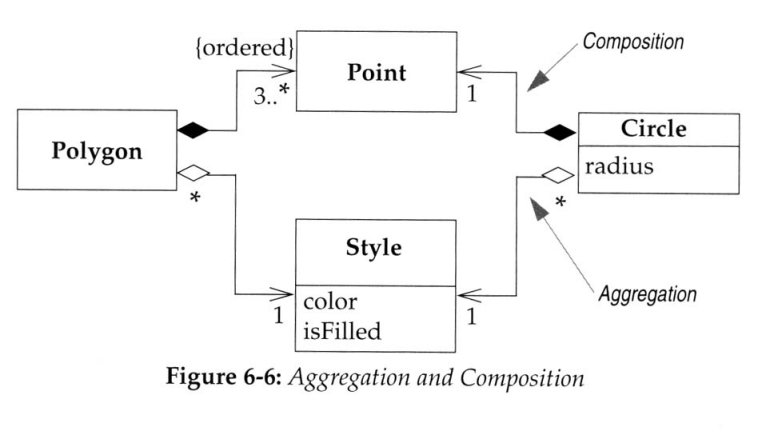
• Aggregations and composition:
Arrow denotes navigability
A black-filled diamond denotes a composition
• a part, unique to this whole
A white-empty diamond denotes an aggregation
Common Associations
• A is subpart/member of B. (SaleLineItem-Sale)
• A uses or manages B. (Cashier –Register,
Pilot-airplane)
• A communicates with B. (Student -Teacher)
• A is transaction related to B. (Payment -Sale)
• A is next to B. (SaleLineItem-SaleLineItem)
• A is owned by B. (Plane-Airline)
Roles and Multiplicity
•
Each end of an association is called a role.
•
Multiplicity defines how many instances of
a class A can be associated with one
instance of a class B.
•
e.g.: a single instance of a Store can be
associated with “many”(zero or more) Item
instances.
Adding Attributes
• An attribute is a logical data value of an object.
• Include the following attributes in a domain model: Those for which the requirements suggest a need to remember information.
• An attribute can be a more complex type whose
structure is unimportant to the problem, so we treat it like a simple type
• UML Attributes Notation: Attributes are shown in
Point of Sale System (POS) [1]
Basic Flow:
1. Customer arrives at a POS checkout with
goods and/or services to purchase.
2. Cashier starts a new sale.
3. Cashier enters item identifier.
4. System records sale line item and presents
item description, price, and running total. Price calculated from a set of price rules. Cashier repeats steps 2-3 until indicates done.
Point of Sale System (POS) [2]
5. System presents total with taxes calculated.
6. Cashier tells Customer the total, and asks for payment.
7. Customer pays and System handles payment.
8. System logs the completed sale and sends sale
and payment information to the external
accounting (for accounting and commissions) and Inventory systems (to update inventory).
9. System presents receipt.
10.Customer leaves with receipt and goods (if any).