Microsoft Hyper-V and SQL Server with
IBM Real-time Compression version 7.4
and IBM Storwize V7000 Gen2
David West
IBM Systems, ISV Technical Enablement
April 2015
Table of contents
Abstract ... 1
Introduction ... 1
Systems overview ... 1
IBM Storwize V7000 ... 2
What is new in Storwize V7000 Gen2 for Real-time Compression ... 3
System x servers ... 4
Hyper-V overview ... 5
Prerequisites ... 6
Volume configurations ... 6
Real-time Compression... 7
Previewing compression benefits ... 7
Comprestimator utility ... 7
Alternate preview method ... 8
Testing ... 9
Compression savings ... 9
Performance results ...10
TPC-C OLTP tests ...11
Fixed-size VHDX creation ...14
Configuring compressed volumes...14
Converting standard volumes to compressed ...15
Conclusion ... 16
Resources ... 17
Acknowledgements ... 18
Abstract
This paper covers IBM Storwize V7000 Gen2 with IBM Real-time Compression in Microsoft Hyper-V and SQL Server environments. In addition to virtual machine space savings, SQL Server provided the sample workload to demonstrate the expected database compression benefits and performance on virtual machines compared to the first generation, Storwize V7000 Gen1.
Introduction
This paper demonstrates how the IBM® Real-time Compression™ feature of IBM Storwize® V7000 Gen2 can be used to reduce the storage capacity required by Microsoft® Hyper-V virtual machines and SQL Server databases. Real-time Compression was first introduced in IBM Storwize version 6.4 as software-based compression. Since then there have been significant improvements in the performance and compression benefits. Customers can see improvement, and excellent compression results with 7.x software on standard Storwize V7000 systems.
An important enhancement was introduced with the combination of version 7.3 firmware and the new Storwize V7000 Gen2 system. The next generation Storwize V7000 includes built-in Real-time
Compression hardware accelerator cards to further improve compression and performance. This is the configuration used for the proof of concept testing, and running version 7.4 firmware. Even without the hardware compression cards, performance and compression improvements from the initial 6.4 version to the 7.3 software alone are significant.
With the widespread use of virtualization and private cloud environments, virtual infrastructure has improved efficiency and lowered IT costs. Adding Real-time Compression to the solution provides highly scalable infrastructures with an even smaller footprint and lower costs.
The IBM Storwize V7000 Gen2 provides robust and reliable feature-rich storage for Hyper-V and SQL Server deployments. All of the Storwize family products run the same code base, architecture, and feature sets, and are compliant with Hyper-V and Storage Management Initiative Specification (SMI-S) standards that Microsoft System Center 2012 Virtual Machine Manager (VMM) relies on. The end result is a highly efficient, integrated virtual environment that combines the benefits of both virtual storage and servers.
Systems overview
This section describes the features of IBM Storwize V7000 and the servers used for the proof of concept testing. IBM storage and System x servers have always been tightly integrated and provide proven combinations for robust, reliable, and scalable solutions.
IBM Storwize V7000
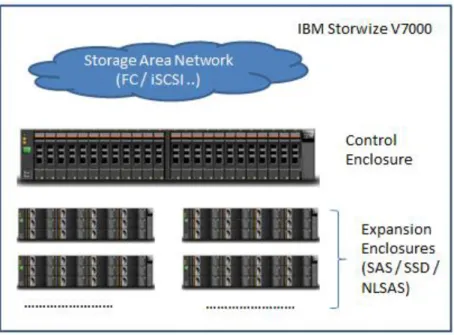
The IBM Storwize V7000 storage system provides block storage enhanced with enterprise-class features. The Storwize V7000 can scale up to 240 drivers per control enclosure. Additionally, up to four control enclosures can be clustered, allowing the Storwize V7000 to scale up to 906 drives. With the built-in storage virtualization, replication capabilities, and Microsoft storage integrations, the IBM Storwize V7000 system is great fit for Microsoft Hyper-V deployments.
Figure 1: IBM Storwize V7000 overview
IBM Storwize V7000 storage system enables customers to improve application flexibility, availability, responsiveness, and unmatched performance while reducing complexity and reducing storage space with the following features:
Clustered systems: The clustering ability of Storwize V7000 system enables growth from the
smallest configurations up to systems with 1056 drives for both performance and capacity.
Data replication: Metro Mirror and Global Mirror performs synchronous and asynchronous data
replication between Storwize V7000 systems at varying distances to protect data and keep services online in disaster situations.
IBM Tivoli® Storage FlashCopy® Manager: The IBM Tivoli Storage FlashCopy Manager
functionality enables the creation of instant volumes copies for data protection and flexibility
Advanced Storage tiering with IBM Easy Tier®: Advanced technology for automatically
migrating data between different storage tiers based on real-time usage and analysis.
New Generation GUI: The graphical user interface (GUI) allows easy-to-use data management
IBM Storwize V7000 system is a modular storage system based on the IBM System Storage® SAN Volume Controller technology and uses the Redundant Array of Independent Disks (RAID) technology from the IBM System Storage DS8000® family to deliver a virtualized, easy to use, enterprise-ready, mid-range storage solution. For additional information about the IBM Storwize V7000, refer to the following URL:
ibm.com/systems/storage/disk/storwize_v7000/index.html
What is new in Storwize V7000 Gen2 for Real-time Compression
The next generation of Storwize V7000 storage system control enclosure is the same size as previous enclosures. However, the back layout is re-designed to make room for more powerful canisters.Figure 2: IBM Storwize V7000 Gen2 canister design
The new Storwize V7000 Gen2 model has one on-board compression accelerator standard and supports volume compression without any standard adaptor installed. As shown in Figure 2, one additional
compression accelerator card can optionally be installed in slot 1, replacing the pass-through adaptor, for a total of two compression accelerator cards per node canisters.
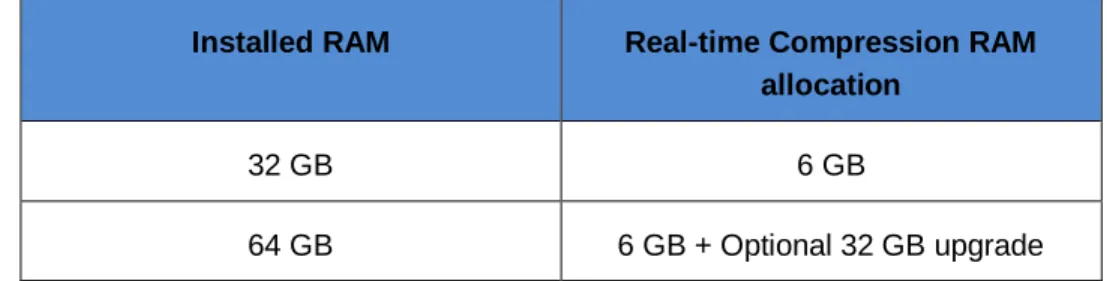
In order to support additional memory for Real-time Compression, an additional 32 GB of Random Access Memory (RAM) is supported in each canister. Table 1 shows typical RAM allocation in a configuration when Real-time Compression is enabled.
Installed RAM Real-time Compression RAM allocation
32 GB 6 GB
64 GB 6 GB + Optional 32 GB upgrade
Table 1: RAM allocation for Real-time Compression
Also, in order to support additional processing power requirements for Real-time Compression, processor cores are allocated appropriately. Table 2 shows processor core allocation when Real-time Compression is enabled.
Real-time Compression disabled Real-time Compression enabled
Storwize operations Real-time Compression Storwize operations Real-time Compression
8 0 4 4
Table 2: Processor core allocation for Real-time Compression
This gives a balanced configuration between Real-time Compression and other Storwize operations. For serious Real-time Compression usage, the recommendation is to add the extra 32 GB of memory and the second accelerator card per canister.
You can find more detailed information about IBM Storwize V7000 at: ibm.com/systems/storage/disk
System x servers
System x server teams partner closely with IBM system storage products to deliver the performance and reliability required for virtualizing mission-critical applications such as SQL Server on Hyper-V and
Microsoft Failover Clustering. A full line of rack mount and blade systems are available to fit any budget or data center requirements. System x servers are available in several performance ranges, from mission-critical or general business level to entry-level systems that allow a company to start small and expand with the business. The servers used for the proof of concept testing included System x3650 M3 servers, and System x3550 M4 servers connected to the Storwize V7000 Gen2 system through Brocade 2498 8Gb Fibre Channel storage area network (SAN) switches.
The System x3650 M3 server provides a highly available and energy-saving design in a manageable 2U package. It includes Intel® Xeon® processors, impressive memory capacity, and the following enterprise-class features:
2U chassis with Low 675 W design and up to 95% efficient energy supplies and up to four PCIe slots
Six cooling fan modules, new Unified Extensible Firmware Interface (UEFI) basic input/output system (BIOS), integrated management module (IMM) and IBM Systems Director Active Energy Manager™
Up to two 3.46 GHz six-core (3.60 GHz four-core) Intel Xeon 5600 series processors and up to 1333 MHz memory access speed
Up to 288 GB RDIMMs or 48 GB UDIMMs high-performance, new-generation DDR-3 memory
Internal storage flexibility with up to sixteen 2.5-inch hot-swap SAS/SATA hard disk drives (HDD) or solid-state drives (SSD)
Hyper-V overview
Hyper-V is Microsoft’s hypervisor included with recent versions of Microsoft Windows® Server, and it continues to gain ground in the competitive server virtualization market. It offers Microsoft-based
infrastructure environments a built-in, familiar, lower-cost server virtualization solution, along with add-on integration and management products such as System Center VMM to simplify administering a growing virtual data center.
Hyper-V supports many storage specific features and enhancements, including: Virtual Fibre channel SAN switches and adapters
iSCSI connectivity Pass-through disks Live storage migration
Storage automation with Microsoft System Center 2012 VMM Virtual hard disks (VHDs) and the improved VHDX format Shared VHDX files (for guest clustering)
Online VHD resizing
Cluster Shared Volumes (CSV) cache Virtual machine snapshots
Resource metering
The Hyper-V host server is often referred to as the parent partition. This is where the Hyper-V hypervisor is installed as a Windows feature. The virtual machines are referred to as guests or child partitions. You can find in-depth information about the Hyper-V architecture and features on the Microsoft website at: http://technet.microsoft.com/en-us/library/hh831531.aspx
Prerequisites
The remaining sections of this paper assume experience with Hyper-V and SQL Server environments. The paper also assumes systems administrator-level knowledge of Windows servers, performance, storage, SAN, and networking concepts.
Before configuring any environment it is important to ensure that all systems and components have the latest supported firmware and drivers installed. Unexpected issues are often resolved by applying these overlooked updates. Additionally, Microsoft security and important patches should be applied and reasonably up-to-date. There are also specific test fixes that might be needed to provide functionality or stability in a Hyper-V environment. You can find a list of these test fixes at:
http://social.technet.microsoft.com/wiki/contents/articles/15576.hyper-v-update-list-for-windows-server-2012.aspx
There is an IBM solution guide with a detailed list of recommended prerequisites, how-to sections and Hyper-V best practices for Storwize family of products. Reviewing this paper is recommended for optimal Hyper-V configurations.
You can find the paper at: ibm.com/support/techdocs/atsmastr.nsf/WebIndex/WP102432
Volume configurations
There are two Hyper-V volume types that are often used for application servers. VHDX files for either the OS or dedicated data volumes
Directly connected physical data volumes using Hyper-V Virtual Fibre Channel connectivity or pass-through disks.
Both volume types are heavily used in most Hyper-V environments. It is common for Hyper-V hosts to have very large volumes to store multiple virtual hard disks. In such configurations, for performance reasons, it is important to ensure that there are adequate disks in the underlying storage pools to support the expected I/O load. It can be easy to overlook I/O performance, and only plan volumes for expected capacity and growth. Multiple high I/O virtual machines can quickly overwhelm a shared volume’s I/O capability. In such cases, the best practice is to distribute heavy I/O machines over more volumes, or use direct mapped volume methods to control VM storage performance more specifically. In most cases, VHDs provide adequate balanced performance.
When using directly connected volumes, they are sized similar to a typical physical server configuration. Directly connected drives are recommended with high I/O applications that require the highest
performance, such as database servers. Often, a virtual server can use a combination of direct-attached and VHD files to balance efficiency and performance depending on each drive’s workload demands. For the proof of concept tests, the OS ran on a VHDX file, and the SQL Server data files resided on Virtual Fibre Channel connected disks with the data spread over 4 volumes
The Windows Server NTFS file allocation size, which is the block size specified during Windows volume formatting, must be set to 64 KB for the best performance. SQL Server stores data in 8 KB pages; however these are retrieved in blocks of 8 extents, equaling 64 KB. This can have a significant performance benefit.
Real-time Compression
Real-time Compression uses the Random Access Compression Engine (RACE), previously implemented in the IBM Real-time Compression Appliance®, which compresses active inbound data before it is written to disk. This is considerably different than most compression solutions which compress data at rest or queue it for delayed processing.
Real-time Compression is implemented by creating a compressed volume, which is a new type of volume option available during the volume creation process. The Storwize family volume types available are:
Regular
Thin-provisioned Compressed
Because Real-time Compression is defined at the volume level, any Hyper-V virtual hard drives hosted on the volume are compressed. Of course, direct attached disks can also be provisioned as compressed volumes. In most cases, the effective storage capacity can be doubled or more. Database volumes typically see 70% or better compression savings.
Depending on the type, data can be compressed by up to 80%, allowing up to five times as much data storage as in the same physical space. The compression can be used with live, heavy I/O applications such as databases or email, and it occurs in real-time without a queue of uncompressed data waiting to be processed. What all of this means is no performance impact and very dense storage for a better return on investment (ROI).
File systems containing data that is already in a compressed format such as audio, video, and
compressed files are not good candidates for Real-time Compression, as the benefits would be minimal. Because the databases store data in tables, these types of files are normally good candidates for a compressed volume, with expected compression ratios around 50% to 80%. When it comes to Hyper-V data volumes, the benefits are going to be in line with the target workload, similar to the way a physical server benefits. The test team also looked at the compression savings of the Hyper-V VHDX files that host the guest VM operating system files.
Previewing compression benefits
It is possible to predict the compression benefits by using an IBM provided command-line utility called the Comprestimator, or by testing real data on a copy of the target data.
Comprestimator utility
Comprestimator is a command-line utility for block storage that uses a highly complex statistical algorithm to sample and predict compression ratios for a given workload on the sampled volumes. The utility runs on a host that has access to the volumes to be analyzed, and performs only read operations with no effect on the volume’s data. You can find the Comprestimator download and more detailed usage information at: http://www14.software.ibm.com/webapp/set2/sas/f/comprestimator/home.html
Figure 3 shows an example of the Comprestimator analysis and output. In this example, the predicted savings of 61.6% was accurate, with the actual savings being 59%.
Figure 3: View of Comprestimator utility results
There are some conditions that affect the accuracy of the Comprestimator predictive results, such as non-zeroed or mostly empty volumes or reusing volumes that had pre-existing data or file systems on them. In such cases, the actual compression ratio might be less than what is reported by the Comprestimator utility. When analyzing traditional (fully allocated) volumes that were created without initially zeroing the device, they often contain traces of old data. This data is not accessible or viewable in the file-system level. When Comprestimator analyzes these volumes, the predicted compression results will reflect the compression rate that can be achieved for all the data in the block storage device, including any traces of old data. When analyzing a block device used by a file system all underlying data in the device will be analyzed, regardless of whether this data belongs to files that were already deleted from the file system. This does not apply to volumes that are thin provisioned. As the old data is over-written by new active data, the accuracy of the compression ratio improves.
To reduce the effect of this behavior, you can use Comprestimator to analyze the volumes that have as much active data stored on them as possible rather than volumes that are mostly empty. This increases the accuracy level and reduces the risk of analyzing old data that is already deleted but might still have traces left on the device.
Another way to avoid this condition is to format the volume during creation. This can be achieved when creating the volumes by selecting the Format before use check box in the advanced properties which will zero all blocks on the device and eliminate traces of old data.
Alternate preview method
Another way to preview actual compression savings is to make a copy of the target application’s production volumes, and monitor the copy using the following steps:
1. Add a second compressed copy to the volume in the Storwize GUI. Refer to the “Converting
standard volumes to compressed” section for the steps..
2. After it synchronizes, mark the new compressed copy as the primary copy.
3. Monitor the application and host to evaluate data reduction.
4. If the benefits are as expected, then remove the original copy and use the new compressed volume. And if the results are unacceptable, delete the compressed copy to restore original condition.
Testing
The proof of concept testing for this paper focused on space savings for Hyper-V guest virtual hard drives and SQL TPC-C databases on directly connected physical volumes. The primary goal of testing was to demonstrate the data reduction benefits of Real-time Compression, while also considering the
performance aspects.
When it comes to performance testing, most traditional benchmark tools such as IOmeter, generate random I/O loads that do not provide accurate results with compressed volumes, including Real-time Compression. These tools create simulated workloads without the temporal locality that a real-world application has; which means, data is not read back in the same order it was written. You can make use of the following options to run performance test on compressed volumes.
Test your actual application workloads by migrating data to compressed volumes. Make a copy of the production volume, as mentioned in the previous section.
Use a workload-specific test tool that imitates the target application more accurately. Some workload-specific load-testing tools that accurately simulate data and performance include Jetstress, VMmark, Benchmark Factory, TPC-C, and TPC-H.
Benchmark Factory was the tool selected for building realistic SQL databases and running the
performance tests. This tool runs TPC-C workloads for SQL, and provides repeatable tests for comparison and planning of system configurations.
Compression savings
Hyper-V VHDX volumes experienced an average of 40% compression savings with Windows Server 2012 R2 as the OS. This was configured as a CSV volume that hosted the Hyper-V VM files used by the operating system.
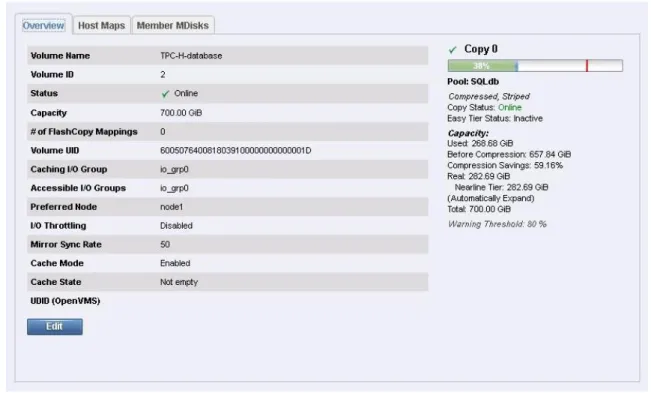
The following figure is an example of a compressed volume, with the configuration summary on the left side, and compression benefits on the right side.
Figure 4: Viewing compression savings in Storwize GUI
The following points provide an overview of the items found in the capacity summary section:
Used – the amount of capacity that has been used by the copy of the volume
Before Compression – the amount of capacity of a compressed volume if it were not
compressed
Compression Saving – the amount of capacity that is saved by using compression
Real – the capacity to be allocated to each copy of the volume
Total – the capacity of the volume that is available to hosts
For the SQL Server 2012 TPC-C tests with Benchmark Factory, using the default TPC-C database specification, the compression level was around 45%. This is because the standard TPC-C database consists of random strings of characters which are neither realistic nor very compressible. To remedy this, the test team is able to update the TPC-C database with more realistic customer data where possible, which results in compression ratios around 70%, and more in line with compression benefits reported by customers with real databases. The amount of compression benefit did not vary with different volume types. For example, the same databases exhibited similar compression ratios on either VHDX virtual drives or direct-attached physical volumes.
Performance results
The purpose of the Benchmark Factory load tests was to evaluate the effect of Real-time Compression on performance with an online transaction processing (OLTP) workload. Although it is not possible to create a true real-world workload in the lab, industry-standard Transaction Processing Council (TPC) tests were considered as close as possible. The team also compared the duration it takes to create a large VHDX file, which is a more write-intensive workload and also a common Hyper-V management task.
TPC-C OLTP tests
The version of SQL Server used for testing was 2012 SP1. The scope of testing was limited to providing a comparable workload to evaluate compression ratios and performance between a Storwize V7000 Gen1 system with standard or fully allocated volumes and the vastly improved performance of the new Storwize V7000 Gen2 system. The following tests clearly indicate that the Storwize V7000 Gen2 system’s
performance, with both standard and compressed volumes, is significantly better than the Storwize V7000 Gen1 system. On observing the Storwize V7000 Gen2 system, it is also clear that the compressed volumes are able to perform well, and in some cases better than the standard volumes.
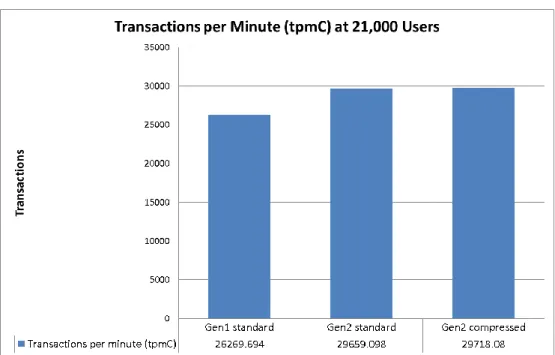
For TPC-C, performance is measured by response times to preset transactions and number of
transactions per minute achieved, listed as a tpmC value. The TPC-C scale used for test data comparison was 21,000 users and the database size was 1.2 TB. Additionally, a TPC-C scale starting at 10,000 users was run, incrementing by 1000 users per test, until each Storwize V7000 system reached the maximum users possible. The maximum user level, or maximum throughput, is defined as the number of users where response time and transactions per minute performance peaks. After this point, performance decreases if more users are added. The results of these tests are in the following charts.
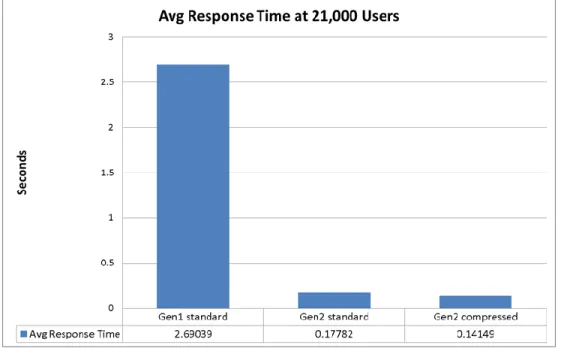
The average response time of TPC-C transactions at 21,000 users is shown below. At this user count, the Storwize V7000 Gen1 system had reached its maximum user level, while the Storwize V7000 Gen2 system had considerable headroom left. Comparing the two types of volumes on the Storwize V7000 Gen2 system, the compressed volume average response time is 20% faster.
Figure 5: Average response time at 21,000 users
The chart in the following figure shows transactions per minute achieved by the two systems. The Storwize V7000 Gen2 system generated 11% more transactions per minute.
Figure 6: Transactions per minute (tpmC) achieved
The charts that follow are the results of the maximum throughput test, The Storwize V7000 Gen2 system reached maximum throughput at 31,000 users, capable of supporting 32% more than the Storwize V7000 Gen1 system.
Figure 7: Maximum users achieved per system configuration
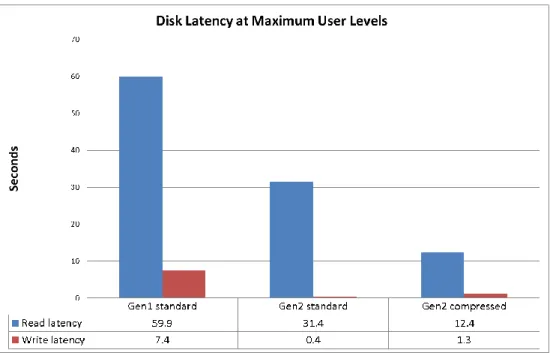
Disk read latency at maximum load was two times better on the Storwize V7000 Gen2 system with standard volumes, while the compressed volumes performed nearly five times better than the Gen1 system.
Figure 8: Disk latency at maximum user levels
The following figure depicts the IOPS results at maximum user levels. The Storwize V7000 Gen2 system generated 35% more IOPS, with the standard volumes performing slightly better in this case.
Fixed-size VHDX creation
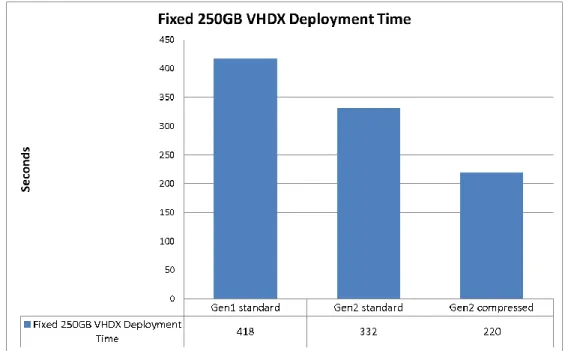
It can take a considerable amount of time to create a fixed-size VHD or VHDX file, depending on how large it is. Because this is a common Hyper-V deployment task, the test team examined the duration it takes to create the file on standard volumes compared to compressed volumes. The results show
considerably better performance on the compressed volumes. The Storwize V7000 Gen2 system created the file on the compressed volume nearly two times as fast as the Gen1 system. Compared to the
standard volume on the Gen2 system, the compressed volume provided a 34% faster deployment. There is another Windows Server feature that would speed this task up considerably, which is Microsoft Offloaded Data Transfer (ODX). ODX off-loads the file copying processing to the storage system, greatly speeding up large file transfers and VHDX creation. IBM is planning support for ODX soon on the Storwize family products.
Figure 10: Fixed 250 GB VHDX file deployment time
Configuring compressed volumes
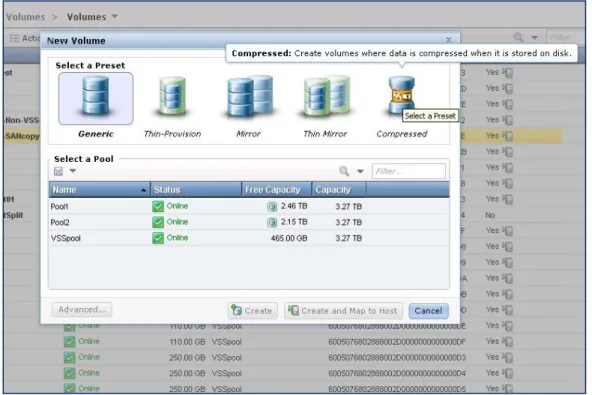
The procedure to create a compressed volume is quite simple. Using the Storwize V7000 GUI, select New Volume from the management GUI and set the volume preset type as Compressed as shown in the following figure. The rest of the process is identical to creating and attaching any other type of Storwize volume.
Figure 11: Creating a new compressed volume
The compressed volumes are transparent and seamless to hosts and applications. As a result there are no specific additional configuration steps needed to implement compressed volumes.
Converting standard volumes to compressed
Because the Storwize family products are virtualized storage, volumes can easily be converted between the different volume types, such as Generic, Compressed or Thin-Provisioned. To accomplish this, the Mirrored Copy function is used. Follow the steps below to convert a Generic volume to Compressed.
1. From the Storwize GUI, volumes view, right click on a Generic volume and select Volume Copy Actions.
2. Click Add Mirrored Copy.
3. Select Compressed as the Volume Type, and assign it to a pool.
4. Click Add Copy to finish.
This starts a synchronization process, as it creates the mirror. The status of the mirror creation can be viewed in the task section of the Storwize GUI. Although the volume is available immediately, the volumes performance may be degraded until the mirror synchronization completes.
5. After the mirror is created, the copy can be Set as primary. If the performance and compression is acceptable, the original copy can be deleted.
Conclusion
This paper summarizes the capabilities of the IBM Real-time Compression feature of the IBM Storwize V7000 Gen2, and its configurations with Microsoft Windows Server 2012 R2, SQL Server 2012 and Hyper-V. The new Storwize V7000 Gen2 is significantly faster than the first generation Storwize V7000, with either standard or compressed volumes. The reliability and performance of the entire Storwize family of products with Microsoft workloads has been proven by customer deployments and involvement with partner testing programs such as SQL Server I/O Reliability, SQL Fast Track, Hyper-V Fast Track and the Exchange Solution Reviewed Program (ESRP). IBM Real-time Compression combined with the cloud capabilities of Hyper-V provide an efficient and simplified virtualization solution for today’s budget conscious data centers.
Resources
The following websites provide useful references to supplement the information contained in this paper: IBM Systems on PartnerWorld
ibm.com/partnerworld/systems IBM Storwize family products
ibm.com/systems/storage/storwize/ IBM Redbooks
ibm.com/redbooks
IBM Real-time Compression on SVC and Storwize V7000 ibm.com/redbooks/abstracts/redp4859.html
IBM Publications Center
www.elink.ibmlink.ibm.com/public/applications/publications/cgibin/pbi.cgi?CTY=US Microsoft TechNet – Hyper-V architecture and features overview
http://technet.microsoft.com/en-us/library/hh831531.aspx Microsoft TechNet – General SCVMM overview and support
Acknowledgements
A special thanks to Tomer London and Itay Raviv from the Real-time Compression team in Israel for configuring and running the SQL Server Benchmark Factory tests.
Trademarks and special notices
© Copyright IBM Corporation 2015.References in this document to IBM products or services do not imply that IBM intends to make them available in every country.
IBM, the IBM logo, and ibm.com are trademarks or registered trademarks of International Business Machines Corporation in the United States, other countries, or both. If these and other IBM trademarked terms are marked on their first occurrence in this information with a trademark symbol (® or ™), these symbols indicate U.S. registered or common law trademarks owned by IBM at the time this information was published. Such trademarks may also be registered or common law trademarks in other countries. A current list of IBM trademarks is available on the Web at "Copyright and trademark information" at www.ibm.com/legal/copytrade.shtml.
Microsoft, Windows, SQL Server, Windows NT, and the Windows logo are trademarks of Microsoft Corporation in the United States, other countries, or both.
Intel, Intel Inside (logos), MMX, and Pentium are trademarks of Intel Corporation in the United States, other countries, or both.
Other company, product, or service names may be trademarks or service marks of others. Information is provided "AS IS" without warranty of any kind.
All customer examples described are presented as illustrations of how those customers have used IBM products and the results they may have achieved. Actual environmental costs and performance
characteristics may vary by customer.
Information concerning non-IBM products was obtained from a supplier of these products, published announcement material, or other publicly available sources and does not constitute an endorsement of such products by IBM. Sources for non-IBM list prices and performance numbers are taken from publicly available information, including vendor announcements and vendor worldwide homepages. IBM has not tested these products and cannot confirm the accuracy of performance, capability, or any other claims related to non-IBM products. Questions on the capability of non-IBM products should be addressed to the supplier of those products.
All statements regarding IBM future direction and intent are subject to change or withdrawal without notice, and represent goals and objectives only. Contact your local IBM office or IBM authorized reseller for the full text of the specific Statement of Direction.
Some information addresses anticipated future capabilities. Such information is not intended as a definitive statement of a commitment to specific levels of performance, function or delivery schedules with respect to any future products. Such commitments are only made in IBM product announcements. The information is presented here to communicate IBM's current investment and development activities as a good faith effort to help with our customers' future planning.
Performance is based on measurements and projections using standard IBM benchmarks in a controlled environment. The actual throughput or performance that any user will experience will vary depending upon considerations such as the amount of multiprogramming in the user's job stream, the I/O configuration, the
storage configuration, and the workload processed. Therefore, no assurance can be given that an individual user will achieve throughput or performance improvements equivalent to the ratios stated here. Photographs shown are of engineering prototypes. Changes may be incorporated in production models. Any references in this information to non-IBM websites are provided for convenience only and do not in any manner serve as an endorsement of those websites. The materials at those websites are not part of the materials for this IBM product and use of those websites is at your own risk.