Reliably Erasing Data From Flash-Based Solid State Drives
Michael Wei
∗, Laura M. Grupp
∗, Frederick E. Spada
†, Steven Swanson
∗∗Department of Computer Science and Engineering, University of California, San Diego
†Center for Magnetic Recording and Research, University of California, San Diego
Abstract
Reliably erasing data from storage media (sanitizingthe media) is a critical component of secure data manage-ment. While sanitizing entire disks and individual files is well-understood for hard drives, flash-based solid state disks have a very different internal architecture, so it is unclear whether hard drive techniques will work for SSDs as well.
We empirically evaluate the effectiveness of hard drive-oriented techniques and of the SSDs’ built-in san-itization commands by extracting raw data from the SSD’s flash chips after applying these techniques and commands. Our results lead to three conclusions: First, built-in commands are effective, but manufactur-ers sometimes implement them incorrectly. Second, overwriting the entire visible address space of an SSD twice is usually, but not always, sufficient to sanitize the drive. Third, none of the existing hard drive-oriented techniques for individual file sanitization are effective on SSDs.
This third conclusion leads us to develop flash trans-lation layer extensions that exploit the details of flash memory’s behavior to efficiently support file sanitization. Overall, we find that reliable SSD sanitization requires built-in, verifiable sanitize operations.
1
Introduction
As users, corporations, and government agencies store more data in digital media, managing that data and access to it becomes increasingly important. Reliably remov-ing data from persistent storage is an essential aspect of this management process, and several techniques that re-liably delete data from hard disks are available as built-in ATA or SCSI commands, software tools, and government standards.
These techniques provide effective means of sanitiz-ing hard disk drives (HDDs) – either individual files they store or the drive in their entirety. Software methods typ-ically involve overwriting all or part of the drive multiple
times with patterns specifically designed to obscure any remnant data. The ATA and SCSI command sets include “secure erase” commands that should sanitize an entire disk. Physical destruction and degaussing are also effec-tive.
Flash-based solid-state drives (SSDs) differ from hard drives in both the technology they use to store data (flash chips vs. magnetic disks) and the algorithms they use to manage and access that data. SSDs maintain a layer of indirection between the logical block addresses that computer systems use to access data and the raw flash addresses that identify physical storage. The layer of in-direction enhances SSD performance and reliability by hiding flash memory’s idiosyncratic interface and man-aging its limited lifetime, but it can also produce copies of the data that are invisible to the user but that a sophis-ticated attacker can recover.
The differences between SSDs and hard drives make it uncertain whether techniques and commands developed for hard drives willl be effective on SSDs. We have de-veloped a procedure to determine whether a sanitization procedure is effective on an SSDs: We write a structured data pattern to the drive, apply the sanitization technique, dismantle the drive, and extract the raw data directly from the flash chips using a custom flash testing system. We tested ATA commands for sanitizing an entire SSD, software techniques to do the same, and software techniques for sanitizing individual files. We find that while most implementations of the ATA commands are correct, others contain serious bugs that can, in some cases, result in all the data remaining intact on the drive. Our data shows software-based full-disk techniques are usually, but not always, effective, and we have found evi-dence that the data pattern used may impact the effective-ness of overwriting. Single-file sanitization techniques, however, consistently fail to remove data from the SSD.
Enabling single-file sanitization requires changes to the flash translation layer that manages the mapping be-tween logical and physical addresses. We have
devel-oped three mechanisms to support single-file sanitization and implemented them in a simulated SSD. The mecha-nisms rely on a detailed understanding of flash memory’s behavior beyond what datasheets typically supply. The techniques can either sacrifice a small amount of perfor-mance for continuous sanitization or they can preserve common case performance and support sanitization on demand.
We conclude that the complexity of SSDs relative to hard drives requires that they provide built-in sanitiza-tion commands. Our tests show that since manufacturers do not always implement these commands correctly, the commands should be verifiable as well. Current and pro-posed ATA and SCSI standards provide no mechanism for verification and the current trend toward encrypting SSDs makes verification even harder.
The remainder of this paper is organized as follows: Section 2 describes the sanitization problem in detail. Section 3 presents our verification methodology and re-sults for existing hard disk-oriented techniques. Sec-tion 4 describes our FTL extensions to support single-file sanitization, and Section 5 presents our conclusions.
2
Sanitizing SSDs
The ability to reliably erase data from a storage device is critical to maintaining the security of that data. This paper identifies and develops effective methods for eras-ing data from solid-state drives (SSDs). Before we can address these goals, however, we must understand what it means to sanitize storage. This section establishes that definition while briefly describing techniques used to erase hard drives. Then, it explains why those tech-niques may not apply to SSDs.
2.1
Defining “sanitized”
In this work, we use the term “sanitize” to describe the process of erasing all or part of a storage device so that the data it contained is difficult or impossible to recover. Below we describe five different levels of sanitization storage can undergo. We will use these terms to catego-rize and evaluate the sanitization techniques in Sections 3 and 4.
The first level is logical sanitization. Data in log-ically sanitized storage is not recoverable via standard hardware interfaces such as standard ATA or SCSI com-mands. Users can logically sanitize an entire hard drive or an individual file by overwriting all or part of the drive, respectively. Logical sanitization corresponds to “clearing” as defined in NIST 800-88 [25], one of several documents from governments around the world [11, 26, 9, 13, 17, 10] that provide guidance for data de-struction.
The next level isdigital sanitization. It is not possible to recover data from digitally sanitized storage via any
digital means, including undocumented drive commands or subversion of the device’s controller or firmware. On disks, overwriting and then deleting a file suffices for both logical and digital sanitization with the caveat that overwriting may not digitally sanitize bad blocks that the drive has retired from use. As we shall see, the complex-ity of SSDs makes digitally sanitizing them more com-plicated.
The next level of sanitization is analog sanitization. Analog sanitization degrades the analog signal that en-codes the data so that reconstructing the signal is effec-tively impossible even with the most advanced sensing equipment and expertise. NIST 800-88 refers to analog sanitization as “purging.”
An alternative approach to overwriting or otherwise obliterating bits is tocryptographically sanitizestorage. Here, the drive uses a cryptographic key to encrypt and decrypt incoming and outgoing data. To sanitize the drive, the user issues a command to sanitize the storage that holds the key. The effectiveness of cryptographic sanitization relies on the security of the encryption sys-tem used (e.g., AES [24]), and upon the designer’s abil-ity to eliminate “side channel” attacks that might allow an adversary to extract the key or otherwise bypass the encryption.
The correct choice of sanitization level for a partic-ular application depends on the sensitivity of the data and the means and expertise of the expected adversary. Many government standards [11, 26, 9, 13, 17, 10] and secure erase software programs use multiple overwrites to erase data on hard drives. As a result many individuals and companies rely on software-based overwrite tech-niques for disposing of data. To our knowledge (based on working closely with several government agencies), no one has ever publicly demonstrated bulk recovery of data from an HDD after such erasure, so this confidence is probably well-placed.1.
2.2
SSD challenges
The internals of an SSD differ in almost every respect from a hard drive, so assuming that the erasure tech-niques that work for hard drives will also work for SSDs is dangerous.
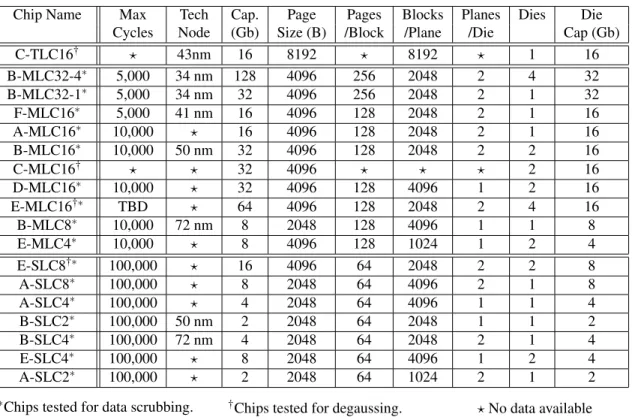
SSDs use flash memory to store data. Flash memory is divided into pages and blocks. Program operations apply to pages and can only change 1s to 0s. Erase operations apply to blocks and set all the bits in a block to 1. As a result, in-place update is not possible. There are typically 64-256 pages in a block (see Table 5).
A flash translation layer (FTL) [15] manages the map-ping between logical block addresses (LBAs) that are visible via the ATA or SCSI interface and physical pages
of flash memory. Because of the mismatch in granular-ity between erase operations and program operations in flash, in-place update of the sector at an LBA is not pos-sible.
Instead, to modify a sector, the FTL will write the new contents for the sector to another location and update the map so that the new data appears at the target LBA. As a result, the old version of the data remains in digital form in the flash memory. We refer to these “left over” data as
digital remnants.
Since in-place updates are not possible in SSDs, the overwrite-based erasure techniques that work well for hard drives may not work properly for SSDs. Those techniques assume that overwriting a portion of the LBA space results in overwriting the same physical media that stored the original data. Overwriting data on an SSD re-sults in logical sanitization (i.e., the data is not retrievable via the SATA or SCSI interface) but not digital sanitiza-tion.
Analog sanitization is more complex for SSDs than for hard drives as well. Gutmann [20, 19] examines the prob-lem of data remnants in flash, DRAM, SRAM, and EEP-ROM, and recently, so-called “cold boot” attacks [21] re-covered data from powered-down DRAM devices. The analysis in these papers suggests that verifying analog sanitization in memories is challenging because there are many mechanisms that can imprint remnant data on the devices.
The simplest of these is that the voltage level on an erased flash cell’s floating gate may vary depending on the value it held before the erase command. Multi-level cell devices (MLC), which store more than one bit per floating gate, already provide stringent control the volt-age in an erased cell, and our conversations with industry [1] suggest that a single erasure may be sufficient. For devices that store a single bit per cell (SLC) a single era-sure may not suffice. We do not address analog eraera-sure further in this work.
The quantity of digital remnant data in an SSD can be quite large. The SSDs we tested contain between 6 and 25% more physical flash storage than they advertise as their logical capacity. Figure 1 demonstrates the exis-tence of the remnants in an SSD. We created 1000 small files on an SSD, dismantled the drive, and searched for the files’ contents. The SSD contained up to 16 stale copies of some of the files. The FTL created the copies during garbage collection and out-of-place updates.
Complicating matters further, many drives encrypt data and some appear to compress data as well to im-prove write performance: one of our drives rumored to use compression is 25% faster for writes of highly com-pressible data than incomcom-pressible data. This adds an additional level of complexity not present in hard drives. Unless the drive is encrypted, recovering remnant data
0 2 4 6 8 10 12 14 16
0 200 400 600 800 1000
Number of copies
File number
Figure 1: Multiple copies This graph shows The FTL duplicating files up to 16 times. The graph exhibits a spiking pattern which is probably due to the page-level management by the FTL.
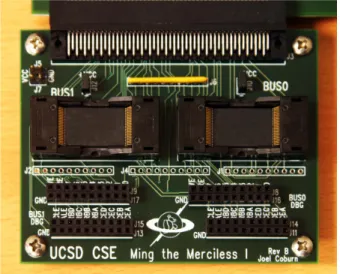
Figure 2:Ming the MercilessOur custom FPGA-based flash testing hardware provides direct access to flash chips without interference from an FTL.
from the flash is not difficult. Figure 2 shows the FPGA-based hardware we built to extract remnants. It cost $1000 to build, but a simpler, microcontroller-based ver-sion would cost as little as $200, and would require only a moderate amount of technical skill to construct.
These differences between hard drives and SSDs po-tentially lead to a dangerous disconnect between user expectations and the drive’s actual behavior: An SSD’s owner might apply a hard drive-centric sanitization tech-nique under the misguided belief that it will render the data essentially irrecoverable. In truth, data may remain on the drive and require only moderate sophistication to extract. The next section quantifies this risk by applying commonly-used hard drive-oriented techniques to SSDs and attempting to recover the “deleted” data.
“Magic” Header (8 bytes)
Generation # (8 bytes)
LBA (8 bytes)
Iteration # (8 bytes)
Bit Pattern (44 bytes)
Checksum (4 bytes)
GUID (8 bytes)
Fingerprint 0 (88 bytes)
Fingerprint 1 (88 bytes)
Fingerprint 2 (88 bytes)
Fingerprint 3 (88 bytes)
Padding (72 bytes)
Fingerprint 4 (88 bytes)
512-Byte ATA Sector 88-byte fingerprint
Figure 3: Fingerprint structure The easily-identified fingerprint simplifies the task of identifying and recon-structing remnant data.
3
Existing techniques
This section describes our procedure for testing sanitiza-tion techniques and then uses it to determine how well hard drive sanitization techniques work for SSDs. We consider both sanitizing an entire drive at once and se-lectively sanitizing individual files. Then we briefly dis-cuss our findings in relation to government standards for sanitizing flash media.
3.1
Validation methodology
Our method for verifying digital sanitization operations uses the lowest-level digital interface to the data in an SSD: the pins of the individual flash chips.
To verify a sanitization operation, we write an iden-tifiable data pattern called afingerprint(Figure 3) to the SSD and then apply the sanitization technique under test. The fingerprint makes it easy to identify remnant digi-tal data on the flash chips. It includes a sequence num-ber that is unique across all fingerprints, byte patterns to help in identifying and reassembling fingerprints, and a checksum. It also includes an identifier that we use to identify different sets of fingerprints. For instance, all the fingerprints written as part of one overwrite pass or to a particular file will have the same identifier. Each fingerprint is 88 bytes long and repeats fives times in a 512-byte ATA sector.
Once we have applied the fingerprint and sanitized the drive, we dismantle it. We use the flash testing system in Figure 2 to extract raw data from its flash chips. The testing system uses an FPGA running a Linux software stack to provide direct access to the flash chips.
Finally, we assemble the fingerprints and analyze them to determine if the sanitization was successful. SSDs vary in how they spread and store data across flash chips: some interleave bytes between chips (e.g., odd bytes on one chip and even bytes on another) and others invert data before writing. The fingerprint’s regularity makes it easy to identify and reassemble them, despite these complications. Counting the number of fingerprints that remain and categorizing them by their IDs allows us to
SSD Ctlr # SECURITY SEC. ERASE
# & Type ERASE UNIT UNIT ENH
A 1-MLC Not Supported Not Supported
B 2-SLC Failed∗ Not Supported
C 1-MLC Failed† Not Supported
D 3-MLC Failed† Not Supported
E 4-MLC Encrypted‡ Encrypted‡
F 5-MLC Success Success
G 6-MLC Success Success
H 7-MLC Success Success
I 8-MLC Success Success
J? 9-TLC Not Supported Not Supported K? 10-MLC Not Supported Not Supported L? 11-MLC Not Supported Not Supported
∗Drive reported success but all data remained on drive †Sanitization only successful under certain conditions ‡Drive encrypted, unable to verify if keys were deleted
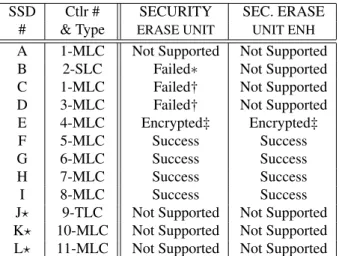
?USB mass storage device does not support ATA security [30] Table 1: Built-in ATA sanitize commandsSupport for built-in ATA security commands varied among drives, and three of the drives tested did not properly execute a sanitize command it reported to support.
measure the sanitization’s effectiveness.
3.2
Whole-drive sanitization
We evaluate three different techniques for sanitizing an entire SSD: issuing a built-in sanitize command, repeat-edly writing over the drive using normal IO operations, and degaussing the drive. Then we briefly discuss lever-aging encryption to sanitize SSDs.
3.2.1 Built-in sanitize commands
Most modern drives have built-in sanitize commands that instruct on-board firmware to run a sanitization proto-col on the drive. Since the manufacturer has full knowl-edge of the drive’s design, these techniques should be very reliable. However, implementing these commands is optional in the drive specification standards. For in-stance, removable USB drives do not support them as they are not supported under the USB Mass Storage De-vice class [30].
The ATA security command set specifies an “ERASE UNIT” command that erases all user-accessible areas on the drive by writing all binary zeros or ones [3]. There is also an enhanced “ERASE UNIT ENH” command that writes a vendor-defined pattern (presumably because the vendor knows the best pattern to eliminate analog rem-nants). The new ACS-2 specification [4], which is still in draft at the time of this writing, specifies a “BLOCK ERASE” command that is part of its SANITIZE feature set. It instructs a drive to perform a block erase on all memory blocks containing user data even if they are not user-accessible.
We collected 12 different SSDs and determined if they supported the security and sanitize feature sets. If the SSD supported the command, we verified effectiveness by writing a fingerprint to the entire drive several times and then issuing the command. Overwriting several times fills as much of the over-provision area as possi-ble with fingerprint data.
Support and implementation of the built in commands varied across vendors and firmware revisions (Table 1). Of the 12 drives we tested, none supported the ACS-2 “SANITIZE BLOCK ERASE” command. This is not surprising, since the standard is not yet final. Eight of the drives reported that they supported the ATA SECURITY feature set. One of these encrypts data, so we could not verify if the sanitization was successful. Of the remain-ing seven, only four executed the “ERASE UNIT” com-mand reliably.
Drive B’s behavior is the most disturbing: it reported that sanitization was successful, butallthe data remained intact. In fact, the filesystem was still mountable. Two more drives suffered a bug that prevented the ERASE UNIT command from working unless the drive firmware was recently reset, otherwise the command would only erase the first LBA. However, they accurately reported that the command failed.
The wide variance among the drives leads us to con-clude that each implementation of the security com-mands must be individually tested before it can be trusted to properly sanitize the drive.
In addition to the standard commands, several drive manufacturers also provide special utilities that issue non-standard erasure commands. We did not test these commands, but we expect that results would be similar to those for the ATA commands: most would work cor-rectly but some may be buggy. Regardless, we feel these non-standard commands are of limited use: the typical user may not know which model of SSD they own, let alone have the wherewithal to download specialized util-ities for them. In addition, the usefulness of the utility depends on the manufacture keeping it up-to-date and available online. Standardized commands should work correctly almost indefinitely.
3.2.2 Overwrite techniques
The second sanitization method is to use normal IO com-mands to overwrite each logical block address on the drive. Repeated software overwrite is at the heart of many disk sanitization standards [11, 26, 9, 13, 17, 10] and tools [23, 8, 16, 5]. All of the standards and tools we have examined use a similar approach: They sequen-tially overwrite the entire drive with between 1 and 35 bit patterns. The US Air Force System Instruction 5020 [2] is typical: It first fills the drive with binary zeros, then binary ones, and finally an arbitrary character. The data
SSD Seq. 20 Pass Rand. 20 Pass
Init: Seq. Rand. Seq. Rand.
A >20 N/A∗ N/A∗ N/A∗
B 1 N/A∗ N/A∗ N/A∗
C 2 2 2 2
D 2 2 N/A∗ N/A∗
F 2 121 hr.? 121 hr.? 121 hr.?
J 2 70 hr.? 70 hr.? 70 hr.?
K 2 140 hr.? 140 hr.? 140 hr.?
L 2 58 hr.? 58 hr.? 58 hr.?
∗Insufficient drives to perform test
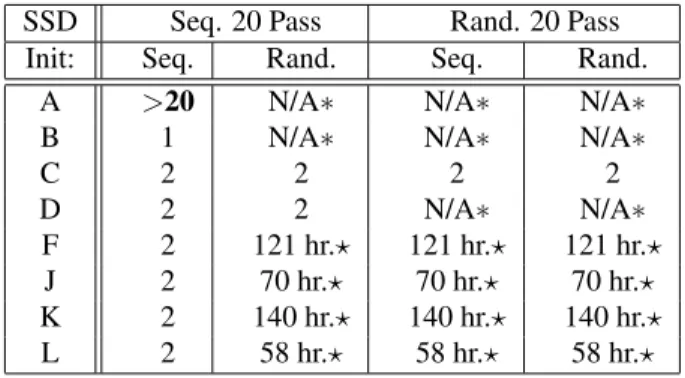
?Test took too long to perform, time for single pass indicated. Table 2: Whole-disk software overwrite. The number in each column indicates the number of passes needed to erase data on the drive. Drives G through I encrypt, so we could not conclude anything about the success of the techniques.
is then read back to confirm that only the character is present.
The varied bit patterns aim to switch as many of the physical bits on the drive as possible and, therefore, make it more difficult to recover the data via analog means.
Bit patterns are potentially important for SSDs as well, but for different reasons. Since some SSDs compress data before storing, they will write fewer bits to the flash if the data is highly compressible. This suggests that for maximum effectiveness, SSD overwrite procedures should use random data. However, only one of the drives we tested (Drive G) appeared to use compression, and since it also encrypts data we could not verify sanitiza-tion.
Since our focus is on digital erasure, the bit patterns are not relevant for drives that store unencrypted, un-compressed data. This means we can evaluate overwrite techniques in general by simply overwriting a drive with many generations of fingerprints, extracting its contents, and counting the number of generations still present on the drive. Ifkgenerations remain, and the first genera-tion is completely erased, thenkpasses are sufficient to erase the drive.
The complexity of SSD FTLs means that the usage history before the overwrite passes may impact the ef-fectiveness of the technique. To account for this, we pre-pared SSDs by writing the first pass of data either se-quentially or randomly. Then, we performed 20 sequen-tial overwrites. For the random writes, we wrote every LBA exactly once, but in a pseudo-random order.
Table 2 shows the results for the eight non-encrypting drives we tested. The numbers indicate how many gen-erations of data were necessary to erase the drive. For some drives, random writes were prohibitively slow, tak-ing as long as 121 hours for a stak-ingle pass, so we do not
perform the random write test on these drives. In most cases, overwriting the entire disk twice was sufficient to sanitize the disk, regardless of the previous state of the drive. There were three exceptions: about 1% (1 GB) of the data remained on Drive A after twenty passes. We also tested a commercial implementation of the four-pass 5220.22-M standard [12] on Drive C. For the sequential initialization case, it removed all the data, but with ran-dom initialization, a single fingerprint remained. Since our testing procedure destroys the drive, we did not per-form some test combinations.
Overall, the results for overwriting are poor: while overwriting appears to be effective in some cases across a wide range of drives, it is clearly not universally reliable. It seems unlikely that an individual or organization ex-pending the effort to sanitize a device would be satisfied with this level of performance.
3.2.3 Degaussing
We also evaluated degaussing as a method for erasing SSDs. Degaussing is a fast, effective means of destroy-ing hard drives, since it removes the disks low-level for-matting (along with all the data) and damages the drive motor. The mechanism flash memories use to store data is not magnetism-based, so we did not expect the de-gausser to erase the flash cells directly. However, the strong alternating magnetic fields that the degausser pro-duces will induce powerful eddy currents in chip’s metal layers. These currents may damage the chips, leaving them unreadable.
We degaussed individual flash chips written with our fingerprint rather than entire SSDs. We used seven chips (marked with†in Table 5) that covered SLC, MLC and TLC (triple-level cell) devices across a range of process generation feature sizes. The degausser was a Security, Inc. HD-3D hard drive degausser that has been evalu-ated for the NSA and can thoroughly sanitize modern hard drives. It degaussed the chips by applying a rotating 14,000 gauss field co-planar to the chips and an 8,000 gauss perpendicular alternating field. In all cases, the data remained intact.
3.2.4 Encryption
Many recently-introduced SSDs encrypt data by default, because it provides increased security. It also provides a quick means to sanitize the device, since deleting the en-cryption key will, in theory, render the data on the drive irretrievable. Drive E takes this approach.
The advantage of this approach is that it is very fast: The sanitization command takes less than a second for Drive E. The danger, however, is that it relies on the con-troller to properly sanitize the internal storage location that holds the encryption key and any other derived val-ues that might be useful in cryptanalysis. Given the bugs
we found in some implementations of secure erase com-mands, it is unduly optimistic to assume that SSD ven-dors will properly sanitize the key store. Further, there is no way verify that erasure has occurred (e.g., by disman-tling the drive).
A hybrid approach called SAFE [29] can provide both speed and verifiability. SAFE sanitizes the key store and then performs an erase on each block in a flash storage array. When the erase is finished, the drive enters a “ver-ifiable” state. In this state, it is possible to dismantle the drive and verify that the erasure portion of the sanitiza-tion process was successful.
3.3
Single-file sanitization
Sanitizing single files while leaving the rest of the data in the drive intact is important for maintaining data se-curity in drives that are still in use. For instance, users may wish to destroy data such as encryption keys, finan-cial records, or legal documents when they are no longer needed. Furthermore, for systems such as personal com-puters and cell phone where the operating system, pro-grams, and user data all reside on the same SSD, sani-tizing single files is the only sanitization option that will leave the system in a usable state.
Erasing a file is a more delicate operation than eras-ing the entire drive. It requires eraseras-ing data from one or more ranges of LBAs while leaving the rest of the drive’s contents untouched. Neither hard disks nor SSDs include specialized commands to erase specific regions of the drive2.
Many software utilities [14, 5, 28, 23] attempt to san-itize individual files. All of them use the same approach as the software-based full-disk erasure tools: they over-write the file multiple times with multiple bit patterns and then delete it. Other programs will repeatedly overwrite the free space (i.e., space that the file system has not allo-cated to a file) on the drive to securely erase any deleted files.
We test 13 protocols, published as a variety of gov-ernment standards, as well as commercial software de-signed to erase single files. To reduce the number of drives needed to tests these techniques, we tested multi-ple techniques simultaneously on one drive. We format-ted the drive under windows and filled a series of 1 GB files with different fingerprints. We then applied one era-sure technique to each file, disassembled the drive, and searched for the fingerprints.
Because we applied multiple techniques to the drive at once, the techniques may interact: If the first technique leaves data behind, a later technique might overwrite it. However, the amount of data we recover from each file 2The ACS-2 draft standard [4] provide a “TRIM” command that
informs drive that a range of LBAs is no longer in use, but this does not have any reliable effect on data security.
Overwrite operation Data recovered
SSDs USB
Filesystem delete 4.3 - 91.3% 99.4% Gutmann [19] 0.8 - 4.3% 71.7% Gutmann “Lite” [19] 0.02 - 8.7% 84.9% US DoD 5220.22-M (7) [11] 0.01 - 4.1% 0.0 - 8.9%
RCMP TSSIT OPS-II [26] 0.01 - 9.0% 0.0 - 23.5% Schneier 7 Pass [27] 1.7 - 8.0% 0.0 - 16.2% German VSITR [9] 5.3 - 5.7% 0.0 - 9.3% US DoD 5220.22-M (4) [11] 5.6 - 6.5% 0.0 - 11.5% British HMG IS5 (Enh.) [14] 4.3 - 7.6% 0.0 - 34.7% US Air Force 5020 [2] 5.8 - 7.3% 0.0 - 63.5% US Army AR380-19 [6] 6.91 - 7.07% 1.1% Russian GOST P50739-95 [14] 7.07 - 13.86% 1.1% British HMG IS5 (Base.) [14] 6.3 - 58.3% 0.6% Pseudorandom Data [14] 6.16 - 75.7% 1.1% Mac OS X Sec. Erase Trash [5] 67.0% 9.8%
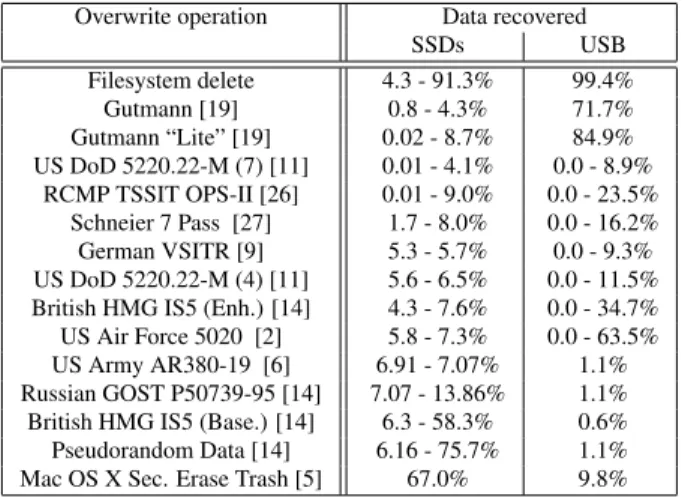
Table 3:Single-file overwriting. None of the protocols tested successfully sanitized the SSDs or the USB drive in all cases. The ranges represent multiple experiments with the same algorithm (see text).
Drive Overwrites Free Space Recovered
C (SSD) 100× 20 MB 87%
C 100× 19,800 MB 79%
C 100×+ defrag. 20 MB 86% L (USB key) 100× 6 MB 64%
L 100× 500 MB 53%
L 100×+ defrag. 6 MB 62%
Table 4: Free space overwritingFree space overwrit-ing left most of the data on the drive, even with varyoverwrit-ing amounts of free space. Defragmenting the data had only a small effect on the data left over (1%).
is a lower bound on amount left after the technique com-pleted. To moderate this effect, we ran the experiment three times, applying the techniques in different orders. One protocol, described in 1996 by Gutmann [19], in-cludes 35 passes and had a very large effect on mea-surements for protocols run immediately before it, so we measured its effectiveness on its own drive.
All single-file overwrite sanitization protocols failed (Table 3): between 4% and 75% of the files’ contents remained on the SATA SSDs. USB drives performed no better: between 0.57% and 84.9% of the data remained.
Next, we tried overwriting the free space on the drive. In order to simulate a used drive, we filled the drive with small (4 KB) and large files (512 KB+). Then, we deleted all the small files and overwrote the free space 100 times. Table 4 shows that regardless of the amount of free space on the drive, overwriting free space was not successful. Finally, we tried defragmenting the drive, reasoning that rearranging the files in the file system might encourage the FTL to reuse more physical storage locations. The table shows this was also ineffective.
3.4
Sanitization standards
Although many government standards provide guidance on storage sanitization, only one [25] (that we are aware of) provides guidance specifically for SSDs and that is limited to “USB Removable Disks.” Most standards, however, provide separate guidance for magnetic media and flash memory.
For magnetic media such as hard disks, the standards are consistent: overwrite the drive a number of times, execute the built-in secure erase command and destroy the drive, or degauss the drive. For flash memory, how-ever, the standards do not agree. For example, NIST 800-88 [25] suggests overwriting the drive, Air Force Sys-tem Security Instruction 5020 suggests ‘[using] the erase procedures provided by the manufacturer” [2], and the DSS Clearing & Sanitization matrix [11] suggests “per-form[ing] a full chip erase per manufacturer’s datasheet.” None of these solutions are satisfactory: Our data shows that overwriting is ineffective and that the “erase procedures provided by the manufacturer” may not work properly in all cases. The final suggestion to perform a chip erase seems to apply to chips rather than drives, and it is easy to imagine it being interpreted incorrectly or applied to SSDs inappropriately. Should the user consult the chip manufacturer, the controller manufacturer, or the drive manufacturer for guidance on sanitization?
We conclude that the complexity of SSDs relative to hard drives requires that they provide built-in sanitiza-tion commands. Since our tests show that manufacturers do not always implement these commands correctly, they should be verifiable as well. Current and proposed ATA and SCSI standards provide no mechanism for verifica-tion and the current trend toward encrypting SSDs makes verification even harder.
Built-in commands for whole disk sanitization appear to be effective, if implemented correctly. However, no drives provide support for sanitizing a single file in iso-lation. The next section explores how an FTL might sup-port this operation.
4
Erasing files
The software-only techniques for sanitizing a single file we evaluated in Section 3 failed because FTL complexity makes it difficult to reliably access a particular physical storage location. Circumventing this problem requires changes in the FTL. Previous work in this area [22] used encryption to support sanitizing individual files in a file system custom built for flash memory. This approach makes recovery from file system corruption difficult and it does not apply to generic SSDs.
This section describes FTL support for sanitizing ar-bitrary regions of an SSD’s logical block address space. The extensions we describe leverage detailed measure-ments of flash memory characteristics. We briefly
de-Chip Name Max Tech Cap. Page Pages Blocks Planes Dies Die
Cycles Node (Gb) Size (B) /Block /Plane /Die Cap (Gb)
C-TLC16† ? 43nm 16 8192 ? 8192 ? 1 16
B-MLC32-4∗ 5,000 34 nm 128 4096 256 2048 2 4 32
B-MLC32-1∗ 5,000 34 nm 32 4096 256 2048 2 1 32
F-MLC16∗ 5,000 41 nm 16 4096 128 2048 2 1 16
A-MLC16∗ 10,000 ? 16 4096 128 2048 2 1 16
B-MLC16∗ 10,000 50 nm 32 4096 128 2048 2 2 16
C-MLC16† ? ? 32 4096 ? ? ? 2 16
D-MLC16∗ 10,000 ? 32 4096 128 4096 1 2 16
E-MLC16†∗ TBD ? 64 4096 128 2048 2 4 16
B-MLC8∗ 10,000 72 nm 8 2048 128 4096 1 1 8
E-MLC4∗ 10,000 ? 8 4096 128 1024 1 2 4
E-SLC8†∗ 100,000 ? 16 4096 64 2048 2 2 8
A-SLC8∗ 100,000 ? 8 2048 64 4096 2 1 8
A-SLC4∗ 100,000 ? 4 2048 64 4096 1 1 4
B-SLC2∗ 100,000 50 nm 2 2048 64 2048 1 1 2
B-SLC4∗ 100,000 72 nm 4 2048 64 2048 2 1 4
E-SLC4∗ 100,000 ? 8 2048 64 4096 1 2 4
A-SLC2∗ 100,000 ? 2 2048 64 1024 2 1 2
∗Chips tested for data scrubbing. †Chips tested for degaussing. ?No data available
Table 5:Flash Chip Parameters.Each name encodes the manufacturer, cell type and die capacity in Gbits. Parame-ters are drawn from datasheets where available. We studied 18 chips from 6 manufacturers.
scribe our baseline FTL and the details of flash behav-ior that our technique relies upon. Then, we present and evaluate three ways an FTL can support single-file sani-tization.
4.1
The flash translation layer
We use the FTL described in [7] as a starting point. The FTL is page-based, which means that LBAs map to in-dividual pages rather than blocks. It uses log-structured writes, filling up one block with write data as it arrives, before moving on to another. As it writes new data for an LBA, the old version of the data becomes invalid but remains in the array (i.e., it becomes remnant data).
When a block is full, the FTL must locate a new, erased block to continue writing. It keeps a pool of erased blocks for this purpose. If the FTL starts to run short of erased blocks, further incoming accesses will stall while it performs garbage collection by con-solidating valid data and freeing up additional blocks. Once its supply of empty blocks is replenished, it re-sumes processing requests. During idle periods, it per-forms garbage collection in the background, so blocking is rarely needed.
To rebuild the map on startup, the FTL stores a reverse map (from physical address to LBA) in a distributed
fash-ion. When the FTL writes data to a page, the FTL writes the corresponding LBA to the page’s out-of-band sec-tion. To accelerate the start-up scan, the FTL stores a summary of this information for the entire block in the block’s last page. This complete reverse map will also enable efficiently locating all copies of an LBA’s data in our scan-based scrub technique (See Section 4.4).
4.2
Scrubbing LBAs
Sanitizing an individual LBA is difficult because the flash page it resides in may be part of a block that con-tains useful data. Since flash only supports erasure at the block level, it is not possible to erase the LBA’s contents in isolation without incurring the high cost of copying the entire contents of the block (except the page containing the target LBA) and erasing it.
However, programming individual pages is possible, so an alternative would be to re-program the page to turn all the remaining 1s into 0s. We call thisscrubbingthe page. A scrubbing FTL could remove remnant data by scrubbing pages that contain stale copies of data in the flash array, or it could prevent their creation by scrubbing the page that contained the previous version whenever it wrote a new one.
Erase Block Program Random Data
For all pages in the Block
Scrub Randomly Selected Page Read All Pages
for Errors
Figure 4:Testing data scrubbingTo determine whether flash devices can support scrubbing we programmed them with random data, randomly scrubbed pages one at a time, and then checked for errors.
datasheets require programming the pages within a block in order to reduce the impact of program disturb effects that can increase error rates. Scrubbing would violate this requirement. However, previous work [18] shows that the impact of reprogramming varies widely between pages and between flash devices, and that, in some cases, reprogramming (or scrubbing) pages would have no ef-fect.
To test this hypothesis, we use our flash testing board to scrub pages on 16 of the chips in Table 5 and measure the impact on error rate. The chips span six manufac-turers, five technology nodes and include both MLC and SLC chips.
Figure 4 describes the test we ran. First, we erase the block and program random data to each of its pages to represent user data. Then, we scrub the pages in ran-dom order. After each scrub we read all pages in the block to check for errors. Flash blocks are independent, so checking for errors only within the block is sufficient. We repeated the test across 16 blocks spread across each chip.
The results showed that, for SLC devices, scrubbing did not cause any errors at all. This means that the num-ber scrubs that are acceptable – thescrub budget– for SLC chips is equal to the number of pages in a block.
For MLC devices determining the scrub budget is more complicated. First, scrubbing one page invariably caused severe corruption in exactly one other page. This occurred because each transistor in an MLC array holds two bits that belong to different pages, and scrubbing one page reliably corrupts the other. Fortunately, it is easy to determine the paired page layout in all the chips we have tested, and the location of the paired page of a given page is fixed for a particular chip model. The paired page
1e-08 1e-07 1e-06 1e-05 1e-04 0.001 0.01 0.1 1
0 16 32 48 64
Log(Bit Error Rate)
Number of Reprograms
B-MLC32-4 B-MLC32-1 F-MLC16 A-MLC16 B-MLC16 D-MLC16 E-MLC16 B-MLC8 E-MLC4 Typical BER
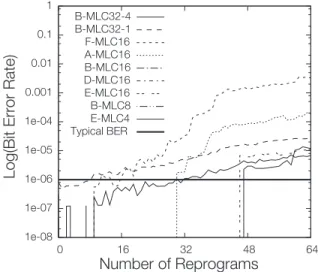
Figure 5: Behavior under data scrubbing Scrubbing causes more errors in some chips than others, resulting in wide variation of scrub budgets for MLC devices. fect means that the FTL must scrub both pages in a pair at the same time, relocating the data in the page that was not the primary target of the scrub.
Figure 5 shows bit error rates for MLC devices as a function of scrub count, but excluding errors in paired pages. The data show that for three of the nine chips we tested, scrubbing caused errors in the unscrubbed data in the block. For five of the remaining devices errors start to appear after between 2 and 46 scrubs. The final chip, B-MLC32-1, showed errors without any scrubbing. For all the chips that showed errors, error rates increase steeply with more scrubbing (the vertical axis is a log scale).
It may be possible to reduce the impact of scrubbing (and, therefore, increase the scrub budget) by carefully measuring the location of errors caused by scrubbing a particular page. Program disturb effects are strongest between physically adjacent cells, so the distribution of scrubs should affect the errors they cause. As a result, whether scrubbing page is safe would depend on which other pages the FTL has scrubbed in the block, not the number of scrubs.
The data in the figure also show that denser flash de-vices are less amenable to scrubbing. The chips that showed no errors (B-MLC16, D-MLC16, and B-MLC8) are 50 nm or 70 nm devices, while the chips with the lowest scrub budgets (F-MLC16, MLC32-4, and B-MLC32-1) are 34 or 41 nm devices.
4.3
Sanitizing files in the FTL
The next step is to use scrubbing to add file sanitization support to our FTL. We consider three different methods that make different trade-offs between performance and data security – immediate scrubbing, background scrub-bing, and scan-based scrubbing.
Name Total Accesses Reads Description
Patch 64 GB 83% Applies patches to the Linux kernel from version 2.6.0 to 2.6.29
OLTP 34 GB 80% Real-time processing of SQL transactions
Berkeley-DB Btree 34 GB 34% Transactional updates to a B+tree key/value store
Financial 17 GB 15% Live OLTP trace for financial transactions.
Build 5.5 GB 94% Compilation of the Linux 2.6 kernel
Software devel. 1.1 GB 65% 24 hour trace of a software development work station.
Swap 800 MB 84% Virtual memory trace for desktop applications.
Table 6:Benchmark and application tracesWe use traces from eight benchmarks and workloads to evaluate scrub-bing.
These methods will eliminate all remnants in the drive’s spare area (i.e., that are not reachable via a log-ical block address). As a result, if a file system does not create remnants on a normal hard drive (e.g., if the file system overwrite a file’s LBAs when it performs a delete), it will not create remnants when running on our FTL.
Immediate scrubbing provides the highest level of se-curity: write operations do not complete until the scrub-bing is finished – that is, until FTL has scrubbed the page that contained the old version of the LBA’s contents. In most cases, the performance impact will be minimal be-cause the FTL can perform the scrub and the program in parallel.
When the FTL exceeds the scrub budget for a block, it must copy the contents of the block’s valid pages to a new block and then erase the block before the operation can complete. As a result, small scrub budgets (as we saw for some MLC devices) can degrade performance. We measure this effect below.
Background scrubbing provides better performance by allowing writes to complete and then performing the scrubbing in the background. This results in a brief win-dow when remnant data remains on the drive. Back-ground scrubbing can still degrade performance because the scrub operations will compete with other requests for access to the flash.
Scan-based scrubbing incurs no performance overhead on normal write operations but adds a command to sani-tize a range of LBAs by overwriting the current contents of the LBAs with zero and then scrubbing any storage that previously held data for the LBAs. This technique exploits the reverse (physical to logical) address map that the SSD stores to reconstruct the logical-to-physical map.
To execute a scan-based scrubbing command, the FTL reads the summary page from each block and checks if any of the pages in the block hold a copy of an LBA that the scrub command targets. If it does, the FTL scrubs that page. If it exceeds the scrub budget, the FTL will need to relocate the block’s contents.
We also considered an SSD command that would ap-ply scrubbing to specific write operations that the op-erating system or file system marked as “sanitizing.” However, immediate and background scrubbing work by guaranteeing that only one valid copy of an LBA exists by always scrubbing old version when writing the new version. Applying scrubbing to only a subset of writes would violate this invariant and allow the creation of remnants that a single scrub could not remove.
4.4
Results
To understand the performance impact of our scrubbing techniques, we implemented them in a trace-based FTL simulator. The simulator implements the baseline FTL described above and includes detailed modeling of com-mand latencies (based on measurements of the chips in Table 5) and garbage collection overheads. For these ex-periments we used E-SLC8 to collect SLC data and F-MLC16 to for MLC data. We simulate a small, 16 GB SSD with 15% spare area to ensure that the FTL does frequent garbage collection even on the shorter traces.
Table 6 summarizes the eight traces we used in our experiments. They cover a wide range of applications from web-based services to software development to databases. We ran each trace on our simulator and report the latency of each FTL-level page-sized access and trace run time. Since the traces include information about when each the application performed each IO, the change in trace run-time corresponds to application-level perfor-mance changes.
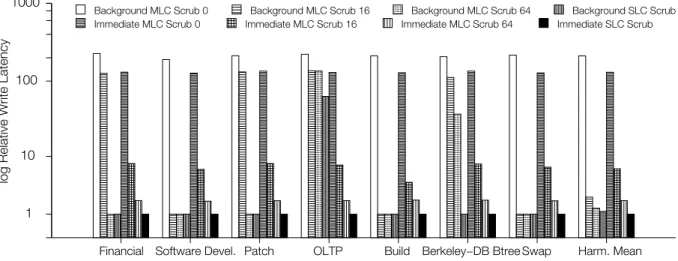
Immediate and background scrubbing Figure 6 compares the write latency for immediate and back-ground scrubbing on SLC and MLC devices. For MLC, we varied the number of scrubs allowed before the FTL must copy out the contents of the block. The figure nor-malizes the data to the baseline configuration that does not perform scrubbing or provide any protection against remnant data.
For SLC-based SSDs, immediate scrubbing causes no decrease in performance, because scrubs frequently exe-cute in parallel with the normal write access.
1 10 100 1000
Financial Software Devel. Patch OLTP Build Berkeley−DB Btree Swap Harm. Mean
log Relative Write Latency
Background MLC Scrub 0 Background MLC Scrub 16 Background MLC Scrub 64 Background SLC Scrub Immediate MLC Scrub 0 Immediate MLC Scrub 16 Immediate MLC Scrub 64 Immediate SLC Scrub
Figure 6:Immediate and background scrubbing performanceFor chips that can withstand at least 64 scrub opera-tions, both background and immediate scrubbing can prevent the creation of data remnants with minimal performance impact. For SLC devices (which can support unlimited scrubbing), background scrubbing has almost no effect and immediate scrubbing increases write latency by about 2×.
In MLC devices, the cost of immediate scrubbing can be very high if the chip can tolerate only a few scrubs be-fore an erase. For 16 scrubs, operation latency increases by 6.4×on average and total runtime increases by up to 11.0×, depending on the application. For 64 scrubs, the cost drops to 2.0×and 3.2×, respectively.
However, even a small scrub budget reduces latency significantly compared relying on using erases (and the associated copy operations) to prevent remnants. Tm-plementing immediate sanitization with just erase com-mands increases operation latency by 130×on average (as shown by the “Scrub 0” data in Figure 5).
If the application allows time for background opera-tions (e.g., Build, Swap and Dev), background scrub-bing with a scrub budget of 16 or 64 has a negligible ef-fect on performance. However, when the application is-sues many requests in quick succession (e.g., OLTP and BDB), scrubbing in the background strains the garbage collection system and write latencies increase by 126× for 16 scrubs and 85×for 64 scrubs. In contrast, slow-down for immediate scrubbing range from just 1.9 to 2.0×for a scrub budget of 64 and from 4.1 to 7.9×for 16 scrubs.
Scrubbing also increases the number of erases re-quired and, therefore, speeds up program/erase-induced wear out. Our results for MLC devices show that scrub-bing increased wear by 5.1×for 16 scrubs per block and 2.0×with 64 scrubs per block. Depending on the appli-cation, the increased wear for chips that can tolerate only a few scrubs may or may not be acceptable. Scrubbing SLC devices does not require additional erase operations.
Finally, scrubbing may impact the long-term integrity of data stored in the SSD in two ways. First, although manufactures guarantee that data in brand new flash de-vices will remain intact for at least 10 years, as the chip ages data retention time drops. As a result, the increase in wear that scrubbing causes will reduce data retention time over the lifetime of the SSD. Second, even when scrubbing does not cause errors immediately, it may af-fect the analog state of other cells, making it more likely that they give rise to errors later. Figure 6 demonstrates the analog nature of the effect: B-MLC32-4 shows errors that come and go for eight scrubs.
Overall, both immediate and background scrubbing are useful options for SLC-based SSDs and for MLC-based drives that can tolerate at least 64 scrubs per block. For smaller scrub budgets, both the increase in wear and the increase in write latency make these techniques costly. Below, we describe another approach to sanitiz-ing files that does not incur these costs.
Scan-based scrubbing Figure 7 measures the latency for a scan-based scrubbing operation in our FTL. We ran each trace to completion and then issued a scrub com-mand to 1 GB worth of LBAs from the middle of the de-vice. The amount of scrubbing that the chips can tolerate affects performance here as well: scrubbing can reduce the scan time by as much as 47%. However, even for the case where we must use only erase commands (MLC-scrub-0), the operation takes a maximum of 22 seconds. This latency breaks down into two parts – the time re-quired to scan the summary pages in each block (0.64 s
Patch OLTP
BDB Btree Financial
Build
Soft. Dev.
Swap
Average
Scan−based scrub Latency (s)
0 4 8 12 16 20
24 SLC
MLC scrub 0 MLC scrub 16 MLC scrub 64
Figure 7: Scan-based scrubbing latency The time to scrub 1 GB varies with the number of scrubs each block can withstand, but in all cases the operation takes less than 30 seconds.
for our SLC SSD and 1.3 s for MLC) and the time to per-form the scrubbing operations and the resulting garbage collection. The summary scan time will scale with SSD size, but the scrubbing and garbage collection time are primarily a function of the size of the target LBA region. As a result, scan-based scrubbing even on large drives will be quick (e.g.,∼62 s for a 512 GB drive).
5
Conclusion
Sanitizing storage media to reliably destroy data is an essential aspect of overall data security. We have em-pirically measured the effectiveness of hard drive-centric sanitization techniques on flash-based SSDs. For san-itizing entire disks, built-in sanitize commands are ef-fective when implemented correctly, and software tech-niques work most, but not all, of the time. We found that none of the available software techniques for sanitizing individual files were effective. To remedy this problem, we described and evaluated three simple extensions to an existing FTL that make file sanitization fast and effec-tive. Overall, we conclude that the increased complexity of SSDs relative to hard drives requires that SSDs pro-vide verifiable sanitization operations.
Acknowledgements
The authors would like to thank Jack Sampson for his useful comments. This work was supported in part by NSF award 1029783.
References
[1] M. Abraham. NAND flash security. In Special Pre-Conference Workshop on Flash Security, Au-gust 2010.
[2] U. S. Air Force.Air Force System Security Instruc-tion 5020, 1998.
[3] American National Standard of Accredited Stan-dards Committee X3T13. Information Technology - AT Attachment-3 Interface, January 1997. [4] American National Standard of Accredited
Stan-dards INCITS T13. Information Technology -ATA/ATAPI Command Set - 2, June 2010.
[5] Apple Inc. Mac OS X 10.6, 2009.
[6] U. S. Army.Army Regulation 380-19, 1998. [7] A. Birrell, M. Isard, C. Thacker, and T. Wobber.
A design for high-performance flash disks. Tech-nical Report MSR-TR-2005-176, Microsoft Re-search, December 2005.
[8] Blancco Oy Ltd. Blancco PC Edition 4.10.1. http: //www.blancco.com.
[9] Bundesamts fr Sicherheit in der Informationstech-nik. Richtlinien zum Geheimschutz von Ver-schlusssachen beim Einsatz von Informationstech-nik, December 2004.
[10] A. Defence Signals Directorate.Government Infor-mation Security Manual (ISM), 2006.
[11] U. S. Defense Security Services.Clearing and San-itization Matrix, June 2007.
[12] U. S. Department of Defense. 5220.22-M Na-tional Industrial Security Program Operating Man-ual, January 1995.
[13] U. S. Dept. of the Navy. NAVSO P-5239-08 Net-work Security Officer Guidebook, March 1996. [14] Eraser. http://eraser.heidi.ie/.
[15] E. Gal and S. Toledo. Algorithms and data struc-tures for flash memories. ACM Comput. Surv., 37(2):138–163, 2005.
[16] GEEP EDS LLC. Darik’s Boot and Nuke (“DBAN”). http://www.dban.org/.
[17] N. Z. Government Communications Security Bu-reau. Security of Information NZSIT 402, Feburary 2008.
[18] L. M. Grupp, A. M. Caulfield, J. Coburn, S. Swan-son, E. Yaakobi, P. H. Siegel, and J. K. Wolf. Char-acterizing flash memory: Anomalies, observations and applications. InMICRO’09: Proceedings of ..., New York, NY, USA, 2009. ACM, IEEE.
[19] P. Gutmann. Secure deletion of data from magnetic and solid-state memory. InSSYM’96: Proceedings of the 6th conference on USENIX Security Sympo-sium, Focusing on Applications of Cryptography, pages 8–8, Berkeley, CA, USA, 1996. USENIX As-sociation.
[20] P. Gutmann. Data remanence in semiconductor de-vices. InSSYM’01: Proceedings of the 10th confer-ence on USENIX Security Symposium, pages 4–4, Berkeley, CA, USA, 2001. USENIX Association. [21] J. A. Halderman, S. D. Schoen, N. Heninger,
W. Clarkson, W. Paul, J. A. Calandrino, A. J. Feld-man, J. Appelbaum, and E. W. Felten. Lest we remember: cold-boot attacks on encryption keys.
Commun. ACM, 52(5):91–98, 2009.
[22] J. Lee, J. Heo, Y. Cho, J. Hong, and S. Y. Shin. Secure deletion for nand flash file system. InSAC ’08: Proceedings of the 2008 ACM symposium on Applied computing, pages 1710–1714, New York, NY, USA, 2008. ACM.
[23] LSoft Technologies Inc. Active@ KillDisk. http: //www.killdisk.com/.
[24] U. S. National Institute of Standards and Technol-ogy. Advanced Encryption Standard (AES) (FIPS PUB 197), November 2001.
[25] U. S. National Institute of Standards and Technol-ogy. Special Publication 800-88: Guidelines for Media Sanitization, September 2006.
[26] Royal Canadian Mounted Police. G2-003, Hard Drive Secure Information Removal and Destruction Guidelines, October 2003.
[27] B. Schneier. Applied cryptography (2nd ed.): pro-tocols, algorithms, and source code in C. John Wi-ley & Sons, Inc., New York, NY, USA, 1995. [28] secure rm. http://srm.sourceforge.net/.
[29] S. Swanson and M. Wei. Safe: Fast, verifiable sani-tization for ssds. http://nvsl.ucsd.edu/sanitize/, Oc-tober 2010.
[30] USB Implementers Forum. Universal Serial Bus Mass Storage Class Specification Overview, September 2008.