Data Protection
™
6.0
T E C H N I C A L O V E R V I E WTable of Contents
Introduction . . . . 3
Architectural Overview . . . . 4
Deployment and Configuration . . . . 5
Backup . . . . 6
Application Backups . . . . 7
Backup Data Replication . . . . 7
Restore . . . . 9
File Level Restore . . . . 9
Application Restore . . . . 10
Automated Backup Verification . . . . 11
Direct-to-Host Emergency Restore . . . . 11
Reporting . . . . 12
Integration with EMC Data Domain . . . . 13
Avoiding Backup Data Corruption . . . . 13
Summary . . . . 13
Introduction
VMware vSphere® Data Protection™ is a backup and recovery solution from VMware. It is fully integrated with VMware vCenter Server™ and VMware vSphere Web Client, providing disk-based backup of virtual machines and applications. vSphere Data Protection is based on the industry-leading EMC® Avamar® backup and recovery solution.
The following are among the features and benefits of vSphere Data Protection:
• Wizard-driven setup and management to quickly and easily implement a data protection solution for a VMware vSphere virtual machine environment
• Significantly reduced backup data disk space requirements, with the patented, variable-length Avamar deduplication technology
• Use of VMware vSphere Storage APIs – Data Protection as well as Changed Block Tracking (CBT) to reduce load on the vSphere host infrastructure and minimize backup window requirements
• Agentless virtual machine backup and restore that reduces complexity and deployment time • Integration with EMC Data Domain® for additional scale, efficiency, and reliability
• Microsoft Exchange Server agent for application-consistent backup and restore of databases and mailboxes, including those protected by a database availability group (DAG)
• Microsoft SQL Server agent that leverages the Virtual Backup Device Interface (VDI) feature for proper backup and restore of databases in standalone configurations and clustered environments
• Microsoft SharePoint agent that enables granular database backup and restore
• Reliable, efficient replication of backup data between vSphere Data Protection appliances for redundancy and offsite data protection
• Flexibility to restore replicated backup data at both the source and target locations
• Automated backup verification that provides the highest level of confidence in backup data integrity • Secure, efficient backup data replication to Avamar for offsite data protection
• Direct-to-host emergency restore operation that enables virtual machine recovery even when vCenter Server and vSphere Web Client are offline
• File Level Restore (FLR), which enables granular file and folder restoration without the need for an agent in Microsoft Windows and Linux virtual machines
• Simple Web browser–based administration through vSphere Web Client • Appliance and backup data protection via a checkpoint-and-rollback mechanism • Deployment of external proxies, enabling as many as 24 parallel backup operations
This paper presents an overview of the architecture, deployment, configuration, and management of vSphere Data Protection.
Architectural Overview
vSphere Data Protection requires vCenter Server, either the Windows implementation or the Linux-based VMware vCenter™ Server Appliance™. VMware vCenter Single Sign-On™ is also required. vSphere Data Protection supports backing up virtual machines on multiple versions of vSphere. The VMware Compatibility Guides should be consulted for more details on product interoperability.
Web browsers must be enabled with Adobe Flash Player to access vSphere Web Client and vSphere Data Protection functionality. See vSphere documentation for a list of Web browsers currently supported with vSphere Web Client.
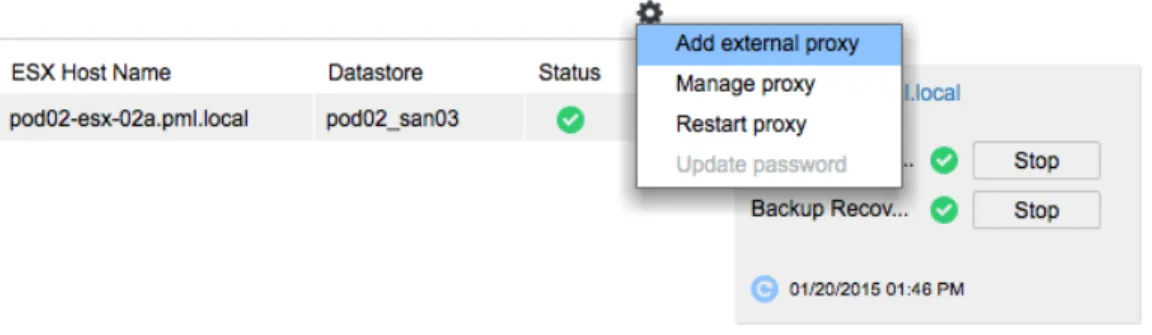
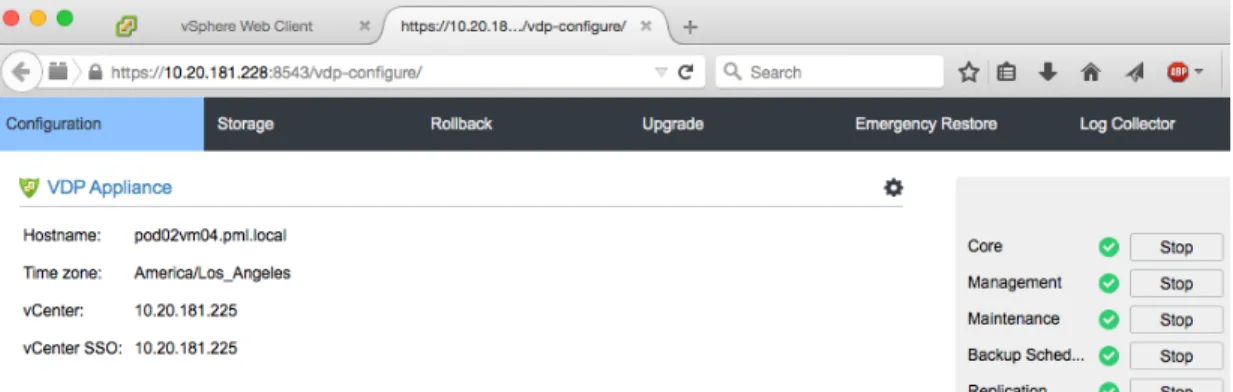
vSphere Data Protection is deployed as a prebuilt, Linux-based virtual appliance. A maximum of 20 vSphere Data Protection appliances can be deployed per vCenter Server. Each appliance is deployed by default with four virtual CPUs and 4GB of memory. Storage capacity for deduplicated backup data is configured during deployment. Optionally, as many as eight external proxies (virtual appliances) can be deployed per vSphere Data Protection virtual appliance. Proxies can be deployed to enable SCSI HotAdd transport backups of virtual machines running on datastores not directly accessible by the vSphere Data Protection virtual appliance. Examples include vSphere hosts utilizing local direct attached storage (DAS) and hosts deployed at remote locations. External proxies are required for the Linux logical volume manager (LVM) and Ext4 FLR. They are deployed using the vSphere Data Protection configure user interface (UI).
Figure 1. Adding an External Proxy in the vSphere Data Protection Configure UI
vSphere Data Protection application agents are downloaded using vSphere Web Client and are installed in the guest operating system (OS) of the virtual machines running Exchange Server, SQL Server, and SharePoint.
Figure 2. vSphere Data Protection Components
vSphere Data Protection supports as much as 8TB of deduplicated backup data capacity per appliance. Assuming average virtual machine sizes, average data change rates, and a 30-day retention policy, approximately 150 to 200 virtual machines can be protected with a vSphere Data Protection appliance. Every environment is different, so actual results will vary.
vSphere Data Protection virtual appliances can be deployed to VMware Virtual SAN™, VMware vSphere VMFS, and NFS datastores. The virtual machine disk (VMDK) files for a vSphere Data Protection virtual appliance can be stored together on the same datastore or distributed across multiple vSphere datastores. It is also possible to detach VMDK files that make up an existing vSphere Data Protection virtual appliance backup data partition and attach them to a newly deployed appliance.
More storage capacity can be added after the appliance has been deployed, up to a maximum of 8TB. For example, a vSphere Data Protection appliance originally deployed with 2TB of backup data storage capacity can be expanded by 6TB, for a total of 8TB of capacity.
When determining storage capacity requirements, several factors—number of protected virtual machines, amount and formats of data being backed up, retention periods, data change rates, and others—should be considered.
Deployment and Configuration
vSphere Data Protection is deployed using vSphere Web Client from a prepackaged Open Virtualization Archive (OVA) file. After the appliance has been deployed and powered on, a Web browser is used to access the vSphere Data Protection configure utility to perform the initial configuration. The first time a user connects to the vSphere Data Protection configure UI, it runs in “install mode.” With the “install mode” wizard, items such as IP address, host name, DNS, time zone, vCenter Server connection information, and storage are configured.
A performance storage test can also be run at this time, which is highly recommended to validate that the storage on which vSphere Data Protection is running meets or exceeds recommended performance levels. Upon successful completion of these tasks, the appliance must be rebooted, which will take several minutes as the appliance automatically finalizes its initial configuration.
After initial configuration, the vSphere Data Protection configure utility runs in “maintenance mode.” In this mode, it is utilized to perform functions such as starting and stopping services in the appliance, deploying proxies, collecting logs, performing emergency restores, upgrading the vSphere Data Protection appliance, and rolling back the appliance to a previous valid configuration state, which will be discussed later in this document.
Backup
Creating and editing a backup job is accomplished using the Backup tab of the vSphere Data Protection UI in vSphere Web Client. Individual virtual machines or specific VMDK files can be selected for backup. Containers of virtual machines such as data centers, clusters, and resource pools can also be selected for backup. When a virtual machine is added to the protected container, it automatically is backed up. Likewise, when a virtual machine is removed from the container, it no longer is included in the backup job. Restore points are preserved until expired by the retention policy.
Backup jobs can be scheduled daily, weekly, or monthly. Each job starts at its scheduled time and runs once on the day it is scheduled.
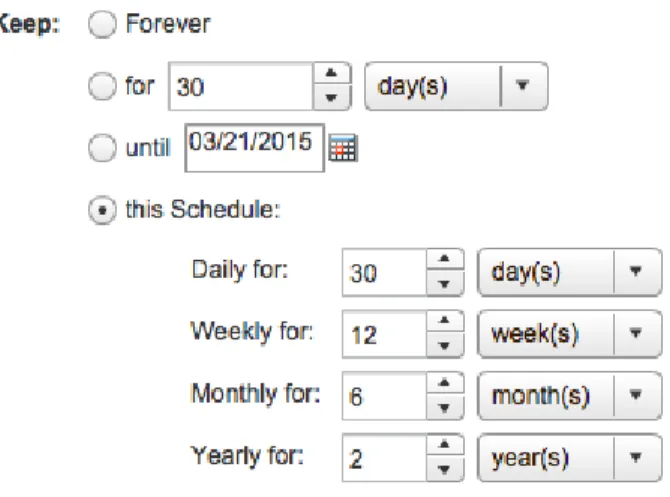
The retention policy can be defined in a few ways; for example, retention for 30 days or until a specific date. A custom retention policy also can be defined.
Figure 4. Custom Retention Policy
After a backup job has been created, it can be edited or deleted. It is also possible to clone a backup job. Cloning can be useful if, for example, the backup administrator wants to easily duplicate an existing custom retention policy for a new set of virtual machines.
The initial backup of a virtual machine can take some time because all data blocks that make up that virtual machine must be backed up. Subsequent backups typically take much less time because vSphere Data Protection utilizes CBT in vSphere.
Application Backups
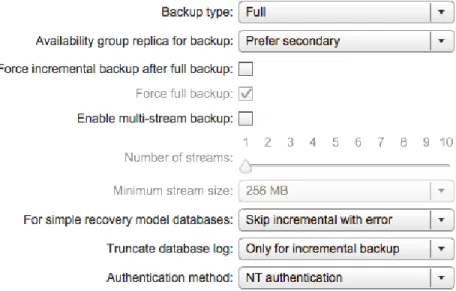
vSphere Data Protection has the capability to properly back up and restore Exchange Server, SQL Server, and SharePoint application databases. SQL Server clusters and Exchange Server database availability groups are also supported. A vSphere Data Protection application agent is installed in the guest OS of each virtual machine running these applications. It is also possible to install these agents on physical machines to protect Exchange Server, SQL Server, and SharePoint application databases. Agents enable application-consistent backup and recovery and provide support for other options such as full, differential, or incremental backups; multistream backups; and database log management.
Figure 5. SQL Server AlwaysOn Cluster Backup Job Options
Backup Data Replication
vSphere Data Protection can replicate backup data between vSphere Data Protection appliances and to Avamar. This capability is especially useful to move backup data offsite in a secure and reliable manner. Because the backup data is deduplicated at both the source and target, only unique backup data segments are replicated. The replicated data is encrypted and compressed to secure it and to further minimize network bandwidth consumption. When creating a replication job, it is possible to define specific criteria for which backup data is replicated. Individual clients—virtual machines and applications—can be selected for replication; specific backup types—weekly backups, for example—can be chosen and date restrictions can be defined.
Figure 6. Backup Selection in a Replication Job
The replication job can be scheduled to run daily, weekly, or monthly. By default, the retention policy of the replicated backup data is the same as what was defined in the backup job(s) for that backup data. A different retention policy for replicated backup data can be defined. For example, an administrator might want to retain backup data locally for 30 days and retain the replicated backup data offsite for 180 days.
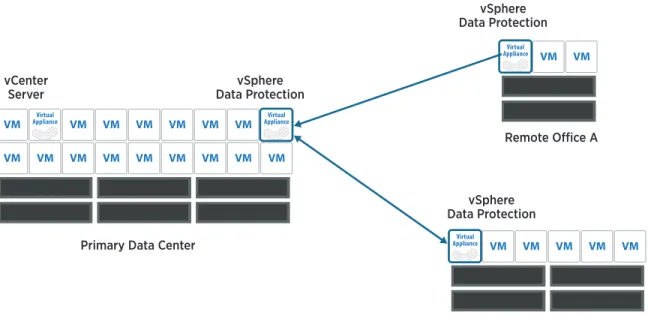
There are numerous replication topology options with vSphere Data Protection. Replication can be one-to-one, or a more robust replication topology such as many-to-one can be implemented. Backup data can be “rereplicated”—for example, backing up virtual machines at remote office A, replicating this backup data to the primary data center, and then replicating the replicated backup data from the primary data center to remote office B. This approach results in backup data availability at all three sites.
VM VM VM VM VM VM VM VM VM VM
VM VM
VM VM VM
VM VM VM VM VM VM VM VM
Virtual
Appliance ApplianceVirtual
Virtual Appliance
vCenter
Server Data ProtectionvSphere
Primary Data Center
vSphere Data Protection
vSphere Data Protection
Remote Office A
Remote Office B
Virtual Appliance
Restore
Restore an entire virtual machine by using the Restore tab in the vSphere Data Protection UI. The administrator can browse the list of protected virtual machines and select one or more restore points. Individual VMDKs can also be selected for restore.
vSphere Data Protection offers fast and efficient recovery by leveraging CBT. When restoring an entire virtual machine to its original location, the workloads of both a full image restore and a restore leveraging CBT are evaluated. vSphere Data Protection intelligently determines which method will result in the faster virtual machine recovery time.
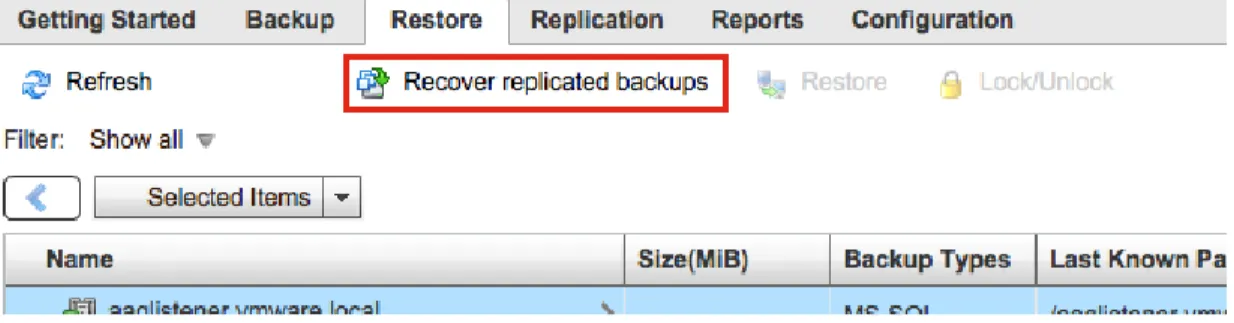
It is also possible to restore virtual machines from replicated backup data at the target location and locally. Example scenario: A vSphere Data Protection virtual appliance protects virtual machines in a primary data center. Backup data is replicated by vSphere Data Protection from the primary data center to a vSphere Data Protection virtual appliance at a disaster recovery data center. Disaster strikes the primary data center; virtual machines, including the vSphere Data Protection virtual appliance, are lost. When the primary data center is back online, a new vSphere Data Protection virtual appliance is deployed and connected to vSphere Data Protection at the disaster recovery site. The new vSphere Data Protection virtual appliance can retrieve backup data from the disaster recovery site and perform restores at the primary data center.
Figure 8. Recover Replicated Backups
File Level Restore
With vSphere Data Protection, it is possible to restore individual files, folders, and directories within a virtual machine. An FLR operation is performed using a Web-based tool called vSphere Data Protection Restore Client. The process enables end users to conduct restores on their own, without the assistance of an administrator, by selecting a restore point and browsing the file system as it looked at the time that backup was done. They locate the item(s) to be recovered, select a destination for the restored item(s), and start the recovery. The progress of the restore job can be monitored in vSphere Data Protection Restore Client.
Application Restore
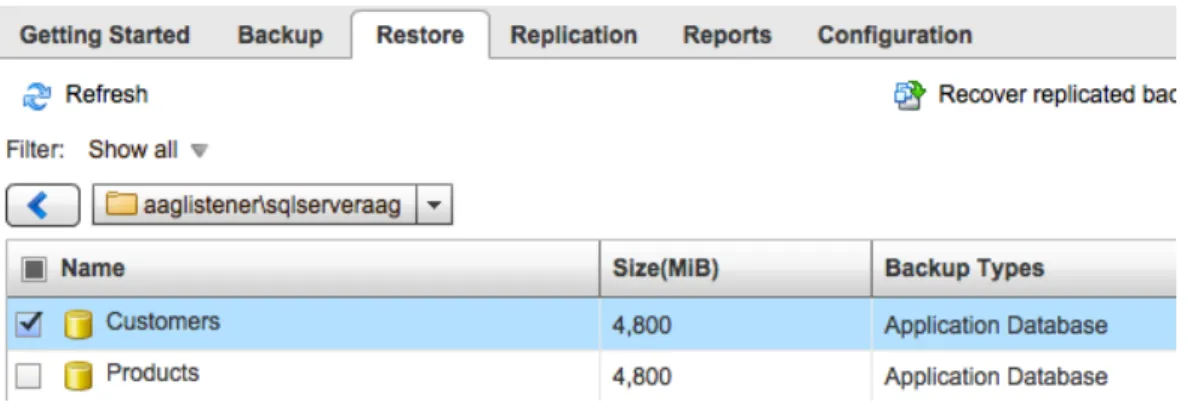
vSphere Data Protection provides the ability to restore individual SQL Server, Exchange Server, and SharePoint application databases. SQL Server clusters and Exchange database availability groups are supported.
Figure 10. SQL Server Database Selected for Recovery in vSphere Data Protection
Because vSphere Data Protection leverages specific application agents, various restore options can be defined. Figure 11 shows options available with the SQL Server agent.
Figure 11. SQL Server Restore Options in vSphere Data Protection
The vSphere Data Protection agent for Exchange Server enables individual database backup and restore. It is also possible to select individual mailboxes for restore. A user’s mailbox is recovered as a folder named “Recovered Items.” The user can then browse the folder’s contents by using an Exchange Server client such as Microsoft Outlook to retrieve any needed items.
Automated Backup Verification
Backup verification jobs can be created in vSphere Data Protection. These jobs automate the process of restoring a virtual machine: powering it on; verifying the guest OS booted, by detection of VMware Tools™ “heartbeats”; and, optionally, confirming an application started successfully by means of a custom script. The restored virtual machine is disconnected from the network to prevent interference with production systems. After the restore and verification have been completed, the restored virtual machine is deleted to free up capacity. Backup verification jobs can be scheduled at specific times daily, weekly, or monthly.
Direct-to-Host Emergency Restore
vCenter Server and the vSphere Web Client server must be online to perform restores using vSphere Web Client. When these components are offline, an emergency restore can be utilized to restore a virtual machine directly to the host on which vSphere Data Protection is running. Emergency Restore is one of the tabs in the vSphere Data Protection configure UI.
Reporting
The Reports tab in vSphere Data Protection displays a variety of information: appliance status, used capacity, backup and replication job details, and so on. If there were errors during a job, clicking Task Failures enables an administrator to view specific information about the failures, including client logs. The Job Details pane provides information about backup, replication, and backup verification jobs. The list of clients—protected virtual
machines and applications—can be filtered to quickly locate a specific client. A list of clients that have not been backed up can also be viewed by clicking Unprotected Clients. All three views can be exported to comma-separated values (CSV) files.
Figure 13. Reports Tab in the vSphere Data Protection UI
In addition to having UI reporting capabilities, vSphere Data Protection can be configured to send email reports scheduled at a specific time, once per day on any or all days of the week. Similar to the UI, these email messages contain details on the vSphere Data Protection appliance, backup jobs, and protected virtual machines.
Integration with EMC Data Domain
vSphere Data Protection can be configured to use Data Domain as a backup data target. The advantages of doing this include additional scale, global deduplication, and improved backup efficiency due to the EMC DD Boost™ libraries built into vSphere Data Protection.
Backup data replication can be configured between two or more vSphere Data Protection appliances with separate Data Domain targets. Replication is configured and backup metadata is maintained in vSphere Data Protection, but replication of the backup data occurs directly between the Data Domain appliances. Data at the source and target is already deduplicated.
Avoiding Backup Data Corruption
vSphere Data Protection contains a checkpoint-and-rollback mechanism. A checkpoint is a system-wide backup of the vSphere Data Protection appliance that is performed to help protect the appliance from risks that might cause data corruption, such as an unexpected appliance power-off. In this case, the appliance would roll back to the last validated checkpoint. Any backup jobs performed after that checkpoint would be lost, but data corruption—that is, loss of all backup information—likely would be avoided.
Checkpoint copy can be enabled for vSphere Data Protection virtual appliances that are using Data Domain to store backup data. With this feature enabled, checkpoints are copied to the Data Domain appliance. If the vSphere Data Protection virtual appliance is lost, a new vSphere Data Protection virtual appliance can be deployed and connected to the Data Domain appliance. The new vSphere Data Protection virtual appliance can read the existing checkpoints and backup data to perform restores.
Summary
Data protection is a key component of any business continuity plan. VMware vSphere Data Protection provides an efficient solution for protecting a VMware virtual machine infrastructure. vSphere Data Protection includes the capability to properly protect mission-critical applications via agents. Backup data can be securely and efficiently replicated to other vSphere Data Protection appliances within the same site and offsite for
redundancy and disaster recovery purposes. vSphere Data Protection can be integrated with EMC Data Domain. Deployment is quick and simple. Administration is easily performed using VMware vSphere Web Client.
About the Author
Jeff Hunter is a senior technical marketing architect at VMware with a focus on business continuity and disaster recovery solutions. He has been with VMware for more than 7 years, prior to which he spent several years implementing and administering VMware virtual infrastructures at two Fortune 500 companies.