Data Sheet
Cisco
1711
and
1712
Security Access Routers
Cisco®1711 and 1712 security access routers are ideal for providing secure/reliable Internet and corporate network connectivity to enterprise small branch offices and small- and medium- sized businesses. They offer an all-in-one security and routing solution with built-in Fast Ethernet LAN switching, Fast Ethernet WAN or DSL broadband modem connectivity; and ISDN or analog modem backup interface to help ensure high availability of critical business applications. Cisco 1711 and 1712 routers also support integrated network security services that help ensure protection of the network and to secure data traveling over the Internet.
Figure 1: Cisco 1711 or 1712 router
Cisco 1711 and 1712 routers, when deployed at a small- or medium-sized business, provide access to the Internet and other remote offices, while securing and protecting business critical data with Cisco IOS® Software security features. When deployed in the enterprise-small-branch office, Cisco 1711 and 1712 routers enable secure/reliable connections to corporate headquarters or other branch offices, providing employees with access to the corporate intranet.
Cisco 1711 and 1712 routers help businesses reduce costs by allowing deployment of a single device to provide multiple services (router, Fast Ethernet switch, firewall, virtual private network [VPN], Intrusion Detection System [IDS], and redundant WAN interface) typically
performed by separate devices. Cisco IOS Software allows this flexibility, providing the industry's most robust, scalable, and feature-rich internetworking software support, using the accepted standard networking software for the Internet and private WANs.
Integrated LAN Switching The four-port 10/100BASE-TX Fast Ethernet switch on Cisco 1711 and 1712 routers allows businesses to support and manage LAN and WAN configurations on a single device. The switch interfaces support Spanning Tree Protocol 802.1D and can be used to connect up to four physical LANs, or up to 16 IEEE 802.1Q virtual LANs (VLANs).
In addition, Cisco IOS Software integrated security features allow for the creation of demilitarized zones (DMZs) within the corporate intranet (Figure 2). This helps businesses secure and protect their network from external threats while enabling customer access to public Web and FTP servers.
Cisco Systems, Inc.
Figure 2:
A DMZ can be created on the Fast Ethernet switching ports of the Cisco 1711 and 1712 using Cisco IOS Firewall
High Availability
For reliable access to the Internet and corporate networks, the ISDN port on the Cisco 1712, and the analog modem port on the Cisco 1711 Router, provide a redundant backup WAN connection to failover should the primary WAN connection fail (Figure 3). Additionally, Cisco 1711 and 1712 routers with Cisco IOS Software, which can automatically detect WAN failures and reestablish connectivity through the backup link. Cisco IOS Software is the industry proven software that has become the standard for reliable business access, and allows businesses to avoid productivity losses resulting from interruptions in WAN connectivity.
Figure 3:
In the event that the primary broadband connection fails, the analog modem port on the Cisco 1711 Router, or the ISDN port on the Cisco 1712 Router, functions as a backup WAN connection
Integrated Network Security
Cisco 1711 and 1712 routers deliver integrated network security solutions that enable organizations to protect productivity gains and reduce costs.
Standard integrated security services include hardware-accelerated IP security (IPSec) Triple Data Encryption Standard (3DES) encryption for wire-speed site-to-site VPN, as well as stateful inspection firewall and the Cisco IDS for network protection. These features provide secure connections via the Internet to connect geographically dispersed offices, business partners, and remote users while providing security, traffic prioritization, management, and reliability equal to that of private networks.
VPNs
VPNs enable companies to securely connect their branch offices, mobile workers, and business partners over public networks, dramatically lowering costs compared to a private line. By taking advantage of the vast, shared
communications infrastructure of the Internet or a shared service provider backbone, companies avoid the service charges of traditional private networks.
The Cisco 1711 and 1712 routers deliver hardware-assisted VPN functionality encrypting data using the strongest encryption available, 3DES at 15 Mbps. The Advanced Encryption Standard (AES) is also supported by Cisco IOS Software. Using high-performance VPN encryption and tunneling technologies, Cisco 1711 and 1712 routers can establish secure tunnels across the Internet to the corporate network. The virtual network connection lasts only as long as it is needed, so enterprises no longer pay for idle capacity on costly leased lines. Using a Cisco 1711 or 1712 router, a VPN can scale to support up to 100 concurrent tunnels or sites in a partial or fully meshed, fully secure global communications Web.
Firewall and IDS
With an always-on broadband connection to the Internet, it is essential to protect the internal network against unwanted intrusion or malicious Internet attacks. The integrated stateful inspection firewall enables secure Internet access by internal users while defending the internal network against denial-of-service (DoS) attacks and other forms of unauthorized access.
Cisco 1711 and 1712 routers integrate robust firewall and IDS features for every perimeter of the network. The router adds greater depth and flexibility to Cisco IOS Software security solutions such as authentication and encryption with state-of-the-art security features including stateful, application-based filtering, Context-Based Access Control (CBAC), DoS protection, dynamic per-user authentication and authorization, defense against network attacks, Java blocking, and real-time alerts.
Advanced Security
Advanced security features supported on the Cisco 1711 and 1712 routers include Cisco Easy VPN Server and Cisco Easy VPN Remote, Cisco Security Device Manager (SDM), Cisco AutoSecure, and Firewall Websense URL Filtering. Cisco Easy VPN software allows simple deployment and management of VPNs. Using the Cisco Easy VPN Server feature with the hardware encryption module, routers can establish VPNs initiated by remote workers running VPN client software on PCs. This functionality helps businesses increase productivity by empowering employees to access information and applications at any time. Additionally, using the Easy VPN Remote feature, enterprise customers can configure site-to-site VPNs with security policies pushed from corporate headquarters to enterprise small branch
Cisco Systems, Inc.
With the Cisco IOS AutoSecure feature a single Cisco IOS Software command can disable common IP services that can be exploited for network attacks and can enable IP services and features that can aid in the defense of a network when under attack. This feature also simplifies the security configuration of a router and hardens the router configuration.
The Firewall Websense URL Filtering feature enables the Cisco IOS Firewall to interact with Websense URL filtering software, allowing it to prevent users from accessing specified Websites on the basis of some security policy. The Cisco IOS Firewall works with the Websense server to know whether a particular URL should be allowed or denied (blocked).
Advanced QoS
Cisco QoS features maximize network performance levels and help businesses reduce WAN access costs by classifying application data, giving the most important applications priority use of the WAN line. The Cisco 1711 and 1712 routers come standard with a complete suite of advanced QoS features such as the Resource Reservation Protocol (RSVP), Weighted Fair Queuing (WFQ), and IP Precedence and many others. Features such as committed access rate (CAR); policy routing, low-latency queuing (LLQ), generic traffic shaping (GTS), Frame Relay traffic shaping (FRTS), and RSVP also help allocate WAN bandwidth for improved performance.
Superior Management
Cisco 1711 and 1712 routers offer superior management applications and ease-of-installation tools including Cisco SDM, CiscoWorks, CiscoView, and CiscoWorks Small Network Management Solution (SNMS).
The Cisco SDM is an intuitive, Web-based device management tool embedded within the Cisco IOS Software access routers. SDM simplifies router and security configuration through smart wizards to enable customers to quickly and easily deploy, configure and monitor a Cisco access router without requiring knowledge of Cisco IOS Software CLI. Cisco SDM provides innovative ease-of-use features to enable quick deployment of security services (firewall, VPN, and Network Address Translation [NAT] for example.) on Cisco 1711 and 1712 routers. Cisco SDM’s intelligent wizards guide users step-by-step to configure LAN and WAN interfaces, firewall, and VPNs. Additionally, Cisco SDM wizards can automatically detect incorrect security configurations and propose fixes, such as allowing Dynamic Host Control Protocol (DHCP) traffic through a firewall if the WAN interface is DHCP-addressed.
Another innovative feature in Cisco SDM is Security Audit (Figure 4). This functionality allows the user to create a security audit report of their existing router configuration and then lock-down the router configuration based on ICSA Labs and Cisco Technical Assistance Center (TAC) recommended configuration through a single click. Cisco SDM is flexible in its design to improve the productivity of users not familiar with Cisco IOS Software CLI through intelligent wizards, and to help the expert Cisco IOS Software users to quickly fine tune the standard firewall and VPN configuration generated by the wizards to be more site specific. Cisco SDM has a Cisco IOS Software CLI preview mode for expert users to review all the configurations generated by Cisco SDM in Cisco IOS Software CLI format. CiscoWorks, the industry-leading Web-based network management suite, provides the ability to remotely configure, administer, monitor, and troubleshoot the Cisco 1711 and 1712 routers, and also increases visibility into network behavior by quickly identifying performance bottlenecks and long-term performance trends. CiscoWorks provides sophisticated configuration tools to optimize bandwidth and usage across expensive and critical WAN links in the network.
CiscoWorks SNMS is a comprehensive, Web-based network management solution that provides a powerful set of monitoring, configuration, and management tools to simplify the administration of small and medium-sized business networks and workgroups that contain up to 20 Cisco internetworking products (switches, routers, hubs, and access servers).
CiscoWorks VPN/Security Management Solution (VMS), an integral part of the SAFE Blueprint for network security, combines Web-based tools for configuring, monitoring, and troubleshooting enterprise VPNs, firewalls, and network and host-based IDS. CiscoWorks VMS delivers the industry’s first robust and scalable foundation and feature set that addresses the needs of small and large-scale VPN and security deployments.
ISDN to ADSL Migration
The Cisco 1712 Router provides businesses a cost-effective migration path from ISDN to ADSL services. In many countries where ISDN is already a popular WAN access technology, ADSL for WAN access is being increasingly adopted. The Cisco 1712 Router allows customers to deploy ISDN access initially while providing a migration path to ADSL when the service becomes available, without purchasing a new router.
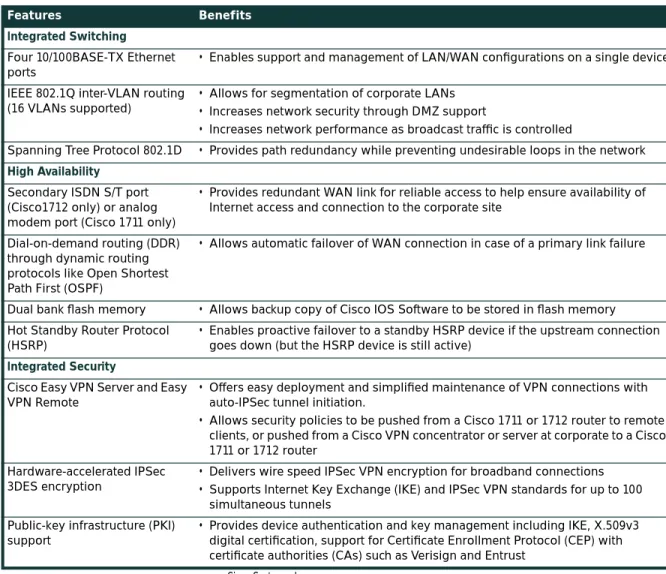
Table 1 Features and Benefits
Features Benefits
Integrated Switching Four 10/100BASE-TX Ethernet ports
• Enables support and management of LAN/WAN configurations on a single device IEEE 802.1Q inter-VLAN routing
(16 VLANs supported)
• Allows for segmentation of corporate LANs • Increases network security through DMZ support
• Increases network performance as broadcast traffic is controlled
Spanning Tree Protocol 802.1D • Provides path redundancy while preventing undesirable loops in the network High Availability
Secondary ISDN S/T port (Cisco1712 only) or analog modem port (Cisco 1711 only)
• Provides redundant WAN link for reliable access to help ensure availability of Internet access and connection to the corporate site
Dial-on-demand routing (DDR) through dynamic routing protocols like Open Shortest Path First (OSPF)
• Allows automatic failover of WAN connection in case of a primary link failure
Dual bank flash memory • Allows backup copy of Cisco IOS Software to be stored in flash memory
Hot Standby Router Protocol (HSRP)
• Enables proactive failover to a standby HSRP device if the upstream connection goes down (but the HSRP device is still active)
Integrated Security
Cisco Easy VPN Server and Easy VPN Remote
• Offers easy deployment and simplified maintenance of VPN connections with auto-IPSec tunnel initiation.
• Allows security policies to be pushed from a Cisco 1711 or 1712 router to remote clients, or pushed from a Cisco VPN concentrator or server at corporate to a Cisco 1711 or 1712 router
Hardware-accelerated IPSec 3DES encryption
• Delivers wire speed IPSec VPN encryption for broadband connections • Supports Internet Key Exchange (IKE) and IPSec VPN standards for up to 100
Cisco Systems, Inc. Product Specifications
Figure 4:
Rear view of the Cisco 1711 and 1712
AES • Offers more security than DES
• Offers greater key sizes (up to 256-bits)
Stateful inspection firewall • Offers internal users secure, per-application dynamic access control (stateful inspection) for all traffic across perimeters
• Defends and protects router resources against DoS attacks • Provides CBAC
IDS • Detects and prevents DoS attacks and unauthorized network access; sends alerts
to initiate correct action; 100 IDS signatures are monitored
Cisco AutoSecure • Allows users to quickly secure their network without thorough knowledge of all
the Cisco IOS Software CLI features
• Eliminates the complexity of securing a router by using a single CLI that automates the lockdown function of security features
Authentication, authorization, and accounting (AAA)
• Authenticates HTTP, Telnet and FTP protocols
• Support for RADIUS, TACACS+, and local authentication • Authorizes user access to network services
• Tracks user network access
Firewall Websense URL Filtering • Allows control of Web traffic for a given host or user on the basis of a specified security policy
• Allows keyword-based filtering, which is applied on the basis of specific keywords (for example, a user can configure a policy for which all URLs with the keyword "dog" will be denied)
• Supports customized filtering, which allows the user to apply a policy for customized URLs
Compression IPSec software-based compression
• Software based Layer 3 IP Payload Compression Protocol (IPPCP) is enabled to use with hardware encryption
Advanced QoS
IP QoS (LLQ, WRED, CAR, class-based traffic shaping, Differentiated Services [DiffServ])
• Helps to ensures consistent response times for multiple applications by intelligently allocating bandwidth
• Allows for classification of applications and gives business-critical applications priority use of the WAN line
• Provides congestion avoidance by throttling down certain TCP sessions, depending on each session's priority level
ATM QoS (ATM traffic unspecified bit rate [UBR], variable bit rate/non-real time [VBRnrt], VBRrt, and constant bit rate [CBR] with per-virtual circuit [per-VC] queuing and traffic shaping)
• Provides QoS for real-time traffic, with the ability to send traffic over the appropriate virtual circuit to provide ATM-level shaping and ensure that no head-of-line blocking can occur between circuits of different or equal traffic classes
Table 1 Features and Benefits (Continued)
Physical Interfaces/Ports
Four 10/100BASE-TX autosensing Fast Ethernet switched ports • RJ-45 jacks
• MDI/MDIX autocrossover • Full-/half-duplex
• IEEE 802.1Q VLAN routing (16 VLANs) • Spanning Tree Protocol 802.1D
One ISDN BRI port on the Cisco 1712 Router
• ISDN dialup and ISDN DSL (IDSL) at 64 and 128 Kbps • Encapsulation over IDSL, Frame Relay, and PPP
• ISDN WAN port features are consistent with Cisco 1-port ISDN WAN interface card (WIC-1B-S/T)
One analog modem port on the Cisco 1711 Router • RJ-11 jack
• Support for speeds up to 56 Kbps (V.90) • Separate RJ-11 jack for telephone connection
• Point-to-Point Protocol (PPP), Multilink PPP (MLPPP), and Serial Line Internet Protocol (SLIP)
One 10/100BASE-TX Fast Ethernet WAN port (RJ-45) • Automatic speed detection
• Automatic duplex negotiation One auxiliary port
• RJ-45 jack with EIA/TIA-232 interface
• Asynchronous serial data rates up to 115.2 Kbps One console port
• RJ-45 jack with EIA/TIA-232 interface
• Transmit/receive rates up to 115.2 Kbps (default 9600 bps, not a network data port)
Performance Summary
• Firewall and IDS throughput: 20 Mbps • 168-bit 3DES IPSec VPN throughput: 15 Mbps
Memory Flash memory • Default: 32 MB • Maximum: 32 MB DRAM memory • Default: 64 MB • Maximum: 128 MB Dimensions and Weight
• Width: 11.2 in. (28.4 cm) • Height: 3.1 in. (7.85 cm) • Depth: 8.7 in. (22.1 cm) • Weight: 2.9 lb (1.32 kg) Power
• AC input voltage: 100 to 240 VAC • Frequency: 47 to 64 Hz
• AC input current: 0.5 A
• Power dissipation: 20W (maximum) Environmental
• Operating temperature: 32 to 104 F (0 to 40 C) • Nonoperating temperature: -4 to 149 F (-20 to 65 C) • Relative humidity: 10 to 85 percent noncondensing operating; 5
to 95 percent noncondensing, nonoperating Safety Certifications • UL 1950 • CSA 22.2—No. 950 • EN60950 • EN41003 • AUSTEL TS001 • AS/NZS 3260 • ETSI 300-047 • BS 6301 (power supply) EMI Classifications • AS/NRZ 3548 Class A • FCC Part 15 Class B • EN60555-2 Class B • EN55022 Class B • VCCI Class II Table 2 Part Numbers
Part Number Description
CISCO1711-VPN/K9 Security access router with integrated 4-port switch, 10/100BASE-TX for WAN and analog modem backup
CISCO1712-VPN/K9 Security access router with integrated 4-port switch, 10/100BASE-TX for WAN and ISDN S/T backup
Corporate Headquarters Cisco Systems, Inc. 170 West Tasman Drive San Jose, CA 95134-1706 USA www.cisco.com Tel: 408 526-4000 800 553-NETS (6387) Fax: 408 526-4100 European Headquarters Cisco Systems International BV Haarlerbergpark Haarlerbergweg 13-19 1101 CH Amsterdam The Netherlands www-europe.cisco.com Tel: 31 0 20 357 1000 Fax: 31 0 20 357 1100 Americas Headquarters Cisco Systems, Inc. 170 West Tasman Drive San Jose, CA 95134-1706 USA
www.cisco.com Tel: 408 526-7660 Fax: 408 527-0883
Asia Pacific Headquarters Cisco Systems, Inc. Capital Tower 168 Robinson Road #22-01 to #29-01 Singapore 068912 www.cisco.com Tel: +65 6317 7777 Fax: +65 6317 7799 Cisco Systems has more than 200 offices in the following countries and regions. Addresses, phone numbers, and fax numbers are listed on the
C i s c o W e b s i t e a t w w w . c i s c o . c o m / g o / o f f i c e s
Argentina • Australia • Austria • Belgium • Brazil • Bulgaria • Canada • Chile • China PRC • Colombia • Costa Rica • Croatia Czech Republic • Denmark • Dubai, UAE • Finland • France • Germany • Greece • Hong Kong SAR • Hungary • India • Indonesia • Ireland Israel • Italy • Japan • Korea • Luxembourg • Malaysia • Mexico • The Netherlands • New Zealand • Norway • Peru • Philippines • Poland Portugal • Puerto Rico • Romania • Russia • Saudi Arabia • Scotland • Singapore • Slovakia • Slovenia • South Africa • Spain • Sweden S w i t z e r l a n d • Ta i w a n • T h a i l a n d • Tu r k e y • U k r a i n e • U n i t e d K i n g d o m • U n i t e d S t a t e s • Ve n e z u e l a • Vi e t n a m • Z i m b a b w e
All contents are Copyright © 1992–2003 Cisco Systems, Inc. All rights reserved. CCIP, CCSP, the Cisco Arrow logo, the Cisco Powered Network mark, Cisco Unity, Follow Me Browsing, FormShare, and StackWise are trademarks of Cisco Systems, Inc.; Changing the Way We Work, Live, Play, and Learn, and iQuick Study are service marks of Cisco Systems, Inc.; and Aironet, ASIST, BPX, Catalyst, CCDA, CCDP, CCIE, CCNA, CCNP, Cisco, the Cisco Certified Internetwork Expert logo, Cisco IOS, the Cisco IOS logo, Cisco Press, Cisco Systems, Cisco Systems Capital, the Cisco Systems logo, Empowering the Internet Generation, Enterprise/Solver, EtherChannel, EtherSwitch, Fast Step, GigaStack, Internet Quotient, IOS, IP/TV, iQ Expertise, the iQ logo, iQ Net Readiness Scorecard, LightStream, MGX, MICA, the Networkers logo, Networking Academy, Network Registrar, Packet, PIX, Post-Routing, Pre-Routing, RateMUX, Registrar, ScriptShare, SlideCast, SMARTnet, StrataView Plus, Stratm, SwitchProbe, TeleRouter, The Fastest Way to Increase Your Internet Quotient, TransPath, and VCO are registered trademarks of Cisco Systems, Inc. and/or its affiliates in the U.S. and certain other countries.
Immunity Standards
• 55082-1 Generic Immunity Specification Part 1: Residential and Light Industry • IEC 1000-4-2 (EN61000-4-2) • IEC 1000-4-3 (ENV50140) • IEC 1000-4-4 (EN61000-4-4) • IEC 1000-4-5 (EN61000-4-5) • IEC 1000-4-6 (ENV50141) • IEC 1000-4-11 • IEC 1000-3-2 Network Homologation Standards
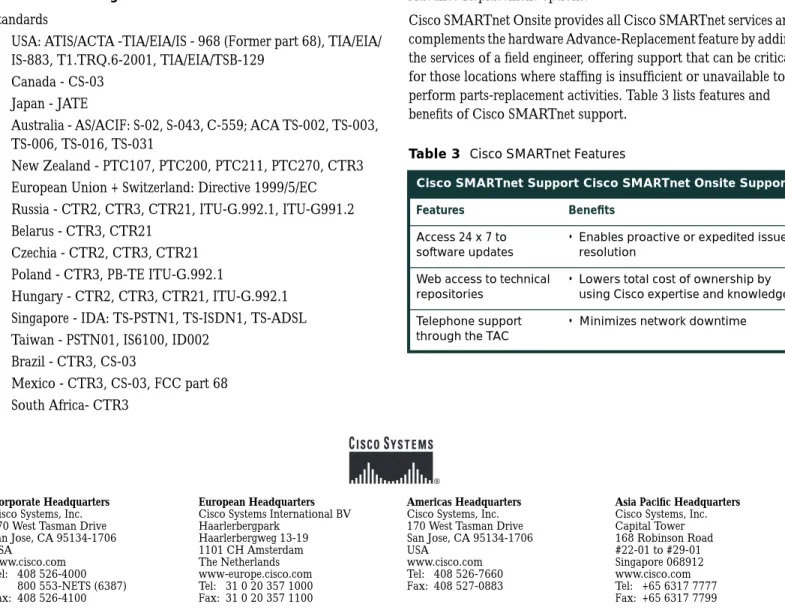
• USA: ATIS/ACTA -TIA/EIA/IS - 968 (Former part 68), TIA/EIA/ IS-883, T1.TRQ.6-2001, TIA/EIA/TSB-129
• Canada - CS-03 • Japan - JATE
• Australia - AS/ACIF: S-02, S-043, C-559; ACA TS-002, TS-003, TS-006, TS-016, TS-031
• New Zealand - PTC107, PTC200, PTC211, PTC270, CTR3 • European Union + Switzerland: Directive 1999/5/EC • Russia - CTR2, CTR3, CTR21, ITU-G.992.1, ITU-G991.2 • Belarus - CTR3, CTR21
• Czechia - CTR2, CTR3, CTR21 • Poland - CTR3, PB-TE ITU-G.992.1
• Hungary - CTR2, CTR3, CTR21, ITU-G.992.1 • Singapore - IDA: TS-PSTN1, TS-ISDN1, TS-ADSL • Taiwan - PSTN01, IS6100, ID002
• Brazil - CTR3, CS-03
• Mexico - CTR3, CS-03, FCC part 68 • South Africa- CTR3
The Cisco 1700 Series, including the Cisco 1711/1712 routers, is in compliance with the requirements of these countries for
distribution. The Cisco 1700 Series conforms to safety, EMI, immunity, and network homologation standards. Details can be obtained through your Cisco reseller or account manager. Service and Support
Technical Support Services for Cisco 1711 and 1712 routers are available through Cisco SMARTnet®™ and Cisco SMARTnet Onsite service programs. Cisco SMARTnet support augments the resources of your operations staff; it provides them access to a wealth of expertise, both on line and via telephone, the ability to refresh their system software at will, and a range of hardware Advance Replacement options.
Cisco SMARTnet Onsite provides all Cisco SMARTnet services and complements the hardware Advance-Replacement feature by adding the services of a field engineer, offering support that can be critical for those locations where staffing is insufficient or unavailable to perform parts-replacement activities. Table 3 lists features and benefits of Cisco SMARTnet support.
Table 3 Cisco SMARTnet Features
Cisco SMARTnet Support Cisco SMARTnet Onsite Support
Features Benefits
Access 24 x 7 to software updates
• Enables proactive or expedited issue resolution
Web access to technical repositories
• Lowers total cost of ownership by using Cisco expertise and knowledge Telephone support
through the TAC