Alison J. LeSueur. High School Libraries Use of Web 2.0 Tools. A Master’s Paper for the M.S. in L.S Degree. April 2010. 70 pages. Advisor: Sandra Hughes Hassell. This study examined high school library websites for evidence of the use of Web 2.0 tools in order to answer two research questions: Are high school librarians incorporating Web 2.0 tools into their online programs and services and how are those tools being used to enhance programs and services? A content analysis was conducted on two samples: a random sample of 100 school library website homepages selected from Newsweek’s 2008 list of the top 1300 public high schools in the United States; and the current websites from ten high schools used in Joyce Valenza’s 2007 study of exemplary high school websites. The results of this study indicate that high school library media specialists need to do more to implement these tools on their websites to enhance their school library program.
Headings
School libraries -- High schools School librarianship
HIGH SCHOOL LIBRARIES USE OF WEB 2.0 TOOLS
By Alison J. LeSueur
A Master’s paper submitted to the faculty of the School of Information and Library Science of the University of North Carolina at Chapel Hill
in partial fulfillment of the requirements for the degree of Master of Science in
Information/Library Science. Chapel Hill, North Carolina
April 2010
Approved by
Table of Contents
Introduction ...2
Literature Review...3
Methodology ...18
Results ...25
Discussion and Study Implications ...34
Conclusion ...38
References ...40
Appendices ...45
Appendix A ...45
Appendix B ...49
Appendix C ...50
Appendix D ...52
Appendix E ...54
Appendix F...55
Introduction
The information skills required by today’s students include the ability to navigate and contribute to the digital world. Internet technology has expanded to support highly collaborative learning environments, challenging traditional learning methods to adapt and implement these new technologies. The updated “American Association of School Librarians Standards for the 21st Century Learner” (AASL, 2007) notes that “technology skills are crucial for future employment needs.” Many of these standards focus on accessing and sharing digital information:
• “Demonstrate mastery of technology tools for accessing information and pursuing
knowledge” (AASL, 2007, p. 4).
• “Use technology and other information tools to organize and display knowledge
in ways that others can view, use and access” (AASL, 2007, p. 6).
• “Solicit and respect diverse perspectives while searching for information,
collaborating with others, and participating as a member of the community” (AASL, 2007, p. 6).
• “Contribute to the exchange of ideas within and beyond the learning community”
(AASL, 2007, p. 6).
Today’s students have access to a multitude of digital tools that enable them to be both consumers and producers of on-line content, including wikis, blogs, social
and can be defined as “digital tools [which] allow users to create, change, publish, and share in an open, collaborative, participatory environment” (Berger, 2007, p. 2).
Prior to Web 2.0, the Internet was used by students primarily to locate and evaluate information. Web 2.0 tools enable students to participate in their own learning by interactively sharing knowledge, questions and discussions with others. Much has been written about how school library media specialists can use Web 2.0 tools to enhance their programs and services and engage students in a collaborative learning process (Johnson, 2006, Kirkland, 2007, Kroski, 2008, Richardson, 2006, Summers, 2009). However, there is little data showing if media specialists are following this advice and actually implementing these tools for students. This study will examine high school media center webpages in order to answer the following questions: Are high school librarians implementing Web 2.0 tools on their library websites and how are those tools being used to enhance programs and services?
Literature Review
There is little empirical research specific to Web 2.0 use in school library programs. Therefore, current research in three relevant areas is worth examining: 1) the impact the Internet has had on how young adults learn; 2) how Web 2.0 tools are being used in the classroom and what impact they have on teaching; 3) the implications of Web 2.0 technology for school librarians and information literacy curriculum.
The “Net Generation” and Learning
Generation Net, Generation Z, the Google Generation, the Internet Generation, iGeneration, Generation Web, all these terms have been used to describe the current group of students who have grown up with the Internet. The growth of wikis, blogs, social networking and other Web 2.0 tools means that students are already sharing information on-line. A Pew study, for example, shows that 64 percent of K-12 students have created some sort of Web 2.0 content on-line: 55 percent used a social networking site, 33 percent had created wikis and 28 percent had created their own blogs (Lenhart et al., 2008). A 2007 Pew study found that 93 percent of teens used the Internet and 64 percent have participated in content-creating activities such as website design, blogging, wikis, and photo and video sharing (Lenhart et al., 2007). These statistics show that Web 2.0 tools are already a part of students’ everyday lives.
technologies but they will retain old habits such as printing emails and consulting print resources before the Internet. Prensky considers the divide between these two groups “the single biggest problem facing education today… our Digital Immigrant instructors, who speak an outdated language (that of the pre-digital age), are struggling to teach a
population that speaks an entirely new language” (p. 2). Prensky concludes that Digital Immigrants must be prepared to teach not only traditional content (reading, writing, critical thinking, etc.) but digital and technological content and the political, sociological and ethical issues that go along with that curriculum.
Rowlands et al. (2008) examined the shift in the information behavior of young adults to see how the Google Generation1
1
“The “Google generation” is a popular phrase that refers to a generation of young people, born after 1993, growing up in a world dominated by the Internet” (Rowlands et al., 2008, p. 292).
studies highlight a need for school library media specialists to ensure Web 2.0 tools are used not simply to engage students, but as an effective part of information literacy instruction.
Web. 2.0 and Education
According to researchers, most of the studies on the use of the Internet in high school instruction have focused on how teachers and students use the Internet to retrieve static information and learning materials. These studies show the use of the Internet as a device to acquire information, rather than to develop and share information as a group (Heafner & Friedman, 2008).
Web 2.0 tools are different in that they not only allow information gathering but they are also highly social, enabling students to actively contribute to learning through collaboration. What Web 2.0 means for educators is that the Internet can be used to promote participation, engage students in a dynamic environment and create learners who are technologically prepared for life in a collaborative work environment (Heafner & Friedman, 2008).
Using a quasi-experimental approach, Heafner and Friedman (2008) examined the effects of student-created wikis on student engagement, cognitive benefits and short and long term student learning. Two secondary school social studies classes were studied. Taught by the same instructor, the teaching method in one class incorporated a wiki as an instructional tool and the other class was taught using standard teaching methods
facilitated a “constructivist (in terms of students as contributors of knowledge) learning environment” (p. 292). A constructivist approach to learning “holds that the learner, through interaction and experience with an object or process, creates knowledge. Instruction based upon constructivist theory places the student at the center of the learning environment, while the instructor serves as a guide or facilitator” (Allen, 2008, p. 21). Follow up interviews with students showed deeper content understanding which the authors attributed to the visual nature of the assignment and the fact that the students were active creators of learning content. Heafner and Friedman also observed a more collaborative learning environment within the wiki group with students initiating and answering questions and providing each other with feedback. Although qualitative data showed increased student engagement and motivation, unit test scores for the wiki group were lower than those of students from the traditionally-taught class. Heafer and
Friedman noted, however, that students from the wiki class scored higher at the 8th month post-test than students from the traditional class, suggesting that the wikis may have a positive impact on retention. The authors concluded that in this case, use of a wiki as a learning tool fostered deeper engagement with the material, a more collaborative learning atmosphere, and increased long term content retention.
because it facilitates interactive learning. Specifically, Hazari et al. sought to answer the following questions: “1) What factors contribute to pedagogical value of wiki
technology? 2) What is the relationship between these factors?” (p. 188)
The test group for this study was the students from four college business classes (taught by the same instructor) where a wiki was assigned as a collaborative tool. An on-line survey was used to measure four constructs to determine the pedagogical value of wiki technology (PVW): learning/pedagogy, motivation, group interaction, and technical features such as ease of use and user interface. Factors such as age, gender, work
experience and web development experience were measured to see if they had an impact on the students’ satisfaction with the technology. Survey questions used to determine PVW included: “Use of the Wiki enhanced my interest in the course” and “I will continue to explore use of Wikis for education” (Hazari et al., 2009, p. 193).
Research results found little correlation between age or web development
experience and PVW. A moderate correlation was found between gender and PVW score, with males scoring higher than females. This was found to be consistent with other
educators understand whether use of the wiki will produce a higher level of student understanding over traditional teaching methods.
Ellison and Wu (2008) looked at student’s perceptions of blogging in the
classroom to determine what aspects of blogging were most helpful to learning: student’s own writing, reading other students’ blog entries, or reading students’ comments on their own blog. The authors also examined perceptions of blogging itself as an educational activity. Ellison and Wu consider blogs to be well-suited to learning environments because writing skills are critical to learning and the collaborative aspects of blogging enable students to engage with divergent opinions. These two elements have the potential to have a positive impact on analytic and critical thinking skills. Ellison and Wu
hypothesize that because blogging exposes student’s writing to a wider audience, this might cause students to “attend more carefully to online writing opportunities” (p. 106). It should be noted, however, that the type of casual and informal writing that blogging promotes may be considered a limitation by some instructors and students. As the authors point out, this less formal writing style may “result in less focused writing and editing effort” (p. 117).
measure students’ perception of how helpful aspects of the assignment were in supporting topic understanding, open-ended items to gather perceptions about the assignments, and behavioral and comprehension information (including a multiple choice quiz on concepts from the readings).
Ellison and Wu’s results showed that among blogging activities, students noted that reading other students’ blogs was significantly more helpful than writing their own blog or reading others’ comments on their blog. Analysis of the open-ended questions showed that students found the blogs generally favorable due to the uniqueness of the assignments and the convenience of writing online. Comments showed that most students preferred the more casual tone of the blogs compared to formal papers. They also found the interactive nature of the assignments appealing and liked being able to read other students work to gain different perspective on topics.
motivation and enjoyment but it is important to know whether these tools also impact student achievement through content understanding.
Luckin et al. (2009) published one of the few research studies on young adult’s use of Web 2.0 tools in schools. This study examined the activities and perceptions of learning with Web 2.0 tools among 11 to 16 year old students in the United Kingdom. The authors looked at the types of Web 2.0 technologies that the students had access to, what were those tools used for, what types of users could be identified from the data and what differences there were between school and non-school technology use. Luckin et al. collected data from two sources. The first source was a guided survey of over 2,600 students in which a PowerPoint presentation demonstrating the structure of the online survey and a discussion of Web 2.0 terminology (“blog”, “wiki”, “social networking”, etc.) was used. The second source of data was transcripts from 60 focus groups held at 22 of the schools.
Research results regarding what Web 2.0 tools were used by the students was not surprising. Social networking, photo and video sharing, email and instant messaging were widely used in their lives at home. Many students reported using wikis for Internet
research but very few had ever posted to a wiki. Blogging was not widely used but was mentioned as being motivating for the few learners who had used it in the classroom. Based on responses on how the students used many Web 2.0 tools, Luckin et al. (2009) were able to identify three different types of users.
• Researchers--students who used the Internet mainly for retrieving information and
• Collaborators--students who used online networks to connect with peers, teachers
and other experts. Although Web 2.0 tools offer an exceptional opportunity to work collaboratively, few students had actually used wikis or blogs to work together on projects with other students. The students’ online collaboration mostly involved chatting with students or teachers about homework or projects.
• Producers and Publishers--students who created content in various forms (photos,
videos, music, etc.) or published text online in the forms of wikis or blogs. Despite the opportunities Web 2.0 provides for students, relatively few were producing and publishing their own online content outside of the social networking sites (Luckin et al., 2009, p. 94-98).
When the authors compared Web 2.0 use in and out of school, they found that most students’ use of these tools at home far outweighed their use at school. Luckin et al. (2009) concluded that although there was a high level of usage of social networking and file sharing sites, students were not using collaborative Web 2.0 tools such as blogs and wikis. Of highest concern to researchers, most students were not using any of the tools in a meaningful way. “The types of activity revealed by the data illustrated little evidence of critical enquiry or analytical awareness, few examples of collaborative knowledge
Web 2.0 and School Libraries
With the rapid development of new forms of information and communication technologies, school libraries are at a crossroads. As the AASL Standards for the 21st Century Learner state “The definition of information literacy has become more complex as resources and technologies have changed” (AASL, 2007, p. 3). The Net Generation learns in a new way and school libraries must transform to meet their needs.
According to Asselin and Doiron (2008), “the literacy education provided in the past by parents and teachers will no longer equip people for success in the altered world in which we live” (p. 1). There are now multiple literacies that students must master to successfully participate in society and the workplace. Asselin and Doiron identify five new literacies for the Net Generation: technology literacy, critical literacy, ethics and social responsibility, inquiry and problem solving, and creativity and representation (p. 13). These literacies include such skills as navigating Internet sites, communicating using tools like social networks, determining authenticity and bias, assessing tools for their learning needs, using new technologies to creatively express knowledge. Asselin and Doiron point out that if school libraries do not respond to the shift in learning and the focus on multiple literacies, then they “run the risk of being completely ignored by our children and youth” (p. 13).
Blogs were described as being used in “reflective learning” such as online journaling and collaborative class work (Naslund & Guistini, 2008, p. 57). They found that some school libraries were using blogs as their primary webpage to share
information, programs and policies. Blogs were also used in writing instruction and building research skills. The authors noted that prominent librarian and blogger Joyce Valenza encourages blog use by her students to help them organize and share their research.
Naslund and Guistini (2008) found wikis were most commonly used by educators as a collaborative writing tool, a place where students could create their own learning content. Wikis were found to be a typical way that educators share ideas among themselves, thereby modeling collaborative learning.
Finally, Naslund and Guistini (2008) examined social media-sharing tools such as Flickr and YouTube. The authors see these as powerful tools with which to visually engage students and promote the use of multimedia in student presentations; however they discussed no specific examples of how these were being used by teachers and media specialists.
networking. She attempted to answer a number of research questions related to who was using these tools and what they were using them for. Baumbach found that although many teacher-librarians knew about Web 2.0 tools, many had never used them. In fact, less than 30 percent reported that they accessed these tools for their own use and even less used them in teaching and learning. Seventy percent had not taught anyone how to use a blog, wiki or podcast.
Hughes Hassell and Hanson-Baldauf (2008) surveyed North Carolina school library media specialists to examine their use, knowledge and understanding of
information and communication technologies (ICTs). These technologies included Web 2.0 tools such as blogs, wikis, podcasts and web design tools. The authors found that the majority of media specialists surveyed only “rarely or occasionally” used those
technologies. Hughes Hassell and Hanson-Baldauf found that a number of barriers existed to prevent media specialists from integrating new technologies into instruction, including:
• A lack of time and resources—many media specialists mentioned the lack of time
to not only learn new things but to plan instruction to incorporate those
technologies. Respondents mentioned resource needs such as adequate technology support and administrative assistants to free them for planning and teaching time. Some schools reported continued problems getting adequate computer hardware and software.
• A lack of adequate technology infrastructure—media specialists mentioned
• Restrictive school district policies and procedures—district internet filters were
identified as a key barrier to implementation. Many districts block access to blogs, social networks, video sharing sites and other Web 2.0 tools.
• A lack of professional development—some respondents reported that their district
did not provide the necessary training to encourage teachers and media specialists to integrate new technologies into instruction.
In another study, Hanson-Baldauf and Hughes Hassell (2009) examined whether prospective media specialists were “adequately prepared for the task of integrating technology and skills into instruction” (p. 3). The study included a survey of 298 students studying school library science to determine their level of knowledge about a wide range of technologies. A high percentage of respondents reported “unfamiliarity” or the “lowest level of competency” with Web 2.0 tools such as podcasts (79%), wikis (61%) and blogs (59%). Sixty nine percent reported low levels of competency with social networks such as Facebook and MySpace (p. 6). According to Hanson-Baldauf and Hughes Hassell, these finding are important because the technology training that school library students receive will determine how those students incorporate technology, including Web 2.0, into their own instructional practices.
Much has been written about how school libraries should include Web 2.0 tools in teaching and learning (Achterman, 2006, Aharony, 2009, Baumbach, 2009, Bolan,
Methodology
This study examined the content of high school library websites for evidence of the use of Web 2.0 tools and analyzed how these tools are being used by media
specialists to enhance their library programs. Content analysis is an appropriate method to use to examine Web 2.0 use by high school library media specialists because one of the places where use of these tools should be evident is on the school library website. One of the benefits of content analysis is that it is unobtrusive. Unlike interviews, questionnaires and experiments, researchers can examine content without involving a human subject. It is therefore unlikely that the act of measuring a phenomenon will instill some change that may impact the data (Riffe, 2005, Berg, 2009). Furthermore, defining the content to be analyzed is determined by the researcher and will be therefore more consistent than other methods. The use of a questionnaire, for example, might expose differing opinions about what is considered a “wiki” or a “social bookmarking tool” and weaken clarity of the corresponding results.
Sample
This study utilized two samples. A large sample was examined in order to collect evidence regarding Web 2.0 use by high school media specialists. A smaller sample was subsequently examined to provide descriptive data on how these tools are being used.
The large sample was compiled using Newsweek’s 2008 rankings of the top 1,300 public high schools in the United States (Matthews, 2008). (This sample will be referred to as the “Top Schools” sample.) The rankings are based on a “Challenge Index”, which is calculated by taking the number of Advanced Placement (AP), International
Baccalaureate (IB) or Cambridge tests given in a school year, and dividing it by the number of graduating seniors. According to Matthews, these tests are important because studies show that one of the best predictors of success in college is an “intense academic experience in high school” produced by taking high level math, English and AP courses (2008). Matthews argues that although there is more to a quality high school than AP and IB tests, those other factors (such as extracurricular activities or teacher quality) are too subjective and cannot be easily measured. Schools that were considered to be too “elite” (students scored significantly higher than average on SAT scores) were pulled from the rankings because the intent was to rank schools that were doing a good job of challenging the average student.
page may not be located in each case. The presence or absence of a school library website was tested by doing a Google search for the high school name and examining the high school home page for a link to the school library home page. If a link was not found, the absence of a link was noted and selection continued until a sample of 100 school library home pages was reached (see Appendix A). If the library homepage appeared on a dropdown menu, it was counted as a link as long as that menu appeared without clicking to a submenu. Links to dead pages or pages that require authentification were counted as having no school library home page.
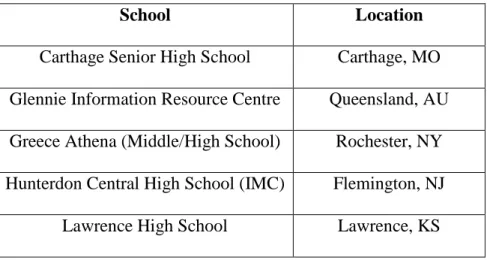
The second sample was created for the purpose of examining a smaller group of high school library websites in greater detail. This was a convenience sample taken from a 2007 study by Joyce Valenza and will be referred to as the “Valenza” sample (see Table 1). Although the Valenza study sought to determine what attributes made up an
exemplary school library website, this same list is useful in this study of Web 2.0 tools because it is expected that school library programs with exemplary websites would also demonstrate representative evidence of these new technologies.
Table 1 – Valenza study sample of “exemplary” high school library websites
School Location
New Trier High School Northfield/Winnetka, IL Newton North High School Newton, MA Northfield Mount Hermon Library Gill, MA Springfield Township High School Erdenheim, PA University Laboratory High School Urbana, IL
Valenza (2007a) used a Delphi process to select ten “exemplary” school library websites. The Delphi method involves anonymous, consecutive rounds of questions posed to experts whose opinions are relevant to the study. In this case the panel of experts was asked to identify exemplary school library websites. The Delphi panel of 22
academics, authors, presenters and practitioners nominated a total of 68 sites, from which the top ten were chosen and subsequently ranked by the same panel. The final list
contained both public and private schools. Two were combined middle and high schools; nine were located in the United States and one in Australia. Due to the possibility that website URLs can change, each of these exemplary sites was located with a Google search for the school name, and then the school home page was analyzed for a link to the school library website.
Coding Scheme
Florida, “WebTools4U2Use”, is mentioned in both school library literature and on blogs as being a comprehensive and valuable resource for school librarians regarding Web 2.0 (Johnson, 2008, Valenza, 2008, Naslund & Giustini, 2008, Abram, 2008).
“WebTools4U2Use” contains a categorized list of tools that originated from a 2008 survey of 600 media specialists about their use of Web 2.0 technologies (Baumbach, 2009). This categorized list appears in Appendix B.
The coding scheme for this study was developed from this list and appears in Appendix C. In the coding scheme, the definitions provided on the WebTools4U2Use website were used to distinguish Web 2.0 tools from other technologies. For example, tools such as YouTube were identified and coded under the WebTools4U2Use category “Video Tools and Video Sharing”. Although Twitter has been described as a “micro-blogging” tool, WebTools4U2Use listed Twitter under both blogging and social
networks. For the purposes of this study, Twitter was included under social networks. To ensure that the list was exhaustive, the category “other” was added to the coding scheme. Because the list is static, the categories were based on what was listed on the site on Dec. 10, 2009. However, when questions arose about categorizing a tool, the current
WebTools4U2Use site was searched to help determine whether the tool was considered Web 2.0 and how it would be classified.
Procedures
When examining the “Top Schools” sample, only evidence of tools or links to tools on the school library home page was noted. No links or subpages were checked.
To gather descriptive data about how Web 2.0 tools are used to enhance programs and services, the Valenza sample was examined in greater detail (see codebook in
Appendix D). The library home page and two subsequent levels below were analyzed. Information about Web 2.0 tools and how to use them were not counted as “use” by the librarian. For example, information about how Facebook or Twitter works did not count as “use”, however a link to the school library Facebook page did count as “use”. Links to subscription-based online video tools (such as United Streaming) and blogs written by professionals other than library staff were not counted. The instrument used to collect data for both samples can be seen in Appendix E.
Limitations
There are advantages and disadvantages to the sampling and methodology used in this study. First, although random sampling was used to generate the large sampling frame (“Top Schools”) and a similar sample could be recreated using the same
population, it is acknowledged that this population of high schools is not a representative sample of all public high schools in the United States. This population represents only about five percent of the 27,000 high schools in the country (Matthews, 2008). Given that there is little research in the area of Web 2.0 use and school libraries however, it is
Township High School in Pennsylvania, which was selected by the Delphi panel as an exemplary high school library website (Valenza, 2007a). Valenza is also an established author and leader in the school library field and has written extensively on the subject of Web 2.0 tools. It is therefore expected that her school library website will use Web 2.0 tools with more frequency than other schools. Inclusion of her school in the sample could potentially skew the results to show more overall usage of these tools.
The first part of this study (Top Schools sample) examined only what was clearly a Web 2.0 tool on the library homepage without clicking on those links. In order to be counted, tools had to be clearly labeled as “wiki”, “blog”, “Facebook” or “Twitter”. In cases such as calendar, task management, or productivity tools, the tool used may not be obvious unless a link was clicked. It is therefore acknowledged that some tools may be in use by these libraries that are not clearly evident on the library’s home page. A similar limitation exists with the Valenza sample. Although three levels of the school libraries websites were examined with that sample, it is possible that use of these tools may be in evidence somewhere other than the library website (at a teacher’s webpage for example).
Results Top Schools Sample
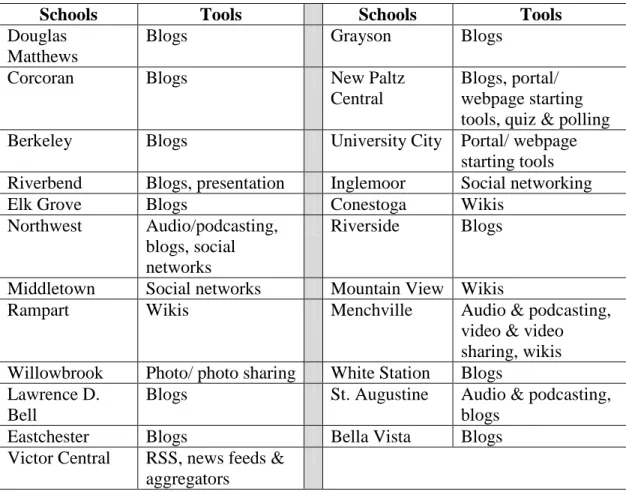
Of the 100 schools in the Top Schools sample, only 23 of the school library websites showed evidence of the use of at least one Web 2.0 tool (see Table 2). Of the 23 schools, only six showed evidence of using more than one tool. Four categories of Web 2.0 tools showed no use and 12 of the 14 categories were evident at 3% or less of the schools. Evidence of the use of blogs and wikis occurred most frequently—14% and 5% respectively (see Table 2). Complete data from the Top Schools sample appears in Appendix F.
Table 2 – Top Schools Sample Evidence of Tools Use (n=23)
Schools Tools Schools Tools
Douglas Matthews
Blogs Grayson Blogs
Corcoran Blogs New Paltz
Central
Blogs, portal/ webpage starting tools, quiz & polling Berkeley Blogs University City Portal/ webpage
starting tools Riverbend Blogs, presentation Inglemoor Social networking
Elk Grove Blogs Conestoga Wikis
Northwest Audio/podcasting, blogs, social networks
Riverside Blogs
Middletown Social networks Mountain View Wikis
Rampart Wikis Menchville Audio & podcasting,
video & video sharing, wikis Willowbrook Photo/ photo sharing White Station Blogs
Lawrence D. Bell
Blogs St. Augustine Audio & podcasting, blogs
Eastchester Blogs Bella Vista Blogs
Victor Central RSS, news feeds & aggregators
Table 3 – Frequency of Tool Use (n=100)
Web 2.0 Tool
Number and Percent of Schools with Evidence of Use on Library
Home Page
Audio & Podcasting 3 (3%)
Blogs 14 (14%)
Calendars & Task Management 0 (0%) Drawing, Charting & Mapping 0 (0%)
Photo/Photo Sharing 1 (1%)
Portal/Webpage Starting Tools 2 (2%)
Presentation 1 (1%)
Quiz & Polling 1 (1%)
RSS, News Feeds & Aggregators 1 (1%)
Social Bookmarking 0 (0%)
Social Networks 3 (3%)
Video & Video Sharing 1 (1%)
Wikis 5 (5%)
Word Processing & Productivity 0 (0%)
Valenza Sample
The Valenza sample originally consisted of 10 schools, however a website could no longer be located for the Glennie Information Resource Center in Queensland,
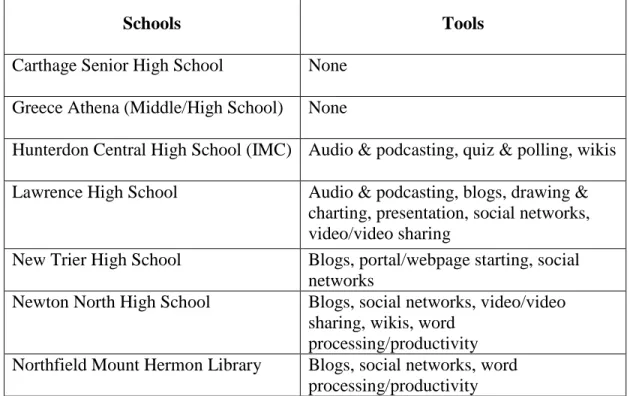
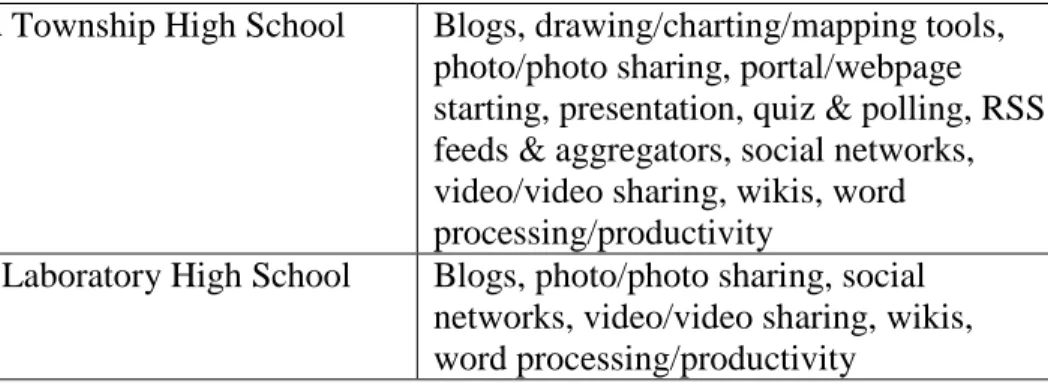
Australia so the final sample for this study consisted of only nine school library websites. Table 4 shows the tools used by each school and table 5 summarizes the
frequency of tool use. Interestingly, two schools in the Valenza sample (Carthage and Greece Athena) showed no evidence of the use of any Web 2.0 tools. Specific uses of the tools are discussed in the following section. Data gathered for the Valenza sample
appears in Appendix G.
Table 4 – Valenza Sample Schools Evidence of Tools Use (n=9)
Schools Tools
Carthage Senior High School None Greece Athena (Middle/High School) None
Hunterdon Central High School (IMC) Audio & podcasting, quiz & polling, wikis Lawrence High School Audio & podcasting, blogs, drawing &
charting, presentation, social networks, video/video sharing
New Trier High School Blogs, portal/webpage starting, social networks
Newton North High School Blogs, social networks, video/video sharing, wikis, word
processing/productivity Northfield Mount Hermon Library Blogs, social networks, word
Springfield Township High School Blogs, drawing/charting/mapping tools, photo/photo sharing, portal/webpage starting, presentation, quiz & polling, RSS feeds & aggregators, social networks, video/video sharing, wikis, word processing/productivity
University Laboratory High School Blogs, photo/photo sharing, social networks, video/video sharing, wikis, word processing/productivity
Table 5 – Frequency of Tool Use (n=9)
Web 2.0 Tool
Number and Percentage of Schools with Evidence of Use on Library
Home Page plus 2 Levels
Audio & Podcasting 2 (22%)
Blogs 6 (66%)
Calendars & Task Management 0 (0%) Drawing, Charting & Mapping 2 (22%)
Photo/Photo Sharing 2 (22%)
Portal/Webpage Starting Tools 2 (22%)
Presentation 2 (22%)
Quiz & Polling 2 (22%)
RSS, News Feeds & Aggregators 1 (11%)
Social Bookmarking 0 (0%)
Social Networks 6 (66%)
Video & Video Sharing 4 (44%)
Wikis 4 (44%)
Blogs
One of the tools most frequently used by the sample schools were blogs. Six schools used at least one blog, predominantly for book reviews, recommendations, awards, library news and events, resource suggestions, student profiles, and some
discussion of pop culture. New Trier Library’s site showed the use of four different blogs, two of which were about new technologies and were clearly aimed at professionals such as teachers, librarians and technology specialists. The library website at Springfield Township included a link to Joyce Valenza’s professional blog, which is published by School Library Journal. Blogs were also used at Springfield to archive links to video
instruction from various sources – YouTube, TeacherLibrarianNetwork and student created videos. There were examples of this in math, grammar and information fluency instruction.
By comparing the blog contributors with a library staff list, it appeared that the majority of contributors to the blogs were school library staff. A blog at Lawrence High School and one of four blogs at New Trier showed contributors that could not be
identified due to the use of anonymous names such as “David” and “pinkie3”.
Although Northfield Mount Herman Library had a library blog, it also used blog-like software called “LibGuides” to organize its pathfinders. This tool did not appear anywhere on the WebTools4U2Use website, however because of its Web 2.0 capabilities, it deserves mention here. “LibGuides” (designed and sold by “Springshare”) is a tool that allows you to create pathfinder-like webpages that operate somewhat like blogs.
Clickable tabs allow the librarian to organize resources, citation information and
be posted, a user can subscribe to RSS feeds of updates to the “LibGuide” page, and users can share the information to social networking and social bookmarking sites.
Social Networks
The other Web 2.0 tool category used most frequently was social networks. The same schools that used blogs also used either Facebook or Twitter or both. Interestingly, these social networks were used for the same purposes as blogs – to share library and local events information, resource and book suggestions, new book or video
announcements, links to things of interest on the web and invitations to view student projects at the library. In each case, the library Facebook page was set up so students and other users could become “fans” of the page. This meant that announcements would show up on their own Facebook pages, but the person in charge of the library Facebook page could not “friend” students or see students’ Facebook profiles, therefore protecting student’s privacy. Twitter was used by six schools in the sample in the same way as Facebook, to make announcements, suggestions and send out links to things of interest. Both Facebook and Twitter were used by the librarians to advocate for libraries and the library profession.
Wikis
Wikis were used by four of the Valenza sample libraries. Two of the schools used wikis for book clubs or as a site where readers could share book recommendations and favorite reads. Three others used wikis almost as pathfinders, places where the librarian, teacher and/or students could post class resources, discussions and assignments. Most of the wikis had been edited by multiple people although the wiki at University High School library could not be edited or commented on without sending a request to join the wiki.
The most wikis were used by Joyce Valenza at Springfield Township Library, who has recreated the high school library website using wiki software. The intention of wikis is to enable users to collaboratively build a website. Although there was some evidence of changes by other users in the “history” of the wiki, the vast majority of edits were done by Valenza. The use of wikis to build the school library website also enabled visitors to post discussions and some small evidence of discussion was noted.
Word Processing Tools
Video Tools
Four of the sample school libraries appeared to be using video tools to both display student work or to demonstrate or provide instruction. For example, Newton North’s site included links to student created videos on YouTube for a history project. At Valenza’s Springfield Township site, a YouTube video was imbedded into a wiki page on search tools to demonstrate Google search options. Videos from YouTube, Teacher Librarian Network and student-created videos were also used at Springfield in online lessons to demonstrate and instruct curriculum topics such as grammar, math and information fluency.
Miscellaneous Tools
The following tools were found to be used by only two of the sample schools: audio and podcasting, drawing & charting, photo sharing; portal/webpage creation, presentation, and quiz/polling. Lawrence library included a link to a student written podcast that was posted to a local newspaper and Hunterdon IMC used a podcast to describe how the school archive webpage came to be created. Both Lawrence and
Springfield Township libraries used Wordle, a drawing or charting tool that allows you to create customized word cloud art. This tool was used to both promote events and to create online genre posters. University High Library and Springfield Township included links to specific Flickr photo sharing pages, although only Springfield’s linked to any student photos or student work.
used PageFlakes to organize pathfinders and RSS feeds. It should be noted however, that webpage starting tools can be difficult to identify. A webpage may have been designed with one of those tools but if the URL was not connected to Weebly or some other vendor, a user would have no way of knowing what tool was used.
Only Lawrence and Springfield libraries used Web 2.0 presentation tools but they used them in a variety of ways. Lawrence embedded slideshows of student work into several of the library webpages and included a slideshow of the library’s annual report. Springfield embedded student photo slideshows into the library main page but also used slideshow tools to demonstrate or instruct students or teachers. One presentation tool used only by Springfield was “Glogster”. This is a multi-media tool that enables the creation of interactive on-line posters. A search of WebTools4U2Use found that Glogster was considered a presentation tool. Springfield uses Glogster to create
graphically-enhanced webpages with links to other resources. Only two schools used quiz and polling tools such as SurveyMonkey, however some schools used Google Docs to accomplish the same function.
Only Valenza’s Springfield Library website appeared to use RSS or news aggregators. Because many Web 2.0 tools may be subscribed to through an RSS feed (blogs, Twitter posts), the only evidence of use that was included in this study was when feeds from other organizations were posted to the library website. Springfield library used RSS feeds extensively to post news updates to both the main library page and to pathfinder pages. For example, TimeSpace: World, an interactive news map from the Washington Post, and Feedzilla, a news aggregator, were both embedded into
were organized with PageFlakes (website creation tool), included many RSS news feeds that were specific to each topic.
There was no evidence of calendar/task management or social bookmarking tools (Delicious, digg) in use by any of the Valenza sample schools.
In conclusion, the examination of the Valenza sample revealed frequent use of social networking and blogs but fewer than half the schools used any of the other tools. In most cases, the tools were used to promote the library collections and programming, and to connect the library’s users to new resources and web tools. Although the Valenza sample showed evidence of using Web 2.0 tools to display student work, there was not a lot of clear evidence that these tools were being used for collaborative learning with students and teachers. More research might reveal that librarians are using these tools collaboratively with others.
Discussion and Study Implications
This study showed that 26% of the schools on the Newsweek “Top Schools” list did not have a direct link to their library website on the school’s home page (see
Web 2.0 technologies have been the subject of countless articles in school library and education literature, however the data gathered from examining the Top Schools sample shows that few school libraries appear to be implementing these technologies. Further research is necessary to examine why. Studies have shown there may be a gap between what the literature is recommending and the training that media specialists receive (Baumbach, 2009, Hanson-Baldauf & Hughes Hassell, 2009, Hughes Hassell & Hanson-Baldauf, 2008). According to Baumbach (2009), “most library media specialists said they have had either no training or poor training on the use of Web tools or that training has not been relevant to library media center applications” (p. 15). Hughes Hassell & Hanson-Baldauf (2008) found that a need for increased training was particularly evident for “emergent Web 2.0 technologies” (p. 8).
Further research may also uncover administrative limitations on the use of these emergent technologies. Baumbach (2009) found that “the most common barrier identified was that many of these tools - including entire categories of tools - are blocked by district or school filters” (p. 15). In an attempt to block material that the government has deemed harmful to minors, most states use some level of Internet filtering on school computers. This has led to many Web 2.0 technologies being blocked from use, particularly social networking, photo and video sharing tools. Comparing the use of these tools in different areas of the country against district filtering policies may reveal regional differences in school library adoption of these emergent technologies.
inadequate infrastructure—may be significant reasons why these tools were not evident in the Top Schools sample. If media specialists are to continue their leadership role in the integration of Web 2.0 tools into teaching and learning, they must advocate for the removal of such obstacles.
Social networks are frequently blocked by district Internet filters, however the majority of the school libraries in the Valenza sample used social networks as a way to get information out to students. This is likely because social networks are so popular, particularly among young adults (Lenhart et al., 2008). Twitter was the social networking tool most widely used by libraries in the Valenza sample. Further study could show that because Twitter posts must be limited to 140 characters, those posts are more easily made by cell phone, thereby bypassing district filters.
Less than half of the Valenza sample schools used video sharing technology and even less used photo sharing tools. Although this may be explained by the
implementation of district filters, it is also possible that these tools are discouraged because of the levels of administrative and parental permissions that are required to post photos of students.
Although many Web 2.0 productivity tools enable document sharing and
The schools in the Valenza sample showed a higher evidence of Web 2.0 tools use than the Top Schools sample, however most schools used these tools to promote new resources, library programs and services. It is important to promote services on a
platform where you are most likely to reach students; however creating students who have 21st century information literacy skills should be the media specialist’s primary responsibility. The tool most widely used in both the Top Schools and Valenza samples was blogs but an examination of the Valenza sample showed that in most cases these blogs were used similarly to social networking tools – to get information out to its readers about technology, resources and events and to advocate for librarianship. Although Springfield Township library showed links to other teacher’s classroom blogs, and “LibGuides” were used by Northfield Mount Herman to organize subject resources, there was limited evidence that blogs were being used by librarians to engage student learning or to teach information literacy.
In the Valenza sample, the tool used most frequently for teaching and learning appeared to be wikis, because they showed some specific instructional and collaborative use by librarians, teachers and students. It is possible that more high school librarians are implementing the use of these tools in teaching and learning but that evidence does not appear on their library website. Regardless, more research is necessary to determine if the evidence seen on the library website is indicative of what is happening in the schools.
One of the most important advantages that Web 2.0 tools have over other software is their ability to enable students and teachers to contribute to learning through
collaboration. Further research into whether these tools are being implemented
observed to be in use by libraries in the Valenza sample, for privacy purposes, many online names are anonymous and therefore it was not always clear whether the tool involved the participation of students or teachers. Clearly some other method of research is necessary to determine if these tools are being used to the benefit of collaborative learning.
Conclusion
The many positive implications of Web 2.0 on teaching and learning is widely discussed in school library literature (Johnson, 2006, Kirkland, 2007, Kroski, 2008, Richardson, 2006, Summers, 2009). The results of this study, however, indicate a low level of evidence that Web 2.0 tools are being used by libraries in schools that are considered by researchers to be the best in the country. The Valenza sample schools showed much more evidence of use, however, more research is necessary to determine if those tools are being used to work collaboratively with students and teachers and to enhance information literacy instruction.
Lack of Web 2.0 presence could suggest re-assessment of existing training and course materials to better prepare media specialists for exploiting the benefits of Web 2.0 tools. Examples provided by adopters such as those in the Valenza sample could provide a basis for understanding how their use of Web 2.0 tools evolved and provide a model for implementation in less developed school programs.
References
Abram, S. (2008). Tips 2.0: What's hot? How do I learn that? Multimedia & Internet@Schools. 15(4), 22.
Achterman, D. (2006). Beyond Wikipedia. Teacher Librarian. 34(2), 21-22. Aharony, N. (2008). Web 2.0 use by librarians. Library & Information Science
Research. 31(1), 29-37.
Allen, M. (2008). Promoting critical thinking skills in online information literacy instruction using a constructivist approach. College & Undergraduate Libraries. 15(1&2), 21-38.
American Association of School Librarians. (2007). Standards for the 21st century learner. Retrieved from
Asselin, M. & Doiron, R. (2008). Towards a transformative pedagogy for school libraries 2.0. School Libraries Worldwide. 14(2), 1-18.
Barnes, K., R. Marateo, & S. Ferris, (2007). Teaching and learning with the net generation. Innovate 3(4).
28, 2009).
Baumbach, D. (2009). Web 2.0 and you. Knowledge Quest. 37(4), 12-19.Berg, B.
(2009). Qualitative research methods for the social sciences. Boston: Allyn & Bacon. Berger, P. (2007). What is Web 2.0 and, most important, how does it support learning?
Information Searcher. 17(2), 2.
Bolan, K., Canada, M. & Cullin, R. (2007). Web, library, and teen services 2.0. Young Adult Library Services. 5(2), 40-43.
Ellison, N. B. & Wu, Y. (2008). Blogging in the classroom: A preliminary exploration of student attitudes and impact on comprehension. Journal of Education Multimedia and Hypermedia. 17(1), 99-122.
Hanson-Baldauf, D. & Hughes Hassell, S. (2009). The information and communication technology competencies of students enrolled in school library media certification programs. Library & Information Science Research. 31(1), 3-11.
Hazari, S., North, A., & Moreland, D. (2009). Investigating pedagogical value of Wiki technology. Journal of Information Systems Education. 20(2), 187-198.
Heafner, T. & Friedman, A. (2008). Wikis and constructivism in secondary social studies: Fostering a deeper understanding. Computers in the Schools. 25(3-4), 288-302.
Hughes Hassell, S. & Hanson-Baldauf, D. (2008). Information and communication technology use by North Carolina school library media specialists: Perceived competencies and barriers. School Library Media Research. 11.
Johnson, D. (2008, April 29). A list o’lists. Message posted t
Kirkland, A. B. (2007). Becoming teacher-librarian 2.0. Partnership: the Canadian Journal of Library and Information Practice and Research, 2(1).
Kroski, E. (2008). Web 2.0 for librarians and information professionals. New York: Neal-Schuman Publishers.
Lenhart, A., Simon, M., Graziano, M. (2001). The Internet and education. Pew Internet and American Life. Retrieved from
http://www.pewinternet.org/Reports/2001/The-Internet-and-Education.aspx.
Lenhart, A., Madden, M., Smith, A. & Macgill, A. (2007). Teens and Social Media. Pew Internet and American Life. Retrieved from
http://www.pewinternet.org/Reports/2007/Teens-and-Social-Media.aspx?r=1.
Lenhart, A., Arafeh, S., Smith, A. & Macgill, A. (2008). Writing, Technology and Teens. Pew Internet and American Life. Retrieved from
Loertscher, D. (2009) Access to technology in transition. Teacher Librarian. 36(5). 46-47.
Luckin, R., Clark, W., Graber, R., Logan, K., Mee, A. & Oliver, M. (2009). Do Web 2.0 tools really open the door to learning? Practices, perceptions and profiles of 11-16-year-old students. Learning, Media and Technology. 34(2), 87-104.
Matthews, J. (2008). The top of the class 2008. Newsweek.
Naslund, J. & Guistini, D. (2008). Towards school library 2.0: An introduction to social software tools for teacher librarians. School Libraries Worldwide. 14(2), 55-67. Prensky, M. (2001). “Digital natives, digital immigrants.” On the Horizon. 9(5).
October 18, 2009).
Richardson, W. (2006). Blogs, Wikis, Podcasts, and other powerful web tools for classrooms. Thousand Oaks, CA: Corwin Press.
Riffe, D., Lacy, S., Fico, F. (2005). Analyzing media messages: Using quantitative content analysis in research. Mahwah, NJ: Lawrence Erlbaum Associates.
Rowlands, I., Nicholas, D., Williams, P., Huntington, P., Fieldhouse, M., Gunter, B., . . . Tenopir, C. (2008). The Google generation: The information behaviour of the
researcher of the future. Aslib Proceedings, 60(4), 290-310.
Solomon, G. & Schrum, L. (2007). Web 2.0: New tools, new schools. Eugene, OR: ISTE. Stephens, M. (2006). Exploring Web 2.0 and libraries. Library Technology Reports.
42(4), 8-14.
Summers, L. (2009). The value of social software in school library instruction, communication and collaboration. Knowledge Quest. 37(4), 48-50.
Valenza, J. K. (2007a). Discovering a descriptive taxonomy of attributes of exemplary school library websites. (Doctoral Dissertation, University of North Texas, 2007).
Retrieved from
Valenza, J. K. (2008, July 16). Glogster and Sproutbuilder: for extreme wiki makeovers (or any other web-type makeovers). Message posted to
Appendix B
Web 2.0 Categories from WebTools4U2Use Wiki (Baumbach & Lee, 2008)
• Audio & Podcasting • Blogs (Weblogs)
• Calendars, Task Management & ToDo List Tools • Drawing, Charting & Mapping Tools
• Photo and Photo Sharing Tools • Portal & WebPage Starting Tools • Presentation Tools
• Quiz & Polling Tools
• RSS, News Feeds & Aggregators • Social Bookmark Tools
• Social Networks
• Video Tools and Video Sharing • Wikis
Appendix C
Code Book – “Top Schools” Sample - Instances of Links to Web 2.0 Tools Unit of Analysis: High school library home page. The “home page” will be defined as
the first page of the school library website, generally the welcoming page. A “website” is defined as a “collection of Webpages - an HTML site, blog, or other Web-based publication - linked together to represent a school library program” (Valenza, 2007a, p. 54).
Instances to be counted: Any identified link to a Web 2.0 tool as defined below. Multiple instances of a tool will not be counted. Categories and examples from
WebTools4U2Use Wiki at
Tool Definitions/Examples:
• Audio & Podcasting – Podcasts are audio recordings that can be posted to the web and downloaded to individual recording devices or personal computers. Examples: ITunes, EdTechTalk, links to any individual podcast.
• Blogs (Weblogs) – an online log or journal where entries are posted and displayed in reverse chronological order. Examples: Blogger, EduBlogs.
• Calendars, Task Management & ToDo List Tools – Online task management tools can be used collaboratively or individually to manage the library schedule, events or shared tasks. Examples: Yahoo! Calendar, Google Calendar, EVite, Coordinatr, ToodleDo.
• Drawing, Charting & Mapping Tools – tools to create online images such as drawings, cartoons, charts, graphs, diagrams, and maps. Examples: MindMeister, Create A Graph, ToonDo, Wordle.
• Photo and Photo Sharing Tools – enable users to view, upload, store and share digital (still) images online. Examples: Flickr, PhotoBucket, Snapfish.
• Portal & WebPage Starting Tools – allow a person to customize their Internet home page by selecting the content to be displayed. Examples: iGoogle, MyYahoo, Netvibes.
• Presentation Tools – web-based collaborative multimedia presentation tools such as SlideShare, VoiceThread, Glogster.
• RSS, News Feeds & Aggregators – technologies that allow users to subscribe to “feeds” of published web content. The content can be from blogs, online news organizations, podcasts and others. This allows the user to have content come to them, rather than the user having to retrieve the content. RSS is an acronym for “Really Simple Syndication”. Examples: Google Reader, Bloglines, SharpReader. • Social Bookmark Tools – enable the user to store their Internet bookmarks to the
web where they can be organized, tagged with key words, annotated, shared and accessed from any computer. Examples: Delicious, digg, StumbleUpon.
• Social Networks – online communities or environments where users can seek out others and build connections with them. Examples: MySpace, Facebook, Ning, LinkedIn, Twitter.
• Video Tools and Video Sharing - enable users to view, upload, store and share digital video images online. Examples: YouTube, TeacherTube, Hulu. Excluded: subscription video tools such as United Streaming.
• Wikis – a collaborative space on the web where anyone can add and edit content. A wiki may be public or limited to a group of users. Examples: Wikipedia,
WikiSpaces, ZohoWiki.
• Word Processing & Productivity Tools – free online office applications that enable users to collaboratively create documents, spreadsheets, databases and
presentations. These files are stored online and can be edited by multiple people and accessed from any computer. Examples: Google Docs, ZohoWriter, ZohoCreator, Open Office.
Note: this list was compiled from:
Baumbach D. & Lee, J. (2008). WebTools4U2Use. Retrieved from http://webtools4u2use.wikispaces.com/.
Kroski, E. (2008). Web 2.0 for librarians and information professionals. New York: Neal-Schuman Publishers.
Solomon, G. & Schrum, L. (2007). Web 2.0: New tools, new schools. Eugene, OR: ISTE.
Appendix D
Code Book – Descriptive Study of Valenza Sample -
How are Web 2.0 tools being used to enhance programs and services?
Unit of Analysis: High school library website home page plus two subsequent levels below. A “website” is defined as a “collection of Webpages - an HTML site, blog, or other Web-based publication - linked together to represent a school library program” (Valenza, 2007a, p. 54). The “home page” will be defined as the first page of the school library website, generally the welcoming page. “Two subsequent levels” is defined as two clicks from the home page.
Instances to be described: Any identified link to a Web 2.0 tool as defined below. Tool Definitions/Examples:
• Audio & Podcasting – Podcasts are audio recordings that can be posted to the web and downloaded to individual recording devices or personal computers. Examples: ITunes, EdTechTalk, links to any individual podcast.
• Blogs (Weblogs) – an online log or journal where entries are posted and displayed in reverse chronological order. Examples: Blogger, EduBlogs.
• Calendars, Task Management & ToDo List Tools – Online task management tools can be used collaboratively or individually to manage the library schedule, events or shared tasks. Examples: Yahoo! Calendar, Google Calendar, EVite, Coordinatr, ToodleDo.
• Drawing, Charting & Mapping Tools – tools to create online images such as drawings, cartoons, charts, graphs, diagrams, and maps. Examples: MindMeister, Create A Graph, ToonDo, Wordle.
• Photo and Photo Sharing Tools – enable users to view, upload, store and share digital (still) images online. Examples: Flickr, PhotoBucket, Snapfish.
• Portal & WebPage Starting Tools – allow a person to customize their Internet home page by selecting the content to be displayed. Examples: iGoogle, MyYahoo, Netvibes.
• Presentation Tools – web-based collaborative multimedia presentation tools such as SlideShare, VoiceThread, Glogster.
• RSS, News Feeds & Aggregators – technologies that allow users to subscribe to “feeds” of published web content. The content can be from blogs, online news organizations, podcasts and others. This allows the user to have content come to them, rather than the user having to retrieve the content. RSS is an acronym for “Really Simple Syndication”. Examples: Google Reader, Bloglines, SharpReader. • Social Bookmark Tools – enable the user to store their Internet bookmarks to the
web where they can be organized, tagged with key words, annotated, shared and accessed from any computer. Examples: Delicious, digg, StumbleUpon.
• Social Networks – online communities or environments where users can seek out others and build connections with them. Examples: MySpace, Facebook, Ning, LinkedIn, Twitter.
• Video Tools and Video Sharing - enable users to view, upload, store and share digital video images online. Examples: YouTube, TeacherTube, Hulu. Excluded: subscription video tools such as United Streaming.
• Wikis – a collaborative space on the web where anyone can add and edit content. A wiki may be public or limited to a group of users. Examples: Wikipedia,
WikiSpaces, ZohoWiki.
• Word Processing & Productivity Tools – free online office applications that enable users to collaboratively create documents, spreadsheets, databases and
presentations. These files are stored online and can be edited by multiple people and accessed from any computer. Examples: Google Docs, ZohoWriter, ZohoCreator, Open Office.
Note: this list was compiled from:
Baumbach D. & Lee, J. (2008). WebTools4U2Use. Retrieved from http://webtools4u2use.wikispaces.com/.
Kroski, E. (2008). Web 2.0 for librarians and information professionals. New York: Neal-Schuman Publishers.
Appendix E
Coding Form – Instances of Links to Web 2.0 Tools
Appendix F - Top Schools Sample Data
5
Appendix F - Top Schools Sample Data, cont.
Appendix F - Top Schools Sample Data, cont.
Appendix F - Top Schools Sample Data, cont.
Appendix F - Top Schools Sample Data, cont.
Appendix F - Top Schools Sample Data, cont.
Appendix F - Top Schools Sample Data, cont.
Appendix F - Top Schools Sample Data, cont.
Appendix G – Valenza Sample Data
Appendix G – Valenza Sample Data, cont.
Appendix G – Valenza Sample Data, cont.
Appendix G – Valenza Sample Data, cont.
Appendix G – Valenza Sample Data, cont.
Appendix G – Valenza Sample Data, cont.
6