DFSMS/MVS Version 1 Release 5
IBM
Implementing System-Managed Storage
DFSMS/MVS Version 1 Release 5
IBM
Implementing System-Managed Storage
Note!
Before using this information and the product it supports, be sure to read the general information under “Notices” on page xiii.
Sixth Edition (March 1999)
This edition applies to Version 1 Release 5 of DFSMS/MVS (5695-DF1), Release 7 of OS/390 (5647-A01), and any subsequent releases until otherwise indicated in new editions. Make sure you are using the correct edition for the level of the product.
Order publications through your IBM representative or the IBM branch office serving your locality. Publications are not stocked at the address given below.
A form for readers' comments appears at the back of this publication. If the form has been removed, address your comments to: International Business Machines Corporation
RCF Processing Department G26/050
5600 Cottle Road
SAN JOSE, CA 95193-0001 U.S.A.
Or you can send your comments electronically to [email protected].
Contents
Notices . . . . xiii
Programming Interface Information . . . xiii
Trademarks . . . . xiv
About this Book . . . xv
Required Product Knowledge . . . xv
How to Tell if this Book is Current . . . xv
Referenced Publications . . . . xvi
References to Product Names Used in DFSMS/MVS Publications . . . xvii
Summary of Changes . . . xix
Sixth Edition, March 1999 . . . xix
Fifth Edition, June 1997 . . . xx
Chapter 1. Introducing System-Managed Storage . . . 1
The DFSMS Environment for MVS . . . 1
Benefits of System-Managed Storage . . . 3
Managing Data with SMS . . . 6
Using SMS Classes and Groups . . . 6
Using Aggregate Groups . . . 14
Using Automatic Class Selection Routines . . . 14
Defining the Storage Management Subsystem Configuration . . . 16
Coexistence Considerations . . . . 17
Using Compression Specifically Tailored to Data Sets . . . 17
Space Constraint Relief . . . 18
Running in Compatibility Mode . . . 18
Sharing System-Managed and Non-System-Managed Data . . . 18
Sharing Catalogs in Multisystem Environments . . . 19
VTOC Compatibility Between MVS/XA and MVS/ESA Systems . . . 21
Sharing DASD Between MVS/ESA and MVS/XA Systems . . . 21
Sharing DASD Between MVS/ESA Systems . . . 22
Using System Group Name with Systems Prior to DFSMS/MVS 1.2 . . . . 23
Using Different Releases of DFDSS, DFHSM, and DFSMS/MVS Programs 24 Hardware Considerations . . . . 25
SMS Features . . . . 25
Multisystem Considerations . . . . 26
Implementing System-Managed Storage . . . 26
Chapter 2. Planning to Implement System-Managed Storage . . . 29
| Implementing to Fit Your Needs . . . 29
| Using DFSMS FIT to Implement System-Managed Storage . . . 29
| Using Milestones to Implement System-Managed Storage . . . 30
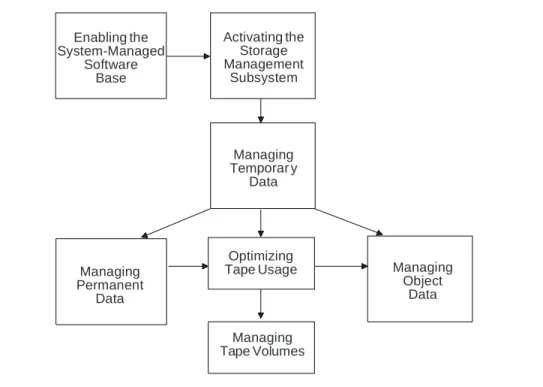
Enabling the Software Base . . . 31
Activating the Storage Management Subsystem . . . 31
Managing Temporary Data . . . 31
Managing Permanent DASD Data . . . 31
Managing Tape Data . . . 32
Using Storage Class to Manage Performance and Availability . . . 33
Using Cache to Improve Performance for Directly-Accessed Data Sets . . . 33
Improving Performance for Sequential Data Sets . . . 35
Improving Performance for Data Set Backup . . . 37
Improving Availability . . . . 39
Allocating Specific System-Managed Volumes . . . 40
Preallocating Space for Multivolume Data Sets . . . 41
Managing Space and Availability for Data Sets . . . 42
Managing Data with DFSMShsm . . . 44
Using SMS with DFSMShsm Commands . . . 46
Using SMS with Aggregate Backup and Recovery Support . . . 47
Managing DASD Volumes with SMS . . . 48
Pooling Volumes with Storage Groups . . . 49
Selecting Volumes with SMS . . . 50
Managing Virtual I/O with SMS . . . 52
Separating Large Data Sets . . . 52
| Avoiding Allocation Failures . . . 53
Designing Your ACS Routines . . . 53
Using the ACS Language and Variables . . . 54
Using ACS Installation Exits . . . 54
Using ACS Indexing Functions . . . 55
Using FILTLIST Statements . . . 55
Using SELECT Statements . . . 56
Using Advanced ACS Routine Design and Coding Techniques . . . 57
Choosing a Method for Placing Your Volumes under System Management . . 58
Converting with Data Movement . . . 60
Converting Data In-Place . . . 62
Gaining Support for SMS from Your Users . . . 64
Identifying the Benefits of SMS to Users . . . 65
Defining Data Classes to Simplify Data Set Allocation . . . 66
Changing the JCL . . . 69
Identifying the User's Role . . . 73
Chapter 3. Enabling the System-Managed Storage Software Base . . . . 75
Providing Security in the DFSMS Environment . . . 75
Protecting System-Managed Data Sets . . . 76
Protecting SMS Control Data Sets . . . 76
Protecting Functions and Commands . . . 76
Restricting Access to Fields in the RACF Profile . . . 77
Restricting Access to Classes and Groups . . . 79
Protecting ISMF Functions . . . 80
Using ISMF to View the Starter Set . . . 81
Viewing the Sample SCDS . . . 81
Viewing the Sample ACS Source Routines . . . 81
Using ISMF to Identify Ineligible Data Sets . . . 82
Identifying Unmovable Data Sets and Absolute Track Allocation . . . 82
Making Unmovable Data Sets Eligible for System Management . . . 86
Using ISMF to Manage Storage Devices . . . 86
Implementing a System-Determined Block Size . . . 86
How System-Determined Block Size Works . . . 87
Determining the Space Savings . . . 87
Chapter 4. Activating the Storage Management Subsystem . . . 89
Activating a Minimal Configuration . . . 89
Calculating the SCDS and ACDS Sizes . . . 91
Calculating the COMMDS Size . . . 92
Defining the Control Data Sets . . . 92
Defining GRS Resource Names for SMS Control Data Sets . . . 92
Defining a Minimal SMS Configuration . . . 93
Defining the SMS Base Configuration . . . 94
Defining the System Group . . . 97
Defining SMS Classes and Storage Group . . . 98
Creating ACS Routines . . . 108
Validating the SCDS . . . 112
Defining the Storage Management Subsystem . . . 114
Defining How to Activate SMS . . . 114
Specifying Members to be Used During IPL . . . 115
Defining the ACDS and COMMDS . . . 115
Activating a new SMS Configuration . . . 116
Activating SMS . . . . 117
Controlling SMS Processing with MVS Operator Commands . . . 118
Enforcing Standards . . . . 119
Chapter 5. Managing Temporary Data . . . 121
Planning to Manage Temporary Data . . . 122
Defining SMS Classes and Groups . . . 123
Defining the Storage Classes . . . 123
Defining the Storage Groups . . . 124
Creating ACS Routines . . . 125
Writing the ACS Routines . . . 125
Translating the ACS Routines . . . 125
Testing the ACS Routines . . . 126
Creating ACS Test Cases . . . 126
Running ACS Test Cases . . . 129
Initializing DASD Volumes for Large and Prime Storage Groups . . . 130
Reactivating the Configuration . . . 130
Validating the Configuration . . . 130
Activating the Configuration . . . 131
Chapter 6. Managing Permanent Data . . . 133
| Identifying Types of Permanent Data . . . 133
| Planning Your Migration of Permanent Data . . . 133
Chapter 7. Managing TSO and HFS Data . . . 135
Managing TSO Data . . . 135
Choosing a Strategy for Placing Your Volumes under System Management 137 Determining a Fallback Strategy . . . 137
Designing for TSO Performance and Availability Services . . . 138
Designing for TSO Data Backup and Space Management . . . 138
Designing the Physical Storage Environment . . . 140
Placing TSO Data under System Management . . . 140
In-Place Conversion . . . . 140
Using Data Movement . . . 141
Automating Data Allocation Using Data Classes . . . 142
Sample Data Classes for TSO Data . . . 143
ACS Routine Fragments for Assigning Data Classes . . . 145
Defining SMS Constructs for HFS Data . . . 149
Chapter 8. Managing Batch Data . . . 151
| Understanding the Benefits of Placing Batch Data under System Management 151 | Planning Your Migration Strategy . . . 152
Improving Batch Performance by Using Sequential Data Striping . . . 153
Eliminating Dependencies on Pattern GDGs . . . 153
Deciding on a Migration Strategy . . . 153
Designing for Batch Performance and Availability Services . . . 154
Designing for Batch Data Backup and Space Management . . . 155
Managing GDGs . . . . 155
Managing Non-GDG Batch Data Sets . . . 156
Designing the Physical Storage Environment . . . 158
Designing Data Classes for Batch Data . . . 158
Replacing Pattern DSCBs . . . 158
Defining Sequential Data Striping . . . 158
Migrating Batch Data . . . 159
Chapter 9. Managing Database Data . . . 161
| Understanding the Benefits of Placing Your Database Data under System | Management . . . . 161
| Planning Your Migration . . . 164
Designing for Database Performance and Availability . . . 165
Designing for CICS Data . . . 165
Designing for IMS Data . . . 170
Designing for DB2 Data . . . 173
Designing for Database Data Backup and Recovery . . . 177
Designing the Management Class ACS Routine . . . 179
Relating DB2 STOGROUPs to SMS Storage Groups . . . 181
| Allocating DB2 Partitioned Table Spaces . . . 184
Chapter 10. Optimizing Tape Usage . . . 185
| Using the Virtual Tape Server (VTS) to Optimize Tape Media . . . 187
Migrating Tape Data Sets to System-Managed Storage . . . 188
Changing Jobs that Reference Undefined Generics and Esoterics . . . 188
Changing Jobs that Use Uncataloged Tape Data Sets . . . 188
Analyzing Expiration Date Codes . . . 188
Using Data Set Level Serialization . . . 189
Classifying Your Tape Data Sets . . . 189
Analyzing Your Current Tape Environment . . . 191
Summarizing Tape Usage with the Volume Mount Analyzer GFTAXTR Program . . . . 192
Analyzing Tape Usage with the Volume Mount Analyzer GFTAVMA Program . . . . 192
Simulating the Tape Mount Management Environment . . . 199
Identifying Exception Tape Data . . . 200
Defining the Tape Mount Management Environment . . . 203
Implementing Advanced Cartridge Hardware . . . 208
Using the Improved Data Recording Capability . . . 208
Using the Enhanced Recording Capability . . . 209
Using Enhanced Capacity Tape . . . 209
Using Automatic Cartridge Loaders . . . 209
Defining DASD to Satisfy Buffer Requirements . . . 210
Defining Management Classes . . . 213
Defining Storage Groups . . . 214
Creating ACS Routines . . . 215
Creating the Data Class ACS Routine . . . 215
Creating the Storage Class ACS Routine . . . 218
Creating the Management Class ACS Routine . . . 219
Creating the Storage Group ACS Routine . . . 221
Using Tape Mount Management Enhancements . . . 221
Data Set Stacking . . . 222
Unit Affinity . . . . 226
Volume Reference to System-Managed Data Sets . . . 227
Volume Reference to Non-System-Managed Data Sets . . . 230
Volume Reference Chains . . . 231
Tuning DFSMShsm Operation . . . 232
Chapter 11. Managing Tape Volumes . . . 233
| Understanding the Benefits of System-Managed Tape . . . 233
| Using Tape Library Dataservers . . . 233
| Using Tape Storage Groups . . . 234
| Using DFSMSrmm . . . . 235
Planning Your Migration to System-Managed Tape . . . 236
Organizing Your Migration Tasks . . . 236
Categorizing Tape Volumes for Migration . . . 237
| Placing Tape Volumes under System Management . . . 237
Defining the Tape Environment . . . 237
Defining OAM . . . . 237
Partitioning a Tape Library Dataserver . . . 238
Defining the Storage Classes . . . 238
Writing the Storage Class ACS Routine . . . 238
Designing the Physical Storage Environment . . . 239
Writing the Storage Group ACS Routine . . . 240
Creating the Tape Configuration Database . . . 240
Defining the Tape Library . . . 241
Defining Data Classes for Tape . . . 243
Validating the SMS Configuration . . . 244
Managing DFSMShsm Volumes . . . 244
Using DFSMShsm Messages . . . 244
Tracking Volumes in Connected Groups . . . 244
Maintaining the Tape Library . . . 245
Appendix A. Sample DFSMS Implementation Project Plan . . . 247
Appendix B. Sample Classes, Groups, and ACS Routines . . . 253
Data Class . . . . 253
Storage Class . . . . 273
Management Class . . . . 294
Storage Group . . . . 306
Appendix C. Installation and User Exits . . . 323
DFSMSdfp Installation Exits . . . 323
DFSMShsm Installation Exits . . . 325
DFSMSdss Installation Exit . . . 327
MVS Installation Exits . . . 327
Abbreviations . . . . 329
Glossary . . . . 331
Figures
1. Related Publications . . . . xv
2. Referenced Publications . . . . xvi
3. Products in the DFSMS Environment . . . 1
4. Allocating Data Sets or Storing Objects . . . 7
5. When A Data Set, Object, or Volume Becomes System-Managed . . . 7
6. Using Data Class . . . 8
7. Using Storage Class . . . 10
8. Using Management Class . . . 11
9. Using Storage Groups . . . 13
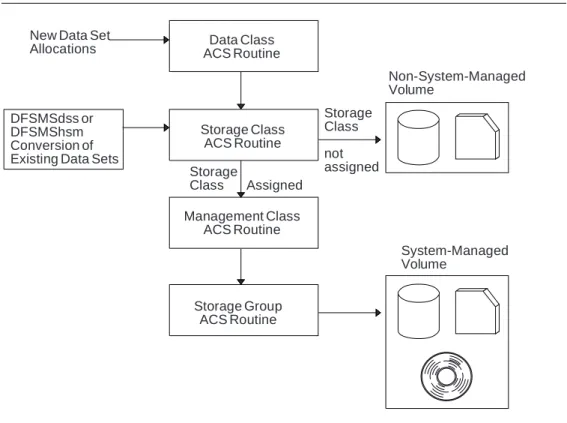
10. Processing ACS Routines . . . 15
11. Configuration Combining MVS/XA and MVS/ESA Systems . . . 20
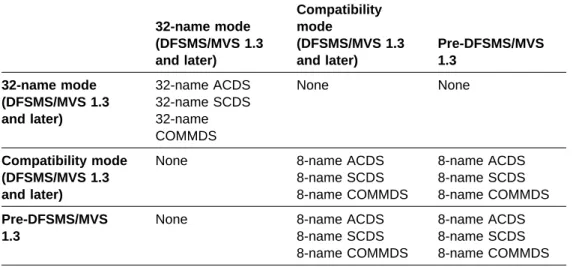
12. System Levels and Configuration/Communication Data Sets They Can Share . . . . 22
13. Coexistence when System Group Name Is Exploited . . . 24
14. Paths for Implementing System-Managed Storage . . . 27
| 15. Storage Class Define Panel, Page 1 of 2 . . . 35
16. Management Class Define Panel, Page 1 of 5 . . . 43
17. Management Class Define Panel, Page 2 of 5 . . . 43
18. Management Class Define Panel, Page 3 of 5 . . . 44
19. DFSMShsm Commands Replaced by SMS . . . 46
20. Management Class Attribute Equivalents of DFSMShsm Parameters . . 47
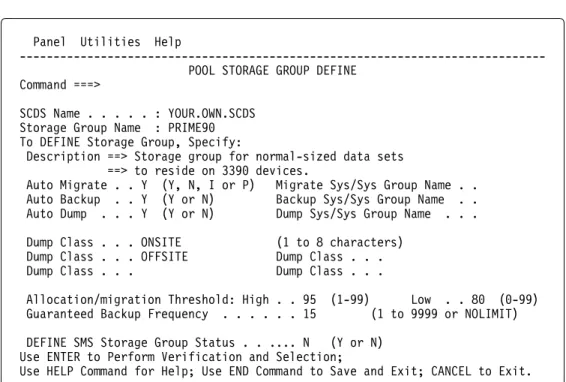
21. Pool Storage Group Define Panel . . . 49
22. Large Data Sets (by DASD Type) . . . 53
23. Using the Data Set Qualifier Indexing Function . . . 55
24. Syntax for the FILTLIST Statement . . . 55
25. Using the FILTLIST Statement . . . 56
26. Syntax for the Format-1 SELECT Statement . . . 56
27. Syntax for the Format-2 SELECT Statement . . . 56
28. Example of the Format-1 SELECT Statement . . . 57
29. Example of the Format-2 SELECT Statement . . . 57
30. Data Class Define Panel, Page 1 of 3 . . . 66
31. Data Class Define Panel, Page 2 of 3 . . . 67
32. Data Class Define Panel, Page 3 of 3 . . . 68
33. Protecting SMS Activation . . . 77
34. Controlling Management Class Assignments . . . 78
35. Defining Resource Class Profiles . . . 79
36. Protecting Storage and Management Classes . . . 80
37. Protecting ISMF Functions . . . 80
38. Selecting Specified Data Sets Using ISMF . . . 83
39. Identifying Unmovable Data Sets . . . 83
40. ISMF List of ISAM and Unmovable Data Sets by DSORG . . . 84
41. ISMF Data Set List . . . 84
42. Identifying Absolute Track Allocation using ISMF . . . 85
43. ISMF List of Unmovable Data Sets by ALLOC UNIT . . . 85
44. Sample Job for Allocating Control Data Sets . . . 92
45. Minimal SMS Configuration . . . 93
46. CDS Application Selection Panel . . . 94
47. SCDS Base Define Panel, Page 1 of 2 . . . 95
48. SCDS Base Define Panel, Page 2 of 2 . . . 95
49. Track Calculation Using DEFAULT DEVICE GEOMETRY . . . 96
50. The SMS View of Parallel Sysplexes—Examples . . . 97
51. Storage Class Application Selection Panel . . . 98
| 52. Storage Class Define Panel, Page 1 of 2 . . . 99
53. Listing Storage Classes Defined in the Base Configuration . . . 100
54. Initiating a Copy for the NONSMS Storage Class . . . 100
55. Copying the NONSMS Storage Class Construct . . . 101
56. Defining a Storage Group for the Minimal Configuration . . . 102
57. Defining Pool Storage Group Attributes . . . 102
58. Defining Storage Group System Status . . . 103
59. Defining Non-Existent Volume in Storage Group . . . 104
60. Defining Volume System Status . . . 104
61. Defining a Management Class for the Minimal Configuration . . . 105
62. Management Class Define Panel, Page 1 of 5 . . . 106
63. Management Class Define Panel, Page 2 of 5 . . . 107
64. Management Class Define Panel, Page 3 of 5 . . . 108
65. Writing an ACS Routine . . . 109
66. Accessing the ISPF/PDF Editor . . . 109
67. Sample Storage Class ACS Routine for the Minimal Configuration . . . 110
68. Sample Storage Group ACS Routine for the Minimal Configuration . . 111
69. Translating an ACS Routine . . . 112
70. Specifying the SCDS Base Configuration . . . 113
71. Validating the SCDS . . . 113
| 72. Keyword Syntax to Define SMS in IEFSSNxx . . . 114
| 73. Positional Syntax to Define SMS in IEFSSNxx . . . 114
74. Updating IEASYSyy . . . . 115
75. Updating IGDSMSxx . . . . 115
76. Activating SMS from the Operator Console . . . 116
77. Requesting Information about the PRIME80 Storage Group . . . 116
78. Storage Group and Volume Status for PRIME80 . . . 117
79. Output from the DEVSERV command . . . 119
80. System-Managed Temporary Data . . . 122
81. Creating ACS Test Cases . . . 126
82. Defining ACS Test Cases . . . 127
83. ACS Test Case Define Panel, Page 1 of 4 . . . 127
84. ACS Test Case Panel, Page 2 of 4 . . . 128
85. Test ACS Routines Panel . . . 129
86. Creating an ACS Output Listing . . . 130
87. Migrating Permanent Data . . . 134
88. Sample Fallback Procedure Using DFSMSdss . . . 138
89. Management Classes for TSO Data . . . 139
90. FILTLISTs for TSO Data Used in Management Class ACS Routine . . 139
91. Management Class ACS Routine for TSO Data . . . 140
92. Sample TSO Data Conversion In-Place . . . 141
93. Sample TSO Data Conversion with Movement . . . 142
94. Data Classes for VSAM Data Sets . . . 143
95. Data Classes for Physical Sequential Data Sets . . . 144
96. Data Classes for Libraries . . . 144
97. Assigning a Data Class for VSAM Processing . . . 146
98. Assigning a Data Class Based on the Low-Level Qualifier . . . 148
99. Storage Classes for Batch Data . . . 154
100. Management Classes for Batch Data . . . 156
104. SMS Services for Database Data . . . 163
105. CICS Data Sets Requiring High Availability . . . 165
106. CICS Data Sets Having High Write Activity . . . 166
107. CICS Data Sets Having High Read Activity . . . 166
108. FILTLIST Section for CICS from Storage Class ACS Routine . . . 168
109. Segment to Permit Special Users to Override SMS allocation . . . 168
110. SELECT Section for CICS from Storage Class ACS Routine . . . 169
111. IMS Data Sets Requiring High Availability . . . 170
112. IMS Data Sets Having High Write Activity . . . 171
113. IMS Data Sets Having High Read Activity . . . 171
114. FILTLIST Section for IMS from Storage Class ACS Routine . . . 172
115. ACS Code to Permit Special Users to Override SMS Allocation . . . . 172
116. SELECT Section for IMS from Storage Class ACS Routine . . . 173
117. DB2 Data Sets Requiring High Availability . . . 174
118. DB2 Data Sets Having High Write Activity . . . 174
119. DB2 Data Sets Having High Read Activity . . . 174
120. FILTLIST Section for DB2 from Storage Class ACS Routine . . . 175
121. Logic to Permit Special Users to Override SMS allocation . . . 175
122. SELECT Section for DB2 from Storage Class ACS Routine . . . 176
123. Storage Classes for Database Data . . . 177
124. Management Classes for Database Data . . . 179
125. FILTLIST Section for Database from Management Class ACS Routine 180 126. Management Class ACS Routine Sections for Database Data . . . 181
127. Storage Groups for Database Data . . . 182
128. FILTLIST Section for Database from Storage Group ACS Routine . . . 183
129. SELECT Section for Database from Storage Group ACS Routine . . . 183
130. Redirecting Tape Allocations to DASD Buffer Managed by DFSMS/MVS 186 131. Data Sets That Must Remain on Tape . . . 190
132. Data Sets That Can Be Redirected to DASD . . . 190
133. Volume Mount Analyzer Helps You Design Your Tape Mount Management Environment . . . . 192
134. Request for Tape Usage Profile . . . 194
135. Savings and Cost Summary in Sample Estimate Report . . . 195
136. Statistical Mount Savings Breakdown in Sample Estimate Report . . . 196
137. Statistical Volume Savings Breakdown: Sample Estimate Report . . . . 196
138. DASD Buffer Cost Breakdown: Sample Estimate Report . . . 197
139. Maximum Gigabyte Allocations by Hour Report . . . 198
140. Maximum Tape Mounts: 18 Day Summary Report . . . 198
141. First Five Entries from a Top Report: Program Names—LARGE = 600MB . . . . 199
142. Request for Estimate of 3490E Impact . . . 201
143. Savings and Cost Summary: Savings From 3490E Implementation . . 202
144. Request for Exception Data Sets . . . 203
145. Request for Management Class Simulation . . . 204
146. Management Class Report for IDCAMS Data . . . 204
147. Example of a Tape Data Set Size Range Table . . . 205
148. Request for the Savings and Cost Summary . . . 206
149. Savings and Cost Summary . . . 206
150. Request for Free Space Estimate for DASD Buffer . . . 207
151. Sample Maximum Gigabyte Allocations by Hour Report . . . 207
152. Calculating Free Space Percentage . . . 207
153. Request for Tape Configuration Impact . . . 208
154. Sample Report of Maximum Tape Allocations . . . 208
155. SMS Classes and Groups for Tape Data Sets . . . 211
156. Sample Management Classes for Tape Mount Management . . . 214
157. Sample Storage Groups for Tape Mount Management . . . 215
158. FILTLIST Section of a Sample Data Class ACS Routine for Tape Mount Management . . . . 216
159. Sample Data Class ACS Routine for Tape Mount Management . . . . 217
160. Sample Storage Class ACS Routine for Tape Mount Management . . . 219
161. Sample Management Class ACS Routine for Tape Mount Management 220 162. Sample Storage Group ACS Routine for Tape Mount Management . . 221
163. Example of Data Set Stacking Using Volume Serial Numbers . . . 222
164. Sample ACS Routine to Assign Same Storage Group as Referenced Data Set . . . . 224
165. Storage Class ACS Routine Fragment to Assign Consistent Device Category . . . . 225
166. Storage Group ACS Routine Fragment to Assign Consistent Device Category . . . . 225
167. Example of a Job Requesting Data Set Stacking with VOL=SER . . . . 226
168. Values for &UNIT ACS Read-Only Variable . . . 227
169. Sample ACS Routine to Assign Different Storage Group than Referenced . . . . 229
170. Sample ACS Routine to Allow Allocation of Non-System-Managed Data Set . . . . 230
171. Sample ACS Routine to Fail Allocation of Non-System-Managed Data Set . . . . 231
172. Example of a Non-SMS-Managed Referenced Data Set . . . 231
173. Example of Volume Reference Chaining . . . 232
174. Storage Class Routine Fragment for Tape Data . . . 238
175. Defining a Tape Storage Group . . . 239
176. Storage Group ACS Routine Fragment to Assign Tape Storage Groups 240 177. Defining a Specific Volume Catalog . . . 240
178. Defining Tape Library for 3495 to Support DFSMShsm-Owned Volumes 243 179. Sample Data Classes for Data Sets . . . 255
180. Sample ACS Data Class Routine . . . 258
181. Sample ACS Data Class Routine for Permanent Milestone . . . 268
182. Sample Storage Classes for Data Sets . . . 275
183. Sample ACS Storage Class Routine . . . 278
184. Sample ACS Storage Class Routine for Temporary Milestone . . . 286
185. Sample Storage Class ACS Routine for Permanent Milestone . . . 288
186. Sample Management Classes for Data Sets . . . 295
187. Sample ACS Management Class Routine . . . 299
188. Sample Management Class ACS Routine for Permanent Milestone . . 303
189. Sample DASD Storage Groups . . . 308
190. Sample Tape Storage Groups . . . 309
191. Sample Tape Libraries . . . 310
192. Sample ACS Storage Group Routine . . . 311
193. Sample Storage Group ACS Routine for Activating Milestone . . . 315
194. Sample Storage Group ACS Routine for Temporary Milestone . . . 317
195. Sample Storage Group ACS Routine for Permanent Milestone . . . 319
196. DFSMSdfp Installation Exits . . . 323
197. DFSMShsm Installation Exits . . . 325
198. DFSMSdss Installation Exit . . . 327
Notices
References in this publication to IBM products, programs, or services do not imply that IBM intends to make these available in all countries in which IBM operates. Any reference to an IBM product, program, or service is not intended to state or imply that only that IBM product, program, or service may be used. Any
functionally equivalent product, program, or service that does not infringe any of the intellectual property rights of IBM may be used instead of the IBM product,
program, or service. The evaluation and verification of operation in conjunction with other products, programs, or services, except those expressly designated by IBM, are the responsibility of the user.
IBM may have patents or pending patent applications covering subject matter in this document. The furnishing of this document does not give you any license to these patents. You can send license inquiries, in writing, to:
IBM Director of Licensing IBM Corporation
North Castle Drive Armonk, NY 10504-1785 USA
Licensees of this program who wish to have information about it for the purpose of enabling: (i) the exchange of information between independently created programs and other programs (including this one) and (ii) the mutual use of the information which has been exchanged, should contact:
IBM Corporation
Information Enabling Requests Dept. DWZ
5600 Cottle Road San Jose, CA 95193
Such information may be available, subject to appropriate terms and conditions, including in some cases, payment of a fee.
Any pointers in this publication to non-IBM Web sites are provided for convenience only, and do not in any manner serve as an endorsement of these Web sites.
Programming Interface Information
This book is intended to help you implement system-managed storage. This book primarily documents General-use Programming Interface and Associated Guidance Information provided by DFSMS/MVS.
General-use programming interfaces allow the customer to write programs that obtain the services of DFSMS/MVS.
However, this book also documents Product-Sensitive Programming Interface and Associated Guidance Information.
Product-sensitive programming interfaces allow the customer installation to perform tasks such as diagnosing, modifying, monitoring, repairing, tailoring, or tuning
DFSMS/MVS. Use of such interfaces creates dependencies on the detailed design or implementation of DFSMS/MVS. Product-sensitive programming interfaces should be used only for these specialized purposes. Because of their dependencies on detailed design and implementation, it is to be expected that programs written to such interfaces may need to be changed in order to run with new product releases or versions, or as a result of service.
Product-sensitive Programming Interface and Associated Guidance Information is identified where it occurs, either by an introductory statement to a chapter or section or by the following marking:
Programming Interface Information Programming interface information
End of Programming Interface Information
Trademarks
The following terms are trademarks of the IBM Corporation in the United States or other countries or both:
UNIX is a registered trademark in the United States and/or other countries licensed exclusively through X/Open Company Limited.
Other company, product, and service names, which may be denoted by a double asterisk (**), may be trademarks or service marks of others.
BookManager CBIPO CICS CICS/ESA CICS/MVS DB2 DFSMS DFSMS/MVS DFSMSdfp DFSMSdss DFSMShsm DFSMSrmm DFSORT ESCON Hipersorting Hiperspace IBM IMS MVS/DFP MVS/ESA MVS/SP MVS/XA NetView OpenEdition OS/390 Parallel Sysplex QMF RACF RAMAC RETAIN RMF SP
About this Book
This book is intended to help system programmers, storage administrators, and data processing professionals plan and implement the migration of an existing MVS installation to system-managed storage under the DFSMS environment.
Required Product Knowledge
Storage management consists of a variety of tasks. There are both hardware and software products that can help you perform these tasks, providing optimal
performance, availability, and use of space. For a list of the software products that enable you to maximize the benefits of system-managed storage, see DFSMS/MVS General Information.
You should be familiar with DFSMS/MVS DFSMSdfp Storage Administration Reference.
The following publications provide additional detail on the subjects discussed in this book. For information on how to order these manuals, contact your local IBM branch office.
Figure 1. Related Publications
Publication Order Number
DFSMS/MVS OAM Application Programmer's Reference SC26-4917 IBM 3494 Tape Library Dataserver Introduction and Planning Guide GA32-0279 OS/390 JES2 Initialization and Tuning Guide SC28-1791 OS/390 MVS Planning: Global Resource Serialization GC28-1759
RMF User's Guide SC28-1949
How to Tell if this Book is Current
IBM regularly updates its books with new and changed information. When first published, both hardcopy and BookManager softcopy versions of a book are identical, but subsequent updates might be available in softcopy before they are available in hardcopy. Here's how to determine the level of a book:
Check the book's order number suffix (often referred to as the dash level). A book with a higher dash level is more current than one with a lower dash level. For example, in the publication order number SC26-4930-02, the dash level 02 means that the book is more current than previous levels, such as 01 or 00. Suffix numbers are updated as a product moves from release to release, as well as for hardcopy updates within a given release.
Check to see if you are using the latest softcopy version. To do this, compare the last two characters of the book's file name (also called the book name). The higher the number, the more recent the book. For example, DGT1U302 is more recent than DGT1U301.
Compare the dates of the hardcopy and softcopy versions of the books. Even if the hardcopy and softcopy versions of the book have the same dash level, the softcopy could be more current. This will not be apparent from looking at the
edition notice. The edition notice number and date remain that of the last hardcopy version. When you are looking at the softcopy product bookshelf, check the date shown to the right of the book title. This will be the date that the softcopy version was created.
Also, an asterisk (*) is added next to the new and changed book titles in the CD-ROM booklet and the README files.
Vertical lines to the left of the text indicate changes or additions to the text and illustrations. For a book that has been updated in softcopy only, the vertical lines indicate changes made since the last printed version.
Referenced Publications
The following publications are referenced within the text: Figure 2 (Page 1 of 2). Referenced Publications
Title Order Number
CICS Recovery and Restart Guide SC33-1698 CICSVR MVS/ESA V2R3 User’s Guide and
Reference
SH19-6970
DB2 Administration Guide SC26-4888
DFSMS Optimizer User’s Guide and Reference SC26-7047 DFSMS/MVS DFSMSdfp Storage Administration Reference SC26-4920 DFSMS/MVS DFSMSdss Storage Administration Guide SC26-4930 DFSMS/MVS DFSMSdss Storage Administration Reference SC26-4929 DFSMS/MVS DFSMShsm Implementation and Customization Guide SH21-1078 DFSMS/MVS DFSMShsm Storage Administration Guide SH21-1076 DFSMS/MVS Installation Exits SC26-4908 DFSMS/MVS Macro Instructions for Data Sets SC26-4913 DFSMS/MVS Managing Catalogs SC26-4914 DFSMS/MVS Managing Data Availability SC26-4928 DFSMS/MVS OAM Planning, Installation, and
Storage Administration Guide for Object Support
SC26-4918
DFSMS/MVS OAM Planning, Installation, and Storage Administration Guide for Tape Libraries
SC26-3051
DFSMS/MVS Planning for Installation SC26-4919
DFSMS/MVS Using Data Sets SC26-4922
DFSMS/MVS Using the Volume Mount Analyzer SC26-4925
DFSMS/MVS Utilities SC26-4926
This book also references the following publication, also known as a “redbook”, produced by the International Technical Support Organization (ITSO):
Get DFSMS FIT: Fast Implementation Techniques, SG24-2568.
The information contained in this referenced ITSO document has not been submitted to any formal IBM test and is distributed AS IS. The use of this information or the implementation of any of these techniques is a customer
responsibility and depends on the customer's ability to evaluate and integrate them into the customer's operational environment.
Figure 2 (Page 2 of 2). Referenced Publications
Title Order Number
IMS/ESA Administration Guide: System SC26-8013 OS/390 MVS Initialization and Tuning Reference SC28-1752 OS/390 MVS Installation Exits SC28-1753 OS/390 MVS JCL User's Guide GC28-1758 OS/390 MVS System Commands GC28-1781 DFSMS/MVS NaviQuest User's Guide SC26-7194 OS/390 UNIX System Services User's Guide SC28-1891 OS/390 Security Server (RACF) Security
Administrator's Guide
SC28-1915
References to Product Names Used in DFSMS/MVS Publications
DFSMS/MVS publications support DFSMS/MVS, 5695-DF1, as well as the DFSMSdfp base element and the DFSMShsm, DFSMSdss, and DFSMSrmm features of OS/390, 5647-A01. DFSMS/MVS publications also describe how DFSMS/MVS interacts with other IBM products to perform the essential data, storage, program and device management functions of the operating system. DFSMS/MVS publications typically refer to another IBM product using a generic name for the product. When a particular release level of a product is relevant, the reference includes the complete name of that product. This section explains the naming conventions used in the DFSMS/MVS library for the following products:
MVS can refer to:
MVS/ESA SP Version 5, 5695-047 or 5695-048
The MVS base control program (BCP) of OS/390, 5647-A01
All MVS book titles used in DFSMS/MVS publications refer to the OS/390 editions. Users of MVS/ESA SP Version 5 should use the corresponding MVS/ESA book. Refer to OS/390 Information Roadmap for titles and order numbers for all the elements and features of OS/390.
For more information about OS/390 elements and features, including their
relationship to MVS/ESA SP and related products, please refer to OS/390 Planning for Installation.
RACF can refer to:
Resource Access Control Facility (RACF), Version 2, 5695-039
The RACF element of the OS/390 Security Server, an optional feature of OS/390
All RACF book titles refer to the Security Server editions. Users of RACF Version 2 should use the corresponding book for their level of the product. Refer to OS/390 Security Server (RACF) Introduction for more information about the Security Server.
CICS can refer to:
CICS/MVS, 5665-403
CICS/ESA, 5685-083
The CICS element of the CICS Transaction Server for OS/390, 5665-147 All CICS book titles refer to the CICS Transaction Server for OS/390 editions. Users of CICS/MVS and CICS/ESA should use the corresponding books for those products. Please see CICS Transaction Server for OS/390: Planning for Installation for more information.
Summary of Changes
This section describes specific changes changes to this book for this and prior releases.
Sixth Edition, March 1999
This publication is a minor revision in support of the functional changes introduced with DFSMS/MVS Version 1 Release 5. Vertical lines to the left of the text and illustrations indicate technical changes or additions since the last release. This revision also includes maintenance and editorial changes.
The following summarizes changes to that information.
Changed occurrences of OS/390 OpenEdition to OS/390 UNIX System
Services or its abbreviated name, OS/390 UNIX. As part of the name change of OpenEdition to OS/390 UNIX System Services, OpenEdition might continue to appear in messages, panel text, and other code with OS/390 UNIX System Services.
Added information about the DFSMS/MVS Optimizer Feature, Adstar
Distributed Storage Manager (ADSM) and CICSVR to the general description of the DFSMS environment in Chapter 1, Introducing System-Managed Storage.
Enhanced the description of the benefits of system-managed storage in Chapter 1, “Introducing System-Managed Storage” on page 1.
Added a note explaining that the SMS control data set structure has changed dramatically with the functions introduced in DFSMS/MVS 1.5, so that
DFSMS/MVS 1.5 systems in an SMS complex can only share SMS control data sets with DFSMS/MVS 1.2 and above systems, in “Coexistence Considerations” on page 17, in Chapter 1, Introducing System-Managed Storage, as well as in “Planning to Activate a Minimal SMS Configuration” on page 90, in Chapter 4, Activating the Storage Management Subsystem.
Updated “Using Compression Specifically Tailored to Data Sets” on page 17 to reflect that you can select the type of compression, using either tailored or generic dictionaries, for physical sequential data sets, in Chapter 1, Introducing System-Managed Storage.
Added a section on implementing SMS to fit your specific needs to Chapter 2, “Planning to Implement System-Managed Storage” on page 29.
Added a section on using DFSMS Fast Implementation Technique (FIT) to Chapter 2, “Planning to Implement System-Managed Storage” on page 29.
Expanded the description on how SMS improves performance for data set backup in Chapter 2, “Planning to Implement System-Managed Storage” on page 29. This includes a description of the new Versioning and Backup storage class subparameters supporting point-in-time copies using IBM RAMAC Virtual Array devices with SnapShot copy support and the DFSMSdss virtual
concurrent copy SPE installed.
Clarified the description of when interval migration is triggered in “Pooling Volumes with Storage Groups” on page 49 in Chapter 2, Planning to Implement System-Managed Storage.
Added a note explaining why using VOL=REF processing with temporary data sets might result in data sets being assigned to different storage groups, in Chapter 5, “Managing Temporary Data” on page 121 and Chapter 10, “Optimizing Tape Usage” on page 185.
Expanded the discussion of the benefits of using SMS to manage batch data in Chapter 8, “Managing Batch Data” on page 151.
Expanded the discussion of the benefits of using SMS to manage database data in Chapter 9, “Managing Database Data” on page 161. This includes a discussion of how production databases can benefit from improved SMS allocation algorithms, how database data backup processes can benefit from point-in-time copy using either concurrent copy or virtual concurrent copy, and how you can use dual copy and RAID architecture to increase availability of critical data sets.
Revised the description how to use SMS to select volumes for DB2 allocations in “Relating DB2 STOGROUPs to SMS Storage Groups” on page 181, in Chapter 9, Managing Database Data.
Added a new section, “Designing for Extended Addressability” on page 177, to the discussion on managing your DB2 data in Chapter 9, Managing Database Data.
Added a new section, “Allocating DB2 Partitioned Table Spaces” on page 184, to Chapter 9, Managing Database Data.
Added a new section, “Using the Virtual Tape Server (VTS) to Optimize Tape Media” on page 187, in Chapter 10, Optimizing Tape Usage.
Added several new headings to the introduction of Chapter 11, Managing Tape Volumes to clarify information and facilitate its retrieval.
Updated the following ISMF panel: Storage Class Define (Page 1 of 2).
Note: For other important updates to this book, please check informational APAR
II11474, a repository of DFSMS/MVS 1.5 information that was not available at the time DFSMS/MVS books were published for general availability.
Fifth Edition, June 1997
This publication is a major revision in support of the functional changes introduced with DFSMS/MVS Version 1 Release 4. This book was last published September, 1996, in softcopy only. Vertical lines to the left of the text and illustrations indicate technical changes or additions since the September softcopy version.
This revision also includes maintenance and editorial changes. The following summarizes changes to that information.
Added information on coexistence considerations when using compression specifically tailored to data sets, and when using space constraint relief to “Coexistence Considerations” on page 17 in Chapter 1, Introducing System-Managed Storage.
Added information on the following new data class attributes to “Defining Data Classes to Simplify Data Set Allocation” on page 66 in Chapter 2, Planning to Implement System-Managed Storage:
– Letting VSAM determine how many and which types of buffers to use when allocating VSAM data sets in extended format.
– Retrying new volume allocations or extents on new volumes that have failed due to space constraints.
– Assigning attributes for VSAM record-level sharing to system-managed data sets, such as backup-while-open, and whether the data set is recoverable or not.
– Supporting VSAM data sets with spanned record formats.
Updated the following ISMF panels:
– Pages 2 and 3 of the ISMF Data Class Define panel with new data class attribute fields, in “Defining Data Classes to Simplify Data Set Allocation” on page 66 in Chapter 2, Planning to Implement System-Managed Storage. – Page 1 of the ISMF Data Set Selection Entry Panel for NaviQuest, in
Chapter 3, Enabling the System-Managed Storage Software Base. – Page 1 of the ISMF ACS Test Case Define panel for NaviQuest, in
Chapter 5, Managing Temporary Data.
– Page 1 of the ISMF Tape Library Define in Chapter 11, Managing Tape Volumes.
Chapter 1. Introducing System-Managed Storage
System-managed storage is the IBM automated approach to managing storage resources. It uses software programs to manage data security, placement, migration, backup, recall, recovery, and deletion to ensure that current data is available when needed, and obsolete data is removed from storage.
You tailor system-managed storage to your needs. You define the requirements for performance, security, and availability, along with storage management policies used to automatically manage the direct access, tape, and optical devices used by its MVS operating systems.
The combination of system-managed storage and related hardware and software products is called the DFSMS environment.
The DFSMS Environment for MVS
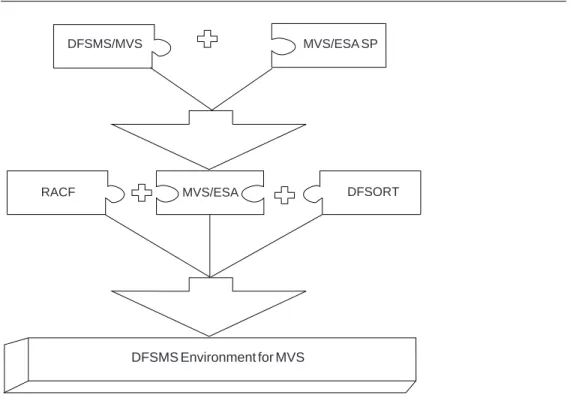
To implement the DFSMS environment and to take advantage of all the functions available with MVS, you need to install a specific set of software products. Figure 3 shows the relationship among the IBM products that form the DFSMS environment.
RACF MVS/ESA DFSORT
DFSMS Environment for MVS
DFSMS/MVS MVS/ESA SP
Figure 3. Products in the DFSMS Environment
The DFSMSdfp functional component of DFSMS/MVS provides the storage, program, data, and device management functions of MVS. The Storage Management Subsystem (SMS) component of DFSMSdfp is fundamental in providing these functions. DFSMSdfp provides the foundation for distributed data access, using the Distributed FileManager to support remote access of MVS data and storage resources from workstations, personal computers, or other authorized systems in a SNA LU 6.2 network. You can also use the DFSMS/MVS Network File
System server to enable an MVS system to act as a file server to workstations, personal computers, and other authorized systems in a TCP/IP network.
The DFSMSdss functional component of DFSMS/MVS copies and moves data for MVS.
The DFSMShsm functional component of DFSMS/MVS provides the backup, recovery, migration, recall, disaster recovery (using ABARS), and space management functions in the DFSMS environment.
The DFSMSrmm functional component of DFSMS/MVS provides the management functions for removable media, including tape cartridges and reels.
DFSORT sorts, merges and copies data sets, and also helps you to analyze data
and produce detailed reports using the ICETOOL utility or the OUTFIL function.
RACF controls access to data and other resources in MVS.
| The DFSMS/MVS Optimizer Feature provides analysis and simulation information
| for both SMS and non-SMS data.
| For more information on the DFSMS/MVS Optimizer Feature, see the DFSMS
| Optimizer User’s Guide and Reference.
| Adstar Distributed Storage Manager (ADSM) for MVS Version 2 is a
| client/server storage management product that provides administrator-controlled, | highly automated, centrally scheduled, network-based backup, archive and space | management functions for workstations and LAN file servers.
| You can use ADSM to back up and recover individual files within the Hierarchical | File System (HFS). The entire data set can also be backed up and recovered using | DFSMShsm or DFSMSdss, though less frequently. For example, on an I/O error, | you can restore the entire data set using DFSMShsm or DFSMSdss and then use | the ADSM client to recover individual files that were backed up since the
| DFSMShsm or DFSMSdss backup. This should result in faster recoveries. Note | that this assumes that only some of the files in the file system get changed and that | it is faster to perform backups using DFSMShsm or DFSMSdss than using ADSM. | For more information on ADSM, see ADSTAR Distributed Storage Manager:
| General Information.
| You can use the CICSVR product to apply forward recovery logs against
| recoverable CICS VSAM data sets after they have been restored using DFSMShsm | or DFSMSdss backups. The forward recovery logs are written by CICS or CICSTS. | For more information on CICSVR, see CICSVR MVS/ESA V2R3 User’s Guide and | Reference. For more information on CICS, see CICS Recovery and Restart Guide.
Benefits of System-Managed Storage
With the Storage Management Subsystem (SMS), you can define performance goals and data availability requirements, create model data definitions for typical data sets, and automate data backup. SMS can automatically assign, based on installation policy, those services and data definition attributes to data sets when they are created. IBM storage management-related products determine data placement, manage data backup, control space usage, provide data security, and perform disaster backup and recovery.
The goals of system-managed storage are to:
Improve the use of the storage media; for example, by reducing out-of-space abends and providing a way to set a free-space requirement.
Reduce the labor involved in storage management by centralizing control, automating tasks, and providing interactive controls for storage administrators.
Reduce the user's need to be concerned with the physical details of performance, space, and device management. Users can focus on using information instead of managing data.
The benefits of system-managed storage are:
Simplified Data Allocation
System-managed storage enables users to simplify their data allocations. For example, without using the Storage Management Subsystem, an MVS user would have to specify the unit and volume on which the system should allocate the data set. The user would also have to calculate the amount of space required for the data set in terms of tracks or cylinders. This means the user has to know the track size of the device which will contain the data set.
With system-managed storage, users can let the system select the specific unit and volume for the allocation. They can also specify size requirements in terms of megabytes (MB) or kilobytes (KB). This means the user does not need to know anything about the physical characteristics of the devices in the installation.
| SMS is required if you want to allocate data sets in extended format, or specify | compression or extended addressability. It is also required if you want to specify | partial release, system-managed buffering, or a secondary volume allocation
| amount for VSAM data sets.
| Ensured Data Integrity on New Allocations
| System-managed storage provides data integrity for newly allocated physical | sequential data sets that have not been written to. For these data sets, SMS | writes a physical end-of-file character at the beginning of the data set when | space for the data set is initially allocated.
| When you do not specify the data set organization on initial allocation, the | system cannot determine how the data set is to be subsequently accessed and | does not write the end-of-file character. To use the data integrity feature, assign | a data class to the data set during initial allocation without the attributes that | apply to other data set organizations, such as partitioned, VSAM, etc. The | system then assumes physical sequential access and writes the physical | end-of-file character on initial allocation.
Improved Allocation Control
| System-managed storage enables you to set a threshold for free space across a | set of direct access storage device (DASD) volumes. During allocation of new | data sets, the system prefers those volumes that are below the specified | threshold. This allows existing data sets to be extended on the volumes that are
| above the threshold.
| On DFSMS/MVS 1.4 and later systems, SMS reduces space-related abends on | initial allocation or when extending to a new volume through the following:
| removing the DADSM five extent limit
| spreading the requested allocation space quantity over multiple volumes | reducing the requested space quantity by a specified percentage. | These do not apply while extending the data set on the same volume.
| On DFSMS/MVS 1.2 and later systems, volume selection techniques from the | secondary list help to avoid problems, such as overallocating all new data sets | on a newly added volume until it reaches a high threshold or until the available | free space on the volume reaches the same level as other volumes in the
| storage group.
| You can also set a threshold for scratch tape volumes in tape libraries, to | ensure enough cartridges are available in the tape library for scratch mounts.
Improved Input/Output (I/O) Performance Management
System-managed storage enables you to improve DASD I/O performance across the installation and at the same time reduce the need for manual tuning by defining performance goals for each class of data. You can use cache statistics recorded in system management facilities (SMF) records to help evaluate performance. You can also improve sequential performance by using striped extended-format sequential data sets. The DFSMS environment makes the most effective use of the caching abilities of the IBM 3990 Model 3 and Model 6 Storage Controls, as well as other models.
You can also use the DFSMS/MVS Optimizer Feature to perform in-depth analysis of high I/O activity data sets, including recommendations for placement and simulations for cache and expanded storage. See DFSMS Optimizer User’s Guide and Reference for more information.
Automated DASD Space Management
System-managed storage enables you to automatically reclaim space which is allocated to old and unused data sets or objects. You can define policies that determine how long an unused data set or object resides in primary storage (storage devices used for your active data). You can have the system remove obsolete data by migrating the data to other DASD, tape, or optical volumes, or you can have the system delete the data. You can also release allocated but unused space which is assigned to new and active data sets.
Automated Tape Space Management
System-managed storage lets you fully use the capacity of your tape cartridges and automate tape mounts. Using tape mount management methodology, | DFSMShsm can fill tapes to their capacity. With 3490E, 3590, and 3591 tape | devices, Enhanced Capacity Cartridge System Tape, 36-track recording mode, | and the improved data recording capability, you can increase the amount of | data that can be written on a single tape cartridge.
| System-Managed Tape
| System-managed storage lets you exploit the device technology of new devices | without having to change the JCL UNIT parameter. In a multi-library
| environment, you can select the drive based on the library where the cartridge | or volume resides. You can use the IBM 3495 or 3494 Tape Library Dataserver | to automatically mount tape volumes and manage the inventory in an automated | tape library. If you are not using SMS for tape management, you can still access | the IBM 3495 or 3494 Tape Library Dataserver using Basic Tape Library
| Storage (BTLS) software.
| You can use the Virtual Tape Server (VTS), with or without the tape mount | management methodology, to optimize your use of tape media. You might still | need to use tape mount methodology for small tape data sets, but VTS | improves your use of tape media and reduces tape mounts. Use VTS for | volumes that don't require removal from the library for offsite storage. VTS | integrates the advanced technology provided by the IBM 3590 tape drives, IBM | fault-tolerant RAID disk storage, a RISC-based controller, and the IBM 3494
| tape library.
| Automated Storage Management for Object Data
| System-managed storage enables you to fully use the capacity of your optical | cartridges and to automate optical mounts. Using an IBM 3995 Optical Library | Dataserver, you can automatically mount optical volumes and manage the | inventory in an automated optical library.
Improved Data Availability Management
With system-managed storage, you can provide different backup requirements to data residing on the same DASD volume. Thus, you do not have to treat all data on a single volume the same way.
You can use DFSMShsm to automatically back up the following:
CICS databases
DATABASE (DB2) databases
Partitioned data sets extended (PDSEs)
Physical sequential data sets
Partitioned data sets
Virtual storage access method (VSAM) data sets
Direct access data sets
Hierarchical file system (HFS) data sets
| Note: For HFS data sets, the ADSM/UNIX System Services client backs
| up the files and directories inside the HFS data set and DFSMShsm
| backs up the data set itself. You can set up your procedures to back
| up the whole file system less frequently using guaranteed backup
| frequency, and then use ADSM client to back up data within the file | system more often. This reduces the total recovery time since it uses
| the high bandwidth of DFSMShsm to perform backups and
| recoveries in case the file system becomes inaccessible.
| You can also back up other types of data and use point-in-time copy to maintain | access to critical data sets while they are being backed up. Concurrent copy, | along with backup-while-open, has an added advantage in that it avoids
| invalidating a backup of a CICS VSAM KSDS due to a control area or control
| interval split.
To backup and recover critical applications requiring concurrent action, such as for disaster recovery, you can create a logical grouping of data sets known as an aggregate group. You define an aggregate group by selecting a
management class and specifying backup attributes (such as type of storage medium, retention period, or destination) which all data sets in the group share. DFSMShsm uses the aggregate backup and recovery support (ABARS) to | manage the aggregate group backup process. You can also use ABARS to
| transfer applications between sites.
You can use the same management class attributes for multiple aggregate groups whose backup copies have the same management needs. These backup attributes are used to manage backup copies and also to create the proper environment for backed-up data sets during recovery. During aggregate recovery, data sets backed up as migrated data sets can be returned to the same level as when backed up, or they can all be recovered to ML1 DASD or ML2 tape. All data sets backed up from user volumes are returned to user volumes.
Simplified Movement of Data to Different Device Types
With system-managed storage, you can move data to new volumes without requiring users to update their job control language (JCL). Because users in a DFSMS environment do not need to specify the unit and volume which contains their data, it does not matter to them if their data resides on a specific volume or device type. This lets you easily replace old devices with new ones.
You can also use system-determined block sizes to automatically reblock physical sequential and partitioned data sets that can be reblocked.
Managing Data with SMS
In the DFSMS environment, you use SMS classes and groups to set service requirements, performance goals, and data definition models for your installation. You use the Interactive Storage Management Facility (ISMF) to create the appropriate classes and groups, and Automatic Class Selection (ACS) routines to assign them to data according to your installation's policies.
Using SMS Classes and Groups
On systems that do not use DFSMS, storage management consists mostly of manual operations performed on individual data sets, and manual and automated operations performed on volumes. With SMS, you can automate storage
management for individual data sets and objects, and for DASD, optical, and tape volumes. You use SMS classes and groups to define the goals and requirements that the system should meet for a data set or object. Figure 4 on page 7 shows the relationship of the classes and groups to your goals and requirements.
Where is it placed? What are its
requirements?
Data Class StorageClass
Manage-ment Class Storage Group ACS Routines What does it look like?
Figure 4. Allocating Data Sets or Storing Objects. You use data class to define model allocation characteristics for data sets; storage class to define performance and availability goals; management class to define backup and retention requirements; and storage group to create logical groupings of volumes to be managed as a unit.
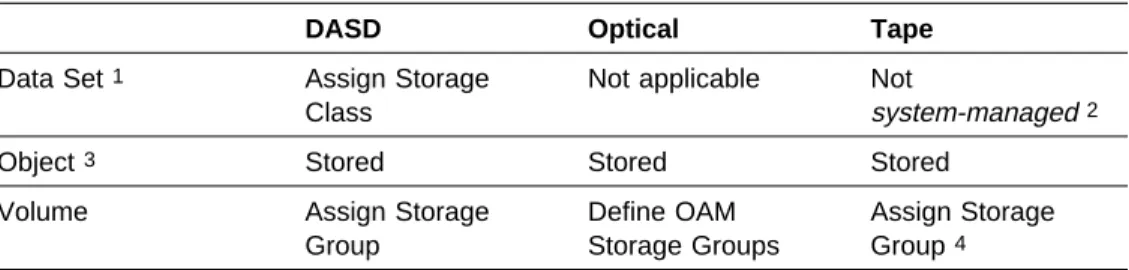
Figure 5 shows how a data set, object, DASD volume, tape volume, or optical volume becomes system-managed.
Notes:
1. A DASD data set is system-managed if you assign it a storage class. If you do not assign a storage class, the data set is directed to a non-system-managed DASD or tape volume —one that is not assigned to a storage group—unless you specify a specific system-managed tape volume, in which case the data set is allocated on system-managed tape.
2. You can assign a storage class to a tape data set to direct it to a
system-managed tape volume. However, only the tape volume is considered system-managed, not the data set.
3. OAM objects each have a storage class; therefore, objects are
system-managed. The optical or tape volume on which the object resides is also system-managed.
Figure 5. When A Data Set, Object, or Volume Becomes System-Managed
DASD Optical Tape
Data Set 1 Assign Storage Class
Not applicable Not
system-managed 2
Object 3 Stored Stored Stored
Volume Assign Storage Group
Define OAM Storage Groups
Assign Storage Group 4
4. Tape volumes are added to tape storage groups in tape libraries when the tape data set is created.
Using Data Classes
A data class is a collection of allocation and space attributes that you define. It is used when data sets are created. You can simplify data set allocation for your users by defining data classes that contain standard data set allocation attributes. You can use data classes with both system-managed and non-system-managed data sets, but some data class characteristics are only available with
system-managed requests.
Data class attributes define space and data characteristics of data sets that are normally specified on JCL DD statements, TSO/E ALLOCATE commands, access method services (IDCAMS) DEFINE commands, dynamic allocation requests, and ISPF/PDF panels. For tape data sets, data class attributes can also specify the type of cartridge and recording method, and if the data is to be compacted. Users then need only specify the appropriate data classes to create standardized data sets.
You can use data class to allocate both sequential and VSAM key-sequenced data sets in extended format.
You can also use the data class automatic class selection (ACS) routine to
automatically assign data classes to new data sets. For example, data sets with the low-level qualifiers LIST, LISTING, OUTLIST, or LINKLIST are usually utility output data sets with similar allocation requirements, and can all be assigned the same data class.
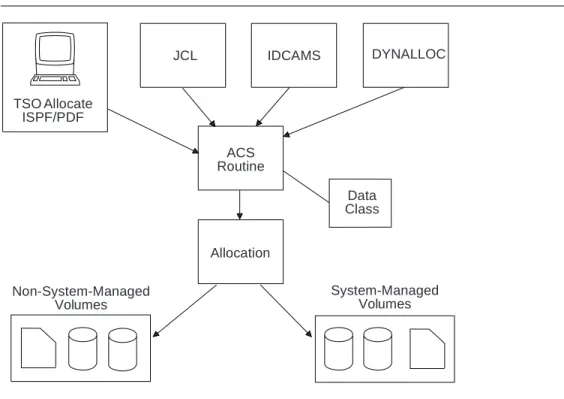
Figure 6 shows that data sets can be assigned a data class during data set creation. TSO Allocate ISPF/PDF DYNALLOC IDCAMS JCL ACS Routine Data Class Allocation Non-System-Managed Volumes System-Managed Volumes
Even though data class is optional, we usually recommend that you assign data classes to system-managed and non-system-managed data. Although the data class is not used after the initial allocation of a data set, the data class name is kept in the catalog entry for system-managed data sets for future reference. The data class name is not saved for non-system-managed data sets, although the allocation attributes in the data class are used to allocate the data set.
For objects on tape, we recommend that you do not assign a data class using the ACS routines. To assign a data class, specify the name of that data class on the SETOAM command.
| If you change a data class definition, the changes only affect new allocations. | Existing data sets allocated with the data class are not changed, except for the | system-managed buffering attribute. With system-managed buffering, the data class | attributes are retrieved and used when the data set is opened.
Using Storage Classes
A storage class is a collection of performance goals and availability requirements that you define. It is used to select a device to meet those goals and requirements. Only system-managed data sets and objects can be assigned a storage class. Storage classes free users from having to know about the physical characteristics of storage devices and manually placing their data on appropriate devices.
Some of the availability requirements you can specify with storage classes can only be met by DASD volumes attached through one of the following storage control devices, or a similar device:
3990 Model 3
3990 Model 6
RAMAC Array Subsystem
Some of the attributes you can specify require the use of the 3990 Model 3 or Model 6 Storage Control dual copy device. Depending on the goals you set, the performance goals can be met through devices attached through storage controls with or without cache.
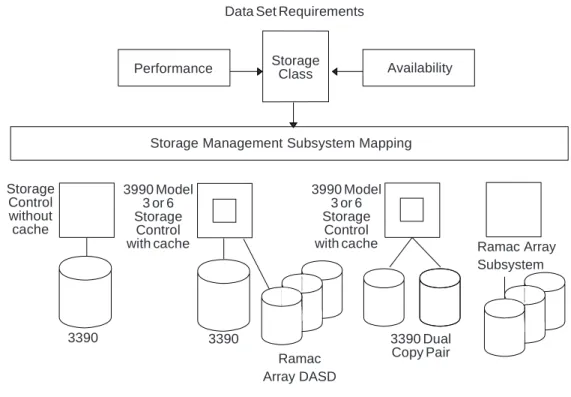
Figure 7 on page 10 shows the storage control configurations needed to use all storage class attribute values.
Data Set Requirements
Performance Availability
Storage Management Subsystem Mapping
3390 3390 3390 Dual Copy Pair Storage Class Storage Control without cache 3990 Model 3 or 6 Storage Control with cache 3990 Model 3 or 6 Storage Control
with cache Ramac Array Subsystem
Ramac Array DASD
Figure 7. Using Storage Class. Storage classes make the best use of fault-tolerant devices
You can use the storage class Availability attributes to assign a data set to fault-tolerant devices, in order to ensure continuous availability for the data set. Currently available fault-tolerant devices include dual copy devices and RAID architecture devices, such as RAMAC.
| You can use the storage class Accessibility attribute to request that point-in-time | copy be used when data sets or volumes are backed up.
You can specify an I/O response time objective with storage class. During data allocation, the system attempts to select the closest available volume to the specified performance objective.
For objects, the system uses the performance goals you set in the storage class to place the object on DASD, optical, or tape volumes. The storage class is assigned to an object when it is stored or when the object is transitioned. The ACS routines can override this assignment.
If you change a storage class definition, the changes affect the performance service levels of existing data sets that are assigned that class when the data sets are subsequently opened. However, the definition changes do not affect the location or allocation characteristics of existing data sets.
Using Management Classes
A management class is a collection of management attributes that you define. It is used to control the retention, migration, backup and release of allocated but unused space for data sets, or to control the retention, backup, and class transition of objects. Management classes let you define management requirements for individual data sets, rather than defining the requirements for entire volumes.
If you do not explicitly assign a management class to a system-managed data set or object, the system uses the default management class. You can define your own default management class when you define your SMS base configuration.
For objects, you can:
Assign a management class when it is stored, or
Assign a new management class when the object is transitioned, or
Change the management class by using the OAM Application Programming Interface (OSREQ CHANGE function).
The ACS routines can override this assignment for objects.
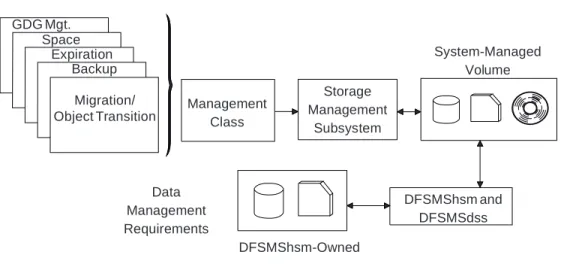
Figure 8 shows that you can use management class attributes to do the following:
Use early migration for old generations of a generation data group (GDG) by specifying the maximum number of generations to be kept on primary storage, and what to do with rolled-off generation data sets
Delete selected old and unused data sets from DASD volumes
Release allocated but unused space from data sets
Migrate unused data sets to tape or DASD volumes
Specify how often to back up data sets, and whether point-in-time copy should be used during backup
Specify how many backup versions to keep for data sets
Specify how long to save backup versions
Specify the number of versions of aggregate backups to keep and how long to retain those versions
Establish the expiration date for objects
Establish transition criteria for objects
Indicate if automatic backup is needed for objects
GDG Mgt. Space Expiration Backup Storage Management Subsystem Data Management Requirements System-Managed Volume Management Class DFSMShsm-Owned DFSMShsm and DFSMSdss Migration/ Object Transition
Figure 8. Using Management Class
By classifying your data according to management requirements, you can define unique management classes to fully automate your data set and object
management. For example, you can use management classes to control the migration of CICS user databases, DB2 user databases and archive logs, test systems and their associated data sets, and IMS archive logs. You can specify that DB2 image copies, and IMS image copies and change accumulation logs, be written to primary volumes and then migrated directly to migration level 2 tape volumes.
For objects, you use the class transition attributes to define when an object is eligible for a change in its performance objectives or management characteristics. For example, after a certain number of days you might want to move an object from a high-performance DASD volume to a slower optical volume. You can also use the management class to specify that the object should have a backup copy made when the OAM Storage Management Component (OSMC) is running.
If you change a management class definition, the changes affect the management requirements of existing data sets and objects that are assigned that class.
Using Storage Groups
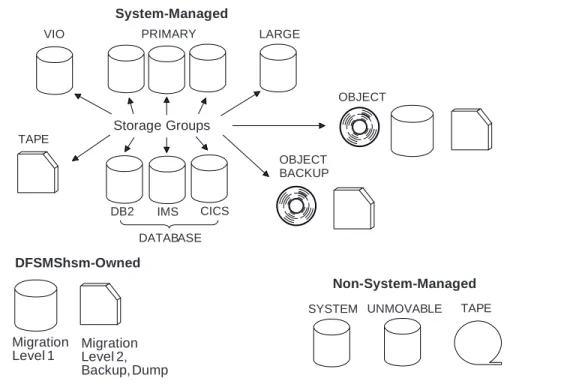
A storage group is a collection of storage volumes and attributes that you define. The collection can be a group of:
System paging volumes
DASD volumes
Tape volumes
Optical volumes
Combination of DASD and optical volumes that look alike
DASD, tape and optical volumes treated as a single object storage hierarchy. Storage groups, along with storage classes, help reduce the requirement for users to understand the physical characteristics of the storage devices which contain their data.
You can direct new data sets to as many as 15 storage groups, although only one storage group is selected for the allocation. The system uses the storage class attributes, volume and storage group SMS status, MVS volume status, and available free space to determine the volume selected for the allocation. In a tape environment, you can also use tape storage groups to direct a new tape data set to an automated or manual tape library.
DFSMShsm uses some of the storage group attributes to determine if the volumes in the storage group are eligible for automatic space or availability management. Figure 9 on page 13 is an example of using storage groups to group storage volumes for specific purposes.