Backup Aware Object based Storage
Girish Moodalbail, Nagapramod Mandagere, Aravindan Raghuveer, Sunil Subramanya, David Du
DTC Intelligent Storage Consortium (DISC)University of Minnesota Minneapolis, MN 55455
[email protected], [email protected], [email protected], [email protected], [email protected]
Abstract— Data management costs have skyrocketed due to increase in both the volume and complexity of storage solutions. Object based storage (OSD) is a new paradigm that has gained increasing acceptance due to ability of embedding intelligence in the storage devices thereby aiding in ease of management.
Even in this age of fault tolerant system, data backup is still the only means of ensuring absolute recovery. Traditional backup solutions are limited by the features of block based storage. Due to the mechanism of data storage in OSD - Objects (data + metadata), it offers a whole new set of features that were not possible in traditional systems [1]. In this work we explore the opportunities and implications of OSD enabled backup. We propose and implement a new backup management system capable of exploiting the features of OSD. Salient features of our proposed design include - fine grained policy specification and intelligent, non-intrusive backup scheduling.
Our prototype evaluation shows that our proposed backup solution outperforms traditional backup solutions both in the features it offers and the performance. Specifically, the non-intrusive backup scheduling completely minimizes the impact on real time data access.
I. INTRODUCTION
One of the main concerns of enterprises today is the Total Cost of Ownership (TCO). In the data storage domain this boils down to Cost of Acquisition and Cost of Manage-ment/Administration. In recent times, complexity of systems has increased, requiring more skilled labour to manage and maintain these system leading directly to an unprecedented increase in Cost of Management. In the day to day working of any data management system, typical management tasks include performance monitoring, system health monitoring and information life-cycle management tasks like regular backups of data, ensuring archival of stale data, etc.
Recent trend in both industry and research community has beens towards building Self Managing and Self Monitoring Storage Systems. The goal of these systems is to minimize human or administrator intervention during the day to day operations of the storage solution. This move towards adding more intelligence into the storage systems, is fueled not just by benefits of reduction in management cost but also by the potential performance benefits that were not available in traditional system.
Building intelligent storage devices requires an in-depth understanding of the metadata that describes the stored data. Traditional block based storage systems do not have the capa-bility to interpret any metadata corresponding to the data that they store. This is in part because of the interface between the
applications that access storage devices and the storage devices themselves and in part because of the way traditional systems store data. Object based Storage(OSD) is a new paradigm that can be used to build intelligent storage devices. In recent times, OSD has seen rapid adoption as a result of standardization of the Object Storage Interface by the T10 committee [2]. OSD revolves around the idea of storing additional metadata along with the data itself and providing an expressive interface for manipulating this metadata. Data is stored as objects with attributes representing the corresponding metadata.
Data backups are critical piece of any Information Lifecycle Management (ILM) scheme. Backups are the only way of ensuring absolute fault tolerance. In large enterprises, one or more administrators make use of commercial enterprise class software to backup important data. Though the degree of au-tomation of this process has increased as backup management softwares have become more intelligent and complex, there is still a need for supervision of a skilled administrator. This can be attributed to two main factors, namely - Static policy specification and Scheduling of backup window.
Policy specification is usually the job of the system adminis-trator and he/she specifies the policies at the backup server(s) as input to the Backup Management Software. Hence, it is up to the system administrator(s) to decide the importance of the data stored on the storage systems managed by them. In large enterprises, the volume of data is huge and hence the system administrator’s job of deciding which data needs to be backed up and when becomes very complicated. In addition, data importance varies over time rendering static policies ineffective. To aid the administrators, system users and administrators generally come to an agreement before hand on backup policies. For instance, one simple example could be that whatever files are present under /user-name/project directory of every user is backed twice daily. This makes enforcement of backup policy by the system administrator(s) less complex. But in doing so, the users are tied up to orga-nizing all their important data in specified locations only. And if the users do not exercise any caution and dump unimportant data in the above mentioned directories, the utilization of backup solution reduces. Another option that is commonly used is to take complete backup of the system irrespective of data importance. Though this approach simplifies the job of administration, the utilization of the backup solution is sub optimal.
Primergy Primergy Primergy ... SCSI over FC or IP ... SCSI over FC or IP Storage Area Network
4 4 6 . . . Server Cluster 1. Backup Instructions Policy Definition Tape Drives/Silos Disk Arrays
2. Snapshot Creation and Mounting 3. Read All File Inodes in Snapshot Volume
Compare Inodes from snapshot and previous 5. Read All Updated
6
backup version metadata, Check for data specified by policy
Stage data to tape drives/silos Backup Servers (Policy Specified) Data
Disk
Disk Disk Disk Disk Disk
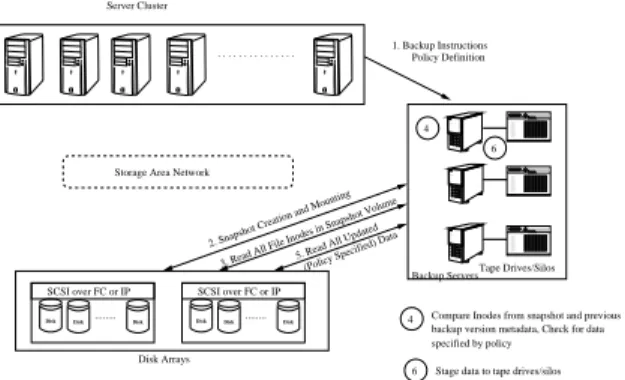
Fig. 1. Backup/Restore in a Traditional Storage System
backups during regular periods of data access can severely im-pact the performance of regular data access. This is particularly true in large enterprises where volume of data backed up daily is enormous requiring long backup windows. Again, the bur-den of scheduling the backup windows intelligently is placed on skilled system administrators. In general, administrators try to schedule backup windows during non peak times. However, globalization has made this option relatively ineffective (no clear cut non peak hours).
Our research focus is to explore cost effective backup solutions for Object Storage ecosystems. We propose a new backup management system for Object based storage devices that exploits the features of OSD to perform backups in an efficient, non intrusive and cost effective manner. Specifically, we propose mechanisms for backup policy specification and storage at an object granularity. We propose an intelligent non intrusive lazy backup scheduler to that makes use of the capability of OSD by which it can distinguish between initiators to minimize the impact of backup operation on regular data access. The rest of the paper is organized as follows - Section II describes working of a typical traditional backup solution, Section III describes our proposed system design, Section IV highlights the details of our implementation and Section V describes the performance evaluation of the proposed solution.
II. TRADITIONALBACKUPSOLUTIONS
In a block based storage solution, the typical way of creating backups is to use one or more dedicated backup servers that take care of performing data backup on a different block based device such as a tape. All the policy decisions are enforced through the backup server by the system administrator, which includes specifying needed directories/files in a volume to be backed up, frequency of data backup and so on. One such typical setting is as shown in Figure 1. Actions 1−6 show
the typical steps performed during any block based backup operation. The usage of a dedicated backup server comes here as a need rather than as a choice. Since the block based storage device doesnt have the necessary file system meta-data information to interpret the stored data, it is inhibited in its capability to perform the functionality provided by the backup server. Apart from the obvious extra cost incurred in this setup
Storage Area Network 1. Backup Instructions Policy Definition 2 3 4 5 6 6 6 6 2 4 3 5 . . . Server Cluster ... ...
OSD Interface(FC/iSCSI) OSD Interface(FC/iSCSI)
...
Snapshot Creation and Mounting Read attribute of each object in the
Snapshot Volume Read All Updated
(Policy Specified) Objects Determine the changed objects
Stage data to tape drives/silos Disk Arrays
Tape Drives/Silos
Disk Disk Disk Disk Disk Disk
Fig. 2. Backup/Restore in an Object Based Storage System
due to the need of a backup server, a lot of bandwidth is consumed for the data movement itself between the backup server and the storage device.
III. PROPOSEDSYSTEMDESIGN
In an Object Based Storage Device, the different types of metadata information (application & file system metadata) is stored on the storage device itself along with actual data as object attributes. This tight coupling makes all data stored on any Object Based Storage device more autonomic and hence readily accessible by the device itself or any client accessing the device. Hence, backing up an object in effect leads to backing up of data, application specific metadata and the file system metadata all in a single atomic operation unlike traditional systems where multiple explicit operations need to be carried out to consolidate all metadata and the data for the purpose of backup.
Figure 2 shows the proposed backup solution using OSD. Actions2−5happen within the confines of the Object Based Storage System and hence network traffic due to backup operation is minimal. The salient features of our design are the ability to perform fine grained backup and the ability to schedule the backup window intelligently so as to not affect the performance of real time data access too drastically.
A. Policy Specification
In our proposed solution, backup policy specification is supported at different levels of granularity. The logical hierar-chical structure that is the basis of any OSD is composed of the root, the partition and the collection. In addition to these three granularities, one could even have backups at Object level. Since collections are virtual entities, they could be used to group similar (objects with similar backup needs) objects. In our proposed solution, the user or the initiator application has the freedom to specify the backup policies - Frequency, Type and Mode of backup. Frequency refers to the desired backup periodicity for a given object. Type of backup is either a full backup or an incremental backup. Mode of backup refers to the mechanism used to implement backups. Possible mechanisms include
-• Cloning1 + Freeing: Freezing all incoming I/O until the entire backup operation is complete. Output is a complete point in time copy - most reliable, but most disruptive, takes a long time(synchronous backup).
• Cloning + Redirection: Redirecting all incoming I/O to an alternate location until backup operation is complete. Output is a complete point in time copy - Additional Space overhead for store redirected I/O, takes a long time(synchronous backup).
• Snapshot2with Copy on Write: Taking a Snapshot of data and backing up from snapshots asynchronously. Output is just a virtual point in time copy - No disruption, less reliable (data is lost if asynchronous backup is not completed before any failure event) , Additional Space overhead for storing snapshot/copy on write data. Option 3, Snapshot with Copy on Write is one of the most used backup mechanisms. The main advantage of this method is that the actual snapshot procedure takes just a few milliseconds as it is only a virtual point in time copy of metadata. Actual backup can be initiated at a later point based on real time traffic patterns.
In our proposed system, we make use of attributes of objects to store this policy information. Hence, the user has the choice of policy specification using the standard GET and SET attribute commands just like any other attribute that is stored with the data. The backup operation at the storage devices interprets this predefined attributes to make backup decisions. This scheme helps in giving users fine grained control over the backup process, thereby increasing the utility or value of the backups.
We propose adding a Backup attribute page for every object (user and partition). This page defines the above mentioned backup policy related attributes (frequency and mode) and values used on a per-object basis. At this point for sim-plicity we only consider full backups. Extending this design to incremental backups requires the use of a slightly more complex mechanism for identifying changes in objects. A user can update these attributes using the GET and SET attribute commands. An object that requires specific backup attributes should have its attribute values set in its backup attributes page. Table I describes the attribute name, number and possible values for these attributes. Currently we support only Snapshot based backups as our focus is on demonstrating non intrusive backup operation. We support five different backup frequency levels - hourly,daily,weekly and monthly,no backup. By default a new object will be assigned a backup frequency of Daily. The user can later change the frequency of the object depending on the importance to any of the other three levels. For root and partition objects everything continues to remain the same except for the Backup attributes page number (0x90008001) and (0x30008001) respectively.
With each object having an attribute to specify its backup frequency, it is now not required for the users to move their
1Clone: Is an exact physical replica created using snapshots 2Snapshot: Is a point in time virtual copy
TABLE I
BACKUPPOLICYATTRIBUTEPAGE(0X8001FOR USER OBJECT)
Attribute Length Attribute Values Client OSD Target
Name (Bytes) # Settable Settable
Page 40 0x0 UofM No Yes
Identifier Backup
Backup 16 0x1 Snapshot No Yes
Mode with
Copy-on-Write
Backup 1 0x2 Hourly Yes No
Frequency Daily
Weekly Monthly
Reserved 0x3 to
0xFFFFFE
files to a particular folder (For e.g.: /user-name/project) that is configured for backup as in the traditional backup environ-ments described earlier. This fine grained nature enables the user to specify the backup frequency for any file no matter where it is located in the file hierarchy thereby eliminating the need for the file to be moved to a pre-configured folder just for the purpose of backup.
Resolving policy conflicts: As policy specification is allowed at an object level, there could be situations where different policies may come in conflict with each other. For instance, consider the backup frequency policy. In a hierarchal directory structure, different files/directories in the directory tree might have different backup policies. A parent directory and a child directory might have conflicting backup frequency policy specified. In such situation, in our solution we honor the following rule - The lowest backup level (most frequent) will be honored at all times. If an object has a lower backup level (more frequent) than its parent then child’s backup level will be honored. If a parent object has a lower backup level than its children, then the children will be backed up at the frequency specified by parent object. However note that we will not change the backup level attribute value of the child. We will just override the object’s backup level accordingly when performing backups.
B. Lazy Backup Scheduling
One of the main concerns in traditional block based systems is that the when backups are running, the performance of real time data access gets severely impacted. For this reason, in most enterprises, backups are usually scheduled during non peak hours. However, globalization has made this option relatively ineffective (no non peak hours). In such situations, intelligent storage devices can provide a signification ad-vantage. An intelligent object based device can dynamically determine the idle times in the storage system and perform pending backup operations intelligently thereby reducing the need for long dedicated backup windows.
One of the main capabilities of an Object based Storage devices is that it can differentiate between different appli-cations using the storage by means of object metadata. Our
Fig. 3. Implementation Architecture
proposed intelligent backup scheme tries to exploit this feature of OSDs in order to perform efficient backups. In essence, by providing differentiated services, the OSD can better satisfy service requirements of different applications. Our proposed solution differentiates between real time data access and backup operations. Specifically, real time data accesses are given a higher priority than backup operations. This solution is made possible in part by the metadata available in OSDs that helps in differentiating accesses and in part by the snapshot mechanism that facilitate additional flexibility in scheduling. In the next section we highlight the details of implementation of this proposed solution.
IV. IMPLEMENTATION
Figure 3 shows a high level overview of our implemen-tation. For this study we use our home-grown open source implementation of the OSD T10 standard [3]. We extend the implementation to add the backup functionality.
In addition to its regular tasks (read,write,etc.), the OSD Command Interpreter performs the task of adding the object ID into the respective backup queue based on the object backup frequency attribute specified by the SET ATTRIBUTE command initiated by the user either explicitly or during a CREATE command. It also moves the object between the queues whenever the user changes the backup frequency by means of SET ATTRIBUTE command. The Snapshot engine wakes up every lowest frequency interval (Hourly) and adds all object IDs from hourly queue to snapshot hashtable (If its midnight it adds all object IDs from daily queue too). Similarly the objects from other queues get added to the snapshot hashtable. The objects in the hashtable are the objects for which the backup needs to be performed by Backup Engine. Snapshot engine is a high priority thread that would always run at the scheduled time. It takes relatively smaller time of the order of a few seconds to perform snapshot, which in this case involves movement of Object IDs from the backup queues to the hashtable.
For every OSD command that changes the state of the object (OSD WRITE, OSD APPEND, OSD SET ATTRIBUTE, et al), OSD command interpreter checks the snapshot hashtable
Client Backup-aware Target
disks OSD does the backup as it
understands filesystem and application Client Backup-unaware Target disks Backup server
Fig. 4. Test setup
for the presence of that object. If that object is present, the command interpreter transfers control to the Copy on Write engine, which performs copy-on-write of that object under consideration.
The Backup engine runs only at the times that the Target is idle. It synchronizes with the command interpreter to keep track of idle times. When the Target is idle, the backup engine removes the object IDs from the snapshot table and performs the backup of those objects. During the operation of backup engine, if a new data access command arrives at the target, the Target signals the backup engine, which then relinquishes CPU and gives the control back to command interpreter. This intelligence differentiates our system from traditional systems where the target is limited to only differentiating between physical hardware clients cannot differentiate between mul-tiple applications from the same physical hardware, which in this case amounts to similar treatment for both backup and real time traffic. So with OSD doing lazy backup the real time requests gets processed much faster.
One limitation of our current implementation is that we use static priorities for our threads. Specifically, currently we do not handle the problem of starvation which could severely impact the backup operation. One could make use of traditional solutions like priority aging to minimize the impact of starvation.
V. PERFORMANCEEVALUATION
We extended our open source T10 reference implementation to add backup functionality. In order to show the performance benefits of our proposed system, we have designed multiple experiments.
Figure 4 show the test setups. For Backup unaware OSD scenario, we have a target and two initiators. One of the initiator is the backup server which will be backing up the data from the target onto its disk, while the other initiator is the client that will be performing read/write while backup is under way.
For Backup aware OSD scenario, we have a target and one initiator. Since the intelligence for performing backup is embedded in OSD target itself there is no requirement for a backup server in this case. Each initiator in both scenarios runs
0 50 100 150 200 250 0 100 200 300 400 500 600 700 800 900 1000 1100
Read Response time (Sec)
File size(MB)
Backup-aware OSD Backup-unaware OSD
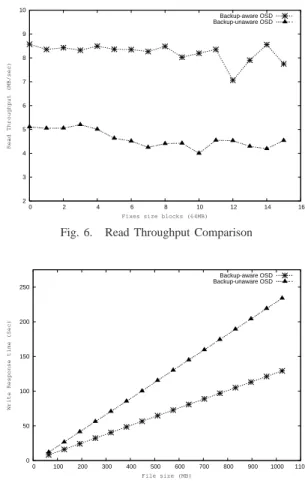
Fig. 5. Read Response Time Comparison
their own policy manager. Policy manager is responsible for providing cryptographically secure credentials to clients that are required for accessing an object on target. Each credential contains a capability that identifies a specific object, the list of operations that may be performed on that object, and a capability key that is used to securely communicate with the target. Further the MySQL server that is required by Policy manager runs on a different machine than initiator. This server stores the capabilities generated by policy manager for every object for every client.
In this performance study we use two metrics, namely -Throughput - the sustained effective data transfer rate between a initiator and the storage devices and the Response time - the time between start of an iSCSI Read/Write command till the request has been served by the target.
A. Read Performance Comparison
In case of Backup unaware OSD we configure the backup server to download 2.56 GB of data from the target and at the same time we also start reading of 1 GB of data from another client. In case of Backup aware OSD we configure the client to read 1GB of data exactly at the time when backup of 2.56 GB of data is supposed to happen. We measured the throughput and response time for the client read in both the cases. Figure 5 shows the comparison of read response times. The response time increases almost linearly with increase in file sizes. This linear increase in response time holds true for both the cases. The response time is much better for Backup aware OSD starting from small files to large files. In fact for 1.0GB file the response time in the case of Backup aware OSD is 98 secs lesser than its counterpart, which is a 45% improvement over Backup unaware OSD. Figure 6 shows the comparison of Read Throughputs. The Throughput for Backup aware OSD was around 8MB/sec whereas for the Backup unaware OSD it was around 5MB/sec.
B. Write Performance Comparison
Here instead of client reading the data from the target we performed write operation of 1GB on to the target. As in the earlier experiment we measured the throughput and response time for the client write in both the scenarios. Figure
2 3 4 5 6 7 8 9 10 0 2 4 6 8 10 12 14 16
Read Throughput (MB/sec)
Fixes size blocks (64MB)
Backup-aware OSD Backup-unaware OSD
Fig. 6. Read Throughput Comparison
0 50 100 150 200 250 0 100 200 300 400 500 600 700 800 900 1000 1100
Write Response time (Sec)
File size (MB)
Backup-aware OSD Backup-unaware OSD
Fig. 7. Write Response Time Comparison
7 and 8 shows the comparison of Write Response Time and Write Throughput respectively. The results are very similar to the Read experment with Backup aware OSD being 104 seconds lesser than its counterpart for 1.0 GB file yielding 45% improvement in response time and the throughput values being 8MB/sec and 4MB/sec respectively. It is interesting to note that in the case of Write experiment the throughput of Backup unaware OSD is almost constant throughout whereas in the case of Read experiment the throughput sees bit more variation. We believe that in the Read case some data fetch at the target requires disk access whereas some data is
3 4 5 6 7 8 9 0 2 4 6 8 10 12 14 16
Write Throughput (MB/Sec)
Fixed size blocks (64MB)
Backup-aware OSD Backup-unaware OSD
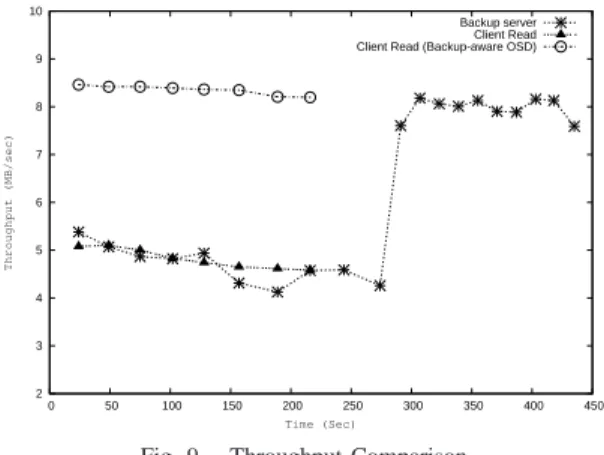
2 3 4 5 6 7 8 9 10 0 50 100 150 200 250 300 350 400 450 Throughput (MB/sec) Time (Sec) Backup server Client Read Client Read (Backup-aware OSD)
Fig. 9. Throughput Comparison
ready available in cache resulting in varying throughput. This behaviour is not seen in the write case since the target is explicitly instructed to do a synchronous write to disk resulting in uniform throughput performance.
The reason for low throughput and high response time in the case of Backup unaware OSD for both Read/Write is that both the client and backup server are competing against each other for disk access. This is very evident from Figure 9. The target does not distinguish the backup traffic and regular traffic and instead process them as they arrive. On the other hand in the case of Backup aware OSD, the intelligence embedded can distinguish the traffic and temporarily suspend the backup and use all its resources to process the regular traffic. This intelligence made possible through metadata present in the objects provides the backup aware OSD to schedule the requests accordingly. After the completion of client read the backup server throughput increases to 8MB/sec that is same as the client read in the case of Backup aware OSD.
In the case of Backup aware OSD the throughput will be high from begining and continues to remain high for the entire read operation. The target would suspend the backup operation and will service the real time requests. Further, we did the backup by copying the files to an NFS mounted partition and it took around 57 seconds to do the backup. So there will be no network traffic associated with backup as the data will be directly moved from target to backup device.
VI. CONCLUSION& FUTUREWORK
In this work we have clearly demonstrated the effectiveness of a backup management system built on top of OSD. The results show that our proposed backup system clearly outper-forms traditional backup solutions. Specifically, our intelligent non intrusive scheduling scheme is able completely minimize the impact of backup traffic on real time traffic.
This is an on going project and we plan to pursue several other interesting issues in data management. We believe that backup policy inference is a key challenge and would go a long way in making truly autonomous backup management systems. We plan to investigate the possibility of applying learning techniques to learn backup policies aided by partial
knowledge of environmental parameters such as access times, frequencies and data locality.
REFERENCES
[1] M. Mesnier, G. Ganger, and E. Riedel, “Object-based storage,” IEEE Communications Magazine, vol. 41, no. 8, pp. 84–90, August 2003. [2] T. T. C. NCITS, SCSI Object-Based Storage Device Commands -2
(OSD-2). Project T10/1721-D, Revision 0, October 2004.
[3] D. Du, D. He, C. Hong, J. Jeong, V. Kher, Y. Kim, Y. Lu, A. Raghuveer, and S. Sharafkandi, “Experiences Building an Object-Based Storage System based on the OSD T-10 Standard,” in Proceeding of the IEEE Conference on Mass Storage Systems and Technologies, MSST, 2006.
![Figure 3 shows a high level overview of our implemen- implemen-tation. For this study we use our home-grown open source implementation of the OSD T10 standard [3]](https://thumb-us.123doks.com/thumbv2/123dok_us/8604108.2333581/4.918.153.397.81.299/figure-overview-implemen-implemen-tation-source-implementation-standard.webp)