Fleet Connectivity Extension
Developer's Guide
Version 1.0
► Contents
Contents
Legal Notices
...3
Document Information
...4
Chapter 1: Overview
...5
What is the Fleet Connectivity Extension?...6
Why use the Fleet Connectivity Extension?...6
Chapter 2: User Guide
...8
Acquiring Credentials...9
Constructing a Request...9
Key Concepts...10
Fleet Connectivity Extension Ecosystem...10
Examples...13
Sending a Job to the Asset...13
Requesting Updates from the Assets...14
Service Support...15
Chapter 3: API Reference
...16
Resources and Responses...17
Sendjob...17
Job Request Body...18
Listupdates...19
Update Response...20
► Legal Notices
Legal Notices
© 2015 HERE. All rights reserved.
This material, including documentation and any related computer programs, is protected by copyright controlled by HERE. All rights are reserved. Copying, including reproducing, storing, adapting or translating, any or all of this material requires the prior written consent of HERE. This material also contains confidential information, which may not be disclosed to others without the prior written consent of HERE.
Trademark Acknowledgements
HERE and Nokia are trademarks or registered trademarks of Nokia Corporation.
Other product and company names mentioned herein may be trademarks or trade names of their respective owners.
Disclaimer
This content is provided "as-is" and without warranties of any kind, either express or implied, including, but not limited to, the implied warranties of merchantability, fitness for a particular purpose, satisfactory quality and non-infringement. HERE does not warrant that the content is error free and HERE does not warrant or make any representations regarding the quality, correctness, accuracy, or reliability of the content. You should therefore verify any information contained in the content before acting on it.
To the furthest extent permitted by law, under no circumstances, including without limitation the negligence of HERE, shall HERE be liable for any damages, including, without limitation, direct, special, indirect, punitive, consequential, exemplary and/ or incidental damages that result from the use or application of this content, even if HERE or an authorized representative has been advised of the possibility of such damages.
► Document Information
Document Information
Product
Name: Fleet Connectivity Extension
Version: Version 1.0
Document
Name: Fleet Connectivity Extension Developer's Guide
Id: 9131031-1449259218
Status: FINAL
► Overview
Chapter
1
Overview
Topics:• What is the Fleet Connectivity Extension?
• Why use the Fleet Connectivity Extension?
This document introduces the Fleet Connectivity Extension and: • explains key concepts
• provides examples
• documents resources and query parameters • documents response structures and data types
► Overview
What is the Fleet Connectivity Extension?
The HERE Fleet Connectivity Extension is the REST API portion of the Fleet Connectivity Extension ecosystem, which enables communication between a fleet dispatcher application and assets using applications created based on the HERE iOS and Android Premium Edition SDKs.
For more information on the Fleet Connectivity Extension ecosystem, see Fleet Connectivity Extension Ecosystem on page 10.
This document describes the overall functionality and the interface between the dispatcher
application and the REST API portion of the Web Fleet Connectivity Extension ecosystem. The API in the iOS and Android Premium Edition SDKs for use in building the navigation application for the asset is described in the documentation accompanying the iOS and Android Premium Edition SDKs.
The basic communication flow is as follows:
• Assets continuously poll for jobs by sending "READY" events until they receive a destination. • Dispatchers send destinations ("jobs") for mobile assets.
• Once an asset receives a destination that asset's application, which is created based on the iOS and Android Premium Edition SDKs, computes the route to the destination.
• While driving, the asset's application sends messages ("events") about the original estimated arrival time to the dispatcher.
• Dispatchers can cancel a job, send another asset to the destination or redirect the asset to another destination.
The Fleet Connectivity Extension ecosystem stores the messages in a persistent queue for delivery. This guarantees that messages get delivered with only a small delay despite possible connectivity limitations in the asset or dispatcher applications. In addition, the HERE Fleet Connectivity Extension ecosystem can be used as a channel for custom message exchange between dispatchers and assets.
Note: While the communication flow is a push model, the current implementation uses a bandwidth saving poll mechanism in order to work across all platforms and networks.
Why use the Fleet Connectivity Extension?
Fleet Connectivity Extension provides solutions for the following high level use cases:
When users of fleet management systems want to more closely integrate their vehicles with their backend systems to improve the processes in terms of speed and automation, the Fleet Connectivity
► Overview
Extension ecosystem provides a solution. One feature is the ability to send destinations directly to a navigation application in the asset instead of calling the driver and having the driver manually typing in the addresses of the destinations. In addition, information about ETAs and delays in the delivery channel is very important for planning purposes and improved customer service. Having this information automatically instead of depending on manual information improves the processes within fleet management.
The benefits are:
• fewer mistakes in delivering destination information
• efficient and time-saving disposition of jobs and employees • improved utilization of mobile resources
• shorter response times and improved customer service • lower telephony costs
► User Guide
Chapter
2
User Guide
Topics: • Acquiring Credentials • Constructing a Request • Key Concepts • Examples • Service SupportThe articles in this section provide a guide to using the Fleet Connectivity Extension.
► User Guide
Acquiring Credentials
All users of HERE APIs must obtain authentication and authorization credentials and provide them as values for the parameters app_id and app_code. The credentials are assigned per application. This document uses the placeholder text {YOUR_APP_CODE} and {YOUR_APP_ID} as placeholders for access and authorization credentials. Please replace these placeholders with your own unique application-specific credentials to access the API resources.
To obtain the credentials for an application, please visit http://developer.here.com/get-started for more details.
If you wish to explore the API, use the API Explorer at https://developer.here.com/api-explorer.
Constructing a Request
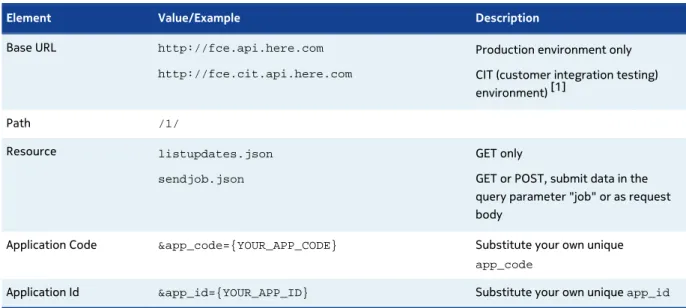
A request to the Fleet Connectivity Extension includes the basic elements shown in the following table and, in addition, it may contain resource-specific parameters or data.
Table 1: Basic request elements
Element Value/Example Description
Base URL http://fce.api.here.com
http://fce.cit.api.here.com
Production environment only CIT (customer integration testing) environment) [1]
Path /1/
Resource listupdates.json
sendjob.json
GET only
GET or POST, submit data in the query parameter "job" or as request body
Application Code &app_code={YOUR_APP_CODE} Substitute your own unique
app_code
Application Id &app_id={YOUR_APP_ID} Substitute your own unique app_id
[1] The CIT environment allows you to test your software against a newer version of the service before HERE brings that version into production. Note that the same application id can be used
► User Guide
in both environments, but staging may require a dedicated application code. If this is the case, please contact us as described under Service Support on page 15.
The staging environment is not intended for production use and HERE SLAs do not apply for this environment.
For examples of requests, see:
• Sending a Job to the Asset on page 13
• Requesting Updates from the Assets on page 14
Key Concepts
This section provides insights into the key concepts used throughout the Fleet Connectivity Extension.
Fleet Connectivity Extension Ecosystem
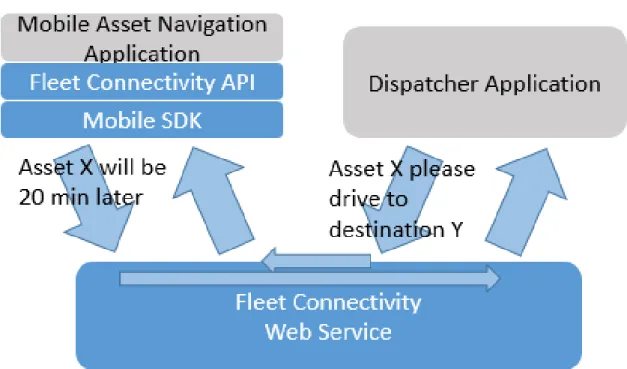
The figure below provides an overview of the components of and the message traffic in the Fleet Connectivity Extension ecosystem.
► User Guide
The following list provides additional information about the physical components above:
• Dispatcher – Center that manages mobile assets. The center's dispatch application uses the Fleet Connectivity Extension to send jobs to assets, instead of making phone calls, sending SMS, email or chat messages, and regularly polls the Fleet Connectivity Extension for updates from the assets. The dispatch application uses the HERE REST API to communicate with the ecosystem. An application can have a single dispatcher - physically or logically (multiple instances for load distribution and fault tolerance that have the same function and responsibility). An application can also have multiple dispatchers that direct and monitor disjoint or overlapping sets of assets (e.g. per country or per store).
• Asset – Logical entity with an application created with a HERE iOS and Android Premium Edition SDKs that provides routing services to the asset and interacts with one or more dispatchers via the Fleet Connectivity Extension. Typically an asset can be a vehicle (delivery truck, car, or bicycle) or a person (passenger, courier) that uses an application that is built on the iOS and Android Premium Edition SDKs. An application can have multiple assets, limited by the number specified in the commercial contract with HERE.
• Destination – The physical location to which the mobile asset is going, as defined by a set of WGS 84 compliant coordinates.
The following list provides additional information about the information flow between the physical components above:
• Job – Package of information that must include at least the geocoordinates of the destination, but may include other additional information depending on the application that the asset has. When a dispatcher sends a job to an asset, this job replaces any previous jobs that were sent. An empty job without a destination cancels the current destination so that the asset is idle.
• Event – Message that is sent from an asset to the Fleet Connectivity Extension with information about the status of the asset.
• Update – Message from the Fleet Connectivity Extension ecosystem to the dispatcher with asset status information, if any is available. An update may contain one or more events that describe a new estimated time of arrival or status information on the particular job such as whether the job was accepted, cancelled, or denied. Update messages expire after one month regardless of their state, but dispatcher applications should pose a use case dependent lower limit on the validity time of an update, usually a few hours. Until the message expiry, the dispatcher(s) asset can always retrieve the message, also multiple times.
• Messages – The Fleet Connectivity Extension does not guarantee a maximum time until the message is delivered to the application on the Mobile SDK, because the device owner might have the device switched off, ran out of battery, have no mobile network coverage or is in a region where his data plan doesn't permit a connection. Jobs expire after one month regardless of their state, but asset applications should pose a use case dependent lower limit on the validity time of a job, usually a few hours. Until the job expiry, the asset can always, also multiple times, retrieve the job message. The Fleet Connectivity Extension does not maintain or communicate an explicit status of a job. The status can be determined by the application (device and dispatcher) based on the messages that have been received w.r.t. this job: If an asset received a destination, it computes the route and sends the estimated time of arrival to the dispatcher. Then the dispatcher knows that the asset received and accepted the job. Before receiving these messages and in between receiving update messages, the dispatcher doesn't know whether the asset is off-line or on-line. An asset does not know whether or when the dispatcher received its route progress and delay update messages. There is no limit on the number or frequency of update
► User Guide
messages sent per asset, but the Mobile SDK minimizes the message traffic to save network bandwidth and cost. The dispatcher decides for each job, how accurate the estimated time of arrival should be obeyed, i.e. after what amount of deviation the dispatcher wants a notification. An initial estimated arrival time must be sent, so that the dispatcher knows the asset accepted and is on the way, and also because the Mobile SDKs route calculation might result in a different time than what the dispatcher computes, due to possibly different algorithms, map releases or using different traffic information. After the initial estimated arrival time was sent, and unless any event (traffic jam, accident...) causes a delay, the next message notifies the dispatcher that the asset reached the destination. The Fleet Connectivity Extension does not maintain or communicate an explicit status of an update message. Hence, if multiple dispatchers are watching for update messages, they cannot know whether another dispatcher has already read or even reacted to an update message. Also, assets cannot know whether a dispatcher has got their update(s).
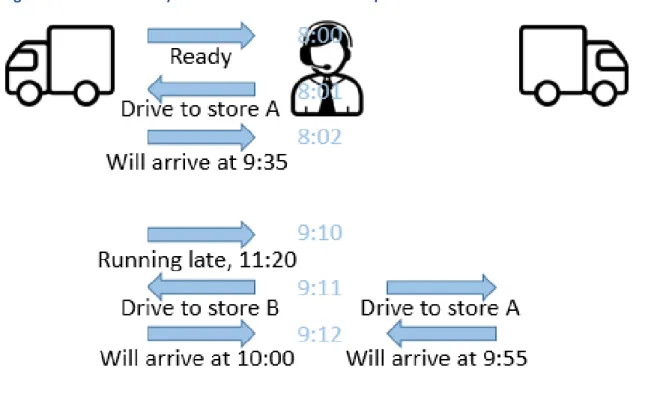
The figure below provides an example communication flow between the components in the Fleet Connectivity Extension ecosystem.
Figure 2: Fleet Connectivity Extension Communication Example
Security
Both the dispatcher application and the asset application use the same set of app_id and app_code credentials to authenticate with the Fleet Connectivity Extension service for each request. The applications should authenticate the service by verifying the server certificate. The Fleet Connectivity Extension does not impose additional authentication or capability/restriction mechanisms. This means the sender_id in a job or event is trusted, and both the dispatchers and all assets have full rights to send and receive arbitrary messages.
► User Guide
You are free to use your existing proprietary authentication and authorization mechanisms on top of the security mechanism described above. Typically, an end user has to enter a user name and password into the asset application. Then the asset application uses a defined asset_id for the communication through the Fleet Connectivity Extension ecosystem to the dispatcher application. Similarly, an end user logs in by user name and password at the dispatcher application. Based on this, the dispatcher application uses a defined dispatcher_id for the communication through the Fleet Connectivity Extension ecosystem to the asset application.
Examples
This section provides examples of requests along with the responding results.
Sending a Job to the Asset
User Story
A logistics company needs to ship a delivery to the HERE Berlin Campus at WGS 84 geocoordinates 52.53086,13.38469. The dispatcher software client Dispatcher-1 assigns the delivery to asset Asset-1. Asset-1 keeps Dispatcher-1 updated on its progress (see the Requesting Updates from the Assets on page 14 for how this is done). The dispatcher wants to know when the asset ETA will be delayed by more than five (5) percent of the original calculated time.
Send Job Request Summary
The following list summarizes the elements required to create a request matching the user story and shows, in square brackets, how the request example below uses these elements. Note that the request example also uses the authentication parameters.
Resource: sendjob.json
Parameters: [app_id={YOUR_APP_ID}], specifies the authentication app_id [app_code={YOUR_APP_CODE}], specifies the authentication app_id
job [job={"version"="1.0", "job_id"="12345", "type"="NEW_DESTINATION", "asset_id"="Asset-1",
"dispatcher_id"="Dispatcher-1", "eta_threshold_percent"="5",
"content"={"destination"="52.53086,13.38469"}}], the job message in url-encoded JSON format
► User Guide
Note: HERE recommends that you follow standard REST paradigms where possible and that the POST method be used for sending messages to the Fleet Connectivity Extension Web Service when sending job requests. When using the Fleet Connectivity Extension API in a pure JavaScript environment, the resource sendjob also allows you to use the request parameter
job with the GET method to send a job request as a parameter for convenience.
Send Job Request (as GET)
http://fce.cit.api.here.com/1/sendjob.json ?app_id={YOUR_APP_ID} &app_code={YOUR_APP_CODE} &job=%7B%22version%22%3A%221.0%22%2C%22job_id%22%3A%2212345%22%2C%22type%22%3A %22NEW_DESTINATION%22%2C%22asset_id%22%3A%22MTK-HE%200815%22%2C%22dispatcher_id%22%3A %2260574331-5f8f-3bee-ee8e-6580dea1cb1a%22%2C%22message%22%3A%22This%20delivery%20is %20urgent.%22%2C%22eta_threshold_percent%22%3A%225%22%2C%22content%22%3A%7B%22destination %22%3A%2250.0833333%2C8.25%22%7D%7D
Send Job Response
{
job_id: "12345" }
Requesting Updates from the Assets
User Story
In continuation of the user story from Sending a Job to the Asset on page 13, the dispatcher software client Dispatcher-1 requests an update from Asset-1. The response from Asset-1 contains the remaining time in seconds and the current position in geocoordinates at a street corner in the immediate neighborhood of the target position at the HERE Berlin Campus.
Request Summary List Updates
Resource: Listupdates on page 19
Parameters: [app_id={YOUR_APP_ID}], specifies the authentication app_id [app_code={YOUR_APP_CODE}], specifies the authentication app_id
List Updates Request
http://fce.cit.api.here.com/1/listupdates.json ?app_id={YOUR_APP_ID}
► User Guide
List Updates Response
{ events: [ { version: "1.0", event_id: "7a86611f-5707-69ba-61dd-980cb814ba6c", message_id: "d50c0671-e52b-3c3f-5c1e-d97714791dd2", job_id: "12345", asset_id: "Asset-1", dispatcher_id: "Dispatcher-1", creation_time_ms: 1446202799806, type: "ETA_UPDATE", eta_update: { remaining_time_seconds: 30, lat: 52.53058, lon: 13.3775 } }, ... ] }
Service Support
If you need assistance with this or other HERE products, please contact your HERE representative or Technical Customer Support.
► API Reference
Chapter
3
API Reference
Topics:• Resources and Responses
• Errors
This section provides descriptions of the resources, parameters, return types and error codes of the HERE Fleet Connectivity Extension.
► API Reference
Resources and Responses
All parameter values must be first UTF-8 encoded and then URL encoded. For example, characters such as ä need to be UTF-8 and URL encoded for the resource to read.
Responses can be extended by new elements or attributes without prior announcement, and without a new major version. Hence, applications that parse the responses should not assume fixed response structures, but should deal with additional, unexpected elements and attributes.
Sendjob
Use the resource sendjob to send a job message to a mobile asset through the Fleet Connectivity Extension ecoystem. This resource supports both POST and GET requests. For more information on the Fleet Connectivity Extension ecoystem, see Fleet Connectivity Extension Ecosystem on page 10. For information on the expected structure of the POST body, see Job Request Body on page 18.
Note: HERE recommends that you follow standard REST paradigms where possible and that the POST method be used for sending messages to the Fleet Connectivity Extension Web Service when sending job requests. When using the Fleet Connectivity Extension API in a pure JavaScript environment, the resource sendjob also allows you to use the request parameter
job with the GET method to send a job request as a parameter for convenience.
Resource URI
The pattern for requests to the resource is base-url/1/sendjob.json?<parameter>=<value>. For more information, see Constructing a Request on page 9.
Resource Parameters
Parameter Type Mandatory Description
app_id string Y Typically, but not guaranteed to be, 20 bytes Base64 URL-safe
encoded string used for the authentication of the client application. See Acquiring Credentials on page 9.
app_code string Y Typically, but not guaranteed to be, 20 bytes Base64 URL-safe
encoded string used for the authentication of the client application. See Acquiring Credentials on page 9.
callback string N Specifies the name of a user-defined function used to wrap the JSON
response. Required for JSONP requests. Default: No JSONP response wrapper
► API Reference
Parameter Type Mandatory Description
job string N URL-escaped JSON message. Either a GET request passes the
message in this parameter or a multi-part POST body passes it as its only part. For more information, see 'Message Formats' in Key Concepts on page 10
Response
This resource returns a response with the POST body element job_id.
{
job_id: "12345" }
Job Request Body
The POST request body contains the message information about the job sent to the asset with the Fleet Connectivity Extension ecosystem.
The overall message size must not exceed 3500 characters in UTF 8 encoding.
The table below lists the elements the post body. For an example of a post body, see Sending a Job to the Asset on page 13.
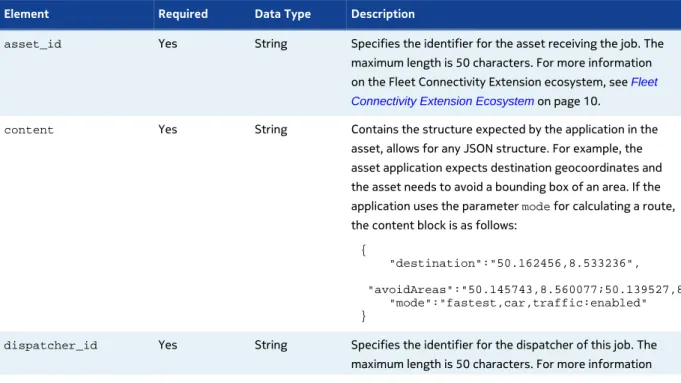
Table 2: Request Body Elements
Element Required Data Type Description
asset_id Yes String Specifies the identifier for the asset receiving the job. The
maximum length is 50 characters. For more information on the Fleet Connectivity Extension ecosystem, see Fleet Connectivity Extension Ecosystem on page 10.
content Yes String Contains the structure expected by the application in the
asset, allows for any JSON structure. For example, the asset application expects destination geocoordinates and the asset needs to avoid a bounding box of an area. If the application uses the parameter mode for calculating a route,
the content block is as follows:
{ "destination":"50.162456,8.533236", "avoidAreas":"50.145743,8.560077;50.139527,8.571493;", "mode":"fastest,car,traffic:enabled" }
dispatcher_id Yes String Specifies the identifier for the dispatcher of this job. The
► API Reference
Element Required Data Type Description
on the Fleet Connectivity Extension ecosystem, see Fleet Connectivity Extension Ecosystem on page 10.
eta_threshold_percentYes String Specifies a threshold as a percentage of the estimated time
of arrival at which the application in the asset should send an update. For example, when you specify a value of 5, the application in the asset sends an update if the estimated time of arrival changes by more than five (5) percent.
job_id Yes String Specifies the unique identifier defined by the dispatcher
application. The maximum length is 50 characters. For more information on the Fleet Connectivity Extension ecosystem, see Fleet Connectivity Extension Ecosystem on page 10.
message No String Optional text message.
type Yes String Specifies the type of job. The allowed values are:
• NEW_DESTINATION – specifies the job; includes the
geocoordinates of a new location.
• CUSTOM – specifies the messsage is for a custom use in
the asset application. When you specifiy this value, the content element may contain any JSON structure that is understood by your asset application.
version Yes String Indicates the protocol version used in the message. The
value must be 1.0.
Listupdates
Use the resource listupdates to request a list of updates from assets sent through the Fleet Connectivity Extension ecoystem to a dispatcher. This resource supports GET requests. For more information on the Fleet Connectivity Extension ecoystem, see Fleet Connectivity Extension Ecosystem on page 10.
Resource URI
The pattern for requests to the resource is base-url/1/listupdates.json? <parameter>=<value>. For more information, see Constructing a Request on page 9.
► API Reference
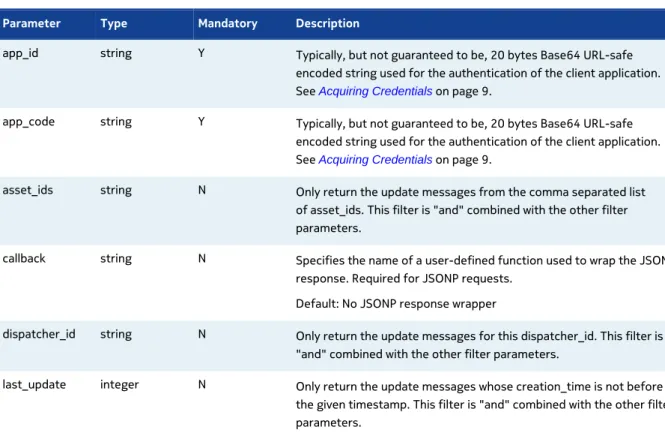
Resource Parameters
Parameter Type Mandatory Description
app_id string Y Typically, but not guaranteed to be, 20 bytes Base64 URL-safe
encoded string used for the authentication of the client application. See Acquiring Credentials on page 9.
app_code string Y Typically, but not guaranteed to be, 20 bytes Base64 URL-safe
encoded string used for the authentication of the client application. See Acquiring Credentials on page 9.
asset_ids string N Only return the update messages from the comma separated list
of asset_ids. This filter is "and" combined with the other filter parameters.
callback string N Specifies the name of a user-defined function used to wrap the JSON
response. Required for JSONP requests. Default: No JSONP response wrapper
dispatcher_id string N Only return the update messages for this dispatcher_id. This filter is "and" combined with the other filter parameters.
last_update integer N Only return the update messages whose creation_time is not before the given timestamp. This filter is "and" combined with the other filter parameters.
Listupdate Response
This resource returns a JSON message. For more information on the message structure, see Update Response on page 20.
Update Response
The response to a request to the resource listupdates uses the elements listed in the table below.
Table 3: Response Elements
Element Always Present
Data Type Description
asset_id Yes String Specifies the identifier of the asset that received the job
and sent the update. The maximum length is 50 characters. For more information on the Fleet Connectivity Extension ecosystem, see Fleet Connectivity Extension Ecosystem on page 10.
► API Reference
Element Always Present
Data Type Description
creation_time_ms Yes Specifies
the count of milliseconds since 00:00:00 1.1.1970 UTC. Must not be passed by the dispatcher application. Gets added to the message by the Fleet Connectivity Extension.
dispatcher_id Yes String Specifies the identifier of the dispatcher that sent the
original job. The maximum length is 50 characters. For more information on the Fleet Connectivity Extension ecosystem, see Fleet Connectivity Extension Ecosystem on page 10.
eta_update .
remaining_distance_meter
- Integer Specifies the estimated remaining distance in the route in meters to the destination. Only used for ETA_UPDATE
messages, otherwise not present.
eta_update .
remaining_time_seconds
Yes Integer Specifies the estimated remaining driving time in seconds to the destination. Only used for ETA_UPDATE messages,
otherwise not present.
event_id Yes String Specifies the unique identifier defined by the asset
application for the event message. The maximum length is 50 characters. For more information on the Fleet Connectivity Extension ecosystem, see Fleet Connectivity Extension Ecosystem on page 10.
job_id - String Specifies the unique identifier defined by the dispatcher
application for the original job to which the update responded. The maximum length is 50 characters. For more information on the Fleet Connectivity Extension ecosystem, see Fleet Connectivity Extension Ecosystem on page 10.
location . lat - String Specifies the current latitude of the asset in WGS 84
geocoordinates.
location . lon - String Specifies the current longitude of the asset in WGS 84
► API Reference
Element Always Present
Data Type Description
type Yes String Specifies the type of job. The allowed values are:
• ETA_UPDATE – indicates the Estimated Time of
Arrival (ETA) changed by an amount that exceeded the percentage value defined for the type.
• READY – indicates the asset is available for a new job.
version Yes String Indicates the protocol version used in the message. The
► API Reference
Errors
Fleet Connectivity Extension supports the standard HTTP status codes. When an request results in a
400 Bad Request response, the response body may contain addition troubleshooting information.
Status Message Error (description) Example
400 Bad Request
Invalid Authentication
Change the parameters in the request to match your credentials. For more information on how to get user credentials, see Acquiring Credentials on page 9.
{
"status" : "Bad Request", "message" : "Error occurred", "error" : "Invalid authentication." } 400 Bad Request Missing Parameters
Add the required parameters to the request. For more information on which parameters are required, see the appropriate reference for the resource (Sendjob on page 17 or Listupdates on page 19).
{
"status" : "Bad Request", "message" : "Missing parameters",
"error" : "Required parameters have not been provided." } 400 Bad Request Unable to complete request
Check the diagnostic for additional information. 400 Bad Request Unique key violation.
The request contains a value for a parameter that duplicates information previously submitted to the system when that parameter must be unique. For example, the parameter job_id in a request to the
resource sendjob contains an ID that was
used in a previous request. Make a new request with a unique ID.
{
"status" : "Bad Request", "message" : "There was a unique key violation. Check data input." ,
"error" : "Duplicate entry 'D133333-1' for key 'unique_customer_loc_id'" }
Unauthorized User not authorized for this action.
"User does not have permission rights for export" or "User not authorized for this action".