Why VPN Alone Will not Secure your Wireless Network
Christian H. Mosveen Department of Computer Science
University of Auckland E-mail: [email protected]
Abstract
Any wireless device will, because it does not use a closed medium to transfer its data, have inherent security issues. The current practice to alleviate this problem is by using Virtual Private Networks (VPN) to provide both authentication and encryption. In this paper we will show that this approach overcomes some of the traditional security problems associated with wireless networks, but that there also exist some it does not protect against. We will focus on showing that even if VPN is used, malicious users can in some cases bypass the security it was supposed to provide, and compromise the network it was supposed to protect. Either by introducing their own access points into the fray (Rogue Access Point) to intercept traffic, or by using a dual-NIC laptop already legitimately connected to the network as a route past the authentication measures (Hidden Wireless Router). We will discuss what measure of security VPN is intended to provide, and how these two attacks compare in the way they relate to it. Finally, we will comment on the countermeasures for the attacks.
1. Introduction
Compared to the explosive growth of wireless devices in the market, security has followed very slowly. While regular networks always had the assurance that if you controlled the cable, you
controlled the data, there is no way of controlling the medium wireless devices transfers their data across – the airwaves. Because of the relative ease for a nearby hostile user to pick packets out of the air, it is common practice to not give direct wireless access to corporate intranets, as
it would defeat the purpose of firewalls and intrusion detection systems if something sinister could just ride past under the guise of a legitimate wireless user [1].
There has been made several attempts at improving wireless security during the years, but none of them has addressed the problems adequately. Therefore, VPN is the current best practice for securing important parts of a network, while still allowing access from wireless devices.
2. Related work
The first attempts at securing 802.11-based wireless networks were with WEP (Wired Equivalent Privacy) and MAC Address Filtering. WEP provided encryption of the traffic, and manual key distribution, but was found to be severely lacking only short after its inception [5, 2]. MAC Address Filtering restricted access to the network by only allowing certain MAC addresses to connect, but ended up in a similar fashion to WEP, because of the ease of sniffing MAC addresses from the
network, and using them to replace the factory defaults [2].
Soon after, a new and improved security mechanism called 802.1x was introduced. It made changes to both the clients and the access points, and was made general enough to apply to several different authentication protocols. While 802.1x was a step in the right direction from the earlier attempts, it still suffered from the same drawback as 802.11b: There was no authentication of the network, which led to the client not being able to know whether he connected to the desired network or to a network set up to lure clients to it [2].
In 2003, IEEE advanced wireless security further by releasing WPA (Wi-Fi Protected Access), which, essentially being a subset of the emerging protocol 802.11i, addressed the vulnerabilities of WEP while incorporating 802.1x port-based authentication [4].
Finally, the mentioned 802.11i is supposed to be ready by the end of 2004 [4, 1], and will, in addition to the WPA features, add per-user authentication, per-session cryptographically strong
keys, and secure de-authentication and disassociation. However, 802.11i will not merely be a modular addition to the existing architecture, and will therefore take some time to get widely deployed [4].
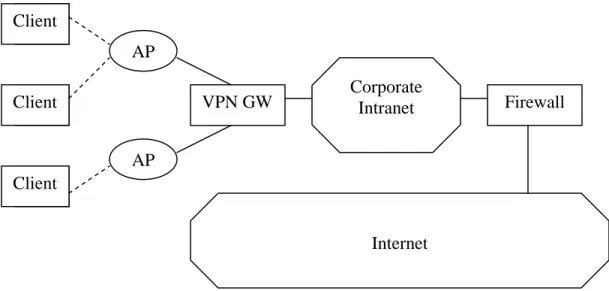
Therefore, and because 802.11i will not provide the magical solution to every problem, many enterprises will still look to VPN to supply their security needs. Figure 1 shows how VPN for wireless networks is usually implemented.
Figure 1
The clients will use WEP to associate themselves with an Access Point (AP), and will be given a private, non-routable IP address by DHCP. Then the clients will establish a VPN connection to the VPN Gateway (GW), through their Access Point. After authentication, keys will be exchanged, and the VPN Gateway will create an encrypted tunnel from the client to the corporate intranet. In this way VPN provides per-user
authentication and privacy by encryption [1].
3. Hidden Wireless Routers
Most laptops able to establish wireless connections also have an adapter supporting regular Ethernet connections, and many enterprises support both types of network connections for their users. AP
AP
VPN GW Corporate Intranet Firewall Client
Client
Client
The Ethernet connection will bring the users straight access to the corporate intranet, while the wireless connection relies on VPN to provide secure access to the intranet, as shown in Figure 1. This architecture will be secure, as long as only legitimate users are connected to the Ethernet jacks, and all wireless traffic travels through the VPN Gateway.
Now consider the setting illustrated in Figure 2, and it will be clear that it is possible for hostile wireless users, close to the physical location, to bypass the VPN Gateway, and thereby get access to the corporate intranet [1].
Figure 2
In this setting we consider two laptops; a legitimate Client, and a hostile Rogue. The Client has associated itself with an Access Point, and thereby gotten a private, non-routable IP address. It has also, however, connected to its local Ethernet jack, and gotten a routable IP address as well, with fixed access
straight to the corporate intranet. Let us also assume that Network Address Translation (NAT) is enabled on the Client’s wireless interface, either via a simple misconfiguration, using it at home and not changing it back, gotten affected by some sort of malicious attack, or for some other reason [1]. A AP
AP
VPN GW Corporate Intranet Firewall Client
Client
Rogue
Rogue close enough to the wireless network could then sniff the wireless traffic to obtain a valid WEP key, and use it to associate itself with an Access Point. It would then get a private IP address in the same subnet as the Client. Since the Client has NAT enabled on the wired interface, with the wireless interface as the local network, the wireless interface would act as the router between any traffic it received over the wireless network, and the routable IP address of the Ethernet adapter. So if the Rogue would forward all of its packets to the private IP address of the Client, the Client would route them all through its Ethernet connection, and straight into the corporate intranet. It would also work as a router in the exact same way for traffic returning from the intranet to the Rogue.
4. Rogue Access Points
As mentioned earlier, a big problem regarding wireless security is the fact that the networks have no means of providing authenticity as to which
network they really are. While the users can be made to authenticate themselves before being allowed onto the networks, the users must take whatever the networks tell them in good faith. Malicious users can take advantage of this non-mutual authentication, by introducing network nodes in the targets’ paths that do the malicious users’ bidding. In wireless networks, the most common of these are called Rogue Access Points.
Rogue Access Points are set in place to mimic legitimate Access Points, but instead of purely providing service for the users, the Rogue Access Points can perform any number of malicious operations on the traffic besides just monitoring it, for example modifying it or re-routing it. In [2], Godber and Dasgupta define Rogue Access Points as “an access point deployed on a large centrally administered network outside the administrative controls established for the authorized wireless access points” (p. 426). We will illustrate this type of attack in Figure 3.
Figure 3
A security breach could occur if the enterprise allowed guest access to the Internet via the normal Access Points, both for bona-fide guests to the corporation, and for privileged users not bothering with VPN just to access the Internet. The Rogue Access Point could be set up by sniffing a valid WEP key, and using it to establish it self as a seemingly valid Access Point. Clients would then inevitably connect to the Rogue Access Point, and the malicious user could monitor their traffic. A technique is described in [2], where the Rogue Access Point modifies the Client’s requests, as to for example downloading malicious software instead of the Client’s intended download. This
malicious software could for instance be a Trojan installing a key logger on the Client’s computer. The key logger would then, among other things, provide the Trojan’s owner with the victim’s VPN authentication credentials the next time the victim needed to access the corporate intranet. The malicious user could then use these credentials to get through the VPN Gateway, and get access to the corporate intranet.
Please not that this attack could be performed in many ways, for example at the user’s home network or a public hotspot, and for many different objectives – the Trojan could contain a plethora of different malware.
AP
RAP
VPN GW Corporate Intranet Firewall Client
Guest
Client
5. Analysis
In [3], Lampson asks “What is security?”, and continues to explain computer security in a setting where the trade-off between what degree of security and what degree of inconvenience, is the most important – the everyday business setting. He also gives a classification of aspects of study needed to evaluate an existing secure system. We will try to discover the similarities and differences of these two attacks, and why VPN in these cases is a vulnerable system, by applying Lampson’s three principles of security study; policy, mechanism, and assurance. What is the system supposed to do? How does it do it? Does it really work? [3].
5.1 Policy
We start off by introducing a general security policy for outer defense systems, like VPN. In the enterprise setting, where there usually is a corporate intranet containing anything from business secrets to personal details, the main objective of the outer defense is to avoid unauthorized access to the intranet altogether. Therefore, which
users get to access the intranet and its data is controlled by a centralized entity. This is the most important part of a secure system like this, because it prevents the theft or modification of both information and privacy. But this secrecy aspect goes hand in hand with the system’s availability, as hard secrecy is likely to also mean higher inconvenience for the users. In addition, the system should provide accountability – just in case anything went wrong, it would be possible to track down the reason for it.
5.2 Mechanism
VPN systems are trying to fulfill this policy by preventing unauthorized wireless users from accessing the content of the corporate intranet, with means of the authentication and encryption VPN provides. Regular Ethernet computers have no such restriction, because they are already protected by the fact that there is a physical link between the corporate network and their computer. In either way there would be accountability, as connected users would have a static IP address, and the wireless users would
have to authenticate through the VPN Gateway.
5.3 Assurance
As we have established with the discussion of the two attacks, this mechanism does not always work, and the policy is therefore not fulfilled. In both cases, the attacks manage to get the malicious user into the supposedly protected intranet, and in neither case is it easy to hold the malicious users accountable.
In the case of the Hidden Wireless Router attack, the malicious user bypasses the control point – the VPN Gateway – altogether, by using a legitimate user’s static connection to travel in on. Any hostile actions would therefore seem as coming from the legitimate user’s IP address, and the best rectification would only be a partial one; getting the legitimate user off the network until the weakness in his or her setup had been dealt with.
With the Rogue Access Point attack, the vulnerability would occur from malicious users getting the login credentials of legitimate users. The way
malicious users could get these credentials could differ, but the network secrecy would in any case be breached, as the malicious users could then find their way into the intranet using perfectly good login names and passwords. Because of this, it would be difficult to immediately hold the malicious users accountable with this attack as well, because they would seem to the system as legitimately authenticated users. When hostile actions were discovered, the first counter-action should be to have the victimized user change his or her credentials, to avoid any further immediate abuse.
6. Countermeasures
Fazal et al. presents a solution to the Hidden Wireless Router attack, which works by monitoring any cross-traffic between wireless nodes in the network. This type of traffic should not occur at all, because all wireless traffic should by default go through the VPN Gateway, and could therefore immediately be flagged as a sign of malicious activity. It would also be possible to detect the
possibility of malicious use in a more active way, where a probe could try to access a honey pot, set up exclusively for this use, through the wireless interface of a suspected Hidden Wireless Router. If the connection could be established, the interface’s owner could be notified and made to modify his or her setup so that any abuse would be impossible [1].
A solution for the broad range of Rogue Access Point attacks is presented by Godber and Dasgupta, where they state that to be adequately secure all traffic has to pass through a VPN to a trusted network [2]. This is on the same note as the solution to the Hidden Wireless Router attack, in that any cross-traffic bypassing the VPN Gateway, even just for guest access to the Internet, should be prohibited.
7. Conclusion
We started by laying out the history of measures meant to increase the security of wireless networks, and also that these are incomplete – leading to the wide use
of VPN-based wireless security. We then explained two attacks that could compromise VPN-secured networks, if either the wireless users were susceptible to them, or if the entire system allowed for traffic bypassing the VPN Gateway. We discussed these two attacks in the context of what security the VPN implementation was intended to bring, and what they had in common. Finally, we pointed out the countermeasures for the two attacks.
It is safe to say that VPN still will be the security system of choice for wireless networks needing protection. While a protocol like 802.11i is expected to be available soon, and alleviate many of the existing problems with current non-VPN solutions, its wide implementation would still be some time off. Until then, it will be important to actually utilize the strengths of VPN, namely having all traffic traveling through it. Without doing so, systems would be left open to the possibility of the attacks described herein.
8. References
[1] Fazal, L., et al. (2004). Tackling security vulnerabilities in VPN-based wireless deployments. 2004 IEEE International Conference on Communications (IEEE Cat. No.04CH37577). IEEE. Part Vol.1, 2004, pp.100-4 Vol.1. Piscataway, NJ, USA.
[2] Godber, A. and Dasgupta, P. (2003). Countering rogues in wireless networks. Proceedings 2003 International Conference on Parallel Processing Workshops. IEEE Comput. Soc. 2003, pp.425-31. Los Alamitos, CA, USA.
[3] Lampson, B. W. (2004). "Computer security in the real world." Computer 37(6): 37-46.
[4] Molta, D. (2004). "Wi-fi vs. bad guy [secure enterprise WLAN]." Network Computing 15(4): 36-48.
[5] Wang, S., et al. (2003). WLAN and it's security problems. Proceedings of the Fourth International Conference on Parallel and Distributed Computing,
Applications and Technologies (IEEE Cat. No.03EX684). IEEE. 2003, pp.241-4. Piscataway, NJ, USA.