S P I
T O
I
2
C B
R I D G E
A N D
G P I O P
O R T
E
X PA N D E R
Single Chip SPI to I2C Transfer
Integrated clock; no external clock required On-Chip Voltage Monitor
Slave Serial Peripheral Interface (SPI) Up to 1.0 Mbit/s Transfers
Configurable to Least Significant Bit or Most Significant Bit first byte transfers
I2C Master Interface
Operates at configurable rates up to 400 kHz 255 RX and TX Data Buffers
Input and Output Port Pins
8 Pins Configurable as Push-Pull or Open-Drain 1 Pin Configurable as an edge-triggered interrupt
source
All pins 5 V Tolerant
INT active low interrupt pin Supply Voltage of 2.7 V to 3.6 V
Typical operating current: 6.4 mA Package
Pb-free 20-pin QFN
Figure 1. Block Diagram
Voltage
Monitor
Internal
Oscillator
Controller
I
2C
Interface
Port Controller
Internal Registers
SPI
Interface
Eight I/O Pins
Edge-Triggered
Interrupt Source
SDA
SCL
MISO MOSI SCK CST
ABLE
O
F
C
ONTENTS
Section
Page
1. System Overview . . . 4
2. Global DC Electrical Characteristics . . . 4
3. Absolute Maximum Ratings . . . 4
4. Pinout And Package Definition . . . 5
4.1. Pin Out Chart . . . . 5
4.2. QFN-20 Pinout Diagram (Top View) . . . 6
4.3. QFN-20 Pinout Diagram (Bottom View) . . . 7
4.4. QFN-20 Solder Paste Recommendations . . . 8
5. SPI Slave Bus . . . 9
5.1. Command Set . . . 10
5.2. Internal Registers . . . 10
5.3. SPI Byte Orientation . . . 11
5.4. SPI Timing Diagrams . . . 11
5.5. I
2C Activity During SPI Transactions . . . 12
6. I
2C Serial Interface . . . 13
6.1. Determining Pull-Up Register Values . . . 13
6.2. I
2C Internal Registers . . . 13
6.3. I
2C Status . . . 15
6.4. I
2C Receive Buffer Size . . . 17
6.5. I
2C Commands . . . 17
7. Port I/O . . . 19
8. CP2120 Revision Number . . . 22
Document Change List . . . 23
1. System Overview
The CP2120 is a highly-integrated SPI-to-I2C Bridge Controller with an SPI interface that provides a simple and reliable method for communicating with I2C devices. The CP2120 includes a 4-wire serial peripheral interface (SPI), a serial I2C interface, 256 byte data buffers, an internal oscillator, eight input/output port pins, and one pin configurable as an edge-triggered interrupt source in a compact 4x4 package. No external components other than pull-up resisters on the I2C pins are required. The SPI Master controls the CP2120 across the SPI interface using a command set that governs all CP2120 configuration and operation.
2. Global DC Electrical Characteristics
3. Absolute Maximum Ratings
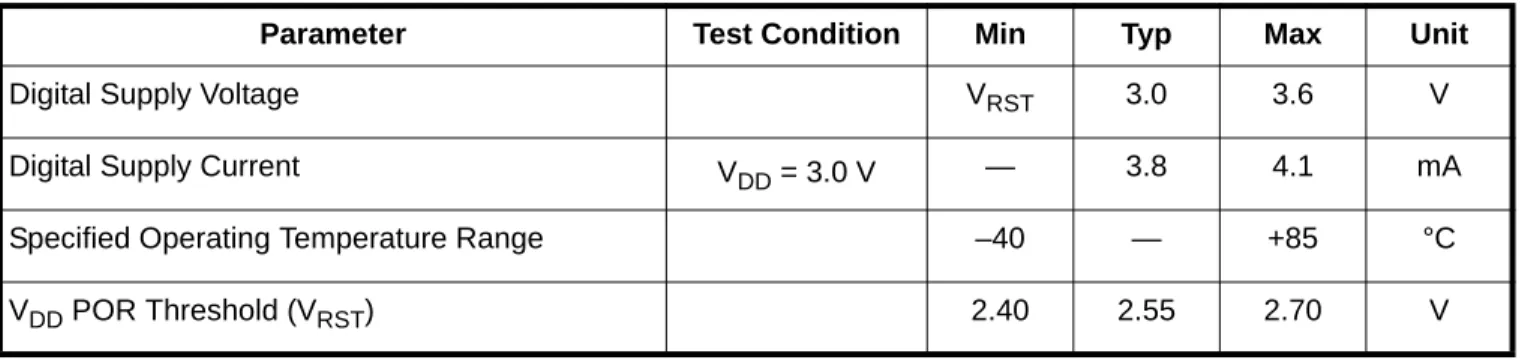
Table 1. Global Electrical Characteristics
–40 to +85 °C, 25 MHz system clock unless otherwise specified.
Parameter Test Condition Min Typ Max Unit
Digital Supply Voltage VRST 3.0 3.6 V Digital Supply Current VDD= 3.0 V — 3.8 4.1 mA Specified Operating Temperature Range –40 — +85 °C VDD POR Threshold (VRST) 2.40 2.55 2.70 V
Table 2. Absolute Maximum Ratings
Parameter Test Condition Min Typ Max Unit
Ambient temperature under bias –55 — 125 °C
Storage Temperature –65 — 150 °C
Voltage on any Port I/O Pin or RST with respect to GND
–0.3 — 5.8 V
Voltage on VDD with respect to GND –0.3 — 4.2 V Maximum Total current through VDD or GND — — 500 mA
4. Pinout And Package Definition
4.1. Pin Out Chart
Name Pin # Type Description
VDD 3 Power Supply Pin
GND 2 Ground
RST 4 Digital I/O Device Reset. Open-drain output of internal POR or VDD monitor. An external source can initiate a system reset by driving this pin low for at least 15 µs.
SCLK 1 Digital In SPI Clock Input MISO 20 Digital Out SPI Slave Output MOSI 19 Digital In SPI Slave Input CS 18 Digital In SPI Slave Select SDA 17 Digital I/O I2C Data Input/Output SCL 16 Digital I/O I2C Clock Input/Output
GPIO 0 5 Digital I/O General Purpose Configurable Digital Input/Output GPIO 1 12 Digital I/O General Purpose Configurable Digital Input/Output GPIO 2 11 Digital I/O General Purpose Configurable Digital Input/Output GPIO 3 10 Digital I/O General Purpose Configurable Digital Input/Output GPIO 4 9 Digital I/O General Purpose Configurable Digital Input/Output GPIO 5 8 Digital I/O General Purpose Configurable Digital Input/Output GPIO 6 7 Digital I/O General Purpose Configurable Digital Input/Output GPIO 7 6 Digital I/O General Purpose Configurable Digital Input/Output EINT 13 Digital I/O Edge-Triggered Interrupt Source
INT 14 Digital Out CP2120 Interrupt Indicator NC 15 Digital Out Not connected, leave floating
4.2. QFN-20 Pinout Diagram (Top View)
3 4 5 1 2 8 9 10 6 7 13 12 11 15 14 18 19 20 17 16 S C LK G N D V D D R S T G P IO 0GPIO 7 GPIO 6 GPIO 5 GPIO 4 GPIO 3
G P IO 2 G P IO 1 E IN T IN T N C SCL SDA CS MOSI MIS O
C P 2120
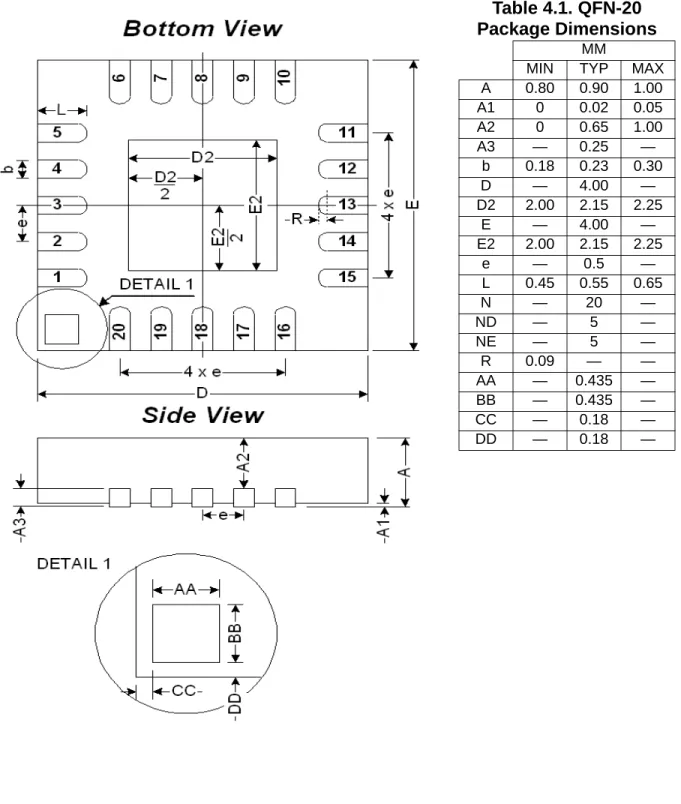
G N D4.3. QFN-20 Pinout Diagram (Bottom View)
Table 4.1. QFN-20
Package Dimensions
MM
MIN TYP MAX A 0.80 0.90 1.00 A1 0 0.02 0.05 A2 0 0.65 1.00 A3 — 0.25 — b 0.18 0.23 0.30 D — 4.00 — D2 2.00 2.15 2.25 E — 4.00 — E2 2.00 2.15 2.25 e — 0.5 — L 0.45 0.55 0.65 N — 20 — ND — 5 — NE — 5 — R 0.09 — — AA — 0.435 — BB — 0.435 — CC — 0.18 — DD — 0.18 —
5. SPI Slave Bus
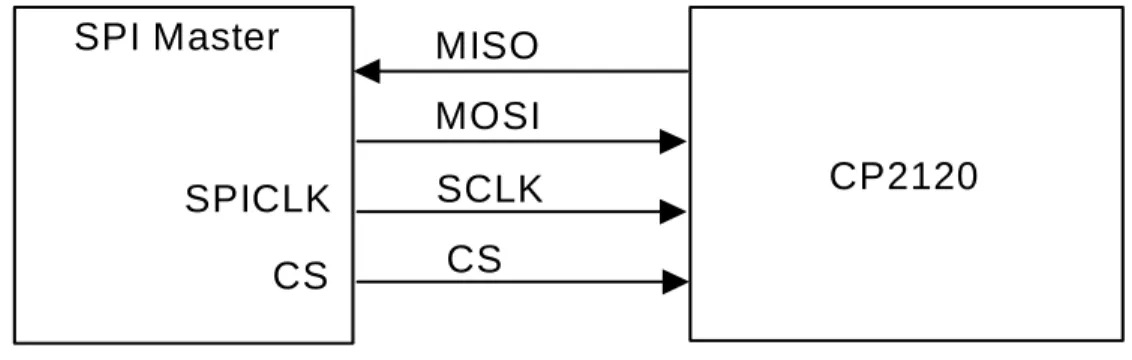
The CP2120 provides a four-wire slave SPI interface. The CP2120's SPI Bus activates whenever the SPI Master pulls the NSS pin low. The master can then clock data into the CP2120 through the Master-Out-Slave-In (MOSI) pin and receive data from the CP2120 through the Master-In-Slave-Out (MISO) pin. The SPI Master provides the SPI with a clock source. Figure 2 shows typical connections for an SPI bus.
Figure 2. SPI Bus Typical Connections
SCLK should be held high when idle. Figure 3 shows a CP2120 data transfer on the SPI Bus. If the CP2120 is the only slave device on the SPI bus, the NSS pin can be tied low.
Figure 3. Slave Mode Data/Clock Timing
Note: Some SPI clock speeds in the 100 kHz to 300 kHz range may result in communication issues. Moving the clock rate faster or slower will resolve this problem.
MISO
MOSI
SPICLK
CS
SCLK
CS
CP2120
SPI Master
MSBMSB Bit 6 Bit 5 Bit 4 Bit 3 Bit 2 Bit 1 Bit 0 Bit 6 Bit 5 Bit 4 Bit 3 Bit 2 Bit 1 Bit 0 SCK
MOSI
MISO
5.1. Command Set
An SPI Master controls the CP2120 by sending commands across the SPI bus. Some commands initiate I2C transactions, while other commands modify or monitor CP2120 operation and events.
5.2. Internal Registers
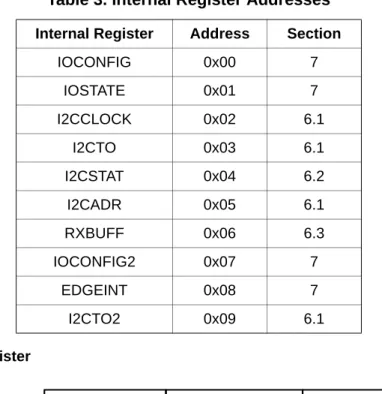
The CP2120 maintains a set of internal registers that can be modified to configure general purpose port I/O and I2C operation and can be read to obtain device status. Commands reading to and writing from the internal registers can be issued at any time, even while an I2C transaction is in progress, as they do not initiate any I2C bus transactions. Table 3 shows a list of all internal registers.
5.2.1. Write to Internal Register
A Write to Internal Register command updates the value of one of the CP2120's Internal Registers. A Write to Internal Register command begins with the command byte, 0x20, followed by the internal register address, followed by the new value of the internal register. Only one register can be accessed per Write to Internal Register
command.
Table 3. Internal Register Addresses
Internal Register Address SectionIOCONFIG 0x00 7 IOSTATE 0x01 7 I2CCLOCK 0x02 6.1 I2CTO 0x03 6.1 I2CSTAT 0x04 6.2 I2CADR 0x05 6.1 RXBUFF 0x06 6.3 IOCONFIG2 0x07 7 EDGEINT 0x08 7 I2CTO2 0x09 6.1 0x20 COMMAND REGISTER X DATA BYTE SPI Master
5.2.2. Read From Internal Register
A Read from Internal Register command retrieves the current value of one of the CP2120's internal registers. The command begins with the command byte, 0x21, followed by the internal register address. This byte is followed by the transmission of a "don't care" byte, which can be of any value and is ignored by the CP2120. After the "don't care" byte, the internal register value is transmitted across the MISO line.
5.3. SPI Byte Orientation
The SPI Configuration command configures the bit orientation of transfers across the SPI bus to one of two states. If SPI transmits most-significant-bit first, bit 7 is transmitted first. If SPI transmits least-significant-bit first, bit 0 is transmitted first.
5.3.1. SPI Configuration
The command begins with the command byte (0x18), followed by SPI Configuration byte, which should equal one of the values shown in the following table. Any values other than those listed in the table are ignored.
5.4. SPI Timing Diagrams
Byte Value Configuration
0x81 Most Significant Bit First 0x42 Least Significant Bit First COMMAND
0x21
REGISTER
Address Don’t Care SPI Master CP2120 REGISTER DATA COMMAND 0x18 SPI CONFIGURATION SPI Master NSS SCK* TSE TCKL TSD
5.5. I
2C Activity During SPI Transactions
If the SPI Master attempts to transmit a command to the CP2120 while the I2C bus is inactive, the CP2120 will disable its slave response. If an I2C Master device on the bus attempts to address the CP2120 during this time, the CP2120 will not ACK the address defined in the I2CADR Internal Register.
If the SPI Master attempts to transmit a command to the CP2120 while the CP2120 is acting as the Master on the I2C bus, the CP2120 will suspend I2C bus activity until the SPI Master has completed transmission of the command. For instance, if the SPI Master calls the Read Internal Register command while the CP2120 is in the middle of an I2C transaction, that I2C transaction will stall until the CP2120 completely processes the Read Internal Register command.
Table 4. SPI Slave Timing Parameters
Slave Mode Timing* (See Figure 4)TSE NSS Falling to First SCLK Edge 2 x TSYSCLK — ns
TSD Last SCLK Edge to NSS Rising 2 x TSYSCLK — ns
TSEZ NSS Falling to MISO Valid — 4 x TSYSCLK ns
TSDZ NSS Rising to MISO High-Z — 4 x TSYSCLK ns
TCKH SCLK High Time 5 x TSYSCLK — ns
TCKL SCLK Low Time 5 x TSYSCLK — ns
TSIS MOSI Valid to SCLK Sample Edge 2 x TSYSCLK — ns
TSIH SCLK Sample Edge to MOSI Change 2 x TSYSCLK — ns
TSOH SCLK Shift Edge to MISO Change — 4 x TSYSCLK ns
TSLH Last SCLK Edge to MISO Change
(CKPHA = 1 ONLY)
6 x TSYSCLK 8 x TSYSCLK ns
6. I
2
C Serial Interface
The CP2120 provides an I2C interface able to transfer data at frequencies up to 400 kHz. During a transaction, the CP2120, operating as the I2C master, sources a data clock on the SCL pin as data travels across the bidirectional SDA pin to and from an I2C slave device. The I2C interface lines each require a pull-up resistor. Figure 5 shows a typical I2C bus.
Figure 5. Typical I2C Bus*
Note: VDD is defined in Table 2, “Absolute Maximum Ratings,” on page 4. For Rpu values, please see “6.1. Determining Pull-Up Register Values” .
Note: The I2C interface does not currently support repeated start transactions, as required by some I2C slave devices.
6.1. Determining Pull-Up Register Values
Logic low to logic high transitions on the SCL and SDA pins, which are configured to open-drain output with external pull-ups to VDD, take the form of an exponential curve with an RC time constant, where C equals the capacitance of the bus and R equals the pull-up resistor value. I2C specification defines rise time as the time required for a signal level to change from Vmin +0.15 V to Vmax-0.15 V. By solving the exponential equation using a Vmin of 0 V and a Vmax of 3.3 V, the following equation can be used to find values for pull-up resistors:
Rise time = 3.04448 RC
Bus capacitance is governed by a number of factors, including signal trace length and capacitance introduced by devices on the bus. 8 mm PCB signal traces on a two-layer board generally add 1 pF of capacitance per centimeter of trace length. To determine the amount of capacitance introduced to the bus by I2C devices, consult those devices’ datasheets. The maximum capacitance allowed before the bus violates I2C specification is 400 pF. Rise time requirements vary depending on each connected I2C device’s timing requirements and the SCL clock frequency. The maximum rise time allowed by the I2C specification is 1000 ns.
6.2. I
2C Internal Registers
Features of the I2C interface are configured through the CP2120's Internal Registers. SCL clock frequency is set by writing to the I2CCLK Internal Register. The frequency can be determined using the equation below. The I2C
I²C-BUS Device CP2120 I²C-BUS DEVICE VDD RpU RpU I²C-bus SDA SCL
Internal Register Definition 1. I2CCLOCK: I
2C Clock Frequency Configuration
The transaction time-out counter, which terminates an I2C transaction after a set period of time has passed, can be configured through the I2CTO Internal Register. If the time-out counter is not enabled, the CP2120 will make only one attempt at executing an I2C transaction and abort if that transaction attempt fails.
Equation 2. CTO Time-Out Frequency
Internal Register Definition 2. I2CTO: I
2C Time Out
The SPI Master can assign an I2C address to the CP2120 by writing to the I2CADR Internal Register. Setting this address is not necessary for device operation. If set, the CP2120 will ACK this address when another I2C Master on the bus attempts to communicate with it. The CP2120 will NACK all attempts at data transfer when responding as an I2C slave.
Internal Register Definition 3. I2CADR: I
2C Address
Internal Register Address: 0x02 Reset Value: 0xA0
Bit 7-0: I2CCK7-0: I2C Clock Frequency Configuration value (minimum register value = 5, maximum register value = 255)
R/W R/W R/W R/W R/W R/W R/W R/W
I2CCK7 I2CCK6 I2CCK5 I2CCK4 I2CCK3 I2CCK2 I2CCK1 I2CCK0
Bit 7 Bit 6 Bit 5 Bit 4 Bit3 Bit 2 Bit 1 Bit 0
Time-out Frequency TO 128
---(Hz)
=
Internal Register Address: 0x03 Reset Value: 0x00
Bit 7-1: TO6-0: Time Out Value Bit 0: TEN:Time Out Enable Bit.
0: Disable Timer. 1: Enable Timer.
R/W R/W R/W R/W R/W R/W R/W R/W
TO6 TO5 TO4 TO3 TO2 TO1 TO0 TEN
The SPI2I2C provides additional SMBus-related timers to enable I2C protocol compatibility. Setting the I2C Bus Free Detect enables the device to poll the SMBus lines and determine when a transfer can begin. Setting the SCL Low Time Out detect will cause an SMBus transaction to abort if the SCL line has been held low by a device for a period of approximately 25 ms.
Internal Register Definition 4. I2CTO2: Additional I
2C Time Outs
6.3. I
2C Status
The CP2120 maintains an Internal Register, I2CSTAT, which describes the current status of the I2C Interface. The I2CSTAT register can be read at any time. The CP2120 updates I2CSTAT when an I2C transaction begins, when an I2C transaction completes (successfully or unsuccessfully), and when a received SPI command contains errors. It is not recommended that an SPI master poll the CP2120's I2CSTAT Internal Register to determine when an I2C transaction has completed. The SPI master should instead watch for the INT pin to drop low, and then read the I2CSTAT register to determine the I2C transaction results.
Internal Register Address: 0x09 Reset Value: 0x00
Bit 1: I2C Bus Free Detect
0: Bus Free Detect Disabled 1: Bus Free Detect Enabled Bit 0: I2C SCL Low Time Out Detect
0: SCL Low Time Out Detect disable 1: SCL Low Time Out Detect enable
R/W R/W R/W R/W R/W R/W R/W R/W
Reserved Reserved Reserved Reserved Reserved Reserved FREN LWEN
Internal Register Definition 5. I2CSTAT: I
2C Status Register
Internal Register Address: 0x04 Reset Value: 0x00
R R R R R R R R
I2ST7 I2ST6 I2ST5 I2ST4 I2ST3 I2ST2 I2ST1 I2ST0
Bit 7 Bit 6 Bit 5 Bit 4 Bit3 Bit 2 Bit 1 Bit 0
Bit 7–0 I2ST: I2C Status
I2C Status Value Status Description
0xF0 I2C transaction completed successfully. 0xF1 Slave address NACKed.
0xF2 Slave data NACKed. 0xF3 I2C transaction in progress.
0xF8 I2C transaction timed out due to timer configured in I2CTO.
0xF9 Command’s Bytes to Transmit Byte and Data Buffer Size do not match, or Read Buf-fer read number of bytes greater than bufBuf-fer count.
0xFA I2C SCL Low time-out, using timer configured in I2CTO2. 0xFB I2C bus free detect has been disabled, and the bus is not free.
6.4. I
2C Receive Buffer Size
Bytes received from I2C transactions are stored in the 255-byte data buffer. The number of bytes currently stored inside this buffer is saved in the RXBUFF Internal Register.
Internal Register Definition 6. RXBUFF: Receive Buffer Size Register
6.5. I
2C Commands
SPI commands initiate all I2C transactions. The CP2120 executes I2C transactions only after every byte of the command has been successfully received across the SPI bus. Once the CP2120 has completed the I2C transaction prompted by the command, the INT pin will be pulled low to indicate that command execution has completed. If an I2C command is issued while an I2C command is in progress, the second I2C command will be ignored.
6.5.1. Write Bytes to I2C
This command transmits data to an I2C slave device. The command begins with the command byte (0x00), followed by the number of bytes to be transmitted across I2C, which can range from 1 to 255, and the address of the I2C Slave. The SPI master then sends the data to be transmitted across I2C. Sending more or fewer bytes than was indicated by the second byte of the command will result in an error condition, and the I2C transaction will not be initiated.
Once the I2C transaction completes, the CP2120 pulls the INT pin low and sets the internal register according to the results of the transaction.
6.5.2. Read Bytes from I2C
Internal Register Address: 0x06 Reset Value: 0x00
Bit 7-0: RXB7-0: Receive Buffer Size
Indicates the number of bytes received during the last I2C read transaction.
R R R R R R R R
RXB7 RXB6 RXB5 RXB4 RXB3 RXB2 RXB1 RXB0
Bit 7 Bit 6 Bit 5 Bit 4 Bit3 Bit 2 Bit 1 Bit 0
DATA BYTE1 DATA BYTE N NUMBER OF BYTES COMMAND 0x00 SLAVE ADDRESS +W
...
SPI Master6.5.3. Read Buffer
The Read Buffer command retrieves bytes from the CP2120's data buffer. The command begins with the command byte, 0x06. After the command byte, the SPI Master must transmit a single byte of data, which is ignored by the CP2120. After receiving the ignored byte of data, the CP2120 transmits data bytes across the MISO pin.
It is recommended that the SPI Master read the RXBUFF Internal Register to determine how many bytes are stored in the CP2120's buffer before issuing a Read Buffer command. If the SPI Master attempts to retrieve more bytes than the buffer contains, the CP2120 will signal the error in I2CSTAT. If an SPI Master attempts to retrieve fewer bytes than are stored in the data buffer, all bytes left in the buffer will be deleted when the Read Buffer
command terminates.
6.5.4. Read After Write
The Read After Write command writes bytes to one I2C slave and then reads bytes from another I2C slave. The SPI Master calls this command by first sending the command byte, 0x02, then the number of bytes to write (1 to 255) and bytes to read (1 to 255). These bytes are followed by the address of the I2C slave to which the CP2120 will attempt to write bytes, followed by the data bytes to write. The last byte of the command is the I2C slave from which the CP2120 will attempt to read bytes.
6.5.5. Write After Write
The Write After Write command writes to an I2C slave device and then issues another write to a second I2C slave device. The command begins with the command byte, 0x08, followed by the number of bytes to write to the first I2C device and the bytes to write to the second I2C device. The SPI master sends the slave address of the first I2C device and the data bytes to write to the first I2C slave. The SPI Master then sends the slave address of the second I2C slave device followed by the data bytes to transmit to that slave device.
6.5.6. Write To Multiple Slaves
COMMAND
0x06 Don’t Care
Data Byte 0 ... Data Byte N
SPI Master
CP2120
NUMBER OF WRITE BYTES 0x02
COMMAND ADDRESS+W SLAVE
...
NUMBER OFREAD BYTES DATA WRITE BYTE 0
DATA WRITE BYTE N SLAVE ADDRESS+R SPI Master NUMBER OF BYTES 1 0x03 COMMAND SLAVE 1 ADDRESS +W
...
NUMBER OFBYTES 2 DATA BYTE 1 DATA BYTE N
SLAVE 2
ADDRESS +W DATA BYTE 1
...
DATA BYTE N7. Port I/O
The CP2120 offers eight general-purpose port pins that can be configured as output, input, or quasi-bidirectional output by writing to the internal registers, IOCONFIG and IOCONFIG2. Pin state can be updated by writing to the internal register, IOSTATE. Reading the IOSTATE Internal Register will return the current values of each port pin. The port pin, EINT, can be configured as an edge-triggered interrupt source by writing to the EDGEINT Internal Register. The EIT bit sets the interrupt to trigger upon a 0 to 1 or a 1 to 0 logic change on the pin. The bit, EIE, enables the pin as an interrupt source.
Once the interrupt has been configured and enabled, the CP2120 will pull the INT pin low when the port pin's logic value switches to “1'” or “0”, depending on the interrupt configuration specified in the EIT bit. When an interrupt is triggered, EIF in the EDGEINT Internal Register is set. Reading from EDGEINT will clear the EIF bit.
Internal Register Definition 7. IOCONFIG: Port I/O Configuration
Internal Register Address: 0x00 Reset Value: 0x00
Bit 7-6: PCIO3.1-PCIO3.0: Port Configuration for GPIO Pin 3 Bit 5-4: PCIO2.1-PCIO2.0: Port Configuration for GPIO Pin 2 Bit 3-2: PCIO1.1-PCIO1.0: Port Configuration for GPIO Pin 1 Bit 1-0: PCIO0.1-PCIO0.0: Port Configuration for GPIO Pin 0 These bits select the port state for GPIO pins 3 through 0.
R/W R/W R/W R/W R/W R/W R/W R/W
PCIO3.1 PCIO3.0 PCIO2.1 PCIO2.0 PCIO1.1 PCIO1.0 PCIO0.1 PCIO0.0
Bit 7 Bit 6 Bit 5 Bit 4 Bit3 Bit 2 Bit 1 Bit 0
PCIOx.1 PCIOx.0 GPIO Pin x Mode
0 0 Open Drain Output 0 1 Input Only
1 0 Push-Pull Output 1 1 Reserved
Internal Register Definition 8. IOCONFIG2: Port I/O Configuration 2
Internal Register Definition 9. IOSTATE: Port I/O State
Internal Register Address: 0x07 Reset Value: 0x00
Bit 7-6: PCIO7.1-PCIO7.0: Port Configuration for GPIO Pin 7 Bit 5-4: PCIO6.1-PCIO6.0: Port Configuration for GPIO Pin 6 Bit 3-2: PCIO5.1-PCIO5.0: Port Configuration for GPIO Pin 5 Bit 1-0: PCIO4.1-PCIO4.0: Port Configuration for GPIO Pin 4 These bits select the port state for GPIO pins 7 through 4.
R/W R/W R/W R/W R/W R/W R/W R/W
PCIO7.1 PCIO7.0 PCIO6.1 PCIO6.0 PCIO5.1 PCIO5.0 PCIO4.1 PCIO4.0
Bit 7 Bit 6 Bit 5 Bit 4 Bit3 Bit 2 Bit 1 Bit 0
PCIOx.1 PCIOx.0 GPIO Pin x Mode
0 0 Open Drain Output 0 1 Input Only
1 0 Push-Pull Output 1 1 Input Only
Internal Register Address: 0x01 Reset Value: 0x00
Bit 7-0: GPIO7-0: General Purpose Input/Output State Write - Output appears on output pins.
0: GPIOx set to logic low output. 1: GPIO set to logic high output. Read - Reads port state. 0: GPIOx is logic low. 1: GPIOx is logic high.
R/W R/W R/W R/W R/W R/W R/W R/W
GPIO7 GPIO6 GPIO5 GPIO4 GPIO3 GPIO2 GPIO1 GPIO0
Internal Register Definition 10. EDGEINT: Edge Triggered Interrupt Enable
Internal Register Address: 0x08 Reset Value: 0x00
Bit 7: EIF: Edge Triggered Interrupt Flag
0: No edge triggered event has occurred on the EI_INT pin. 1: Edge-triggered event has occurred on the EI_INT pin. Bit 6: EIE: Edge Triggered Interrupt Enable
0: Edge Triggered interrupts disabled. 1: Edge Triggered interrupts enabled. Bit 5: EIT: Edge Triggered Interrupt Trigger
0: Interrupt triggered on negative-to-positive digital transition on the EI_INT port pin.
1: Interrupt triggered on positive-to-negative digital transition on the EI_INT port pin.
Bit 4–Bit 0: Not used.
R/W R/W R/W R/W R/W R/W R/W R/W
EIF EIE EIT Rsvd Rsvd Rsvd Rsvd Rsvd
8. CP2120 Revision Number
The CP2120 revision number can be retrieved by first sending the Revision Number command byte of 0x40 and then transmitting one “don’t care” transitional byte. The CP2120 then transmits the two-byte revision number, most significant byte first, in BCD format. For example, a transmitted byte sequence of “0x01 0x44” would indicate that the CP2120’s revision number is equal to 1.44.
0x40
COMMAND Don’t Care
Rev Num Byte 1 Rev Num Byte 2 SPI Master CP2120
D
OCUMENT
C
HANGE
L
IST
Revision 0.1 to Revision 0.2
Various small text changes.
Updated 4.1 Pin Out Chart.
Updated 4.2 Pin Out Diagram.
Updated Figure 2. SPI Bus Typical Connections.
Added Table 3. Internal Register Addresses.
Updated all CP2120 command drawings.
Added section 6.1 Determining Pull-Up Register Values.
Changed appearance of all Internal Register Definition charts.
Changed contents of Section 8. CP2120 Revision Number.
Revision 0.2 to Revision 0.3
Removed references to power down mode.
Corrected Equation 1, “I2C Clock Frequency,” on page 13.
In Internal Register 4, “I2CTO2: Additional I2C Time Outs,” on page 15, changed Internal Register Address to “0x09”.
In Internal Register 5, “I2CSTAT: I2C Status
Register,” on page 16, changed all bits to “R” instead of “R/W”
In Internal Register 6, “RXBUFF: Receive Buffer Size Register,” on page 17, changed all bits to “R” instead of “R/W”.
Revision 0.3 to Revision 0.4
Updated Figure 1.
Updated Digital Supply Voltage in Table 2.
Updated Figure 3.
Revision 0.4 to Revision 1.0
Updated CS and INT to have the overbar in Section 4.1.
C
ONTACT
I
NFORMATION
Silicon Laboratories Inc. 400 West Cesar Chavez Austin, TX 78701
Please visit the Silicon Labs Technical Support web page:
https://www.silabs.com/support/pages/contacttechnicalsupport.aspx