ISSN 1990-9233
© IDOSI Publications, 2012
Corresponding Author: Khalid S. Husain, Information Technology Deanship, King Abdulaziz University,
Performance Evaluation Process of the Content Management System:
Case Study of Kau Marz System
Khalid S. Husain
Information Technology Deanship, King Abdulaziz University, Jeddah, Kingdom of Saudi Arabia Abstract: The selection and implementation process of a content management system (CMS) represents one of the largest information technology (IT) projects tackled by many organizations specially the academic institutions that have a huge volume of data needed to be managed well. A content management system can be defined as software that is used to support the creating, updating, publishing, translating archiving and retiring of digital information. A traditional software evaluation process involves approximately seven steps: requirements gathering, literature and industry research review, candidate selection and request for proposal, vendor demonstration, formal evaluation and software selection. Evaluating content management systems can be an overwhelming task because there are tons of them to choose from. However, with a structured approach to our evaluation, things can be much easier and less intimidating. So, the goal of the evaluation process is to determine which software can be used to support which website goals. The main interest of this paper is to use some trend data from research organizations to form evaluation criteria that can be used for analyzing the performance of the CMS that is developed in King Abdul-Aziz University (KAU) named MARZ. Also, we check whether these criteria are sufficient and adopted for evaluation process or need further enhancement and modifications.
Key words: IT CMS WCM KAU SSMM MARZ RLO ECM HTML FTP and DAM
INTRODUCTION is defined by its location on a site. CMS are focused Content management is defined as a collection of linkages between pages. The CMS provide tight policies and technologies that guide and enable integration between authoring and the repository (i.e. a corporations to contribute, manage and share their database that stores and manages pieces of information structured and/or unstructured information. So, Content or learning) along with a powerful publishing engine [2]. management systems (CMS) can be viewed as data CMS stores and distributes the right content to the repositories that may also contain authoring, sequencing right learner at the right time. Also, CMS provides and content aggregation tools, with an objective to centralized storage for small information chunks for easy “simplify the creation and administration of online retrieval, revision and distribution. The most important content. Originally developed and used by the newspaper part of a CMS is the content itself. A sampling of the industry and adapted in the mid-1990s to manage large types of content that can be stored and distributed via a volumes of content required for robust websites, CMS CMS includes: Simple pages; Complex pages, with incorporate a workflow process and manage information specific layout and presentation; Dynamic information based on search and retrieval criteria. CMS can support sourced from databases, etc; Training materials; Online content being created once (content components or RLO) manuals; General business documents; Thousands of and used many times [1]. An example is the image that is pages in total and Extensive linking between page. used in several different newspaper articles targeted at Content Management Systems (CMS) have evolved into different audiences or an organization chart used more than just publishing content, but managing our throughout the corporation and housed in the CMS so it workflow as well. CMS’s nowadays allow us to easily need only to be updated at one location. CMS manage conceive, edit, index and publish content, while giving small, interconnected units of information where each unit designers and developers more flexibility in customizing primarily for web-page creation and editing with
cross-their look and functionality. CMS are used to perform web templates and therefore grant a high degree of flexibility. administrative functions, manage assets, provide Assets have to be managed separately to keep up with personalization and localization features and much more. their versions and grant their reusability. Because the There are many subcategories of CMS. A Web Content predecessors of some content management systems are Management (WCM) system has additional features editorial process management systems, the integration of specifically tailored to manage web site content. A Digital workflow management components is necessary. Such Asset Management (DAM) system has additional components control all of the system’s processes. Being features to support the ingesting, cataloguing, storing, able to do that, the management of users and their roles is retrieving and annotating of digital material. An Enterprise inevitable. Import and export of content is usually done Content Management (ECM) system is usually comprised with an interface that converts content to XML and vice of a WCM and DAM and provides additional versa. When exchanging content, the division of (raw) knowledge management and document management content and layout (as described above) has to be features as well. Sometimes Content Management preserved. Exchanging content automatically via a defined Systems (CMS) have evolved from existing systems like interface is called “Content Syndication”. Popular one that is developed in KAU named MARZ. Therefore examples for Content Syndication are ICE (“Information each system has-depending on its predecessors-a certain and Content Exchange Protocol”), OCS (“Open Content focal point regarding technology and functionality. Syndication”) and RSS (“RDF Site Summary”). Possible predecessors are document management Individualization of the presented content is done by systems, editorial process management systems, workflow observing the users actions, creating an appropriate management systems or database management systems. profile of him and selecting adequate content based on Current systems therefore have different focal points and this profile. The process can be divided into four steps: differ in type and complexity of the functions they offer. Profiling is used to collect personal data of the user; On the other hand, there are characteristic features all Tracking means the process of observing the users CMS have in common [3]. actions and derive his likes and dislikes from this A perfect CMS should offer the following: Division observations; Matchmaking is the process of comparing of Content, Structure and Presentation, So-called the created profile with the available content and ; The “SSMM”-principle (Single Source - Multiple Media), presentation of matching content finally is called Management of assets, Management of workflow, channeling [4].
Managing users an their roles, Ability to import and When engaging in the CMS selection process, export content, Content Syndication, Individualize the higher education institutions must focus on the presented content, Being extensible by scripts or before and after, evaluating the current processes for modules, Version-Management regarding content and managing web content, whether for the internet, assets, Archiving content, Publication and, Supporting intranet or extranet, determining what is working the editorial process. The content in CMS is parted into and what is failing and outlining a picture for how they the physically displayable raw content and its - separately see content being handled after the CMS is stored - layout. The layout itself consists of two parts. On implemented [30]. These institutions must also identify the one hand there is general information like the who the primary users and managers of the web requested document type. This information is called content are, such as faculty, staff, administration and structure. On the other hand more detailed information like students and encourage a collaborative effort among them fonts, colors, borders etc. is needed. This is called the all to successfully draw those conclusions. Higher display format and is usually stored in templates or style education institutions must outline their internal sheets. The necessity for publishing content in several processes for managing the lifecycle of information. The different media types, e.g. a printed Brochure and small lifecycle of managing information, represented by Website leads to the so-called SSMM-principle (Single creating, editing, publishing and archiving content, Source - Multiple Media). It is important to notice that no is central to any CMS implementation. Institutions need only the separation of content and layout (as stated to outline and define what type of information is regularly above), but also storage of content in a media- created, the necessary approvers for the information, independent format is needed to fulfill the request of the where the information is published and when the SSMM-principle. When using a CMS, the content itself is information should be archived. Common information divided into so called assets. Typical examples for assets regularly published online by institutions is the are headlines and pictures. Assets enable the use of following [30]:
Semester/quarter school calendars Employment listings (student/faculty) Sports calendars
Housing listings Announcements Campus directories Press releases
Academic department/organization Information A comprehensive list of content regularly published needs to be developed, including the appropriate workflow (approval) process for each item. With these
information management methodologies outlined in a Fig. 1: Classical editorial process formal document, the designated CMS vendors must
show a realistic example in action presenting the technology component. In order to best choose an appropriate CMS, an institution should first understand and analyze how content is currently managed in their organization. The suggested steps of selecting best commercial CMS [30] are:-
Identify key users/managers of web content Collectively discuss the goals for moving to a CMS
(Will it make the management of our content run Fig. 2: CMS editorial process smoother? Is it cost effective? Will it be easy to
implement it? How will we get everyone accustomed documents and assets, as well is nowadays considered to to using it as opposed to our former methods? Do we be a standard feature of CM-systems. This enables the want everyone in the office to be able to use the systems to show older pages, follow the changes on them system or will our key people be the sole users?) and to create an archive of old documents. This is among Collectively discuss the current web content (Is the other things important, because in most countries, information pertinent? Is it effectively organized? publishers are forced by law to keep copies of published What changes should we make? What should remain content. Although actual CMS offer the possibilities to
the same?) publish content cross-media, as we have stated above
Collectively discuss the current state of how content while illustrating the SSMM-principle, today most CMS is managed (What works? What fails to meet our are used to publish content on websites. Technically, needs? What features should we keep? Which can there are two different types of interaction: Staging-be eliminated? What features should Staging-be added? Servers and Live-Servers. Staging Servers store static Collectively devise accurate pictures for our vendor pages, which are created by the CMS. This is a fast, candidates of where the institution is currently and although really inflexible solution. Live-Servers, on the where it would like to be after the CMS is other hand, create pages on demand. This means they
implemented have to process every single user request separately and
Keep lines of communication open among all those search the appropriate data in their database. That makes involved in the selection process. Be sure that them highly dynamic, flexible and actual (there is no delay everyone’s needs/concerns are taken into between content creation and publication), but such consideration. Use vendor need assessment servers are really slow, especially when serving questionnaires to help gather this information. numerousness users. Because both possibilities have Features, Various Characteristics, Process and principles are used in daily business [5].
Pre-Built CSM:Because CMS evolved from document One of the important features of CMS is quasi management systems, another feature was nearly inherited, too supporting the editorial process. While “inherited”: The ability to store different versions of editorial process management systems implement a more advantages and disadvantages, today a mixture of both
classical editorial process consisting of chief editor, editor Choosing a pre-built CMS from the large number of and graphic artist (Figure 1), actual WCMS support a
more complex process (Figure 2). This process takes programmers and administrators into account and integrates them into the workflow management of the CMS. Notifications are generated, when an asset has changed, which allow the full process to run. The process is finished, when every step of the process is completed. After that the content is ready to be published. Depending on the type of content that has to be published, the steps of this process are not always the same. Weekly updated documents e.g. do not need all steps, because templates do already exist. The reuse of existing assets on the other hand does not require an orthographic check. Not every system implements the complete introduced functionality [6], but systems with some of the features stated above could be very effective when it comes to managing content. The process oriented point of view grants high quality content, while individualization of documents based on statistics seems to do its job, at least from an economic point of view.
There is a wide range of content will be published using the CMS [5]. These contents should be characterised with the following:
Simple pages
Complex pages, with specific layout and presentation Dynamic information sourced from databases, etc Training materials
Online manuals (policy & procedures, HR, etc) General business documents
Thousands of pages in total Extensive linking between pages.
In recent years, numerous pre-built open-source CMS have emerged as viable alternatives to costly proprietary products or custom-built solutions. Cost savings are not the only reason why open-source CMS are gaining in popularity [26]. Unlike proprietary products, the source code for open-source CMS is freely available; so it is possible to customize the CMS to match project's requirements. Customized versions also can be redistributed according to the terms of their licenses. In addition, the benefit of free technical support provided by the Open Source community cannot be discounted. Development and long-term maintenance costs of a custom-built CMS can be high. Keeping up with new requirements or security issues can take a lot of time and effort. Open-source CMS combine the advantages of the proprietary and custom-built approaches--a pre-built CMS that is ready to use but can be customized if needed.
alternatives can be an overwhelming task. They come in several shapes and sizes, employing different platforms, programming languages and content management approaches. Complicating the decision-making process, open-source CMS projects are at varying stages of development, from stable and reliable applications to cutting-edge experiments. How do we decide which one is right for us? The CMS Matrix is a community-maintained list of over 300 CMS [26], both proprietary and open source. This list may not be comprehensive, but it is a good place to start. This Web site makes it easy to review CMS details such as system requirements, availability of technical support, ease of use, performance, security, interoperability, flexibility and commerce. It also features a convenient matrix to conduct a side-by-side comparison of up to 10 CMS at a time. But we still need to decide which ones to compare and evaluate. Normally the following seven criteria are used to evaluate potential CMS [26]:
Web application platform Software license
Stability and development activity User community
Documentation and source code Web standards, accessibility Suitability and usability
As was defined previously content management system is a computer software system for organizing and facilitating collaborative creation of documents and other content. Many organizations have turned to CMS to publish data with the speed and freedom provided by the Web [27]. Many of modern applications have been developed by CMS. For example, the software for the website Wikipedia is based on a wiki, which is a particular type of content management system [28]. Wiki systems such as wikipedia.org are similar to blogs in principle as they are based on user participation to add content [29]. Typically, a CMS consists of two elements: the content management application (CMA) and the content delivery application (CDA). The CMA element allows the content manager or author, who may not know Hypertext Markup Language (HTML), to manage the creation, modification and removal of content from a Web site without needing the expertise of a Webmaster. The CDA element uses and compiles that information to update the Web site. In the simplest case, there are three components designed in a CMS. In addition to the host computer where everything
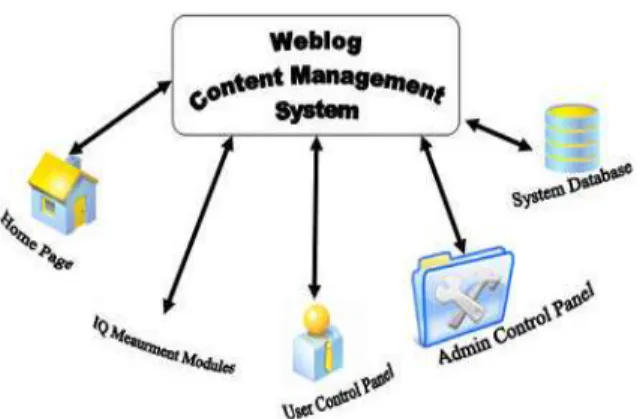
Fig. 3: Blog Content Management System Architecture is stored: a database to organize the information; a script language to provide an interface to the information; and a web server to present the information as an HTML file for a web browser.
The current Blog management system includes several technologies commonly used in the modern web applications. The system was developed by PHP, MySQL, HTML, CSS, JavaScript and Ajax. Figure 3 shows Blog content management system architecture.
The Blog management system contains four major components; Administrator control panel, user control panel, IQ modules, system database. Administrator control panel is an interface for system’s administrator to control, manage and monitor the Blog management system. User control panel is an interface designed for users to produce and manage contents of their Blogs. This panel provides features which user needs to manage a Blog such as links management, edit and create template, add new article, manage comments and configuration of Blog. IQ modules measure information quality for each Blog based on considered IQ criteria. System database records users’ activities on the Blogs. Administrator control panel is an interface that was designed for administrator to control, manage and monitor the Blog management system. This panel comprises two major panels. A panel manages content structure of the website. So this panel, controls contents of homepage and other pages that are linked to the homepage. Menu management, publish new subject, subjects management, news and announcement management and page management are the most important features in this panel. Another panel controls and monitors user activities on the Blogs by accessing to the system database and log files. In the panel, administrator can observe and monitor
many activities that are performed by Blog owners. Whenever a user logs in to the system, administrator can observe details of the login in the panel. As soon as user posts an article, the panel enables the administrator to control details of the posted article. Overall status, observation of members and entries, edition of templates and HTML, observation of log files, configuration of specifications and registration are the most important features in this panel. In sum, administrator control panel facilitated content management for administrator; provide an interface for monitoring the Blog system. The panel makes easier extension and maintenance of the Blog management system because it is designed according to properties of a content management system. User control panel is an interface designed for users to produce and manage contents of their Blogs. A user is able to publish and manage his/her Blog by logging to the user control panel. This panel provide features which user needs for managing a Blog. Links management, adding new article, observing posted article, template selection and edition, general configuration of Blog, comments configuration, friends’ management and sending files are the principle features of the user control system.
Overview of Content Management System: The term “content management” has several different meanings in today’s marketplace. A content management system is one that stores digital content for search, browsing, access and retrieval by users in a workgroup or enterprise [5]. The most prevalent types of content management systems are:
Enterprise Content Management (ECM): systems that facilitate management of corporate documents and other types of information for use internally as well as externally with a company’s business partners, customers, regulators and the general public.
Digital Asset Management (DAM): systems that manage rich media assets, often including digital audio and video clips, for retrieval and repurposing in media production environments. These systems are sometimes also called Media Asset Management (MAM).
Web Content Management (WCM): tools that provide page template design, editorial workflow and publishing environments specifically for Web sites and other forms of Internet content delivery.
The term Content Management System (CMS) Search and browse: CMSs have interfaces for users encompass all of the above. All of those types of systems to enter query terms to search for assets whose have common technology elements as well as common metadata fit those terms. Many also have browsing processes associated with their use. Some of the common interfaces, where a user can scan a collection of asset technology elements are: descriptions (e.g. text abstracts, image thumbnails, Database management systems for managing Distribution: the final process that most types of metadata (information describing content) and CMS support is making assets available through sometimes the content itself. some channel(s) outside of the domain of the CMS. Content storage systems, including disk drives, This could mean publishing HTML pages to a Web storage area networks (SANs) and nearline/offline site, sending files to a business partner over FTP or storage, particularly for storage-intensive assets a syndication protocol, or persistently protecting such as high-resolution still images and digital video. assets with a DRM packager.
Content indexing and search technologies, such as
inverted text indexes to promote searching and With regards to the main returned benefits from
browsing of content. using Content Management System, we see that CMS
Metadata creation technologies, including text satisfies the following: categorization, entity extraction and image
understanding. A CMS makes it easier for people to create, edit and
Workflow capabilities, which include check-in and publish content on a website. Historically, website check-out, version control and approval routing. publishing has required significant technical skills Although the following is not meant to be an (HTML, programming). A good CMS allows non-exhaustive list of processes that CMSs support, here technical authors and editors to easily and quickly are the most important ones:- publish their content.
Metadata creation: Some types of metadata (e.g. date A CMS makes it easier for us to manage who and time of creation, image resolution) can be creates, edits and publishes content. Because it automatically extracted from file formats. Other types establishes defined publishing processes, we can can be inferred from the content by automated tools allocate specific publishing rights to various (e.g. categorization engines that analyze text and individuals.
generate keywords). Other types of metadata, such By easing technical hurdles in the publication of as information about asset creators or detailed content, a CMS can reduce the need for training, descriptions, must be entered manually. Rights while facilitating more people to publish. At the same metadata is another important type of metadata that time, it reduces the daily stream of calls to the IT can be created automatically if rights information is department for changes to the website
captured upstream from the CMS. A CMS reduces time-to-publish, allowing us to get Asset storage: A CMS can store content in a native content published faster. This is an important issue format, an output-neutral format (e.g. XML), or a for the modern organization. The quicker we get key format specific to an output medium (e.g. HTML for content published the more value it creates.
web pages). The term ingestion is often used to A CMS allows for the design of common and comprise metadata creation and asset storage. consistent information architecture (metadata, Workflow: Many CMSs provide for the identification classification, navigation, search, layout and design). of roles (e.g. author, editor and producer) and their Inconsistent and poorly designed information association with specific privileges on an asset, architectures plague many websites.
which could include reading, editing, or the ability to A CMS will allow for the consistent management of change the asset’s metadata. Users can check metadata through content template structures. Of the content out for editing and check it back in again and many benefits this delivers is a significantly they can often use the CMS to send (route) content improved search process. Basically, if the appropriate to other users, whether in an ad hoc manner or metadata is captured on all documents, then people according to fixed, predefined routing schemes. can find the right content a lot more quickly .
Security is an important issue, particularly for format or XML, then formatted as needed to reflect intranets. A CMS can facilitate better content separate graphic design for both Internet and security. It can control who is allowed to publish to Intranet sites and formatted to display correctly on the website and who is allowed to see what content. personal digital assistant (PDA) devices. Content A CMS can allow us to more easily measure the managers enter the content only once, but it appears success of our publishing efforts. We can track who in three different places, formatted using three is publishing what, how quickly content is getting different layouts and graphic designs. All three published, whether the publication schedule is being pages immediately reflect approved content changes. adhered to, whether out-of-date content is being Create reusable content repositories: web CMSs removed quickly enough, etc. allow for reuse of content. Objects such as templates, A CMS really comes into its own when we have a lot graphics, images and content are created and entered of authors and editors, based at multiple locations, once and then reused as needed throughout the publishing substantial quantities of content on an Web site.
ongoing basis. Without a CMS, such an environment Implement central graphic design management: can become a nightmare to manage. graphic design in a CMS becomes template- driven Key Goals of Cms for Higher Education Organization: that format and display content following a request Almost all Web CMSs help an organization on higher from a user for a particular Web page. Templates education in achieving the following goals [7-10]: ensure a consistent, professional look and feel for all Streamline and automate content administration: easy and simultaneous modification of an entire site's Web content has considered of static pages/files of graphic design.
HTML, requiring HTML programming experience and Automate workflow management: Good CMSs enable manual updating of content and design- clearly a good workflow process. In the most complex time- consuming and labor- intensive process. In workflow system, three different individuals create, contrast, Web CMSs significantly reduce this approve and publish a piece of content, working overhead by hiding the complexities of HTML and separately and independently. A good workflow automating the management of content. system expedites the timely publication of content by Implement Web-forms-based content administration: altering the next person in the chain when an action In an ideal Web CMS, all content administration is is required. It also ensures that content is adequately performed through web forms using a Web browser. reviewed and approved before publication.
Proprietary software and specialized expertise (such Build sophisticated content access and security: as HTML) are not required of content managers. Good CMSs allow for sophisticated control of Users simply copy and past existing content or fill in content access, both for content managers who
blanks a form. create and maintain content and for users who view
Distribute content management and control: the web and use it. Web managers should be able to define manager has often been a critical bottleneck in the who has access to different types of information and timely publication and ongoing maintenance of web what type of access each person has.
content. Web CMSs remove that bottleneck by Allow for customization and integration with legacy distributing content management responsibilities to systems: Enterprise CMSs allow for customization of individuals throughout the organization. Those the functionality through advanced programming. individuals who are responsible for content now They should expose the functionality of the system have the authority and tools to maintain that content through an application programming interface (API). themselves- without any knowledge of HTML, They also coexist and integrate with legacy systems. graphic design, or Web publishing. Include structures to collect and use metadata: Separate content from layout and design: In a Web Because data is stored separately from layout and CMS, content is stored separately from its design, the database also stores metadata describing publication format. For example, the university's and defining the data, including author, creation mission statement could be stored in a raw, text date, publication and expiration dates, content and centrally managed. Templates are the structures
descriptions and indexing information, categories terminology varies between different platforms) make information, revision history, security and access a difference in terms of enhancing our site’s ability to information and a range of other content- related provide our site users with useful options for
data. interfacing with our site. Look for a CMS with a
Evaluating CriteriaOfthe Standard Content Management case we need to write our own extensions. Make sure System: Content Management Systems (CMS) have that the CMS we are considering already has a huge evolved into more than just publishing content, but list of plugins. Though we might not need plugins managing our workflow as well [11, 12]. CMS’s nowadays right away, it’s important that this is available to us, allow us to easily conceive, edit, index and publish later down the road.
content, while giving designers and developers more No Need for Programming Knowledge: If we’re more flexibility in customizing their look and functionality. "design-oriented" than anything else, make sure we Evaluating content management systems can be an select a CMS where we won’t need to have extensive overwhelming task, not because it’s rocket science, but programming abilities to publish and maintain our simply because there are tons of them to choose from. site. There is a wide selection of CMS’s that have However, with a structured approach to our evaluation, WYSIWYG editors, letting us edit content without things can be much easier and less intimidating. Let’s talk the need for code. Having to edit text through HTML about the things we should look at when deciding what markup can be time consuming and takes us away CMS to use; here are eight characteristics that a good from other aspects of our managing and building our
CMS should have: site. Complex sites, however, can require a CMS that
Intuitiveness: easy to understand and use: Our CMS extensions such as.php. css. html and make changes should have a GUI (Graphical User Interface) that’s without that need for a third-party source code easy on the eyes, doesn’t have overly complicated editor.
options and offers simplicity in its administration Optimized for Performance and Speed: Taking into interface. A good interface means that tasks consideration the speed of our pages load on the pertaining to creating and managing our content will browser and how fast our site can make a connection be quicker, saving us a lot of time and increasing our to a server, is vital. Choosing a CMS that is bulky will productivity. We should also look at it from an end drive away visitors rather than bring them in. By user’s perspective: if we’re building a content visiting examples of live sites, we’ll be able to gauge management system for a client who’s not somewhat how fast pages load. Keep in mind that we "technology-savvy" and we choose a solution that can increase the load time of our site by choosing a requires a Ph. D. in computer science, it’s less likely good host and adding plugins that that they’ll be able to use the system (thus, defeating cache/compress/minify feeds, CSS, JS and also the whole purpose of a CMS, which is to empower its caches our database objects.
users). Security: Adequate security for our site is very
Flexibility and Ease of Customization: When taking important and must be in place in order to protect our into consideration a content management system, content. There are CMS’s that allow us to install make sure that we’re not obligated to use their specific plugins and edit files/permissions in order to design templates. A large quantity of CMS solutions increase security levels. Make sure we choose a allows us to customize our own design without major management system that offers modules to protect restrictions. If our CMS forces us to choose a fixed the integrity of our site. We can also protect our site and unalterable design template, then we’re stripped by selecting a CMS that allows us to easily assign a of creative license and our website will look like different username and password to each user. This
everyone else’s. will let us view and control what each user has
Extensibility via Plugins and Modules: A good CMS access to.
will allow us incorporate helpful site features into our Documentation and Community Support: Nothing’s site by letting us extend the default configuration more frustrating than trying to figure out how to do with plugins. Plugins/extensions/modules (their something and not have references online that we powerful Application Programming Interface (API) in
can take advantage of. One way to ensure that we Have capacity for e-portfolios and e-commerce? won’t be running into this problem is by reading
through the documentation of our candidate CMS’s. Also, a quick Google search will tell us how popular and well-documented a content management system is. The availability (or lack thereof) of support from users of the system can be a deal maker or deal breaker. When users are active and proud of being part of the community, we not only have access to individuals that are more familiar with the system, but also, we can be assured that the project will be developed continually.
Emphasis on Web Standards and Best Practices: Content Management Systems developed under web standards guidelines and best practices will ensure that we won’t get burned later down the road. When applications are designed with best practices in mind, we can be assured ultimate cross-browser compatibility, lean-and-mean code and ease of maintenance. Look for content management systems that promote the use of web standards and those that put it at the forefront of their development and design philosophy.
Evolution Process of Marz Content Management System: A powerful new content management tool is able to manage market and measure our business online. Our newly launched Content Management System called MARZ CMS has been designed and developed based on 5 years of content management experience and provides our clients with an intuitive way in which to manage and market their websites and more importantly measure their online success. Before we develop our MARZ CMS system, we deeply analyze the main requirements of KAU to develop a product satisfy the needs. So, there were major points have been questioned like [13-15]:
Include other universities as clients? Can we leverage their work?
Focus on higher education needs? Run on Linux?
Use custom drivers?
Move content easily to printers and mobile devices? Have records management component?
Include a taxonomy tool? Use metadata?
Have adequate security features? Have drag and drop (both in and out)? Compare versions of content easily?
Include a user dashboard? Include flexible workflow?
Include collaborative software tools?
Focus on learning management, content management, or web publishing?
Having an easy to use interface for nontechnical users?
Include/make use of style sheets?
In view point of our designing CMS Dashboard; we say that the problem was accessing data quickly, easily and in an interface that is simple to understand. The majority of analytics services fail in all these regards, that’s where our new dashboard is different. Quickly view a wealth of statistics in real-time including:
Completed website goals such as enquires or sales Visitor statistics
Traffic sources breakdown Popular search keywords
Referring websites and inbound links Google Awards performance Social networking statistics
Within our designed MARZ CMS, we satisfy the following capabilities:
Flexible content management editor: Creating new content pages, blog articles and customer feedback forms has never been so easy [16-20]. Our editor enables us to publish text, images and even video content with a few clicks of the mouse. Other features include delayed publishing, customization of search engine data plus much more.
Search engine optimized content and position reports: Our content management platform provides search engine friendly, enabling us to customize Meta information at an individual page level. If we choose our search engine optimization service we'll take care of all our optimization needs. Providing weekly reports that show our website positions on Google, Yahoo and Bing, allowing us to measure our marketing success with ease [21].
Blogs & support for social networks: Blogging is a great way to increase our website traffic and encourage users to follow our business. Sublime CMS provides RSS feeds and allows users to share articles on sites such as Facebook, Twitter and Linked In.
Members / client portal: MARZ CMS comes analysis conducted by open source organizations can complete with a member's portal as standard. This often facilitate decision making. We concluded that the enables us share restricted content such as developed CMS in KAU achieved the major requirements documents or files by simply creating login's for our and needs of all customers, employee, academic members existing clients. We can even send them messages whom deals with KAU either in research track or other using the CMS which they are presented with when university jobs. We expect a lot of benefits of the logging into our website [23, 24]. As well as the developed MARZ system inclusive of the following: Fast features outlined above we have a large range of production and deployment of courses, Reduce additional modules available designed to perform a production and deployment cost, supporting innovation wide range of tasks. Because our CMS is modular by of web technology, Security and privacy of contents, design, the development time required to add increased return on investment, increased security and additional features is kept to a minimum. privacy and more time and focus to learning. We hope to Real-time performance monitoring & analytics: Our develop MARZ system to be adopted for e-learning powerful MARZ CMS dashboard provides us with system to assist in raising the education process of KAU. detailed real-time summaries of our website activity
and online sales. Measure our digital marketing REFERENCES efforts with ease with powerful analytic reports that
enable us to analyze information on traffic sources, 1. Iyer, L.S. and B. Gupta, 2001. Commercial Web Site customer’s locations, search engines, search Design and Maintenance Issues: An Overview. keyword terms and completed website goals [25]. Proceedings of the Decision Sciences Institute. Conclusion and Future Works: It is important to Technology Review. Los Angeles, 22(11): 9. understand how a CMS impacts a number of different 3. Smith, T., 2003. Mixed results in managing content. people and departments in a higher education setting. B to B. Chicago, 14, 2003. Vol. 88, Iss. 4; pg. 15. Analyzing the current institution sites and seeking input 4. West, K., R. Huff and P. Turocy, 2000. Managing from key individuals helps in understanding how a CMS content on the Web. Network Computing. fits in the school environment. Choosing is a CMS is not Manhasset: October 30, 2000. Vol. 11, Issue 21; a simple decision, but rather a decision based on an pg. 50.
extensive process and open communication. Higher 5. Chester, B., 2003. Web content management 101. education institutions reap tremendous benefits from AIIM E - Doc Magazine. Silver Spring: May/Jun using a CMS and more comprehensive preparation will 2003. Vol. 17, Iss. 3; pg. 24.
lead to a more successful implementation [30]. Effective 6. Friedlein, A., 2003. Maintaining and Evolving information management is key for an organization to Successful Commercial Web Sites. San Francisco: achieve high performance and yet the sheer abundance of Morgan Kaufmann.
unstructured data causes a number of challenges. For 7. Hitt, F.J., 2002. Web Content Workflow Management. example, the cost of data management has increased; Cyber Teams, Inc. A White paper. Published, finding the right information is difficult; information is not 8. Falla, J. Ed. 2001. Content management: coping with well leveraged among partners and it is not coming the content challenge: Definitions.
together in ways that would yield useful new insights 9. Feldstein, M., 2002. What's Important in a Learning about employees, customers or market opportunities. Content Management System?
Today, businesses and higher institutions are using 10. GetNewWise. 2004. Glossary.
content management systems (CMS) to help them for 11. Chapman, B. and S.O. Hall, 2004. LCMS 2004 - 2005 delivering targeted information for visitors interested in Report. Comparative Analysis of Enterprise Wide their products and services. So, there are many software Learning Content Management Systems.
packages available; however selecting a CMS is 12. Collis, B. and A. Strijker, 2002. New Pedagogies and sometimes difficult because trend and evaluation data Re-usable Learning Objects: Toward a Different Role does not always coexist in the same reports. Developing for an LMS. Association for the Advancement of a new content management system represent great Computing in Education (AACE). ED9MEDIA 2002 challenges especially if it cope with the organization World Conference on Educational Multimedia, needs. Using a process that incorporates trend analysis Hypermedia & Telecommunications. Proceedings. conducted by independent researchers and feature pp: 24-29.
13. Donello, J., 2002. Theory and practice: Learning 22. Ferl Web Site. Evaluating Learning Platforms; 2005. Content Management Systems. 23. Garett, J.J., 2005. Ajax: A New Approach to Web 14. Downes, S., 2001. Learning objects: resources for Applications.
distance education worldwide. International Review 24. Lewis, B.A. and V.M. MacEntee, 2005. Learning of Research in Open and Distance Learning. Management Systems Comparison. In:Proceedings 15. English, P., 2001. What the future holds for e- of the 2005 Informing Scienceand IT Education Joint
learning. Conference (InSITE2005);
16. Microsoft Developer Network. ASP.NET Spiced: 25. Microsoft Developer Network. Three-tier Application
AJAX, 2008, Model, 2008.
17. Paulsen, M.F., 2002. Online Education Systems: 26. http://www.linuxjournal.com/article/8301
Discussion and Definition of Terms. 27. Rainville-Pitt, S. and J.M. D’Amour, Using a CMS to 18. Barron, T., 2001. An E-learning industry update. create fully accessible websites Proceedings of the Retrieved March 2, 2004, from. 2007 international cross-disciplinary conference on 19. Brennan, M., S. Funke and C. Anderson, 2001. Web accessibility (W4A), Banff, Canada ACM, 2007,
The Learning Content Management System. pp: 130-131.
20. Abazi-Bexheti, L. and Z. Dika, 2008. A study on 28. Wikipedia. Content Management System, 2008. evaluation papers and surveys about Learning 29. Jazayeri, M., 2007. Some Trends in Web Application Content Management Systems, Proceedings of the Development, Future of Software Engineering 7th WSEAS international conference, SEPADS, UK, (FOSE '07), IEEE, pp: 199-213
pp: 158-162 30. www.hannonhill.com/.../CMS-for-Higher-Education
21. Eckerson, Wayne W., 2000. Three Tier Client/Server Architecture: Achieving Scalability, Performance and Efficiency in Client Server Applications.