opErational dEcision ManagEr and iBM
BusinEss procEss ManagEr standard
January 2013IntroductIon
Technology changes at a rate that consistently challenges companies to keep up to date. Several technologies that were labeled as ’new’ or ’emerging’ just a few years ago are now facing
changes. Some changes are revolutionary while others are evolutionary. an evolution is currently taking place with business process management (BPM). This evolution raises the importance of technologies like business rules management systems (BrMS) and complex event processing (CEP) that complement and seamlessly integrate with BPM. The combination of BrMS, CEP, and BPM allows companies to create business solutions with less variability, improved accuracy, and greater environmental awareness.
The resources used to create business solutions are also evolving. Business solutions are no longer tied to business resources (like analysts and subject-matter experts) focused on creat-ing specifications that are handed off to technical resources to base system designs and builds on. Today, business solution creation and maintenance favor business resources over technical resources. We see business resources using tools created specifically for them that allow them to directly leverage technology. Technical resources still provide important skills and capabilities for the business solution life cycle. However, their role is limited to the most technical aspects of using technology without disrupting the work of the business resources. The work of the business and technical resources—just like the three technologies (BPM, BrMS, CEP)—needs to be well-inte-grated and allow seamless and efficient interaction.
Each JBoss® Enterprise BrMS subscription from red Hat provides a powerful combination of
technology, including BrMS, CEP, BPM, system management, and an application platform to run it all on. In comparison, IBM WebSphere offers a selection of three offerings for BPM1
capabili-ties each of which must be supplemented with IBM Operational Decision Manager2 to add BrMS
and CEP capabilities to match the combined BPM, BrMS, and CEP capabilities found in JBoss Enterprise BrMS 5.3.
EconomIcs
There is a significant difference in the total cost of acquisition between JBoss Enterprise BRMS 5.3 and the combination of IBM Operational Decision Manager and IBM Business Process Manager Standard. While red Hat does not believe that price alone drives purchase decisions, the eco-nomic advantage Red Hat has over IBM is so significant that it shouldn’t be overlooked. With an IBM WebSphere purchase under the Passport Advantage program, there is one charge in the first year that combines license costs with subscription and support costs.3 After the first anniversary
of purchase, IBM subscription and support charges are based on your Passport advantage rSVP level.4 Subscription and support costs change as your Passport advantage rSVP level changes.
1 IBM Business Process Manager Express, IBM Business Process Manager Standard, IBM Business Process Manager advanced
2 IBM Operational Decision Manager web page - http:// www-01.ibm.com/software/ decision-management/opera-tional-decision-management/ websphere-operational-deci-sion-management/ 3 CDW software licensing center web page - http://www.
cdw.com/content/software- licensing/ibm.aspx
4 IBM International Passport advantage agreement - http:// public.dhe.ibm.com/software/ passportadvantage/Pa_ agreements/Pa_agreement_ International_English.pdf Section 1.8 “rSVP Level.”
5 IBM Software online catalog - http://www-01.ibm.com/ software/info/app/ecatalog/ atoz.html using uSa pricing
6 JBoss na Channel SKus - http://www.redhat.com/f/ html/jboss_channel_skus.html
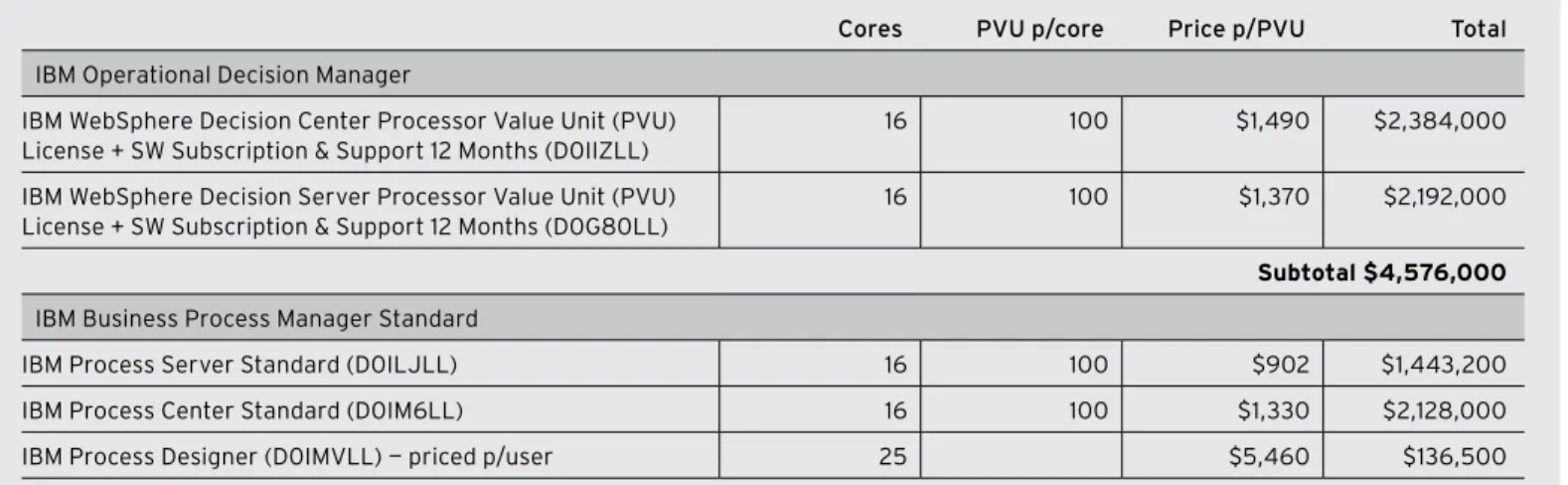
table a: 2-year ibm CalCulations using 16 Cores
Cores pvu p/core price p/pvu total
IBM Operational Decision Manager
IBM WebSphere Decision Center Processor Value unit (PVu) License + SW Subscription & Support 12 Months (D0IIZLL)
16 100 $1,490 $2,384,000 IBM WebSphere Decision Server Processor Value unit (PVu)
License + SW Subscription & Support 12 Months (D0G80LL)
16 100 $1,370 $2,192,000
subtotal $4,576,000
IBM Business Process Manager Standard
IBM Process Server Standard (D0ILJLL) 16 100 $902 $1,443,200 IBM Process Center Standard (D0IM6LL) 16 100 $1,330 $2,128,000 IBM Process Designer (D0IMVLL) — priced p/user 25 $5,460 $136,500
subtotal $3,707,700
Total License Fees $8,283,700
Annual subscription and support Fees @ 20% of license $1,656,740 two YEAr totAl IBm cost $9,940,440
With JBoss Enterprise Middleware, you pay an annual subscription fee and are never charged software licensing fees.
Getting started with a red Hat® subscription is very economical when compared to IBM
WebSphere. For example, compare the 2-year list price acquisition costs of IBM Operational Decision Manager5 and IBM Business Process Manager Standard to JBoss Enterprise BrMS6
deployed on 16 cores of Intel-based servers. For IBM, the Intel cores are rated at 100 PVu7 per
core and the u.S. price list in effect January 2013 is used. First-year IBM costs are calculated by multiplying 16 (cores) X 100 (PVu per core) X [product price]. Second-year IBM subscription and support is calculated at 20% of license cost.8
As shown in Table A, the 2-year list price acquisition costs of 16 cores of IBM Operational Decision Manager and IBM Business Process Manager Standard is more than $9.9M uSD at list price. JBoss Enterprise BRMS Platform 2-year acquisition costs are significantly lower than IBM’s combined product offers as shown in Table B. JBoss Enterprise BrMS can be purchased with a 1- or 3-year subscription with 16- or 64-core count increments. red Hat recommends man-aged subscriptions with premium support. Using this subscription profile, a JBoss Enterprise BrMS subscription is millions less (uSD) than the IBM offering at list price.
Consider the red Hat cost advantages already presented. With dramatically lower costs to acquire and use JBoss Enterprise Middleware, how many more projects could you start? How much more focus could you give to innovation? Can you find enough technical advantages in IBM Operational Decision Manager and IBM Business Process Manager Standard to justify the added expense of that software?
BusInEss procEss mAnAgEmEnt
JBoss Enterprise BrMS includes a BPM component based on the Business Process Model and notation version 2 (BPMn) standard. This component is derived from the JBoss jBPM commu-nity project and includes all the BPMn-based functionality available from red Hat. With IBM 7 IBM Processor Value unit
[PVu] licensing for Distributed Software - http://www-01.ibm.
com/software/lotus/pass-portadvantage/pvu_licensing_ for_customers.html
8 See page 25 of the IBM whitepaper ’Comparing IBM WebSphere and Oracle WebLogic’ for 20 percent reference - ftp://
public.dhe.ibm.com/common/ ssi/ecm/en/wsw14127usen/ WSW14127uSEn.PDF
What are the
opportu-nity costs of choosing
IBM Operational
Decision Manager and
IBM Business Process
Manager Standard?
table b: 2-year Jboss enterprise brms subsCription Costs
Jboss enterprise brms platform with management, 16 Core premium
Jboss enterprise brms platform with management, 64 Core premium
annual Subscription $36,000 $130,000 2-year subscription $72,000 $260,000
savings versus ibm (usD) $9,868,440 $39,501,760
table b: 2-year ibm CalCulations using 64 Cores
Cores pvu p/core price p/pvu total
IBM Operational Decision Manager
IBM WebSphere Decision Center Processor Value unit (PVu) License + SW Subscription & Support 12 Months (D0IIZLL)
64 100 $1,490 $9,536,000 IBM WebSphere Decision Server Processor Value unit (PVu)
License + SW Subscription & Support 12 Months (D0G80LL)
64 100 $1,370 $8,768,000
subtotal $18,304,000
IBM Business Process Manager Standard
IBM Process Server Standard (D0ILJLL) 64 100 $902 $5,772,800 IBM Process Center Standard (D0IM6LL) 64 100 $1,330 $8,512,000 IBM Process Designer (D0IMVLL) — priced p/user 100 $5,460 $546,000
subtotal $14,830,800
Total License Fees $33,134,800
Annual subscription and support Fees @ 20% of license $6,626,960 two YEAr totAl IBm cost $39,761,760
9 IBM Business Process Manager Express, IBM Business Process Manager Standard, IBM Business Process Manager advanced
10 IBM Business Process Manager V8.0 configuration capabilities - http://pic.dhe. ibm.com/infocenter/dmndhelp/ v8r0mx/topic/com.ibm.wbpm. main.doc/topics/cbpm_wbpm_ pkg.html
WebSphere, you select from one of three offerings9 for BPM capabilities. While all three IBM
offerings support BPMn modeling, there are variations in functional and deployment features.10
red Hat has determined based on technical and deployment capabilities, that IBM Business Process Manager Standard is the best IBM BPM software product to compare with the jBPM component in JBoss Enterprise BrMS. IBM Business Process Manager Express Edition limits the numbers of users and cores that can be used for production and development and does not include transaction support. JBoss Enterprise BrMS does not have similar restrictions—it allows you to host as many users as the cores you deploy across environments of your choice can handle, all while providing transaction support. IBM Business Process Manager advanced brings adds BPEL modeling and execution with IBM Process Server compatibility to the capabilities found in IBM Business Process Manager Standard. red Hat offers BPEL capabilities (plus other technologies) as part of the JBoss Enterprise SOa platform. Therefore, IBM Business Process Manager advanced is not appropriate to compare to JBoss Enterprise BrMS.
Building business process models in a graphical environment is a common BPM market feature. JBoss Enterprise BrMS and IBM Business Process Manager Standard allow users to graphi-cally model and execute BPMN version 2 process flows. JBoss Enterprise BRMS uses BPMN for business process modeling using web- or Eclipse-based tooling and stores and manages assets in a common repository. In addition, advanced users can embed the designer tool in their own
web-based applications. IBM Business Process Manager Standard users can create and modify BPMn processes using a web-based tool and store and manage assets in a central repository. IBM Eclipse-based process modeling is available with IBM Integration Designer that is available for use with IBM Business Process Manager advanced or as a stand-alone tool for other uses. IBM documentation does not explicitly state that IBM Integration Designer can be used with IBM Business Process Manager Standard.11
JBoss Enterprise BRMS allows you to introduce domain-specific nodes into the BPMN modeling environments. Domain-specific nodes can be customized and then exposed via the design tool palette to reflect the nuances of your business. This can result in processes more easily under-stood by business users and can help simplify business process development. Domain-specific nodes can be used for a single process as well as registered in the service repository and made available for use with any business process. IBM Business Process Manager Standard does not provide domain-specific node functionality. As a result, users cannot customize the BPM busi-ness process designer palette to reflect the special needs of their busibusi-ness.
What about business process designs generated using other tools? JBoss Enterprise BRMS allows you to import and export BPMn 2 models. as process diagrams are developed and mature, the need to share and review them increases. JBoss Enterprise BrMS can export pro-cess flows in formats such as ERDF, JSON, PDF, PNG, SVG, and of course BPMN2. IBM Business Process Manager Standard BPMn import functionality is limited to WebSphere Business Compass, IBM WebSphere Business Modeler, and IBM Blueworks Live artifacts. IBM export func-tionality is limited to a simple zip file.
Once business processes are defined, your attention turns to executing them. BPMN process flows can be executed via a central server using both JBoss Enterprise BRMS and IBM Business Process Manager Standard. However, with JBoss Enterprise BrMS, BPMn process models are executed natively while IBM Business Process Manager Standard uses an execution environ-ment engine common to both BPMN and BPEL. Both solutions allow you to define users and associated security that dictates what business processes can be controlled. users log in via a web-based tool to work with assigned and unassigned tasks as well as launch and monitor new business process instances with proper security permissions.
Unique to JBoss Enterprise BRMS is the ability to embed business process execution in Java and web-based applications. you are not forced to run all business processes from a centralized server. Business processes, like business rules, are a powerful way to avoid having business logic hard coded into custom applications. With JBoss Enterprise BrMS, you get the flexibility to deploy business processes as you see fit and the accompanying economics make that option feasible.
as business processes execute, some may have human tasks embedded. Human tasks are manual business process interactions satisfied in a variety of ways, including using simple web user interfaces and mobile device applications. JBoss Enterprise BrMS and IBM Business Process Manager Standard both support human tasks implemented outside of the BPM server. JBoss Enterprise BrMS provides a default implementation of a human task service based on the WS-HumanTask specification, and the implementation is fully pluggable, meaning that users can integrate their own human task solutions if necessary. This allows users with existing implemen-tations of a WS-HumanTask human task service to get even more value out of that deployment. Despite contributing to the WS-HumanTask specification, IBM does not leverage this standard for its external human task integration solution. The ability to easily create custom applications for business processes is an important factor to consider. Without this ability, you may force business process users into an environment used for BPM human tasks and nothing else. 11 See authoring environments
documentation - http://pic. dhe.ibm.com/infocenter/dmnd-help/v8r0mx/topic/com.ibm. wbpm.main.doc/topics/cbpm_ ae.html#cbpm_ae__tab-2
Between the
JBoss Drools
community project
v5.1 and JBoss
Enterprise BRMS
v5.1 from Red Hat,
there were 150+
bug fixes, 5 security
fixes, 2 customer
feature requests, and
several performance
enhancements.
12 The rules engine is based on the Drools project, which is a widely used open source busi-ness rules engine and the sub-ject of three published books
13 See IBM documentation on synchronizing and storing rules for more details - http://pic.dhe.
ibm.com/infocenter/dmanager/ v8r0/index.jsp?topic=%2Fcom. ibm.wodm.dcenter. synchro%2Ftopics%2Fwodm_ dcenter_synchro.html 14 IBM documentation - http://pic.dhe.ibm.com/ infocenter/dmanager/v8r0/ index.jsp?topic=%2Fcom. ibm.WebSphere Operational Decision Management. dserver.rules.designer. dev%2Fdesigning_bom_ topics%2Ftpc_bom_designing_ for_java_model.html
BusInEss rulEs mAnAgEmEnt sYstEm
JBoss Enterprise BrMS includes a powerful business rules engine and rule-authoring tools together with a management system and repository.12 JBoss Enterprise BrMS makes it possible
to manage and automate the business rules that drive IT applications, such that business ana-lysts and application developers can have confidence that encoded rules correctly implement business policies and comply with external regulations.
IBM Operational Decision Manager is based on proprietary source code and split into two major components: Decision Server, the design and run-time tool for setting up and executing ODM projects, and Decision Center, the business-user oriented tool for authoring, editing, and man-aging the sets of rules and events that make the decisions. Each of the IBM components run as separate server processes. JBoss Enterprise BrMS business rules can be installed on an inde-pendent application platform instance or one that shares other components of the platform. The ideal authoring environment for a BrMS will allow technical resources and business users to collaborate without corrupting each others’ work. For best results, business rules should be managed in a way that allows for versioning, security, and other governance features. authoring rules in IBM Operational Decision Manager is performed using multiple tools. One of the IBM tools, rule designer, is an Eclipse-based tool targeted at technical resources. rules designer users store rules in a file system, work on copies of a rule project in their Eclipse work-spaces, and keep master copies in source code control systems that handle file sharing, conflict resolution, and version management. JBoss Enterprise BrMS developers working with JBoss Developer Studio interact directly with the governance repository permitting them to add, update, commit, compare with version, switch to version, show history, and delete resources directly. This simplifies developer activities and helps avoid the potential synchronization errors between the source code control system and the repository that are possible with IBM Operational Decision Manager.13
When working with rules, there are multiple features that JBoss Enterprise BrMS has in com-mon with IBM Operational Decision Manager. For example, interactive guided rules, domain-spe-cific language for rules, rule templates, decision tables, and many others. Still, JBoss Enterprise BrMS has several advantages over IBM Operational Decision Manager in this area. For example, with JBoss, you use the same method to define fact types for rules and events. IBM uses differ-ent methods for defining evdiffer-ents and rule facts. Another example is simplicity. JBoss Enterprise BrMS allows you to directly reference Java objects and use them as fact types for rules and events. IBM Operational Decision Manager has different ways to reference Java objects for use, depending on if you are working with rules or events. If you are working with rules, you have two levels of abstraction (business object model or execution object model) between your Java object and rule vocabulary.14
complEx EvEnt procEssIng
The complex event processing (CEP) component in JBoss Enterprise BrMS is derived from the JBoss Drools Fusion community project. The component is implemented by moving away from the narrow modeling perspective that sees only rules, processes, or events as the main model-ing concept. JBoss Enterprise BrMS treats all of these as primary concepts, allowmodel-ing them to leverage each other’s strengths to effectively achieve the flexibility and power of behavioral modeling. although this paper compares the CEP component as an independent module, it is important to realize that it is completely integrated with the rest of the BrMS platform. Enabling CEP adds the following features:
• Understands and handles events as first-class citizens of the platform • Selects a set of interesting events in a cloud or stream of events • Detects the relevant relationships (patterns) among these events • Takes appropriate actions based on the patterns detected
IBM Operational Decision Manager takes a different approach to complex event management, with event development separated from rule development and the event engine separated from the business rules engine.15 as a result, the logic associated with processing and
analyz-ing complex event data is separate from business rule processanalyz-ing. This is different from JBoss Enterprise BRMS, where complex event processing and business rules are configured to work together. The red Hat approach allows you to mix rules with events in a single declaration. For example, a rule could be written that states, “If the average temperature reading for the last 10 minutes goes above a certain point, sound the alarm.” using this approach, events are used within business rules, allowing the author to work within a single context.
rule "Sound the alarm in case temperature rises above threshold" when
TemperatureThreshold( $max : max )
Number( doubleValue > $max ) from accumulate(
SensorReading( $temp : temperature ) over window:time( 10m ), average( $temp ) )
then
// sound the alarm end
When using IBM Operational Decision Manager, both the data and rule must be defined and executed using Decision Server Events because the example rule requires temporal evaluation of data. The IBM event developer would design, author, test, and deploy the required logic using an Eclipse-based event designer tool. The defined event would have all the data needed for the required rule conditions. The Decision Server events engine would run the rule and the Decision Server rules engine would not be needed in the example. With JBoss Enterprise BrMS, you exe-cute on a single run-time engine, eliminating the overhead of choosing to implement a rule run using the event engine or business rule engine.
In order to effectively determine sequences of events that apply to rules, the author must have temporal functions available to work with. JBoss Enterprise BrMS CEP implements 13 temporal operators and their logical complements (negation) plus sliding time windows. a sliding window is a time period that stretches back in time from the present. For instance, a sliding window of 2 minutes includes any events that have occurred in the past 2 minutes. as events fall out of the sliding time window (in this case because they occurred more than 2 minutes ago) they will no longer match against rules using this particular sliding window.
The 13 JBoss Enterprise BRMS CEP temporal operators are after, before, coincides, during, fin-ishes, finished by, includes, meets, met by, overlaps, overlapped by, starts, and started by. All 13 can be used with point-interval and interval-interval scenarios. Point-point intervals can be used with before, after, and coincides operators. Table C illustrates a subset of JBoss Enterprise BrMS temporal operator intervals.
IBM Operational Decision Manager takes a different approach to temporal reasoning, provid-ing varyprovid-ing functions and operators based on context or DateTime data. There are 8 context operators and 8 functions for context data. For DataTime data, there are 34 operators and 18 15 See diagram on What
is WebSphere Operational Decision Management docu-mentation page - http://pic.dhe. ibm.com/infocenter/dmanager/ v8r0/index.jsp
functions. The granularity of IBM temporal capabilities can make them more difficult to use than when applying the concise set of temporal operators in JBoss Enterprise BrMS. For example, the JBoss overlaps operator correlates two events and matches when the current event starts before the correlated event starts and ends after the correlated event starts, but before the cor-related event ends.
JBoss Enterprise BrMS events have metadata built in that allows you to check this condition via syntax such as “$eventA : EventA( this overlaps $eventB )”. IBM does not have similar
built-in metadata, requirbuilt-ing you to explicitly declare start and end time stamps built-in each of the events and logically evaluate “$eventA.startTimestamp < $eventB.startTimestamp < $eventA.endTime-stamp < $eventB.endTime$eventA.endTime-stamp”. This adds complexity to an IBM solution, when compared to one
implemented using JBoss Enterprise BrMS.
The temperature example also leverages a sliding time window to determine rolling aver-age. JBoss Enterprise BrMS CEP uses the over keyword to associate windows with patterns. In the temperature example, the rule text “accumulate(SensorReading( $temp : temperature ) over window:time( 10m ),average( $temp ) )” uses a 10-minute sliding time window to
deter-mine the average temperature. This straightforward rule process can’t be replicated using IBM Operational Decision Manager. Instead, with IBM Operational Decision Manager, a multiple-step implementation starts by filtering events that fall within a fixed duration. As events are identified, they are the aggregated into an array. Once the fixed duration is satisfied, the event aggregation array is operated on to determine the average temperature. This is more complex than the implementation shown for JBoss Enterprise BrMS. It is also important to note that the IBM time duration is static and therefore technically not a sliding time window—another JBoss Enterprise BrMS advantage.
Once you have detected an event pattern of interest, the next step is to store and manipulate data and possibly perform a task in response to the events. using IBM Operational Decision Manager, data is recorded using business objects and you define actions that are an output event sent from the event run time to an external system. To communicate with the external system, you use one of the predefined technology connectors that allow you to communicate via email, file system, FTP, HTTP, JDBC, JMS, SOAP, or user console message.
table C
point-point point-interval interval-interval a after b a B a metby b a B aoverlapedby b a B a finishedBy b a B a during b a B a finishes b a B
sales anD inQuiries latin ameriCa +54 11 4329 7300 [email protected] nortH ameriCa 1–888–rEDHaT1 www.redhat.com
europe, miDDle east anD afriCa 00800 7334 2835 www.europe.redhat.com [email protected] asia paCifiC +65 6490 4200 www.redhat.com [email protected]
red Hat is the world’s leading provider of open source solutions, using a community-powered approach to provide reliable and high-performing cloud, virtualization, storage, Linux, and middleware technologies. red Hat also offers award-winning support, training, and consulting services. Red Hat is an S&P company with more than 70 offices spanning the globe, empower-ing its customers’ businesses.
about reD Hat
your rule you can directly call methods within a Java object instance that communicates with another system using the technology of your choice. alternatively, you can simply use Java class instances methods to manipulate data locally as needed. JBoss Enterprise BrMS offers developers maximum flexibility.
conclusIon
This competitive brief has presented a mix of similarities and differences between JBoss Enterprise BrMS and the combined IBM Operational Decision Manager and IBM Business Process Manager Standard software. While both IBM and red Hat offer BPM, CEP, and BrMS software, red Hat provides all three in one commercial offering.
red Hat offers the full functionality of JBoss Enterprise BrMS without any associated software licenses fees. red Hat customers simply purchase subscriptions for the red Hat technologies they use. JBoss Enterprise BrMS is available in 16- and 64-core entitlement increments in annual or discounted 3-year subscriptions.
regardless of the subscription you choose, JBoss Enterprise BrMS platform offers many of the functional capabilities found in IBM Operational Decision Manager and IBM Business Process Manager Standard, at a significantly lower acquisition cost. The cost savings you realize by choosing red Hat can enable you to start more projects, deploy technology more pervasively within the enterprise, and apply more of your budget towards innovation.
Innovate more and spend less with a JBoss Enterprise BrMS subscription. Contact your red Hat sales professional for more information.
fixed list of technology connec-tors - http://pic.dhe.ibm.com/ infocenter/dmanager/v8r0/ index.jsp?topic=%2Fcom.ibm. wodm.dserver.events.dev%2Ft opics%2Fwhataretechnologyco nnectors.html