Process Simulation Support in BPM
Tools: The Case of BPMN
Abstract
Due to the increasing acceptance of BPM, nowadays BPM tools are extensively used in organizations. Core to BPM are the process modeling languages, of which BPMN is the one that has been receiving most attention these days. Once a business process is described using BPMN, one can use a process simulation approach in order to find its optimized form. In this context, the simulation of business processes, such as those defined in BPMN, appears as an obvious way of improving processes. This paper analyzes the business process modeling and simulation areas, identifying the elements that must be present in the BPMN language in order to allow processes described in BPMN to be simulated. During this analysis a set of existing BPM tools, which support BPMN, are compared regarding their limitations in terms of simulation support.
Keywords
BPM, BPM tools, BPMN, process modeling, process simulation.
1. Introduction
Nowadays, organizations maintain a special focus on their business processes, in a worldwide movement known as BPM (Business Process Management). Indeed, it is widely recognized that a business processes oriented management provides organizations with increased levels of performance and flexibility, as they can respond to the needs and changes of the markets in a most efficient and effective way. For this reason the adoption of BPM technologies by organizations has been a reality. As a consequence, BPM technology producers are spending a substantial part of their financial resources developing and improving their tools (Buelow, 2010).
In order for a business process to be managed it has to be modeled in the first place. Regarding the modeling of business processes there are several languages in use today, such as BPMN (Business Process Model and Notation), EPC (Event-driven Process Chain), or UML-AD (Unified Modeling Language – Activity Diagrams), to name a few.
Since its conception, the BPMN has gained worldwide acceptance, and is now recognized as the standard process modeling language to use in the development of BPM projects. The use of this language has simplified the way organizations represent and communicate their business processes. The BPMN allows business process modelers to represent complex business processes easily and effectively (Briol, 2008). Through the standardization of this language, the modeled processes follow certain standards regarding graphic representation. Given that this language aims to simplify the understanding of process models, organizations tend to be the major beneficiaries, since the interpretation of the process models does not require high technical knowledge. Simultaneously, as everyone recognizes, this language has contributed enormously to close the gap
António Paulo Freitas
Universidade do Minho
Depart. de Sistemas de Informação Guimarães
Portugal
José Luís Pereira
Universidade do Minho
Depart. de Sistemas de Informação Guimarães
Portugal
between two communities that have been mostly apart – business experts and information technology professionals – who now have a common working language.
The modeling of business processes, using the BPMN language, allows organizations to obtain graphical representations of their processes. Using the produced diagrams (Business Process Diagrams), organizations can assess whether their processes display anomalies, inconsistencies, inefficiencies and, therefore, improvement opportunities (Tessari, 2008). The inability to quantify the processes weaknesses can be eliminated by organizations through the use of simulation. This approach allows organizations to anticipate process behaviors, based on estimations and mathematical calculations performed with the aid of a computer, thus letting them identify and quantify its shortcomings and anomalies.
Simulation is an approach that helps organizations to better understand their business processes. Indeed, by using simulation to analyze organizational processes, results can be quantified, studied and compared. Thus, simulation provides estimates of the impact that a modification may have on the performance of a process (Netjes et al., 2006).
In this paper, we analyze the business process modeling and simulation areas, to identify the elements that must be present in the BPMN language in order to allow processes described in BPMN to be simulated. During this analysis a set of existing tools, which support BPMN, are compared regarding their limitations in terms of simulation support. Although it is an area that attracts more and more interest, there are still several limitations regarding the simulation of process models defined in BPMN.
Concerning the structure of this paper, initially we briefly present the concepts of BPM and business process, followed by a very concise introduction to a language commonly used to graphically represent processes - BPMN. Next, we present process simulation as a valuable approach to support decision-making in the context of business process improvement. We identify some elements that the BPMN language has to incorporate in order to enable the simulation of business processes. Finally, some well-known BPM tools, which use BPMN to model processes, are compared, using a set of criteria, regarding their support to simulation, in order to highlight their major weaknesses and limitations.
2. Business Process Management
It is widely accepted, nowadays, that organizations structured according to the “old” functional paradigm have great difficulties to succeed in the present market conditions. In this context a new movement emerged in which the management and operation of organizations began to emphasize the concept of business process - Business Process Management (BPM).
BPM has been inspired by several management disciplines, such as Total Quality Management (TQM), Business Process Reengineering (BRP), Six Sigma, and Balanced Scorecard, among others, who share the idea that a focused approach in business processes leads to substantial improvements in terms of organizational performance and achievement of objectives (Brocke & Rosemann, 2010). Thus, the concept of business process is paramount to the BPM approach.
The Information and Communication Technology (ICT) area has followed the movement around BPM and, as a result, several tools specifically developed to support the needs of BPM began to appear. In this context emerged the Business Process Management Systems (BPMS), which are software tools that evolved from technologies such as Workflow, Enterprise Application Integration (EAI) and WebServices, among others, giving organizations the ability to implement, execute, monitor and manage their business processes.
The delivery of work to the right people, at the right time, using the right information, accordingly to the model of some business process is one of the capabilities of a BPMS. Anyway, before a business process can be analyzed, optimized, implemented and managed, it has to be modeled. Models of business processes are developed using specific languages, of which BPMN is one of the most widely used.
3. The BPMN Language
BPMN stands for Business Process Model and Notation and is a language that has appeared in 2004, developed and sponsored by the Business Process Management Initiative (BPMI), and later adopted as standard by the
Object Management Group (OMG). The first version of BPMN was developed in order to standardize the graphical representation of business processes, providing a set of "graphic symbols" for the various elements of the process, with a coherent meaning and ability to represent their possible combinations (OMG, 2011). White (2004a) argues that the main objective of BPMN is to provide a notation that is understandable to all the stakeholders around organizational processes, from business analysts, who document or define the models of business processes, to technical developers, who are responsible for developing the IT solutions that will support the those processes, and finally, to all users who will control and manage the processes developed.
The notation for the graphical representation of the language elements was designed so that different elements are distinguishable from each other and noticeable for modelers. For instance, it is normal to associate rectangles to business process activities, while decisions are represented by diamonds (White, 2004b).
To organize the graphic elements of the language, BPMN distinguishes among five specific categories (flow objects, data, connection objects, swimlanes and artifacts). The flow objects, which are the major graphic elements to represent the behavior of a business process, are divided into three groups (events, activities and gateways). The data category provides the information necessary for the activities, and is divided into four groups (data object, collections of data, input data and output data). The connection objects define the way objects are linked and the order in which activities are performed during the process. Currently there are three groups of connection objects (sequence flows, message flows and associations). Swimlanes are divided in two categories (pool and lane). Pools allow the identification of the actors involved in the process. In order to increase the detail, pools may be sub-divided in lanes. Artifacts are used in order to provide additional information about the process that is represented. Currently, there are two types of artifacts (group and notes), and the process modeler can add more than one artifact to the process model. Some of this elements are shown in Figure 1.
Figure 1. Elements of a BPMN Business Process Diagram (Briol, 2008)
4. Process Simulation with BPMN
It is widely acknowledged today that simulation experiments are a reliable and credible source of insights with regard to the support of decision-making in organizations. Indeed, the ability to anticipate, in a tangible and understandable way, the probable results of a decision before making it in the real world, allows managers to better ground their decisions. Simply put, simulation assists managers in their decision-making duties, since it allows them to develop and analyze various scenarios of possible interest. The use of simulation to analyze “what if” scenarios eliminates the costs and risks that are inherent to testing them in a real environment.
As Sakurada & Miyake (2009) put it, simulation is a technique that may be applied to understand the behavior of a system, with the purpose of assessing the consequences arising from changes made to their processes and/or physical settings (e.g. the capacity of the resources to execute tasks and the final aspect of the facility), without any disturbances to current operations.
With the growing importance of BPM in organizations, the use of BPMN to model their business processes is gaining more and more followers. If the elements needed for the simulation of processes were incorporated into the BPMN language, then one would be able not only to model the processes, but also to simulate them. That is, by using the BPMN language enriched with the proper elements needed to support simulation, users not only have the ability to model business processes, but also the ability to simulate the processes modeled, with all the advantages of testing and analyzing different scenarios without any risks to the real system (Ribeiro & Pereira, 2014).
BPMN has been designed to standardize the graphical representation of business processes, without any concerns about simulation. Therefore, there is a need to define a set of "extensions" to the BPMN language, in order to allow process models developed in BPMN to be simulated. These are properties that the proponents of the BPMN language did not anticipate, but that are essential, so process models can be simulated. Following are some elements that a process model has to incorporate, in order to be simulated (Oliveira & Pereira, 2008):
• A business process may be triggered several times during a period of time. In order to simulate a process
its pattern of triggering has to be known in advance. Typically, this can be represented using a suitable probabilistic distribution;
• In a business process any activity, in order to be accomplished, needs to have resources available to
execute it, such as machines or humans. So, the number of resources committed to each activity in a process model is an important element for simulation;
• The execution of an activity by a resource, in particular its duration, is conditioned by the resource’s
characteristics. Typically, in the case of human resources, the patterns of activity execution are not always constant regarding its duration, but follow a probabilistic distribution. So, in a process model, each activity has to be characterized in terms of a probabilistic duration;
• To complicate the picture, it is a fact that during the execution of a process, not every resource dedicates
100% of its time to the same activity. Indeed, human resources tend to divide their attention simultaneously by several activities, pertaining to the same or even to different processes. This fact has consequences in terms of the duration of the activities and has to be taken in proper account;
• In a process model, after a decision point (gateway) any branch might be chosen during the execution of the process. But different branches have distinct probabilities of being followed in runtime. So, in a process model, every branch has to be characterized by a probability.
Other authors argue that, besides BPMN, for a simulation tool to become fully usable in the BPM arena, some aspects have to be supported (Waller, Clark, & Enstone, 2006):
• The resources that participate in the execution of activities have inconstant levels of availability. For
instance, a person might not appear to work due to some illness, or a device might have some malfunction. In order to address these aspects, it must be possible to stochastically assign a value of unavailability to a resource;
• A resource, after terminating the execution of an activity, may not be immediately available to perform
the next activity. Therefore, for each resource, it should be possible to define intervals of unavailability between tasks;
• When a resource has several items of work waiting for his attention some kind of selection takes place.
The common and simpler way is to adopt a FIFO approach, but in reality some work items might have higher priorities than others. So, some kind of prioritization of work items must be defined;
• In a similar way, in a business process some activities might have maximum priority, and so it is
mandatory to always have resources available to execute them, even if it is necessary to take those resources from other activities.
These are just some of the aspects that need to be taken into account if one wants to prepare business process models to be simulated. Some of these aspects might be reflected in the BPMN models, others relate to the simulation engines themselves.
5. BPM Tools and Process Simulation
Until recently, to simulate a business process modeled in, for instance BPMN, an analyst had to re-model the process model according to the specific language of the selected simulation tool. Such a situation is unjustified and awkward as it involves a duplication of work. Fortunately, this situation has begun to change, as more and more tools emerge in the market, which allow the simulation of business processes modeled in BPMN.
However, one can find a common pattern among those tools – all of them originated from BPM tools vendors, not from simulation tools vendors. So, these are essentially BPM tools which have been extended with simulation capabilities, not simulation tools which have incorporated BPMN as a modeling language. Therefore, it is not clear right now if those tools can, effectively, simulate BPMN business processes with the desired level of realism and accuracy. In order to clarify this situation an analysis of some available software packages is made.
Some of the tools that have made incursions in the simulation arena are:
• Bizagi (Modeler version 2.9); • BIMP (online version); • BonitaSoft (version 6.5.3); • Visual Paradigm (version 12.1);
• BPSim (Trisotech BPMN 2.0 Modeler for Visio version 4.2.0).
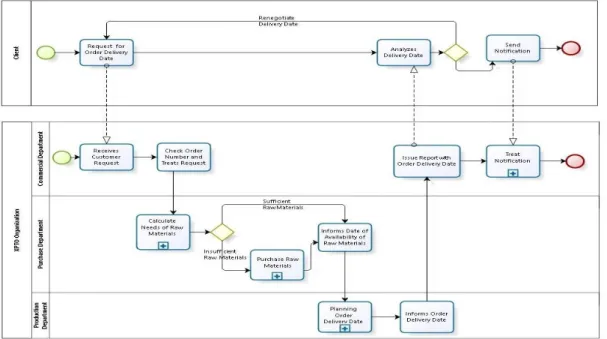
To facilitate the analysis of these tools a simple scenario was developed which uses a common business process, dealing with the approval of the delivery date of an order. The main goal is to assess, for each BPM tool, which simulation parameters are present or absent. Very briefly, the business process is carried out as follows: "The client sends a request to the commercial department of XPTO, asking about the delivery date of his order. The commercial department processes the request and forwards it to the responsible departments (purchasing department and production department). After getting the delivery date of the order and the conditions thereof, the commercial department prepares a report and informs the client. The client decides if he approves the delivery date of his order or if he wants to renegotiate it" (see Figure 2, below).
In order to be able to analyze the simulation capabilities of the above BPM tools, using the process “Request of Order Delivery Date”, we drew up a list of properties that a simulation tool should address. As a starting point we considered the simulation properties described in the previous section. To this initial set we added several others, which are present in well-known simulation tools such as Arena, Simio, Simul8, among others. We consider that these properties are the minimum necessary for a BPM tool to have some value regarding the simulation of business processes.
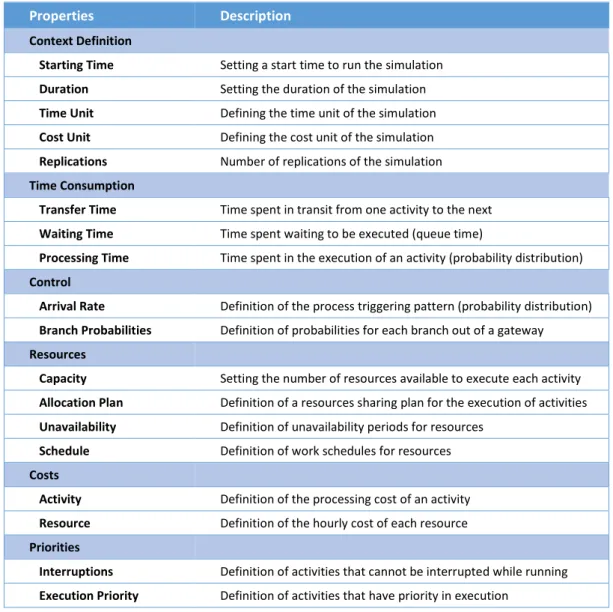
Once there are several properties, to facilitate the analysis these were grouped into six classes: Context Definition, Time Consumption, Control, Resources, Costs and Priorities (see Table 1).
Table 1. Simulation Properties
Properties Description
Context Definition
Starting Time Setting a start time to run the simulation
Duration Setting the duration of the simulation
Time Unit Defining the time unit of the simulation
Cost Unit Defining the cost unit of the simulation
Replications Number of replications of the simulation
Time Consumption
Transfer Time Time spent in transit from one activity to the next
Waiting Time Time spent waiting to be executed (queue time)
Processing Time Time spent in the execution of an activity (probability distribution)
Control
Arrival Rate Definition of the process triggering pattern (probability distribution)
Branch Probabilities Definition of probabilities for each branch out of a gateway
Resources
Capacity Setting the number of resources available to execute each activity
Allocation Plan Definition of a resources sharing plan for the execution of activities
Unavailability Definition of unavailability periods for resources
Schedule Definition of work schedules for resources
Costs
Activity Definition of the processing cost of an activity
Resource Definition of the hourly cost of each resource
Priorities
Interruptions Definition of activities that cannot be interrupted while running
Execution Priority Definition of activities that have priority in execution
Concerning probability distributions, there are several distributions, which are normally available in every simulation tool (such as Normal, Triangular, Uniform, Beta, Exponential, Gamma, Erlang, Binomial, and Poisson), that should also be present in a BPM tool with simulation capabilities.
6. BPM Tools Analysis Regarding Process Simulation
The analysis of the BPM tools mentioned earlier was performed taking into account the simulation properties identified in Table 1, above. The results of this analysis are presented in Table 2, which summarizes the simulation capabilities and limitations of each tool, facilitating the comparison among them. But before, each one of the BPM tools is briefly presented and its most relevant characteristics are described.
BIMP
BIMP is referred as a simulator of business processes, running in an online server, and available to any user, free of charge. This tool, unlike the other BPM tools, has no modeling capacity. Accordingly, to simulate a business process with BIMP, it is necessary to first develop the business process in a modeling tool which allows to export the model in BPMN 2.0 or VSDX format (available in Visio 2013 BPMN). Failure to graphically represent a business process is a serious drawback of this tool, as it is necessary to use two different tools to model and simulate a business process. Due to this limitation we had some problems simulating the "Request for Order Delivery Date" BPMN Process, as the identification of the BPMN elements which had to receive simulation properties was not easy to do. If the simulation of a relatively small process (composed of eight activities and four sub-processes) has been somewhat complex, one wonders how to simulate a larger process with this tool.
Regarding the list of simulation properties defined earlier, BIMP supports a fair amount of them, but the reports obtained from the tool are very simplistic and naïve. Although this is a different tool from the others that were analyzed here, the difficulty to add simulation properties to the BPMN elements of the process model, and the extreme simplicity of the reports produced, lead us to the conclusion that this tool cannot be used as a real-world simulation tool.
Bizagi
This is considered by many users one of the best BPM tools with respect to modeling business processes. Using this tool one can easily develop BPMN diagrams in order to represent all the essential details about business processes. From the developed models supporting documentation might be generate for later analysis.
In its latest version (version 2.9), process simulation capabilities have been included, using a very user friendly interface. The association of simulation properties to the elements in a BPMN diagram evolves around four steps (Process Validation, Time Analysis, Resource Analysis and Analysis Calendar). One of the advantages highlighted by the developers of Bizagi is the What-if Analysis function. This feature allows users to "clone" any scenario developed and change the parameters where “bottlenecks” are identified in the process. The report produced subsequently compares the simulated scenarios and identifies which are the elements that have changed, thus allowing us to assess the impact of changes made in the process model. BPSim
Trisotech is a company dedicated to the development of BPM tools, which has developed strong partnerships with various industry leaders. Through these partnerships, Trisotech managed to develop a module capable of simulating business processes modeled with BPMN – BPSim (Business Process Simulation), which was added to the product of Trisotech (BPMN 2.0 Modeler for Visio). The partner for the development of BPSim was the Lanner Group, a company with a long tradition in the simulation area. Regarding the simulation properties mentioned in Table 1, this was the tool that stood out as it supports the majority of those properties. With respect to “ease of use” this tool proved to be rather complex. To assign values to the BPMN elements of a process specific knowledge of the tool is needed. The ability to allocate resources to the activities is also a complex task. Additionally, the reports produced by the tool are less complete and of lower quality, if compared to other tools discussed here. Although it is not an easy to use tool, this was not a barrier to simulate our business process. Regarding simulation, for which this tool was specifically developed, it was noticeable that it stood out from the others, since it can cover a wide range of simulation properties that are necessary in a real case.
BonitaSoft
Contrary to BIMP, the BonitaSoft tool allows the graphical representation of business processes in BPMN. As with similar tools, process modelling is very simple and intuitive, doing simple drag and drop of the BPMN elements in a modeling canvas. Unfortunately, regarding simulation of process models, BonitaSoft is still in a very early phase of development, since it only includes resource definition and loading profiles.
Another limitation of this tool concerns the absence of information about queues. Since there are no graphical animation capabilities, as currently happens with the majority of simulation tools, one cannot, even visually, identify the activities that have larger queues. The reports obtained also do not produce any information regarding this situation, making very difficult to identify the bottlenecks that may exist in a business process. Although this tool provides a simulation module, the inability to obtain the data needed for a correct analysis of the processes behavior makes its real use very limited.
Visual Paradigm
In the past, the only option to model business processes with this tool was to use the graphical language UML (Unified Modeling Language), namely its Activity Diagrams. More recently, this tool also began to support BPMN, and using its “Enterprise” version one can also simulate business processes. Unfortunately, regarding its simulation capabilities, it was clear from the beginning of our analysis that this tool would have difficulties to perform a simulation in full, as data inputs provided to the simulation model were very limited. A relevant feature for simulation that was not found in this tool is the possibility to assign a work cost to a resource.
Although this tool has a friendly user interface and is easy to use, with respect to simulation it still has considerable weaknesses. Indeed, it does not include a large part of the simulation properties mentioned above. On the other hand, the reports provided might be considered satisfactory, as they include data for the waiting time of each activity, the percentage of resources utilization, and the process cost.
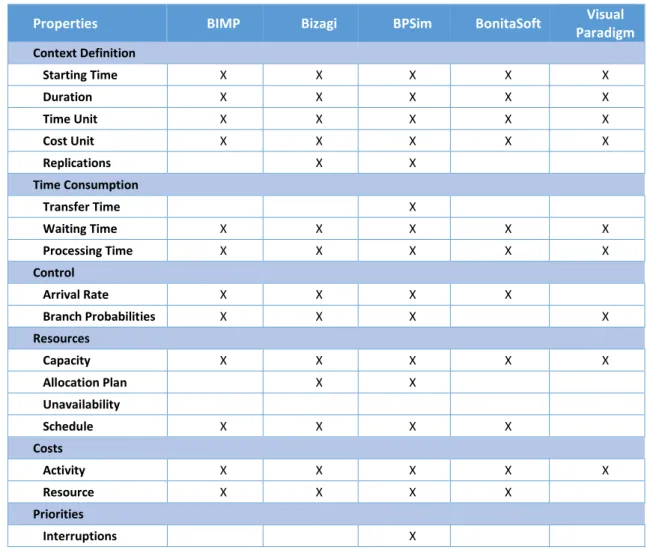
The next table (Table 2) is as a summarization of the simulation capabilities of each tool described above, taking into account the properties identified in Table 1. A mark (X) signals that a property is supported by the tool. Table 2. Simulation Properties by Tool
Properties BIMP Bizagi BPSim BonitaSoft Visual
Paradigm Context Definition Starting Time X X X X X Duration X X X X X Time Unit X X X X X Cost Unit X X X X X Replications X X Time Consumption Transfer Time X Waiting Time X X X X X Processing Time X X X X X Control Arrival Rate X X X X Branch Probabilities X X X X Resources Capacity X X X X X Allocation Plan X X Unavailability Schedule X X X X Costs Activity X X X X X Resource X X X X Priorities Interruptions X
Execution Priority X Probability Distributions Normal X X X X X Triangular X X X Uniform X X X Beta X X Erlang X X Poisson X X
As we can see, there are substantial differences among tools regarding simulation capabilities. Considering that a simulation experiment is intended to faithfully represent the real system or, at least, represent it as accurately as possible, BPM tools that have limitations concerning the support of simulation properties won’t be able to fulfil that requirement. Thus, leading to simulation results that might by far away from the real ones.
7. Conclusions
With the worldwide acceptance of the BPM (Business Process Management) approach by organizations, a class of software tools has gained major importance – the BPM tools. This is a large family of products intended to support the needs of organizations regarding the modeling, implementation, execution, monitoring and improvement of their business processes.
In this paper we focus our attention in the modeling of business processes using the widely used language BPMN. More specifically we want to clarify which is the level of support offered by modern BPM tools, regarding the simulation of business processes modeled in BPMN. Our interest in process simulation comes from the fact that the ability to simulate business processes, before their actual implementation in the field, might provide substantial gains to organizations and reduce the risks associated to changes. Indeed, by using simulation organizations may anticipate the effects of changes in their processes and evaluate different scenarios (what-if). The analysis of some BPM tools underlying this paper has revealed that, besides a minimum set of features needed to do simple simulation work, and which is common to all of them, there are very distinct simulation capabilities among tools. On the one hand, while there are already some BPM tools which may be used to do serious simulation work, on the other hand, there are others that still lack essential simulation capabilities. Anyway, it becomes clear that there is already an effort from BPM tools developers, particularly those that support the BPMN standard, in enabling their products with simulation features. One can expect that, in a few years, simulation capabilities will be standard features of BPM tools.
References
Briol, P. (2008). BPMN: the Business Process Modeling Notation Pocket Handbook.Lulu.com.
Brocke, J., & Rosemann, M. (2010). Handbook on Business Process Management 2: Strategic Alignment, Governance, People and Culture. Springer Berlin Heidelberg.
Buelow, H. (2010). Getting Started with Oracle BPM Suite 11gR1. Packt Publishing Ltd. OMG. (2011). Business Process Model and Notation (BPMN). Object Management Group, Inc.
Oliveira, P., & Pereira, J. (2008). A Simulação Computorizada no Suporte à Optimização e Melhoria Contínua de Processos Organizacionais. Proceedings da 8ª Conferência da Associação Portuguesa de Sistemas de Informação. CAPSI 2008. Setúbal - Portugal.
Ribeiro, M., & Pereira. J. (2014). Multi-paradigm simulation projects: The need for practical guidelines. Proceedings of the 4th International Conference on Business Sustainability. BS 2014. Póvoa de Varzim – Portugal.
Sakurada, N., & Miyake, D. (2009). Simulação baseada em agentes (SBA) para modelagem de sistema de operações. Simpoi, ANAIS (1980), 1–16.
Tessari, R. (2008). Gestão De Processos De Negócio: Um Estudo De Caso Da Bpmn Em Uma Empresa Do Setor Moveleiro. Dissertação de Mestrado, Universidade de Caxias do Sul.
Waller, A., Clark, M., & Enstone, L. (2006). L-SIM: Simulating BPMN Diagrams with a Purpose Built Engine, Proceedings of the Winter Simulation Conference. WSC 2006. 591–597. Monterey, CA.
White, S. a. (2004a). Business process modeling notation. Specification, BPMI. Org, (January), 1–296. White, S. a. (2004b). Introduction to BPMN. BPTrends, 1–11.