Under standing the .NET
Framewor k Architecture
New technologies force change, nowhere more so than in computers and software. Occasionally, a new technology is so innovative that it forces us to challenge our most fundamental assumptions. In the computing industry, the latest such technology is the Internet. It has forced us to rethink how software should be created, deployed, and used.
However, that process takes time. Usually, when a powerful new technology comes along, it is first simply strapped onto existing platforms. So it has been for the Internet. Before the advent of Microsoft .NET, developers used older platforms with new Internet capabilities “strapped on.” The resulting systems worked, but they were expensive and difficult to produce, hard to use, and difficult to maintain.
Realizing this several years ago, Microsoft decided it was time to design a new platform from the ground up specifically for the post-Internet world. The result is called .NET. It represents a turning point in the world of Windows software for Microsoft platforms. Microsoft has staked its future on .NET and has publicly stated that henceforth almost all its research and development will be done on this platform. It is expected that, eventually, almost all Microsoft products will be ported to the .NET platform.
Microsoft is now at version 3.0 of the Microsoft .NET Framework, and the development environ-ment associated with this version is called Visual Studio 2005. The version of Visual Basic in this version is thus called Visual Basic 2005, and this book is about using Visual Basic 2005 with the .NET Framework 3.0.
What Is the .NET Framewor k?
The .NET Framework includes an execution platform in the form of a virtual machine. It also includes several programming languages that can produce programs for this virtual machine, and extensive class libraries, to provide rich built-in functionality for those languages.
This chapter looks at the .NET Framework from the viewpoint of a Visual Basic developer. Unless you are quite familiar with the framework already, you should consider this introduction an essential first step in assimilating the information about Visual Basic 2005 that is presented in the rest of this book.
Versions of the .NET Framework
The first released product based on the .NET Framework was Visual Studio .NET 2002, which was pub-licly launched in February 2002, and included version 1.0 of the .NET Framework. Visual Studio .NET 2003 was introduced a year later and included version 1.1 of the .NET Framework.
In late 2005, version 2.0 of the .NET Framework was introduced, and along with it a new version of Visual Studio was released. That version is named Visual Studio 2005. (Note that the “.NET” part of the name was dropped for this version.)
In early 2007, Microsoft’s new version of Windows, called Vista, was released to the public. At the same time, a new version of the .NET Framework was introduced, called .NET Framework 3.0. This version of the .NET Framework is built into Windows Vista, and is available to be installed on Windows XP and Windows Server 2003.
Earlier versions of the .NET Framework also worked on several versions of Windows before XP, but the .NET Framework 3.0 does not. It is only compatible with Windows XP, Windows 2003 Server, and Windows Vista.
No new version of Visual Studio was released with the .NET Framework 3.0. Visual Studio 2005 is com-patible with this version of the framework.
This book assumes that you are using Visual Studio 2005 and .NET Framework 3.0. Some of the exam-ples will work transparently with other versions of the .NET Framework and Visual Studio, but you should not count on this. Many examples in this edition emphasize features of .NET Framework 2.0 over 1.0/1.1, and of course many new examples require .NET Framework 3.0.
What’s New in .NET Framework 3.0?
Most of the classes in .NET Framework 2.0 are unchanged in 3.0. The differences for .NET Framework 3.0 are new libraries that offer completely new functionality. The new capabilities in .NET Framework 3.0 are almost entirely contained in three new technologies:
Windows Presentation Foundation (WPF) — A completely new UI technology, based on the DirectX engine, which allows creation of vector-based user interfaces instead of the traditional Windows bit-mapped UI. WPF is the platform for the next generation of interactive user interfaces, with built-in capabilities for scaling, animation, media, styling, and three-dimensional visualization.
Windows Communication Foundation (WCF)— A unified framework for machine-to-machine and process-to-process communication. WCF brings together the capabilities of various messaging and com-munications technologies, including Web Services, enterprise services, remoting, and Microsoft Message Queue, into one integrated programming model. WCF is designed to be the principal Microsoft platform for systems with Service-Oriented Architecture (SOA).
Windows Workflow (WF)— An engine for creation of workflow applications. WF serves as the kernel of workflow, handling threading, persistence, and other plumbing tasks. WF brings a consistent, compo-nent-oriented philosophy to workflow, and is expected to be the core of a range of workflow solutions from Microsoft and various third parties.
Platform for a Post-Internet World
The .NET Framework began as a rich and complex platform, and as indicated earlier, it continues to include new and innovative capabilities. These new technologies fit well with the original philosophy of .NET, which is to serve as a platform for all kinds of software in an Internet-enabled world.
The vision of Microsoft .NET is globally distributed systems, using XML as the universal glue to enable functions running on different computers across an organization or across the world to come together in a single application. In this vision, systems from servers to wireless palmtops, with everything in between, will share the same general platform, with versions of .NET available for all of them, and with each of them able to integrate transparently with the others.
This does not leave out classic applications as you have always known them, though. The .NET
Framework also makes traditional business applications much easier to develop and deploy. Some of the technologies of the .NET Framework, such as Windows Forms, demonstrate that Microsoft has not for-gotten the traditional business developer. In fact, such developers will find it possible to Internet-enable their applications more easily than with any previous platform.
From the perspective of a Visual Basic developer, the .NET Framework enables Visual Basic to be used for anything from a simple utility program to a worldwide distributed n-tier system, and to create soft-ware on anything from huge servers to portable devices.
Overcoming the Limitations of COM
The pre-.NET technologies used for development on Microsoft platforms encompassed the COM (Component Object Model) standard for creation of components. COM had several major drawbacks. It wasn’t designed for an Internet-enabled world or for highly distributed systems. In addition, deploy-ment of COM-based applications was quite expensive.
Pre-.NET versions of Visual Basic also had significant limitations, and many of them resulted from the limitations of COM, upon which VB6 was based. For example, VB6’s lack of full object orientation was due in part to the fact that COM itself was not object oriented. This meant that producing frameworks for complex systems in versions of Visual Basic through VB6 was not very practical.
Add to this a limited threading model and limited options for exposing Internet user interfaces, and Visual Basic needed a complete overhaul. That was done as part of the creation of the .NET Framework.
An Over view of the .NET Framewor k
The .NET Framework covers all the layers of software development above the operating system level. It provides the richest level of integration among presentation technologies, component technologies, and data technologies ever seen on a Microsoft, or perhaps any, platform. The entire architecture has been created to make it as easy to develop Internet applications as it is to develop desktop applications.
The .NET Framework actually “wraps” the operating system, insulating software developed with .NET from most operating system specifics such as file handling and memory allocation. This prepares for a possible future in which the software developed for .NET is portable to a wide variety of hardware and operating system foundations.
The major components of the .NET Framework 3.0 are shown in Figure 1-1.
Figure 1-1
The framework starts all the way down at the memory management and component loading level and goes all the way up to multiple ways of rendering user and program interfaces. In between, there are layers that provide just about any system-level capability that a developer would need.
At the base is the common language runtime, often abbreviated to CLR. This is the heart of the .NET Framework — it is the engine that drives key functionality. It includes, for example, a common system of datatypes. These common types, plus a standard interface convention, make cross-language inheritance possible. In addition to allocation and management of memory, the CLR also does reference tracking for objects and handles garbage collection.
The middle layer includes the next generation of standard system services, such as classes that manage data and Extensible Markup Language (XML). These services are brought under control of the frame-work, making them universally available and making their usage consistent across languages.
.NET Framework Classes for External Interface ASP.NET
Web Forms Web Services
Windows Forms Controls and Forms
Drawing
Windows Presentation Foundation
Windows Communication Foundation Pages, Animation, etc. Pipelines, Endpoints, etc.
.NET Framework Base Classes for Internal and Local Use
Common Language Runtime
Memory Management Common Type System Lifecycle Monitoring JIT Compilers,etc. ADO.NET
Component Model Security XML Diagnostics Threading Exceptions IO Etc. Workflow
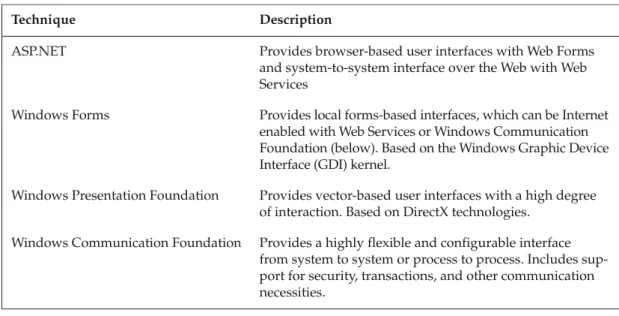
The top layer includes user and program interfaces. There are four major ways of providing an interface from within .NET to entities outside .NET:
All of these interfacing capabilities are available to any language based on the .NET platform, including, of course, Visual Basic 2005.
The Common Language Runtime
We are all familiar with runtimes — they go back further than DOS languages. However, the common language runtime (CLR) is as advanced over traditional runtimes as a machine gun is over a musket. Figure 1-2 shows a simple diagrammatic summary of the major pieces of the CLR.
Figure 1-2
Common Type System Data Types, etc.
Intermediate Language (IL) to native code compilers
Execution Support (traditional runtime
functions)
Security
Garbage collection, stack walk, code manager
Class loader and memory layout
Technique Description
ASP.NET Provides browser-based user interfaces with Web Forms and system-to-system interface over the Web with Web Services
Windows Forms Provides local forms-based interfaces, which can be Internet enabled with Web Services or Windows Communication Foundation (below). Based on the Windows Graphic Device Interface (GDI) kernel.
Windows Presentation Foundation Provides vector-based user interfaces with a high degree of interaction. Based on DirectX technologies.
Windows Communication Foundation Provides a highly flexible and configurable interface from system to system or process to process. Includes sup-port for security, transactions, and other communication necessities.
Key Design Goals
The design of the CLR is based on the following primary goals:
❑ Simpler, faster development
❑ Automatic handling of system-level tasks such as memory management and process communi-cation
❑ Excellent tool support
❑ Simpler, safer deployment
❑ Scalability
Many of these design goals directly address the limitations of COM. Let’s look at some of these in detail.
Simpler, Faster Development
A broad, consistent framework enables developers to write less code, and to reuse code more. Using less code is possible because the system provides a rich set of underlying functionality. Programs in .NET access this functionality in a standard, consistent way, requiring less “hardwiring” and customization logic to interface with the functionality than was typically needed in earlier platforms. Programming is also simpler in .NET because of the standardization of datatypes and interface conventions.
The result is that programs written in VB 2005 that take proper advantage of the full capabilities of the .NET Framework typically have significantly less code than equivalent programs written in pre-.NET versions of Visual Basic. Less code means faster development, fewer bugs, and easier maintenance.
Excellent Tool Support
Although much of what the CLR does is similar to operating system functionality, it is very much designed to support development languages. It furnishes a rich set of object models that are useful to tools such as designers, wizards, debuggers, and profilers; and because the object models are at the run-time level, such tools can be designed to work across all languages that use the CLR. Many such tools are available from a variety of third-party vendors.
Simpler, Safer Deployment
Applications produced in the .NET Framework can be designed to install with a simple XCOPY. Just copy the files onto the disk and run the application (as long as the .NET Framework is already available on the machine). There are other more sophisticated deployment possibilities, but most rely on .NET’s simple deployment model.
This model works because compilers in the .NET Framework embed identifiers (in the form of metadata, to be discussed later) into compiled modules, and the CLR manages those identifiers automatically. The identifiers provide all the information needed to load and run modules, and to locate related modules.
As a great by-product, the CLR can manage multiple versions of the same component (even a shared component) and have them run side by side. The identifiers tell the CLR which version is needed for a particular compiled module, because such information is captured at compile time. The runtime policy can be set in a module either to use the exact version of a component that was available at compile time, to use the latest compatible version, or to specify an exact version.
This has implications that might not be apparent at first. For example, .NET supports a program that can run directly from a CD or a shared network drive, without first running an installation program. This dramatically reduces the cost of deployment in many common scenarios.
Another significant deployment benefit in .NET is that applications only need to install their own core logic. An application produced in .NET does not need to install a runtime, for example, or modules for ADO or XML. Such base functionality is part of the .NET Framework, which is installed separately and only once for each system. As mentioned earlier, the .NET Framework 3.0 is included with the Windows Vista operating system, and can be installed on a one-time basis on Windows XP and Windows 2003 Server.
.NET programs can also be deployed across the Internet. Version 3.0 of the .NET Framework includes a technology specifically for that purpose called ClickOnce. This was a new capability in .NET 2.0, supple-menting the “no touch deployment” of earlier versions. You can read about ClickOnce in Chapter 22.
Scalability
Since most of the system-level execution functions are concentrated in the CLR, they can be optimized and architected to allow a wide range of scalability for applications produced in the .NET Framework. As with most of the other advantages of the CLR, this one comes to all applications with little or no effort.
Memory and process management is one area where scalability can be built in. The memory manage-ment in the CLR is self-configuring and tunes itself automatically. Garbage collection (reclaiming mem-ory that is no longer being actively used) is highly optimized, and the CLR supports many of the component management capabilities of COM+ (such as object pooling) in a portion of .NET called Enterprise Services. The result is that components can run faster and, thus, support more users.
This has some interesting side effects. For example, the performance and scalability differences among languages become smaller. All languages compile to a standard byte code called Microsoft Intermediate Language (MSIL), often referred to simply as IL. With all languages compiling down to similar byte code, it becomes unnecessary in most cases to look to other languages when performance is an issue. The difference in performance among .NET languages is minor — Visual Basic, for example, offers about the same performance as any of the other .NET languages.
Versions of the CLR are available on a wide range of devices. The vision is for .NET to be running at all levels, from smart mobile devices all the way up to Web farms. The same development tools work across the entire range. (The current version of .NET for mobile devices is still based on .NET Framework 2.0, but Visual Studio 2005 can still work with that version, which is known as the Compact Framework.)
Metadata
The .NET Framework needs a lot of information about an application to carry out several automatic functions. The design of .NET requires applications to carry that information within them. That is, appli-cations are self-describing. The collected information that describes an application is called metadata. The concept of metadata is not new. For example, COM components use a form of it called a type library,
which contains metadata describing the classes exposed by the component and is used to facilitate OLE Automation. A component’s type library, however, is stored in a separate file. In contrast, the metadata in .NET is stored in one place — inside the component it describes. Metadata in .NET also contains more information about the component and is better organized.
Chapter 5, “The Common Language Runtime,” provides more information about metadata, and Chapter 21, “Assemblies,” has additional detail. For now, the most important point for you to internalize is that metadata is key to the easy deployment in .NET. When a component is upgraded or moved, the neces-sary information about the component cannot be left behind. Metadata can never become out of sync with a .NET component because it is not in a separate file. Everything the CLR needs to know to run a component is supplied with the component.
Multiple-Language Integration and Support
The CLR is designed to support multiple languages and allow high levels of integration among those languages. By enforcing a common type system, and by having complete control over interface calls, the CLR enables languages to work together more transparently than ever before. The cross-language inte-gration issues of COM simply don’t exist in .NET.
It is straightforward in the .NET Framework to use one language to subclass a class implemented in another. A class written in Visual Basic can inherit from a base class written in C#, or in a .NET version of COBOL for that matter. The VB program doesn’t even need to know the language used for the base class. .NET offers full implementation inheritance with no problems that require recompilation when the base class changes.
A Common Type System
A key piece of functionality that enables multiple-language support is a common type system, in which all commonly used datatypes, even base types such as Longand Boolean, are actually implemented as objects. Coercion among types can now be done at a lower level for more consistency between lan-guages. In addition, because all languages are using the same library of types, calling one language from another doesn’t require type conversion or weird calling conventions.
This results in the need for some readjustment, particularly for developers who are only familiar with pre-.NET versions of VB. For example, what was called an Integerin VB6 and earlier is now known as a Shortin VB 2005.
The “everything’s an object” approach of .NET results in other potential surprises. For example, because
Stringis a class in .NET instead of just a simple datatype, it has methods for string manipulation. Splitting a string into parts based on a delimiter is done with the String.Splitmethod. VB6 develop-ers might expect there to be a language keyword or a function in the library to do this, and wouldn’t necessarily expect a method call right on the Stringobject.
These adjustments are well worth the effort. The benefit is the ascension of Visual Basic to the status of a fully object-oriented language with no “glass ceiling” preventing it from being used for scenarios such as creating visual controls.
The CLR enforces the requirement that all datatypes satisfy the common type system. This has important implications, too. For example, it is not possible with the common type system to get the problem known in COM as a buffer overrun, which is the source of many security vulnerabilities. Programs written on .NET should have fewer such vulnerabilities because .NET is not dependent on the programmer to con-stantly check passed parameters for appropriate type and length. Such checking is done by default.
Namespaces
One of the most important concepts in the .NET Framework is namespaces. Namespaces help organize object libraries and hierarchies, simplify object references, prevent ambiguity when referring to objects, and control the scope of object identifiers. The namespace for a class enables the CLR to unambiguously identify that class in the available .NET libraries that it can load.
Namespaces are discussed briefly in Chapter 2 and in more detail in Chapter 8. Understanding the con-cept of a namespace is essential for your progress in .NET, so do not skip those sections if you are unfa-miliar with namespaces.
The Next Layer—The .NET Class Framewor k
The next layer up in the framework provides the services and object models for data, input/output, security, and so forth. It is called the .NET Class Framework, sometimes referred to as the .NET base classes.
The .NET Class Framework contains literally thousands of classes and interfaces. Here are just some of the functions of various libraries in the .NET Class Framework:
❑ Data access and manipulation
❑ Creation and management of threads of execution
❑ Interfaces from .NET to the outside world — Windows Forms, Web Forms, Web Services, and console applications
❑ Definition, management, and enforcement of application security
❑ Encryption, disk file I/O, network I/O, serialization of objects, and other system-level functions
❑ Application configuration
❑ Working with directory services, event logs, performance counters, message queues, and timers
❑ Sending and receiving data with a variety of network protocols
❑ Accessing metadata information stored in assemblies
Much of the functionality that a programmer might think of as being part of a language has been moved to the base classes. For example, the old VB6 keyword Sqrfor extracting a square root is no longer avail-able in .NET versions of Visual Basic. It has been replaced by the System.Math.Sqrt()method in the framework classes.
It’s important to emphasize that all languages based on the .NET Framework have these framework classes available. That means that COBOL, for example, can use the same function mentioned above to get a square root. This makes such base functionality widely available and highly consistent across lan-guages. All calls to Sqrtlook essentially the same (allowing for syntactical differences among lan-guages) and access the same underlying code. Here are examples in VB.NET and C#:
’ Example using Sqrt in Visual Basic .NET Dim dblNumber As Double = 200
Dim dblSquareRoot As Double
dblSquareRoot = System.Math.Sqrt(dblNumber) Label1.Text = dblSquareRoot.ToString ’ Same example in C#
Double dblNumber = 200;
Double dblSquareRoot = System.Math.Sqrt(dblNumber); dblSquareRoot = System.Math.Sqrt(dblNumber); label1.Text = dblSquareRoot.ToString;
Notice that the line using the Sqrt()function is exactly the same in both languages.
A programming shop can create its own classes for core functionality, such as globally available, already compiled functions. This custom functionality can then be referenced in code the same way as built-in .NET functionality.
Much of the functionality in the base framework classes resides in a vast namespace called System. The
System.Math.Sqrt()method was just mentioned. The Systemnamespace contains dozens of such
subcategories. The following table describes a few of the important ones, many of which you will be using in various parts of this book:
Namespace What It Contains Example Classes and Subnamespaces System.Collections Creation and management of
vari-ous types of collections
Arraylist, Hashtable, SortedList
System.Data Classes and types related to basic database management (see Chapter 10 for details)
DataSet, DataTable, DataColumn
System.Diagnostics Classes to debug an application and to trace the execution of code
Debug, Trace
System.IO Types that allow reading and writ-ing to and from files and other data streams
File, FileStream, Path, StreamReader, StreamWriter
System.Math Members to calculate common mathematical quantities, such as trigonometric and logarithmic functions
Sqrt (square root), Cos (cosine), Log (logarithm), Min (minimum)
System.Reflection Capability to inspect metadata Assembly, Module
System.Security Types that enable security capabili-ties (see Chapter 12 for details)
User and Program Interfaces in .NET
At the top layer, .NET provides four ways to render and manage user interfaces:
❑ Windows Forms
❑ Web Forms
❑ Windows Presentation Foundation
❑ Console applications (not shown in Figure 1-1)
.NET also provides several techniques for interprocess communication, either on the same machine or between different machines. These include Web Services, .NET Remoting, and the new Windows Communication Foundation.
Using .NET effectively requires understanding the strengths and intended uses of these technologies, and how to choose among them for specific circumstances. The following sections provide a brief overview, with references to additional chapters in the book that go into more depth.
Windows Forms
Windows Forms is a more advanced and integrated way to do standard Win32 screens. All languages that work on the .NET Framework can use the Windows Forms engine, which duplicates the functionality of the old VB forms engine. It provides a rich, unified set of controls and drawing functions. It effectively replaces the Windows graphical API, wrapping the Windows GDI kernel in such a way that developers normally have no need to go directly to the Windows API for any graphical or screen functions.
Chapter 15 describes Windows Forms in more detail and notes significant changes in Windows Forms versus older VB forms. Chapter 16 continues discussing advanced Windows Forms capabilities such as creation of Windows Forms visual controls.
Client Applications versus Browser-Based Applications
Before .NET, many internal corporate applications were browser-based simply because of the cost of installing and maintaining a client application on hundreds or thousands of workstations. Windows Forms and the .NET Framework change the economics of these decisions. A Windows Forms application is much easier to install and update than an equivalent VB6 desktop application. With a simple XCOPY deployment and no registration issues, installing and updating become much easier. Internet deploy-ment via ClickOnce also makes applications more available across a wide geographic area, with auto-matic updating of changed modules on the client.
This means that “smart client” applications with a rich user interface are more practical under .NET, even for a large number of users. It may not be necessary to resort to browser-based applications just to save on installation and deployment costs.
As a consequence, don’t dismiss Windows Forms applications as merely replacements for earlier VB6 desktop applications. Instead, examine applications in .NET and explicitly decide what kind of interface makes sense in a given scenario. In some cases, applications that you might have assumed should be
browser-based simply because of a large number of users and wide geographic deployment instead can be smart-client-based, which can improve usability, security, and productivity.
In other cases, it might be appropriate for parts of your system to expose a Windows Forms interface, and other parts to expose a browser-based system. Because logic for data access and other system chores is compatible with both of those UI technologies, multiple forms of user interface could easily work with the same server-based functionality.
Web Forms
The part of .NET that handles communications over the Internet is called ASP.NET. It includes a forms engine, called Web Forms, which can be used to create browser-based user interfaces.
Divorcing layout from logic, Web Forms consist of two parts:
❑ A template, which contains HTML-based layout information for all user interface elements
❑ A component, which contains all logic to be hooked to the user interface
It is as if a standard Visual Basic form were split into two parts, one containing information on controls and their properties and layout, and the other containing the code. Just as in Visual Basic, the code oper-ates “behind” the controls, with events in the controls activating event routines in the code.
As with Windows Forms, Web Forms are available to all .NET languages. This brings complete, flexible Web interface capability to a wide variety of languages. Chapters 19 and 20 go into detail about Web Forms and the controls that are used on them.
If you have only used ASP.NET in versions 1.0 or 1.1 of .NET, you should know that ASP.NET 2.0 has dramatic improvements. With even more built-in functionality for common browser tasks, applications can be written with far less code in ASP.NET 2.0 as compared to earlier versions. Capabilities such as user authentication can now be done with prebuilt ASP.NET components, so you no longer have to write such components yourself.
Windows Presentation Foundation
As mentioned at the beginning of this chapter, changing hardware technologies often force changes in our software platforms and development tools. Recent advances in display technologies provide an example. Video hardware has become more powerful. Display devices have become available in many different sizes, resolutions, and aspect ratios.
Developers are accustomed to making decisions about what resolution to support for their applications. Should it be 800×600? Or 1024×768? As such options multiply, decisions become much more complex, and it becomes desirable to find a more complete solution by supporting a wider variety of display devices.
Microsoft’s answer is Windows Presentation Foundation (WPF). At its core, WPF is vector-based,rather than bit-mapped. This enables user interface objects such as controls and shapes to be scalable to any size or resolution. Users of vector-based drawing programs are familiar with this advance, but with WPF it becomes available for general programming use.
WPF also tightly integrates many other display-related technologies, such as animation, styling, and three-dimensional visualization. Media, such as video playback, can easily be placed on any user inter-face surinter-face.
Microsoft’s ambitions for WPF go beyond just supplementing Windows Forms for local interfaces. A version of WPF is planned for non-Windows systems. It is tentatively called WPF/e, sometimes referred to as WPF Everywhere. WPF/e will enable browser pages to incorporate many of WPF’s sophisticated UI features, even if those pages are running on non-Windows systems such as the Apple Macintosh.
Chapter 17 provides an introduction to WPF, and Chapter 18 discusses integration and interoperability of WPF with Windows Forms.
Console Applications
Although Microsoft doesn’t emphasize the .NET Framework’s capability to write character-based appli-cations, the framework does include an interface for such console applications. Batch processes, for example, can now have components integrated into them, and those components can write to a console interface.
As with Windows Forms and Web Forms, this console interface is available for applications written in any .NET language. Writing character-based applications in pre-.NET versions of Visual Basic, for exam-ple, was always a struggle, because those versions were completely oriented around a graphical user interface (GUI). Visual Basic 2005 is independent of user interface technology, and can be used for true console applications along with forms-based and browser-based user interfaces.
Web Services and Windows Communication Foundation
Application development is moving into the next stage of decentralization. The oldest idea of an appli-cation is a piece of software that accesses basic operating system services, such as the file system and graphics system. Then we moved to applications that used a lot of base functionality from other system-level applications, such as a database — this type of application added value by applying generic func-tionality to specific problems. The developer’s job was to focus on adding business value, not building the foundation.
Web Services represented the next step in this direction. In Web Services, software functionality becomes exposed as a service that doesn’t care what the consumer of the service is (unless there are security con-siderations). Web Services enable developers to build applications by combining local and remote resources for an overall integrated and distributed solution.
In .NET, Web Services are implemented as part of ASP.NET (refer to Figure 1-1), which handles all Web interfaces. It enables programs to talk to each other directly over the Web, using the SOAP standard. This has the potential to dramatically change the architecture of Web applications, allowing services running all over the Web to be integrated into a local application.
Moving beyond Web services, the Windows Communication Foundation (WCF) provides the next gen-eration of decentralization. WCF is new in .NET Framework 3.0. It subsumes most of the technologies used in earlier versions of .NET for interprocess communication. Web Services, for example, can be com-pletely wrapped by WCF.
Other Microsoft technologies that are either wrapped or have their functionality replicated in WCF include Enterprise Services, Microsoft Message Queue (MSMQ), and .NET Remoting. All are exposed via a consistent API, so it is no longer necessary in .NET to learn a variety of APIs for cross-process or cross-machine interaction.
Microsoft’s intent with WCF is to provide a platform for creating applications with a Service-Oriented Architecture (SOA). Such an architecture does interprocess communication using messages, rather than function calls or their equivalent. The messages must satisfy a contract that specifies the format of the message and all the information in it. As long as each side of the communication understands how to use the contract, the way each side actually stores the data is irrelevant to the other side.
This type of architecture allows loose coupling between parts of the application. The parts don’t have to know much about each other — they just need to understand the contract. That makes it much easier to replace a part of the application with similar functionality without significant modification to the rest of the application.
Chapter 30 covers the basics of WCF.
.NET Remoting is the remaining technology for interprocess communication. It is not intended for a Service-Oriented Architecture — instead, it allows actual object calls between different .NET processes. The advantage of .NET Remoting is speed on local area networks.
However, WCF has comparable performance capabilities on LANs, and is expected to be the basis for future innovation in interprocess communication. While .NET Remoting will continue to be supported in .NET indefinitely, it is no longer being enhanced. For new applications, WCF is usually preferred.
Chapter 27 covers .NET Remoting.
XML as the .NET Metalanguage
Much of the underlying integration of .NET is accomplished with XML. For example, Web Services depend completely on XML for interfacing with remote objects. Looking at metadata usually means looking at an XML version of it.
ADO.NET, the successor to ADO, is heavily dependent on XML for the remote representation of data. Essentially, when ADO.NET creates what it calls a dataset(a more complex successor to a recordset), the data is converted to XML for manipulation by ADO.NET. Then, changes to that XML are posted back to the datastore by ADO.NET when remote manipulation is finished.
.NET uses XML internally, too. The standard way of storing configuration information in .NET is XML-based.
With XML as an “entry point” into so many areas of .NET, integration opportunities are multiplied. Using XML to expose interfaces to .NET functions enables developers to tie components and functions together in new, unexpected ways. XML can be the glue that ties pieces together in ways that were never anticipated, both to Microsoft and non-Microsoft platforms.
Chapter 11 discusses XML in .NET in more detail.
The Role of COM
When the .NET Framework was introduced in 2002, some uninformed journalists interpreted it as the death of COM. That turned out to be completely incorrect. COM is not going anywhere for a while. In fact, Windows will not boot without COM.
.NET integrates very well with COM-based software. Any COM component can be treated as a .NET component by native .NET components. The .NET Framework wraps COM components and exposes an interface that .NET components can work with. That makes.NET interoperable with a tremendous amount of older COM-based software.
Going in the other direction, the .NET Framework can expose .NET components with a COM interface. This enables older COM components to use .NET-based components as if they were developed using COM.
Chapter 23 discusses COM interoperability in more detail.
No Internal Use of COM
Understand, however, that native .NET components do not interface using COM. The CLR implements a new way for components to interface, one that is not COM-based. Use of COM is only necessary when interfacing with COM components produced by non-.NET tools.
Over a long span of time, the fact that .NET does not use COM internally may lead to the decline of COM, but for any immediate purposes, COM is definitely important.
Major Differences in .NET 2.0
A list of major changes in the .NET Framework 3.0 was included early in this chapter. However, many developers who started with .NET Framework 1.0 or 1.1, and with the associated versions of Visual Basic, may not be familiar with differences between those versions and version 2.0 of the .NET Framework.
Here is a list of important additions and changes that first happened with .NET Framework 2.0/Visual Basic 2005, along with the chapter you should check for more information:
Summar y
Visual Basic has left behind its roots in the COM-based, pre-Internet world. Visual Basic 2005 is built with completely different assumptions about the kind of software you need to develop, and it is built on a platform that is central to Microsoft’s entire product strategy. This chapter discussed the overall struc-ture of this platform, .NET, and summarized the purposes and capabilities of many of the major compo-nent pieces of it.
The .NET platform is now at version 3.0, and each version continues to add impressive new capabilities. Windows Presentation Foundation, Windows Communication Foundation, and Windows Workflow are the major new technologies for .NET Framework 3.0, and each looks poised to have a dramatic effect on the way we develop our software systems.
The next chapter takes a closer look at the core basics of VB 2005. It is a foundation for much of what fol-lows. Following that, Chapters 3 and 4 discuss object orientation and syntax. Those three chapters pro-vide the foundation for the rest of the book, as they go into detail about specific .NET technologies and Visual Basic features.
Feature Description Chapter(s)
Edit and Continue Allows you to make changes to code while you are running it in the integrated development environment (IDE) and have the changes take effect immediately. (This feature was avail-able in VB6 and earlier, but was not availavail-able in Visual Basic 2002 or 2003.)
13
Partial classes Allows code for a class to be split over multiple code modules 3 Generics Allows generic collections to handle specific types, declared
when the collection is created
7
ClickOnce New deployment technology for deploying across the Internet, with automatic updating
22
“My” classes Provides quick access to commonly used classes in the .NET Framework
8
IsNot keyword Simplifies Ifstatements that check whether an object is
Nothing
2
Using keyword Automates disposing of objects created in a section of code 5 IDE improvements Exception manager, code snippets with automatic fill-in,
improved IntelliSense, and autocorrect are a few of the new capabilities of the IDE.