Evaluating software refactoring tool support
Erica Mealy and Paul Strooper
School of Information Technology and Electrical Engineering
The University of Queensland
St Lucia, Qld 4072, Australia
[email protected]
Abstract
Up to 75% of the costs associated with the development of software systems occur post-deployment during mainte-nance and evolution. Software refactoring is a process that can significantly reduce the costs associated with software evolution. Refactoring is defined as internal modification of source code to improve system quality, without change to observable behaviour. Tool support for software refac-toring attempts to further reduce evolution costs by au-tomating manual, error-prone and tedious tasks. Although the process of refactoring is well-defined, tools support-ing refactorsupport-ing do not support the full process. Existsupport-ing tools suffer from issues associated with the level of au-tomation, the stages of the refactoring process supported or automated, the subset of refactorings that can be ap-plied, and complexity of the supported refactorings. This paper presents a framework for evaluating software refac-toring tool support based on the DESMET method. For the DESMET application, a functional analysis of the require-ments for supporting software refactoring is used in con-junction with a case study. This evaluation was completed to assess the support provided by six Java refactoring tools and to evaluate the efficacy of using the DESMET method for evaluating refactoring tools.
1
Introduction
Software evolution can be time-consuming and tedious, and often accounts for up to 75% of costs associated with the development of software-intensive systems [21]. Lehman’s laws of software evolution [14, 15] state that while the functionality of a system increases over time, there is a corresponding decrease in quality and increase in internal complexity. Refactoring is a process that helps
mitigate the problems of evolution by addressing the con-cerns of internal complexity and quality.
Refactoring isthe process of changing a software sys-tem in such a way that is does not alter the external be-haviour of the code yet improves its internal structure[10]. Refactoring tasks range in complexity from the introduc-tion of a symbolic constant to replace a magic number, to the major re-design of a system to introduce a design pattern [12]. As described by Fowler [10], refactoring is a manual process consisting of multiple stages: identifi-cation of code smells, proposing a refactoring, and ap-plying the selected refactoring. A code smellis a struc-ture present in source code that suggests the possibility of refactoring [2]. Manual refactoring, like evolution, is a time-consuming, tedious and error-prone process.
Automated software refactoring assists developers by supporting the time-consuming and error-prone tasks of manual refactoring. These manual processes include tasks such as propagating changes to method names throughout a system. Although automated software refactoring pro-vides benefits to users, problems can be introduced since these tools currently have either an inappropriate level of automation (no user interaction or customisation avail-able), are incomplete (covering only part of the refactor-ing process) or are too simple (the transformations and de-tected issues are not sufficiently complex or sophisticated). Furthermore, tools categorised asautomatic(implying the whole process of refactoring is automated) exhibit vary-ing levels of automatic support for the refactorvary-ing process. The current levels of support are characterised by only a subset of the refactorings described in [10] being imple-mented or only automating the application of refactorings without automating the detection of opportunities.
In this paper, the DESMET method [13], for evaluat-ing software engineerevaluat-ing methods and tools, is used to assess software refactoring tools. DESMET provides a formalised evaluation framework for assessing the
appro-priateness of tools for use in supporting a selected soft-ware engineering task. We have used the DESMET Fea-ture Analysis method (incorporating a small case study) to evaluate Java refactoring support tools. The tools stud-ied are Eclipse [8], Borland JBuilder [5], IntelliJ IDEA [11], RefactorIT [23], Condenser [18] and jCOSMO [26]. The application of the Feature Analysis has highlighted the limitations of current refactoring tools. The evaluation has also demonstrated the framework’s ability to differentiate software refactoring tools.
Section 2 introduces software refactoring and issues with refactoring tool support. Section 3 presents existing comparison frameworks and requirements definitions for software development environments (including software refactoring support), highlighting shortcomings with ap-proaches using these frameworks for evaluating refactor-ing tools. An introduction to DESMET tool evaluations and Feature Analyses is provided in Section 4, including the definition of the feature set used in this study. Informa-tion on the case study used in this project and the results of the Feature Analysis of the selected Java refactoring tools are provided in Section 5.
2
Software Refactoring
Refactoring is the process of internal improvement of software without change to externally observable be-haviour [10, 20]. Tourw´e and Mens [25] identify three phases associated with the process of refactoring:
1. Identification of when an application should be refac-tored.
2. Proposal of which refactorings could be applied where.
3. Application of the selected refactorings.
Fully-automatic tools [6, 19] complete the multi-stage refactoring process without user interaction, from initial identification of where it is needed through the selection and application of a specific refactoring. Static, fully-automated software refactoring tools focus on detection and removal of duplicated code [1, 19]. In the Guru fully-automatic refactoring tool [19], restructuring of inheri-tance hierarchies is also performed automatically for pro-grams written in the Self programming language (the Java equivalent is Condenser [18]). Although fully-automated tools assist software developers, the lack of user input into the process causes the introduction of meaningless identi-fier names, lack of customisability, and negative impacts on a user’s current understanding of a system [4, 7]. Semi-automated refactoring tools attempt to address the prob-lems raised by fully-automated or fully-manual processes
by retaining user input to guide the refactoring process whilst automating the tedious, error-prone and complex sub-tasks.
Current support for semi-automated software refactor-ing focuses on a srefactor-ingle stage of the refactorrefactor-ing process, e.g., the implementation of refactorings such as ‘Extract method’. This single-stage focus unnecessarily burdens developers with tasks that could be completed automati-cally, such as identifying where a refactoring may be ap-plied. Additionally, the tools automating each of the dif-ferent stages of refactoring are not themselves integrated, making the linking together of the stages (i.e., passing the output from one stage to the next, including any changes in data formatting) the task of the user. Examples of semi-automated refactoring tools include Eclipse’s [8] refac-toring transformation support, and jCOSMO’s [26] code smell detection.
3
Existing evaluation frameworks
Evaluation of software engineering tools is a key pro-cess in selecting the correct environment to support soft-ware development. As such, formalised frameworks for comparing these tools are also important. For pro-cesses such as software refactoring, no specific compari-son framework has been defined, instead frameworks for assessing software evolution or general development envi-ronments have been used.
The Taxonomy for Software Evolution [17] is a frame-work for evaluating software evolution support tools. The Taxonomy defines four dimensions along which the tools are assessed: Temporal properties (when), Object of change (where), System properties (what), and Change support (how). Criteria within these categories include ‘Artifact’, ‘Granularity’, ‘Impact’ and ‘Change propaga-tion’ for ‘Object of change’ as an example. In [17], the Taxonomy is applied to three tools: a versioning system, a refactoring tool and a dynamically evolving server. The study of these tools successfully showed that the Taxon-omy can distinguish tools supporting different evolution sub-tasks.
In [22], the Taxonomy is applied to four software refac-toring tools. The tools studied were Eclipse 2.0, Together ControlCenter 6.0, Guru (for Self 4.0) and SmallTalk Visu-alWorks 7.0, and were selected based upon their perceived differences. The application of the Taxonomy identified only minor differences between the tools. The differences that were identified were based upon the environments in which the refactoring support was situated (e.g., the pres-ence or abspres-ence of version management and undo/redo fa-cilities), and the development language supported (e.g.,
Java, SmallTalk or Self). The Taxonomy did not differ-entiate the tools based upon their support of the stages of refactoring (Guru fully automated the entire process, whereas the other tools supported only the implementa-tion stage), nor the different levels of support provided within a stage (based on the complexity and number of different refactorings available). The interaction styles of the selected tools was also not addressed by the Taxon-omy, with Guru’s command-line, batch processing inter-face not compared to the interactive, Graphical User Inter-faces (GUIs) of the other tools. The inability to distinguish refactoring tools based upon these factors provided a mo-tivation for the development of the framework presented in this paper. To address the inadequacies highlighted by the applications in [22], the tools selected for the frame-work application in this paper have included those used by Simmonds and Mens, although limited to using equivalent tools supporting Java refactoring. The restriction to Java refactoring tools was made to eliminate language-based differences within refactoring support, and to better mir-ror processes that are undertaken in tool selection in an industrial setting. The tools used in this study correspond-ing to those from [22] are Eclipse 3.1 [8] replaccorrespond-ing Eclipse 2.0, Borland JBuilder [5] replacing Together ControlCen-ter 6.01and Condenser [18] which is the Java version of Guru. IntelliJ IDEA, RefactorIT and jCOSMO were added to the set of tools studied to provide a more diverse set of tool styles (IDE, plugin amd stand-alone). jCOSMO also provides an additional code smell detection tool, with the selection of IDEA and RefactorIT based upon their repu-tation as premiere Java refactoring tools [9].
Another source of criteria when comparing software engineering tools are requirements specifications such as the STONEMAN Ada Programming Support Environment Specification (APSE) [3]. STONEMAN details require-ments for development environrequire-ments supporting the Ada programming language, but these requirements are equally applicable to software development environments in gen-eral. Whilst useful for evaluating full development envi-ronments, STONEMAN does not provide an appropriate way to evaluate refactoring tools because it focused on evaluating the completeness of an environment. Devel-opment environment requirements specifications, such as STONEMAN, may mandate the need for the inclusion of refactoring support, but specific requirements for support provided by the environment or any component tool are not included.
In addition to their lack of specific criteria for soft-ware refactoring, the Taxonomy for softsoft-ware evolution and
1TogetherSoft was purchased by Borland in October, 2002.
STONEMAN do not provide a rigorous or formal process for application. Techniques such as the DESMET method [13], for evaluating software engineering tools and meth-ods, provides a formalised and proven method for evaluat-ing software engineerevaluat-ing tools.
Additionally, both the Taxonomy for software evolution and STONEMAN are incomplete, not accounting for user interaction and usability requirements. In [24], Toleman and Welsh emphasise that research into usability of soft-ware development tools and the application of usability heuristics and guidelines during the development of such tools is not common practice. As a result, frameworks for assessing software development tools currently do not ac-count for usability criteria either.
In the specific case of software refactoring tools, exist-ing evaluation frameworks are both too broad, evaluatexist-ing the environments containing the refactoring support, and too general, since the stages of refactoring, and in par-ticular the levels of automation for the different stages, are not considered. Due to this inability to consider the stages of refactoring, a command-line, batch processing, fully-automated, detection and transformation tool, such as Guru [19], is indistinguishable from the Graphical User Interface (GUI) based, user-driven, automated refactoring transformation support integrated into Eclipse, using these frameworks.
A DESMET Feature Analysis is used in this study to overcome the issues with existing evaluation frameworks. The criteria selected for the Feature Analysis include spe-cific criteria for refactoring, usability concerns, and rel-evant criteria from the Taxonomy for software evolution and the STONEMAN APSE requirements specification.
4
DESMET Evaluation
The DESMET method is a generic, formalised frame-work for evaluating software engineering methods and tools [13]. DESMET provides a set of nine evaluation methods based upon qualitative and quantitative measure-ment techniques. Applications of the framework can use formal experiments, case studies, user surveys, or a com-bination of these to formally evaluate both methods and tools. In our evaluation, a Feature Analysis incorporating a case study was used.
The DESMET method is designed to be an industry-driven assessment of software tools and methods. The as-sessments are conducted relative to a particular environ-ment of software developenviron-ment processes, tools and pro-cedures in place at a given company(s). Note that in this paper, a full evaluation was not conducted, as a generic assessment of refactoring tools was the goal. As such,
some of the subjective suitability criteria, such as ‘Cost of changes to software process’ have not been assessed. Al-though a full evaluation has not been conducted, the fea-ture set discussed in Section 4.2 has been defined in full so that it can be applied by others for a specific industrial environment.
4.1
Feature Analysis
Feature Analysis assesses the comparative applicability of a software tool (or method) in a given context, using a set of required and desired features. In a traditional Feature Analysis, each feature is scored by a boolean value for its presence or absence, or on an ordinal scale for the degree of support provided. In this study, several sub-categories that have been defined contain value judgements that are context-dependent, and as such have not been assigned a numerical scale. For example, a company with its own software development department that desires customis-able tools may prefer an open source tool, whereas another company without a development team may prefer a com-mercially supported product. This criterion is part of the ‘Supplier assessment’ category, and is an example of a cri-terion for which an enumerated list has been defined, e.g., Style of supplier = (Commercial|Open Source|Research), but ranking of these values has been left for a company choosing to apply this framework.
Section 4.2 outlines the categories of evaluation criteria for the feature set. Due to the importance and novelty of the usability and refactoring categories, a detailed break-down of these criteria is provided. The remaining cate-gories have been elided for the sake of brevity, however the full criteria set is available online2.
4.2
Evaluation Criteria
This feature set was built from the list of top-level cat-egories suggested by Kitchenham et al. [13]. This set was further augmented with criteria from the Taxonomy for Software evolution [17], the STONEMAN Ada Program-ming Support Environments Specification (APSE) [3], and criteria developed by the authors through experience with techniques and tools for refactoring and general software development.
The top-level categories for this feature set are:
1. Supplier assessment The style of the supplier (e.g., Commercial, Open Source or Research) and any li-cense restrictions (e.g., for Commercial: Annual or Perpetual, and for Open Source: the Gnu Public Li-cense (GPL)).
2http://www.itee.uq.edu.au/˜erica/
2. Maturity of tool The type and version number of the current release of the software, the perceived extent of use and the number of previous releases, used to judge the stability and maturity of this release of the tool.
3. Economic issues The Total Cost of Ownership (TCO) including the cost of the tool, any required software and hardware, staff training and required changed to software processes currently used.
4. Ease of introduction The ease with which the refactor-ing tool can be introduced to the company. This in-cludes time for installation, any required software or hardware packages that are needed and the ease with which these are sourced, the complexity of the in-stallation process, and style of software processes the tool supports, and the impact on existing processes. Note that criteria within this category do overlap with ‘3. Economic issues’, however in this category the focus is on evaluating ease with which the tool can be introduced, whereas in Economic issues, the focus is on the costs over the lifetime of the tool.
5. Reliability Whether the tool performs without faults, or the degree to which faults occurred or can be ex-pected. Judged based on use of the tool in the case study.
6. Efficiency The evaluation of both the tool response and processing times, and the user time required to oper-ate the tool.
7. Usability Discussed in Section 4.2.1.
8. Compatibility How the tool fits within development en-vironments and software processes. This includes the style of tool integration, and the openness and com-pleteness of the overall development environment(s) the tool fits within. Note that the environments and processes considered as part of Compatability are not restricted to those already in place at a company, whereas in ‘3. Economic issues’ and ‘4. Ease of introduction’ compatibility with the existing environ-ment is considered.
9. Refactoring Specific Discussed in Section 4.2.2. 4.2.1 Usability criteria
Usability concerns for software development environ-ments and tools are not often evaluated [24], yet these con-cerns are important for any style of software tool [16]. As such, usability criteria form an important part of the fea-ture set for this analysis. In developing the Usability cri-teria, Lund’s [16] key usability maxims were used in addi-tion to criteria and categories suggested by Kitchenham et al. [13]. The category of Usability is further divided into
Learnability and User Interface. Learnability refers to the ease with which the tool can be incorporated by the user into their development culture and environment, including how long it takes to learn to use. The User Interaction category assesses the efficacy of the tool’s user interface. A User Interface (UI) provides the means to communicate with the underlying tool, and is particularly important to the selection of what tool is used in a given environment. The style of UI that is most appropriate for a task is de-pendent upon the task. For instance, for tasks that are completed automatically on a server, command-line inter-action with batch processing facilities may be preferred, whereas for a development workstation where all process-ing is done locally and the user must maintain an under-standing and a high awareness of system state, a Graphical User Interface (GUI) may be preferable.
7.1 Learnability
7.1.1. Quality of documentation The quality of the avail-able or supplied documentation including manuals, tutorials, examples and APIs. Also included are the amount and accuracy of available training material, e.g., tutorials that are up-to-date with the latest fea-tures and user interface, and the availability of online help, e.g., user and developer forums.
7.1.2. Learning curve How much time and ongoing ef-fort is required to become a master at using a tool. The more complex and less intuitive the UI and the more disruptive the technology to existing practices, the larger the learning curve.
7.1.3. Training effort The amount of effort required to train staff to use the tool. Closely related to the in-clusion or availability of tutorials and examples. 7.2 User Interface
7.2.1. Interaction style The way in which the program physically interacts with the user, i.e., through a GUI or via the command-line, and the style of interaction, i.e., interactive or batch.
7.2.2. Responsiveness How the interface responds to the user, includes both the concerns from ‘6. Efficiency’ (processing time and necessary user time), and as-sessment of the measures that are taken to ensure cor-rect user expectations of these times, e.g., progress bars, changed cursors.
7.2.3. Complexity of interface Whether the user interface is intuitive, understandable, busy or cluttered, and the appropriateness of the number of steps, in the user interface, required to complete an action.
7.2.4. Extent of user interaction required Whether the tool is reactive or proactive, the level of user guid-ance required/allowed (modification and voiding of proposed actions), and the level of task automation. These measures can give an idea of whether the tool appropriately supports maintaining user under-standing of the program being refactored/developed.
4.2.2 Refactoring specific criteria
To allow for appropriate evaluation and comparison of refactoring tools, criteria specific to the refactoring process need to be considered. As discussed in Section 3, an issue with using existing comparison frameworks for evaluating refactoring support is that they fail to adequately distin-guish between refactoring tools in general, and refactoring tools supporting the same stage of the refactoring process.
The sub-categories for refactoring are:
9.1. Refactoring stages supported The refactoring stages (Detection, Proposal, Transformation) supported by the tool, and the level to which they are supported (not supported (0), supported manually (1) or supported automatically (2)). If multiple stages are supported the style of integration (i.e., at the file level, using a wizard or through the user manually entering data from one stage into the next) is also considered.
9.2. Maturity/Complexity of refactorings supported As described by Fowler [9] in his ‘Refactoring Rubicon’, refactorings vary in both complexity and maturity. For example, the ‘Rename field’ (or method) refac-toring is a simple search and replace action, whereas the ‘Extract method’ refactoring requires source code analysis. The maturity/complexity of the code smell or refactorings is judged according to this definition.
9.3. Language characteristics Whether the tool is generic or specific to a given development language, and what (if any) language-specific features are required (e.g., multiple inheritance). A generic tool may be preferred if different projects use different languages, and a language-specific tool when all development is conducted in a single language.
9.4. Behaviour preservation Since preservation of be-haviour is part of the definition of refactoring, a tool that does not assure preservation of behaviour, even at the highest level (i.e., using composition of atomic refactoring stages to ensure preservation), is not con-sidered a refactoring tool. This criterion forms part of the required feature set for a refactoring tool.
9.5. Customisability Whether the tool allows the defini-tion of addidefini-tional code smells/refactorings; and the
customisation/removal of existing rules for detection, proposal or transformation. This criterion assesses both the ability to customise during development and through saved preferences in the tool.
9.6. Artifacts supported The artifacts that are supported by the tool. The minimum requirement is support of code, however support for refactoring require-ments, design, build and testing artifacts may be de-sirable. Facilities for propagating changes across ar-tifact types are also considered if more than one stage is supported, e.g., propagation of changes made dur-ing code refactordur-ing to the design.
9.7. Time of change When the refactoring tool can be used. As refactoring tools can operate both statically (i.e., during development), or dynamically (i.e., dur-ing program execution), this criterion is used to cate-gorise refactoring tools based on when changes occur.
5
Application
In this case study the feature set is applied to six soft-ware refactoring tools. These tools vary in style of sup-plier, stage(s) supported, number and complexity of code smells/refactorings and whether they are stand-alone, an integrated part of a development environment, or a plug-in for multiple IDEs. The selected tools are: Eclipse [8], IntelliJ IDEA [11], Borland JBuilder [5], RefactorIT [23], Condenser [18], jCOSMO [26]. Eclipse, IDEA and JBuilder are Java software development environments with inbuilt refactoring transformation support. RefactorIT is a refactoring plugin for the Eclipse, JBuilder, Oracle JDe-veloper, Sun ONE Studio and Netbeans development envi-ronments. Condenser and jCOSMO are prototype, stand-alone, code smell detectors. Of these tools, Condenser and jCOSMO are research tools from academic institutions, Eclipse is an open source project, and IDEA, JBuilder and RefactorIT are commercially supported products.
During the Feature Analysis, a case study was used to provide a common foundation on which to base the eval-uation. Any supplied documentation and tutorials were also used prior to the application of the tool to the case study program to assess the training attributes of the tool. The case study program selected was a library application catering for a variety of styles of items (at desk, references, books, periodicals, etc.). Before commencing the tool evaluations, the Library program was studied and manu-ally refactored to identify the applicable refactorings and ideal design. This measure was put in place to mitigate any effects that increasing familiarity with the case study program as the evaluation progressed could have on the re-sults. Details of the initial system and the characteristics
of the system after (manual) refactoring appear in Table 1.
Initial After refactoring Number of classes 12 15 Lines of Code (LOC) 319 250
Duplicate LOC 51 0
Table 1. Library system: Before and After The refactorings from Fowler [10] that could be ap-plied to the program were: ‘Create superclass’, ‘Extract method’, ‘Pull up method’ and ‘Pull up field’ refactorings, based on the presence of the ‘Duplicate code’ code smell.
The process taken during the evaluation of the refac-toring tools was to first locate, download and install the tools. Upon installation, any tutorials or introductory help manuals provided with the tool were used, followed by the application of the case study. During these initial stages, quantified measurements, including installation time, and time taken to complete the case study were recorded. Af-ter the completion of the case study, the Feature Analysis evaluation was completed for each tool. A final collation of the results was completed once each tool was individu-ally evaluated.
5.1
Data
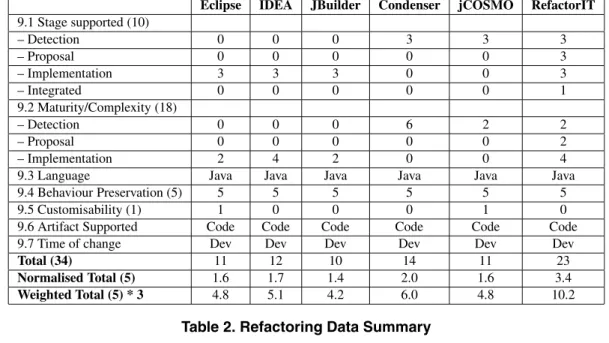
This section presents the results of the evaluation of the six Java refactoring tools. For each of the categories out-lined in Section 4.2, the scores have been converted to a 5 point ordinal scale to allow for comparison. Due to their importance in differentiating refactoring tools (discussed in Section 3), the Usability and Refactoring categories are also given an overall higher weighting than the other cat-egories. For Usability the weighting given is a multipli-cation factor of 1.5, for Refactoring the weighting is 3. Within the categories, the criteria are scored on weighted scales according to level of importance (the full definition of the feature set with scales is available online3). Note that the level of importance for a given criterion takes into account its status as a mandatory or desirable requirement as defined by the DESMET method. To compute the nor-malised total for each category, the results for all of the weighted criteria are summed, and then converted to a score out of 5. The calculation of the normalised scores for the Refactoring and Usability Categories are provided in Tables 2 and 3. To calculate the scores, the totals for the weighted criteria are summed, e.g., the ‘Stages supported’ criteria is a ten point scale, with 3 points for each stage sup-ported automatically, 1.5 for semi-automatically, and 0 for a stage not explicitly supported, and one point for if sup-port for mulitple stages is integrated. Maturity/Complexity
of refactorings consists of an 18 point scale, due to its abil-ity to differentiate tools supporting the same stage of refac-toring. Also important is Behaviour preservation, whose support is a mandatory requirement (i.e., if behaviour is not preserved, the action is termed ’evolution’ rather than ’refactoring’). Finally, customisability, whilst desirable is not mandatory and is an overlapping critieria with the Us-ability category, as such it is scored out of 1. The re-maining criteria are qualitative, and whilst useful for dis-tinguishing refactoring tools have not been judged for this evaluation. From the maximum score, the results for each tool are then converted to a score out of 5.
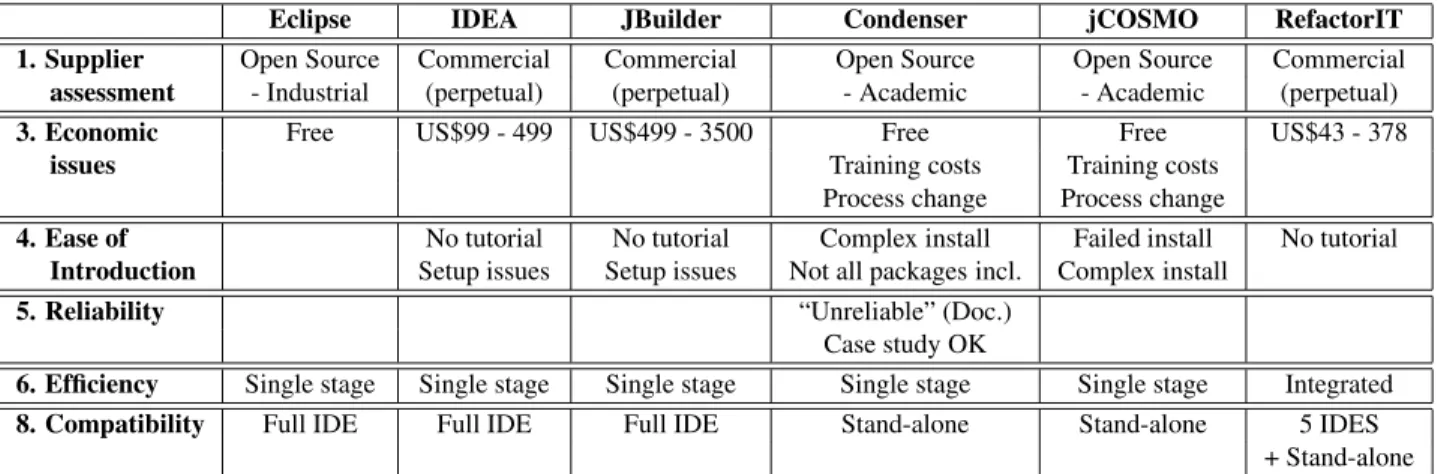
Table 4 summarises the results by providing cumulative scores for each category (determined by adding together the criteria scores within the category). The total possible score for each category is provided in brackets. Table 5 provides any comments or results from qualitative criteria
5.2
Discussion
From the evaluations and the data presented in Section 5.1, conclusions can be drawn about both the quality of refactoring support provided by the tools and the efficacy of the developed evaluation framework. Conclusions that can be reached relating to the refactoring tools are:
• None of the tools fully support the refactoring process as a whole.
• Refactoring implementation tools are comparable in maturity, reliability, efficiency and usability, but dis-tinguishable on supplier, economic issues and refac-toring specific criteria.
• Tools for detection are not yet industrial strength. • Usability of refactoring tools requires further
re-search/consideration.
It is clear from the results of the Feature Analysis that refactoring tools currently available, such as those eval-uated in this study, do not provide adequate support for the refactoring process in its entirety, as defined by Fowler [10] and Tourw´e and Mens [25]. This lack of support is demonstrated by low scores in the ‘Refactoring specific’ category, the average being 5.85 out of a possible 15. The slightly higher score for RefactorIT reflects the inclusion of ‘software audits’ which, whilst not including the so-phistication of the code smells identified by Fowler [10], does score above the other tools due to its ability to detect and propose remedies for potential stylistic errors in source code. An example of a stylistic error found by RefactorIT is “Constant field’s name should be upper case” [23]. Note that this can be identified in Eclipse using the Code for-matter, and is not considered a code smell, nor its remedy a refactoring.
The data collected also shows that the tools supporting refactoring implementation (Eclipse, JBuilder, IDEA and RefactorIT) are mature, reliable and efficient to use. One means of differentiating these tools is on the complexity of the refactoring supported. In the case of IDEA and Refac-torIT, the higher scores for the refactoring specific criteria is partially based on supporting more and more complex refactorings. Supplier assessment and Economic issues also distinguish these tools.
Another conclusion that can be drawn from the data re-lates to the immaturity of support for detection of code smells. Both the code smell detection tools, Condenser and jCOSMO, are prototype tools that are not mature or reliable enough for use in an industrial setting. Addition-ally, RefactorIT, the only of the commercial tools to at-tempt detection, possesses the capability to detect and pro-pose solutions for code smells less complex and sophis-ticated than those defined by Fowler [10]. The data also shows that integration of stages, even if not supported by a single tool or environment, is an issue that needs to be addressed by all the studied tools except for RefactorIT, whose integrated detection, proposal and transformation technique for stylistic errors provides an appropriate mech-anism, though it did not support refactorings of sufficient complexity.
From studying the results for the Usability criteria, we have concluded that the refactoring tools that were part of integrated development environments with Graphical User Interfaces (GUIs) are the most usable. Additionally, the inclusion of both tutorials and manuals for documenta-tion contributed to tools gaining higher usability scores. To achieve a maximum score for usability, which none of the studied tools did, an integrated approach to refactor-ing support that balances automation and user interaction is needed.
From the data presented, it is clear that the developed feature set achieved the goal of providing a mechanism to evaluate refactoring support. The use of a DESMET Feature Analysis incorporating a case study, allowed both comparative evaluation of the studied tools and an assess-ment of refactoring tools in the general sense, especially in regards to their completeness. The inclusion of the refactoring specific criteria provided a way to differentiate tools supporting the same stage of the refactoring process, not previously possible using existing evaluation frame-works. The definition of the criteria for Usability pro-vided a means to differentiate refactoring support tools, and demonstrated that more work is required on develop-ing the usability of software refactordevelop-ing tools.
Eclipse IDEA JBuilder Condenser jCOSMO RefactorIT 9.1 Stage supported (10) – Detection 0 0 0 3 3 3 – Proposal 0 0 0 0 0 3 – Implementation 3 3 3 0 0 3 – Integrated 0 0 0 0 0 1 9.2 Maturity/Complexity (18) – Detection 0 0 0 6 2 2 – Proposal 0 0 0 0 0 2 – Implementation 2 4 2 0 0 4
9.3 Language Java Java Java Java Java Java 9.4 Behaviour Preservation (5) 5 5 5 5 5 5
9.5 Customisability (1) 1 0 0 0 1 0
9.6 Artifact Supported Code Code Code Code Code Code 9.7 Time of change Dev Dev Dev Dev Dev Dev
Total (34) 11 12 10 14 11 23
Normalised Total (5) 1.6 1.7 1.4 2.0 1.6 3.4
Weighted Total (5) * 3 4.8 5.1 4.2 6.0 4.8 10.2
Table 2. Refactoring Data Summary
Eclipse IDEA JBuilder Condenser jCOSMO RefactorIT
7.1.1 Documentation (5) 5 4 4 1 0 4
7.1.2 Learning Curve (3) 2.5 2.5 2.5 1.5 0 2
7.1.3 Training Effort (3) 3 1 1 1 0 1
– Tutorial supplied Y N N N N N
7.2.1 UI Style (5) 5 5 5 0 0 5
– GUI/Commandline (Cmd) GUI GUI GUI Cmd Cmd GUI
– Interactive (I)/Batch (B) I I I B B I
7.2.2 Responsiveness (3) 3 3 3 1 0 3
7.2.3 Complexity of Interface (5) 3 3 3 4 0 4
7.2.4 Level of Required 3 3 3 1 1 5
User Interaction (5) Too High Too High Too High Too low Too low Appropriate
Total (29) 24.5 21.5 21.5 9.5 1 24
Normalised Total (5) 4.22 3.71 3.71 1.64 0.17 4.14
Weighted Total (5) * 1.5 6.33 5.57 5.57 2.46 0.26 6.21
Table 3. Usability Data Summary
Eclipse IDEA JBuilder Condenser jCOSMO RefactorIT
2. Maturity of tool (5) 5 5 5 1 1 4 3. Economic issues (5) 5 4 2 4 4 4 4. Ease of Introduction (5) 5 4 4 0 0 4 5. Reliability (5) 5 5 5 3 0 5 6. Efficiency (5) 3 3 3 4 0 5 7. Usability (5) * 1.5 6.33 5.57 5.57 2.46 0.26 6.21 8. Compatibility (5) 4 4 4 1 1 5 9. Refactoring Specific (5) * 3 4.8 5.1 4.2 6 4.8 10.2 TOTAL (52.5) 38.13 35.67 32.77 21.46 11.26 43.41
Eclipse IDEA JBuilder Condenser jCOSMO RefactorIT 1. Supplier Open Source Commercial Commercial Open Source Open Source Commercial
assessment - Industrial (perpetual) (perpetual) - Academic - Academic (perpetual)
3. Economic Free US$99 - 499 US$499 - 3500 Free Free US$43 - 378
issues Training costs Training costs
Process change Process change
4. Ease of No tutorial No tutorial Complex install Failed install No tutorial
Introduction Setup issues Setup issues Not all packages incl. Complex install
5. Reliability “Unreliable” (Doc.)
Case study OK
6. Efficiency Single stage Single stage Single stage Single stage Single stage Integrated
8. Compatibility Full IDE Full IDE Full IDE Stand-alone Stand-alone 5 IDES + Stand-alone
Table 5. Qualitative Data Summary
6
Conclusion
In this paper, we have presented a framework for evaluating software refactoring support based upon the DESMET Feature Analysis technique. This framework was then used to evaluate six Java refactoring tools. In defining the criteria for this framework we have outlined deficiencies in using existing general frameworks for eval-uating software evolution and development environments to evaluate refactoring support, and have highlighted the importance of including refactoring specific criteria and criteria to assess usability. The evaluation has shown that existing support for refactoring is inadequate due to its incompleteness, and in the case of code smell detection tools, their relative immaturity. Usability of refactoring tools was also raised as an issue requiring further work. The data also shows the effectiveness of the framework in being able to distinguish between tools supporting the same stage of refactoring.
The usefulness and applicability of the DESMET method to evaluate refactoring tools was also studied in this project. It was found that the method provided a ro-bust, thorough and formal process for developing an eval-uation framework for refactoring support tools. The use of the feature analysis technique, with case studies, gave a more balanced and thorough approach than existing com-parison frameworks. The ability to weight categories ac-cording to importance, a part of the standard DESMET Feature analysis method, provided a means to ensure that characteristics more desirable in refactoring tool support were treated as such. The only modification that needed to be made to utilise the method in this project was to take away the quantification in several of the outlined cate-gories. This was mandated by the use of the framework in an academic environment, in which issues such as the im-portance of cost and open source were not resolvable. The
use of enumerated lists for these categories allows appro-priate values to be assigned when the framework is applied in an industrial context.
The evaluation has shown that current levels of refac-toring support provided by software tools fall short of the desired level. In work to follow on from this paper, a full usability study will be conducted to determine exact user requirements for software refactoring tools. From the identified requirements, and using the results of this evaluation, an integrated approach to software refactor-ing support will be developed. This approach will build on the strengths identified within current refactoring trans-formation support, and additionally incorporate detection of code smells (as defined by Fowler [10]) and refactor-ing proposal to provide a support mechanism for the en-tire refactoring process. Being careful to balance automa-tion with user interactivity, the support will assist users by removing error-prone, time-consuming and tedious tasks, whilst assisting the user to maintain an accurate mental model of the software that is being refactored.
Acknowledgement
The authors wish to thank Anthony MacDonald and Michael Lawley for discussions during the early stages of this project, and Daniel Jarrott and J¨orn Guy S¨uß for their assistance with the production of this paper.
The work reported in this paper has been funded in part by the Co-operative Research Centre for Enterprise Dis-tributed Systems Technology (DSTC) through the Aus-tralian Federal Government’s CRC Programme (Depart-ment of Education, Science and Training).
Erica Glynn is supported by an Australian Postgradu-ate Award funded by the Australian Federal Government Department of Education, Science and Training.
References
[1] M. Balazinska, E. Merlo, M. Dagenais, B. Lague, and K. Kontogiannis. Advanced clone-analysis to support object-oriented system refactoring. InWorking Conference on Reverse Engineering, pages 98–107, 2000.
[2] K. Beck and M. Fowler. Bad smells in code. In M. Fowler, editor,Refactoring: Improving the Design of Existing Code, chapter 3, pages 75–88. Addison Wesley, 1999.
[3] J. Buxton. DoD requirements for Ada programming support enviroments, STONEMAN. Technical Report AD-A100 404, US Department of Defense, February 1980. Available from http://www.adahome.com/ History/Stoneman, Accessed August 2003.
[4] F. W. Callis. Problems with automatic restructurers. ACM SIGPLAN Notices, 23:13–21, March 1987.
[5] Borland Software Corporation. JBuilder. http: //www.borland.com/us/products/jbuilder/ index.html, Accessed September, 2005.
[6] P. Ebraert, T. D’Hondt, and T. Mens. Enabling dyamic soft-ware evolution through automatic refactoring. In Proceed-ings of the Workshop on Software Evolution Transforma-tions (SET2004), pages 3–7, November 2004.
[7] M. Endsley. Automation and situation awareness. In R. Parasuraman and M. Mouloua, editors,Automation and human performance: Theory and applications, pages 163– 181, 1996.
[8] Eclipse Foundation. Eclipse 3.1. http://www. eclipse.org/, Accessed September, 2005.
[9] M. Fowler. Refactoring home page. http:// refactoring.com/, Accessed October 2005.
[10] M. Fowler. Refactoring: Improving the Design of Existing Code. Addison Wesley, 1999.
[11] JetBrains. IntelliJ IDEA Version 5.0. http://www. jetbrains.com/idea/, Accessed September, 2005. [12] J. Kerievsky. Refactoring to Patterns. Addison-Wesley,
2005.
[13] B. A. Kitchenham. Evaluating software engineering meth-ods and tool: Parts 1 – 12.ACM SIGSOFT: Software Engi-neering Notes, (21(1)–23(5)), 1996–98.
[14] M. Lehman. Laws of program evolution - rules and tools for programming management. InProceedings Infotech State of the Art Conference, Why Software Projects Fail?, vol-ume 11, pages 1–25, April 1978.
[15] M. Lehman and J. Ramil. Rules and tools for software evo-lution planning and management.Annals of Software Engi-neering, 11(1):15–44, November 2001.
[16] A. Lund. Expert ratings of usability maxims. Ergonomics in Design, (3):15–20, July 1997.
[17] T. Mens, J. Buckley, M. Zenger, and A. Rashid. Towards a taxonomy of software evolution. InProc. Workshop on Unanticipated Software Evolution, pages 1–18, Warhau, Poland, March 2003.
[18] I. Moore. Condenser 1.05. http://condenser. sourceforge.net/, Accessed September, 2005. [19] I. Moore. Guru - a tool for automatic restructuring of Self
inheritance hierachies. InTechnology of Object-Oriented Language Systems (TOOLS), volume 17, pages 267–275. Prentice-Hall, 1995.
[20] W. Opdyke. Refactoring Object-Oriented Frameworks. PhD thesis, Department of Computer Science, 1992. [21] S. Rugaber. Program comprehension. Encyclopedia of
Computer Science and Technology, 35(20):341–368, 1995. [22] J. Simmonds and T. Mens. A comparison of software refac-toring tools. Technical Report vub-prog-tr-02-15, Program-ming Technology Lab, November 2002.
[23] Aqris Software. RefactorIT 2.5. http://www. refactorit.com/, Accessed September, 2005. [24] M. Toleman and J. Welsh. Systematic evaluation of design
choices for software development tools. Software – Con-cepts and Tools, 19:109–121, 1998.
[25] T. Tourw´e and T. Mens. Identifying refactoring opportu-nities using logic meta programming. InProceedings of 7th European Conference on Software Maintenance and Reengineering, pages 91–100. IEEE Computer Society, 2003.
[26] E. van Emden and L. Moonen. jCOSMO 0.2.
http://www.cwi.nl/projects/renovate/ javaQA/intro.html, Accessed September, 2005.