Design for All Research Group
Middlesex University Research Office
Middlesex University
LONDON
NW4 4BT
UK
Web accessibility in context, an investigation into
standardisation issues
Project Reference: R&T project ANEC-ML-2007-0031
Document status: Final Report 31/1/2008
Author: Suzette Keith
MDX Confidential FINAL REPORT Page 1 Web_context_final 31/1/2008
Contents
Management summary and recommendations...2
1. Introduction...5
2. Methodology...8
3. Results...8
4. Findings...11
5.Summary of critical issues on web accessibility in context ...14
6. Conclusions...15
7. References...16
MDX Confidential FINAL REPORT Page 2 Web_context_final 31/1/2008
Management summary and recommendations
The purpose of this study was to examine the gap between design practice and the guidance offered through standardisation. Much attention on accessibility and the web has focussed on large on-line businesses and government information providers. However, small and medium sized enterprises (SMEs) are the majority business model and are also developing a web presence. This is greatly expanding the range of services available to a much more diverse and geographically dispersed target user group. It is essential that these businesses should also prioritise web accessibility in order to engage with older and disabled people and to avoid discrimination. The study focused on the design of websites for SMEs particularly in the business sectors of leisure, entertainment and social services that contribute to the quality of life of older and disabled people. This exploratory study provides a snap shot of web design practice in a dynamic world where many key elements – such as the design of the web authoring tools, browsers and assistive technologies continue to change. The study set out to identify examples of common practice and good practice and also to examine the resources available to support accessible web design. Samples of websites from 21 SME businesses primarily within the tourism and leisure sector in 5 EU member states were identified by searching local directories, lists of awards for good practice and recommendations from disabled users. The website source code was examined in order to reveal some of the design decisions made by the website developer and the impact on accessibility. Additionally selected pages were inspected using automatic tools to verify compliance with web standards and accessibility.
In relation to design practice, there is some indication from this study that the adoption of a web presence for the SME is still at an early stage and varies between countries. However there is substantial growth in the availability of the internet across the EU member countries and it is therefore timely to consider how standards can be used to support SMEs to engage with the needs of older and disabled consumers when planning and publishing a website.
The results of this study identified opportunities for improvement that relate to design practice and ecommerce for small businesses, and which would benefit from standardisation or policy
development.
1. Harmonisation of the various interdependent technologies that together impact on the development of accessible web pages
Recommendations:
1a) Recognition needs to be given to the context of SMEs with limited resources and expertise and the need to simplify the process of developing small accessible websites. It is recommended that further urgent action is taken to work with WAI to harmonise guidance at the most basic level of creating small non -interactive websites both in relation to the authoring tools used by the developers and the user agents used by the consumer (including assistive technology tools and the browsers). 1b) It is recommended that action to evaluate and certify web authoring tools and user
agents is needed to ensure that SMEs have the opportunity to purchase tools that help to deliver accessible content and to reduce current uncertainties.
MDX Confidential FINAL REPORT Page 3 Web_context_final 31/1/2008
Findings:
The website of the Web Accessibility Initiative (WAI) provides a major authoritative resource for promoting and measuring web accessibility both through the guidelines of web content, authoring tools and web agents and in the support materials offered. Much of the focus of the guidelines on accessible web content is addressed to the developer to initiate appropriate changes and
modifications to the underlying structure and code and to conduct appropriate tests.
The international community of accessibility experts offers blogs and forums to support the practical aspects of web development. An examination of the on -line forums revealed that novices are experiencing difficulties in meeting guidelines at the detailed code level. For the most part, the experts appear to advise direct use of non-proprietary mark-up language (HTML) rather than proprietary web authoring tools in order to provide the level of control necessary to build an accessible website and to avoid masking accessibility issues. Craft skills are needed to deliver current accessibility practise and to compensate for differences between browsers, however differences of opinion between experts on how best to do this were common. It is of concern that this level of craft skill raises barriers to understanding how to create accessible websites as
compared to the ease with which on-line tools support the creation of a website that fails to meet the latest accessibility practice.
The study revealed a range of development strategies and levels of expertise and consequent levels of accessibility achieved. These included the use of a popular low-cost tool advertised as ‘easy to use’ and ‘no html needed’ as well as more sophisticated proprietary authoring tools which in each case resulted in a website that failed the most basic accessibility guidelines. The rare
examples of good practice were expertly built using XHTML 1.0 and showed a strong commitment to quality, carrying certification of W3C compliance of the use of valid code and style sheets. Eight of the 21 sites inspected failed to include a state ment of the DOCTYPE to indicate the mark up language standard used or national language. The most common failing identified in this study was the failure to offer a text label for pictures and other graphic elements. This study also found examples of the n ow outdated practice of using tables to control layout and using fixed font sizes.
2. The context of ecommerce on SME website accessibility Recommendations:
2a) It is recommended that action is taken at an international level to address accessibility policy with third party service providers such as the web hosts and portals that play an important part in delivering SME websites to the customer. This action should be initiated with WAI.
2b) It is recommended that internationally agreed guidelines on accessibility should address the providers of ecommerce services such as booking and purchasing systems. These are a critical element in enabling the older or disabled consumer to complete purchase
transactions on-line . This action may lay outside the scope for WAI and action should be directed to an ecommerce context.
2c) It is recommended that action is taken to provide for the evaluation and certification of third party services such as webhosts, portals and ecommerce services in order to help ensure that SMEs have the opportunity to purchase services that help to deliver accessible content. This action may lay outside the scope for WAI and action should be directed to an
MDX Confidential FINAL REPORT Page 4 Web_context_final 31/1/2008
2d) It is recommended that international standardisation on commissioning accessible
websites should hold the SME business responsible for establishing an accessibility policy, and delivering and maintaining accessible content. This action may lay outside the scope for WAI and action should be directed to an ecommerce context.
Findings:
The case studies revealed examples of using out-sourced services and of interdependency with other non -national third party services. These included the services of a web host or a portal service to both create and host the website as a complete ‘low-cost’ option. In at least one instance the host service was located in a different country to the website owner. We also found one site which failed to meet the most basic accessibility guidelines which had purchased its presentational style from an on-line company outside the EU. Furthermore the study found examples of on-line shopping facilities which made use of ecommerce package services to provide on-line booking or shopping that linked to remote websites. These transactional forms are inherently more complex, and have special requirements in relation to trust and security that are part of ecommerce practice rather than generic guidelines on content. Support for
accessibility of this aspect of web usage should be explored in relation to ecommerce regulations.
The interconnectedness with remote sites limits the opportunity for the website owner to effect change and confuses responsibility for website accessibility. The web developer may
additionally find it difficult to choose between the services offered or to make individual adjustments to improve accessibility. Any effort directed to ensuring that these third party services make a concerted effort to support accessibility would have far reaching benefits for many small businesses and their customers.
3. Opportunities for further action
The world wide web offers an environment for commerce that stretches beyond national boundaries. Smaller businesses that might once have limited their customer base to their
immediate locality can use the web to promote and sell their services wherever there is a market. These businesses offer new opportunities for disabled or older people as consumers.
There is clearly scope for more work to be done including:
• A more extensive investigation of the special context of small businesses in Europe and the special relationship with their extended customer base.
• To examine the effects of differences between national and European requirements on accessibility through legislation and guidance an dits impact on SMEs
• To examine the effectiveness of certification schemes to help raise quality and competence for SMEs such as the Euracert so far offered in Belgium, France and Spain.
Such research would provide a firm foundation for developing guidelines, national standards or agreeing international standards and focussing training requirements on web accessibility that are more directly tailored to the needs of small businesses.
MDX Confidential FINAL REPORT Page 5 Web_context_final 31/1/2008
1. Introduction
1.1 BackgroundThis study has set out to investigate the apparent gap between current published guidelines on accessibility and the current practice of web developers, and the tools used by the developers to create accessible websites.
The World Wide Web Consortium (W3C) published the web content accessibility guidelines (WCAG 1.0, 1999) over eight years ago, in that time there has been considerable growth in the use of the Internet as a commercial resource for business and a significant communication resource for consumers. Concern for improving access to the resources on the Internet by d isabled people has tended to focus attention on public information systems and the larger popular e -businesses. A number of studies have found that these websites commonly fail the most basic guidelines, revealing lack of awareness, understanding or commitment to improving accessibility (Sullivan & Matson 2000, Cabinet Office 2005, United Nations 2006). People with disabilities also continue to find it difficult to access information over the Internet.
This study has turned the focus of accessibility onto the websites of SMEs and even more
specifically to the growing business area of tourism which includes leisure, entertainment and social services. These areas were initially chosen to reflect the quality of life context of daily living by disabled people, however this is also identified as an important area for economic growth within the EU. The tourism industry includes hotels, restaurant, travel agents and recreational facilities. A European study monitoring the take up of ICT in businesses reports that 99% of businesses in tourism are SMEs with nearly 1.5 million enterprises employing about 8 million persons generating over 400 billion Euros of business. Within the EU-10, the accommodation sector of tourism was found to be making use of on-line booking facilities with national and international customers. It was found that 46% of the smaller business (10 -49 employees) and 55% of medium sized businesses (50 -249 employees) reported that they accepted orders from customer’s on -line (eBusinesswatch 2006).
This study set out to identify a sample of websites from SMEs in order to provide a snap shot on current practice in relation to accessibility as defined by the Web Accessibility Initiative (WAI).
1.2 Overview of accessibility guidelines Web accessibility initiative (WAI)
The Web Accessibility Initiative (WAI) website offers an extensive resource for the developer of accessible websites including the guidelines and techniques and practical issues of managing accessibility and evaluation accessibility. However achieving accessibility of a website is a complex task that draws on many skills and technologies. The WAI resource “Essential components of web accessibility” outlines the interdependency between web content accessibility and the technologies used to create the websites - the authoring tools and the user agents by which the user is able to perceive the content. In addition the accessibility guidelines are underpinned by the World Wide Web Consortium (W3C) technical specifications for the mark up tools including HTML, XML, CSS and SML. (Chisholm, Lawton Henry 2005)
Web content accessibility guidelines (WCAG)
The WCAG 1.0 (1999) primarily addresses web developers and sets out guidelines to delivering improved accessibility during website design and develop ment. The three level prioritised checklist supports evaluation of websites for conformance organised into 14 guidelines each with a number of individual checkpoints. The long awaited revisions of WCAG 2.0 (2007) continues as a draft
discussion document framed around four key principles of perception, operation, understandability and robustness.
MDX Confidential FINAL REPORT Page 6 Web_context_final 31/1/2008
Authoring tools accessibility guidelines (ATAG)
Web authoring tools are used by the developers to create the websites and are the subject of ATAG 1.0 (2000). Historically HTML (hypertext markup language) was used to mark up text based
documents, however as the web has transformed into a more visual medium there has been an increasing emphasis on the format and visual elements and the need to separate content from th e presentational aspects, for example by using cascading style sheets (CSS). The authoring tools include proprietary tools that allow the developer to both work in the code view and the design view in order to see what the website will look like. The auth oring tools component also includes tools that convert documents for example from word processed versions to HTML. ATAG 2.0 (2006) also includes ‘indirect’ authoring tools such as content management systems (CMS) which are used to manage larger websites, as well as web -building wizards. ATAG 2.0 draws an important distinction between the use of the tools and the need for the tools themselves to be accessible, and that these tool should support the creation of accessible websites.
User agent accessibility guidelines (UAAG)
The User Agents are the group of technologies that stand between the user and the content and importantly include the browsers as well as multimedia players. The UAAG (2002) includes assistive technologies as part of the user agents although in effect these typically form a layer between the user and the browser. The most commonly used browsers are Internet Explorer – currently in two versions as users slowly upgrade to the new version and Firefox. There are a number of other browsers each with unresolved differences in the way they interpret website code.
1.3 The developer view
The developer has a significant role in creating a website and applying accessibility guidelines, however the developers have been found to be critical of the guidelines being confusing (Lazar 2003). A number of experts in accessibility have written additional material to address some of the confusions and changes occurring in the authoring, browsing and assistive technologies (eg Thatcher et al 2006). The role of the developer in relation to accessibility does not extend to all areas of the website. Among the many debates within the world of web development is the distinction drawn between design and development. The role of design is often limited to the creative and unique ‘look and feel’ of the website. The unique informational content of the site may also be separately distinguished from design and development as an editing or content
management role. The role of the developer extends to all other technical asp ects of building the website using the available web authoring tools and possibly other back-end database tools that for example make an on -line booking service work.
The UK advisory standard PAS 78 Guide to Good Practice in Commissioning Accessible Websites (2006) further identified procurement by businesses or organisation as a gap in the scope of WCAG 1.0 and has placed responsibility on the website owner for accessibility.
This study sets out to provide an enhanced view of the development process in order to better understand the gap between design practice and guidance. A case study approach has been adopted in order to identify differences in common design practice through an inspection and analysis of the website source code. An overall task scenario has been applied in which a small business commissions a website and explores options of self-build or buying in a service, and consequences for accessibility.
1.4 The user view
Within this study we consider the diversity of web users who benefit genera lly from the application of accessibility guidelines including those using assistive technologies to support perception or
MDX Confidential FINAL REPORT Page 7 Web_context_final 31/1/2008
people with disabilities use the web ” (Brewer 2001) which describes people using the Internet who have different impairments and how the accessibility guidelines can be applied to meets their needs. There is some debate within the web accessibility community over the gap between conformance to the WCAG, and the user experience in successfully achieving key tasks. In part this is addressed by the advice by WAI to test websites with real users. However some doubts have been expressed about “the evidence that following the guidelines will create resources that people with disabilities can perceive, understand, navigate and interact with” (Kelly et al 2007) and a demand made for a more holistic framework for understanding the context of use.
This study takes account of the need to understand accessibility within the broader context of use. An overall scenario takes account of a user looking for local tourist information including for example small hotels, restaurants, shops as well as local services. The overall goal is focused on the
acquisition of useful information and successful interaction (Astbrink and Kadous 2003, Curzon et al 2004).
1.5 Accessibility and usability
Many issues of web accessibility are subject to intense debate, including the relationship between accessibility and usability. Web accessibility as defined by the Web Accessibility Initiative (WAI) focuses its efforts on the strategies, guidelines and resources to make the web accessible to people with disabilities.
However in taking a more holistic perspective (Kelly et al 2007) identifies the need to consider the context of use, giving as an example a framework for the development of educational materials. The definition of usability (ISO 9241-11) also draws on a broad context of use and the purpose of the interaction
“.. th e extent to which a product can be used by specified users to achieve specified goals with effectiveness, efficiency and satisfaction in a specified context of use.”
The supporting processes that underpin usability were set out in the process standard ISO 13407 Human-centred design processes for interactive systems (1999). This process standard identifies four key principles of identifying the user needs, appropriate allocation of functions between the user and system, iterative development and a multi-disciplinary team in order to develop a system that reflects the needs of the users.
For the purposes of this study, we similarly consider the design process as applied to the
development of an accessible website. Within that design process the designer (or developer) must make numerous decisions that impact on the final results experienced by the user. According to Carroll (2000) these decisions represent claims by the designer on the effect that they may have on the user. Analysis of these claims – claims analysis, is an approach that has been applied within studies of usability in order to explore design rationale. Here we explore design rationale in relation to web accessibility in the context of use.
One common practice to capture the context of use and the user goals are simple stories called scenarios which describe the context, the user and the goal. Here we use simple scenarios to help define the roles and responsibilities of the critical stakeholders: the SME business owner, the SME web developer and the website user. The first scenario represents the experiences of the SME who is sufficiently aware of accessibility issues that he or she would like to commission an accessible website. The second generic scenario considers an SME web developer with an awareness of accessibility that makes use of online resources to improve on practice. The third generic scenario represents the website user who visits a website to find information or otherwise interact with the content (eg Brewer 2001).
MDX Confidential FINAL REPORT Page 8 Web_context_final 31/1/2008
2. Methodology
The study has applied a case study approach to enter the world of website development and to take account of the inter-related needs of key stakeholders: SME business owner, the website designer or developer, and the customer. The selected case studies represent a diversity of practice and competence in delivering content that conforms to best practice in accessibility and meets the goal of the customer to gather information and engage in ecommerce .
Sampling the websites
Particular effort was directed towards finding examples of good practice as well as trying to understand common current practice. Searches for websites to act as case studies used various approaches: search engines and directories, local produced tourist guides, award winning businesses or websites and recommendations from disability forums and newsletters. Selected websites have been the subject of visual inspection of representative pages using a Firefox browser and an analysis of the source code including:
• Compliance testing to web standards for HTML and CSS using W3C tools including the use of DOCTYPE or document type declaration (DTD) need by the browsers, assistive technology tools and evaluation tools to process the document
• Compliance to those elements of WCAG 1.0 that can be tested automatically using a tool freely available to a developer
• Inspection using a developers toolkit freely available to a developer and added to a Firefox browser in order to switch off styles, images and Javascript
• Inspection of the source code to examine use of web authoring tools, structure and presentational strategies as well as conformance with WCAG 1.0.
• Scenario based browsing and navigation within and between pages to replicate a customer search for information or purchase of services.
Sampling the developers
Sources of information for web developers were traced using searches and following links to identify web forums on web design and accessibility, forums run by web authoring tools, blogs by
accessibility experts and on -tutorials. Where possible the web developers have been identified as creators of the selected sample websites, and through web developer associations and through a local business association open evening.
The specialist forums run by web developers skilled in accessibility issues proved a useful resource for identifying the problems encountered by less experienced developers. Questions posted on a web developer forum were reviewed and additional questions posted using a general question:
• Is it possible to develop an accessible website without a knowledge of HTML?
And a more specific question which was more in line with the detailed level queries raised by the forum users:
• Is there an accessible shopping cart?
3. Results
3.1 The website case studies
The case study websites revealed some of the breadth of design practice in a range of businesses across the EU member states. A brief summary of each website is included in Appendix 1 and includes the type of business, location, the type of information provided, the technologies used to develop the site and the provision of document type information. By way of example three descriptions follow to give a flavour of the different types of websites reviewed:
MDX Confidential FINAL REPORT Page 9 Web_context_final 31/1/2008
• Case study a: A small ethnic restaurant in the UK developed its website using a popular all inclusive low cost web builder package from a web hosting company. The site was identified from a local tourist business guide. The site was developed using HTML 4.0 transitional
• Case study b: A specialist ‘supermarket’ portal in the UK listed small businesses specialising in organic products. Some of the businesses listed used the same developer as the directory. The listing was created using HTML but gave no DOCTYPE information. Two businesses were selected from the portal for further analysis.
• Case study c: An Italian hotel was identified from a site promoting web standards
compliance by web developers. The site included descriptions and pictures of the hotel and a booking form with Italian and English language versions. The home page passed all accessibility checkpoints tested automatically. The website of the developer promoted web compliant and accessible design as a core business.
Twenty-one websites were found in the UK, Ireland, Estonia, Italy and Germany. The businesses included cafes, restaurants and hotels and on -line businesses supplying sportswear, speciality foods and bath products and a retirement planning business. Two portals acting as directories to small businesses were included since they were in themselves small businesses.
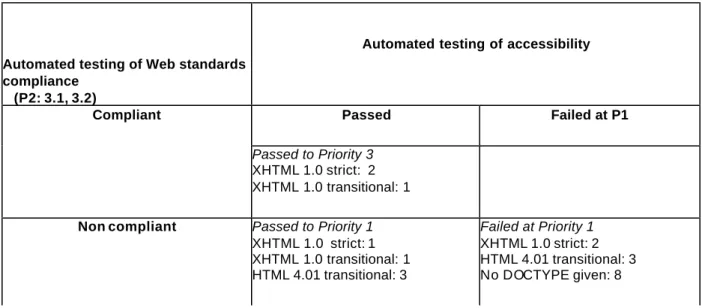
Table 1 Summary of results of automated accessibility and compliance testing of 21 websites
Automated testing of Web standards compliance
(P2: 3.1, 3.2)
Automated testing of accessibility
Passed Failed at P1
Compliant
Passed to Priority 3
XHTML 1.0 strict: 2 XHTML 1.0 transitional: 1
Non compliant Passed to Priority 1
XHTML 1.0 strict: 1 XHTML 1.0 transitional: 1 HTML 4.01 transitional: 3 Failed at Priority 1 XHTML 1.0 strict: 2 HTML 4.01 transitional: 3 No DOCTYPE given: 8
As summarised in Table 1, three of twenty-one selected websites successfully demonstrated good practice and passed all automated checks for accessibility and additionally used standards
compliant mark up. Note that “validate to published formal grammars” is checkpoint 3.2, priority 2 in WCAG 1.0 and indicated in WCAG 2.0 under requirements for robustness. Five of the websites passed automated checks for accessibility at priority 1 but the mark up was not compliant and thus failed at priority 2. The remaining 13 sites failed automated checks for accessibility at priority 1 of which all but two failed even the most basic requirement ‘to provide text equivalence for non -text elements’ (checkpoint 1.1, priority 1), typically by not completing the ‘alt text’ to describe a picture. Additionally the mark up was not compliant. These results raise concerns that in the majority of cases the websites failed to meet the more technical requirement to use valid markup in either XHTML or HTML. A common failing by 8 of the 21 websites was the lack of DOCTYPE ( WCAG 1.0 checkpoint 3.2, priority2) information giving details of the mark up code and the language used. This
MDX Confidential FINAL REPORT Page 10 Web_context_final 31/1/2008
omission can impact on how the browser or user agent interpret and display the presentational elements of the content and can adversely affect assistive technologies.
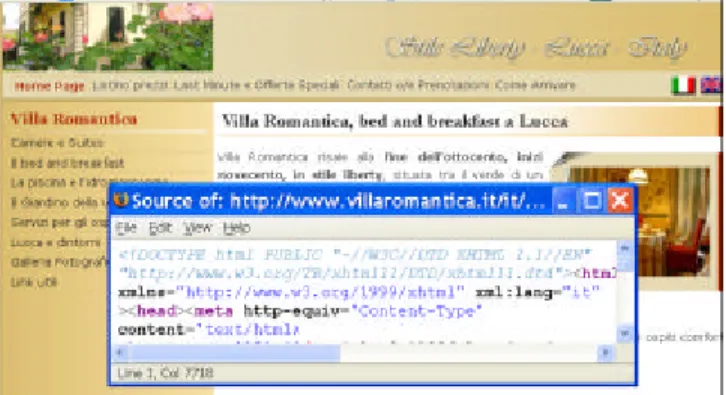
Figure 1 An example of best practice passing automated testing in accessibility and web standards compliance
The three websites that passed all automated checks showed a high level of professional design and development, and in the one described above (Fig 1 and example case study c) showed a strong commitment to accessibility. This example of current best practice used the latest mark up XHTML 1.0 Strict, and separated presentation from content using style sheets (WCAG 1.0
checkpoint 3.3, priority 2). Layout was managed by using the style sheets and ‘div tags’ which mark out blocks of text and graphics allowing them to reflow if the user chooses to en large the text size or change the window size (WCAG 1.0 checkpoint 3.4 priority 2). Additionally in best ecommerce practice the web page footer contained full address and contact details, VAT registration and confirmation of standards and accessibility compliance .
Some of the difficulties of the failing and non-compliant sites would have been exacerbated by lack of awareness of latest best practice on the part of the developer (example case study b) who was also responsible for the design of a specialist directory or portal to other small businesses and was credited with the design of some of the websites feature on the portal. The case studies included 3 examples where it was possible to identify the use of high and low value web authoring tools that offer apparently simple graphical interfaces that typically mask issues of accessibility or fail to generate compliant code (example case study a). Another site made use of a low cost hosting service that also provided an easy service to design your own website . Common failings of these sites included missing text descriptions of the visual elements (WCAG 1.0 checkpoint 1.1, priority 1), the now outdated practices of using of fixed fonts (WCAG 1.0 checkpoint 3.4, priority 2) and tables for layout (WCAG checkpoint 5.3, priority 2) and there was one example of using frames for layout. Visual imagery played an important part in establishing the identity of the sites – showing views of hotels, restaurants or products, conveying the professionalism of a financial services business. One website used multimedia with the restaurant owner talking about the food provided. The links from one site revealed that the graphic design had been purchased as a template from an on-line company in India, this did not meet critical accessibility guidelines although in terms of editorial content this was a well managed site and acted as a directory to other small businesses. In another site the credits revealed separate businesses created the style and the technical structure. This visually unusual site demonstrated best practice by separating content from presentation and met accessibility guidelines with the style sheet disabled.
Local directories and portals were found to play an important part in promoting small businesses to poten tial customers and were thus also useful in identifying case studies. One portal service
provider and one of the web hosting companies provided a complete service to design and promote the website although in each case the website failed to meet requiremen ts for compliance or
MDX Confidential FINAL REPORT Page 11 Web_context_final 31/1/2008
accessibility. The smaller ecommerce businesses were found to outsource the commercial elements of hotel reservation services and on-line payment systems. These off-site services have complex requirements to dynamically process requests and to ensure security. These were not assessed for accessibility however they are a critical element in the process of ebusiness and provide a service to many businesses.
3.2 The web developers
It was found that nearly half of the websites selected for review included the name or links to the web developer, and two additionally included links to a separate design company. Every effort was made to identify some sites demonstrating good practice however the key selection criteria being an SME in the leisure and entertainment domains were generally not met by developers specialising in web accessibility or on websites promoting accessibility. In particular resources promoting
accessible websites tended to showcase larger businesses, government and non-for-profit businesses or the website of the developer.
Four of the selected sites from the SMEs showed clear examples of trying to use compliant mark up, to meet WCAG checkpoints and to apply current best practice in accessibility. Only 3 were
successful in meeting all of the automatically tested checkpoints. The other failed on the requirement to put text labels some images.
The developers strategies and difficulties were further examined by reviewing recent exchanges in forums on accessibility in web development, it was noted that there were also forums on
accessibility run by the developers of major web authoring tools, browsers and operating systems. Direct discussions with business advisers and start-up business owners revealed the importance of advice and guidance on creating websites for small businesses. One business owner reported developing his own site using a package available from a bookstore, while another had had her site designed for her as part of a locally funded start-up business package. This simple site promoting a photography business passed accessibility guidelines at priority level 1. The other demonstrated some serious flaws in its design and development.
4. Findings
The overall indication is that there is a considerable gap to be overcome by the owner of an SME business or novice developer who has reached the stage of wanting to create an accessible website. The small business user is the target for advertising that suggests it is easy to build your own
business website ‘no html needed’ either by low cost web hosting companies or through low cost applications for example on sale through book stores. However forums and blogs of a core group of accessibility experts reveal a more complex story showing that at the detailed level even apparently simple questions such as how to code type size can lead to strongly expressed differences of opinion. The role of the accessibility experts in the developer community are however a vital link in helping newcomers overcome difficulties in achieving effective accessibility at the code level. The findings are grouped as a series of questions that reflect the scenarios of the SME who would like to commission an accessible website and the web developer seeking to build an accessible website:
• Can you build an accessible website without knowing HTML? This was the most generic question posted on a forum on accessibility. It resulted in the answer that it depended on site complexity, but that it was probably only possible for the simplest static website. For some of the smallest sites surveyed, for example with only four pages it would seem reasonable to expect that full compliance could easily be achieved. The smallest sites however were least likely even to include the DOCTYPE information needed to support standards compliance. Adopting a more lateral approach to the problem, one respondent
MDX Confidential FINAL REPORT Page 12 Web_context_final 31/1/2008
proposed the use of a popular open source blogging tool as an alternative to developing a website but facilitating an easily accessible web presence. Clearly the expert accessible web developer will be biased towards the use of HTML or XHTML because of its flexibility and control over the result. WYSIWYG (What you see is what you get) tools allow the developer to focus only on the resulting visual display element while the tool creates the markup automatically. This has at least two classes of accessibility problem, one where the tool fails to produce code that meets accessibility guidelines and the other attributable to the author who remains unaware of the impact of the non-visual elements.
• What is in a website? Arguable the most important part of the exercise is the editorial content. However from the development perspective, a simple website typically consists of a number of basic units: the company banner, some variable information about the
business and a contact form. The navigation tools are fundamental to the working of the Internet and include the links and buttons within and between pages. In addition interactive elements support e-commerce activity, such as filling in a simple contact form or using an on-line shopping cart and secure purchase system. Examination of selected websites suggests that there is fragmentation of responsibility for these key components – for example a small on-line business may ‘buy’ a logo or other visual material, a template for the look and feel of the site, a content management system or a shopping cart from different sources, including open-source software. The commissioner of the website and the developer must make a number of decisions about the content, size and format of the website and the sophistication of the ecommerce element which impact on the type of service provided through the website, and responsibility for the accessibility of the website.
• How do you create a website? In the ‘expert model’ the website developers are likely to be familiar with a number of development tools including the scripting languages (HTML, XHTML) and style sheets (CSS), graphics packages, programming languages and database tools which they may adapt and develop over a number of different websites. Alternatively, and supporting a ‘novice model’ with a lower level entry point in web development there are web authoring tools that provide a highly visual development environment to support a WYSIWYG experience and which write the underlying HTML code automatically. Current practice among the experts is to separate presentation design, that is the layout and graphic design, from the (editorial and picture) content. This design decision has a positive impact for accessibility whereby the user’s attention is directed towards the same content, while the presentational format is variable and adaptable to the needs of the user.
• How do you buy a website? Responses to searches on the Internet identified suppliers of small business packages, including ‘one stop packages’ which provide domain names, design services and web hosting and these contrast with the fragmentation of the hand built site. The ‘one stop’ approach in effect devolves responsibility from the bu siness owner to the service provider. The ‘web hosting’ services located anywhere in the world are an important resource to small businesses unable to run their own servers. A website
commissioner may well be attracted to the one stop hosts but would need to identify those that support and promote accessibility.
• How can a developer find out more about accessibility? Responses to searches for on-line tutorials and forums revealed that there is considerable support available from the
developer community including initiatives by WAI and through accessibility initiatives run by providers of web browsers and web authoring tools, as well as independent
associations of web developers who are experts in accessibility, and disability
organisations. Much of the training of the web developer on accessibility issues appears to be informal and ad-hoc. With constant changes to the authoring tools and user agents, and the long awaited agreement on WCAG 2.0 these community based resources are filling a
MDX Confidential FINAL REPORT Page 13 Web_context_final 31/1/2008
practical gap at the detailed level of design decisions that impact on meeting accessibility guidelines or in addressing the real needs of the web users.
• Is it possible to identify a user of assistive technologies? This issue was raised by a developer on an accessibility forum. Currently assistive technologies exist as a layer between the user and the browser and it appears that they are (almost always) technically invisible. However, other tools that affect the presentation of content are fully detectable eg type of browser or older browsers or a mobile device is being used, or where JavaScript or graphics technologies have been ‘disabled’. The developers commonly evaluate their designs in different browsers and make adjustments at the code level to ensure that the website works for all users. However, in accessibility this approach has raised concerns about poor version control resulting in discrimination.
• A time and a place for versions? All but one of the tourism sites from non -English speaking countries offered alternative language versions in two or more languages and this was clearly an important strategy in attracting international customers. Alternative versions for language is generally regarded as acceptable in ecommerce practice to support
international use.
• How is the website evaluated? Automated checking of accessibility can still only address a small subset of checkpoints and some points are inherently qualitative – for example that the label on a button or image is appropriate and informative. The latest generation of web authoring tools are beginning to offer some options for automated accessibility checking and some tools are available to the developer from the browser. As a website becomes more complex and the number of possible transactions increases it beco mes essential to be able to conduct manual tests quickly and with a wide range of scenarios however this is probably goes beyond the needs of most SMEs. Consultancies providing for expert manual checking, user testing and certification currently appear to be serving larger companies and organisations and their publicly available resources or award schemes list few SMEs in any business domain.
• How is the interplay between web authoring tools and agents and assistive technology managed? Standards compliance is an important component in ensuring the machine to machine communication is accurate and complete especially for those running an additional assistive technology layer, or developing tools that support accessibility. However there is concern being expre ssed within the developer community that some authoring tools are not able to produce compliant code and that web standard compliance may not be a key part of the accessibility guidelines in WCAG 2.0. This issue goes beyond the scope of the SME web commissioner or developer, however whether or not they are able to deliver a website that not only meets accessible guidelines but is accessible in context is very dependent on this interdependency of the technologies
• What is the role of the website commissioners and content authors? The activity of commissioning a website, writing the editorial content and keeping it fresh and up to date falls outside of the scope of WCAG 1.0. This variable element however makes a
significant contribution to the successful delivery of accessible content. The PAS 78 guide is a time limited specification document which is due for review in 2008 and only applicable in the UK. However, it is one example of guidance that spreads the burden of responsibility for accessibility from the developer to the website owner.
• Is the visual element just decorative? A debate on this issue was noted in one forum. Analysis of selected websites suggested there are some advances toward separating content from presentation through the use of style sheets (CSS). Historically however there is a continuation of the practice of using of tables for layout of the web page which is
MDX Confidential FINAL REPORT Page 14 Web_context_final 31/1/2008
discouraged by WCAG 1.0 which emphasises that tables should only be used to display data. The visual appearance implicitly contains a message about the authority and quality of the site – formal and professional, youthful and lively, disorganised and chaotic. ECommerce sites have a need to both describe and show pictures of their products – eg the decorated cakes, or the location of hotels or restaurants. One site was found that was trying to offer the personal touch with a video of the owner shopping and cooking. Website owners and designers continue to share an interest in creating a very visual message using FLASH which for the time being continues to cause problems for screen readers and for keyboard only (non-mouse) controls although the situation appears to be changing with the latest versions, but not with all browsers.
• How to get noticed? Small businesses do not characteristically have the same power within the Internet environment as larger multinationals that are household names. The smaller directories and portals help to group small local or specialist businesses together. In some cases these directory owners are small bu siness in their own right and have an important role to play in the ecology of the small business. Potentially they provide a point of review from which to promote good accessibility design practice.
5. Summary of critical issues on web accessibility in context
This summary distinguishes between those issues that form part of the scope of WAI to develop accessibility guidelines on web content, tools and user agents from those factors that lie with the business context of ecommerce. This broader scope lies outside of the control of the developer, and yet could have a much wider impact on SMEs who are dependent on outsourcing to web service providers such as the web hosts, reservation systems and payment systems.
Issue
Action on international agreement and standardisation
1. Harmonisation of tools.
The craft skill of the expert developer of accessible websites appears very high and currently more often applied to large complex sites. For an SME looking for their first web presence it should be reasonable to expect that they can set up a small non -interactive site that is fully compliant. Recognition needs to be given to the context of SMEs with limited resources and expertise and the need to simplify the process of developing small accessible websites.
It is recommended that further urgent action is taken to work with WAI to harmonise guidance at the most basic level of creating small non-interactive websites both in relation to the authoring tools used by the developers and the user agents used by the consume r (including assistive technology tools and the browsers). It is recommended that action to evaluate and certify web authoring tools and user agents is needed to ensure that SMEs have the
opportunity to purchase tools that help to deliver accessible conte nt and to reduce current uncertainties.
2. Fragmentation and the one -stop shop.
A one-stop shop solution typically offered by web hosting companies provides an
important entry point for the SME who uses the templates and facilities as packaged. Current a ccessibility guidelines do not address these very specific and detailed level implementations of third party service providers.
It is recommended that action is taken at an international level to address accessibility policy with third party service providers such as the web hosts and portals that play an important part in delivering SME websites to the customer. This action should be initiated with WAI.
3. Business services.
Some key elements of an SME website may
It is recommended that internationally agreed guidelines on accessibility should address the
MDX Confidential FINAL REPORT Page 15 Web_context_final 31/1/2008
be purchased separately and lie outside the control of the website owner including the e -commerce elements of the shopping cart, booking system or payment system. Attention needs to be directed to these aspects that are more likely to affect SMEs and are less likely to affect larger
businesses and expert developers with more resources available to them.
These are a critical element in enabling the older or disabled consumer to complete purchase transactions on-line and fully benefit from ecommerce services
providers of ecommerce services such as booking and purchasing systems. These are a critical element in enabling the older or disabled consumer to complete purchase transactions on-line. This action may lay outside the scope for WAI and action should be directed to an ecommerce context.
It is recommended that action is taken to provide for the evaluation and certification of third party services such as webhosts, portals and
ecommerce services in order to help ensure that SMEs have the opportunity to purchase services that help to deliver accessible content. This action may lay outside the scope for WAI and action should be directed to an ecommerce context.
4. Management.
A number of issues of management such as commissioning, editing and maintaining a website lie outside of the WCAG 1.0 guidelines or the scope of WAI. The UK document PAS 78 offers a valuable model of how these issues can be addressed and in addition imposes a responsibility on the site owner rather that the developer.
It is recommended that international
standardisation on commissioning accessible websites should hold the SME business responsible for establishing an accessibility policy, and delivering and maintaining
accessible content. This action may lay outside the scope for WAI and action should be directed to an ecommerce context.
6. Conclusions
This was a very early exploratory study of the world of the SMEs in leisure, entertainment and social services which suggest that having a web presence is still in its infancy with few examples of good practice to show the way. There is clearly a need for more work across the EU partners to explore the needs of small businesses who are developing a web presence , and to examine the cause s and effects of differences in practice at the detailed level, including certification and training . In addition within the dynamic world of web services there are continuing changes to the design of tools, legislation and the future of WCAG 2.0 which demand close monitoring of the impact on small businesses and the consequent changes (if any) in accessibility by older and disabled people. Some businesses may seek expert support early on and need to be able to identify those who are up to date with latest practice. Others may adopt a minimal web presence using only the easiest and lowest cost on-line tools and services. Overall, it would appear that there is a need to
encourage small businesses and new businesses to recognise their role in delivering accessibility from their first venture into on-line business and to either develop some in-house expertise or outsource to reputable service provider. It is essential to the principles of einclusion that authoring tools and web services recognisably support and promote best practice in accessible web design for the smaller business and are effective across the European member states. Harmonisation of standards and ecommerce practice is needed to better support the context small business.
MDX Confidential FINAL REPORT Page 16 Web_context_final 31/1/2008
7. References
Astbrink, G. & Kadous, W. (2003) Using disability scenarios for user centred product design. AAATE conference, Dublin, 1-3 September 2003
Thatcher J. et al (2006) Web Accessibility: Web Standards and Regulatory Compliance Friends of Ed, July, 2006
Cabinet Office (2005) eAccessibility of public sector services in the European Union. European Public Administration network www.cabinetoffice.gov.uk/egovernment/eaccessibility
Carroll J M (2000) Making use: scenario based design of human computer interaction. MIT Press Chisolm W., Lawton Henry S., Interdependent components of web accessibility (2005) W4A at WWW2005 ACM Press
Curzon P, Keith S, Wilson J and Whitney G. (2004). Information seeking strategies used by older people. HCI 2004: HCI and Older population workshop
e-Business W@tch / European Commission (2006). ICT and Electronic Business in the Tourism Industry. ICT adoption and e -business activity in 2006. Sector Report No. 8/2006.
ISO 9241-11 (1998): Ergonomic requirements for office work with visual display terminals. Guidance on usability
ISO 13407 (1999): Human-centred design processes for interactive systems
Kelly B, Sloan D, Brown S., Searle J., Petrie., Lauke P., Ball S. (2007) Accessibility 2.0 People, policies and processes. W4A2007- technical paper. ACM Press
Lazar J., Dudley-Sponaugle, A., Greenidge K_D., (2003) Improving web accessibility: a study of webmaster perceptions. Computers in Human Behaviour. Elsevier
PAS (Publicly Available Specification) 78 (2006) Guide to Good Practice in Commissioning Accessible Websites. BSI, London
Sullivan T., Matson R. (2000) Barriers to use: usability and content accessibility on the Web's most popular sites. Proceedings 2000 conference on Universal Usability pp139 - 144 ACM Press New York, NY, USA
United Nations (2006) United Nations global audit of web accessibility. United Nations Enable. accessed http://www.un.org/esa/socdev/enable/gawanomensa.htm
W3C Web Accessibility Initiative (WAI) documents:
Essential Components of Web Accessibility http://www.w3.org/WAI/intro/components.php accessed 1/10/2007
"Authoring Tool Accessibility Guidelines 1.0", J. Treviranus, C. McCathieNevile, I. Jacobs, and J. Richards, eds., 3 February 2000. This W3C Recommendation is available at
MDX Confidential FINAL REPORT Page 17 Web_context_final 31/1/2008
“Authoring Tool Accessibility Guidelines 2.0” W3C Working Draft 7 December 2006 J. Treviranus, J. Richards, M. May Latest version: http://www.w3.org/TR/ATAG20/
"How People With Disabilities Use the Web", J. Brewer, ed., 4 January 2001. This document is available at http://www.w3.org/WAI/EO/Drafts/PWD-Use-Web/.
"User Agent Accessibility Guidelines 1.0" I. Jacobs, J. Gunderson, E. Hansen, eds., W3C Recommendation 17 December 2002. The latest version of UAAG 1.0 is available at http://www.w3.org/TR/UAAG10
“Web Content Accessibility Guidelines 1.0” G. Vanderheiden, W. Chisholm, I. Jacobs, Editors, W3C Recommendation, 5 May 1999, http://www.w3.org/TR/1999/WAI-WEBCONTENT-1999 0505/. The latest version of WCAG 1.0 is available at http://www.w3.org/TR/WAI-WEBCONTENT/
“Web Content Accessibility Guidelines 2.0”. B. Caldwell, M. Cooper, L Guarino Reid, G.
Vanderheiden, W3C Working Draft 17 May 2007 Latest version: http://www.w3.org /TR/WCAG20 Why Standards Harmonization is Essential to Web Accessibility: J Brewer (2006)
http://www.w3.org/WAI/Policy/harmon
Web tool evaluator
http://chrispederick.com/work/web-developer/ source: http://www.w3.org/WAI/ER/tools/complete
MDX Confidential FINAL REPORT Page 18 Web_context_final 31/1/2008
APPENDIX 1
The selected websites are grouped according to different strategies used to identify the sites:
UK local restaurants
Four local restaurants were identified within a south-east England tourist area that featured both in a national web based business directory and a local county tourism portal. These four restaurant businesses represent some of the diversity of SME business practice. Their presence within the local business portal would have helped to boost their search engine rankings and the possibility tha t they could be found by locals and visitors.
1. An award winning small business whose restaurant had featured on a television programme. It showed a high level of attention to the visual appeal and imagery of a top class small
business with high quality photographs of the location and food, and copies of the menus. The site was built using XHTML 1.0 transitional.
2. A café with several branches in SE England. During the period of review they changed their website developer and updated the website. The se cond business also opted for visual appeal, appealing to local interest with information about the owners and business. It was built using a relatively low cost web authoring tool in HTML 4.0.
3. A small ethnic restaurant offered only a small number of pages with minimal content and design effort. The website was developed using a popular high value web authoring tool using tables for layout and no style sheets. No DOCTYPE information was provided.
4. A small ethnic restaurant developed using a popular low cost web builder package from a web hosting company. It was developed using HTML 4.0 transitional
Accessible websites
A search was made for examples of good practice using listings of approved accessible websites, and the case studies shown on the websites of a number of leading web accessibility developers. These revealed many contenders that were large corporate and government businesses, and web design companies but there were very few instances of SMEs in the leisure, entertainment or social service sector. This is reflected in the choice made to include a sports shop and a financial planning business.
5. An online sports wear shop identified from the website of a developer with a special interest in accessibility. As an on -line shopping site it included pictures of the goods for sale and an on-line shopping cart. This site was developed using XHTML 1.0 strict.
6. A retirement planning business was identified from a website that promotes the awareness of accessible websites and ensuring that the sites have visual appeal. The business is registered as a small business but is part of a much larger organisation. This site was developed using XHTML 1.0 strict and passed automated checks for web accessibility.
Local directories, portals and newsletters
A search was made for resources used to host and advertise local businesses. Some of these were small businesses in themselves or the work of committed individuals. Three of these included:
7. A specialist ‘supermarket’ portal listed small businesses specialising in organic products. Some of the businesses listed used the same developer as the directory. The listing was created using HTML but gave no DOCTYPE information, whereas the developer’s website revealed a DOCTYPE of HTML 4.01 transitional
MDX Confidential FINAL REPORT Page 19 Web_context_final 31/1/2008
8. A local county portal from the same group as the specialist supermarket, and recommended by a reader following an enquiry to an accessibility newsletter.
9. A special interest food website in Ireland with a strong editorial content included links to notable local businesses in the food industry. The website owner described it as a free service that was privately funded. The website was created using HTML 4.01 transitional. The website design originated from a template design company in India
Rural UK and Ireland speciality businesses
These newsletters and portals were used to identify a further set of small businesses of which three selected are in the food industry and one is a bath product:
10. A provider of organic bath products offered descriptions of a range of products and on-line shopping. The site uses a strong visual imagery and unconventional scrolling and menu buttons which fail to work with JavaScript disabled. However the home page was found to be standards compliant and passed all automated accessibility checks. Credits and links were included for both the designer and developer.
11. A provider of organic fruit juice captured the rural image with a background of leaves. The site was unreliable suggesting problems with the host server or a very low budget for numbers of site visits per day. It was created using XHTML 1.0 strict.
12. A celebration cake business included pictures to showcase many of the designs available and included informative alt text labels to simple describe the type of decoration such as a ‘tiered christening cake with baby on top’. The home page passed the automated priority 1 checkpoints and was in line with current practice to establish the page layout using styles sheets and div tags. It failed one priority 2 checkpoint due to a minor layout problem with the logo that affected every page.
13. An award winning business in speciality cakes and cookies had a comprehensive site with information about their history, products and enthusiasm for good food. The banner included a JavaScript driven slide show of photographs of the product range. Although the product pictures were effectively labelled using alt text, the home page failed priority 1 checkpoint due to layout issues of spaces and lines in the navigation tab that were no t labelled. The site was created in HTML but included no DOCTYPE. The site included a link to the developer.
A visit to Estonia
An Estonian site was recommended by a member of organisation working on accessibility issues and this led to a further three local businesses in the tourist sector. Many of the smaller business listed in local directories only offered email addresses and appeared to have no web presence. The tourist industry is very important to Estonian businesses, and these websites offered alternative language versions in English and other languages from neighbouring countries:
14. Chocolate shop and café offered an image based website in Estonian and English versions. The text navigation was embedded within the image and switching off the image of the home page resulted in a blank screen. This was a small site of only 8 pages including a contact page. A limited amount of text on other pages was viewable with images disabled. 15. Tourist craft gift shop and café offered alternative versions in Estonian and English. It included information about the history of the co -operative and small pictures of the building and the artists. The site was developed in HTML with no DOCTYPE information given.
16. A traditional restaurant offered alternative Estonian and English versions. The site included pictures of the restaurant, details of the traditional menu and a booking form.
MDX Confidential FINAL REPORT Page 20 Web_context_final 31/1/2008
17. A medium sized ‘boutique’ hotel offered alternative versions in 5 languages. The site included banners and pictures, not all o f which had associated alt text. However the CSS and HTML were found to be compliant and the main text made sense when linearized. The site included an off site link to a secure hotel booking service.
Italy
A search was made for a selection of websites to similar to those found in Estonia. This strategy was less successful and it appeared there was a gap between very small businesses which did not have a web presence and large national companies:
18 An Italian hotel was identified from a site promoting web standards compliance by web developers. The site included descriptions and pictures of the hotel and a booking form with Italian and English language versions. This site was developed using XHTML 1.0 strict and passed automated checks for web accessibility.
19 A restaurant provided both Italian and English versions. As well as information about the history of the website and a shop selling glasses and gift items the site included a multimedia video of the owner and showing food being prepared. The site was not standards compliant and the home page failed on several priority 1 checkpoints.
20. Olive producer offering Italian, English and German language was identified from a specialist food portal aimed at tourists and non-national residents. The site u sed frames for layout with a no-frames alternative and an artistic approach to navigation which unfortunately would not link properly when using a Firefox browser.
Germany
21. A ‘Barrier-free’ guest house for people with sensory impairments. This simple yet attractive website was in German language only. It was both standards compliant and passed
accessibility checkpoint priority 1 but failed a priority 2 checkpoint due to use of a deprecated element affecting the layout.