ISSN (e): 2250-3021, ISSN (p): 2278-8719
Vol. 09, Issue 5 (May. 2019), ||S (X) || PP 12-19
Intelligent Home Automation System Using Android Application
Himanshu Ramnani
1, Atul Sahare
2, Monali Gulhane
31(Departmen of Computer Science Engineering, Jhulelal Institute of Technology, Nagpur, India) 2(Departmen of Computer Science Engineering, Jhulelal Institute of Technology, Nagpur, India) 3
(Departmen of Computer Science Engineering, Jhulelal Institute of Technology, Nagpur, India)
Abstract:
The proposed system that we introduced focuses on increasing the efficiency. The cost of living is going up, there is a growing focus to involve technology to lower those prices with this thought the project based on home automation allows the user to increase efficiency and maintain a house that is smart enough to reduce the electricity consumption while providing more automation. A home Automation System will sense its surrounding and take advantage to enhance the efficiency even if no one is present at home. With a house having home automation system, one can ensure that our house is at its best in power consumption and results in enhanced energy efficiency. This upgrade of Automation technology, Quality of human life is increased significantly. In this world of technology there is a significant increase in the field of automation as it is making our life luxurious. The rapid increase in the number of users of internet over the past decade has made Internet a part of once day-to-day life, and Internet of Things is the latest technology which is helping us in connecting devices or appliances through internet. Internet of things is a growing network of everyday from industries to Home Appliances that can execute the tasks the one want to perform while he/she is busy with other activities. Home Automation system using Internet of Things is a system that uses computers or mobile devices to control basic home appliances automatically through internet from anywhere around the world, an Home Automation System is sometimes called a smart home. It is meant to save the electric power and time. The home automation system differs from other system by allowing the user to operate the system from anywhere around the world and also provides the feature of day and night mode which can control the appliances specifically light by sensing the intensity of the room.Keywords:
Raspberry ver1.2 model b, 4-channel relay board, python version 3, google assistant, smart phones, Light emitting diode.I.
Introduction
There are number of ways to control home appliances such as home automation using cloud, home automation with the help of android apps in our Smartphones, home automation using Arduino , home automation by android application based remote control, home automation using digital control, Home automation using Bluetooth application which uses RF-communication. It is the type of communication which allows us to connect two or more devices/appliances in a network which help the user to communicate or perform certain tasks. [1]
Wireless home automation using IOT is the proposed of our project is an innovative application of internet of things developed to control home appliances remotely over the cloud. Wi-Fi (Wireless Fidelity) is a wireless networking technology used for exchanging the information between two or more devices without using cables or wires. [2]
There are various Wi-Fi technologies like Wi-Fi 802.11a, 802.11b, 802.11g and 802.11n. In this project Wi-Fi module is used to receive commands from the internet and reacts by fetching the keys from the input which can trigger the python script to enable and disable circuits.
A smart home will take advantage of its environment and allow seamless control whether the user is present or away. With a home that has this advantage, you can know that your home is performing at its best in energy performance. With increasing technology, life is getting luxurious and easier in all aspects. In today‟s world Automation is being preferred over manual system. [3]
Internet of Things is the latest and technology. Internet of things is a growing network of everyday from industries to costumers that can complete tasks according to the requirement, while you are busy with other activities.
flexible with many network infrastructures and appliances. Wireless Home Automation system using Internet of Things is a system that uses computers or mobile devices to control basic home functions and features automatically through internet from anywhere around the world, an automated home is sometimes called a smart home. It is meant to save the electric power and human energy. The home automation system is unique as it allows user to operate his/her devices form mobile locations.
II.
Literature Survey
2.1 Home Automation System with Android Application:The home automation system is figured through WebIOPi web server. It includes HTTP server that will make asynchronous calls to the REST API to control and update the user interface. The system is also can be controlled remotely through the deployment of android application (client interface). In this case, the main controller act as the hosts the web-server and received the instructions to perform the necessary actions. The internet connection via Wi-Fi or 3G or 4G can be used to control and monitored the smart home environment from the remote location by using the mobile phone application. The next step involves starting and initializing of IP address by using Dynamic Domain Name System (DDNS) protocol.
2.2 IOT based home automation:
The Raspberry Pi is a series of credit card–sized single board computers developed in the United Kingdom by the Raspberry Pi Foundation with the intention of promoting the teaching of basic computer science. They develop free resources to help people learn about computing and how to make things with computers. Raspberry Pi‟s inception began in 2006. Two models were announced in 19 February 2012: Model A and Model B. Model B+ was announced in July 2014. Pi 3 Model B is announced on 29th February 2016 [5]. Raspberry pi is low cost minicomputer. It is possible to connect Monitor of PC as well as television to the Raspberry pi. Mouse and Keyboard can be connected to the Raspberry pi. All models having a Broadcom system on a chip, it includes an ARM compatible central processing unit (CPU) and an on-chip graphics processing unit. CPU speed ranges from 700 MHz to 1.2 GHz for the Pi.
2.3 Intelligent Smart Home Automation and Security using Arduino:
First part is the smart switch apparatus that is connected to the existing wiring of the electrical appliances in the house, such as a ceiling air condition and lamp in order to get power supply. This unit will receive supplies from the lives and neutral of home supply that are connected to the power module. It is 240 VAC to convert (AC) to (DC) with 5V rectifier type DC power supply Wi-Fi adapter. Relays are available in various configurations of operating voltages like 6V, 9V, 12V, 24V and so on. Relay is divided into two parts, one is input and other is output. Input side is nothing but a coil which generate magnetic field when small input voltage is given to it.
2.4 Raspberry pi home automation using android application: Interfacing comprises of various steps, these steps are as:
First, write the Raspbian OS into an SD card by using ―Win32Disk Imager‖, and put it on Raspberry Pi board, and then give power to the Raspberry Pi. Connect HDMI to view the display of the Raspberry Pi operation, and it will show as a figure. Connect keyboard and mouse to the Raspberry Pi USB ports for operating the raspberry pi and to change the keyboard settings by typing ―Sudo nano /etc/default/keyboard‖ on LX-terminal from the UK„ to US„, then reboot it by sudo reboot‖. Configure the Raspberry Pi by using a command raspi-config‖ according to the need of the project requirements, then reboot it. Write the code for the corresponding application in python IDLES. The User Interface of the application (Web or Android) allows the user to communicate with the Raspberry Pi over the internet. The end user gives the command of turning ON or OFF the specific appliance by pressing the ON/OFF button in the application. The application interacts via the internet and transmits the code to the Raspberry Pi. Raspberry reads the command and sends the signal to the respected SSR via GPIO. The respected relay operates and turns the appliance ON or OFF.
2.5 Raspberry pi home automation with wireless sensors using smart phone:
home when owner not present. Temperature Sensor-LM 35 is an integrated circuit temperature sensor which can be used to detect the temperature in a centigrade scale(55°C to 150°C).The LM35's low output impedance, linear output, and precise inherent calibration make interfacing to readout or control circuitry it draws only 60mA from its supply, it has very low self-heating. In this system, it is used to adjust the HVAC (Humidity, Ventilation and AC) system in a home. LM 35 is less prone to oxidation and can measure high voltage range than that of thermocouples.
III.
Problem Statement
Aim is to make a system through which we can control our home appliances from almost anywhere in the world and also to sense the intensity of light of the rooms and automatically turn on and off the lights. The home automation device that we are aiming can be integrated with almost all the home appliances and can be used to control them remotely from any part of the world with enhanced security as well as day and night mode.
IV.
Flow Diagram
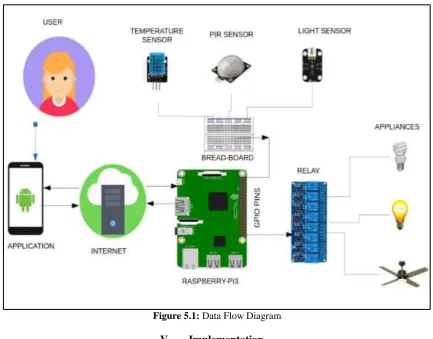
The figure below shows the flow diagram of Home Automation System. It controls the appliances connected to our system from any remote location. We use an user/client application to give the command to the raspberry pi through internet or cloud so that raspberry pi can respond through GPIO pins in the form of „1‟ and „0‟ so that the switch created by the relay board can turn on and off the appliances connected to it.
We also integrated a sensory system through which we can sense the intensity of light and the lights will adjust its intensity according to the room.
Figure 5.1: Data Flow Diagram
V.
Implementation
The system that we have developed basically consist of six modules 1. Raspberry pi Module6. Cloud
For the implementation of our system we have to follow following steps:
Step 1:
1. For the setup of the raspberry pi we start by downloading an operating system which is compatible for our project, it can be any standard operating system such as Windows, Linux, Raspbian, UNIX, etc.
2. As we used python as the programming language raspbian OS is perfect as it has inbuilt python IDEs and is more compatible with python scripting.
3. For downloading the raspbian OS we visited the official raspberry pi website, here all the versions of the raspbian OS are available and we need to download any standard version of raspbian OS.
Figure: Different Standard OS compatible with raspberry pi
Step 2:
1. After downloading the OS we have to install the OS in our standard size memory card, but the OS we downloaded is in the form of „Image‟.
2. For this we have to download as Image writing software called Win32diskimager. It is available online and can be downloaded easily.
3. After installing the windows disc imager we just have to copy the path where we have to burn the OS and click on the start button.
Figure: Win32Disk Imager
Now we have to set up the raspbian OS and provide it the necessary data in order to use the internet services. We also update all the software and IDE in the raspberry pi, so that we can select the standard version for our programming.
For updating the system we use following commands: sudo apt-get update.
sudo apt-get dist-upgrade.
sudo apt-get install -y rpi-chromium-mods.
sudo apt-get install -y python-sense-emu python3-sense-emu.
Figure: Raspbian operating system desktop
Step 4:
1. Boot the raspberry pi with the standard operating system (windows, Linux, raspbian, Unix, etc.)
2. Set up the operating system with and internet connection. Internet connection can be established in many ways such as, through LAN or may be through Wi-Fi dongle or even with Wi-Fi.
3. Once the connectivity is established check that, does system has the internet access or not by opening the browser.
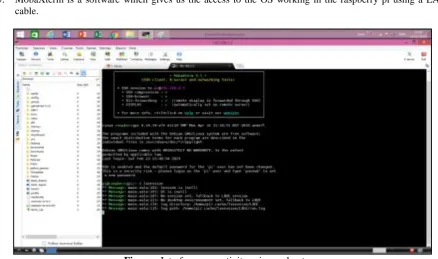
4. MobaXterm is used as a connecting software to access the rasbian operating system.
5. MobaXterm is a software which gives us the access to the OS working in the raspberry pi using a LAN cable.
Figure : Interface connectivity using moboxterm
1. Go to UBI dots platform and design the Remote according to your requirement. 2. Generate tokens for each button.
3. Once the tokens are generated create an object for each button in our python program and assign the tokens. 4. Open your application and check whether the buttons are functioning properly or not.
5. Now, we will run our python code through the python IDLE installed in our system.
Figure: Python code for Automation System
Step 6: 1.
Fig: Output of Home Automation System
1. Interface of our system consist of a small menu through which we can create multiple buttons according to our requirement.
2. For each button it generates a token.
3. The token that is generated is then checked every time before executing a command which helps us in distinguish the command given by the different buttons.
4. We can create as well as edit the buttons through the menu as much as we want.
5. We can create n number of buttons and perform different functions according to the requirement of the client.
Given bellow is the image of our user interface:
Figure: User Interface – Mobile device
VI.
Conclusion and future scope
Conclusion The Internet of Things involves an increasing number of smart interconnected devices and sensors (e.g. cameras, biometric and medical sensors) that are often non-intrusive, transparent and invisible.
System through which we can control our home appliances from almost anywhere in the world.
Enhanced security.
Smart mode helps us save electricity and at the same time we don‟t waste any time turning light on and off.
Future Scope
Improvements in Security Problems.
Industrial Automation and Management through internet from anywhere around the world.
Season modes will be considered.
System should work even with poor internet connection.
[1]. “Home Automation System with Android Application” by Mohd Nor Azni (IEEE 2016). [2]. “IOT based home automation” by B.P Kulkarni volume 3 and issue 4
[3]. “Intelligent Smart Home Automation and Security using Arduino” by J. Chandramohan Volume 6 Issue 3. [4]. “Raspberry pi home automation using android application” by Himani Singh Dhami volume 3 issue [5]. “Raspberry pi home automation with wireless sensors using smart phone” by A.S.Biradar
[6]. NupurTyagi, “A REFERENCE ARCHITECTURE FOR IoT”, in International Journal of Computer Engineering and Applications, Volume X, Issue I, Jan.
[7]. “RASPBERRY PI HOME AUTOMATION WITH WIRELESS SENSORS USING SMART PHONE” by P Bhaskar Rao volume 4
issue 5.
[8]. “IoT based Simple Home Automation using Raspberry Pi“by Aditya Vikram Jajodia (ISSN: 2231-5381) [9]. Souza, Alberto M.C. Amazonas, Jose R.A. “A Novel Smart Home Application”.
[10]. Asadullah, Muhammad (22 Dec 2016) an Overview of Home Automation Systems". [11]. Best Home Automation System - Consumer Reports". Retrieved 2016-02-14.