MOBILE TESTING FOR EARTHQUAKE MITIGATION AND
RESCUE PATH ON ANDROID APPLICATION
Endina Putri Purwandari1, Endang Widi Winarni2, Richo Hardiansyah3, Ernawati4
1.INTRODUCTION
Indonesia is one of the largest archipelagic countries in the world, is located between three of the world's active plates, the Eurasian, Indo-Australian and Pacific plates. The interactions between these plates make Indonesia prone to geological disasters including earthquakes, volcanic eruptions, tsunamis, land movements, and others. One of the active geological disasters in Indonesia is Bengkulu Province. BMKG recorded the big earthquake had hit the Bengkulu province in 1833, 1861, 2000, 2007, and 2009 [1]. With the history of geological disasters in Bengkulu, it is necessary to deal with disasters with a proactive strategy, not only after a disaster, but to carry out various preparatory activities to anticipate the disaster.
Disaster mitigation is an action to reduce the disaster impact that can be done before the disaster occurs. Indonesian Law No. 24 of 2007, mitigation efforts can take the form of pre-disaster, during disasters and post-disaster. Pre-disaster as an effort to anticipate disasters, through providing information and education can increase preparedness to minimize disaster risk [2]. Mobile devices are taking over desktop computer and becoming an important thing in human live. Some mobile application testing is requiring for the quality assurance of application. Sharma [3] purpose an automated stress testing for mobile application to check the reliability and compatibility of phones. Shashikant [4] develop smart tracking systems in Android application that provides flexibility supports many feature and friendly applications. Cantos [5] conduct software evaluation use ISO 9126 with Likert scale questionnaire that assess functionality, reliability, usability, efficiency, maintainability and portability. The prototype evaluation of describes respondents strongly agree that the student information website was acceptable. Vijayalakshmi [6] purposes statistics analysis to test smart phones in different operating systems. The smart phones manufacturer should pay intention on materials in mobile shell that used for many Android applications. Alexander [7] develops German language application using mobile android. This application tested in different Android operation system version, and questionnaires to determine user satisfaction level.
Therefore, two main objectives of this project are to develop a mobile application, to provide information on evacuation path mapping accompanied by information on evacuation and conduct gathering points for testing this mobile application with functional suitability testing, compatibility testing, usability testing, and reliability testing. This research is mainly focused on presenting earthquake mitigation and information rescue paths accurately.
1
Assistant Professor,Department of Information System, University of Bengkulu, Bengkulu, Indonesia
2Professor, Department of Education, University of Bengkulu, Bengkulu, Indonesia
3,4Assistant Professor,Department of Informatics, University of Bengkulu, Bengkulu, Indonesia
DOI: http://dx.doi.org/10.21172/1.121.06
e-ISSN:2278-621X
Abstract- Disaster mitigation is an action to reduce the disaster impact that can be done before the disaster occurs. The application aims to provide information on evacuation path mapping accompanied by information on evacuation and conduct gathering points and to test the mobile application with functional suitability testing, compatibility testing, usability testing, and reliability testing. Mobile application testing purpose to produce high quality software with a series of software qualit y tests to find errors before being used by user. Functional suitability is to ensure that there are no errors in application that conducted on 7 test classes and 24 test scenarios. Compatibility test will check the application uses various mobile device platforms. This test used 5 smartphone devices and 15 devices on 3 Testing Cloud Device Programs. Usability testing use the USE Questionnaire consisted of 30 questions consist of Usefulness, Satisfaction, and Ease of Use, and Satisfaction. The questionnaire instrument was fulfilled the validity and reliability with SPSS 21. Reliability testing compares the latitude and longitude accuracy of GPS devices via the NAVITEL Application on smartphones and GPS map 76CSx on GARMIN devices. Based on testing results, the functional suitability testing was successful at 100%, the compatibility testing was 100% successfully running in 20 devices without error messages and the reliability testing was shown a small waypoint difference of around 0-1 seconds. In addition the usability testing with 40 respondents shown that 89.75% of respondents said they were strongly agree and satisfied with this application.
2.MOBILEAPPLICATIONTESTING
The purpose of building software is to produce high quality software with a series of software quality tests to find errors before being used by users. Software quality can be assessed through specific measures and methods. One measure of software quality is ISO 25010, which was created by the International Standardization Organization (ISO) and International Electro technical Commission (IEC). ISO 25010 replaces the previous standard, ISO 9126 [8] which since 2001 has become the standard for measuring software quality analysis and standards for quality assurance. According to Wagner [9] ISO 25010 establishes eight characteristics, namely functional suitability, reliability, performance efficiency, usability, maintainability, security, compatibility and portability which are further divided into a series of sub-characteristics (Figure I).
(1) Functional Suitability, the extent to which a product or system meets the needs when used under certain conditions. (2) Performance Efficiency, the level of performance relative to the resources used in the specified conditions.
(3) Compatibility to what extent the system can exchange information with other products, systems or components and or carry out the necessary functions, when sharing the same hardware or software environment.
(4) Usability, the extent the system can be used by certain users to obtain certain objectives effectively, efficiently, and satisfactorily.
(5) Reliability, the extent the system, product, or component performs certain functions under certain conditions within the stipulated period.
(6) Security, the extent a product or system can protect information or data so that people, other products, or systems have a level of data access that matches their type and level of authorization.
(7) Maintain-ability, the level of effectiveness and efficiency of a product or system to be modified by the developer.
(8) Portability, the level of effectiveness and efficiency with the system, product or component can be transferred from one hardware, software or operational environment or use to another.
Figure 1. ISO 25010 [9]
3.METHOD
The earthquake mitigation and rescue path application implements 4 aspects of software testing by Wagner [9] in accordance with ISO 25010 standards. There are functional suitability testing, compatibility testing, usability testing, and reliability testing. Applications should meet all standard aspects so eligible for use by general users. The testing aspects of mobile software in this application are:3
3.1 Functional Suitability
This test aims to validate the application functions in accordance with the requirements. In functional suitability testing, we use the checklist method from test case that contains the application functions based on needs analysis. Test case is to ensure that there are no errors in application and if an error is found then it must be corrected. The instrument of test case lists the application functions according to the analysis of functional requirements. Test case is expected to minimize the errors possibility of application.
This test will check the application uses a variety of browsers, OS, device type, device size, and connection speed. Direct device testing is carried out by operating the Earthquake Mitigation and Rescue Path application on several Android devices with different versions such as Android Ice Cream Sandwich, Android Jelly Bean, Kikkat, Lollipop, Nuget, to Android Oreo. The compatibility held by using Cloud Devices on the Firebase Test Lab, Kobiton Cloud Device, and Amazon.
3.3 Usability
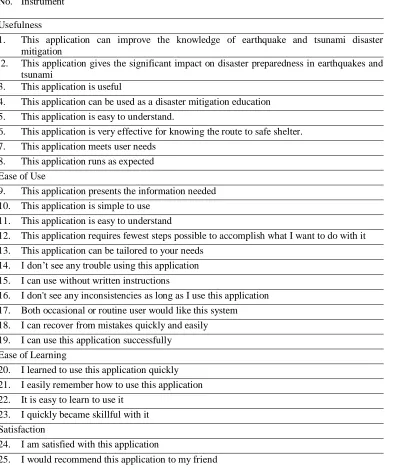
Usability testing is used to test end users about application. The questionnaire provided is a list of questions submitted to respondents to find information about the use of application. We used purposive sampling technique. Usability uses the USE Questionnaire by Arnold M. Lund [10]. The USE Questionnaire instrument has been tested for validity. The USE Instrument Questionnaire consisted of 30 questions divided into 4 criteria: usefulness, ease of use, ease of learning, and satisfaction (Table I). The questionnaire in Table I will be filled by 40 respondents. Each respondent were asked to give the check list in every statement from strongly agree, agree, enough, strongly disagree which each choice represents the Likert scale from 1 to 4.
3.4. Reliability
Reliability focuses on whether the data is collected and analyzed. In order to ensure reliability, data collection, data processing, and data analysis procedures were well documented. We test reliability by comparing the latitude and longitude accuracy of GPS devices via the NAVITEL Application on smartphones and GPS map 76CSx on GARMIN devices.
Table I: Use Instrument No. Instrument
Usefulness
1. This application can improve the knowledge of earthquake and tsunami disaster mitigation
2. This application gives the significant impact on disaster preparedness in earthquakes and tsunami
3. This application is useful
4. This application can be used as a disaster mitigation education 5. This application is easy to understand.
6. This application is very effective for knowing the route to safe shelter. 7. This application meets user needs
8. This application runs as expected Ease of Use
9. This application presents the information needed 10. This application is simple to use
11. This application is easy to understand
12. This application requires fewest steps possible to accomplish what I want to do with it 13. This application can be tailored to your needs
14. I don’t see any trouble using this application 15. I can use without written instructions
16. I don't see any inconsistencies as long as I use this application 17. Both occasional or routine user would like this system 18. I can recover from mistakes quickly and easily 19. I can use this application successfully
Ease of Learning
20. I learned to use this application quickly 21. I easily remember how to use this application 22. It is easy to learn to use it
23. I quickly became skillful with it Satisfaction
24. I am satisfied with this application
26. This application is fun to use
27. This application works the way I want it to work 28. This application isn’t use large data quota 29. I feel I need to have it
30. This application is pleasant to use
4.ANALYSISANDRESULTS
4.1 Result of functional suitability testing
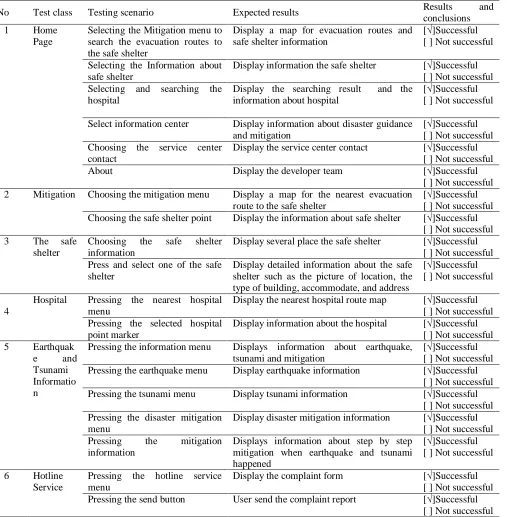
Table II showed the testing results for the functional suitability aspect. The functional suitability testing conducted on 7 test classes and 24 test scenarios showed that the application was 100% successfully running properly.
Table II: Functional Suitability Test Results
No Test class Testing scenario Expected results Results and
conclusions
1 Home
Page
Selecting the Mitigation menu to search the evacuation routes to the safe shelter
Display a map for evacuation routes and safe shelter information
[√]Successful [ ] Not successful
Selecting the Information about safe shelter
Display information the safe shelter [√]Successful [ ] Not successful Selecting and searching the
hospital
Display the searching result and the information about hospital
[√]Successful [ ] Not successful
Select information center Display information about disaster guidance and mitigation
[√]Successful [ ] Not successful Choosing the service center
contact
Display the service center contact [√]Successful [ ] Not successful
About Display the developer team [√]Successful
[ ] Not successful 2 Mitigation Choosing the mitigation menu Display a map for the nearest evacuation
route to the safe shelter
[√]Successful [ ] Not successful Choosing the safe shelter point Display the information about safe shelter [√]Successful
[ ] Not successful
3 The safe
shelter
Choosing the safe shelter information
Display several place the safe shelter [√]Successful [ ] Not successful Press and select one of the safe
shelter
Display detailed information about the safe shelter such as the picture of location, the type of building, accommodate, and address
[√]Successful [ ] Not successful
4
Hospital Pressing the nearest hospital menu
Display the nearest hospital route map [√]Successful [ ] Not successful Pressing the selected hospital
point marker
Display information about the hospital [√]Successful [ ] Not successful
5 Earthquak
e and
Tsunami Informatio n
Pressing the information menu Displays information about earthquake, tsunami and mitigation
[√]Successful [ ] Not successful Pressing the earthquake menu Display earthquake information [√]Successful
[ ] Not successful
Pressing the tsunami menu Display tsunami information [√]Successful
[ ] Not successful Pressing the disaster mitigation
menu
Display disaster mitigation information [√]Successful [ ] Not successful Pressing the mitigation
information
Displays information about step by step mitigation when earthquake and tsunami happened
[√]Successful [ ] Not successful
6 Hotline
Service
Pressing the hotline service menu
Display the complaint form [√]Successful
[ ] Not successful
Pressing the send button User send the complaint report [√]Successful
Pressing the exit button Displays two choices the user can cancel or continue
[√]Successful [ ] Not successful
Pressing the Yes button The application will exit [√]Successful
[ ] Not successful
Pressing the No button The application still can be used [√]Successful
[ ] Not successful
7 About Choosing about menu Display information about developer
system.
[√]Successful [ ] Not successful
4.2 Result of Compatibility Testing
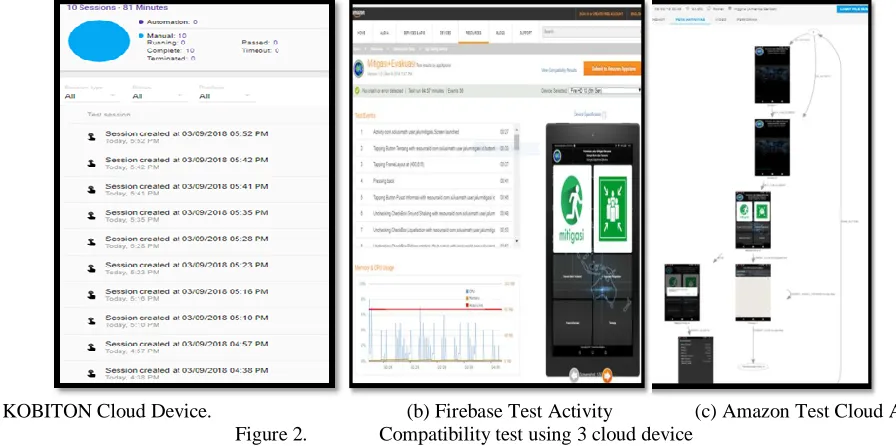
The compatibility testing is done by testing applications in various mobile device platforms, which include OS versions, screen sizes, and different resolutions. This test used 5 smartphone devices and 15 devices on 3 Testing Cloud Device Programs, such as Firebase Test Lab, KOBITON Cloud Device, and Amazon. The following is a testing activity on KOBITON cloud device (Figure 2.a) from website www.kobiton.com on 8 different devices, Firebase cloud device (Figure 2.b) from website www.firebase.google.com on 1 device, and Amazon (Figure 2.c) from website www.aws.amazon.com with 6 cloud device.
(a) KOBITON Cloud Device. (b) Firebase Test Activity (c) Amazon Test Cloud Activity
Figure 2. Compatibility test using 3 cloud device
Based on the testing on 20 devices with 5 smartphone devices (Table III) and 15 devices tested in 3 cloud device testing (Table IV) shows that the earthquake mitigation and rescue route application has been able to run successfully on various devices without any error message.
Table III: Compatibility Testing Results Using Smartphone Devices
No Device OS Version Testing Process
1 Samsung Galaxy
Note 8
Android 7.1.1
Successful
2 Lenovo A7000-a Android 6.0 Successful
3 XIAOMI Redmi
Note2
Android 5.0.2
Successful
4 LG K10 LTE Android 6.0 Successful
5 Samsung Galaxy
TAB J5
Android 5.1.1
Successful
Table IV: Compatibility Testing Results Using Cloud Device KOBITON, Test Lab Firebase,and Amazon
No Device Testing Process
1 XPeria XZ Premium Versi Android 7.1.1
Successful
2 U11 versi Android 7.1.1 Successful
3 Pixle XL Versi Android 8.0.0 Successful
4 Nexus 5X Versi Android 7.1.1 Successful
6 Galaxy Note 4 Versi Android 5.1.1 Successful
7 Galaxy J7 Versi Android 7.0 Successful
8 Galaxy A7 Versi Android 6.0.1 Successful
9 Pixle Tingkat API 26 Successful
10 Fire HDX 8.9 Successful
11 Fire HD 10 (5th Gen) Successful
12 Fire HD 8 (5TH Gen) Successful
13 Fire HD 7 Successful
14 Fire HD 7 (7TH Gen) Successful
15 Fire ( 5th Gen) Successful
4.3 Result of Usability Testing
The usability testing carried out on the community with 40 people respondents with various professions. The test was carried out using the 30 questions with USE Questionnaire instrument (Table 1). The questionnaires were constructed as four-point Likert rating scales. Users were asked to rate agreement with statements ranging from strongly agree, agree, enough, and strongly disagree. Usability analyses using three dimensions USE consist of Usefulness, Satisfaction, and Ease of Use. The item Ease of Use separated into two factors, Ease of Learning and Ease of Use (Lund, 2001).
The questionnaire instrument must be fulfilled the validity and reliability with SPSS 21 before tested to respondents. Validity test is used to measure whether the validity of questions in questionnaire. The data from filling out the questionnaire were analyzed using the SPSS tool to get the Alpha Cronbach consistency value (Figure 3).
Figure 3. Cronbach Alpha Calculation Using SPSS 21
In Figure 3 shown that the Cronbach's Alpha value is greater than r-table, 0.868 > 0.257, and meaning that the 30 questions in questionnaire was reliable and can be used for analysis. The results of Usability testing can be seen in Table V.
Table V: Usability Testing Results
Scale Total Score Total x
Score
Strongly agree 725 4 2.900
Agree 456 3 1.368
Enough 20 2 40
Strongly disagree
0 1 0
Total 4.308
Maximum Score 4.800
The maximum value obtained if the respondent chooses the strongly agree answer with score = 4. So, the percentage of usability is obtained at 89.75%.
The percentage of usability = = 89,75 %
4.4 Result of Reliability Testing
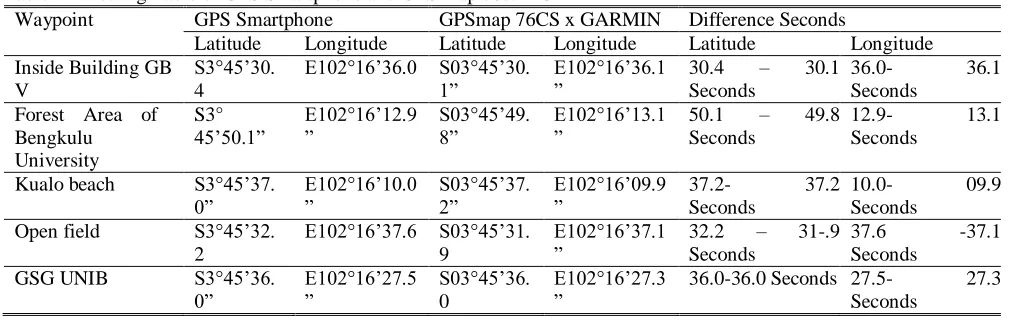
GARMIN to see the accurate waypoint point. When user searched the waypoint point evacuation path, the user remained in the right waypoint point area. Based on the data collected in 5 different waypoint points, the waypoint results are obtained in Table VI.
Table VI: Testing Table of GPS Smartphone and GPS map 76cs x GARMIN
Waypoint GPS Smartphone GPSmap 76CS x GARMIN Difference Seconds
Latitude Longitude Latitude Longitude Latitude Longitude
Inside Building GB V
S3°45’30. 4
E102°16’36.0 S03°45’30.
1” E102°16’36.1” 30.4 Seconds – 30.1
36.0- 36.1
Seconds Forest Area of
Bengkulu University S3° 45’50.1” E102°16’12.9 ” S03°45’49. 8” E102°16’13.1 ”
50.1 – 49.8
Seconds
12.9- 13.1
Seconds
Kualo beach S3°45’37.
0” E102°16’10.0 ” S03°45’37. 2” E102°16’09.9
” 37.2- Seconds 37.2
10.0- 09.9
Seconds
Open field S3°45’32.
2
E102°16’37.6 S03°45’31. 9
E102°16’37.1
” 32.2 Seconds – 31-.9
37.6 -37.1
Seconds
GSG UNIB S3°45’36.
0” E102°16’27.5” S03°45’36.0
E102°16’27.3
” 36.0-36.0 Seconds 27.5- Seconds 27.3
From the test results by looking at the accuracy of latitude and longitude waypoint points, it is known that (1) the accuracy of waypoint points is strongly influenced by the GPS position; (2) there is a difference of each waypoint point between 0-1 seconds with the waypoint 3 point signal radius - 24 meters. To get the higher accuracy of waypoint points, GPS is best used in open space. Because using GPS inside the building, the reception of smartphone signals is a little weak and cannot get a signal at all.
5.CONCLUSION
Based on functional suitability testing with 7 test classes and 24 scenarios was successful at 100%. The compatibility aspect gets valid results by complying with compatibility aspects. This testing is tested on 5 different smartphone devices and tested on 15 cloud devices from 3 different sites. The compatibility test result was 100% successfully running in 20 devices without error messages. The usability aspect gets percentage value of 89.75% from questionnaires at 40 respondents with USE Questionnaire. The validity testing in the Alpha-Cronbach value of .868 where the value is greater than the value distribution in r-table 0.257 with this validity reality data obtained validity. The reliability testing has shown a small waypoint difference of around 0-1 seconds.
All of these testing demonstrate the performance of software product for earthquake mitigation and rescue route on Android apps. This research established the test cases for some product quality in ISO 25010 in Android Smartphone. Future studies may develop more test cases in ISO 25010 such as performance efficiency, security, maintain ability, and portability test.
6.ACKNOWLEDGMENT
We would like to thank the Directorate of Higher Education, Ministry of Research, Technology, and Higher Education, Republic Indonesia and Research Centre in University of Bengkulu, Indonesia for the funding throughout research grant 2018
7.REFERENCES
[1] BNPB (Badan Nasional Penanggulangan Bencana). (2017). Indonesian Disaster Information Data. National Board for Disaster Management or BNPB, http://dibi.bnpb.go.id
[2] Noor, D. (2014). Pengantar Mitigasi Bencana Geologi. Yogyakarta: Deepublish Cv.Budi Utama.
[3] Sharma, Santosh Kumar, Akshit Sharma, Shivam Gaur. (2017). Stress Testing of Android Applications Using Test Automation. International Journal of Latest Trends in Engineering and Technology (IJLTET) Volume 8 Issue 2 pp. 326 – 336 e-ISSN 2278 – 621X DOI:http://dx.doi.org/10.21172/1..82.044
[4] Shashikant, Kshirsagar Suraj, et al. (2015). Android Based Mobile Smart Tracking System. International Journal of Latest Trends in Engineering and Technology (IJLTET) Volume 5 Issue 1 January 2015 pp. 410-420 – 336 e-ISSN 2278 – 621X.
[5] Cantos, Maria Cecilia G., Lorena W. Rabago, Bartlome T. Tanguilig. (2015). Mobile Web-Based Student Integrated Information System. International Journal of Machine Learning and Computing (IJMLC) Vol. 5 No. 5 October 2015 ISSN 2010-3700 DOI: 10.7763/IJMLC.2015.V5.534.
[6] Vijayalaksmi, K. (2014). Analysis of Android OS Smart Phones Using Failure Mode and Effect Analysis. International Journal of Latest Trends in Engineering and Technology (IJLTET) Volume 4 Issue 4 November 2014 pp. 410-420 – 336 e-ISSN 2278 – 621X.
[7] Alexander S, N. Agustinus, O. Widya. German Language for Beginners Applications Based on Mobile Android. International Journal of Machine Learning and Computing (IJMLC) Vol. 6 No. 6 December 2016 ISSN 2010-3700 DOI: 0.18178/ijmlc.2016.6.6.609.
[8] International Organization for Standardization (ISO). (2011). ISO/IEC 25010. Webpage
http://www.iso.org/iso/catalogue_detail.htm?csnumber=35733.
[9] Wagner S. (2013). Software Product Quality Control. Springer, Heidelberg.
![Figure 1. ISO 25010 [9]](https://thumb-us.123doks.com/thumbv2/123dok_us/1410875.1653781/2.612.130.454.320.584/figure-iso.webp)