Analysis of Windows In-Memory Structures for Extracting Digital
Evidence
Dinesh N. Patil1 and Bandu B. Meshram2
1, 2 Computer Engineering Department, Veermata Jijabai Technological Institute, Mumbai, Maharashtra, India
1
[email protected], [email protected]
ABSTRACT
The Windows Volatile memory maintains information about the various activities on the system such as processes and its threads running, registry key open, user authentication details. By performing the forensic investigation of the volatile memory, the digital evidence about the activity performed on the system can be identified. The paper discuss about the various in-memory structures with their forensic importance and details out the approach to identify and locate the total number of key objects in use by the running process. The paper also discusses the forensic importance of SAM services in password hash extraction.
Keywords: Volatile Memory, Registry Key, EPROCESS, Object, VAD.
1. INTRODUCTION
The Windows Computer system‟s volatile memory maintains the processes to be executed and their metadata. The memory space is divided into kernel and user space. The system related processes runs in kernel memory space whereas the user related process used to switch between user and kernel space in order to gain access to the resources [1]. The digital forensic investigation of volatile memory can help in knowing about any malicious process running on the system. The volatile memory is dumped to perform its forensic investigation. The various tools and techniques are used to perform volatile memory dump.
The Registry is a repository of system configuration settings and includes links to applications that need to be executed once the system has been established. The running processes access registry key for their execution. It becomes essential to identify and locate the registry key related information from the volatile memory as the traces of activity being performed on the system can be identified. This raises the importance of identifying the total number of key objects created and in use for a particular process. Further investigating the content of the key objects, can help in identifying the last access
time of a registry key and the registry key value accessed. This paper is structured as follows: Section 2 covers the related work in the volatile memory forensics. Section 3 discusses the various in-memory structures and their forensic importance. Section 4 covers an approach to identify and locate the total number of key objects in use by the process and locating the password hashes in the dumped volatile memory. The details of the experimentation carried out are covered in section 5. The conclusion and the future work to be carried out are covered in section 6.
2. RELATED WORK
Crucial information regarding the activities going on in a running system can be identified by analyzing the physical memory dump collected from the suspect‟s system. The extraction of running process list from the dumped volatile memory is performed in [2]. The importance of forensics of live machines and artifacts which can be found as well as methods and tools which are used for extracting and analyzing data from RAM is discussed in [3].
A method of address translation mechanism is proposed in [4], based on this address running processes, login information, and registry details are obtained.
The address translation mechanism for converting virtual address to physical address is discussed in [5].
The algorithm for extracting the registry hive files from the dumped memory image is covered in [6].
3. THE VOLATILE MEMORY
STRUCTURE
3.1
EPROCESS Structure
The EPROCESS structure for a process is created when a process is invoked for its execution. The EPROCESS structure consists of number of attributes of the process, pointers to the number of other attributes and data structures related to the process.
The attributes of the EPROCESS structures are having forensic importance. These attributes are discussed as follows:
Pcb (Process control Block): This data structure is used by the operating system to manage the process itself. The Pcb provides the information about the page table for the process.
CreateTime: This attribute specifies the time at which the process was created. Thus helping in correlating the incident timing.
UniqueProcessID: Each Process is assigned a specific ID to identify it.
ObjectTable: It is a pointer attributes which consists of the virtual address of the handle table. The number of objects in use by the process can be located using this attribute. ImageFileName: The name of the process can
be identified using this attribute
Peb (Process Environment Block): This data
structure consists of attribute
ImageBaseAddress that specifies the starting address of the executable for the process. VadRoot: This is a 32-bit pointer attribute
which specifies the virtual address of the root of the Virtual address descriptor (VAD) tree structure. The individual VAD in the VAD tree structure represents the range of addresses occupied by the files and data associated with the particular process in the volatile memory
Fig. 1. EPROCESS structure
3.2
Virtual Address Descriptor Structure
The Virtual Address Descriptor tree is used by the Windows memory manager to describe memory ranges used by a process as they are allocated. When a process allocates memory with VirutalAlloc, the memory manager creates an entry in the VAD tree [7]. The attribute with the forensic importance in the virtual address descriptor are as follows:
Parent VAD: This attribute specifies the parent VAD node of the current VAD node.
LeftChild: This attribute specifies the left child of the current VAD node.
RightChild: This attribute specifies the right child of the current VAD node.
StartingVpn: On converting the starting virtual page number attribute to the physical address, it is possible to locate the first page mapped in the physical memory represented by the VAD. EndingVpn: On converting the Ending virtual
page number attribute to the physical address, it is possible to locate the last page mapped in the physical memory represented by the VAD.
Fig. 2. Virtual Address Descriptor structure
3.3 Object Type
This memory structure stores the information which is common to all the objects of the same type.
Fig. 3. Object Type structure
TypeList: This field specifies starting and ending address of a doubly linked list nodes indicate all the objects of the same type currently open.
TotalNumberOfObject: The total number of objects currently in use of the particular object type is specified by this field.
TotalNumberOfHandles: The total number of handles created for the particular object type is specified by this field.
Key: This field contains the pool tag that is used to allocate object of this object type.
3.4
File Object
The single instance open of a file can be tracked by using this particular structure. The information about a file can be extracted from this object.
Type: This field indicates the type of this object, which is a file object.
Size: This field specifies the size of the file object in bytes.
Device Object: This field contains the 32-bit virtual address of the device object on which the file is opened. Device objects serves as the target of all operations on the device [8] .Device object itself is a memory structure using which the information about the device driver associated with the device can be identified.
FileName: The name of the file that is open can be known from this field.
Fig. 4. File Object structure
3.5
Key Object
Whenever an application opens or creates a registry key, the configuration manager allocates a key object with the help of object manager that works as a handle to the registry key. The key object leads to the key in use by the particular process and it can be used to extract the hive file from the volatile memory as discussed in [6].
Type: This field specifies the hex pattern used to represent the key object.
Key Control Block: This field specifies the number of time a key was opened. The last access time of the key can be obtained from this field. Key control block is created by the configuration manager for each key that is open.
Process Id: The process which is using the key can be identified from this key.
Fig. 5. Key Object structure
3.6
Key Control Block
The configuration manager allocates a key control block. This structure specifies the name of the key, includes the cell index of the key node.
RefCount: This field specifies the number of application which had opened the same registry key.
KeyHive: This field holds the virtual address which is useful in extracting the entire hive from the physical memory.
KCBLastWriteTime: The last time when the key control block was accessed is available in this field
Fig. 6. Key Control Block structure
4. ANALYZING THE VOLATILE
MEMORY
4.1
Locating the Key Objects
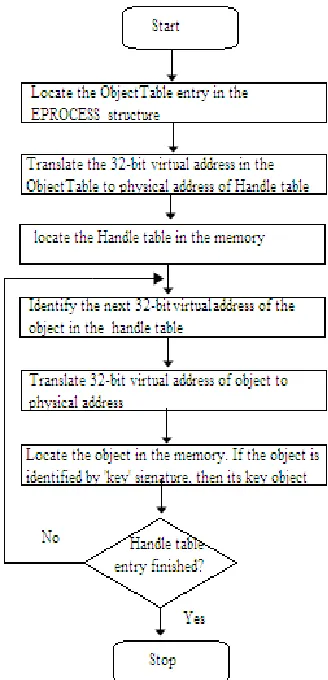
The various key objects can be located by using the ObjectTable field of the EPROCESS structure. Figure 8 shows the steps to identify the total key objects in use by the running process from the dumped volatile memory
Step1. Locate the EPROCESS Structure
Whenever a process is created, an EPROCESS is created for the particular process. This structure maintains the various about the running process. The „Pro‟ text signature is used to identify the EPROCESS structure. The name of the process running is located at 420 bytes from the beginning of the „Pro‟ text signature.
Step2. Locate the object table field
Step3. Locate the Handle table virtual address
The physical address of the object table obtained by translating the virtual address maintains the 32-bit virtual address of the handle table.
Step4. Locate the Handle table and its entry
By translating the 32-bit virtual address of the handle table to the physical address, handle table is located. Handle table maintains the entry for each handle that are opened for a particular running process. This handle can be registry key, device object, files that are required by the running process. Each handle entry is a 32-bit virtual address of the object opened. By translating this virtual address to the physical address, the object is located physically.
Step5. Locate the key object
Whenever a registry key is opened by the running process a key object is created for that registry key. This key object is identified by the signature „key‟. Therefore by going through all the handle table entry and searching for „key‟ text signature at the physical location of the object, it becomes possible to identify all the key objects that are created. As individual key object is created whenever a process access registry key from the registry database, therefore by counting the total number of key object created for a particular running process it is possible to identify the total number of keys opened by the running process.
Identifying key object opened has its forensic importance as key object point to the other in-memory structure such as key control block. This key control block structure maintains the information such as last access time and how many times a key was accessed by the running process. The relation between various in-memory structures to identify the last time access of a key is depicted as in figure 7.
Fig.7. Relationship Between Various In-Memory Structures
Using key control block field such as KeyHive and KeyCell it is possible to locate the key cell and value cell of a registry key associated with the key object. The key cell maintains the name of the key and the value cell maintains the value of the key.
Fig. 8. Flowchart depicting the process for identifying the number of key objects.
4.2
Password Hashes
in the Windows registry and access to it is tightly controlled while window is running. Instead of storing your user account password in clear-text, Windows generates and stores user account passwords in the form of hashes. SAM (Security Account Manager) file holds the password hashes for every account on the local machine, or domain. The location of this registry hives is found in %systemroot%/system32\config\ directory.
When the password for a user account contains fewer than 15 characters, Windows generates both a LAN Manager hash (LM hash) and a Windows New Technology LAN Manager hash (NTLM hash) of the password [9].
Hashes often remain in memory after successful authentication, especially during an interactive session, so that future authentication can be done quickly if needed and without requiring the security principal (the entity requesting authentication, such as a user) to re-enter the plaintext password. As a result, password hashes can be found in memory during active logon sessions (and sometimes after). The possible extraction and decoding of hashes may become eminent.
The security account manager service (SamSS) maintains the security information of local user accounts for authentication purpose by accessing the data from the Security Accounts Manager registry hive. This information remains in the volatile memory which can be accessed by dumping the volatile memory. The samSS service is handled by the lsass.exe process. The lsass.exe process is responsible for authentication of the user‟s details provided by the winlogon process. Carefully analyzing the volatile memory for the samSS service, password hashes can be identified. The figure 9 shows the samSS service and the identified password hashes.
Fig. 9. Snapshot of Dumped Volatile Memory For Samss Service
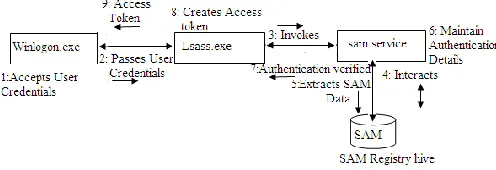
The detail process of how the authentication of a user happens is shown in figure 10.
Fig. 10. Windows User Authentication process
The authentication process in Windows can be described as follows. On receiving the user credential for authentication purpose, the winlogon.exe process passes credential to the lsass.exe which in turn invokes the sam service (SamSS). The SAM service then extracts the hashes from the SAM registry hive and compares with the user credential passed by the lsass.exe process. If the authentication is verified then the lsass.exe generates the access token and passes it to the winlogon.exe. Upon receiving the access token the winlogon.exe starts the explorer.exe
Since the Sam service maintains the hashes extracted from the SAM registry hive for authentication purpose. The searching for the SamSS string in the volatile memory dump will help in extracting the password hashes
5. EXPERIMENTATION
Our experiments were performed on the memory dump imaged obtained from the 32-bit Windows 7, 8 Professional machines. Nearly 10 memory dump files each from Windows 7 and Windows 8 were analyzed to identify and locate the registry key objects and the password hashes. Table 1 provides detailed information about our test machine.
Table 1: Test Machine Information
Operating System 32-bit Windows 7,8 Professional edition
Memory 2GB
Processor Intel ® Pentium 4 @3.00GHz
6. CONCLUSIONS
The paper described the approach to identify and locate the key objects in use by the running process. As discussed the in-memory structures, if carefully analyzed can help in identifying the registry key related information and password hashes.
In future in-memory structures will be analyzed to locate the memory mapped file.
REFERENCES
[1] T. Soulami,” Inside Windows Debugging”,Microsoft, 2000.
[2] S. Thomas, K. Sherly and S. Dija , “Extraction of Memory Forensic artifacts from Windows 7 RAM image”, Proceeding of IEEEE conference on Information and Communication Technologies (ICT 2013), 2013
[3] K. Hausknecht, D. Foit and J. Buric , “RAM data significance in Digital Forensics”, MIPRO, Opatija, Croatia,2015.
[4] S. Zhang, L. Wang and R. Zhang , “Exploratory Study on memory analysis of windows 7 operating system”,3rd International Conference on Advanced Computer Theory and Engineering (ICACTE),2010. [5] R. Zhang, L. Wang and Shuhui Zhang, “Windows
Memory Analysis Based on KPCR”, Fifth International Conference on Information Assurance and Security, 2009.
[6] S. Zhang, L. Wang and Lei Zhang, “Extracting
Windows Registry Information from physical
Memory”, IEEE, 2011
[7] B. Dolan-Gavitt.,” The VAD tree. The process-eye view of physical memory”, Digital Investigation, 2007, 4S S62-S64.
[8] Microsoft.
http://msdn.microsoft.com/en-us/library/windows/hardware/ff54801%28v=vs.85%29. aspx
[9] Password Technical Overview,