$3.00
October
1983
TABLE OF CONTENTS
Installing the Big Board II ... 4
In Search of the Perfect Terminal ... 7
Video Jitter Fix. . . .. 10
Cheap Daisy Blossoms ... 11
Big Board I Video Size ... . . . .. 18
Packet Radio, Operating Details ... 42
REGULAR FEATURES
Letters ... 2
Slicer Column ... 15
KayPro Column ... 20
FORTHwords ... 24
C'ing Clearly ... 27
Pascal Proced ures. . . .. 31
On Your Own ... 34
'-,
..:
U) w=
aw
I:IC
Z
Q W ...J
ca <
...J
C ~
~
~
Q U W W I:IC U.
<
>=
....
z <
I:IC I:IC
< ~ Q W
....
~
:::;
>-< CI CI
en
I:IC
=
Q U. Q
U)
~
I:IC W
....
w
i=
Q
....
....
uw
...,
ca=
U) wCI <
~
W I:IC
< U) ~ < U)
...J ...J
<
"THE ORIGINAL BIG BOARD"
OEM - INDUSTRIAL - BUSINESS - SCIENTIFIC
SINGLE BOARD COMPUTER KIT!
Z-80 CPU! 64K RAM!
(DO NOT CONFUSE WITH ANY OF OUR FLATTERING IMITATORS!)
THE BIG BOARD PROJECT: With thousands sold worldwide and over two years of field experience, the Big Board may just be one of the most reliable single board computers available today. This is the same design that was licensed by Xerox Corp. as the basis for their 820 computer.
$
279
00
(64K KIT BASIC 1/0)**
The Big Board gives you the right mix of most needed computing features all on one board. The Big Board was designed from scratch to run the latest version of CP/M·. Just imagine all the off-the-shelf software that can be run on the Big Board without any modifications needed.
SIZE: 8'1. x 13'/. IN. SAME AS AN 8 IN. DRIVE. REQUIRES: +5V @ 3 AMPS + - 12V @.5 AMPS.
FULLY SOCKETEDI FEATURES: (Remember, all this on one board!)
64K RAM
Uses Industry standard 4116 RAM's. All 64K is available to the user, our VIDEO and EPROM sections do not make holes in system RAM. Also, very special care was taken in the RAM array PC layout to eliminate potential noise and glitches.
Z-80 CPU
Running at 2.5 MHZ. Handles all 4116 RAM refresh and supports Mode 2 INTERUPTS. Fully buffered and runs 8080 software.
SERIAL I/O (OPTIONAL)
Full 2 channels using the zao SIO andtheSMC 8116 Baud Rate Generator. FULL RS232! For synchronous or asynchronous communication. In synchronous mode, the clocks can be transmitted or received by a modem. Both channels can be set up for either data-communication or data-terminals. Supports mode 21nl. Price for all parts and connectors: $39.95
BASIC I/O
Consists of separate parallel port (Z80, PIO) for use with an ASCII encoded keyboard for Input. Output would be on-the 80 x 24 Video Display .
BLANK PC BOARD - $99.95
The blank Big Board PC Board comes complete with full documentation (including schematics), the character ROM, the PFM 3.3 MONITOR ROM, and a diskette with the source of our BIOS, BOOT, and PFM 3.3 MONITOR.
24 X 80 CHARACTER VIDEO
With a crisp, flicker-free display that looks extremely sharp even on small monitors. Hardware scroll and full cursor control. Composite video or split video and sync. Character set is supplied on a 2716 style ROM, making customized fonts easy. Sync pulses can be any desired length or polarity. Video may be inverted or true. 5 x 7 Matrix - Upper & Lower Case.
FLOPPY DISC CONTROLLER
Uses WD1771 controller chip with a TTL Data Separator for enhanced reliability. IBM 3740 compatible. Supports up to four 8 inch disc drives. Directly compatible with standard Shugart drives such as the SA800 or SA801. Drives can be configured for remote AC off-on. Runs CP/M" 2.2.
TWO PORT PARALLEL I/O (OPTIONAL)
Uses Z-80 PIO. Full 16 bits, fully buffered, bi-directional. Uses selectable hand shake polarity. Set of all parts and connectors for parallel 1/0: $19.95
REAL TI ME CLOCK (OPTIONAL)
Uses Z-80 CTC. Can be configured as a Counter on Real Time Clock. Set of all parts: $9.95
CP/M* 2.2 FOR BIG BOARD
The popular CP/M" D.O.S. to run on Big Board is available for $139.00.
BIG BOARD SOFTWARE SPECIAL"':' $149
Through special arrangement with COL we offer a powerful package of TDL z-ao software that has a suggested retail of almost $600. Includes: Extended Disk Business BaSic, ZEDIT text editor, MACRO II Macro Assembler, LINKER, DEBUG I and DEBUG II. Supplied on a in. diskette with extensive manual.
PFM 3.3 2K SYSTEM MONITOR
The real power of the Big Board lies in its PFM 3.3 on board monitor. PFM commands include: Dump Memory, Boot CP/M", Copy, Examine, Fill Memory, Test Memory, Go To, Read and Write 1/0 Ports, Disc Read (Drive, Track, Sector), and Search PFM occupies one of the four 2716 EPROM locations provided. Z-80 Is a Trademark of Zilog.
Digital Research Computers
'. (OF TEXAS)
P.O. BOX 401565 • GARLAND, TEXAS 75040 • (214) 271-3538
TERMS: Shipments will be made approximately 3 to 6 weeks after we receive your order. VISA, MC, cash accepted. We will accept COD's (for the Big Board only) with a $75 deposit. Balance UPS COD. Add $4.00 shipping.
USA AND CANADA ONLY
MICRO CORNUCOPIA
P.O. Box 223
Bend, Oregon 97709
503-382-8048
Editor
&Publisher
David
J.
Thompson
Graphic Design
Sandra Thompson
Technical Guru
Dana Cotant
Staff Assistants
Dorcas Dsenis
Alice Holbrow
Typography
Patti Morris
&Martin White
Irish Setter
MICRO CORNUCOPIA is the single board systems journal sup-porting systems programming lan-guages and single board systems-including the Big Board, Big Board II, Xerox 820, Kaypro, and Slicer.
MICRO CORNUCOPIA is pub-lished six times a year by Micro Cor-nucopia of Oregon, P.O. Box 223, Bend, Oregon 97709.
SUBSCRIPTION RATES: 1 yr.(6 issues)
1 yr. (Canada & Mexico) 1 yr. (other foreign)
$16.00 $20.00 $26.00
Make all orders payable in U.S. funds on a U.S. bank, please.
ADVERTISING RATES: Available on request.
CHANGE OF ADDRESS: Please send your old label and new ad-dress.
SOFTWARE, HARDWARE, AND BOOK VENDORS: We would very much like to review your CP/M & MSDOS compatible products. Send materials to the Review Depart-ment, Micro Cornucopia.
CP/M is a trademark of Digital Research, Inc.
Copyright 1983 by Micro Cornucopia All rights reserved
IICID CDllaCD.11
October 1983
The Single Board Systems Journal
No. 14
Oh,
Bother
Reach Out and Bother Someone Dana and I have received a number of calls and letters from folks who are using software on the user disks or who are reading our columns and articles and have questions about the articles or the programs. And, we've heard from folks who just say thanks for the great soft-ware and information. Of course we ap-preciate the thanks and we try our best to answer the questions.
However, when I suggest that a reader contact an author, the reaction usually is, "I'm sure the author would be too busy to respond to me."
Meanwhile we have gotten calls and letters from authors wondering whether anyone has tried their software or read their articles. (See FORTHwords in this issue for Arne's sentiments.)
One author lamented, "Even a com-plaint about my writing style would be better than complete silence."
So there you have it. You readers are afraid to bother the writers and the writ-ers are waiting anxiously to be bothered. What can I say?
S-BASIC
Those of you who know me well, know I spent a good deal of time pro-gramming in BASIC (during my past life at Tektronix). It was pure and simple Dartmouth BASIC and I hated it. If you want to write good readable, structured code, then you have to write in some-thing other than this classic BASIC. (I really enjoy working in Pascal, C, and dBASE II.)
So, when I got my first Kaypro, I ig-nored its single BASIC offering. After all, every system comes with one BASIC or another doesn't it? And a BASIC by any other name smells.
Well, one of the BASICs that came with my Kaypro is called S-BASIC and it's really exciting. You can write read-able structured source code in this BAS-IC and then compile the source into a real .COM file. Jerry Pournelle of Byte lumped S-BASIC in with CBASIC when he reviewed the Kaypro. That tells me that he didn't check out S-BASIC any better than I had. (Kaypro is now ship-ping S-BASIC, CBASIC and MBASIC.)
My excitement is not without two res-ervations. First, S-BASIC is not well doc-umented, so you will spend a lot of time writing and running little programs to test the syntax and structure of some of the more obscure (but necessary) fea-tures. Second, S-BASIC has some defi-nite bugs (sequential file access prob-lems, for instance).
S-BASIC was written by Gilbert Ohnysty under the name Topaz. Kaypro bought S-BASIC lock, stock, and name-and I understand that Gilbert is now an employee. Little wonder that Kaypro 48 and lOs include it. (You can purchase S-BASIC for only $75 directly from Kaypro.)
An informal poll has led me to con-clude that less than 5 percent of Kaypro owners have tried S-BASIC. Part of the problem might be that it is a compiler. But the main problem, I'm sure, is the documentation.
I think this inexpensive but powerful language deserves a place in Micro C, as a regular column.
Another BG Bargain
BG Micro has come up with another winner. Billy Gage is selling bare Xerox 820-1 boards for $39.95 each (he has thousands of them and I hear they are selling very well). He is including docu-mentation and a monitor ROM in the package.
This is another genuine steal from BG. (Note that all the BB users disks run on· the 820.) You can reach BG Micro at PO Box 280298, Dallas Texas, 75228, 214-271-5546. Tell Billy you heard about him in Micro C. Who knows, maybe he'll ad-vertise -with us again so you can read about all the great bargains first-hand.
LETTEIS
Dear Editor,
I just read issue #12 and noted your remarks about broken drive door latches on the Kaypro II. I believe the problem is sloppy operating rather than bowed be-zels. People don't seat the disk in the slot well enough and the two metal arms sometimes contact the front edge of the envelope.
Anyway, the parts·needed for repair are available from Tandon. The TM100-1, 2, 3, or 4 units take latch assembly 171140-001 (costs $2.14). The B drive re-pair is easy, I don't know how you get to theA drive.
Your publication is most welcome and several of us have talked it up at our local (300+) Kaypro users group. One thing you might consider-publishing a list of the various modifications by serial num-ber. I own #4868, an early machine, and would like to know: how mine differs from later models. I have been particu-larly fmpressed by its ability to run for hours wIth no apparent problems due to heat.
A local guru says that it will cost me several hundred dollars to convert my machine to the fast version as I have an old 1/ A" board which must be replaced. I think I may be a mark! It will be people like you and publications like MC that .. save us from a debt worse than fate! (P. S. A piece of half-inch thick wood with a three-inch door stop screwed into each end-a little farther apart than the width of the keyboard-makes a fine prop for the KP and frees the keyboard.
Col Malcolm A Hormats 10401 Brosvenor Place Apt 160~
Rockville, MA 20852
Editor's note:
I'm indebted to you for all the great infor-mation, Malcolm (but then I suppose that's fate). Anyway, we speeded up both of our Kaypros. The old one (#5005) should be identical to yours. U67 is a 74LS04 instead of a 74HC04, and Ql, the transistor pull-up is in the 2BO clock circuit, but it speeded up just as easily as the later one (number over 30,000). In fact, your old one does faster disk accesses than the newer ones. That's one rea-. son why we started with the old code when we
designed our PRO-MONITOR ROM. (Be sure to do the simple "drive timing fix." from issue #11 to your machine, it'll make it even more solid.)
You've got a very good machine. In fact, Kaypro is now sorry that they went from the vertical drives to the horizontal stack because the change caused many heat problems.
Your machine's most obvious problem is its character set. If you have access to the charac-ter ROM on one of the new machines, you can copy the ROM into a 2716-1 (350 ns). Use a Data-IO or other ROM programmer. Hopefully we'll have a ROM programmer construction article for the Kaypro within the next few issues, as well as software to run it.
Anyway, copying the ROM into a fast part will clear up the white flashing dots or fleckies on your screen in addition to giving you a better looking character set.
If you want to go all the way up to really neat characters, check out our character ROM. (Someday I'll tell you the history of the Kaypro character set and how I created those original characters one afternoon at Tektronix. I wouldn't admit it now, of course.)
If your board ever goes belly up, your dealer can exchange it with Kaypro for a brand new one. The exchange costs your dealer $100 (no matter how old your board is).
Also, I watched a drive latch break (with no disk in the drive) just minutes after the Kay-pro had been removed from the box. Mean-while, we bang disks and doors around with great abandon (here in the office) with no problems.
Dear Editor,
I have a Radio Shack "Plug'n power controller." In order to connect it to the Big Board and program it, I need infor-mation on how it works. I contacted Tan-dy Corp in Forth Worth and they would not give (or sell) me the information. Can anyone help?
Raymond P Shea 914 W Center St Duncanville TX 75116
Dear Editor,
There is a bug in the Kaypro's cursor routine. Supposedly non-destructive cursor movements actually destroy un-derlines.
Is this fixed in your PRO-MONITOR? David Hillman
2006 NE Davis Portland, OR 97232
Editor's note:
Yes David, Our ROM with the non-blink-ing block cursor will not eat your underlines because we've put it on a strict diet of solid blocks. (Someone else might eat your under-lines, but that's beyond the scope of Micro C.)
Dear Editor,
I'm using a BB Iwith two 8" drives. Now I am going through the book Soul of
CP 1M by Mitchell Waite and Robert La-fore, which seems to be really helping me understand how CP 1M works. The book is published by Howard W. Sams and is $18.95. Keep up the good work. Gordon P. Batey
Rt5 Box 164 Staunton VA 24401
Dear Editor,
I was pleased to see my BB II printer interface article in print (August, 1983 is-sue, page 8). Unfortunately, there is a ty-pographical error in one of the listings (my fault, not yours). Line 50 of figure 3 should read "JR Z,LIST" rather than "JR Z, LISTST." The corresponding opcode becomes: E76D: 28 FA
In the original form, the driver will simply return to the calling program if the printer is not ready to accept a char-acter. With the correction, the driver will wait until the printer is ready.
John Taylor
Taylor Electric Company PO Drawer 11 N
Milwaukee, WI 53201
Dear Editor,
I recently converted my Big Board to ' 4MHz, using the modifications outlined in Iss·ue 3 of Micro C, but some problems have arisen. When I reset the computer and press return, 50 percent of the time I get a fifteen character string of garbage on my H/19 terminal instead of the PFM monitor prompt. I have tried setting the terminal at lower baud rates, but that has only made things worse. I have also tried changing the monitor PROM to a faster version (350ns) but have not seen any change. The computer runs perfectly (no reset problems) when I use the on-board video and a separate keyboard. I would appreciate any suggestions that would help rectify this problem.
L. C. Chen 654 Vernon St. #6 Oakland, CA 94610
Editor's note:
There is a baud rate timing loop called BAUD2 located at FOBl in RAM (see issue #1 page 11). You'll have to increase the time
Dear Editor,
Congratulations to Henry Holcolm (Letters, Micro
c.,
#12) for solving my video jitter problem.When I tried a slight variation, I was quite impressed by the rock solid dis-play. The only minor problem was the missing 1/3 of the display on the right side. My monitor, a Ball Brothers TTL120, has an adjustable horizontal po-sition but was unable to bring the display into proper position. By alternately elim-inating U51 and 1/2 of U38 and trig-gering the display on the trailing edge of the pulse, it became apparent that both one-shots were contributing to the jitter. Obviously a more stable time delay was needed, and the unused gate in UI0 at the top of Schematic Page 2 was avail-able. Removing U51, bending out U38 pin I, and jumpering from UI0 pin 12 to U38 pin 1 (on IC chip) gave a stable dis-play, which, when properly positioned, was right at the end of my monitor hori-zontal position adjustment. This amount of delay may, however, be optimum for some monitors.
Additionally, cutting the etch between UI0 pin 13 and U11 pin 2 (bottom of board) and jumpering
uto
pin 13 to U23 pin 11 gives a pulse that occurs slightly later and is well within the range of my monitor.Keep up the good work with Micro C.
My issues of it become quite worn, while my Byte barely gets the cover turned. Ron Scott
133 Malvern St. Scarborough, Onto CANADA M1B 2H1
Dear Editor,
Sorry I took so long to renew. I was going to a clinic for recovery from a strange disease-Micro Cornucopiitis (copee-eye-tiss), and I had just gone cold turkey. Then my dreams of a normal life were shattered when I received No. 12 without asking. Now I am fully addicted once again, you louses!
I can't get my Crowe Assembler to work with my double density system. What do I do???
Stuart Russell Pragmatronics, Inc. 2015 10th St. Boulder, CO 80302
Editor's note:
Dana has just finished reworking the Crowe Assembler so that it will work on any
CP /M machine (single, double, double dou-ble, Kaypro, Osborne, Northstar, BB ... ).
The new version is on user disk #20.
Dear Editor,
I have a nice, new serial keyboard that I would like to use on my BB II. This would seem to pose no problem, since the source code for the CBIOS supplied by Cal-Tex Computers has an EQU (SE-RIAL) which can be set to TRUE, ena-bling an SIO/CRT combination. The problem comes when I try to assemble and link the modified source code (I have also added some code to make header J11 a parallel printer port for LST:). M-80 works fine, but L-80 gives an 'OUT OF MEMORY' error message, regardless of what offset I use and even if I make no changes in the source code! LINKMT, al-though able to handle the linking, gener-ates an incompatible .HEX file. Maybe this is why Cal-Tex supplies both .MAC and .HEX files for the standard CBIOS variants. I can, of course, get around the printer code problem easily enough with an OVERLAY. COM file, but the key-board problem requires assembly and linking. Any ideas?
For those like me who are learning but are less than 'computer whizzes,' I rec-ommend USER'S GUIDE TO CP/M, a bimonthly publication featuring articles and tutorials on CP/M and the more popular application programs. ($18/ year, PO Box 3050, Stanford, CA 94305). Gary Cooper
1943 Palo Alto Way Menlo Park, CA 94025
Dear Editor,
I am writing to let you know of my frustration with JRT Systems.
On April 25th I placed a Visa order for JRT PASCAL. (My account was billed on May 2nd.) When I placed the order, they said there would be a 6-8 week delay. Unfortunately, the 6-8 weeks became 5 months, and several phone inquiries did nothing to speed my order.
Today marked the end of my pa-tience-I called and demanded a re-fund. I hope my experience is an isolated one. If not, perhaps the FTC needs to in-crease its case workload by one. David M. Bauscher
3034 Rosedale Blvd. Louisville, KY 40220
Dear Editor,
Do have any info on interfacing to am-ateur radio for CW/RTTY, ASCII, etc.? I have a Kaypro II.
Bud Atkinson
6708 San Louis Obispo, NE Albuquerque, NM 87109
Dear Editor,
I recently changed from my BB I to a BB II. The assembly instructions permit-ted me to get the board up and r~mning without too many hassles. The only problem I have is the system's occasional tendency to leave a cursor here and there on the page, or sometimes a stripe of re-verse video-especially when using Wordstar.
Also, when I'm transferring files from a single-sided to a double-sided floppy, all is well when I'm on Side 1 of the dou-ble-sided drive. Once I get onto Side 2, the BIOS apparently forgets to switch back to Side 1 when accessing the single-sided floppy. The effect is to send the system wandering off into limbo. Maybe someone else has noticed this and will publish a fix in Micro C. Otherwise, I am delighted with the BB II.
John F. Dalstead
Lot 7, Mt. Gisborne Road Gisborne, Victoria AUSTRALIA 3437
Editor's note:
There is a new monitor ROM available for the BB II which should fix most of those prob-lems (I'm not sure about the double sided mess). Anyway, the ROM should be avail-able from Cal- Tex now. It probably wouldn't hurt to send Bill a 2732 when you ask for it.
Dear Editor,
My Big Board has been plagued with a problem since its conception. When first turned on, it will not respond to the seri-al port. A reset does not correct the prob-lem. After a moment of sitting, the CRT displays the PFM sign-on very slowly and prints '?'s after the prompt. The '?'s continue for a minute or two and pick up speed. After the question marks stop, I can hit the return on my terminal and the system will reset and respond. Appar-ently, the problem is not the PIOs be-cause I swapped them, and there was no change. If I fan cool the board, I cannot boot the system. What's Wrong? Christopher Farrar
75 North Street Saco, ME 04072
Editor's note:
You say you are using a terminal so 1 wouldn't suspect the PIOs. The SIO (or 1489s) might be generating garbage, or your terminal might be strange. If it is not in the serial interface (a good way to check is to try the built-in monitor) then I'd look at the monitor ROM, the clocks, and the Z80.
Installing The BB II
By
William
L.
King
I
am very happy with my BB II and would not trade it for anything. The mo-tor turn-on is long enough so I don't get "disk not ready" messages, and I really like the display.I purchased the "UNKIT," which came with the ICs installed at no extra cost (thanks Cal-Tex). (Editor's note, Bill stuffed and tested the first 30 unkits to verify that there weren't going to be problems. 28 of the 30 came up immediately.)
So I only needed to connect it up and turn on power. That is what I thought at first. I would like to see a manual at least as good as BB I. I have read everything I could in Micro C on the BB II. Fortunate-ly the BB II monitor is almost identical to the BB I monitor. So, this is how I in-stalled my BB II.
Disk AC control
[image:6.613.56.574.470.736.2]This control is known as "motor" on the mini-floppy or "55R" (on the power connector) for the 8 in. My Silicon motor control switch requires a TTL signal, so I connected a 1k ohm resistor between plus 5V and the positive input to the switch. I then connected the minus input to the silicon switch to 55R on the BB II.
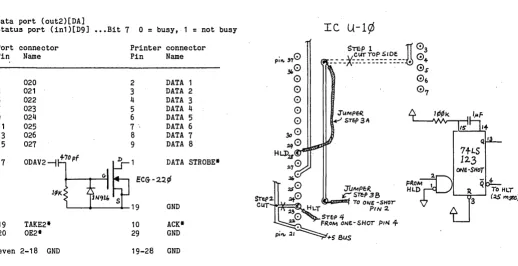
Figure 1 - Big Board /I Printer Cable
Data port (out2)[DA]
Connecting the CRT
The connectors for the BB I and BB II for the CRT are the same so I just plugged it in and turned it on. After ad-justing the horizontal, I found I had a picture but it was way off center, and I could only see columns 1 thru 59.
So, I set aside the BB II until I located a data sheet for the 6845. It turned out that the 6845 set up in the ROM was incor-rect. R2 must be larger than RO. My ROM listing shows R2 smaller, and this turned out to be the real problem. (R2 is the hor-izontal position.) Nor did I like the verti-cal position R7. So, instead of using Tay-lor's suggested change, I now use:
ODC,2 ODD,52 ODC,7 ODD,19
Connecting th~ Disk Drives
I chose the 5560E8 CBI05 because I have 2 D5DD drives which I wanted to run as 4 55DD units. I followed the in-structions supplied on the disk (they were adequate) and saved the new sys-tem by typing SAVE 43 CPMII.COM.
8222 Sprenger N.E. Albuquerque, NM 87109
However, I got the shock of my life. The disk keeps the heads loaded. In my book this is unthinkable. I use the door lock function of the DT8 so I had to wait for the motors to shut down before I could remove a disk.
I called Cal-Tex about this, but all I got was a justification of the way they did it.
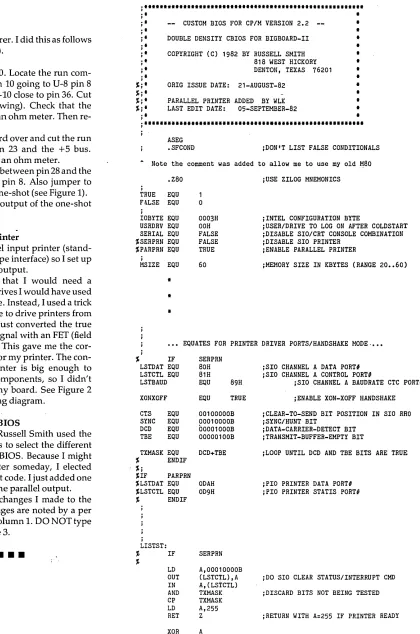
So it was up to me. The schematic shows the HLD (head load) signal from the 1797 connected to pin 8 of U-8 (the driver) and pin 10 of U-14 HLT going to pin 23 of the 1797. It turns out, however, thatthe HLD and HLT signals of the 1797 are not used. Jim Ferguson probably hoped to save an IC by doing the HLT signal via software. (Editor's note: Bill Siegmund just sent me a new set of schemat-ics for the BB II; you all should get them in the near future.)
When this didn't work he changed the signal HLT supplied by U-14 to HLD and connected it directly to U-8 pin 8. It turns out that it is difficult to do a HLD for each read, write or seek. So, the heads are loaded when the motor is turned on and unloaded when the motor is turned off. I changed this by using a one-shot to gen-erate HLT from HLD as recommended
Figure 2 - Big Board /I Floppy Interface Modification
Status port (in1)[D9] ••• Bit 7 0
=
busy, 1=
not busyIe U-l¢
PortPin
1 3 5 7 9 11 13 15
17
19 20
even
4
connector Printer connector
Name Pin Name
020 2 DATA 1
021 3 DATA 2
022 4 DATA 3
023 5 DATA 4
024 6 DATA 5
025 7 DATA 6
026 8 DATA 7
027 9 DATA 8
ODAV2~~1
DATA STROBE*Go EC&-2~¢
ljlK lN~ll. S
19 GND
TAKE2* 10 ACK*
OE2* 29 GND
2-18 GND 19-28 GND
:TUMPf:R.
~STCP38 TO ONE-SHor
Hl.T PIN 2.
STf:PJ./.
FR.OM ONf.-SHOr PIN 4
+5 BuS
ONe-SHoT
FROMJD2.
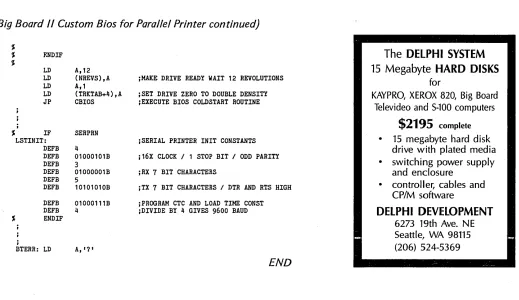
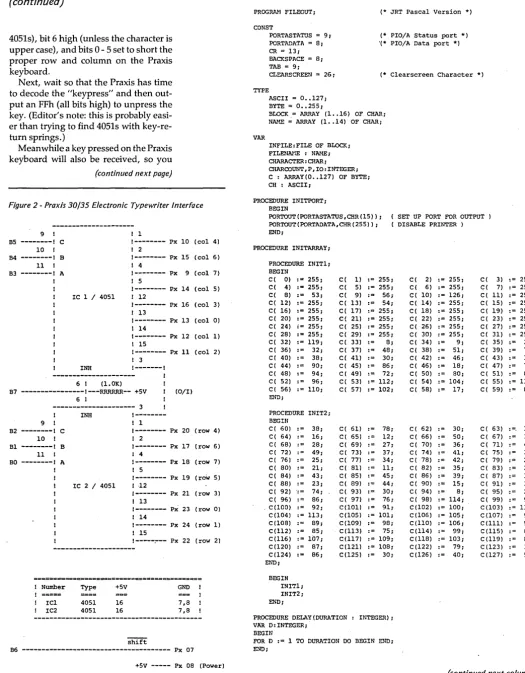
HLD To HLTFigure 3 - Big Board /I Custom Bios for Parallel Printer
by the manufacturer. I did this as follows (also see Figure 1).
1. Remove U-10. Locate the run com-ing from U-14 pin 10 gocom-ing to U-8 pin 8 which is under U-l0 close to pin 36. Cut this run (see drawing). Check that the run is open with an ohm meter. Then re-place the Ie.
2. Turn the board over and cut the run between U-10 pin 23 and the +5 bus. Again check with an ohm meter.
3. Now jumper between pin 28 and the run going to U-8 pin 8. Also jumper to the input of the one-shot (see Figure 1).
4. Connect the output of the one-shot to pin 23 of U-10.
Adding a Line Printer
I have a parallel input printer (stand-ard Centronics type interface) so I set up a parallel printer output.
Had I known that I would need a 74LS123 for the drives I would have used the other half here. Instead, I used a trick I have used before to drive printers from a level output. I just converted the true signal to a false signal with an FET (field effe.ct transistor). This gave me the cor-rect strobe edge for my printer. The con-nector at the printer is big enough to hold the extra components, so I didn't need to modify my board. See Figure 2 for the cable wiring diagram.
Modifying the CBIOS
I like the way Russell Smith used the software switches to select the different options for the CBIOS. Because I might use a serial printer someday, I elected not to remove that code. I just added one more switch for the parallel output.
Below are the changes I made to the CBIOS. The changes are noted by a per cent sign (%) in column 1. DO NOT type the %. See Figure 3.
•••
j , • • • • • • • • • • • • • • • • • • • • • • • • • • • • • • • • , • • • • • • • • • • • • • • • • " . " •
. ,
,
,
j ' j '
.,
,
· ,
,
· ,
,
·
,
,
.,
,
·
,
,
%j' %j' %j' %j'
.,
,
-- CUSTOM BIOS FOR CP/M VERSION 2.2 DOUBLE DENSITY CBIOS FOR BIGBOARD-II COPYRIGHT (C) 1982 BY RUSSELL SMITH
ORIG ISSUE DATE:
818 WEST HICKORY DENTON, TEXAS 76201 21-AUGUST-82
PARALLEL PRINTER ADDED BY WLK LAST EDIT DATE: 05-SEPTEMBER-82
•
•
•
•
•
•
•
•
•
•
•
•
•
j , • • • • • • • • • • • • • • • , • • • • • • • • • • • • • • • • • • • • • • • • • • • • • • • • • • • • • • •ASEG
.SFCOND JDON'T LIST FALSE CONDITIONALS
A Note the comment was added to allow me to use my old M80
.Z80
,
TRUE EQU FALSE EQU
j
IOBYTE EQU USRDRV EQU SERIAL EQU %SERPRN EQU %PARPRN EQU
,
MSIZE EQU
•
•
•
0 0003H OOH FALSE FALSE TRUE 60
JUSE ZILOG MNEMONICS
jINTEL CONFIGURATION BYTE
jUSER/DRIVE TO LOG ON AFTER COLDSTART jDISABLE SIO/CRT CONSOLE COMBINATION jDISABLE SIO PRINTER
jENABLE PARALLEL PRINTER
jMEMORY SIZE IN KBYTES (RANGE 20 •• 60)
••• EQUATES FOR PRINTER DRIVER PORTS/HANDSHAKE MODE .••• j
% IF
LSTDAT EQU LSTCTL EQU LSTBAUD XONXOFF CTS EQU SYNC EQU DeD EQU TBE EQU TXMASK EQU % ENDIF %j
%IF PARPRN %LSTDAT EQU %LSTCTL EQU % ENDIF
j LISTST:
% IF
%
LD OUT IN AND CP LD RET XOR RET
SERPRN 80H 81H EQU 89H EQU TRUE 00100000B 00010000B 00001000B 00000100B DCD+TBE
ODAH OD9H
SERPRN A,00010000B (LSTCTL),A A, (LSTCTL) TXMASK TXMASK A,255
Z
A
JSIO CHANNEL A DATA PORTH JSIO CHANNEL A CONTROL PORTH
JSIO CHANNEL A BAUDRATE CTC PORTI jENABLE XON-XOFF HANDSHAKE jCLEAR-TO-SEND BIT POSITION IN SIO RHO jSYNC/HUNT BIT
jDATA-CARRIER-DETECT BIT jTHANSMIT-BUFFER-EMPTY BIT
jLOOP UNTIL DCD AND TBE BITS ARE TRUE
jPIO PRINTER DATA PORT I
jPIO PRINTER STATIS PORTI
JDO SIO CLEAR STATUS/INTERRUPT CMD jDISCARD BITS NOT BEING TESTED jRETURN WITH A=255 IF PRINTER READY jELSE RETURN WITH A=O
[image:7.612.106.526.80.714.2]LOW COST DISK CONTROLLER
- LESS THAN $10
COMPLETE-SAVE WEAR AND TEAR ON YOUR DISK DRIVES AND FLOPPIES WITH THE MODEL 3801 ALL SOLID STATE RELAY. SMALL ENOUGH TO FIT EASILY INSIDE YOUR DISK DRIVE, THE 3801 CAN BE INSTALLED IN MINUTES. YOUR BIG BOARD WILL THEN TURN YOUR DRIVES ON AND OFF AUTOMATICALLY AS THEY ARE NEEDED.
FEATURES
-* StULL SIZE - 1.75 X 1.40 X 0.35
* FAST INSTALLATION - DIAGRAM INCLUDED
* ZERO CROSSING· - ELDlINATES ALL SWITCHING NOISE
* TRIAC OUTPUT - NO MECHANICAL PARTS
* DVDT FILTER - INCLUDED
* LOW COST - ONLY $8.80 EACH
* 1 YEAR WARRANTY
* 30 DAY MONEY BACK GUARANTEE
~_.1tZ
COMPANY OF CALIFORNIA 1619 SOUTH MINNIE STREET SANTA ANA. CALIFORNIA 9~,07
(114) 541-4316
CALIF. RES. ADD 6% SALES TAX ADD $1.00 POSTAGE & HANDLING
CABINET FOR THE
l.J-I-D-E
DISK DRIVES
(SA800-2)
Heavy CAST ALUMINUM
Cabinet---$50.00
Cabinet, Pwr Supply
and Wiring for 2
crives---$150.00
Quantities Limited
First Come, First
Served.
C~binetsare USED and sold
AS IS.
Pwr supplies
have been tested.
ADD $5 Shipp/Hand.
Charge Cards ADD 5%
CASCADE
ELECTRON~CS·ROUTE 1
BOX 8
RANDOLPH, !-iN.
507-645-7997
55065
MN. add 6% sales tax
(Big Board /I Custom Bios for Parallel Printer continued)
% ENDIF
%;
% IF PARPRN %
% IN A, (LSTCTL)
% BIT 7,A jDISCARD BITS NOT BEING TESTED % LD A,255
% RET NZ jRETURN WITH A=255 IF PRINTER READY %
% XOR A
% RET jELSE RETURN WITH A=O
%
% ENDIF %j
,
LIST:
% IF SERPRN %
CALL LISTST OR A
JR Z,LIST jLOOP TILL SIO CAN SEND A CHARACTER LD A,C
OUT (LSTDAT) ,A jOUTPUT ASCII TO SIO IF XONXOFF
IN A, (LSTCTL)
BIT O,A JTEST SIO RX DATA AVAILABLE RET Z JEXIT IF NO INPUT FROM PRINTER IN A, (LSTDAT) jELSE GET CHARACTER AND TEST FOR RES 7,A j 'XOFF' CHARACTER (CONTROL-S) CP 'S'-64
RET NZ LIST2: IN A, (LSTCTL)
BIT a,A
JR Z,LIST2 jLOOP TILL NEXT HANDSHAKE CHARACTER IN A, (LSTDAT) jINPUT AND DISCARD 'XON' CHARACTER END IF
RET % ENDIF %j
% IF PARPRN %
% CALL LISTST
% OR A
% JR Z,LIST jLOOP TILL PIO CAN SEND A CHARACTER
%
% LD A,C
% OUT (LSTDAT),A jOUTPUT ASCII TO PIO
"
RET"
%
% ENDIF
••••••••••••••••••••••••••••••••••••••••••••••••••••••••••••••••••••
For the file ONESECT.MAC make the following changes: LD
LD LD LD LD LDIR
(IOBYTE+1),A HL,SCRATCH (HL),a DE,SCRATCH+1 BC,SCRLEN-1 IF SERPRN LD
LD LD OTIR LD LD OTIR
HL,LSTINIT B,6 C,LSTCTL B,2 C,LSTBAUD
JSET DEFAULT DRIVE/USER FOR COLDSTART
JZERa-OUT SCRATCH MEMORY FOR BIOS
jSET PRINTER PARITY/LENGTH/STOP BITS JSET PRINTER BAUD RATE
In Search of the Perfect Terminal
Review
By
David Thompson
Those of you moving into the Slicer world, or who are interested in moving up to something fancier than the ADM-3A for your Big Board I, have probably noticed that there are more than a few terminals to choose from.
i've been looking too, and the choice is overwhelming. A few things have stood out during my initial search. (I'm tread-ing on fairly unfamiliar ground so the following is definitely open to attack from the ranks.)
A lot of non-graphic terminals are DEC VT -52 compatible (including the Heath/Zenith H-19). A lot of graphic ter-minals are DEC VT -100 compatible (at least as an option).
Most terminals have hardware or soft-ware controls that allow them to emulate one or more less-powerful terminals. For this reason almost every terminal worth its salt (and a few that aren't) will emu-late the ADM-3A (which tells you some-thing about the 3A).
However, the Xerox, the Big Board, and the Kaypro all say that they look like the ADM-3A, but they all have slightly different screen control characters and
they are each different than the 3A. In some cases, the differences don't matter, but the screen driver built into dBASE II will do strange things on the Kaypro II if it thinks it's talking to an ADM-3A. See Figure I, for a stroke-by-stroke account.
Before you choose a terminai; - you need to figure out what it needs to do (graphics display, character translator, printer buffer ... ) and then you need to find what fits those needs and see if you and it are compatible. (Similar to mar-riage, though the initial cost of a terminal can be higher.)
If you are a touch typist, you definitely need to try out the keyboard for feel and layout. In fact, you should try the one you'll be buying rather than a display model. Manufacturers often have two or three different brands of keyboards that they install into a single terminal model. (But then most single models are termi-nal.)
Look closely at the monitor. Is every character on the screen sharp? Is the im-age rock solid? Can you select a blinking or non-blinking cursor? Do you like the color (green or amber)? Is the keyboard
(Big Board
/I
Custom Bios for Parallel Printer continued)
%
% F.NDIF
%
,
LD LD LD LD JP
% IF
LSTINIT: DEFB DEFB DEFB DEFB DEFB DEFB
A,12 (NREVS) ,A A,1
(TRKTAB+4),A CBIOS
SERPRN
4
01000101B
3
01000001B
5
10101010B DEFB 01000111B DEFB 4
% ENDIF
;
BTERR: LD A,'?'
;HAKE DRIVE READY WAIT 12 REVOLUTIONS ;SET DRIVE ZERO TO DOUBLE DENSITY ;EXECUTE BIOS COLDSTART ROUTINE
;SERIAL PRINTER IN!T CONSTANTS ;16X CLOCK / 1 STOP BIT / ODD PARITY ;RX 7 BIT CHARACTERS
;TX 7 BIT CHARACTERS / DTR AND RTS HIGH ;PROGRAM CTC AND LOAD TIME CONST ;DIVIDE BY 4 GIVES 9600 BAUD
END
movable? Will it really run 9600 baud with your computer?
Also, I've received the following ter-minal evaluation that was distributed via the Unix Net. I have no way of identify-ing the author, but I know that Tektronix folks used this information when decid-ingwhich terminals to purchase. This in-formation is about two years old (the notes in parenthesis and the conclusion are mine).
Ann Arbor Ambassador
Wonderful features including reverse video. Has a nice keyboard with all the keys in the right places. However has a slow phosphore. (Has been popular around Tek.)
Visual 200
Excellent character font but a rotten keyboard. No extra memory for multiple pages. (The new Visual 50 looks very in-teresting however.)
(continued next page)
The
DELPHI SYSTEM
15 Megabyte
HARD DISKS
for
KAYPRO, XEROX 820, Big Board Televideo and S-100 computers
$2195
complete15 megabyte hard disk drive with plated media • switching power supply
and enclosure • controller, cables and
CP/M software
DELPHI DEVELOPMENT
[image:9.612.41.560.438.738.2]IN SEARCH OF THE PERFECT TERMINAL
(continued)
Ampex Dialogue 80
Pretty Box but a rotten keyboard. It
has a nice display font, good features, multiple pages of memory but no reverse of forward scroll to view it. (You have to page up and down.)
Teleray100
VT100 compatible. Problem with VT100s is that their idea of insert/delete line is so bizzare that they are almost un-usable. Ugly box, OK screen font. Too expensive.
ADM 32
Nice box, rotten keyboard, weird fea-tures (sorry no details on this) and an OK screen font.
Televideo 950
[image:10.613.55.396.443.582.2]Excellent font, weird features (again, no details), no local scrolling to view multiple pages. Video tubes go out of whack and flyback squeal is bad. Sticky keyboard.
Figure 1 - Four Versions of the ADM - 3A
HP-2621
Many features but also many prob-lems. Lots of characters in a cursor move sequence so most of the time programs use the up, down, left, and right se-quences to move.
Datamedia 40
Nice but large. Televideo 950, ADM 31 compatible. Nice keyboard, pretty good features and has local scroll. I didn't see this one myself, so I don't know why we didn't pick it.
Adds Viewpoint
Real loser. Has a rotten keyboard, ex-cruciatingly loud bell and no features. Ugly.
Televideo 920
Nice keyboard as long as you have a hammer in your hand. All the features of the 950.
Command ADM-3A BB I & II Kaypro (ALL) Xerox 820
---1---1---1---1---1
Bell 07H 7 07H 7 07H 7 07H 7
Backspace 08H 8 08H 8 08H 8 08H 8
Cursor Down OAH 10 OAH 10 OAH 10 OAH 10
Cursor Up OBH 11 OBH 11 OBH 11 OBH 11
Cursor Right OCH 12 OCH 12 OCH 12 OCH 12
Clr to End of Scrn 12H 18 11H 17 17H 23 12H 18 Clr to End of Line 11H 17 18H 24 18H 24 11H 17
Clr screen 1AH 26 1AH 26 1AH 26 1AH 26
Home .. cursor OEH 14 1EH 30 1EH 30 OEH 14
Insert Line 13H .19 1BH,45H 27,69 14H 20
Delete Line 04H 4 1BH,52H 27,82 19H 25
Cursor Positioning (Same for all)
U~e the 4 byte sequence -- ESC, Equals Symbol, Row + 20H, Column + 20H. Which for the Home position (row 0, column 0) would be - 1BH,3DH,20H,20H.
Note, hexadecimal (base 16) numbers are followed by an H. All other numbers are decimal. Commas are just for separation of numbers.
A "." in a column means that the function is not supported.
The Clear to end of screen (CLEOS) character is incorrectiy listed as
~ (17H) in the BB I documentation. It is really AQ (llH) as noted above. The Kaypro designers thought they were making the Kaypro monitor compatible with the BB I when they made AW (17H) the CLEOS character.
ADM-3A
Everyone knows what these do, and don't do.
Concept 108
This terminal has more features than any other I have seen, including the Am-bassador. It has the best keyboard for me, because all the keys are in the right place except for the caps lock. It has local scroll mode-96 to 192 lines of text in 80 column mode, fewer in 132 column mode. Bindable function keys -and local editing. Can be programmed to send cntl-s and cntl-q when it gets behind, so fill characters aren't needed. The manual is half-an-inch thick. There is a 25th sta-tus line which can be programmed in 17,000 different ways. We didn't buy one of these because it is a bit too expensive.
Falco Data Products TS-1
This is the winner. It has a very nice keyboard, lots of features, and choice of green, white, or amber monitor. Also, local editing, scrolling, bindable func-tion keys, no padding needed, setup mode like VT-100butnicer. Terminal has an internal time clock which it displays on the status (25th) line, battery backup of the status/time information, and a de-tachable keyboard. The price is right too.
Conclusion
Now, I know you are all going to ask how to locate the TS-1. I don't have the slightest idea, I don't even know if Falco is still in business. However, I think the above listing should give you a start in your pursuit of the perfect terminal. If
you find it, drop me a postcard. (Or, just tell your local dealer that you want all the information on the Falco TS-1, that should keep him off the streets for a week to two.)
Meanwhile: The first person who sug-gests that we hunt up one of the ever-elusive Snipe 13s is risking early expira-tion. You see, I located the last existing Snipe while attending Boy Scout camp many, many years ago-which of course explains why none have been seen since. (Good luck on your terminal hunt.)
NEW LOWER PRICES!
NOW IN "UNKIT"'It FORM
TOO!
"BIG BOARD II"
4 MHz Z80·A SINGLE BOARD COMPUTER WITH "SASI"
HARD·DISK INTERFACE
$795 ASSEMBLED
&
TESTED
$545 "UNKIT"*
$245 PC BOARD WITH 16 PARTS
Jim Ferguson, the designer of the "Big Board" distributed by Digital Research Computers, has produced a stunning new computer that Cal-Tex Computers has been shipping for a year. Called "Big Board II", it has the following features:
• 4 MHz Z80-A CPU and Peripheral Chips
The new Ferguson computer runs at 4 MHz. Its Monitor code is lean, uses Mode 2 interrupts, and makes good use of the Z80-A DMA chip.
• 64K Dynamic RAM + 4K Static CRT RAM +
24K E(E)PROM or Static RAM
"Big Board II" has three memory banks. The first memory bank has eight 4164 DRAMs that provide 60K of user space and 4K of monitor space. The second memory bank has two 2Kx8 SRAMs for the memory-mapped CRT display and space for six 2732As, 2Kx8 static RAMs, or pin-compatible EEPROMS. The third memory bank is for RAM or ROM added to the board via the STD bus. Whether bought as a bare board, an "unkit"·, or assembled and tested, it comes with a 2732 EPROM containing Russell, Smith's superb Monitor.
iii Multiple-Density Controller for SS/DS Floppy Disks
The new Cal- Tex single-board computer has a multiple-density disk controller. It can use 1793 or 8877 controller chips since it generates the side signal with TTL parts. The board has two connectors for disk signals, one with 34 pins for 5.25" drives, the other with 50 pins for 8" drives.
• Vastly Improved CRT Display
The new Ferguson SBC uses a 6845 CRT controller and SMC 8002 video attributes controller to produce a display rivaling the display of quality terminals. There are three display modes: Character, block-graphics, and line-graphics. The board emulates an ADM-31 with 24 lines of 80 characters formed by a 7x9 dot matrix.
• STD Bus
The new Ferguson computer has an STD Bus port for easy system expansion.
• DMA
The new Ferguson computer has a Z80-A DMA chip that will allow byte-wise data transfers at 500 KBytes per second and bit-serial transfers via the Z80-ASI 0 at 880 Kbits per second with minimal processer overhead. When a hard-disc subsystem is added, the DMA chip makes impressive disk performance possible.
CAL·TEX COMPUTERS, INC.
780 E. TRIMBLE ROAD #504 • SAN JOSE. CA 95131 • (408) 942·1424
SIZE: 8,75" X 15,5"
POWER: +5V @ 3A. +-12V @ 0,1 A
• "SASI" Interface for Winchester Disks
Our "Big Board II" implements the Host portion of the "Shugart Associates Systems Interface." Adding a Winchester disk drive is no harder than attaching a floppy-disk drive. A user simply 1) runs a fifty-conductor ribbon cable from a header on the board to a Xebec controller that costs only $295 and implements the controller portion of the SASI interface, 2) cables the controller to a Seagate Technology ST-506 hard disk or one compatible with it, and 3) provides power for the controller-card and drive. Since our CBIOS contains code for communicating with hard-disks, that's all a user has to do to add a Winchester to a system!
• Two Synchronous/Asynchronous Serial Ports
With a Z80-A SIOIO and a Z80-A CTC as a baud-rate generator, the new Ferguson
computer has two full RS232-C ports. It autobauds on both.
• A Parallel Keyboard Port + Four Other Parallel
Ports for User I/O
The new Cal- Tex single-board computer has one parallel port for an ASCII keyboard and four others for user-defined 1/0.
• Two Z80-A CTCs = Eight Programmable Counters/Timers
The new Ferguson computer has two Z80-A CTCs. One is used to clock data into and out of the Z80-A SIOIO, while the other is for systems and applications use.
• PROM Programming Circuitry
The new Cal-Tex SBC has circuitry for programming 2716s, 2732(A)s, or pin-combatible EEPROMs.
• CP/M 2.2**
CP/M with Russell Smith's CBIOS for the new Cal-Tex computer is available for $150. The CBIOS is available separately for $25.
*
The "un kit" is a fully-socketed, wave-soldered "Big Board II". It requires NO soldering. All an "unkit" purchaser must do is carefully insert the prime ICs we supply in the proper sockets and systematically proceed tobring up and test the board.
• 'CP M IS a regIstered trademark o( DIgital Research
Video Jitter Fix
By Art Boehm
If your video display is not quite per-fect even though you have eliminated the slow swimming wiggle with the right (13.9776 MHz) crystal-have eliminated the tearing by hand -picking U11 or using an 5 part, and replacing C24 with a 10 pf capacitor-and have added filters to the video section (including tantalum capa-citors), then take heart.
We have the real fix for the jit"ters. The problem is that U38 and U51 (the hori-zontal/vertical sync and horizontal sync delay one shots) are 74L5123's, and the output pulse width of these parts is both temperature and voltage sensitive (they are not fully compensated).
The solution is to replace both U38 and U51 with 74L5221's, which are fully compensated and rock stable. Inciden-tally, if you d9ubt that it matters, note that according to the 123's specs, a 1 per-cent change in +5V (like from 5.00 to 4.95) will reduce the horiz. sync pulse width by about 0.4 percent (or 30 ns) and
that is almost half a dot of jitter.
The good news is that the 221 is pin compatable with the 123. The bad news is that it doesn't quite operate th~ same way. The two differences are:
First, the Cext pins cannot be tied to ground (pins 6 and 14).
Second, the constant in the delay for-mula is 0.7 not 0.45.
So to make this change, cut the follow-ing three traces on the component side. They come from under the sockets and go to ground.
Cut the run from U38 pin 6 to the ground grid (look under R4).
Cut the run from U38 pin 14 to the ground grid (also under R4).
Cut the run from U51 pin 14 to the ground grid (look under R5).
Change the timing components as fol-lows: New HC values for 74LS221s
2000 29th Ave NW NewBrighton, Mn 55112
Note that we reused C53 and R3 so you only need three new parts besides the two 221s.
Finally, C69 is tied from U51 pin 15 (Rext/Cext) to ground. The grounded lead must be isolated from the ground grid (cut around the pad) and then the free lead must be connected to U51 pin 14.
Now, replace the 74L5123s in U38 and U51 with 74L5221s.
•••
Leave C54 4700 pf Make R4 68K Make C53 100 pf Make H3 75K Make C6g 180 pf Make H5 68K
T=223 us (V sync) T=5.25 us (H sync) T=8.57 us (H delay)
IHDS
HUNTINGTON DATA SYSTEMSWinchester Interface
for Big Board I
Features are:
each
$95
Single Unit Price
• Interfaces easily to Western Digital's WD1002 Winchester disk controller for" 2.5 MHz
Big Board
I.
Simply remove Z80 processor, insert daughter card, place Z80 on daughter
card, attach Wi nchester controller cable and Wi nchester controller.
• Format utility and install program for TM502 (source included)
• Schematic and all documentation
Coming soon:
Hard disk sub-system with sample BIOS
CALL FOR QUANTITY PRICING
Terms: Add $2.00 domestic shipping/handling, $15.00 overseas. California residents add 6%. US funds only. Order by check or money order. 30 day money back guarantee. Allow 4·6 weeks for delivery.
307 6th Street, Huntington Beach, California 92648 • (714) 960·7498
Cheap Daisy Blossoms
By
Gary Kaufman
The typewriter I received for college graduation has turned out to be a double purpose gift. You see, the Praxis 35 elec-tronic typewriter is really an inexpensive daisy wheel printer which prints about eight characters per second.
Agure 1 -Praxis Logic Board: Layout and Connections
So I modified it to work with my Big Board, and though it is slow and prone to misalignment (it's needed repair twice in the last six months) it has served my needs well. It prints the complete ASCII character set except for brackets, greater-than/less-than, braces, and the up-carat.
Though it took me only two hours to build and check out, I would recom-mend the following interface only to those of you who are confident in your electronic and mechanical repair skills. You void your warranty when you open the unit.
About the Praxis
The Praxis' electronics are all mounted on two PC boards inside the case. In the left rear is the power supply board (sup-plies 5Vand 24V). The other PC board is mounted below the keyboard. This board contains 2 Mostek single-chip processors. The first, called DIMOD in the Olivetti Service Manual, controls the character selection motor. The second processor (called MASTER) controls the keyboard, the line feed motor, the tab motor, and the buzzer.
MASTER scans the keyboard through two 8-bit ports. All the keys except the shift, keyboard selection, and pitch are part of this 8-by-8 matrix. When you press a key you short one of the 8 rows to one of the 8 columns. Master decodes the short and carries out the instruction. So it's pretty easy to talk to the Praxis. I used two CMOS 4051 3-to-8 multiplex-ers so one 3-bit code could select the col-umn and the other could select the row. Thus, six· bits (0-5) can short the prope~
row to the proper column. I use bit 6 for the shift line (it is pulled low for upper case) and bit 7 to disable the multiplexers when there is no input from the comput-er.
Interface
To send a character, output a byte (to· the PIO) with bit 7 low (to enable the
(continued next page)
FLAT-CABLE.
TO
KE.YlJOA1elJ J3aAR.!J
LED OFF/O'"
LED SHIFT
MATJZ.f MATIZO
MAT~!1.
MATIZ3
"'A7~1I MATt!5
MATIZ.7
MA7R6
MATC3
MA7t!6 MATes
{
MO~V P.eIAJT EL:!
eA~/AG£ _
,.!1l/-11
GA.J..lJP 57A1
TPOO'
TE.!:T PallJT S"
Fote
AUrO--./)IAGAJo57IC
PR06fil:AM
FLAT-CAl!.I..£
To
kEYBOA~
.BQAte1)
TP003
, MTF)
TPOO!1
~
~
0
!1
",---
It'I....
..,
~ cg
~
a
...
:;; c(1: ~
S
dI
~
2001 Hamilton St. Box 87 Philadelphia, PA 19130 215-496-0687 (Evenings Before 9 pm)
7~~
}
Jr.3L CB LIAlE-P£ED I MOTO.e
GAJ/JP
GAib JT2
GAlDP Powt:R
.20v
J
rSI/ .sUPPLY 4-5VAJS
uTI
5AJD } LEFT SllJE.
CHEAP DAISY BLOSSOMS
(continued)
4051s), bit 6 high (unless the character is upper case), and bits 0 - 5 set to short the proper row and column on the Praxis keyboard.
Next, wait so that the Praxis has time to decode the "keypress" and then out-put an FFh (all bits high) to unpress the key. (Editor's note: this is probably easi-er than trying to find 4051s with key-re-turn springs.)
Meanwhile a key pressed on the Praxis keyboard will also be received, so you
[image:14.617.43.569.59.733.2](continued next page)
Figure 2 - Praxis 30/35 Electronic Typewriter Interface
9 B5
---1 C
10 B4
---1 B
11 B3
---1 A
IC 1 / 4051
1
1---
Px 10 (col 4)I 2
1---
Px 15 (col 6) I 41---
Px 9 (col 7) I 51---
Px 14 (col 5) I 121---
Px 16 (col 3) I 131---
Px 13 (colO) 1 141---
Px 12 (col 1) ! 15!---
Px 11 (col 2) I 3INH !---I
--- 1 6 1 (l.OK)
B7 ---I---RRRRRR-- +5V (0/1)
6 1
--- 3
9 1
B2
---1 C
10 B1---1 B
111
BO
---1 A
Number
IC1 IC2
INH
IC 2 / 4051
Type 4051 4051 +5V 16 16
!---! 1
1---
Px 20 (row 4)1 2
1---
Px 17 (row 6) 1 41---
Px 18 (row 7)1 5
1--- Px 19 (roW 5)
1 ·12
1--- Px 21 (row 3)
I 13
1---
Px 23 (row 0)1 14
1---
Px 24 (row 1) ! 15!---~-- Px 22 (row 2)
GND
7,8 7,8
S'hIft
B6 --- Px 07 +5V --- Px 08 (Power)
GND --- Px 01 (Ground)
Figure 3 - Praxis Printer Routine in J R T Pascal
PROGRAM FILEOUT;
CONST
PORTASTATUS = 9; PORTADATA = 8;
(* JRT Pascal Version *)
(* PIO/A Status port *) '(* PIO/A Data port *)
CR = 13; BACKSPACE = 8; TAB = 9;
CLEARSCREEN = 26; (* C1earscreen Character *)
TYPE
ASCII = O •• 127; BYTE = 0 •• 255;
BLOCK.= ARRAY (1 •• 16) OF CHAR;
NAME = ARRAY (1 •• 14) OF CHAR;
VAR
INFILE:FILE OF BLOCK; FlLENMiE : NMoiE;
CHARACTER: CHAR;
CHARCOUNT,P,IO:INTEGER; C : ARRAY(0 •• 127) OF BYTE; CH : ASCII;
PROCEDURE INITPORT; BEGIN
PORTOUT(PORTASTATUS,CHR(15»; PORTOUT(PORTADATA,CHR(255»; END;
PROCEDURE INITARRAY;
PROCEDURE INIT1; BEGIN
C( 0) := 255; C( 4) := 255; C( 8) := 53; C( 12) := 255; C( 16) := 255; C( 20) := 255; C( 24) := 255; C( 28) := 255; C( 32) := 119; C( 36) := 32;
C( 40) := 38;
C( 44) := 90; C( 48) := 94; C( 52) := 96; C( 56) := 110; END;
PROCEDURE INIT2; BEGIN
C( 60) := 38; C( 64) := 16; C( 68) := 28;
C( 72) := 49;
C( 76) := 25; C( 80) := 21; C( 84) := 43; C( 88) := 23; C( 92):= 74; C( 96) := 86; . C(100) := 92; C(104) := 113; C(108) := 89; C(112) := 85; C(116) := 107; C(120) := 87; C(124) := 86;
END;
BEGIN INIT1; INIT2; END;
C( 1) := 255; C( 5) := 255; C( 9) := 56;
C( 13) := 54; C( 17) := 255; C( 21) := 255; C( 25) := 255; C( 29) := 255; C( 33):= 8; C( 37) := 48; C( 41) := 30;
C( 45) := 86; C( 49) := 72; C( 53) := 112; C( 57) := 102;
C( 61) := C( 65) := C( 69) := C( 73) := C( 77) := C( 81) := C( 85) := C( 89) := C( 93) := C( 97) := C(101) := C(105) :=
C(109) := C(1l3) := C(117) := C(121) := C(125) :=
78; 12; 27; 37; 34; 11; 45; 44; 30; 76; 91; 101; 98; 75; 109; 108; 30;
PROCEDURE DELAY (DURATION INTEGER) ; Vlm D: INTEGER;
BEGIN
FOR D := 1 TO DURATION DO BEGIN END;
END;
SET UP PORT FOR OUTPUT DISABLE PRINTER )
C( 2) 255; C( 6) := 255; C( 10) := 126; C( 14) := 255; C( 18) := 255; C( 22) := 255; C( 26) 255; C( 30) := 255; C( 34) := 9; 51; 46; 18; 80;
C( 38) := C( 42) := C( 46) := C( 50) := C( 54) C( 58) :=
C( 62) := C( 66) := C( 70) := C( 74) C( 78) := C( 82) := C( 86) :=
C( 90) := C( 94) := C( 98) := C(102) := C(106) := C(llO) := C(1l4) := C(1l8) := C(122) := C(126) :=
104; 17; 30; 50; 36; 41; 42; 35; 39; 15; 8; 114; 100; 105; 106; 99; 103; 79; 40;
C( 3) C( 7) C( 11) C( 15)
C( 19) C( 23) := C( 27) := C( 31) := C( 35) := C( 39) := C( 43) := C( 47) := C( 51) := C( 55) := C( 59)
C( 63) :=. C( 67) := C( 71) := C( 75) := C( 79) := C( 83) := C( 87) := C( 91) := C( 95) := C( 99) := C(103) :=
C(107) C(l11) := C(1l5) :=
C(1l9) := C (123) := C(127) :=
255; 255; 255; 255; 255; 255; 255; 255; 24; 73; 14; 74; 88; 115; 81; 10; 31; 47; 33; 29; 20; 19; 38; 22; 95; 111;. 97; 93; 84; 83; 38; 53;
(Praxis Printer Routine in Pascal continued)
PROCEDURE SEND (CH:ASCII) ; VAR A: INTEGER;
BEGIN
PORTOUT(PORTADATA,CHR(CH» ; DELAY(700);
PORTOUT(PORTADATA,CHR(25?» ; DELAY (400) ;
END;
PROCEDURE SETTABS (P:INTEGER); VAR I,K:INTEGER;
BEGIN
SEND(62); ( EXPR ) SEND (67) ; ( MARGIN BYPASS SEND (62) ; ( EXPR )
(* Delays are for 4 mhz *)
FOR K := 1 TO (P * 2) DO BEGIN SEND (55) ; Elm; ( SPACE) SEND (59) ; ( f·IARGIN LEFT )
FOR I := 1 TO 13 DO BEGIN
SEND (56) ; (TAB) SEND (63) ; (TAB CLEAR END;
SEND (62) ; ( EXPR ) FOR I := 1 TO (P - 2) DO
BEGIN
FOR K := 1 TO 8 00 BEGIN SE!m(55); END; ( SPAC::; ) SEND(61); ( TAB SET)
END;
SEND (56) ; TAB) SEND (57) ; HARGIN BYPASS SE!m(56); ( TAB )
FOR K := 1 TO (P-1) DO BEGIN SEND (53) ; END; ( BACKSPACE) SEND (60) ; ( MARGIN RIGHT)
SEND(62); ( EXPR ) END;
PROCEDURE PRINT(CH : CHAR); VAR A: INTEGER;
BEGIN A := ORD(CH);
PORTOUT(PORTADATA,CHR(C(A») ; DELAY (600) ;
PORTOUT(PORTADATA,CHR(255» ; DELAY(450);
END I
BEGIN INITPORT; INITARRAY;
WRITELN(CHR(CL~qSCREEN» ;
(* Delays are for 4 mhz *)
WRITELN (' THIS PROGRAM WILL PRINT A L!STING OF A TEXT FILE WHICH IS ON') ; WRITELN(' EITHER DISK. THE LISTING WILL APPEAR BOTH ON THE VIDEO SCREEN'); \ffilTELN (' AND ON THE PRAXIS 35. MAKE SURE THAT THE PRAXIS 35 TYPEWRITER' ); WRlTELN (' IS PLUGGED IN AND IS TURNED ON') ;
WRITELN;
WRITE('SET TABS? 'I;
READLN(CHARACTER) ;
IF (CHARACTER = 'Y ') OR (CHARACTER = 'y') THEN BEGIN
REPEAT
WRITE('PITCI (10,12,15) ? 'I;
READLN(P) ;
UNTIL «P = 10) OR (P = 12) OR (P ~ 15»; SETTABS(P);
END; WRlTELN;
WRITELN (' TYPE THE FILE NAME THEN RETURN') ; WRITE(' OF THE FILE Nk~E ---I ');
READLN(FILENAME) ;
RESET (INFILE,FILENAME,BINARY, 256) ; CHARCOUNT : = 0;
WHILE NOT EOF(INFILE) DO BEGIN
READ (INFILE;CHARACTER) ; CHARCOUNT :
=
CHARCOUNT + 1; WRITE (CHARACTER) ;PRINT (CHARACTER) ;
IF (ORD(CHARACTER) = TAB) THEN CUARCOUNT := CHARCOUNT + 7; IF (ORD(ClIARACTER) = BACKSPACE) THEN CUARCOUNT := CHARCOUNT - 1; IF (ORD (CHARACTER) = CR) THEN
END; END.
BEGIN
DELAY«CHARCOUNT * 50) + 2500); CHARCOUNT : = 0;
END;
END
CHEAP DAISY BLOSSOMS
(continued)
can easily enter names into form letters right from the Praxis.
If I had had another port available I would have used it to control the pitch selection and the keyboard selector switch.
Power
I stole the +5V for the 4051s from the Praxis keyboard connector. One reason was laziness and the other was that the chips needed to be powered whenever the Praxis was running to prevent them from generating random garbage.
Even though the CMOS 4051s don't draw much current, I have mounted a small Sprite fan behind the power sup-ply and suggest that you do the same thing even if you don't build this in ter-face.
Disassembling the Praxis
Make certain that your typewriter is running perfectly before opening the case. To open the case (voids your war-ranty), do the following:
1. Remove the 4 outermost screws on the bottom of the case.
2. Unscrew the platten knobs by turning them counter-clockwise.
3. Gently lift off the top cover, deform-ing it slightly to fit around the platen.
Next, remove the keyboard and ex-pose the controller board.
1. Remove the 2 screws holding down the keyboard and unplug the cables run-ning to it.
2. Remove the 3 screws on the bottom of the keyboard which hold the processor board in place.
3. Gently bend the processor board aside leaving the 2 ribbon cables intact.
The connection points on the process-or board are now exposed.
Connecting the Ribbon
Carefully tack-solder the ribbon cable from the 4051's to the processor board at the same 2 places that the keyboard rib-bon cables are attached. See Figures 1 and 2 for details.
I used ribbon cable because it was easy to bring out of the typewriter case. Now you can reassemble the case backwards (which can be interesting).
CHEAP DAISY BLOSSOMS
(continued)
Assembling the Board
I wired the circuit board point to point on a small piece of perf-board. It took about 2 hrs to wire, mount in a small box, and check out. I ran ribbon cable to both the BB and to the Praxis. I added several .01 capacitors between +5Vand ground to reduce noise.
Software
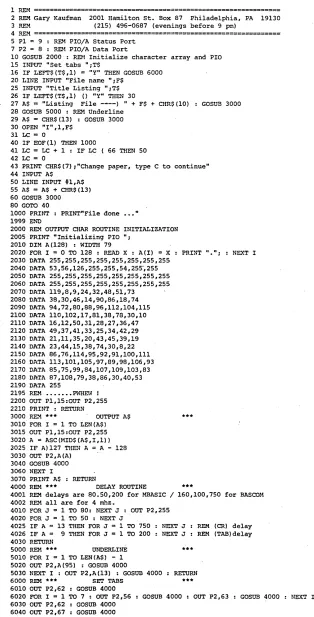
To talk to the printer, you need a lookup table and some delays so that you don't overflow the unit's 12-character buffer. I have written programs in sev-eral languages including MBASIC, UCSD Pascal, and JRT Pascal. The MBA-SIC and JRT Pascal versions follow this article (see Figures 3 and 4).
The delay routines are set up for a 4 MHz clock. You can adjust these for your clock. If you have UCSD Pascal, you can obtain a much more advanced version of the program from me if you send an 8" disk and a self-addressed stamped re-turn envelope.
Final notes
The Praxis 30 is the same as the 35, both electrically and mechanically. The only differences are the color and the ad-dition of the pitch selector switch to the 35. If you add the switch yourself then you have a 35 for the price of a 30.
•••
DO-iT-YOURSELF CROSS-ASSEMBLERS LANGUAGE TRANSLATORS STRUCTURED ASSEMBLY LANGUAGE
ALL iN ONE $39.95 PROGRAM! • Use the XLT Macro Processor as a pre-processor to your favorite assembler and do the Job right! To translate, a file of definitions Is read by XLT and compared to the Input texl. A match causes the In-put text to be replaced with the definition's contents. .
• XLT allows up to ten arguments In a definition, arguments con-taining spaces or tabs, Incrementing/decrementing strings, a stack, and conditional text replacement.
• Includes definitions to translate Z80 to 8080 mnemonics and vice-versa, and definitions to Implement CSAL, a C-structured assy. language, allowing code like add a,(hl) to be written a+ = °hl.
• XLT users can pool their definitions via the XLT Users Group.
XL T costs 39.95 plus 5.00 P&H. For CP/M 1.28" single
den-sity disk Z80 systems.
Send check or money order to:
L.A. Software
6708 Melrose Los Angeles Calif. 90038 213/932-0817
[image:16.612.240.554.38.655.2]CA res. add sales tax CP 1M is a trademark of Digital Research
Figure 4 -Praxis Printer Routine in MBASle
1 REM
===============================================================
2 REM Gary Kaufman 2001 Hamilton St. Box 87 Philadelphia, PA 19130R&~ (215) 496-0687 (evenings before 9 pm)
4 R&~
===============================================================
5 P1=
9 : REM PIO/A Status Port7 P2 = 8 : RD~ PIO/A Data Port
10 GOSUB 2000 : ~1 Initialize character array and PIO 15 INPUT "Set tabs ";T$
16 IF LEFT$(T$,l) = "Y" THEN GOSUB 6000 20 LINE INPUT "File name ";F$
25 INPUT "Title Listing ";T$ 26 IF LEFT$ (T$ ,1) () "Y" THEN 30
27 A$ = "Listing File ----) " + F$ + CHR$(10) 28 GO SUB 5000 : REM Underline
29 A$ = CHR$(13) : GOSUB 3000 30 OPEN "I",l,F$
31 LC = 0
40 IF EOF(l) THEN 1000
41 LC = LC + 1 : IF LC 66 THEN 50 42 LC = 0
GOSUB 3000
43 PRINT CHR$(7) ,"Change paper, type C to continue" 44 INPUT AS
50 LINE INPUT #l,A$ 55 A$ = A$ + CHR$(13) 60 GOSUB 3000 80 GOTO 40
1000 PRINT : PRINT"Fi1e done 1999 END
2000 REM OUTPUT CHAR ROUTINE INITIALIZATION 2005 PRINT "Initializing PIO ",
2010 DIM A(128) : WIDTH 79
2020 FOR I = 0 TO 128 : READ X : A(I) = X PRINT "."; NEXT I 2030 DATA 255,255,255,255,255,255,255,255
2040 DATA 53,56,126,255,255,54,255',255 2050 DATA 255,255,255,255,255,255,255,255 2060 DATA 255,255,255,255,255,255,255,255 2070 DATA 119,8,9,24,32,48,51,73
2080 DATA 38,30,46,14,90,86,18,74 2090 DATA 94,72,80,88,96,112,104,115 2100 DATA 110,102,17,81,38,78,30,10 2110 DATA 16,12,50,31,28,27,36,47 2120 DATA 49,37,41,33,25,34,42,29 2130 DATA 21,11,35,20,43,45,39,19 2140 DATA 23,44,15,38,74,30,8,22 2150 DATA 86,76,114,95,92,91,100,111 2160 DATA 113,101,105,97,89,98,106,93 2170 DATA 85,75,99,84,107,109,103,83 2180 DATA 87,108,79,38,86,30,40,53 2190 DATA 255
2195 REM ••••••• PlfflEt'i' I
2200 OUT P1,15:oUT P2,255 2210 PRINT : RETURN
3000 REM *** OUTPUT A$ 3010 FOR I
=
1 TO LEN(A$) 3015 OUT P1,15:0UT P2,255 3020 A = ASC(MID$(A$,I,l»~025 IF A)127 THm{ A
=
A - 128 3030 OUT P2,A(A)3040 GOSUB 4000 3060 NEXT I
3070 PRINT A$ : RETURN
***
4000 REM *** DELAY ROUTINE ***
4001 REM delays are 80.50,200 for MBASIC / 160,100,750 for BASCOM 4002 REM all are for 4 mhz.
4010 FOR J = 1 TO 80: NEXT J : OUT P2,255 4020 FOR J = 1 TO 50 : NEXT J
4025 IF A = 13 THEN FOR J = 1 TO 750 NEXT J REM (CR) delay 4026 IF A = 9 THEN FOR J = 1 TO 200 NEXT J REM (TAB)de1ay 4030 RETURN
5000 REM *** UNDERLINE ***
5010 FOR I = 1 TO LEN(A$) - 1 5020 OUT P2,A(95) : GOSUB 4000
5030 NEXT I : OUT P2,A(13) : GOSUB 4000 RETURN 6000 REM *** SET TABS
6010 OUT P2,62 : GOSUB 4000
6020 FOR I = 1 TO 7 : OUT P2,56 GOSUB 4000 : OUT P2,63 GOSUB 4000 NEXT I 6030 OUT P2,62 : GOSUB 4000
6040 OUT P2,67 :