c
A PROGRAMMING LANGUAGEFOR THE FORTUNE 32:16
I
:
FORTUNE SYSTEMSI_-
FORTUNE SYSTEMS CORPORATIONLANGUAGE DEVELOPMENT TOOlS GUIDE
RELEASE 1.8
ADDITIONS AND CHANGES
... , .... ,j.t: .. , .
'I1lis document contains Important information tor the
Lancuau
DeyelCQDentTgoll
Guide, and pertains to Release 1.8ot
the Language DevelopmentTools set and the language compilers C, Pascal, and FORTRAN.
SOFnrARB BXCiPtIOl1B
I',. , " : ,
JIP.
running a program compiled with the protner option (-p), do not rely. ::OD.;,,~i'l..~~,~tI.;WS returned by that option. Exit status
ot
the protUedprorram
l·.Y :,6i!~ ~'Cbecked at runtime..l:_ ' ...
t't: ';-' ' , . ", ;; ~,'~
';\ 'j; ~
(~
I ..
FORTUNE
SYSTEMS>
101 Twin Dolphin Drive
Redwood City, CA 94065
Dear Fortune Systems Customer:
.~ ,::1 .:_ ~::'~7:.;~!;i~·'.;
,;".}-.
R E L E
This package contains the latest release of the Fortune C Language. You should find the following items included in this package:
• Fortune C Language Master Diskette (Release 1.7)
• Fortune C Language Guide and index tab
A
(The guide and tab can be inserted into the Language Development Tools binder.)
• The C Programming Language, by B.W. Kernighan and D.M. Ritchie
• User Response Card
• Software Registration Card
If any item is missing, contact a Fortune Representative. Please be sure to fill out and return the software registration card.
C is a general purpose programming language that is often described as a "powerful assembly language.» It offers the programmer the advantages of coding brevity, variety of data structures, modern flow-control constructs, fast floating-point, single and double processor, and operators. C is well suited ~() system software
development (most tJNlXTM operating systems and Fortune's FOR:PRO are written in C) and has been used successfully in a wide range of commercial, scientillc, and data base
applications.
A copy of The C Programming Language, by Brian W. Kernighan and Denrus· M. Ritchie, is also included in this package to aid further understanding of C programming.
In addition to C, Fortune Systems Corporation offers two other systems. languages for development purposes: Pascal and FORTRAN. These packages identify Fortune extensions. to the language and provide numerous programming examples.
If you do not have Fortune Language Development Tools (part number 1002145-02) installed on your system, you will need to order this package separately before
installing the Fortune C Language. The Language Development Tools package is a language-independent companion document to the guide that accompanies the compiler disks. It is designed to meet the needs of experienced programmers for programming
in the FOR:PRO environment.
We at Fortune Systems Corporation hope you find the Fortune C Language package to be as useful and effective as we do. We welcome your comments and suggestions
concerning thi's and other Fortune products.
10/85 1002398-02
UNIX is a trademark of AT&T Bell Laboratories Page 1
c
FortuneC Language Guide
c
I:
PORilJ N E
3~0~a~~~u~a~
Copyright
®
1984 Fortune Systems Corporation. All rights0
reserved.No part of this document may be copied, photocopied, reproduced, translated, or reduced to any electronic medium or machine read-able form without prior consent in writing from Fortune Systems Corporation. The information in this manual may be used only under the terms and conditions of separate Fortune Systems Cor-poration license agreements.
UNIX is a registered trademark of Bell Laboratories. Fortune 32:16 is a trademark of Fortune Systems Corporation. FOR:PRO is a trademark of Fortune Systems Corporation for the Fortune 32:16 Operating System.
Printed in the U.S.A. 1 2 3 4 5 6 7 890
Ordering the Fortune C Language Guide
Order No.: 1002175-01 for the complete guide with disk 1002147-01 for the complete guide without disk
Consult an authorized Fortune Systems Representative for copies of manuals and technical information.
Disolaimer of Warranty and Liability
No representations or warranties, expressed or implied, of any kind are made by or with respect to anything in this manual. By way of example, but not limitation, no representations or warran-ties of merchantability or fitness for any particular purpose are made by or with respect to anything in this manual.
In no event shall Fortune Systems Corporation be liable for any incidental, indirect, special or consequential damages whatsoever (including but not limited to lost profits) arising out of or related to this manual or any use thereof even if Fortune Systems Corporation has been advised, knew or should have known of the possibility of such damages. Fortune Systems Corporation shall not be held to any liability with respect to any claim on account of, or arising from, the manual or any use thereof.
For full details of the terms and conditions for using Fortune software, please refer to the Fortune Systems Corporation Custo-mer Software License Agreement.
11
o
c
(~'\
j
o
Contents
INTRODUCTION: AN OVERVIEW OF C i-1
Part 1 USING C ON THE FOR:PRO SYSTEM
Part 2
1 Compiling a C Program 1-1 2 Linking a C Program 2-1 3 Executing a C Program 3-1 4 Debugging a C Program 4-1 5 Profiling a C Program 5-1
THE C LANGUAGE
6 The C Character Set and Conventions of Notation 6-1 7 Data Types and Declarations 7-1
8 Expressions and Statements 8~1
9 Routines 9-1
10 Library Functions 10-1 11 Input and Output 11-1
Part 3 ADVANCED C PROGRAMMING
12 13 14
APPENDIX A
APPENDIX B
APPENDIX C
Advanced System Calls 12-1
Function Calling Conventions 13-1
Linking Programs in Different Languages 14-1
Compiler Passes, Options and Functions A-1
List of C Language Files B-1
o
C
Introduction
o
An Overview of
C
The Fortune Systems' version of C is a general purpose program-ming language based on the C language developed by Bell Labora-tories. C is fast and versatile. It is suitable for applica-tions programming as well as for developing operating systems and compilers. The FOR:PRO operating system, the UNIX operating sys-tem on which C is based, and the C compiler were all written in C. The C language is also appropriate for numerical, text han-dling, and data base applications.
THE C VOCABULARY
The major elements of the C vocabulary are:
Functions
Declarations
Arguments.
Statements
Return Values
Types
Structure
IIO
FunctionsMemory Management Functions
Math Functions
String Functions
THE C PROGRAM
Logically grouped events.
Areas of the program that define a section of code to be activated by function calls from other parts of the program.
Methods of passing data to functions.
Parts of the program that determine action.
Values returned by each function.
Each declared variable is of a particular type.
Groups of logically associated data.
Functions available through a library file that is linked automatically.
Library routines that allocate and free space in the main memory.
A library of math functions.
A library of string functions.
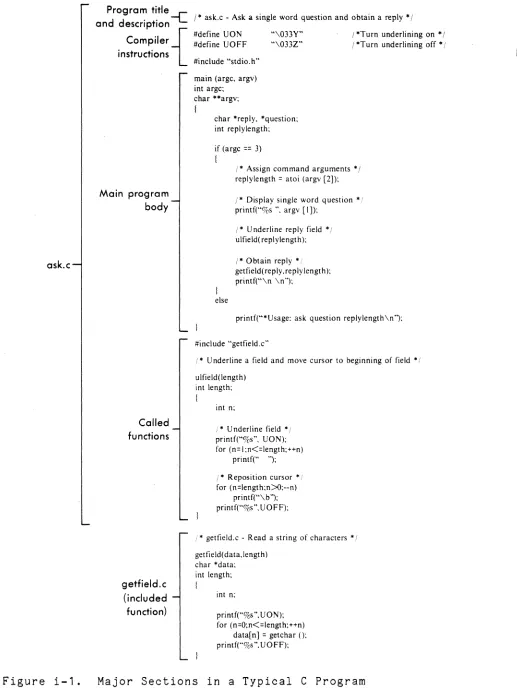
ask.c
Program title and description
-1:
comPiler{ instructions .
Main program body Called functions getfield.c (included function)
1* ask.c - Ask a single word question and obtain a reply * I #define VON
#define VOFF
#include "stdio.h"
main (argc, argv) int argc; char **argv; {
"\033Y" "\033Z"
char *reply, *question; int reply length;
if (argc == 3) {
I *Turn underlining on * / / *Turn underlining off * I
I· Assign command arguments • / replylength = atoi (argv [2]);
else
/ * Display single word question • / printf("%s ", argv [I]);
I· Underline reply field * / ulfield(replylength);
I * Obtain reply * / getfield( reply, reply length); printf("\n \n ");
printf("·Usage: ask question replylength\n");
#include "getfield.c"
/ * Underline a field and move cursor to beginning of field * /
ulfield(length) int length; {
int n;
!. Underline field * / printf("%s", UON); for (n= I ;n<=length;++n)
printf(" ");
i * Reposition cursor • / for (n=length;n>o;--n)
printf("\ b "); printf("%s ", U 0 FF);
;' * getfield.c - Read a string of characters * I
getfield( data,length) char *data; int length; {
int n;
printf("%s", UON); for (n=O;n<=length;++n)
data[ n] = getchar (); printf("%s", V 0 FF);
Figure i-1. Major Sections in a Typical C Program
C Language Guide i-2
c
o
o
[image:9.612.52.569.30.727.2]c:
FORTUNE EXTENSIONS TO THE C LANGUAGEC:
o
Fortune Systems Corporation has included several extensions to the C language. These are:
• Non-unique structure elements
Previously, all declarations at the same context level had to be unique. This extension permits non-unique structure element declarations that do not share the same offset value.
• Long variable names
The Fortune C language permits variables to be of any length.
• The void type
•
This type may be used to prevent "incompatible type" warning messages.
Passing of structure arguments by value
This feature of the Fortune version of C allows structures to be passed to functions by "value" as well as by the stan-dard "reference."
Structures as function return values
The Fortune C language permits structures to be returned as the value of a function.
These extensions are described in detail in Part 2, "The C Language."
CONVENTIONS USED IN THIS GUIDE
When creating and executing C programs, you'll be communicating with the FOR:PRO operating system. FOR:PRO requires that com-mands be typed using proper command format, or syntax. This document uses certain conventions to illustrate how FOR:PRO com-mands are to be typed. These are outlined below.
• Commands to FOR:PRO are almost always lowercase letters,
as is with most UNIX commands. Occasionally, some command options may be uppercase. Be careful to type commands using the case shown in the syntax descriptions.
.• Words that you must replace with your own text are und.ru:=
0
lined. Such items are also referred to as command-lineparameters.
• Brackets [ ] indicate one or more options you may select
from.
• Hyphens (-) usually signal an option on a command line, as
in the command
Is -1
Always remember to type the hyphen.
• Ellipses ( ... ) mean that the preceding option may be
repeated.
• Commands are sent to FOR:PRO by pressing the RETURN key.
• This guide assumes you are using the standard Bourne shell, hence the $ prompt indicating the start of a command line. However, this is merely a convention. The FOR:PRO command syntax used throughout this guide applies to the C shell as well.
BIBLIOGRAPHY
Hancock, Les and Morris Krieger, Ih~ ~ ELim~L.
McGraw-Hill Book Company, 1982. New York:
Kernigan, Brian W. and Dennis M. Ritchie, Ih~ ~ ELQ&Lsmmin&
1angu..9g~. Englewood Cliffs, NJ: Prentice-Hall, Inc., 1978.
Kochan, Stephen G., fro&Lamm1n& in~. Hasbrouck Heights, New Jersey: Hayden Book Company, Inc.
C Language Guide i-4 2/84
- - - -- - -
-o
c
PART ONE
USING
C
ON THE
FOR:PRO
SYSTEM
(-: Part 1 of the Fortune C Language Guide introduces five fundamen-tal steps in developing and using a C program on the FRO:PRO sys-tem. These are:
• Compiling a C program • Linking a C program • Executing a C program • Debugging a C program • Profiling a C program
C
Chapter
1
Compiling a
C
Program
The C compiler translates C source code into relocatable object code. It translates each file of code individually and then calls the linking loader to create a single file of object code.
ENTERING SOURCE CODE
Generally, C source code is entered as a source file using a text editor. You can use the FOR:PRO line editor ed or any other editor you have on your system. For instructions on the use of the ed editor, see Chapter 1 of the LangYM~ DeveloQIDen.t. Tool§.
INVOKING THE COMPILER
For input, the compiler expects one or more file names, each with the suffix .c. The compiler will not accept files without this suffix.
To invoke the C compiler, use the cc command with the following syntax:
The cc oommand calls up to six different programs to translate a C source file into object code. They include, the following:
• Preprocessor • C compiler • Optimizer
• Fast floating-point processor • Assembler
• Linking loader
opt ( optimizer)
ffp (fast floating point processor)
cc
cpp (preprocessor)
ccciii (compiler)
ac ( assembler)
libraries /usr/lib/crtO.o /usr/lib/libc.a /usr/lib/libm.a / usr /Iib/libc. ffpa
Figure 1-1. Path of a C Source File Through the Compiler
C Language Guide 1-2
o
o
o
SELECTING COMPILER OPTIONS
The output of the cc command is by default an executable object file called a.out. It is created 1.n the current working direc-tory. However, you may select a number of options that change the output of the compiler or alter the way it runs. Use the following syntax to select a compiler option:
$ cc -Q fil~L.Q
where fil~~ is the C source file, and Q is the option. Note that a hyphen - must precede all options.
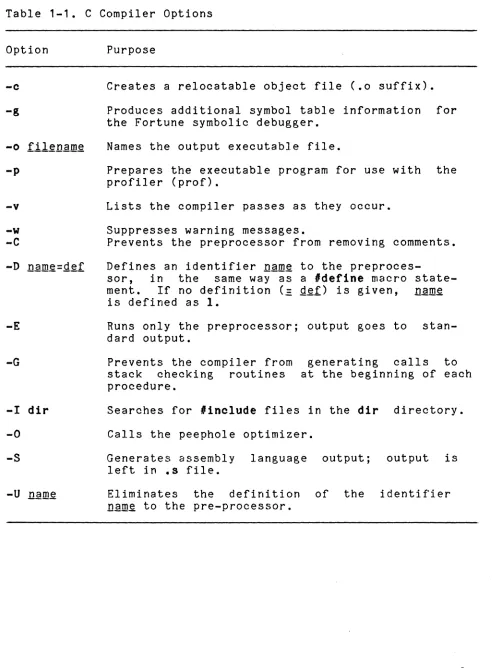
Table 1-1 briefly describes the options of cc in alphabetical order for convenient reference. More detailed descriptions of the options appear in Appendix A.
OBTAINING SOURCE LISTINGS
The C compiler does not generate source or cross reference list-ings. To obtain these, use the separate FOR:PRO programs cat,
more,
andIpr.
CO:)
cat: Listing Source Fileso
The cat program concatenates and displays files. You may use it to list a C source file on the terminal screen as follows:
$ cat filll~
You can generate line numbers in the listing by inserting the -n option between the cat command and the filename:
$ cat
-n
file~more: Viewing Long Program Listings
If a program is more than one screenful in length, you may wish to use the more command, since the text will scroll continu-ously if you use the cat command. The syntax for more is
$
more
fil~ .... Qlpr: Listing Source Files on a Printer
Finally, to send source files to a line printer, use the Ipr command:
Table 1-1. C Compiler Options
Option
-0
... g
-0 filenllm~
-p
-v
-w
-c
-D nllm~=gef
-E
-G
-I dir
-0 -5
Purpose
Creates a relocatable object file (.0 suffix).
Produces additional symbol table information for the Fortune symbolic debugger.
Names the output executable file.
Prepares the executable program for use with the profiler (prof).
Lists the compiler passes as they occur.
Suppresses warning messages.
Prevents the preprocessor from removing comments.
Defines an identifier nam~ to the
preproces-sor, in the same way as a 'define macro
state-ment. If no definition (= g~f) is given, nam~
is defined as 1.
Runs only the preprocessor; output goes to stan-dard output.
Prevents the compiler from stack checking routines procedure.
generating calls to at the beginning of each
Searches for 'include files in the dir directory.
Calls the peephole optimizer.
Generates assembly language output; output is left in .8 file.
Eliminates the definition of the identifier
nll.l!!~ to the pre-processor.
C Language Guide 1-4 2/84
o
o
[image:17.612.49.545.74.742.2]c
o
Chapter
2
Linking a
C
Program
The last pass of the C compiler is the linking loader. ing loader combines files of object code, resolves references, and searches libraries as necessary. It is automatically by the 00 command unless you use the -0 piler option.
The link-external
invoked
com-If you are developing a large program, it is helpful to divide it into smaller programs and compile them separately using the -0
option. When they have all been compiled successfully into object code, they can be linked together using the linking loader as follows.
INVOKING THE LINKING LOADER
There are two ways to invoke the linking loader. method is to use the 00 command:
The simplest
With this command, the three object code files--fll~.o, fll~.2.o, and .fll~.o--are linked into one executable ftle,
a.out.
Sample Program for Use with the cc Command
NOTE: Although this is a short example, separate com-pilation is most useful with long programs.
You have two files, t1.0 and f2.0. The contents of f1.0 are
maine)
{
1nt x,Y,z; x=10;
y=20;
z=57;
b1ngo(x,y,z);
The contents of f2.0 are
b1ngo(a,b,o) 1nt a,b,oj
(
pr1ntf("~d Id Id", a,b,c); )
The co command is used with the -c option to produce two files of object code:
$ cc -0
f.L.Q
$ cc -c ~Q
or simply
$ cc -0 f1~Q f~~£
When f1~Q and f~Q are successfully compiled, you will have two object code files, f~ and fg~Q. You link the files with the command
and one executable file a.out is produced.
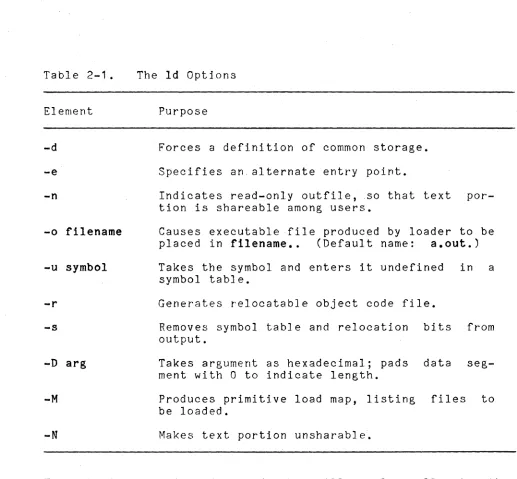
The second way to invoke the linking loader is with the Id com-mand. This command is not as simple to use as ce. With the Id command, you must call the individual libraries; the ce command calls them for you automatically. However, Id does make available several options that cannot be used with ce. These are shown in Table 2-1.
The syntax of the Id command is
The snytax of the ld is
$ Id [QQt12n~ Llusr/l1b/crtO.o] !il~L2 fil~~Q L-lx][-lx2] In this command, -Ix is an abbreviation for a library named libl.a in a given list of directories. The loader searches for matching libraries in the directory Ilib, lurs/lib, and lusr/local/11b, in that order. To load the standard C library
(/usr/11b/l1bc.a) , include the flag -Ie at the end of the loader command line.
The module lusr/11b/crtO.o is the standard runtime module. It must be the first module in the command want the loader output to be an executable command. command does this automatically.)
C Language Guide 2-2
~--
-~--~---stuntoff line if you
(The ee
2/84
o
o
I I
-<
C'
. ,c::
Table 2-1 .
Element
-d
-e
-n
-0 filename
-u symbol
-r
-s
-D arg
-M
-N
The ld Options
Purpose
Forces a definition of common storage.
Specifies an, alternate entry point.
Indicates read-only outfile, .so that text por-tion is shareable among users.
Causes executable file produced by loader to be placed in filename •. (Default name: a.out.)
Takes the symbol and enters it undefined in a symbol table.
Generates relocatable object code file.
Removes symbol table and relocation bits from output.
Takes argument as hexadecimal; pads data seg-ment with 0 to indicate length.
Produces primitive load map, listing files to be loaded.
Makes text portion unsharable.
The libaries contain object code that will resolve calls to the standard C routines (such as printf), calls to math functions, or other special subroutine calls. It is important that the stan-dard C library libe.a be the last argument on the ld command line, since all other modules (and other libaries) reference sub-routines defined in libe.a.
Some of the libraries you may need with the C programs and Id
command are:
• IcrtO.o Runtime start-off library
• Ilibc.a C library
• Ilibm.a Math library
[image:20.612.47.564.24.503.2]• Ilibcurses.a Library of screen functions (see Curses(3».
If you use the -ffp option, you will not need the math library but you will need:
• libffp.a • libc_ffp.a
the floating-point library the C floating-point library
Below is an example of a local line for object modules compiled using the -ffp option:
$ Id -u_cforoe lusr/lib/crtO.o IDQgl~Q mQg~Q =lc_ffp -lffp -10
The -u_cforoe is required to force loading of the -f'fp modules in the C fast floating-point libraries rather than the standard library routines, which may not be compatible with -ffp. The -rfp option causes the -u option and arguments to be passed to the loader automatically.
LINKING FILES IN DIFFERENT STAGES OF COMPILATION
o
You can combine files that are in different stages of compilation with the 00 command. The 68000 assembly language files (suffix
.s), object code files (suffix .0), and C source code files
(suf-fix .c) can be compiled into one a.out file as follows: ~
$ 00
il&§
fll~~Q fll.tl..QThis command converts the two files that are not already in object code (f~§ and fil~~Q) into object code, resulting in filL.,Q, f1il.a....Q, and fil~.3...Q. Because the linking loader was not suppressed, (that is, the -c option was not used) the three object code files are then linked, producing one executable file a.out.
LINKING MODULES WRITTEN IN OTHER LANGUAGES
Source files written in languages other than C must be compiled using the -c option before they can be linked.
For example, to compile a C program with a program written in Pascal, use the po command with the -0 option. The po
com-mand invokes the Pascal compiler, and -0 suppresses the linking
loader, resulting in ah object code file of the Pascal program. The command is
$ pc -0 Q~~cfil~Q
It produces ftle pascfile.o.
C Latlguage Guide 2-4 2/84
c
(
-.
-~
c
To link the object code file produced by the above command with a C file, you use:
$ pc -c pascfile.p
It produces file pascfile.o.
To link the object code file produced by the above command with a C file, you use:
$ cc pascfile.o Cfile.o
Remember that the C file and all other files in the ld command line must be in object code.
HEADER FILES AND GLOBAL VARIABLES
Separate compilation of programs can save time when several pro-gram modules constitute one large program. Each module can be compiled separately and then they can be linked into one program with the linking loader.
Two techniques should be considered when performing separate com-pilations. First, a common set of definitions or declarations can be shared among the modules of a large C program. Rather than placing a set of these definitions in each module, you should declare them in a common header file. By convention, the suffix .h is appended to this header file name. Use the 'include statement with the name of the header file as its argument in each file that requires the definitions.
The following example shows how to prepare files for separate compilation without duplicating the definitions:
r1le1.c: f11e2.c:
tnt 1[100]; 1nt 1[100]; int j[200]; 1nt j[200]; 1nt k[100]; int k[100];
runc1() runc2()
{ {
• • • • • •
• • • • • •
Use 'include statements with a header file:
dets.h:
int i[100]; intj[200]; int k[100];
file1.c:
func1()
{ • •• • • • }
file2.c:
fUDC2()
{
• • •
• ••
}
The second technique concerns global variables that are used across several C source files but are not defined in a common header file. In all files other than the one in which an exter-nal variable is defined, there must exist an external declara-tion. In the following example, . this declaration permits the compiler to determine the type of a variable that is not defined in the module.
file1.c: file2.c:
lonl val; extern long long val;
maine) func()
{ {
••• • • •
• • • • ••
} }
C Language Guide 2-6 2/84
o
o
CChapter3
Executing a
C
Program
A file that has been compiled and linked can be executed. To execute a file, typ~ its name and pr~ss RETURN. If you used the
-0 option in the 00 command, the exeoutable file's name was
indicated with the option. If the -0 option was not used, the
executable file is named a.out. For example:
$ tilename If the -0 option was used during compilation
$ a.out If the -0 option wasn't used
Errors that were not detected during compilation sometimes sur-face during program execution. These are called runtime errors. Sometimes runtime errors cause execution to stop with an error message. Often, runtime errors can only be found by examining the output or "side effects" of execution. Chapter 4 contains more information about debugging your programs.
(" REDIRECTING INPUT
o
The standard input device is the keyboard. The C routines that access files for standard input are discussed in Chapter 11, "Input and Output."
In addition, it is possible to redirect input so it comes from a file instead of the keyboard. Use the redirection input symbol
<
to do this. The redirection symbols are shell commands, and are used on the shell command line. Here is the syntax used to execute a.out with redirected input.$ a.out
<
gatgf!l~The object file a.out will be executed and the contents of
datafil~, a file you have created in your directory, will be read into a.out when the appropriate C system call is reached.
REDIRECTING OUTPUT
The standard output is the terminal screen. Chapter 11, "Input and Output," discusses the C system calls for generating output on the screen.
Redirecting Output to a File
~
Use the FOR:PRO redirection symbol> to redirect output to a file. Both the output of a successfully executed program and the error messages can be redirected to a file in your directory. For both, use >. To use> with a.out, type
$ a.out > store
This command will place the output of a.out in a file called store. If store contains any contents already, the old con-tents will be replaced by the new. To have the new data appended instead, use the double arrow» as follows:
$ a.out » sto~~
The output of a.out will be added to the end of the file
.§.tQ~.
The input and output redirection symbols may be used together in one command line to redirect both input and output:
$ a.out
<
infile > outfil~This command line inputs the contents of infile to a.out and places the output of a.out in Qy.tfil~.
Redirecting Output to the Printer
Two ways are available to send output to the printer. If the output of an executed program is stored in a file, the output file may be sent to the line printer spooler with the Ipr com-mand, which has the following syntax:
$ Ipr [-oQtions] outfll~
Note that Ipr is the FOR:PRO command that invokes the line printer spooler. The spooler ensures that one job is completely printed before another is started.
If output is normally sent to the standard output, it can be redirected with the pipe symbol
I
as in:$ a.out
r
IprHANDLING ERRORS
o
The C compiler error messages are designed to be self-explanatory and to help the user locate the line number in the source file
where the error occurs. For example, if the compiler discovers
4[)
the following for statement on line 5 of this sample C program:c
main () { int jack; jack = 0;
}
for(i=O; i <=100; i++) jack = jack + i;
the error message is
"programname.c", line5: i undefined
Normally the display screen receives standard output has been redirected This convention has been provided so be intermingled with other output.
error messages even when to some other output device. that error messages will not
Error messages are normally sent to device number 2, standard error. To redirect your error messages to a file, use the fol-lowing command from the Bourne shell:
$ a.out
>
erfile 2>
&1In the C shell use
$ a.out
>
&erfileIf you do not know which shell you are in, use the set command.
If the variable argv is listed, you are in the C shell.
Other-wise, you are in the Bourne shell.
The fprintf statement can also redireot error messages, using
the predefined stream pointer stderr just as standard output
uses stdout.
Error messages can be redirected from within a C program in this way:
0,"
. 'fr,(~!
~,
C
Chapter
4
Debugging a
C
Program
The Fortune sybmolic debugger (fdb) is one of the tools included with the Language Development Tools. The debugger is used when a program compiles successfully but does not run as expected. From within the debugger, you can trace variables and their values throughout a program to find the exact location of a bug.
This chapter describes the use of the Fortune symbolic debugger.
COMPILING A PROGRAM FOR DEBUGGING
Before a file can be input to the debugger, the file must be com-piled with the -g compiler option. This is done with the command:
$ cc -g f11~.&
(-- INVOKING THE DEBUGGER
c
After compiling the program with the -g option, you will have an executable file. As always, the file is called a.out unless you used the -0 option. The next step is to run the fdb
pro-gram with your executable file as follows:
where filen2ID~ is the name of your executable file. If no filename is given, the file a.out is used by default. The
Qi~ectoLY, if included, refers to the directory where filename can be found. If no directory is named, the current working directory is assumed.
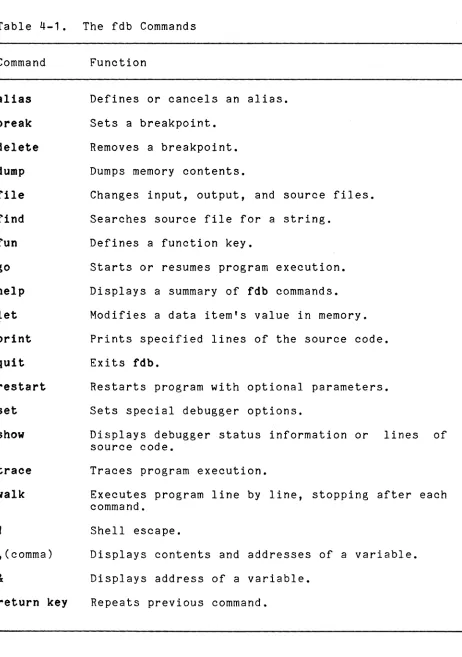
USING THE fdb Commands
Table 4-1 commands described mands may
Table 4-1. The fdb Commands
Command
alias break delete
dump
file
find
fun
go
help
let
quit
restart
set show
trace
walk
,(comma)
&
return
keyFunction
Defines or cancels an alias.
Sets a breakpoint.
Removes a breakpoint.
Dumps memory contents.
Changes input, output, and source files.
Searches source file for a string.
Defines a function key.
Starts or resumes program execution.
Displays a summary of fdb commands.
Modifies a data item's value in memory.
Prints specified lines of the source code.
Exits fdb.
Restarts program with optional parameters.
Sets special debugger options.
Displays debugger status information or lines of source code.
Traces program execution.
Executes program line by line, stopping after each command.
Shell escape.
Displays contents and addresses of a variable.
Displays address of a variable.
Repeats previous command.
C Language Guide 4-2 2/84
o
o
[image:29.612.64.526.57.714.2]i
(~
C···\
_'iA SAMPLE C PROGRAM FOR DEBUGGING
The following C language program converts integers to ASCII char-acters. It can be used as an exercise in debugging.
To begin your debugging session, first create a file of the sam-ple C program. Then, after compiling the file with the -g option, give the fdb command, and type the different debugger commands to see how the debugger works. Name the program "sample.c" and type it as file in your current working directory as follows:
'define MAXCHAR 10 char s[MAXCHARJ
mainO
,-
sample.c{
int i;
i= 12345; pr1ntd(1); i= -987654; pr1ntd(i);
}
printd(n) int nj
{
reg1ster 1 ; 1f (n
<
0) {putohar('-'); --n;
}
1 - 0; do {
-,
s[1++J = n ~ 10 + '0'; } wbile ( (n
,=
10)>
0 ); pr1nt1t(i);}
pr1nt1t(k) int k;
(
}
Next, compile the C program with the -g option:
Then invoke the Fortune symbolic debugger with the command:
$fdb a.out
Your screen will show the message:
Fortune Symbolic Debugger
An asterisk (.) prompt will appear on your screen. Now follow the guide below. The information that you type is in boldface type. The purpose of the command is in parentheses.
*
break 11(Sets breakpoint at line 11.)
BREAKPOINT SET AT: PROCEDURE main
LINE 11: printd(i)j
*
break printd: 1 do ,n(Sets breakpoint at the first line of procedure printd and display the value of n whenever the program stops.)
NEW BREAKPOINT S,ET AT: PROCEDURE printd
LINE 19: if (n
<
0) {*
break printit:34
(Sets breakpoint at printit, line 34.)
NEW BREAKPOINT SET AT: PROCEDURE printit
LINE 34: putchar(s[kJ)j
*
show break(Displays the 3 breakpoints defined so far.)
PROCEDURE printit
LINE 34: putchar(s[k])j
PROCEDURE printd
LINE 19: if (n
<
0) { BKPT COMMAND: ,nPROCEDURE main
LINE 11: printd(i)j
C Language Guide 4-4 2/84
o
o
c
c
*
go(Starts program execution and stops at the first breakpoint.) INFORM(36): EXECUTION SUSPENDED TO
PERFORM BREAKPOINT COMMAND ,n AT printd:LINE 19: if (n
<
0) { 12345*
show window 7(Displays 7 lines before and 7 lines after the current line.)
LINE 12: }
LINE 13 :
LINE 14: printd(n) LINE 15 : int n'
,
LINE 16: {LINE 17: register i'
,
LINE 18:LINE 9 : if (n
<
0) {LINE 20: putchar('-')j
LINE 21 : --nj
LINE 22: }
LINE 23: i = O·
,
LINE 24: do {
LINE 25: s[i++] = n % 10 + ' 0 ' j
LINE 26: } while ( (n 1= 10)
>
0 ) j*
break 26(Sets another breakpoint at line 26.)
NEW BREAKPOINT SET AT: PROCEDURE printd LINE 26: } while ( (n 1= 10)
>
0 )j*
go(Continues the program.)
INFORM(35): EXECUTION SUSPENDED DUE TO BREAKPOINT SET AT
printd:LINE 26:} while ( (n 1= 10)
>
0 )j*
t n; t sIs(Displays the variables nand s.)
*
alias gd "go; ,n; ,sIs"(Sets alias definition gd to resume execution and displays variables nand s in one command when the execution stops.)
*
show alias(Displays the alias definition.)
ALIAS: gd DEFINED AS go; ,n; ,sIs
*
gd(Runs the command.)
INFORM(35): EXECUTION SUSPENDED DUE TO BREAKPOINT SET AT
printd:LINE 26:} while ( (n 1= 10)
>
0 )j1234 54
*
gd(Runs the command again.)
INFORM(35): EXECUTION SUSPENDED DUE TO BREAKPOINT SET AT
printd:LINE 26:} while ( (n 1= 10)
>
0 )j123 543
*
delete 26(Deletes breakpoint at line 26.)
*
show break(Displays the breakpoints.)
PROCEDURE printit
LINE 34: putchar(s[k]);
PROCEDURE printd
LINE 19: if (n
<
0) { BKPT COMMAND:,nPROCEDURE main
LINE 11: printd(i);
*
delete all(Deletes all the breakpoints.)
C Language Guide 4-6
o
o
o
c
*
go(Continues the program. Since all the breakpoints are deleted, it will' finish.)
12345 -987654
SYSTEM (99): PROCESS TERMINATED
(Process is terminated whenever the main procedure completes execution.)
*
quit(Leaves the debugger program and returns the shell prompt.)
Now rerun the debugger program as follows:
$fdb a.out
Fortune Symbolic Debugger
(-C'
*
break 7C\
"(Sets a breakpoint at line
7.)
NEW BREAKPOINT SET AT: PROCEDURE main LINE 7: i=12345;
*
restart(Restarts the debugger program.)
INFORM(35): EXECUTION SUSPENDED DUE TO BREAKPOINT SET AT
main:LINE
7:
i= 12345;*
walk(Single steps through the program.)
main:LINE 8: printd (1) ;
*
dump &1ADDRESS FOR :i IS Ox7ffed8
sp address 0 1 2 3 4 5 6 7 8 9 a b c d e f
D 7ffdfO 00 00 00 00 00 00 00 62 00 00 30 39 00 00 00 00
*
Idate(Executes the shell command for date and time.)
Fri Jul 8 12:57:23 GMT-3:30 1983
*
show file(Names the input, output, debug, and source files.)
INPUT FILE: OUTPUT FILE: DEBUG FILE: SOURCE FILE:
standard standard sample.c sample.c
*
find "print" 1(Searches for the first time the string print occurs from line 1.)
LINE 8 : printd( 1);
*
find(Searches for the same string again.)
LINE 11 : printd(i);
*
print 1/10(Prints lines 1 - 10.)
LINE 1 : 11defi neMAXCHAR 10 LINE 2: char s[MAXCHAR]; LINE 3 : maine )
LINE 4 : {
LINE 5: int i;
LINE 6 :
LINE 7: i
=
12345; LINE 8 : printd( 1) ;LINE 9 : i
=
-987654; LINE 10:C Language Guide 4-8
o
o
o
1
C
c
*
show fun(Shows how the function keys are currently set.)
FUN KEY: fun16 DEFINED AS next
FUN KEY: down DEFINED AS print next FUN KEY: up DEFINED AS print .-1 FUN KEY: EXECUTE DEFINED AS walk in FUN KEY: execute DEFINED AS walk
FUN KEY: nextscrn DEFINED AS print . -1 ! 20
FUN KEY: prevscrn DEFINED AS print . ! -20
FUN KEY: help DEFINED AS help
C
ChapterS
c
Profiling a
C
Program
The profiler is a tool designed to help programmers identify those parts of a program that are inefficient. It generates a list that indicates the amount of time spent executing each part of a program. This chapter describes how to use the profiler. It should be noted that the profiler alters the value returned by a program. In normal cases this should not cause any difficulty.
COMPILING A PROGRAM FOR PROFILING
To prepare a file for profiling, you must first compile it with the -p option:
The input to the cc -p command may contain no more than 200 procedures (the main program and all functions and subroutines).
The output of the co -p command executable file. The name of
a.out unless the -0 option was
specified.
is a modified version of the the executable file, as usual, is used and another name was
The executaple file produced by the -p option is modified to contain code that calls a program named monitor. monitor
tracks the use of computer time during program execution.
USING THE prof PROGRAM
Once the cc -p command line has prepared a file for profiling, the file must be executed as usual by typing its name and a return.
At the end of the execution, profiler information is placed in a file called mon.out. You may use the 18 command to ascertain that mon.out is in your directory.
Once the a.out file has been executed, use the prof program to generate the profiler information. The basic syntax of prof is
$ prof
where your executable file is a.out. If a.out is not the name of your executable file, you must state the filename after the
$ prof filename
A listing of profiler information will appear on your screen in response to the prof command.
A SAMPLE PROGRAM FOR USING THE PROFILER
This sample session illustrates the use of the profiler. The program to be profiled is named proftst.c. Its contents are
mainO
{
long 1;
for (1=0; i
<
100; i++) funO:printf(ftDone\nft ):
}
fun()
{
}
int n;
for(n=OJ n
<
100; ++n) fun2() ;fun2()
{
lnt n;
for(n=O; n
<
10; ++n);}
To compile the program, type
$ co -p QrQftst.q
To generate the profiler listing, type
$ a.out
then the profiler command
$ prof
C Language Guide 5-2 2/84
o
o
c
o
The following information will appear on your screen:
%time
63.1 4.2
0.0
tm spent
1. 77
0.12 0.00
cum sec
1. 77 1.88 1.88
call
10000 100
1
ms/call
0.18
1.19
0.00
name
fun2 fun main
where:
%time Percentage of time spent in function
tm spent Time (in seconds) spent in function
cum sec Cumulative time prior to this function
flcall Number of times function was called
ms/call Number of milliseconds spent in call
name Program unit name
o
c
PARTTWQ
THE
C
LANGUAGE
('. Part 2 of the Fortune C Language Guide summarizes the vocabulary and conventions of the C language on the FOR:PRO operating sys-tem. It defines
C\
• .;.,,..1• The C character set and conventions of notation • Data types and declarations
• Expressions and statements • Routines
• Library functions • Input and output
o
;(~.
\~)
C
Chapter
'6
("'
•. .~
The
C
Character Set and Conventions
of
No
tation
The C language uses a few conventions of notation that must be observed when programs are written. These as described, together with the C character set, in this chapter.
THE CHARACTER SET
The C character set contains the following characters:
ABCDEFGHIJKLMNOPQRSTUVWXYZabcdefghijklmnopqrstuvwxyz
0 1 2 3 4 5 6 7 8 9
"
,
II $ % &*
( ) +-
/.
,
. .
.
,
< >
=
? @ [ ] { } "
,
I-The C language distinguishes between uppercase and lowercase. For example, the variable named "Lower," spelled with an upper-case L is different from the variable "lower," spelled with a lowercase I as the first letter. The same is true of constants.
RESERVED IDENTIFIERS
In C, the following identifiers are reserved for use as keywords and cannot be used to identify other elements of a C program.
auto break oase ohar oontinue default do
double else
entry extern float
for
goto if int long register
NONGRAPHIC CHARACTERS
In the C language, the backslash \ is used with other charac-ters to represent certain nongraphic characters as well as the single quote and the backslash itself. These non-graphic charac-ters and their representations are as follows:
backslash \
backspace \b
bit pattern \ddd
carriage return \r
form feed \f
horizontal tab \t
newline \n
single quote \'
STATEMENT FORMAT
The C language uses a free field for statements: They may begin or end in any column, and blanks beyond the first one are ignored by the compiler. Any number of blanks, tabs, or blank lines may be included to improve ease of reading.
COMMENTS
The C compiler ignores any' characters that appear between
,*
and*'.
These symbols can thus be used to create comments, that will appear in the program listing but not affect its execu-tion. Such comments may be used freely in a C program. Comments can be included anywhere a blank or a newline can.C Language Guide 6-2 2/84
o
(~-
Chapter
7
c
Data Types and Declarations
The basic data types used by a C program are constants and vari-ables. Constants are declared implicitly by their appearance and use in a program. Variables must be declared in such a way that the variable name becomes associated with a variable type. This type implies the properties and storage size of the variable.
The basic data types may also be used to create extended data types, such as structures and arrays. These extended data con-structions are useful for modeling logical groups that arise in actual data.
Finally, pointer variables may be declared to point to both basic and extended data types. When used in plac~ of array subscripts, pointers increase the efficiency of programs that perform index referencing.
The five classes of data types are described below.
CONSTANTS
Constants may be characters, integers, or floating-point numbers. Characters may exist alone or in groups called strings.
Character Constants
The following are examples of character constants:
'a' '1'
"January"
Single charaters
String of 8 characters (null included)
Character constants are enclosed by single quotes while strings are enclosed by double quotes. A string will always include the null character (a binary zero) as its terminator. This character is added by the compiler. Note that a string is the same as an array of characters in C.
Integer Constants
Integer constants may be represented in different radix formats by prefixing them with the appropriate symbol, 0 for octal or
Here are some examples of integer constants:
-25 0 100000
0177 011
Decimal constants
Octal constants
Oxa2 Oxfff Hexadecimal constants
Floating-Point Constants
Floating-point constants are represented by "number decimal point numberrr or by scientific notation. They can also be expressed in
hexidecimal or octal. The two ways of expressing floating-point constants are shown below.
12.5 1000.0001
23.4e23 10.023E-4
VARIABLES
Use of decimal points
Use of scientific notation
o
A variable declaration consists of a variable name and an associ-ated variable type. The variable name is a string of letters and
digits, the first of which must be a letter. ~
The Six Variable Types
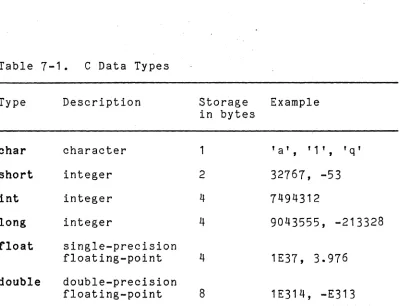
There are six variable types in the C programming language. Each type implies rules for the manipulation of its value and the number of bits allocated for its storage, as shown in Table 7-1.
The additional unsigned qualifier may precede a character, short, or integer variable name to permit the integer to range in value from zero to a maximum of two to the n-minus-1 power, where
n
is the number of bits in the integer.Multiple variables of the same type may be declared in a single declaration statement by separating each with a comma. Each declaration is terminated by a semicolon.
The following example shows the declaration of multiple variables of type short.
short s1,s2,s3;
C Language Guide 7-2 2/84
C
..c
Table 7-1. C Data Types
Type Description Storage Example
in bytes
char character 1 ' a' , ' 1 ' , ' q ,
short integer 2 32767, -53
int integer 4 7494312
long integer 4 9043555, -213328
float single-precision
floating-poiint 1E37, 3.976
double double-precision
floating-point 8 1E314, -E313
Precision Arithmetic
The program below illustrates precision arithmetic. Following the program is a t~ble which gives the upper and lower bounds of all the numerical data types. CIS precision is the same as
Fortran's and follows the IEEE standard. In this standard, all real and double-precision numbers are represented in the form called normalized floating point form: plus or minus 2 raised to the n-th power times f where f is a real number whose lower bound may equal 1.0 and whose upper bound is always less than 2.0.
If you compile the program below by typing
$ cc .IU:Qgram ~ -lm and then run it by typing
a.out
you will get the following output:
uf is 3.4025878e+38 If is 1.1754944e-38
ud is 1.797568532587847e+308 ld is 2.225073858507200e-308 little is 32767
[image:48.612.82.483.35.341.2]The program statements beginning uf and If (upper floating and lower floating) illustrate the largest and smallest floating point numbers expressed in normalized form. In the output above, they are converted to normal scientific notation. The double numbers ud and ld are treated similarly. The last two lines of the output show the largest short and the largest integer. (The function pow is described in section 3 of the EOR~fRO
PrQg~~mm~~~§ M~nu21 along with all the other C library functions.)
'inolude <math.b>
'*
this loads in the math library routines*'
main{){
short little; int i,big; float uf,lf: double ud,ld:
uf
=
pow( 2.0, 121.9999); printfC" uf 1s S1.1e O,uf); If = pow( 2.0, -126.0): printfC" If is Sl.7e O,lf);ud = pow( 2.0, 1023.9999); printfC" ud 1s Sl.lSe a,ud); ld = powC 2.0, -1022.0); printfC" ld is S1.1Se O,ld); little
=
32761; big=
2147483647;pr1ntf(nlittle is SSdO,llttle); printfCnbig is S10dO,big);
}
Upper and Lower Bounds for Numerical Datatypes
DATA TYPE
short int float double
LOWER BOUND
+(-)1.175494E-38
+(-)2.2250738507E-308
The ffp Option
UPPER BOUND
+(-)32767
+(-)2147483647 +(-)3.402587E+38
+(-)1.7976931348E+308
Users who want faster arithmetic operations and are willing to sacrifice precision and range can use the -ffp option with the
C compiler. The necessary library, which comes with the Language Development Tools, is loaded automatically. Note that when you invoke ffp:
•
There is no distinction between float and double, doubles are treated as floats.•
The range of the float exponent is reduced by approximately fifty percent.The ranges for the -ffp option are:
-9.22337E18
<
x<
-2.71050E-20 (for negative values) 5.421010E-20<
x<
9.22337E18 (for positive values)C Language Guide 7-4 2/84
- - -
-o
o
c
A Fortune Extension: . Long Variable NamesIn many implementations of the C language, only the first eight characters of a variable name are signifi-cant. The Fortune C language, however, permits variable names to be of an arbitrary length.
The only limit imposed is one of practicality. Variable names that extend beyond 256 or even 128 characters will be unwieldy and a nuisance to type and understand. The underscore character may be useful in separating logical parts of a variable name.
This example illustrates a long variable name:
Mixing Variable Types (Casting)
A type is associated with each declared variable in C. When variables are used in expressions (such as relationals or assign-ments) these types are compared for compatibility. Normally, programs are written in such a manner that compatibility is obvi-ous: Integers are added only to other integers, characters are compared only with other characters, and so forth.
When types do not match, implicit rules are provided, and the intended operation is able to continue. These rules are called casts. If a variable of type short is being compared or assigned to one of type long, for instance, the C-Ianguage cast converts the short variable to a long variable before it is com-pared or assigned.
In the following example, s is first moved to a long temporary variable or register, and its sign is extended, if necessary, to reflect a negative value. It is then ready for the assignment operation:
long I;
short s;
1
=
s;Here is an example of an explicit cast:
cl'lar .cp; short .sp;
sp
=
(short .)cp;The type supplied in parentheses is the type to which the vari-able immediately following it should be converted. This mayor may not generate additional machine instructions, but if the variables have been properly cast, the compiler will omit its warning.
Note that casting character pointers to short o~ integer may
cause your program to fail due to an odd-byte address.
A Fortune Extension: The Void Type
A special new void type, corresponding to the undefined type, is available with the Fortune C compiler. It may be used to prevent the "incompatible type" warning mes-sages produced by the type-checking program lint.
In the following example, the function fune1 normally returns a long value. When the function is called and cast using the void type, a dummy variable that holds the return value is unnecessary because this return value is not needed.
This program illustrates the use of the void type:
maine)
{
}
(void)func1():
long fune1()
{
}
int longval
=
10;return(longva1);
C Language Guide
7-6
2/84o
o
c
(
ARRAYS
Array declarations permit the logical grouping of homogeneous data objects. Each data object occupies the same amount of phy-sical space and is referenced by subscripts according to its position relative to the first element.
As in other languages, subscripts are used both in the declara-tion to indicate the size of the array and in the reference to indicate the element required. Arrays in C may have one or more dimensions.
Simple Arrays
The simplest and most common array has only one dimension.
The following are examples of the declaration and indexing of one-dimensional arrays:
char cstrlng[80J;
fnt iarray[100J;
iar-r-ay[OJ
iar-r-ay[~J
larray[99J
Array of 80 characters, termed a "string" Array of 100 integers
First integer in iarray Fifth integer in iarray Last integer in iarray
Since the first array element is indexed, the last element of an array is one less than the declared size of the array.
Multi-Dimensional Arrays
Arrays are not limited to one dimension; they may have several. A two-dimensional array of integers is declared as follows:
int larray[10][20J;
A total of 200 integer elements are in this array. The elements are stored in order by rows. The rightmost subscript of the array varies fastest when the elements are accessed in the order in which they are stored in memory.
An array may be initialized by a list of initializing constants enclosed in braces. A multi-dimensional array is initialized by enclosing sublists of these constant initializers in braces.
The following example shows a corresponding list and array:
1nt february(_](1]
= {
} ;
{ 8, 8, 8, 8, 8, 0, 0 },
{ 8, 8, 8, 8, 8, 8, 0 },
{ 8, 8, 8, 8, 8, 8, 8 }, { 8, 8, 8, 8, 8, 0, 0 }
STRUCTURES
In C, structures combine heterogeneous data types into a compound data types. A C structure is equivalent to what is termed a "record", in many other languages. This compound data types col-lects data that logically belong together.
Structures may consist of combinations of simple variables, arrays, or additional nested structures. Structures of the same type may be grouped together into an array of structures.
Because structure is a declared type, pointers may point to structures to access individual elements. Combinations are pos-Sible, and structures may even contain pointers referencing them-selves.
More information on passing structures and on pointers to struc-tures appears in Chapter 10, "Library Functions."
Simple Structures
Each element of a structure is a declared variable and may include both arrays and structures. This declaration has the' following form:
struct [strYQ1~1~g] {
~lem~nl1; ~l~menl~; ~l~~nl1;
••• • • •
e1~~lN;
} §trYQtu~g_n~mg;
The keyword struct denotes the beginning of a structure declaration. The §trYQly~e t~ notation merely names (or tags) the particular structure being declared and is therefore optional. However, such name tags should ordinarily be included because they are useful in the creation of additional instances of the structure and in the definition of pointers to the struc-ture.
C Language Guide
7-8
2/84o
o
c
c
The following structure has one element that is a simple integer plus three elements that are character arrays:
tnt char char char
} newcar;
year; make[16]; model[16]; color[16];
Additional structures of this type (one integer and three charac-ter arrays) may be created using the same tag, tag~car:
struct
struct .t.aL-Q.al: taL-cal: jYnkQ.al:; usedQ.al:;
Each of the above structures contains the same four elements as the original structure and is initialized by following the declaration with a list of constants enclosed in braces.
struct tag_car junkcar
= {
1951, "Buick", "Super", "black",
} ;
An element of a structure is referenced using the. operator:
junkcar.year junkcar.make junkcar.model junkcar.color
Arrays of Structures
equals equals equals equals
1951 "Buick" "Super" "black"