138
©IJRASET: All Rights are Reserved
Blinds Personal Assistant Application for Android
Dr. Usha B A1, Prof. Sangeetha K N2, Mr. Vikram C M3
1
Associate Professor, Dept. of ISE, BMSIT&M Bengaluru – 560060
2
Assistant Professor, Dept. of E&C, JSSATE, Bengaluru-560060
3
Trainee Software Engineer, Dept of ISBL, Sony India Software Centre, Bangalore - 560103
Abstract: The technology can be in many ways to help visually impaired people, but the problem of identifying objects and reading hard copy documents by blind people is still a challenging task. The aim of this study was to design an efficient and cost-effective method for object detection and optical character recognition for visually impaired people. This project was designed and developed for android devices as an application, which can have downloaded and installed on any android smart phone typically having camera, voice processing unit and internet access. Android was chosen, because it has been already proliferated in the market to a very great extent.
Organization of the paper are Introduction, State of Art Development, Motivation, Objective, Scope, Methodology, Experimental results and analysis, Conclusion, Future enhancements and References
Index Terms: Android, COCO (Common objects in context), FPS (Frames per second), Object detection, OCR (Optical Character Recognition), Tensor Flow.
I. INTRODUCTION
Eyesight is one of the greatest indispensable human senses and it acts a supreme significant role in human observation about neighboring surroundings. Many problems arises when trying to carry out routine daily activities when you’re visually impaired. Including identifying objects (mostly while shopping), physical movement, handling cash is an entirely different concern, withdrawing money from an atm can be really time consuming, reading writing using braille and many more problems have to be faced at every movement in there day to day life.
And as we know that for many people it was unable get back their vision by any kind of medication or surgery's, for whom we call as total blinds. Therefore, to overcome as many as problems for blinds with a minimum cost and in an effective manner, we are trying to build an application known as “BLIND’s PERSONAL ASSISTANT” application for Android. Which mainly includes object detection and OCR (Optical character recognition) techniques.
Object detection as has been a part of wide research for an extended period. Throughout the previous decades, a huge amount of algorithms have been projected. This is due to the fact that, at a closer aspect, "object detection" is a term for diverse algorithms intended for an extensive diversity of applications, where each application has its explicit inevitabilities, constraints and requirements. At this juncture we present the algorithms which emphases on the foremost idea, which is well-defined and explained in deep, and avoids extensive work of mathematics.
Optical character recognition [1] is an automatic identification and alphanumeric encoding of printed text by means of an optical scanner and specific software systems. By means of Optical character recognition (OCR) software lets a machine to read stationary images of text and translate them into editable data. Optical character recognition is also a significant tool for making reachable documents, predominantly PDFs, for sightless and visually-impaired people. Here we used basic android camera as optical scanner to capture the image of document and convert the same to soft copy which is editable.
II. STATE OF ART DEVELOPMENT
In 2014, Shraddha A. Kamble [2], has developed an application known as “VOCAL VISION”. This remains a minor method to make the sightless people self-governing. This development is a vision substitute arrangement, developed to assist visually-impaired individuals for autonomous navigation. It was employed by the idea called ‘image to sound’ translation. At this juncture it mainly works on only images.
©IJRASET: All Rights are Reserved
139
In 2016, Shivaji Sarokar [4] developed a system which is used to enhance mobility for visually impaired people by incorporating advance technologies. It mainly focuses on obstacle detection which decrease the navigational problems for sightless individuals. For blind people it is really curtail challenge to make movement in new environment autonomously. Here in this project they have designed to device which lets the blinds to know about obstacles and also informs the blind about obstacle free path. To accomplish this task they have used buzzer and vibrator as two output modes for user.In 2011, Chen X [5] presented an algorithm for detecting and reading text in natural images for the use of blind and visually impaired people while walking through the city scenes. The overall algorithm has a success rate of over 90% on the test set and the unread text is typically small and distant from the viewer.
In 2007, Kai Ding [6] suggested that gabor feature and gradient feature have been proven to be two most efficient features for handwritten character recognition recently. However, few comprehensive comparative researches on the performance of these two methods in large scale handwritten Chinese character recognition (HCCR) were reported in the literature. In this paper, they compared these two methods for large scale HCCR.
III. MOTIVATION
Visual damage and sightlessness caused by numerous illnesses has been massively reduced, but there are several other reasons from which individuals are at the risk of becoming blind. Visual info is the basis for most directional everyday jobs, so blind people are at high difficulty scenario. Since essential information about the neighboring surroundings is not accessible. Many problems arises when trying to carry out routine daily activities when you’re visually impaired. Including identifying objects (mostly while shopping), physical movement, handling cash is an entirely different concern, withdrawing money from an atm can be really time consuming, reading writing using braille and many more problems have to be faced at every movement in there day to day life. Blind people face much embarrassment when connecting with their neighboring surroundings like identifying objects, and the maximum mutual task is to find dropped or misdirected individual objects (i.e., keys, wallets, etc.). Though numerous works and arrangements have been remained concentrating on navigation or steering, way discovery, text interpretation, bar code interpretation etc., however at present there are very few number of camera-based methods offered in the marketplace to fulfill necessities for the visually impaired people. Hence, we are trying provide an android application for blind people which uses its rare camera to assist them
IV. OBJECTIVE
The objectives of the system are set of activities that each module should carry. These are: -
A. Object detection: The application should be able to identify objects by making use the smart phones rear camera. In the input video live stream, it should be able to create bounding boxes for all possible classes and should tell description of the object.
B. Reading Documents: To avoid the braille work it provides a way to read computer printed documents and text in images by using OCR technique.
C. Voice Interaction: The application must be capable of interacting with the user over voice.
V. SCOPE
This project is currently done keeping in mind that blind should alone recognize objects that he encounters in his surroundings and read printed documents. The objects recognized by the system will be the limited. Because it can identify only the trained objects and we cannot train a system which can classify all classes. Here we trained the machine taking into account that the system must classify most generally encounter objects that we deal in our daily life, like COCO (Common Objects in Context). And reading printed documents is done by using Optical character recognition, it can read only English as of now. But in future other languages can be added.
VI. METHODOLY
140
©IJRASET: All Rights are Reserved
VII. E XPERIMENTAL RESULTS AND ANALYSIS
In analysis of a process, experiments are commonly used to evaluate the inputs to the process which most times define the output of the process. They also help pinpoint the appropriate and thus target inputs to achieve a desired result. The output obtained from the system is compared with the expected output to verify the correctness of the system. There are several metrics for comparison. Analyzing the experimental output is verifying whether the evaluation metrics are satisfied. This section discusses the performance features of the system.
A. Evaluation Metrics
Evaluation metrics [7] are the standards intended for testing different algorithms. The behavior of the algorithms or techniques can be determined using these metrics. Some techniques satisfy some of the metrics. In this project, the outputs that are obtained from the different inputs given to the system are compared with the ideal output as per requirements to check whether the metrics are satisfied.
The most relevant evaluation metrics for this application are precision, recall, F1-score and mAP. Precision describes how relevant the detection results are (Eq. 1):
= p + (1) Where TP = true positive, FP = false positive
Recall describes the percentage of relevant objects that are detected with the detector (Eq. 2): = + (2)
Where FN = false negative.
Generally, when precision increases, recall decreases and vice versa: a very sensitive model is able to catch large percentage of objects in an image, but it also generates high number of false positives, where as a model with high threshold for detection only produces few false positives but it also leaves a higher percentage of objects undetected. The right balance between these two depends on the application. F1-score is used as a single metric for these two viewpoints (Eq. 3).
1 − = 2 ∗ ∗ + (3)
Definition of true positive, false positive and false negative can change from one object detection application to other. The TensorFlow Object Detection API uses “PASCAL VOC 2007 metrics” [13] where a predicted instance is defined as a TP when Intersection over Union (IoU) is over 50% [14] (Eq.4), i.e.
= ( ∩ ) / ( ∪ ) > 0.5
(4)
One object can have only one bounding box associated with it, so if several bounding boxes are predicted for an object, only one is considered TP and the others FP. An object without any predicted bounding boxes associated with it is considered a FN.
Mean Average Precision (map) is a commonly used metrics for comparing model performance in object detection. MAP summarizes the information in “precision recall” curve to one number. Precision-recall curve is formed by sorting all the predicted bounding boxes (over all images in the evaluation set) assigned to an object class by their confidence rating, and then for each prediction, a recall value and a precision value are calculated. Recall is defined as proportion of TPs above the given rank out of all user tagged objects. Precision is defined as proportion of TPs in predictions above the given rank. From these precision-recall-pairs a precision-recall curve is formed. Average Precision (AP) is calculated as the “area under the precision recall-curve”, i.e. it approximates precision averaged across all values of recall between 0 and 1 by summing precision values multiplied by the corresponding change in recall from one point in curve to the next. However, what VOC metrics call “AP” is actually interpolated average precision, which is definite “for instance the mean precision at a conventional of eleven alike spaced recall levels”, the precision value corresponding to each recall interval being the maximum precision value observed in the curve within the interval. MAP of a model is then the mean of AP values of all object classes. The interpolated AP is, of course, higher than the basic AP; this must be taken into consideration when comparing map value
B. Experimental Dataset
©IJRASET: All Rights are Reserved
141
C. Performance Analysis
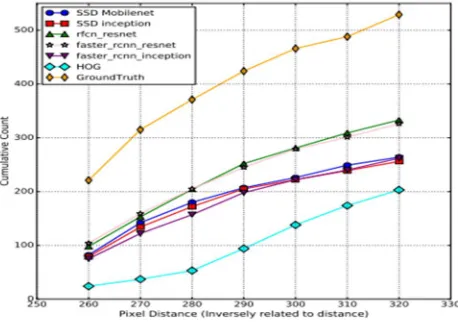
This section explains the experimental results of this project. TensorFlow and OpenCV were used on configurations: CPU + GPU, High-end CPU & Low-end CPU. We use the pre-trained models for neural network-based detectors from the TensorFlow Model COCO. In Figure 1.1 variations of modules at 15 frames per second (FPR) was shown.
[image:4.612.190.421.135.280.2]Figure 1.1: Variation in the number of people detected at different FPRs of the detectors in a video sampled at 15 FPS. Same modules were successfully run on different machines to know the performance of each module on various hardware configurations. This was shown in the Figure 1.2 and Figure 1.3.
Figure 1.2 Number of people detected in CPU+GPU system
The Figure 1.2 shows the performance of different modules on CPU+GPU machine in form of graph. Here the performance is pretty good, because most of the graphics processing was processed on GUP providing better performance.
[image:4.612.190.419.345.506.2]142
©IJRASET: All Rights are Reserved
The Figure 1.3 shows the performance of different modules on CPU enabled machine in form of graph. As compared to the CUP+GUP machine here we found low performance. Because CPU alone must carry out all the computations.
1) Face expression analysis: Current system is able detection person in future work it should able analyze human face expression.
2) Blind can shop: Enabling shopping in which it includes bar code scanning and giving reviews based on the bar code reading by check online reviews of that particular product.
The project results as shown below:
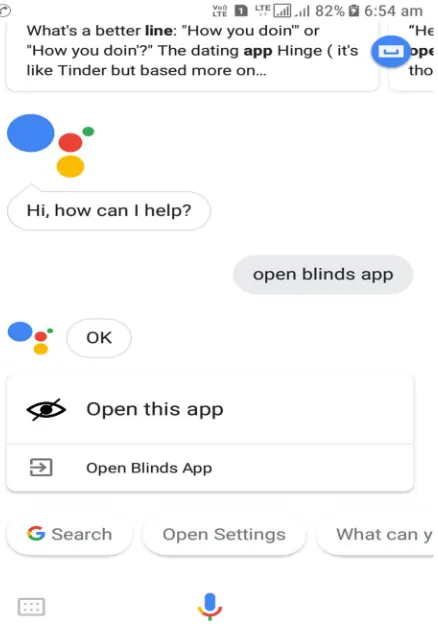
[image:5.612.206.425.194.507.2]Using Google personal assistant to open blind’s application. To open application the user should say OK GOOGLE to activate Google assistant. Then by saying the command ‘Open blind’s app’ the application will be opened. This is screen shot is shown in Figure A.1.
Figure 1.4 Using Google assistant to open application
[image:5.612.198.447.541.706.2]©IJRASET: All Rights are Reserved
143
Once the application opened it asks the user to give input either object or optical and it stays in listening prompt. If the user says object it triggers the object detection module or if user says optical then it triggers OCR module. The main screen activity is shown in Figure A.2.Figure 1.6 Object Detection module
This is the object detection module. After user entering to the object detction module the phone’s carema will be opened and the object detection will be carried on automatically without any user intervention. For detected objects the description will be given over voice as results to user. The object detected module is shown in Figure A.3.
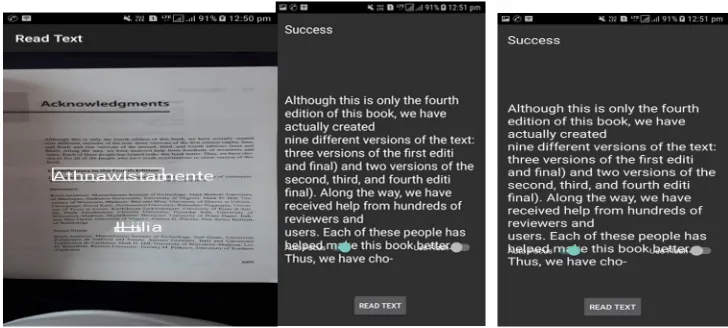
Figure 1.7 Optical character recognition module
This is the OCR module. After user entering to the OCR module the phone’s carema will be opened and the OCR will be carried on automatically without any user intervention. The extratcted text will be spoken over voice as results to user.OCR module screen shot is shown in Figure A.4.
VIII. CONCLUSION
This project was developed for people who are visually impaired. The aim of this project is to assist the blind people to deal independently some of their daily activities like object detection and reading hard copy documents. And also it focuses on cost effective manner to deal this problem. Hence we chosen android smart phone to implement this project, because they have been proliferated to every common man. The project consists of three main modules those are object detection, OCR and voice interaction.
[image:6.612.121.485.366.530.2]144
©IJRASET: All Rights are Reserved
IX. FUTURE ENHANCEMENTS
To overcome the limitations of the project, the following will be taken up in the future:
A. The distance of the objects will be identified to resolve the spatial accepts.
B. The voice processing be will be done on device only to provide better voice interaction module. Some extra features or modules likely to add in future system.
C. Scene description: this module should be able to give description of a scene (given in form of image) captured by phone camera.
REFERENCES
[1] Pranob K Charles, V.Harish, M.Swathi, CH. Deepthi, "A Review on the Various Techniques used for Optical Character Recognition", International Journal of Engineering Research and Applications, Vol. 2, Issue 1, pp. 659-662, Jan 2012.
[2] Shraddha A. Kamble “An Approach for Object and Scene Detection for Blind Peoples Using Vocal Vision” Int. Journal of Engineering Research and Applications ISSN: 2248-9622, Vol. 4, Issue 12, pp.01-03, December 2014.
[3] Qian Lin “Let Blind People See: Real-Time Visual Recognition with Results Converted to 3D Audio”, International Journal of Engineering Research and Applications, Vol. 6, Issue 5, pp. 8–9, June 2015.
[4] Shivaji Sarokar, Seema Udgirkar, Sujit Gore & Dinesh Kakust “Object Detection System for Blind People”, International Journal of Innovative Research in Computer and Communication Engineering (An ISO 3297: 2007 Certified Organization) Vol. 4, Issue 9,pp 12-20, September 2016.
[5] Chen X and A. L. Yuille, Ada Boost Learning for Detecting and Reading Text in City Scenes Proceedings of IEEE International Conference on Computer Vision and Pattern Recognition, volume 9, pp. 366-373, 2010.
[6] Kai Ding, Zhibin Liu, LianwenJin, Xinghua Zhu, A Comparative study of GABOR feature and gradient feature for handwritten Chinese character recognition, International Conference on Wavelet Analysis and Pattern Recognition, Beijing, China, Vol.2, issue 4, pp. 1182-1186, Nov. 2007