IndoWordnet Visualizer: A Graphical User Interface for Browsing
and Exploring Wordnets of Indian Languages
Devendra Singh Chaplot Sudha Bhingardive Pushpak Bhattacharyya
Department of Computer Science and Engineering,
IIT Bombay, Powai,
Mumbai, 400076.
{chaplot,sudha,pb}@cse.iitb.ac.in
Abstract
In this paper, we are presenting a graphical user interface to browse and explore the In-doWordnet lexical database for various Indi-an lIndi-anguages. IndoWordnet visualizer ex-tracts the related concepts for a given word and displays a sub graph containing those concepts. The interface is enhanced with dif-ferent features in order to provide flexibility to the user. IndoWordnet visualizer is made publically available. Though it was initially constructed for making the wordnet valida-tion process easier, it is proving to be very useful in analyzing various Natural Language Processing tasks, viz., Semantic relatedness, Word Sense Disambiguation, Information Retrieval, Textual Entailment, etc.
1
Introduction
IndoWordnet (Bhattacharyya, 2010) is a linked lexical knowledge base consisting of wordnets of various Indian languages, where each wordnet is composed of synsets and semantic relations. This resource is very useful for various NLP applica-tions viz., Machine Translation, Word Sense Dis-ambiguation, Sentimental Analysis, Information Retrieval, etc. But to use this knowledge in an effective way, a set of tools are required to que-ry, retrieve and visualize information from this knowledge base. Data visualization is the study of the visual representation of data, meaning "in-formation that has been abstracted in some schematic form, including attributes or variables for the units of information" (Friendly, 2008). The main goal of visualization is to organize in-formation clearly and effectively through graph-ical means. We have developed a user interface that provides a graphical representation of In-doWordnet. Till date, no such tool was devel-oped for visualizing the wordnet database for Indian languages. The visualizer we developed
takes a word from a specific language as an input and displays the related concepts of that word depending upon its semantic and lexical relations with other words in the wordnet.
This paper is organized as follows. Section 2 covers a related work. Section 3 gives an over-view of IndoWordnet. Section 4 describes In-doWordnet visualizer. Section 5 gives implemen-tation details. Conclusion and future work are covered in Section 6.
2
Related Work
There are many wordnet visualizers available for browsing and exploring wordnets to better un-derstand the concepts and semantic relations be-tween them. Some of them include BabelNet ex-plorer (Navigli, 2013), AndreOrd (Johannsen and Pedersen, 2011), Visuwords1, Nodebox2,
Word-Ties (Pedersen et. al 2013), WordVis (Ver-cruysse and Kuiper, 2011) etc. BabelNet explorer is designed for visualizing the lexical database BabelNet (Navigli and Ponzetto, 2012). It uses the tree layout for visualization which allows intuitive navigation. It covers English, Italian, Catalan, Spanish, German and French languages. AndreOrd is the wordnet browser developed for the Danish wordnet, DanNet. It uses the open source framework Ruby on Rails and the gra-phing toolkit Protovis3. Visuwords is the online
graphical dictionary designed for accessing Princeton WorNet (Fellbaum, 1998). It uses a force-directed graph layout for visualizing the synset structure. Nodebox visualizer provides the static layout. It does not use any color or shape encoding in the graph. WordTies is the wordnet visualizer designed for Nordic and Baltic word-nets. It covers seven monolingual and four bilin-gual wordnets. It has been made available via
1http://www.visuwords.com/
META-SHARE4 through the META-NORD
pro-ject.
3
Overview of IndoWordnet
IndoWordnet is the most useful multilingual lex-ical resource in Indian languages. Hindi wordnet is created manually using lexical knowledge from various dictionaries. Wordnets other than Hindi have been created by using expansion ap-proach with Hindi as a pivot language. It in-cludes 18 Indian languages5 viz., Assamese,
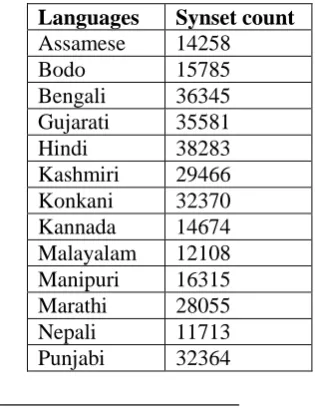
[image:2.595.342.490.69.124.2] [image:2.595.95.253.468.676.2]Bengali, Bodo, Gujarati, Kannada, Kashmiri, Nepali, Kashmiri, Konkani, Malayalam, Manipu-ri, Marathi, Nepali, Odiya, Punjabi, Sanskrit, Tamil, Telugu, Urdu, etc. Expansion approach makes use of the fact that there are several ‘uni-versal concepts’ which are independent of the language. If one language has synsets for univer-sal concepts, then it makes sense to borrow this work for some other language. For such univer-sal concepts, the semantic relations remain same across the languages. Hence one can directly bor-row them for other languages. This principle is used in the creation of IndoWordnet. All the se-mantic relations for universal synsets are defined in Hindi and are borrowed by other languages. Expansion approach works very well for closely related languages like ‘Hindi and Marathi’. The current statistics of the IndoWordnet is shown in Table 1.
Languages Synset count
Assamese 14258
Bodo 15785
Bengali 36345 Gujarati 35581 Hindi 38283 Kashmiri 29466 Konkani 32370 Kannada 14674 Malayalam 12108 Manipuri 16315 Marathi 28055 Nepali 11713 Punjabi 32364
4http://www.meta-share.org
5 Wordnets for Indian languages are developed in In-doWordNet project. Wordnets are available in following Indian languages: Assamese, Bodo, Bengali, English, Guja-rati, Hindi, Kashmiri, Konkani, Kannada, Malayalam, Ma-nipuri, Marathi, Nepali, Punjabi, Sanskrit, Tamil, Telugu and Urdu. These languages cover 3 different language fami-lies, Indo Aryan, Sino-Tebetian and Dravidian. http://www.cfilt.iitb.ac.in/indowordnet
Sanskrit 22912 Tamil 20297 Telugu 20057 Urdu 31008
Table 1: Current statistics of the IndoWordnet
IndoWordnet stores various relations among words and synsets. These relations give an im-portant knowledge about the language structure. These are categorized under two labels viz., lex-ical relations and semantic relations.
3.1 Lexical Relations
Lexical relations are present between the words. IndoWordnet contains different types of lexical relations listed below,
Gradation (state, size, light, gender, temperature, color, time, quality, action, manner) (for all parts-of-speech)
Antonymy (action, amount, direction, gender, personality, place, quality, size, state, time, color, manner) (for all parts-of-speech)
Compound (for nouns) Conjunction(for verbs)
3.2 Semantic Relations
Semantic relations are present between the synsets. Different types of semantic relations are given below,
Hypernymy (for noun and verbs) Holonymy ( nouns)
Meronymy (component object, member collection, feature, activity, place, area, face, state, portion, mass, resource, pro-cess, position, area)
Troponymy (for verbs)
Similar Attribute (between noun and ad-jective)
Function verb (between noun and verb) Ability verb (between noun and verb) Capability verb (between noun and verb) Also see
Adverb modifies verb (between adverb and verb)
Entailment (for verb) Near synset
Adjective modifies noun (between adjec-tive and noun)
IndoWordnet provides extra relations (Na-rayan et. al., 2002) in comparison with Princeton wordnet, e.g., gradation, causative form, nominal and verbal compounds, conjunction etc. All these relations are covered in IndoWordnet Visualizer. User can see these relations and understand them better visually. All these relations are used while finding the related concepts of a given word. The need to make entirely different explorer for In-doWordnet lies in its difference from other wordnets in terms of the structure and relations. The entirely different format makes it difficult to import other visualizers directly. Manually going through the wordnet relations takes very large time. Visualizer makes this process extremely efficient and intuitive. This motivated us to cre-ate a new visualizer for IndoWordnet. Developed GUI is enriched with various facilities as ex-plained in Section 4.
4
IndoWordnet Visualizer
IndoWordnet visualizer is designed for visualiz-ing the IndoWordnet database. It is made publi-cally available on IndoWordnet website6. Related
concepts of a given input word are extracted at different levels and a sub graph is displayed on a screen. The user interface layout and its features are described below.
4.1 User Interface Layout
The interface of the visualizer consists of fol-lowing I/O features.
The input to the interface consists of:
Text-box for the word to browse and ex-plore
Drop-box to select a language (Indian languages)
Drop-box to select visualization options
The output of the interface consists of:
A graphical view of all related words and concepts in a respective language for a given input word. (Screenshot 2)
6
http://www.cfilt.iitb.ac.in/indowordnet/
Download option is provided for retriev-ing related words and concepts which can act as a good context clue for a given input word.
4.2 Features
Interface is enhanced with the following fea-tures, which provide flexibility to the user to visualize the wordnet database.
Nodes are automatically arranged on the screen according to physics and depending on the total number of nodes. The repul-sion between the nodes and the link tance is optimally calculated so as to dis-play all nodes clearly. Here, nodes are nothing but the concepts from IndoWord-net. For a given input word, all related concepts are extracted from IndoWordnet and are displayed at appropriate positions on the screen.
The size of the node varies according to the number of its immediate neighbor. A node consisting large number of neighbors is bigger in size than a node with less number of neighbors. This highlights more frequent words against less frequent ones.
When a user moves a mouse pointer over a particular node, it highlights all its im-mediate neighbors along with that node. (Screenshot 6)
When a user moves a mouse pointer over a particular edge, it highlights the type of relation exist between the nodes. Different color encodings are used for displaying the lexical and semantic relations. (Screenshot 3)
User can click, drag, expand and fix nodes for better visibility. (Screenshot 4) Zoom in and zoom out facilities are also
provided.
When a user clicks on a node all its se-mantic information is displayed on the screen. It includes synset id, synset words, gloss, and example sentence.
4.3 Visualization Schemes
In an interface, we provided two types of visual schemes.
1. By the number of levels
2. By the number of nodes
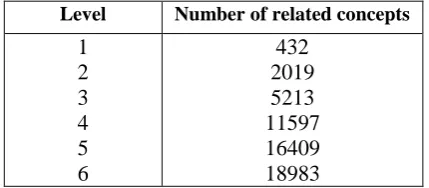
In the first scheme, for a given concept, relat-ed concepts are extractrelat-ed according to different levels e.g., immediate neighbors, neighbors of immediate neighbors and so on. Sometimes due to large number of neighboring concepts user may face difficulty in visualization. For example, for the Hindi concept ‘मानवकृति’ (man-made) giv-en below, the number of extracted related con-cepts at different levels are shown in Table 2.
As number of levels increases, number of nodes (related concepts) for the concept also in-creases drastically. It is very difficult to render such kind of concepts on a screen. That’s why we provided a second visualization scheme in which user has been given a facility to choose number of nodes to be displayed on the screen (Screenshot 7).
Level Number of related concepts
[image:4.595.73.288.596.690.2]1 2 3 4 5 6 432 2019 5213 11597 16409 18983
Table 2: Number of related concepts for the word
‘मानव कृति’ (manavakruti) (man-made) at different levels
5
Implementation details
The front-end of the IndoWordnet Visualizer uses Data Driven Documents (D3) JavaScript library, which allows us to present the data of nodes and edges from the back-end, graphically. This library allows us to define geometry for nodes and edges so as to automatically arrange them efficiently, while also allowing the user to click, drag and fix any node for better visibility. The library uses Scalable Vector Graphics (SVG), which allows us to zoom into the graph without pixelating the nodes, links or labels. The superiority of D3 lies in its support for dynamic behavior allowing user-friendly interaction and animation.
6
Conclusion and Future Work
We have presented the IndoWordnet visualizer which can be used for browsing and exploring IndoWordnet lexical database. It is enhanced with various functionalities in order to provide flexibility to the user. It is very useful for word-net validation process. It can be used in various Natural Language Processing applications viz.,
Word Sense Disambiguation, Information Re-trieval, Semantic Relatedness etc. IndoWordnet visualizer is under development and some more features are yet to be included like generating the minimum sub graph between two given con-cepts.
References
Pushpak Bhattacharyya, 2010. “IndoWordnet”, Lexi-cal Resources Engineering Conference (LREC 2010), Malta.
Christiane Fellbaum, 1998. “WordNet: An Electronic Database”, MIT Press, Cambridge, MA.
Michael Friendly, 2008. "Milestones in the history of thematic cartography, statistical graphics, and data visualization", National Sciences and Engineering Research, Council of Canada.
Anders Johannsen and Bolette Pedersen, 2011. “An-dre ord” – a Wordnet Browser for the Danish Wordnet, DanNet, NODALIDA 2011 Conference Proceedings, pp. 295–298.
Dipak Narayan, Debasri Chakrabarty, Prabhakar Pan-de and Pushpak Bhattacharyya, 2002. “ An Experi-ence in Building the IndoWordNet - a WordNet for Hindi”, International Conference on Global Word-Net (GWC), Mysore, India.
Roberto Navigli, 2013. “A Quick Tour of BabelNet1.1”, CICLing 2013, Part I, LNCS 7816, pp. 25–37.
Hindi concept:
Synset:
मानव कृति, मानवकृति, मानव-कृति, मानव तनर्मिि
वस्िु, मानव-कृि वस्िु, कृत्रिम वस्िु (Human work, man-made object, human - integrated object, artificial object)
Gloss/example:
मानव द्वारा बनाई या िैयार की हुई वस्िु "यह
मुगलकालीन मानव कृति है"
Roberto Navigli and Simone Ponzetto, 2012. “BabelNetXplorer: A Platform for Multilingual Lexical Knowledge Base Access”, France.
Bolette Pedersen, Lars Borin, Markus Forsberg, Neeme Kahusk, Krister Lindén, Jyrki Niemi, Ni-klas Nisbeth, Lars Nygaard, Heili Orav, Eirikur Rögnvaldsson, Mitchel Seaton, Kadri Vider, Kaar-lo Voionmaa, 2013. “Nordic and Baltic wordnets aligned and compared through WordTies”, Pro-ceedings of the 19th Nordic Conference of Compu-tational Linguistics (NODALIDA), 2013.
Steven Vercruysse and Martin Kuiper, 2011. “WordVis: JavaScript and Animation to Visualize the WordNet Relational Dictionary” in Proceedings of the Third International Conference on Intelligent Human Computer Interaction (IHCI 2011), Prague, Czech Republic, August, 2011
Screenshots
Screenshot 1: For a given Hindi word ‘maata’ (mother), all its senses are displayed on a
Screenshot 2: Graph for a Hindi word ‘maata’ (mother) with level 1
All related concepts of ‘maata’ are displayed in a graph along with
its semantic information on right side
Screenshot 3: Graph for a Hindi word ‘maata’ (mother) with level 1
Screenshot 4: Graph for a Hindi word ‘pita’ (father) with level 1
(In screenshot 2, if we expand node ‘pita’ then this graph is generated)
Screenshot 6: Graph for a Hindi word ‘diwar’ (wall)with level 2. On mouse hover it high-lights its synsets and only immediate neighbors (concepts)
Screenshot 7: Graph for a Hindi word ‘diwar’ (wall) with 25 number of nodes on a screen.