Enhancing Eucalyptus Community Cloud
Andrea Bosin1,2,3, Matteo Dessalvi4, Gian Mario Mereu3, Giovanni Serra3
1
Istituto Nazionale di Fisica Nucleare (INFN), Sezione di Cagliari, Monserrato, Italy 2
Dipartimento di Fisica, Università degli Studi di Cagliari, Monserrato, Italy 3
Consorzio Cybersar, Cagliari, Italy 4
Università degli Studi di Cagliari, Cagliari, Italy
Email: {andrea.bosin, matteo.dessalvi}@dsf.unica.it, {gmariomereu, giovanni.srr}@gmail.com
Received December 14, 2011; revised January 26, 2012; accepted February 5, 2012
ABSTRACT
In the last few years, the cloud computing model has moved from hype to reality, as witnessed by the increasing num-ber of commercial providers offering their cloud computing solutions. At the same time, various open-source projects are developing cloud computing frameworks open to experimental instrumentation and study. In this work we analyze Eucalyptus Community Cloud, an open-source cloud-computing framework delivering the IaaS model and running un-der the Linux operating system. Our aim is to present some of the results of our analysis and to propose some enhance-ments that can make Eucalyptus Community Cloud even more attractive for building both private and community cloud infrastructures, but also with an eye toward public clouds. In addition, we present a to-do list that may hopefully help users in the task of configuring and running their own Linux (and Windows) guests with Eucalyptus.
Keywords: Cloud; IaaS; Eucalyptus; KVM; Qcow2
1. Introduction
According to NIST [1], “cloud computing is a model for enabling ubiquitous, convenient, on-demand network access to a shared pool of configurable computing re- sources (e.g., networks, servers, storage, applications, and services) that can be rapidly provisioned and released with minimal management effort or service provider in- teraction”. Such a definition is quite general, and is not bound to any specific enabling technology or hardware and software implementation.
Cloud resources are presented to users according to one of three different delivery or service models:
Software as a Service (SaaS). The service provided to users is to employ the provider’s applications running on a cloud infrastructure. The applications are acces- sible from different client devices through either a program interface or a thin client interface, such as a web browser. Users can at most manage limited user- specific application configuration.
Platform as a Service (PaaS). The service provided to users is to deploy onto the cloud infrastructure their own applications developed using languages, libraries, and tools supported by the provider. Users have con- trol over the deployed applications and possibly con- figuration settings.
Infrastructure as a Service (IaaS). The service pro- vided to users is to provision fundamental computing resources (processing, storage, networks, etc.) where
users are able to deploy and run arbitrary software, such as operating systems and applications. Users have control over operating systems, storage, and deployed applications; and possibly limited control of network configuration (e.g., host firewalls or IP address reser- vation).
Depending on the way in which resources are organized and made available to users, we can distinguish between four different deployment models:
Private cloud. The cloud infrastructure is provisioned for exclusive use by a single organization.
Community cloud. The cloud infrastructure is provi-
sioned for exclusive use by a specific community of users from organizations that have shared concerns.
Public cloud. The cloud infrastructure is provisioned
for open use by the general public. It may be owned, managed, and operated by a business, academic, or government organization, or some combination of them.
Hybrid cloud. The cloud infrastructure is a composi-
tion of two or more distinct cloud infrastructures (pri- vate, community, or public) that remain unique enti- ties, but are bound together by standardized or pro- prietary technology that enables data and application portability.
may exist on or off premises, public clouds exist on the premises of the cloud provider.
The Open Cloud Manifesto [2], with its motto “dedi- cated to the belief that the cloud should be open”, puts openness as one of the core principles of cloud comput- ing, thus complementing the NIST model by envisioning a long-running perspective based on openness.
In this paper we analyze Eucalyptus Community [3], an open-source cloud-computing framework delivering the IaaS model and running under the Linux operating system. Eucalyptus Community exhibits openness in at least two important ways: in source code and in the adopted Amazon EC2 [4] and S3 [5] application pro- gramming interfaces (API), which have a public specifi- cation. The developers present Eucalyptus as “a frame- work that uses computational and storage infrastructure commonly available to academic research groups to pro- vide a platform that is modular and open to experimental instrumentation and study” [3]. Openness in source code allows us to fully study, experiment, customize and en- hance such a framework.
The aim of this work is to present the results of our analysis and to propose some enhancements that, in our opinion, can make Eucalyptus Community Cloud even more attractive for building both private and community cloud infrastructures, but also with an eye toward public clouds.
In Section 2 we present an overview of the Eucalyptus Community open-source cloud-computing framework, its design and its main functionality. Section 3 describes Eucalyptus out-of-the-box configuration, and points out some of its limitations. In Section 4 we discuss a number of enhancements aimed at mitigating some of the bottle-necks and some experiments showing how it is possible to take advantage of different underlying hardware and software resources. Section 5 tackles the problem of por- ting an external physical or virtual machine into Eucaly-
ptus since, in our experience, this can be the nightmare of advanced users wishing to run their own virtual machine images. At last, Section 6 draws some conclusions.
2. Eucalyptus Overview
In Eucalyptus Community, the IaaS delivery model is accomplished by providing virtual machines [6] to users: the framework provides a number of high level manage- ment services and integrates them with the lower level virtualization services found in many recent distributions of the Linux operating system. The system allows users to start, control, access, and terminate entire virtual ma- chines. Virtual machines (VM or guests or instances) run somewhere on the physical machines (PM or hosts) that belong to the underlying physical cloud infrastructure.
Eucalyptus Community has a flexible and modular ar- chitecture with a hierarchical design as depicted in Fig- ure 1.
Each high level component is implemented as a stand- alone Web service [7]:
Node Controller (NC) runs on a PM and controls the execution, inspection, and termination of VM in- stances on the host where it runs.
Cluster Controller (CC) schedules and monitors VM execution on specific node controllers, as well as ma- nages virtual instance network.
Storage Controller (SC) is optionally associated to a cluster controller and is responsible for the manage- ment (allocation, use and deletion) of virtual disks that can be attached to VM instances; virtual disks (or volumes) are off-instance storage that persists inde- pendently of the life of an instance.
Walrus is a put/get storage service, providing a sim- ple mechanism for storing and accessing virtual ma- chine images and user data.
[image:2.595.124.474.539.719.2] Cloud Controller (CLC) is the entry-point for users
and administrators; it queries cluster controllers for in- formation about resources (instances, images, volumes, etc.), makes high level scheduling decisions, and man- ages user credentials and authentication.
PMs running the node controller service are grouped into one or more independent clusters, where each cluster is managed by a cluster controller and optionally coupled to a storage controller; all cluster controllers are coordi- nated by one cloud controller, while one Walrus service provides storage for all virtual machine images and op- tional user data. User interaction involves the cloud con- troller for VM and volume management through the EC2 API, and Walrus for the management of VM images and user files through the S3 API; the access to VMs from the network (e.g. login via secure shell) is transparently granted or denied by the cluster controllers based on the security policies (or access groups) specified by users.
Users can interact with Eucalyptus Community either through command line tools such as euca2ools [8] or s3cmd [9] or web browsers plug-ins such as Hybridfox [10]. In addition, the CLC publishes a web interface for user registration and credentials generation.
3. Eucalyptus Out-of-the-Box Configuration
Eucalyptus Community Cloud (ECC) provides a standard out-of-the-box configuration for the lower level virtuali- zation services to allow a simple set-up of the cloud in- frastructure. Such configuration affects mainly the node controllers which are responsible of the bare execution of VMs. The out-of-the-box configuration discussed here is by no means the only possible, as we are going to show in the next section, but it represents a simple and reason- able starting point. In this section we cover the details which we consider most relevant, and point out some of the correlated limitations and bottlenecks.
VMs run atop the Xen [11] hypervisor, even though ECC interacts with the specific hypervisor through an abstraction layer, i.e. the libvirt virtualization API [12]. Xen requires a special Xen-aware kernel both on the host and on the guest if para-virtualization [13] is used; only if the host hardware supports hardware-assisted virtuali- zation (HVM), as it is the case with recent CPU [14-16], guest operating systems can be executed unmodified. As a consequence, if HVM is not enabled, Windows operat-ing systems cannot be executed, while Linux operatoperat-ing systems must be booted from a Xen-aware kernel.
To run a VM instance, ECC needs separate image files for kernel, ramdisk and root filesystem, which are up- loaded by users and retrieved by the system through the Walrus service; kernels and ramdisks can be registered with Walrus only by cloud administrators. This means that it is neither possible to boot a VM from the (native) kernel and ramdisk in the root filesystem, nor to update external kernels and ramdisks without the intervention of
cloud administrators. Windows can only be booted using a custom-made kernel/ramdisk combination. Walrus cu- rrent implementation is extremely inefficient in manag- ing large image files (say larger that 1 GB), since it per- forms many operations reading the files from and writing them to disk every time, instead of piping all the opera- tions using the main memory and writing the result to disk only at the end.
[image:3.595.311.537.529.718.2]The image file of the root filesystem partition is ac- quired immediately before starting a VM instance; a copy of the former (and also of the kernel and the ramdisk) is cached in a directory on the node controller in such a way that a new VM instance of the same type and on the same node controller will use the cached images, thus avoiding the overhead of retrieving them once again. The set-up of the root filesystem image is very time consum- ing; if it is not already present in cache, the image must be first retrieved from Walrus and saved on the node controller filesystem, then copied into the caching direc- tory, and at last the VM is started. If the image is found in the node controller caching directory, a copy is per- formed and the VM is started. It is not unusual to have root filesystem large 5 - 10 GB in size, and the need for multiple copies slows down VM start-up times.
Figure 2 summarizes the main steps for the deploy- ment of a VM: 1) a user requests a new VM to CLC; 2) CLC authorizes the request and forwards it to CC; 3) CC performs virtual network set-up (hardware and IP ad- dresses, and firewall rules) and schedules the request to a NC; 4) NC retrieves image files from Walrus (or cache); 5) NC starts the VM through the hypervisor; and 6) the user logs into the VM.
To test a medium-sized ECC standard installation we have used the cloud resources available from the Future- Grid project [17], in particular those in the “India” cloud.
One of the first problems we encountered using Future
Grid ECC was the identification of a kernel/ramdisk combination, among those already deployed, working with our own Linux root filesystem image. Using a ker- nel which is not the one bundled (and tested) with the chosen Linux distribution may cause problems, in addi- tion to the fact that we had to find out and install the cor- responding kernel modules.
Another problem that we had to face was the mismatch between the devices referenced by our own Linux root filesystem image, and the para-vitualized devices seen by the Xen kernel.
A simple measure of the time needed to prepare the root filesystem image is the time interval that occurs be- tween instance submission and the VM entering the run- ning state. For a root filesystem image of 4 GB (741 MB compressed) we have measured a start-up time of appro- ximately 5 - 7 minutes.
4. Enhancing Eucalyptus
In this section we describe the experiments we have per- formed and the enhancements we have tested starting from a clean ECC v2.0.3 installation. Such enhancements involve, in addition to the tuning of standard configura- tion files, both customization/modification of ECC scripts and the application of a couple of simple patches to the source code; the scripts and the patches are available to interested readers [18].
4.1. Service Environment
As a preliminary step to our experimentation, we have deployed a new ECC installation starting from sources, where all services, except NC, run on VMs so as to opti- mize hardware resource usage. The answer to the obvi- ous question, “is VM performance capable of efficiently running ECC services?” is positive at least in the fol- lowing environment that we have tested:
VMs are executed on a host supporting hardware- assisted virtualization by using a recent version of the open-source machine emulator and virtualizer QEMU [19] combined with Kernel-based Virtual Machine [20] (KVM);
VM virtual disks are stored in physical disk partitions as logical volumes (LVM) [21] (LVM allows live backups without service interruption);
storage is made available to both Walrus and SC by an efficient network filesystem (IBM General Parallel File System [22] in our case) to provide the necessary disk space and performance (we plan to test the Lus- tre [23] filesystem, too); and VMs use the virtio [24] network and disk drivers.
4.2. Hypervisor
The next step has been to replace the Xen hypervisor
with QEMU/KVM on node controllers, considered that all recent servers support hardware-assisted virtualization. The replacement is simple since ECC interfaces with the libvirt API which supports both Xen and QEMU/KVM.
QEMU/KVM on node controllers is configured to use virtio network/disk drivers. We have performed a set of I/O tests: the combination of KVM on host and virtio on guests, except for some unhappy occurrence of host ker- nel and KVM modules (e.g. hosts running CentOS 5.7 Linux), guarantees a good guest performance (e.g. latest CentOS 6 and Debian Squeeze Linux, but also Windows XP). ECC over QEMU/KVM adopts a different strategy for VM filesystem layout: the image of the root file- system partition is converted into a virtual disk image in “raw” format immediately before starting a VM instance and the caching is performed on the virtual disk.
One of the advantages of QEMU/KVM is the usage of standard unmodified operating system kernels both in hosts (only kernel modules are required) and guests (Linux and Windows), thus simplifying host and guest set-up and portability.
In addition, QEMU/KVM allows node controllers to boot a VM using the operating system boot loader (e.g. Linux GRand Unified Bootloader or GRUB) stored in the master boot record of the virtual disk image, and hence to boot the operating system from the native kernel/ramdisk stored inside the root filesystem. In this way users can simply use their own kernels/ramdisks and can update them as needed. Of course, this implies the possibility of uploading an entire virtual disk image to Walrus, and not only the root filesystem image, and ECC allows it.
VM start-up time is another aspect that deserves sub- stantial enhancement. The availability of a network file- system on node controllers allowed us to configure a cen- tralized caching directory shared by all NCs; virtual disk creation from the root filesystem image stored on Walrus is then performed only once for all NCs instead of once for every NC.
4.3. Image Format
the unmodified “raw” backing file. More than one “qcow2” image file can reference the same read-only “raw” backing file, hence the possibility of using the “raw” virtual disk images in the caching directory as backing files for the “qcow2” virtual disk images used by VM, thus avoiding the copy of the whole virtual disk image from cache. The creation of a “qcow2” virtual disk image with a “raw” backing file is very fast (few seconds), and VM start-up times are drastically reduced to a few seconds, if the “raw” image already is in cache (with a shared cache, only the first VM instance of a given type will encounter a cache miss).
4.4. Virtual Disk Performance
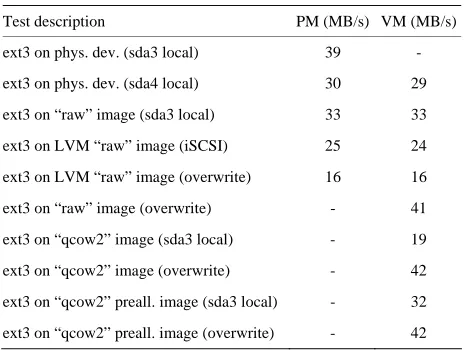
No solution is perfect, and the “qcow2” format intro- duces a penalty in VM disk write performance. To give some numbers, with a Linux ext3 filesystem we mea- sured the following speeds when writing a file of size 1 GB by means of 1024 write and sync operations of 1 MB each: the guest performs at 33 MB/s for a virtual disk image in “raw” format and 19 MB/s for “qcow2”, to be compared with the host performance of 39 MB/s meas-ured when writing directly to the filesystem and 33 MB/s when writing to a “raw” virtual disk image.
[image:5.595.307.539.99.274.2]“Qcow2” with meta-data pre-allocation performs much better, reaching 32 MB/s, but the use of a backing file and meta-data pre-allocation cannot be combined in the current release of QEMU/KVM; the good news is that they will be in the next future.
Table 1 summarizes the results of some write speed measures performed on a CentOS 6 node controller (PM) and a Debian Squeeze guest (VM) running on top of it. It may be interesting to notice that VM performance sub- stantially increases when over-writing the 1 GB file pre- viously written (suggesting that allocation of new disk space is one of the factors that limits the performance of virtual disk images): approximately 40 MB/s for both “raw” and “qcow2” images and aligned with native host performance.
An important point to consider when comparing re- sults is the decrease in write speed that physical disks exhibit when moving from outer to inner cylinders.
To better understand the data shown in Table 1, it may be useful to know that sda4 is a 10 GB partition that spans only over the inner disk cylinders, while sda3 is a 180 GB partition (almost empty) whose extension starts from the outer cylinders: this leads to different write speeds, 30 MB/s for sda4 and 39 MB/s for sda3, the outer the better.
The “qcow2” performance problem is more annoying for Windows guests and especially immediately after boot, since this operating system uses a page file located inside its root filesystem; during operating system start-up all process data that are not in active use are written to the
Table 1. Summary of write speed tests.
Test description PM (MB/s) VM (MB/s)
ext3 on phys. dev. (sda3 local) 39 -
ext3 on phys. dev. (sda4 local) 30 29
ext3 on “raw” image (sda3 local) 33 33
ext3 on LVM “raw” image (iSCSI) 25 24
ext3 on LVM “raw” image (overwrite) 16 16
ext3 on “raw” image (overwrite) - 41
ext3 on “qcow2” image (sda3 local) - 19
ext3 on “qcow2” image (overwrite) - 42
ext3 on “qcow2” preall. image (sda3 local) - 32
ext3 on “qcow2” preall. image (overwrite) - 42
page file causing a lot of (slow) writes to the “qcow2” image.
At a first sight “qcow2” performance could be a re- levant problem, since in general disk I/O performance for VM is not exceptional (at least when the virtual disk images are stored into files as with ECC). However, we must consider that heavy disk write activity on the VM root filesystem is not recommended anyway, nor it is usually necessary since ECC provides off-instance vo- lumes that can be attached on-the-fly to a running VM instance and be seen as standard disks. Off-instance vo- lumes are “exported” by a storage controller and “im- ported” by the host running the VM via the iSCSI proto- col, i.e. the network, and attached to the VM by emulat- ing a PCI hot-plug device. If the storage controller fea- tures a good filesystem performance and the network bandwidth is reasonable, volume performance is accept- able: the 1 GB test executed on an attached volume rea- ched 24 MB/s on the guest, to be compared with 25 MB/s on the host. If the storage controller can be atta- ched to a high performance NAS or SAN, a higher speed would be achieved.
4.5. I/O Barriers
4.6. File Injection
Related to the “qcow2” image format, is the problem of “injecting” files into a virtual disk image before VM start-up; this technique is used by ECC to customize the VM with a user-generated public key for the root user, in such a way that after boot the user can exploit secure shell to log in to the VM, by using the corresponding private key (Linux only). While the injection of a file into a “raw” image can be performed directly by using the loopback devices, the same is not true for a “qcow2” image. In the latter case we have then resorted to the lib- guestfs [27] suite.
5. Porting New Machines into Eucalyptus
In our experience, when a user wishes to run guests from its own deployed root filesystem or disk image, he/she may immediately run into troubles, due to the differences in the configuration expected by ECC and the one exhi- bited by a cloned PM or even VM built for a different environment. In this section we present a to-do list that may hopefully help in the aforementioned task of con- figuring and running a user-provided Linux guest in ECC. Please notice that not all ECC installations have the same configuration, as the experiments reported in this work should point out. At a minimum, users should be aware of the hypervisor in use, i.e. Xen or QEMU/KVM.
5.1. Filesystem Layout
In many recent Linux distributions (such as RHEL/ CentOS or Debian/Ubuntu), disk partitions are no longer referred to by device in /etc/fstab; labels or universally unique identifiers (UUID) are preferred just because of physical device independence. Unluckily, some cloning tools (most noticeably ECC euca-bundle-vol) do not clone labels or UUID; hence, if /etc/fstab is not manually adjusted in the cloned image, a mismatch occurs and partitions cannot be mounted during VM boot. A similar problem can come about even if /etc/fstab refers to disk partitions by device, since devices usually differ between a running PM and its VM clone or between a running Xen VM and its QEMU/KVM clone; the SATA hard disk partition device /dev/sda1 in a PM may become the virtio disk partition /dev/vda1 in a QEMU/KVM VM or the virtual disk partition /dev/xvda1 in a Xen VM.
5.2. Network
Network configuration is simple, since ECC provides the IP address to its guests via the DHCP protocol (on the contrary, host network configuration is quite flexible [3]): just set the network interface eth0 to acquire an IP ad- dress via DHCP; a common error, especially when clon- ing a PM, is to have a specific MAC or hardware address
assigned to the network interface: this must be removed from the network configuration file because ECC assigns its own MAC addresses to guests and a MAC mismatch will cause network start-up to fail.
5.3. Serial Console
ECC can redirect the output of the VM serial console into a file, which can then be viewed by the user; this may be useful for debugging problems which occur dur- ing VM start-up. For console redirection to work, a VM must be configured to write to its serial console, usually by enabling the device /dev/ttyS0 (KVM) or /dev/hvc0 (Xen) in the /etc/inittab configuration file. No serial con- sole configured means no output redirected to the file.
5.4. Ramdisk
The ramdisk associated to a kernel image contains the modules necessary to mount the root filesystem during boot; when booting a VM inside ECC, additional modu- les may be needed, notably the virtio modules if QEMU/ KVM is configured to reply upon them. In such a case, the ramdisk must be re-created including the necessary modules; otherwise the boot will fail when trying to mount the root filesystem. A common error is to clone a PM or a VM built for Xen expecting that it will boot as a VM using QEMU/KVM configured to employ virtio: a typical PM ramdisk does not contain virtio device driv- ers.
5.5. Boot Loader
vice for such a VM is /dev/vda1; on the contrary, QEMU/KVM configured for IDE disk emulation will boot a VM if the root filesystem is specified as /dev/hda1, not if it is specified as /dev/vda1.
5.6. Windows
Windows is not covered in detail here, but unless QEMU/KVM or Xen/HVM are configured to emulate devices known to Windows (e.g. IDE disks), the correct device drivers must be installed. While filesystem layout, ramdisk and boot loader should not require special con- figuration, almost certainly a Windows re-activation will be required if using a cloned disk image. As far as the network is concerned, DHCP should be configured and terminal services started to be able to log in to the VM through the network.
6. Conclusions
Eucalyptus Community Cloud is a very interesting cloud- computing framework with promising possibilities, rely- ing on open-source code and on EC2 and S3 API, for which a public specification is available. In this work we have investigated and proposed a number of enhance- ments and extensions that, in our belief, can make ECC even more attractive for building both private and com- munity cloud infrastructures, but also with an eye toward public clouds.
Many other interesting features can be tested, among others we plan to experiment with the new “qcow2” for- mat supporting both backing file and meta-data pre- allocation, as soon as it is available.
In addition, most of the attracting features that made us prefer KVM over Xen seem to be available in the latest Xen, i.e. version 4, and we plan to investigate the combination of ECC and Xen4 in the next future, even because every Linux kernel from 2.6. 39 onwards will contain the Xen hypervisor, thus eliminating the need of a modified kernel in hosts and guests.
Moreover, some of the points covered in Section 5 could be automatically managed within ECC by means of suitable scripts; for example, we already have in place a semi-automatic procedure for installing GRUB to a virtual disk image, and we plan to include it in ECC as a completely automatic operation.
7. Acknowledgements
The authors acknowledge the Cybersar Consortium for the use of its computing facilities. This material is based upon work supported in part by the National Science Foundation under Grant No. 0910812.
REFERENCES
[1] G. P. Mell and T. Grance, “The NIST Definition of Cloud
Computing,” National Institute of Standards and Tech-nology, Gaithersburg, 2011.
[2] “Open Cloud Manifesto,” 2009.
http://www.opencloudmanifesto.org/Open%20Cloud%20 Manifesto.pdf
[3] D. Nurmi, et al., “The Eucalyptus Open-Source Cloud-Com- puting System,” Proceedings of the 9th IEEE/ACM Interna- tional Symposium on Cluster Computing and the Grid, Shang- hai, 18-21 May 2009, pp. 124-131.
doi:10.1109/CCGRID.2009.93
[4] Amazon, “Amazon Elastic Compute Cloud API Reference,” 2011.
http://awsdocs.s3.amazonaws.com/EC2/latest/ec2-api.pdf
[5] Amazon, “Amazon Simple Storage Service API Reference,” 2006.
http://awsdocs.s3.amazonaws.com/S3/latest/s3-api.pdf
[6] J. E. Smith and R. Nair, “The Architecture of Virtual Ma- chines,” Computer (IEEE), Vol. 38, No. 5, 2005, pp. 32-38.
doi:10.1109/MC.2005.173
[7] M. P. Papazoglou, P. Traverso, S. Dustdar and F. Leymann, “Service-Oriented Computing: State of the Art and Re- search Challenges”, Computer (IEEE), Vol. 40, No. 11, 2007, pp. 64-71. doi:10.1109/MC.2007.400
[8] “Euca2ools,” 2011.
http://open.eucalyptus.com/wiki/Euca2oolsGuide_v1.3
[9] M. Ludvig, “S3 tools,” 2011. http://s3tools.org/s3tools
[10] “Hybridfox,” 2011.
http://code.google.com/p/hybridfox [11] Xen, 2011. http://xen.org
[12] Libvirt, “The Virtualization API,” 2011. http://libvirt.org
[13] T. Abels, P. Dhawan and B. Chandrasekaran, “An Over-view of Xen Virtualization,” Dell Power Solutions, No.8, 2005, pp. 109-111.
[14] Advanced Micro Devices, “AMD64 Virtualization Code- named ‘Pacifica’ Technology—Secure Virtual Machine Ar- chitecture Reference Manual,” Advanced Micro Devices, Sunnyvale, 2005, pp. 1-3.
[15] G. Neiger, A. Santoni, F. Leung, D. Rodgers and R. Uhlig, “Intel Virtualization Technology: Hardware Support for Efficient Processor Virtualization,” Intel Technology Jour- nal, Vol. 10, No. 3, 2006, pp. 167-178.
doi:10.1535/itj.1003.01
[16] A. Aneja, “Xen Hypervisor Case Study—Designing Em-bedded Virtualized Intel Architecture Platforms,” Intel, 2011, pp. 5-9.
http://download.intel.com/design/intarch/PAPERS/32525 8.pdf
[17] FutureGrid, “A Distributed Testbed for Clouds, Grids, and HPC,” 2011. https://portal.futuregrid.org
[18] A. Bosin, M. Dessalvi, G. M. Mereu and G. Serra, “En- hancing Eucalyptus Community Cloud,” 2011.
http://www.dsf.unica.it/~andrea/eucalyptus.html
[19] QEMU, 2011. http://wiki.qemu.org/Main_Page
[21] LVM, 2011.
http://sources.redhat.com/lvm2
[22] IBM, “IBM General Parallel File System,” 2011. http://www-03.ibm.com/systems/software/gpfs
[23] “Lustre Filesystem,” 2011.
http://wiki.lustre.org/index.php/Main_Page
[24] R. Russell, “Virtio: Towards a De-Facto Standard for Virtual I/O Devices,” ACM SIGOPS Operating Systems Review—Research and Developments in the Linux Kernel
Archive, Vol. 42, No. 5, 2008, pp. 95-103.
doi:10.1145/1400097.1400108
[25] M. McLoughlin, “The Qcow2 image format,” 2008. http://people.gnome.org/~markmc/qcow-image-format.ht ml
[26] “Understanding Linux Block IO Barriers,” 2010. http://www.linuxsmiths.com/blog/?p=18.