Document analysis of PDF files: methods,
results and implications
WILLIAM S. LOVEGROVE AND DAVID F. BRAILSFORD Electronic Publishing Research Group
Department of Computer Science University of Nottingham Nottingham, NG7 2RD, U. K.
e-mail:{wsl,dfb}@cs.nott.ac.uk
SUMMARY
A strategy for document analysis is presented which uses Portable Document Format (PDF — the underlying file structure for Adobe Acrobat software) as its starting point. This strategy examines the appearance and geometric position of text and image blocks distributed over an entire document. A blackboard system is used to tag the blocks as a first stage in deducing the fundamental relationships existing between them. PDF is shown to be a useful intermediate stage in the bottom-up analysis of document structure. Its information on line spacing and font usage gives important clues in bridging the ‘semantic gap’ between the scanned bitmap page and its fully analysed, block-structured form. Analysis of PDF can yield not only accurate page decomposition but also sufficient document information for the later stages of structural analysis and document understanding.
KEY WORDS Document analysis Document understanding Geometric structure Logical structure PDF PostScript
1 INTRODUCTION
Page description languages (PDLs) have been described as “communication of an already formatted page or document description from a composition system to an output device, either screen or printer” [1]. The initial development of page description languages has been closely linked to progress in laser-printer technology. More recently, PDLs have evolved further so that they are now being used for the electronic dissemina-tion and storage of documents: Adobe’s Portable Document Format (PDF) [2] and Com-mon Ground’s Digital Paper [3] are just two recent examples.
The major advantage of disseminating electronic documents in a PDL format is the complete control it gives over appearance. Disadvantages of PDL documents include their relatively large file size (when compared to the logical markup used in SGML and HTML) and the lack of any useful logical structure within the file format. This last draw-back stems from the evolution of PDLs from low-level printer languages and yet it is often the case that a PDL file is the only available ‘electronic form’ of a document and any attempt to infer the structure of such a document has to be made ‘bottom up’ from a scanned page image.
This paper presents the findings of a year’s study of the document analysis and
docu-ment classification of PDF material. The first of these terms covers the decomposition of
CCC 0894–3982/95/020207–14 Received 3 April 1996
a page into geometric elements (e.g a group of text lines, or a photograph, that form a ‘block’ of some sort) followed by the demarcation of these blocks using paragraph breaks, inter-column gutters and so on. After a preliminary tagging of these blocks according to their apparent type (e.g. photograph, heading, paragraph etc.) it may be possible to combine this type classification with the known geometric block layout to discern which headings (for example) govern which particular text and graphic blocks. In this way one can begin document classification by inferring whether this document is a journal paper, newspaper, brochure, business letter or some other document type [4]. Previous research in this field has taken scanned bitmap images as the input to the document analysis system and classification of the document components is often guided by a priori knowledge of the document’s class [5–9]. It is noteworthy that there has been hardly any research in using PostScript as a starting point for document analysis. Certainly, if a PostScript file has been designed for maximum rasterising efficiency it can be a daunting task even to reconstruct the ‘reading order’ of the document. It may also be the case that previous workers have presumed that a well-structured source text will always be available to match PostScript output and, therefore, that working ‘bottom up’ from PostScript would seldom be necessary. However, we shall find that documents can be acquired in the PostScript-related PDF language in a variety of ways (including an OCR-based route directly from a bitmapped page). The extra structure in PDF, over and above that in PostScript, helps to achieve the goal of document understanding, which can be defined as the mapping of a logical document structure onto the geometric structure created from document analysis 4, 5]. More precisely, the goal of the present research is to work towards full document understanding and structural inference with no a priori knowledge of the document class. We would like to be able to recognise a document as being a journal paper, say, and then be able to analyse it thoroughly enough to confect an SGML Document Type Definition (DTD) for all of its elements. Alternatively we might wish to perform a ‘fuzzy match’ of the analysed document elements against a previously supplied DTD. We are not yet at a stage to achieve this full document understanding but the next sections describe what we have achieved in the necessary preliminary stages of document analysis and classification. We also set out those features of PDF which make analysis and classification easier if PDF is used as a starting point rather than a simple bitmap page image.
2 THE PORTABLE DOCUMENT FORMAT
PDF may usefully be regarded as a tree-structured version of level 2 PostScript with each node in the tree being an array of imageable objects belonging to a particular page. Asso-ciated with each page object are the ‘resources’, such as fonts, that the page uses. PDF also has facilities for hyperlinks, bookmarks, ‘yellow stickers’ and thumbnail images of pages (as an aid to navigation) [2, 10].
PDF may be created in three different ways:
g By the Distiller software from PostScript: here a special PostScript interpreter
creates PDF from PostScript files.
g By PDFWriter: This program is a normal printer driver which can create PDF,
directly, from document authoring systems.
g By Adobe Acrobat Capture: Capture is a document analysis package which starts
with a bitmap image of a document in TIFF form and recreates this document faith-fully in PDF using a customised version of PDFWriter. This processing requires the recognition of fonts, as well as words and characters. The resulting PDF is usu-ally much more compact than the TIFF image and can be searched for arbitrary phrases and keywords by all of the standard PDF search engines.
The last-named method gives a means of generating PDF files without any recourse to some initial tagged, or WYSIWYG, source text. Capture performs image segmentation, classification, line identification, word recognition and optical character recognition, but does not attempt document classification or understanding. The program will often seg-ment the page image during the course of its analysis but any geometric blocks created in this way will not generally be reflected in the translation to PDF. This is particularly true of pages composed entirely of text, where a single amorphous PDF page-object will be produced. Thus, Capture cannot, of itself, perform the breakdown into geometric blocks that corresponds to document analysis (as defined in the previous section). One exception to this rule is that Capture’s recognition algorithms can distinguish items such as photo-graphs, screen-dumps or complex diagrams — which need to be left in bitmap form. Such items will typically be converted to separate ‘image objects’ on the appropriate PDF page. However, there is no mechanism in PDF, as presently defined, for embedding any logical information about inter-object relationships into a PDF file.
One of the features of PDF is that, like PostScript, there are many different PDF pro-grams that can have precisely the same rendered effect on the screen. A given PDF file might be structured to write out text a word at a time, a character at a time, or by some other algorithm that tries to optimise on-screen rendering. There is no requirement for PDF files to be in ‘reading order’ and, for multi-column text, it will often be the case that the file is rendered across the columns i.e. by hopping across the inter-column gutter.
In order to help application programmers to extract logical words from a PDF file (even if these have been hyphenated, say) Adobe Systems Inc. provide a software developers kit (SDK) which gives access via the application programme interface (API) of Acrobat viewers to the underlying portable document model which the viewer is hold-ing in memory. There is a built-in algorithm inside the viewers which attempts to find all the logical words within a PDF document for string-search purposes. This algorithm is sound for all single-column documents but can get confused when presented with multi-column texts. Typically, errors occur when the inter-multi-column gutter is very narrow; the word reconstruction algorithm may then, mistakenly, hop across the gutter. Furthermore, if the rightmost word of the rightmost column is hyphenated, the remainder of the word may be erroneously looked for in the leftmost column of the next line on the page.
3 PAGE SEGMENTATION OF PDF FILES
Having acquired a PDF document by any of the methods outlined in the previous section, our software analyses each page of the PDF file in turn. We now describe the algorithm for segmenting a PDF page using the geometric properties of its constituent elements: text, graphics and images. In the PDF model images are already represented as separate child objects attached to the appropriate node of the pages tree. This makes them easy to identify and no further processing needs to be done to segment or classify these elements. Within the graphic elements it would be useful to try and detect higher-level constructs, such as vertical and horizontal lines in a typeset table, but this task is not attempted here.
The major processing, therefore, is to segment the amorphous chunks of text within a PDF page into regions containing text with similar attributes. The two most important of these attributes are point size and font name and these are used as a key for tagging the various segments that are discovered. Note that these attributes — which are such a valu-able aid to document analysis — are stored as part of the ‘page resources’ in each node of the PDF page tree (regardless of the method by which the PDF file was produced).
3.1 Phase one, forming lines from words
The logical words are first grouped into lines. This function is performed by the word-finding algorithm of the API within the Acrobat Exchange viewer. As already noted, the algorithm is prone to errors particularly in multi-column documents, or when the original document has been created at 90°to the intended reading position and then rotated. This results in the bounding boxes of the words being 90°adrift, which has a disastrous effect on the built-in line-finding algorithm. This type of error is rare and can easily be put right by applying the correct rotational matrix to the bounding boxes.
The net result of processing in phase one is that, for each line, a start, middle and end point can be estimated by accumulating the bounding boxes of its individual words. Once this line recognition is complete each line is given the following attributes:
g Point size of the majority of its constituent words. g Font of the majority of its constituent words. g Coordinates relating to its position on the page.
3.2 Phase two, geometric segmentation of text regions
Each line is given a key, formed from the combination of its point size and font name features. A bin is created for each unique combination of font and point size in the docu-ment. The lines are then allocated to that bin which matches their key.
3.3 Phase three, discrimination using line spacing and indentation
The sub-bins, in turn, are sorted based on their vertical position and for each consecutive pair of lines in a sub-bin a vote is registered for the line-spacing value. The most popular line spacing values (determined by applying a threshold created from a function of the number of lines voting) are used to further segment the sub-bins into geometric blocks. The start and end of a block within a sub-bin will usually have been triggered by some abrupt change in line-spacing or paragraph leading-edge value.
Paragraphs are usually formatted left justified, center justified, right justified or fully justified. In a left justified paragraph all the lines start with approximately the same hor-izontal coordinate value. In a right justified paragraph all the lines finish with approxi-mately the same horizontal coordinate value. In both center and fully justified paragraphs the centers of all the lines have approximately the same horizontal coordinate value. The leading edge value of a paragraph is the term used to describe the paragraph format style in terms of start, middle and end of line coordinate values.
3.4 Phase four, finding basic geometric relationships
In this phase we attempt to find basic geometric relationships. which are those deduced purely from the geometric properties and spatial positions of geometric elements. Logical relationships, by contrast, are at a more abstract level, and are often based on information other than pure geometry (for example, a footnote reference has a logical relationship to the footnote itself and a phrase such as ‘see figure 2’ in the middle of a text block relates that block to some earlier or later image block).
To work out the geometric relationships, each block on the page is taken in turn and its next block vertically down the page is examined. If that block is a text block and deemed to be of a lesser status (by examining the font name and point size features) the original block is tagged as a possible title black. The information this extra tag provides is then used in later analysis (see Section 4). Successive vertical blocks of equal status can now be regarded as all being governed by some preceding title block.
In some situations simply comparing the font name and point size features of two blocks is not enough to decide which block is of a greater status within the document. The font name gives no geometric information upon which to base a comparison, and sometimes the point size of text can be misleading if considered out of context. PDF typi-cally uses Adobe Type 1 fonts1 or Multiple Master2 font substitutes. These fonts are mathematically engineered to be scalable and resolution independent. They have a set of metrics [2] associated with them which hold the important geometric features of that font: x-height, descender height, caps height, serif, sans-serif, stem width and so on. A simple comparison algorithm was devised which uses the metric information and the point size information to determine the relative status of the various geometric blocks.
3.5 Appraisal of PDF page segmentation
The method of decomposition we have described here was devised independently, but turns out to be similar to that proposed by Hirayama [11] who, like us, concludes that it is better to over-segment a page and afterwards merge blocks together rather than to
1
PDF can also use Adobe Type 3 fonts which have no metric information associated with them.
2
under-segment and have to split blocks later. An important bonus for us was the detailed knowledge of fonts and point sizes provided in a PDF file as opposed to Hirayama’s rough estimate of point size by analysing the heights of bounding boxes of lines.
Our methods turned out to be robust but they are based almost entirely on geometric differences between text blocks. We have already noted that this can sometimes produce pages which are over-segmented, in the sense that groups of lines may be allocated as stand-alone blocks separate from the natural geometric block to which the human visual system would automatically assign them. This can occur, for example, if there was insufficient information for determining the appropriate discrimination value from the line-spacing and leading-edge values or because the rounding algorithm applied to the discrimination values was too strict. Another possibility is that font changes can mislead the bin-allocation algorithms. A particular line might contain 60% italic characters (but in the same typeface family, e.g. Times, as the remainder of the paragraph in which it lies). Here the human brain might perceive that the italics represent an emphasised phrase, or the proper name of a piece of software. The analysis algorithm, however, could decide to separate such a line from the natural geometric block on the basis of its different font characteristics. This over-segmentation can be partly rectified by the methods outlined in the next section.
4 FURTHER DOCUMENT ANALYSIS OF PDF FILES
In previous sections we have shown how a document page represented in PDF can be segmented into geometric blocks. In this section we describe the general architecture of our system for the analysis of entire PDF documents and present a deeper level of analysis which embodies elements of traditional document analysis and document under-standing. The system employs a blackboard-based architecture [12] which uses a train-ing stage to extract knowledge about various elements of documents, some of which exist in all types of documents: graphics, main text, captions, images, titles, headers and footers. It is not suggested that all documents contain all of these elements, but a subset of these elements will be present in almost any given document.
Blackboard architectures have been used previously in document recognition work, notably in Niyogi’s newspaper recognition system [13] and in the work by Taylor et
al [14]. The novel feature in our work is the element of machine learning applied to the patterns detected in the decomposed pages, coupled with the fact that there is no disclo-sure of the possible document class, to the system, prior to processing. The system tags each of the geometric blocks created from the basic document analysis with one of the labels listed above (i.e. title, header, footer etc.) and, where necessary, identifies the logi-cal relationships between the elements. In order for a block to be tagged as a logilogi-cal title the system must identify a relationship between that block and its successor. This stage of document processing is half way between document analysis and document under-standing. For it to be ‘document understanding’ in the sense used by previous workers [5, 15–17] the process of understanding would be helped along by knowing the class of document to which this sample belonged. More specifically, the document under-standing strategy would often use a detailed set of logical tags in accordance with some SGML DTD for the particular document class.
considerable information that PDLs have about the geometric properties of a document. Initially our system is set up with ‘empty’ knowledge sources for each of the proposed tags. The blackboard control system then executes two stages. Stage one takes a page at a time from the PDF document segments using the algorithm outlined in Section 3 and places every geometric block, one after another, onto the blackboard. Each knowledge source is given the opportunity to examine the block before the control system replaces that block with the next one. If the knowledge source judges the block to be suitable it appends the geometric knowledge that the block contains to the knowledge already acquired for that block (e.g font, point-size etc.). Once all the blocks in the entire document have been inspected the control system asks the knowledge sources to train themselves using the knowledge they have now gathered. The sources can then augment their knowledge with the recurring geometric features they have encountered in the blocks they have examined. Rules and criteria for classifying the geometric blocks can then be inferred from these recurring features. The control system then recalls the geometric blocks, one by one, back to the blackboard where the knowledge sources classify and tag them.
4.1 Knowledge source learning and training
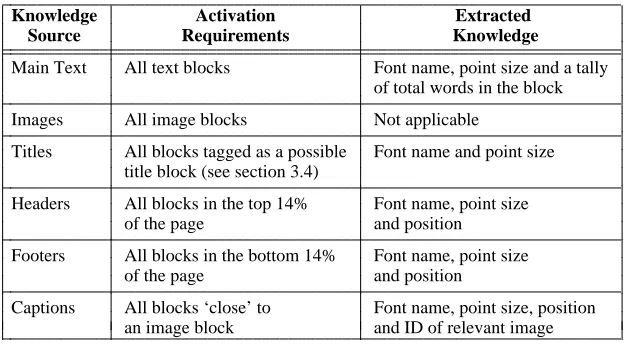
The criteria under which a knowledge source accepts information from a geometric block is described in Table 1, for each knowledge source. All blocks start off by being tagged as type ‘unknown’ but Table 1 shows what sort of extra knowledge can be extracted.
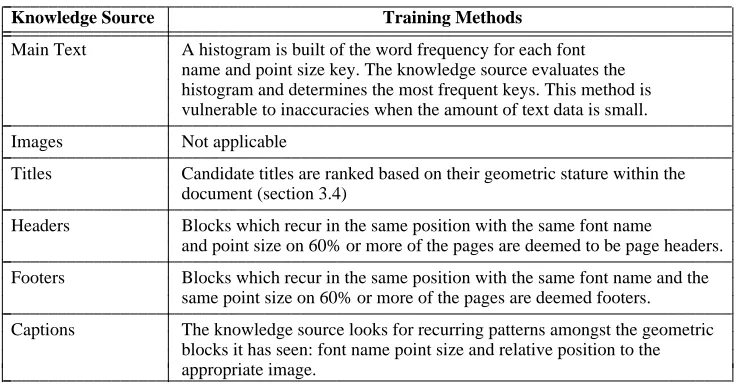
[image:7.595.150.462.500.673.2]For each page all the image blocks are passed to the blackboard ahead of the text blocks. This gives the Caption knowledge source the information it needs regarding the positions of the images blocks on the page. In terms of a blackboard architecture image blocks can been seen as a hierarchically lower class of information which is utilised for making higher level decisions. A brief synopsis of the training methods used by each knowledge source is given in Table 2.
Table 1. Activation criteria and acquired knowledge for individual knowledge sources
iiiiiiiiiiiiiiiiiiiiiiiiiiiiiiiiiiiiiiiiiiiiiiiiiiiiiiiiiiiiiiiiiiiii
Knowledge Activation Extracted
Source Requirements Knowledge
iiiiiiiiiiiiiiiiiiiiiiiiiiiiiiiiiiiiiiiiiiiiiiiiiiiiiiiiiiiiiiiiiiiii iiiiiiiiiiiiiiiiiiiiiiiiiiiiiiiiiiiiiiiiiiiiiiiiiiiiiiiiiiiiiiiiiiiii
Main Text All text blocks Font name, point size and a tally of total words in the block
iiiiiiiiiiiiiiiiiiiiiiiiiiiiiiiiiiiiiiiiiiiiiiiiiiiiiiiiiiiiiiiiiiiii
Images All image blocks Not applicable
iiiiiiiiiiiiiiiiiiiiiiiiiiiiiiiiiiiiiiiiiiiiiiiiiiiiiiiiiiiiiiiiiiiii
Titles All blocks tagged as a possible Font name and point size title block (see section 3.4)
iiiiiiiiiiiiiiiiiiiiiiiiiiiiiiiiiiiiiiiiiiiiiiiiiiiiiiiiiiiiiiiiiiiii
Headers All blocks in the top 14% Font name, point size
of the page and position
iiiiiiiiiiiiiiiiiiiiiiiiiiiiiiiiiiiiiiiiiiiiiiiiiiiiiiiiiiiiiiiiiiiii
Footers All blocks in the bottom 14% Font name, point size
of the page and position
iiiiiiiiiiiiiiiiiiiiiiiiiiiiiiiiiiiiiiiiiiiiiiiiiiiiiiiiiiiiiiiiiiiii
Captions All blocks ‘close’ to Font name, point size, position an image block and ID of relevant image
Table 2. A brief synopsis of individual knowledge source training methods
iiiiiiiiiiiiiiiiiiiiiiiiiiiiiiiiiiiiiiiiiiiiiiiiiiiiiiiiiiiiiiiiiiiiiiiiiiiiiiiiii
Knowledge Source Training Methods
iiiiiiiiiiiiiiiiiiiiiiiiiiiiiiiiiiiiiiiiiiiiiiiiiiiiiiiiiiiiiiiiiiiiiiiiiiiiiiiiii iiiiiiiiiiiiiiiiiiiiiiiiiiiiiiiiiiiiiiiiiiiiiiiiiiiiiiiiiiiiiiiiiiiiiiiiiiiiiiiiii
Main Text A histogram is built of the word frequency for each font name and point size key. The knowledge source evaluates the histogram and determines the most frequent keys. This method is vulnerable to inaccuracies when the amount of text data is small.
iiiiiiiiiiiiiiiiiiiiiiiiiiiiiiiiiiiiiiiiiiiiiiiiiiiiiiiiiiiiiiiiiiiiiiiiiiiiiiiiii
Images Not applicable
iiiiiiiiiiiiiiiiiiiiiiiiiiiiiiiiiiiiiiiiiiiiiiiiiiiiiiiiiiiiiiiiiiiiiiiiiiiiiiiiii
Titles Candidate titles are ranked based on their geometric stature within the document (section 3.4)
iiiiiiiiiiiiiiiiiiiiiiiiiiiiiiiiiiiiiiiiiiiiiiiiiiiiiiiiiiiiiiiiiiiiiiiiiiiiiiiiii
Headers Blocks which recur in the same position with the same font name
and point size on 60% or more of the pages are deemed to be page headers.
iiiiiiiiiiiiiiiiiiiiiiiiiiiiiiiiiiiiiiiiiiiiiiiiiiiiiiiiiiiiiiiiiiiiiiiiiiiiiiiiii
Footers Blocks which recur in the same position with the same font name and the same point size on 60% or more of the pages are deemed footers.
iiiiiiiiiiiiiiiiiiiiiiiiiiiiiiiiiiiiiiiiiiiiiiiiiiiiiiiiiiiiiiiiiiiiiiiiiiiiiiiiii
Captions The knowledge source looks for recurring patterns amongst the geometric blocks it has seen: font name point size and relative position to the appropriate image. iiiiiiiiiiiiiiiiiiiiiiiiiiiiiiiiiiiiiiiiiiiiiiiiiiiiiiiiiiiiiiiiiiiiiiiiiiiiiiiiii c c c c c c c c c c c c c c c c c c c c c c c c c c c c c c c c c c c c c c c c c c c c c c c c c c c c c c c c c c c c c c c
4.2 Knowledge source conflict resolution
[image:8.595.132.482.468.693.2]When knowledge sources disagree over the tag to be affixed to a block the conflict is resolved by examining the reasoning behind the respective knowledge sources’ decisions for tagging that block. The system represents this reasoning by asking each knowledge source to provide a value representing the degree of confidence the knowledge source has in the successful tagging of that block. The control system compares these values to resolve the dispute. Table 3 summarises the rules governing the application of confidence factors.
Table 3. The criteria upon which confidence is given to geometric blocks
iiiiiiiiiiiiiiiiiiiiiiiiiiiiiiiiiiiiiiiiiiiiiiiiiiiiiiiiiiiiiiiiiiiiiiiiiiiiii
Knowledge Confidence
Source Block attribute requirements Increase
iiiiiiiiiiiiiiiiiiiiiiiiiiiiiiiiiiiiiiiiiiiiiiiiiiiiiiiiiiiiiiiiiiiiiiiiiiiiii iiiiiiiiiiiiiiiiiiiiiiiiiiiiiiiiiiiiiiiiiiiiiiiiiiiiiiiiiiiiiiiiiiiiiiiiiiiiii
The block has the same style and point size key as the value 0.5 Main Text
known to the knowledge source
iiiiiiiiiiiiiiiiiiiiiiiiiiiiiiiiiiiiiiiiiiiiiiiiiiiiiiiiiiiiiiiiiiiiiiiiiiiiii
The block is in the bottom 14% of the page 0.1
iiiiiiiiiiiiiiiiiiiiiiiiiiiiiiiiiiiiiiiiiiiiiiiiiiiiiiiiiiiiiiiiii
The block conforms to a recognised Footer pattern known to 0.6 the knowledge source
iiiiiiiiiiiiiiiiiiiiiiiiiiiiiiiiiiiiiiiiiiiiiiiiiiiiiiiiiiiiiiiiii
Footer
The document is over 4 pages in length 0.1
iiiiiiiiiiiiiiiiiiiiiiiiiiiiiiiiiiiiiiiiiiiiiiiiiiiiiiiiiiiiiiiiiiiiiiiiiiiiii
The block is in the top 14% of the page 0.1
iiiiiiiiiiiiiiiiiiiiiiiiiiiiiiiiiiiiiiiiiiiiiiiiiiiiiiiiiiiiiiiiii
The block conforms to a recognised Header pattern known to 0.6 the knowledge source
iiiiiiiiiiiiiiiiiiiiiiiiiiiiiiiiiiiiiiiiiiiiiiiiiiiiiiiiiiiiiiiiii
Header
The document is over 4 pages in length 0.1
iiiiiiiiiiiiiiiiiiiiiiiiiiiiiiiiiiiiiiiiiiiiiiiiiiiiiiiiiiiiiiiiiiiiiiiiiiiiii
The block is ‘close’ to an image 0.4
iiiiiiiiiiiiiiiiiiiiiiiiiiiiiiiiiiiiiiiiiiiiiiiiiiiiiiiiiiiiiiiiii
Caption
The block overlaps the image −0.1
iiiiiiiiiiiiiiiiiiiiiiiiiiiiiiiiiiiiiiiiiiiiiiiiiiiiiiiiiiiiiiiiiiiiiiiiiiiiii
The block has a point size and font name key which is 0.4 Titles
recognised by the Title knowledge source as being a valid title
If the confidence factors are equivalent then an internal hierarchy amongst the knowledge sources is used to resolve the dispute. Table 3 shows that negative values can be used as well as positive ones, and that global document features can also help in deter-mining confidence values. For example, the length of the document could determine the confidence that headers and footers are present given that short documents, typically, do not have headers and footers. To some extent caption and title tags are affixed to blocks only if the other knowledge sources have rejected them. This strategy is due to the difficulty of unambiguously classifying a block as being a title or a caption (factors such as point-size and font change are indicative, but far from being definitive).
5 REALISING BASIC LOGICAL RELATIONSHIPS
After the tags have been attached to the geometric blocks an algorithm is applied which searches for basic logical relationships amongst blocks on the same page. In this context the word ‘basic’ implies structurally simple and non-permanent. The aim of these rela-tionships is to provide as much information as possible for document understanding. The following rules are applied when searching for logical relationships:
1. Headers and footers neither look for relationships with other blocks nor allow other blocks to form a relationship with them.
2. Image blocks cannot look for relationships with other blocks. 3. Captions can only form relationships with image blocks.
4. Remaining blocks are only allowed to look for one relationship each.
5. Block A is allowed to form a relationship with block B only if the following cri-teria hold:
g Block A must be below block B on the page.
g There must be at least one line that can be drawn vertically from the top of
the page to the bottom of the page which intersects block B and then block A without intersecting any other block between them.
g Block A must have a font and point-size key which is of a lesser or equal
geometric status than block B.
g If block A and block B have the same font name and point size key they must
have approximately the same start, middle and end horizontal coordinates to be eligible to form a relationship.
previously, they must have similar horizontal coordinates. If, upon inspection, the vertical gap between the top of block A and the bottom of block B is comparable to the line-spacing value within both blocks then they can confidently be merged.
5.1 Results
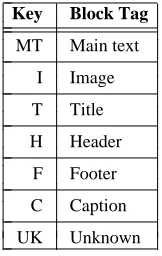
A two-tier document analysis method has been presented for the segmentation of PDF documents and the elementary classification and relationship identification of geometric elements within them. These techniques could, in principle, be applied to some other PDL, such as PostScript, although a low level page-decomposition algorithm would have to be developed in order to extract logical lines from the PDL ‘soup’. Our method is independent of the class of document being processed and provides considerably more information to the document understanding processes than previous document analysis methods have been able to achieve. However, errors can occur — particularly in the reali-sation of basic relationships — and we now present a series of examples showing the capabilities of our algorithms for analysing different types of document. The key to the labels used in the forthcoming figures is given in Table 4.
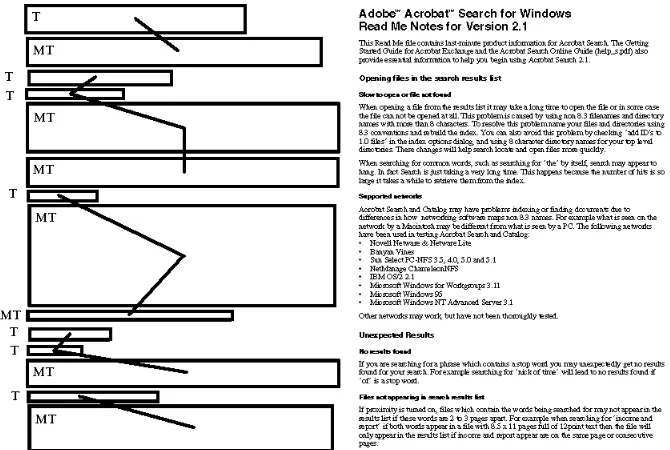
[image:10.595.266.347.465.593.2]Figure 1 shows how a typical magazine layout structure can deceive the relationship-finding algorithm. In this case, one would instinctively use graphic elements such as arti-cle or column separators to help determine the correct relationships between geometric blocks. This capability is not yet implemented in the system. and errors of this type would be carried through to the document understanding stage. Fortunately, information provided by document analysis need not treated as an absolute truth. The document understanding process should be capable of reversing any relationship-related decisions made at this early stage as long as it is given an accurate description of the logical struc-ture of the document being processed.
Table 4. Legend for document analysis diagrams
iiiiiiiiiiiiiiiiii
Key Block Tag
iiiiiiiiiiiiiiiiii iiiiiiiiiiiiiiiiii
MT Main text
iiiiiiiiiiiiiiiiii I Image iiiiiiiiiiiiiiiiii T Title iiiiiiiiiiiiiiiiii H Header iiiiiiiiiiiiiiiiii F Footer iiiiiiiiiiiiiiiiii C Caption iiiiiiiiiiiiiiiiii UK Unknown iiiiiiiiiiiiiiiiii c c c c c c c c c c c c c c c c c c c c c c c c c c c c c c c c c c c c c c c c c c
Figure 1. Example of an error in analysing a magazine page’s structure
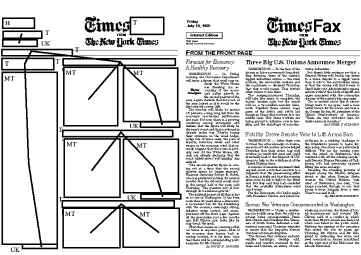
[image:11.595.141.476.456.681.2]Figure 3 shows a simple newspaper layout. There is only one style of main text in the document, but there is a wide distribution of font and point sizes. Several blocks (notably those created from the text indicating the author of the article) are marked as unknown. It is the role of document understanding to tag these blocks as “author blocks”. If the specific geometric structure being constructed by this algorithm is traversed depth-first, left to right, the reading order of the multi-column articles is produced.
Figure 3. An example document (right) and the results of its analysis (left)
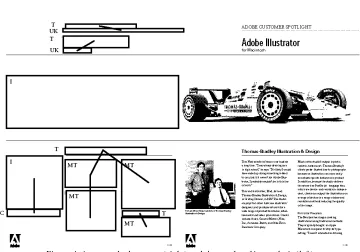
Figure 4 shows a multi-column document which has images and captions. Note that the graphics in the document have not been processed. In this instance a graphic conveys important grouping information which links the two columns of text together to their title. Interpretation of graphical elements is a major goal of future research. Also, the main image of the car was correctly interpreted as not having a suitable caption block. This illustrates the flexibility and benefits afforded by a blackboard system coupled to a system of predefined uncertainties.
6 DISCUSSION
The examples shown in the previous section illustrate the value of PDF’s geometric, font and point-size information in moving us towards document understanding [4, 5, 15–17]. Full document understanding incorporates the mapping of a specific logical structure onto the geometric structure provided by document analysis. In order to pick the correct logical structure one can either:
g Apply a logical structure and evaluate its success at mapping to the geometric
structure. If no success is achieved then one should backtrack and apply another logical structure.
g Attempt document classification before attempting to map a logical structure.
Figure 4. An example document (right) and the results of its analysis (left)
structure is too vague, the evaluation phase may match a logically incorrect structure to the geometric structure. A predefined logical structure should be used merely as a guide to document understanding and should not be used as a strict set of document understanding rules or within a document classification strategy. Document classification is a non-trivial problem precisely because of the lack of information at the point in the processing cycle when the class of document is needed i.e. between document analysis and document understanding. By using the system outlined in this paper it is possible, for the first time, to formulate a set of features which contain detailed geometric information, hitherto unavailable, about the document being processed. Consider,
g Presence of headers and footer and the layout patterns they form. g Number of titles within the document and their hierarchical status. g Distribution and quantity of keys for font names and point-sizes. g Presence of captions and the layout patterns they form.
g The maximum number of text columns on any page.
g Consistency of image placements relative to column structure.
Future research will focus on document classification and the application of detailed document understanding algorithms which have been tailored for specific document classes.
ACKNOWLEDGEMENTS
This research was greatly assisted by a three-month visit, in 1995, by one of us (WSL) to the Acrobat Engineering Group at Adobe Systems Inc. Particular thanks are due to Liz McQuarrie and Bob Wulff for all their help in bringing this about.
REFERENCES
1. A. L. Oakley and A. C. Norris , ‘Page description languages: development implementation and standardization.’, Electronic Publishing — Origination, Dissemination and Design, 1(2), (1988).
2. Adobe Systems Incorporated, Portable Document Format Reference Manual, Addison-Wesley, Reading, Massachusetts, June 1993.
3. Common Ground Software Inc., Common Ground Software ,
URL: http://www.commonground.com/index.html
4. Y. Y. Tang and C. Y. Suen, ‘Document Structures: A Survey. ’, in Proceedings Third Interna-tional Conference on Document Analysis and Recognition, 1993, pp. 99–102.
5. T. Pavlidis and J. Zhou. , ‘Page segmentation and classification’, CVGIP: Graphic models and image processing, 54(6), 484–496 (1992).
6. A. Dengel and J. Kanai, Document Analysis: SSPR’90 Working Group Report, Springer-Verlag, London, 1992 .
7. A Dengel, ‘ANASTASIL: A System for low-level and high-level geometric analysis of printed documents. ’, in Structured Document Image Analysis, Springer-Verlag, London, 1992. 8. D. J. Ittner and H. S. Baird, ‘Language Free layout analysis’, in Proceedings of the Third
International conference on Document Analysis and Recognition, 1993, pp. 336–340.
9. L. O’Gorman , ‘The document spectrum for page layout analysis’, IEEE Transactions on Pat-tern Recognition and Machine Intelligence, 15(11), 1162–1173 (1993).
10. Philip N. Smith, David F. Brailsford, David R. Evans, Leon Harrison, Steve G. Probets, and Peter E. Sutton, ‘Journal Publishing with Acrobat: the CAJUN project’, Electronic Publishing — Origination, Dissemination and Design, 6(4), 481–493 (1993).
11. Yuki Hirayama, ‘A Block Segmentation Method for Document Images with Complicated Column Structures’, in Proceedings of the Second International Conference on Document Analysis and Recognition , IEEE, July 1993, pp. 91–94.
12. R. Engelmore and T. Morgan, Blackboard systems, Addison-Wesley, 1988.
13. Debashish Niyogi and Sargur N. Srihari, ‘Knowledge-based Derivation of Logical Document Structure’, in Proceedings of the Third International Conference on Document Analysis and Recognition, September 1995 , pp. 472–475.
14. S. L. Taylor, M. Lipshutz, and C. Weir, ‘Document Structure Interpretation by Integrating Multiple Knowledge Sources’, in Symposium on Document Analysis and Information Retrieval, March 1992, pp. 58–76.
15. T. Saitoh , M. Tachikawa , and T. Yamaai , ‘Document Image Segmentation and text area ord-ering ’, in Proceedings of the Second International Conference on Document Analysis and Recognition , IEEE, July 1993 , pp. 323–329.
16. J. T. Fisher , ‘Logical structure descriptions of segmented document images’, in Proceedings of the First International conference on Document Analysis and Recognition, 1991 , pp. 302–310. 17. Q. Luo , R. T. Watanabe , and N. Sugie, ‘Structure recognition methods for various types of