The 3D Object Mediator:
Handling 3D Models on Internet
Arjan J.F. Kok1, Joost van Lawick van Pabst1, Hamideh Afsarmanesh2 1 TNO Physics and Electronics Laboratory
P.O.Box 96864, 2509 JG The Hague, The Netherlands E-mail: [email protected], [email protected]
2 University of Amsterdam
Kruislaan 403, 1098 SJ Amsterdam, The Netherlands E-mail: [email protected]
Abstract. The 3D Object MEdiator (3DOME3) offers two services for
handling 3D models: a modelshop and a renderfarm. These services can be consulted through the Internet. The modelshop meets the demands for brokerage of geometric descriptions of 3D models. People who create ge-ometric models of objects can supply their models to the modelshop and 3DOME will offer them to potential customers. People who need models can browse through the model database and buy the models they need. The renderfarm, consisting of a large number of workstations and multi– processor computers, offers rendering services to generate animations and realistic images of large scenes. In general, these kinds of renderjobs cannot be done by a single workstation in an acceptable amount of time. 3DOME’s parallel rendering facilities may be very helpful for these jobs.
1
Introduction
If an architect wants to have a computer generated artist impression of the building he has designed, he needs to decorate the building. For a view of the outside of the building he needs trees, streets, grass, cars, etc.; for an inside view of some rooms in the building objects such as furniture, lamps, etc., will improve the impression. However, the architect only wants to model the building itself. In general, he does not have the expertise to model the decoration and he does not want to spend time doing that. Therefore, he likes to have a place where he may buy the models he needs for decoration.
On the other hand, a computer artist, who creates models of all sorts of things such as cars, trees, chairs, tables, etc., likes to get his modelling effort rewarded by selling these models. It usually takes quite some time to create accurate models. Therefore he would like to sell his objects to many customers, but often does not have the contacts to establish that. He can benefit from a platform where he can show and sell his models.
3 The work described in this paper is part of the Dutch HPCN project 3DOME.
Partners in this project are: RCC Roccade, University of Amsterdam, Electrogig, TNO Physics and Electronics Laboratory, Token, Trendsoft, and Joining the Forces.
The creation of an accurate image of the interior of a building, including cor-rect lighting, or the creation of an animation, for example of a walk through a building, requires advanced rendering packages and much computer power. These demands may easily exceed the local capacities of small architectural firms. For this reason one may expect a market for commercial rendering services.
3D Object MEdiator (3DOME) is a research project to investigate possible solutions for the above described requirements and problems. In this project a prototype of the 3DOME system is being built. Basically this system consists of a set of services that customers can use through the Internet. It intends to be a place on the Internet where designers, architects, computer artists, lighting designers, animation builders, CAD/CAM constructors, etc., can exchange 3D objects, render their models, and make animations. All services will be offered on a commercial basis.
The 3DOME system consists of two major elements: the modelshop and the renderfarm. 3D geometric models can be bought and offered for sale in the modelshop. If someone supplies a model, it will be put in the object database. Potential customers of models can browse through the catalogue of the database to look for the models they need. While browsing, clients can have a quick look at the available 3D models (by means of thumbnails and snapshots). If they find a suitable model, they can buy it from the 3DOME system. As a consequence, the system will pay the supplier of that model. Because of the wide variety of 3D model formats, the system will support several model conversions. Therefore, users may supply and buy models in several formats.
Once a user has composed several objects (that he retrieved from the 3DOME system or that he modelled himself) into a scene, he can request 3DOME to render a high quality image of the scene. Since rendering involves complex al-gorithms that require long computation times, computers at the customer’s site are usually not powerful enough to get the job done in an acceptable amount of time. Therefore, 3DOME offers a rendering service, the renderfarm, using state of the art technology that can do accurate high–quality rendering in a reasonable amount of time.
The 3D Object MEdiator research project involves several interesting re-search topics: advanced database management for storing models, efficient and intuitive browsing through a large database catalogue (including searching and description matching techniques), interface design, safe payment on the Inter-net, pricing, model data format conversion, parallelization of rendering packages, scheduling problems, estimation of rendering times, etc.
This paper gives a global description of the 3DOME system at its current stage of development, with an accent on one of its subsystems, the renderfarm.
2
General View of the 3DOME System
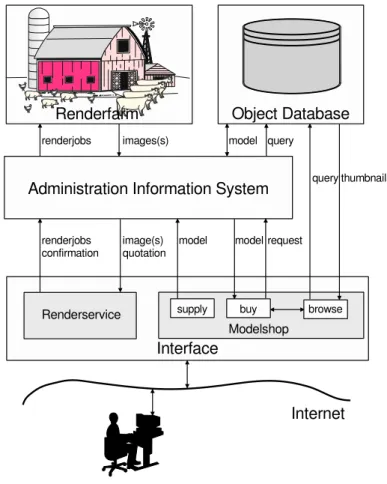
The 3DOME system is a service center for handling 3D models. A user can contact this system via the Internet. Figure 1 gives an overview of this system. Several subsystems can be distinguished:
renderjobs images(s) model query
renderjobs confirmation
image(s) quotation
model model request
query thumbnails Modelshop Renderservice
Interface
Internet
Object Database
Renderfarm
supply buy browse
Administration Information System
Fig. 1.Overview of the 3DOME system
Interface All communications between a user and the system is handled at the interface. The 3DOME services can only be reached through this interface. For interactive use the interface provides some WWW pages that offer access to the services. Electronic mail is used for non-interactive use.
The interface offers users access to two groups of services:
– The Modelshop. This service deals with the interaction of the user with the object database (directly or indirectly).
A user can submit a model by sending it to the modelshop. His submis-sion must contain, apart from the geometric description of the model, some extra information such as its format, the measures of the model, the type of coordinate system used, and other metadata like version in-formation and comments. To help the supplier with giving this extra information, the modelshop provides forms that can be filled in with this information. The interface sends the complete submission to the administration information system.
The user can browse through the catalogue of the graphic object database searching for a model. The user may search the database in different ways using contexts, categories, and some search queries based on spe-cific characteristics of models. In combination with advanced database searching and description matching techniques the user can find the mod-els he needs. For a quick impression of the modmod-els 2D images of these models (thumbnails) are displayed during browsing.
If the user has found the desired model, he can send a request to buy the object. This request is sent to the administration system that checks whether the customer is allowed to purchase models. If that is allowed, then the user can pay and buy the model.
– The Renderservice. This service deals with the interaction between the user and 3DOME system when the user wants to render scenes. A ren-derjob that a user supplies to the system consists of the following items:
• The geometric description of the scene including materials and light source information. The render service will support one general for-mat for describing scenes (the OpenInventor forfor-mat [8]) and the na-tive format of the rendering packages.
• The textures that are used in the geometric model.
• Viewing parameters (if not included in the geometric description). If a walk-through animation is to be rendered, a sequence of views must be specified.
• Extra information, such as the rendering package to be used, the desired quality, the priority of the job, etc.
To help the user entering the necessary information, the interface will provide some forms to fill in. Filling in these forms completely will guar-antee that all information is provided.
The user gets a message when his renderjob cannot be rendered properly. Otherwise the interface will provide him with a quotation that contains one or more proposals how to render his job. It includes information like when he can expect his job to be finished and what he has to pay for it. In return, the user has to confirm which proposal and therefore price he agrees on. If the user does not confirm, the renderjob is canceled. At the end of the renderjob the interface is responsible for sending the results (images) to the user.
Administration Information System This part of the 3DOME system is responsible for the management of administrative information. The
admin-istration information system manages the information about suppliers, cus-tomers, orders, and pricing. When a customer transaction arrives, this trans-action needs to be registered and a set of trans-actions related to this transtrans-action needs to be performed.
For a supply-job this system is responsible for checking whether the model is complete and without errors before it is sent to the object database. The system adds a price to the model and registers the supplier of the model. The administration information system is also responsible for payment of the supplier when his model is sold.
If a customer wants to buy a model, the administration information system registers the user, checks whether the customer is known to the system, and determines how payment for the model has to be done. After payment, the system enables sending the model from the database to the user. Further-more, the credit-balance of the supplier of the model is updated.
In case of a renderjob, the system is responsible for registering the user, and for making a quotation from the timing estimates made in the renderfarm. If the user accepts this quotation, the system notifies the renderfarm that the job can start. If the renderjob finishes successfully, then the administration system takes care of the payment.
The administration information system is being implemented using the Ma-tisse database system [9].
Object Database The object database stores the objects that are supplied by users and that can be bought by customers. Objects that are stored are the 3D geometric descriptions of models and the 2D textures.
To support data suppliers and customers that use various formats for de-scribing the geometry of their models, the system is provided with some format converters. These converters convert a large variety of model data formats to the OpenInventor format and vice versa. We decided to use the OpenInventor file format [8] as the common format, since it is widely used and because of its comprehensiveness. However, often some accuracy is lost when converting between formats. As a result, the object will be stored in the database in two formats: the original (native) format in which the model was supplied, and the common internal (OpenInventor) format. Buying a model in its native format guarantees the original accuracy.
Along with a 2D or 3D model a thumbnail (an image of the model) and some extra descriptive information is stored. The descriptive information consists of general, administrative, and technical information about the models. It also includes some browsing information. The general information consists of the name, a textual description, the keywords/category description of the model, etc. The administrative information represents the supplier, condi-tions, price, designer information, etc. Examples of the technical information are the measures of the models (inches, centimeters, or meters), the origin of the model, left- or right-handed coordinate system used, the number of primitives (e.g. polygons) in the model, etc. The browsing information is specifically designed to support the browsing interface of the modelshop.
A catalogue is built for the object database based on the keywords and categories that best describe every object. This catalogue is searched and browsed through by customers, and the thumbnails are viewed to decide on choosing the objects to buy. The catalogue is also dynamically extended to represent new categories, when there are enough new objects supplied to the database to represent a new category. The definition of the object database and catalogue is based onpeerobject–oriented schema definition framework [1].
The object database is currently being implemented using the Matisse data-base system [9]
Renderfarm Users can supply their scene to the renderfarm. This system ren-ders the scene and returns an image or animation of the scene. The render-farm is described into more details in chapter 3.
3
The Renderfarm
Ray tracing and radiosity algorithms [2, 4] are the most important algorithms for generating realistic images. These algorithms simulate the traversal of light through a scene, the interaction of light with surfaces (reflection, refraction, etc.), and the projection of it onto the viewing plane. The demands on processing power and memory size of these algorithms to generate images of large scenes often exceed the capacity of workstations usually owned by users. Rendering a single image may take many hours on a large workstation. Imagine what time is required for an animation of several minutes.
3DOME provides for the need of rendering capacity by offering a render-farm. This renderfarm consists of a large number of workstations and a few multi–processor computers connected in a network. The renderfarm is not lim-ited to workstations of one type, but contains different types of computers. The network can easily be expanded by including more workstations. This is useful for including computers that are only available at night while during the day these computers are used for other purposes.
Each computer will be equipped with one or more rendering packages (de-pending on the fact whether or not a package is available for that type of com-puter). The renderfarm supports several rendering packages. Depending on the demands and wishes of a user, a rendering package is selected. More experi-ences users can directly select their favorite rendering package. The decision which one to use is based on a number of factors, such as their application, the realism/quality they want to achieve, whether they want animations or just one image, and the price they want to pay. It makes a big difference whether users want physically correct images or just images that look nice. Packages as the Radiance Lighting Simulation and Rendering System [7] can generate physi-cally correct images and are therefore useful for lighting designers and architects because they can predict light levels and appearances of rooms prior to con-struction. When physical correctness is of less importance other packages may
be favorable because they have better facilities for generating animations or be-cause they render faster (and therefore cheaper).
The renderfarm can render much faster than a single workstation by exploit-ing parallelism:
– The multi–processor machines in the farm can be used to generate pictures using parallel versions of the rendering packages [5]. In the 3DOME project we are currently developing a parallel version of the Radiance package. Be-cause of the portability of the PVM library [3], that is chosen for commu-nication support, we can use our parallel version of the rendering package not only on a dedicated multi–processor system, but also on a cluster of workstations in a heterogeneous network.
– Animations can be generated quickly by distributing the separate frames of the animations over the available workstations in the network. In this way several frames can be rendered in parallel.
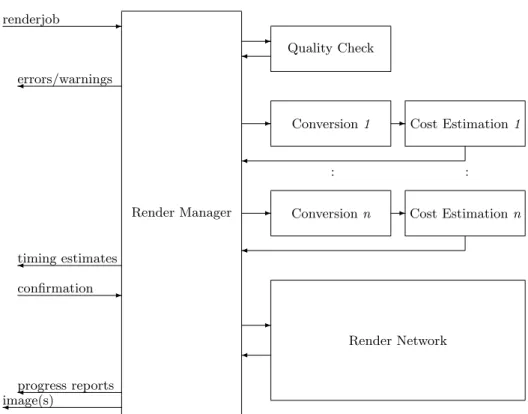
One of the workstations of the renderfarm serves as aRender Manager. The render manager is the crucial process to get an efficient renderfarm. This process decides which tasks must be done on the data in the renderjobs and on which machines these tasks can be performed most efficiently. The render manager starts these tasks on the selected machines. Figure 2 shows the render manager and its relation with other components of the renderfarm. The render manager of the renderfarm receives its jobs from the administration information system. Before the actual rendering of a scene starts, some preprocessing has to be done on the data that the render manager received in the renderjob.
First of all, the render manager sends the model(s) and rendering parame-ters of the renderjob to theQuality Check. The quality check performs several tests to investigate whether the job can be done successfully. It checks, for exam-ple, the syntax of the scene description, the completeness of the model, and the completeness and correctness of the parameters (for example, are the viewing parameters specified?). If a job cannot pass this check, error messages are issued to the render manager. Moreover, the quality check can issue warnings when it encounters circumstances that might give unwanted features in the image. For example, when no light sources are included in the model, rendering that model will result in an all black image. Usually, that is not what the supplier of the job expects to get. The render manager sends the list with errors and warnings it receives from the quality check to the administration information system. If errors occur, then the render manager cancels the renderjob.
3DOME uses the OpenInventor format as general file format to describe scenes. However, each of the rendering packages used in the renderfarm has its native input format. Therefore aConversionis applied to convert the OpenIn-ventor format to the format suited for the specified rendering package. It includes converting the geometric description, materials, textures, and viewing
parame -renderjob -Quality Check ¾ ¾ errors/warnings
- Conversion1 -Cost Estimation1 ¾
: :
- Conversionn -Cost Estimationn ¾ timing estimates ¾ confirmation -¾ Render Network ¾ progress reports ¾ image(s) Render Manager
Fig. 2.The render manager
ters. For each rendering package supported in the renderfarm a conversion rou-tine is available.
In theCost Estimationstage an estimation of the time needed to render the scene with given parameters is computed. This cost estimation serves several purposes:
– To submit a quotation to a potential customer of rendering services. A cus-tomer has to know in advance what he has to pay to render his scene. – To predict when his job is expected to be finished. If the supplier of a scene
has a deadline, he wants to know in advance whether the renderfarm is able to render the scene before that deadline.
– To do scheduling. The results of the cost estimation can be used to determine which of the available workstations must render which jobs to get a good load balancing of all supplied renderjobs.
– If a job is sent to a parallel processor, predicting the cost of rendering sub-parts of the scene can be used to get a good data–distribution over the available processors.
It is hard to do an accurate cost estimation. Many factors are involved: not only the number of primitives (for example polygons) and the size of the im-age, but also the distribution of these primitives over the scene, their reflection properties, and the number and size of the light sources. They all determine how many rays must be traced and how much computation is needed for each ray [6]. For each rendering package that is used in the renderfarm, a separate cost estimation module must be developed because each package is differently influenced by these factors.
The render manager uses these cost predictions to schedule the render jobs, to find out on which computers in the Render Network (network with several multi–processor computers and workstations with rendering packages installed) to run the jobs. It tries to find a solution in which all jobs are finished as soon as possible. It takes into account on which computers in the network the requested rendering package is installed, how much time the (sub)job will take on each computer, and when the computers can start their job. To be able to know when a computer can start a job, the render manager keeps record of the progress and waiting queues on all computers in the network.
The render manager can make several scheduling proposals; for example one for rendering on a one-processor workstation and one for rendering on a multi-processor computer. Each proposal consists of an estimate of how much process-ing time is needed for each computer involved and when the job is expected to be finished. The render manager sends the proposal(s) to the administration in-formation system. This system translates the runtime estimations into prices to submit a quotation to the user. Therefore it takes into account how expensive it is to use a certain type of machine. Using a multi-processor system will probably be more expensive, but will return results more quickly.
When the user has accepted one of the proposals, rendering starts. The jobs are sent to the queues of the scheduled computers in the render network. During rendering the render manager gathers information from the computers to check whether everything is running as expected. If this is not the case progress reports are sent to the administration information system that in turn can warn the user. This might for example occur when the expected time to be finished cannot be reached because of problems with (one of) the computers or by unexpected long processes with a higher priority.
When a computer has finished its rendering job, the resulting image (if de-sired, after image format conversion) is sent to the render manager. If the image is not part of an animation, then it is sent directly to the administration infor-mation system. However, if it is a frame of an aniinfor-mation then it is stored at the render manager until all frames of the animation are collected. These frames are combined into an animation and sent to the administration information sys-tem. With an image or animation also some status information is sent to the administration information system.
4
Conclusions
In this paper we have presented the 3DOME system. This system offers a mod-elshop to exchange 3D models and a renderfarm to generate realistic images and animations. Users can contact these services through the Internet. We strongly believe that there is a need for brokerage of models and for a rendering service for generating accurate realistic images of models on demand.
Acknowledgements
This work is carried out as part of the 3DOME project, which is partially funded by the Dutch HPCN foundation. We wish to thank all participants of the project for the discussions we had about the topics described in this paper. We especially thank Ad Marneffe from Electrogig and Erik Reinhard from Delft University of Technology for sharing their ideas concerning the renderfarm.
References
1. H. Afsarmanesh, F. Tuijnman, M. Wiedijk, and L.O. Hertzberger. Distributed Schema Management in a Cooperation Network of Autonomous Agents. In Pro-ceedings of the 4th IEEE International Conference on Database and Expert Systems Applications DEXA ’93, Lecture Notes in Computer Science (LNCS) 720, pages 565–576. Springer–Verlag, September 1993.
2. M.F. Cohen and J.R. Wallace. Radiosity and Realistic Image Synthesis. Academic Press Professional, 1993.
3. A. Geist, A. Beguelin, J. Dongarra, W. Jiang, R. Mancheck, and V. Sunderam.
PVM 3 User’s Guide and Reference Manual. Oak Ridge National Laboratory, 1993. 4. A.S. Glassner. Introduction to Ray Tracing. Academic Press, 1989.
5. E. Reinhard and F.W. Jansen. Rendering Large Scenes Using Parallel Ray Tracing. In A. Chalmers and F.W. Jansen, editors,First Eurographics Workshop on Parallel Graphics and Visualisation, pages 67–80. Alpha Books, September 1996.
6. E. Reinhard, A.J.F. Kok, and F.W. Jansen. Cost Prediction in Ray Tracing. In X. Pueyo and P. Schr¨oder, editors, Rendering Techniques ’96, (Proceedings of the Seventh Eurographics Workshop on Rendering), pages 41–50. Springer–Verlag, 1996. 7. G.J. Ward. The RADIANCE Lighting Simulation and Rendering System. In Pro-ceedings of SIGGRAPH ’94, Computer Graphics Proceedings, Annual Conference Series, pages 459–472. ACM Press, July 1994.
8. J. Wernecke.The Inventor Mentor. Addison–Wesley, 1994.