Designing and implementing a cloud-hosted SaaS for
data movement and sharing with SlapOS
Walid Saad*, Heithem Abbes and Mohamed Jemni
LaTICE,Universit´e de Tunis,
ESSTT 5, Av. Taha Hussein, B.P. 56, Bab Mnara,Tunis, Tunisia
E-mail: [email protected] E-mail: [email protected], E-mail: [email protected] *Corresponding author
Christophe C
erin
´
LIPN/CNRS UMR 7030, Universit´e de Paris 13,99, Avenue Jean-Baptiste Cl´ement, 93430 Villetaneuse, France
E-mail: [email protected]
Abstract:For over a decade, the data requirements of e-Science applications increase drastically with the emergence of data-intensive applications. Several tools and frameworks have been developed to manage and handle the big amount of data for the grid platforms. However, the use of these tools by the basic scientist and the grid computing community is not well adopted because of the complexity of the installation and configuration processes. Recently, an open source distributed operating system for clouds emerged, namely SlapOS. The aim of SlapOS is to hide the complexity of IT infrastructures and software deployments from users. In this work, we propose a cloud-hosted data grid using the SlapOS cloud. Through a software as a service (SaaS) solution, users can request and install automatically any data movement and sharing tools like Stork and Bitdew without any intervention of a system administrator. The entire solution is now running in production into the SlapOS cloud at Paris 13 University. Intensive experiments have been conducted on the Grid ‘5000 testbed to validate our approach.
Keywords:data-intensive application; big data management; software as a service; SaaS; stork; Bitdew; SlapOS; grids tools and clouds federation ; software integration.
Reference to this paper should be made as follows: Saad, W., Abbes, H., Jemni, M. and C´erin, C. (2014) ‘Designing and implementing a cloud-hosted SaaS for data movement and sharing with SlapOS’,Int. J. Big Data Intelligence, Vol. 1, Nos. 1/2, pp.18–35.
Biographical notes: Walid Saad is currently a Teaching Assistant in Computer Science at Higher Institute of Business Administration of Gafsa, University of Gafsa, Tunisia. He received his Master degree in Computer Science in 2009 from the Higher School of Sciences and Techniques of Tunis, University of Tunis, Tunisia. He is a member of Research Laboratory of Technologies of Information and Communication and Electrical Engineering (LaTICE) at the University of Tunis. Since 2010, he has been working towards his PhD at the Research Laboratory LaTICE in Tunisia in collaboration with the LIPN Laboratory in France. His research is focused on grid computing, peer-to-peer systems and cloud computing.
Heithem Abbes received his PhD in Computer Sciences, from the University of Paris 13 and ENSI (University of Manouba) in 2009. Since 2010, he has been an Associate Professor in Computer Science Department at the Faculty of Sciences of Tunis. He is a member of Research Laboratory of Technologies of Information and Communication and Electrical Engineering (LaTICE) at the University of Tunis. He has been working on high performance computing, grid computing and cloud computing research fields.
Mohamed Jemni is a Professor of Computer Science and Educational Technologies and the Head of the Research Laboratory of ICT and Electrical Engineering (LaTICE) at the University of Tunis. Currently and since 2013, he is the Director of ICT at ALECSO. He is a senior member of IEEE and member of the executive board of IEEE Technical Committee on Learning Technology (www.ieeetclt.org). His research project involvements during the last 24 years are tools and environments of e-learning, high performance and grid computing and accessibility of ICT to people with disabilities. He has published more than 200 papers in international journals.
Christophe C´erin has been a Professor of Computer Science at the University of Paris 13, France since 2005. He has served the IEEE Computer Society for many years in different positions varying from Chair of the France CS computer chapter to the organisation of meetings or being Financial Chair for different CS sponsored or co-sponsored cconferences. His industrial experience is currently with the Resilience project (Nexedi, Morpho, Alixen, Vifib) related to cloud computing. His research interests are in the field of high performance computing, including grid computing. He is developing middleware, algorithms, tools and methods for managing distributed systems.
1 Introduction
In recent years, many real world scientific and enterprise applications deal with a huge amount of data. The emergence of data-intensive application has prompted scientists around the world to enable data grids. Examples of such data-intensive applications include bio-informatics, medical imaging, high energy physics, coastal and environmental modelling and geospatial analysis. For instance in bio-informatics, Basic Local Alignment Search Tool (BLAST) (http://blast.ncbi.nlm.nih.gov/Blast.cgi) is one of the most important and fundamental technology to determine the DNA structure and sequences of human being and animals. BLAST is widely used in almost every large molecular biology laboratories for sequence alignment analysis. In order to process large data-sets, users need to access, process and transfer large datasets stored in distributed repositories. The users get difficulties to manage easily their data. For instance, to move data from its site to the experimental platform (cluster or computational grids), the user must install client software tools and place data by hand, using simple scripts through the command line interface. To accomplish this task, the user must necessarily have a knowledge about data management technologies and transfer protocols such as scp, rsync, FTP, SRM tools (Shoshani et al., 2002), Globus GridFTP (Allcock et al., 2005), GridTorrent (Zissimos et al., 2007).
In a recent work (Saad et al., 2012), we proposed a self-configurable desktop grids (DGs) platform on demand. We attempt to extend DGs middleware with the orchestration of different data management middleware and computing systems to deploy data-intensive applications. Our research focuses on an extension of the BonjourGrid (Abbes et al., 2008, 2009, 2010a,b) DGs for supporting data-intensive BoT/DAG (Bag of Tasks/Direct Acyclic Graph) applications by exploiting existing data management protocols and grid middleware. We choose a decoupling between the source site and the computation site by the mean of a remote cache and a local cache. However, since resources in a DG are typically accessed through wide area
network links, the bottleneck comes with the bandwidth limitation. The solution is to imagine architectures that are able to mask (in part) the bandwidth limitation. In Saad et al. (2013), we propose a decentralised approach for data prefetching for BoT and DAG applications to mask the bandwidth limitation and to overcome the disadvantages of the master-worker paradigm.
In Kondo et al. (2009), Cappello et al. consider that “adoption of cloud computing platforms and services by the scientific community is in its infancy as the performance and monetary cost-benefits for scientific applications are not perfectly clear. This is especially true for desktop grids (aka volunteer computing) applications”. Nowadays, the adoption of cloud computing platforms and service computing technologies by the scientific community may be questionable according to the cost-benefits for scientific applications.
In this context, the Simple Language for Accounting and Provisioning Operating System (SlapOS) cloud presents a configurable environment in terms of the OS and the software stack to manage without the need of virtualisation techniques. SlapOS reuses, in part, some concepts of desktop grids (C´erin and Fedak, 2012): machines at home host services and data, a ‘master’ contains a catalogue of services and publishes them in a directory on a slave node. We would like to assume that the DG and cloud paradigms become widely used, more and more over the time (Silberstein, 2011), by non-experts in the computer engineering fields.
We focus in this paper on a subset of the overall research about interoperability between DGs and clouds namely data tools as hosted software as a service (SaaS) frameworks. We consider that the most important challenge is as follows: grid users want to manage data in the same way as they perform other tasks on their computer. In this paper, we make our previous works in the data management field ‘easy to use’ for grid users. We estimate that it is useful for them to manage data via a web interface. We present the design and the implementation of two Software
as a Service tools for data management. The first service provides a mean for users to transfer data from their sites to the computation or simulation sites. The second service will be used to share data in widely distributed environment. The challenge is how to:
• imagine automatic data management tools that are able to mask the installation and configuration difficulties of data management software
• deliver data management functionality as hosted services via web user interfaces.
The first contribution of this paper is to demonstrate how to automate the installation of data management software through SlapOS Buildout profiles such that the SlapOS user can now deploy a data management software in the same way he deploys a web application. The data management software is now one more application for the SlapOS catalogue of applications and not a SaaS running on isolated infrastructure, separated from many other SaaS. The second contribution demonstrates that a non-trivial use case can effectively be set up and run for the SlapOS cloud infrastructure.
The remainder of this paper is organised as follows. In Section 2, we outline issues to deal with SaaS-based solutions in the context of data management in grids environment, such as No IT required, the complexity of installation and configuration process. We summarise, in Section 3, related works. Section 4 presents the main concepts of the SlapOS cloud. Section 5 presents our proposed approach for data management as hosted SaaS and we describe its implementation with SlapOS. In Section 6, in order to prove the effect of the implementation, we introduce experimental results. Finally, in Section 7 we summarise the contributions of the paper and we investigate future works.
2 Motivations and fundamental issues
The data requirements of e-Science applications increase dramatically with the emergence of data-intensive applications. These applications require efficient data management and transfer software in wide-area, distributed computing environments. Since basic users lack the fundamental IT and networking knowledge, they spend too much time to download, install, configure and to run such tools. Hence our arguments:
• to achieve data management on demand, the users need a resilient service that moves data transparently
• no IT knowledge required, no software download/installation/configuration steps.
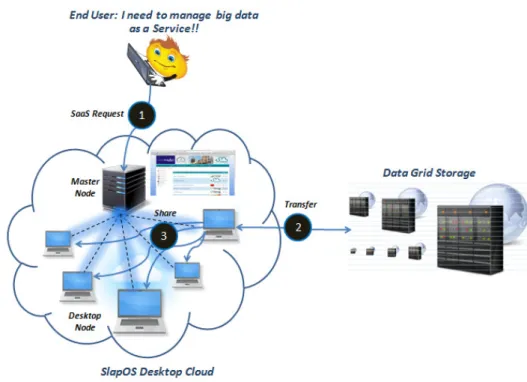
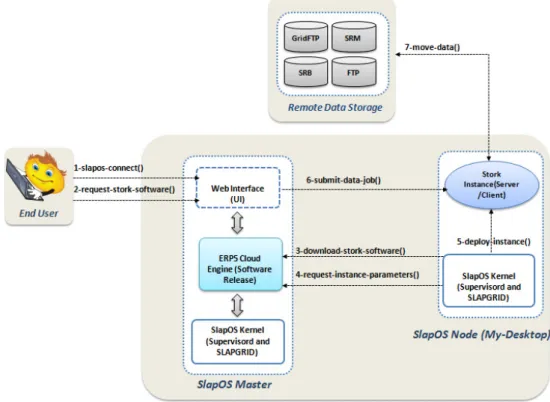
With the above requirements in mind, our implementations are based on (see Figure 1):
• stork data scheduler: manage data movement over wide area networks, using intermediate data grid storage systems and different protocols
• Bitdew: make data accessible and shared from other resources including end-user desktops and servers
• SlapOS: with only a ‘one-click’ process, instantiate, configure data managers (Stork+Bitdew) and deploy them over the internet.
3 Related work
In this section we introduce the key technologies being developed in order to prepare an infrastructure for scientists to manage the low-level data handling issues on grid systems. Additionally, we present some high-level tools for co-scheduling of data and computation in grid environments. We also introduce research in data management using SaaS-based services.
3.1 Data management and transfer in grid environment
Several tools have been developed to enable big data management in conventional grid computing platforms. For large data transfer, GridFTP is the most widely used tool through parallel streams. Representative examples of storage systems include storage resource managers (SRMs), SRB, IBP and NeST that have been proven successful in traditional grid like Globus, TeraGrid and EumedGrid. However they do not fit with the philosophy of DGs.
Others systems have targeted cluster and volatile desktop to aggregate unused desktop storage. The Freeloader (Vazhkudai et al., 2005) framework is designed to aggregate space, and I/O bandwidth contributions from volatile desktop storage within a domain to provide a shared cache/scratch space for large, immutable datasets. FreeLoader is designed to handle scientific data under local network.
Farsite (Adya et al., 2002) builds a secure file system using entrusted desktop computers. It provides file reliability and availability through cryptography, replication and file. Farsite supports the high performance I/O of scientific applications, rather than typical desktop file-I/O workloads in academic environments.
Chirp (Thain et al., 2012) is a user-level file system for collaboration across distributed systems such as clusters, clouds, and grids. Chirp allows ordinary users to discover, share, and access storage, whether within a single machine room or over a wide area network.
Figure 1 Our approach overview (see online version for colours)
Notes: The user utilises web interface to (1) interact with SlapOS master; (2) deploy data transfer tools (Stork) to move data from remote grid storage to SlapOS (3) Share data inside SlapOS cloud and
then he performs simulations (or a specific processing) on data already published.
Bitdew (Fedak et al., 2009) is an open source data management for grid, DG and cloud computing. It can be easily integrated into grid middleware (XtremWeb, BOINC, Hadoop, Condor, Glite, Unicore, etc.). The Bitdew framework offers a programmable environment for enabling data-intensive and long running applications by providing P2P technologies, DHT for data distribution and BitTorrent for data transfer. In order to manage data, programmers uses a specific APIs to define for every data these four abstractions: replication, fault-tolerance, lifetime and affinity. Bitdew run-time environment manage operations of data creation, deletion, movement, replication, and fault-tolerance operation.
GatorShare (Xu and Figueiredo, 2010) is a data management framework that offers a file system interface and an extensible architecture designed to support multiple data transfer protocols, including BitTorrent for DG. It eases the integration with DGs and enables high-throughput data management for unmodified data-intensive applications. For example, in Grid Appliance GatorShare provides an alternative cooperative data distribution service and users are able to download a fully or partial data. GatorShare does not consider mechanisms for replication and fault tolerance compared to Bitdew.
Juxtaposed Memory (JuxMem) (Antoniu et al., 2005) is a data sharing service for grid computing based on a compromise between DSM systems and P2P systems. It is built over the JXTA middleware and it provides location-transparent data access as well as data persistence in a dynamic, distributed environment. JuxMem features
includes data replication, localisation and fault tolerance. In Saad et al. (2013) we have demonstrated how data-aware scheduling improves data-intensive applications performance in distributed systems. The architectural context is DG computing and the Condor project. Since the resources are accessed through wide area networks, the bottleneck comes with the bandwidth limitation and the master-worker paradigm. Data prefetching has the potential for overlapping the elapsed times to exchange data between nodes. Authors propose a decentralised approach for data prefetching for bag-of-tasks and DAG applications. Experimentation, using more than 200 machines on the Nancy site of the Grid ‘5000 testbed, demonstrate that the model improves the performance of applications execution.
3.2 Higher level tools for data scheduling
Nowadays, the increasing need to stage large data from the user site to the computation site has incited researchers to set-up mechanisms for co-scheduling of data and computation. Grid users move, manually or through simple scripts, their data to the grid using transfer tools such as FTP and SCP.
Stork (Kosar and Livny, 2004; Yin et al., 2011), a scheduler for data placement activities in a grid environment, is used to schedule data and computation in Condor. Using Stork input data will be queued, scheduled, monitored, managed, and even check-pointed. Stork provides solutions for data placement problems both
in the grid and DG environment since it can interact with different data transfer protocols such as FTP, GridFTP, HTTP and DiskRouter. Stork can interact with various data storage systems like SRB and NeST and data management middleware such as SRM.
In Kosar and Balman (2009) PetaShare and Stork are coupled to enable data intensive collaborative science at Louisiana University by providing additional storage, and infrastructure to access, retrieve and share data. Similarly, Condor and SRM are coupled in Romosan et al. (2005) to schedule jobs on compute nodes, where data is available.
Zhang et al. (2007) propose the orchestration of job scheduling with data staging/offloading and on-demand staged data reconstruction in HPC environments.
3.3 Data orchestration through SaaS technologies
Globus Online (GO) (Foster, 2011; Allen et al., 2011) is a project that delivers data management functionalities not as downloadable software but as hosted SaaS. It allows users to move, synchronise, and share their data using a web browser. GO uses modern Web 2.0 technologies to enable GridFTP fire-and-forget file transfers with automatic fault recovery, quickly, securely, and reliably between the user desktop, the lab server, the campus computing cluster, and the super computing facility. To summarise the main facts related to GO, we would like to mention:
• GO uses only GridFTP transfers.
• The security procedure is too complicated, we consider that GO is a private cloud (for a specific research labs).
• Not suitable for volunteer environment.
• To use GO, the users must install on their machines a client software (Globus Connect andGlobus Connect
Multi-User) using the command line interface. So, we
think that GO is not entirely an hosted solution for large scale data management. As in GO, with our approach users must install the SlapOS node package, but the benefit here is to make available to them a range of services through a free access to the catalogue applications of SlapOS.
While the common area is data management as hosted SaaS, our research direction is fundamentally different from these works. We attempt to provide a public SaaS solution by the orchestration of different data management tools via the web technologies. Using SlapOS, the users deploy their data management tools in one click.
4 SlapOS overview
SlapOS (Smets-Solanes et al., 2011) is an open source distributed operating system and it provides an environment for automating the deployment of applications, while including accounting and billing services through the ERP5
platform. Based on the idea that ‘everything is process’, SlapOS combines grid computing, in particular the concepts inherited from BonjourGrid (Abbes et al., 2009, 2010a) and the techniques inherited from the field of ERP in order to manage, through the SlapGrid daemon, IaaS, PaaS and SaaS cloud services. The SlapOS strengths are the compatibility with any operating system, in particular GNU Linux, the compatibility with all software technologies, and support for several infrastructures (IaaS). More than 500 different recipes are available for consumer applications such as Linux Apache MySQL PHP (LAMP).
4.1 SlapOS key concepts
SlapOS architecture is composed of two types of components: SlapOS master and SlapOS nodes. The master tells to the SlapOS node which is the software that must be installed and also which instance of a specific software will be deployed. It acts as a centralised directory for all SlapOS nodes and it knows the location where software are located and all software that are installed.
We can view the topology of classical clouds infrastructures as data centers to which are connected user machines. In these architectures the computations are centered on a subset of machines (the data centers) among the possible ones. SlapOS (Smets-Solanes et al., 2011) considers an alternative view of clouds where both users machines and data centers are used for servicing requests. We refer to these clouds asvolunteer clouds.
SlapOS nodes can be dedicated or volunteer nodes. The master’s role is to install applications and run processes on SlapOS nodes. It acts as a central directory of all SlapOS nodes, knowing where each SlapOS node is located and which software can be installed on each node. The role of SlapOS master is also to allocate processes to SlapOS nodes. By default in SlapOS, applications are not executed inside virtual machines, but, inside partitions defined with Linux containers (LXC). It is however possible to switch from this default setting to virtual machines.
In comparison with the traditional clouds, SlapOS is based on an opportunistic view that can be summarised as follows. In its normal utilisation, the requests are serviced by the data center nodes. Whenever the number of requests reach a peak, SlapOS can redirect some of them on volunteer nodes. Doing so, the system can win on two points:
1 it maintains a good response time in the requests treatment (elasticity)
2 in the case of increase in the number of cloud’s customers, there is a good alternative for guaranteeing the SLAs without buying new machines.
It might not seem obvious for volunteers, to see their interest in participating in the SlapOS cloud. Let us observe that in SlapOS, volunteers can also be clients of the system. In this case, they can use their volunteer status for obtaining advantageous prices.
A SlapOS node consists essentially of a basic Linux distribution, a daemon named SlapGrid, a Buildout environment for bootstrapping applications andsupervisord
to control processes. Buildout is a compile system developed in python and used to create, assemble and deploy applications that consist of several parts.
A node can receive a request to install software from master, it then downloads the description file of the software called the ‘Buildout profile’ and launches the Buildout process that will install the software.
A node may also receive a request asking the master to deploy an instance of a software, then it uses Buildout to create all the needed files and scripts, then, using Supervisord, starts the application.
SlapOS software on a node is called a ‘Software Release’ and it consists of all the binaries to run the software. From a Software Release, SlapOS can create multiple instances of the corresponding software and it is called a ‘Software Instance’. The concept of Software instance refers to the idea that one server can execute independently a high number of process of the same software. Since these processes use the same shared memory, the memory footprint is overloaded and we can run another instance with minimum memory resources, contrary to the principle of virtualisation. It is therefore possible to setup a SlapOS node over 200 instances of the same software. In the case of Tiolive Services, 200 ERP5 can be run on a standard dual core CPU.
A computer partition can be seen as a lightweight
container or jail. It provides a reasonable level of isolation (but less than a virtual machine), based on the host operating system user and group management. A partition contains a single application and it can be any Software Instance.
Generally, SlapOS includes different runtime environments of software as stack. The stack concept in SlapOS represents a basic environment for the deployment of a specific class of application. We can take the example of PHP web-based applications, than a stack (currently named LAMP) will allow to install all necessary components for the execution of these applications (MySQL, PHP, Apache, etc.) and deploy all services. The objective here is to provide a method generalising the deployment of applications of the same type while simplifying the creation of their Buildout profiles. The complexity is hidden at the stack level. In the same vein, the components (Apache, PHP, etc.) are carried separately and independently into SlapOS, allowing to use the same component in several stacks or Software Release.
To automate application deployment, SlapOS also uses Buildout, exploiting the concepts of parts and recipes. A
part is simply an object, a python package or a program manipulated by Buildout. The part is referenced by its name and will be installed in the directory to which the application is associated. For each part a recipe is defined that contains the management logic and the data that will be used. A recipe is an object that knows how to install, update or uninstall a specificpart. Under SlapOS we have a python egg named slapos.cookbook1 that contains recipes
for deploying applications and components. More than 500 different recipes are available for consumer applications such as LAMP.
4.2 How to join SlapOS?
SlapOS is a voluntary cloud, which mean that each person can potentially add its own server into the cloud. This model based on distributed server allows to increase the power of computing, which is important and consistent with the philosophy of DG application such as BOINC or Condor. The participation is simple and many platforms are supported by SlapOS. If a volunteer wants to join the SlapOS community in order to participate to a BOINC and/or Condor project, he has to:
1 Register on a SlapOS master.
2 Install SlapOS node on the node. For a full system installation, we can use the SlapOS image disk and to install SlapOS node on existing operating system. 3 Add a virtual server on the master and link it to the
physical server by configuring the node installed on the physical server. To simplify this process, the command SlapOS COMPUTER NAMEregister node is implemented allowing to connect a physical server to a virtual server in SlapOS.
4 Select and install applications, from the list of available applications on the master, that will be allowed to be deployed on the node. In our case, a volunteer can install for example the Stork scheduler or the Bitdew framework.
At this moment, the master knows that the node is a potential target to deploy instances of applications. The number of instances that can be run on the node depends on the capacity and the configuration of SlapOS on the server. If the maximum number of instances is reached, then the master may no longer deploy instances on the node until one or more partitions become free. Note also that the volunteer must specify, every time he deploys a service, the server to be used by SlapOS master, to avoid that the service be deployed anywhere in the cloud.
To make our applications available on the SlapOS master, it is necessary to integrate them to SlapOS. The integration of applications to SlapOS goes through the writing of Buildout profiles, consisting mainly of the file software.cfg which will then make reference to all other required files. We will explain in the next section, the data manager integration use case.
5 Design and implementation issues
In this section we review in detail the integration of Stork and Bitdew into the SlapOS cloud. Basically we are going to focus on all stages of the implementation and present in detail the deployment process of our cloud-hosted data management approach with SlapOS.
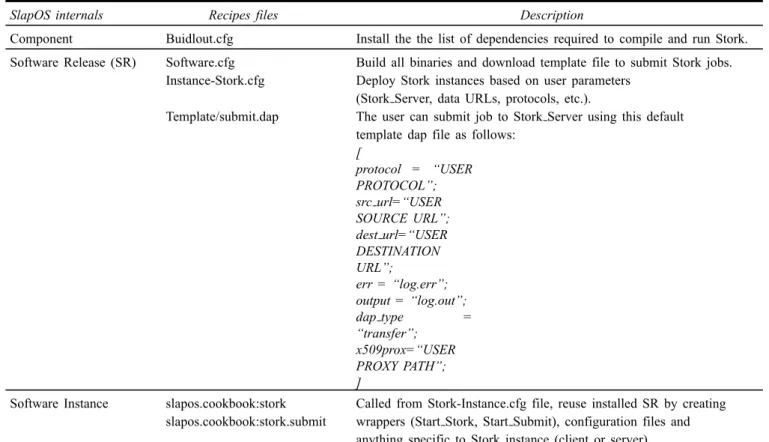
Table 1 Buildout main files for deploying stork instances with SlapOS
SlapOS internals Recipes files Description
Component Buidlout.cfg Install the the list of dependencies required to compile and run Stork. Software Release (SR) Software.cfg Build all binaries and download template file to submit Stork jobs.
Instance-Stork.cfg Deploy Stork instances based on user parameters (Stork Server, data URLs, protocols, etc.).
Template/submit.dap The user can submit job to Stork Server using this default template dap file as follows:
[ protocol = “USER PROTOCOL”; src url=“USER SOURCE URL”; dest url=“USER DESTINATION URL”; err = “log.err”; output = “log.out”; dap type = “transfer”; x509prox=“USER PROXY PATH”; ]
Software Instance slapos.cookbook:stork Called from Stork-Instance.cfg file, reuse installed SR by creating slapos.cookbook:stork.submit wrappers (Start Stork, Start Submit), configuration files and
anything specific to Stork instance (client or server). 5.1 Data movement via SaaS
We start firstly by describing how to setup Stork as a service with SlapOS. Next, we present an overview of the architecture of our system as well as a detailed description of all components of our data movement cloud-hosted model.
5.1.1 Implementation steps
As mentioned above, SlapOS uses Buildout technologies to install software and deploy instances. In the Stork case, software is divided in three profiles (see Table 1) organised into several directories. The first profile is named the component (slapos/component/stork/buidlout.cfg), and we find here all the dependencies (libraries or binaries) used by Stork. Buildout will allow us to integrate the profile and dependencies using the rules extends in order to install mainly the Globus Client (globus-url-copy), Globus GSI grid security infrastructure (in the case of third-party transfer from remote GridFTP server), 6tunnel proxy and others atomic components (Perl, dash, etc.). Second, we set Software Release profile (SR) located on a remote git server and defined by its URL (http://git-repository/slapos/software/stork/software.cfg). The SR describe the installation of Stork and its dependencies without configuration files and disk image creation. When SlapOS installs a Stork SR, it launches a Buildout command with the correct URL.
Third, we set the Software Instance. It will reuse an installed Software Release by creating wrappers,
configuration files and anything specific to an instance. The whole process creates a stork configuration file.
Finally, once the Software Release is installed, your node is ready to deploy instances of Stork. SlapOS can then create Software Instances using two recipes (slapos.cookbook:stork and slapos.cookbook:stork.submit). Recipe will run python scripts ( init.py andconfigure.py) to create: disk image tree (root, base and wrappers directories) configuration file, and starts promises. SlapOS promise is an executable doing some arbitrary work for the purpose to know if instance is working or not. For Stork integration, we developed promise functions to start Stork server scripts and launch data movement by submitting the data job description file.
Running Stork with IPV6. SlapOS node is usually
configured to use IPv6 addresses for each computer partition. It consists of a dedicated routable IPv6 address, a dedicated no routable local IPv4 address, a dedicated tap interface (slaptapN), a dedicated user (slapuserN) and a dedicated directory (/srv/slapgrid/slappartN). The main problem with IPv6 is that it is poorly supported by most applications. Currently, Stork services is compatible only with IPV4. For this reason, we use Stunnel (6tunnel 6tunnel, http://toxygen.net/6tunnel/), a proxy mechanism used to maps local IPv4 addresses to global IPv6 addresses (and vice versa) and encrypts all communication. Stunnel allows users (Stork Client) to submit data job to both local (SlapOS cloud) and remote Stork server (existing servers).
Slap parameters using JSON or XML. We define two types of parameters. The first type is used to configure daemons to be executed on the host (release dir, bin dir,
sbin dir,host,stork log, etc.). The second type is the submit
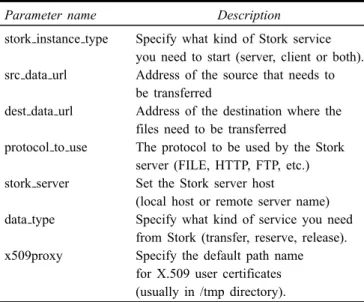
description file which contains the specification about the job to be submitted by the user. Table 2 shows the settings that are available as part of the job description file. The customisation parameters are passed directly during the deployment of the instance through the instance parameter calledslapparameter.
Table 2 Slap parameters used to deploy a Stork instance
Parameter name Description
stork instance type Specify what kind of Stork service you need to start (server, client or both). src data url Address of the source that needs to
be transferred
dest data url Address of the destination where the files need to be transferred
protocol to use The protocol to be used by the Stork server (FILE, HTTP, FTP, etc.) stork server Set the Stork server host
(local host or remote server name) data type Specify what kind of service you need
from Stork (transfer, reserve, release). x509proxy Specify the default path name
for X.509 user certificates (usually in /tmp directory).
5.1.2 Architecture overview
Before going further, we remind that SlapOS is based on a master-slave paradigm. SlapOS master knows which software and instance can be installed on which slave node without human intervention. Slave nodes are the people and organisations who register to the SlapOS portal. Once they are registered, they can request any type of resource. They can also add to a SlapOS global cloud their own servers in order to contribute to total amount of processing resources, just like SETI@Home. To add his own desktop, an end user first download and setup the SlapOS node package. The installation process installs the SlapOS kernel (GNU/Linux, Buildout, SlapGrid and supervisord) (http://community.slapos.org/wiki/osoe-Lecture. SlapOS.Extended/developer-Installing.SlapOS.Package).
After installation, the user create an account on the SlapOS master, this account will be used to register the new node on the master (http://community. slapos.org/wiki/osoe-Lecture.SlapOS.Extended/developer-Running.SlapOS.on.your.computer). The user account allows also the user to manage his desktop node through the master web interface.
We now provide an overview of the SlapOS architecture after the integration of Stork. We explain the interaction of the user with the SlapOS distributed cloud (master and slave nodes), as well as the Stork components (server and clients) used to make data movement ‘tasks on demand’ and as simple as possible.
Notice that the previous discussion was about the work of a system administrator (not a user) and that the work has to be done once, and only once.
Figure 2 shows all steps that allow user to participate in SlapOS community and exploit Stork services. SlapOS user must follow the following steps:
• slapos-connect (Login, Password): An end user must
connect to his space ‘My space’ through a web interface by giving login and password parameters.
• resuest-stork-software (Slave Node Name,
Software Release Name):in the ‘My Servers’ section,
the user selects his server by choosing the computer computer ID in computer field, click on ‘Install New Software’ button and select Stork and click on ‘Add Software’. If the user wants to deploy the instance on a no dedicated node, he can keep the computer field empty and SlapOS would automatically choose an available computer.
• download-stork-software
(Stork Software Release URL):This will compile and
install the Stork package. At this moment the user is allowed to make a deployment of Stork instances.
• request-instance-parameters (Slap Parameters List):
Through the web interface, the user can choose the different parameters of his instance (see Table 2) or keep the default parameters, the computer on which he wants the instance be deployed.
• deploy-instance (Slap Parameters List):At this stage,
the stork instance is being deployed. Using default parameters, the deployed instance contains the necessary packages for running Stork Server and Stork Client scripts and promises.
• submit-data-job (submit dap file, stork server):Once
the instance is deployed correctly, the user has the option to stop or to start it using the web UI. Again, he updates the default parameters of the instance, for example if he wants to ask the Stork Server to perform other file transfer. After changing parameters (e.g.,src data url,dest data urlor stork server), the instance will be automatically configured and started.
• move-data (src data url,dest data url):Data
management is provided by Stork Server that is the main daemon process of the instance. It performs scheduling, execution, and monitoring of data transfer jobs.
5.1.3 Security and authentication process
Security in Stork is an important issue with many aspects to consider. The most important is the way in which user want to run Stork daemons. Current Stork releases fall into three main schema:
a single host: Stork Server and Stork Client are running in the same machine
b multiple hosts: Stork Server in one location and Stork Client in another one
c multiple hosts and third-party transfers: Stork Server manage movement of data among two or more remote locations (the case of GridFTP servers withgsiftp
protocol).
Many authentication mechanisms are available like SSL, Kerberos, PASSWORD and GSI. By default, Stork Server provides only GSI authentication to allow different client machines to connect to it. The same authentication method is used by users to access SlapOS cloud. SlapOS generated X509 certificates for each type of identity: X509 certificates for people to login to the SlapOS master, an X509 certificate for each server (user machine) which contributes to the resources of SlapOS and an X509 certificate for each running software instance that may need to request or notify the SlapOS master. In our approach, we consider that in the (a) schema, users can bypass the security level because the SlapOS authentication process is sufficient. However, it is strongly recommended not to bypass authentication in schema (b) and (c) because it is important to limit the access to Stork Server. In the next section, we will explain how we proceed to configure security for each scheme, as explained above.
5.1.4 Security configuration
We remind here that the SlapOS slave node is divided into a certain number of computer partitions. Usually, each node can provide more than 100 computer partitions (for hosting web applications). Therefore, the users can easily run 100 Stork instances on a ‘small cluster’, each of them with its own independent daemons and configuration. According to the user needs, our approach can turn Stork components (server and client tools) in the same instance or in different instances. Thus, security settings depends on the manner in which the users want to deploy their Stork instances.
Running Stork in the SlapOS cloud. After installation of
the SlapOS slave node, the user requests one instance which includes two Stork components (server and client tools), both will use the same configuration file. To configure instance, Stork recipe (slapos.cookbook:stork) download the
local stork config.generic template file and any security
settings is defined (see Table 3, line 1).
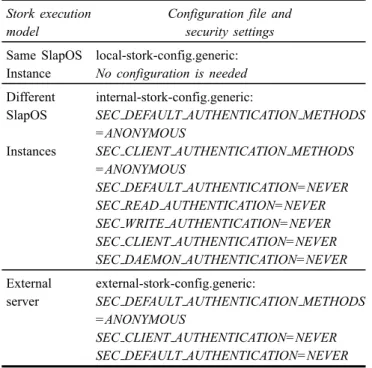
Stork provides the ability of running Stork Server and Stork Client in different location. This feature will be useful when multiple client instances want to use the same server instance at the same time. A server instance can not run for extended period of time due to server access time limitations. As we have shown previously, Stork supports only GSI authentication mechanism. Since SlapOS is a highly secure environment users who do not have GSI credentials can bypass it by following the steps in Table 3. Anonymous authentication causes authentication to be skipped entirely (see Table 3, line 2).
Table 3 Security configuration of Stork instances
Stork execution Configuration file and
model security settings
Same SlapOS local-stork-config.generic: Instance No configuration is needed Different internal-stork-config.generic:
SlapOS SEC DEFAULT AUTHENTICATION METHODS =ANONYMOUS
Instances SEC CLIENT AUTHENTICATION METHODS =ANONYMOUS
SEC DEFAULT AUTHENTICATION=NEVER SEC READ AUTHENTICATION=NEVER SEC WRITE AUTHENTICATION=NEVER SEC CLIENT AUTHENTICATION=NEVER SEC DAEMON AUTHENTICATION=NEVER External external-stork-config.generic:
server SEC DEFAULT AUTHENTICATION METHODS =ANONYMOUS
SEC CLIENT AUTHENTICATION=NEVER SEC DEFAULT AUTHENTICATION=NEVER
Submitting jobs to an external Stork server. An important
property of our approach is the ability to handle transfers using existing Stork Server. The user wants to use a Stork Server that is already deployed in its community (research laboratory, university, etc. . . ). In this case, during deployment of the Stork Client instance, the user must specify the hostname of the machine where the server is running (see Table 2, stork server parameter). In the other hand, authentication methods and access parameters must be set in the Stork configuration file (see Table 3, line 3). So, it is strongly recommended to havegrid proxies
initiated at both client instance and remote server sides. For testing purposes, if a user has not GSI credentials, he can bypass authentication by using anonymous methods. We recall that Stork uses the Stunnel solution to secure communications between two applications.
Remote GridFTP transfers (gsiftp:// protocol). To use
GSIFTP transfers with Stork, the users need to specify a valid grid proxy and a user credentials in place. Stork will use the users credentials to authenticate to the GridFTP server. When the server and client are running in the same instance, the users can use the same grid proxy. If the stork components run on two different instances, the user need to have Stork Client grid proxy initiated and Stork Server grid proxy initiated. The user must specify the path or set
the default flag for the created proxy using the x509proxy
parameter in the Stork submit file (see Table 1, line 2). Now that a user has its credentials in place, he can request Stork Server to copy a file from a remote GridFTP server with the globus-url-copycommand.
Figure 2 Schematic of the Stork SaaS via SlapOS cloud (see online version for colours)
Figure 3 Schematic of the Bitdew SaaS via SlapOS cloud (see online version for colours)
5.2 Data sharing via SaaS
In the previous section, we illustrated the different steps of Stork SaaS implementation. In this section we present the deployment process of Bitdew with SlapOS.
5.2.1 Architecture overview
Once data are placed on SlapOS, a second SaaS based on Bitdew is automatically launched to publish and to distribute data over SlapOS community.
BitDew is a programmable framework for large-scale data management and distribution for DG systems. Programmers use a simple API for creating, accessing, storing and moving data using several protocols: client/server (HTTP and FTP), P2P such as BitTorrent, and wide area storage such as IBP or Amazon S3. Bitdew offers two sets of nodes: server (services hosts) and client (consumers). Server nodes run various independent services which compose the runtime environment: Data Repository (DR), Data Catalogue (DC), Data Transfer (DT) and Data Scheduler (DS). To use Bitdew framework, the users have to utilise a specific JAVA APIs which may require knowledge about the data management requirements and the runtime environment. Thus, our main target is to make data management trivial.
We follow the same steps used with Stork. To share data with Bitdew, end-users need to connect to SlapOS, request Bitdew software and specify information for instances deployment. As we shown in Figure 3, the architecture follows a cloud-hosted approach commonly found in cloud systems: it divides the world in three sets of nodes: cloud-middleware node (SlapOS master), cloud-provider node (SlapOS slave node), SaaS instances (Bitdew server and client). SlapOS user must invoke the following steps:
• request-instance-parameters (Slap Parameters List):
Using the web interface and by updating the XML parameters, the users can always customise their Bitdew instances with their parameters and
configurations settings. For server instances, the user must specify the host name of the server
(server hostname), the protocol used to share data
(ftp, http or Brent) including all connections
parameters, and the directory of the data to be shared
(data-path). By default server instances support all
protocols. For client instances, slap-parameters are classified into two types;
a Bitdew Server: the user sets information about the remote server hostname (server hostname) b data information’s parameters: the user must
specify the protocol used to get remote data and the signature of the file (transfer protocol,
File md5 ID, etc.)
• deploy-instance (Slap Parameters List,
properties.json):Using the developed Buildout recipe
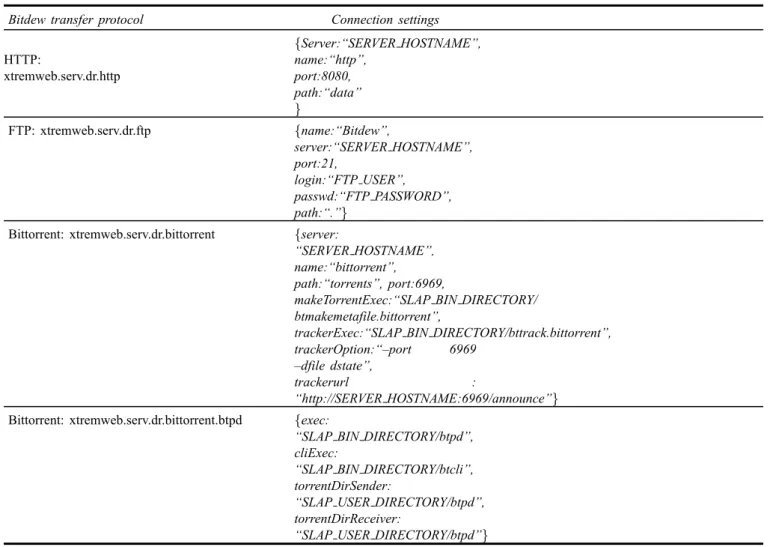
of Bitdew, we set up a new configuration file from the template file (see Table 4) . Words written in capital letters will be replaced by the slap-parameters list. We note that server and client instances use the same configuration file.
• share-data(transfer protocol, data-path,
properties.json):Once the instance is deployed
correctly, Bitdew will create, for each file of the
data-pathdirectory, a new data and copy the content
of the file in the storage space using the chosen protocol. Data creation consists, using thePutscript, of the creation of a data object contains data
meta-information:name is the character string label, checksum is an MD5signature of the file,size is the file length. At the end of the execution, SlapOS should list, in the displayConnection Parameters tab, all MD5 signature of shared files as follows:
Data registered : data JOB1.in
[713ce230-8738-31e2-ba67-c6cf15fb7e0e]
= {md5=25e317773f308e446cc84c503a6d1f85
size=52428800 } Transfer finished
• get-data (transfer protocol, File md5 ID,
properties.json): Through client instances the user can
now use the Getscript to retrieve the data from the shared storage in a new file. The user must specify the MD5 signature of the requested file as parameter. He can recover the signature from the web interface of the server instance (Connection Parameters tab):
Get Data : data JOB1.in
[713ce230-8738-31e2-ba67-c6cf15fb7e0e]
= {md5=25e317773f308e446cc84c503a6d1f85
size=52428800}
Transfer complete
5.2.2 Bitdew buildout profiles
The integration of Bitdew into SlapOS needs writing multiple Buildout profiles. Thus, we designed the hierarchy shown in Figure 4. Buildout profiles are divided in three types, organized into several directories. We start by the component buidlout.cfg, consisting of all the dependencies (libraries or binaries) used by Bitdew and transfers protocols daemons. Buildout will install packages that are needed to run Bitdew like java, and 6tunnel. In addition, we setup Apache-HTTP (default transfer protocol), Proftpd server for FTP transfer and Btpd (the BitTorrent Protocol Daemon).
On the other hand, the Software Release (SR) consists primarily of software.cfg file, which will then make reference to all other required files. The SR will be used to manage the installation process of Bitdew including transfer protocols tools and to copy the template configuration file
(properties.json) in the installation directory.
Finally, Software Instance will reuse an installed SR by creating wrappers, configuration files and anything specific to an instance. To deploy Bitdew, we added to slapos.cookbook two recipes: slapos.cookbook:bitdew and slapos.cookbook:bitdew.submit. The first Recipe deploys the Bitdew server: creates the disk image tree (instance directories), and starts the server daemon by running the python script StartServer.py. The second recipe will be executed in a different manner depending on the type of instance: for server instances, it uses the script
ShareData.py to publish and share the requested data file
(indicated as parameter) on the SlapOS network. In the case of a client instance, the recipe calls Getdata.py script to download the file that was already shared by the server instance.
Table 4 A part of the template configuration file (properties.json) used for data exchange
Bitdew transfer protocol Connection settings
HTTP: xtremweb.serv.dr.http {Server:“SERVER HOSTNAME”, name:“http”, port:8080, path:“data” } FTP: xtremweb.serv.dr.ftp {name:“Bitdew”, server:“SERVER HOSTNAME”, port:21, login:“FTP USER”, passwd:“FTP PASSWORD”, path:“.”}
Bittorrent: xtremweb.serv.dr.bittorrent {server:
“SERVER HOSTNAME”,
name:“bittorrent”, path:“torrents”, port:6969,
makeTorrentExec:“SLAP BIN DIRECTORY/ btmakemetafile.bittorrent”,
trackerExec:“SLAP BIN DIRECTORY/bttrack.bittorrent”, trackerOption:“–port 6969
–dfile dstate”,
trackerurl :
“http://SERVER HOSTNAME:6969/announce”} Bittorrent: xtremweb.serv.dr.bittorrent.btpd {exec:
“SLAP BIN DIRECTORY/btpd”, cliExec:
“SLAP BIN DIRECTORY/btcli”, torrentDirSender:
“SLAP USER DIRECTORY/btpd”, torrentDirReceiver:
“SLAP USER DIRECTORY/btpd”}
Figure 4 Implementation of Bitdew with SlapOS: the hierarchy of all Buildout profiles and components (see online version for colours)
6 Experimental results
The forthcoming experiments have performed on the experimental grid computing infrastructure Grid ‘5000. Experiments were conducted in four clusters of Lyon site using more than 50 machines. We set two Debian Linux Distribution images of SlapOS as we have already mentioned in Figures 2 and 3. In the first image, we deploy SlapOS master (SlapOS Kernel, Supervisord, SlapGrid and ERP 5 Engine). The second image contains the
kernel of SlapOS node (SlapOS Kernel, Supervisord and SlapGrid), and it will be used to deploy, on demand a cloud-hosted SaaS based on Stork and Bitdew instances. In this section, we present the different steps for configuring and deploying SlapOS on Grid ‘5000. Next, we explain the experimentation scenario, present results and extract interpretations from them.
6.1 Deployment steps of SlapOS on Grid ‘5000
To integrate SlapOS in Grid ‘5000 we met several technical difficulties, the most important are IPv6 configuration and Grid ‘5000 access restriction. SlapOS is designed to work natively with IPv6. However, it can also be installed over IPv4 environment. Since Grid ‘5000 lacks, natively, IPv6 network, we use the OpenVPN tunnel to provide an IPv6 network to implement the architecture of SlapOS. Recall that IPv6 allows easy SlapOS deployment thanks to the auto-configuration of networks and the capacity to provide an unlimited number of public IP addresses available around the world.
In addition, several restrictions are applied to limit access to and from outside the Grid ‘5000 infrastructure. Many URLs are unreachable such as the Git repository of SlapOS and other packages needed for compilation. To overcome restrictions, we prepared pre-compiled images containing all the standard install files of SlapOS: the Kernel and runtime daemons. These images are also configured to run IPv6 at startup. To facilitate the deployment of the master in Grid ‘5000 we implemented
theslapos-vifib image. It configures the master using static
parameters (for five minutes at least). Furthermore, the deployment of nodes is done through a pre-configured image called slapos-image.
In the same context, applications that must be deployed on SlapOS nodes are compiled in advance and binaries are included in the image. Administrators of Grid ‘5000 provide HTTP-HTTPS Proxy to allow applications and users to access resources outside the Grid ‘5000 infrastructure. But in the current version of SlapOS, SlapGrid and Buildout are unable to work with these proxies. Thus, software profiles can not be downloaded into Grid ‘5000 and their compilation becomes a difficult task. To facilitate the use of our solution by a larger audience, software releases of Stork and Bitdew are provided in binary and it was built directly in theslapos-image.
6.2 Usage scenario
Our experiments are performed out to show the capacity of our cloud-hosted model to build a scalable platform for the purpose to manage bag-of-tasks applications with intensive data. The metrics are of two types: In the first type we measure the scalability of our approach in terms of how-many-instances-requests-are-supported and we conducted the experiments in the form of SaaS submissions to the SlapOS master. We aim evaluate the behaviour of the master following a request for creation of a few (respectively large) number of instances. Users may connect to the same SlapOS master and demand a hundred of instances. We may be concerned that if the master is overloaded, the time needed to respond to a request instance may increase. We want to know the server capacity to save simultaneously a hundred number of requests. Thus, one way to better measure the saturation of the master is to compare the response time when we have one node and then when multiple nodes are connected.
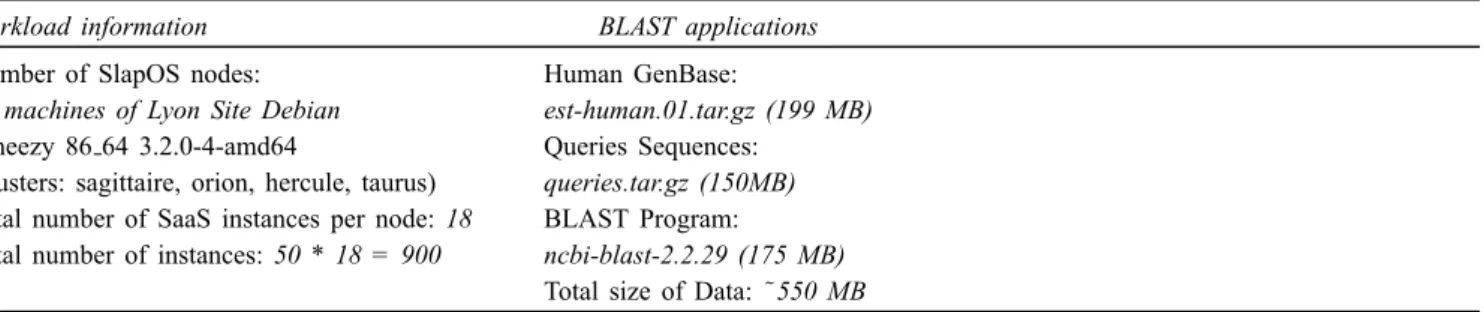
In the second type, we decided to measure the time required to create Stork and Bitdew instances as a function of the number of SlapOS nodes. Table 5 presents the workload and the system information of the test. Figure 5 shows all the experimentation steps.
We have developed in Python a generator of instances that takes as parameters
1 the workload model which specifies the number of instances to be created
2 SlapOS nodes file
3 the number of computer partitions to be configured per SlapOS node
4 the Slap parameters list.
Indeed, for each entry in the SlapOS node file, the generator uses the parameters presented in the entry to create a set of Stork and Bitdew instances. As shown in Table 5, We used 18 computers partitions among the 20 partitions available, by default, in each SlapOS node. We aim to deploy 900 instances using 50 nodes.
To perform experiments, we used the well known BLAST bag-of-tasks applications that compares a nucleotide queries sequences (called the input DNA
Sequence) against a nucleotide sequence database (called
the DNA databases or the DNA Genebase). For both, the queries sequences and the DNA databases were taken from the NCBI FTP site of National Center for Biotechnology Information (ftp://ftp.ncbi.nlm.nih.gov/blast/db/). In our experiments, we use blastn program to search respectively Human DNA sequences in DNA databases. To run BLAST jobs we need the BLAST application package (BLAST program used is NCBI BLAST 2.2.29 for Linux 64 bits (ftp://ftp.ncbi.nlm.nih.gov/blast/executables/blast+/LATEST/),
the DNA Genebase which contains millions of sequences
is a compressed large archive, the DNA Sequence to compare with sequences in Genebase. The recommended scenarios to be used in our experiments is shown in Algorithm 1. We notice that the scenario activates about
(1 + 1 + 1 + 15)∗50 = 900 simultaneous services. Once BLAST files are in place, the worker starts the blastn
program to compare sequences. At the end of computation, each job will create a result file containing all matched sequences.
6.3 Results analysis
In this section, according to the above mentioned scenario, we present the evaluation of performance of our cloud-hosted SaaS, built on top of the SlapOS system.
6.3.1 Data movement service completion time
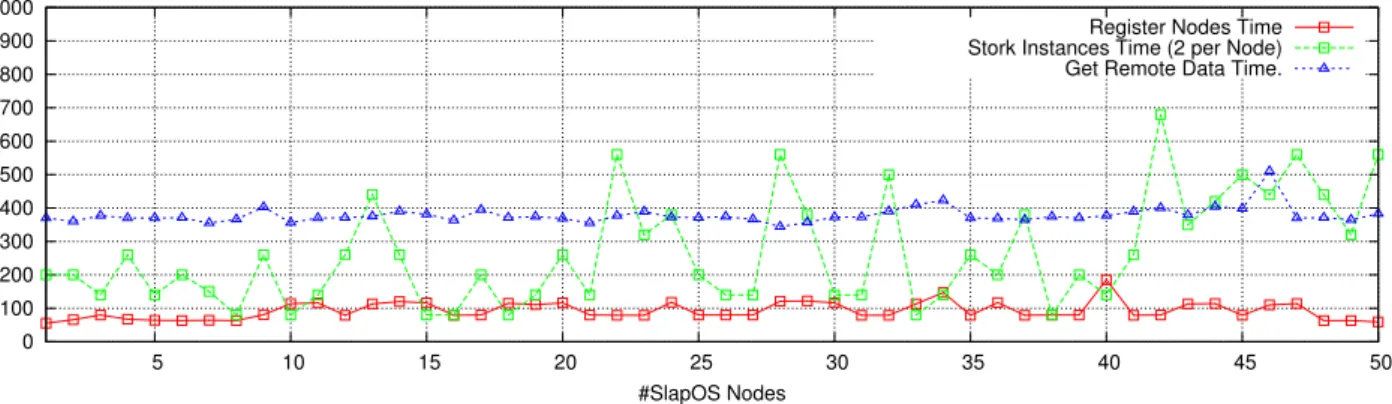
The results are shown in Figure 6. This figure illustrates the total completion time for two Stork instances using 50 SlapOS nodes (a total of 100 instances). All instances are launched simultaneously and completed successfully, the total completion time includes times to:
Algorithm 1 Scenarios used for the Grid ‘5000 experiments Input: The workload, Node List
Output: Times to register nodes, create instances and execute BLAST jobs 1: nodes←50
2: do in parallel
3: fori←1tonodesdo
4: One Stork Server Instance: Transfer the BLAST applications files from the FTP Site of NCBI (BLAST Program, DNA GenBase, Queries Sequences) to Grid5000;
5: One Stork Client Instance: Submit the transfer request to the Stork Serve;
6: end for
7: fori←1tonodesdo
8: One Bitdew Server Instance: Put BLAST files on the local repository of SlapOS Node;
9: 15 Bitdew Client Instances: Get Data shared by Bitdew Server and execute BLAST Jobs;
10: end for
11:end parallel
Table 5 Workload used for the experimentation
Workload information BLAST applications
Number of SlapOS nodes: Human GenBase:
50 machines of Lyon Site Debian est-human.01.tar.gz (199 MB) Wheezy 86 64 3.2.0-4-amd64 Queries Sequences:
(clusters: sagittaire, orion, hercule, taurus) queries.tar.gz (150MB) Total number of SaaS instances per node: 18 BLAST Program:
Total number of instances: 50 * 18 = 900 ncbi-blast-2.2.29 (175 MB) Total size of Data: ˜550 MB XML file of Slap parameters used to deploy Stork Client instances:
<?xmlversion=“1.0”encoding=“utf-8”?> <instance>
<parameter id=“stork server”>10.0.7.105</parameter>
<parameter id=“src data url”>ftp://ftp.ncbi.nlm.nih.gov/blast/executables/blast+/LATEST/ncbi-blast-2.2.29+-ia32-linux.tar.gz, ftp://ftp.ncbi.nlm.nih.gov/blast/db/est human.01.tar.gz,
ftp://ftp.ncbi.nlm.nih.gov/blast/temp/test/queries.tgz</parameter>
<parameter id=“data name”>ncbi-blast-2.2.29+-ia32-linux.tar.gz,est human.01.tar.gz,queries.tgz</parameter> <parameter id=“dest data url”>local</parameter>
<parameter id=“protocol to use”>ftp</parameter> </instance>
Figure 6 Performance results of Stork SaaS over Grid ‘5000 with 50 nodes (see online version for colours) 0 100 200 300 400 500 600 700 800 900 1000 5 10 15 20 25 30 35 40 45 50
Time (In Second)
#SlapOS Nodes
Register Nodes Time Stork Instances Time (2 per Node) Get Remote Data Time.
• Register SlapOS node to the master: We compute how long it takes on average for new node to register with a master. Node executesslapos node register
command to retrieve key and certificate from the master. Results show that the register time is ranged between [65..200] seconds and the majority of nodes presents the average time close to 95 seconds. We remind here that the master is configured by default to register one node at a time.
• Deploy of Stork instances: it is calculated by the difference between the submission time (request) of the Stork server instance and the finish time of the client instance. Also, it includes the queue waiting time of the master. It is the difference between the time the request instance is submitted to the master and the time it is picked up from the queue. SlapOS client creates an instance in two stages: ask
installation of Stork software on a specific node
(slapos supply $URL STORK). Then, node will be
ready to accept instances of specified software (slapos
request $MY INSTANCE NAME$URL STORK). On
Figure 6 (the green curve), we focus on analysing the pics first. For instance, the master needs between 420 (minimal value) and 700 seconds (maximal value) to start deploying instances (nodes n°13, 22, 28, 42). The peaks in the curves are explained by the
saturation of the master. There is so much requests of instances arriving at same time, so the master makes a lot of HTTPS communications. We notice that each peak has at least six previous nodes which requests two instances simultaneously (e.g., the master receives the request of node n°13 but has already the list of previous requests in its queue). In general, the majority (70%) of nodes do not exceeded by 270 seconds to deploy their instances. But, we note that 30% of nodes requests more than 300 seconds. We remind here, that the master processes requests sequentially. In the ideal case (with one node attached to the master) the creation of an instance can achieve an average delay between 2 (120 sec) and 5 minutes (300 sec).
• Transfer BLAST files from NCBI FTP server to SlapOS nodes: it is the difference between the
submission time of the first data job (Human
GenBase File) and the finish time of the last data job (the BLAST Program File). As seen in Figure 6 (the blue curve), the time required to get remote data is nearly linear with an average time of 390 seconds.
In short, we conclude that the master is overloaded at various point during the tests. The completion time of instances is proportional to
a the number of nodes connected to the master b the number of instances required simultaneously.
Thus, a waiting time between requests may reduce the master overload. We improve this situation in the next use case.
6.3.2 Data sharing service completion time
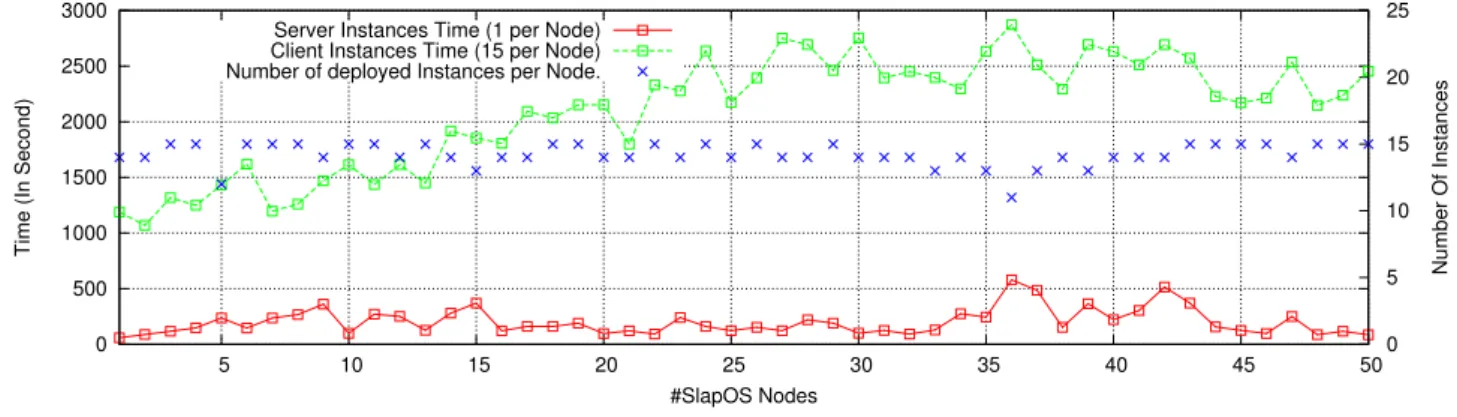
In this use case, the number of instances sent to the master is the main parameter impacting the total completion time. For the purpose to reduce the master overload, we modified our model by adding a fixed amount of time between instances requests (the timeout is equal to 60 seconds). We may expect that this artifact will introduce some overhead, due to the important number of consecutive requests. So, we followed a pipelining request principle which overlaps an instance’sslapos supply$URL BITDEW command with the next instance’s slapos request instance command, allowing the new instance to register in the master’s queue while the previous instance’s deployment is still running. We have submitted 16 requests per node and calculated the total time to deploy instances. For a total of 800 requests, results are presented in Figure 7 as follows:
• Deploy of server instances (red curve): it is calculated as the difference between the submission time of the Bitdew server instance and the finish time of
share-data script. For each BLAST files (BLAST
Program, DNA GenBase, Queries Sequences), it creates a new data and copy the content of the file in the storage space using the HTTP protocol. Curve shows that this time is ranged between [100..500] seconds. The major difference compared to Stork
server is seen on the absence of pics, because the timeout between requests improves the response time of the master.
• Deployment of client instances (Green curve): it is calculated as the difference between the submission time of the Bitdew Client instance and the finish time of the get-datascript. We measured total time in the range of 1100 seconds and 2800 seconds. We observe that phenomenon, as expected in 6.2, because there is an increase in turnaround time as the number of concurrent requests (respectively the nodes number) increases. This is explained by the fact that in SlapOS the master is unreachable and needs more time to deploy instances and to receive subsequent requests. For instance, node n°30 has spent 2700 seconds for deploying all requested instances. At this stage of experiments, the server communicates with 30 machines, where it has in its queue at least
30∗15 = 450 queries.
In Figure 7, the Y2 axis gives the instances numbers correctly deployed. We found that
a 21 nodes from 50 were able to deploy the 15 instances requested
b 22 nodes were able to deploy 14 instances c five nodes were able to deploy 13 instances d two nodes were able to deploy respectively
11 and 12 instances.
Here, we believe that the master looses connections to the nodes since it uses the same TCP port to receive all heart beat signals emitted by nodes: every five minutes, the node asks the list of software that must be installed and requests the list of computer partitions to reconfigure.
• BLAST execution: it is divided into time to unzip BLAST files, time to setup application and time to match sequences by running the blastnprogram. Once BLAST files are downloaded by Bitdew, each client instance starts execution of BLAST application. In general, all instances have an identical average time equal to 100 seconds since we run BLAST
application using the same GenBase and nucleotide queries sequences.
6.3.3 Discussion
In this section, we will discuss the various comments and interpretations about the behaviour of SlapOS during the experimentations. We are investigating the use of SlapOS to deploy multiples SaaS instances.
The deployment process of instances is initiated by the client using the command slapos request instance. Depending on the load of the master, the request will be saved or rejected. In both cases the master sends immediately a message to nodes indicating the status
of requests. SlapOS is based on SlapGrid daemon that uses, for communication between the master and nodes, the HTTP-HTTPS protocols. SlapGrid checks for time to time if there is a new request. Verification frequency is calculated to reduce failures that can occur with a large number of nodes. If several requests have been sent, SlapGrid will deploy all requests sequentially. Now, if the instance request does not return an error (such as the Code 500 error), then it was taken into account by the master.
Once the deployment process is started, the master waits for nodes to reply back with the deployment status, when the reply was not received after the wait time, failed instances will be deployed again by SlapGrid. The instance status can be obtained by checking promises scripts. Usually, SlapOS promises are used to know if instance is working or not (in our case these scripts are used to start Stork and Bitdew servers and to manage data.). Therefore, if there is no error during deployment and promise scripts do not return error code, then instance is marked as deployed, otherwise instances that had errors are redeployed sequentially.
At the end of the deployment, information about the status of the instance are always sent to the master via HTTP. Sometimes the master responds with the 500 error. This code is sent when the master is unable to process the request immediately, but after a few attempts the request will work eventually.
Finally, the following conclusion can be drawn from experiments. The master is overloaded when there are more nodes connected to the cloud because it makes a lot of communications. Certainly, this overload does not depend on the number of instances because SlapGrid runs in loop to initiate failed requests. Thus, further experimental investigations are needed to estimate communication and traffic bottlenecks between nodes.
7 Conclusions and future works
The emergence of data-intensive applications and cloud SaaS technologies brought the flexibility to introduce new data management handling mechanism that help the basic scientist and the grid users to deploy easily their distributed platform. This works focuses on data management as SaaS-based solutions for the purpose to mask (in part) the complexity of the installation and configuration processes and the IT infrastructure requirements. We argue that distributed data-intensive applications require two fundamental services: recover data from outside (remote storage server) and share data with a large number of nodes inside cloud infrastructure with the least effort. We have presented our design and implementation of these two services under the framework of SlapOS. The users can request and install automatically any data movement and sharing tools like Stork and Bitdew without any intervention of a system administrator. Also, through a large scale experimentation we have evaluated our solution by creating 900 Stork and Bitdew services using more then 50 machines of grid5000.
Figure 7 Performance results of Bitdew SaaS over Grid ‘5000 with 50 nodes (see online version for colours) 0 500 1000 1500 2000 2500 3000 5 10 15 20 25 30 35 40 45 50 0 5 10 15 20 25
Time (In Second)
Number Of Instances
#SlapOS Nodes Server Instances Time (1 per Node)
Client Instances Time (15 per Node) Number of deployed Instances per Node.
Since our SaaS solutions is already in production into the SlapOS cloud at Paris 13 University, our future research is focused more on self-configuration, scalability and security transfer. In this area, we plan several future works, which include adding modules for monitoring data transfer, implementing tools for discovering, automatically without user intervention, shared data between big number of SlapOS node. For scalability interest, we plan to extend evaluation using hundreds of physical nodes from multiples sites of Grid ‘5000.
Furthermore, we plan to move towards the interoperability with Globus Online platform. The users can deploy Stork SaaS with SlapOS and transfer data from GO GridFTP end-points to SlapOS cloud and conversely. For this purpose, several aspects should be reviewed such as security and networking strategies.
In some way, we believe that we enter to a post-era where cores/CPU/nodes are unlimited in number as well as storage. We need to pay attention where the data are stored. We also need to pay attention to the user and make sure that he will be able to imagine and deploy experimental scenarios on large scale distributed infrastructures in a simple and natural manner. It is a necessary condition for the adoption of the new paradigms, both architectural and programming paradigms, by large communities of users. We think that clouds should play a major role by putting the user in the middle of our concerns.
Acknowledgements
In France, this work is funded by the FUI-12 Resilience project from the ministry of industry. Experiments presented in this paper were partly carried out using the Grid ‘5000 testbed, supported by a scientific interest group hosted by Inria and including CNRS, RENATER and several Universities as well as other organisations (see https://www.grid5000.fr). Some experiments were carried out on the SlapOS cloud available at University of Paris 13 (see https://slapos.cloud.univ-paris13.fr).
References
Abbes, H., C´erin, C. and Jemni, M. (2008) ‘Bonjourgrid as a descentralized scheduler’, IEEE APSCC, December. Abbes, H., C´erin, C. and Jemni, M. (2009) ‘Bonjourgrid:
orchestration of multi-instances of grid middlewares on institutional desktop grids’, Parallel and Distributed Processing Symposium, International, pp.1–8.
Abbes, H., C´erin, C., Jemni, M. and Saad, W. (2010a) ‘Fault tolerance based on the publish-subscribe paradigm for the bonjourgrid middleware’,Proceedings of the 11th IEEE/ACM International Conference on Grid Computing, Brussels, Belgium, October 25–29, pp.57–64.
Abbes, H., C´erin, C., Jemni, M. and Saad, W. (2010b) ‘Toward a meta-grid middleware’, Journal of Internet Technology, January, Vol. 11, No. 1, pp.55–68.
Adya, A., Bolosky, W.J., Castro, M., Cermak, G., Chaiken, R., Douceur, J.R., Howell, J., Lorch, J.R., Theimer, M. and Wattenhofer, R.P. (2002) ‘Farsite: federated, available, and reliable storage for an incompletely trusted environment’, SIGOPS Oper. Syst. Rev., December, Vol. 36, No. SI, pp.1–14.
Allcock, W., Bresnahan, J., Kettimuthu, R., Link, M., Dumitrescu, C., Raicu, I. and Foster, I. (2005) ‘The globus striped GridFTP framework and server’, Proceedings of the 2005 ACM/IEEE Conference on Supercomputing.
Allen, B., Bresnahan, J., Childers, L., Foster, I.T., Kandaswamy, G., Kettimuthu, R., Kordas, J., Link, M., Martin, S., Pickett, K. and Tuecke, S. (2011)Globus Online: Radical Simplification of Data Movement via SASS, preprint CI-PP-05-0611, Computation Institute.
Antoniu, G., Boug´e, L. and Jan, M. (2005) ‘JuxMem: an adaptive supportive platform for data sharing on the grid’, Scalable Computing: Practice and Experience, November, Vol. 6, No. 33, pp.45–55.
C´erin, C. and Fedak, G. (2012) Desktop Grid Computing, 25 June, Chapman and Hall/CRC Publisher, London, ISBN-10: 1439862141, ISBN-13: 978-1439862148.
Fedak, G., He, H. and Cappello, F. (2009) ‘BitDew: a data management and distribution service with multi-protocol file transfer and metadata abstraction’, Journal of Network and Computer Applications, September, Vol. 32, No. 5, pp.961–975.
Foster, I. (2011) ‘Globus online: accelerating and democratizing science through cloud-based services’, IEEE Internet Computing, Vol. 15, No. 3, pp.70–73.